Non-Functional Testing Guide: Exploring
Its Types, Importance and Tools
Looking for ways to ensure your software development projects are successful? Non-functional
testing is an essential part of the process, helping to guarantee that applications and systems
meet the necessary non-functional requirements such as availability, scalability, security, and
usability.
In this blog post, we'll provide an overview of the basics of non-functional testing, from
non-functional testing types of tests to use to tools for implementation. We'll also discuss the
benefits of using these tests and give tips on choosing the right ones for your project.
What is Non-Functional Testing?
Non-functional testing evaluates how well a software application performs beyond its core
functionalities. It focuses on aspects like speed, security, usability, and scalability under various
conditions. Unlike functional testing, which checks what the system does, non-functional testing
checks how well it performs under different environments and constraints.
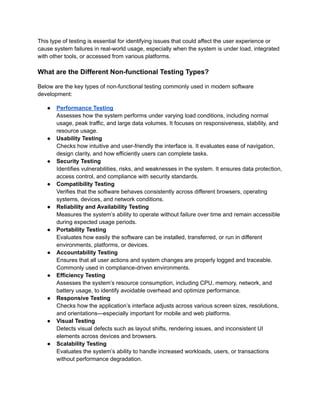
This type of testing is essential for identifying issues that could affect the user experience or
cause system failures in real-world usage, especially when the system is under load, integrated
with other tools, or accessed from various platforms.
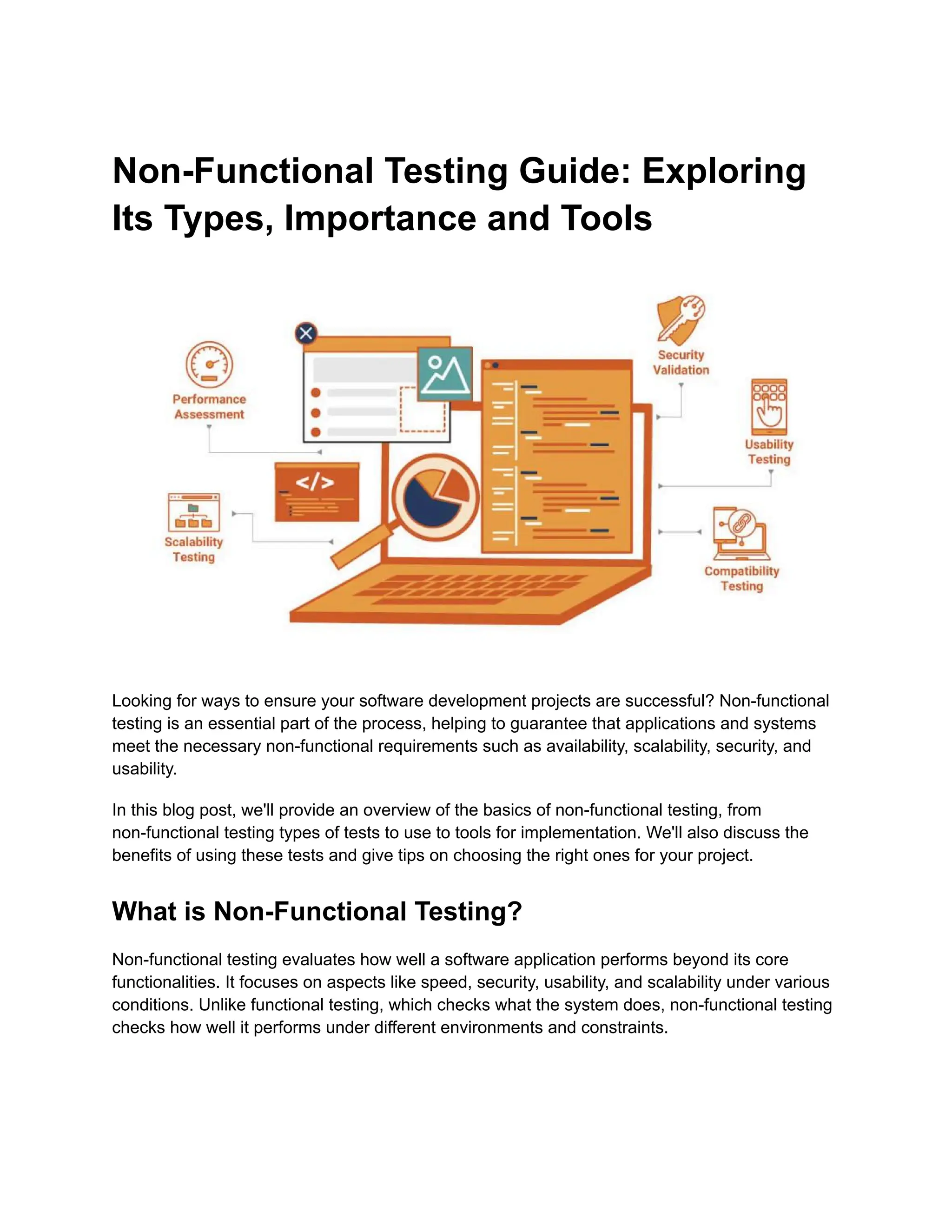
What are the Different Non-functional Testing Types?
Below are the key types of non-functional testing commonly used in modern software
development:
●​ Performance Testing​
Assesses how the system performs under varying load conditions, including normal
usage, peak traffic, and large data volumes. It focuses on responsiveness, stability, and
resource usage.
●​ Usability Testing​
Checks how intuitive and user-friendly the interface is. It evaluates ease of navigation,
design clarity, and how efficiently users can complete tasks.
●​ Security Testing​
Identifies vulnerabilities, risks, and weaknesses in the system. It ensures data protection,
access control, and compliance with security standards.
●​ Compatibility Testing​
Verifies that the software behaves consistently across different browsers, operating
systems, devices, and network conditions.
●​ Reliability and Availability Testing​
Measures the system’s ability to operate without failure over time and remain accessible
during expected usage periods.
●​ Portability Testing​
Evaluates how easily the software can be installed, transferred, or run in different
environments, platforms, or devices.
●​ Accountability Testing​
Ensures that all user actions and system changes are properly logged and traceable.
Commonly used in compliance-driven environments.
●​ Efficiency Testing​
Assesses the system’s resource consumption, including CPU, memory, network, and
battery usage, to identify avoidable overhead and optimize performance.
●​ Responsive Testing​
Checks how the application’s interface adjusts across various screen sizes, resolutions,
and orientations—especially important for mobile and web platforms.
●​ Visual Testing​
Detects visual defects such as layout shifts, rendering issues, and inconsistent UI
elements across devices and browsers.
●​ Scalability Testing​
Evaluates the system’s ability to handle increased workloads, users, or transactions
without performance degradation.
Characteristics of Non-Functional Testing
Non-functional testing focuses on validating the operational aspects of a system to ensure it
meets performance, usability, and reliability standards. Some key characteristics of
non-functional testing include:
1.​ Performance-Oriented: This type of testing ensures that the system performs optimally
under expected and peak load conditions. It measures metrics such as response time,
throughput, and scalability.
2.​ Focus on User Experience: Non-functional tests assess the system's usability,
ensuring users interact smoothly with the application. They check factors such as ease
of use, interface responsiveness, and user satisfaction.
3.​ Reliability and Stability Testing: Non-functional testing examines the system's
reliability by examining how it behaves under stress or prolonged use. This includes
checking for memory leaks, crash handling, and recovery procedures.
4.​ Compliance and Security: Non-functional testing evaluates the system’s compliance
with security protocols, industry standards, and legal regulations. It helps identify
vulnerabilities and ensure the system's data integrity and security.
5.​ Resource Utilization: These tests ensure that the system efficiently uses resources like
CPU, memory, and network bandwidth. The goal is to optimize performance without
overloading the infrastructure.
6.​ Environment-Specific: Non-functional tests are often tailored to specific environments,
such as mobile devices, different browsers, or varying operating systems, to ensure
consistent performance across platforms.
Non-functional testing complements functional testing by ensuring that the system works as
expected and delivers a seamless experience in various real-world scenarios.
Differentiating Functional and Non-Functional Testing
Requirements
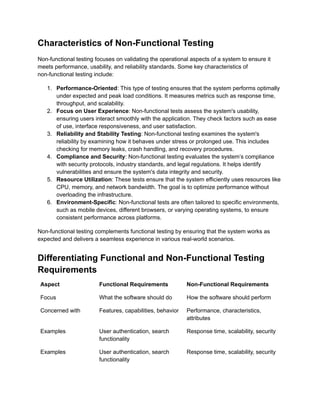
Aspect Functional Requirements Non-Functional Requirements
Focus What the software should do How the software should perform
Concerned with Features, capabilities, behavior Performance, characteristics,
attributes
Examples User authentication, search
functionality
Response time, scalability, security
Examples User authentication, search
functionality
Response time, scalability, security
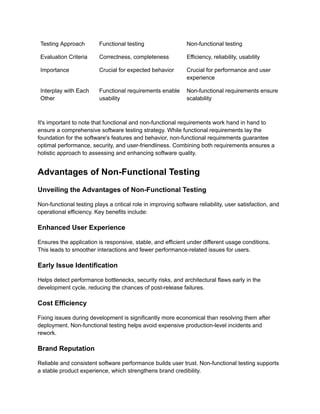
Testing Approach Functional testing Non-functional testing
Evaluation Criteria Correctness, completeness Efficiency, reliability, usability
Importance Crucial for expected behavior Crucial for performance and user
experience
Interplay with Each
Other
Functional requirements enable
usability
Non-functional requirements ensure
scalability
It's important to note that functional and non-functional requirements work hand in hand to
ensure a comprehensive software testing strategy. While functional requirements lay the
foundation for the software's features and behavior, non-functional requirements guarantee
optimal performance, security, and user-friendliness. Combining both requirements ensures a
holistic approach to assessing and enhancing software quality.
Advantages of Non-Functional Testing
Unveiling the Advantages of Non-Functional Testing
Non-functional testing plays a critical role in improving software reliability, user satisfaction, and
operational efficiency. Key benefits include:
Enhanced User Experience‍
Ensures the application is responsive, stable, and efficient under different usage conditions.
This leads to smoother interactions and fewer performance-related issues for users.
Early Issue Identification‍
Helps detect performance bottlenecks, security risks, and architectural flaws early in the
development cycle, reducing the chances of post-release failures.
Cost Efficiency‍
Fixing issues during development is significantly more economical than resolving them after
deployment. Non-functional testing helps avoid expensive production-level incidents and
rework.
Brand Reputation‍
Reliable and consistent software performance builds user trust. Non-functional testing supports
a stable product experience, which strengthens brand credibility.
Improved Load Handling‍
Tests how the system performs under various traffic levels, helping teams prepare for real-world
usage spikes without compromising performance or uptime.
Reusable Test Cases‍
Test scenarios created for non-functional checks—such as load, security, or compatibility—can
be reused across projects, environments, and regression cycles, saving time and effort.
Reduced Time Commitment‍
Identifying and addressing issues early helps streamline QA cycles and reduces delays caused
by reactive debugging or late-stage fixes.
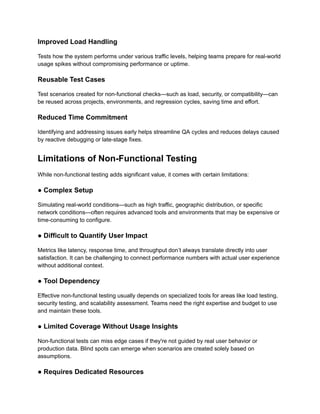
Limitations of Non-Functional Testing
While non-functional testing adds significant value, it comes with certain limitations:
● Complex Setup‍
Simulating real-world conditions—such as high traffic, geographic distribution, or specific
network conditions—often requires advanced tools and environments that may be expensive or
time-consuming to configure.‍
● Difficult to Quantify User Impact‍
Metrics like latency, response time, and throughput don’t always translate directly into user
satisfaction. It can be challenging to connect performance numbers with actual user experience
without additional context.‍
● Tool Dependency‍
Effective non-functional testing usually depends on specialized tools for areas like load testing,
security testing, and scalability assessment. Teams need the right expertise and budget to use
and maintain these tools.
● Limited Coverage Without Usage Insights‍
Non-functional tests can miss edge cases if they're not guided by real user behavior or
production data. Blind spots can emerge when scenarios are created solely based on
assumptions.‍
● Requires Dedicated Resources‍
Performance engineers, test environments, and infrastructure monitoring are essential for
effective non-functional testing. Without dedicated resources, results may be incomplete or
misleading.‍
● Not Always Prioritized‍
In fast-paced development cycles, non-functional testing often takes a back seat to functional
testing. This can lead to insufficient focus on performance and reliability until problems occur in
production.
Exploring Tools for Non-Functional Testing: An Array of
Options
Non-functional testing ensures that applications and systems meet essential non-functional
requirements, encompassing aspects like availability, scalability, security, and usability.
Achieving this objective necessitates utilizing a diverse range of automated and manual testing
tools. These tools play a pivotal role in assessing performance, reliability, and security, thereby
contributing to the creation of robust applications. As you navigate the landscape of
non-functional testing tools, consider the following pointers:
● Automated Testing Tools: These tools offer efficiency by executing tests swiftly compared to
manual processes. They automate data collection, results comparison, and parallel testing
across various systems or environments. Examples include:
●​ Apache JMeter: For load testing web applications.
●​ LoadRunner: For stress testing web applications.
●​ Selenium WebDriver: For browser automation.
●​ SoapUI: For API testing.
● Manual Testing Tools: When precision and complex scenarios are paramount, manual tools
shine. They encompass non-functional testing types like User Acceptance Tests (UAT), Smoke
Tests, Regression Tests, and Exploratory Tests.
●​ Microsoft Office Suite Programs: Excel spreadsheets for test case creation.
●​ Zephyr Test Management Suite: UAT management.
●​ X-ray Test Management Plugin: Regression tracking in JIRA Software.
●​ Bugzilla Bug Tracker Tool: Defect Tracking During Exploratory Tests.
‍
● Selecting the Right Tool:
●​ Cost Effectiveness: Consider budget constraints and tool pricing.
●​ Compatibility: Ensure alignment with existing technology stacks.
●​ Ease of Use: User-friendly interfaces for seamless adoption.
●​ Scalability: Ability to accommodate growing testing needs.
●​ Support Services: Evaluate vendor-provided support.
●​ Performance Metrics: Assess response time measurement capabilities.
●​ Logging Information: Ability to capture detailed logs for analysis.
●​ Integration: Compatibility with development frameworks, such as Jenkins.
●​ Security Certification: Look for compliance certifications, such as SOC 2.
●​ Reporting Capabilities: Real-time dashboards for insights.
●​ Custom Solutions: Consider developing tailored solutions if needed.
How To Choose the Right Tools for Non-Functional
Testing
Choosing the right tools for non-functional testing is essential to ensure that applications and
systems meet quality standards. Start by identifying the purpose of the test and the specific
outcomes you're targeting—whether it's load handling, responsiveness, security, or
cross-platform behavior. Since non-functional tests vary based on the system, it's important to
define which aspects of performance or reliability need validation.
The testing environment also plays a key role. Some tools are better suited for certain platforms
or network conditions than others. Compare available options based on their features,
compatibility, and pricing. Scalability and portability are important if your organization plans to
grow or move workloads across environments.
CI/CD integration is a critical factor to consider. Choose tools that can connect with your CI/CD
pipeline (e.g., Jenkins, GitLab CI, CircleCI) to automate test execution after each code commit
or build. This helps teams identify regressions or performance issues early in the release cycle.
Once you’ve shortlisted a tool, test it in a controlled development environment before rolling it
out in production. This helps surface any compatibility issues or configuration gaps in advance.
Harnessing HeadSpin's Unique Capabilities in
Non-Functional Testing
Regarding efficient and comprehensive non-functional testing, HeadSpin emerges as a
frontrunner. With its advanced capabilities, HeadSpin empowers software teams to conduct
rigorous performance, security, and usability assessments. With real-world usage scenarios and
data science-driven insights, HeadSpin empowers developers to identify and address issues,
ensuring the creation of high-quality, seamless software.
Here are additional unique capabilities of HeadSpin in the realm of non-functional testing:
●​ Network Condition Variation: HeadSpin enables software teams to execute testing
under various network conditions, including latency, bandwidth, and packet loss, to
assess performance under different connectivity scenarios.
●​ Load Testing at Scale: With HeadSpin, load testing can be conducted at scale,
simulating thousands of concurrent users to evaluate application performance under
heavy user loads.
●​ Comprehensive Browser Testing: The Platform offers extensive browser compatibility
testing, ensuring optimal performance across a wide range of web browsers.
●​ Multi-Platform Compatibility: HeadSpin's capabilities extend to testing applications on
different platforms, such as Android, iOS, and more, ensuring consistent performance
across various operating systems.
●​ Real-Time Monitoring: With an extensive global device infrastructure, HeadSpin
provides real-time monitoring and analytics, allowing developers to observe application
behavior and performance metrics in real-world scenarios as tests are executed.
●​ Third-Party Integrations: HeadSpin seamlessly integrates with popular third-party tools
and frameworks, enhancing the testing ecosystem and enabling efficient collaboration
within existing workflows.
●​ Automated Reporting: The Platform generates automated, detailed reports
summarizing test results, performance metrics, and AI-driven insights for streamlined
issue identification and resolution.
●​ Customizable Testing Scenarios: HeadSpin allows teams to create custom testing
scenarios tailored to specific use cases, enabling targeted evaluation of non-functional
aspects.
●​ Expert Support and Guidance: In addition to its tools and frameworks, HeadSpin
provides expert support and guidance, helping software teams interpret results, optimize
performance, and improve software quality.
●​ CI/CD-Friendly: HeadSpin integrates with CI/CD systems like Jenkins, allowing
automated execution of non-functional tests during the software delivery lifecycle. This
helps teams catch regressions and performance issues early, before code reaches
production.
The Way Forward
In the ever-evolving landscape of software development, non-functional testing stands as a
cornerstone of software quality assurance. By meticulously assessing performance, security,
and usability, non-functional testing ensures that software systems operate seamlessly, even
under the most challenging conditions.
As you embark on your journey to deliver exceptional software, consider harnessing the power
of HeadSpin's specialized tools and expertise.
Elevate your non-functional testing endeavors and unlock the true potential of your software
with HeadSpin.
Article Source:
This article was originally published on:
https://www.headspin.io/blog/the-essentials-of-non-functional-testing

Non-Functional Testing Guide_ Exploring Its Types, Importance and Tools.pdf

  • 1.
    Non-Functional Testing Guide:Exploring Its Types, Importance and Tools Looking for ways to ensure your software development projects are successful? Non-functional testing is an essential part of the process, helping to guarantee that applications and systems meet the necessary non-functional requirements such as availability, scalability, security, and usability. In this blog post, we'll provide an overview of the basics of non-functional testing, from non-functional testing types of tests to use to tools for implementation. We'll also discuss the benefits of using these tests and give tips on choosing the right ones for your project. What is Non-Functional Testing? Non-functional testing evaluates how well a software application performs beyond its core functionalities. It focuses on aspects like speed, security, usability, and scalability under various conditions. Unlike functional testing, which checks what the system does, non-functional testing checks how well it performs under different environments and constraints.
  • 2.
    This type oftesting is essential for identifying issues that could affect the user experience or cause system failures in real-world usage, especially when the system is under load, integrated with other tools, or accessed from various platforms. What are the Different Non-functional Testing Types? Below are the key types of non-functional testing commonly used in modern software development: ●​ Performance Testing​ Assesses how the system performs under varying load conditions, including normal usage, peak traffic, and large data volumes. It focuses on responsiveness, stability, and resource usage. ●​ Usability Testing​ Checks how intuitive and user-friendly the interface is. It evaluates ease of navigation, design clarity, and how efficiently users can complete tasks. ●​ Security Testing​ Identifies vulnerabilities, risks, and weaknesses in the system. It ensures data protection, access control, and compliance with security standards. ●​ Compatibility Testing​ Verifies that the software behaves consistently across different browsers, operating systems, devices, and network conditions. ●​ Reliability and Availability Testing​ Measures the system’s ability to operate without failure over time and remain accessible during expected usage periods. ●​ Portability Testing​ Evaluates how easily the software can be installed, transferred, or run in different environments, platforms, or devices. ●​ Accountability Testing​ Ensures that all user actions and system changes are properly logged and traceable. Commonly used in compliance-driven environments. ●​ Efficiency Testing​ Assesses the system’s resource consumption, including CPU, memory, network, and battery usage, to identify avoidable overhead and optimize performance. ●​ Responsive Testing​ Checks how the application’s interface adjusts across various screen sizes, resolutions, and orientations—especially important for mobile and web platforms. ●​ Visual Testing​ Detects visual defects such as layout shifts, rendering issues, and inconsistent UI elements across devices and browsers. ●​ Scalability Testing​ Evaluates the system’s ability to handle increased workloads, users, or transactions without performance degradation.
  • 3.
    Characteristics of Non-FunctionalTesting Non-functional testing focuses on validating the operational aspects of a system to ensure it meets performance, usability, and reliability standards. Some key characteristics of non-functional testing include: 1.​ Performance-Oriented: This type of testing ensures that the system performs optimally under expected and peak load conditions. It measures metrics such as response time, throughput, and scalability. 2.​ Focus on User Experience: Non-functional tests assess the system's usability, ensuring users interact smoothly with the application. They check factors such as ease of use, interface responsiveness, and user satisfaction. 3.​ Reliability and Stability Testing: Non-functional testing examines the system's reliability by examining how it behaves under stress or prolonged use. This includes checking for memory leaks, crash handling, and recovery procedures. 4.​ Compliance and Security: Non-functional testing evaluates the system’s compliance with security protocols, industry standards, and legal regulations. It helps identify vulnerabilities and ensure the system's data integrity and security. 5.​ Resource Utilization: These tests ensure that the system efficiently uses resources like CPU, memory, and network bandwidth. The goal is to optimize performance without overloading the infrastructure. 6.​ Environment-Specific: Non-functional tests are often tailored to specific environments, such as mobile devices, different browsers, or varying operating systems, to ensure consistent performance across platforms. Non-functional testing complements functional testing by ensuring that the system works as expected and delivers a seamless experience in various real-world scenarios. Differentiating Functional and Non-Functional Testing Requirements Aspect Functional Requirements Non-Functional Requirements Focus What the software should do How the software should perform Concerned with Features, capabilities, behavior Performance, characteristics, attributes Examples User authentication, search functionality Response time, scalability, security Examples User authentication, search functionality Response time, scalability, security
  • 4.
    Testing Approach Functionaltesting Non-functional testing Evaluation Criteria Correctness, completeness Efficiency, reliability, usability Importance Crucial for expected behavior Crucial for performance and user experience Interplay with Each Other Functional requirements enable usability Non-functional requirements ensure scalability It's important to note that functional and non-functional requirements work hand in hand to ensure a comprehensive software testing strategy. While functional requirements lay the foundation for the software's features and behavior, non-functional requirements guarantee optimal performance, security, and user-friendliness. Combining both requirements ensures a holistic approach to assessing and enhancing software quality. Advantages of Non-Functional Testing Unveiling the Advantages of Non-Functional Testing Non-functional testing plays a critical role in improving software reliability, user satisfaction, and operational efficiency. Key benefits include: Enhanced User Experience‍ Ensures the application is responsive, stable, and efficient under different usage conditions. This leads to smoother interactions and fewer performance-related issues for users. Early Issue Identification‍ Helps detect performance bottlenecks, security risks, and architectural flaws early in the development cycle, reducing the chances of post-release failures. Cost Efficiency‍ Fixing issues during development is significantly more economical than resolving them after deployment. Non-functional testing helps avoid expensive production-level incidents and rework. Brand Reputation‍ Reliable and consistent software performance builds user trust. Non-functional testing supports a stable product experience, which strengthens brand credibility.
  • 5.
    Improved Load Handling‍ Testshow the system performs under various traffic levels, helping teams prepare for real-world usage spikes without compromising performance or uptime. Reusable Test Cases‍ Test scenarios created for non-functional checks—such as load, security, or compatibility—can be reused across projects, environments, and regression cycles, saving time and effort. Reduced Time Commitment‍ Identifying and addressing issues early helps streamline QA cycles and reduces delays caused by reactive debugging or late-stage fixes. Limitations of Non-Functional Testing While non-functional testing adds significant value, it comes with certain limitations: ● Complex Setup‍ Simulating real-world conditions—such as high traffic, geographic distribution, or specific network conditions—often requires advanced tools and environments that may be expensive or time-consuming to configure.‍ ● Difficult to Quantify User Impact‍ Metrics like latency, response time, and throughput don’t always translate directly into user satisfaction. It can be challenging to connect performance numbers with actual user experience without additional context.‍ ● Tool Dependency‍ Effective non-functional testing usually depends on specialized tools for areas like load testing, security testing, and scalability assessment. Teams need the right expertise and budget to use and maintain these tools. ● Limited Coverage Without Usage Insights‍ Non-functional tests can miss edge cases if they're not guided by real user behavior or production data. Blind spots can emerge when scenarios are created solely based on assumptions.‍ ● Requires Dedicated Resources‍
  • 6.
    Performance engineers, testenvironments, and infrastructure monitoring are essential for effective non-functional testing. Without dedicated resources, results may be incomplete or misleading.‍ ● Not Always Prioritized‍ In fast-paced development cycles, non-functional testing often takes a back seat to functional testing. This can lead to insufficient focus on performance and reliability until problems occur in production. Exploring Tools for Non-Functional Testing: An Array of Options Non-functional testing ensures that applications and systems meet essential non-functional requirements, encompassing aspects like availability, scalability, security, and usability. Achieving this objective necessitates utilizing a diverse range of automated and manual testing tools. These tools play a pivotal role in assessing performance, reliability, and security, thereby contributing to the creation of robust applications. As you navigate the landscape of non-functional testing tools, consider the following pointers: ● Automated Testing Tools: These tools offer efficiency by executing tests swiftly compared to manual processes. They automate data collection, results comparison, and parallel testing across various systems or environments. Examples include: ●​ Apache JMeter: For load testing web applications. ●​ LoadRunner: For stress testing web applications. ●​ Selenium WebDriver: For browser automation. ●​ SoapUI: For API testing. ● Manual Testing Tools: When precision and complex scenarios are paramount, manual tools shine. They encompass non-functional testing types like User Acceptance Tests (UAT), Smoke Tests, Regression Tests, and Exploratory Tests. ●​ Microsoft Office Suite Programs: Excel spreadsheets for test case creation. ●​ Zephyr Test Management Suite: UAT management. ●​ X-ray Test Management Plugin: Regression tracking in JIRA Software. ●​ Bugzilla Bug Tracker Tool: Defect Tracking During Exploratory Tests. ‍ ● Selecting the Right Tool: ●​ Cost Effectiveness: Consider budget constraints and tool pricing. ●​ Compatibility: Ensure alignment with existing technology stacks. ●​ Ease of Use: User-friendly interfaces for seamless adoption. ●​ Scalability: Ability to accommodate growing testing needs.
  • 7.
    ●​ Support Services:Evaluate vendor-provided support. ●​ Performance Metrics: Assess response time measurement capabilities. ●​ Logging Information: Ability to capture detailed logs for analysis. ●​ Integration: Compatibility with development frameworks, such as Jenkins. ●​ Security Certification: Look for compliance certifications, such as SOC 2. ●​ Reporting Capabilities: Real-time dashboards for insights. ●​ Custom Solutions: Consider developing tailored solutions if needed. How To Choose the Right Tools for Non-Functional Testing Choosing the right tools for non-functional testing is essential to ensure that applications and systems meet quality standards. Start by identifying the purpose of the test and the specific outcomes you're targeting—whether it's load handling, responsiveness, security, or cross-platform behavior. Since non-functional tests vary based on the system, it's important to define which aspects of performance or reliability need validation. The testing environment also plays a key role. Some tools are better suited for certain platforms or network conditions than others. Compare available options based on their features, compatibility, and pricing. Scalability and portability are important if your organization plans to grow or move workloads across environments. CI/CD integration is a critical factor to consider. Choose tools that can connect with your CI/CD pipeline (e.g., Jenkins, GitLab CI, CircleCI) to automate test execution after each code commit or build. This helps teams identify regressions or performance issues early in the release cycle. Once you’ve shortlisted a tool, test it in a controlled development environment before rolling it out in production. This helps surface any compatibility issues or configuration gaps in advance. Harnessing HeadSpin's Unique Capabilities in Non-Functional Testing Regarding efficient and comprehensive non-functional testing, HeadSpin emerges as a frontrunner. With its advanced capabilities, HeadSpin empowers software teams to conduct rigorous performance, security, and usability assessments. With real-world usage scenarios and data science-driven insights, HeadSpin empowers developers to identify and address issues, ensuring the creation of high-quality, seamless software. Here are additional unique capabilities of HeadSpin in the realm of non-functional testing: ●​ Network Condition Variation: HeadSpin enables software teams to execute testing under various network conditions, including latency, bandwidth, and packet loss, to assess performance under different connectivity scenarios.
  • 8.
    ●​ Load Testingat Scale: With HeadSpin, load testing can be conducted at scale, simulating thousands of concurrent users to evaluate application performance under heavy user loads. ●​ Comprehensive Browser Testing: The Platform offers extensive browser compatibility testing, ensuring optimal performance across a wide range of web browsers. ●​ Multi-Platform Compatibility: HeadSpin's capabilities extend to testing applications on different platforms, such as Android, iOS, and more, ensuring consistent performance across various operating systems. ●​ Real-Time Monitoring: With an extensive global device infrastructure, HeadSpin provides real-time monitoring and analytics, allowing developers to observe application behavior and performance metrics in real-world scenarios as tests are executed. ●​ Third-Party Integrations: HeadSpin seamlessly integrates with popular third-party tools and frameworks, enhancing the testing ecosystem and enabling efficient collaboration within existing workflows. ●​ Automated Reporting: The Platform generates automated, detailed reports summarizing test results, performance metrics, and AI-driven insights for streamlined issue identification and resolution. ●​ Customizable Testing Scenarios: HeadSpin allows teams to create custom testing scenarios tailored to specific use cases, enabling targeted evaluation of non-functional aspects. ●​ Expert Support and Guidance: In addition to its tools and frameworks, HeadSpin provides expert support and guidance, helping software teams interpret results, optimize performance, and improve software quality. ●​ CI/CD-Friendly: HeadSpin integrates with CI/CD systems like Jenkins, allowing automated execution of non-functional tests during the software delivery lifecycle. This helps teams catch regressions and performance issues early, before code reaches production. The Way Forward In the ever-evolving landscape of software development, non-functional testing stands as a cornerstone of software quality assurance. By meticulously assessing performance, security, and usability, non-functional testing ensures that software systems operate seamlessly, even under the most challenging conditions. As you embark on your journey to deliver exceptional software, consider harnessing the power of HeadSpin's specialized tools and expertise. Elevate your non-functional testing endeavors and unlock the true potential of your software with HeadSpin. Article Source: This article was originally published on:
  • 9.