Non-Functional Testing Guide:
Exploring Its Types, Importance and
Tools
Introduction
Are you looking for ways to ensure your software development projects are
successful? Non-functional testing is an essential part of the process, helping
to guarantee that applications and systems meet the necessary
non-functional requirements such as availability, scalability, security, and
usability.
In this blog post, we'll provide an overview of the basics of non-functional
testing, from types of tests to use to tools for implementation. We'll also
discuss the benefits of using these tests and give tips on choosing the right
ones for your project.
What is Non-Functional Testing?
Non-functional testing evaluates a software application's non-functional
attributes. This includes testing the software's performance, load, stress,
scalability, security, compatibility, and usability, among other characteristics.
The primary goal is to ensure that the software behaves as expected under
certain conditions that are not directly related to specific functionalities.
Key Areas of Non-Functional Testing:
Performance Testing: Measures how the software application behaves under
a particular load. It evaluates the software's speed, responsiveness, and
stability under varying levels of user traffic.
● Usability Testing: Focuses on the user's ease of using the application,
its navigability, and overall user experience. It aims to identify any
aspects of the software that may be confusing or frustrating for
users.
● Security Testing: This ensures that software does not have
vulnerabilities or threats that can lead to data loss.
● Compatibility Testing: This process checks the software's
compatibility with different browsers, databases, hardware, operating
systems, mobile devices, and networks to ensure consistent behavior
across various platforms.
● Reliability and Availability Testing: This assesses the software's
reliability and consistency in being accessed or used as intended over
time.
● Scalability Testing: Determines the software's ability to scale up or
down in terms of its processing power or network load.
By conducting non-functional testing, developers and testers can address
issues not apparent during functional testing but critical to the software's
overall quality and user satisfaction. Integrating non-functional testing into the
software development lifecycle is essential for delivering a robust, efficient,
and user-friendly product.
Delving into the Importance of
Non-Functional Testing
In the ever-changing world of software testing, non-functional testing stands
as a steadfast protector of software quality. While functional testing
examines whether the software meets its basic requirements, non-functional
testing goes beyond functionality. It ensures that the software performs
seamlessly under various conditions, spotlighting potential issues that could
arise in real-world usage.
Functional testing is like checking off a to-do list, ensuring each feature works
as intended. Non-functional testing is more like stress testing – it examines
how well the software handles pressure. Also, non-functional testing
evaluates the software's behavior under different user loads and scenarios.
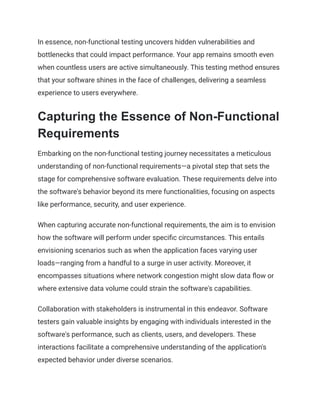
In essence, non-functional testing uncovers hidden vulnerabilities and
bottlenecks that could impact performance. Your app remains smooth even
when countless users are active simultaneously. This testing method ensures
that your software shines in the face of challenges, delivering a seamless
experience to users everywhere.
Capturing the Essence of Non-Functional
Requirements
Embarking on the non-functional testing journey necessitates a meticulous
understanding of non-functional requirements—a pivotal step that sets the
stage for comprehensive software evaluation. These requirements delve into
the software's behavior beyond its mere functionalities, focusing on aspects
like performance, security, and user experience.
When capturing accurate non-functional requirements, the aim is to envision
how the software will perform under specific circumstances. This entails
envisioning scenarios such as when the application faces varying user
loads—ranging from a handful to a surge in user activity. Moreover, it
encompasses situations where network congestion might slow data flow or
where extensive data volume could strain the software's capabilities.
Collaboration with stakeholders is instrumental in this endeavor. Software
testers gain valuable insights by engaging with individuals interested in the
software's performance, such as clients, users, and developers. These
interactions facilitate a comprehensive understanding of the application's
expected behavior under diverse scenarios.
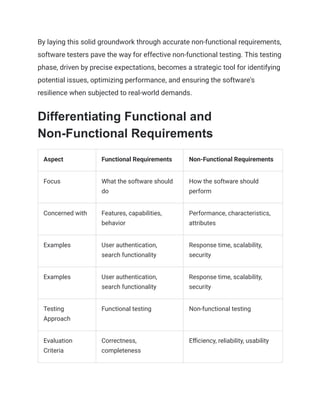
By laying this solid groundwork through accurate non-functional requirements,
software testers pave the way for effective non-functional testing. This testing
phase, driven by precise expectations, becomes a strategic tool for identifying
potential issues, optimizing performance, and ensuring the software's
resilience when subjected to real-world demands.
Differentiating Functional and
Non-Functional Requirements
Aspect Functional Requirements Non-Functional Requirements
Focus What the software should
do
How the software should
perform
Concerned with Features, capabilities,
behavior
Performance, characteristics,
attributes
Examples User authentication,
search functionality
Response time, scalability,
security
Examples User authentication,
search functionality
Response time, scalability,
security
Testing
Approach
Functional testing Non-functional testing
Evaluation
Criteria
Correctness,
completeness
Efficiency, reliability, usability
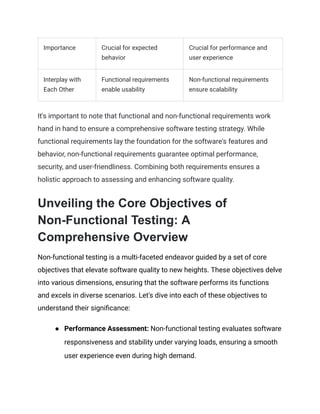
Importance Crucial for expected
behavior
Crucial for performance and
user experience
Interplay with
Each Other
Functional requirements
enable usability
Non-functional requirements
ensure scalability
It's important to note that functional and non-functional requirements work
hand in hand to ensure a comprehensive software testing strategy. While
functional requirements lay the foundation for the software's features and
behavior, non-functional requirements guarantee optimal performance,
security, and user-friendliness. Combining both requirements ensures a
holistic approach to assessing and enhancing software quality.
Unveiling the Core Objectives of
Non-Functional Testing: A
Comprehensive Overview
Non-functional testing is a multi-faceted endeavor guided by a set of core
objectives that elevate software quality to new heights. These objectives delve
into various dimensions, ensuring that the software performs its functions
and excels in diverse scenarios. Let's dive into each of these objectives to
understand their significance:
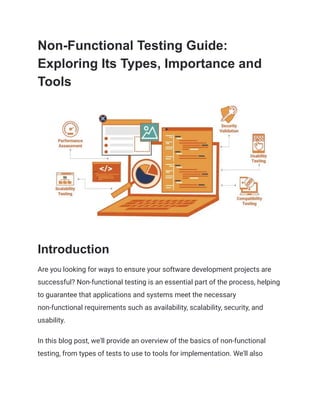
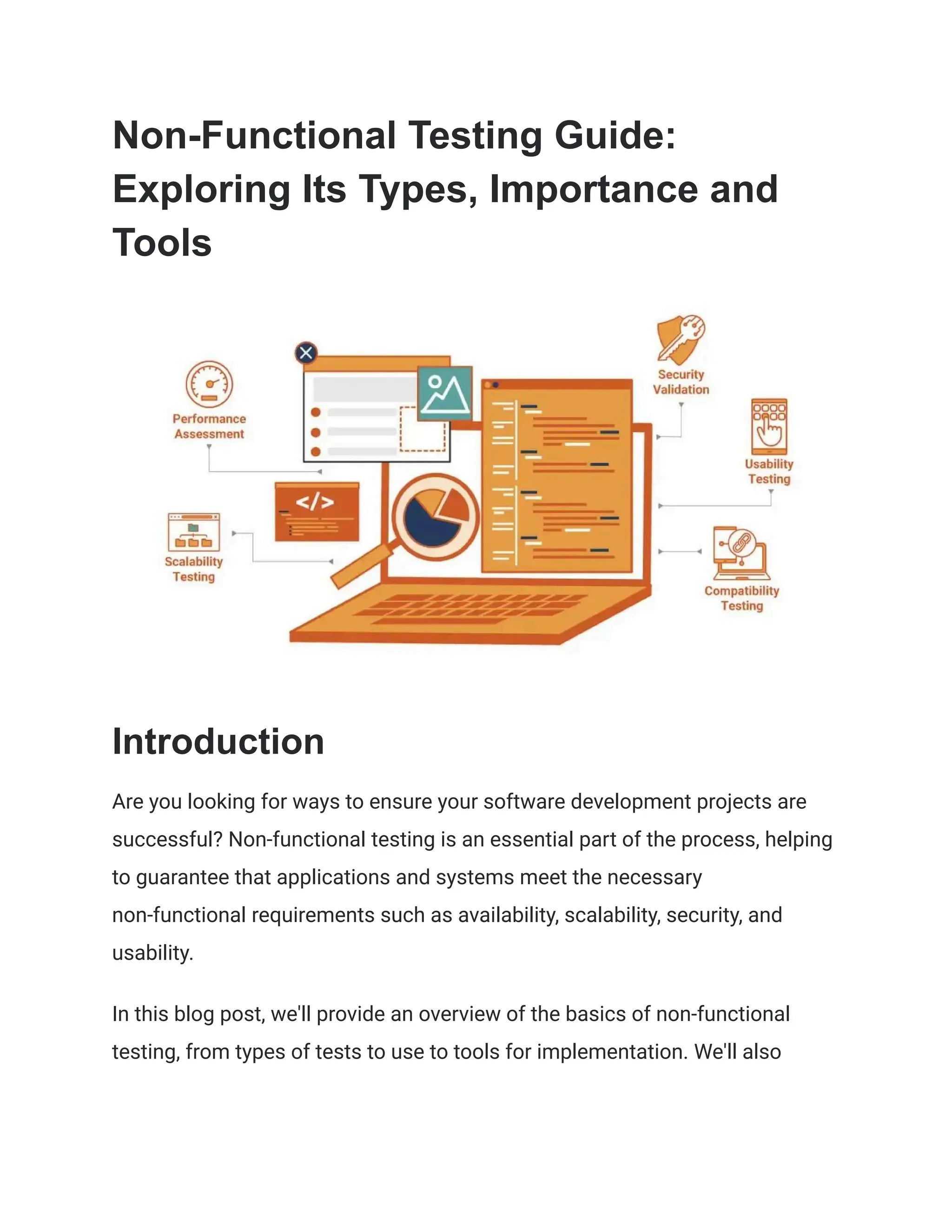
● Performance Assessment: Non-functional testing evaluates software
responsiveness and stability under varying loads, ensuring a smooth
user experience even during high demand.
● Scalability Testing: This objective examines the software's ability to
handle increased user loads without compromising performance,
anticipating sudden spikes in usage.
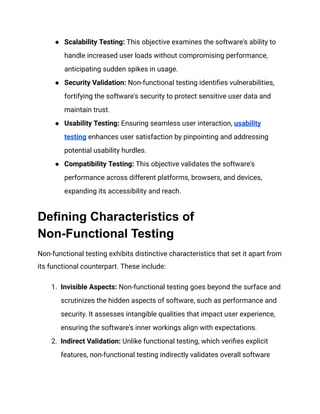
● Security Validation: Non-functional testing identifies vulnerabilities,
fortifying the software's security to protect sensitive user data and
maintain trust.
● Usability Testing: Ensuring seamless user interaction, usability
testing enhances user satisfaction by pinpointing and addressing
potential usability hurdles.
● Compatibility Testing: This objective validates the software's
performance across different platforms, browsers, and devices,
expanding its accessibility and reach.
Defining Characteristics of
Non-Functional Testing
Non-functional testing exhibits distinctive characteristics that set it apart from
its functional counterpart. These include:
1. Invisible Aspects: Non-functional testing goes beyond the surface and
scrutinizes the hidden aspects of software, such as performance and
security. It assesses intangible qualities that impact user experience,
ensuring the software's inner workings align with expectations.
2. Indirect Validation: Unlike functional testing, which verifies explicit
features, non-functional testing indirectly validates overall software
quality. It ensures that the software not only performs tasks but does
so efficiently and reliably, contributing to a seamless user experience.
3. Varied Testing Approaches: Non-functional testing employs diverse
methodologies tailored to specific quality attributes. These
approaches collectively address performance, security, usability, and
other critical factors, comprehensively evaluating software excellence.
4. Realistic Scenarios: Testing scenarios in non-functional testing mirror
real-world usage, simulating practical conditions. This approach
unveils how the software behaves under actual user loads, network
fluctuations, and other authentic situations, providing invaluable
insights into its performance and resilience.
Unveiling the Advantages of
Non-Functional Testing
Embracing non-functional testing yields a plethora of advantages, including:
● Enhanced User Experience: Non-functional testing stands as a
guardian of user satisfaction. Rigorously assessing software
performance guarantees that applications operate seamlessly,
offering a responsive and smooth user experience. Just as a
well-tuned instrument produces harmonious melodies, non-functional
testing ensures that software delivers users an uninterrupted and
enjoyable journey.
● Early Issue Identification: One of the remarkable advantages of
non-functional testing is its role as a vigilant early warning system.
Uncovering potential bottlenecks and vulnerabilities during the
development phase allows for swift remediation before these issues
escalate. Like a skilled detective, non-functional testing ensures that
lurking problems are spotted and resolved well before they impact the
end users.
● Cost-Efficiency: In software development, prevention is often more
cost-effective than cure. Non-functional testing embodies this
principle by identifying and addressing performance issues in the
early stages of development. By nipping these concerns in the bud, it
prevents the need for extensive and costly post-release fixes. Much
like regular maintenance keeps a machine running smoothly,
non-functional testing ensures that software remains efficient and
trouble-free.
● Brand Reputation: In the digital age, a brand's reputation hinges on its
software's performance. Non-functional testing contributes to a
positive brand image by ensuring that software operates reliably,
reflecting a commitment to excellence. Just as stellar customer
service enhances a brand's reputation, robust software performance
fosters user trust and confidence. Through non-functional testing, a
brand can establish itself as a reliable provider of high-quality
software, forging a positive and enduring impression.
What are the Different Types of
Non-functional Testing?
Performance testing is a non-functional test that evaluates how quickly a
system responds to user requests and how well it performs under load. This
enables businesses to identify any issues that could affect customer
satisfaction due to slow response times or poor performance.
Stress testing looks at how a system behaves when subjected to extreme load
levels and helps companies determine if their programs can handle increased
usage. Scalability testing examines the capability of a system to scale up or
down depending on the number of users and data present in it.
Security testing assesses the level of security in an application and detects
any weaknesses that could put customer data at risk. Compatibility testing
checks whether an application works with different operating systems,
browsers, and devices so customers can access it regardless of their device's
specifications.
Overall, different non-functional testing types provide invaluable information
about an application's performance before its launch into production
environments, which helps ensure customer satisfaction regarding reliability
and efficiency across all platforms.
Exploring Tools for Non-Functional
Testing: An Array of Options
Non-functional testing ensures that applications and systems meet essential
non-functional requirements, encompassing aspects like availability,
scalability, security, and usability. Achieving this objective necessitates
utilizing a diverse range of automated and manual testing tools. These tools
play a pivotal role in assessing performance, reliability, and security,
contributing to creating robust applications. As you navigate the landscape of
non-functional testing tools, consider the following pointers:
● Automated Testing Tools: These tools offer efficiency by executing tests
swiftly compared to manual processes. They automate data collection, results
comparison, and parallel testing across various systems or environments.
Examples include:
● Apache JMeter: For load testing web applications.
● LoadRunner: For stress testing web applications.
● Selenium WebDriver: For browser automation.
● SoapUI: For API testing.
● Manual Testing Tools: When precision and complex scenarios are
paramount, manual tools shine. They encompass non-functional test types
like User Acceptance Tests (UAT), Smoke Tests, Regression Tests, and
Exploratory Tests.
● Microsoft Office Suite Programs: Excel spreadsheets for test case
creation.
● Zephyr Test Management Suite: UAT management.
● Xray Test Management Plugin: Regression tracking in JIRA Software.
● Bugzilla Bug Tracker Tool: Defect tracking during exploratory tests.
‍
● Selecting the Right Tool:
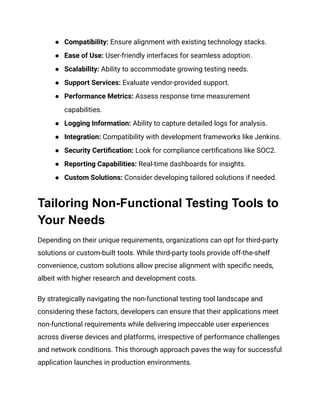
● Cost Effectiveness: Consider budget constraints and tool pricing.
● Compatibility: Ensure alignment with existing technology stacks.
● Ease of Use: User-friendly interfaces for seamless adoption.
● Scalability: Ability to accommodate growing testing needs.
● Support Services: Evaluate vendor-provided support.
● Performance Metrics: Assess response time measurement
capabilities.
● Logging Information: Ability to capture detailed logs for analysis.
● Integration: Compatibility with development frameworks like Jenkins.
● Security Certification: Look for compliance certifications like SOC2.
● Reporting Capabilities: Real-time dashboards for insights.
● Custom Solutions: Consider developing tailored solutions if needed.
Tailoring Non-Functional Testing Tools to
Your Needs
Depending on their unique requirements, organizations can opt for third-party
solutions or custom-built tools. While third-party tools provide off-the-shelf
convenience, custom solutions allow precise alignment with specific needs,
albeit with higher research and development costs.
By strategically navigating the non-functional testing tool landscape and
considering these factors, developers can ensure that their applications meet
non-functional requirements while delivering impeccable user experiences
across diverse devices and platforms, irrespective of performance challenges
and network conditions. This thorough approach paves the way for successful
application launches in production environments.
How To Choose the Right Tools for
Non-Functional Testing
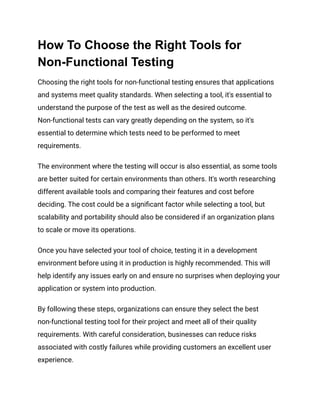
Choosing the right tools for non-functional testing ensures that applications
and systems meet quality standards. When selecting a tool, it's essential to
understand the purpose of the test as well as the desired outcome.
Non-functional tests can vary greatly depending on the system, so it's
essential to determine which tests need to be performed to meet
requirements.
The environment where the testing will occur is also essential, as some tools
are better suited for certain environments than others. It's worth researching
different available tools and comparing their features and cost before
deciding. The cost could be a significant factor while selecting a tool, but
scalability and portability should also be considered if an organization plans
to scale or move its operations.
Once you have selected your tool of choice, testing it in a development
environment before using it in production is highly recommended. This will
help identify any issues early on and ensure no surprises when deploying your
application or system into production.
By following these steps, organizations can ensure they select the best
non-functional testing tool for their project and meet all of their quality
requirements. With careful consideration, businesses can reduce risks
associated with costly failures while providing customers an excellent user
experience.
Harnessing HeadSpin's Unique
Capabilities in Non-Functional Testing
Regarding efficient and comprehensive non-functional testing, HeadSpin
emerges as a frontrunner. With its advanced capabilities, HeadSpin empowers
software teams to conduct rigorous performance, security, and usability
assessments. With real-world usage scenarios and data science-driven
insights, HeadSpin equips developers to identify and address issues, ensuring
high-quality, seamless software creation.
Here are additional unique capabilities of HeadSpin in the realm of
non-functional testing:
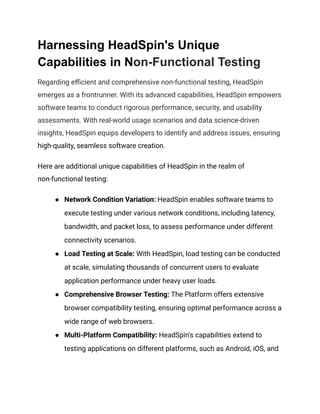
● Network Condition Variation: HeadSpin enables software teams to
execute testing under various network conditions, including latency,
bandwidth, and packet loss, to assess performance under different
connectivity scenarios.
● Load Testing at Scale: With HeadSpin, load testing can be conducted
at scale, simulating thousands of concurrent users to evaluate
application performance under heavy user loads.
● Comprehensive Browser Testing: The Platform offers extensive
browser compatibility testing, ensuring optimal performance across a
wide range of web browsers.
● Multi-Platform Compatibility: HeadSpin's capabilities extend to
testing applications on different platforms, such as Android, iOS, and
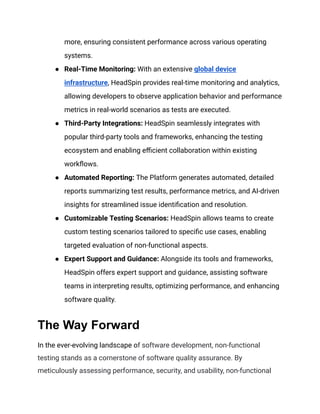
more, ensuring consistent performance across various operating
systems.
● Real-Time Monitoring: With an extensive global device
infrastructure, HeadSpin provides real-time monitoring and analytics,
allowing developers to observe application behavior and performance
metrics in real-world scenarios as tests are executed.
● Third-Party Integrations: HeadSpin seamlessly integrates with
popular third-party tools and frameworks, enhancing the testing
ecosystem and enabling efficient collaboration within existing
workflows.
● Automated Reporting: The Platform generates automated, detailed
reports summarizing test results, performance metrics, and AI-driven
insights for streamlined issue identification and resolution.
● Customizable Testing Scenarios: HeadSpin allows teams to create
custom testing scenarios tailored to specific use cases, enabling
targeted evaluation of non-functional aspects.
● Expert Support and Guidance: Alongside its tools and frameworks,
HeadSpin offers expert support and guidance, assisting software
teams in interpreting results, optimizing performance, and enhancing
software quality.
The Way Forward
In the ever-evolving landscape of software development, non-functional
testing stands as a cornerstone of software quality assurance. By
meticulously assessing performance, security, and usability, non-functional
testing ensures that software systems operate seamlessly, even under the
most challenging conditions.
As you embark on your journey to deliver exceptional software, consider
harnessing the power of HeadSpin's specialized tools and expertise.
Elevate your non-functional testing endeavors and unlock the true potential of
your software with HeadSpin.
Article resource:
This article was originally published on:
https://www.headspin.io/blog/the-essentials-of-non-functional-testing

Non-Functional Testing Guide_ Exploring Its Types, Importance and Tools.pdf

  • 1.
    Non-Functional Testing Guide: ExploringIts Types, Importance and Tools Introduction Are you looking for ways to ensure your software development projects are successful? Non-functional testing is an essential part of the process, helping to guarantee that applications and systems meet the necessary non-functional requirements such as availability, scalability, security, and usability. In this blog post, we'll provide an overview of the basics of non-functional testing, from types of tests to use to tools for implementation. We'll also
  • 2.
    discuss the benefitsof using these tests and give tips on choosing the right ones for your project. What is Non-Functional Testing? Non-functional testing evaluates a software application's non-functional attributes. This includes testing the software's performance, load, stress, scalability, security, compatibility, and usability, among other characteristics. The primary goal is to ensure that the software behaves as expected under certain conditions that are not directly related to specific functionalities. Key Areas of Non-Functional Testing: Performance Testing: Measures how the software application behaves under a particular load. It evaluates the software's speed, responsiveness, and stability under varying levels of user traffic. ● Usability Testing: Focuses on the user's ease of using the application, its navigability, and overall user experience. It aims to identify any aspects of the software that may be confusing or frustrating for users. ● Security Testing: This ensures that software does not have vulnerabilities or threats that can lead to data loss. ● Compatibility Testing: This process checks the software's compatibility with different browsers, databases, hardware, operating systems, mobile devices, and networks to ensure consistent behavior across various platforms.
  • 3.
    ● Reliability andAvailability Testing: This assesses the software's reliability and consistency in being accessed or used as intended over time. ● Scalability Testing: Determines the software's ability to scale up or down in terms of its processing power or network load. By conducting non-functional testing, developers and testers can address issues not apparent during functional testing but critical to the software's overall quality and user satisfaction. Integrating non-functional testing into the software development lifecycle is essential for delivering a robust, efficient, and user-friendly product. Delving into the Importance of Non-Functional Testing In the ever-changing world of software testing, non-functional testing stands as a steadfast protector of software quality. While functional testing examines whether the software meets its basic requirements, non-functional testing goes beyond functionality. It ensures that the software performs seamlessly under various conditions, spotlighting potential issues that could arise in real-world usage. Functional testing is like checking off a to-do list, ensuring each feature works as intended. Non-functional testing is more like stress testing – it examines how well the software handles pressure. Also, non-functional testing evaluates the software's behavior under different user loads and scenarios.
  • 4.
    In essence, non-functionaltesting uncovers hidden vulnerabilities and bottlenecks that could impact performance. Your app remains smooth even when countless users are active simultaneously. This testing method ensures that your software shines in the face of challenges, delivering a seamless experience to users everywhere. Capturing the Essence of Non-Functional Requirements Embarking on the non-functional testing journey necessitates a meticulous understanding of non-functional requirements—a pivotal step that sets the stage for comprehensive software evaluation. These requirements delve into the software's behavior beyond its mere functionalities, focusing on aspects like performance, security, and user experience. When capturing accurate non-functional requirements, the aim is to envision how the software will perform under specific circumstances. This entails envisioning scenarios such as when the application faces varying user loads—ranging from a handful to a surge in user activity. Moreover, it encompasses situations where network congestion might slow data flow or where extensive data volume could strain the software's capabilities. Collaboration with stakeholders is instrumental in this endeavor. Software testers gain valuable insights by engaging with individuals interested in the software's performance, such as clients, users, and developers. These interactions facilitate a comprehensive understanding of the application's expected behavior under diverse scenarios.
  • 5.
    By laying thissolid groundwork through accurate non-functional requirements, software testers pave the way for effective non-functional testing. This testing phase, driven by precise expectations, becomes a strategic tool for identifying potential issues, optimizing performance, and ensuring the software's resilience when subjected to real-world demands. Differentiating Functional and Non-Functional Requirements Aspect Functional Requirements Non-Functional Requirements Focus What the software should do How the software should perform Concerned with Features, capabilities, behavior Performance, characteristics, attributes Examples User authentication, search functionality Response time, scalability, security Examples User authentication, search functionality Response time, scalability, security Testing Approach Functional testing Non-functional testing Evaluation Criteria Correctness, completeness Efficiency, reliability, usability
  • 6.
    Importance Crucial forexpected behavior Crucial for performance and user experience Interplay with Each Other Functional requirements enable usability Non-functional requirements ensure scalability It's important to note that functional and non-functional requirements work hand in hand to ensure a comprehensive software testing strategy. While functional requirements lay the foundation for the software's features and behavior, non-functional requirements guarantee optimal performance, security, and user-friendliness. Combining both requirements ensures a holistic approach to assessing and enhancing software quality. Unveiling the Core Objectives of Non-Functional Testing: A Comprehensive Overview Non-functional testing is a multi-faceted endeavor guided by a set of core objectives that elevate software quality to new heights. These objectives delve into various dimensions, ensuring that the software performs its functions and excels in diverse scenarios. Let's dive into each of these objectives to understand their significance: ● Performance Assessment: Non-functional testing evaluates software responsiveness and stability under varying loads, ensuring a smooth user experience even during high demand.
  • 7.
    ● Scalability Testing:This objective examines the software's ability to handle increased user loads without compromising performance, anticipating sudden spikes in usage. ● Security Validation: Non-functional testing identifies vulnerabilities, fortifying the software's security to protect sensitive user data and maintain trust. ● Usability Testing: Ensuring seamless user interaction, usability testing enhances user satisfaction by pinpointing and addressing potential usability hurdles. ● Compatibility Testing: This objective validates the software's performance across different platforms, browsers, and devices, expanding its accessibility and reach. Defining Characteristics of Non-Functional Testing Non-functional testing exhibits distinctive characteristics that set it apart from its functional counterpart. These include: 1. Invisible Aspects: Non-functional testing goes beyond the surface and scrutinizes the hidden aspects of software, such as performance and security. It assesses intangible qualities that impact user experience, ensuring the software's inner workings align with expectations. 2. Indirect Validation: Unlike functional testing, which verifies explicit features, non-functional testing indirectly validates overall software
  • 8.
    quality. It ensuresthat the software not only performs tasks but does so efficiently and reliably, contributing to a seamless user experience. 3. Varied Testing Approaches: Non-functional testing employs diverse methodologies tailored to specific quality attributes. These approaches collectively address performance, security, usability, and other critical factors, comprehensively evaluating software excellence. 4. Realistic Scenarios: Testing scenarios in non-functional testing mirror real-world usage, simulating practical conditions. This approach unveils how the software behaves under actual user loads, network fluctuations, and other authentic situations, providing invaluable insights into its performance and resilience. Unveiling the Advantages of Non-Functional Testing Embracing non-functional testing yields a plethora of advantages, including: ● Enhanced User Experience: Non-functional testing stands as a guardian of user satisfaction. Rigorously assessing software performance guarantees that applications operate seamlessly, offering a responsive and smooth user experience. Just as a well-tuned instrument produces harmonious melodies, non-functional testing ensures that software delivers users an uninterrupted and enjoyable journey. ● Early Issue Identification: One of the remarkable advantages of non-functional testing is its role as a vigilant early warning system.
  • 9.
    Uncovering potential bottlenecksand vulnerabilities during the development phase allows for swift remediation before these issues escalate. Like a skilled detective, non-functional testing ensures that lurking problems are spotted and resolved well before they impact the end users. ● Cost-Efficiency: In software development, prevention is often more cost-effective than cure. Non-functional testing embodies this principle by identifying and addressing performance issues in the early stages of development. By nipping these concerns in the bud, it prevents the need for extensive and costly post-release fixes. Much like regular maintenance keeps a machine running smoothly, non-functional testing ensures that software remains efficient and trouble-free. ● Brand Reputation: In the digital age, a brand's reputation hinges on its software's performance. Non-functional testing contributes to a positive brand image by ensuring that software operates reliably, reflecting a commitment to excellence. Just as stellar customer service enhances a brand's reputation, robust software performance fosters user trust and confidence. Through non-functional testing, a brand can establish itself as a reliable provider of high-quality software, forging a positive and enduring impression. What are the Different Types of Non-functional Testing?
  • 10.
    Performance testing isa non-functional test that evaluates how quickly a system responds to user requests and how well it performs under load. This enables businesses to identify any issues that could affect customer satisfaction due to slow response times or poor performance. Stress testing looks at how a system behaves when subjected to extreme load levels and helps companies determine if their programs can handle increased usage. Scalability testing examines the capability of a system to scale up or down depending on the number of users and data present in it. Security testing assesses the level of security in an application and detects any weaknesses that could put customer data at risk. Compatibility testing checks whether an application works with different operating systems, browsers, and devices so customers can access it regardless of their device's specifications. Overall, different non-functional testing types provide invaluable information about an application's performance before its launch into production environments, which helps ensure customer satisfaction regarding reliability and efficiency across all platforms. Exploring Tools for Non-Functional Testing: An Array of Options Non-functional testing ensures that applications and systems meet essential non-functional requirements, encompassing aspects like availability, scalability, security, and usability. Achieving this objective necessitates utilizing a diverse range of automated and manual testing tools. These tools
  • 11.
    play a pivotalrole in assessing performance, reliability, and security, contributing to creating robust applications. As you navigate the landscape of non-functional testing tools, consider the following pointers: ● Automated Testing Tools: These tools offer efficiency by executing tests swiftly compared to manual processes. They automate data collection, results comparison, and parallel testing across various systems or environments. Examples include: ● Apache JMeter: For load testing web applications. ● LoadRunner: For stress testing web applications. ● Selenium WebDriver: For browser automation. ● SoapUI: For API testing. ● Manual Testing Tools: When precision and complex scenarios are paramount, manual tools shine. They encompass non-functional test types like User Acceptance Tests (UAT), Smoke Tests, Regression Tests, and Exploratory Tests. ● Microsoft Office Suite Programs: Excel spreadsheets for test case creation. ● Zephyr Test Management Suite: UAT management. ● Xray Test Management Plugin: Regression tracking in JIRA Software. ● Bugzilla Bug Tracker Tool: Defect tracking during exploratory tests. ‍ ● Selecting the Right Tool: ● Cost Effectiveness: Consider budget constraints and tool pricing.
  • 12.
    ● Compatibility: Ensurealignment with existing technology stacks. ● Ease of Use: User-friendly interfaces for seamless adoption. ● Scalability: Ability to accommodate growing testing needs. ● Support Services: Evaluate vendor-provided support. ● Performance Metrics: Assess response time measurement capabilities. ● Logging Information: Ability to capture detailed logs for analysis. ● Integration: Compatibility with development frameworks like Jenkins. ● Security Certification: Look for compliance certifications like SOC2. ● Reporting Capabilities: Real-time dashboards for insights. ● Custom Solutions: Consider developing tailored solutions if needed. Tailoring Non-Functional Testing Tools to Your Needs Depending on their unique requirements, organizations can opt for third-party solutions or custom-built tools. While third-party tools provide off-the-shelf convenience, custom solutions allow precise alignment with specific needs, albeit with higher research and development costs. By strategically navigating the non-functional testing tool landscape and considering these factors, developers can ensure that their applications meet non-functional requirements while delivering impeccable user experiences across diverse devices and platforms, irrespective of performance challenges and network conditions. This thorough approach paves the way for successful application launches in production environments.
  • 13.
    How To Choosethe Right Tools for Non-Functional Testing Choosing the right tools for non-functional testing ensures that applications and systems meet quality standards. When selecting a tool, it's essential to understand the purpose of the test as well as the desired outcome. Non-functional tests can vary greatly depending on the system, so it's essential to determine which tests need to be performed to meet requirements. The environment where the testing will occur is also essential, as some tools are better suited for certain environments than others. It's worth researching different available tools and comparing their features and cost before deciding. The cost could be a significant factor while selecting a tool, but scalability and portability should also be considered if an organization plans to scale or move its operations. Once you have selected your tool of choice, testing it in a development environment before using it in production is highly recommended. This will help identify any issues early on and ensure no surprises when deploying your application or system into production. By following these steps, organizations can ensure they select the best non-functional testing tool for their project and meet all of their quality requirements. With careful consideration, businesses can reduce risks associated with costly failures while providing customers an excellent user experience.
  • 14.
    Harnessing HeadSpin's Unique Capabilitiesin Non-Functional Testing Regarding efficient and comprehensive non-functional testing, HeadSpin emerges as a frontrunner. With its advanced capabilities, HeadSpin empowers software teams to conduct rigorous performance, security, and usability assessments. With real-world usage scenarios and data science-driven insights, HeadSpin equips developers to identify and address issues, ensuring high-quality, seamless software creation. Here are additional unique capabilities of HeadSpin in the realm of non-functional testing: ● Network Condition Variation: HeadSpin enables software teams to execute testing under various network conditions, including latency, bandwidth, and packet loss, to assess performance under different connectivity scenarios. ● Load Testing at Scale: With HeadSpin, load testing can be conducted at scale, simulating thousands of concurrent users to evaluate application performance under heavy user loads. ● Comprehensive Browser Testing: The Platform offers extensive browser compatibility testing, ensuring optimal performance across a wide range of web browsers. ● Multi-Platform Compatibility: HeadSpin's capabilities extend to testing applications on different platforms, such as Android, iOS, and
  • 15.
    more, ensuring consistentperformance across various operating systems. ● Real-Time Monitoring: With an extensive global device infrastructure, HeadSpin provides real-time monitoring and analytics, allowing developers to observe application behavior and performance metrics in real-world scenarios as tests are executed. ● Third-Party Integrations: HeadSpin seamlessly integrates with popular third-party tools and frameworks, enhancing the testing ecosystem and enabling efficient collaboration within existing workflows. ● Automated Reporting: The Platform generates automated, detailed reports summarizing test results, performance metrics, and AI-driven insights for streamlined issue identification and resolution. ● Customizable Testing Scenarios: HeadSpin allows teams to create custom testing scenarios tailored to specific use cases, enabling targeted evaluation of non-functional aspects. ● Expert Support and Guidance: Alongside its tools and frameworks, HeadSpin offers expert support and guidance, assisting software teams in interpreting results, optimizing performance, and enhancing software quality. The Way Forward In the ever-evolving landscape of software development, non-functional testing stands as a cornerstone of software quality assurance. By meticulously assessing performance, security, and usability, non-functional
  • 16.
    testing ensures thatsoftware systems operate seamlessly, even under the most challenging conditions. As you embark on your journey to deliver exceptional software, consider harnessing the power of HeadSpin's specialized tools and expertise. Elevate your non-functional testing endeavors and unlock the true potential of your software with HeadSpin. Article resource: This article was originally published on: https://www.headspin.io/blog/the-essentials-of-non-functional-testing