NISO Webinar: Assessment Metrics
      December 14, 2011
         Oliver Pesch
 Chief Strategist, E-Resources
 EBSCO Information Services
•  What’s new with Release 4 of the COUNTER Code of
   Practice
•  How the COUNTER and SUSHI XML Schemas are
   affected
•  Facilitating implementation with the COUNTER-SUSHI
   Implementation Profile
•  Ensuring Compliance through a more robust audit
•  Timing
What’s New
One Code of Practice
•  Covers books, databases, journals and multimedia
   collections
•  Easier to manage for COUNTER
•  Easier to manage for content providers –
   particularly those offering multiple resource types.
Multimedia Report 1
•  Reports on use of items in multimedia collections
•  Applies to platforms like ArtStor
Consortium Report 3
•  The multimedia report for consortia
Journal Report 5
•  Usage of journal articles broken out by year of
   publication
•  No longer optional
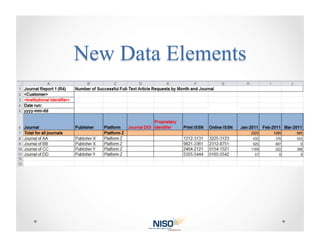
DOI and Proprietary Identifier
•  Improves identification of items listed in the reports
•  Improves matching usage to the correct items in a
   knowledge base
•  Involves coordination with KBART so the same
   identifier is on both the vendor’s Title List and their
   COUNTER report
•  Applies to most COUNTER reports
Institutional Identifier
•  Utilizes the NISO I2 as the standard identifier for the
   institution (being implemented as ISNI for
   organizations)
•  Improves comparative analysis– particularly for
   usage processed by consortium
•  Applies to all reports
Gold Open Access
•  Covers articles accessible without subscription
•  Included as a separate count in Journal Report
   1and Journal Report 1a
Result Clicks and Record Views
•  Result Click counts each time a user clicked a link
   from the search result to the detailed view, a link
   resolver, etc.
•  Record View counts the abstract/detailed records
   explicitly viewed from the database
•  Both indicate an explicit expression of interest in the
   result
•  Provides a more direct measure of database usage,
   in particular for A&I databases
•  Applies to Database Reports 1 and 3
Access Denied: content item not licensed
•  In addition to Turnaway s (simultaneous user limit)
•  Records a user’s attempt to access full text for which
   their institution does not have a subscription
•  Applies to “Access Denied” reports:
   o  Journal Report 2
   o  Database Report 2
   o  Book Reports 3 and 4

•  Useful input for collection development
Sessions
•  Federated Search and Discovery products have
   made “Sessions” an unreliable measure of use
•  Reports affected:
  o  Database Report 1
  o  Database Report 3
  o  Consortium Report 2
Changes resulting from the new Code of Practice
COUNTER Schema
•  Minor changes only
•  ItemIdentifier, ItemPublisher now optional elements
•  PubYr attribute ( used by Journal Report 5) now
   defined as a year.
•  PubYrFrom and PubYrTo attributes added to allow
   Journal Report 5 to report ranges of years.
COUNTER Enumeration Schema
•  Contains the controlled vocabulary for elements like
   ItemDataType, Category, MetricType, etc.
•  Added new values as required by the new and
   updated reports
SUSHI Schema
•  No changes required
Facilitating adoption of SUSHI
Why
•  SUSHI and COUNTER tend to be abstract
•  Abstraction leaves the opportunity for concepts to
   be interpreted differently
•  Different interpretations leads to inconsistencies
•  Examples:
   o  Different authentication methods that require custom development
   o  Wrong capitalization on controlled data values
   o  Including “Totals” in the XML
   o  Including invalid ISSNs (e.g. “N/A”)
Authentication for SUSHI Client
•  IP and use of requester and customer IDs allowed
•  Use of SOAP extensions not allowed
Report Names
•  Must exactly match the value in the “Name”
   column on the SUSHI Reports Registry
Date Ranges for SUSHI Request
•    Format must by yyyy-mm-dd
•    Begin date must be first of the month
•    End date must be last day of the month
•    End date must be later than begin date
SUSHI Exceptions
•  Standard error numbers must be used for standard
   error conditions (see Table 17 in the SUSHI standard)
SUSHI Server Registry
•  SUSHI Server must be registered on SUSHI Server
   Registry
Data to Return in the COUNTER Report
•  Only the months of usage asked for
•  Include exception if some or all usage not available
•  Only include items appropriate to the report (e.g.
   don’t return book usage in a Journal Report)
•  Do not include totals for the report or an item
Data Elements Values
•  Use registered values with proper casing for
   enumerated values (Item Data Type, Category,
   Metric Type, etc.)
•  Use values appropriate for the report
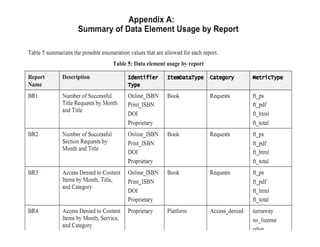
Designed for use by implementers
•  Prescriptive in nature
•  Lots of tables and charts
Designed for use by implementers
•  Prescriptive in nature
•  Lots of tables and charts
Monitoring compliance
•  SUSHI and COUNTER XML will receive more focus in
   the audit
•  COUNTER-SUSHI Implementation Profile should server
   as a guide for auditors
•  Auditors will be expected to use automation to
   reduce the cost of the audit
Trial use, comments and final implementation
January 20, 2012
•  Last day for comments on the draft of release 4 of
   COUNTER Code of Practice and the COUNTER-SUSHI
   Implementation Profile
March/April 2012
•  Final publication of Release 4 of COUNTER CoP and
   the COUNTER-SUSHI Implementation Profile
December 31, 2013
•  Deadline for compliance with Release 4 of the
   COUNTER CoP
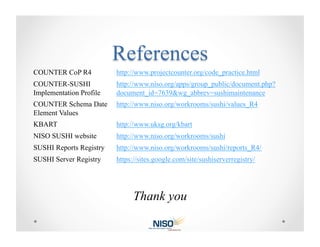
COUNTER CoP R4           http://www.projectcounter.org/code_practice.html
COUNTER-SUSHI            http://www.niso.org/apps/group_public/document.php?
Implementation Profile   document_id=7639&wg_abbrev=sushimaintenance
COUNTER Schema Date      http://www.niso.org/workrooms/sushi/values_R4
Element Values
KBART                    http://www.uksg.org/kbart
NISO SUSHI website       http://www.niso.org/workrooms/sushi
SUSHI Reports Registry   http://www.niso.org/workrooms/sushi/reports_R4/
SUSHI Server Registry    https://sites.google.com/site/sushiserverregistry/


                               Thank you

NISO Webinar: Assessment Metrics

  • 1.
    NISO Webinar: AssessmentMetrics December 14, 2011 Oliver Pesch Chief Strategist, E-Resources EBSCO Information Services
  • 2.
    •  What’s newwith Release 4 of the COUNTER Code of Practice •  How the COUNTER and SUSHI XML Schemas are affected •  Facilitating implementation with the COUNTER-SUSHI Implementation Profile •  Ensuring Compliance through a more robust audit •  Timing
  • 3.
  • 4.
    One Code ofPractice •  Covers books, databases, journals and multimedia collections •  Easier to manage for COUNTER •  Easier to manage for content providers – particularly those offering multiple resource types.
  • 5.
    Multimedia Report 1 • Reports on use of items in multimedia collections •  Applies to platforms like ArtStor Consortium Report 3 •  The multimedia report for consortia Journal Report 5 •  Usage of journal articles broken out by year of publication •  No longer optional
  • 6.
    DOI and ProprietaryIdentifier •  Improves identification of items listed in the reports •  Improves matching usage to the correct items in a knowledge base •  Involves coordination with KBART so the same identifier is on both the vendor’s Title List and their COUNTER report •  Applies to most COUNTER reports
  • 7.
    Institutional Identifier •  Utilizesthe NISO I2 as the standard identifier for the institution (being implemented as ISNI for organizations) •  Improves comparative analysis– particularly for usage processed by consortium •  Applies to all reports
  • 9.
    Gold Open Access • Covers articles accessible without subscription •  Included as a separate count in Journal Report 1and Journal Report 1a
  • 10.
    Result Clicks andRecord Views •  Result Click counts each time a user clicked a link from the search result to the detailed view, a link resolver, etc. •  Record View counts the abstract/detailed records explicitly viewed from the database •  Both indicate an explicit expression of interest in the result •  Provides a more direct measure of database usage, in particular for A&I databases •  Applies to Database Reports 1 and 3
  • 11.
    Access Denied: contentitem not licensed •  In addition to Turnaway s (simultaneous user limit) •  Records a user’s attempt to access full text for which their institution does not have a subscription •  Applies to “Access Denied” reports: o  Journal Report 2 o  Database Report 2 o  Book Reports 3 and 4 •  Useful input for collection development
  • 12.
    Sessions •  Federated Searchand Discovery products have made “Sessions” an unreliable measure of use •  Reports affected: o  Database Report 1 o  Database Report 3 o  Consortium Report 2
  • 13.
    Changes resulting fromthe new Code of Practice
  • 14.
    COUNTER Schema •  Minorchanges only •  ItemIdentifier, ItemPublisher now optional elements •  PubYr attribute ( used by Journal Report 5) now defined as a year. •  PubYrFrom and PubYrTo attributes added to allow Journal Report 5 to report ranges of years.
  • 15.
    COUNTER Enumeration Schema • Contains the controlled vocabulary for elements like ItemDataType, Category, MetricType, etc. •  Added new values as required by the new and updated reports
  • 16.
    SUSHI Schema •  Nochanges required
  • 17.
  • 18.
    Why •  SUSHI andCOUNTER tend to be abstract •  Abstraction leaves the opportunity for concepts to be interpreted differently •  Different interpretations leads to inconsistencies •  Examples: o  Different authentication methods that require custom development o  Wrong capitalization on controlled data values o  Including “Totals” in the XML o  Including invalid ISSNs (e.g. “N/A”)
  • 19.
    Authentication for SUSHIClient •  IP and use of requester and customer IDs allowed •  Use of SOAP extensions not allowed
  • 20.
    Report Names •  Mustexactly match the value in the “Name” column on the SUSHI Reports Registry Date Ranges for SUSHI Request •  Format must by yyyy-mm-dd •  Begin date must be first of the month •  End date must be last day of the month •  End date must be later than begin date
  • 21.
    SUSHI Exceptions •  Standarderror numbers must be used for standard error conditions (see Table 17 in the SUSHI standard) SUSHI Server Registry •  SUSHI Server must be registered on SUSHI Server Registry
  • 22.
    Data to Returnin the COUNTER Report •  Only the months of usage asked for •  Include exception if some or all usage not available •  Only include items appropriate to the report (e.g. don’t return book usage in a Journal Report) •  Do not include totals for the report or an item
  • 23.
    Data Elements Values • Use registered values with proper casing for enumerated values (Item Data Type, Category, Metric Type, etc.) •  Use values appropriate for the report
  • 24.
    Designed for useby implementers •  Prescriptive in nature •  Lots of tables and charts
  • 25.
    Designed for useby implementers •  Prescriptive in nature •  Lots of tables and charts
  • 26.
  • 27.
    •  SUSHI andCOUNTER XML will receive more focus in the audit •  COUNTER-SUSHI Implementation Profile should server as a guide for auditors •  Auditors will be expected to use automation to reduce the cost of the audit
  • 28.
    Trial use, commentsand final implementation
  • 29.
    January 20, 2012 • Last day for comments on the draft of release 4 of COUNTER Code of Practice and the COUNTER-SUSHI Implementation Profile March/April 2012 •  Final publication of Release 4 of COUNTER CoP and the COUNTER-SUSHI Implementation Profile December 31, 2013 •  Deadline for compliance with Release 4 of the COUNTER CoP
  • 30.
    COUNTER CoP R4 http://www.projectcounter.org/code_practice.html COUNTER-SUSHI http://www.niso.org/apps/group_public/document.php? Implementation Profile document_id=7639&wg_abbrev=sushimaintenance COUNTER Schema Date http://www.niso.org/workrooms/sushi/values_R4 Element Values KBART http://www.uksg.org/kbart NISO SUSHI website http://www.niso.org/workrooms/sushi SUSHI Reports Registry http://www.niso.org/workrooms/sushi/reports_R4/ SUSHI Server Registry https://sites.google.com/site/sushiserverregistry/ Thank you