CHAPTER
Digital Life:
Computer Concepts
Projects
Presenting: Software to
Tell Your Story
5
Copyright © 2014 Pearson Education, Inc. Publishing as Prentice Hall
1. Create a Prezi presentation
2. Upload a presentation to an online sharing site
3. Create and share an interactive presentation
Copyright © 2014 Pearson Education, Inc. Publishing as Prentice Hall
Objectives
◊ Presentation—delivery of content to an
audience
◊ Prezi:
▫ Cloud-based application used to create
presentations
▫ Enhances content using:
• Multimedia—text, images, and videos
• Zooming
• Motion
Copyright © 2014 Pearson Education, Inc. Publishing as Prentice Hall
 Create a Prezi Presentation
Copyright © 2014 Pearson Education, Inc. Publishing as Prentice Hall
 Create a Prezi Presentation
Copyright © 2014 Pearson Education, Inc. Publishing as Prentice Hall
 Create a Prezi Presentation
◊ SlideShare—online presentation
management and sharing site
◊ SlideShare accounts:
▫ Free—only create public presentation
▫ Pro—also create private presentations
◊ SlideShare presentations:
▫ Embedded into web pages
▫ Hyperlinked
 Upload a Presentation to
an Online Sharing Site
Copyright © 2014 Pearson Education, Inc. Publishing as Prentice Hall
 Upload a Presentation to
an Online Sharing Site
Copyright © 2014 Pearson Education, Inc. Publishing as Prentice Hall
 Upload a Presentation to
an Online Sharing Site
Copyright © 2014 Pearson Education, Inc. Publishing as Prentice Hall
◊ Synchronous communication—when
people communicate at the same time
◊ Asynchronous communication—when
people communicate at different times
◊ VoiceThread—online service enabling
asynchronous communication in response
to online content
 Create and Share an
Interactive Presentation
Copyright © 2014 Pearson Education, Inc. Publishing as Prentice Hall
 Create and Share an
Interactive Presentation
Copyright © 2014 Pearson Education, Inc. Publishing as Prentice Hall
◊ Prezi is a cloud-based application used to
create presentations containing
multimedia content
◊ SlideShare is an online site which can be
used to share PowerPoint presentations
◊ VoiceThread is an online site where
presentations can be shared and users
can make comments
Summary
Copyright © 2014 Pearson Education, Inc. Publishing as Prentice Hall

Next 05 ppt

  • 1.
    CHAPTER Digital Life: Computer Concepts Projects Presenting:Software to Tell Your Story 5 Copyright © 2014 Pearson Education, Inc. Publishing as Prentice Hall
  • 2.
    1. Create aPrezi presentation 2. Upload a presentation to an online sharing site 3. Create and share an interactive presentation Copyright © 2014 Pearson Education, Inc. Publishing as Prentice Hall Objectives
  • 3.
    ◊ Presentation—delivery ofcontent to an audience ◊ Prezi: ▫ Cloud-based application used to create presentations ▫ Enhances content using: • Multimedia—text, images, and videos • Zooming • Motion Copyright © 2014 Pearson Education, Inc. Publishing as Prentice Hall  Create a Prezi Presentation
  • 4.
    Copyright © 2014Pearson Education, Inc. Publishing as Prentice Hall  Create a Prezi Presentation
  • 5.
    Copyright © 2014Pearson Education, Inc. Publishing as Prentice Hall  Create a Prezi Presentation
  • 6.
    ◊ SlideShare—online presentation managementand sharing site ◊ SlideShare accounts: ▫ Free—only create public presentation ▫ Pro—also create private presentations ◊ SlideShare presentations: ▫ Embedded into web pages ▫ Hyperlinked  Upload a Presentation to an Online Sharing Site Copyright © 2014 Pearson Education, Inc. Publishing as Prentice Hall
  • 7.
     Upload aPresentation to an Online Sharing Site Copyright © 2014 Pearson Education, Inc. Publishing as Prentice Hall
  • 8.
     Upload aPresentation to an Online Sharing Site Copyright © 2014 Pearson Education, Inc. Publishing as Prentice Hall
  • 9.
    ◊ Synchronous communication—when peoplecommunicate at the same time ◊ Asynchronous communication—when people communicate at different times ◊ VoiceThread—online service enabling asynchronous communication in response to online content  Create and Share an Interactive Presentation Copyright © 2014 Pearson Education, Inc. Publishing as Prentice Hall
  • 10.
     Create andShare an Interactive Presentation Copyright © 2014 Pearson Education, Inc. Publishing as Prentice Hall
  • 11.
    ◊ Prezi isa cloud-based application used to create presentations containing multimedia content ◊ SlideShare is an online site which can be used to share PowerPoint presentations ◊ VoiceThread is an online site where presentations can be shared and users can make comments Summary Copyright © 2014 Pearson Education, Inc. Publishing as Prentice Hall

Editor's Notes

  • #2 This presentation accompanies Digital Life: Computer Concepts Projects, by Lisa Hawkins. In this chapter, you will learn how to create and upload a presentation.
  • #3 The following objectives will be covered: Create a Prezi presentation Upload a presentation to an online sharing site Create and share an interactive presentation
  • #4 A presentation is the delivery of content to an audience. Prezi is a cloud-based application used to create presentations that enhance content by using text, images, videos, zooming, and motion.
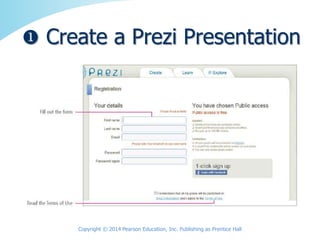
  • #5 Like many accounts, to apply for a Prezi account, you must provide personal information and create a profile. You should also familiarize yourself with the terms of use.
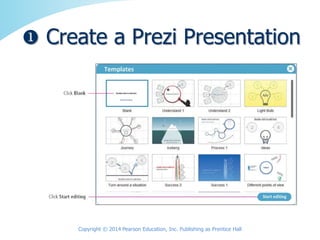
  • #6 Once signed up, you can create a presentation. Begin by entering a presentation title and description, select a template, and click Start editing.
  • #7 SlideShare is an online presentation management and sharing site. YouTube is a site for sharing videos, and SlideShare is a site for sharing presentations. SlideShare accounts are free—only allowing the creation of public presentations—or Pro—also allowing the creation of private presentations. SlideShare presentations can be embedded into web pages or shared as hyperlinks.
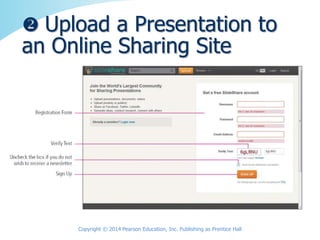
  • #8 To create a SlideShare account, you must provide user information.
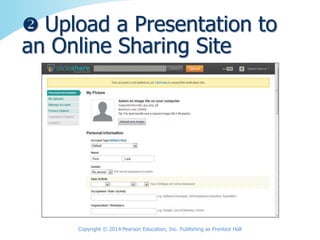
  • #9 As you saw with Prezi, to create a SlideShare account, you must also provide personal information.
  • #10 Synchronous communication takes place when people communicate at the same time as with a phone conversation. Asynchronous communication takes place when people communicate at different times as when emailing messages. VoiceThread is an online service that enables asynchronous communication in response to online content.
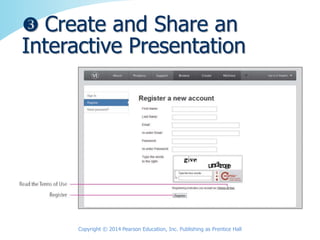
  • #11 To create a VoiceThread account, go to www.voicethread.com, enter your email address, and select a password. You must register by entering personal information. Be sure to familiarize yourself with the terms of use.
  • #12 Prezi is a cloud-based application used to create presentations containing multimedia content. SlideShare is an online site which can be used to share PowerPoint presentations. VoiceThread is an online site where presentations can be shared and users can make comments.