



Click to edit Master title stylelove your event software
With over 7700+ hours of
development in new products and
enhancements this year, our
platform is in constant motion
thanks to you
Click to edit Master title stylelove your event software
We wanted to highlight some of the
new features available in the platform:
Responsive eReg
Mass Upload
Payment Plans
Onsite Admin Reg
eSelect Module
website
Click to edit Master title styleNew Features: Responsive eReg
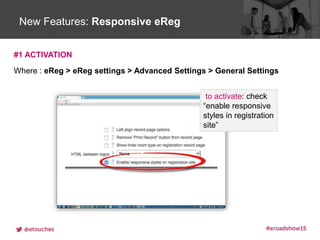
#1 ACTIVATION
Where : eReg > eReg settings > Advanced Settings > General Settings
to activate: check
“enable responsive
styles in registration
site”
Click to edit Master title styleNew Features: Responsive eReg
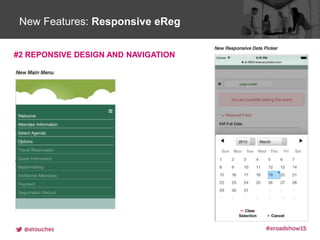
#2 REPONSIVE DESIGN AND NAVIGATION
Click to edit Master title styleNew Features: Responsive eReg
Click to edit Master title styleNew Features: Mass Update Via Upload
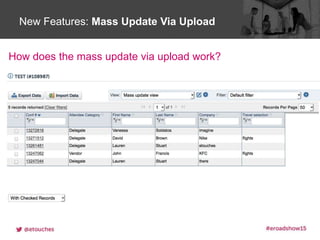
How does the mass update via upload work?
Click to edit Master title styleNew Features: Partial Payments & Payment Plan
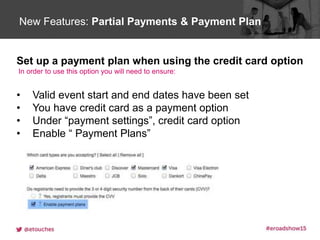
Set up a payment plan when using the credit card option
In order to use this option you will need to ensure:
• Valid event start and end dates have been set
• You have credit card as a payment option
• Under “payment settings”, credit card option
• Enable “ Payment Plans”
Click to edit Master title styleNew Features: Partial Payments & Payment Plan
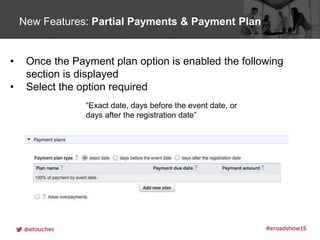
• Once the Payment plan option is enabled the following
section is displayed
• Select the option required
“Exact date, days before the event date, or
days after the registration date”
Click to edit Master title styleNew Features: Partial Payments & Payment Plan
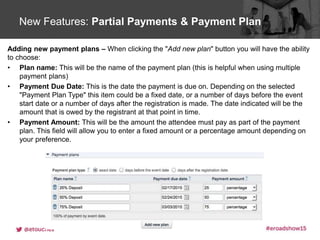
Adding new payment plans – When clicking the "Add new plan" button you will have the ability
to choose:
• Plan name: This will be the name of the payment plan (this is helpful when using multiple
payment plans)
• Payment Due Date: This is the date the payment is due on. Depending on the selected
"Payment Plan Type" this item could be a fixed date, or a number of days before the event
start date or a number of days after the registration is made. The date indicated will be the
amount that is owed by the registrant at that point in time.
• Payment Amount: This will be the amount the attendee must pay as part of the payment
plan. This field will allow you to enter a fixed amount or a percentage amount depending on
your preference.
Click to edit Master title styleNew Features: Partial Payments & Payment Plan
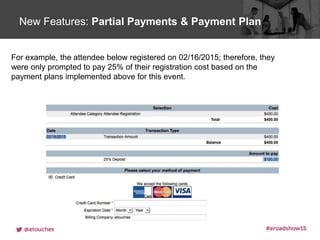
For example, the attendee below registered on 02/16/2015; therefore, they
were only prompted to pay 25% of their registration cost based on the
payment plans implemented above for this event.
Click to edit Master title styleNew Features: Partial Payments & Payment Plan
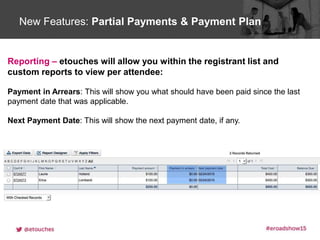
Reporting – etouches will allow you within the registrant list and
custom reports to view per attendee:
Payment in Arrears: This will show you what should have been paid since the last
payment date that was applicable.
Next Payment Date: This will show the next payment date, if any.
Click to edit Master title styleNew Features: Admin Check-in Function
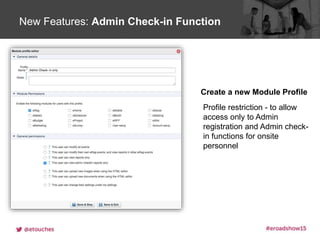
Profile restriction - to allow
access only to Admin
registration and Admin check-
in functions for onsite
personnel
Create a new Module Profile
Click to edit Master title styleNew Features: Admin Check-in Function
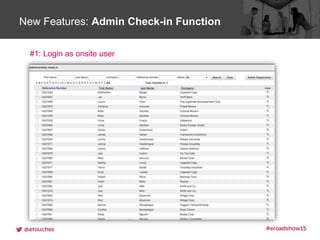
#1: Login as onsite user
Click to edit Master title styleNew Features: Admin Check-in Function
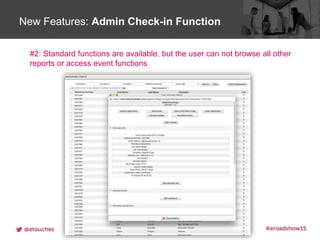
#2: Standard functions are available, but the user can not browse all other
reports or access event functions
Click to edit Master title styleNew Features: Admin Check-in Function
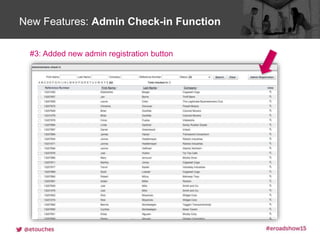
Added new Admin registration button
#3: Added new admin registration button
Click to edit Master title styleNew Features: Admin Check-in Function
Added new Admin registration button
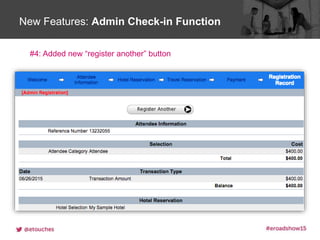
#4: Added new “register another” button
Click to edit Master title styleNew eSelect interface
Click to edit Master title styleeSelect Features
Click to edit Master title styleeSelect User View
Click to edit Master title styleeSelect Reviewer Scores
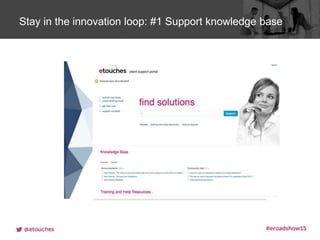
Click to edit Master title styleStay in the innovation loop: #1 Support knowledge base
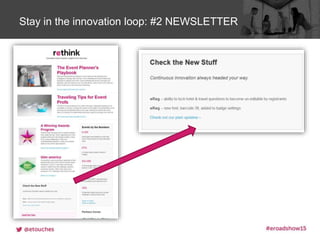
Click to edit Master title styleStay in the innovation loop: #2 NEWSLETTER
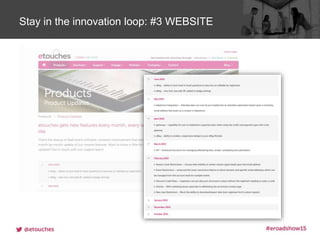
Click to edit Master title styleStay in the innovation loop: #3 WEBSITE
New etouches Platform Feaures - September 2015

New etouches Platform Feaures - September 2015

  • 2.
    Click to editMaster title stylelove your event software With over 7700+ hours of development in new products and enhancements this year, our platform is in constant motion thanks to you
  • 3.
    Click to editMaster title stylelove your event software We wanted to highlight some of the new features available in the platform: Responsive eReg Mass Upload Payment Plans Onsite Admin Reg eSelect Module
  • 4.
  • 5.
    Click to editMaster title styleNew Features: Responsive eReg #1 ACTIVATION Where : eReg > eReg settings > Advanced Settings > General Settings to activate: check “enable responsive styles in registration site”
  • 6.
    Click to editMaster title styleNew Features: Responsive eReg #2 REPONSIVE DESIGN AND NAVIGATION
  • 7.
    Click to editMaster title styleNew Features: Responsive eReg
  • 9.
    Click to editMaster title styleNew Features: Mass Update Via Upload How does the mass update via upload work?
  • 11.
    Click to editMaster title styleNew Features: Partial Payments & Payment Plan Set up a payment plan when using the credit card option In order to use this option you will need to ensure: • Valid event start and end dates have been set • You have credit card as a payment option • Under “payment settings”, credit card option • Enable “ Payment Plans”
  • 12.
    Click to editMaster title styleNew Features: Partial Payments & Payment Plan • Once the Payment plan option is enabled the following section is displayed • Select the option required “Exact date, days before the event date, or days after the registration date”
  • 13.
    Click to editMaster title styleNew Features: Partial Payments & Payment Plan Adding new payment plans – When clicking the "Add new plan" button you will have the ability to choose: • Plan name: This will be the name of the payment plan (this is helpful when using multiple payment plans) • Payment Due Date: This is the date the payment is due on. Depending on the selected "Payment Plan Type" this item could be a fixed date, or a number of days before the event start date or a number of days after the registration is made. The date indicated will be the amount that is owed by the registrant at that point in time. • Payment Amount: This will be the amount the attendee must pay as part of the payment plan. This field will allow you to enter a fixed amount or a percentage amount depending on your preference.
  • 14.
    Click to editMaster title styleNew Features: Partial Payments & Payment Plan For example, the attendee below registered on 02/16/2015; therefore, they were only prompted to pay 25% of their registration cost based on the payment plans implemented above for this event.
  • 15.
    Click to editMaster title styleNew Features: Partial Payments & Payment Plan Reporting – etouches will allow you within the registrant list and custom reports to view per attendee: Payment in Arrears: This will show you what should have been paid since the last payment date that was applicable. Next Payment Date: This will show the next payment date, if any.
  • 17.
    Click to editMaster title styleNew Features: Admin Check-in Function Profile restriction - to allow access only to Admin registration and Admin check- in functions for onsite personnel Create a new Module Profile
  • 18.
    Click to editMaster title styleNew Features: Admin Check-in Function #1: Login as onsite user
  • 19.
    Click to editMaster title styleNew Features: Admin Check-in Function #2: Standard functions are available, but the user can not browse all other reports or access event functions
  • 20.
    Click to editMaster title styleNew Features: Admin Check-in Function Added new Admin registration button #3: Added new admin registration button
  • 21.
    Click to editMaster title styleNew Features: Admin Check-in Function Added new Admin registration button #4: Added new “register another” button
  • 23.
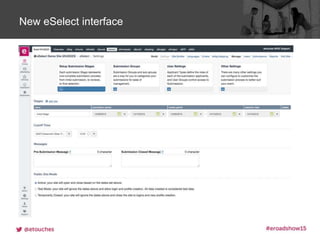
    Click to editMaster title styleNew eSelect interface
  • 24.
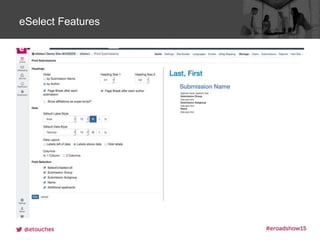
    Click to editMaster title styleeSelect Features
  • 25.
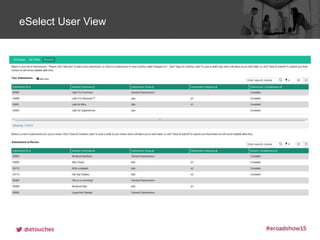
    Click to editMaster title styleeSelect User View
  • 26.
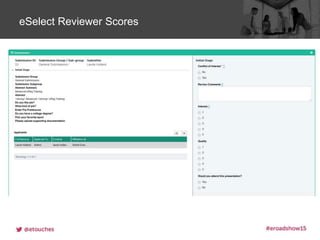
    Click to editMaster title styleeSelect Reviewer Scores
  • 28.
    Click to editMaster title styleStay in the innovation loop: #1 Support knowledge base
  • 29.
    Click to editMaster title styleStay in the innovation loop: #2 NEWSLETTER
  • 30.
    Click to editMaster title styleStay in the innovation loop: #3 WEBSITE

Editor's Notes

  • #3 We’ve spent over 7,700 hours on the development of new products and enhancements this year. And it’s thanks to you, that our platform is in constant motion. The feature request ideas we’ve received globally have helped us to achieve and maintain this momentum.
  • #4 Some of the new features now available include: Responsive eReg Mass Upload Payment plans An Onsite Admin registration profile, and A new eSelect module And I’ll take you through each of these in a little more detail now.
  • #5 eReg, our most widely used module is now responsive on any device. Let’s take a look at a responsive website in action. https://www.eiseverywhere.com/ereg/newreg.php?eventid=142219 As you can see here, when I change the size of the page the fields change and adapt to fit the space
  • #6  To enable this on your registration sites, simply go eReg Settings > Advanced Settings > General Settings and select this checkbox
  • #7 This will improve the registration experience for your attendees by allowing them to register on smart phones and tablets as well as their desktops and laptops. On screen are some screenshots from a smart phone of the New main Menu and New responsive date selector
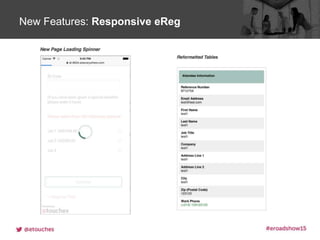
  • #8 There is also new page loading spinner and reformatted tables
  • #9 Another new feature is mass updating information for attendees via upload
  • #10 Only users with a specific module profiles can use Mass Upload, and you can contact Support to activate this. Then you can export the Registration list, make changes to the spreadsheet and then upload it. This is particularly useful for clients who get updated travel and hotel information from their travel agencies. Making mass changes to all of your attendees is now a lot quicker and easier.
  • #11 Now let’s take a look at the new Payment feature: Partial Payments and Payment Plans
  • #12 When using the credit card payment method with a gateway, you can now allow attendees to make a partial payment, or deposit, rather than just the full amount.
  • #13 You can decide the payment due date, either an exact date, or a specific amount of days before or after the event.
  • #14 When adding a new payment plan you can select; A payment plan name The payment due date And the payment amount, either a fixed amount or a percentage of the full registration fee
  • #15 For example, this attendee registered on the 16 February, therefore they were only prompted to pay 25% of the registration cost. So $100 instead of the full $400
  • #16 Reporting on payment plans can be done on the registration list and in custom reports, with the fields Payment in arrears, and Next payment due And you can of course still use the balance due, total cost and other standard fields.
  • #17 We have also released an Admin Check-in User Profile
  • #18 In User Profiles you can now create a profile for users which restricts them to “Admin check-in and Admin registration functions” only.
  • #19 When logged in as this profile, the user can check attendees in…
  • #20  and look up attendee details. but none of the other editing options are available within eReg. So it’s great for your onsite registration staff.
  • #21 We’ve also added a button allowing users with this profile to do an Admin registration from the check-in report
  • #22 And another button that quickly allows them to quickly register another attendee from the Registration Record page
  • #23 The new eSelect interface is something we’re really excited about.
  • #24 This is the back end of the new eSelect, which will be released in just a couple of weeks at the end of September. eSelect is ideal for managing award nominations and abstract submissions. It allows submitters to log in and put forward their content, and then reviewers can log in to view the submitters content and add scores and comments. So it’s an easy way for you to manage both of these user types and their nomination or abstract experience.
  • #25 The new eSelect features include: A multi-stage submission process Intuitive User Role and Review assignment Comprehensive emails (and this includes default system messages and the ability to create your own emails) Ad Hoc reporting and dashboards Plus, Submitters can use scientific notation, special characters and mathematic equations in their submissions. And as you can see on this screen – you can also print Abstracts books and export straight to excel or Microsoft word
  • #26 Here is the view for a user logged in who is both a Submitter and Reviewer. You can also create user who are either a submitter or reviewer. This view is completely customisable so you can make sure it is on brand with your event.
  • #27 Here you can see just how easier it is for Reviewers to log in and score submissions. On the left hand side they can read the submission and on the right hand side they can submit their scores. There’s not enough time for me to show you all of the great features in eSelect today, so please sign up for a training session in October.
  • #28 We are continually adding new features and enhancements to our platform, so how can you keep up with our innovations?
  • #29 Visit the Support Portal to view how-to guides, videos and make Feature Requests
  • #30 You can also sign up to our newsletter to see the “New Stuff” section. If you aren’t already receiving this you can join our mailing list at etouches.com on the Rethink Newsletter page under the Engage heading
  • #31 On our website you can also view the Product update section. As I mentioned earlier, it’s your ideas that help us to stay at the fore-front of event technology. So please keep suggesting and showing your support for the ideas in the Feature Request section of the Support Portal.