CONTENTS
INTRODUCTION
COMPUTER NETWORK
TYPES OF NETWORK
CLASSIFICATION OF NETWORK ARCHITECTURE
NETWORK TOPOLOGY
INTRODUCTION
 A computer network is a telecommunications network that allows
computers to exchange data.
 The physical connection between networked computing devices is
established using either cable media or wireless media.
 The best-known computer network is the internet.
COMPUTER NETWORK
 A collection of computing devices that are connected in various ways
in order to communicate and share resources.
 Usually, the connections between computers in a network are made
using physical wires or cables.
 However, some connections are wireless, using radio waves or
infrared signals.
TYPES OF NETWORK
 Based on the size and the coverage area, networks
are categorized into the following types:
Personal Area Networks (PANs)
Local Area Networks (LANs)
Metropolitan Area Networks (MANs)
Wide Area Networks (WANs)
PERSONAL AREA NETWORKS (PANs)
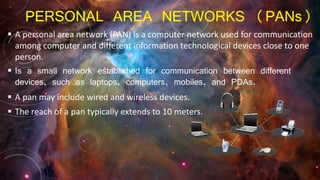
 A personal area network (PAN) is a computer network used for communication
among computer and different information technological devices close to one
person.
 Is a small network established for communication between different
devices, such as laptops, computers, mobiles, and PDAs.
 A pan may include wired and wireless devices.
 The reach of a pan typically extends to 10 meters.
LOCAL AREA NETWORK(LANs)
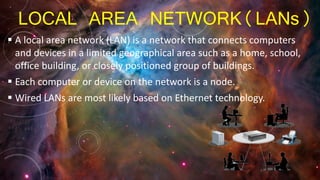
 A local area network (LAN) is a network that connects computers
and devices in a limited geographical area such as a home, school,
office building, or closely positioned group of buildings.
 Each computer or device on the network is a node.
 Wired LANs are most likely based on Ethernet technology.
METROPOLITAN AREA NETWORK (MAN)
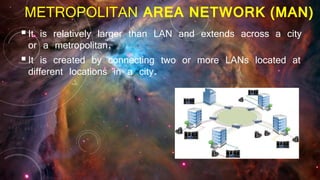
It is relatively larger than LAN and extends across a city
or a metropolitan.
It is created by connecting two or more LANs located at
different locations in a city.
WIDE AREA NETWORK(WANs)
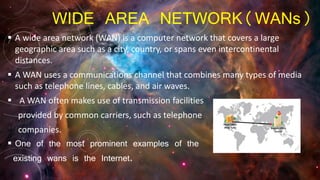
 A wide area network (WAN) is a computer network that covers a large
geographic area such as a city, country, or spans even intercontinental
distances.
 A WAN uses a communications channel that combines many types of media
such as telephone lines, cables, and air waves.
 A WAN often makes use of transmission facilities
provided by common carriers, such as telephone
companies.
 One of the most prominent examples of the
existing wans is the Internet.
CLASSIFICATION OF NETWORK ARCHITECTURE
The architecture of a network is a logical design that
determines how the devices in the network communicate.
The commonly used architectures for computer networks are:
 Client-server architecture
 Peer-to-peer architecture
 Hybrid architecture
CLIENT-SERVER ARCHITECTURE
 On a network built using the client-server architecture, the
devices communicate to other devices through a central
computer referred to as a server.
 The server is a terminal with high processing power, which
provides services for the other computers on the network.
 The client is a terminal that accesses the resources
available on a server.
PEER-TO-PEER ARCHITECTURE
 On a network built using the peer-to-peer architecture, no specific
distinction exists between a client and a server.
 Any node can provide a service as well as send a request for a
service from another node on the network.
 The peer-to-peer network architecture allows sharing of resources,
data, and users.
 Each node on the network has full control over the network
resources.
HYBRID ARCHITECTURE
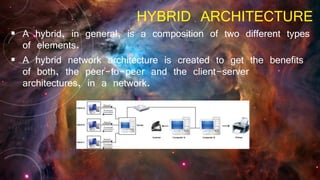
 A hybrid, in general, is a composition of two different types
of elements.
 A hybrid network architecture is created to get the benefits
of both, the peer-to-peer and the client-server
architectures, in a network.
NETWORK TOPOLOGY
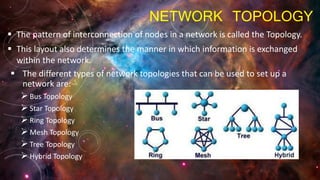
 The pattern of interconnection of nodes in a network is called the Topology.
 This layout also determines the manner in which information is exchanged
within the network.
 The different types of network topologies that can be used to set up a
network are:
Bus Topology
Star Topology
Ring Topology
Mesh Topology
Tree Topology
Hybrid Topology
BUS TOPOLOGY
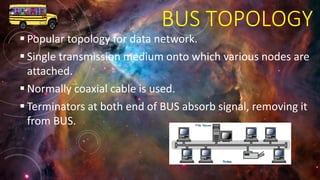
 Popular topology for data network.
 Single transmission medium onto which various nodes are
attached.
 Normally coaxial cable is used.
 Terminators at both end of BUS absorb signal, removing it
from BUS.
STAR TOPOLOGY
 The star topology connects nodes over a network using a central control unit called the
hub.
 You can easily add nodes to a star-based network by attaching the required nodes to the
hub.
 Setting up a star topology requires a lot of cabling because all
the nodes have to connect to the hub.
RING TOPOLOGY
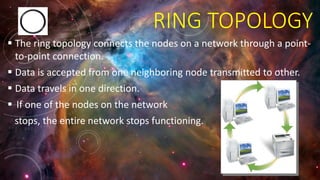
 The ring topology connects the nodes on a network through a point-
to-point connection.
 Data is accepted from one neighboring node transmitted to other.
 Data travels in one direction.
 If one of the nodes on the network
stops, the entire network stops functioning.
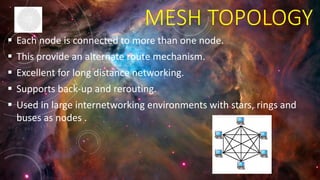
MESH TOPOLOGY
 Each node is connected to more than one node.
 This provide an alternate route mechanism.
 Excellent for long distance networking.
 Supports back-up and rerouting.
 Used in large internetworking environments with stars, rings and
buses as nodes .
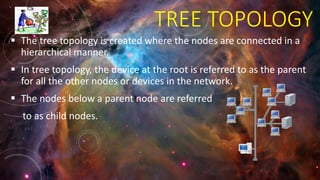
TREE TOPOLOGY
 The tree topology is created where the nodes are connected in a
hierarchical manner.
 In tree topology, the device at the root is referred to as the parent
for all the other nodes or devices in the network.
 The nodes below a parent node are referred
to as child nodes.
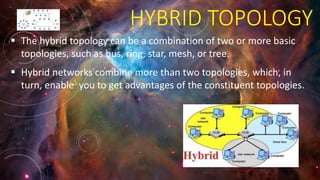
HYBRID TOPOLOGY
 The hybrid topology can be a combination of two or more basic
topologies, such as bus, ring, star, mesh, or tree.
 Hybrid networks combine more than two topologies, which, in
turn, enable you to get advantages of the constituent topologies.
Networking(holiday homework)

Networking(holiday homework)

  • 2.
    CONTENTS INTRODUCTION COMPUTER NETWORK TYPES OFNETWORK CLASSIFICATION OF NETWORK ARCHITECTURE NETWORK TOPOLOGY
  • 3.
    INTRODUCTION  A computernetwork is a telecommunications network that allows computers to exchange data.  The physical connection between networked computing devices is established using either cable media or wireless media.  The best-known computer network is the internet.
  • 4.
    COMPUTER NETWORK  Acollection of computing devices that are connected in various ways in order to communicate and share resources.  Usually, the connections between computers in a network are made using physical wires or cables.  However, some connections are wireless, using radio waves or infrared signals.
  • 5.
    TYPES OF NETWORK Based on the size and the coverage area, networks are categorized into the following types: Personal Area Networks (PANs) Local Area Networks (LANs) Metropolitan Area Networks (MANs) Wide Area Networks (WANs)
  • 6.
    PERSONAL AREA NETWORKS(PANs)  A personal area network (PAN) is a computer network used for communication among computer and different information technological devices close to one person.  Is a small network established for communication between different devices, such as laptops, computers, mobiles, and PDAs.  A pan may include wired and wireless devices.  The reach of a pan typically extends to 10 meters.
  • 7.
    LOCAL AREA NETWORK(LANs) A local area network (LAN) is a network that connects computers and devices in a limited geographical area such as a home, school, office building, or closely positioned group of buildings.  Each computer or device on the network is a node.  Wired LANs are most likely based on Ethernet technology.
  • 8.
    METROPOLITAN AREA NETWORK(MAN) It is relatively larger than LAN and extends across a city or a metropolitan. It is created by connecting two or more LANs located at different locations in a city.
  • 9.
    WIDE AREA NETWORK(WANs) A wide area network (WAN) is a computer network that covers a large geographic area such as a city, country, or spans even intercontinental distances.  A WAN uses a communications channel that combines many types of media such as telephone lines, cables, and air waves.  A WAN often makes use of transmission facilities provided by common carriers, such as telephone companies.  One of the most prominent examples of the existing wans is the Internet.
  • 10.
    CLASSIFICATION OF NETWORKARCHITECTURE The architecture of a network is a logical design that determines how the devices in the network communicate. The commonly used architectures for computer networks are:  Client-server architecture  Peer-to-peer architecture  Hybrid architecture
  • 11.
    CLIENT-SERVER ARCHITECTURE  Ona network built using the client-server architecture, the devices communicate to other devices through a central computer referred to as a server.  The server is a terminal with high processing power, which provides services for the other computers on the network.  The client is a terminal that accesses the resources available on a server.
  • 12.
    PEER-TO-PEER ARCHITECTURE  Ona network built using the peer-to-peer architecture, no specific distinction exists between a client and a server.  Any node can provide a service as well as send a request for a service from another node on the network.  The peer-to-peer network architecture allows sharing of resources, data, and users.  Each node on the network has full control over the network resources.
  • 13.
    HYBRID ARCHITECTURE  Ahybrid, in general, is a composition of two different types of elements.  A hybrid network architecture is created to get the benefits of both, the peer-to-peer and the client-server architectures, in a network.
  • 14.
    NETWORK TOPOLOGY  Thepattern of interconnection of nodes in a network is called the Topology.  This layout also determines the manner in which information is exchanged within the network.  The different types of network topologies that can be used to set up a network are: Bus Topology Star Topology Ring Topology Mesh Topology Tree Topology Hybrid Topology
  • 15.
    BUS TOPOLOGY  Populartopology for data network.  Single transmission medium onto which various nodes are attached.  Normally coaxial cable is used.  Terminators at both end of BUS absorb signal, removing it from BUS.
  • 16.
    STAR TOPOLOGY  Thestar topology connects nodes over a network using a central control unit called the hub.  You can easily add nodes to a star-based network by attaching the required nodes to the hub.  Setting up a star topology requires a lot of cabling because all the nodes have to connect to the hub.
  • 17.
    RING TOPOLOGY  Thering topology connects the nodes on a network through a point- to-point connection.  Data is accepted from one neighboring node transmitted to other.  Data travels in one direction.  If one of the nodes on the network stops, the entire network stops functioning.
  • 18.
    MESH TOPOLOGY  Eachnode is connected to more than one node.  This provide an alternate route mechanism.  Excellent for long distance networking.  Supports back-up and rerouting.  Used in large internetworking environments with stars, rings and buses as nodes .
  • 19.
    TREE TOPOLOGY  Thetree topology is created where the nodes are connected in a hierarchical manner.  In tree topology, the device at the root is referred to as the parent for all the other nodes or devices in the network.  The nodes below a parent node are referred to as child nodes.
  • 20.
    HYBRID TOPOLOGY  Thehybrid topology can be a combination of two or more basic topologies, such as bus, ring, star, mesh, or tree.  Hybrid networks combine more than two topologies, which, in turn, enable you to get advantages of the constituent topologies.