7-291-1/5

              Network Address Translation (NAT)
I. NAT outbound (NAT ra)
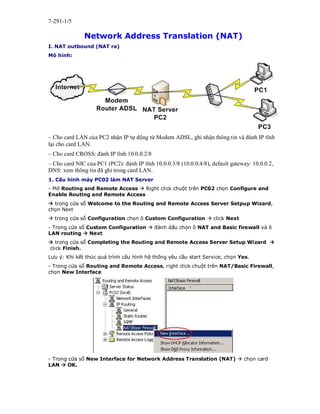
Mô hình:


– Cho card LAN của PC2 nhận IP tự động từ Modem ADSL, ghi nhận thông tin và đánh IP tĩnh
lại cho card LAN.
– Cho card CROSS: đánh IP tĩnh 10.0.0.2/8
– Cho card NIC của PC1 (PC2): đánh IP tĩnh 10.0.0.3/8 (10.0.0.4/8), default gateway: 10.0.0.2,
DNS: xem thông tin đã ghi trong card LAN.
1. Cấu hình máy PC02 làm NAT Server
- Mở Routing and Remote Access  Right click chuột trên PC02 chọn Configure and
Enable Routing and Remote Access
 trong cửa sổ Welcome to the Routing and Remote Access Server Setpup Wizard,
chọn Next
 trong cửa sổ Configuration chọn ô Custom Configuration  click Next
- Trong cửa sổ Custom Configuration  đánh dấu chọn ô NAT and Basic firewall và ô
LAN routing  Next
 trong cửa sổ Completing the Routing and Remote Access Server Setup Wizard 
click Finish.
Lưu ý: Khi kết thúc quá trình cấu hình hệ thống yêu cầu start Service, chọn Yes.
- Trong cửa sổ Routing and Remote Access, right click chuột trên NAT/Basic Firewall,
chọn New Interface


- Trong cửa sổ New Interface for Network Address Translation (NAT)  chọn card
LAN  OK.
7-291-2/5


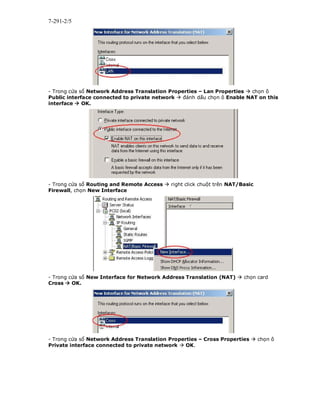
- Trong cửa sổ Network Address Translation Properties – Lan Properties  chọn ô
Public interface connected to private network  đánh dấu chọn ô Enable NAT on this
interface  OK.


- Trong cửa sổ Routing and Remote Access  right click chuột trên NAT/Basic
Firewall, chọn New Interface


- Trong cửa sổ New Interface for Network Address Translation (NAT)  chọn card
Cross  OK.


- Trong cửa sổ Network Address Translation Properties – Cross Properties  chọn ô
Private interface connected to private network  OK.
7-291-3/5


- Trong cửa sổ Routing and Remote Access  vào IP Routing  right click chuột trên
Static Routes chọn New Static Route…


 trong cửa sổ Static Route cấu hình như sau:
Interface: LAN
Destination: 0.0.0.0
Network mask: 0.0.0.0
Gateway: 192.168.0.250
Metric: 1
 OK
Lưu ý: Gateway phải cùng net ID với địa chỉ IP card LAN


- Trong cửa sổ Routing and Remote Access  Right click chuột trên PC02 chọn All
Tasks  Restart
2. Kiểm tra:
Máy PC01 Log on Administrator  mở Internet Explorer  truy cập vào địa chỉ
http://www.yahoo.com
Lưu ý: máy PC01 đã truy cập được Internet
                                       KẾT THÚC
7-291-4/5
II. NAT Inbound (NAT vào)
Chuẩn bị:


1. Cấu hình Web Server trên máy PC01
Từ menu Start  Settings  Control Pannel  Add/Remove Programs 
Add/Remove Windows Component  chọn mục Application Server  chọn Detail 
đánh dấu chọn vào ô Internet Information Services (IIS)  OK  Next  Finish.
Lưu ý: trong quá trình cài đặt IIS, chỉ đường dẫn vào thư mục I386 trong dĩa CD Windows
server 2003 khi hệ thống yêu cầu.
- Mở Windows Explore  vào thư mục C:Interpubwwwroot  tạo file Default.htm
có nội dung tùy thích
- Mở Internet Explorer  truy cập vào địa chỉ http://localhost
Lưu ý: kiểm tra đã truy cập được trang web vừa mới tạo.
2. Cấu hình NAT Server trên máy PC02
- Mở Routing and Remote Access  chọn mục NAT/Basic Firewall  Right click chuột
trên LAN chọn Properties  chọn tab Services and Ports  kéo thanh trượt xuống phía
dưới chọn mục Web Server (HTTP)


 trong hộp thoại Edit Service nhập địa chỉ IP của máy PC01 OK
7-291-5/5


- Trong Routing and Remote Access  right click phải trên PC02 chọn All Tasks 
Restart
Kiểm tra:
Máy PC03 Mở Internet Explorer  truy cập vào địa chỉ http://192.168.0.2 (tuỳ theo IP đã
nhận ban đầu)
Lưu ý: máy PC03 đã truy cập thành công vào web site cửa máy PC01
                                        Kết thúc

Network address translatio

  • 1.
    7-291-1/5 Network Address Translation (NAT) I. NAT outbound (NAT ra) Mô hình: – Cho card LAN của PC2 nhận IP tự động từ Modem ADSL, ghi nhận thông tin và đánh IP tĩnh lại cho card LAN. – Cho card CROSS: đánh IP tĩnh 10.0.0.2/8 – Cho card NIC của PC1 (PC2): đánh IP tĩnh 10.0.0.3/8 (10.0.0.4/8), default gateway: 10.0.0.2, DNS: xem thông tin đã ghi trong card LAN. 1. Cấu hình máy PC02 làm NAT Server - Mở Routing and Remote Access  Right click chuột trên PC02 chọn Configure and Enable Routing and Remote Access  trong cửa sổ Welcome to the Routing and Remote Access Server Setpup Wizard, chọn Next  trong cửa sổ Configuration chọn ô Custom Configuration  click Next - Trong cửa sổ Custom Configuration  đánh dấu chọn ô NAT and Basic firewall và ô LAN routing  Next  trong cửa sổ Completing the Routing and Remote Access Server Setup Wizard  click Finish. Lưu ý: Khi kết thúc quá trình cấu hình hệ thống yêu cầu start Service, chọn Yes. - Trong cửa sổ Routing and Remote Access, right click chuột trên NAT/Basic Firewall, chọn New Interface - Trong cửa sổ New Interface for Network Address Translation (NAT)  chọn card LAN  OK.
  • 2.
    7-291-2/5 - Trong cửasổ Network Address Translation Properties – Lan Properties  chọn ô Public interface connected to private network  đánh dấu chọn ô Enable NAT on this interface  OK. - Trong cửa sổ Routing and Remote Access  right click chuột trên NAT/Basic Firewall, chọn New Interface - Trong cửa sổ New Interface for Network Address Translation (NAT)  chọn card Cross  OK. - Trong cửa sổ Network Address Translation Properties – Cross Properties  chọn ô Private interface connected to private network  OK.
  • 3.
    7-291-3/5 - Trong cửasổ Routing and Remote Access  vào IP Routing  right click chuột trên Static Routes chọn New Static Route…  trong cửa sổ Static Route cấu hình như sau: Interface: LAN Destination: 0.0.0.0 Network mask: 0.0.0.0 Gateway: 192.168.0.250 Metric: 1  OK Lưu ý: Gateway phải cùng net ID với địa chỉ IP card LAN - Trong cửa sổ Routing and Remote Access  Right click chuột trên PC02 chọn All Tasks  Restart 2. Kiểm tra: Máy PC01 Log on Administrator  mở Internet Explorer  truy cập vào địa chỉ http://www.yahoo.com Lưu ý: máy PC01 đã truy cập được Internet KẾT THÚC
  • 4.
    7-291-4/5 II. NAT Inbound(NAT vào) Chuẩn bị: 1. Cấu hình Web Server trên máy PC01 Từ menu Start  Settings  Control Pannel  Add/Remove Programs  Add/Remove Windows Component  chọn mục Application Server  chọn Detail  đánh dấu chọn vào ô Internet Information Services (IIS)  OK  Next  Finish. Lưu ý: trong quá trình cài đặt IIS, chỉ đường dẫn vào thư mục I386 trong dĩa CD Windows server 2003 khi hệ thống yêu cầu. - Mở Windows Explore  vào thư mục C:Interpubwwwroot  tạo file Default.htm có nội dung tùy thích - Mở Internet Explorer  truy cập vào địa chỉ http://localhost Lưu ý: kiểm tra đã truy cập được trang web vừa mới tạo. 2. Cấu hình NAT Server trên máy PC02 - Mở Routing and Remote Access  chọn mục NAT/Basic Firewall  Right click chuột trên LAN chọn Properties  chọn tab Services and Ports  kéo thanh trượt xuống phía dưới chọn mục Web Server (HTTP)  trong hộp thoại Edit Service nhập địa chỉ IP của máy PC01 OK
  • 5.
    7-291-5/5 - Trong Routingand Remote Access  right click phải trên PC02 chọn All Tasks  Restart Kiểm tra: Máy PC03 Mở Internet Explorer  truy cập vào địa chỉ http://192.168.0.2 (tuỳ theo IP đã nhận ban đầu) Lưu ý: máy PC03 đã truy cập thành công vào web site cửa máy PC01 Kết thúc