2-291-1/5

      Dynamic Host Configuration Protocol (DHCP)
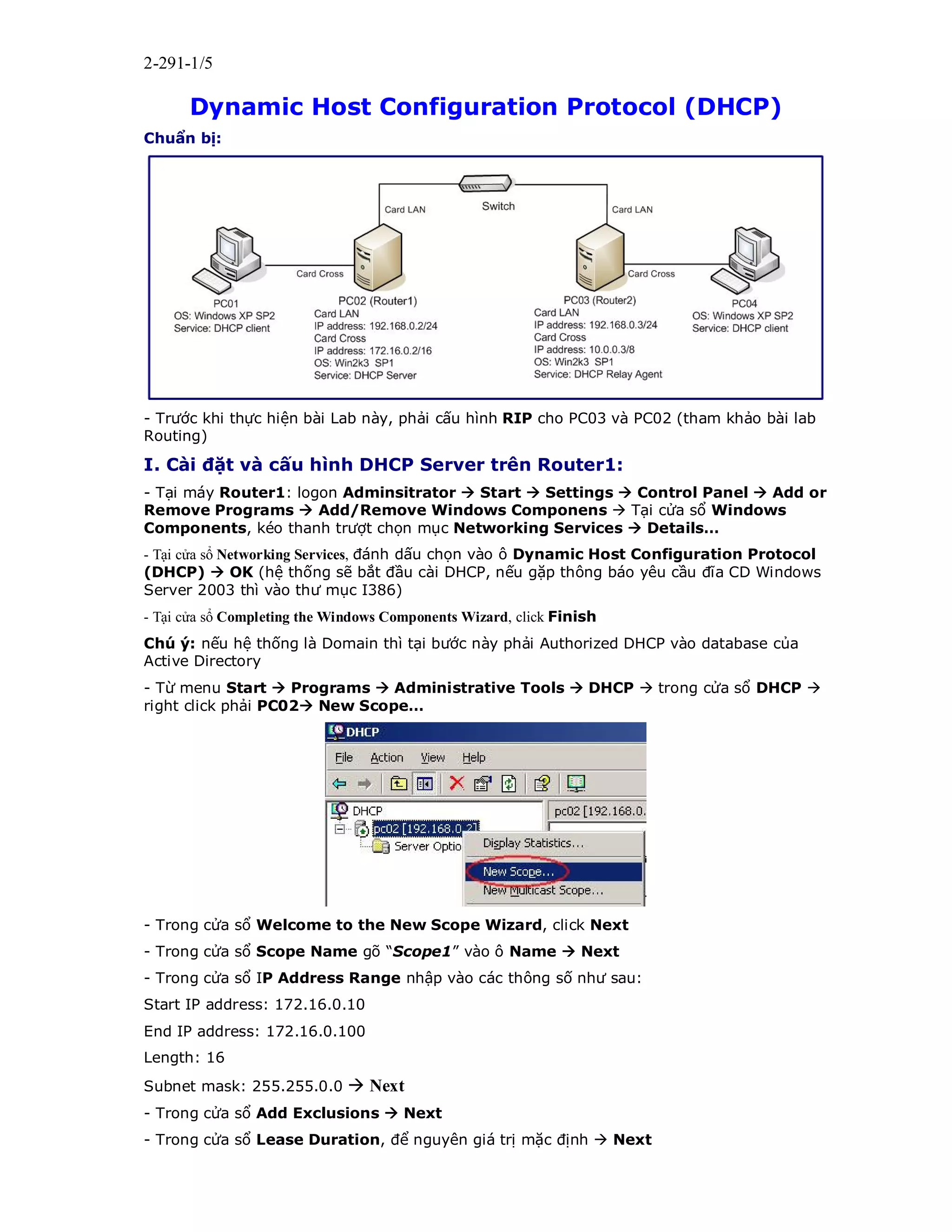
Chuẩn bị:


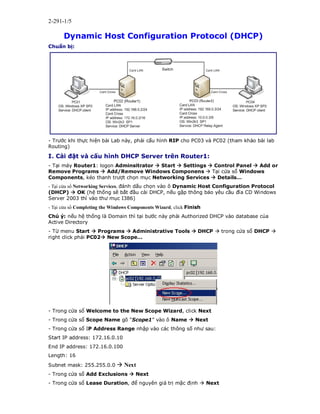
- Trước khi thực hiện bài Lab này, phải cấu hình RIP cho PC03 và PC02 (tham khảo bài lab
Routing)

I. Cài đặt và cấu hình DHCP Server trên Router1:
- Tại máy Router1: logon Adminsitrator  Start  Settings  Control Panel  Add or
Remove Programs  Add/Remove Windows Componens  Tại cửa sổ Windows
Components, kéo thanh trượt chọn mục Networking Services  Details…
- Tại cửa sổ Networking Services, đánh dấu chọn vào ô Dynamic Host Configuration Protocol
(DHCP)  OK (hệ thống sẽ bắt đầu cài DHCP, nếu gặp thông báo yêu cầu đĩa CD Windows
Server 2003 thì vào thư mục I386)
- Tại cửa sổ Completing the Windows Components Wizard, click Finish
Chú ý: nếu hệ thống là Domain thì tại bước này phải Authorized DHCP vào database của
Active Directory
- Từ menu Start  Programs  Administrative Tools  DHCP  trong cửa sổ DHCP 
right click phải PC02 New Scope…


- Trong cửa sổ Welcome to the New Scope Wizard, click Next
- Trong cửa sổ Scope Name gõ “Scope1” vào ô Name  Next
- Trong cửa sổ IP Address Range nhập vào các thông số như sau:
Start IP address: 172.16.0.10
End IP address: 172.16.0.100
Length: 16
Subnet mask: 255.255.0.0  Next
- Trong cửa sổ Add Exclusions  Next
- Trong cửa sổ Lease Duration, để nguyên giá trị mặc định  Next
2-291-2/5
- Trong cửa sổ Configure DHCP Options  đánh dấu chọn vào ô No, I will configure
these options later  Next
- Trong cửa sổ Completing the New Scope Wizard, click Finish
- Right click trên Scope1 (Scope được tạo ở trên)  chọn Activate


- Right click trên Scope Options  chọn Configure Options…


- Trong cửa sổ Scope Options  tab General  đánh dấu chọn vào ô 003 Router 
trong ô IP address gõ 172.16.0.2  Add  OK
- Kiểm tra trong Scope Options đã có 003 Router
- Trong cửa sổ DHCP  right click chuột trên PC02 New Scope…  trong cửa sổ Scope
Name gõ “Scope2” vào ô Name  Next
- Trong cửa sổ IP Address Range nhập vào các thông số như sau:
Start Ip address: 10.0.0.100
End IP address: 10.0.0.150
Length: 8
Subnet mask: 255.0.0.0
 Next
- Trong cửa sổ Add Exclusions  Next
- Trong cửa sổ Lease Duration  để nguyên giá trị mặc định  Next
- Trong cửa sổ Configure DHCP Options  đánh dấu chọn vào ô No, I will configure
these options later  Next  Finish
- Right click chuột phải trên Scope2 (Scope được tạo ở trên)  chọn Activate
- Right click chuột trên Scope Options  chọn Configure Options….  trong cửa sổ
Scope Options  tab General  đánh dấu chọn vào ô 033 Router  trong ô IP address
gõ 10.0.0.3  Add  OK
2-291-3/5
 kiểm tra trong Scope Options đã có 003 Router
- Right click chuột trên Server Options  chọn Configure Options….
- Trong cửa sổ Server Options  tab General  đánh dấu chọn vào ô 006 DNS Servers
 trong ô IP address gõ 210.245.31.130  Add  OK

Cấu hình DHCP client trên PC01:
Tại máy PC01: Log on Administrator  mở Properties card Cross  mở properties
Internet Protocol (TCP/IP)  đánh dấu chọn vào 2 ô:
+ Obtain an IP address automatically
+ Obtain DNS server address automatically
 OK  OK
- Vào Command line  gõ ipconfig /release
- Trong Command line  gõ ipconfig /renew
- Trong Command line  gõ ipconfig /all
Lưu ý: sau khi gõ lệnh này DHCP Server sẽ cấp cho PC01 những giá trị sau:
IP Address: 172.16.0.10
Subnet Mask: 255.255.0.0
Default Gateway: 172.16.0.2
DHCP Server: 172.16.0.2
DNS Server: 210.245.31.130

Dynamic host configuration protocol

  • 1.
    2-291-1/5 Dynamic Host Configuration Protocol (DHCP) Chuẩn bị: - Trước khi thực hiện bài Lab này, phải cấu hình RIP cho PC03 và PC02 (tham khảo bài lab Routing) I. Cài đặt và cấu hình DHCP Server trên Router1: - Tại máy Router1: logon Adminsitrator  Start  Settings  Control Panel  Add or Remove Programs  Add/Remove Windows Componens  Tại cửa sổ Windows Components, kéo thanh trượt chọn mục Networking Services  Details… - Tại cửa sổ Networking Services, đánh dấu chọn vào ô Dynamic Host Configuration Protocol (DHCP)  OK (hệ thống sẽ bắt đầu cài DHCP, nếu gặp thông báo yêu cầu đĩa CD Windows Server 2003 thì vào thư mục I386) - Tại cửa sổ Completing the Windows Components Wizard, click Finish Chú ý: nếu hệ thống là Domain thì tại bước này phải Authorized DHCP vào database của Active Directory - Từ menu Start  Programs  Administrative Tools  DHCP  trong cửa sổ DHCP  right click phải PC02 New Scope… - Trong cửa sổ Welcome to the New Scope Wizard, click Next - Trong cửa sổ Scope Name gõ “Scope1” vào ô Name  Next - Trong cửa sổ IP Address Range nhập vào các thông số như sau: Start IP address: 172.16.0.10 End IP address: 172.16.0.100 Length: 16 Subnet mask: 255.255.0.0  Next - Trong cửa sổ Add Exclusions  Next - Trong cửa sổ Lease Duration, để nguyên giá trị mặc định  Next
  • 2.
    2-291-2/5 - Trong cửasổ Configure DHCP Options  đánh dấu chọn vào ô No, I will configure these options later  Next - Trong cửa sổ Completing the New Scope Wizard, click Finish - Right click trên Scope1 (Scope được tạo ở trên)  chọn Activate - Right click trên Scope Options  chọn Configure Options… - Trong cửa sổ Scope Options  tab General  đánh dấu chọn vào ô 003 Router  trong ô IP address gõ 172.16.0.2  Add  OK - Kiểm tra trong Scope Options đã có 003 Router - Trong cửa sổ DHCP  right click chuột trên PC02 New Scope…  trong cửa sổ Scope Name gõ “Scope2” vào ô Name  Next - Trong cửa sổ IP Address Range nhập vào các thông số như sau: Start Ip address: 10.0.0.100 End IP address: 10.0.0.150 Length: 8 Subnet mask: 255.0.0.0  Next - Trong cửa sổ Add Exclusions  Next - Trong cửa sổ Lease Duration  để nguyên giá trị mặc định  Next - Trong cửa sổ Configure DHCP Options  đánh dấu chọn vào ô No, I will configure these options later  Next  Finish - Right click chuột phải trên Scope2 (Scope được tạo ở trên)  chọn Activate - Right click chuột trên Scope Options  chọn Configure Options….  trong cửa sổ Scope Options  tab General  đánh dấu chọn vào ô 033 Router  trong ô IP address gõ 10.0.0.3  Add  OK
  • 3.
    2-291-3/5  kiểm tratrong Scope Options đã có 003 Router - Right click chuột trên Server Options  chọn Configure Options…. - Trong cửa sổ Server Options  tab General  đánh dấu chọn vào ô 006 DNS Servers  trong ô IP address gõ 210.245.31.130  Add  OK Cấu hình DHCP client trên PC01: Tại máy PC01: Log on Administrator  mở Properties card Cross  mở properties Internet Protocol (TCP/IP)  đánh dấu chọn vào 2 ô: + Obtain an IP address automatically + Obtain DNS server address automatically  OK  OK - Vào Command line  gõ ipconfig /release - Trong Command line  gõ ipconfig /renew - Trong Command line  gõ ipconfig /all Lưu ý: sau khi gõ lệnh này DHCP Server sẽ cấp cho PC01 những giá trị sau: IP Address: 172.16.0.10 Subnet Mask: 255.255.0.0 Default Gateway: 172.16.0.2 DHCP Server: 172.16.0.2 DNS Server: 210.245.31.130