.NET Core
(revolution of .NET)
2016
Bohdan Pashkovskyi
Motivation Behind .NET Core
When .NET first shipped in 2002, it was a
single framework, but it didn’t take long
before the .NET Compact Framework
shipped, providing a smaller version of .NET
designed for mobile devices. Over the years,
this exercise was repeated multiple times, so
that today there are different flavors of .NET
specific to different platforms.
Add to this the further platform reach
provided by Mono and Xamarin, which target
Linux, Mac, and native iOS and Android
devices. For each platform, a separate
vertical stack consisting of runtime,
framework, and app model is required to
develop .NET applications.
What is .NET Core
a small, optimized
runtime
CoreCLR
a set of libraries
CoreFX
.NET Core 5 is a modular runtime and
library implementation that includes a
subset of the .NET Framework. Currently
it is feature complete on Windows, and
in-progress builds exist for both Linux
and OS X.
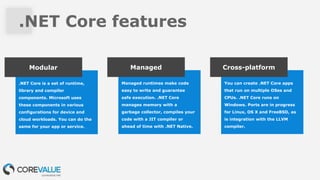
.NET Core features
.NET Core is a set of runtime,
library and compiler
components. Microsoft uses
these components in various
configurations for device and
cloud workloads. You can do the
same for your app or service.
Modular
Managed runtimes make code
easy to write and guarantee
safe execution. .NET Core
manages memory with a
garbage collector, compiles your
code with a JIT compiler or
ahead of time with .NET Native.
.
Managed
You can create .NET Core apps
that run on multiple OSes and
CPUs. .NET Core runs on
Windows. Ports are in progress
for Linux, OS X and FreeBSD, as
is integration with the LLVM
compiler.
Cross-platform
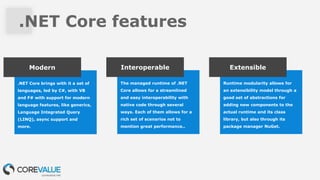
.NET Core features
.NET Core brings with it a set of
languages, led by C#, with VB
and F# with support for modern
language features, like generics,
Language Integrated Query
(LINQ), async support and
more.
Modern
The managed runtime of .NET
Core allows for a streamlined
and easy interoperability with
native code through several
ways. Each of them allows for a
rich set of scenarios not to
mention great performance..
Interoperable
Runtime modularity allows for
an extensibility model through a
good set of abstractions for
adding new components to the
actual runtime and its class
library, but also through its
package manager NuGet.
Extensible
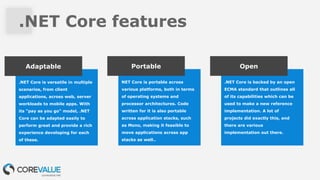
.NET Core features
.NET Core is versatile in multiple
scenarios, from client
applications, across web, server
workloads to mobile apps. With
its "pay as you go" model, .NET
Core can be adapted easily to
perform great and provide a rich
experience developing for each
of these.
Adaptable
NET Core is portable across
various platforms, both in terms
of operating systems and
processor architectures. Code
written for it is also portable
across application stacks, such
as Mono, making it feasible to
move applications across app
stacks as well..
Portable
.NET Core is backed by an open
ECMA standard that outlines all
of its capabilities which can be
used to make a new reference
implementation. A lot of
projects did exactly this, and
there are various
implementation out there.
Open
DNX Overview
The .NET Execution Environment (DNX) is a software development kit (SDK) and runtime
environment that has everything you need to build and run .NET applications for Windows, Mac
and Linux. It provides a host process, CLR hosting logic and managed entry point discovery. DNX
was built for running cross-platform ASP.NET Web applications, but it can run other types of .NET
applications, too, such as cross-platform console apps.
Open source friendly
Why build DNX? Package managers have
completely changed the face of
modern software development
and DNX makes it easy to
create and consume packages.
DNX provides tools for
installing, creating and
managing NuGet packages.
DNX projects simplify building
NuGet packages by cross-
compiling for multiple target
frameworks and can output
NuGet packages directly. You
can reference NuGet packages
directly from your projects and
transitive dependencies are
handled for you. You can also
build and install development
tools as packages for your
project and globally on a
machine.
Build for .NET Core
DNX dramatically simplifies the work needed to
develop cross-platform applications using .NET
Core. It takes care of hosting the CLR, handling
dependencies and bootstrapping your application.
You can easily define projects and solutions using
a lightweight JSON format (project.json), build
your projects and publish them for distribution.
DNX makes it easy to work with open source
projects. With DNX projects you can easily
replace an existing dependency with its
source code and let DNX compile it in-
memory at runtime. You can then debug the
source and modify it without having to
modify the rest of your application.
What is ASP.NET 5?
ASP.NET 5 is a new open-source and cross-platform framework for building modern cloud-based
Web applications using .NET. We built it from the ground up to provide an optimized development
framework for apps that are either deployed to the cloud or run on-premises. It consists of
modular components with minimal overhead, so you retain flexibility while constructing your
solutions. You can develop and run your ASP.NET 5 applications cross-platform on Windows, Mac
and Linux. ASP.NET 5 is fully open source on GitHub.
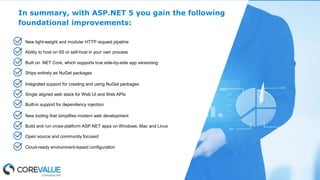
In summary, with ASP.NET 5 you gain the following
foundational improvements:
New light-weight and modular HTTP request pipeline
Ability to host on IIS or self-host in your own process
Built on .NET Core, which supports true side-by-side app versioning
Ships entirely as NuGet packages
Integrated support for creating and using NuGet packages
Single aligned web stack for Web UI and Web APIs
Built-in support for dependency injection
New tooling that simplifies modern web development
Build and run cross-platform ASP.NET apps on Windows, Mac and Linux
Open source and community focused
Cloud-ready environment-based configuration
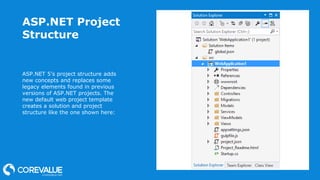
ASP.NET Project
Structure
ASP.NET 5’s project structure adds
new concepts and replaces some
legacy elements found in previous
versions of ASP.NET projects. The
new default web project template
creates a solution and project
structure like the one shown here:
The project.json
File
The project.json file is new to
ASP.NET 5. It is used to define the
project’s server side dependencies
(discussed below), as well as
other project-specific information.
The top-level default sections
included in project.json of the
default web project template are
highlighted below:
{
"userSecretsId": "aspnet5-WebApplication1-8479b9ce-7b8f-4402-
9616-0843bc642f09",
"version": "1.0.0-*",
"compilationOptions": { "emitEntryPoint": true
},
"dependencies": {
"EntityFramework.Commands": "7.0.0-rc1-final",
...
},
"commands": {
"web": "Microsoft.AspNet.Server.Kestrel",
"ef": "EntityFramework.Commands"
},
"frameworks": {
"dnx451": { },
"dnxcore50": { }
},
"exclude": [ "wwwroot", "node_modules" ],
"publishExclude": [ "**.user", "**.vspscc" ],
"scripts": {
"prepublish": [ "npm install", "bower install", "gulp
clean", "gulp min" ]
}
}
The global.json
File
The global.json file is used to
configure the solution as a whole.
It includes just two sections,
projects and sdk by default.
{
"projects": [ "src", "test" ],
"sdk": {
"version": "1.0.0-rc1-final"
}
}
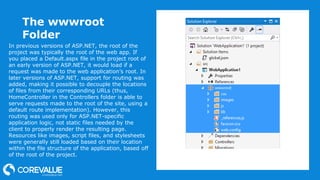
The wwwroot
Folder
In previous versions of ASP.NET, the root of the
project was typically the root of the web app. If
you placed a Default.aspx file in the project root of
an early version of ASP.NET, it would load if a
request was made to the web application’s root. In
later versions of ASP.NET, support for routing was
added, making it possible to decouple the locations
of files from their corresponding URLs (thus,
HomeController in the Controllers folder is able to
serve requests made to the root of the site, using a
default route implementation). However, this
routing was used only for ASP.NET-specific
application logic, not static files needed by the
client to properly render the resulting page.
Resources like images, script files, and stylesheets
were generally still loaded based on their location
within the file structure of the application, based off
of the root of the project.
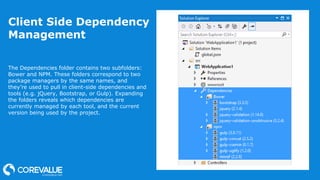
Client Side Dependency
Management
The Dependencies folder contains two subfolders:
Bower and NPM. These folders correspond to two
package managers by the same names, and
they’re used to pull in client-side dependencies and
tools (e.g. jQuery, Bootstrap, or Gulp). Expanding
the folders reveals which dependencies are
currently managed by each tool, and the current
version being used by the project.
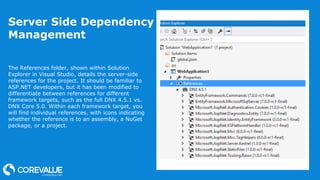
Server Side Dependency
Management
The References folder, shown within Solution
Explorer in Visual Studio, details the server-side
references for the project. It should be familiar to
ASP.NET developers, but it has been modified to
differentiate between references for different
framework targets, such as the full DNX 4.5.1 vs.
DNX Core 5.0. Within each framework target, you
will find individual references, with icons indicating
whether the reference is to an assembly, a NuGet
package, or a project.
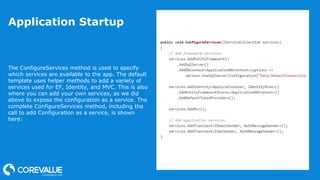
Application Startup
The ConfigureServices method is used to specify
which services are available to the app. The default
template uses helper methods to add a variety of
services used for EF, Identity, and MVC. This is also
where you can add your own services, as we did
above to expose the configuration as a service. The
complete ConfigureServices method, including the
call to add Configuration as a service, is shown
here:
Summary
ASP.NET 5 introduces a few concepts that didn’t exist in
previous versions of ASP.NET. Rather than working with
web.config, packages.config, and a variety of project
properties stored in the .csproj/.vbproj file, developers can
now work with specific files and folders devoted to specific
purposes. Although at first there is some learning curve, the
end result is more secure, more maintainable, works better
with source control, and has better separation of concerns
than the approach used in previous versions of ASP.NET.
Questions?

.Net Core

  • 1.
    .NET Core (revolution of.NET) 2016 Bohdan Pashkovskyi
  • 2.
    Motivation Behind .NETCore When .NET first shipped in 2002, it was a single framework, but it didn’t take long before the .NET Compact Framework shipped, providing a smaller version of .NET designed for mobile devices. Over the years, this exercise was repeated multiple times, so that today there are different flavors of .NET specific to different platforms. Add to this the further platform reach provided by Mono and Xamarin, which target Linux, Mac, and native iOS and Android devices. For each platform, a separate vertical stack consisting of runtime, framework, and app model is required to develop .NET applications.
  • 3.
    What is .NETCore a small, optimized runtime CoreCLR a set of libraries CoreFX .NET Core 5 is a modular runtime and library implementation that includes a subset of the .NET Framework. Currently it is feature complete on Windows, and in-progress builds exist for both Linux and OS X.
  • 4.
    .NET Core features .NETCore is a set of runtime, library and compiler components. Microsoft uses these components in various configurations for device and cloud workloads. You can do the same for your app or service. Modular Managed runtimes make code easy to write and guarantee safe execution. .NET Core manages memory with a garbage collector, compiles your code with a JIT compiler or ahead of time with .NET Native. . Managed You can create .NET Core apps that run on multiple OSes and CPUs. .NET Core runs on Windows. Ports are in progress for Linux, OS X and FreeBSD, as is integration with the LLVM compiler. Cross-platform
  • 5.
    .NET Core features .NETCore brings with it a set of languages, led by C#, with VB and F# with support for modern language features, like generics, Language Integrated Query (LINQ), async support and more. Modern The managed runtime of .NET Core allows for a streamlined and easy interoperability with native code through several ways. Each of them allows for a rich set of scenarios not to mention great performance.. Interoperable Runtime modularity allows for an extensibility model through a good set of abstractions for adding new components to the actual runtime and its class library, but also through its package manager NuGet. Extensible
  • 6.
    .NET Core features .NETCore is versatile in multiple scenarios, from client applications, across web, server workloads to mobile apps. With its "pay as you go" model, .NET Core can be adapted easily to perform great and provide a rich experience developing for each of these. Adaptable NET Core is portable across various platforms, both in terms of operating systems and processor architectures. Code written for it is also portable across application stacks, such as Mono, making it feasible to move applications across app stacks as well.. Portable .NET Core is backed by an open ECMA standard that outlines all of its capabilities which can be used to make a new reference implementation. A lot of projects did exactly this, and there are various implementation out there. Open
  • 7.
    DNX Overview The .NETExecution Environment (DNX) is a software development kit (SDK) and runtime environment that has everything you need to build and run .NET applications for Windows, Mac and Linux. It provides a host process, CLR hosting logic and managed entry point discovery. DNX was built for running cross-platform ASP.NET Web applications, but it can run other types of .NET applications, too, such as cross-platform console apps.
  • 8.
    Open source friendly Whybuild DNX? Package managers have completely changed the face of modern software development and DNX makes it easy to create and consume packages. DNX provides tools for installing, creating and managing NuGet packages. DNX projects simplify building NuGet packages by cross- compiling for multiple target frameworks and can output NuGet packages directly. You can reference NuGet packages directly from your projects and transitive dependencies are handled for you. You can also build and install development tools as packages for your project and globally on a machine. Build for .NET Core DNX dramatically simplifies the work needed to develop cross-platform applications using .NET Core. It takes care of hosting the CLR, handling dependencies and bootstrapping your application. You can easily define projects and solutions using a lightweight JSON format (project.json), build your projects and publish them for distribution. DNX makes it easy to work with open source projects. With DNX projects you can easily replace an existing dependency with its source code and let DNX compile it in- memory at runtime. You can then debug the source and modify it without having to modify the rest of your application.
  • 9.
    What is ASP.NET5? ASP.NET 5 is a new open-source and cross-platform framework for building modern cloud-based Web applications using .NET. We built it from the ground up to provide an optimized development framework for apps that are either deployed to the cloud or run on-premises. It consists of modular components with minimal overhead, so you retain flexibility while constructing your solutions. You can develop and run your ASP.NET 5 applications cross-platform on Windows, Mac and Linux. ASP.NET 5 is fully open source on GitHub.
  • 10.
    In summary, withASP.NET 5 you gain the following foundational improvements: New light-weight and modular HTTP request pipeline Ability to host on IIS or self-host in your own process Built on .NET Core, which supports true side-by-side app versioning Ships entirely as NuGet packages Integrated support for creating and using NuGet packages Single aligned web stack for Web UI and Web APIs Built-in support for dependency injection New tooling that simplifies modern web development Build and run cross-platform ASP.NET apps on Windows, Mac and Linux Open source and community focused Cloud-ready environment-based configuration
  • 11.
    ASP.NET Project Structure ASP.NET 5’sproject structure adds new concepts and replaces some legacy elements found in previous versions of ASP.NET projects. The new default web project template creates a solution and project structure like the one shown here:
  • 12.
    The project.json File The project.jsonfile is new to ASP.NET 5. It is used to define the project’s server side dependencies (discussed below), as well as other project-specific information. The top-level default sections included in project.json of the default web project template are highlighted below: { "userSecretsId": "aspnet5-WebApplication1-8479b9ce-7b8f-4402- 9616-0843bc642f09", "version": "1.0.0-*", "compilationOptions": { "emitEntryPoint": true }, "dependencies": { "EntityFramework.Commands": "7.0.0-rc1-final", ... }, "commands": { "web": "Microsoft.AspNet.Server.Kestrel", "ef": "EntityFramework.Commands" }, "frameworks": { "dnx451": { }, "dnxcore50": { } }, "exclude": [ "wwwroot", "node_modules" ], "publishExclude": [ "**.user", "**.vspscc" ], "scripts": { "prepublish": [ "npm install", "bower install", "gulp clean", "gulp min" ] } }
  • 13.
    The global.json File The global.jsonfile is used to configure the solution as a whole. It includes just two sections, projects and sdk by default. { "projects": [ "src", "test" ], "sdk": { "version": "1.0.0-rc1-final" } }
  • 14.
    The wwwroot Folder In previousversions of ASP.NET, the root of the project was typically the root of the web app. If you placed a Default.aspx file in the project root of an early version of ASP.NET, it would load if a request was made to the web application’s root. In later versions of ASP.NET, support for routing was added, making it possible to decouple the locations of files from their corresponding URLs (thus, HomeController in the Controllers folder is able to serve requests made to the root of the site, using a default route implementation). However, this routing was used only for ASP.NET-specific application logic, not static files needed by the client to properly render the resulting page. Resources like images, script files, and stylesheets were generally still loaded based on their location within the file structure of the application, based off of the root of the project.
  • 15.
    Client Side Dependency Management TheDependencies folder contains two subfolders: Bower and NPM. These folders correspond to two package managers by the same names, and they’re used to pull in client-side dependencies and tools (e.g. jQuery, Bootstrap, or Gulp). Expanding the folders reveals which dependencies are currently managed by each tool, and the current version being used by the project.
  • 16.
    Server Side Dependency Management TheReferences folder, shown within Solution Explorer in Visual Studio, details the server-side references for the project. It should be familiar to ASP.NET developers, but it has been modified to differentiate between references for different framework targets, such as the full DNX 4.5.1 vs. DNX Core 5.0. Within each framework target, you will find individual references, with icons indicating whether the reference is to an assembly, a NuGet package, or a project.
  • 17.
    Application Startup The ConfigureServicesmethod is used to specify which services are available to the app. The default template uses helper methods to add a variety of services used for EF, Identity, and MVC. This is also where you can add your own services, as we did above to expose the configuration as a service. The complete ConfigureServices method, including the call to add Configuration as a service, is shown here:
  • 18.
    Summary ASP.NET 5 introducesa few concepts that didn’t exist in previous versions of ASP.NET. Rather than working with web.config, packages.config, and a variety of project properties stored in the .csproj/.vbproj file, developers can now work with specific files and folders devoted to specific purposes. Although at first there is some learning curve, the end result is more secure, more maintainable, works better with source control, and has better separation of concerns than the approach used in previous versions of ASP.NET.
  • 19.