Autodesk ®  Navisworks ®  Manage 2010
주요 기능 Autodesk ®  Navisworks ®  Manage 2010 Software Autodesk  ®  ViewCube TM  navigation widget Autodesk  ®  SteeringWheels TM  tool In-view measurement display 편의성 생산성의 향상 New measure tools Sectioning enhancements TimeLiner CSV support Presenter transparent images Clash Detective enhancements Workflow 향상된 기능 Autodesk  ®  2010 product support JT Open file reader CIS/2 file reader Graphisoft ArchiCAD 12 Autodesk  ®  Revit  ® -based software shared coordinates 상호 운영성 협력 기능의 강화
Architectural design by HOK   편의성  Usability
편의성  Usability ViewCube 기능들 Current camera feedback Quick access to preset views Home Compass The right tools at the right time. Autodesk Navisworks Manage 2010 SteeringWheels 의 종류들 Task-oriented Navigation tools Tracking menus
더 쉬워진 사용  Easier to Use In-view Measurements 측정한 거리의 시각화 각도 및 면적 디스플레이 Providing information right where you need it. Autodesk Navisworks Manage 2010
Architectural design by HOK   Workflow
Easier to Use 객체간 최단거리의 측정  Faster, more accurate measurements between objects. Autodesk Navisworks Manage 2010
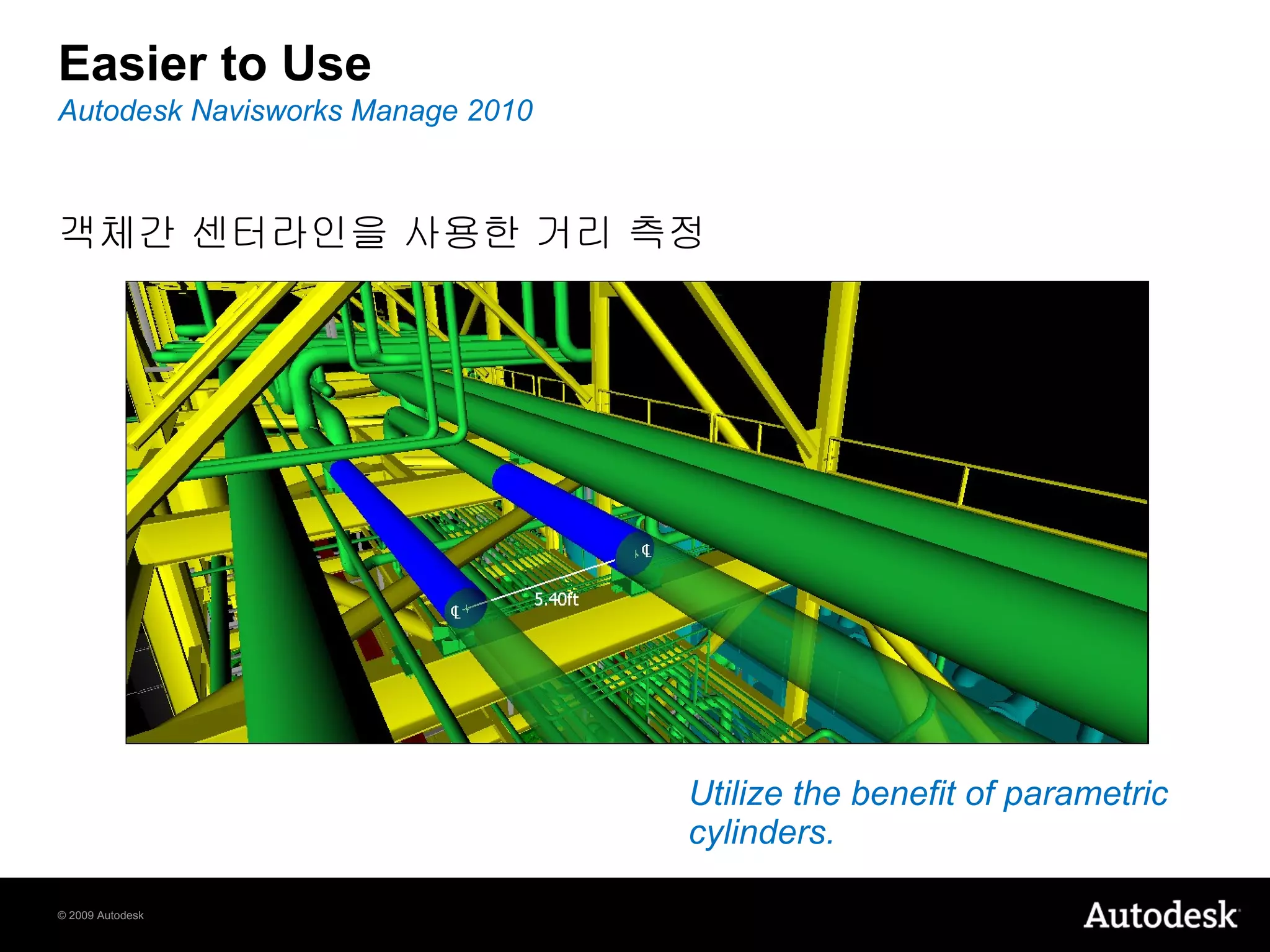
Easier to Use 객체간 센터라인을 사용한 거리 측정  Utilize the benefit of parametric cylinders. Autodesk Navisworks Manage 2010
Workflow 측정값의 레드 라인으로의 변경 후 저장이 가능  Save measurements for later use. Autodesk Navisworks Manage 2010
Workflow Section Box Autodesk Navisworks Manage 2010 Save time and help increase accuracy. Align Section Plane
TimeLiner CSV  파일포맷의  Export/Import 지원 Export schedule modifications for use in other applications. Autodesk Navisworks Manage 2010
TimeLiner Simulate multiple processes on single objects. Autodesk Navisworks Manage 2010 TimeLiner 의  Task 날짜의 복사 / 붙여넣기 가능 멀티 Task 로의 객체선택 적용이 가능
Presenter PNG 파일 포맷의  Transparency 지원 Create your own transparent materials. Autodesk Navisworks Manage 2010
Clash Detective 간섭체크 결과의 그룹화 Deal with multiple clash results as a single issue. Autodesk Navisworks Manage 2010
Clash Detective 간섭발견 부분의 전체구조상에서의 확인 Orientate yourself,   and your clash results, within the model. Autodesk Navisworks Manage 2010
Clash Detective Maintain orientation within the project model. Autodesk Navisworks Manage 2010 뷰 - 포인트 애니메이션을 통한 간섭결과 확인
Clash Detective 이미 확인 된 간섭결과에 대한 표시가 가능 More clearly identify clash results requiring further work. Autodesk Navisworks Manage 2010
Architectural design by HOK   상호운용성 Interoperability
상호운용성 새롭게 지원이 가능하게 된  File Reader 와  Exporter 들 Autodesk 2010 design applications AutoCAD ®  2010 software, AutoCAD ®  Architecture 2010 software, AutoCAD ®  MEP 2010 software, AutoCAD ®  Civil 3D ®  2010 software Autodesk ®  Revit Architecture 2010 software, Autodesk ®  Revit  ®  Structure 2010 software, Autodesk ®  Revit ®  MEP 2010 software Autodesk ®  Inventor ®  2010 software Autodesk ®  3ds Max ®  2010 software JT Open CIS/2 Graphisoft ArchiCAD 12 Faro Providing support for some of the latest authoring applications. Autodesk Navisworks Manage 2010
Operating Systems Windows ®  XP software 32-bit version 64-bit version Windows Vista ®  software 32-bit version 64-bit version Take advantage of increased memory and better performance. Autodesk Navisworks Manage 2010
Architectural design by HOK   새로추가된기능들  Additional New Features
Additional New Features 사용자 인터페이스의 강화  단면 자르기 기능 향상 수평선 기능 추가 새로운 버튼 메뉴의 추가  제품  install 시에  Site 와 project folder 의 지정이 가능 Autodesk Navisworks Manage 2010
Additional New Features 향상된 제품성 강화된 Communication Center Auto-save 와  recovery 기능 새로운 형식과 내용으로 변경 된 사용자 도움말 (Help) 기능 Autodesk Navisworks Manage 2010
Autodesk, AutoCAD, Autodesk Inventor, Civil 3D, DWF, Inventor, Navisworks, Revit, SteeringWheels, ViewCube, and 3ds Max are registered trademarks or trademarks of Autodesk, Inc., and/or its subsidiaries and/or affiliates in the USA and/or other countries. All other brand names, product names, or trademarks belong to their respective holders. Autodesk reserves the right to alter product offerings and specifications at any time without notice, and is not responsible for typographical or graphical errors that may appear in this document.  © 2009 Autodesk, Inc. All rights reserved.
 

Navisworks Manage 2010

  • 1.
    Autodesk ® Navisworks ® Manage 2010
  • 2.
    주요 기능 Autodesk® Navisworks ® Manage 2010 Software Autodesk ® ViewCube TM navigation widget Autodesk ® SteeringWheels TM tool In-view measurement display 편의성 생산성의 향상 New measure tools Sectioning enhancements TimeLiner CSV support Presenter transparent images Clash Detective enhancements Workflow 향상된 기능 Autodesk ® 2010 product support JT Open file reader CIS/2 file reader Graphisoft ArchiCAD 12 Autodesk ® Revit ® -based software shared coordinates 상호 운영성 협력 기능의 강화
  • 3.
    Architectural design byHOK 편의성 Usability
  • 4.
    편의성 UsabilityViewCube 기능들 Current camera feedback Quick access to preset views Home Compass The right tools at the right time. Autodesk Navisworks Manage 2010 SteeringWheels 의 종류들 Task-oriented Navigation tools Tracking menus
  • 5.
    더 쉬워진 사용 Easier to Use In-view Measurements 측정한 거리의 시각화 각도 및 면적 디스플레이 Providing information right where you need it. Autodesk Navisworks Manage 2010
  • 6.
  • 7.
    Easier to Use객체간 최단거리의 측정 Faster, more accurate measurements between objects. Autodesk Navisworks Manage 2010
  • 8.
    Easier to Use객체간 센터라인을 사용한 거리 측정 Utilize the benefit of parametric cylinders. Autodesk Navisworks Manage 2010
  • 9.
    Workflow 측정값의 레드라인으로의 변경 후 저장이 가능 Save measurements for later use. Autodesk Navisworks Manage 2010
  • 10.
    Workflow Section BoxAutodesk Navisworks Manage 2010 Save time and help increase accuracy. Align Section Plane
  • 11.
    TimeLiner CSV 파일포맷의 Export/Import 지원 Export schedule modifications for use in other applications. Autodesk Navisworks Manage 2010
  • 12.
    TimeLiner Simulate multipleprocesses on single objects. Autodesk Navisworks Manage 2010 TimeLiner 의 Task 날짜의 복사 / 붙여넣기 가능 멀티 Task 로의 객체선택 적용이 가능
  • 13.
    Presenter PNG 파일포맷의 Transparency 지원 Create your own transparent materials. Autodesk Navisworks Manage 2010
  • 14.
    Clash Detective 간섭체크결과의 그룹화 Deal with multiple clash results as a single issue. Autodesk Navisworks Manage 2010
  • 15.
    Clash Detective 간섭발견부분의 전체구조상에서의 확인 Orientate yourself, and your clash results, within the model. Autodesk Navisworks Manage 2010
  • 16.
    Clash Detective Maintainorientation within the project model. Autodesk Navisworks Manage 2010 뷰 - 포인트 애니메이션을 통한 간섭결과 확인
  • 17.
    Clash Detective 이미확인 된 간섭결과에 대한 표시가 가능 More clearly identify clash results requiring further work. Autodesk Navisworks Manage 2010
  • 18.
    Architectural design byHOK 상호운용성 Interoperability
  • 19.
    상호운용성 새롭게 지원이가능하게 된 File Reader 와 Exporter 들 Autodesk 2010 design applications AutoCAD ® 2010 software, AutoCAD ® Architecture 2010 software, AutoCAD ® MEP 2010 software, AutoCAD ® Civil 3D ® 2010 software Autodesk ® Revit Architecture 2010 software, Autodesk ® Revit ® Structure 2010 software, Autodesk ® Revit ® MEP 2010 software Autodesk ® Inventor ® 2010 software Autodesk ® 3ds Max ® 2010 software JT Open CIS/2 Graphisoft ArchiCAD 12 Faro Providing support for some of the latest authoring applications. Autodesk Navisworks Manage 2010
  • 20.
    Operating Systems Windows® XP software 32-bit version 64-bit version Windows Vista ® software 32-bit version 64-bit version Take advantage of increased memory and better performance. Autodesk Navisworks Manage 2010
  • 21.
    Architectural design byHOK 새로추가된기능들 Additional New Features
  • 22.
    Additional New Features사용자 인터페이스의 강화 단면 자르기 기능 향상 수평선 기능 추가 새로운 버튼 메뉴의 추가 제품 install 시에 Site 와 project folder 의 지정이 가능 Autodesk Navisworks Manage 2010
  • 23.
    Additional New Features향상된 제품성 강화된 Communication Center Auto-save 와 recovery 기능 새로운 형식과 내용으로 변경 된 사용자 도움말 (Help) 기능 Autodesk Navisworks Manage 2010
  • 24.
    Autodesk, AutoCAD, AutodeskInventor, Civil 3D, DWF, Inventor, Navisworks, Revit, SteeringWheels, ViewCube, and 3ds Max are registered trademarks or trademarks of Autodesk, Inc., and/or its subsidiaries and/or affiliates in the USA and/or other countries. All other brand names, product names, or trademarks belong to their respective holders. Autodesk reserves the right to alter product offerings and specifications at any time without notice, and is not responsible for typographical or graphical errors that may appear in this document. © 2009 Autodesk, Inc. All rights reserved.
  • 25.

Editor's Notes

  • #2 Note to Presenter: This slide is the “destination check” slide that should be on the screen at least 10 minutes before the beginning of your presentation; it affords your audience the reassurance that they are, in fact, in the right room. For a large, formal or executive sales presentation, it is generally best to arrange to have the primary sales presenter be introduced by someone else. Note to Presenter: Insert the speaker’s introduction here. Keep it short, but use the opportunity to establish the presenter’s credibility and value he/she brings to this presentation. Advance to the next slide as the primary presenter takes the floor. Hello Everyone, I’m <Name>, and I’d like to welcome you to today’s presentation of Autodesk Navisworks Manage 2010 software, the version of Navisworks software for design, engineering and construction professionals. I’d also like to introduce <Name of AE>.