

![$$
var myElements = $$(aTag[, anElement[,
Elements[, ...]);
Examples
$$('a', 'b');
$$('#myElement a.myClass');
$$(myelement1, myelement2, 'a', '#myid, #myid2,
#myid3', document.getElementsByTagName('div'));](https://image.slidesharecdn.com/mootoolsselectors-140511235724-phpapp02/85/Mootools-selectors-3-320.jpg)
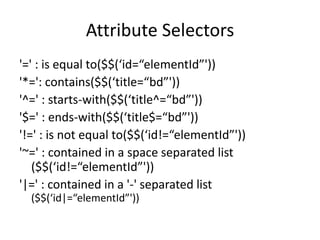

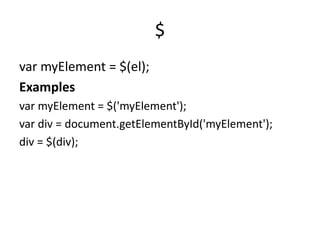
This document discusses Mootools selectors and provides examples of how to use them. It explains how to select a single element with $, multiple elements with $$, and attribute selectors using operators like =, *=, ^=, $=, !=, ~=, and |=. It also includes references for more documentation on Mootools selectors.


