Monitoring hybrid container
environments
1
Samuel
Vandamme
Product specialist at CoScale
● Company focussed on container
& orchestration monitoring
● Spend 80% time helping
customers monitor Kubernetes
and Docker
@kidk
www.sava.be
2
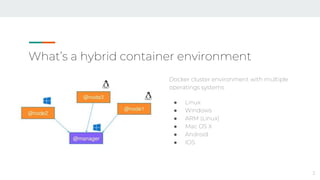
What’s a hybrid container environment
Docker cluster environment with multiple
operatings systems
● Linux
● Windows
● ARM (Linux)
● Mac OS X
● Android
● IOS
3
4
Use-cases
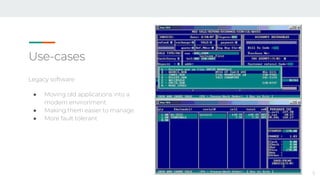
Legacy software
● Moving old applications into a
modern environment
● Making them easier to manage
● More fault tolerant
5
Use-cases
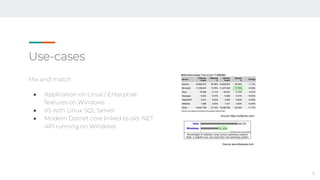
Mix and match
● Application on Linux / Enterprise
features on Windows
● IIS with Linux SQL Server
● Modern Dotnet core linked to old .NET
API running on Windows
6
Source https://w3techs.com/
Source securityspace.com
Use-cases
Testing
● Building and testing your
application on Linux, Windows,
Mac, Android, ..?
● Browser testing: IE, Edge, Safari,
Firefox, Chrome, ..
7
Advantages
● Single orchestration environment
○ Single monitoring view
○ Single cluster maintenance
● Increased security
○ Hyper-V containers
■ VM isolation of containers
● Flexibility
○ Moving to containers allows you to deploy theoretically anywhere
8
● Setting up a Hybrid cluster
● Monitoring a Hybrid cluster
9
● Setting up a Hybrid cluster
10
Docker Swarm / EE support
● One of the first to support Windows containers
○ Built together with Microsoft
● Supported out of the box, no special configuration required
● Not container type aware, so node labels are important
○ "unsupported platform on 1 node"
11
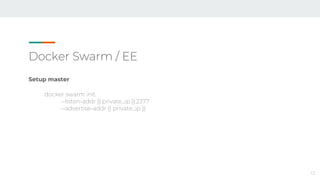
Docker Swarm / EE
Setup master
docker swarm init
--listen-addr {{ private_ip }}:2377
--advertise-addr {{ private_ip }}
12
Docker Swarm / EE
Connect nodes - Linux & Windows
docker swarm join
--listen-addr {{ private_ip }}:2377
--advertise-addr {{ private_ip }}:2377
--token {{ swarm_token }}
{{ master['private_ip'] }}:2377
13
Docker Swarm / EE
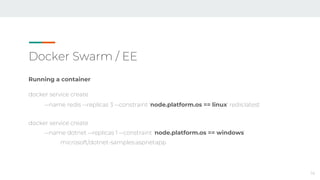
Running a container
docker service create
--name redis --replicas 3 --constraint 'node.platform.os == linux' redis:latest
docker service create
--name dotnet --replicas 1 --constraint 'node.platform.os == windows’
microsoft/dotnet-samples:aspnetapp
14
Demo - Swarm
15
Kubernetes
16
W
indow
s
Kubernetes
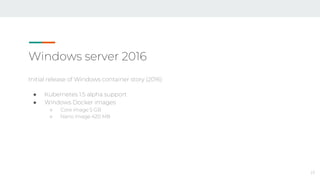
Windows server 2016
Initial release of Windows container story (2016)
● Kubernetes 1.5 alpha support
● Windows Docker images
○ Core image 5 GB
○ Nano image 420 MB
17
Kubernetes Setup for Windows server 2016
Available in alpha from Kubernetes 1.5
● [alpha] Added support for Windows Server 2016 nodes and scheduling Windows
Server Containers
Don’t try it, unless you have time to waste
18
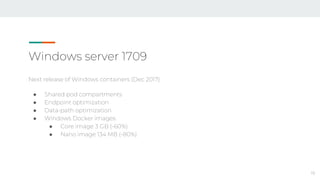
Windows server 1709
Next release of Windows containers (Dec 2017)
● Shared pod compartments
● Endpoint optimization
● Data-path optimization
● Windows Docker images
● Core image 3 GB (-60%)
● Nano image 134 MB (-80%)
19
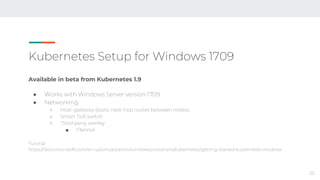
Kubernetes Setup for Windows 1709
Available in beta from Kubernetes 1.9
● Works with Windows Server version 1709
● Networking
○ Host-gateway (static next-hop routes between nodes)
○ Smart ToR switch
○ Third party overlay
■ Flannel
Tutorial:
https://docs.microsoft.com/en-us/virtualization/windowscontainers/kubernetes/getting-started-kubernetes-windows
20
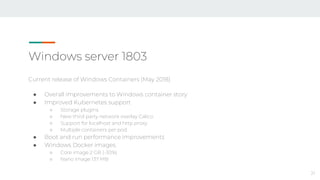
Windows server 1803
Current release of Windows Containers (May 2018)
● Overall improvements to Windows container story
● Improved Kubernetes support
○ Storage plugins
○ New third party network overlay Calico
○ Support for localhost and http proxy
○ Multiple containers per pod
● Boot and run performance improvements
● Windows Docker images
○ Core image 2 GB (-30%)
○ Nano image 137 MB
21
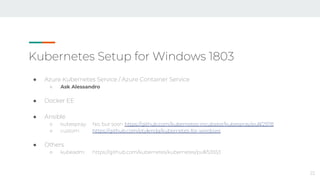
Kubernetes Setup for Windows 1803
● Azure Kubernetes Service / Azure Container Service
○ Ask Alessandro
● Docker EE
● Ansible
○ kubespray: No, but soon https://github.com/kubernetes-incubator/kubespray/pull/2978
○ custom: https://github.com/ptylenda/kubernetes-for-windows
● Others
○ kubeadm: https://github.com/kubernetes/kubernetes/pull/53553
22
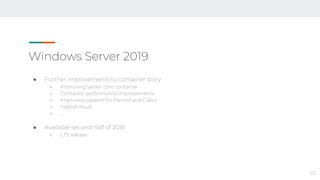
Windows Server 2019
● Further improvements to container story
○ Improving Server core container
○ Container performance improvements
○ Improved support for Flannel and Calico
○ Hybrid cloud
○ …
● Available second half of 2018
○ LTS release
23
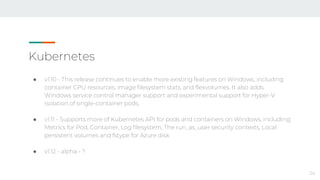
Kubernetes
● v1.10 - This release continues to enable more existing features on Windows, including
container CPU resources, image filesystem stats, and flexvolumes. It also adds
Windows service control manager support and experimental support for Hyper-V
isolation of single-container pods.
● v1.11 - Supports more of Kubernetes API for pods and containers on Windows, including:
Metrics for Pod, Container, Log filesystem, The run_as_user security contexts, Local
persistent volumes and fstype for Azure disk
● v1.12 - alpha - ?
24
Demo - Kubernetes
25
Azure
26
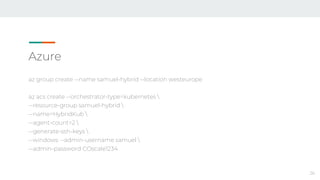
az group create --name samuel-hybrid --location westeurope
az acs create --orchestrator-type=kubernetes 
--resource-group samuel-hybrid 
--name=HybridKub 
--agent-count=2 
--generate-ssh-keys 
--windows --admin-username samuel 
--admin-password COscale1234
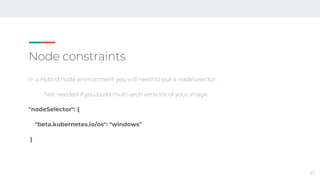
Node constraints
In a Hybrid node environment you will need to put a nodeSelector.
Not needed if you build multi-arch versions of your image
"nodeSelector": {
"beta.kubernetes.io/os": "windows"
}
27
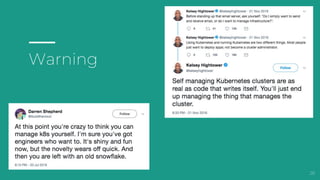
Warning
28
● Monitoring a Hybrid cluster
29
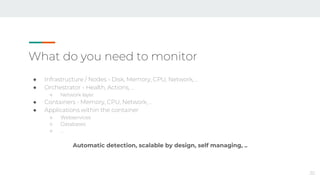
What do you need to monitor
30
● Infrastructure / Nodes - Disk, Memory, CPU, Network, ..
● Orchestrator - Health, Actions, ..
○ Network layer
● Containers - Memory, CPU, Network, ..
● Applications within the container
○ Webservices
○ Databases
○ …
Automatic detection, scalable by design, self managing, ..
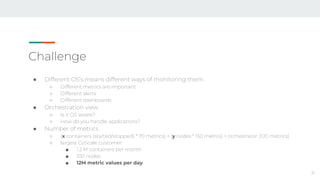
Challenge
● Different OS’s means different ways of monitoring them
○ Different metrics are important
○ Different alerts
○ Different dashboards
● Orchestration view
○ Is it OS aware?
○ How do you handle applications?
● Number of metrics
○ (x containers (started/stopped) * 70 metrics) + (y nodes * 150 metrcs) + orchestrator (100 metrics)
○ largest CoScale customer:
■ 1.2 M containers per month
■ 100 nodes
■ 12M metric values per day
31
Windows
● No privileged containers
○ Deploying monitoring in container is not possible
● Resource retrieval is different
● Network layer is different
○ Harder to secure endpoints
32
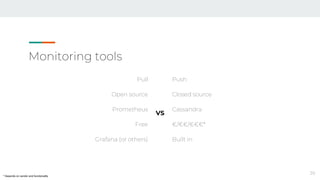
Monitoring tools
Prometheus
● Open source
● Time series database
● Popular in container environments
● Extra’s needed
○ Grafana
○ AlertManager
○ Endpoints
33
CoScale (or other commercial vendors)
● Closed source
● Monitoring platform
● Focus on container environments
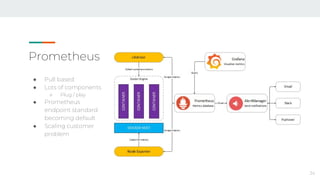
Prometheus
34
● Pull based
● Lots of components
○ Plug / play
● Prometheus
endpoint standard
becoming default
● Scaling customer
problem
Prometheus - endpoints
● Node exporter
○ Linux - https://github.com/prometheus/node_exporter
○ Windows - https://github.com/martinlindhe/wmi_exporter
● CAdvisor
○ Linux - https://github.com/google/cadvisor
○ Windows
■ Work being done to integrate it with Kubernetes
● List of > 100 application monitoring endpoints
○ More and more are being built in
35
Demo - Prometheus
36
CoScale
37
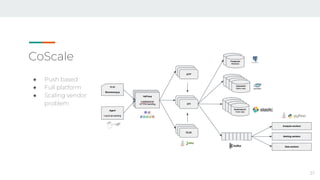
● Push based
● Full platform
● Scaling vendor
problem
Demo - CoScale
38
Monitoring tools
Pull
Open source
Prometheus
Free
Grafana (or others)
Push
Closed source
Cassandra
€/€€/€€€*
Built in
39
VS
* Depends on vendor and functionality
Questions?
40
Thanks for your time
41
twitter.com/kidk or samuel@coscale.com

Monitoring hybrid container environments

  • 1.
  • 2.
    Samuel Vandamme Product specialist atCoScale ● Company focussed on container & orchestration monitoring ● Spend 80% time helping customers monitor Kubernetes and Docker @kidk www.sava.be 2
  • 3.
    What’s a hybridcontainer environment Docker cluster environment with multiple operatings systems ● Linux ● Windows ● ARM (Linux) ● Mac OS X ● Android ● IOS 3
  • 4.
  • 5.
    Use-cases Legacy software ● Movingold applications into a modern environment ● Making them easier to manage ● More fault tolerant 5
  • 6.
    Use-cases Mix and match ●Application on Linux / Enterprise features on Windows ● IIS with Linux SQL Server ● Modern Dotnet core linked to old .NET API running on Windows 6 Source https://w3techs.com/ Source securityspace.com
  • 7.
    Use-cases Testing ● Building andtesting your application on Linux, Windows, Mac, Android, ..? ● Browser testing: IE, Edge, Safari, Firefox, Chrome, .. 7
  • 8.
    Advantages ● Single orchestrationenvironment ○ Single monitoring view ○ Single cluster maintenance ● Increased security ○ Hyper-V containers ■ VM isolation of containers ● Flexibility ○ Moving to containers allows you to deploy theoretically anywhere 8
  • 9.
    ● Setting upa Hybrid cluster ● Monitoring a Hybrid cluster 9
  • 10.
    ● Setting upa Hybrid cluster 10
  • 11.
    Docker Swarm /EE support ● One of the first to support Windows containers ○ Built together with Microsoft ● Supported out of the box, no special configuration required ● Not container type aware, so node labels are important ○ "unsupported platform on 1 node" 11
  • 12.
    Docker Swarm /EE Setup master docker swarm init --listen-addr {{ private_ip }}:2377 --advertise-addr {{ private_ip }} 12
  • 13.
    Docker Swarm /EE Connect nodes - Linux & Windows docker swarm join --listen-addr {{ private_ip }}:2377 --advertise-addr {{ private_ip }}:2377 --token {{ swarm_token }} {{ master['private_ip'] }}:2377 13
  • 14.
    Docker Swarm /EE Running a container docker service create --name redis --replicas 3 --constraint 'node.platform.os == linux' redis:latest docker service create --name dotnet --replicas 1 --constraint 'node.platform.os == windows’ microsoft/dotnet-samples:aspnetapp 14
  • 15.
  • 16.
  • 17.
    Windows server 2016 Initialrelease of Windows container story (2016) ● Kubernetes 1.5 alpha support ● Windows Docker images ○ Core image 5 GB ○ Nano image 420 MB 17
  • 18.
    Kubernetes Setup forWindows server 2016 Available in alpha from Kubernetes 1.5 ● [alpha] Added support for Windows Server 2016 nodes and scheduling Windows Server Containers Don’t try it, unless you have time to waste 18
  • 19.
    Windows server 1709 Nextrelease of Windows containers (Dec 2017) ● Shared pod compartments ● Endpoint optimization ● Data-path optimization ● Windows Docker images ● Core image 3 GB (-60%) ● Nano image 134 MB (-80%) 19
  • 20.
    Kubernetes Setup forWindows 1709 Available in beta from Kubernetes 1.9 ● Works with Windows Server version 1709 ● Networking ○ Host-gateway (static next-hop routes between nodes) ○ Smart ToR switch ○ Third party overlay ■ Flannel Tutorial: https://docs.microsoft.com/en-us/virtualization/windowscontainers/kubernetes/getting-started-kubernetes-windows 20
  • 21.
    Windows server 1803 Currentrelease of Windows Containers (May 2018) ● Overall improvements to Windows container story ● Improved Kubernetes support ○ Storage plugins ○ New third party network overlay Calico ○ Support for localhost and http proxy ○ Multiple containers per pod ● Boot and run performance improvements ● Windows Docker images ○ Core image 2 GB (-30%) ○ Nano image 137 MB 21
  • 22.
    Kubernetes Setup forWindows 1803 ● Azure Kubernetes Service / Azure Container Service ○ Ask Alessandro ● Docker EE ● Ansible ○ kubespray: No, but soon https://github.com/kubernetes-incubator/kubespray/pull/2978 ○ custom: https://github.com/ptylenda/kubernetes-for-windows ● Others ○ kubeadm: https://github.com/kubernetes/kubernetes/pull/53553 22
  • 23.
    Windows Server 2019 ●Further improvements to container story ○ Improving Server core container ○ Container performance improvements ○ Improved support for Flannel and Calico ○ Hybrid cloud ○ … ● Available second half of 2018 ○ LTS release 23
  • 24.
    Kubernetes ● v1.10 -This release continues to enable more existing features on Windows, including container CPU resources, image filesystem stats, and flexvolumes. It also adds Windows service control manager support and experimental support for Hyper-V isolation of single-container pods. ● v1.11 - Supports more of Kubernetes API for pods and containers on Windows, including: Metrics for Pod, Container, Log filesystem, The run_as_user security contexts, Local persistent volumes and fstype for Azure disk ● v1.12 - alpha - ? 24
  • 25.
  • 26.
    Azure 26 az group create--name samuel-hybrid --location westeurope az acs create --orchestrator-type=kubernetes --resource-group samuel-hybrid --name=HybridKub --agent-count=2 --generate-ssh-keys --windows --admin-username samuel --admin-password COscale1234
  • 27.
    Node constraints In aHybrid node environment you will need to put a nodeSelector. Not needed if you build multi-arch versions of your image "nodeSelector": { "beta.kubernetes.io/os": "windows" } 27
  • 28.
  • 29.
    ● Monitoring aHybrid cluster 29
  • 30.
    What do youneed to monitor 30 ● Infrastructure / Nodes - Disk, Memory, CPU, Network, .. ● Orchestrator - Health, Actions, .. ○ Network layer ● Containers - Memory, CPU, Network, .. ● Applications within the container ○ Webservices ○ Databases ○ … Automatic detection, scalable by design, self managing, ..
  • 31.
    Challenge ● Different OS’smeans different ways of monitoring them ○ Different metrics are important ○ Different alerts ○ Different dashboards ● Orchestration view ○ Is it OS aware? ○ How do you handle applications? ● Number of metrics ○ (x containers (started/stopped) * 70 metrics) + (y nodes * 150 metrcs) + orchestrator (100 metrics) ○ largest CoScale customer: ■ 1.2 M containers per month ■ 100 nodes ■ 12M metric values per day 31
  • 32.
    Windows ● No privilegedcontainers ○ Deploying monitoring in container is not possible ● Resource retrieval is different ● Network layer is different ○ Harder to secure endpoints 32
  • 33.
    Monitoring tools Prometheus ● Opensource ● Time series database ● Popular in container environments ● Extra’s needed ○ Grafana ○ AlertManager ○ Endpoints 33 CoScale (or other commercial vendors) ● Closed source ● Monitoring platform ● Focus on container environments
  • 34.
    Prometheus 34 ● Pull based ●Lots of components ○ Plug / play ● Prometheus endpoint standard becoming default ● Scaling customer problem
  • 35.
    Prometheus - endpoints ●Node exporter ○ Linux - https://github.com/prometheus/node_exporter ○ Windows - https://github.com/martinlindhe/wmi_exporter ● CAdvisor ○ Linux - https://github.com/google/cadvisor ○ Windows ■ Work being done to integrate it with Kubernetes ● List of > 100 application monitoring endpoints ○ More and more are being built in 35
  • 36.
  • 37.
    CoScale 37 ● Push based ●Full platform ● Scaling vendor problem
  • 38.
  • 39.
    Monitoring tools Pull Open source Prometheus Free Grafana(or others) Push Closed source Cassandra €/€€/€€€* Built in 39 VS * Depends on vendor and functionality
  • 40.
  • 41.
    Thanks for yourtime 41 twitter.com/kidk or samuel@coscale.com