Module 3
ARM
Introduction
• All modern general-purpose computers employ the
principles of the stored-program digital computer.
• Computer architecture describes the user's view of the
computer. The instruction set, visible registers, memory
management table structures and exception handling
model are all part of the architecture.
• Computer organization describes the user-invisible
implementation of the architecture. The pipeline structure,
transparent cache, table-walking hardware and translation
look-aside buffer are all aspects of the organization.
What is a processor?
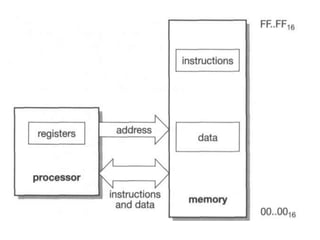
• A general-purpose processor is a finite-state automaton
that executes instructions held in a memory.
• The state of the system is defined by the values held in the
memory locations together with the values held in certain
registers within the processor itself.
• Each instruction defines a particular way the total state
should change and it also defines which instruction should
be executed next.
• The stored-program digital computer keeps its instructions
and data in the same memory system, allowing the
instructions to be treated as data when necessary.
• This enables the processor itself to generate instructions
which it can subsequently execute
CISC & RISC
• The principal trend in instruction set design was towards
increasing complexity in an attempt to reduce the semantic
gap that the compiler had to bridge.
• Single instruction procedure entries and exits were
incorporated into the instruction set, each performing a
complex sequence of operations over many clock cycles
• The argument for RISC over CISC is that having a less
complicated set of instructions makes designing a CPU
easier, cheaper and quicker.
• The primary difference between RISC and CISC architecture
is that RISC-based machines execute one instruction per
clock cycle.
Contd..
• In a CISC processor, each instruction performs so many
actions that it takes several clock cycles to complete.
• In a RISC processor, every instruction also has a fixed
memory size, which makes them easier to decode and
execute. In a CISC machine, the instructions can be variable
lengths, which increases the processing time.
• In RISC has small number of fixed length instructions but
CISC has Large number of instructions.
ARM
• The first ARM processor was developed at Acorn
Computers Limited, of Cambridge, England was the Acom
Risc machine
• Later the ARM – Advanced RISC Machine
• At the time the first ARM chip was designed, the only
examples of RISC architectures were the Berkeley RISC I and
II and the Stanford MIPS (Microprocessor without
Interlocking Pipeline Stages).
• The ARM architecture incorporated a number of features
 a load-store architecture
 fixed-length 32-bit instructions
 3-address instruction formats.
The ARM programmer's model
• A processor's instruction set defines the operations that the
programmer can use to change the state of the system
incorporating the processor.
• This state usually comprises the values of the data items in
the processor's visible registers and the system's memory.
• Each instruction can be viewed as performing a defined
transformation from the state before the instruction is
executed to the state after it has completed.
• When writing user-level programs, only the 15 general-
purpose 32-bit registers (r0 to r14), the program counter (r15)
and the current program status register (CPSR) need be
considered. The remaining registers are used only for system-
level programming and for handling exceptions (for example,
interrupts).
ARM's visible registers.
Current Program Status Register
(CPSR)
• The CPSR is used in user-level programs to store the
condition code bits.
• These bits are used, for example, to record the
result of a comparison operation and to control
whether or not a conditional branch is taken
The condition code flags are in the top four bits of the register
and have the following meanings:
• N: Negative; the last ALU operation which changed the
flags produced a negative result (the top bit of the 32-bit
result was a one).
• Z: Zero; the last ALU operation which changed the flags
produced a zero result (every bit of the 32-bit result was
zero).
• C: Carry; the last ALU operation which changed the flags
generated a carry-out, either as a result of an arithmetic
operation in the ALU or from the shifter.
• V: oVerflow; the last arithmetic ALU operation which
changed the flags generated an overflow into the sign bit.
Memory system
• In addition to the processor register state, an ARM system
has memory state.
• Memory may be viewed as a linear array of bytes
numbered from zero up to 2^32-l.
• Data items may be 8-bit bytes, 16-bit half-words or 32-bit
words.
• Words are always aligned on 4-byte boundaries (that is, the
two least significant address bits are zero) and half-words
are aligned on even byte boundaries.
• This shows a small area of memory where each byte
location has a unique number. A byte may occupy any of
these locations.
• A word-sized data item must occupy a group of four byte
locations starting at a byte address which is a multiple of
four.
• Half-words occupy two byte locations starting at an even
byte address.
Load-store architecture
• The instruction set will only process (add, subtract, and so
on) values which are in registers (or specified directly
within the instruction itself), and will always place the
results of such processing into a register.
• The only operations which apply to memory state are ones
which copy memory values into registers (load instructions)
or copy register values into memory (store instructions).
• The instructions are
 Data processing instructions. These use and change only
register values. For example, an instruction can add two
registers and place the result in a register.
 Data transfer instructions. These copy memory values into
registers (load instructions) or copy register values into
memory (store instructions). An additional form, useful
only in systems code, exchanges a memory value with a
register value.
 Control flow instructions. Normal instruction execution
uses instructions stored at consecutive memory addresses.
Control flow instructions cause execution to switch to a
different address, either permanently (branch instructions)
or saving a return address to resume the original sequence
(branch and link instructions) or trapping into system code
(supervisor calls).
The ARM instruction set
• The most notable features of the ARM instruction set are:
 The load-store architecture;
 3-address data processing instructions (that is, the two source
operand registers and the result register are all independently
specified);
 conditional execution of every instruction;
 the inclusion of very powerful load and store multiple register
instructions;
 the ability to perform a general shift operation and a general ALU
operation in a single instruction that executes in a single clock cycle;
 open instruction set extension through the coprocessor instruction
set, including adding new registers and data types to the
programmer's model;
 a very dense 16-bit compressed representation of the instruction set
in the Thumb architecture.
ARM development tools
• The tools are intended for cross-development (that
is, they run on a different architecture from the one
for which they produce code) from a platform such
as a PC running Windows or a suitable UNIX
workstation.
ARM development tools
ARM C Compiler
• It can be told to produce assembly source output instead of
ARM object format, so the code can be inspected, or even hand
optimized, and then assembled subsequently.
The compiler can also produce Thumb code.
ARM Assembler
• The ARM assembler is a full macro assembler which produces
ARM object format output that can be linked with output from
the C compiler
Linker
• The linker takes one or more object files and combines them
into an executable program.
• It resolves symbolic references between the object files and
extracts object modules from libraries as needed by the
program.
• It can assemble the various components of the program in a
number of different ways, depending on whether the code is to
run in RAM or ROM, whether overlays are required, and so on.
ARMsd
• The ARM symbolic debugger is a front-end interface to assist
in debugging programs running either under emulation (on
the ARMulator) or remotely on a target system such as the
ARM development board.
• ARMsd allows an executable program to be loaded into the
ARMulator or a development board and run. It allows the
setting of breakpoints, which are addresses in the code that,
if executed, cause execution to halt so that the processor
state can be examined.
• In the ARMulator, or when running on hardware with
appropriate support, it also allows the setting of watchpoints
• ARMsd supports full source level debugging, allowing the C
programmer to debug a program using the source file to
specify breakpoints and using variable names from the
original program.
ARMulator
• The ARMulator (ARM emulator) is a suite of programs that
models the behaviour of various ARM processor cores in
software on a host system.
• It can operate at various levels of accuracy:
• Instruction-accurate modelling gives the exact behaviour of
the system state without regard to the precise timing
characteristics of the processor.
• Cycle-accurate modelling gives the exact behaviour of the
processor on a cycle-by-cycle basis, allowing the exact
number of clock cycles that a program requires to be
established.
• Timing-accurate modelling presents signals at the correct
time within a cycle, allowing logic delays to be accounted
for.
• The ARMulator allows an ARM program developed using the
C compiler or assembler to be tested and debugged on a
host machine with no ARM processor connected.
• It allows the number of clock cycles the program takes to
execute to be measured exactly, so the performance of the
target system can be evaluated.
• At its most complex, the ARMulator can be used as the
centre of a complete, timing-accurate, C model of the target
system, with full details of the cache and memory
management functions added, running an operating system.
ARM Development board
• The ARM Development Board is a circuit board incorporating
a range of components and interfaces to support the
development of ARM-based systems.
• It includes an ARM core memory components which can be
configured to match the performance and bus-width of the
memory in the target system, and electrically programmable
devices which can be configured to emulate application-
specific peripherals.
• It can support both hardware and software development
before the final application-specific hardware is available.
Software Toolkit
• ARM Project Manager is a graphical front-end for the tools
• It supports the building of a single library or executable image
from a list of files that make up a particular project.
• These files may be:
• source files (C, assembler, and so on);
• object files;
• library files.
• The source files may be edited within the Project
Manager, a dependency list created and the output
library or executable image built.
• There are many options which may be chosen for the
build, such as:
Whether the output should be optimized for code size
or execution time.
Whether the output should be in debug or release
form.
Which ARM processor is the target (and, particularly,
whether it supports the Thumb instruction set).
Data processing instructions
• ARM data processing instructions enable the programmer
to perform arithmetic and logical operations on data values
in registers.
• All other instructions just move data around and control
the sequence of program execution, so the data processing
instructions are the only instructions which modify data
values.
• Rules which apply to ARM data processing instructions:
 All operands are 32 bits wide and come from registers or
are specified as literals in the instruction itself.
 The result, if there is one, is 32 bits wide and is placed in a
register.
 Each of the operand registers and the result register are
independently specified in the instruction. That is, the ARM
uses a '3-address' format for these instructions.
Simple register operands
• care must be taken to write the operands in the correct
order, which is result register first, then the first
operand and lastly the second operand.
• The semicolon in this line indicates that everything to
the right of it is a comment and should be ignored by
the assembler.
• The different instructions available in this form are
1.Arithmetic operations –
'ADD' is simple addition, 'ADC' is add with carry, 'SUB' is
subtract, 'SBC' is subtract with carry, 'RSB' is reverse
subtraction and 'RSC' reverse subtract with carry.
Eg: ADD r0,r1,r2 ; r0 := r1+r2
2. Bit-wise logical operations.
• These instructions perform the specified Boolean logic
operation on each bit pair of the input operands.
• AND, OR (here called ORR) and XOR (here called EOR)
logical operations at the hardware gate level and BIC,
stands for 'bit clear' where every ' 1' in the second operand
clears the corresponding bit in the first.
• 3. Register movement operations.
• These instructions ignore the first operand, which is
omitted from the assembly language format, and simply
move the second operand (possibly bit-wise inverted) to
the destination.
Eg. MOV,MVN
• The 'MVN' mnemonic stands for 'move negated'; it leaves
the result register set to the value obtained by inverting
every bit in the source operand
4. Comparison operations.
• These instructions do not produce a result (which is
therefore omitted from the assembly language
format) but just set the condition code bits (N, Z, C
and V) in the CPSR according to the selected
operation.
• Eg. CMP, CMN, TST, TEQ
Immediate operands
• If, instead of adding two registers, we simply wish to
add a constant to a register we can replace the
second source operand with an immediate value,
which is a literal constant, preceded by '#':
Shifted register operands
• A third way to specify a data operation is similar to
the first, but allows the second register operand to
be subject to a shift operation before it is combined
with the first operand.
Eg. ADD r3, r2, r1, LSL #3 ; r3 := r2 + 8
• The available shift operations are:
LSL: logical shift left by 0 to 31 places; fill the vacated bits at
the least significant end of the word with zeros.
LSR: logical shift right by 0 to 32 places; fill the vacated bits
at the most significant end of the word with zeros.
ASL: arithmetic shift left; this is a synonym for LSL.
ASR: arithmetic shift right by 0 to 32 places; fill the vacated
bits at the most significant end of the word with zeros if the
source operand was positive, or with ones if the source
operand was negative.
ROR: rotate right by 0 to 32 places; the bits which fall off
the least significant end of the word are used, in order, to
fill the vacated bits at the most significant end of the word.
RRX: rotate right extended by 1 place; the vacated bit (bit
31) is filled with the old value of the C flag and the operand
is shifted one place to the right
Others
• ADDS
• ADC
• MUL
• MLA - adds the product to a running total
Data transfer instructions
They move data b/w ARM registers and memory. They are
• Single register load and store instructions.
These instructions provide most flexible way to transfer
single data items between ARM register and memory. The
data item may be a byte, 32-bit word, or a 16-bit half-word.
• Multiple register load and store instructions.
These instructions are less flexible than earlier one, but
enable large quantities of data to be transferred more
efficiently. They are used for procedure entry and exit, to
save and restore workspace registers, and to copy blocks of
data around memory.
• Single register swap instructions.
These instructions allow a value in a register to be
exchanged with a value in memory, effectively doing both a
load and a store operation in one instruction.
Register-indirect addressing
• Register-indirect addressing uses a value in one
register (the base register) as a memory address
and either loads the value from that address into
another register or stores the value from another
register into that memory address
• Eg. LDR, STR
Initializing an address pointer
• To load or store from or to a particular memory
location, an ARM register must be initialized to
contain the address of that location.
• Eg. ADR
Stack addressing
• The addressing variations come from the fact that one use of
these instructions is to implement stacks within memory.
• A stack is a form of last-in-first-out store which supports
simple dynamic memory allocation,ie, memory allocation
where the address to be used to store a data value is not
known at the time the program is compiled or assembled.
• An example would be a recursive function, where the depth
of recursion depends on the value of the argument.
• A stack is usually implemented as a linear data structure
which grows up (an ascending stack) or down (a descending
stack) memory as data is added to it and shrinks back as data
is removed.
• A stack pointer holds the address of the current top of the
stack, either by pointing to the last valid data item pushed
onto the stack (a full stack), or by pointing to the vacant slot
where the next data item will be placed (an empty stack).
• Full ascending: the stack grows up through
increasing memory addresses and the base register
points to the highest address containing a valid
item.
• Empty ascending: the stack grows up through
increasing memory addresses and the base register
points to the first empty location above the stack.
• Full descending: the stack grows down through
decreasing memory addresses and the base register
points to the lowest address containing a valid item.
• Empty descending: the stack grows down through
decreasing memory addresses and the base register
points to the first empty location below the stack.
others
• Single register load and store instructions
• Base plus offset addressing
• Multiple register data transfers
• Block copy addressing - LDMIA, STMIA, STMFD…
Control flow instructions
1. Branch instructions
switch program execution from one place to another
2. Conditional branch instructions
The mechanism used to control loop exit is conditional
branching. Here the branch has a condition associated with it
and it is only executed if the condition codes have the correct
value.
Branch conditions
Branch Interpretation Normal uses
B BAL Unconditional
Always Always take this branch
BEQ Equal Comparison equal or zero result
BNE Not equal Comparison not equal or non-zero
result
BPL Plus Result positive or zero
BMI Minus Result minus or negative
BCC Carry clear Arithmetic operation did not give
carry - out
BLO Lower Unsigned comparison gave lower
BCS Carry set Higher Arithmetic operation gave carry-out
BHS or same Unsigned comparison gave higher or
same
BVC Overflow clear Signed integer operation; no
BVS Overflow set Signed integer operation; overflow
occurred
BGT Greater than Signed integer comparison gave
greater than
BGE Greater or Signed integer comparison gave
equal greater or equal
BLT Less than Signed integer comparison gave less
than
BLE Less or equal Signed integer comparison gave less
than or equal
BHI Higher Unsigned comparison gave higher
BLS Lower or Unsigned comparison gave lower or
same same
Conditional execution
• In ARM instruction set conditional execution applies
not only to branches but to all ARM instructions.
• A branch which is used to skip a small number of
following instructions may be omitted altogether by
giving those instructions the opposite condition
• ADDNE, SUBNE
Branch and link instructions
• program is to be able to branch to a subroutine in a
way which makes it possible to resume the original
code sequence when the subroutine has completed.
• This requires that a record is kept of the value of the
program counter just before the branch is taken.
Subroutine Return instructions
Arithmetic
• ADD R0, R1, R2  R0 = R1+R2
• ADC R0, R1, R2  R0 = R1+R2+C
• SUB R0, R1, R2  R0 = R1-R2
• SBC R0, R1, R2  R0 = R1-R2+C-1
• RSB R0, R1, R2  R0 = R2-R1
• RSC R0, R1, R2  R0 = R2-R1+C-1
Bitwise logic
• AND R0, R1, R2  R0 = R1 and R2
• ORR R0, R1, R2  R0 = R1 or R2
• EOR R0, R1, R2  R0 = R1 xor R2
• BIC R0, R1, R2  R0 = R1 and (~R2)
In bit clear: R2 is a mask identifying which bits of R1 will
be cleared to zero
Eg: R1=0x11111111 R2=0x01100101
BIC R0, R1, R2
R0=0x10011010
Register movement
• MOV R0, R2  R0 = R2
• MVN R0, R2  R0 = ~R2
Comparison
• CMP R1, R2  set cc on R1-R2
• CMN R1, R2  set cc on R1+R2
• TST R1, R2  set cc on R1 and R2
• TEQ R1, R2  set cc on R1 xor R2
Addressing modes
Register operands
• ADD R0, R1, R2
Immediate operands
• ADD R3, R3, #1  R3:=R3+1
• AND R8, R7, #0xff  R8=R7[7:0]
Shifted register operands
Logical shift left
• MOV R0, R2, LSL #2  R0:=R2<<2
 R2 unchanged
Eg: 0…0 0011 0000
Before R2=0x00000030
After R0=0x000000C0
R2=0x00000030
Writing programs
• Assembler details to note:
AREA - declaration of code area
EQU - initialising constants
ENTRY - code entry point
=, DCB, DCD - ways to initialise memory
END - the end of the program source
labels are aligned left – opcodes are indented
Q1. P = Q + R + S
• Let Q = 2, R = 4, S = 5. Assume that r1 = Q, r2 = R, r3
= S. The result Q will go in r0.
• Code
ADD r0,r1,r2 ;add Q to R and put in P
ADD r0,r0,r3 ;add S to P and put the result in P
• program
AREA Example1, CODE, READONLY
ADD r0,r1,r2
ADD r0,r3
Stop B Stop
END
• The semicolon indicates a user-supplied comment. Anything
following a semicolon on the same line is ignored by the
assembler.
• The first line is AREA Example1, CODE, READONLY is an assembler
directive and is required to set up the program. It is a feature of
the development system and not the ARM assembly language. An
assembler from a different company may have a different way of
defining the start of a program.
• In this case, AREA refers to the segment of code, Example1 is the
name CODE indicates executable code rather than data, and
READONLY state that it cannot be modified at run time.
• Anything starting in column 1 (in this case Stop) is a label that can
be used to refer to that line.
• The instruction Stop B Stop means ‘Branch to the line labelled
Stop’ and is used to create an infinite loop. This is a convenient
way of ending programs in simple examples like these.
• The last line END is an assemble directive that tells the assembler
there is not more code to follow. It ends the program.
• Q2. In Q1 put the data in memory in the form of
constants before the program runs.
LDR r1,Q ; load r1 with Q
LDR r2,R ; load r2 with R
LDR r3,S ; load r3 with S
ADD r0,r1,r2 ; add Q to R
ADD r0,r0,r3 ; add in S
STR r0,Q ; store result in Q
Q3. In Q1 put the data in memory as constants before
the program runs
ADR r4,TheData ;r4 points to the data area
LDR r1,[r4,#Q] ;load Q into r1
LDR r2,[r4,#R] ;load R into r2
LDR r3,[r4,#S] ;load S into r3
ADD r0,r1,r2 ;add Q and R
ADD r0,r0,r3 ;add S to the total
STR r0,[r4,#P] ;save the result in memory
Q4. Calculate the bitwise calculation of F = A.B + ~ C.D
Assume that A, B, C, D are in r1, r2, r3, r4,
respectively
AND r0,r1,r2 ;r0 = A.B
AND r3,r3,r4 ;r3 = C.D
MVN r3,r3 ;r3 = ~ C.D
ORR r0,r0,r3 ;r0 = A.B + ~ C.D

Mod 3.pptx

  • 1.
  • 2.
    Introduction • All moderngeneral-purpose computers employ the principles of the stored-program digital computer. • Computer architecture describes the user's view of the computer. The instruction set, visible registers, memory management table structures and exception handling model are all part of the architecture. • Computer organization describes the user-invisible implementation of the architecture. The pipeline structure, transparent cache, table-walking hardware and translation look-aside buffer are all aspects of the organization.
  • 3.
    What is aprocessor? • A general-purpose processor is a finite-state automaton that executes instructions held in a memory. • The state of the system is defined by the values held in the memory locations together with the values held in certain registers within the processor itself. • Each instruction defines a particular way the total state should change and it also defines which instruction should be executed next. • The stored-program digital computer keeps its instructions and data in the same memory system, allowing the instructions to be treated as data when necessary. • This enables the processor itself to generate instructions which it can subsequently execute
  • 5.
    CISC & RISC •The principal trend in instruction set design was towards increasing complexity in an attempt to reduce the semantic gap that the compiler had to bridge. • Single instruction procedure entries and exits were incorporated into the instruction set, each performing a complex sequence of operations over many clock cycles • The argument for RISC over CISC is that having a less complicated set of instructions makes designing a CPU easier, cheaper and quicker. • The primary difference between RISC and CISC architecture is that RISC-based machines execute one instruction per clock cycle.
  • 6.
    Contd.. • In aCISC processor, each instruction performs so many actions that it takes several clock cycles to complete. • In a RISC processor, every instruction also has a fixed memory size, which makes them easier to decode and execute. In a CISC machine, the instructions can be variable lengths, which increases the processing time. • In RISC has small number of fixed length instructions but CISC has Large number of instructions.
  • 7.
    ARM • The firstARM processor was developed at Acorn Computers Limited, of Cambridge, England was the Acom Risc machine • Later the ARM – Advanced RISC Machine • At the time the first ARM chip was designed, the only examples of RISC architectures were the Berkeley RISC I and II and the Stanford MIPS (Microprocessor without Interlocking Pipeline Stages). • The ARM architecture incorporated a number of features  a load-store architecture  fixed-length 32-bit instructions  3-address instruction formats.
  • 8.
    The ARM programmer'smodel • A processor's instruction set defines the operations that the programmer can use to change the state of the system incorporating the processor. • This state usually comprises the values of the data items in the processor's visible registers and the system's memory. • Each instruction can be viewed as performing a defined transformation from the state before the instruction is executed to the state after it has completed. • When writing user-level programs, only the 15 general- purpose 32-bit registers (r0 to r14), the program counter (r15) and the current program status register (CPSR) need be considered. The remaining registers are used only for system- level programming and for handling exceptions (for example, interrupts).
  • 9.
  • 10.
    Current Program StatusRegister (CPSR) • The CPSR is used in user-level programs to store the condition code bits. • These bits are used, for example, to record the result of a comparison operation and to control whether or not a conditional branch is taken
  • 11.
    The condition codeflags are in the top four bits of the register and have the following meanings: • N: Negative; the last ALU operation which changed the flags produced a negative result (the top bit of the 32-bit result was a one). • Z: Zero; the last ALU operation which changed the flags produced a zero result (every bit of the 32-bit result was zero). • C: Carry; the last ALU operation which changed the flags generated a carry-out, either as a result of an arithmetic operation in the ALU or from the shifter. • V: oVerflow; the last arithmetic ALU operation which changed the flags generated an overflow into the sign bit.
  • 12.
    Memory system • Inaddition to the processor register state, an ARM system has memory state. • Memory may be viewed as a linear array of bytes numbered from zero up to 2^32-l. • Data items may be 8-bit bytes, 16-bit half-words or 32-bit words. • Words are always aligned on 4-byte boundaries (that is, the two least significant address bits are zero) and half-words are aligned on even byte boundaries.
  • 13.
    • This showsa small area of memory where each byte location has a unique number. A byte may occupy any of these locations. • A word-sized data item must occupy a group of four byte locations starting at a byte address which is a multiple of four. • Half-words occupy two byte locations starting at an even byte address.
  • 14.
    Load-store architecture • Theinstruction set will only process (add, subtract, and so on) values which are in registers (or specified directly within the instruction itself), and will always place the results of such processing into a register. • The only operations which apply to memory state are ones which copy memory values into registers (load instructions) or copy register values into memory (store instructions). • The instructions are  Data processing instructions. These use and change only register values. For example, an instruction can add two registers and place the result in a register.
  • 15.
     Data transferinstructions. These copy memory values into registers (load instructions) or copy register values into memory (store instructions). An additional form, useful only in systems code, exchanges a memory value with a register value.  Control flow instructions. Normal instruction execution uses instructions stored at consecutive memory addresses. Control flow instructions cause execution to switch to a different address, either permanently (branch instructions) or saving a return address to resume the original sequence (branch and link instructions) or trapping into system code (supervisor calls).
  • 16.
    The ARM instructionset • The most notable features of the ARM instruction set are:  The load-store architecture;  3-address data processing instructions (that is, the two source operand registers and the result register are all independently specified);  conditional execution of every instruction;  the inclusion of very powerful load and store multiple register instructions;  the ability to perform a general shift operation and a general ALU operation in a single instruction that executes in a single clock cycle;  open instruction set extension through the coprocessor instruction set, including adding new registers and data types to the programmer's model;  a very dense 16-bit compressed representation of the instruction set in the Thumb architecture.
  • 17.
    ARM development tools •The tools are intended for cross-development (that is, they run on a different architecture from the one for which they produce code) from a platform such as a PC running Windows or a suitable UNIX workstation.
  • 18.
  • 19.
    ARM C Compiler •It can be told to produce assembly source output instead of ARM object format, so the code can be inspected, or even hand optimized, and then assembled subsequently. The compiler can also produce Thumb code. ARM Assembler • The ARM assembler is a full macro assembler which produces ARM object format output that can be linked with output from the C compiler Linker • The linker takes one or more object files and combines them into an executable program. • It resolves symbolic references between the object files and extracts object modules from libraries as needed by the program. • It can assemble the various components of the program in a number of different ways, depending on whether the code is to run in RAM or ROM, whether overlays are required, and so on.
  • 20.
    ARMsd • The ARMsymbolic debugger is a front-end interface to assist in debugging programs running either under emulation (on the ARMulator) or remotely on a target system such as the ARM development board. • ARMsd allows an executable program to be loaded into the ARMulator or a development board and run. It allows the setting of breakpoints, which are addresses in the code that, if executed, cause execution to halt so that the processor state can be examined. • In the ARMulator, or when running on hardware with appropriate support, it also allows the setting of watchpoints • ARMsd supports full source level debugging, allowing the C programmer to debug a program using the source file to specify breakpoints and using variable names from the original program.
  • 21.
    ARMulator • The ARMulator(ARM emulator) is a suite of programs that models the behaviour of various ARM processor cores in software on a host system. • It can operate at various levels of accuracy: • Instruction-accurate modelling gives the exact behaviour of the system state without regard to the precise timing characteristics of the processor. • Cycle-accurate modelling gives the exact behaviour of the processor on a cycle-by-cycle basis, allowing the exact number of clock cycles that a program requires to be established. • Timing-accurate modelling presents signals at the correct time within a cycle, allowing logic delays to be accounted for.
  • 22.
    • The ARMulatorallows an ARM program developed using the C compiler or assembler to be tested and debugged on a host machine with no ARM processor connected. • It allows the number of clock cycles the program takes to execute to be measured exactly, so the performance of the target system can be evaluated. • At its most complex, the ARMulator can be used as the centre of a complete, timing-accurate, C model of the target system, with full details of the cache and memory management functions added, running an operating system.
  • 23.
    ARM Development board •The ARM Development Board is a circuit board incorporating a range of components and interfaces to support the development of ARM-based systems. • It includes an ARM core memory components which can be configured to match the performance and bus-width of the memory in the target system, and electrically programmable devices which can be configured to emulate application- specific peripherals. • It can support both hardware and software development before the final application-specific hardware is available. Software Toolkit • ARM Project Manager is a graphical front-end for the tools • It supports the building of a single library or executable image from a list of files that make up a particular project. • These files may be:
  • 24.
    • source files(C, assembler, and so on); • object files; • library files. • The source files may be edited within the Project Manager, a dependency list created and the output library or executable image built. • There are many options which may be chosen for the build, such as: Whether the output should be optimized for code size or execution time. Whether the output should be in debug or release form. Which ARM processor is the target (and, particularly, whether it supports the Thumb instruction set).
  • 25.
    Data processing instructions •ARM data processing instructions enable the programmer to perform arithmetic and logical operations on data values in registers. • All other instructions just move data around and control the sequence of program execution, so the data processing instructions are the only instructions which modify data values. • Rules which apply to ARM data processing instructions:  All operands are 32 bits wide and come from registers or are specified as literals in the instruction itself.  The result, if there is one, is 32 bits wide and is placed in a register.  Each of the operand registers and the result register are independently specified in the instruction. That is, the ARM uses a '3-address' format for these instructions.
  • 26.
    Simple register operands •care must be taken to write the operands in the correct order, which is result register first, then the first operand and lastly the second operand. • The semicolon in this line indicates that everything to the right of it is a comment and should be ignored by the assembler. • The different instructions available in this form are 1.Arithmetic operations – 'ADD' is simple addition, 'ADC' is add with carry, 'SUB' is subtract, 'SBC' is subtract with carry, 'RSB' is reverse subtraction and 'RSC' reverse subtract with carry. Eg: ADD r0,r1,r2 ; r0 := r1+r2
  • 27.
    2. Bit-wise logicaloperations. • These instructions perform the specified Boolean logic operation on each bit pair of the input operands. • AND, OR (here called ORR) and XOR (here called EOR) logical operations at the hardware gate level and BIC, stands for 'bit clear' where every ' 1' in the second operand clears the corresponding bit in the first. • 3. Register movement operations. • These instructions ignore the first operand, which is omitted from the assembly language format, and simply move the second operand (possibly bit-wise inverted) to the destination. Eg. MOV,MVN • The 'MVN' mnemonic stands for 'move negated'; it leaves the result register set to the value obtained by inverting every bit in the source operand
  • 28.
    4. Comparison operations. •These instructions do not produce a result (which is therefore omitted from the assembly language format) but just set the condition code bits (N, Z, C and V) in the CPSR according to the selected operation. • Eg. CMP, CMN, TST, TEQ
  • 29.
    Immediate operands • If,instead of adding two registers, we simply wish to add a constant to a register we can replace the second source operand with an immediate value, which is a literal constant, preceded by '#': Shifted register operands • A third way to specify a data operation is similar to the first, but allows the second register operand to be subject to a shift operation before it is combined with the first operand. Eg. ADD r3, r2, r1, LSL #3 ; r3 := r2 + 8
  • 30.
    • The availableshift operations are: LSL: logical shift left by 0 to 31 places; fill the vacated bits at the least significant end of the word with zeros. LSR: logical shift right by 0 to 32 places; fill the vacated bits at the most significant end of the word with zeros. ASL: arithmetic shift left; this is a synonym for LSL. ASR: arithmetic shift right by 0 to 32 places; fill the vacated bits at the most significant end of the word with zeros if the source operand was positive, or with ones if the source operand was negative. ROR: rotate right by 0 to 32 places; the bits which fall off the least significant end of the word are used, in order, to fill the vacated bits at the most significant end of the word. RRX: rotate right extended by 1 place; the vacated bit (bit 31) is filled with the old value of the C flag and the operand is shifted one place to the right
  • 31.
    Others • ADDS • ADC •MUL • MLA - adds the product to a running total
  • 32.
    Data transfer instructions Theymove data b/w ARM registers and memory. They are • Single register load and store instructions. These instructions provide most flexible way to transfer single data items between ARM register and memory. The data item may be a byte, 32-bit word, or a 16-bit half-word. • Multiple register load and store instructions. These instructions are less flexible than earlier one, but enable large quantities of data to be transferred more efficiently. They are used for procedure entry and exit, to save and restore workspace registers, and to copy blocks of data around memory. • Single register swap instructions. These instructions allow a value in a register to be exchanged with a value in memory, effectively doing both a load and a store operation in one instruction.
  • 33.
    Register-indirect addressing • Register-indirectaddressing uses a value in one register (the base register) as a memory address and either loads the value from that address into another register or stores the value from another register into that memory address • Eg. LDR, STR Initializing an address pointer • To load or store from or to a particular memory location, an ARM register must be initialized to contain the address of that location. • Eg. ADR
  • 34.
    Stack addressing • Theaddressing variations come from the fact that one use of these instructions is to implement stacks within memory. • A stack is a form of last-in-first-out store which supports simple dynamic memory allocation,ie, memory allocation where the address to be used to store a data value is not known at the time the program is compiled or assembled. • An example would be a recursive function, where the depth of recursion depends on the value of the argument. • A stack is usually implemented as a linear data structure which grows up (an ascending stack) or down (a descending stack) memory as data is added to it and shrinks back as data is removed. • A stack pointer holds the address of the current top of the stack, either by pointing to the last valid data item pushed onto the stack (a full stack), or by pointing to the vacant slot where the next data item will be placed (an empty stack).
  • 35.
    • Full ascending:the stack grows up through increasing memory addresses and the base register points to the highest address containing a valid item. • Empty ascending: the stack grows up through increasing memory addresses and the base register points to the first empty location above the stack. • Full descending: the stack grows down through decreasing memory addresses and the base register points to the lowest address containing a valid item. • Empty descending: the stack grows down through decreasing memory addresses and the base register points to the first empty location below the stack.
  • 36.
    others • Single registerload and store instructions • Base plus offset addressing • Multiple register data transfers • Block copy addressing - LDMIA, STMIA, STMFD…
  • 37.
    Control flow instructions 1.Branch instructions switch program execution from one place to another 2. Conditional branch instructions The mechanism used to control loop exit is conditional branching. Here the branch has a condition associated with it and it is only executed if the condition codes have the correct value.
  • 38.
    Branch conditions Branch InterpretationNormal uses B BAL Unconditional Always Always take this branch BEQ Equal Comparison equal or zero result BNE Not equal Comparison not equal or non-zero result BPL Plus Result positive or zero BMI Minus Result minus or negative BCC Carry clear Arithmetic operation did not give carry - out BLO Lower Unsigned comparison gave lower BCS Carry set Higher Arithmetic operation gave carry-out BHS or same Unsigned comparison gave higher or same BVC Overflow clear Signed integer operation; no
  • 39.
    BVS Overflow setSigned integer operation; overflow occurred BGT Greater than Signed integer comparison gave greater than BGE Greater or Signed integer comparison gave equal greater or equal BLT Less than Signed integer comparison gave less than BLE Less or equal Signed integer comparison gave less than or equal BHI Higher Unsigned comparison gave higher BLS Lower or Unsigned comparison gave lower or same same
  • 40.
    Conditional execution • InARM instruction set conditional execution applies not only to branches but to all ARM instructions. • A branch which is used to skip a small number of following instructions may be omitted altogether by giving those instructions the opposite condition • ADDNE, SUBNE Branch and link instructions • program is to be able to branch to a subroutine in a way which makes it possible to resume the original code sequence when the subroutine has completed. • This requires that a record is kept of the value of the program counter just before the branch is taken. Subroutine Return instructions
  • 41.
    Arithmetic • ADD R0,R1, R2  R0 = R1+R2 • ADC R0, R1, R2  R0 = R1+R2+C • SUB R0, R1, R2  R0 = R1-R2 • SBC R0, R1, R2  R0 = R1-R2+C-1 • RSB R0, R1, R2  R0 = R2-R1 • RSC R0, R1, R2  R0 = R2-R1+C-1 Bitwise logic • AND R0, R1, R2  R0 = R1 and R2 • ORR R0, R1, R2  R0 = R1 or R2 • EOR R0, R1, R2  R0 = R1 xor R2 • BIC R0, R1, R2  R0 = R1 and (~R2) In bit clear: R2 is a mask identifying which bits of R1 will be cleared to zero
  • 42.
    Eg: R1=0x11111111 R2=0x01100101 BICR0, R1, R2 R0=0x10011010 Register movement • MOV R0, R2  R0 = R2 • MVN R0, R2  R0 = ~R2 Comparison • CMP R1, R2  set cc on R1-R2 • CMN R1, R2  set cc on R1+R2 • TST R1, R2  set cc on R1 and R2 • TEQ R1, R2  set cc on R1 xor R2
  • 43.
    Addressing modes Register operands •ADD R0, R1, R2 Immediate operands • ADD R3, R3, #1  R3:=R3+1 • AND R8, R7, #0xff  R8=R7[7:0] Shifted register operands Logical shift left • MOV R0, R2, LSL #2  R0:=R2<<2  R2 unchanged Eg: 0…0 0011 0000 Before R2=0x00000030 After R0=0x000000C0 R2=0x00000030
  • 44.
    Writing programs • Assemblerdetails to note: AREA - declaration of code area EQU - initialising constants ENTRY - code entry point =, DCB, DCD - ways to initialise memory END - the end of the program source labels are aligned left – opcodes are indented
  • 45.
    Q1. P =Q + R + S • Let Q = 2, R = 4, S = 5. Assume that r1 = Q, r2 = R, r3 = S. The result Q will go in r0. • Code ADD r0,r1,r2 ;add Q to R and put in P ADD r0,r0,r3 ;add S to P and put the result in P • program AREA Example1, CODE, READONLY ADD r0,r1,r2 ADD r0,r3 Stop B Stop END
  • 46.
    • The semicolonindicates a user-supplied comment. Anything following a semicolon on the same line is ignored by the assembler. • The first line is AREA Example1, CODE, READONLY is an assembler directive and is required to set up the program. It is a feature of the development system and not the ARM assembly language. An assembler from a different company may have a different way of defining the start of a program. • In this case, AREA refers to the segment of code, Example1 is the name CODE indicates executable code rather than data, and READONLY state that it cannot be modified at run time. • Anything starting in column 1 (in this case Stop) is a label that can be used to refer to that line. • The instruction Stop B Stop means ‘Branch to the line labelled Stop’ and is used to create an infinite loop. This is a convenient way of ending programs in simple examples like these. • The last line END is an assemble directive that tells the assembler there is not more code to follow. It ends the program.
  • 47.
    • Q2. InQ1 put the data in memory in the form of constants before the program runs. LDR r1,Q ; load r1 with Q LDR r2,R ; load r2 with R LDR r3,S ; load r3 with S ADD r0,r1,r2 ; add Q to R ADD r0,r0,r3 ; add in S STR r0,Q ; store result in Q
  • 48.
    Q3. In Q1put the data in memory as constants before the program runs ADR r4,TheData ;r4 points to the data area LDR r1,[r4,#Q] ;load Q into r1 LDR r2,[r4,#R] ;load R into r2 LDR r3,[r4,#S] ;load S into r3 ADD r0,r1,r2 ;add Q and R ADD r0,r0,r3 ;add S to the total STR r0,[r4,#P] ;save the result in memory
  • 49.
    Q4. Calculate thebitwise calculation of F = A.B + ~ C.D Assume that A, B, C, D are in r1, r2, r3, r4, respectively AND r0,r1,r2 ;r0 = A.B AND r3,r3,r4 ;r3 = C.D MVN r3,r3 ;r3 = ~ C.D ORR r0,r0,r3 ;r0 = A.B + ~ C.D