 Why Mobile? Why now? Using the Cell
  Phone as a Learning device
 Choose one tool and practice!
 Wrap Up/ Discuss Homework / Questions
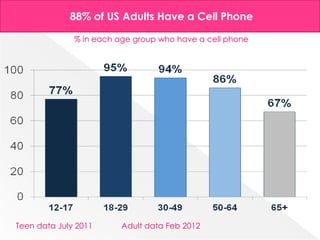
88% of US Adults Have a Cell Phone

              % in each age group who have a cell phone


Teen data July 2011      Adult data Feb 2012
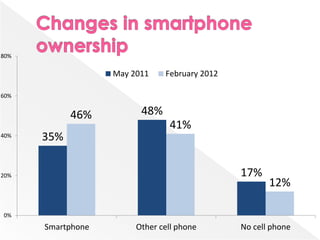
80%

                   May 2011    February 2012

60%


            46%          48%
                                41%
40%   35%

20%                                            17%
                                                      12%

0%
      Smartphone        Other cell phone       No cell phone
   iPhone
    › QR Reader for iPhone (Free App)
    › Quick Scan (Free App)
   Android
    › Google Goggles (Free App)
    › QR Droid (Free App)
   Digital Scavenger Hunt
   Link to Internet Sites
   Access Homework
   Access Notes from a Lesson
   Access a game or simulation
   Go to a wiki for group work
   Read a Blog and Comment
   Create Individual Classroom Blogs & QR
    Codes
   Worksheets with links to websites
   Sheet Music with links to mp3 sound files
   Label science equipment to link to videos
    that show proper use
   Links to How To Videos…

   Brainstorm for more Lesson Ideas…
 Poll up to 40 students, Free!
 Great for Review, Test Prep, or as a pre-
  assessment Tool

   Polleverywhere.com
http://wiffiti.locamoda.com/boards/1302
 Free for Educators
 Collect feedback from students and
  display like notes on a corkboard
 Collects text messages/tweets
 Includes a G rated filter to keep out
  inappropriate comments
 Zap feature to remove unwanted
  comments.
   Studyboost.com – Free
    › Help make lessons more interactive
    › Make studying more convenient
    › Extend the learning to outside your
      classroom
    › Get statistics on how your students are doing
   Homework –Use one of the 4 tools in a
    classroom lesson. Explain how you used
    them to meet learning objectives in your
    course. Email Roberta or Andrea and
    provide the details on how you
    incorporated the tool.

 Questions?, Call us!
   › Roberta 322-3271 & Andrea 323-6973
 Thanks for Coming!
   “Re-think Everything for Mobile or you’re Toast.”
    http://www.techrepublic.com/blog/hiner/re-think-everything-for-mobile-or-
    youre-toast/10251?tag=nl.e101

   Rainie,Lee. “The State of Mobile America.”
    http://www.pewinternet.org/

Mobilize me3 Scharenberg

  • 2.
     Why Mobile?Why now? Using the Cell Phone as a Learning device  Choose one tool and practice!  Wrap Up/ Discuss Homework / Questions
  • 3.
    88% of USAdults Have a Cell Phone % in each age group who have a cell phone Teen data July 2011 Adult data Feb 2012
  • 4.
    80% May 2011 February 2012 60% 46% 48% 41% 40% 35% 20% 17% 12% 0% Smartphone Other cell phone No cell phone
  • 6.
    iPhone › QR Reader for iPhone (Free App) › Quick Scan (Free App)  Android › Google Goggles (Free App) › QR Droid (Free App)
  • 7.
    Digital Scavenger Hunt  Link to Internet Sites  Access Homework  Access Notes from a Lesson  Access a game or simulation  Go to a wiki for group work  Read a Blog and Comment  Create Individual Classroom Blogs & QR Codes  Worksheets with links to websites  Sheet Music with links to mp3 sound files  Label science equipment to link to videos that show proper use  Links to How To Videos…  Brainstorm for more Lesson Ideas…
  • 10.
     Poll upto 40 students, Free!  Great for Review, Test Prep, or as a pre- assessment Tool  Polleverywhere.com
  • 11.
  • 12.
     Free forEducators  Collect feedback from students and display like notes on a corkboard  Collects text messages/tweets  Includes a G rated filter to keep out inappropriate comments  Zap feature to remove unwanted comments.
  • 13.
    Studyboost.com – Free › Help make lessons more interactive › Make studying more convenient › Extend the learning to outside your classroom › Get statistics on how your students are doing
  • 14.
    Homework –Use one of the 4 tools in a classroom lesson. Explain how you used them to meet learning objectives in your course. Email Roberta or Andrea and provide the details on how you incorporated the tool.  Questions?, Call us! › Roberta 322-3271 & Andrea 323-6973  Thanks for Coming!
  • 15.
    “Re-think Everything for Mobile or you’re Toast.” http://www.techrepublic.com/blog/hiner/re-think-everything-for-mobile-or- youre-toast/10251?tag=nl.e101  Rainie,Lee. “The State of Mobile America.” http://www.pewinternet.org/