Mobile Shuttle
Tracker
Umesh Jonnalagadda
Brendon Justin
Alex Shulgach
Austin Wagner
Summary of Purpose
ď‚› Provide  a convenient way to display
  shuttle information for mobile devices.
ď‚› How?
  ď‚›   Show shuttles on a map.
  ď‚›   Show estimated arrival times to each stop
      on the east and west routes.
  ď‚›   Show user location relative to stops.
Data Processing
ď‚› Calculates   arrival times based on the
  shuttles’ location.
ď‚› Improvements:
  ď‚›   Utilized bearing calculations to determine
      location of shuttle.
  ď‚›   Each stop holds a route point closest to its
      location.
  ď‚›   Each stop to be visited by a shuttle will
      have 30 seconds added to its ETA.
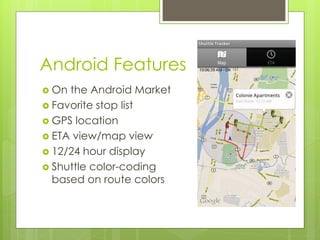
Android Features
ď‚› On the Android Market
ď‚› Favorite stop list
ď‚› GPS location
ď‚› ETA view/map view
ď‚› 12/24 hour display
ď‚› Shuttle color-coding
  based on route colors
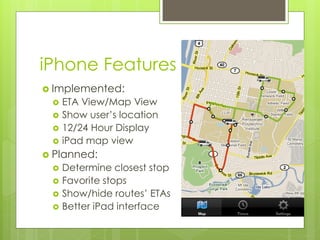
iPhone Features
ď‚› Implemented:
 ď‚›   ETA View/Map View
    Show user’s location
 ď‚›   12/24 Hour Display
 ď‚›   iPad map view
ď‚› Planned:
 ď‚›   Determine closest stop
 ď‚›   Favorite stops
    Show/hide routes’ ETAs
 ď‚›   Better iPad interface
Web Site Features
ď‚› Auto-refresh of ETA tables
ď‚› Favorite stop list
ď‚› Collapsible route lists
ď‚› Formatting adjusts for small and large
  screens
ď‚› Map view (In progress)
ď‚› Upcoming: New design, many bug fixes
Thanks
ď‚› Moorthy
ď‚› WTG
 SeanO’Sullivan
ď‚› RCOS
Demo!
Questions or suggestions?

Mobile shuttle tracker presentation 3

  • 1.
    Mobile Shuttle Tracker Umesh Jonnalagadda BrendonJustin Alex Shulgach Austin Wagner
  • 2.
    Summary of Purpose ď‚›Provide a convenient way to display shuttle information for mobile devices. ď‚› How? ď‚› Show shuttles on a map. ď‚› Show estimated arrival times to each stop on the east and west routes. ď‚› Show user location relative to stops.
  • 3.
    Data Processing  Calculates arrival times based on the shuttles’ location.  Improvements:  Utilized bearing calculations to determine location of shuttle.  Each stop holds a route point closest to its location.  Each stop to be visited by a shuttle will have 30 seconds added to its ETA.
  • 4.
    Android Features ď‚› Onthe Android Market ď‚› Favorite stop list ď‚› GPS location ď‚› ETA view/map view ď‚› 12/24 hour display ď‚› Shuttle color-coding based on route colors
  • 5.
    iPhone Features  Implemented:  ETA View/Map View  Show user’s location  12/24 Hour Display  iPad map view  Planned:  Determine closest stop  Favorite stops  Show/hide routes’ ETAs  Better iPad interface
  • 6.
    Web Site Features ď‚›Auto-refresh of ETA tables ď‚› Favorite stop list ď‚› Collapsible route lists ď‚› Formatting adjusts for small and large screens ď‚› Map view (In progress) ď‚› Upcoming: New design, many bug fixes
  • 7.
    Thanks  Moorthy  WTG SeanO’Sullivan  RCOS
  • 8.
  • 9.