Presenter: Simon Muraya
MOBILE DEVICE MANAGEMENT
❖ I am Bachelors holder in Information Technology, Diploma In
Information Technology and Diploma in Information Communication
Technology(KNEC). I am a Cisco and Microsoft certified trainer with 5
years of training experience. I hold the following certifications, CompTIA
A+,N+,Security+, Cisco CCNA,CCNA Security, CCNP Enterprise, MCSA
windows server 2016, MCSE Core Infrastructure, Micro soft Azure
Fundamentals and Microsoft azure administrator. Currently pursuing
CEH.
❖ Contacts:0719478257
❖ Email:simonmuraya144@gmail.com
About me…
❖ Connection methods
❖ Mobile device management concepts
❖ Enforcement and monitoring
❖ Deployment models
Mobile Device Security
❖ What is a mobile device?
❖ Any easily transportable computing system
❖ Laptops
❖ Tablets
❖ Hybrids
❖ Smartphones
❖ Watches
❖ IoT
Mobile Devices
❖ Cellular
❖ Wi-Fi
❖ Bluetooth
❖ NFC
❖ SATCOM
❖ ANT
❖ Infrared
❖ USB
Connection methods
❖ Wi-Fi
❖ Bluetooth
❖ NFC – Near-Field Communications
❖ SATCOM – Satellite Communications
❖ ANT – proprietary multicast wireless
❖ Infrared – Using light in the infrared spectrum
❖ USB / Firewire
Connection methods
❖ Personal-Area Network (PAN) – short-range wireless connectivity
❖ Uses a spread spectrum, frequency hopping, full-duplex signal
❖ Pairing devices forms a piconet
❖ Bluesnarfing / Bluejacking
❖ If needed, set to nondiscoverable
Bluetooth
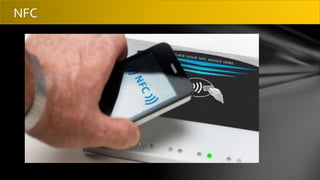
❖ Standards for contactless communication between devices
❖ Chips generate electromagnetic fields
❖ Modes of operation:
❖ Peer-to-peer mode: Two mobile devices exchange data.
❖ Read/write mode: An active device receives data from a passive device.
❖ Card emulation: The device is used as a contactless credit card.
Near-Field Communications (NFC)
NFC
❖ The administration of mobile devices in an organization
❖ Software used to inventory, monitor, manage and secure employees'
mobile devices, deployed across multiple mobile service providers and
across multiple mobile operating systems
❖ Device enrollment, provisioning, and inventory
❖ Configuration management / updating
❖ Managing applications Enforcing policies
Mobile Device Management (MDM
❖ Mobile Application Management (MAM)
• Restricting applications
• Digitally signing applications
• Distribution from a centralized, controlled source
• Managed through whitelisting or blacklisting
❖ Mobile Content Management (MCM)
• Controlling access to data and file storage
❖ Push notification services
• Brief message or alert
• Operating system push notification service (OSPNS)
• Allows auto-updating base OS and client apps
Mobile Device Management Capabilities
❖ Geolocation
• Uses the devices’ GPS
• Some apps (Maps, Foursquare)
❖ Geofencing
• Defining a geographic perimeter
• Example: Texting in front seat of a car
Mobile Device Management Capabilities
❖ Full device encryption
• System and application
• Use TPM when available (laptops)
❖ Screen locks / Lockout – Screen configured to automatically lock after set time
❖ Passwords and Pins
• Based on corporate policy
❖ Biometrics
❖ Context-aware authentication
• Additional criteria used for authentication or device usage
• Examples: Location, time, activity, etc.
Mobile device management concepts
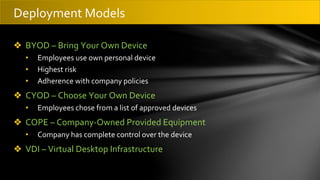
❖ BYOD – Bring Your Own Device
• Employees use own personal device
• Highest risk
• Adherence with company policies
❖ CYOD – Choose Your Own Device
• Employees chose from a list of approved devices
❖ COPE – Company-Owned Provided Equipment
• Company has complete control over the device
❖ VDI – Virtual Desktop Infrastructure
Deployment Models
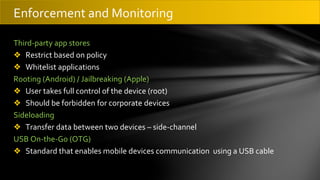
Third-party app stores
❖ Restrict based on policy
❖ Whitelist applications
Rooting (Android) / Jailbreaking (Apple)
❖ User takes full control of the device (root)
❖ Should be forbidden for corporate devices
Sideloading
❖ Transfer data between two devices – side-channel
USB On-the-Go (OTG)
❖ Standard that enables mobile devices communication using a USB cable
Enforcement and Monitoring
ANY QUESTIONS
Thank you for Listening

Mobile Device Management.pptx

  • 1.
  • 2.
    ❖ I amBachelors holder in Information Technology, Diploma In Information Technology and Diploma in Information Communication Technology(KNEC). I am a Cisco and Microsoft certified trainer with 5 years of training experience. I hold the following certifications, CompTIA A+,N+,Security+, Cisco CCNA,CCNA Security, CCNP Enterprise, MCSA windows server 2016, MCSE Core Infrastructure, Micro soft Azure Fundamentals and Microsoft azure administrator. Currently pursuing CEH. ❖ Contacts:0719478257 ❖ Email:simonmuraya144@gmail.com About me…
  • 3.
    ❖ Connection methods ❖Mobile device management concepts ❖ Enforcement and monitoring ❖ Deployment models Mobile Device Security
  • 4.
    ❖ What isa mobile device? ❖ Any easily transportable computing system ❖ Laptops ❖ Tablets ❖ Hybrids ❖ Smartphones ❖ Watches ❖ IoT Mobile Devices
  • 6.
    ❖ Cellular ❖ Wi-Fi ❖Bluetooth ❖ NFC ❖ SATCOM ❖ ANT ❖ Infrared ❖ USB Connection methods
  • 7.
    ❖ Wi-Fi ❖ Bluetooth ❖NFC – Near-Field Communications ❖ SATCOM – Satellite Communications ❖ ANT – proprietary multicast wireless ❖ Infrared – Using light in the infrared spectrum ❖ USB / Firewire Connection methods
  • 8.
    ❖ Personal-Area Network(PAN) – short-range wireless connectivity ❖ Uses a spread spectrum, frequency hopping, full-duplex signal ❖ Pairing devices forms a piconet ❖ Bluesnarfing / Bluejacking ❖ If needed, set to nondiscoverable Bluetooth
  • 9.
    ❖ Standards forcontactless communication between devices ❖ Chips generate electromagnetic fields ❖ Modes of operation: ❖ Peer-to-peer mode: Two mobile devices exchange data. ❖ Read/write mode: An active device receives data from a passive device. ❖ Card emulation: The device is used as a contactless credit card. Near-Field Communications (NFC)
  • 10.
  • 11.
    ❖ The administrationof mobile devices in an organization ❖ Software used to inventory, monitor, manage and secure employees' mobile devices, deployed across multiple mobile service providers and across multiple mobile operating systems ❖ Device enrollment, provisioning, and inventory ❖ Configuration management / updating ❖ Managing applications Enforcing policies Mobile Device Management (MDM
  • 12.
    ❖ Mobile ApplicationManagement (MAM) • Restricting applications • Digitally signing applications • Distribution from a centralized, controlled source • Managed through whitelisting or blacklisting ❖ Mobile Content Management (MCM) • Controlling access to data and file storage ❖ Push notification services • Brief message or alert • Operating system push notification service (OSPNS) • Allows auto-updating base OS and client apps Mobile Device Management Capabilities
  • 13.
    ❖ Geolocation • Usesthe devices’ GPS • Some apps (Maps, Foursquare) ❖ Geofencing • Defining a geographic perimeter • Example: Texting in front seat of a car Mobile Device Management Capabilities
  • 14.
    ❖ Full deviceencryption • System and application • Use TPM when available (laptops) ❖ Screen locks / Lockout – Screen configured to automatically lock after set time ❖ Passwords and Pins • Based on corporate policy ❖ Biometrics ❖ Context-aware authentication • Additional criteria used for authentication or device usage • Examples: Location, time, activity, etc. Mobile device management concepts
  • 15.
    ❖ BYOD –Bring Your Own Device • Employees use own personal device • Highest risk • Adherence with company policies ❖ CYOD – Choose Your Own Device • Employees chose from a list of approved devices ❖ COPE – Company-Owned Provided Equipment • Company has complete control over the device ❖ VDI – Virtual Desktop Infrastructure Deployment Models
  • 16.
    Third-party app stores ❖Restrict based on policy ❖ Whitelist applications Rooting (Android) / Jailbreaking (Apple) ❖ User takes full control of the device (root) ❖ Should be forbidden for corporate devices Sideloading ❖ Transfer data between two devices – side-channel USB On-the-Go (OTG) ❖ Standard that enables mobile devices communication using a USB cable Enforcement and Monitoring
  • 17.
  • 18.
    Thank you forListening