International Journal of Innovative Research in Advanced Engineering (IJIRAE) ISSN: 2349-2163
Issue 07, Volume 4 (July 2017) www.ijirae.com
_________________________________________________________________________________________________
IJIRAE: Impact Factor Value – SJIF: Innospace, Morocco (2016): 3.916 | PIF: 2.469 | Jour Info: 4.085 |
ISRAJIF (2016): 3.715 | Indexcopernicus: (ICV 2015): 47.91
IJIRAE © 2014- 17, All Rights Reserved Page -1
M-Learning Enabled Secure Exam Management
Systems (MLESEMS)
Rahul B. Mannade*, Hirendra H. Hazare**
*P. G. Student, Gondwana University, Gadchiroli, Maharashtra (India)
mannade.rahul@gmail.com
**Assistant Professor, Gondwana University, Gadchiroli, Maharashtra (India)
hirendrahazare@gmail.com
Manuscript History
Number: IJIRAE/RS/Vol.04/Issue07/JYAE10080
Received: 20, June 2017
Final Correction: 30, June 2017
Final Accepted: 05, July 2017
Published: July 2017
Citation: Mannade, R. B. & Hazare, H. H. (2017), 'M-Learning Enabled Secure Exam Management Systems
(MLESEMS)', Master's thesis, Gondwana University, Gadchiroli, Maharashtra (India).
Editor: Dr.A.Arul L.S, Chief Editor, IJIRAE, AM Publications, India
Copyright: ©2017 This is an open access article distributed under the terms of the Creative Commons Attribution
License, Which Permits unrestricted use, distribution, and reproduction in any medium, provided the original author
and source are credited.
Abstract— The advancement and proliferations in Information and Communication Technology (ICTs) has led to
migration of learning beyond the traditional classroom Face-to- Face (F2F) to different types of learning such as
Distance Flexible Learning (DFL), Electronic Learning (eLearning) and to everywhere and anytime known as
Mobile Learning (M-Learning). This paper presents an attempt to exploit mobile technologies to simplify the exam
management and performance assessment activities of a learning process. The work focuses on key aspects of
mobile device and platform oriented design, light-weight and efficient implementation, interface usability issues
related to fast and convenient question navigation, and performance assessment. A prototype system,
implemented on Google Android OS, is also illustrated.
Keywords — Android, GPRS, LMS, M-Learning, MOODLE, NFC, PDA, RFID, Tablets, Wi-Fi.
I. INTRODUCTION
In early days, assessment of student performance was carried out through paper based examination system. Such
systems were resources as well as time consuming. Also it had some inherent risks of question paper leakage,
wrong or biased assessment. After paper based examinations, computer based exam called e-exams were
introduced. During the last few years, a lot of studies introduced the exploitation of Information and
Communication Technologies for educational purposes, i.e. to enhance the teaching and learning activities [1, 2].
The so-called e-exam systems simplify the assessment process by computer aided control and automated marking.
The term assessment is used to point on to all activities undertaken by teachers to help their students in assessing
themselves, and to measure their success rate in the learning progress. In this paper, we have introduced a novel
approach to conduct examinations using mobile smartphones. Section II discusses related work, Section III
explains detailed system design, Section IV shows testing results and Section V discusses futures perspectives of
the system and concludes the work.
II. RELATED WORK
With the development of mobile device capability and wireless network infrastructure, mobile devices are widely
used in diverse areas such as business, healthcare, and education [7].
International Journal of Innovative Research in Advanced Engineering (IJIRAE) ISSN: 2349-2163
Issue 07, Volume 4 (July 2017) www.ijirae.com
_________________________________________________________________________________________________
IJIRAE: Impact Factor Value – SJIF: Innospace, Morocco (2016): 3.916 | PIF: 2.469 | Jour Info: 4.085 |
ISRAJIF (2016): 3.715 | Indexcopernicus: (ICV 2015): 47.91
IJIRAE © 2014- 17, All Rights Reserved Page -2
The rapid development of mobile technology and its widespread application in diverse areas have motivated
much research work regarding the utilization of mobile technologies to facilitate the examination process. There
is a series of research publications on e-exam systems. Yuan et al. presented a web-based examination system
which carried out the examination and auto-grading for computer science education [3]. Huang et al. adopted the
S2SH and MVC web system development pattern to complete the essential function of online exam system, and the
system increased the reusability of code and strengthened the flexibility and maintainability of the system [4].
Pang et al. proposed an online training and exam web service system architecture with high security, easy
operation, powerful integration, easy maintenance and management [5]. Most computer based evaluation
mechanisms are based on web-based testing and employ the client-server paradigm [6]. But, in these systems
security issues like student authentication, impersonation etc., has not considered. In order to insure quality
knowledge transmission, assessment process, such as conducting experiments, realizing mini-projects, quizzes,
exams…etc., is needed for students and teachers. For students, it helps them to know if they achieve what
expected. For teachers, it helps them to adjust their lectures and methodology to a better quality approach. Other
types of the e-assessment systems that are recognized at universities and based on the campus wireless have been
developed. These systems help the students to use their Mobile Phones as learning media to access the
information more easily at any area of the campus and at any time.
III.SYSTEM DESIGN AND ARCHITECTURE
MLESEMS is mobile based exam management system that enables its stake holders to conduct/attend exam using
their mobile phones. This exam management system avoids use of papers, reduces the no. of required resources,
man power, improves the assessment time and quality. As shown in figure 1, MLESEMS consists of three modules:
1. Exam Server 2. Exam Client App 3. Teacher App.
Fig. 1: System Architecture
A. Exam Server
Exam server is core vital component of MLESEMS. It provides services which are needed to create exam, prepare
question bank, store answer key, randomize questions, user authentication etc. We have implemented this server
in PHP. Exam server provides following services.
 It stores credentials of both teacher as well as student and authenticate the same.
 It stores students list, exams, exam questions, exam data attended by students etc.
 It provides functionalities to add/delete exams, add/delete exam questions, auto evaluation of questions etc.
 It creates exam instances by random distribution of exam questions to the enrolled students’ mobile/tablet
devices. This means it ensures that questions are not going to reach students in the same order. Moreover,
the multi-choices of each question, in case of MCQ’s will be flipped randomly and delivered differently to
each student, which guarantees that each student gets different questions order and makes cheating by
“hand-signals” impossible.
B. Exam Client App
In order to attend exam, student has to first register with exam server using Exam Client App (ECA). After
registration student need to get approved by the concerned teacher.
International Journal of Innovative Research in Advanced Engineering (IJIRAE) ISSN: 2349-2163
Issue 07, Volume 4 (July 2017) www.ijirae.com
_________________________________________________________________________________________________
IJIRAE: Impact Factor Value – SJIF: Innospace, Morocco (2016): 3.916 | PIF: 2.469 | Jour Info: 4.085 |
ISRAJIF (2016): 3.715 | Indexcopernicus: (ICV 2015): 47.91
IJIRAE © 2014- 17, All Rights Reserved Page -3
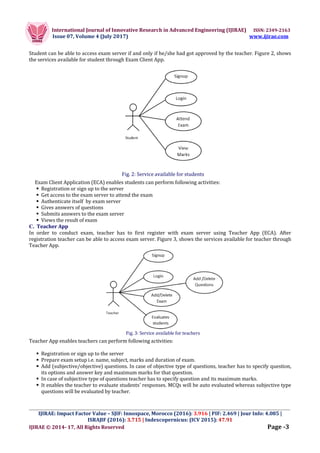
Student can be able to access exam server if and only if he/she had got approved by the teacher. Figure 2, shows
the services available for student through Exam Client App.
Fig. 2: Service available for students
Exam Client Application (ECA) enables students can perform following activities:
 Registration or sign up to the server
 Get access to the exam server to attend the exam
 Authenticate itself by exam server
 Gives answers of questions
 Submits answers to the exam server
 Views the result of exam
C. Teacher App
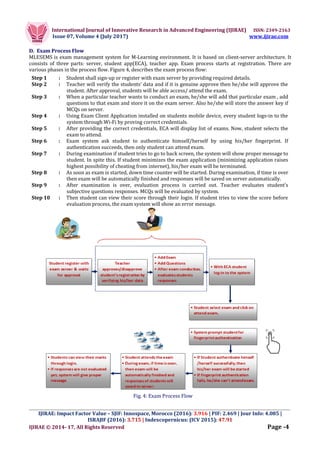
In order to conduct exam, teacher has to first register with exam server using Teacher App (ECA). After
registration teacher can be able to access exam server. Figure 3, shows the services available for teacher through
Teacher App.
Fig. 3: Service available for teachers
Teacher App enables teachers can perform following activities:
 Registration or sign up to the server
 Prepare exam setup i.e. name, subject, marks and duration of exam.
 Add (subjective/objective) questions. In case of objective type of questions, teacher has to specify question,
its options and answer key and maximum marks for that question.
 In case of subjective type of questions teacher has to specify question and its maximum marks.
 It enables the teacher to evaluate students’ responses. MCQs will be auto evaluated whereas subjective type
questions will be evaluated by teacher.
International Journal of Innovative Research in Advanced Engineering (IJIRAE) ISSN: 2349-2163
Issue 07, Volume 4 (July 2017) www.ijirae.com
_________________________________________________________________________________________________
IJIRAE: Impact Factor Value – SJIF: Innospace, Morocco (2016): 3.916 | PIF: 2.469 | Jour Info: 4.085 |
ISRAJIF (2016): 3.715 | Indexcopernicus: (ICV 2015): 47.91
IJIRAE © 2014- 17, All Rights Reserved Page -4
D. Exam Process Flow
MLESEMS is exam management system for M-Learning environment. It is based on client-server architecture. It
consists of three parts: server, student app(ECA), teacher app. Exam process starts at registration. There are
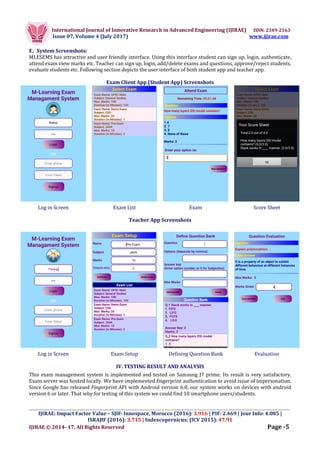
various phases in the process flow. Figure 4, describes the exam process flow:
Step 1 : Student shall sign-up or register with exam server by providing required details.
Step 2 : Teacher will verify the students’ data and if it is genuine approve then he/she will approve the
student. After approval, students will be able access/ attend the exam.
Step 3 : When a particular teacher wants to conduct an exam, he/she will add that particular exam , add
questions to that exam and store it on the exam server. Also he/she will store the answer key if
MCQs on server.
Step 4 : Using Exam Client Application installed on students mobile device, every student logs-in to the
system through Wi-Fi by proving correct credentials.
Step 5 : After providing the correct credentials, ECA will display list of exams. Now, student selects the
exam to attend.
Step 6 : Exam system ask student to authenticate himself/herself by using his/her fingerprint. If
authentication succeeds, then only student can attend exam.
Step 7 : During examination if student tries to go to back screen, the system will show proper message to
student. In spite this. If student minimizes the exam application (minimizing application raises
highest possibility of cheating from internet), his/her exam will be terminated.
Step 8 : As soon as exam is started, down time counter will be started. During examination, if time is over
then exam will be automatically finished and responses will be saved on server automatically.
Step 9 : After examination is over, evaluation process is carried out. Teacher evaluates student’s
subjective questions responses. MCQs will be evaluated by system.
Step 10 : Then student can view their score through their login. If student tries to view the score before
evaluation process, the exam system will show an error message.
Fig. 4: Exam Process Flow
International Journal of Innovative Research in Advanced Engineering (IJIRAE) ISSN: 2349-2163
Issue 07, Volume 4 (July 2017) www.ijirae.com
_________________________________________________________________________________________________
IJIRAE: Impact Factor Value – SJIF: Innospace, Morocco (2016): 3.916 | PIF: 2.469 | Jour Info: 4.085 |
ISRAJIF (2016): 3.715 | Indexcopernicus: (ICV 2015): 47.91
IJIRAE © 2014- 17, All Rights Reserved Page -5
E. System Screenshots:
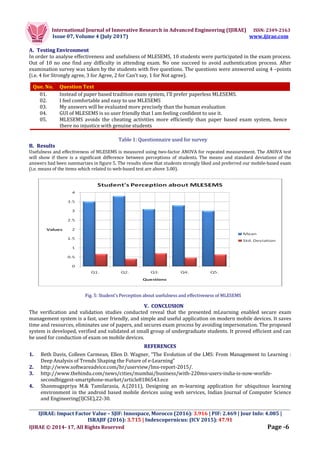
MLESEMS has attractive and user friendly interface. Using this interface student can sign up, login, authenticate,
attend exam view marks etc. Teacher can sign up, login, add/delete exams and questions, approve/reject students,
evaluate students etc. Following section depicts the user interface of both student app and teacher app.
Exam Client App (Student App) Screenshots
Log in Screen Exam List Exam Score Sheet
Teacher App Screenshots
Log in Screen Exam Setup Defining Question Bank Evaluation
IV. TESTING RESULT AND ANALYSIS
This exam management system is implemented and tested on Samsung J7 prime. Its result is very satisfactory.
Exam server was hosted locally. We have implemented fingerprint authentication to avoid issue of impersonation.
Since Google has released Fingerprint API with Android version 6.0, our system works on devices with android
version 6 or later. That why for testing of this system we could find 10 smartphone users/students.
International Journal of Innovative Research in Advanced Engineering (IJIRAE) ISSN: 2349-2163
Issue 07, Volume 4 (July 2017) www.ijirae.com
_________________________________________________________________________________________________
IJIRAE: Impact Factor Value – SJIF: Innospace, Morocco (2016): 3.916 | PIF: 2.469 | Jour Info: 4.085 |
ISRAJIF (2016): 3.715 | Indexcopernicus: (ICV 2015): 47.91
IJIRAE © 2014- 17, All Rights Reserved Page -6
A. Testing Environment
In order to analyse effectiveness and usefulness of MLESEMS, 10 students were participated in the exam process.
Out of 10 no one find any difficulty in attending exam. No one succeed to avoid authentication process. After
examination survey was taken by the students with five questions. The questions were answered using 4 –points
(i.e. 4 for Strongly agree, 3 for Agree, 2 for Can’t say, 1 for Not agree).
Table 1: Questionnaire used for survey
B. Results
Usefulness and effectiveness of MLESEMS is measured using two-factor ANOVA for repeated measurement. The ANOVA test
will show if there is a significant difference between perceptions of students. The means and standard deviations of the
answers had been summarizes in figure 5. The results show that students strongly liked and preferred our mobile-based exam
(i.e. means of the items which related to web-based test are above 3.00).
Fig. 5: Student’s Perception about usefulness and effectiveness of MLESEMS
V. CONCLUSION
The verification and validation studies conducted reveal that the presented mLearning enabled secure exam
management system is a fast, user friendly, and simple and useful application on modern mobile devices. It saves
time and resources, eliminates use of papers, and secures exam process by avoiding impersonation. The proposed
system is developed, verified and validated at small group of undergraduate students. It proved efficient and can
be used for conduction of exam on mobile devices.
REFERENCES
1. Beth Davis, Colleen Carmean, Ellen D. Wagner, “The Evolution of the LMS: From Management to Learning :
Deep Analysis of Trends Shaping the Future of e-Learning”
2. http://www.softwareadvice.com/hr/userview/lms-report-2015/.
3. http://www.thehindu.com/news/cities/mumbai/business/with-220mn-users-india-is-now-worlds-
secondbiggest-smartphone-market/article8186543.ece
4. Shanmugapriya M.& Tamilarasia, A.(2011), Designing an m-learning application for ubiquitous learning
environment in the android based mobile devices using web services, Indian Journal of Computer Science
and Engineering(IJCSE),22-30.
Que. No. Question Text
01. Instead of paper based tradition exam system, I’ll prefer paperless MLESEMS.
02. I feel comfortable and easy to use MLESEMS
03. My answers will be evaluated more precisely than the human evaluation
04. GUI of MLESEMS is so user friendly that I am feeling confident to use it.
05. MLESEMS avoids the cheating activities more efficiently than paper based exam system, hence
there no injustice with genuine students
International Journal of Innovative Research in Advanced Engineering (IJIRAE) ISSN: 2349-2163
Issue 07, Volume 4 (July 2017) www.ijirae.com
_________________________________________________________________________________________________
IJIRAE: Impact Factor Value – SJIF: Innospace, Morocco (2016): 3.916 | PIF: 2.469 | Jour Info: 4.085 |
ISRAJIF (2016): 3.715 | Indexcopernicus: (ICV 2015): 47.91
IJIRAE © 2014- 17, All Rights Reserved Page -7
5. Winters, N.& Mor.Y (2008)’IDR: a participatory methodology for interdisciplinary design in technology
enhanced learning’ (Computers & Education, 50(2),579-600).
6. Jasmina Kljunić, Dijana Plantak Vukovac, “A Survey on Usage of Mobile Devices for Learning among Tertiary
Students in Croatia”, Central Europian Conference on Information and Intelligent Systems, Sept. 23-
25,2016.(pp. 97-104).
7. Elias, T. Universal Instructional Design for Mobile Learning. International Review of Research in Open and
Distance Learning 12 (2), pages 143-156, 2011.
8. Rahul B. Mannade, Amol B. Bhande, “Challenges of Mobile Computing: An Overview”, International Journal of
Advanced Research in Computer and Communication Engineering, Vol. 2, Issue 8, August 2013, pp.3109-
3114.
9. Bidin, S., Ziden, A. Adoption and application of mobile learning in the education industry. The 6th
International Conference on University Learning and Teaching, pages 720-729, 2013.
10. Marcelo Milrad, “How should learning activities using mobile technologies be designed to support innovative
educational practices?”, Report of a workshop by the Kaleidoscope Network of Excellence Mobile Learning
Initiative.
11. Giasemi Vavoula and Charalampos Karagiannidis: “Designing Mobile Learning Experiences”.

M-Learning Enabled Secure Exam Management Systems (MLESEMS)

  • 1.
    International Journal ofInnovative Research in Advanced Engineering (IJIRAE) ISSN: 2349-2163 Issue 07, Volume 4 (July 2017) www.ijirae.com _________________________________________________________________________________________________ IJIRAE: Impact Factor Value – SJIF: Innospace, Morocco (2016): 3.916 | PIF: 2.469 | Jour Info: 4.085 | ISRAJIF (2016): 3.715 | Indexcopernicus: (ICV 2015): 47.91 IJIRAE © 2014- 17, All Rights Reserved Page -1 M-Learning Enabled Secure Exam Management Systems (MLESEMS) Rahul B. Mannade*, Hirendra H. Hazare** *P. G. Student, Gondwana University, Gadchiroli, Maharashtra (India) mannade.rahul@gmail.com **Assistant Professor, Gondwana University, Gadchiroli, Maharashtra (India) hirendrahazare@gmail.com Manuscript History Number: IJIRAE/RS/Vol.04/Issue07/JYAE10080 Received: 20, June 2017 Final Correction: 30, June 2017 Final Accepted: 05, July 2017 Published: July 2017 Citation: Mannade, R. B. & Hazare, H. H. (2017), 'M-Learning Enabled Secure Exam Management Systems (MLESEMS)', Master's thesis, Gondwana University, Gadchiroli, Maharashtra (India). Editor: Dr.A.Arul L.S, Chief Editor, IJIRAE, AM Publications, India Copyright: ©2017 This is an open access article distributed under the terms of the Creative Commons Attribution License, Which Permits unrestricted use, distribution, and reproduction in any medium, provided the original author and source are credited. Abstract— The advancement and proliferations in Information and Communication Technology (ICTs) has led to migration of learning beyond the traditional classroom Face-to- Face (F2F) to different types of learning such as Distance Flexible Learning (DFL), Electronic Learning (eLearning) and to everywhere and anytime known as Mobile Learning (M-Learning). This paper presents an attempt to exploit mobile technologies to simplify the exam management and performance assessment activities of a learning process. The work focuses on key aspects of mobile device and platform oriented design, light-weight and efficient implementation, interface usability issues related to fast and convenient question navigation, and performance assessment. A prototype system, implemented on Google Android OS, is also illustrated. Keywords — Android, GPRS, LMS, M-Learning, MOODLE, NFC, PDA, RFID, Tablets, Wi-Fi. I. INTRODUCTION In early days, assessment of student performance was carried out through paper based examination system. Such systems were resources as well as time consuming. Also it had some inherent risks of question paper leakage, wrong or biased assessment. After paper based examinations, computer based exam called e-exams were introduced. During the last few years, a lot of studies introduced the exploitation of Information and Communication Technologies for educational purposes, i.e. to enhance the teaching and learning activities [1, 2]. The so-called e-exam systems simplify the assessment process by computer aided control and automated marking. The term assessment is used to point on to all activities undertaken by teachers to help their students in assessing themselves, and to measure their success rate in the learning progress. In this paper, we have introduced a novel approach to conduct examinations using mobile smartphones. Section II discusses related work, Section III explains detailed system design, Section IV shows testing results and Section V discusses futures perspectives of the system and concludes the work. II. RELATED WORK With the development of mobile device capability and wireless network infrastructure, mobile devices are widely used in diverse areas such as business, healthcare, and education [7].
  • 2.
    International Journal ofInnovative Research in Advanced Engineering (IJIRAE) ISSN: 2349-2163 Issue 07, Volume 4 (July 2017) www.ijirae.com _________________________________________________________________________________________________ IJIRAE: Impact Factor Value – SJIF: Innospace, Morocco (2016): 3.916 | PIF: 2.469 | Jour Info: 4.085 | ISRAJIF (2016): 3.715 | Indexcopernicus: (ICV 2015): 47.91 IJIRAE © 2014- 17, All Rights Reserved Page -2 The rapid development of mobile technology and its widespread application in diverse areas have motivated much research work regarding the utilization of mobile technologies to facilitate the examination process. There is a series of research publications on e-exam systems. Yuan et al. presented a web-based examination system which carried out the examination and auto-grading for computer science education [3]. Huang et al. adopted the S2SH and MVC web system development pattern to complete the essential function of online exam system, and the system increased the reusability of code and strengthened the flexibility and maintainability of the system [4]. Pang et al. proposed an online training and exam web service system architecture with high security, easy operation, powerful integration, easy maintenance and management [5]. Most computer based evaluation mechanisms are based on web-based testing and employ the client-server paradigm [6]. But, in these systems security issues like student authentication, impersonation etc., has not considered. In order to insure quality knowledge transmission, assessment process, such as conducting experiments, realizing mini-projects, quizzes, exams…etc., is needed for students and teachers. For students, it helps them to know if they achieve what expected. For teachers, it helps them to adjust their lectures and methodology to a better quality approach. Other types of the e-assessment systems that are recognized at universities and based on the campus wireless have been developed. These systems help the students to use their Mobile Phones as learning media to access the information more easily at any area of the campus and at any time. III.SYSTEM DESIGN AND ARCHITECTURE MLESEMS is mobile based exam management system that enables its stake holders to conduct/attend exam using their mobile phones. This exam management system avoids use of papers, reduces the no. of required resources, man power, improves the assessment time and quality. As shown in figure 1, MLESEMS consists of three modules: 1. Exam Server 2. Exam Client App 3. Teacher App. Fig. 1: System Architecture A. Exam Server Exam server is core vital component of MLESEMS. It provides services which are needed to create exam, prepare question bank, store answer key, randomize questions, user authentication etc. We have implemented this server in PHP. Exam server provides following services.  It stores credentials of both teacher as well as student and authenticate the same.  It stores students list, exams, exam questions, exam data attended by students etc.  It provides functionalities to add/delete exams, add/delete exam questions, auto evaluation of questions etc.  It creates exam instances by random distribution of exam questions to the enrolled students’ mobile/tablet devices. This means it ensures that questions are not going to reach students in the same order. Moreover, the multi-choices of each question, in case of MCQ’s will be flipped randomly and delivered differently to each student, which guarantees that each student gets different questions order and makes cheating by “hand-signals” impossible. B. Exam Client App In order to attend exam, student has to first register with exam server using Exam Client App (ECA). After registration student need to get approved by the concerned teacher.
  • 3.
    International Journal ofInnovative Research in Advanced Engineering (IJIRAE) ISSN: 2349-2163 Issue 07, Volume 4 (July 2017) www.ijirae.com _________________________________________________________________________________________________ IJIRAE: Impact Factor Value – SJIF: Innospace, Morocco (2016): 3.916 | PIF: 2.469 | Jour Info: 4.085 | ISRAJIF (2016): 3.715 | Indexcopernicus: (ICV 2015): 47.91 IJIRAE © 2014- 17, All Rights Reserved Page -3 Student can be able to access exam server if and only if he/she had got approved by the teacher. Figure 2, shows the services available for student through Exam Client App. Fig. 2: Service available for students Exam Client Application (ECA) enables students can perform following activities:  Registration or sign up to the server  Get access to the exam server to attend the exam  Authenticate itself by exam server  Gives answers of questions  Submits answers to the exam server  Views the result of exam C. Teacher App In order to conduct exam, teacher has to first register with exam server using Teacher App (ECA). After registration teacher can be able to access exam server. Figure 3, shows the services available for teacher through Teacher App. Fig. 3: Service available for teachers Teacher App enables teachers can perform following activities:  Registration or sign up to the server  Prepare exam setup i.e. name, subject, marks and duration of exam.  Add (subjective/objective) questions. In case of objective type of questions, teacher has to specify question, its options and answer key and maximum marks for that question.  In case of subjective type of questions teacher has to specify question and its maximum marks.  It enables the teacher to evaluate students’ responses. MCQs will be auto evaluated whereas subjective type questions will be evaluated by teacher.
  • 4.
    International Journal ofInnovative Research in Advanced Engineering (IJIRAE) ISSN: 2349-2163 Issue 07, Volume 4 (July 2017) www.ijirae.com _________________________________________________________________________________________________ IJIRAE: Impact Factor Value – SJIF: Innospace, Morocco (2016): 3.916 | PIF: 2.469 | Jour Info: 4.085 | ISRAJIF (2016): 3.715 | Indexcopernicus: (ICV 2015): 47.91 IJIRAE © 2014- 17, All Rights Reserved Page -4 D. Exam Process Flow MLESEMS is exam management system for M-Learning environment. It is based on client-server architecture. It consists of three parts: server, student app(ECA), teacher app. Exam process starts at registration. There are various phases in the process flow. Figure 4, describes the exam process flow: Step 1 : Student shall sign-up or register with exam server by providing required details. Step 2 : Teacher will verify the students’ data and if it is genuine approve then he/she will approve the student. After approval, students will be able access/ attend the exam. Step 3 : When a particular teacher wants to conduct an exam, he/she will add that particular exam , add questions to that exam and store it on the exam server. Also he/she will store the answer key if MCQs on server. Step 4 : Using Exam Client Application installed on students mobile device, every student logs-in to the system through Wi-Fi by proving correct credentials. Step 5 : After providing the correct credentials, ECA will display list of exams. Now, student selects the exam to attend. Step 6 : Exam system ask student to authenticate himself/herself by using his/her fingerprint. If authentication succeeds, then only student can attend exam. Step 7 : During examination if student tries to go to back screen, the system will show proper message to student. In spite this. If student minimizes the exam application (minimizing application raises highest possibility of cheating from internet), his/her exam will be terminated. Step 8 : As soon as exam is started, down time counter will be started. During examination, if time is over then exam will be automatically finished and responses will be saved on server automatically. Step 9 : After examination is over, evaluation process is carried out. Teacher evaluates student’s subjective questions responses. MCQs will be evaluated by system. Step 10 : Then student can view their score through their login. If student tries to view the score before evaluation process, the exam system will show an error message. Fig. 4: Exam Process Flow
  • 5.
    International Journal ofInnovative Research in Advanced Engineering (IJIRAE) ISSN: 2349-2163 Issue 07, Volume 4 (July 2017) www.ijirae.com _________________________________________________________________________________________________ IJIRAE: Impact Factor Value – SJIF: Innospace, Morocco (2016): 3.916 | PIF: 2.469 | Jour Info: 4.085 | ISRAJIF (2016): 3.715 | Indexcopernicus: (ICV 2015): 47.91 IJIRAE © 2014- 17, All Rights Reserved Page -5 E. System Screenshots: MLESEMS has attractive and user friendly interface. Using this interface student can sign up, login, authenticate, attend exam view marks etc. Teacher can sign up, login, add/delete exams and questions, approve/reject students, evaluate students etc. Following section depicts the user interface of both student app and teacher app. Exam Client App (Student App) Screenshots Log in Screen Exam List Exam Score Sheet Teacher App Screenshots Log in Screen Exam Setup Defining Question Bank Evaluation IV. TESTING RESULT AND ANALYSIS This exam management system is implemented and tested on Samsung J7 prime. Its result is very satisfactory. Exam server was hosted locally. We have implemented fingerprint authentication to avoid issue of impersonation. Since Google has released Fingerprint API with Android version 6.0, our system works on devices with android version 6 or later. That why for testing of this system we could find 10 smartphone users/students.
  • 6.
    International Journal ofInnovative Research in Advanced Engineering (IJIRAE) ISSN: 2349-2163 Issue 07, Volume 4 (July 2017) www.ijirae.com _________________________________________________________________________________________________ IJIRAE: Impact Factor Value – SJIF: Innospace, Morocco (2016): 3.916 | PIF: 2.469 | Jour Info: 4.085 | ISRAJIF (2016): 3.715 | Indexcopernicus: (ICV 2015): 47.91 IJIRAE © 2014- 17, All Rights Reserved Page -6 A. Testing Environment In order to analyse effectiveness and usefulness of MLESEMS, 10 students were participated in the exam process. Out of 10 no one find any difficulty in attending exam. No one succeed to avoid authentication process. After examination survey was taken by the students with five questions. The questions were answered using 4 –points (i.e. 4 for Strongly agree, 3 for Agree, 2 for Can’t say, 1 for Not agree). Table 1: Questionnaire used for survey B. Results Usefulness and effectiveness of MLESEMS is measured using two-factor ANOVA for repeated measurement. The ANOVA test will show if there is a significant difference between perceptions of students. The means and standard deviations of the answers had been summarizes in figure 5. The results show that students strongly liked and preferred our mobile-based exam (i.e. means of the items which related to web-based test are above 3.00). Fig. 5: Student’s Perception about usefulness and effectiveness of MLESEMS V. CONCLUSION The verification and validation studies conducted reveal that the presented mLearning enabled secure exam management system is a fast, user friendly, and simple and useful application on modern mobile devices. It saves time and resources, eliminates use of papers, and secures exam process by avoiding impersonation. The proposed system is developed, verified and validated at small group of undergraduate students. It proved efficient and can be used for conduction of exam on mobile devices. REFERENCES 1. Beth Davis, Colleen Carmean, Ellen D. Wagner, “The Evolution of the LMS: From Management to Learning : Deep Analysis of Trends Shaping the Future of e-Learning” 2. http://www.softwareadvice.com/hr/userview/lms-report-2015/. 3. http://www.thehindu.com/news/cities/mumbai/business/with-220mn-users-india-is-now-worlds- secondbiggest-smartphone-market/article8186543.ece 4. Shanmugapriya M.& Tamilarasia, A.(2011), Designing an m-learning application for ubiquitous learning environment in the android based mobile devices using web services, Indian Journal of Computer Science and Engineering(IJCSE),22-30. Que. No. Question Text 01. Instead of paper based tradition exam system, I’ll prefer paperless MLESEMS. 02. I feel comfortable and easy to use MLESEMS 03. My answers will be evaluated more precisely than the human evaluation 04. GUI of MLESEMS is so user friendly that I am feeling confident to use it. 05. MLESEMS avoids the cheating activities more efficiently than paper based exam system, hence there no injustice with genuine students
  • 7.
    International Journal ofInnovative Research in Advanced Engineering (IJIRAE) ISSN: 2349-2163 Issue 07, Volume 4 (July 2017) www.ijirae.com _________________________________________________________________________________________________ IJIRAE: Impact Factor Value – SJIF: Innospace, Morocco (2016): 3.916 | PIF: 2.469 | Jour Info: 4.085 | ISRAJIF (2016): 3.715 | Indexcopernicus: (ICV 2015): 47.91 IJIRAE © 2014- 17, All Rights Reserved Page -7 5. Winters, N.& Mor.Y (2008)’IDR: a participatory methodology for interdisciplinary design in technology enhanced learning’ (Computers & Education, 50(2),579-600). 6. Jasmina Kljunić, Dijana Plantak Vukovac, “A Survey on Usage of Mobile Devices for Learning among Tertiary Students in Croatia”, Central Europian Conference on Information and Intelligent Systems, Sept. 23- 25,2016.(pp. 97-104). 7. Elias, T. Universal Instructional Design for Mobile Learning. International Review of Research in Open and Distance Learning 12 (2), pages 143-156, 2011. 8. Rahul B. Mannade, Amol B. Bhande, “Challenges of Mobile Computing: An Overview”, International Journal of Advanced Research in Computer and Communication Engineering, Vol. 2, Issue 8, August 2013, pp.3109- 3114. 9. Bidin, S., Ziden, A. Adoption and application of mobile learning in the education industry. The 6th International Conference on University Learning and Teaching, pages 720-729, 2013. 10. Marcelo Milrad, “How should learning activities using mobile technologies be designed to support innovative educational practices?”, Report of a workshop by the Kaleidoscope Network of Excellence Mobile Learning Initiative. 11. Giasemi Vavoula and Charalampos Karagiannidis: “Designing Mobile Learning Experiences”.