Migration from jBPM to Activiti!
             Frederik Heremans!
     Software Engineer, Activiti Team, Alfresco!
Introduction!


             Frederik Heremans
             Software Engineer at Alfresco


  •    Activiti core developer!
  •    Open-source enthusiast!
  •    Former J2EE and ECM consultant!
  •    Based in Belgium!
Agenda!

 •     What is Activiti?!
 •     BPMN 2.0!
 •     Activiti and JBPM compared!
 •     Migrating your workflow!
      •    Process definition!
      •    Your code!
 •  Designer Demo!
 •  Q&A!
What is Activiti?!

  •    100% Open source BPM!
  •    100% Java!
  •    Lightweight!
  •    Embeddable!
  •    Customizable!
  •    Excellent testability!
What is Activiti?!

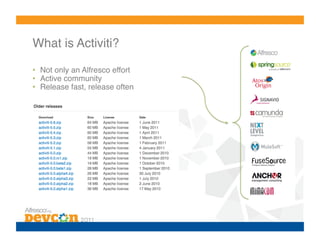
•  Not only an Alfresco effort!
•  Active community!
•  Release fast, release often!
What is Activiti?!


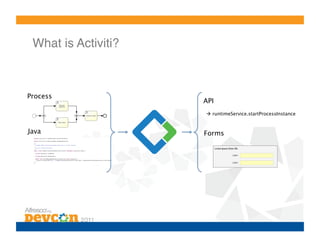
Process
                      API
                       runtimeService.startProcessInstance…


Java
                 Forms
More than just a simple library…!
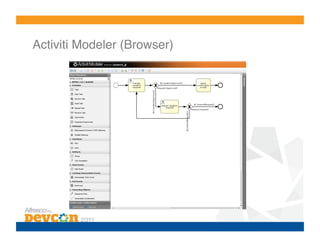
Activiti Modeler (Browser)!
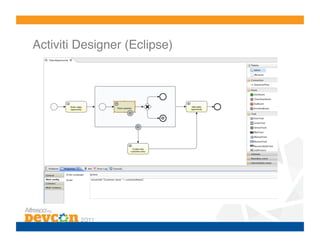
Activiti Designer (Eclipse)!
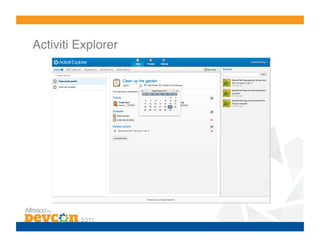
Activiti Explorer!
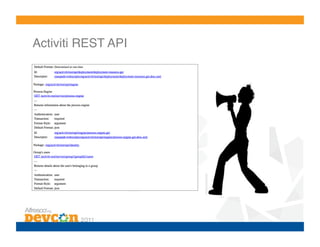
Activiti REST API!
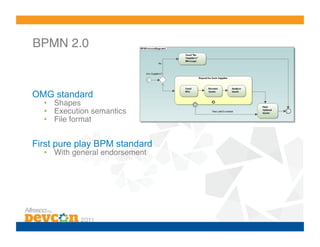
BPMN 2.0!


OMG standard
  •  Shapes!
  •  Execution semantics!
  •  File format!


First pure play BPM standard
  •  With general endorsement
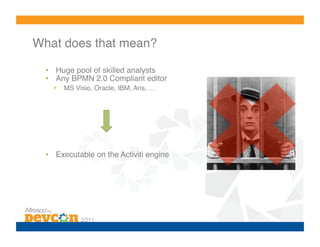
What does that mean?!

  •  Huge pool of skilled analysts!
  •  Any BPMN 2.0 Compliant editor!
    •    MS Visio, Oracle, IBM, Aris, …!


  •  Executable on the Activiti engine!
Activiti and JBPM compared!

  •    Apache licensed!
  •    Started from scratch, new architecture!
  •    Clean (fluent) API!
  •    History separated from runtime data!
  •    Hibernate replaced by myBatis!
  •    BPMN 2.0 offers more constructs than JPDL!
Migrating your workflows!

No automatic database-upgrade possible
  •  Due to big difference in architecture!
  •  Not necessary in Alfresco, both engines can be running alongside
     during transition period!


What to migrate?
  •  Convert process definition!
  •  Convert (or reuse) task-definitions!
  •  Convert custom coding!
Migrating your workflows!

No automatic database-upgrade possible
  •  Due to big difference in architecture!
  •  Not necessary in Alfresco, both engines can be running alongside
     during transition period!


What to migrate?
  •  Convert process definition!
  •  Convert (or reuse) task-definitions!
  •  Convert custom coding!
Modeling an Activiti process!

Using the Activiti designer
   •  Eclipse plug-in (uses Graphiti)!
   •  Built-in extensions & templates for Alfresco!


Editing XML by hand
   •  Activiti offers some extensions for making BPMN less verbose!


Modeling BPMN 2.0 in the Web-base modeler
   •  Pure BPMN modeler, no custom activiti/alfresco features!
Common constructs!

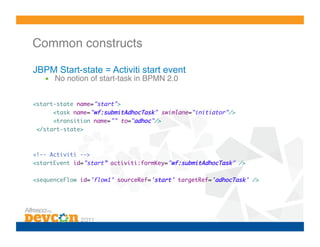
JBPM Start-state = Activiti start event
   •  No notion of start-task in BPMN 2.0!


<start-state name="start">	
      <task name="wf:submitAdhocTask" swimlane="initiator"/>	
      <transition name="" to="adhoc"/>	
 </start-state>	


<!-- Activiti -->	
<startEvent id="start” activiti:formKey="wf:submitAdhocTask" />	

<sequenceFlow id='flow1’ sourceRef='start’ targetRef='adhocTask' />
Common constructs!
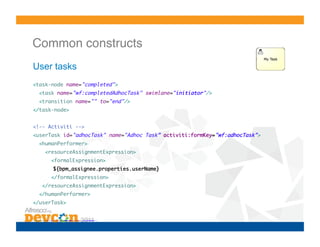
User tasks
<task-node name="completed">	
      <task name="wf:completedAdhocTask" swimlane="initiator"/>	
      <transition name="" to="end"/>	
</task-node>	


<!-- Activiti -->	
<userTask id="adhocTask" name="Adhoc Task” activiti:formKey="wf:adhocTask">	
      <humanPerformer>	
             <resourceAssignmentExpression>	
                    <formalExpression>	
    		             	${bpm_assignee.properties.userName}	
                    </formalExpression>	
         </resourceAssignmentExpression>	
      </humanPerformer>	
</userTask>	


<sequenceFlow id='flow2’ sourceRef='adhocTask’ targetRef='verifyTaskDone' />
Common constructs!
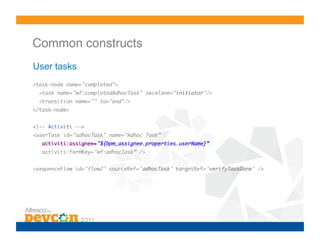
User tasks
<task-node name="completed">	
  <task name="wf:completedAdhocTask" swimlane="initiator"/>	
  <transition name="" to="end"/>	
</task-node>	


<!-- Activiti -->	
<userTask id="adhocTask" name="Adhoc Task”	
   activiti:assignee="${bpm_assignee.properties.userName}” 	
   activiti:formKey="wf:adhocTask” />	


<sequenceFlow id='flow2’ sourceRef='adhocTask’ targetRef='verifyTaskDone' />
Assignment!

Swimlanes not supported in Activiti, use one of:
  •  Assignee (human performer)!
  •  Candidate users (potential owner)!
  •  Candidate groups (potential owner)!


Use of expressions is possible
  •  Assignment based on process-variables!
Common constructs!

Variables

  •    Process and Task-local variables!
  •    Some correspond to task-properties (QName)!
  •    Supports same variable types!
  •    Task-variables arenʼt flushed to the process (by default)!
  •    Can be used in expressions and alfresco scripts!
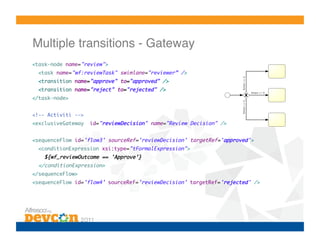
Multiple transitions - Gateway!
<task-node name="review">	
  <task name="wf:reviewTask" swimlane="reviewer” />           	
  <transition name="approve" to="approved" />	
  <transition name="reject" to="rejected" />	
</task-node>	


<!-- Activiti -->	
<exclusiveGateway    id="reviewDecision" name="Review Decision" /> 	


<sequenceFlow id='flow3' sourceRef='reviewDecision' targetRef='approved’>	
  <conditionExpression xsi:type="tFormalExpression">	
    ${wf_reviewOutcome == 'Approve’}	
  </conditionExpression>	
</sequenceFlow>	
<sequenceFlow id='flow4’ sourceRef='reviewDecision’ targetRef='rejected' />
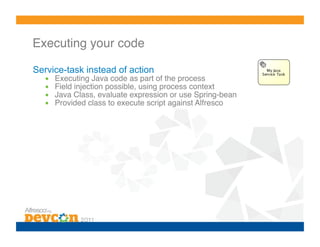
Executing your code!

Service-task instead of action
  •    Executing Java code as part of the process!
  •    Field injection possible, using process context!
  •    Java Class, evaluate expression or use Spring-bean!
  •    Provided class to execute script against Alfresco!
Executing your code!

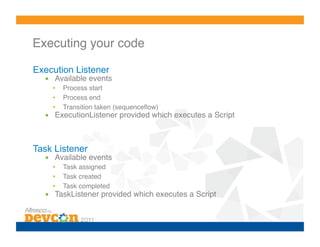
Execution Listener
  •  Available events!
    •    Process start!
    •    Process end!
    •    Transition taken (sequenceflow)!
  •  ExecutionListener provided which executes a Script!


Task Listener
  •  Available events!
    •    Task assigned!
    •    Task created!
    •    Task completed!
  •  TaskListener provided which executes a Script!
Tips!

  •  Look at the process-definitions shipped with Alfresco!
    •    Property handling!
    •    Timers!
    •    Scripting!
    •    Gateways and outcomes!

  •  Activiti userguide!
    •  Contains a lot of examples!
    •  All supported BPMN 2.0 constructs explained!

  •  No need to read the full BPMN 2.0 spec (unless you have a lot of
     time on your hands…)!

  •  Come to the “Workflow Deep Dive” talk to learn more!!
Eclipse designer demo!
Thank you for your attention!

   Any questions?!

BPM-4 Migration from jBPM to Activiti

  • 1.
    Migration from jBPMto Activiti! Frederik Heremans! Software Engineer, Activiti Team, Alfresco!
  • 2.
    Introduction! Frederik Heremans Software Engineer at Alfresco •  Activiti core developer! •  Open-source enthusiast! •  Former J2EE and ECM consultant! •  Based in Belgium!
  • 3.
    Agenda! •  What is Activiti?! •  BPMN 2.0! •  Activiti and JBPM compared! •  Migrating your workflow! •  Process definition! •  Your code! •  Designer Demo! •  Q&A!
  • 4.
    What is Activiti?! •  100% Open source BPM! •  100% Java! •  Lightweight! •  Embeddable! •  Customizable! •  Excellent testability!
  • 5.
    What is Activiti?! • Not only an Alfresco effort! •  Active community! •  Release fast, release often!
  • 6.
    What is Activiti?! Process API  runtimeService.startProcessInstance… Java Forms
  • 7.
    More than justa simple library…!
  • 8.
  • 9.
  • 10.
  • 11.
  • 12.
    BPMN 2.0! OMG standard •  Shapes! •  Execution semantics! •  File format! First pure play BPM standard •  With general endorsement
  • 13.
    What does thatmean?! •  Huge pool of skilled analysts! •  Any BPMN 2.0 Compliant editor! •  MS Visio, Oracle, IBM, Aris, …! •  Executable on the Activiti engine!
  • 14.
    Activiti and JBPMcompared! •  Apache licensed! •  Started from scratch, new architecture! •  Clean (fluent) API! •  History separated from runtime data! •  Hibernate replaced by myBatis! •  BPMN 2.0 offers more constructs than JPDL!
  • 15.
    Migrating your workflows! Noautomatic database-upgrade possible •  Due to big difference in architecture! •  Not necessary in Alfresco, both engines can be running alongside during transition period! What to migrate? •  Convert process definition! •  Convert (or reuse) task-definitions! •  Convert custom coding!
  • 16.
    Migrating your workflows! Noautomatic database-upgrade possible •  Due to big difference in architecture! •  Not necessary in Alfresco, both engines can be running alongside during transition period! What to migrate? •  Convert process definition! •  Convert (or reuse) task-definitions! •  Convert custom coding!
  • 17.
    Modeling an Activitiprocess! Using the Activiti designer •  Eclipse plug-in (uses Graphiti)! •  Built-in extensions & templates for Alfresco! Editing XML by hand •  Activiti offers some extensions for making BPMN less verbose! Modeling BPMN 2.0 in the Web-base modeler •  Pure BPMN modeler, no custom activiti/alfresco features!
  • 18.
    Common constructs! JBPM Start-state= Activiti start event •  No notion of start-task in BPMN 2.0! <start-state name="start"> <task name="wf:submitAdhocTask" swimlane="initiator"/> <transition name="" to="adhoc"/> </start-state> <!-- Activiti --> <startEvent id="start” activiti:formKey="wf:submitAdhocTask" /> <sequenceFlow id='flow1’ sourceRef='start’ targetRef='adhocTask' />
  • 19.
    Common constructs! User tasks <task-nodename="completed"> <task name="wf:completedAdhocTask" swimlane="initiator"/> <transition name="" to="end"/> </task-node> <!-- Activiti --> <userTask id="adhocTask" name="Adhoc Task” activiti:formKey="wf:adhocTask"> <humanPerformer> <resourceAssignmentExpression> <formalExpression> ${bpm_assignee.properties.userName} </formalExpression> </resourceAssignmentExpression> </humanPerformer> </userTask> <sequenceFlow id='flow2’ sourceRef='adhocTask’ targetRef='verifyTaskDone' />
  • 20.
    Common constructs! User tasks <task-nodename="completed"> <task name="wf:completedAdhocTask" swimlane="initiator"/> <transition name="" to="end"/> </task-node> <!-- Activiti --> <userTask id="adhocTask" name="Adhoc Task” activiti:assignee="${bpm_assignee.properties.userName}” activiti:formKey="wf:adhocTask” /> <sequenceFlow id='flow2’ sourceRef='adhocTask’ targetRef='verifyTaskDone' />
  • 21.
    Assignment! Swimlanes not supportedin Activiti, use one of: •  Assignee (human performer)! •  Candidate users (potential owner)! •  Candidate groups (potential owner)! Use of expressions is possible •  Assignment based on process-variables!
  • 22.
    Common constructs! Variables •  Process and Task-local variables! •  Some correspond to task-properties (QName)! •  Supports same variable types! •  Task-variables arenʼt flushed to the process (by default)! •  Can be used in expressions and alfresco scripts!
  • 23.
    Multiple transitions -Gateway! <task-node name="review"> <task name="wf:reviewTask" swimlane="reviewer” /> <transition name="approve" to="approved" /> <transition name="reject" to="rejected" /> </task-node> <!-- Activiti --> <exclusiveGateway id="reviewDecision" name="Review Decision" /> <sequenceFlow id='flow3' sourceRef='reviewDecision' targetRef='approved’> <conditionExpression xsi:type="tFormalExpression"> ${wf_reviewOutcome == 'Approve’} </conditionExpression> </sequenceFlow> <sequenceFlow id='flow4’ sourceRef='reviewDecision’ targetRef='rejected' />
  • 24.
    Executing your code! Service-taskinstead of action •  Executing Java code as part of the process! •  Field injection possible, using process context! •  Java Class, evaluate expression or use Spring-bean! •  Provided class to execute script against Alfresco!
  • 25.
    Executing your code! ExecutionListener •  Available events! •  Process start! •  Process end! •  Transition taken (sequenceflow)! •  ExecutionListener provided which executes a Script! Task Listener •  Available events! •  Task assigned! •  Task created! •  Task completed! •  TaskListener provided which executes a Script!
  • 26.
    Tips! • Look at the process-definitions shipped with Alfresco! •  Property handling! •  Timers! •  Scripting! •  Gateways and outcomes! •  Activiti userguide! •  Contains a lot of examples! •  All supported BPMN 2.0 constructs explained! •  No need to read the full BPMN 2.0 spec (unless you have a lot of time on your hands…)! •  Come to the “Workflow Deep Dive” talk to learn more!!
  • 27.
  • 28.
    Thank you foryour attention!
 Any questions?!