MidoNet 101!
Face-to-face with the distributed SDN
Antonio Sagliocco ∙ Alex Bikfalvi
FOSDEM 2015
MidoNet 101! Face-to-Face with the Distributed SDN・FOSDEM 2015
Agenda
2
Network Virtualization
What is? • Key Advantages • Overlay vs. Underlay
MidoNet 101
Feature • Architecture • Intelligence at the Edge • Under the Hood
I
II
Features
Switching • Routing • Firewall • NAT • Load Balancing • API
III
Open Source Initiative
Project Showcase • Coming Soon
IV
Network Virtualization
MidoNet 101! Face-to-Face with the Distributed SDN・FOSDEM 2015
What Is Network Virtualization?
4
Decoupling an infrastructure/service from the physical hardware
assets on which the service operates
Network Overlay
Physical Underlay
Virtual Private Networks
(VPNs)
Point-to-Point Protocol
(PPP)
IP Fabric
Just a carrier for data
Potentially invariant
Is it a new
concept?
MidoNet 101! Face-to-Face with the Distributed SDN・FOSDEM 2015
What Is Network Virtualization?
• Fills the gap between compute and
network introduced by host
virtualization
• Think of it as Network-as-a-Service
5
Network
functions
implemented
in software
Router
Switch
Load Balancer
L3 Switch
NAT
QoS
ACLGateway
Virtualize the Network
to
Network the Virtualization
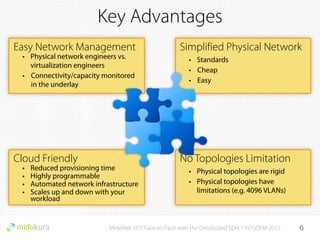
Easy Network Management
• Physical network engineers vs.
virtualization engineers
• Connectivity/capacity monitored
in the underlay
MidoNet 101! Face-to-Face with the Distributed SDN・FOSDEM 2015
Key Advantages
Simplified Physical Network
• Standards
• Cheap
• Easy
Cloud Friendly
• Reduced provisioning time
• Highly programmable
• Automated network infrastructure
• Scales up and down with your
workload
No Topologies Limitation
• Physical topologies are rigid
• Physical topologies have
limitations (e.g. 4096 VLANs)
6
Overlay vs. Underlay
7
Virtual Topology
Physical Topology
Border Gateway Nodes Compute NodesPrivate IP Network
VirtualMachines
BGP
BGP
BGP
vPort
vPort
vPort
vPort
vPort
vPort
Virtual Switch A1
Virtual Switch A2
Virtual Switch B1Virtual Tenant
Router B
Virtual Tenant
Router A
Virtual Provider
Router
vPort
MidoNet 101! Face-to-Face with the Distributed SDN・FOSDEM 2015
MidoNet 101
MidoNet 101! Face-to-Face with the Distributed SDN・FOSDEM 2015
What is MidoNet?
9
Virtual Switching
• Layer 2 over layer 3, decoupled from the physical
network and layer 2 isolation
1
Virtual Routing
• Routing between virtual networks within software
container, layer 3 isolation
2
Network Address Translation
• Stateless and stateful NAT, dynamic NAT and port
masquerading
3
Firewall and Load Balancing
• Kernel integrated for high performance
• Reduces the need for dedicated hardware
4
GRE and VXLAN tunneling
• Requires only layer 3 connectivity between MidoNet
nodes
5
MidoNet and Neutron REST API
• Alignment and integration with the OpenStack cloud
management platform
6
Virtual Networks
Cloud Management Platform
MidoNet Virtualization
Machine Virtualization (KVM, ESXi, XEN, LXC)
Virtual L2 Virtual L3 Firewall
Layer 4 LB NAT GRE/VXLAN
REST
API
Application
Hardware
MidoNet Architecture
10
Cloud Orchestrator
Network State Cluster
VMs
MidoNet Agent
Virtual Server
VMs
MidoNet Agent
Virtual Server
x86 Border Router
MidoNet Agent
BGP Gateway
Private IP Network
MidoNet 101! Face-to-Face with the Distributed SDN・FOSDEM 2015
Internet
REST API
Tunnel
Cluster RPC
Overlay vs. Underlay Revisited
11
Virtual Topology
Physical Topology
Border Gateway Nodes Compute NodesPrivate IP Network
VirtualMachines
State Cluster
BGP
BGP
BGP
vPort
vPort
vPort
vPort
vPort
vPort
Virtual Switch A1
Virtual Switch A2
Virtual Switch B1Virtual Tenant
Router B
Virtual Tenant
Router A
Virtual Provider
Router
vPort
MidoNet Agent
MidoNet Agent
MidoNet Agent
MidoNet Agent
MidoNet Agent
MidoNet Agent
MidoNet 101! Face-to-Face with the Distributed SDN・FOSDEM 2015
Intelligence at the Edge
12
Private IP Network
State ClusterBorder Node
Compute Nodes (Hosts)
Internet
1
VM 1
VM 2
MidoNet Agent
VM 1
MidoNet Agent
Linux Kernel
VM 1 VM 2
Virtual Tenant
Router A
Virtual
Switch A1
Virtual Provider
Router
Virtual
Switch A2
1
2
2
3
4
3
4
VM 1 sends a packet through the virtual network
MN Agent fetches the virtual topology/state
It simulates the packet through the virtual network
It installs a flow rule in the kernel at the ingress host
Tunnel
5 Tunnel packets to egress host
5
MidoNet leverages a distributed architecture where the SDN intelligence is
pushed at the edge
MidoNet 101! Face-to-Face with the Distributed SDN・FOSDEM 2015
Intelligence at the Edge
13
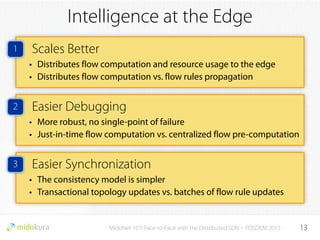
Scales Better
• Distributes flow computation and resource usage to the edge
• Distributes flow computation vs. flow rules propagation
Easier Debugging
• More robust, no single-point of failure
• Just-in-time flow computation vs. centralized flow pre-computation
Easier Synchronization
• The consistency model is simpler
• Transactional topology updates vs. batches of flow rule updates
1
2
3
MidoNet 101! Face-to-Face with the Distributed SDN・FOSDEM 2015
Peeking Under the Hood
14
Virtual
Machine
VM1
MidoNet
Agent
OVS Kernel Module
Linux Kernel
Host A
Virtual
Machine
VM1
MidoNet
Agent
OVS Kernel Module
Linux Kernel
Host B
Private IP Network
VXLAN / GREUPDIPv4Outer Ethernet
VM 1 VM 2
Virtual Tenant
Router A
Virtual
Switch A1
Virtual Topology
Physical Topology
Packet
Packet
Virtual
Switch A2
User Mode
Kernel Mode
1
2
3
4
Packet sent by VM1 misses the OVS datapath
Packet sent to the MidoNet Agent via Netlink
The MidoNet Agent processes and simulates the packet
It installs a flow rule in the kernel at the ingress host
5 Tunnel packets to egress host
1
2
3
4
5
Virtual
Machine
VM1
MidoNet
Agent
OVS Kernel Module
Linux Kernel
Host A
MidoNet 101! Face-to-Face with the Distributed SDN・FOSDEM 2015
Peeking Under the Hood
15
Virtual
Machine
VM1
MidoNet
Agent
OVS Kernel Module
Linux Kernel
Host B
Private IP Network
VM 1 VM 2
Virtual Tenant
Router B
Virtual Topology
Physical Topology
ARP Request
Virtual
Switch B1
User Mode
Kernel Mode
1
2
3
4
5
ARP Request
What is the L2 MAC address for IP of VM2?
State Cluster
3
4/5
The MidoNet Agent completes the request
Returns ARP reply to the originating VM1
No data transmitted over the wire
Features
MidoNet 101! Face-to-Face with the Distributed SDN・FOSDEM 2015
Distributed L2 Switching
17
VM 1 VM 2
Virtual Tenant
Router B
Virtual Topology
Physical Topology
ARP Request
Virtual
Switch B1
VM 1 VM 2
State Cluster
Virtual Switch B1
MAC Port Host
AC:CA:BA:00:00:01
AC:CA:BA:00:00:02
vPort 0
vPort 1
Host 0
Host 1
Tunnel Zone
GRE / VXLAN IPv4Host
192.168.0.1
10.0.0.1
Host 0
Host 1
MAC AC:CA:BA:00:00:01
IP 192.168.0.1
MAC AC:CA:BA:00:00:02
IP 10.0.0.1
vPort 1vPort 0
Host 0 Host 1
• State cluster based on ZooKeeper
• Stores the virtual topology
• Topology is cached by the MidoNet Agent
• Agents access data using publish-subscribe
MidoNet 101! Face-to-Face with the Distributed SDN・FOSDEM 2015
Layer 2 Gateways
18
VM 1 VM 2
Virtual Tenant
Router B
Virtual Topology
Physical Topology
Virtual
Switch B1
vPort 1vPort 0
Virtual Provider
Router
vPort L3GW
vPort L2GW
Layer 2 Network
VM 1 Host 0 Hardware VTEP
State Cluster
Layer 2 Network
VXLAN
L2 gateway for VXLAN tunneling
• The state cluster adds L2 gateway
functions
• Exchange state data with hardware
VXLAN tunnel end-points (VTEPs)
• Leverages virtualization at the edge
to optimize the traffic flow
L2 VXLAN
Gateway
MidoNet 101! Face-to-Face with the Distributed SDN・FOSDEM 2015
Distributed Layer 2 Networks
19
Private IP Network
Virtual Servers
VM 1
VM 2
Hardware VTEP
L2 Network
Hardware VTEP
Hardware VTEP
State Cluster
Virtual
Switch B1
VM 1 VM 2
vPort 1vPort 0
L2 Network
vPort L2GW 0 vPort L2GW 1 vPort L2GW 2
Physical Topology Virtual Topology
Scalability and High Availability
MidoNet 101! Face-to-Face with the Distributed SDN・FOSDEM 2015
Distributed Layer 3 Routing
20
Private IP Network
Virtual Servers
VM 1
VM 2
Provider
Network
State Cluster
Virtual
Switch B1
VM 1 VM 2
vPort 1vPort 0
Physical Topology Virtual Topology
Scalability and High Availability
Border Node
Border Node
Border Node
Virtual Tenant
Router B
Virtual Provider
Router
vPort L3GW
vPort L3GW
Provider
Network BGP Peer
BGP Peer
BGP Peer
MidoNet 101! Face-to-Face with the Distributed SDN・FOSDEM 2015
Firewall
21
• MidoNet supports OpenStack/Neutron Security Groups
• Apply to each network port bound to a VM, inbound or outbound
• Any forward traffic not explicitly allowed by a rule is dropped
• Return traffic is allowed
VM 1 VM 2
Virtual Tenant
Router A
Virtual
Switch A1
Virtual Provider
Router
Virtual
Switch A2
vPort 1vPort 0
Port-level firewall
$ neutron security-group-rule-create --protocol tcp 
--port-range-min 22 --port-range-max 22 
-—direction ingress security-group-1
SG-1 Allowing SSH inbound traffic
$ neutron security-group-rule-create --protocol icmp 
--direction ingress security-group-2
SG-2 Allowing ICMP inbound traffic
Chains
Rules
• Anti-spoofing
• L2 - L4 header fields
• Wildcards
• Ranges
MidoNet Models
CHAIN vPort0 ingress
MidoNet 101! Face-to-Face with the Distributed SDN・FOSDEM 2015
Firewall
22
VM 1 VM 2
Virtual Tenant
Router A
Virtual
Switch A1
Virtual Provider
Router
Virtual
Switch A2
vPort 1vPort 0
$ neutron security-group-rule-create --protocol tcp 
--port-range-min 22 --port-range-max 22 
-—direction ingress security-group-1
SG1 Allowing SSH inbound traffic
$ neutron security-group-rule-create --protocol icmp 
--direction ingress security-group-2
SG2 Allowing ICMP inbound traffic
SG-1
SG-1
SG-2
DROP
if not MAC1
MAC1 AC:CA:BA:00:00:01
IP1 192.168.0.1
MAC2 AC:CA:BA:00:00:02
IP2 10.0.0.1
DROP
if not IP1
ACCEPT
return flow
JUMP
SG-1 ingress
DROP
everything
CHAIN SG-1 ingress
ACCEPT
TCP port range [22, 22]
• Different agents must exchange flow
information
• Drop not allowed packets at the
ingress host
• Protects the private underlay
MidoNet 101! Face-to-Face with the Distributed SDN・FOSDEM 2015
Network Address Translation
23
Virtual
Switch B1
VM 1 VM 2
Virtual Tenant
Router B
Virtual Provider
Router
Provider
Network
Private Network
Public Network
10.0.0.100:1234
151.16.16.1:37001
Forwardflow
Returnflow
L4 NAT for a TCP connection
Private IP Network
VM 1
Border Router
Virtual Topology Physical Topology
MidoNet 101! Face-to-Face with the Distributed SDN・FOSDEM 2015
Distributed Flow State
24
VM 1 VM 2
Virtual
Switch B1
VM 1
VM 2
Virtual Tenant
Router B
Private Network
Public Network
Physical Topology Virtual Topology
Forward flow
Fwd outFwd in
Flow state
Return flow Ret inRet out
Ingress host
Possible return
flow ingress
Possible forward
flow ingress
Egress host
Ingress host Egress host
Forward flow
Fwd out
Fwd in
Ingress host
Possible return
flow ingress
Possible forward
flow ingress
Egress host
1
2
3
• Flow state forwarded to
possible interested hosts
• No delay for simulating flow
ingress packets at other
hosts
• State backup in cluster
State Cluster
Open Source
MidoNet 101! Face-to-Face with the Distributed SDN・FOSDEM 2015
MidoNet Project
Web midonet.org
Wiki wiki.midonet.org
Blog blog.midonet.org
Mailing list lists.midonet.org
GitHub github.com/midonet
GerritHub gerrithub.io/midonet
IRC #midonet on freenode
26
Confidential

MidoNet 101

  • 1.
    MidoNet 101! Face-to-face withthe distributed SDN Antonio Sagliocco ∙ Alex Bikfalvi FOSDEM 2015
  • 2.
    MidoNet 101! Face-to-Facewith the Distributed SDN・FOSDEM 2015 Agenda 2 Network Virtualization What is? • Key Advantages • Overlay vs. Underlay MidoNet 101 Feature • Architecture • Intelligence at the Edge • Under the Hood I II Features Switching • Routing • Firewall • NAT • Load Balancing • API III Open Source Initiative Project Showcase • Coming Soon IV
  • 3.
  • 4.
    MidoNet 101! Face-to-Facewith the Distributed SDN・FOSDEM 2015 What Is Network Virtualization? 4 Decoupling an infrastructure/service from the physical hardware assets on which the service operates Network Overlay Physical Underlay Virtual Private Networks (VPNs) Point-to-Point Protocol (PPP) IP Fabric Just a carrier for data Potentially invariant Is it a new concept?
  • 5.
    MidoNet 101! Face-to-Facewith the Distributed SDN・FOSDEM 2015 What Is Network Virtualization? • Fills the gap between compute and network introduced by host virtualization • Think of it as Network-as-a-Service 5 Network functions implemented in software Router Switch Load Balancer L3 Switch NAT QoS ACLGateway Virtualize the Network to Network the Virtualization
  • 6.
    Easy Network Management •Physical network engineers vs. virtualization engineers • Connectivity/capacity monitored in the underlay MidoNet 101! Face-to-Face with the Distributed SDN・FOSDEM 2015 Key Advantages Simplified Physical Network • Standards • Cheap • Easy Cloud Friendly • Reduced provisioning time • Highly programmable • Automated network infrastructure • Scales up and down with your workload No Topologies Limitation • Physical topologies are rigid • Physical topologies have limitations (e.g. 4096 VLANs) 6
  • 7.
    Overlay vs. Underlay 7 VirtualTopology Physical Topology Border Gateway Nodes Compute NodesPrivate IP Network VirtualMachines BGP BGP BGP vPort vPort vPort vPort vPort vPort Virtual Switch A1 Virtual Switch A2 Virtual Switch B1Virtual Tenant Router B Virtual Tenant Router A Virtual Provider Router vPort MidoNet 101! Face-to-Face with the Distributed SDN・FOSDEM 2015
  • 8.
  • 9.
    MidoNet 101! Face-to-Facewith the Distributed SDN・FOSDEM 2015 What is MidoNet? 9 Virtual Switching • Layer 2 over layer 3, decoupled from the physical network and layer 2 isolation 1 Virtual Routing • Routing between virtual networks within software container, layer 3 isolation 2 Network Address Translation • Stateless and stateful NAT, dynamic NAT and port masquerading 3 Firewall and Load Balancing • Kernel integrated for high performance • Reduces the need for dedicated hardware 4 GRE and VXLAN tunneling • Requires only layer 3 connectivity between MidoNet nodes 5 MidoNet and Neutron REST API • Alignment and integration with the OpenStack cloud management platform 6 Virtual Networks Cloud Management Platform MidoNet Virtualization Machine Virtualization (KVM, ESXi, XEN, LXC) Virtual L2 Virtual L3 Firewall Layer 4 LB NAT GRE/VXLAN REST API Application Hardware
  • 10.
    MidoNet Architecture 10 Cloud Orchestrator NetworkState Cluster VMs MidoNet Agent Virtual Server VMs MidoNet Agent Virtual Server x86 Border Router MidoNet Agent BGP Gateway Private IP Network MidoNet 101! Face-to-Face with the Distributed SDN・FOSDEM 2015 Internet REST API Tunnel Cluster RPC
  • 11.
    Overlay vs. UnderlayRevisited 11 Virtual Topology Physical Topology Border Gateway Nodes Compute NodesPrivate IP Network VirtualMachines State Cluster BGP BGP BGP vPort vPort vPort vPort vPort vPort Virtual Switch A1 Virtual Switch A2 Virtual Switch B1Virtual Tenant Router B Virtual Tenant Router A Virtual Provider Router vPort MidoNet Agent MidoNet Agent MidoNet Agent MidoNet Agent MidoNet Agent MidoNet Agent MidoNet 101! Face-to-Face with the Distributed SDN・FOSDEM 2015
  • 12.
    MidoNet 101! Face-to-Facewith the Distributed SDN・FOSDEM 2015 Intelligence at the Edge 12 Private IP Network State ClusterBorder Node Compute Nodes (Hosts) Internet 1 VM 1 VM 2 MidoNet Agent VM 1 MidoNet Agent Linux Kernel VM 1 VM 2 Virtual Tenant Router A Virtual Switch A1 Virtual Provider Router Virtual Switch A2 1 2 2 3 4 3 4 VM 1 sends a packet through the virtual network MN Agent fetches the virtual topology/state It simulates the packet through the virtual network It installs a flow rule in the kernel at the ingress host Tunnel 5 Tunnel packets to egress host 5 MidoNet leverages a distributed architecture where the SDN intelligence is pushed at the edge
  • 13.
    MidoNet 101! Face-to-Facewith the Distributed SDN・FOSDEM 2015 Intelligence at the Edge 13 Scales Better • Distributes flow computation and resource usage to the edge • Distributes flow computation vs. flow rules propagation Easier Debugging • More robust, no single-point of failure • Just-in-time flow computation vs. centralized flow pre-computation Easier Synchronization • The consistency model is simpler • Transactional topology updates vs. batches of flow rule updates 1 2 3
  • 14.
    MidoNet 101! Face-to-Facewith the Distributed SDN・FOSDEM 2015 Peeking Under the Hood 14 Virtual Machine VM1 MidoNet Agent OVS Kernel Module Linux Kernel Host A Virtual Machine VM1 MidoNet Agent OVS Kernel Module Linux Kernel Host B Private IP Network VXLAN / GREUPDIPv4Outer Ethernet VM 1 VM 2 Virtual Tenant Router A Virtual Switch A1 Virtual Topology Physical Topology Packet Packet Virtual Switch A2 User Mode Kernel Mode 1 2 3 4 Packet sent by VM1 misses the OVS datapath Packet sent to the MidoNet Agent via Netlink The MidoNet Agent processes and simulates the packet It installs a flow rule in the kernel at the ingress host 5 Tunnel packets to egress host 1 2 3 4 5
  • 15.
    Virtual Machine VM1 MidoNet Agent OVS Kernel Module LinuxKernel Host A MidoNet 101! Face-to-Face with the Distributed SDN・FOSDEM 2015 Peeking Under the Hood 15 Virtual Machine VM1 MidoNet Agent OVS Kernel Module Linux Kernel Host B Private IP Network VM 1 VM 2 Virtual Tenant Router B Virtual Topology Physical Topology ARP Request Virtual Switch B1 User Mode Kernel Mode 1 2 3 4 5 ARP Request What is the L2 MAC address for IP of VM2? State Cluster 3 4/5 The MidoNet Agent completes the request Returns ARP reply to the originating VM1 No data transmitted over the wire
  • 16.
  • 17.
    MidoNet 101! Face-to-Facewith the Distributed SDN・FOSDEM 2015 Distributed L2 Switching 17 VM 1 VM 2 Virtual Tenant Router B Virtual Topology Physical Topology ARP Request Virtual Switch B1 VM 1 VM 2 State Cluster Virtual Switch B1 MAC Port Host AC:CA:BA:00:00:01 AC:CA:BA:00:00:02 vPort 0 vPort 1 Host 0 Host 1 Tunnel Zone GRE / VXLAN IPv4Host 192.168.0.1 10.0.0.1 Host 0 Host 1 MAC AC:CA:BA:00:00:01 IP 192.168.0.1 MAC AC:CA:BA:00:00:02 IP 10.0.0.1 vPort 1vPort 0 Host 0 Host 1 • State cluster based on ZooKeeper • Stores the virtual topology • Topology is cached by the MidoNet Agent • Agents access data using publish-subscribe
  • 18.
    MidoNet 101! Face-to-Facewith the Distributed SDN・FOSDEM 2015 Layer 2 Gateways 18 VM 1 VM 2 Virtual Tenant Router B Virtual Topology Physical Topology Virtual Switch B1 vPort 1vPort 0 Virtual Provider Router vPort L3GW vPort L2GW Layer 2 Network VM 1 Host 0 Hardware VTEP State Cluster Layer 2 Network VXLAN L2 gateway for VXLAN tunneling • The state cluster adds L2 gateway functions • Exchange state data with hardware VXLAN tunnel end-points (VTEPs) • Leverages virtualization at the edge to optimize the traffic flow L2 VXLAN Gateway
  • 19.
    MidoNet 101! Face-to-Facewith the Distributed SDN・FOSDEM 2015 Distributed Layer 2 Networks 19 Private IP Network Virtual Servers VM 1 VM 2 Hardware VTEP L2 Network Hardware VTEP Hardware VTEP State Cluster Virtual Switch B1 VM 1 VM 2 vPort 1vPort 0 L2 Network vPort L2GW 0 vPort L2GW 1 vPort L2GW 2 Physical Topology Virtual Topology Scalability and High Availability
  • 20.
    MidoNet 101! Face-to-Facewith the Distributed SDN・FOSDEM 2015 Distributed Layer 3 Routing 20 Private IP Network Virtual Servers VM 1 VM 2 Provider Network State Cluster Virtual Switch B1 VM 1 VM 2 vPort 1vPort 0 Physical Topology Virtual Topology Scalability and High Availability Border Node Border Node Border Node Virtual Tenant Router B Virtual Provider Router vPort L3GW vPort L3GW Provider Network BGP Peer BGP Peer BGP Peer
  • 21.
    MidoNet 101! Face-to-Facewith the Distributed SDN・FOSDEM 2015 Firewall 21 • MidoNet supports OpenStack/Neutron Security Groups • Apply to each network port bound to a VM, inbound or outbound • Any forward traffic not explicitly allowed by a rule is dropped • Return traffic is allowed VM 1 VM 2 Virtual Tenant Router A Virtual Switch A1 Virtual Provider Router Virtual Switch A2 vPort 1vPort 0 Port-level firewall $ neutron security-group-rule-create --protocol tcp --port-range-min 22 --port-range-max 22 -—direction ingress security-group-1 SG-1 Allowing SSH inbound traffic $ neutron security-group-rule-create --protocol icmp --direction ingress security-group-2 SG-2 Allowing ICMP inbound traffic Chains Rules • Anti-spoofing • L2 - L4 header fields • Wildcards • Ranges MidoNet Models
  • 22.
    CHAIN vPort0 ingress MidoNet101! Face-to-Face with the Distributed SDN・FOSDEM 2015 Firewall 22 VM 1 VM 2 Virtual Tenant Router A Virtual Switch A1 Virtual Provider Router Virtual Switch A2 vPort 1vPort 0 $ neutron security-group-rule-create --protocol tcp --port-range-min 22 --port-range-max 22 -—direction ingress security-group-1 SG1 Allowing SSH inbound traffic $ neutron security-group-rule-create --protocol icmp --direction ingress security-group-2 SG2 Allowing ICMP inbound traffic SG-1 SG-1 SG-2 DROP if not MAC1 MAC1 AC:CA:BA:00:00:01 IP1 192.168.0.1 MAC2 AC:CA:BA:00:00:02 IP2 10.0.0.1 DROP if not IP1 ACCEPT return flow JUMP SG-1 ingress DROP everything CHAIN SG-1 ingress ACCEPT TCP port range [22, 22]
  • 23.
    • Different agentsmust exchange flow information • Drop not allowed packets at the ingress host • Protects the private underlay MidoNet 101! Face-to-Face with the Distributed SDN・FOSDEM 2015 Network Address Translation 23 Virtual Switch B1 VM 1 VM 2 Virtual Tenant Router B Virtual Provider Router Provider Network Private Network Public Network 10.0.0.100:1234 151.16.16.1:37001 Forwardflow Returnflow L4 NAT for a TCP connection Private IP Network VM 1 Border Router Virtual Topology Physical Topology
  • 24.
    MidoNet 101! Face-to-Facewith the Distributed SDN・FOSDEM 2015 Distributed Flow State 24 VM 1 VM 2 Virtual Switch B1 VM 1 VM 2 Virtual Tenant Router B Private Network Public Network Physical Topology Virtual Topology Forward flow Fwd outFwd in Flow state Return flow Ret inRet out Ingress host Possible return flow ingress Possible forward flow ingress Egress host Ingress host Egress host Forward flow Fwd out Fwd in Ingress host Possible return flow ingress Possible forward flow ingress Egress host 1 2 3 • Flow state forwarded to possible interested hosts • No delay for simulating flow ingress packets at other hosts • State backup in cluster State Cluster
  • 25.
  • 26.
    MidoNet 101! Face-to-Facewith the Distributed SDN・FOSDEM 2015 MidoNet Project Web midonet.org Wiki wiki.midonet.org Blog blog.midonet.org Mailing list lists.midonet.org GitHub github.com/midonet GerritHub gerrithub.io/midonet IRC #midonet on freenode 26
  • 27.