Microsoft Security
Intelligence Report
Volume 21 | January through June, 2016
This document is for informational purposes only. MICROSOFT MAKES NO
WARRANTIES, EXPRESS, IMPLIED, OR STATUTORY, AS TO THE INFORMATION
IN THIS DOCUMENT.
This document is provided “as-is.” Information and views expressed in this
document, including URL and other Internet Web site references, may change
without notice. You bear the risk of using it.
Copyright © 2016 Microsoft Corporation. All rights reserved.
The names of actual companies and products mentioned herein may be the
trademarks of their respective owners.
ii ABOUT THIS REPORT
Authors
Charlie Anthe
Cloud and Enterprise Security
Evan Argyle
Windows Defender Labs
Eric Douglas
Windows Defender Labs
Sarah Fender
Azure Security
Elia Florio
Windows Defender Labs
Chad Foster
Bing
Ram Gowrishankar
Windows Defender Labs
Volv Grebennikov
Bing
Paul Henry
Wadeware LLC
Aaron Hulett
Windows Defender Labs
Ivo Ivanov
Windows Defender Labs
Michael Johnson
Windows Defender Labs
Jeff Jones
Corporate Communications
Tim Kerk
Windows Defender Labs
Mathieu Letourneau
Windows Defender Labs
Marianne Mallen
Windows Defender Labs
Matt Miller
Microsoft Security Response
Center
Chad Mills
Safety Platform
Nam Ng
Enterprise Cybersecurity
Group
Hamish O'Dea
Windows Defender Labs
James Patrick Dee
Windows Defender Labs
Siddharth Pavithran
Windows Defender Labs
Daryl Pecelj
Microsoft IT Information
Security and Risk
Management
Ferdinand Plazo
Windows Defender Labs
Tim Rains
Commercial Communications
Paul Rebriy
Bing
Karthik Selvaraj
Windows Defender Labs
Tom Shinder
Azure Security
Nitin Sood
Windows Defender Labs
Tomer Teller
Azure Security
Vikram Thakur
Windows Defender Labs
Contributors
Eric Avena
Windows Defender Labs
Iaan D'Souza- Wiltshire
Windows Defender Labs
Dustin Duran
Windows Defender Labs
Tanmay Ganacharya
Windows Defender Labs
Chris Hallum
Windows and Devices Group
Satomi Hayakawa
CSS Japan Security Response
Team
Sue Hotelling
Windows and Devices Group
Yurika Kakiuchi
CSS Japan Security Response
Team
Louie Mayor
Windows Defender Labs
Dolcita Montemayor
Windows Defender Labs
Heike Ritter
Windows and Devices Group
Norie Tamura
CSS Japan Security Response
Team
Steve Wacker
Wadeware LLC
David Weston
Windows Defender Labs
MICROSOFT SECURITY INTELLIGENCE REPORT, VOLUME 21, JANUARY–JUNE 2016 iii
Table of contents
About this report.......................................................................................................................... v
How to use this report ............................................................................................................... vi
Featured intelligence 1
Protecting cloud infrastructure: Detecting and mitigating threats using Azure
Security Center..............................................................................................................................3
Threats against cloud deployments and infrastructure.......................................................... 3
The cyber kill chain: On-premises and in the cloud................................................................. 7
Countering threats with Azure Security Center Advanced Threat Detection.................. 11
Summary............................................................................................................................................20
PROMETHIUM and NEODYMIUM: Parallel zero-day attacks targeting individuals
in Europe ....................................................................................................................................... 21
Activity Group Profile: PROMETHIUM .......................................................................................22
Activity Group Profile: NEODYMIUM.........................................................................................23
Mitigation ..........................................................................................................................................29
Summary............................................................................................................................................32
Indicators...........................................................................................................................................32
Ten years of exploits: A long-term study of exploitation of vulnerabilities in
Microsoft software.....................................................................................................................35
Worldwide threat assessment 41
Vulnerabilities..............................................................................................................................43
Industry-wide vulnerability disclosures .....................................................................................43
Vulnerability severity ......................................................................................................................44
Vulnerability complexity ................................................................................................................46
Operating system, browser, and application vulnerabilities................................................47
Microsoft vulnerability disclosures..............................................................................................49
Guidance: Developing secure software ....................................................................................49
Exploits........................................................................................................................................... 51
Exploit families..................................................................................................................................53
Exploit kits..........................................................................................................................................54
Java exploits......................................................................................................................................57
iv ABOUT THIS REPORT
Operating system exploits............................................................................................................59
Document exploits...........................................................................................................................61
Adobe Flash Player exploits .........................................................................................................62
Browser exploits ..............................................................................................................................64
Exploit detection with Internet Explorer and IExtensionValidation....................................65
Exploits used in targeted attacks ................................................................................................66
Malicious and unwanted software ........................................................................................ 71
Learning about new threats with cloud-based protection in Windows Defender........ 73
Malicious and unwanted software worldwide......................................................................... 73
Threat categories .............................................................................................................................81
Threat families..................................................................................................................................85
Ransomware.....................................................................................................................................92
Threats from targeted attackers ................................................................................................. 97
Potentially unwanted applications in the enterprise ............................................................ 101
Security software use ................................................................................................................... 104
Guidance: Defending against malware....................................................................................109
Malicious websites.....................................................................................................................111
Phishing sites................................................................................................................................... 112
Malware hosting sites ................................................................................................................... 116
Drive-by download sites .............................................................................................................. 119
Guidance: Protecting users from unsafe websites................................................................122
Malware at Microsoft: Dealing with threats in the Microsoft environment..........123
Antimalware usage........................................................................................................................123
Malware detections ...................................................................................................................... 124
Malware infections.........................................................................................................................127
What IT departments can do to protect their users .............................................................129
Appendixes 133
Appendix A: Threat naming conventions .........................................................................135
Appendix B: Data sources.......................................................................................................137
Appendix C: Worldwide encounter and infection rates...............................................140
Glossary........................................................................................................................................145
Threat families referenced in this report...........................................................................155
Index .............................................................................................................................................162
MICROSOFT SECURITY INTELLIGENCE REPORT, VOLUME 21, JANUARY–JUNE 2016 v
About this report
The Microsoft Security Intelligence Report (SIR) focuses on software
vulnerabilities, software vulnerability exploits, malware, and unwanted software.
Past reports and related resources are available for download at
www.microsoft.com/sir. We hope that readers find the data, insights, and
guidance provided in this report useful in helping them protect their
organizations, software, and users.
Reporting period
This volume of the Microsoft Security Intelligence Report focuses on the first and
second quarters of 2016, with trend data for the last several quarters presented
on a quarterly basis. Because vulnerability disclosures can be highly inconsistent
from quarter to quarter and often occur disproportionately at certain times of
the year, statistics about vulnerability disclosures are presented on a half-yearly
basis.
Throughout the report, half-yearly and quarterly time periods are referenced
using the nHyy or nQyy formats, in which yy indicates the calendar year and n
indicates the half or quarter. For example, 1H16 represents the first half of 2016
(January 1 through June 30), and 4Q15 represents the fourth quarter of 2015
(October 1 through December 31). To avoid confusion, please note the reporting
period or periods being referenced when considering the statistics in this report.
Conventions
This report uses the Microsoft Malware Protection Center (MMPC) naming
standard for families and variants of malware. For information about this
standard, see “Appendix A: Threat naming conventions” on page 135. In this
report, any threat or group of threats that share a common unique base name is
considered a family for the sake of presentation. This consideration includes
threats that may not otherwise be considered families according to common
industry practices, such as generic and cloud-based detections. For the
purposes of this report, a threat is defined as a malicious or unwanted software
family or variant that is detected by the Microsoft Malware Protection Engine.
vi HOW TO USE THIS REPORT
How to use this report
The Microsoft Security Intelligence Report has been released twice a year since
2006. Each volume is based upon data collected from millions of computers all
over the world, which not only provides valuable insights on the worldwide
threat landscape, both at home and at work, but also provides detailed
information about threat profiles faced by computer users in more than a
hundred individual countries and regions.
To get the most out of each volume, Microsoft recommends the following:
Read
Each volume of the report consists of several parts. The primary report typically
consists of a worldwide threat assessment, one or more feature articles,
guidance for mitigating risk, and some supplemental information. A summary of
the key findings in the report can be downloaded and reviewed separately from
the full report; it highlights a number of facts and subjects that are likely to be of
particular interest to readers. The regional threat assessment, available for
download and in interactive form at www.microsoft.com/security/sir/threat,
provides individual summaries of threat statistics and security trends for more
than 100 countries and regions worldwide.
Reading the volume in its entirety will provide readers with the most benefit and
context, but the report is designed to provide value in small doses as well. Take
a few minutes to review the summary information to find the information that
will be of most interest to you and your organization. Consult the table of
contents and the index to learn more about particular topics of interest.
Share
Microsoft also encourages readers to share each released volume, or its
download link, with co-workers, peers, and friends with similar interests. The
Microsoft Security Intelligence Report is written to be useful and accessible to a
wide range of audiences. Each volume contains thousands of hours of research
disseminated in easy to understand language, with advanced technical jargon
kept to a minimum. Each section and article is written and reviewed to provide
the most value for the time it takes to read.
MICROSOFT SECURITY INTELLIGENCE REPORT, VOLUME 21, JANUARY–JUNE 2016 vii
Assess your own risk
Reading about the threats and risks that affect different types of environments
presents a good opportunity to assess your own risks. Not every computer and
entity faces the same risk from all threats. Assess your own risks and determine
which topics and information can help you to best defend against the most
significant risks.
The volume and scope of threats facing the typical organization make it
important to prioritize. The greatest risk to any computer or organization is
posed by currently and recently active threats. Pay attention to the threats that
have most commonly affected your region or industry, focusing particularly on
the most common successful attacks in the wild that cause the most problems.
Give less consideration to very rare or theoretical-only attacks, unless your
computers are at particular risk for such threats.
Educate
Microsoft strives to make this report one of the most valuable sources of threat
and mitigation information that you can read and share. We encourage you to
use the Microsoft Security Intelligence Report as a guide to educate your
employees, friends, and families about security-related topics.
Anyone, including a business, may link, point to, or re-use articles in the
Microsoft Security Intelligence Report for informational purposes, provided the
material is not used for publication or sale outside of your company and you
comply with the following terms: You must not alter the materials in any way.
You must provide a reference to the URL at which the materials were originally
found. You must include the Microsoft copyright notice followed by “Used with
permission from Microsoft Corporation.” Please see Use of Microsoft
Copyrighted Content for further information.
Ask questions
Contact your local Microsoft representative with any questions you have about
the topics and facts presented in this report. We hope that each volume
provides a good educational summary and helps promote dialog between
people trying to best secure their computing devices. Thank you for trusting
Microsoft to be your partner in the fight against malware, hackers, and other
security threats.
Featured intelligence
Protecting cloud infrastructure: Detecting and
mitigating threats using Azure Security Center...3
PROMETHIUM and NEODYMIUM: Parallel zero-
day attacks targeting individuals in Europe........21
Ten years of exploits: A long-term study of
exploitation of vulnerabilities in Microsoft
software ......................................................................... 35
2 HOW TO USE THIS REPORT
MICROSOFT SECURITY INTELLIGENCE REPORT, VOLUME 21, JANUARY–JUNE 2016 3
Protecting cloud
infrastructure: Detecting and
mitigating threats using
Azure Security Center
Cloud computing introduces new challenges to security organizations of all
sizes. Enterprise IT teams have established policies and procedures designed for
enterprise infrastructure and applications, based on their decades of security
experience dealing with on-premises threats. Many of these policies and
procedures can be used effectively in public and hybrid cloud environments.
However, security teams need to keep abreast of changes in the threat
landscape brought on by the emergence of cloud computing.
Threats against cloud deployments and infrastructure
New types of threats can be related to characteristics of the public cloud only, or
to issues introduced by connectivity between on-premises environments and
the public cloud. The following subsections provide descriptions of some new
types of threats.
Disclosing secrets on public sites
Public code repositories such as GitHub have become very popular with
developers because they enable easy collaboration and source control and
remove the responsibility for maintaining the repository infrastructure from
developers. But public repositories can be a double-edged sword. Documented
cases exist of developers accidentally publishing secret keys on GitHub and
other public code repositories, which were discovered by attackers and used to
compromise cloud services. Such incidents can sometimes give attackers access
to a service’s entire account/subscription database, or allow them to misuse its
compute resources for malicious purposes.
4 PROTECTING CLOUD INFRASTRUCTURE: DETECTING AND MITIGATING THREATS USING AZURE SECURITY CENTER
Pivot back attacks
A pivot back attack occurs when an attacker compromises a public cloud
resource to obtain information that they then use to attack the resource
provider’s on-premises environment. Public facing endpoints in the cloud are
often under constant brute force attack through protocols such as Remote
Desktop Protocol (RDP) and Secure Shell (SSH). Although the overwhelming
majority of these attacks fail, a very small percentage of them succeed. When
they do, an attacker can sometimes find sensitive information in unexpected or
obscure places.
For example, they could find such secrets in a Bash session
history or a text file in the root directory of the virtual machine’s
desktop. Such information can be used to access resources such
as databases, SharePoint sites, and cloud storage. If left
unimpeded, an attacker could continue gathering information
that could provide greater access to the enterprise infrastructure
and data.
Attacks against cloud administrators
Targeted attacks against on-premises and cloud infrastructures
alike often focus on IT administrators. The intent is to take
control of an email account that has a high probability of containing credentials
that can be used to gain access to the public cloud administrator portal.
After logging into the administrator portal, an attacker can gather information
and make changes to gain access to other cloud-based resources, execute
ransomware, or even pivot back to the on-premises environment, as explained
earlier.
Man in the Cloud (MitC) attacks
Another new threat is posed by what the security company Imperva has dubbed
“Man in the Cloud,” or MitC attacks,1 In which an attacker induces a prospective
victim to install a piece of malware using a typical mechanism, such as an email
with a link to a malicious website. After the malware is downloaded and installed,
1 “Man in the Cloud (MITC) Attacks,” Imperva Hacker Intelligence Initiative Report,
https://www.imperva.com/docs/HII_Man_In_The_Cloud_Attacks.pdf.
Targeted attacks
against on-
premises and
cloud infra-
structures often
focus on IT
administrators.
MICROSOFT SECURITY INTELLIGENCE REPORT, VOLUME 21, JANUARY–JUNE 2016 5
it finds a cloud storage folder on the user’s computer. It then switches out the
user’s cloud storage synchronization token with the attacker’s token.
After the token switch, the attacker will receive copies of each file the user places
in cloud storage, which effectively makes the attacker a “man in the middle” for
cloud storage. One of the attacker’s advantages in this threat scenario is that the
malware is removed after the token is switched out, which makes it harder to
detect the compromise.
Side-channel attacks
In a side-channel attack, an attacker attempts to put a virtual machine on the
same physical server as the intended victim. If such a successful co-location can
be achieved, the attacker will be able to launch local attacks against the victim.
These attacks might include local DDoS, network sniffing, and man-in-the-
middle attacks, all of which can be used to extract information.
It should be noted that side-channel attacks are not trivial. Microsoft Azure
employs a number of obfuscation methodologies to significantly decrease the
chances of such an attack succeeding.
Resource ransom
Ransomware is well-known in the desktop operating system space. This malware
restricts access to components of an operating system or to files stored on disk,
typically through encryption, and demands that the victim pay the attacker to
get the keys required to restore access.
Attackers have made similar attempts to hold cloud resources hostage by
breaking in to a prospective victim’s public cloud account using any one of a
number of methods, including some of the methods discussed in this section.
When they have control of the account, the attackers attempt to encrypt or
otherwise restrict access to as many cloud resources as possible. The attackers
then require the victim to pay the ransom to release the restricted resources.
The challenge for the attacker is to inform the victim that the attack has taken
place, and how to pay the ransom. Because servers usually don’t have signed in
users, attackers need to use methods other than those used for desktop
ransomware. One way an attacker can inform cloud resource ransom victims is
through the use of bot technology, which presents another, and perhaps
unexpected, use case for the new and growing ecosystem of bot technologies.
6 PROTECTING CLOUD INFRASTRUCTURE: DETECTING AND MITIGATING THREATS USING AZURE SECURITY CENTER
Cloud weaponization
In the cloud weaponization threat scenario, an attacker establishes a foothold
within a cloud infrastructure by compromising and taking control of a few virtual
machines. The attacker can then use these virtual machines to attack,
compromise, and control thousands of virtual machines – some within the same
public cloud service provider as the initial attack, and others inside other public
cloud service providers.
Each of the compromised virtual machines has malware installed that establishes
a backdoor connection to the attacker’s command and control servers, from
which the attacker can issue commands to the thousands of compromised
virtual machines to attack targets throughout the Internet.
Cloud weaponization can be implemented in a number of ways using a variety
of attacks, including SSH, RDP, distributed denial-of-service (DDoS), unsolicited
messaging (spamming), port scanning, and port sweeping.
Azure actively monitors for cloud weaponization. Figure 1 shows the distribution
of the outbound attacks discovered (and in many cases mitigated) by Azure
Security Center’s advanced detection mechanisms.
Figure 1. Outbound attacks from Azure virtual machines, September 2016
Figure 2 and Figure 3 show where incoming and outgoing attacks originate
from.
Communication
with malicious IP
41.0%
RDP brute force
25.5%
Spam
20.5%
DDoS
7.6%
SSH brute force
2.2%
Port sweeping
1.7%
Other
1.5%
MICROSOFT SECURITY INTELLIGENCE REPORT, VOLUME 21, JANUARY–JUNE 2016 7
Figure 2. Incoming attacks detected by Azure Security Center in September 2016, by country/region of origin
Figure 3. Outgoing communication to malicious IP addresses detected by Azure Security Center in September 2016, by address
location
The cyber kill chain: On-premises and in the cloud
The cyber kill chain is a model defined by analysts at Lockheed Martin to aid
decision making with regard to detecting and responding to threats.2 This
2 Eric M. Hutchins, Michael J. Cloppert, Rohan M. Amin, Ph.D., “Intelligence-Driven Computer Network Defense
Informed by Analysis of Adversary Campaigns and Intrusion Kill Chains,” Lockheed Martin Corporation, 2011,
www.lockheedmartin.com/content/dam/lockheed/data/corporate/documents/LM-White-Paper-Intel-Driven-
Defense.pdf.
8 PROTECTING CLOUD INFRASTRUCTURE: DETECTING AND MITIGATING THREATS USING AZURE SECURITY CENTER
model has become very popular with IT security groups within both small and
large IT organizations. It includes the following phases:
 Reconnaissance. The attacker determines the best targets by probing a
number of online and offline resources.
 Weaponization. Files (such as documents) can be changed in ways to make
them useful “weapons” against a target system and can also be used to
enable installation of malicious code.
 Delivery. Weaponized files are placed on the target.
 Exploitation. Weaponized files are “detonated” to take advantage of
weaknesses in the target operating system or applications.
 Installation. A back door mechanism is installed on the compromised device
so that that the attacker has persistent access.
 Command and control (C2). Malware on the compromised device
communicates with a command-and-control system that provides the
attacker with access to resources required to carry out actions.
 Actions on objectives. The attacker moves forward to carry out objectives,
which may be predefined, or evolve based on discovery.
The cyber kill chain was defined at a time when cloud computing was still
gaining traction and did not explicitly consider the some of the unique aspects
of cloud computing. There are some differences in how to approach the various
phases in the kill chain between on-premises and cloud computing scenarios.
Figure 4 reformulates the cyber kill chain phases to make it easier to understand
some of the differences in the cyber kill chain between on-premises and cloud
environments.
Figure 4. The cyber kill chain on-premises and in the public cloud
Phase On-premises Public cloud
Active reconnaissance HUMINT, OSINT (users) Foot printing (services)
Delivery
Browser, mail, USB (user
interaction)
Hacking (no user interaction)
Exploitation Client-side vulnerabilities Server-side vulnerabilities
Persistence File system based Memory based
Internal reconnaissance Custom tools Built-in admin tools
Lateral movement Machine pivot Resource pivot
MICROSOFT SECURITY INTELLIGENCE REPORT, VOLUME 21, JANUARY–JUNE 2016 9
Active reconnaissance
During the active reconnaissance phase, the attacker learns about the intended
victim to improve their chances of a successful attack. In the on-premises world,
the attacker can take advantage of social networks to learn information about
the target that can be used to induce the victim to download malware during
the delivery phase.
The same ruse isn’t as easy in the cloud. There’s no social
network for servers and services to help the attacker learn
more about them. The attacker must go through a time and
effort-intensive process of scanning the network, doing port
scans to discover devices, and then testing active service
ports. All this activity provides the defender an opportunity
for discovering the attacker’s activities.
Delivery
The attacker places malware on the target during the delivery phase. In the on-
premises world, the attacker can create an email that has a malicious link to a
website or include an attachment that leads to the installation of malicious code.
Another option is to copy the malware onto a USB key and then place the USB
key in a strategic location so that the intended target finds it. The victim then
puts the USB key into their computer, which compromises it.
In the public cloud, the attacker needs to deliver the malicious payload to a
server. Because it’s unlikely to find a logged on user on a server to install
malicious code, the attacker needs to find a way to gain direct access. One way
to accomplish this is through a brute force attack. If such an attack is successful,
the attacker will be able to place malware on the server.
The defender has an opportunity to detect the malware on the server before the
attacker moves on to the exploitation phase.
Exploitation
On-premises exploitation typically focuses on client-side vulnerabilities. In the
public cloud the focus is on server-side vulnerabilities.
Active
reconnaissance
isn’t as easy in the
cloud.
10 PROTECTING CLOUD INFRASTRUCTURE: DETECTING AND MITIGATING THREATS USING AZURE SECURITY CENTER
Persistence
In most cases, attackers of client operating systems will use tools that persist on
the compromised device by placing them on the local hard disk. Tools aren’t
placed in memory because client computers reboot relatively often for system
updates, policy changes, or even simple password changes or bug checks.
In contrast, server uptime is much longer, which benefits attackers because they
can load exploit code into memory and have the code persist for an extended
period of time. Longer server uptime reduces the risk of detection because there
is no persistent code on disk that’s easy to detect.
Although traditional disk scanning techniques won’t find evidence of in-memory
malware, defenders can use crash dump analysis to discover and examine
malware that exists only in memory.
Internal reconnaissance
In many on-premises client attack scenarios, the attacker uses custom tools.
Built-in toolsets are not as robust as those found on servers and therefore don’t
meet their needs.
Such custom toolsets aren’t seen very often in the cloud. Attackers take
advantage of built-in admin tools, which are typically more powerful than what’s
found on client operating systems. These built-in admin tools help attackers by
reducing the risk of detection; they don’t need to place custom attack tools on
disk.
Because new attack tools aren’t being installed on cloud-based virtual machines,
they can’t be detected with disk scanning techniques. Instead, defenders can use
machine learning and behavioral analytics to differentiate between legitimate
admin activity and malicious activity.
Lateral movement
Lateral movement across on-premises networks uses a machine (or virtual
machine) pivot. Attackers move from machine to machine by obtaining
increasingly privileged credentials as they expand outward. Tools such as
mimikatz are used by attackers to harvest such credentials.
The machine pivot isn’t currently the norm in the cloud. There are a number of
reasons for this, such as the fact that tenants maintain a number of resource
MICROSOFT SECURITY INTELLIGENCE REPORT, VOLUME 21, JANUARY–JUNE 2016 11
islands in the cloud. Also, in most cases there is limited trust between the cloud
and on-premises deployments.
In the cloud, the primary pivot appears to cloud resources.
For example, with resource pivoting, an attacker will
compromise an IaaS virtual machine, find credentials for a
storage service, where more credentials are discovered,
some of which allow access to a SQL instance. The attacker
hops services instead of virtual machines.
This service hopping behavior enables the defender to focus on this type of
activity and enables another avenue for detection.
Countering threats with Azure Security Center Advanced Threat
Detection
Azure Security Center helps protect, detect, and respond to security threats
against Azure cloud-based resources. Security Center provides protection by
analyzing the security status of Azure resources and then providing
recommendations on how to increase the level of security.
Protection is just the first level. The ability to detect that an intrusion has taken
place is critical. Without powerful detection, there can be no response. Azure
Security Center uses advanced threat detection technologies and
methodologies to detect threats that would have been very difficult to find prior
to the advent of machine learning and big data.
Azure Security Center uses a number of methods that work together to provide
advanced threat detection. These methods include:
 Atomic detections
 Threat intelligence feeds
 Behavioral analysis
 Anomaly detection
 Detection fusion
Atomic detections
Atomic detections are based on well-known malicious patterns that are
consistent with indicators of compromise (IoC). These patterns are not subject to
mutation, and therefore are considered unambiguous. They can be determined
Without powerful
detection, there
can be no
response.
12 PROTECTING CLOUD INFRASTRUCTURE: DETECTING AND MITIGATING THREATS USING AZURE SECURITY CENTER
by a single entity, such as a single packet, single behavior, or single event
(recorded in a log entry). This determination is similar to how an intrusion
detection system (IDS) works, but instead of using on-the-wire packet analysis,
atomic threat detection typically uses log entries.
Atomic threat detection has a high return on investment because development
overhead is relatively low. In addition, there is also a very low false positive rate.
Most commodity malware can be found with atomic detections.
A disadvantage of atomic detection is that it isn’t the best method for detecting
more sophisticated attacks. Atomic detections are very threat specific, and so it
is relatively easy for skilled attackers to evade them. However, this isn’t a
problem because Azure Security Center uses a multi-tier detection strategy that
provides the ability to detect attacks at multiple levels.
Suspicious processes provide an example of an attack type that lends itself to
atomic detection. In the example seen in Figure 5, you can see that Azure
Security Center has detected that the mimikatz.exe process is running. Mimikatz
is a tool that has been used by malicious attackers to steal credentials from a
compromised machine.
MICROSOFT SECURITY INTELLIGENCE REPORT, VOLUME 21, JANUARY–JUNE 2016 13
Figure 5. Azure Security Center detects and alerts on the mimikatz malware
Threat intelligence feeds
Azure Security Center uses a number of threat intelligence (TI) feeds, such as
those from the Microsoft Digital Crime Unit, to help detect potential threats
against Azure resources. Azure Security Center uses these feeds primarily for
bot detection.
Several actions are possible if a virtual machine hosted on Azure appears in one
of these feeds. For example, observing network traffic can confirm that the
potentially compromised virtual machine is in contact with a command-and-
control server. If this network communication is successfully verified, it’s possible
to take over the compromised VM’s DNS, which can provide additional insight
into the botnet infrastructure and IP addresses used by the command-and-
control servers.
14 PROTECTING CLOUD INFRASTRUCTURE: DETECTING AND MITIGATING THREATS USING AZURE SECURITY CENTER
Similar to atomic detections, TI feeds provide a high ROI for threat detection
because of the simple logic required to attain high fidelity alerts. And as more TI
providers are added, more detections are possible.
Azure Security Center alerts users when their virtual machines are discovered to
be communicating with command-and-control servers. These connections are
consistent with bot links from computers infected with malware similar to Alina
or Conficker. Figure 6 shows an alert generated by Azure Security Center based
on such a detection.
Figure 6. Azure Security Center showing communication with a C&C server
Behavioral analysis
Atomic and threat intelligence-based detections are essentially pattern
matching. To detect more complex threats, more advanced methods of threat
detection are required.
One such method is behavioral analysis. In contrast to pattern matching,
behavioral analysis moves beyond pattern matching and signatures and focuses
on the malicious behavior. This focus enables defenders to counter attackers
who generate an almost infinite number of variants for a particular malware.
Malware designers can change the hash, switch a bit or byte, change a packet or
pattern; each of these changes would require a new signature.
Behavioral analysis drills down to what the malware is doing on the system.
There’s no need to pattern match each malware variant if the behavior of the
malware can be identified. In the final analysis, it’s the behavior that is of most
MICROSOFT SECURITY INTELLIGENCE REPORT, VOLUME 21, JANUARY–JUNE 2016 15
interest. Each malicious behavior can represent literally thousands of individual
signature variants. Behavioral analysis is variant resistant.
However, there are gray areas in some of the behaviors. Such borderline cases
could lead to false positives. When the system detects these ambiguous
behaviors, Azure Security Center looks for other behaviors or detections to
confirm the initial suspicion. More information about the confirmation process is
provided in the discussion on detection fusion later in this section.
An example of behavioral analysis: system processes that run in an abnormal
context. Azure Security Center can detect these situations and fire an alert. In
the example seen in, you can see that Azure Security Center has detected that
SVCHOST was running in an abnormal context. SVCHOST is a container process
for many other system processes and malware often tries to take advantage of
this to hide its activity.
Figure 7. Azure Security Center detects processes running in an abnormal context
16 PROTECTING CLOUD INFRASTRUCTURE: DETECTING AND MITIGATING THREATS USING AZURE SECURITY CENTER
Anomaly detection
Behavioral analysis discovers known threats by detecting known behaviors. This
process is immensely useful, and significantly extends detection capabilities
beyond simple signature-based detections.
The logical next step is to detect unknown threats, which is where anomaly
detection comes into play.
With anomaly detection, the system builds a baseline. The baseline is defined by
the history of a certain element of the virtual machine. If a statistically significant
deviation from that baseline is detected, an alert might be generated.
It’s important to note that while the system might generate an alert, it’s possible
that no alert will be generated. The reason for this possibility is
that not all deviations from baseline are detrimental. Similar to
other detections, when the system detects ambiguous activity,
supporting evidence and correlation with other detections are
sought to confirm.
One of the major advantages of anomaly detection is that it
enables detections to move past what is already known, and
discover possible new exploits. Anomalies can lead researchers
to dig deeper, and come up with new analytics that define new
“known” threats.
An example of an anomaly-based detection is a brute force attack. A brute force
attack is characterized by repeated attempts to log onto a virtual machine with
guessed user names and passwords. Azure Security Center can detect that the
number of failed log on attempts has reached a statistically significant level and
generate an alert, as seen in Figure 8.
Anomaly detection
makes it possible
to move past what
is already known,
and discover
possible new
exploits.
MICROSOFT SECURITY INTELLIGENCE REPORT, VOLUME 21, JANUARY–JUNE 2016 17
Figure 8. Azure Security Center detects a failed brute force attack
Detection fusion
As stated several times in this section, instances exist when a specific detection is
non-specific, which requires supporting evidence to reduce the probability of a
false positive. A very effective method for reducing ambiguity (and the false
positive rate) is to correlate individual alerts generated throughout the cyber kill
chain.
The correlations provide the context needed to confirm that the findings of each
of the individual alerts represents an actual security event. We call this
combination or correlation of multiple alerts along the kill chain a security
incident.
Security incidents are explicitly identified in the alerts section of Azure Security
Center. In addition, incidents help to reduce investigation time by providing
insight into what steps the attacker took, and what specific resources were
affected.
18 PROTECTING CLOUD INFRASTRUCTURE: DETECTING AND MITIGATING THREATS USING AZURE SECURITY CENTER
Incidents tie together alerts during attack progression. A simplified
characterization of the cyber kill chain places incidents into one of three phases:
 Target and attack
 Install and exploit
 Post breach
Target and attack
The target and attack phase represents the reconnaissance and deliver phases
of the cyber kill chain.
For example, a brute force attack against a virtual machine fits into this phase;
alerts related to brute force attacks are placed here.
When an attacker launches a brute force attack against a virtual machine, Azure
Security Center will use anomaly detection to determine whether the number of
logon attempts exceeds what is expected. If so, Azure Security Center surfaces a
failed brute force attempt alert to the user.
Install and exploit
The system analyzes the results of the initial attack during the install and exploit
phase.
Some of the things considered during this phase include:
 Evidence of existing malware signatures (using Microsoft antimalware or
partner solutions)
 In-memory malware (using crash dump analysis)
 Suspicious process execution (using behavioral analysis)
 Lateral movement
 Internal reconnaissance
Suppose an attacker were able to gain access to a virtual machine using a brute
force attack (which would have taken place during the target and attack phase).
Malware is installed on the machine (during the install and exploit phase) and
the malware ends up causing a process to crash.
Azure Security Center will collect a copy of the crash dump and scan it for
evidence of in-memory malware. If an exploit (such as malicious shellcode) is
MICROSOFT SECURITY INTELLIGENCE REPORT, VOLUME 21, JANUARY–JUNE 2016 19
found, an alert will be generated and assigned to the target and attack phase of
the kill chain.
Post breach
Attackers execute their plans during the post breach phase, which includes all
the activities attackers carry out using automated or manual processes on
compromised virtual machines.
For example, a virtual machine is compromised by a brute force attack during
the target and attack phase and an alert is generated. The attacker installs
malware, and another alert is generated during the install and exploit phase.
Finally, the malware generates large amounts of SMTP traffic. This SMTP traffic is
correlated with the Office 365 SPAM database to determine whether this traffic
is legitimate or SPAM. If the assessment is SPAM, an alert is generated by Azure
Security Center.
In addition to these alerts, an incident (defined as a collection of alerts) is
generated by Azure Security Center indicating a very high probability that a
successful compromise has taken place because of the correlation and
verification of and by multiple alerts.
Figure 9 shows a number of security incidents as reported by Azure Security
Center.
Figure 9. A list of security incidents in Azure Security Center
Azure Security Center also provides the ability to drill down on a security
incident and provide detailed information on the individual alerts that were
correlated to create the incident, as shown in Figure 9.
20 PROTECTING CLOUD INFRASTRUCTURE: DETECTING AND MITIGATING THREATS USING AZURE SECURITY CENTER
Figure 10. Azure Security Center provides additional information about security events
Summary
The cloud introduces a number of new attack vectors that were previously
unavailable to intruders in the on-premises world. These new attack types
require that we evolve our methods of attack detection. Detecting cloud-based
attacks requires us to address and act on the differences between the on-
premises and cloud kill chains. There are also security benefits from running
your workloads in the cloud, as you’ll benefit from Microsoft’s comprehensive
threat intelligence and security expertise. Azure Security Center takes advantage
of a multi-layered approach to threat detection, which ranges from rudimentary
signature based systems all the way up to machine learning driven approaches
and detection fusion. See azure.microsoft.com for more details and to take
advantage of a 90 day free trial of Azure Security Center.
MICROSOFT SECURITY INTELLIGENCE REPORT, VOLUME 21, JANUARY–JUNE 2016 21
PROMETHIUM and
NEODYMIUM: Parallel zero-
day attacks targeting
individuals in Europe
Windows Defender ATP
Microsoft proactively monitors the threat landscape for emerging threats. Part
of this job involves observing the activities of targeted activity groups, which are
often the first ones to introduce new exploits and techniques that are later used
by other attackers. The previous two volumes of the Microsoft Security
Intelligence Report explored the activities of two such groups, code-named
STRONTIUM and PLATINUM, which used previously unknown vulnerabilities and
aggressive, persistent techniques to target specific individuals and institutions—
often including military installations, intelligence agencies, and other
government bodies.
This volume chronicles two activity groups, code-named PROMETHIUM and
NEODYMIUM, both of which target individuals in a specific area of Europe.
Although most malware today either seeks monetary gain or conducts
espionage for economic advantage, both of these activity groups appear to
seek information about specific individuals.
In May 2016, both PROMETHIUM and NEODYMIUM were observed to launch
attack campaigns. These campaigns used completely distinct infrastructure and
primary malware, which indicated a lack of association at the operational level.
However, the similarity in the campaigns’ victim locale, timing, and use of the
same zero-day exploit prior to public disclosure strongly indicates that the
activity groups may be related at a higher organizational tier.
Microsoft is sharing information about these groups to raise awareness of their
activities, and to help individuals and organizations implement existing
mitigation options that significantly reduce risk from these attack groups and
other similar groups.
22 PROMETHIUM AND NEODYMIUM: PARALLEL ZERO-DAY ATTACKS TARGETING INDIVIDUALS IN EUROPE
Activity Group Profile: PROMETHIUM
Campaign summary: PROMETHIUM is an activity group that has been active
since at least 2012. In 2016, an attack campaign by this group was recorded in
early May that made use of an exploit for CVE-2016-4117, a vulnerability in
Adobe Flash Player, which at the time was both unknown and unpatched.
Adobe promptly and publicly acknowledged the zero-day vulnerability and
pushed a security update.
The attack itself began with certain individuals receiving links in
instant messenger clients. These links led to malicious
documents that invoked exploit code and eventually executed a
piece of malware called Truvasys on unsuspecting victims’
computers.
Administrators and users wondering whether they were
targeted by PROMETHIUM can scan their network by using the
indicators listed in the appendix, by using Windows Defender to
examine their logs for “Truvasys,” or by searching for PROMETHIUM in their
Windows Defender Advanced Threat Protection product console alerts.
Attack details: Truvasys has been previously documented by peer organizations
in the security industry. The malware and its developers have been active for a
few years and have conducted multiple attack campaigns by masquerading as
common computer utilities such as WinUtils, TrueCrypt, WinRAR, and SanDisk.
In each of the campaigns, the Truvasys malware was updated to include
additional features, showing close collaboration between the activity groups
behind the campaigns and the developers of the malware.
Truvasys is a collection of modules written in the Delphi programming language,
a variant of Pascal. It runs on 32-bit and 64-bit editions of multiple versions of
Windows, including Windows Vista, Windows 7, Windows 8, and Windows 10, in
both standard user and administrator modes. It includes a number of features
designed to evade detection, including virtual environment detection and
tampering with security software.
Truvasys connects to a remote command and control (C&C) server to retrieve
instructions from an attacker, who can use the malware to execute arbitrary
functionality on the compromised computer.
PROMETHIUM and
NEODYMIUM both
target individuals
in a specific area of
Europe.
MICROSOFT SECURITY INTELLIGENCE REPORT, VOLUME 21, JANUARY–JUNE 2016 23
This malware family has targeted individuals through the combined use of spear
phishing and watering hole techniques for a number of years. In most cases,
Truvasys is embedded with legitimate installers of applications, compromising
individual computers by tricking users into running the installers. One campaign
involved a fake Adobe Flash Player installer, with a social engineering lure in
Turkish.
Figure 11. In one campaign, Truvasys was distributed via social engineering lures in the Turkish language
The language used in this example is consistent with the geography of Truvasys
victims, as observed over the years. Most Truvasys activities have been observed
across western Europe with a large majority of computers using the Turkish
locale setting, which suggests that most of them are Turkish citizens or
expatriates.
While studying Truvasys, Microsoft uncovered a previously undocumented
piece of malware known as Myntor that is a completely separate malware family.
Myntor is pushed onto victims’ computers that are selected by an unknown logic
devised by PROMETHIUM.
Activity Group Profile: NEODYMIUM
Campaign summary: NEODYMIUM is an activity group that, like PROMETHIUM,
conducted an attack campaign in early May 2016. NEODYMIUM also used the
exact same CVE-2016-4117 exploit code that PROMETHIUM used, prior to public
knowledge of the vulnerability’s existence.
24 PROMETHIUM AND NEODYMIUM: PARALLEL ZERO-DAY ATTACKS TARGETING INDIVIDUALS IN EUROPE
NEODYMIUM used a backdoor detected by Windows Defender as Wingbird,
whose characteristics closely match FinFisher, a government-grade commercial
surveillance package. Data about Wingbird activity indicates that it is typically
used to attack individuals and individual computers instead of networks.
Administrators and users wondering whether they were targeted by
NEODYMIUM can scan their networks by using the indicators listed in the
appendix, by using Windows Defender to examine their logs for “Wingbird,” or
by searching for NEODYMIUM in their Windows Defender Advanced Threat
Protection product console alerts.
Attack details: Target individuals were sent customized spear phishing emails.
An image of one such customized email from this campaign is shown in the
following figure.
Figure 12. The spear phishing campaign that NEODYMIUM launched in May 2016 is highly customized to target individuals; a large
portion of the email has been redacted to protect the privacy of the targeted individual, which shows the extent of personalization of
the malicious email
When the user opened the attachment, a blank document displayed. In the
background, a series of events, including the use of the CVE-2016-4117 zero-day
exploit, ultimately led to the download and execution of a backdoor. The exploit
code executes only if the Microsoft Office Protected View setting is turned off.
By default, documents opened from the Internet (using web browsers or email
clients) are opened in protected view mode, which prevents execution of
embedded objects and potentially malicious code.
MICROSOFT SECURITY INTELLIGENCE REPORT, VOLUME 21, JANUARY–JUNE 2016 25
Figure 13. The NEODYMIUM attack chain shows how the exploit CVE-2016-4117 was used to infect target individuals’ computers
The backdoor payload showed behavior that matched publicly documented
traits of a program called FinFisher, a government-grade commercial
surveillance package marketed to law enforcement and intelligence agencies.
The publisher, FinFisher GmbH, claims that it sells the software exclusively to
government agencies for use in targeted and lawful criminal investigations. It is
likely that the backdoor payload is a relatively new version of the commercial
spyware.
The apparent use of a version of FinFisher suggests that the exploit and the
spear fishing campaign that delivered it were the work of an attack group
probably connected in some way to a state actor.
Windows Defender detects the backdoor payload as Wingbird. Visibility into the
usage of Wingbird shows it has been used only against individuals, not against
computers that are part of an organization’s network.
Research into Wingbird from May through November 2016 showed only tens of
victims, predominantly in Turkey.
26 PROMETHIUM AND NEODYMIUM: PARALLEL ZERO-DAY ATTACKS TARGETING INDIVIDUALS IN EUROPE
Figure 14. NEODYMIUM victim breakdown, by country for May through November 2016
Like Truvasys, Wingbird is designed to run on both 32-bit and 64-bit Windows
platforms. The malware is a native 32-bit PE executable that installs a number of
additional executables and files. These components are all embedded within the
dropper itself, which allows the malware to avoid downloading components and
consequently attracting attention.
After the backdoor executes, the malware checks the underlying operating
system version and, depending on what platform it is running on, drops several
files to %ProgramData%RpcSrv (on 32-bit computers) or
%ProgramData%AuditService (on 64-bit computers).
In addition, on 64-bit computers the dropper creates a secondary native 64-bit
payload executable, referred to in the following diagram as [Payload64].exe. The
32-bit processes are isolated from 64-bit processes and restricted in the actions
they can perform. By providing a separate 64-bit payload, Wingbird attempts to
inject code into 64-bit processes as well as 32-bit processes.
Turkey
84%
US
6%
Germany
5%
UK
5%
MICROSOFT SECURITY INTELLIGENCE REPORT, VOLUME 21, JANUARY–JUNE 2016 27
Figure 15. Wingbird behaves differently on 32-bit computers and 64-bit computers
The main goal of the original dropper is to indirectly deliver executables by
injecting malicious code and data into two Windows system processes,
Services.exe and Winlogon.exe. The primary Wingbird payload uses anti-VM,
anti-debugging, and anti-AV mechanisms to evade discovery and analysis.
On 32-bit computers, the original dropper creates three files, as shown in Figure
5. Of the three files, the only true binary is rpcsrv.dat, a kernel rootkit that
enables the attacker to load and run privileged unsigned code. The other two
files, installer.cab and the randomly named [xxxxx].cab, are encrypted data files.
Wingbird attempts to detect and evade security products. For example, some of
the strings found in running processes, such as avcuf32.dll and <un-wnd-
%.08x>, indicate that the malware checks for the presence of one of several
versions of Bitdefender security software.
Through a series of actions and code injections, the original malware installs the
rootkit driver, rpcsrv.dat, a non-standard kernel driver. The attackers know that
64-bit computers are much more secure because they prevent loading of
unsigned drivers, so they do not even attempt this technique on 64-bit systems.
The malware searches for a file called ico_ty23.ico, which is publicly documented
as the filename one of the key user mode DLL components of FinFisher.
28 PROMETHIUM AND NEODYMIUM: PARALLEL ZERO-DAY ATTACKS TARGETING INDIVIDUALS IN EUROPE
On 64-bit computers, the installation of Wingbird is a lot more complicated. The
64-bit version of the original payload creates a new folder,
%ProgramData%AuditService, and copies the Windows system file lsass.exe
from %SystemFolder% into the new folder. At the same time, the payload drops
a malicious file known as sspisrv.dll alongside the copy of lsass.exe. This
sspisrv.dll file shares its name with a code library that implements several APIs
that lsass.exe is designed to import.
Figure 16. Wingbird payload’s behavior on 64-bit computers
The original 32-bit dropper continues monitoring until the folder and file are
created. After the 64-bit payload is done copying files, its parent process (the
32-bit dropper) deletes it. The parent process then deletes itself as an attempt to
hide its tracks and prevent analysis by security professionals.
The 64-bit malware then injects code into services.exe, the Service Control
Manager, to register a service using a clean lsass.exe that would load the
malicious sspisrv.dll, which would then inject malicious code into svchost.exe.
The constant delegation of malicious code control from one process to the next
is a way to hide execution of unwanted code and make it extremely difficult to
detect the presence of Wingbird.
This version of Wingbird has also been observed with the ability to execute
highly privileged kernel code by injecting code through vulnerable signed
AuditServiceLSASS.exe
Infected SvcHost.exe
[Payload32].exe detects it
executes on 64-bit platform and
drops [Payload64].exe
[Payload32].exe starts
up
[Payload64.exe]
 Drops SSPISRV.dll
 Copies a clean LSASS.exe
 Injects code into winlogon.exe
and services.exe
The infected services.exe
registers a new service using the
copy of the clean LSASS.exe
Vulnerable Digitally
Signed Kernel Driver
AuditServiceLSASS.exe
starts up and loads
SSPISRV.dll
SSPISRV.dll injects code into
svchost.exe
The implant in the infected
SvcHost.exe exploits a vulnerable
kernel driver
[Payload64] Services.exe
SSPISRV.dll
MICROSOFT SECURITY INTELLIGENCE REPORT, VOLUME 21, JANUARY–JUNE 2016 29
drivers. It maintains a list of legitimate yet vulnerable drivers that can be
exploited to inject and execute kernel code.
It appears that Wingbird obfuscates its code at source level, rather than binary
level, to evade analysis tools and security solutions.
Similar to the 32-bit version, this version of Wingbird performs a check for a file
named ico_sf46.ico, which is a known component of FinFisher.
Mitigation
Stopping zero-day exploits in Windows 10
PROMETHIUM and NEODYMIUM both used a zero-day
exploit that executed code to download a malicious payload.
Protected view, a security feature that was introduced in
Microsoft Office 2010, prevents the malicious Flash code
from loading when the document is opened. Control Flow
Guard, a security feature that is turned on by default in
Windows 10 and Microsoft Office 365 64-bit version, can
help by making it more difficult to exploit memory corruption
vulnerabilities. The Flash vulnerability CVE-2016-4117 is a type
confusion vulnerability in the DeleteRangeTimelineOperation
class. The referenced exploit only reliably works on specific Windows platforms
because of a ByteArray mitigation in Flash Player, which causes Microsoft to
believe that the exploit was authored with pre-knowledge of the victim’s
computer information. The exploit uses the Adobe Flash Player’s Function object
vftable corruption method to achieve code execution.
Because 64-bit versions of Windows 10 enforce driver signing, malicious code
that attempts to load a locally made, untrusted driver will be stopped in its
tracks.
In addition, the technique of using lsass.exe to load a malicious DLL files can be
mitigated by an optional feature introduced in Windows 10 called Credential
Guard. Microsoft highly recommends that network administrators test and
enable this feature. In Wingbird’s case, the malicious sspisrv.dll will not load
because it wasn’t signed by a trusted certificate.
The Hypervisor Code Integrity (HVCI) service enables the Device Guard feature
in Windows 10 to help protect kernel mode processes and drivers from
Control Flow
Guard makes it
more difficult to
exploit memory
corruption
vulnerabilities.
30 PROMETHIUM AND NEODYMIUM: PARALLEL ZERO-DAY ATTACKS TARGETING INDIVIDUALS IN EUROPE
vulnerability exploits and zero-day exploits. HVCI uses the processor’s
functionality to force all software running in kernel mode to safely allocate
memory, which means that after memory has been allocated, its state must be
changed from writable to read-only or execute-only. By forcing memory into
these states, HVCI helps ensure that attacks are unable to inject malicious code
into kernel mode processes and drivers through techniques such as buffer
overflows and heap spraying.
Detecting malicious behavior with Windows Defender Advanced Threat
Protection
Windows Defender Advanced Threat Protection (ATP) is a new built-in detection
service that ships natively with Windows 10 and helps enterprises to detect
targeted and advanced attacks. When activated, it captures behavioral signals
from the endpoint and then uses cloud-based security machine learning
analytics and threat intelligence to flag suspicious attack-related activities.
The NEODYMIUM attack campaign executed the following five malicious
behaviors, all of whichare detected by Windows Defender ATP:
1. Zero-day exploit code causes a Microsoft Office file to generate and open
an executable file.
Figure 17. Windows Defender ATP shows an alert for an exploit resulting in a malicious file executing on an endpoint
2. Zero-day exploit code allows an executable file to gain higher privileges.
3. A suspicious file self-deletes, a behavior associated with malware that erases
traces of infection as a way to evade forensic analysis.
MICROSOFT SECURITY INTELLIGENCE REPORT, VOLUME 21, JANUARY–JUNE 2016 31
Figure 18. Windows Defender ATP shows an alert for processes that attempt self-deletion
4. Malware executes DLL-side loading, a technique in which attackers replace
legitimate DLL files in non-standard folders with malicious ones so that the
malicious file is loaded when the application or operating system starts.
Figure 19. Windows Defender ATP shows an alert for DLL-side loading
5. Malware injects code into legitimate processes, which is usually done to load
the malware when system processes run.
Figure 20. Windows Defender ATP shows an alert for suspicious code injections
Windows Defender Advanced Threat Protection alerts enterprise security teams
of detections and allows them to investigate and respond to each security
incident in a timely and effective manner. The service complements and works
32 PROMETHIUM AND NEODYMIUM: PARALLEL ZERO-DAY ATTACKS TARGETING INDIVIDUALS IN EUROPE
along with Windows Defender or third-party antivirus security solutions.
Additional information about the service is available here.
Summary
In May 2016, two apparently unrelated activity groups, PROMETHIUM and
NEODYMIUM, conducted attack campaigns in Europe that used the same zero-
day exploit while the vulnerability was publicly unknown. Although the use of the
same exploit code could be attributed to a number of coincidences, the timing
of the campaigns and victim demographics lend credence to the theory that the
campaigns were associated.
One threat family, Wingbird, appears to be a version of a commercially available
tool sold to organizations conducting lawful interception. Wingbird is a fairly
advanced threat family that must have required the authors several months’
worth of man-hours to generate. Even so, Wingbird as-is does not execute in
Windows 10.
Each activity group uses a unique set of tools and methods to perform actions
like lateral movement and data exfiltration. One of the purposes of tracking
activity groups is to research unique attacker techniques and to develop
mitigations for the native operating system. Microsoft has built proactive
security mitigations into its products, which increases the investment barrier for
attackers who try to victimize users of the latest versions of Windows.
The Windows security service Windows Defender ATP provides an additional
post-breach layer of security to enterprises organizations. As this article shows,
proactive mitigation in Windows 10 and Office on 64-bit systems does not allow
the exploit vector for these two attack campaigns or the exploitation of kernel
drivers to succeed. In addition, Windows Defender ATP detects suspicious
events on endpoints, alerts security operators about undesired activities, and
provides the required tool to respond.
Indicators
The following table includes a sampling of indicators on the malware used by
PROMETHIUM and NEODYMIUM. This is just a snippet of the information
collected while studying these malware and the corresponding attack
campaigns.
MICROSOFT SECURITY INTELLIGENCE REPORT, VOLUME 21, JANUARY–JUNE 2016 33
Figure 21. PROMETHIUM and NEODYMIUM indicators
SHA1 or other indicator Association
21a3862dfe21d6b216359c6baa3d3c2beb50c7a3 Malicious document
0b16135d008f6952df0caca104449c33d736e5fc Malicious document
21a3862dfe21d6b216359c6baa3d3c2beb50c7a3 Malicious document
0852aa6b8df78069d75fa2f09b53d4476cdd252b Malicious document
05dbe59a7690e28ca295e0f939a0c1213cb42eb0 Wingbird
3c2c7ac8fddbc3ee25ce0f73f01e668855ccdb80 Wingbird
211a111586cb5914876adb929ccae736928d8363 Wingbird
c972bf5751438c99fe3e02ecacf6fa759388c40e Wingbird
72722073f0adba1919dc31ffa26638555ad5867f Wingbird
2fb49455d65ad8baf18e3c604cd1b992b7ebbefa Wingbird
f41b999f41312f2a0fe4eaf08e90824f73e0e186 Wingbird
d8d54574a082162220c3c2f3d3f4c1b1bd4d6255 Wingbird
86580603f5e1d817af87e8bf3ba4dc4ea9e3069d Wingbird
cb5d0d1d557a1266f77357a951358c78196e97ff Wingbird
d75d12d250e7a36f9ef1173d630a0059b8ea5349 Wingbird
a77db6e89d604eabf29a6114a30345a705b05107 Wingbird
b32b0d52fff7c09c60bb64bc396dc7522a457399 Wingbird
ade19bde9716770bef84ce4414a45c0462c2eba2 Wingbird
e4d82ab117b86fd44c02ff3289976d15a9d9ced4 Wingbird
88cb78d99fa0275db8123c17a2bd3b3d58f541da Wingbird
a248f9ad5d757d589a06a253dc46637f4128eea9 Wingbird
532b0d52fff7c09c60bb64bc396dc7522a457399 Wingbird
srv601[.]ddns[.]net Wingbird
srv602[.]ddns[.]net Wingbird
980d96d83f0bae8132fd13eb7d0e799999141492 Truvasys
7ab2d32b2603c2b12e814264230572584e157d42 Truvasys
a4f72ee3d337e5a0db78f33fd31958b41e9e9d4f Truvasys
6de50cf42cd3ff8429a405e9c62d38c11fb2edd6 Truvasys
8d847ea0ffa06b8d48bbd9c943c50b05b23d310b Truvasys
7047ed9ae510377f4625db256e52af02694ef153 Truvasys
bb66c7d655021234ede01bc59e808c6b8f3fa91b Truvasys
34 PROMETHIUM AND NEODYMIUM: PARALLEL ZERO-DAY ATTACKS TARGETING INDIVIDUALS IN EUROPE
SHA1 or other indicator Association
www[.]updatesync[.]com Truvasys
www[.]svnservices[.]com Truvasys
ftp[.]mynetenergy[.]com Truvasys
www[.]windriversupport[.]com Truvasys
www[.]truecrypte[.]org Truvasys
www[.]edicupd002[.]com Truvasys
MICROSOFT SECURITY INTELLIGENCE REPORT, VOLUME 21, JANUARY–JUNE 2016 35
Ten years of exploits: A long-
term study of exploitation of
vulnerabilities in Microsoft
software
Microsoft researchers conducted a study of security vulnerabilities and
the exploitation of the most severe vulnerabilities in Microsoft software
over a 10-year period ending in 2015. In the second half of the past
decade there have been an increasing number of vulnerability disclosures
across the entire industry. However, despite the increasing number of
disclosures, the number of remote code execution (RCE) and elevation of
privilege (EOP) vulnerabilities in Microsoft software has declined
significantly. The results of the study suggest that while the risk posed by
vulnerabilities appeared to increase in recent years, the actualized risk of
exploited vulnerabilities in Microsoft software has steadily declined.
It is impossible to completely prevent vulnerabilities from being introduced
during the development of large-scale software projects. As long as human
beings write software code, no software is perfect and mistakes that lead to
imperfections in software will be made. This fact is reflected in the long-term
industry vulnerability disclosure data illustrated in Figure 22. Thousands of
vulnerabilities are publicly disclosed across the industry every year. The 4,512
vulnerabilities disclosed during the second half of 2014 (2H14) is the largest
number of vulnerabilities disclosed in any half-year period since the Common
Vulnerabilities and Exposures system was launched in 1999.
36 TEN YEARS OF EXPLOITS: A LONG-TERM STUDY OF EXPLOITATION OF VULNERABILITIES IN MICROSOFT SOFTWARE
Figure 22. Industrywide vulnerability disclosures, 2006-2015
Microsoft researchers performed a study on the exploitation of vulnerabilities in
Microsoft software that enabled remote code execution (RCE) and/or elevation
of privilege (EOP) spanning the last 10 years. These vulnerabilities represent the
vulnerabilities in Microsoft software with the highest severity scores and are
generally the vulnerabilities that security and risk professionals are most
concerned with.
0
500
1,000
1,500
2,000
2,500
3,000
3,500
4,000
4,500
5,000
1H 2H 1H 2H 1H 2H 1H 2H 1H 2H 1H 2H 1H 2H 1H 2H 1H 2H 1H 2H
2006 2007 2008 2009 2010 2011 2012 2013 2014 2015
Industrywidevulnerabilitydisclosures
MICROSOFT SECURITY INTELLIGENCE REPORT, VOLUME 21, JANUARY–JUNE 2016 37
Figure 23. Remote code executable (RCE) and elevation of privilege (EOP) vulnerability disclosures in Microsoft software known to be
exploited before the corresponding security update release or within 30 days afterward, 2006–2015
 Over the past 6 years, Microsoft has observed a sustained decrease in both
the percentage and number of vulnerabilities for which there is evidence of
their being exploited within 30 days of a security update being available.
(Exploitation risk tends to decrease significantly after 30 days, as most
organizations have typically tested and deployed the update by that point.)
 In 2015, only 5% of Microsoft remote code execution (RCE) and elevation of
privilege (EOP) vulnerabilities had evidence of being exploited within 30
days of a security update being available.
 Microsoft believes that multiple factors have contributed to this decline, such
as additional hardening measures that are present in the latest versions of
Microsoft products and the Security Development Lifecycle (SDL).
24 18 19 25
61
43
25
21 18 18
97 93 114 130
157
156
116
266 282 397
0%
10%
20%
30%
40%
50%
60%
70%
80%
90%
100%
2006 2007 2008 2009 2010 2011 2012 2013 2014 2015
PercentofRCEandEOPCVEs
Exploited within 30 days of patch Not known to be exploited
38 TEN YEARS OF EXPLOITS: A LONG-TERM STUDY OF EXPLOITATION OF VULNERABILITIES IN MICROSOFT SOFTWARE
Figure 24. Timing of the exploitation of RCE and EOP vulnerabilities in Microsoft software per year, 2006–2015
 Over the last six years, it has been observed that if Microsoft vulnerabilities
are exploited at all, they are most likely to be exploited as zero-day exploits
– that is, exploited before a security update is available.
 This observation suggests that exploiting vulnerabilities after a security
update has been released is not generally seen as desirable by attackers.
One contributing factor might be the mature security update release and
deployment model that Microsoft uses to help ensure customers are kept
up-to-date.
Each year over the past decade, thousands of vulnerability disclosures have
been made across the industry. A series of vulnerability disclosure increases
across the industry since the second half of 2011 culminated in the largest
number of vulnerabilities disclosed in any half-year period since the CVE system
was launched in 1999, with 4,512 vulnerabilities disclosed during the second half
of 2014.
Despite these increases, the number of RCE and EOP vulnerabilities in Microsoft
software for which there was evidence of their being exploited decreased by
almost 60% during the same period, and decreased by more than 70% since
2010. This evidence suggests that although potential risk due to vulnerabilities
17 14
4
16
20
19
13
12
15
12
7 4
15
9
41 24
12
9
3
6
5
5 6
10
11
14
5 4
6 6
0%
10%
20%
30%
40%
50%
60%
70%
80%
90%
100%
2006 2007 2008 2009 2010 2011 2012 2013 2014 2015
PercentofRCEandEOPCVEs
Before patch (0-day) Within 30 days of patch More than 30 days after patch
MICROSOFT SECURITY INTELLIGENCE REPORT, VOLUME 21, JANUARY–JUNE 2016 39
has appeared to increase in recent years, the actualized risk caused by exploited
vulnerabilities in Microsoft software has declined year over year.
Newer software typically has fewer vulnerabilities than older
software. Newer software that uses mitigations built into the
Windows platform, such as Address Space Layout
Randomization (ASLR), Data Execution Prevention (DEP),
Structured Exception Handler Overwrite Protection (SEHOP),
and others, make it harder to successfully exploit
vulnerabilities that do exist. Microsoft Edge has advanced
security technologies and significantly less of an attack
surface than older browsers, making exploitation much more
difficult and helping make the web a safer experience.3
Windows 10 has been hardened against attacks from every
direction and at every layer of the stack; more information is available here.4 The
Microsoft cloud provides a more holistic security platform, with unique insights
into the threat landscape, informed by trillions of signals from billions of sources,
than what most customers have in their on-premises IT environments today. For
many organizations, these capabilities make the cloud a key part of their risk
management strategy.
3 https://blogs.windows.com/msedgedev/2015/05/11/microsoft-edge-building-a-safer-browser/
4 https://blogs.windows.com/business/2016/06/29/advancing-security-for-consumers-and-enterprises-at-
every-layer-of-the-windows-10-stack/
Mitigations such as
ASLR, DEP, and
SEHOP make it
harder to
successfully exploit
vulnerabilities that
do exist.
Worldwide threat
assessment
Vulnerabilities.............................................................. 43
Exploits............................................................................51
Malicious and unwanted software ......................... 71
Malicious websites .....................................................111
Malware at Microsoft: Dealing with threats in the
Microsoft environment............................................123
42 TEN YEARS OF EXPLOITS: A LONG-TERM STUDY OF EXPLOITATION OF VULNERABILITIES IN MICROSOFT SOFTWARE
MICROSOFT SECURITY INTELLIGENCE REPORT, VOLUME 21, JANUARY–JUNE 2016 43
Vulnerabilities
Vulnerabilities, in the context of computer security, are
weaknesses in software that could allow an attacker to
compromise the integrity, availability, or confidentiality of the
software. Some of the worst vulnerabilities allow attackers to
exploit the compromised system by causing it to run malicious
code without the user’s knowledge.
Industry-wide vulnerability disclosures
A disclosure, as the term is used in the Microsoft Security Intelligence Report, is
the revelation of a software vulnerability to the public at large. Disclosures can
come from a variety of sources, including publishers of the affected software,
security software vendors, independent security researchers, and even malware
creators.
The information in this section is compiled from vulnerability disclosure data that
is published in the National Vulnerability Database (NVD), the US government’s
repository of standards-based vulnerability management data at nvd.nist.gov.
The NVD represents all disclosures that have a published CVE (Common
Vulnerabilities and Exposures) identifier.5
Figure 25 illustrates the number of vulnerability disclosures across the software
industry for each half-year period since 2H13. (See “Appendix A: Threat naming
conventions” on page 135 for an explanation of the reporting period
nomenclature used in this report.)
5 CVE entries are subject to ongoing revision as software vendors and security researchers publish more
information about vulnerabilities. For this reason, the statistics presented here may differ slightly from
comparable statistics published in previous volumes of the Microsoft Security Intelligence Report.
44 VULNERABILITIES
Figure 25. Industrywide vulnerability disclosures, 2H13–1H16
 Vulnerability disclosures across the industry decreased 9.8 percent between
2H15 and 1H16, to just above 3,000.
 Prior to the decrease in 1H16, vulnerability disclosures had trended generally
upward over the past three years, with the exception of a spike in 2H14
caused by a research project at the Computer Emergency Response Team
(CERT) Coordination Center (CERT/CC) that uncovered SSL-related man-in-
the-middle vulnerabilities in a large number of Android apps in the Google
Play Store.
Vulnerability severity
The Common Vulnerability Scoring System (CVSS) is a standardized, platform-
independent scoring system for rating IT vulnerabilities. The CVSS base metric
assigns a numeric value between 0 and 10 to vulnerabilities based on factors
such as potential impact, access vectors, and ease of exploitation, with higher
scores representing greater severity. (See A Complete Guide to the Common
Vulnerability Scoring System Version 2.0 at first.org for more information.)
0
500
1,000
1,500
2,000
2,500
3,000
3,500
4,000
4,500
5,000
2H13 1H14 2H14 1H15 2H15 1H16
Industrywidevulnerabilitydisclosures
MICROSOFT SECURITY INTELLIGENCE REPORT, VOLUME 21, JANUARY–JUNE 2016 45
Figure 26. Industrywide vulnerability disclosures by severity, 2H13–1H16
 Disclosures of high-severity vulnerabilities—those with CVSS scores of 7 and
above—decreased 16.9 percent across the industry in 1H16, to account for
38.3 percent of all vulnerabilities, smaller than in 2H15 but larger than in any
other period over the last several years.
 Of these, the highest severity vulnerabilities—those rated 9.9 or higher—
accounted for more than a third of all high-severity vulnerabilities, or 10.9
percent of vulnerabilities overall, as shown in Figure 27.
Figure 27. Industrywide vulnerability disclosures in 1H16, by severity
0
500
1,000
1,500
2,000
2,500
3,000
3,500
2H13 1H14 2H14 1H15 2H15 1H16
Industrywidevulnerabilitydisclosures
Medium (4–6.9)
Low (0–3.9)
High (7–10)
Low (0–
3.9)
9.0%
Medium (4–6.9)
52.7%
High (7–9.8)
27.4%
High (9.9 +)
10.9%
46 VULNERABILITIES
 Disclosures of medium- and low-severity vulnerabilities also decreased
slightly between 2H15 and 1H16, and accounted for 52.7 percent and 9.0
percent of all vulnerabilities, respectively.
Vulnerability complexity
Some vulnerabilities are easier to exploit than others, and vulnerability
complexity is an important factor to consider in determining the magnitude of
the threat that a vulnerability poses. A high-severity vulnerability that can only
be exploited under very specific and rare circumstances might require less
immediate attention than a lower-severity vulnerability that can be exploited
more easily.
The CVSS assigns each vulnerability a complexity ranking of Low, Medium, or
High. (See A Complete Guide to the Common Vulnerability Scoring System
Version 2.0 at first.org for more information about the CVSS complexity ranking
system.) Figure 28 shows complexity trends for vulnerabilities disclosed since
2H13. Note that Low complexity in Figure 28 indicates greater risk, just as High
severity indicates greater risk in Figure 26.
Figure 28. Industrywide vulnerability disclosures by access complexity, 2H13–1H16
 Disclosures of low-complexity vulnerabilities—those that are the easiest to
exploit—accounted for the largest category of disclosures, at 52.7 percent
of all disclosures for the period. Low-complexity vulnerabilities reversed a
0
500
1,000
1,500
2,000
2,500
3,000
2H13 1H14 2H14 1H15 2H15 1H16
Industrywidevulnerabilitydisclosures
Medium complexity
(medium risk)
High complexity
(lowest risk)
Low complexity
(highest risk)
MICROSOFT SECURITY INTELLIGENCE REPORT, VOLUME 21, JANUARY–JUNE 2016 47
multi-year trend of increases in 1H16, and ended the period with the fewest
low-complexity vulnerabilities since 1H14.
 Medium-complexity vulnerabilities accounted for the second largest share,
at 42.5 percent of all vulnerabilities. After increasing slightly in 2H15,
medium-complexity vulnerabilities decreased again in 1H16 to nearly the
same number as a year prior.
 Disclosures of high-complexity vulnerabilities more than
doubled from 2H15 to 1H16, but still only accounted for
4.8 percent of all disclosures.
Operating system, browser, and application
vulnerabilities
Comparing vulnerabilities that affect a computer’s operating
system to vulnerabilities that affect other components, such
as applications and utilities, requires a determination of
whether the affected component is considered part of the
operating system. This determination is not always simple
and straightforward, given the componentized nature of
modern operating systems. Some programs (media players, for example) ship
by default with some operating system software but can also be downloaded
from the software vendor’s website and installed individually. Linux distributions,
in particular, are often assembled from components developed by different
teams, many of which provide crucial operating functions such as a graphical
user interface (GUI) or Internet browsing.
To facilitate analysis of operating system and browser vulnerabilities, the
Microsoft Security Intelligence Report distinguishes among four different kinds of
vulnerabilities:
 Core operating system vulnerabilities are those with at least one operating
system platform enumeration (/o) in the NVD that do not also have any
application platform enumerations (/a).6
 Operating system application vulnerabilities are those with at least one /o
platform enumeration and at least one /a platform enumeration listed in the
NVD, except as described in the next bullet point.
6 See nvd.nist.gov/cpe.cfm for information about the Common Platform Enumeration (CPE) standard for
naming information technology systems, software, and packages.
Disclosures of
high-complexity
vulnerabilities
more than
doubled, but still
only accounted for
4.8 percent of all
vulnerabilities.
48 VULNERABILITIES
 Browser vulnerabilities are those that affect components defined as part of a
web browser, including Internet Explorer and Apple’s Safari (which ship with
operating systems) along with third-party browsers such as Mozilla Firefox
and Google Chrome.
 Other application vulnerabilities are those with at least one /a platform
enumeration in the NVD that do not have any /o platform enumerations,
except as described in the previous bullet point.
Figure 29 shows industrywide vulnerabilities for operating systems, browsers,
and applications since 2H13.
Figure 29. Industrywide operating system, browser, and application vulnerabilities, 2H13–1H16
 Disclosures of vulnerabilities in applications other than web browsers and
operating system applications decreased slightly in 1H16, but remained the
most common type of vulnerability during the period, accounting for 45.8
percent of all disclosures for the period.
 Core operating system vulnerability disclosures were down from 2H15, but
remained in second place in 1H16, at 22.5 percent of all disclosures.
 Operating system application vulnerability disclosures accounted for 22.4
percent of all disclosures in 1H16, just behind core operating system
vulnerability disclosures.
0
500
1,000
1,500
2,000
2,500
3,000
3,500
2H13 1H14 2H14 1H15 2H15 1H16
Industrywidevulnerabilitydisclosures
Core operating
system
Web browsers
Operating
system
applications
Other
applications
MICROSOFT SECURITY INTELLIGENCE REPORT, VOLUME 21, JANUARY–JUNE 2016 49
 Browser vulnerability disclosures decreased by nearly a third from 2H15 to
account for 9.3 percent of all disclosures in 1H16.
Microsoft vulnerability disclosures
Figure 30 shows trends for vulnerability disclosures that affect Microsoft
products compared to the rest of the industry.
Figure 30. Vulnerability disclosures for Microsoft and non-Microsoft products, 2H13–1H16
 Microsoft vulnerability disclosures decreased from 305 disclosures in 2H15 to
225 in 1H16, a decrease of 26.2 percent.
Guidance: Developing secure software
The Security Development Lifecycle (SDL) (www.microsoft.com/sdl) is a free
software development methodology that incorporates security and privacy best
practices throughout all phases of the development process, with the goal of
protecting software users. Using such a methodology can help reduce the
number and severity of vulnerabilities in software and help manage
vulnerabilities that might be discovered after deployment.
“Life in the Digital Crosshairs,” at sdlstory.com, is a multimedia presentation that
explores the genesis and development of the SDL from its origins in the
Windows team’s well-documented all-hands security push in the early 2000s. It
includes interviews with several of the pivotal figures in the history of the SDL
0
500
1,000
1,500
2,000
2,500
3,000
3,500
4,000
4,500
5,000
2H13 1H14 2H14 1H15 2H15 1H16
Industrywidevulnerabilitydisclosures
Non-Microsoft
Microsoft
50 VULNERABILITIES
and Microsoft’s focus on secure software. Security professionals and anyone else
with an interest in secure development are likely to find the site invaluable for
putting the SDL into historical context and understanding what the future holds.
To learn more about how the SDL is applied in the present day, see “Secure
Software Development Trends in the Oil & Gas Sectors” at the Microsoft
Download Center (www.microsoft.com/download) for an example of how the
SDL has helped one critical industry.
MICROSOFT SECURITY INTELLIGENCE REPORT, VOLUME 21, JANUARY–JUNE 2016 51
Exploits
An exploit is a piece of code that uses software vulnerabilities
to access information on a computer or install malware.
Exploits target vulnerabilities in operating systems, web
browsers, applications, or other software components that are
installed on a computer.
In some scenarios, targeted components are add-ons that may be pre-installed
by the computer manufacturer before the computer is sold. A user may not
even use the vulnerable add-on or be aware that it is installed. In addition, some
software has no facility for updating itself, so even if the software vendor
publishes an update that fixes the vulnerability, the user may not know that the
update is available or how to obtain it and therefore remains vulnerable to
attack.
Software vulnerabilities are enumerated and documented in
the Common Vulnerabilities and Exposures (CVE) list
(cve.mitre.org), a standardized repository of vulnerability
information. Here and throughout this report, exploits are
labeled with the CVE identifier that pertains to the affected
vulnerability, if applicable. In addition, exploits that affect
vulnerabilities in Microsoft software are labeled with the
Microsoft Security Bulletin number that pertains to the
vulnerability, if applicable.7
Microsoft real-time security products can detect and block attempts to exploit
known vulnerabilities whether the computer is affected by the vulnerabilities or
not. For example, the CVE-2010-2568 CplLnk vulnerability has never affected
Windows 8, but if a Windows 8 user receives a malicious file that attempts to
exploit that vulnerability, Windows Defender is designed to detect and block it
anyway. Encounter data provides important information about which products
and vulnerabilities are being targeted by attackers, and by what means.
However, the statistics presented in this report should not be interpreted as
7 See technet.microsoft.com/security/bulletin to search and read Microsoft Security Bulletins.
Some exploits
target add-ons
that may be
preinstalled by the
computer
manufacturer.
52 EXPLOITS
evidence of successful exploit attempts, or of the relative vulnerability of
computers to different exploits.
Figure 31 shows the prevalence of different types of exploits detected by
Microsoft antimalware products each quarter from 3Q15 to 2Q16, by encounter
rate. Encounter rate is the percentage of computers running Microsoft real-time
security products that report a malware encounter. For example, the encounter
rate for operating system exploit attempts in 2Q16 was 0.14 percent, meaning
that 0.14 percent of computers running Microsoft real-time security software in
2Q16 encountered operating system exploit attempts, and 99.86 percent did
not. In other words, a computer selected at random would have had about a
0.14 percent chance of encountering an operating system exploit attempt in
2Q16. Only computers whose users have opted in to provide data to Microsoft
are considered when calculating encounter rates.8 See page 71 for more
information about the encounter rate metric.
Figure 31. Encounter rates for different types of exploit attempts, 3Q15–2Q16
Computers that report more than one type of exploit are counted for each type detected. * Figures for exploit kits, Java, and Adobe
Flash Player exploits are affected by IExtensionValidation in Internet Explorer, which blocks many threats before they are
encountered. See page 65 for more information.
8 For information about the products and services that provide data for this report, see “Appendix B: Data
sources” on page 137.
0.0%
0.2%
0.4%
0.6%
0.8%
1.0%
1.2%
3Q15 4Q15 1Q16 2Q16
Encounterrate(percentofallreportingcomputers)
Exploit kits*
Operating system
HTML/JavaScript
Documents
Browser
Adobe Flash
Player*
Java*
Other
MICROSOFT SECURITY INTELLIGENCE REPORT, VOLUME 21, JANUARY–JUNE 2016 53
 After increasing significantly between 3Q15 and 4Q15, encounters with
exploit kits decreased by more than a third from 4Q15 to 1Q16. They
remained the most commonly encountered type of exploit in the second
half of the year, with an encounter rate more than four times that of the next
most common type of exploit. See “Exploit kits” on page 54 for more
information about these exploits.
 Exploit attempts involving Adobe Flash Player increased significantly in 1Q16
with the appearance of SWF/Netis, then returned to much lower levels in
2Q16 as Netis encounters decreased.
 The number of encounters with exploits that target operating systems
decreased slightly during both quarters in 1H16, but ended the period in
second place as Adobe Flash Player exploits receded. See “Operating
system exploits” on page 59 for more information.
 Encounters with Java exploits, HTML/JavaScript exploits, and other types of
exploits each accounted for less than 0.1 percent of all malware encounters
in 1H16. See the remainder of this section for more information about these
exploits.
Exploit families
Figure 32 lists the exploit-related malicious software families that were detected
most often during the first half of 2016.
Figure 32. Quarterly encounter rate trends for the exploit families most commonly detected and blocked by Microsoft real-time
antimalware products in 1H16, shaded according to relative prevalence
Exploit Type 3Q15 4Q15 1Q16 2Q16
JS/Axpergle Exploit kit 0.71% 0.92% 0.53% 0.40%
SWF/Netis Adobe Flash Player 0.00% 0.00% 0.27% 0.00%
CVE-2010-2568 (CplLnk) Operating system 0.18% 0.24% 0.13% 0.13%
HTML/Meadgive Exploit kit 0.07% 0.17% 0.08% 0.10%
JS/NeutrinoEK Exploit kit 0.01% 0.11% 0.04% 0.10%
HTML/IframeRef Generic 0.04% 0.05% 0.03% 0.02%
ShellCode Adobe Flash Player 0.01% 0.03% 0.02% 0.02%
SWF/Dlcypt Adobe Flash Player — — 0.01% 0.01%
JS/Anogre Exploit kit 0.01% 0.01% 0.01% 0.01%
Win32/Pdfjsc Documents 0.01% 0.01% 0.01% 0.00%
Totals shown in the table for individual vulnerabilities do not include exploits that were detected as part of exploit kits.
54 EXPLOITS
 Exploit kits accounted for four of the 10 most commonly encountered exploit
detections during 1H16. See “Exploit kits” on page 54 for more information
about exploit kits.
 SWF/Netis uses a critical vulnerability in Adobe Flash Player (CVE-2015-5119)
to download and run files on the infected computer. Adobe released
Security Bulletin APSB15-16 in July 2015 to address the issue.
 CVE-2010-2568 is a vulnerability in Windows Shell.
Detections are often identified as variants in the Win32/CplLnk
family, although several other malicious software families
attempt to exploit the vulnerability as well. An attacker exploits
CVE-2010-2568 by creating a malformed shortcut file—typically
distributed through social engineering or other methods—that
forces a vulnerable computer to load a malicious file when the
shortcut icon is displayed in File Explorer. The vulnerability was
first discovered being used by the malware family
Win32/Stuxnet in mid-2010, and it has since been exploited by a
number of other families, many of which predated the
disclosure of the vulnerability and were subsequently adapted to attempt to
exploit it. Microsoft published Security Bulletin MS10-046 in August 2010 to
address the issue. Windows 8 and subsequently released versions of
Windows have never been vulnerable to exploits of CVE-2010-2568.
 HTML/IframeRef is a generic detection for specially formed HTML inline
frame (IFrame) tags that redirect to remote websites that contain malicious
content. More properly considered exploit downloaders than true exploits,
these malicious pages use a variety of techniques to exploit vulnerabilities in
browsers and plug-ins. The only commonality is that the attacker uses an
inline frame to deliver the exploits to users. The exact exploit delivered and
detected by one of these inline frames might be changed frequently.
 SWF/Dlcypt is an Adobe Flash Player file that may be used by attackers to
decrypt and execute encrypted JavaScript files. It is configured to a run with
a frame size of zero by zero pixels, which allows it to run without being
noticed.
Exploit kits
Exploit kits are collections of exploits bundled together and sold as commercial
software or as a service. Prospective attackers buy or rent exploit kits on
malicious hacker forums and through other illegitimate outlets. A typical kit
Exploit kits
accounted for four
of the 10 most
commonly
encountered
exploit detections
during 1H16.
MICROSOFT SECURITY INTELLIGENCE REPORT, VOLUME 21, JANUARY–JUNE 2016 55
comprises a collection of webpages that contain exploits for several
vulnerabilities in popular web browsers and browser add-ons. When the
attacker installs the kit on a malicious or compromised web server, visitors who
don’t have the appropriate security updates installed are at risk of having their
computers compromised through drive-by download attacks. (See page 119 for
more information about drive-by downloads.)
Figure 33. How a typical exploit kit works
Microsoft security products detect and block the characteristic techniques that a
number of common exploit kits use to infect computers, along with several
generic HTML and JavaScript exploit techniques. Figure 34 shows the
prevalence of several top web-based exploit kits and techniques during each of
the four most recent quarters.
56 EXPLOITS
Figure 34. Trends for the top exploit kit-related threats detected and blocked by Microsoft real-time antimalware products in 1H16
 JS/Axpergle, a detection for the so-called Angler exploit kit, was the most
commonly encountered exploit kit family in 1H16. It is known to target a
number of vulnerabilities in Silverlight (CVE-2013-0074), Internet Explorer
(CVE-2013-2551), Adobe Flash Player (CVE-2015-0310, CVE-2015-0311, and
CVE-2015-0313, among others), and Java (CVE-2013-2460), although exploit
kit authors frequently change the exploits included in their kits in an effort to
stay ahead of software publishers and security software vendors. Encounters
involving Axpergle fell sharply at the end of 2Q16, a development that some
news reports have linked to the breakup of a cybercrime ring by Russian
federal authorities in June.9 If Angler remains dormant, encounters involving
its two most active competitors, RIG and Neutrino, may be expected to rise
significantly in the second half of the year.
 Encounters involving the RIG exploit kit (detected as HTML/Meadgive)
declined somewhat from 2H15, but remained the second most commonly
encountered kit during both quarters in 1H16. It targets vulnerabilities in
Adobe Flash Player (CVE-2015-8651 and CVE-2015-0311), Java (CVE-2013-
2423, CVE-2013-1493, and CVE-2012-1723), and Silverlight (CVE-2013-3896
and CVE-2013-0074), among other components.
9 Kevin Townsend, “Did Angler Exploit Kit Die With Russian Lurk Arrests?”, SecurityWeek, June 13, 2016,
www.securityweek.com/did-angler-exploit-kit-die-russian-lurk-arrests.
0.0%
0.1%
0.2%
0.3%
0.4%
0.5%
0.6%
0.7%
0.8%
0.9%
1.0%
1Q15 2Q15 3Q15 4Q15
Encounterrate(percentofallreportingcomputers)
Axpergle (Angler)
JS/NeutrinoEK
(Neutrino)
HTML/Meadgive
(RIG)
Win32/Anogre
(Sweet Orange)
HTML/Kaixin
(KaiXin)
MICROSOFT SECURITY INTELLIGENCE REPORT, VOLUME 21, JANUARY–JUNE 2016 57
 The Neutrino exploit kit (detected as JS/NeutrinoEK) added a number of
new Adobe Flash Player exploits in 1H16, including CVE-2016-4117, CVE-
2016-1019, and CVE-2015-8651.
Java exploits
Figure 35 shows the prevalence of different Java exploits by quarter.
Figure 35. Trends for the top Java exploits detected and blocked by Microsoft real-time antimalware products in 1H16
Encounter figures are affected by IExtensionValidation in Internet Explorer, which blocks many threats before they are encountered.
See page 65 for more information.
 Overall, encounters with Java exploits continued to decrease significantly in
1H16. This decrease is likely caused by several important changes in the way
web browsers evaluate and execute Java applets:
 The IExtensionValidation interface in Internet Explorer 11, released in late
2013, provides a mechanism for security software to validate that a
webpage is safe before allowing instantiation of ActiveX controls, such
as the control that hosts embedded Java applets. If a webpage is
determined to be malicious, the ActiveX controls are blocked from
loading, and the actual Java exploit itself is therefore never encountered.
(See “Exploit detection with Internet Explorer and IExtensionValidation”
on page 65 for more information.) Subsequent Internet Explorer security
updates released in 2014 added an isolated heap mechanism and a
0.000%
0.002%
0.004%
0.006%
0.008%
0.010%
0.012%
0.014%
0.016%
0.018%
3Q15 4Q15 1Q16 2Q16
Encounterrate(percentofallreportingcomputers)
CVE-2012-1723
CVE-2010-0840
CVE-2013-0422
Obfuscator
CVE-2012-0507
58 EXPLOITS
deferred-free method to mitigate use-after-free bugs, which further
hardened Internet Explorer against Java exploitation.
 Beginning with Java 7 update 51, released in January 2014, the Java
Runtime Environment (JRE) requires Java applets running in web
browsers to be digitally signed by default.
 In September 2014, Microsoft published updates for
versions 8 through 11 of Internet Explorer to begin blocking out-
of-date ActiveX controls, including controls that host older
versions of the JRE in the browser. As explained in this section,
the most commonly encountered Java exploits all target
vulnerabilities that were addressed with security updates years
ago, but remain present in out-of-date Java installations. When
a webpage attempts to load one of the vulnerable versions of Java in
Internet Explorer with the update applied, the control is blocked by
default and the user is urged to update Java to a more secure version.
Figure 36. Internet Explorer blocks out-of-date ActiveX controls from running
 In January 2016, Oracle announced that it would be deprecating the
Java browser plugin in JDK 9, scheduled for release in 2017.
 Microsoft Edge, the newest Microsoft web browser and the default
browser in Windows 10, does not support Java or other ActiveX plugins,
which eliminates the possibility of Java exploits being delivered within
the browser. See “A break from the past, part 2: Saying goodbye to
ActiveX, VBScript, attachEvent…” (May 6, 2015) at the Microsoft Edge
Dev Blog at blogs.windows.com/msedgedev for more information.
 CVE-2012-1723, the most commonly encountered individual Java exploit in
1H16, is a type-confusion vulnerability in the Java Runtime Environment (JRE)
that is exploited by tricking the JRE into treating one type of variable like
another type. Oracle confirmed the existence of the vulnerability in June
2012, and addressed it the same month with its June 2012 Critical Patch
Update. The vulnerability was observed being exploited in the wild
beginning in early July 2012, and has been used in a number of exploit kits.
Encounters with
Java exploits con-
tinued to decrease
significantly in
1H16.
MICROSOFT SECURITY INTELLIGENCE REPORT, VOLUME 21, JANUARY–JUNE 2016 59
For more information about this exploit, see the entry “The rise of a new
Java vulnerability - CVE-2012-1723” (August 1, 2012) in the Microsoft
Malware Protection Center (MMPC) blog at blogs.technet.com/mmpc.
 CVE-2010-0840 is a JRE vulnerability that was first disclosed in March 2010
and addressed by Oracle with a security update the same month. The
vulnerability was previously exploited by some versions of the Blackhole
exploit kit (detected as JS/Blacole), which has been inactive in recent years.
 CVE-2012-0507 allows an unsigned Java applet to gain
elevated permissions and potentially have unrestricted
access to a host system outside its sandbox environment.
The vulnerability is a logic error that allows attackers to
run code with the privileges of the current user, which
means that an attacker can use it to perform reliable
exploitation on other platforms that support the JRE,
including Apple Mac OS X, Linux, VMWare, and others.
Oracle released a security update in February 2012 to
address the issue.
 Obfuscator is a generic detection for programs that have
been modified by malware obfuscation, often in an attempt to avoid
detection by security software. Files identified as Java/Obfuscator can
represent exploits that target many different Java vulnerabilities.
 CVE-2013-0422 first appeared in January 2013 as a zero-day vulnerability.
CVE-2013-0422 is a package access check vulnerability that allows an
untrusted Java applet to access code in a trusted class, which then loads the
attacker’s own class with elevated privileges. Oracle published a security
update to address the vulnerability on January 13, 2013.
For more information about CVE-2013-0422, see the entry “A technical
analysis of a new Java vulnerability (CVE-2013-0422)” (January 20, 2013) in
the MMPC blog at blogs.technet.com/mmpc.
Operating system exploits
Although most operating system exploits detected by Microsoft security
products are designed to affect the platforms on which the security products
run, malicious or infected files that affect other operating systems are sometimes
downloaded. Figure 37 shows trends for the individual exploits most commonly
detected and blocked or removed during each of the past four quarters.
Microsoft Edge,
the default
browser in
Windows 10, does
not support Java or
other ActiveX
plugins.
60 EXPLOITS
Figure 37. Trends for the top operating system exploits detected and blocked by Microsoft real-time antimalware products, 3Q15–
2Q16
 Win32/CplLnk, an exploit that targets a vulnerability in Windows Shell,
remained the most commonly encountered operating system exploit in
1H16. An attacker exploits the vulnerability (CVE-2010-2568) by creating a
malformed shortcut file that forces a vulnerable computer to load a
malicious file when the shortcut icon is displayed in File Explorer. Microsoft
released Security Bulletin MS10-046 in August 2010 to address this issue.
 Two of the five most commonly encountered operating system exploits on
Windows computers in 1H16 actually target the Android mobile operating
system published by Google and the Open Handset Alliance. Microsoft
security products detect these threats when Android devices or storage
cards are connected to computers running Windows, or when Android
users knowingly or unknowingly download infected or malicious programs
0.00%
0.05%
0.10%
0.15%
0.20%
0.25%
3Q15 4Q15 1Q16 2Q16
Encounterrate(percentofallreportingcomputers)
Win32/CplLnk
(see below)
0.000%
0.001%
0.002%
0.003%
0.004%
0.005%
0.006%
0.007%
0.008%
3Q15 4Q15 1Q16 2Q16
Encounterrate(percentofallreportingcomputers)
Unix/Lotoor
CVE-2014-6332
CVE-2011-1823
(GingerBreak)
CVE-2012-0056
MICROSOFT SECURITY INTELLIGENCE REPORT, VOLUME 21, JANUARY–JUNE 2016 61
to their computers before transferring the software to their devices. Most
detections that affect Android involve exploits that enable an attacker or
other user to obtain root privileges on vulnerable Android devices. Device
owners sometimes use such exploits intentionally to gain access to
additional functionality (a practice often called rooting or jailbreaking), but
these exploits can also be used by attackers to infect devices with malware
that bypasses many typical security systems.
 Unix/Lotoor is an exploit family that exploits
vulnerabilities in the Android operating system to
gain root privileges on a mobile device. Google
published a source code update in March 2011 to
address the vulnerability.
 CVE-2011-1823 is sometimes called the GingerBreak
vulnerability because of its use by a popular rooting
application of that name. It is also used by
AndroidOS/GingerMaster, a malicious program that
can allow a remote attacker to gain access to the mobile device.
GingerMaster might be bundled with clean applications, and includes an
exploit for the CVE-2011-1823 vulnerability disguised as an image file.
Google published a source code update in May 2011 to address the
vulnerability.
 CVE-2014-6332 is a vulnerability in Windows Object Linking and Embedding
(OLE) that can be used to launch remote attacks on a computer through
Internet Explorer in some circumstances. Microsoft released Security Bulletin
MS14-064 in November 2014 to address this issue. See “The life and times of
an exploit” on pages 3–10 of Microsoft Security Intelligence Report, Volume
18 (July–December 2014), available from the Microsoft Download Center, for
more information about this vulnerability and what Microsoft has done to
mitigate it.
Document exploits
Document exploits are exploits that target vulnerabilities in the way a document
editing or viewing application processes a particular file format. Figure 38 shows
encounter rates for individual exploits.
Microsoft released
Security Bulletin
MS14-064 in
November 2014 to
address CVE-2014-
6332.
62 EXPLOITS
Figure 38. Trends for the top document exploits detected and blocked by Microsoft real-time antimalware products, 3Q15–2Q16
 Most detections of exploits that affect Adobe Reader and Adobe Acrobat
were associated with the exploit family Win32/Pdfjsc, a detection for PDF
files containing a malicious JavaScript that targets CVE-2010-0188 and other
vulnerabilities. Adobe released Security Bulletin APSB10-07 in February 2010
to address CVE-2010-0188. Pdfjsc and related exploits were particularly
prevalent in eastern Europe. Pdfjsc mostly targets older Java vulnerabilities,
so attackers may find it less useful as more computers are updated to newer
versions of Java, which could explain the decrease in encounters over the
past several quarters.
 CVE-2012-0158 is a remote code execution in Windows Common Controls
that affects certain older versions of Microsoft Office. Microsoft released
Security Bulletin MS12-027 in April 2012 to address the issue.
 CVE-2010-3336 is a memory corruption vulnerability in several older
versions of Microsoft Office and Microsoft Word that allows a remote
attacker to execute arbitrary code via a malicious document. Microsoft
released Security Bulletin MS10-087 in November 2010 to address the issue.
Adobe Flash Player exploits
Figure 39 shows the prevalence of different Adobe Flash Player exploits by
quarter.
0.000%
0.001%
0.002%
0.003%
0.004%
0.005%
0.006%
0.007%
0.008%
0.009%
0.010%
3Q15 4Q15 1Q16 2Q16
Encounterrate(percentofallreportingcomputers)
Win32/Pdfjsc
CVE-2012-0158
CVE-2011-0097
CVE-2010-3336
CVE-2014-1761
MICROSOFT SECURITY INTELLIGENCE REPORT, VOLUME 21, JANUARY–JUNE 2016 63
Figure 39. Adobe Flash Player exploits detected and blocked by Microsoft real-time antimalware products, 3Q15–2Q16
Encounter figures are affected by IExtensionValidation in Internet Explorer, which blocks many threats before they are encountered.
See page 65 for more information.
 SWF/Netis uses a critical vulnerability in Adobe Flash Player (CVE-2015-5119)
to download and run files on the infected computer. Adobe released
Security Bulletin APSB15-16 in July 2015 to address the issue. Netis appeared
in 1Q16 at a worldwide encounter rate of 0.27 percent, making it the second
most commonly encountered exploit during the quarter, before encounters
dropped to much lower levels in 2Q16.
 Win32/ShellCode is a detection for a Flash Player file that attempts to exploit
several vulnerabilities in versions of Adobe Acrobat and Adobe Reader. In
the wild, the malicious .swf file has been observed to be embedded in a PDF
attachment in spam email messages, alongside other malware components.
 Although Adobe Flash Player continues to be a primary target for exploit kits
and targeted attackers, evidence suggests that attackers had a harder time
exploiting it in 1H16 than in previous periods: fewer zero-day Flash Player
exploits were discovered in 1H16 than during comparable periods in 2015,
and fewer post-update exploits were incorporated into exploit kits. Part of
this change is likely due to aggressive efforts on the part of Adobe to add
new exploit mitigations to Flash Player in recent years, including adopting
the Control Flow Guard technology in Windows 10, which makes memory
0.000%
0.005%
0.010%
0.015%
0.020%
0.025%
0.030%
3Q15 4Q15 1Q16 2Q16
Encounterrate(percentofallreportingcomputers)
Win32/ShellCode
CVE-2010-3653
CVE-2011-0611
SWF/Netis
CVE-2010-1297
64 EXPLOITS
corruption vulnerabilities harder to successfully exploit.10 Exploit writers tend
to take a “low hanging fruit” approach of concentrating their efforts on the
vectors that they believe are easiest to exploit. If attackers continue to find
Flash Player harder to exploit, they may begin to shift their attention to other
potential vectors, in much the same way that they largely stopped
attempting to exploit the Java Runtime Environment in favor of Flash Player
a few years ago.
Browser exploits
Figure 40 shows the prevalence of different browser exploits by quarter.
Figure 40. Browser exploits detected and blocked by Microsoft real-time antimalware products, 3Q15–2Q16
Encounter figures are affected by IExtensionValidation in Internet Explorer, which blocks many threats before they are encountered.
See below for more information.
 Exploits that targeted vulnerabilities addressed by Security Bulletin MS09-
002, published by Microsoft in February 2009, accounted for the largest
share of browser-related exploits encountered in 1H16.
 CVE-2015-0072 is a cross-site scripting (XSS) vulnerability in Internet
Explorer versions 9 through 11 that can allow remote attackers to bypass the
same-origin policy, which is intended to prevent malicious scripts on
10 See “Community Collaboration Enhances Flash” (December 21, 2015) and “Reflections on Pwn2Own” (April
18, 2016) on the Security @ Adobe blog at blogs.adobe.com/security for more information about collaborative
efforts to improve the security of Adobe Flash Player.
0.0000%
0.0002%
0.0004%
0.0006%
0.0008%
0.0010%
0.0012%
3Q15 4Q15 1Q16 2Q16
Encounterrate(percentofallreportingcomputers)
MS09-002
CVE-2015-0072
(MS15-018)
CVE-2012-1889
(MS12-043)
CVE-2008-2551
JS/HeapAli
MICROSOFT SECURITY INTELLIGENCE REPORT, VOLUME 21, JANUARY–JUNE 2016 65
compromised pages from accessing resources located elsewhere. Microsoft
released Security Bulletin MS15-018 in March 2015 to address the issue.
 CVE-2012-1889, a memory corruption vulnerability that affects older
versions of Microsoft XML Core Services, was addressed by Microsoft with
Security Bulletin MS12-043, released in July 2012.
 None of the most commonly encountered browser exploits in 1H16 affected
Microsoft Edge.
Exploit detection with Internet Explorer and IExtensionValidation
IExtensionValidation is an interface introduced in Internet Explorer 11 that real-
time security software can implement to block ActiveX controls from loading on
malicious pages. (Microsoft Edge, the newest Microsoft web browser and the
default browser in Windows 10, does not support ActiveX plug-ins at all, and
therefore does not use IExtensionValidation.) When Internet Explorer loads a
webpage that includes ActiveX controls, if the security software has
implemented IExtensionValidation, the browser calls the security software to
scan the HTML and script content on the page before loading the controls
themselves. If the security software determines that the page is malicious (for
example, if it identifies the page as an exploit kit landing page), it can direct
Internet Explorer to prevent individual controls or the entire page from loading.
Figure 41. Internet Explorer 11 can block pages that contain ActiveX controls if security software determines that the page is malicious
Figure 42 shows the types of ActiveX controls identified on malicious webpages
in Internet Explorer 11 for each quarter from 3Q15 to 2Q16.
66 EXPLOITS
Figure 42. ActiveX controls detected on malicious webpages through IExtensionValidation, 3Q15–2Q16, by control type
 Adobe Flash Player objects were the most commonly detected type of
object hosted on malicious pages in each of the past four quarters, reaching
a high of 99.2 percent in 4Q15 before declining to 69.3 percent in 2Q16.
 Pages hosting malicious Silverlight objects increased in 1H16 as several
exploit kits added exploits for two recently disclosed Silverlight
vulnerabilities, CVE-2015-1671 and CVE-2016-0034. Microsoft published
Security Bulletins MS15-044 in May 2015 and MS16-006 in January 2016,
respectively, to address the vulnerabilities.
Exploits used in targeted attacks
A targeted attack is an attack against the computers or networks of a specific
group of companies or individuals. This type of attack usually attempts to gain
access to the computer or network before trying to steal information or disrupt
the infected computers. Figure 43 lists some of the exploits Microsoft has
observed being used in targeted attacks in 1H16.
0%
10%
20%
30%
40%
50%
60%
70%
80%
90%
100%
3Q15 4Q15 1Q16 2Q16
PercentofIExtensionValidationdetections
Adobe Flash Silverlight Adobe Reader Java Other
MICROSOFT SECURITY INTELLIGENCE REPORT, VOLUME 21, JANUARY–JUNE 2016 67
Figure 43. Some of the zero-day exploits used in targeted attacks in 1H16
CVE Exploit Type Type Affecting Security Update
Used
by EK?
CVE-2016-0034
Silverlight “GetChars()” memory
corruption
RCE
Microsoft
Silverlight
MS16-006 (Jan. 2016) YES
CVE-2016-1010 Flash “copyPixels” integer overflow RCE Adobe Flash APSB16-08 (Mar. 2016) NO
CVE-2016-1019 Flash “ASNative” type confusion RCE Adobe Flash APSB16-10 (Apr. 2016) YES
CVE-2016-0167
Win32k!xxxMNDestroyHandler Use-
After-Free
EoP
Microsoft
Windows
MS16-039 (Apr. 2016) n/a
CVE-2016-0165 Win32k!NtGdiPathToRegion EoP
Microsoft
Windows
MS16-039 (Apr. 2016) n/a
CVE-2016-4117
Flash “DeleteRangeTimelineOperation”
type confusion
RCE Adobe Flash APSB16-15 (May 2016) YES
CVE-2016-0189 VBSCRIPT engine memory corruption RCE
Microsoft
Internet
Explorer
MS16-051 (May 2016) YES
CVE-2016-4171 Flash malformed ExecPolicy tag RCE Adobe Flash APSB16-18 (Jun. 2016) NO
Adobe Flash Player
Although the majority of remote code execution (RCE) zero-day vulnerabilities
used in 1H16 targeted attacks affected Adobe Flash, there were fewer Flash
Player exploits compared to previous periods, and exploit kit authors have not
been integrating Flash exploits as quickly as in 2015.
 CVE-2016-1010 - Flash Player “copyPixels” integer overflow: This vulnerability
was exploited in limited attacks targeting multiple browsers from different
vendors and distributed in a particular region of the world, most likely used
in a campaign since December, 2015. The attacker was able to inject on-the-
fly the Flash Player exploit on certain websites through some form of MITM
and JavaScript redirection. Adobe released Security Bulletin APSB16-08 out-
of-band to neutralize the attack as soon as possible, and the exploit was not
subsequently observed being used by exploit kits.
68 EXPLOITS
 CVE-2016-1019 - Flash Player “ASNative” type confusion: This zero-day
exploit, first reported by researchers at FireEye11 and Proofpoint,12 is unusual
in that it was first observed being used by an exploit kit in April 2016, rather
than by a targeted attack group. A few exploit kits have used this
vulnerability to target Internet Explorer, while Microsoft Edge was not
targeted because of its additional capabilities for mitigating common
exploitation techniques used by this exploit.
 CVE-2016-4117 – Flash Player “DeleteRangeTimelineOperation” type
confusion: This Flash Player vulnerability was exploited through
a malicious RTF document sent as an email attachment that
embedded a Flash payload with the exploit as reported by
FireEye.13 The attack was limited and targeted a few selected
individuals and telco companies in the Middle East. (See
“PROMETHIUM and NEODYMIUM: Parallel zero-day attacks
targeting individuals in Europe” on page 21 for more
information about this attack.) This exploit was later integrated
into exploit kits and used also by other activity groups (for
example, STRONTIUM) in different campaigns after the
disclosure and release of the patch.
 CVE-2016-4171 – Flash Player malformed ExecPolicy tag: This zero-day
exploit was found by Kaspersky researchers14 and used in limited targeted
attacks by an activity group that Kaspersky has dubbed “ScarCruft”.15
Microsoft telemetry suggests evidence of this vulnerability being exploited
through targeted spear-phishing emails sent to selected targets, including
victims in Korea and China. This exploit was not observed being used by
exploit kits after Adobe released the corresponding security update.
11 Genwei Jiang, “CVE-2016-1019: A New Flash Exploit Included in Magnitude Exploit Kit,” FireEye Threat
Research Blog, April 7, 2016, https://www.fireeye.com/blog/threat-research/2016/04/cve-2016-
1019_a_new.html.
12 Kafeine, “Killing a Zero-Day in the Egg: Adobe CVE-2016-1019,” Proofpoint, April 7, 2016,
https://www.proofpoint.com/us/threat-insight/post/killing-zero-day-in-the-egg.
13 Genwei Jiang, “CVE-2016-4117: Flash Zero-Day Exploited in the Wild,” FireEye Threat Research Blog, May 13,
2016, https://www.fireeye.com/blog/threat-research/2016/05/cve-2016-4117-flash-zero-day.html.
14 Costin Raiu, “CVE-2016-4171 – Adobe Flash Zero-day used in targeted attacks,” Securelist, June 14, 2016,
https://securelist.com/blog/research/75082/cve-2016-4171-adobe-flash-zero-day-used-in-targeted-attacks/.
15 Costin Raiu and Anton Ivanov, “Operation Daybreak: Flash zero-day exploit deployed by the ScarCruft APT
Group,” Securelist, June 17, 2016, https://securelist.com/blog/research/75100/operation-daybreak/.
CVE-2016-1010 was
exploited in limited
attacks targeting
multiple browsers
from different
vendors.
MICROSOFT SECURITY INTELLIGENCE REPORT, VOLUME 21, JANUARY–JUNE 2016 69
Microsoft products
The two exploits affecting Microsoft Windows are both elevation of privilege
(EoP) exploits used as second-stage payloads immediately after an initial remote
code execution (RCE) exploit to gain higher privileges or escape a sandbox.
Windows, Silverlight, and Internet Explorer were the only Microsoft products
affected by zero-day RCE vulnerabilities. Microsoft Edge was not affected by any
known zero-day exploits used in targeted attacks in 1H16.
 CVE-2016-0034 - Silverlight “GetChars()” memory
corruption: This exploit targeted a Remote Code
Execution vulnerability affecting the Microsoft Silverlight
browser plugin. Discovered by Kaspersky researchers in
January 2016,16 the exploit was probably created in
approximately July 2015 and used in a campaign that
targeted computers in southeast Asia. Evidence found by
security researchers suggests a link between this exploit
and the 2015 breach of the Hacking Team security
company, which resulted in details of multiple exploits
being disclosed to the public. After Microsoft released Security Bulletin
MS16-006 in January 2016 to address the issue, it was integrated into a
number of exploit kits.
 CVE-2016-0167 – Microsoft Windows Win32k!xxxMNDestroyHandler Use-
After-Free: This privilege escalation exploit (EoP) was discovered by FireEye
researchers in a campaign that specifically targeted computers running
Windows 7 in a number of retail sectors, and used by attackers to elevate
privileges, dump credentials, and move laterally across the network, stealing
point-of-sale (PoS) and payment card data.17 Attackers used social
engineering to induce users to execute Microsoft Word binary documents
that contained malicious macros. Microsoft released Security Bulletin MS16-
039 in April 2016 to address the issue.
16 Costin Raiu and Anton Ivanov, “The mysterious case of CVE-2016-0034: the hunt for a Microsoft Silverlight 0-
day,” Securelist, January 13, 2016, https://securelist.com/blog/research/73255/the-mysterious-case-of-cve-
2016-0034-the-hunt-for-a-microsoft-silverlight-0-day/.
17 Dhanesh Kizhakkinan, Yu Wang, Dan Caselden, and Erica Eng, “Threat Actor Leverages Windows Zero-day
Exploit in Payment Card Data Attacks,” FireEye Threat Research Blog, May 11, 2016,
https://www.fireeye.com/blog/threat-research/2016/05/windows-zero-day-payment-cards.html.
CVE-2016-0034
was used in a
campaign that
targeted
computers in
southeast Asia.
70 EXPLOITS
 CVE-2016-0189 - VBScript engine memory corruption: This exploit was
initially used in a limited targeted attack in Asia, particularly South Korea.18
The exploit was hosted on a compromised legitimate website and crafted
specifically to target Internet Explorer users running Windows 7; the exploit
is ineffective against the latest versions of Windows because of mitigations
such as Control Flow Guard (CFG), introduced in Windows 8.1. After
Microsoft released Security Bulletin MS16-051 in May 2016 to address the
issue, other researchers published a proof-of-concept fully working exploit
for this vulnerability, and the exploit code was soon integrated into multiple
exploit kits.
See the entry “Targeted Attacks Video Series” (June 13, 2013) on the Microsoft
Cyber Trust blog at blogs.microsoft.com/cybertrust for an informative series of
videos and papers about targeted attacks, the techniques used by attackers, and
some of the steps that organizations can take to secure their networks against
targeted attacks.
18 Symantec Security Response, “Internet Explorer zero-day exploit used in targeted attacks in South Korea,”
Symantec Official Blog, May 10, 2016, https://www.symantec.com/connect/blogs/internet-explorer-zero-day-
exploit-used-targeted-attacks-south-korea.
MICROSOFT SECURITY INTELLIGENCE REPORT, VOLUME 21, JANUARY–JUNE 2016 71
Malicious and unwanted
software
Most attempts by malware to infect computers are
unsuccessful. More than three-quarters of Internet-connected
personal computers worldwide are protected by real-time
security software that constantly monitors the computers and
network traffic for threats and blocks them before they can
infect the computers, if possible. Therefore, a comprehensive
understanding of the malware landscape requires
consideration of infection attempts that are blocked as well as
infections that are removed.
Microsoft uses two different metrics to measure malicious and unwanted
software prevalence:19
 Encounter rate is simply the percentage of computers running Microsoft
real-time security products that report a malware encounter.20 For example,
the encounter rate for the malware family JS/Axpergle in Canada in 2Q16
was 2.7 percent. This data means that, of the computers in Canada that
were running Microsoft real-time security software in 2Q16, 2.7 percent
reported encountering the Axpergle family, and 97.3 percent did not.
Encountering a threat does not mean the computer has been infected. Only
computers whose users have opted in to provide data to Microsoft are
considered when calculating encounter rates.21
19 Microsoft regularly reviews and refines its data collection methodology to improve its scope and accuracy.
For this reason, the statistics presented in this volume of the Microsoft Security Intelligence Report may differ
slightly from comparable statistics in previous volumes.
20 Encounter rate does not include threats that are blocked by a web browser before being detected by
antimalware software. In particular, IExtensionValidation in Internet Explorer 11 enables security software to
block pages that contain exploits from loading. (See “Exploit detection with Internet Explorer and
IExtensionValidation” on page 65 for information about IExtensionValidation and the threats it blocks.) For this
reason, encounter rate figures may not fully reflect all of the threats encountered by computer users.
21 For information about the products and services that provide data for this report, see “Appendix B: Data
sources” on page 137.
72 MALICIOUS AND UNWANTED SOFTWARE
 Computers cleaned per mille, or CCM, is an infection rate metric that is
defined as the number of computers cleaned for every 1,000 unique
computers that run the Malicious Software Removal Tool (MSRT), a free tool
distributed through Microsoft update services that removes more than 200
highly prevalent or serious threats from computers. Because it is not a real-
time tool, the MSRT only detects and removes threats that are already
present on the computer; it does not block infection attempts as they
happen.
Figure 44 illustrates the difference between these two metrics.
Figure 44. Worldwide encounter and infection rates, 3Q15–2Q16, by quarter
As Figure 44 shows, and as one would expect, encounters are much more
common than infections. On average, about 20.6 percent of reporting
computers worldwide encountered threats over the past four quarters. At the
same time, the MSRT removed threats from about 10.1 out of every 1,000
computers, or 1.01 percent. Together, encounter and infection rate information
can help provide a broader picture of the threat landscape by offering different
perspectives on how threats propagate and how computers get infected.
0
50
100
150
200
250
0%
5%
10%
15%
20%
25%
3Q15 4Q15 1Q16 2Q16
Computerscleanedper1,000scanned(CCM)
Encounterrate(percentofallreportingcomputers)
Encounter rate Infection rate
MICROSOFT SECURITY INTELLIGENCE REPORT, VOLUME 21, JANUARY–JUNE 2016 73
Learning about new threats with cloud-based protection in
Windows Defender
Several of the threats discussed in this volume of the Security Intelligence Report,
such as Win32/Spursint and Win32/Rundas, are identified as cloud-based
detections. These are not true malware families as the term is usually used.
Instead, they are detections for malicious files that have been automatically
identified through the cloud-based protection feature of Windows Defender in
Windows 10.
When cloud-based protection is enabled, Windows Defender queries the cloud
protection backend when encountering a suspicious but undetected file. The
backend service uses heuristics, machine learning, and automated file analysis to
determine whether the file is malicious. If the cloud protection service
determines that the file is malicious, Windows Defender blocks it, and the service
uses the information to provide enhanced protection to other users. In many
cases, this process can reduce the response time when a new threat emerges
from hours to seconds. Some of these automatically identified threats have
proven to be highly prevalent—Spursint, for example, was the second most
commonly encountered malicious software detection in 2Q16, and the fourth
most commonly encountered malicious software detection in 1H16 overall. The
prevalence of these threats serves as a vivid example of the potential for
increased protection offered by cloud-based antimalware technologies.
Cloud-based protection is enabled by default in the Anniversary Update edition
of Windows 10. For more information about the feature and guidance for
administering it in network environments, see the article “Block at First Sight” at
technet.microsoft.com.
Malicious and unwanted software worldwide
The telemetry data generated by Microsoft security products from computers
whose administrators or users choose to opt in to provide data to Microsoft
includes information about the location of the computer, as determined by IP
geolocation. This data makes it possible to compare infection and encounter
rates, patterns, and trends in different locations around the world.22
22 For more information about this process, see the entry “Determining the Geolocation of Systems Infected
with Malware” (November 15, 2011) in the Microsoft Cyber Trust Blog (blogs.microsoft.com/cybertrust).
74 MALICIOUS AND UNWANTED SOFTWARE
Figure 45. Encounter rate trends for the locations with the most computers reporting malicious and unwanted
software encounters in 1H16, by number of computers reporting
Country/Region 3Q15 4Q15 1Q16 2Q16
United States 10.8% 12.5% 11.9% 12.0%
China 14.9% 18.9% 19.1% 21.1%
Brazil 29.2% 34.4% 29.9% 29.4%
Russia 22.8% 28.7% 27.2% 24.9%
India 36.5% 44.2% 35.4% 32.6%
Turkey 32.6% 40.3% 34.8% 31.4%
France 18.8% 19.4% 17.0% 15.3%
Mexico 23.9% 28.5% 24.4% 23.8%
United Kingdom 11.9% 13.9% 13.7% 11.5%
Germany 12.2% 13.8% 13.0% 13.0%
Worldwide 17.8% 20.8% 18.3% 21.2%
 Locations in Figure 45 are ordered by the number of computers reporting
detections in 1H16.
 The encounter rate in the United States was about 40 percent lower (or
approximately 8–9 percentage points lower) than the worldwide encounter
rate in 1H16. The exploit kit JS/Axpergle and the rogue security software
program JS/FakeCall were the most common malware families encountered
in the US during the period. FakeCall is a detection for webpages that show
a message falsely claiming the computer is infected with malware and
offering to help clean it for a fee. FakeCall was significantly more common in
the United States than in most of the rest of the world; it only ranked 38th
worldwide.
See “Threat families” beginning on page 85 for more information about
commonly encountered malicious and unwanted software families.
 The threat landscape in China is typically dominated by malware families
that are much less common worldwide, and 1H16 was no exception. Several
of the most prevalent threat families worldwide, including Axpergle, the
browser modifier Win32/SupTab, and the software bundler Win32/Tillail,
were not among the 100 most commonly encountered families in China in
1H16.
The most common threat family in China in 1H16 was Win32/Xiazai, a
Chinese-language browser modifier that ranked 35th worldwide. Other
MICROSOFT SECURITY INTELLIGENCE REPORT, VOLUME 21, JANUARY–JUNE 2016 75
unusually common threat families in China included the virus
DOS/JackTheRipper (ranked fifth in China, 75th worldwide) and the browser
modifiers Win32/Hao123 (tenth in China, 120th worldwide) and
Win32/Riccietex (twelth in China, 137th worldwide).
 The encounter rate in Brazil was about 50 percent higher
than the worldwide encounter rate in 1H16. Encounters in
Brazil were led by the cloud-based detection
Win32/Spursint and the downloader/dropper family
Win32/Banload. (See “Win32/Banload and Banking
Malware” on page 21 of Microsoft Security Intelligence
Report, Volume 19 (January–June 2015) for more
information about Banload and related families in Brazil.)
Threat families that were unusually common in Brazil
included Banload (ranked second in Brazil, 63rd
worldwide), the software bundler Win32/Fourthrem
(eighth in Brazil, 77th worldwide), and the downloader
family Win32/Sventore (11th in Brazil, 42nd worldwide).
 The encounter rate in Russia was about 33 percent higher than the
worldwide encounter rate in 1H16. Threat families that were unusually
common in Russia in 1H16 included the software bundler Win32/DLHelper
(ranked sixth in Russia, 52nd worldwide), the downloader family
Win32/Ogimant (ranked eighth in Russia, 67th worldwide) and the browser
modifier Win32/Neobar (ranked ninth in Russia, 40th worldwide).
 The encounter rate in India was about 73 percent higher than the worldwide
encounter rate in 1H16, led by the worm family Win32/Gamarue, which
ranked first in India and fourth worldwide. Unusually common threat families
in India included the virus family Win32/Sality (11th in India, 26th worldwide)
and the worm family MSIL/Mofin (13th in India, 144th worldwide).
 The encounter rate in Turkey was about 69 percent higher than the
worldwide encounter rate in 1H16, led by Gamarue and the generic trojan
detections Win32/Peals and Win32/Skeeyah. The trojan family
Win32/BeeVry (11th in Turkey, 201st worldwide) was unusually common in
Turkey, which accounted for about 95 percent of all BeeVry detections
during 1H16.
 The encounter rate in France was about 18 percent lower than worldwide
encounter in 1H16. The overall mix of threats in France was similar to that of
The threat
landscape in China
is typically
dominated by
malware families
that are much less
common
worldwide.
76 MALICIOUS AND UNWANTED SOFTWARE
the world as a whole: all of the ten most common threat families in France
were also among the top 25 threats worldwide.
 The encounter rate in Mexico was about 23 percent higher than the
worldwide encounter rate in 1H16. Unusually common threat
families in Mexico included SWF/Netis (fifth in Mexico, 29th
worldwide), an exploit family, and the worm family JS/Bondat
(seventh in Mexico, 66th worldwide).
 The encounter rate in the United Kingdom was about 36
percent lower than the worldwide encounter rate in 1H16. The
adware program Win32/Adposhel (ranked seventh in the UK,
37th worldwide) was unusually common in the UK, which
accounted for about 10 percent of all Adposhel encounters in
1H16.
 The encounter rate in Germany was about 34 percent lower than the
worldwide encounter rate in 1Q16. The most commonly encountered threat
family in Germany during 1H16 was Win32/Bervisec, a software bundler
distributed on German-language websites that was only the 87th most
commonly encountered threat family worldwide. About 60 percent of all
Bervisec encounters in 1H16 occurred in Germany.
For a different perspective on threat patterns worldwide, Figure 46 shows the
infection and encounter rates in locations around the world in 2Q16.
Win32/Bervisec is a
software bundler
that is primarily
distributed on
German-language
websites.
MICROSOFT SECURITY INTELLIGENCE REPORT, VOLUME 21, JANUARY–JUNE 2016 77
Figure 46. Encounter rates (top) and infection rates (bottom) by country/region in 2Q16
The next several figures illustrate trends for specific locations around the world
with particularly high or low incidences of threat detection. Figure 47 and Figure
48 show trends for the locations with the highest rates of detection as
determined by encounter rate and CCM, respectively.
78 MALICIOUS AND UNWANTED SOFTWARE
Figure 47. Trends for the five locations with the highest encounter rates in 1H16 (100,000 reporting computers minimum)
Figure 48. Trends for the five locations with the highest infection rates in 1H16, by CCM (100,000 MSRT computers minimum)
 The locations with the highest encounter rates were Indonesia, Pakistan,
Vietnam, Myanmar, and Mongolia. Mongolia also had one of the highest
infection rates in 1H16, accompanied by Libya, Iraq, the Palestinian
territories, and Morocco.
0%
10%
20%
30%
40%
50%
60%
3Q15 4Q15 1Q16 2Q16
Encounterrate(percentofallreportingcomputers)
Pakistan
Indonesia
Mongolia
Myanmar
Vietnam
Worldwide
0
10
20
30
40
50
60
70
80
90
100
3Q15 4Q15 1Q16 2Q16
Computerscleanedper1,000scanned(CCM)
Morocco
Palestinian
Authority
Iraq
Mongolia
Libya
Worldwide
MICROSOFT SECURITY INTELLIGENCE REPORT, VOLUME 21, JANUARY–JUNE 2016 79
 As is frequently the case, exploit kits were relatively rare in the locations
with the highest encounter rates. JS/Axpergle, the most commonly
encountered exploit kit worldwide in 1H16 and the 10th most commonly
encountered threat family overall, ranked no higher than 98th in any of
the locations with the highest encounter rates. Exploit kits usually offer
web-based control panels that enable attackers to
target specific populations, such as geographic
regions, operating system versions, browsers, and so
on. The Angler kit (Axpergle) appears clearly to be
targeted predominantly at wealthier countries and
regions in Europe and the Americas, possibly
because of a belief that computers in those areas
have more valuable data to steal than in others.
 Threat families that were unusually common in
Mongolia include Win32/Lightmoon (ranked 12th in
Mongolia, 241st worldwide), a mass-mailing worm
that sends itself to email addresses found on the
infected computer. It also attempts to propagate via P2P applications.
Some variants can disable system tools, log keystrokes, and take other
malicious actions. Encounter rates for Lightmoon were more than three
times as high in Mongolia as in any other country or region in 1H16.
 Threat families that were unusually common in Myanmar include the
worm families Win32/Macoute (first in Myanmar, 112th worldwide) and
Win32/Conustr (eighth in Myanmar, 491st worldwide), and the virus
family Win32/Madang (second in Myanmar, 226th worldwide). Macoute
is a worm that can spread itself to removable USB drives, and may
communicate with a remote host. Madang is a virus that infects .exe and
.scr files, and connects to specific websites to possibly download other
malware. Encounter rates for Madang were highest in Myanmar and
Indonesia, which together accounted for about three-fourth of all
Madang encounters worldwide.
 Threat families that were unusually common in Vietnam included the
software bundler Win32/Prepscram (ranked third in Vietnam, 57th
worldwide) and the virus family DOS/Sigru (twelfth in Vietnam, 148th
worldwide). Prepscram is often distributed as a mountable .iso disk file
containing a software installer, which installs unwanted software
The Angler exploit
kit appears clearly
to be targeted
predominantly at
wealthier countries
and regions in
Europe and the
Americas.
80 MALICIOUS AND UNWANTED SOFTWARE
alongside the desired applications. Vietnam accounted for about 20
percent of all Prepscram encounters worldwide in 1H16. Sigru is a virus
that can stop some files from working correctly in Windows XP and
earlier operating systems. It spreads by infecting the master boot record
(MBR) on connected hard disks and floppy disks. Vietnam accounted for
about 40 percent of all Sigru encounters worldwide in 1H126, with China
accounting for most of the rest.
 Threat families that were unusually common in Pakistan included the
worm families Win32/Ippedo (ranked third in Pakistan, 30th worldwide)
and Win32/Nuqel (eighth in Pakistan, 71st worldwide).
 Threat families that were unusually prevalent in Indonesia included the
virus family Win32/Virut (ranked sixth in Indonesia, 48rd worldwide) and
the worm family Win32/Copali (14th in Indonesia, 145th worldwide).
Figure 49. Trends for locations with low encounter rates in 1H16 (100,000 reporting computers minimum)
0%
5%
10%
15%
20%
25%
3Q15 4Q15 1Q16 2Q16
Encounterrate(percentofallreportingcomputers)
Worldwide
Denmark
Sweden
Japan
Finland
Norway
MICROSOFT SECURITY INTELLIGENCE REPORT, VOLUME 21, JANUARY–JUNE 2016 81
Figure 50. Trends for locations with low infection rates in 1H16, by CCM (100,000 reporting computers minimum)
 The Nordic countries, including Denmark, Finland, Iceland, Norway, and
Sweden, have perennially been among the healthiest locations in the world
with regard to malware exposure, as has Japan. In 1H16, the infection and
encounter rates for these locations were typically about half of the
worldwide averages.
 All of the locations shown in Figure 49 and Figure 50 had similar encounter
and infection statistics in 1H16, with relatively few threat families that were
particularly common or uncommon compared to the world as a whole. The
adware program Win32/Adposhel, which ranked sixth in Norway and 11th in
Denmark but only 37th worldwide, was an outlier.
Threat categories
The MMPC classifies individual threats into types based on a number of factors,
including how the threat spreads and what it is designed to do. To simplify the
presentation of this information and make it easier to understand, the Microsoft
Security Intelligence Report groups these types into categories based on
similarities in function and purpose.
0
2
4
6
8
10
12
14
16
18
3Q15 4Q15 1Q16 2Q16
Computerscleanedper1,000scanned(CCM)
Denmark
Norway
Finland
Japan
Germany
Worldwide
82 MALICIOUS AND UNWANTED SOFTWARE
Figure 51. Encounter rates for significant malicious software categories, 3Q15–2Q16
 Trojans remained the most commonly encountered category of malicious
software in 1H16, due to continued high encounter rates for the generic
detections Win32/Dynamer, Win32/Peals, and Win32/Skeeyah, and to
increased encounters involving Win32/Spursint and Win32/Lodbak. See
“Threat families” beginning on page 85 for more information about these
and other malicious and unwanted software families.
 Worms remained the second most commonly encountered category, driven
by the high encounter rate of Win32/Gamarue.
 Encounters involving the Other Malware category increased in 1H16 to make
it the third most commonly encountered category during the period, largely
because of Win32/Hadsruda, a cloud-based detection for files that have
been automatically determined to be malicious by Windows Defender. (See
“Learning about new threats with cloud-based protection in Windows
Defender” on page 73 for more information about cloud-based detections.)
0%
2%
4%
6%
8%
10%
12%
3Q15 4Q15 1Q16 2Q16
Encounterrate(percentofallreportingcomputers)
Trojans
Downloaders &
Droppers
Password Stealers
& Monitoring Tools
Worms
Obfuscators &
Injectors
Exploits
Viruses
Backdoors
Ransomware
Other Malware
MICROSOFT SECURITY INTELLIGENCE REPORT, VOLUME 21, JANUARY–JUNE 2016 83
Figure 52. Encounter rates for unwanted software categories, 3Q15–2Q16
 Encounters involving browser modifiers declined significantly in 1H16, driven
by fewer detections of Win32/Diplugem and Win32/SupTab. See “Threat
families” beginning on page 85 for more information about these and other
malicious and unwanted software families.
 Encounters involving software bundlers rose in 1Q16, primarily because of
increased detections of Win32/Mizenota and Win32/Tillail, then fell in 2Q16
as encounters involving those threat families receded.
Threat categories by location
Significant differences exist in the types of threats that affect users in different
parts of the world. The spread of malware can be highly dependent on
language and socioeconomic factors as well as on the methods used for
distribution. Some threats are spread using techniques that target people who
speak a particular language or who use online services that are local to a specific
geographic region. Other threats target vulnerabilities or operating system
configurations and applications that are unequally distributed around the world.
Figure 53 shows the relative prevalence of different categories of malware in
several locations around the world in 2Q16.
0%
1%
2%
3%
4%
5%
6%
7%
8%
9%
1Q15 2Q15 3Q15 4Q15
Encounterrate(percentofallreportingcomputers)
Adware
Software
Bundlers
Browser
Modifiers
84 MALICIOUS AND UNWANTED SOFTWARE
Figure 53. Threat category prevalence in 2Q16, worldwide and in the 10 locations with the most computers reporting encounters
Category
Worldwide
UnitedStates
China
Brazil
Russia
India
Turkey
France
Mexico
UnitedKingdom
Germany
Trojans 11.3% 5.1% 13.5% 21.9% 19.2% 26.6% 31.6% 6.0% 16.0% 4.7% 5.3%
Browser Modifiers 4.1% 2.2% 6.8% 8.4% 7.0% 7.6% 5.5% 4.0% 4.6% 1.7% 3.1%
Software Bundlers 3.9% 1.9% 0.2% 6.0% 12.1% 8.8% 5.3% 3.8% 3.0% 2.6% 4.6%
Worms 3.8% 0.5% 2.9% 4.6% 1.9% 21.0% 8.1% 1.0% 9.6% 0.6% 0.4%
Other Malware 1.6% 1.0% 1.5% 3.3% 2.2% 2.5% 3.0% 1.0% 1.8% 0.8% 0.8%
Downloaders &
Droppers
1.6% 1.0% 1.6% 5.1% 1.4% 2.9% 1.1% 1.7% 2.0% 1.2% 0.9%
Exploits 1.5% 1.0% 0.7% 0.9% 0.4% 1.3% 1.1% 1.9% 0.7% 2.0% 1.5%
Viruses 1.3% 0.2% 4.5% 1.1% 0.6% 3.5% 2.7% 0.2% 0.6% 0.2% 0.1%
Obfuscators &
Injectors
1.1% 0.3% 1.3% 1.5% 2.3% 3.0% 2.4% 0.6% 1.1% 0.4% 0.4%
Adware 1.0% 1.0% 0.0% 1.0% 1.3% 1.1% 1.0% 1.7% 0.9% 1.4% 1.5%
Backdoors 0.4% 0.2% 0.6% 0.8% 0.4% 1.1% 1.0% 0.3% 0.3% 0.2% 0.2%
Ransomware 0.3% 0.4% 0.0% 0.1% 0.3% 0.2% 0.4% 0.2% 0.2% 0.2% 0.2%
Password Stealers
& Monitoring Tools
0.2% 0.1% 0.2% 0.2% 0.2% 0.3% 0.3% 0.1% 0.2% 0.1% 0.1%
 Within each row of Figure 53, a darker color indicates that the category is
more prevalent in the specified location than in the others and a lighter
color indicates that the category is less prevalent. As in Figure 45 on page
74, the locations in the table are ordered by number of computers reporting
detections in 1H16.
 Turkey and India had high encounter rates for Trojans, driven by a number
of generic detections including Win32/Peals and Win32/Dynamer, and by
Win32/Lodbak, associated with the worm family Win32/Gamarue.
 Russia had a high encounter rate for Software Bundlers, led by
Win32/DLHelper, which was unusually common in Russia in 2Q16.
 Brazil had high encounter rates for Browser Modifiers, led by
Win32/SupTab, and for Downloaders & Droppers, led by Win32/Banload.
MICROSOFT SECURITY INTELLIGENCE REPORT, VOLUME 21, JANUARY–JUNE 2016 85
 The high encounter rate for viruses in China is driven by
DOS/JackTheRipper, a destructive virus that affects versions of MS-DOS and
Windows through Windows XP, but is ineffective against all currently
supported Windows versions. JackTheRipper is a very old virus: the code
contains a spurious copyright date of 1992, and samples have been
collected in the wild since at least 1993 or 1994.
 France, the United Kingdom, and Germany all had high encounter rates for
Exploits, led by JS/Axpergle, and Adware, influenced by Win32/EoRezo and
Win32/Adposhel.
 The United States had a high encounter rate for Ransomware, led by
Win32/Tescrypt.
See “Appendix C: Worldwide encounter and infection rates” on page 140 for
more information about malware around the world.
Threat families
Figure 54 and Figure 55 show trends for the top malicious software families that
were detected on computers by Microsoft real-time antimalware products
worldwide in 1H16.
Figure 54. Quarterly trends for the top 10 malicious software families encountered by Microsoft real-time antimalware products in
1H16, shaded according to relative encounter rate
Rank Family Most significant category23 3Q15 4Q15 1Q16 2Q16
1 Win32/Dynamer Trojans 0.58% 0.98% 1.01% 1.10%
2 Win32/Peals Trojans 1.33% 1.06% 1.15% 0.88%
3 Win32/Gamarue Worms 1.20% 1.82% 1.08% 0.95%
4 Win32/Spursint Trojans 0.05% 0.60% 0.95% 1.00%
5 Win32/Skeeyah Trojans 1.55% 0.98% 1.00% 0.84%
6 JS/Axpergle Exploits 0.71% 0.92% 0.78% 0.69%
7 Win32/Obfuscator Obfuscators & Injectors 1.08% 1.09% 0.81% 0.51%
8 INF/Autorun Obfuscators & Injectors 0.54% 0.69% 0.59% 0.54%
9 VBS/Jenxcus Worms 0.54% 0.67% 0.52% 0.51%
10 Win32/Lodbak Trojans 0.28% 0.23% 0.14% 0.86%
23 Some threat families have multiple variants that belong to different categories. For each family, “most
significant category” refers to the category with the highest encounter rate for the family during the period.
86 MALICIOUS AND UNWANTED SOFTWARE
Figure 55. Encounter rate trends for a number of notable malicious software families in 1H16
 Win32/Dynamer, Win32/Peals, and Win32/Skeeyah are generic detections
for a variety of threats that share certain characteristics.
 Win32/Gamarue, the most commonly encountered non-generic threat in
1H16, is a worm that is commonly distributed via exploit kits and social
engineering. Variants have been observed stealing information from the
local computer and communicating with command-and-control (C&C)
servers managed by attackers. Gamarue was especially prevalent in
southern and southeast Asia, with India and Indonesia together accounting
for about 25 percent of all Gamarue encounters during the period. Despite
its prevalence worldwide, Gamarue was rarely detected in most countries
and regions in North America and western Europe, including the United
States, where it was only the 32nd most commonly encountered threat
family in 1H16; Canada, where it ranked 51st; Russia, where it ranked 52nd;
and France, where it ranked 70th.
For more information about Gamarue, see the following entries in the
MMPC blog at blogs.technet.com/mmpc:
 Get gamed and rue the day… (October 25, 2011)
 The strange case of Gamarue propagation (February 27, 2013)
0.0%
0.2%
0.4%
0.6%
0.8%
1.0%
1.2%
1.4%
1.6%
1.8%
2.0%
3Q15 4Q15 1Q16 2Q16
Encounterrate(percentofallreportingcomputers)
Win32/Gamarue
JS/Axpergle
Win32/Lodbak
Win32/Spursint
Win32/Peals
Win32/Skeeyah
Win32/Dynamer
MICROSOFT SECURITY INTELLIGENCE REPORT, VOLUME 21, JANUARY–JUNE 2016 87
 JS/Axpergle, a detection for the Angler exploit kit, is the only exploit-related
family in the top ten in 1H16. See “Exploit kits” on page 54 for more
information about Axpergle and other exploit kits.
 Win32/Spursint is a cloud-based detection for files that
have been automatically determined to be malicious by
Windows Defender. (See “Learning about new threats
with cloud-based protection in Windows Defender” on
page 73 for more information about cloud-based
detections.) Spursint disproportionately affected eastern
Europe during 1H16, with the highest Spursint encounter
rates coming from the former Soviet republics of
Armenia, Belarus, and Ukraine.
 Win32/Lodbak is a trojan that is usually installed on removable drives by
Gamarue, and which attempts to install Gamarue when the infected
removable drive is connected to a computer. As might be expected, it tends
to be encountered in the same geographic regions where Gamarue is most
commonly found.
 VBS/Jenxcus is a worm coded in VBScript that opens a backdoor on an
infected computer, enabling an attacker to control it remotely. In addition to
spreading via removable drives, Jenxcus is often transmitted via a fake
Adobe Flash Player update from spoofed YouTube webpages. Encounters
involving Jenxcus decreased significantly after the Microsoft Digital Crimes
Unit launched a takedown operation in June of 2014 that successfully
disrupted the Jenxcus botnet. The original owners of the botnet
subsequently left the project, but the Jenxcus code is now being used by
other criminal organizations.
See “The Microsoft DCU and the legal side of fighting malware” on pages
29–32 of Microsoft Security Intelligence Report, Volume 17 (January–June
2014), available from the Microsoft Download Center, for more information
about the Microsoft takedown of the Jenxcus botnet. For additional
technical information about Jenxcus, see the following entries in the MMPC
blog (blogs.technet.com/mmpc):
 MSRT February 2014 – Jenxcus (February 11, 2014)
 Microsoft Digital Crimes Unit disrupts Jenxcus and Bladabindi malicious
software families (June 30, 2014)
Win32/Gamarue
was rarely detected
in most countries
and regions in
North America and
western Europe.
88 MALICIOUS AND UNWANTED SOFTWARE
Figure 56 and Figure 57 show trends for the top unwanted software families that
were detected on computers by Microsoft real-time antimalware products
worldwide in 1H16.24
Figure 56. Quarterly trends for the top five unwanted software families encountered by Microsoft real-time antimalware products in
1H16, shaded according to relative encounter rate
Rank Family Most Significant Category 3Q15 4Q15 1Q16 2Q16
1 Win32/Mizenota Software Bundlers — 0.51% 1.29% 0.75%
2 Win32/SupTab Browser Modifiers 3.47% 2.42% 1.16% 0.71%
3 Win32/Diplugem Browser Modifiers 2.20% 2.65% 0.84% 0.53%
4 Win32/Tillail Software Bundlers — 0.46% 1.18% 0.17%
5 Win32/OutBrowse Software Bundlers 0.87% 0.90% 0.66% 0.33%
Figure 57. Encounter rate trends for the top unwanted software families in 1H16
 The declining encounter trends shown in Figure 57 follow an effort by
Microsoft to focus on eradicating several specific highly common unwanted
software families, particularly Win32/SupTab and Win32/Diplugem, which
had been the two most commonly encountered unwanted software families
24 Microsoft has published the criteria that the company uses to classify programs as unwanted software at
www.microsoft.com/security/portal/mmpc/shared/objectivecriteria.aspx. For programs that have been
classified as unwanted software, Microsoft provides a dispute resolution process to allow for reporting of
potential false positives and to provide software vendors with the opportunity to request investigation of a
rating with which they do not agree.
0.0%
0.5%
1.0%
1.5%
2.0%
2.5%
3.0%
3.5%
4.0%
3Q15 4Q15 1Q16 2Q16
Encounterrate(percentofallreportingcomputers)
Win32/OutBrowse
Win32/Diplugem
Win32/Tillail
Win32/Sasquor
Win32/Mizenota
Win32/SupTab
MICROSOFT SECURITY INTELLIGENCE REPORT, VOLUME 21, JANUARY–JUNE 2016 89
in 2H15 by a large margin. SupTab is a browser modifier
that installs itself and changes the browser’s default
search provider without obtaining the user’s consent for
either action. The SupTab authors shifted their focus to
other malware after Microsoft added detections for the
family in 3Q15, which likely explains much of the decline.
Diplugem installs browser extensions without obtaining
the user’s consent. The browser extensions show extra
advertisements as the user browses the web and can
inject additional advertisements into web search results
pages. Diplugem encounters began to decline after
detections for the family were added to the MSRT in
October 2015, and remained significantly lower through
1H16.
 Win32/Mizenota, the most commonly encountered unwanted software
family in 1H16, is a software bundler that installs other unwanted software
families, including SupTab and Sasquor.
 Win32/Sasquor first appeared in early April and quickly became the second
most commonly encountered unwanted software family in 2Q16. Sasquor is
a browser modifier that modifies search and home page settings, and
installs services and scheduled tasks to prevent the user from changing
them back. It can also download additional malware, including SupTab and
Win32/Xadupi.
 Win32/OutBrowse is a software bundler that installs additional unwanted
programs alongside software that the user wishes to install. It can remove or
hide the installation program’s close button, leaving no option for users to
close or decline the installation of offered applications.
Win32/SupTab is a
browser modifier
that installs itself
and changes the
browser’s default
search provider
without obtaining
the user’s consent
for either action.
90 MALICIOUS AND UNWANTED SOFTWARE
Figure 58. Win32/OutBrowse installs software without a close or Cancel button to allow the user to decline
installation
Threat families by platform
Malware does not affect all platforms equally. Some threats are spread by
exploits that are ineffective against one or more operating system versions.
Some threats are more common in parts of the world where specific platforms
are more or less popular than elsewhere. In other cases, differences between
platforms might be caused by simple random variation.
Figure 59 and Figure 60 demonstrate how detections of the most prevalent
malicious and unwanted software families in 2Q16 ranked differently on
computers running different operating system versions.
MICROSOFT SECURITY INTELLIGENCE REPORT, VOLUME 21, JANUARY–JUNE 2016 91
Figure 59. The malicious software families most commonly encountered by Microsoft real-time antimalware solutions in 2Q16, and
how they ranked in prevalence on different platforms
Rank
(Overall)
Family
Most significant
category
Rank (Win.
Vista)
Rank
(Win. 7)
Rank
(Win. 8)*
Rank
(Win. 10)
1 Win32/Dynamer Trojans 4 3 3 1
2 Win32/Spursint Trojans 12 6 6 2
3 Win32/Gamarue Worms 13 2 1 6
4 Win32/Peals Trojans 6 4 2 5
5 Win32/Lodbak Trojans 19 5 4 4
6 Win32/Skeeyah Trojans 11 7 5 3
7 JS/Axpergle Exploits 22 1 13 13
8 Win32/Xadupi Trojans 2 8 7 10
9 INF/Autorun Obfuscators & Injectors 18 10 8 11
10 Win32/Rundas Trojans 5 9 12 8
24 JS/FakeCall Other Malware 3 31 26 26
69 Win32/Falrile Trojans 1 30 27 62
* Includes Windows 8.1
 Encounters involving JS/Axpergle, a detection for the Angler exploit kit and
the only exploit-related family in the top ten in 1H16, were mostly confined
to computers running Windows 7; although Axpergle ranked first on that
platform, it ranked 22nd on Windows Vista and 13th on both Windows 8
(including Windows 8.1) and Windows 10. The malicious webpages that
exploit kits use to spread malware often include scripts that detect certain
aspects of the computer’s computing environment and only present their
exploits to computers that meet criteria specified by the attacker. The Angler
exploit kit clearly affects Windows 7 far more than other platforms, which
may partially be caused by the integration of Adobe Flash Player into
Internet Explorer in Windows 8 and subsequent versions. The Angler exploit
kit relies heavily on exploiting vulnerabilities in old, out-of-date versions of
Flash Player, which must be installed as an add-on and updated separately
from Internet Explorer in versions of Windows prior to Windows 8. Because
Flash Player is integrated into Internet Explorer in Windows 8 and
subsequent versions, it receives security updates through Windows Update
and Microsoft Update along with other operating system components,
which makes it easier for users to stay current on security updates for the
component.
92 MALICIOUS AND UNWANTED SOFTWARE
 Although the list of the most commonly encountered malicious software
families was otherwise mostly consistent from platform to platform,
Windows Vista is noticeably different. The remaining installed base for
Windows Vista, the oldest currently supported client version of Windows, is
very low relative to newer versions of Windows, and some of the variance
seen in Figure 59 may be an artifact of the relatively small population of
computers running Windows Vista.
As Figure 60 illustrates, unwanted software is generally consistent between
platforms as well.
Figure 60. The unwanted software families most commonly encountered by Microsoft real-time antimalware solutions in 2Q16, and
how they ranked in prevalence on different platforms
Rank
(Overall)
Family Most significant category
Rank (Win.
Vista)
Rank
(Win. 7)
Rank
(Win. 8)*
Rank
(Win. 10)
1 Win32/Mizenota Software Bundlers 1 1 3 2
2 Win32/Sasquor Browser Modifiers 12 4 2 1
3 Win32/SupTab Browser Modifiers 3 2 1 3
4 Win32/Diplugem Browser Modifiers 2 3 4 4
5 Win32/Stallmonitz Software Bundlers 9 5 8 8
* Includes Windows 8.1
 Unlike malicious software, unwanted software delivery mechanisms typically
make little effort to distinguish between different platforms, and as a result
the list of the most commonly encountered unwanted software families is
similar on each supported platform.
Ransomware
Ransomware is a type of malware that is designed to render a computer or its
files unusable until the computer user pays a certain amount of money to the
attacker or takes other actions. Early ransomware families typically displayed
what looked like official warnings from well-known law enforcement agencies,
accusing the computer user of committing a computer-related crime and
demanding that the user pay a fine via electronic money transfer or a virtual
currency such as Bitcoin to regain control of the computer. In recent years,
many of the more commonly encountered ransomware families have dropped
the pretense of coming from law enforcement: they simply encrypt important
files on the computer and offer to sell the user the private key to decrypt them.
MICROSOFT SECURITY INTELLIGENCE REPORT, VOLUME 21, JANUARY–JUNE 2016 93
Attackers often demand payment in Bitcoin, a popular virtual currency, or
through other difficult-to-trace means.
Figure 61. Examples of the lock screens used by different ransomware families
Ransomware affects different parts of the world in varying degrees. Figure 62
shows encounter rates for ransomware families by country and region in 2Q16.
94 MALICIOUS AND UNWANTED SOFTWARE
Figure 62. Encounter rates for ransomware families by country/region in 2Q16
 The location with the highest ransomware encounter rate in 2Q16 was Italy
(0.82 percent), followed by Bulgaria (0.74 percent) and Taiwan (0.67
percent).
 Ransomware tends to target countries and regions that otherwise have
relatively low infection rates. Italy, with the highest ransomware infection
rate in the world, had an overall encounter rate of 18.8 percent in 2Q16,
lower than the worldwide encounter rate of 21.2 percent. South Africa, with
the fourth highest ransomware encounter rate in the world in 2Q16, had the
lowest overall infection rate in Africa during the same period.
Figure 63 displays encounter rate trends for several of the most commonly
encountered ransomware families worldwide.
MICROSOFT SECURITY INTELLIGENCE REPORT, VOLUME 21, JANUARY–JUNE 2016 95
Figure 63. Trends for several commonly encountered ransomware families in 1H16, by quarter
 Win32/Tescrypt, the most commonly encountered ransomware family
worldwide in 1H16, is typically dropped by exploit kits such as Angler
(Axpergle) and Sweet Orange (Anogre). It encrypts more than 180 different
types of file by extension, and displays a demand for payment in Bitcoins to
be paid to a dark website accessible via Tor. Encounter rates for Tescrypt
were highest in Bulgaria (0.13 percent in 2Q16), Korea
(0.13 percent), and Italy (0.12 percent). In May of 2016, the
Tescrypt authors announced that they were ceasing
operations and released the Tescrypt master key to the
public.
 Win32/Locky was the second most commonly
encountered ransomware family worldwide in 1H16.
Encounter rates were highest in South Africa (0.13
percent in 2Q16), Croatia (0.09 percent), and
Luxembourg (0.09 percent). First detected in February
2016, Locky is typically downloaded to computers via
threats like JS/Nemucod and O97M/Donoff, which are
spread by spam email messages, and by exploit kits such as Neutrino and
RIG. After encrypting and renaming a victim’s files, Locky replaces the
computer’s desktop background with a demand for payment in Bitcoins,
and instructions for transmitting the payment to the attacker.
0.00%
0.02%
0.04%
0.06%
0.08%
0.10%
0.12%
0.14%
0.16%
0.18%
0.20%
3Q15 4Q15 1Q16 2Q16
Encounterrate(percentofallreportingcomputers)
JS/FakeBsod
Win32/Crowti
JS/Brolo
Win32/Cerber
Win32/Locky
Win32/Tescrypt
Win32/Locky en-
crypts and remains
the victim’s files,
and then replaces
the desktop
background with a
demand for
payment.
96 MALICIOUS AND UNWANTED SOFTWARE
Figure 64. Desktop background and web page used by Win32/Locky
Locky searches for and encrypts more than 450 different types of file by
extension. It is typically configured to avoid computers located in Russia or
which use the Russian language, which gives a clue to its origins: attackers
often try not to infect computers located in their home country or region, in
an effort to avoid drawing attention from local authorities. Locky has been
revised several times since its discovery in February to add code
obfuscation, offline encryption, and other features. The Locky authors
appear to use affiliates to distribute it, based on the presence of affiliate IDs
found in the malware.
For additional information about Locky, see the following entry in the MMPC
blog (blogs.technet.com/mmpc):
 The new .LNK between spam and Locky infection (October 19, 2016)
 Win32/Cerber is another new ransomware family, which is often spread via
the RIG (Meadgive) and Magnitude (Pangimop) exploit kits. Cerber is a
ransomware-as-a-service family, sold to prospective attackers by its creators
and designed to be easy to use by novices. Encounter rates for Cerber were
highest in Qatar (0.10 percent in 2Q16), the Former Yugoslav Republic of
Macedonia (0.09 percent), and Bosnia and Herzegovina (0.09 percent).
MICROSOFT SECURITY INTELLIGENCE REPORT, VOLUME 21, JANUARY–JUNE 2016 97
 Win32/Crowti (known as “CryptoWall” and “CryptoDefense”), the most
commonly encountered ransomware family worldwide in 2H15, declined to
much lower levels in 1H16 as its authors stopped actively distributing it. First
detected in late 2013, Crowti is a file encrypting ransomware family that
typically spreads through spam or is installed by downloader malware and
exploits.
Microsoft recommends that victims of ransomware infections not pay the so-
called fine. Ransomware is distributed by malicious attackers, not legitimate
authorities, and paying the ransom is no guarantee that the attacker will restore
the affected computer to a usable state. Microsoft provides free tools and
utilities, such as the Microsoft Safety Scanner and Windows Defender Offline,
that can help remove a variety of malware infections even if the computer’s
normal operation is being blocked.
See “Ransomware Protection in Windows 10 Anniversary Update” at
https://go.microsoft.com/fwlink/?linkid=837485 for information about new
features designed to fight ransomware in the latest release of Windows 10, and
visit www.microsoft.com/security/portal/mmpc/shared/ransomware.aspx for
more information about ransomware and how computer users can avoid being
taken advantage of by this type of threat.
Threats from targeted attackers
Although using a real-time security software product from a reputable vendor
and keeping the detection signatures up-to-date remains one of the best ways
individuals and organizations can protect themselves against known threats,
conventional antimalware software is often less effective against advanced
attacks, such as those conducted by targeted attack groups. These groups,
which focus on targeting computers at specific institutions, often use specially
crafted threats that they test against popular antimalware solutions ahead of
time to ensure that they will not be detected. By the time detection signatures
are available to stop such a threat, it may have already compromised the
organization. To help organizations combat such attacks, Office 365 Advanced
Threat Protection, available with select Office 365 plans, provides an additional
layer of defense against threats and malicious links that have never been
encountered before.
When an incoming message includes a potentially dangerous attached file,
Office 365 Advanced Threat Protection launches it in a detonation chamber—a
98 MALICIOUS AND UNWANTED SOFTWARE
virtual sandboxed environment in which potential threats can run without
posing harm to any other resources—and monitors it for suspicious behavior
such as registry changes, attempts to access memory dumps, changes to
executables, and other actions that malware characteristically takes. This
monitoring makes it possible to detect and block threats that have never been
seen before and for which no detection signatures are available. Some
advanced threats avoid taking malicious actions when they determine they are
beoing run in a virtual machine. Office 365 Advanced Threat Protection includes
anti-sandbox detection features to combat this behavior.
Figure 65. How Office 365 Advanced Threat Protection works with Exchange Online
Figure 66 illustrates the file types of the malicious attachments blocked by Office
365 Advanced Threat Protection in 1H16.
Safe
Multiple filters + multiple antivirus engines
with Exchange Online protection
Links
Recipient
Unsafe
Attachment
• Supported file type
• Clean by AV/AS filters
• Not in Reputation list
Detonation chamber
(sandbox)
Executable?
Registry call?
Elevation?
……?
Sender
Safe links rewrite
MICROSOFT SECURITY INTELLIGENCE REPORT, VOLUME 21, JANUARY–JUNE 2016 99
Figure 66. Types of malicious files blocked by Office 365 Advanced Threat Protection in 1H16
Excludes unknown file types. Totals for JavaScript and Other are incomplete due to a data collection error.
 About 30 percent of the malicious files in Figure 66 were delivered inside
container files, such as .zip and .rar files.
 Microsoft Word files accounted for 38.5 percent of malicious files. Of these,
the most common file extensions were .doc, used for the binary file format
used in Word 97-2003, and .docm, used for Word documents that contain
macros.
 JavaScript files accounted for the second largest type of file, at 30.6 percent
of the total. JavaScript files also accounted for the overwhelming majority of
malicious files contained within .zip files. Overall, about 70 percent of .js files
attached to email messages were determined to be malicious, whether in a
container file or not.
 Executable files accounted for the third largest share of malicious files, at
18.6 percent of the total. This type includes the familiar .exe extension used
by most executable programs in Windows, along with a number of other
extensions, such as .scr, .com, .pif, and .cpl. Executable files can provide an
attacker with an easy way to compromise a computer without relying on
exploiting a vulnerability, but most enterprise email servers and programs
are configured to block them by default.
 Microsoft Excel and URL files each accounted for a small percentage of the
total.
Word
38.5%
JavaScript
30.6%
EXE
18.6%
Excel
5.1%
URL
2.1% Other
5.2%
100 MALICIOUS AND UNWANTED SOFTWARE
 Other file types accounted for 13.8 percent of the total. Some of the more
common file extensions here were .eml, used by Microsoft Outlook to save
email messages to disk; .wsf, used by the Windows Script Host; and .jar, a
package format used for Java files.
 PDF files, which have historically been a popular method for sending
malware to targeted victims, accounted for only 0.9 percent of malicious file
detections, as attackers have moved from embedding malware directly in
PDF files to sending clean PDFs that contain links to malicious URLs. (See
page 111 for information about malicious websites.)
As Figure 67 demonstrates, the file types used for advanced threats changes
significantly from month to month, as targeted attack groups shift between
different victims and tactics.
Figure 67. Malicious files blocked by Office 365 Advanced Threat Protection in 1H16, by month
Excludes unknown file types. Totals for JavaScript and Other in May and June are incomplete due to a data collection error.
 Detections of malicious Word files were highest in January and declined
each month through May before rebounding in June.
 Malicious JavaScript files accounted for more than half of the total in April,
then retreated to much lower levels in the following months.
 Malicious executables and Excel files were most common in May and June,
respectively.
0%
10%
20%
30%
40%
50%
60%
70%
80%
90%
100%
January February March April May June
Percentofallmaliciousfiles
Word JavaScript EXE Excel URL Other
MICROSOFT SECURITY INTELLIGENCE REPORT, VOLUME 21, JANUARY–JUNE 2016 101
Potentially unwanted applications in the enterprise
Microsoft has published the criteria used to classify programs as unwanted
software at
www.microsoft.com/security/portal/mmpc/shared/objectivecriteria.aspx.
Characteristics of unwanted software can include depriving users of adequate
choice or control over what the software does to the computer, preventing
users from removing the software, or displaying advertisements without clearly
identifying their source. Microsoft security products classify unwanted software
as threats, and block or remove them when they are encountered.
Some programs don’t meet the criteria to be considered unwanted software but
still exhibit behaviors that may be considered undesirable, particularly in
enterprise environments. Microsoft classifies these programs as potentially
unwanted applications (PUA). For example, a program that displays additional
advertisements in the browser might not be classified as unwanted software if it
clearly identifies itself as the source of the ads, but may be considered
potentially unwanted. Users often end up installing these programs because
they were installing an application that they wanted, and the installer offered to
install additional software—usually with the offer acceptance checked by default
and often without the user realizing they are agreeing to install the additional
software. These programs can also cause problems for network
administrators—they can affect computer performance, increase the workload
for the IT help desk, put computers and data at risk of being compromised
through exploits, and make it more difficult to identify malware infections
among the noise. To provide organizations with additional options for dealing
with programs classified as PUA, Microsoft offers enterprise users of System
Center Endpoint Protection (SCEP) the ability to block them from being installed
on their networks.
PUA statistics
Figure 68 shows the PUA families blocked most often by SCEP in 2Q16.
102 MALICIOUS AND UNWANTED SOFTWARE
Figure 68. PUA families blocked in 2Q16
 PUA:Win32/InstallCore and PUA:Win32/CandyOpen are detections for
installer programs that were built with software bundler utilities (called
InstallCore and OpenCandy, respectively) that offer monetization
opportunities to software developers, such as pay-per-install services for
programs that offer to download other programs alongside the requested
application. The OpenCandy installer was frequently encountered bundled
with μTorrent, a popular file-sharing program, and paint.net, an image and
photo editing program. InstallCore was often bundled with audio and video
file conversion programs.
 PUA:Win32/AskToolbar and PUA:Win32/MyWebSearch are toolbar
programs that are frequently offered for download with other programs
through pay-per-install arrangements.
 PUA:Win32/RelevantKnowledge is a tool used by a marketing research
company to gather analytics about Internet usage from people who install
the software. Like many of the other programs discussed in this section, it is
often bundled with other software.
Win32/InstallCore
22.0%
Win32/CandyOpen
8.2%
Win32/AskToolbar
6.3%
Win32/MyWebSearch
5.7%
Win32/RelevantKnowle
dge
4.2%
Win32/Conduit
4.0%
Win32/Isrocore
3.8%
Win32/Spigot
3.8%
Win32/DownloadAdmin
2.9%
Win32/ExpressDownloa
der
2.4%
Win32/iBryteInstaller
2.2%
Win32/DownloadSpons
or
2.1%
All others
32.4%
MICROSOFT SECURITY INTELLIGENCE REPORT, VOLUME 21, JANUARY–JUNE 2016 103
PUA programs detected in 1H16 were split nearly evenly between digitally signed
and unsigned programs. Figure 69 lists the top signed and unsigned PUA
programs detected.
Figure 69. The most commonly detected signed and unsigned PUA families in 1H16
Rank Signed application
% of
Signed
Unsigned application
% of
Unsigned
1 PUA:Win32/InstallCore 23.0% PUA:Win32/InstallCore 34.0%
2 PUA:Win32/CandyOpen 7.5% PUA:Win32/Isrocore 6.2%
3 PUA:Win32/MyWebSearch 6.4% PUA:Win32/CandyOpen 5.8%
4 PUA:Win32/RelevantKnowledge 5.1% PUA:Win32/ExpressDownloader 4.6%
5 PUA:Win32/AskToolbar 5.1% PUA:Win32/DownloadAdmin 4.4%
6 PUA:Win32/Conduit 4.6% PUA:Win32/iBryteInstaller 4.1%
7 PUA:Win32/Spigot 3.6% PUA:Win32/DownloadSponsor 3.6%
8 PUA:Win32/DownloadAdmin 2.8% PUA:Win32/Softonic 2.4%
9 PUA:Win32/Isrocore 2.7% PUA:Win32/Mobogenie 2.2%
10 PUA:Win32/ExpressDownloader 2.4% PUA:Win32/RelevantKnowledge 1.8%
Blocking PUA with System Center Endpoint Protection
System administrators can configure the PUA protection feature through System
Center Configuration Manager (SCCM) or Microsoft Intune. For more
information about creating a configuration item to enable PUA protection in
System Center Configuration Manager, see How to Configure Endpoint
Protection in Configuration Manager and Detect and block Potentially
Unwanted Application in Windows 10 on Microsoft TechNet
(technet.microsoft.com). For more information about configuring policy settings
in Microsoft Intune, see Intune policy settings for Windows 10 devices in
Microsoft Intune, also on Microsoft TechNet.
Figure 70. PUA is blocked by System Center Endpoint Protection (left) and Windows Defender in Windows 10 (right)
When enabled, PUA is blocked and automatically quarantined; users who
request more information online are informed that the program was blocked
104 MALICIOUS AND UNWANTED SOFTWARE
from running on the network because it has a poor reputation. PUA that is
already installed on the computer will not be removed.
Security software use
Recent releases of the MSRT collect and report details about the state of real-
time antimalware software on a computer, if the computer’s administrator has
chosen to opt in to provide data to Microsoft. This telemetry data makes it
possible to analyze security software usage patterns around the world and
correlate them with infection rates. Figure 71 shows the percentage of
computers worldwide that the MSRT found to be running up-to-date real-time
security software each quarter in 2H15 and 1H16.
Figure 71. Average monthly percentage of computers reporting security software enabled, 3Q15–2Q16
 More than 80 percent of computers reported having real-time security
software enabled during each of the past four quarters, increasing to 88
percent by 2Q16. Much of the increase corresponds to increased adoption
of Windows 10, which comes with Windows Defender installed and
automatically enabled if no other security software is present, replacing
installations of older versions of Windows that did not have this feature.
0%
10%
20%
30%
40%
50%
60%
70%
80%
90%
100%
3Q15 4Q15 1Q16 2Q16
PercentofcomputersrunningtheMSRTreportingasprotected
MICROSOFT SECURITY INTELLIGENCE REPORT, VOLUME 21, JANUARY–JUNE 2016 105
Security software use worldwide
Just as infection and encounter rates differ from one country or region to
another, so do security software usage rates, as shown in Figure 72.
Figure 72. Average security software protection state for the locations with the most computers executing the MSRT in 1H16
 All of the locations in Figure 72 reported at least 80 percent of computers
protected by real-time security software in 1H16, ranging from 83.8 percent
in Russia to 91.5 percent in Germany.
 In addition, all of these locations except Russia exceeded the worldwide
average protection rate in 2H16.
The rate of security software usage in a country or region often correlates with
its infection rate. Figure 73 shows the percentage of computers in different
countries and regions that reported being protected in 2Q16.
0%
10%
20%
30%
40%
50%
60%
70%
80%
90%
100%
PercentofcomputersrunningtheMSRTreportingasprotected
106 MALICIOUS AND UNWANTED SOFTWARE
Figure 73. Average monthly percent of computers reporting security software enabled in 2Q16, by country/region
 The locations with the highest percentage of computers reporting as
protected by real-time security software include Finland, with an average of
93.9 percent each month in 2Q16; Denmark, at 92.3 percent; and Norway, at
92.2 percent.
 Locations with the fewest computers reporting as fully protected include
Libya, at 68.0 percent; Kyrgyzstan, at 77.3 percent; and Algeria, at 78.5
percent.
Countries and regions with high percentages of computers reporting as fully
unprotected also tend to have high infection rates, as Figure 74 shows.
MICROSOFT SECURITY INTELLIGENCE REPORT, VOLUME 21, JANUARY–JUNE 2016 107
Figure 74. Infection rates for the locations with the highest percentage of computers reporting as fully unprotected in 1H16
Country/region 1H16 average unprotected % CCM 1Q16 CCM 2Q16
Libya 30.7% 83.5 79.2
Algeria 21.8% 52.2 52.5
Nigeria 21.8% 34.7 29.4
Iraq 20.8% 62.9 60.2
Tanzania 20.5% 33.6 34.8
Cameroon 19.9% 42.4 38.8
Zimbabwe 19.9% 34.6 29.9
Indonesia 19.3% 49.2 37.0
Azerbaijan 19.0% 30.6 24.4
Mongolia 18.4% 68.8 59.9
Worldwide 13.5% 8.4 8.8
 The locations in the table all had overall infection rates ranging between 2.8
and 10.0 times as high as the worldwide average each quarter.
 Libya, which had the highest percentage of unprotected computers in both
quarters of 1H16, also had the highest infection rate in both quarters, as
shown in Figure 48 on page 78.
Security software use by platform
Protection rates can also vary by operating system, as shown in Figure 75.
108 MALICIOUS AND UNWANTED SOFTWARE
Figure 75. Average monthly security software protection state for supported client versions of Windows in 1H16, by quarter
* Includes Windows 8.1
 In general, computers running newer versions of Windows tended to report
being unprotected less often than computers running older versions.
 The high rate of protection with Windows 10 is primarily because of a
change in the way Windows Defender operates. To provide Windows 10
users with protection from malware out of the box, Windows Defender is
automatically activated upon installation of Windows 10 if no other real-time
security product is installed, as opposed to a few days after installation in
Windows 8 and Windows 8.1.
The reasons computers go unprotected can vary significantly by platform, as
Figure 76 illustrates.
0%
5%
10%
15%
20%
25%
30%
Windows Vista Windows 7 Windows 8* Windows 10 TH1 Windows 10 TH2
Percentofcomputersreportingasunprotected
MICROSOFT SECURITY INTELLIGENCE REPORT, VOLUME 21, JANUARY–JUNE 2016 109
Figure 76. Computers running supported client versions of Windows reporting statuses other than Protected in 1H16
* Windows Vista and Windows 7 do not report expired subscriptions.
 On Windows Vista and Windows 7, unprotected computers predominantly
report having no antimalware software installed at all. On subsequent
Windows versions, Windows Defender is enabled by default if no other
antimalware software is present, so the number of computers reporting no
antimalware software is very low.
 On Windows 8 and Windows 8.1, expired versions of commercial
antimalware products that are no longer receiving signature updates
account for the largest percentage of unprotected computers.
 On Windows 10, out-of-date signatures were the most common reason
computers lacked protection. Expired subscriptions accounted for a very low
percentage of unprotected computers running Windows 10, possibly
reflecting both increased use of Windows Defender and new computers
with pre-installed trial subscriptions of commercial antimalware products
that had yet to expire during the period. Computers on which real-time
monitoring had been temporarily turned off, or “snoozed,” accounted for
the second highest share.
Guidance: Defending against malware
Effectively protecting users from malware requires an active effort on the part of
organizations and individuals. For in-depth guidance, see Help prevent malware
0%
10%
20%
30%
40%
50%
60%
70%
80%
90%
100%
Windows Vista* Windows 7* Windows 8 Windows 8.1 Windows 10
PercentofcomputersreportingasotherthanProtected
No AV installed Off Out of date Expired Snoozed
110 MALICIOUS AND UNWANTED SOFTWARE
infection on your PC at the Microsoft Malware Protection Center website at
www.microsoft.com/mmpc.
For help understanding the threats that pose the greatest risk to your
environment and how to defend against them, see “Fixing the #1 Problem in
Computer Security: A Data-Driven Defense,” available from Microsoft TechNet.
MICROSOFT SECURITY INTELLIGENCE REPORT, VOLUME 21, JANUARY–JUNE 2016 111
Malicious websites
Attackers often use websites to conduct phishing attacks or
distribute malware. To help protect users from malicious
webpages, Microsoft and other browser vendors have
developed filters that keep track of sites that host malware and
phishing attacks and display prominent warnings when users
try to navigate to them.
Malicious websites often appear to be completely legitimate, and provide no
outward indicators of their malicious nature even to experienced computer
users. In many cases, these sites are legitimate websites that have been
compromised by malware, SQL injection, or other techniques in efforts by
attackers to take advantage of the trust users have invested in such sites. In
other cases, attackers run their own sites and use social engineering to draw in
traffic.
The information in this section is compiled from a variety of sources, including
telemetry data produced by SmartScreen Filter in Internet Explorer versions 8
through 11 and Microsoft Edge, from a database of known active phishing and
malware hosting sites reported by users of Internet Explorer and other Microsoft
products and services, and from malware data provided by Microsoft
antimalware technologies. (See “Appendix B: Data sources” on page 137 for
more information about the products and services that provided data for this
report.)
112 MALICIOUS WEBSITES
Figure 77. SmartScreen Filter in Microsoft Edge and Internet Explorer blocks reported phishing and malware
distribution sites to protect users
Phishing sites
Microsoft gathers information about phishing sites and impressions from
phishing impressions that are generated by users who choose to enable
SmartScreen Filter.25 A phishing impression is a single instance of a user
attempting to visit a known phishing site with SmartScreen Filter enabled and
being warned, as illustrated in Figure 78.
25 See “Appendix B: Data sources” on page 137 for privacy statements and other information about the
products and services used to provide data for this report.
MICROSOFT SECURITY INTELLIGENCE REPORT, VOLUME 21, JANUARY–JUNE 2016 113
Figure 78. How Microsoft tracks phishing impressions
Figure 79 illustrates the volume of phishing impressions tracked by SmartScreen
Filter each month in 1H16, compared to the volume of distinct phishing URLs
visited.
Figure 79. Phishing sites and impressions reported by SmartScreen Filter each month in 1H16, relative to the monthly average for
each
0%
20%
40%
60%
80%
100%
120%
January February March April May June
Percentofmonthlyaverage
Sites
Impressions
Average
114 MALICIOUS WEBSITES
 The numbers of active phishing sites and impressions rarely correlate
strongly with each other. Phishers sometimes engage in campaigns that
temporarily drive more traffic to each phishing page without necessarily
increasing the total number of active phishing pages they maintain at the
same time. Nevertheless, both sites and impressions remained remarkably
stable throughout 1H16, with neither one varying more than about 5 percent
from the period average.
Target institutions
Some types of sites tend to consistently draw many more impressions per site
than others. Figure 80 shows the breakdown of phishing impressions by
category as reported by SmartScreen Filter.
Figure 80. Phishing sites and impressions reported by SmartScreen Filter for each type of phishing site in 1H16
 Phishing sites that targeted online services received the largest share of
impressions during the period, and accounted for the largest number of
active phishing URLs.
 Financial institutions have always been popular phishing targets because of
their potential for providing direct illicit access to victims’ bank accounts.
Sites that targeted financial institutions accounted for the second largest
share of both attacks and impressions.
0%
5%
10%
15%
20%
25%
30%
35%
40%
45%
50%
Online Services Financial Sites E-Commerce Social Networking Gaming
Percentoftotalimpressions/sites
Sites
Impressions
MICROSOFT SECURITY INTELLIGENCE REPORT, VOLUME 21, JANUARY–JUNE 2016 115
 The other three categories each accounted for a small percentage of both
sites and impressions.
Global distribution of phishing sites and clients
Phishing impression information from SmartScreen Filter includes anonymized
information about the IP addresses of the clients making the reports, as well as
the IP addresses of the phishing sites themselves. Performing geographic
lookups on these addresses makes it possible to analyze patterns among both
the computers that host phishing sites and the users that they target.
Figure 81. Phishing sites per 1,000 Internet hosts for locations around the world in 1H16
 SmartScreen Filter detected 9.1 phishing sites per 1,000 Internet hosts
worldwide in 1H16.
 Locations hosting higher than average concentrations of phishing sites
include Ukraine (18.8 per 1,000 Internet hosts in 1H16), South Africa (15.4),
and Australia (14.5). Locations with low concentrations of phishing sites
include Taiwan (1.5), Korea (2.0), and China (2.8).
116 MALICIOUS WEBSITES
Figure 82. Phishing impressions by client location per 1,000,000 pageviews in in 1H16
 SmartScreen Filter reported 17.8 phishing attempts per 1,000,000 pageviews
in 1H16.
 Locations with unusually high rates of phishing impressions included Nigeria
(74.2 phishing impressions per 1,000 pageviews in 1H16), South Africa (62.6),
and Spain (57.7).
 Locations with unusually low rates of phishing impressions include Korea (1.1
impressions per 1,000,000 pageviews in 1H16), China (1.6), and Russia (2.2).
Malware hosting sites
SmartScreen Filter helps provide protection against sites that are known to host
malware, in addition to phishing sites. SmartScreen Filter uses file and URL
reputation data and Microsoft antimalware technologies to determine whether
sites distribute unsafe content. As with phishing sites, Microsoft collects
anonymized data regarding how many people visit each malware hosting site
and uses the information to improve SmartScreen Filter and to better combat
malware distribution.
Figure 83. SmartScreen Filter in Microsoft Edge and Internet Explorer displays a warning when a user attempts to download an
unsafe file
Figure 84 compares the volume of active malware hosting sites in the Microsoft
database each month with the volume of malware impressions tracked.
MICROSOFT SECURITY INTELLIGENCE REPORT, VOLUME 21, JANUARY–JUNE 2016 117
Figure 84. Malware hosting sites and impressions tracked each month in 1H16, relative to the monthly average for each
 Monthly malware impressions more than tripled from January to June due
to several factors, including aggressive campaigns by attackers and
improved detection and classification by SmartScreen Filter. In 2015, the
MMPC updated its malware evaluation criteria to include ads that are
deceptive and misleading, which are now classified as malware by
SmartScreen Filter and blocked. Over the past year, the volume of ads that
meet these criteria has increased, including an emerging subset designed to
take advantage of users seeking technical support.
Global distribution of malware hosting sites and clients
Figure 85 and Figure 86 show the geographic distribution of malware hosts and
computers reporting impressions in 1H16.
0%
20%
40%
60%
80%
100%
120%
140%
160%
180%
January February March April May June
Percentofmonthlyaverage
Sites
Impressions
Average
118 MALICIOUS WEBSITES
Figure 85. Malware distribution sites per 1,000 Internet hosts for locations around the world in 1H16
 SmartScreen Filter detected 36.8 malware hosting sites per 1,000 Internet
hosts worldwide in 1H16.
 China, which had a lower than average concentration of phishing sites (2.8
phishing sites per 1,000 Internet hosts in 1H16), also had a high
concentration of malware hosting sites (59.6 malware hosting sites per 1,000
hosts in 1H16). Other locations with large concentrations of malware hosting
sites included Vietnam (60.8), Ukraine (53.8), and Thailand (49.4). Locations
with low concentrations of malware hosting sites included Finland (14.8),
Austria (16.2), and Sweden (16.4).
Figure 86. Malware impressions by client location per 1,000,000 pageviews in in 1H16
MICROSOFT SECURITY INTELLIGENCE REPORT, VOLUME 21, JANUARY–JUNE 2016 119
 Malware impressions were much more common than phishing impressions
in 1H16. SmartScreen Filter reported 769.7 malware impressions per
1,000,000 pageviews during the period, compared to 17.8 phishing attempts
per 1,000,000 pageviews.
 Locations that were heavily affected by malware impressions included
Ireland (3,228.9 malware impressions per 1,000,000 pageviews in 1H16),
Saudi Arabia (3,110.5), and the United Arab Emirates (2,046.2).
 Locations with unusually low malware impression rates included Korea
(112.0), Japan (206.9), and Slovenia (311.3).
Drive-by download sites
A drive-by download site is a website that hosts one or more exploits that target
vulnerabilities in web browsers and browser add-ons. Users with vulnerable
computers can be infected with malware simply by visiting such a website, even
without attempting to download anything.
Drive-by download pages are usually hosted on legitimate websites to which an
attacker has posted exploit code. Attackers gain access to legitimate sites
through intrusion or by posting malicious code to a poorly secured web form,
like a comment field on a blog. Compromised sites can be hosted anywhere in
the world and concern nearly any subject imaginable, making it difficult for even
an experienced user to identify a compromised site from a list of search results.
Figure 87. One example of a drive-by download attack
120 MALICIOUS WEBSITES
Search engines such as Bing have taken a number of measures to help protect
users from drive-by downloads. As Bing indexes webpages, they are assessed
for malicious elements or malicious behavior. Because the owners of
compromised sites are usually victims themselves, the sites are not removed
from the Bing index. Instead, clicking the link in the list of search results displays
a prominent warning, saying that the page may contain malicious software, as
shown in Figure 88.
Figure 88. A drive-by download warning from Bing
Figure 89 shows the concentration of drive-by download pages in countries and
regions throughout the world at the end of 1Q16 and 2Q16, respectively.
MICROSOFT SECURITY INTELLIGENCE REPORT, VOLUME 21, JANUARY–JUNE 2016 121
Figure 89. Drive-by download pages indexed by Bing at the end of 1Q16 (top) and 2Q16 (bottom), per 1,000 URLs in each
country/region
 Each map shows the concentration of drive-by download URLs tracked by
Bing in each country or region on a reference date at the end of the
associated quarter, expressed as the number of drive-by download URLs
per every 1,000 URLs hosted in the country/region.
 Significant locations with high concentrations of drive-by download URLs in
both quarters include Taiwan, with 7.4 drive-by URLs for every 1,000 URLs
tracked by Bing at the end of 2Q16; Mongolia, with 3.1; and Iran, with 2.6.
122 MALICIOUS WEBSITES
Guidance: Protecting users from unsafe websites
One of the best ways organizations can protect their users from malicious and
compromised websites is by mandating the use of web browsers with
appropriate protection features built in and by promoting safe browsing
practices. For in-depth guidance, see “Top security solutions” at
www.microsoft.com/en-us/safety/pc-security/solutions.aspx.
MICROSOFT SECURITY INTELLIGENCE REPORT, VOLUME 21, JANUARY–JUNE 2016 123
Malware at Microsoft:
Dealing with threats in the
Microsoft environment
Microsoft IT
Microsoft IT provides information technology services internally for Microsoft
employees and resources. Microsoft IT manages more than 600,000 devices for
more than 150,000 users across more than 100 countries and regions worldwide.
Safeguarding a computing infrastructure of this size requires implementation of
strong security policies, technology to help keep malware off the network and
away from mission-critical resources, and dealing with malware outbreaks swiftly
and comprehensively when they occur.
This section of the report compares the potential impact of malware to the levels
of antimalware compliance from more than 600,000 workstation computers and
devices managed by Microsoft IT between January and June 2016. This data is
compiled from multiple sources, including Windows Defender, System Center
Endpoint Protection (SCEP), Windows Event Forwarding (WEF), DirectAccess,
forensics, and manual submission of suspicious files. Comparing the nature and
volume of the malware detected on these computers to the level of protection
they receive can illustrate significant trends and provide insights as to the
effectiveness of antimalware software and security best practices.
Antimalware usage
Real-time antimalware software is required on all user devices that connect to
the Microsoft corporate network. Windows Defender and System Center
Endpoint Protection 2012 (SCEP) are the antimalware solutions that Microsoft IT
deploys to its users. To be considered compliant with antimalware policies and
standards, user computers must be running the latest version of the Defender or
SCEP client, antimalware signatures must be no more than six days old, and
real-time protection must be enabled.
124 MALWARE AT MICROSOFT: DEALING WITH THREATS IN THE MICROSOFT ENVIRONMENT
Figure 90 shows the level of antimalware compliance in the Microsoft user
workstation environment for each month in 1H16.
Figure 90. Percentage of computers at Microsoft running real-time antimalware software each month in 1H16
The average monthly compliance rate at Microsoft exceeded 97.8 percent each
month during the first half of the year, reaching a high of 98.8 percent in June. In
any network of this size, it is almost inevitable that a small number of computers
will be in a noncompliant state at any given time. In most cases, these are
computers that are being rebuilt or are otherwise in a state of change when
online, rather than computers that have had their antimalware software
intentionally disabled.
Microsoft IT believes that a compliance rate in excess of 97.8 percent among
approximately half a million computers is an acceptable level of compliance. In
most cases, attempting to boost a large organization’s compliance rate the rest
of the way to 100 percent will likely be a costly endeavor, and the end result—
100 percent compliance—will be unsustainable over time.
Malware detections
Figure 91 shows the categories of malicious and unwanted software that were
most frequently detected at Microsoft in 1H16.
0%
10%
20%
30%
40%
50%
60%
70%
80%
90%
100%
January February March April May June
Percentofcomputersrunningreal-timeantimalwaresoftware
MICROSOFT SECURITY INTELLIGENCE REPORT, VOLUME 21, JANUARY–JUNE 2016 125
Figure 91. Top categories of malicious and unwanted software detected by Windows Defender and System Center Endpoint
Protection at Microsoft in 1H16
In this section, malware detections are defined as files and processes flagged by
SCEP, regardless of the success or failure of automated containment or
remediation. Malware detections are a measure of attempted malware activity,
and do not necessarily indicate that a computer has been successfully infected.
(Note that the methodology for assessing encounters used elsewhere in this
report counts unique computers with detections, an approach that differs from
the methodology used in this section, in which individual detections are
counted. For example, if a computer encountered one trojan family in February
and another one in June, it would only be counted once for the purposes of
figures such as Figure 51 on page 82. In the preceding Figure 91, it would be
counted twice, once for each detection.)
Potentially unwanted applications (PUA) accounted for the largest number of
detections, with twice as many detections as the next most prevalent category.
The large number of PUA detections is the result of Microsoft using the new PUA-
blocking features in System Center Endpoint Protection to keep such programs
out of enterprise networks. (See “Potentially unwanted applications in the
enterprise” on page 101 for more information about this feature.)
Figure 92 shows the top 10 file types among threat detections at Microsoft in
1H16.
0
100,000
200,000
300,000
400,000
500,000
600,000
700,000
800,000
900,000
PUA Trojans Exploits Browser
Modifiers
Downloaders &
Droppers
Worms Viruses Software
Bundlers
Other Malware
Threatdetections
126 MALWARE AT MICROSOFT: DEALING WITH THREATS IN THE MICROSOFT ENVIRONMENT
Figure 92. Top ten file types used by threats detected at Microsoft in 1H16
Executable program files with the .exe extension were the most commonly
detected type of malicious file at Microsoft in 1H16. Malicious files with the .temp
extension, typically used for temporary files, were the next most common type
of threats, followed by .dll.
Transmission vectors
Examining the processes targeted by malware can help illustrate the methods
that attackers use to propagate it. Figure 93 lists the top five transmission
vectors used by the malware encountered at Microsoft in 1H16.
Figure 93. The top five transmission vectors used by malware encountered at Microsoft in 1H16
Rank Process Description
1 File transfers in operating system
2 Cloud backup/storage
3 Web browsing
4 Non-operating-system tasks
5 Developing tools
The transmission vector most commonly used by infection attempts detected on
Microsoft computers in 1H16 involved file transfers made through File Explorer,
0
100,000
200,000
300,000
400,000
500,000
600,000
700,000
800,000
900,000
.exe .temp .dll .lnk .tmp .html .inf .txt .com .tbl
Threatdetections
MICROSOFT SECURITY INTELLIGENCE REPORT, VOLUME 21, JANUARY–JUNE 2016 127
followed by cloud backup and storage services and web browsing. Non-
operating-system tasks were fourth, followed by developing tools.
Malware infections
Because almost all of the computers at Microsoft run real-time security software
at all times, most infection attempts are detected and blocked before they are
able to infect the target computer. When Defender or SCEP do disinfect a
computer, it is usually because the software’s signature database has been
updated to enable it to detect a threat that it did not recognize when the
computer first encountered the threat. This lack of recognition may be because
the threat is a new malware family, a new variant of a known family, a known
variant that has been encrypted or otherwise repackaged to avoid detection, or
because of some other reason. The MMPC constantly analyzes malware
samples submitted to it, develops appropriate detection signatures, and deploys
them to customers who use SCEP, Microsoft Security Essentials, and Windows
Defender.
Figure 94 shows the most commonly detected categories of malicious and
unwanted software that SCEP and Defender removed from computers at
Microsoft in 1H16.
Figure 94. Infections and removals at Microsoft in 1H16, by category
0
10
20
30
40
50
60
70
80
Downloaders &
Droppers
Worms Trojans Password Stealers &
Monitoring Tools
Other Malware
Threatinfectionsandremovals
128 MALWARE AT MICROSOFT: DEALING WITH THREATS IN THE MICROSOFT ENVIRONMENT
As this chart shows, detection and infection statistics were significantly different
in 1H16. For example, exploits, which accounted for more than 300,000
detections at Microsoft in 1H16, was not discovered infecting a single computer
internally during the period. Most of the other categories also show clear
differences between Figure 91 and Figure 94, although the ordering in the latter
chart is significantly influenced by the low volumes involved.
Figure 95 shows the top 10 file types used by malware to infect computers at
Microsoft in 1H16.
Figure 95. Infections and removals at Microsoft in 1H16, by file type
Figure 95 is important because it provides information about threats that
Defender and SCEP did not detect when they were first encountered—and
therefore provides a clue about the areas in which malware authors have been
focusing their efforts in recent months. Almost half of the malicious files
removed from computers at Microsoft by Defender and SCEP in 1H16 had the
extension .doc, used for Microsoft Word binary files. The .js extension used by
JavaScript script files was next, followed by malicious .exe files. Nine extensions
accounted for the remaining files, with seven extensions accounting for a single
file each.
0
5
10
15
20
25
30
35
40
45
50
.doc .js .exe .dll .html .cin .docm .docx .dxn .html .jpg .scr
Threatinfectionsandremovals
MICROSOFT SECURITY INTELLIGENCE REPORT, VOLUME 21, JANUARY–JUNE 2016 129
What IT departments can do to protect their users
 Evaluate commercially available management tools, develop a plan, and
implement a third-party update mechanism to disseminate non-Microsoft
updates.
 Ensure that all software deployed on computers in the environment is
updated regularly. If the software provider offers an automatic update utility
similar to Microsoft Update, ensure that it is enabled by default. See
“Windows Update: FAQ” at support.microsoft.com for instructions on
enabling automatic updates of Microsoft software.
 Ensure that SmartScreen Filter is enabled in Microsoft Edge and Internet
Explorer. See “SmartScreen Filter: FAQ” at support.microsoft.com for more
information.
 Use Group Policy to enforce configurations for Windows Update, Windows
Firewall, and SmartScreen Filter. See Knowledge Base article KB328010 at
support.microsoft.com, and “Windows Firewall with Advanced Security
Deployment Guide” and “Manage Privacy: SmartScreen Filter and Resulting
Internet Communication” at technet.microsoft.com for instructions.
 Set the default configuration for antimalware to enable real-time protection
across all drives, including removable devices.
 Enable Windows Defender Cloud Protection in Windows 10 to automatically
send information about suspicious files and behaviors to the Windows
Defender Cloud, which can help identify and block threats during the first
critical hours of an attack. For information about using Group Policy to
enable cloud-based protection throughout your organization, see
Configure Windows Defender in Windows 10 at Microsoft TechNet.
130 MALWARE AT MICROSOFT: DEALING WITH THREATS IN THE MICROSOFT ENVIRONMENT
Figure 96. Enabling cloud-based protection for Windows Defender in Windows 10
 Identify business dependencies on Java and develop a plan to minimize its
use where it is not needed.
 Use AppLocker to block the installation and use of unwanted software such
as Java or peer-to-peer (P2P) applications. See “AppLocker” at
technet.microsoft.com for more information.
 Implement the Enhanced Mitigation Experience Toolkit (EMET), if possible,
to minimize exploitation of vulnerabilities in all software in your
environment. See technet.microsoft.com/security/jj653751 for more
information.
 Implement strong password policies, and require employees to change their
passwords periodically.
 Strengthen authentication by using smart cards. See “Smart Cards” at
technet.microsoft.com for more information.
 Use Network Access Protection (NAP) and DirectAccess (DA) to enforce
compliance policies for firewall, antimalware, and patch management on
remote computers that connect to a corporate network. See “Network
MICROSOFT SECURITY INTELLIGENCE REPORT, VOLUME 21, JANUARY–JUNE 2016 131
Access Protection” at msdn.microsoft.com and “Windows 7 DirectAccess
Explained” at technet.microsoft.com for more information.
 Enable the following Windows PowerShell v5 security features via Windows
Management Framework 5.0:
 Script block logging
 System-wide transcripts
 Constrained PowerShell
 Antimalware integration (AMSI) in Windows 10
 For more information about how Microsoft IT works to ensure a trusted
computing environment, see the following articles at the Microsoft IT
Showcase (microsoft.com/itshowcase):
 Microsoft IT uses Windows Defender to boost malware protection
 Using Windows Defender telemetry to help mitigate malware attacks
Appendixes
Appendix A: Threat naming conventions ..........135
Appendix B: Data sources........................................137
Appendix C: Worldwide encounter and infection
rates................................................................................140
Glossary.........................................................................145
Threat families referenced in this report............155
Index ..............................................................................162
134 MALWARE AT MICROSOFT: DEALING WITH THREATS IN THE MICROSOFT ENVIRONMENT
MICROSOFT SECURITY INTELLIGENCE REPORT, VOLUME 21, JANUARY–JUNE 2016 135
Appendix A: Threat naming
conventions
Microsoft names the malware and unwanted software that it detects according
to the Computer Antivirus Research Organization (CARO) Malware naming
scheme.
This scheme uses the following format:
Figure 97. The Microsoft malware naming convention
When Microsoft analysts research a particular threat, they will determine what
each of the components of the name will be.
Type
The type describes what the threat does on a computer. Worms, trojans, and
viruses are some of the most common types of threats Microsoft detects.
Platform
The platform refers to the operating system (such as Windows, Mac OS X, and
Android) that the threat is designed to work on. Platforms can also include
programming languages and file formats.
Family
A group of threats with the same name is known as a family. Sometimes
different security software companies use different names.
136 APPENDIX A: THREAT NAMING CONVENTIONS
Variant letters
Variant letters are used sequentially for each different version or member of a
family. For example, the detection for the variant “.AF” would have been created
after the detection for the variant “.AE.”
Additional information
Additional information is sometimes used to describe a specific file or
component that is used by another threat in relation to the identified threat. In
the preceding example, the !lnk indicates that the threat is a shortcut file used by
the Backdoor:Win32/Caphaw.D variant, as shortcut files usually use the
extension .lnk.
MICROSOFT SECURITY INTELLIGENCE REPORT, VOLUME 21, JANUARY–JUNE 2016 137
Appendix B: Data sources
Data included in the Microsoft Security Intelligence Report is gathered from a
wide range of Microsoft products and services whose users have opted in to
provide usage data. The scale and scope of this telemetry data allows the report
to deliver the most comprehensive and detailed perspective on the threat
landscape that is available in the software industry:
 Azure Security Center is a service that helps organizations prevent, detect,
and respond to threats by providing increased visibility into the security of
cloud workloads and using advanced analytics and threat intelligence to
detect attacks.
 Bing, the search and decision engine from Microsoft, contains technology
that performs billions of webpage scans per year to seek out malicious
content. After such content is detected, Bing displays warnings to users
about it to help prevent infection.
 Exchange Online is the Microsoft-hosted email service for business.
Exchange Online antimalware and antispam services scan billions of
messages every year to identify and block spam and malware.
 The Malicious Software Removal Tool (MSRT) is a free tool that Microsoft
designed to help identify and remove specific prevalent malware families
from customer computers. The MSRT is primarily released as an important
update through Windows Update, Microsoft Update, and Automatic
Updates. A version of the tool is also available from the Microsoft Download
Center. The MSRT was downloaded and executed more than 600 million
times each month on average in 1H16. The MSRT is not a replacement for an
up-to-date real-time antivirus solution.
 The Microsoft Safety Scanner is a free downloadable security tool that
provides on-demand scanning and helps remove malware and other
malicious software. The Microsoft Safety Scanner is not a replacement for an
up-to-date antivirus solution, because it does not offer real-time protection
and cannot prevent a computer from becoming infected.
 Microsoft Security Essentials is a free, easy-to-download real-time
protection product that provides basic, effective antivirus and antispyware
protection for Windows Vista and Windows 7.
138 APPENDIX B: DATA SOURCES
 Microsoft System Center Endpoint Protection (formerly Forefront Client
Security and Forefront Endpoint Protection) is a unified product that
provides protection from malware and unwanted software for enterprise
desktops, laptops, and server operating systems. It uses the Microsoft
Malware Protection Engine and the Microsoft antivirus signature database
to provide real-time, scheduled, and on-demand protection.
 Office 365 is the Microsoft Office subscription service for business and home
users. Select business plans include access to Office 365 Advanced Threat
Protection.
 SmartScreen Filter, a feature in Microsoft Edge and Internet Explorer, offers
users protection against phishing sites and sites that host malware. Microsoft
maintains a database of phishing and malware sites reported by users of
Microsoft Edge, Internet Explorer, and other Microsoft products and
services. When a user attempts to visit a site in the database with the filter
enabled, the browser displays a warning and blocks navigation to the page.
 Windows Defender in Windows 8, Windows 8.1, and Windows 10 provides
real-time scanning and removal of malware and unwanted software.
 Windows Defender Advanced Threat Protection is a new service built into
Windows 10 Anniversary Update that enables enterprise customers to
detect, investigate, and remediate advanced persistent threats and data
breaches on their networks.
 Windows Defender Offline is a downloadable tool that can be used to create
a bootable CD, DVD, or USB flash drive to scan a computer for malware and
other threats. It does not offer real-time protection and is not a substitute
for an up-to-date antimalware solution.
MICROSOFT SECURITY INTELLIGENCE REPORT, VOLUME 21, JANUARY–JUNE 2016 139
Figure 98. US privacy statements for the Microsoft products and services used in this report
Product or service Privacy statement URL
Azure Security Center www.microsoft.com/en-us/privacystatement/OnlineServices/Default.aspx
Bing privacy.microsoft.com/en-us/privacystatement/
Exchange Online, Office 365 www.microsoft.com/online/legal/v2/?docid=43
Internet Explorer 11 privacy.microsoft.com/en-us/internet-explorer-ie11-preview-privacy-statement
Malicious Software Removal Tool www.microsoft.com/en-us/safety/pc-security/msrt-privacy.aspx
Microsoft Edge privacy.microsoft.com/en-us/privacystatement/
Microsoft Safety Scanner www.microsoft.com/security/scanner/en-us/privacy.aspx
Microsoft Security Essentials windows.microsoft.com/en-us/windows/security-essentials-privacy
System Center Endpoint Protection
https://www.microsoft.com/privacystatement/en-us/SystemCenter2012R2/
Default.aspx#tilepspSystemCenter2012R2EndpointProtectionModule
Windows Defender in Windows 10 privacy.microsoft.com/en-us/privacystatement/
Windows Defender Offline privacy.microsoft.com/en-us/windows-defender-offline-privacy
140 APPENDIX C: WORLDWIDE ENCOUNTER AND INFECTION RATES
Appendix C: Worldwide
encounter and infection rates
“Malicious and unwanted software” on page 71 explains how threat patterns
differ significantly in different parts of the world. Figure 99 shows the infection
and encounter rates for 1Q16 and 2Q16 for locations around the world.26 See
page 52 for information about how infection and encounter rates are calculated.
Figure 99. Encounter and infection rates for locations around the world, 1Q16–2Q16, by quarter (100,000
computers reporting minimum)
Country/region CCM 1Q16 CCM 2Q16 ER 1Q16 ER 2Q16
Worldwide 8.4 8.8 18.3% 21.2%
Albania 32.3 24.0 35.6% 35.3%
Algeria 45.5 44.6 41.2% 39.1%
Angola 43.1 42.4 35.1% 36.6%
Argentina 15.8 12.7 27.1% 23.0%
Armenia 13.7 10.2 38.4% 36.1%
Australia 7.7 5.4 14.5% 13.0%
Austria 5.7 4.0 13.2% 12.2%
Azerbaijan 29.4 23.3 34.7% 33.8%
Bahamas, The — 12.0 — —
Bahrain 39.4 30.3 32.3% 0.0%
Bangladesh 29.2 24.9 42.4% 41.1%
Barbados — 10.2 — —
Belarus 6.9 5.7 34.5% 32.8%
Belgium 8.3 6.0 14.9% 13.5%
Bolivia 27.9 25.5 26.7% 26.6%
Bosnia and Herzegovina 26.7 17.6 29.3% 26.3%
Brazil 14.0 14.3 29.9% 29.4%
26 Encounter rate and CCM are shown for locations with at least 100,000 computers running Microsoft real-
time security products and the Malicious Software Removal Tool, respectively, during a quarter. Only
computers whose users have opted in to provide data to Microsoft are considered when calculating encounter
and infection rates.
MICROSOFT SECURITY INTELLIGENCE REPORT, VOLUME 21, JANUARY–JUNE 2016 141
Country/region CCM 1Q16 CCM 2Q16 ER 1Q16 ER 2Q16
Bulgaria 12.6 9.8 25.6% 24.2%
Cambodia 26.3 23.7 39.1% 39.1%
Cameroon 35.7 34.0 — —
Canada 7.2 4.9 14.7% 13.5%
Chile 16.6 13.0 25.7% 22.7%
China 4.6 5.3 19.1% 21.1%
Colombia 16.1 13.6 25.1% 23.6%
Costa Rica 15.2 10.9 19.2% 17.0%
Côte d’Ivoire 25.3 24.8 35.7% 33.8%
Croatia 16.4 8.6 25.1% 20.8%
Cyprus 16.8 12.0 23.0% 18.1%
Czech Republic 7.4 5.5 17.7% 15.2%
Denmark 5.1 3.1 12.1% 10.0%
Dominican Republic 26.9 22.1 31.0% 27.2%
Ecuador 22.0 16.8 26.3% 23.2%
Egypt 36.8 34.5 40.9% 37.3%
El Salvador 22.5 17.1 23.2% 20.9%
Estonia 10.2 4.6 19.8% 17.9%
Finland 4.7 2.1 9.2% 7.9%
France 6.6 5.6 17.0% 15.3%
Georgia 18.7 13.7 31.0% 29.9%
Germany 4.3 3.2 13.0% 13.0%
Ghana 32.0 29.9 40.3% 33.8%
Greece 14.6 8.3 22.4% 18.7%
Guadeloupe 10.7 9.7 — —
Guatemala 23.8 19.3 22.4% 21.4%
Honduras 29.5 22.1 26.0% 23.5%
Hong Kong SAR 12.6 7.4 17.7% 17.0%
Hungary 8.9 5.7 23.3% 19.2%
Iceland 6.9 3.8 14.6% 12.6%
India 35.6 26.9 35.4% 32.6%
Indonesia 45.1 34.4 47.5% 45.2%
142 APPENDIX C: WORLDWIDE ENCOUNTER AND INFECTION RATES
Country/region CCM 1Q16 CCM 2Q16 ER 1Q16 ER 2Q16
Iraq 62.5 59.8 38.1% 36.9%
Ireland 10.3 6.3 14.0% 11.6%
Israel 14.3 10.0 25.4% 24.9%
Italy 9.1 7.2 22.2% 18.8%
Jamaica 25.8 16.9 27.2% 24.2%
Japan 2.5 2.2 6.9% 6.6%
Jordan 46.3 39.2 37.8% 35.8%
Kazakhstan 12.5 10.3 36.3% 34.9%
Kenya 26.9 23.1 32.4% 29.9%
Korea 6.3 6.6 15.7% 15.8%
Kuwait 34.5 25.4 27.1% 26.2%
Latvia 9.7 5.2 22.6% 20.5%
Lebanon 40.8 33.2 31.2% 29.4%
Libya 82.8 78.3 — —
Lithuania 13.3 7.1 23.8% 19.9%
Luxembourg 7.7 5.1 15.1% 13.9%
Macao SAR 15.1 9.8 — —
Macedonia, FYRO 26.3 16.7 30.2% 27.5%
Malaysia 28.7 20.4 29.6% 27.6%
Malta 15.0 8.0 18.7% 16.2%
Martinique 9.3 8.3 — —
Mauritius 26.8 18.1 29.1% 0.0%
Mexico 20.6 17.2 24.4% 23.8%
Moldova 12.1 8.6 31.9% 30.1%
Mongolia 59.5 55.9 47.0% 49.3%
Morocco 39.5 36.0 36.9% 34.9%
Mozambique — 32.5 — —
Namibia — 18.8 — —
Nepal 42.4 39.5 42.1% 41.1%
Netherlands 6.6 3.6 15.2% 13.0%
New Zealand 7.7 5.4 13.1% 11.8%
Nicaragua 21.9 15.3 23.4% 0.0%
MICROSOFT SECURITY INTELLIGENCE REPORT, VOLUME 21, JANUARY–JUNE 2016 143
Country/region CCM 1Q16 CCM 2Q16 ER 1Q16 ER 2Q16
Nigeria 34.1 28.4 30.3% 28.7%
Norway 5.4 3.1 10.7% 10.0%
Oman 55.5 45.6 36.9% 35.1%
Pakistan 42.6 37.3 48.8% 45.4%
Palestinian Authority 48.0 47.9 46.7% 42.4%
Panama 18.1 14.5 21.1% 20.8%
Paraguay 19.9 16.0 24.4% 22.6%
Peru 24.9 21.9 24.6% 25.9%
Philippines 42.7 31.5 39.6% 35.6%
Poland 9.1 6.9 23.1% 19.7%
Portugal 10.1 7.0 22.9% 20.5%
Puerto Rico 15.9 10.1 22.2% 19.6%
Qatar 31.9 21.4 29.3% 27.8%
Réunion 11.8 9.8 19.4% 18.5%
Romania 16.2 11.8 27.6% 24.4%
Russia 5.8 4.7 27.2% 24.9%
Saudi Arabia 38.3 28.8 31.6% 28.6%
Senegal 26.5 24.7 38.3% 37.2%
Serbia 23.0 13.5 28.3% 25.6%
Singapore 12.6 8.1 20.2% 19.4%
Slovakia 11.2 7.5 18.6% 15.7%
Slovenia 9.8 5.3 18.7% 16.5%
South Africa 18.0 14.8 24.0% 23.0%
Spain 12.5 8.9 22.6% 19.3%
Sri Lanka 26.9 21.2 31.0% 28.8%
Sweden 6.3 3.5 12.2% 10.3%
Switzerland 5.5 4.3 11.7% 12.9%
Taiwan 9.9 7.5 19.8% 22.3%
Tanzania 32.5 33.1 41.5% 38.0%
Thailand 30.0 25.3 36.4% 34.9%
Trinidad and Tobago 20.2 12.0 21.7% 18.5%
Tunisia 39.4 34.0 37.4% 36.4%
144 APPENDIX C: WORLDWIDE ENCOUNTER AND INFECTION RATES
Country/region CCM 1Q16 CCM 2Q16 ER 1Q16 ER 2Q16
Turkey 24.9 22.9 34.8% 31.4%
Ukraine 6.3 5.2 34.2% 31.7%
United Arab Emirates 36.5 23.7 30.4% 27.4%
United Kingdom 6.7 4.4 13.7% 11.5%
United States 4.9 4.3 11.9% 12.0%
Uruguay 16.3 12.7 23.0% 20.3%
Venezuela 25.2 21.6 30.4% 28.0%
Vietnam 25.7 23.3 45.9% 45.7%
Zambia — 27.1 — —
Zimbabwe 32.1 27.6 — —
Worldwide 8.4 8.8 18.3% 21.2%
MICROSOFT SECURITY INTELLIGENCE REPORT, VOLUME 21, JANUARY–JUNE 2016 145
Glossary
For additional information about these and other terms, visit the MMPC glossary
at www.microsoft.com/en-us/security/portal/mmpc/shared/glossary.aspx.
account credentials
Information presented to a service provider to verify that the holder of the
credentials is authorized to access an account. Account credentials typically take
the form of user names paired with passwords, but other forms of identification
are possible.
ActiveX control
A software component of Microsoft Windows that can be used to create and
distribute small applications through Internet Explorer. ActiveX controls can be
developed and used by software to perform functions that would otherwise not
be available using typical Internet Explorer capabilities. Because ActiveX controls
can be used to perform a wide variety of functions, including downloading and
running programs, vulnerabilities discovered in them may be exploited by
malware. In addition, cybercriminals may also develop their own ActiveX
controls, which can do damage to a computer if a user visits a webpage that
contains the malicious ActiveX control.
Address Space Layout Randomization (ASLR)
A security feature in recent versions of Windows that randomizes the memory
locations used by system files and other programs, which makes it harder for an
attacker to exploit the system by targeting specific memory locations.
adware
A program that displays advertisements. Although some adware can be
beneficial by subsidizing a program or service, other adware programs may
display advertisements without adequate consent.
ASLR
See Address Space Layout Randomization (ASLR).
backdoor trojan
A type of trojan that provides attackers with remote unauthorized access to and
control of infected computers. Bots are a subcategory of backdoor trojans. Also
see botnet.
146 GLOSSARY
Bitcoin
A form of digital currency. Bitcoins can be used to buy things online or exchange
them for real money.
botnet
A set of computers controlled by a command-and-control (C&C) computer to
execute commands as directed. The C&C computer can issue commands
directly (often through Internet Relay Chat [IRC]) or by using a decentralized
mechanism, such as peer-to-peer (P2P) networking. Computers in a botnet are
often called bots, nodes, or zombies.
buffer overflow
An error in an application in which the data written into a buffer exceeds the
current capacity of that buffer, thus overwriting adjacent memory. Because
memory is overwritten, unreliable program behavior may result and, in certain
cases, allow arbitrary code to run.
C&C
See command and control (C&C).
CCM
Short for computers cleaned per mille (thousand). The number of computers
cleaned for every 1,000 executions of the Microsoft Malicious Software Removal
Tool (MSRT). For example, if the MSRT has 50,000 executions in a particular
location in the first quarter of the year and removes infections from 200
computers, the CCM for that location in the first quarter of the year is 4.0 (200 ÷
50,000 × 1,000). Also see encounter rate.
clean
To remove malware or potentially unwanted software from an infected
computer. A single cleaning can involve multiple disinfections.
cloud-based detection
A detection signature that detects files that have been automatically identified as
malicious through the cloud-based protection feature of Windows Defender.
command and control (C&C)
A server that acts as a command center for one or more compromised
computers. Botnet operators use C&C servers to issue commands to computers
in the botnet.
MICROSOFT SECURITY INTELLIGENCE REPORT, VOLUME 21, JANUARY–JUNE 2016 147
credentials
See account credentials.
cross-site scripting
Abbreviated XSS. An attack technique in which an attacker inserts malicious
HTML and JavaScript into a vulnerable Web page, often in an effort to distribute
malware or to steal sensitive information from the Web site or its visitors.
Despite the name, cross-site scripting does not necessarily involve multiple
websites. Persistent cross-site scripting involves inserting malicious code into a
database used by a web application, potentially causing the code to be
displayed for large numbers of visitors.
Data Execution Prevention (DEP)
A security technique designed to prevent buffer overflow attacks. DEP enables
the system to mark areas of memory as non-executable, which prevents code in
those memory locations from running.
DDoS
See distributed denial of service (DDoS).
DEP
See Data Execution Prevention (DEP).
detection signature
A set of characteristics that can identify a malware family or variant. Signatures
are used by antimalware products to determine whether a file is malicious or
not. Also see definition.
detonation chamber
A sandbox environment in which potentially dangerous files can be
automatically launched and monitored for possible malicious activity.
disclosure
Revelation of the existence of a vulnerability to a third party.
disinfect
To remove a malware or potentially unwanted software component from a
computer or to restore functionality to an infected program. Compare with
clean.
distributed denial of service (DDoS)
A form of denial of service (DoS) that uses multiple computers to attack the
target. Considerable resources may be required to exhaust a target computer
148 GLOSSARY
and cause it to fail to respond. Often multiple computers are used to perform
these types of malicious attack and increase the attack’s chances of success. This
can occur, for example, when a number of compromised computers, such as
those that comprise a botnet, are commandeered and ordered to access a
target network or server over and over again within a small period of time.
DNS
See Domain Name System.
Domain Name System
The infrastructure used for name resolution on the Internet. It comprises a
hierarchical collection of name servers which translate alphanumeric domain
names to numeric IP addresses, and vice versa.
downloader
See downloader/dropper.
downloader/dropper
A form of trojan that installs other malicious files to a computer that it has
infected, either by downloading them from a remote computer or by obtaining
them directly from a copy contained in its own code.
dropper
See downloader/dropper.
encounter
An instance of security software detecting a threat and blocking, quarantining,
or removing it from the computer.
encounter rate
The percentage of computers running Microsoft real-time security software that
report detecting malware or potentially unwanted software, or report detecting
a specific threat or family, during a period. Also see infection rate.
exploit
Malicious code that takes advantage of software vulnerabilities to infect a
computer or perform other harmful actions.
exploit kit
A collection of exploits bundled together and sold as commercial software. A
typical kit contains a collection of web pages that contain exploits for
vulnerabilities in popular web browsers and add-ons, along with tools for
managing and updating the kit.
MICROSOFT SECURITY INTELLIGENCE REPORT, VOLUME 21, JANUARY–JUNE 2016 149
firewall
A program or device that monitors and regulates traffic between two points,
such as a single computer and the network server, or one server to another.
generic
A type of signature that is capable of detecting a variety of malware samples
from a specific family, or of a specific type.
hash
Text that has been encoded using a one-way cryptographic function that
prevents it from being decrypted. Also refers to a checksum produced by a hash
function to identify or authenticate data.
heuristics
A tool or technique that can help identify common patterns. This can be useful
for making generic detections for a malware family.
IFrame
Short for inline frame. An IFrame is an HTML document that is embedded in
another HTML document. Because the IFrame loads another webpage, it can be
used by criminals to place malicious content, such as a script that downloads
and installs spyware, into non-malicious HTML pages that are hosted by trusted
websites.
in the wild
Said of malware that is currently detected on active computers connected to the
Internet, as compared to those confined to internal test networks, malware
research laboratories, or malware sample lists.
infection
The presence of malware on a computer, or the act of delivering or installing
malware on a computer. Also see encounter.
infection rate
See CCM.
jailbreaking
See rooting.
Malicious Software Removal Tool
A free tool that Microsoft designed to help identify and remove specific
prevalent malware families from customer computers. An updated version of
the tool is released each month through Windows Update and other updating
150 GLOSSARY
services. The MSRT is not a replacement for an up-to-date real-time antivirus
solution.
malware
Short for malicious software. The general name for programs that perform
unwanted actions on a computer, such as stealing personal information. Some
malware can steal banking details, lock a computer until the user pays a ransom,
or use the computer to send spam. Viruses, worms and trojans are all types of
malware.
malware impression
A single instance of a user attempting to visit a page known to host malware and
being blocked by SmartScreen Filter in Microsoft Edge or Internet Explorer. Also
see phishing impression.
man-in-the-middle attack
A form of eavesdropping in which a malicious hacker gets in the middle of
network communications. The malicious hacker can then manipulate messages
or gather information without the people doing the communication knowing.
monitoring tool
Software that monitors activity, usually by capturing keystrokes or screen
images. It may also include network sniffing software. Also see password stealer
(PWS).
MSRT
See Malicious Software Removal Tool.
P2P
See peer-to-peer (P2P).
password stealer (PWS)
Malware that is specifically used to transmit personal information, such as user
names and passwords. A PWS often works in conjunction with a keylogger. Also
see monitoring tool.
payload
The actions conducted by a piece of malware for which it was created. Payloads
can include, but are not limited to, downloading files, changing system settings,
displaying messages, and logging keystrokes.
MICROSOFT SECURITY INTELLIGENCE REPORT, VOLUME 21, JANUARY–JUNE 2016 151
peer-to-peer (P2P)
A system of network communication in which individual nodes are able to
communicate with each other without the use of a central server.
phishing
A method of credential theft that tricks Internet users into revealing personal or
financial information online. Phishers use phony websites or deceptive email
messages that mimic trusted businesses and brands to steal personally
identifiable information (PII), such as user names, passwords, credit card
numbers, and identification numbers.
phishing impression
A single instance of a user attempting to visit a known phishing page and being
blocked by SmartScreen Filter in Microsoft Edge or Internet Explorer. Also see
malware impression.
potentially unwanted application (PUA)
A program that doesn't meet the criteria to be considered unwanted software,
but still exhibits behaviors that may be considered undesirable, particularly in
enterprise environments.
PUA
See potentially unwanted application (PUA).
ransomware
A type of malware that prevents use of a computer or access to the data that it
contains until the user pays a certain amount to a remote attacker (the
“ransom”). Computers that have ransomware installed usually display a screen
containing information on how to pay the “ransom.” A user cannot usually
access anything on the computer beyond the screen.
rogue security software
Software that appears to be beneficial from a security perspective but that
provides limited or no security capabilities, generates a significant number of
erroneous or misleading alerts, or attempts to socially engineer the user into
participating in a fraudulent transaction.
rooting
Obtaining administrative user rights on a mobile device through the use of
exploits. Device owners sometimes use such exploits intentionally to gain access
to additional functionality, but these exploits can also be used by attackers to
infect devices with malware that bypasses many typical security systems. The
152 GLOSSARY
term “rooting” is typically used in the context of Android devices; the
comparable process on iOS devices is more commonly referred to as
jailbreaking.
rootkit
A program whose main purpose is to perform certain functions that cannot be
easily detected or undone by a system administrator, such as hiding itself or
other malware.
sandbox
A specially constructed portion of a computing environment in which potentially
dangerous programs or processes may run without causing harm to resources
outside the sandbox.
SEHOP
See Structured Exception Handler Overwrite Protection (SEHOP).
signature
See detection signature.
social engineering
A technique that defeats security precautions by exploiting human
vulnerabilities. Social engineering scams can be both online (such as receiving
email messages that ask the recipient to click the attachment, which is actually
malware) and offline (such as receiving a phone call from someone posing as a
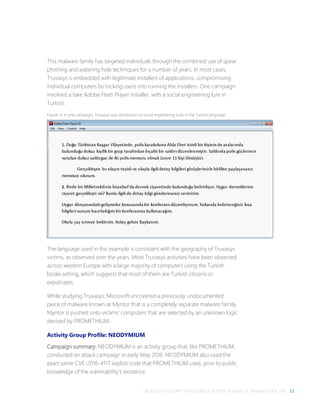
representative from one’s credit card company). Regardless of the method
selected, the purpose of a social engineering attack remains the same—to get
the targeted user to perform an action of the attacker's choice.
software bundler
A program that installs unwanted software on a computer at the same time as
the software the user is trying to install, without adequate consent.
spam
Bulk unsolicited email. Malware authors may use spam to distribute malware,
either by attaching the malware to email messages or by sending a message
containing a link to the malware. Malware may also harvest email addresses for
spamming from compromised machines or may use compromised machines to
send spam.
MICROSOFT SECURITY INTELLIGENCE REPORT, VOLUME 21, JANUARY–JUNE 2016 153
spear phishing
Phishing that targets a specific person, organization, or group, containing
additional information associated with that person, organization, or group to
lure the target further into a false sense of security to divulge more sensitive
information.
spyware
A program that collects information, such as the websites a user visits, without
adequate consent. Installation may be without prominent notice or without the
user’s knowledge.
SQL injection
A technique in which an attacker enters a specially crafted Structured Query
Language (SQL) statement into an ordinary web form. If form input is not
filtered and validated before being submitted to a database, the malicious SQL
statement may be executed, which could cause significant damage or data loss.
Structured Exception Handler Overwrite Protection (SEHOP)
A security technique designed to prevent exploits from overwriting exception
handlers to gain code execution. SEHOP verifies that a thread’s exception
handler list is intact before allowing any of the registered exception handlers to
be called.
targeted attack
A malware attack against a specific group of companies or individuals. This type
of attack usually aims to get access to the computer or network, before trying to
steal information or disrupt the infected machines.
tool
In the context of malware, a software program that may have legitimate
purposes but may also be used by malware authors or attackers.
trojan
A generally self-contained program that does not self-replicate but takes
malicious action on the computer.
unwanted software
A program with potentially unwanted functionality that may affect the user’s
privacy, security, or computing experience.
154 GLOSSARY
virus
Malware that replicates, typically by infecting other files in the computer, to
allow the execution of the malware code and its propagation when those files
are activated.
vulnerability
A weakness, error, or poor coding technique in a program that may allow an
attacker to exploit it for a malicious purpose.
watering hole attack
A type of targeted attack that involves planting malware at websites visited by
people in specific industries or with specific interests.
wild
See in the wild.
worm
Malware that spreads by spontaneously sending copies of itself through email
or by using other communication mechanisms, such as instant messaging (IM)
or peer-to-peer (P2P) applications.
XSS
See cross-site scripting.
zero-day exploit
An exploit that targets a zero-day vulnerability.
zero-day vulnerability
A vulnerability in a software product for which the vendor has not yet published
a security update.
MICROSOFT SECURITY INTELLIGENCE REPORT, VOLUME 21, JANUARY–JUNE 2016 155
Threat families referenced in
this report
The definitions for the threat families referenced in this report are adapted from
the Microsoft Malware Protection Center encyclopedia
(www.microsoft.com/security/portal), which contains detailed information about
a large number of malicious software and unwanted software families. See the
encyclopedia for more in-depth information and guidance for the families listed
here and throughout the report.
Win32/Adposhel. Adware that can show extra ads inside and outside the web
browser.
Win32/Anogre. A detection for the Sweet Orange exploit kit, which exploits
vulnerabilities in some versions of Windows, Adobe Flash Player, and Java to
install malware.
INF/Autorun. A family of worms that spreads by copying itself to the mapped
drives of an infected computer. The mapped drives may include network or
removable drives.
JS/Axpergle. A detection for the Angler exploit kit, which exploits vulnerabilities
in some versions of Internet Explorer, Silverlight, Adobe Flash Player, and Java to
install malware.
Win32/Banload. A family of trojans that download other malware. Banload
usually downloads Win32/Banker, which steals banking credentials and other
sensitive data and sends it back to a remote attacker.
Win32/BeeVry. A trojan that modifies a number of settings to prevent the
computer from accessing security-related websites, and lower the computer's
security.
Win32/Bervisec. A software bundler that is typically distributed on German-
language websites as an installer for legitimate applications. Some versions also
install the browser modifier Win32/Sasquor.
156 THREAT FAMILIES REFERENCED IN THIS REPORT
JS/Bondat. A family of threats that collects information about the computer,
infects removable drives, and tries to stop the user from accessing files. It
spreads by infecting removable drives, such as USB thumb drives and flash
drives.
JS/Brolo. A ransomware family that locks the web browser and displays a
message, often pretending to be from a law enforcement agency, demanding
money to unlock the browser.
Win32/Cerber. A ransomware-as-a-service family that encrypts files on the
computer and demands payment in Bitcoins for the decryption key.
Win32/Copali. A family of worms that can download other malware, including
PWS:Win32/Zbot. They spread through infected network and removable drives.
Win32/CplLnk. A generic detection for specially-crafted malicious shortcut files
that attempt to exploit the vulnerability addressed by Microsoft Security Bulletin
MS10-046.
Win32/Crowti. A ransomware family that encrypts files on the computer and
demands that the user pay a fee to decrypt them, using Bitcoins.
Win32/Diplugem. A browser modifier that installs browser add-ons without
obtaining the user’s consent. The add-ons show extra advertisements as the
user browses the web, and can inject additional ads into web search results
pages.
SWF/Dlcypt. An Adobe Flash Player file that may be used by attackers to decrypt
and execute encrypted JavaScript files.
Win32/DLHelper. A software bundler that is often distributed as a mountable
.iso disk file. It installs unwanted software alongside the desired applications,
including Win32/Pokavampo.
O97M/Donoff. A threat that uses an infected Microsoft Office file to download
other malware onto the computer. It can arrive as a spam email attachment,
usually as a Word file (.doc).
Win32/Dynamer. A generic detection for a variety of threats.
Win32/EoRezo. Adware that displays targeted advertising to affected users
while browsing the Internet, based on downloaded pre-configured information.
MICROSOFT SECURITY INTELLIGENCE REPORT, VOLUME 21, JANUARY–JUNE 2016 157
JS/FakeBsod. A malicious JavaScript script that attempts to extort money from
the user by locking the web browser, displaying a fake error message, and
instructing the user to call a phone number to have it unlocked.
JS/FakeCall. Rogue security software in the form of a webpage that claims the
computer is infected with malware. It asks the user to phone a number to
receive technical support to help remove the malware.
Win32/Falrile. A cloud-based detection for files that have been automatically
identified as malicious by the cloud-based protection feature of Windows
Defender.
Win32/Fourthrem. A program that installs unwanted software without adequate
consent on the computer at the same time as the software the user is trying to
install.
Win32/Gamarue. A worm that is commonly distributed via exploit kits and social
engineering. Variants have been observed stealing information from the local
computer and communicating with command-and-control (C&C) servers
managed by attackers.
AndroidOS/GingerMaster. A malicious program that affects mobile devices
running the Android operating system. It may be bundled with clean
applications, and is capable of allowing a remote attacker to gain access to the
mobile device.
Win32/Hadsruda. A cloud-based detection for files that have been automatically
identified as malicious by the cloud-based protection feature of Windows
Defender.
Win32/Hao123. A threat that changes browser settings and makes it difficult to
change them back. It is often installed by bundlers that offer free software.
HTML/IframeRef. A generic detection for specially formed IFrame tags that point
to remote websites that contain malicious content.
Win32/Ippedo. A worm that can send sensitive information to a malicious
hacker. It spreads through removable drives, such as USB flash drives.
DOS/JackTheRipper. A virus that can stop some files from working correctly in
Windows XP and earlier operating systems. It spreads by infecting the master
boot record (MBR) on connected hard disks and floppy disks.
158 THREAT FAMILIES REFERENCED IN THIS REPORT
VBS/Jenxcus. A worm that gives an attacker control of the computer. It is spread
by infected removable drives, like USB flash drives. It can also be downloaded
within a torrent file.
HTML/Kaixin. A detection for the KaiXin exploit kit, which exploits vulnerabilities
in some versions of Adobe Flash Player, Java, and other components in an
attempt to spread malware.
Win32/Lightmoon. A mass-mailing worm that sends itself to email addresses
found on the infected computer. It also attempts to propagate via P2P
applications. Some variants can disable system tools, log keystrokes, and take
other malicious actions.
Win32/Locky. Ransomware that encrypts files on the computer, and directs the
user to a Tor webpage to pay for the decryption key. It often arrives via spam as
an infected Microsoft Word .doc file.
Unix/Lotoor. A detection for specially crafted Android programs that attempt to
exploit vulnerabilities in the Android operating system to gain root privilege.
Win32/Lodbak. A trojan that is usually installed on removable drives by
Win32/Gamarue, and which attempts to install Gamarue when the infected
removable drive is connected to a computer.
Win32/Macoute. A worm that can spread itself to removable USB drives, and
may communicate with a remote host.
Win32/Madang. A virus that infects .exe and .scr files, and connects to specific
web sites to possibly download other malware.
HTML/Meadgive. A detection for the RIG exploit kit, also known as Redkit,
Infinity, and Goon. It attempts to exploit vulnerabilities in programs such as Java
and Silverlight to install other malware.
Win32/Mizenota. A software bundler that installs unwanted software alongside
the software the user is trying to install. It has been observed to install
Win32/SupTab, Win32/Sasqor, Win32/Smudplu, and others.
MSIL/Mofin. A worm that can steal files from your PC and send them to a
malicious hacker. It spreads via infected removable drives, such as USB flash
drives.
MICROSOFT SECURITY INTELLIGENCE REPORT, VOLUME 21, JANUARY–JUNE 2016 159
JS/Nemucod. A family of .zip attachments that try to install other malware when
opened.
Win32/Neobar. A browser modifier that can change web browser settings
without adequate consent. It is often installed by software bundlers, and has
used the names Best YouTube Downloader, Torrent Search, BonusBerry, and
several others.
SWF/Netis. An exploit that targets a vulnerability in Adobe Flash Player (CVE-
2015-5119) to download and run files, including malware like
Exploit:Python/Hitbrovi.A!dha.
JS/NeutrinoEK. A detection for the Neutrino exploit kit, which exploits
vulnerabilities in some versions of Adobe Flash Player, Internet Explorer,
Silverlight, and Java to install malware.
Win32/Nuqel. A worm that spreads via mapped drives and certain instant
messaging applications. It may modify system settings, connect to certain
websites, download arbitrary files, or take other malicious actions.
Win32/Obfuscator. A generic detection for programs that have had their
purpose disguised to hinder analysis or detection by antivirus scanners. Such
programs commonly employ a combination of methods, including encryption,
compression, anti-debugging and anti-emulation techniques.
Win32/Ogimant. A threat that claims to help download items from the Internet,
but actually downloads and runs files that are specified by a remote attacker.
Win32/OutBrowse. A software bundler that installs additional unwanted
programs alongside software that the user wishes to install. It can remove or
hide the installer’s close button, leaving no way to decline the additional
applications.
Win32/Pdfjsc. A family of specially crafted PDF files that exploit Adobe Acrobat
and Adobe Reader vulnerabilities. Such files contain malicious JavaScript that
executes when the file is opened.
Win32/Peals. A generic detection for various threats that display trojan
characteristics.
160 THREAT FAMILIES REFERENCED IN THIS REPORT
Win32/Prepscram. A software bundler that installs unwanted software alongside
the desired applications. It has been observed installing browser modifiers such
as Win32/Sasquor, Win32/Soctuseer, and Win32/Flowsurf.
Win32/Ramnit. A family of multi-component malware that infects executable
files, Microsoft Office files, and HTML files. Win32/Ramnit spreads to removable
drives and steals sensitive information such as saved FTP credentials and
browser cookies. It may also open a backdoor to await instructions from a
remote attacker.
Win32/Riccietex. A browser modifier that is distributed as an installer for various
applications. When used, it alters shortcuts (.lnk files) that open popular
browsers and configures them to open a specific website by default.
Win32/Rundas. A cloud-based detection for files that have been automatically
identified as malicious by the cloud-based protection feature of Windows
Defender.
Win32/Sality. A family of polymorphic file infectors that target executable files
with the extensions .scr or .exe. They may execute a damaging payload that
deletes files with certain extensions and terminates security-related processes
and services.
Win32/Sasquor. A browser modifier that modifies search and home page
settings, and installs services and scheduled tasks to prevent the user from
changing them back. It can also download additional malware, including
Win32/SupTab and Win32/Xadupi.
DOS/Sigru. A virus that can stop some files from working correctly in Windows
XP and earlier operating systems. It spreads by infecting the master boot record
(MBR) on connected hard disks and floppy disks.
Win32/Skeeyah. A generic detection for various threats that display trojan
characteristics.
Win32/Spursint. A cloud-based detection for files that have been automatically
identified as malicious by the cloud-based protection feature of Windows
Defender.
Win32/Stallmonitz. A software bundler that installs unwanted software, typically
Win32/InstallMonitizer, along with the program desired by the user.
MICROSOFT SECURITY INTELLIGENCE REPORT, VOLUME 21, JANUARY–JUNE 2016 161
Win32/Stuxnet. A multi-component family that spreads via removable volumes
by exploiting the vulnerability addressed by Microsoft Security Bulletin MS10-
046.
Win32/SupTab. A browser modifier that installs itself and changes the browser’s
default search provider, without obtaining the user’s consent for either action.
Win32/Sventore. A trojan that can install other malware or unwanted software
on the computer. It sometimes attempts to avoid running in virtual
environments, or if certain antimalware products are installed.
Win32/Tescrypt. Ransomware that encrypts files and extorts payment in Bitcoins
from the user for the decryption key. It is sometimes dropped by exploit kits
such as Axpergle (Angler) and Neclu (Nuclear).
Win32/Tillail. A software bundler that installs unwanted software alongside the
software the user is trying to install. It has been observed to install the browser
modifier Win32/SupTab.
Win32/Virut. A family of file-infecting viruses that target and infect .exe and .scr
files accessed on infected systems. Win32/Virut also opens a backdoor by
connecting to an IRC server.
Win32/Xadupi. A trojan that poses as a useful application, usually called
WinZipper or QKSee, but can silently download and install other malware. It is
often installed silently by the browser modifiers Win32/Sasquor and
Win32/SupTab.
Win32/Xiazai. A program that installs unwanted software on the computer at
the same time as the software the user is trying to install, without adequate
consent.
162 INDEX
Index
ActiveX, 57, 58, 65–66, 145
Address Space Layout Randomization
(ASLR), 39, 145
Adobe Acrobat, 62, 63, 159
Adobe Flash Player, 22, 23, 29, 52, 53, 54,
56, 57, 62–64, 64, 66, 67–68, 87, 91, 155,
156, 158, 159
Adobe Reader, 62, 63, 159
Adobe Security Bulletins, 54, 62, 63, 67
Adposhel, 76, 81, 85, 155
adware, 76, 81, 83, 84, 85, 128, 145, 155, 156
Albania, 140
Algeria, 106, 107, 140
Americas (continents), 79
Android, 44, 60, 61, 152, 157, 158
Angler. See Axpergle
Angola, 140
Anogre, 53, 56, 95, 155
Argentina, 140
Armenia, 87, 140
Asia, 69, 70, 86
AskToolbar, 102, 103
ASLR. See Address Space Layout
Randomization (ASLR)
Australia, 115, 140
Austria, 118, 140
Autorun (malware), 85, 91, 155
Axpergle, 53, 56, 71, 74, 79, 85, 86, 87, 91,
95, 155, 161
Azerbaijan, 107, 140
Azure Security Center, 3–20, 137
backdoors, 6, 24, 25, 26, 82, 84, 87, 145, 160,
161
Bahamas, The, 140
Bahrain, 140
Bangladesh, 140
Banload, 75, 84, 155
Barbados, 140
BeeVry, 75, 155
behavioral analysis, 14–15
Belarus, 87, 140
Belgium, 140
Bervisec, 76, 155
Bing, 119–21, 137, 139
Bitcoin, 92, 95, 146, 156, 161
Bolivia, 140
Bondat, 76, 156
Bosnia and Herzegovina, 96, 140
Brazil, 74, 75, 84, 140
Brolo, 95
browser modifiers, 74, 75, 83, 84, 88, 89, 92,
125, 155, 156, 159, 160, 161
Bulgaria, 94, 95, 141
Cambodia, 141
Cameroon, 107, 141
Canada, 71, 86, 141
CandyOpen, 102, 103
CCM. See computers cleaned per mille
Cerber, 95, 96, 156
Chile, 141
China, 68, 74, 80, 84, 85, 115, 116, 118, 141
Chinese language, 74
cloud storage, 4, 5, 126
cloud-based detections, 73, 75, 82, 87, 146,
157, 160
Colombia, 141
Common Vulnerabilities and Exposures. See
CVE identifier
Common Vulnerability Scoring System
(CVSS), 44, 45, 46
computers cleaned per mille, 72
Conduit, 103
Conficker, 14
Control Flow Guard, 29, 63, 70
Conustr, 79
Copali, 80, 156
Costa Rica, 141
Côte d’Ivoire, 141
MICROSOFT SECURITY INTELLIGENCE REPORT, VOLUME 21, JANUARY–JUNE 2016 163
CplLnk, 51, 53, 54, 60, 156
Credential Guard, 29
Croatia, 95, 141
cross-site scripting, 64, 147, 154
Crowti, 95, 97, 156
CryptoDefense. See Crowti
CryptoWall. See Crowti
CVE identifier, 35, 43, 51
CVE-2008-2551, 64
CVE-2010-0188, 62
CVE-2010-0840, 57
CVE-2010-1297, 63
CVE-2010-2568. See CplLnk
CVE-2010-3336, 62
CVE-2010-3653, 63
CVE-2011-0097, 62
CVE-2011-0611, 63
CVE-2011-1823, 60, 61
CVE-2012-0056, 60
CVE-2012-0158, 62
CVE-2012-0507, 57
CVE-2012-1723, 56, 57, 58, 59
CVE-2012-1889, 64
CVE-2013-0074, 56
CVE-2013-0422, 57, 59
CVE-2013-1493, 56
CVE-2013-2423, 56
CVE-2013-2460, 56
CVE-2013-2551, 56
CVE-2013-3896, 56
CVE-2014-1761, 62
CVE-2014-6332, 61
CVE-2015-0072, 64
CVE-2015-0310, 56
CVE-2015-0311, 56
CVE-2015-0313, 56
CVE-2015-5119, 54, 63, 159
CVE-2015-8651, 56, 57
CVE-2016-0034, 66, 67, 69
CVE-2016-0165, 67
CVE-2016-0167, 67, 69
CVE-2016-0189, 67, 70
CVE-2016-1010, 67
CVE-2016-1019, 57, 67, 68
CVE-2016-4117, 22, 23, 24, 25, 29, 57, 67, 68
CVE-2016-4171, 67, 68
CVSS. See Common Vulnerability Scoring
System (CVSS)
Cyprus, 141
Czech Republic, 141
Data Execution Prevention (DEP), 39, 147
DDoS. See distributed denial of service
Delphi, 22
Denmark, 81, 106, 141
DEP. See Data Execution Prevention (DEP)
Diplugem, 83, 88, 92, 156
DirectAccess, 123, 130
distributed denial of service, 5, 6, 147
Dlcypt, 53, 54, 156
DLHelper, 75, 84, 156
Dominican Republic, 141
Donoff, 95, 156
DownloadAdmin, 103
downloaders, 75, 97, 148
Downloaders & Droppers (category), 82, 84,
125, 127
DownloadSponsor, 103
drive-by downloads, 119–21
droppers, 26, 27, 28, 75, 148
Dynamer, 82, 84, 85, 86, 91, 156
Ecuador, 141
Egypt, 141
El Salvador, 141
email, 97–100
EMET. See Enhanced Mitigation Experience
Toolkit
encounter rate, 71
Enhanced Mitigation Experience Toolkit, 130
EoRezo, 85, 156
Estonia, 141
Europe, 21–34, 62, 79, 86, 87
Exchange Online, 97, 98, 97–100, 137, 139
exploit kits, 52, 53, 54–57, 58, 59, 63, 65, 66,
67, 68, 69, 70, 74, 79, 86, 87, 91, 95, 96,
148, 155, 157, 158, 159, 161
exploits, 35–39, 51, 64, 66, 51–70, 82, 84, 85,
91, 125
Adobe Flash Player, 62–64, 67–68
164 INDEX
browser, 64–65
document, 61–62
families, 53–54
Internet Explorer, 69
Java, 57–59
Microsoft Windows, 67
operating system, 59–61
Silverlight, 67, 69
used in targeted attacks, 66–70
zero-day. See zero-day vulnerabilities
and exploits
ExpressDownloader, 103
FakeBsod, 95
FakeCall, 74, 91, 157
FinFisher, 24, 25, 27, 29
Finland, 81, 106, 118, 141
FireEye, 68, 69
Fourthrem, 75, 157
France, 74, 75, 84, 85, 86, 141
Gamarue, 75, 82, 84, 85, 86, 87, 91, 157, 158
generic detections, v, 54, 55, 59, 75, 82, 84,
86, 149, 156, 157, 159, 160
Georgia (country), 141
German language, 76, 155
Germany, 74, 76, 84, 85, 105, 141
Ghana, 141
GingerBreak. See CVE-2011-1823
GingerMaster, 61
GitHub, 3
Google, 44, 48, 60, 61
Google Chrome, 48
Google Play Store, 44
Greece, 141
Group Policy, 129
Guadeloupe, 141
Guatemala, 141
Hacking Team, 69
Hadsruda, 82, 157
Hao123, 75, 157
HeapAli, 64
Honduras, 141
Hong Kong SAR, 141
Hungary, 141
HVCI. See Hypervisor Code Integrity
Hypervisor Code Integrity, 29
iBryteInstaller, 103
Iceland, 81, 141
IExtensionValidation, 52, 57, 63, 64, 65–66,
71
IframeRef, 53, 54, 157
India, 74, 75, 84, 86, 141
Indonesia, 78, 79, 80, 86, 107, 141
InstallCore, 102, 103
Internet Explorer, 48, 52, 56, 57, 58, 61, 63,
64, 65–66, 67, 68, 69, 70, 71, 91, 111, 112,
116, 129, 138, 139, 145, 150, 151, 155, 159
Ippedo, 80, 157
Iran, 121
Iraq, 78, 107, 142
Ireland, 119, 142
Israel, 142
Isrocore, 103
Italy, 94, 95, 142
JackTheRipper, 75, 85, 157
jailbreaking. See rooting
Jamaica, 142
Japan, ii, 81, 119, 142
Java Runtime Environment, 52, 53, 56, 57,
58, 59, 57–59, 62, 64, 100, 130, 155, 158,
159
JavaScript, 53, 54, 55, 62, 67, 99, 100, 128,
147, 156, 157, 159
Jenxcus, 85, 87, 158
Jordan, 142
JRE. See Java Runtime Environment
Kaixin. See Anogre
Kaspersky, 68, 69
Kazakhstan, 142
Kenya, 142
Korea, 68, 70, 95, 115, 116, 119, 142
Kuwait, 142
Kyrgyzstan, 106
Latvia, 142
Lebanon, 142
Libya, 78, 106, 107, 142
Lightmoon, 79, 158
Linux, 47, 59
Lithuania, 142
MICROSOFT SECURITY INTELLIGENCE REPORT, VOLUME 21, JANUARY–JUNE 2016 165
Lockheed Martin, 7
Locky, 95, 96, 158
Lodbak, 82, 84, 85, 86, 87, 91, 158
Lotoor, 60
Luxembourg, 95, 142
Mac OS X, 59
Macao SAR, 142
Macedonia, FYRO, 96, 142
Macoute, 79, 158
Madang, 79, 158
Magnitude. See Pangimop
Malaysia, 142
malicious software. See malware
Malicious Software Removal Tool, 72, 78,
87, 89, 104, 105, 137, 139, 140, 146, 149,
150
Malta, 142
malware, v, vii, 3–20, 21, 22, 23, 26, 27, 28,
30–32, 32, 43, 51, 52, 53, 54, 59, 61, 63,
71–110, 111, 112, 116, 117, 118, 119, 123–31,
135–36, 137, 138, 145, 146, 147, 148, 149,
150, 151, 152, 153, 154, 155–61
by country or region, 73–81, 140–44
by platform, 90–92
categories, 81–85
by location, 83–85
families, 85–92
by platform, 90–92
naming, 135–36
ransomware, 92–97
malware hosting, 116–19
by location, 117–19
man-in-the-middle attacks, 5, 44, 150
Martinique, 142
Mauritius, 142
Meadgive, 53, 56, 95, 96, 158
Mexico, 74, 76, 84, 142
Microsoft Digital Crime Unit, 13
Microsoft Digital Crimes Unit, 87
Microsoft Edge, 39, 58, 65, 68, 69, 111, 112,
116, 129, 138, 139, 150, 151
Microsoft Excel, 99, 100
Microsoft Intune, 103
Microsoft IT, 123–31
Microsoft Malware Protection Engine, v, 138
Microsoft Office, 24, 29, 30, 62, 138, 156, 160
Microsoft Outlook, 100
Microsoft Safety Scanner, 97, 137, 139
Microsoft Security Bulletins, 51, 54, 60, 61,
62, 64, 65, 66, 67, 69, 70, 156, 161
Microsoft Security Essentials, 127, 137, 139
Microsoft Update, 91, 129, 137
Microsoft Word, 62, 69, 99, 100, 128, 156,
158
mimikatz, 10, 12, 13
Mizenota, 83, 88, 89, 92, 158
Mobogenie, 103
Mofin, 75, 158
Moldova, 142
Mongolia, 78, 79, 107, 121, 142
Morocco, 78, 142
Mozambique, 142
Mozilla Firefox, 48
MS-DOS, 85
MSRT. See Malicious Software Removal Tool
Myanmar, 78, 79
Myntor, 23
MyWebSearch, 102, 103
Namibia, 142
NAP. See Network Access Protection
National Vulnerability Database, 43, 47, 48
Nemucod, 95, 159
Neobar, 75, 159
NEODYMIUM, 21–34, 68
Nepal, 142
Netherlands, 142
Netis, 53, 54, 63, 76, 159
Network Access Protection, 130
NeutrinoEK, 53, 56, 57, 95, 159
New Zealand, 142
Nicaragua, 142
Nigeria, 107, 116, 143
North America, 86
Norway, 81, 106, 143
Nuqel, 80, 159
NVD. See National Vulnerability Database
Obfuscator, 57, 59, 85, 159
166 INDEX
Obfuscators & Injectors (category), 82, 84,
85, 91
Office 365, 19, 29, 97–100, 138, 139
Office 365 Advanced Threat Protection, 97–
100, 138
Ogimant, 75, 159
Oman, 143
OpenCandy. See CandyOpen
Oracle, 58, 59
Other Malware (category), 82, 84, 91, 125,
127
OutBrowse, 88, 89, 90, 159
paint.net, 102
Pakistan, 78, 80, 143
Palestinian Authority, 78, 143
Panama, 143
Pangimop, 96
Paraguay, 143
Password Stealers & Monitoring Tools
(category), 82, 84
PDF, 62, 63, 100, 159
Pdfjsc, 53, 62, 159
Peals, 75, 82, 84, 85, 86, 91, 159
Peru, 143
Philippines, 143
phishing, 112–16
by location, 115–16
spear phishing, 23, 24, 153
target institutions, 114–15
PLATINUM, 21
Poland, 143
Portugal, 143
potentially unwanted applications, 101–4,
125
PowerShell, 131
Prepscram, 79, 160
PROMETHIUM, 21–34, 68
Proofpoint, 68
PUA. See potentially unwanted applications
Puerto Rico, 143
Qatar, 96, 143
ransomware, 82, 92–97
Ransomware, 5, 84, 85, 158, 161
RDP. See Remote Desktop Protocol
RelevantKnowledge, 102, 103
Remote Desktop Protocol, 4, 6
Réunion, 143
Riccietex, 75, 160
RIG. See Meadgive
rogue security software, 74, 151
Romania, 143
rooting, 61, 149, 151, 152
rootkits, 27, 152
Rundas, 73, 91, 160
Russia, 56, 74, 75, 84, 86, 96, 105, 116, 143
Russian language, 96
Safari, 48
Sality, 75, 160
SanDisk, 22
Sasquor, 89, 92, 155, 160, 161
Saudi Arabia, 119, 143
ScarCruft, 68
SCCM. See System Center Configuration
Manager
SCEP. See System Center Endpoint
Protection
security software, real-time, 104–9
by location, 105–7
by platform, 107–9
SEHOP. See Structured Exception Handler
Overwrite Protection (SEHOP)
Senegal, 143
Serbia, 143
SharePoint, 4
ShellCode, 53, 63
Sigru, 79, 160
Silverlight, 56, 66, 67, 69, 155, 158, 159
Singapore, 143
Skeeyah, 75, 82, 85, 86, 91, 160
Slovakia, 143
Slovenia, 119, 143
smart cards, 130
SmartScreen Filter, 112–19, 129
Softonic, 103
software bundlers, 74, 75, 76, 79, 83, 84, 88,
89, 92, 102, 125, 152, 155, 156, 158, 159,
160, 161
South Africa, 94, 95, 115, 116, 143
MICROSOFT SECURITY INTELLIGENCE REPORT, VOLUME 21, JANUARY–JUNE 2016 167
Spain, 116, 143
spam, 63, 95, 96, 97, 137, 150, 152, 156, 158
Spigot, 103
Spursint, 73, 75, 82, 85, 86, 87, 91, 160
SQL, 11, 111, 153
Sri Lanka, 143
Stallmonitz, 92, 160
STRONTIUM, 21, 68
Structured Exception Handler Overwrite
Protection (SEHOP), 39, 152, 153
Stuxnet, 54, 161
SupTab, 74, 83, 84, 88, 89, 92, 158, 160, 161
Sventore, 75, 161
Sweden, 81, 118, 143
Sweet Orange. See Anogre
Switzerland, 143
System Center Configuration Manager, 103
System Center Endpoint Protection, 101,
103–4, 123, 125, 127, 128, 138, 139
Taiwan, 94, 115, 121, 143
Tanzania, 107, 143
targeted attacks, 21–34, 66–70, 97–100
Tescrypt, 85, 95, 161
Thailand, 118, 143
Tillail, 74, 83, 88, 161
Tor, 95, 158
Trinidad and Tobago, 143
trojans, 75, 82, 84, 85, 87, 91, 125, 127, 145,
148, 153, 155, 158, 159, 160, 161
TrueCrypt, 22
Truvasys, 22, 23, 26, 33, 34
Tunisia, 143
Turkey, 25, 21–34, 74, 75, 84, 144
Turkish language, 23
Ukraine, 87, 115, 118, 144
United Arab Emirates, 119, 144
United Kingdom, 74, 76, 84, 85, 144
United States, 74, 84, 85, 86, 144
unwanted software. See malware
Uruguay, 144
Venezuela, 144
Vietnam, 78, 79, 118, 144
viruses, 75, 79, 80, 82, 84, 85, 125, 150, 154,
157, 158, 160
Virut, 80, 161
VMWare, 59
vulnerabilities, v, 8, 9, 21, 29, 35–39, 43–50,
51–70, 83, 91, 119, 130, 145, 148, 152, 155,
158, 159
Adobe Flash Player, 67–68
application, 47–49
browser, 47–49
complexity, 46–47
elevation of privilege (EOP), 35, 36, 37,
38, 67, 69
in Microsoft products, 35–39, 49
industry-wide, 43–44
Internet Explorer, 69
operating system, 47–49
remote code execution (RCE), 35, 36, 37,
38, 62, 67, 69
severity, 44–46
Silverlight, 69
zero-day. See zero-day vulnerabilities
and exploits
Windows 10, 22, 29, 30, 32, 39, 58, 63, 65,
73, 91, 97, 103, 104, 108, 109, 129, 130, 131,
138, 139
Anniversary Update, 73, 97, 138
Windows 7, 22, 69, 70, 91, 109, 131, 137
Windows 8, 22, 51, 54, 70, 91, 92, 108, 109,
138
Windows 8.1, 70, 91, 92, 108, 109, 138
Windows Defender, ii, 21, 22, 24, 25, 30–32,
32, 51, 73, 82, 87, 103, 104, 108, 109, 123,
125, 127, 129, 130, 131, 138, 139, 146, 157,
160
cloud-based protection, 73
Windows Defender Advanced Threat
Protection, 22, 24, 30–32, 138
Windows Defender Offline, 97, 138, 139
Windows Event Forwarding, 123
Windows Firewall, 129
Windows Script Host, 100
Windows Update, 91, 129, 137, 149
Windows Vista, 22, 91, 92, 109, 137
Windows XP, 80, 85, 157, 160
Wingbird, 24, 25, 26, 27, 28, 29, 32, 33
168 INDEX
WinRAR, 22
WinUtils, 22
worms, 75, 76, 79, 80, 82, 84, 85, 86, 87, 91,
125, 127, 154, 157, 158, 159
Xadupi, 89, 91, 160, 161
Xiazai, 74, 161
XSS. See cross-site scripting
YouTube, 87, 159
Zambia, 144
zero-day vulnerabilities and exploits, 21–34,
37, 38, 59, 63, 67, 68, 69, 70, 154
Zimbabwe, 107, 144
μTorrent, 102
One Microsoft Way
Redmond, WA 98052-6399
microsoft.com/security

Microsoft Security Intelligence Report vol. 21

  • 1.
    Microsoft Security Intelligence Report Volume21 | January through June, 2016
  • 3.
    This document isfor informational purposes only. MICROSOFT MAKES NO WARRANTIES, EXPRESS, IMPLIED, OR STATUTORY, AS TO THE INFORMATION IN THIS DOCUMENT. This document is provided “as-is.” Information and views expressed in this document, including URL and other Internet Web site references, may change without notice. You bear the risk of using it. Copyright © 2016 Microsoft Corporation. All rights reserved. The names of actual companies and products mentioned herein may be the trademarks of their respective owners.
  • 4.
    ii ABOUT THISREPORT Authors Charlie Anthe Cloud and Enterprise Security Evan Argyle Windows Defender Labs Eric Douglas Windows Defender Labs Sarah Fender Azure Security Elia Florio Windows Defender Labs Chad Foster Bing Ram Gowrishankar Windows Defender Labs Volv Grebennikov Bing Paul Henry Wadeware LLC Aaron Hulett Windows Defender Labs Ivo Ivanov Windows Defender Labs Michael Johnson Windows Defender Labs Jeff Jones Corporate Communications Tim Kerk Windows Defender Labs Mathieu Letourneau Windows Defender Labs Marianne Mallen Windows Defender Labs Matt Miller Microsoft Security Response Center Chad Mills Safety Platform Nam Ng Enterprise Cybersecurity Group Hamish O'Dea Windows Defender Labs James Patrick Dee Windows Defender Labs Siddharth Pavithran Windows Defender Labs Daryl Pecelj Microsoft IT Information Security and Risk Management Ferdinand Plazo Windows Defender Labs Tim Rains Commercial Communications Paul Rebriy Bing Karthik Selvaraj Windows Defender Labs Tom Shinder Azure Security Nitin Sood Windows Defender Labs Tomer Teller Azure Security Vikram Thakur Windows Defender Labs Contributors Eric Avena Windows Defender Labs Iaan D'Souza- Wiltshire Windows Defender Labs Dustin Duran Windows Defender Labs Tanmay Ganacharya Windows Defender Labs Chris Hallum Windows and Devices Group Satomi Hayakawa CSS Japan Security Response Team Sue Hotelling Windows and Devices Group Yurika Kakiuchi CSS Japan Security Response Team Louie Mayor Windows Defender Labs Dolcita Montemayor Windows Defender Labs Heike Ritter Windows and Devices Group Norie Tamura CSS Japan Security Response Team Steve Wacker Wadeware LLC David Weston Windows Defender Labs
  • 5.
    MICROSOFT SECURITY INTELLIGENCEREPORT, VOLUME 21, JANUARY–JUNE 2016 iii Table of contents About this report.......................................................................................................................... v How to use this report ............................................................................................................... vi Featured intelligence 1 Protecting cloud infrastructure: Detecting and mitigating threats using Azure Security Center..............................................................................................................................3 Threats against cloud deployments and infrastructure.......................................................... 3 The cyber kill chain: On-premises and in the cloud................................................................. 7 Countering threats with Azure Security Center Advanced Threat Detection.................. 11 Summary............................................................................................................................................20 PROMETHIUM and NEODYMIUM: Parallel zero-day attacks targeting individuals in Europe ....................................................................................................................................... 21 Activity Group Profile: PROMETHIUM .......................................................................................22 Activity Group Profile: NEODYMIUM.........................................................................................23 Mitigation ..........................................................................................................................................29 Summary............................................................................................................................................32 Indicators...........................................................................................................................................32 Ten years of exploits: A long-term study of exploitation of vulnerabilities in Microsoft software.....................................................................................................................35 Worldwide threat assessment 41 Vulnerabilities..............................................................................................................................43 Industry-wide vulnerability disclosures .....................................................................................43 Vulnerability severity ......................................................................................................................44 Vulnerability complexity ................................................................................................................46 Operating system, browser, and application vulnerabilities................................................47 Microsoft vulnerability disclosures..............................................................................................49 Guidance: Developing secure software ....................................................................................49 Exploits........................................................................................................................................... 51 Exploit families..................................................................................................................................53 Exploit kits..........................................................................................................................................54 Java exploits......................................................................................................................................57
  • 6.
    iv ABOUT THISREPORT Operating system exploits............................................................................................................59 Document exploits...........................................................................................................................61 Adobe Flash Player exploits .........................................................................................................62 Browser exploits ..............................................................................................................................64 Exploit detection with Internet Explorer and IExtensionValidation....................................65 Exploits used in targeted attacks ................................................................................................66 Malicious and unwanted software ........................................................................................ 71 Learning about new threats with cloud-based protection in Windows Defender........ 73 Malicious and unwanted software worldwide......................................................................... 73 Threat categories .............................................................................................................................81 Threat families..................................................................................................................................85 Ransomware.....................................................................................................................................92 Threats from targeted attackers ................................................................................................. 97 Potentially unwanted applications in the enterprise ............................................................ 101 Security software use ................................................................................................................... 104 Guidance: Defending against malware....................................................................................109 Malicious websites.....................................................................................................................111 Phishing sites................................................................................................................................... 112 Malware hosting sites ................................................................................................................... 116 Drive-by download sites .............................................................................................................. 119 Guidance: Protecting users from unsafe websites................................................................122 Malware at Microsoft: Dealing with threats in the Microsoft environment..........123 Antimalware usage........................................................................................................................123 Malware detections ...................................................................................................................... 124 Malware infections.........................................................................................................................127 What IT departments can do to protect their users .............................................................129 Appendixes 133 Appendix A: Threat naming conventions .........................................................................135 Appendix B: Data sources.......................................................................................................137 Appendix C: Worldwide encounter and infection rates...............................................140 Glossary........................................................................................................................................145 Threat families referenced in this report...........................................................................155 Index .............................................................................................................................................162
  • 7.
    MICROSOFT SECURITY INTELLIGENCEREPORT, VOLUME 21, JANUARY–JUNE 2016 v About this report The Microsoft Security Intelligence Report (SIR) focuses on software vulnerabilities, software vulnerability exploits, malware, and unwanted software. Past reports and related resources are available for download at www.microsoft.com/sir. We hope that readers find the data, insights, and guidance provided in this report useful in helping them protect their organizations, software, and users. Reporting period This volume of the Microsoft Security Intelligence Report focuses on the first and second quarters of 2016, with trend data for the last several quarters presented on a quarterly basis. Because vulnerability disclosures can be highly inconsistent from quarter to quarter and often occur disproportionately at certain times of the year, statistics about vulnerability disclosures are presented on a half-yearly basis. Throughout the report, half-yearly and quarterly time periods are referenced using the nHyy or nQyy formats, in which yy indicates the calendar year and n indicates the half or quarter. For example, 1H16 represents the first half of 2016 (January 1 through June 30), and 4Q15 represents the fourth quarter of 2015 (October 1 through December 31). To avoid confusion, please note the reporting period or periods being referenced when considering the statistics in this report. Conventions This report uses the Microsoft Malware Protection Center (MMPC) naming standard for families and variants of malware. For information about this standard, see “Appendix A: Threat naming conventions” on page 135. In this report, any threat or group of threats that share a common unique base name is considered a family for the sake of presentation. This consideration includes threats that may not otherwise be considered families according to common industry practices, such as generic and cloud-based detections. For the purposes of this report, a threat is defined as a malicious or unwanted software family or variant that is detected by the Microsoft Malware Protection Engine.
  • 8.
    vi HOW TOUSE THIS REPORT How to use this report The Microsoft Security Intelligence Report has been released twice a year since 2006. Each volume is based upon data collected from millions of computers all over the world, which not only provides valuable insights on the worldwide threat landscape, both at home and at work, but also provides detailed information about threat profiles faced by computer users in more than a hundred individual countries and regions. To get the most out of each volume, Microsoft recommends the following: Read Each volume of the report consists of several parts. The primary report typically consists of a worldwide threat assessment, one or more feature articles, guidance for mitigating risk, and some supplemental information. A summary of the key findings in the report can be downloaded and reviewed separately from the full report; it highlights a number of facts and subjects that are likely to be of particular interest to readers. The regional threat assessment, available for download and in interactive form at www.microsoft.com/security/sir/threat, provides individual summaries of threat statistics and security trends for more than 100 countries and regions worldwide. Reading the volume in its entirety will provide readers with the most benefit and context, but the report is designed to provide value in small doses as well. Take a few minutes to review the summary information to find the information that will be of most interest to you and your organization. Consult the table of contents and the index to learn more about particular topics of interest. Share Microsoft also encourages readers to share each released volume, or its download link, with co-workers, peers, and friends with similar interests. The Microsoft Security Intelligence Report is written to be useful and accessible to a wide range of audiences. Each volume contains thousands of hours of research disseminated in easy to understand language, with advanced technical jargon kept to a minimum. Each section and article is written and reviewed to provide the most value for the time it takes to read.
  • 9.
    MICROSOFT SECURITY INTELLIGENCEREPORT, VOLUME 21, JANUARY–JUNE 2016 vii Assess your own risk Reading about the threats and risks that affect different types of environments presents a good opportunity to assess your own risks. Not every computer and entity faces the same risk from all threats. Assess your own risks and determine which topics and information can help you to best defend against the most significant risks. The volume and scope of threats facing the typical organization make it important to prioritize. The greatest risk to any computer or organization is posed by currently and recently active threats. Pay attention to the threats that have most commonly affected your region or industry, focusing particularly on the most common successful attacks in the wild that cause the most problems. Give less consideration to very rare or theoretical-only attacks, unless your computers are at particular risk for such threats. Educate Microsoft strives to make this report one of the most valuable sources of threat and mitigation information that you can read and share. We encourage you to use the Microsoft Security Intelligence Report as a guide to educate your employees, friends, and families about security-related topics. Anyone, including a business, may link, point to, or re-use articles in the Microsoft Security Intelligence Report for informational purposes, provided the material is not used for publication or sale outside of your company and you comply with the following terms: You must not alter the materials in any way. You must provide a reference to the URL at which the materials were originally found. You must include the Microsoft copyright notice followed by “Used with permission from Microsoft Corporation.” Please see Use of Microsoft Copyrighted Content for further information. Ask questions Contact your local Microsoft representative with any questions you have about the topics and facts presented in this report. We hope that each volume provides a good educational summary and helps promote dialog between people trying to best secure their computing devices. Thank you for trusting Microsoft to be your partner in the fight against malware, hackers, and other security threats.
  • 11.
    Featured intelligence Protecting cloudinfrastructure: Detecting and mitigating threats using Azure Security Center...3 PROMETHIUM and NEODYMIUM: Parallel zero- day attacks targeting individuals in Europe........21 Ten years of exploits: A long-term study of exploitation of vulnerabilities in Microsoft software ......................................................................... 35
  • 12.
    2 HOW TOUSE THIS REPORT
  • 13.
    MICROSOFT SECURITY INTELLIGENCEREPORT, VOLUME 21, JANUARY–JUNE 2016 3 Protecting cloud infrastructure: Detecting and mitigating threats using Azure Security Center Cloud computing introduces new challenges to security organizations of all sizes. Enterprise IT teams have established policies and procedures designed for enterprise infrastructure and applications, based on their decades of security experience dealing with on-premises threats. Many of these policies and procedures can be used effectively in public and hybrid cloud environments. However, security teams need to keep abreast of changes in the threat landscape brought on by the emergence of cloud computing. Threats against cloud deployments and infrastructure New types of threats can be related to characteristics of the public cloud only, or to issues introduced by connectivity between on-premises environments and the public cloud. The following subsections provide descriptions of some new types of threats. Disclosing secrets on public sites Public code repositories such as GitHub have become very popular with developers because they enable easy collaboration and source control and remove the responsibility for maintaining the repository infrastructure from developers. But public repositories can be a double-edged sword. Documented cases exist of developers accidentally publishing secret keys on GitHub and other public code repositories, which were discovered by attackers and used to compromise cloud services. Such incidents can sometimes give attackers access to a service’s entire account/subscription database, or allow them to misuse its compute resources for malicious purposes.
  • 14.
    4 PROTECTING CLOUDINFRASTRUCTURE: DETECTING AND MITIGATING THREATS USING AZURE SECURITY CENTER Pivot back attacks A pivot back attack occurs when an attacker compromises a public cloud resource to obtain information that they then use to attack the resource provider’s on-premises environment. Public facing endpoints in the cloud are often under constant brute force attack through protocols such as Remote Desktop Protocol (RDP) and Secure Shell (SSH). Although the overwhelming majority of these attacks fail, a very small percentage of them succeed. When they do, an attacker can sometimes find sensitive information in unexpected or obscure places. For example, they could find such secrets in a Bash session history or a text file in the root directory of the virtual machine’s desktop. Such information can be used to access resources such as databases, SharePoint sites, and cloud storage. If left unimpeded, an attacker could continue gathering information that could provide greater access to the enterprise infrastructure and data. Attacks against cloud administrators Targeted attacks against on-premises and cloud infrastructures alike often focus on IT administrators. The intent is to take control of an email account that has a high probability of containing credentials that can be used to gain access to the public cloud administrator portal. After logging into the administrator portal, an attacker can gather information and make changes to gain access to other cloud-based resources, execute ransomware, or even pivot back to the on-premises environment, as explained earlier. Man in the Cloud (MitC) attacks Another new threat is posed by what the security company Imperva has dubbed “Man in the Cloud,” or MitC attacks,1 In which an attacker induces a prospective victim to install a piece of malware using a typical mechanism, such as an email with a link to a malicious website. After the malware is downloaded and installed, 1 “Man in the Cloud (MITC) Attacks,” Imperva Hacker Intelligence Initiative Report, https://www.imperva.com/docs/HII_Man_In_The_Cloud_Attacks.pdf. Targeted attacks against on- premises and cloud infra- structures often focus on IT administrators.
  • 15.
    MICROSOFT SECURITY INTELLIGENCEREPORT, VOLUME 21, JANUARY–JUNE 2016 5 it finds a cloud storage folder on the user’s computer. It then switches out the user’s cloud storage synchronization token with the attacker’s token. After the token switch, the attacker will receive copies of each file the user places in cloud storage, which effectively makes the attacker a “man in the middle” for cloud storage. One of the attacker’s advantages in this threat scenario is that the malware is removed after the token is switched out, which makes it harder to detect the compromise. Side-channel attacks In a side-channel attack, an attacker attempts to put a virtual machine on the same physical server as the intended victim. If such a successful co-location can be achieved, the attacker will be able to launch local attacks against the victim. These attacks might include local DDoS, network sniffing, and man-in-the- middle attacks, all of which can be used to extract information. It should be noted that side-channel attacks are not trivial. Microsoft Azure employs a number of obfuscation methodologies to significantly decrease the chances of such an attack succeeding. Resource ransom Ransomware is well-known in the desktop operating system space. This malware restricts access to components of an operating system or to files stored on disk, typically through encryption, and demands that the victim pay the attacker to get the keys required to restore access. Attackers have made similar attempts to hold cloud resources hostage by breaking in to a prospective victim’s public cloud account using any one of a number of methods, including some of the methods discussed in this section. When they have control of the account, the attackers attempt to encrypt or otherwise restrict access to as many cloud resources as possible. The attackers then require the victim to pay the ransom to release the restricted resources. The challenge for the attacker is to inform the victim that the attack has taken place, and how to pay the ransom. Because servers usually don’t have signed in users, attackers need to use methods other than those used for desktop ransomware. One way an attacker can inform cloud resource ransom victims is through the use of bot technology, which presents another, and perhaps unexpected, use case for the new and growing ecosystem of bot technologies.
  • 16.
    6 PROTECTING CLOUDINFRASTRUCTURE: DETECTING AND MITIGATING THREATS USING AZURE SECURITY CENTER Cloud weaponization In the cloud weaponization threat scenario, an attacker establishes a foothold within a cloud infrastructure by compromising and taking control of a few virtual machines. The attacker can then use these virtual machines to attack, compromise, and control thousands of virtual machines – some within the same public cloud service provider as the initial attack, and others inside other public cloud service providers. Each of the compromised virtual machines has malware installed that establishes a backdoor connection to the attacker’s command and control servers, from which the attacker can issue commands to the thousands of compromised virtual machines to attack targets throughout the Internet. Cloud weaponization can be implemented in a number of ways using a variety of attacks, including SSH, RDP, distributed denial-of-service (DDoS), unsolicited messaging (spamming), port scanning, and port sweeping. Azure actively monitors for cloud weaponization. Figure 1 shows the distribution of the outbound attacks discovered (and in many cases mitigated) by Azure Security Center’s advanced detection mechanisms. Figure 1. Outbound attacks from Azure virtual machines, September 2016 Figure 2 and Figure 3 show where incoming and outgoing attacks originate from. Communication with malicious IP 41.0% RDP brute force 25.5% Spam 20.5% DDoS 7.6% SSH brute force 2.2% Port sweeping 1.7% Other 1.5%
  • 17.
    MICROSOFT SECURITY INTELLIGENCEREPORT, VOLUME 21, JANUARY–JUNE 2016 7 Figure 2. Incoming attacks detected by Azure Security Center in September 2016, by country/region of origin Figure 3. Outgoing communication to malicious IP addresses detected by Azure Security Center in September 2016, by address location The cyber kill chain: On-premises and in the cloud The cyber kill chain is a model defined by analysts at Lockheed Martin to aid decision making with regard to detecting and responding to threats.2 This 2 Eric M. Hutchins, Michael J. Cloppert, Rohan M. Amin, Ph.D., “Intelligence-Driven Computer Network Defense Informed by Analysis of Adversary Campaigns and Intrusion Kill Chains,” Lockheed Martin Corporation, 2011, www.lockheedmartin.com/content/dam/lockheed/data/corporate/documents/LM-White-Paper-Intel-Driven- Defense.pdf.
  • 18.
    8 PROTECTING CLOUDINFRASTRUCTURE: DETECTING AND MITIGATING THREATS USING AZURE SECURITY CENTER model has become very popular with IT security groups within both small and large IT organizations. It includes the following phases:  Reconnaissance. The attacker determines the best targets by probing a number of online and offline resources.  Weaponization. Files (such as documents) can be changed in ways to make them useful “weapons” against a target system and can also be used to enable installation of malicious code.  Delivery. Weaponized files are placed on the target.  Exploitation. Weaponized files are “detonated” to take advantage of weaknesses in the target operating system or applications.  Installation. A back door mechanism is installed on the compromised device so that that the attacker has persistent access.  Command and control (C2). Malware on the compromised device communicates with a command-and-control system that provides the attacker with access to resources required to carry out actions.  Actions on objectives. The attacker moves forward to carry out objectives, which may be predefined, or evolve based on discovery. The cyber kill chain was defined at a time when cloud computing was still gaining traction and did not explicitly consider the some of the unique aspects of cloud computing. There are some differences in how to approach the various phases in the kill chain between on-premises and cloud computing scenarios. Figure 4 reformulates the cyber kill chain phases to make it easier to understand some of the differences in the cyber kill chain between on-premises and cloud environments. Figure 4. The cyber kill chain on-premises and in the public cloud Phase On-premises Public cloud Active reconnaissance HUMINT, OSINT (users) Foot printing (services) Delivery Browser, mail, USB (user interaction) Hacking (no user interaction) Exploitation Client-side vulnerabilities Server-side vulnerabilities Persistence File system based Memory based Internal reconnaissance Custom tools Built-in admin tools Lateral movement Machine pivot Resource pivot
  • 19.
    MICROSOFT SECURITY INTELLIGENCEREPORT, VOLUME 21, JANUARY–JUNE 2016 9 Active reconnaissance During the active reconnaissance phase, the attacker learns about the intended victim to improve their chances of a successful attack. In the on-premises world, the attacker can take advantage of social networks to learn information about the target that can be used to induce the victim to download malware during the delivery phase. The same ruse isn’t as easy in the cloud. There’s no social network for servers and services to help the attacker learn more about them. The attacker must go through a time and effort-intensive process of scanning the network, doing port scans to discover devices, and then testing active service ports. All this activity provides the defender an opportunity for discovering the attacker’s activities. Delivery The attacker places malware on the target during the delivery phase. In the on- premises world, the attacker can create an email that has a malicious link to a website or include an attachment that leads to the installation of malicious code. Another option is to copy the malware onto a USB key and then place the USB key in a strategic location so that the intended target finds it. The victim then puts the USB key into their computer, which compromises it. In the public cloud, the attacker needs to deliver the malicious payload to a server. Because it’s unlikely to find a logged on user on a server to install malicious code, the attacker needs to find a way to gain direct access. One way to accomplish this is through a brute force attack. If such an attack is successful, the attacker will be able to place malware on the server. The defender has an opportunity to detect the malware on the server before the attacker moves on to the exploitation phase. Exploitation On-premises exploitation typically focuses on client-side vulnerabilities. In the public cloud the focus is on server-side vulnerabilities. Active reconnaissance isn’t as easy in the cloud.
  • 20.
    10 PROTECTING CLOUDINFRASTRUCTURE: DETECTING AND MITIGATING THREATS USING AZURE SECURITY CENTER Persistence In most cases, attackers of client operating systems will use tools that persist on the compromised device by placing them on the local hard disk. Tools aren’t placed in memory because client computers reboot relatively often for system updates, policy changes, or even simple password changes or bug checks. In contrast, server uptime is much longer, which benefits attackers because they can load exploit code into memory and have the code persist for an extended period of time. Longer server uptime reduces the risk of detection because there is no persistent code on disk that’s easy to detect. Although traditional disk scanning techniques won’t find evidence of in-memory malware, defenders can use crash dump analysis to discover and examine malware that exists only in memory. Internal reconnaissance In many on-premises client attack scenarios, the attacker uses custom tools. Built-in toolsets are not as robust as those found on servers and therefore don’t meet their needs. Such custom toolsets aren’t seen very often in the cloud. Attackers take advantage of built-in admin tools, which are typically more powerful than what’s found on client operating systems. These built-in admin tools help attackers by reducing the risk of detection; they don’t need to place custom attack tools on disk. Because new attack tools aren’t being installed on cloud-based virtual machines, they can’t be detected with disk scanning techniques. Instead, defenders can use machine learning and behavioral analytics to differentiate between legitimate admin activity and malicious activity. Lateral movement Lateral movement across on-premises networks uses a machine (or virtual machine) pivot. Attackers move from machine to machine by obtaining increasingly privileged credentials as they expand outward. Tools such as mimikatz are used by attackers to harvest such credentials. The machine pivot isn’t currently the norm in the cloud. There are a number of reasons for this, such as the fact that tenants maintain a number of resource
  • 21.
    MICROSOFT SECURITY INTELLIGENCEREPORT, VOLUME 21, JANUARY–JUNE 2016 11 islands in the cloud. Also, in most cases there is limited trust between the cloud and on-premises deployments. In the cloud, the primary pivot appears to cloud resources. For example, with resource pivoting, an attacker will compromise an IaaS virtual machine, find credentials for a storage service, where more credentials are discovered, some of which allow access to a SQL instance. The attacker hops services instead of virtual machines. This service hopping behavior enables the defender to focus on this type of activity and enables another avenue for detection. Countering threats with Azure Security Center Advanced Threat Detection Azure Security Center helps protect, detect, and respond to security threats against Azure cloud-based resources. Security Center provides protection by analyzing the security status of Azure resources and then providing recommendations on how to increase the level of security. Protection is just the first level. The ability to detect that an intrusion has taken place is critical. Without powerful detection, there can be no response. Azure Security Center uses advanced threat detection technologies and methodologies to detect threats that would have been very difficult to find prior to the advent of machine learning and big data. Azure Security Center uses a number of methods that work together to provide advanced threat detection. These methods include:  Atomic detections  Threat intelligence feeds  Behavioral analysis  Anomaly detection  Detection fusion Atomic detections Atomic detections are based on well-known malicious patterns that are consistent with indicators of compromise (IoC). These patterns are not subject to mutation, and therefore are considered unambiguous. They can be determined Without powerful detection, there can be no response.
  • 22.
    12 PROTECTING CLOUDINFRASTRUCTURE: DETECTING AND MITIGATING THREATS USING AZURE SECURITY CENTER by a single entity, such as a single packet, single behavior, or single event (recorded in a log entry). This determination is similar to how an intrusion detection system (IDS) works, but instead of using on-the-wire packet analysis, atomic threat detection typically uses log entries. Atomic threat detection has a high return on investment because development overhead is relatively low. In addition, there is also a very low false positive rate. Most commodity malware can be found with atomic detections. A disadvantage of atomic detection is that it isn’t the best method for detecting more sophisticated attacks. Atomic detections are very threat specific, and so it is relatively easy for skilled attackers to evade them. However, this isn’t a problem because Azure Security Center uses a multi-tier detection strategy that provides the ability to detect attacks at multiple levels. Suspicious processes provide an example of an attack type that lends itself to atomic detection. In the example seen in Figure 5, you can see that Azure Security Center has detected that the mimikatz.exe process is running. Mimikatz is a tool that has been used by malicious attackers to steal credentials from a compromised machine.
  • 23.
    MICROSOFT SECURITY INTELLIGENCEREPORT, VOLUME 21, JANUARY–JUNE 2016 13 Figure 5. Azure Security Center detects and alerts on the mimikatz malware Threat intelligence feeds Azure Security Center uses a number of threat intelligence (TI) feeds, such as those from the Microsoft Digital Crime Unit, to help detect potential threats against Azure resources. Azure Security Center uses these feeds primarily for bot detection. Several actions are possible if a virtual machine hosted on Azure appears in one of these feeds. For example, observing network traffic can confirm that the potentially compromised virtual machine is in contact with a command-and- control server. If this network communication is successfully verified, it’s possible to take over the compromised VM’s DNS, which can provide additional insight into the botnet infrastructure and IP addresses used by the command-and- control servers.
  • 24.
    14 PROTECTING CLOUDINFRASTRUCTURE: DETECTING AND MITIGATING THREATS USING AZURE SECURITY CENTER Similar to atomic detections, TI feeds provide a high ROI for threat detection because of the simple logic required to attain high fidelity alerts. And as more TI providers are added, more detections are possible. Azure Security Center alerts users when their virtual machines are discovered to be communicating with command-and-control servers. These connections are consistent with bot links from computers infected with malware similar to Alina or Conficker. Figure 6 shows an alert generated by Azure Security Center based on such a detection. Figure 6. Azure Security Center showing communication with a C&C server Behavioral analysis Atomic and threat intelligence-based detections are essentially pattern matching. To detect more complex threats, more advanced methods of threat detection are required. One such method is behavioral analysis. In contrast to pattern matching, behavioral analysis moves beyond pattern matching and signatures and focuses on the malicious behavior. This focus enables defenders to counter attackers who generate an almost infinite number of variants for a particular malware. Malware designers can change the hash, switch a bit or byte, change a packet or pattern; each of these changes would require a new signature. Behavioral analysis drills down to what the malware is doing on the system. There’s no need to pattern match each malware variant if the behavior of the malware can be identified. In the final analysis, it’s the behavior that is of most
  • 25.
    MICROSOFT SECURITY INTELLIGENCEREPORT, VOLUME 21, JANUARY–JUNE 2016 15 interest. Each malicious behavior can represent literally thousands of individual signature variants. Behavioral analysis is variant resistant. However, there are gray areas in some of the behaviors. Such borderline cases could lead to false positives. When the system detects these ambiguous behaviors, Azure Security Center looks for other behaviors or detections to confirm the initial suspicion. More information about the confirmation process is provided in the discussion on detection fusion later in this section. An example of behavioral analysis: system processes that run in an abnormal context. Azure Security Center can detect these situations and fire an alert. In the example seen in, you can see that Azure Security Center has detected that SVCHOST was running in an abnormal context. SVCHOST is a container process for many other system processes and malware often tries to take advantage of this to hide its activity. Figure 7. Azure Security Center detects processes running in an abnormal context
  • 26.
    16 PROTECTING CLOUDINFRASTRUCTURE: DETECTING AND MITIGATING THREATS USING AZURE SECURITY CENTER Anomaly detection Behavioral analysis discovers known threats by detecting known behaviors. This process is immensely useful, and significantly extends detection capabilities beyond simple signature-based detections. The logical next step is to detect unknown threats, which is where anomaly detection comes into play. With anomaly detection, the system builds a baseline. The baseline is defined by the history of a certain element of the virtual machine. If a statistically significant deviation from that baseline is detected, an alert might be generated. It’s important to note that while the system might generate an alert, it’s possible that no alert will be generated. The reason for this possibility is that not all deviations from baseline are detrimental. Similar to other detections, when the system detects ambiguous activity, supporting evidence and correlation with other detections are sought to confirm. One of the major advantages of anomaly detection is that it enables detections to move past what is already known, and discover possible new exploits. Anomalies can lead researchers to dig deeper, and come up with new analytics that define new “known” threats. An example of an anomaly-based detection is a brute force attack. A brute force attack is characterized by repeated attempts to log onto a virtual machine with guessed user names and passwords. Azure Security Center can detect that the number of failed log on attempts has reached a statistically significant level and generate an alert, as seen in Figure 8. Anomaly detection makes it possible to move past what is already known, and discover possible new exploits.
  • 27.
    MICROSOFT SECURITY INTELLIGENCEREPORT, VOLUME 21, JANUARY–JUNE 2016 17 Figure 8. Azure Security Center detects a failed brute force attack Detection fusion As stated several times in this section, instances exist when a specific detection is non-specific, which requires supporting evidence to reduce the probability of a false positive. A very effective method for reducing ambiguity (and the false positive rate) is to correlate individual alerts generated throughout the cyber kill chain. The correlations provide the context needed to confirm that the findings of each of the individual alerts represents an actual security event. We call this combination or correlation of multiple alerts along the kill chain a security incident. Security incidents are explicitly identified in the alerts section of Azure Security Center. In addition, incidents help to reduce investigation time by providing insight into what steps the attacker took, and what specific resources were affected.
  • 28.
    18 PROTECTING CLOUDINFRASTRUCTURE: DETECTING AND MITIGATING THREATS USING AZURE SECURITY CENTER Incidents tie together alerts during attack progression. A simplified characterization of the cyber kill chain places incidents into one of three phases:  Target and attack  Install and exploit  Post breach Target and attack The target and attack phase represents the reconnaissance and deliver phases of the cyber kill chain. For example, a brute force attack against a virtual machine fits into this phase; alerts related to brute force attacks are placed here. When an attacker launches a brute force attack against a virtual machine, Azure Security Center will use anomaly detection to determine whether the number of logon attempts exceeds what is expected. If so, Azure Security Center surfaces a failed brute force attempt alert to the user. Install and exploit The system analyzes the results of the initial attack during the install and exploit phase. Some of the things considered during this phase include:  Evidence of existing malware signatures (using Microsoft antimalware or partner solutions)  In-memory malware (using crash dump analysis)  Suspicious process execution (using behavioral analysis)  Lateral movement  Internal reconnaissance Suppose an attacker were able to gain access to a virtual machine using a brute force attack (which would have taken place during the target and attack phase). Malware is installed on the machine (during the install and exploit phase) and the malware ends up causing a process to crash. Azure Security Center will collect a copy of the crash dump and scan it for evidence of in-memory malware. If an exploit (such as malicious shellcode) is
  • 29.
    MICROSOFT SECURITY INTELLIGENCEREPORT, VOLUME 21, JANUARY–JUNE 2016 19 found, an alert will be generated and assigned to the target and attack phase of the kill chain. Post breach Attackers execute their plans during the post breach phase, which includes all the activities attackers carry out using automated or manual processes on compromised virtual machines. For example, a virtual machine is compromised by a brute force attack during the target and attack phase and an alert is generated. The attacker installs malware, and another alert is generated during the install and exploit phase. Finally, the malware generates large amounts of SMTP traffic. This SMTP traffic is correlated with the Office 365 SPAM database to determine whether this traffic is legitimate or SPAM. If the assessment is SPAM, an alert is generated by Azure Security Center. In addition to these alerts, an incident (defined as a collection of alerts) is generated by Azure Security Center indicating a very high probability that a successful compromise has taken place because of the correlation and verification of and by multiple alerts. Figure 9 shows a number of security incidents as reported by Azure Security Center. Figure 9. A list of security incidents in Azure Security Center Azure Security Center also provides the ability to drill down on a security incident and provide detailed information on the individual alerts that were correlated to create the incident, as shown in Figure 9.
  • 30.
    20 PROTECTING CLOUDINFRASTRUCTURE: DETECTING AND MITIGATING THREATS USING AZURE SECURITY CENTER Figure 10. Azure Security Center provides additional information about security events Summary The cloud introduces a number of new attack vectors that were previously unavailable to intruders in the on-premises world. These new attack types require that we evolve our methods of attack detection. Detecting cloud-based attacks requires us to address and act on the differences between the on- premises and cloud kill chains. There are also security benefits from running your workloads in the cloud, as you’ll benefit from Microsoft’s comprehensive threat intelligence and security expertise. Azure Security Center takes advantage of a multi-layered approach to threat detection, which ranges from rudimentary signature based systems all the way up to machine learning driven approaches and detection fusion. See azure.microsoft.com for more details and to take advantage of a 90 day free trial of Azure Security Center.
  • 31.
    MICROSOFT SECURITY INTELLIGENCEREPORT, VOLUME 21, JANUARY–JUNE 2016 21 PROMETHIUM and NEODYMIUM: Parallel zero- day attacks targeting individuals in Europe Windows Defender ATP Microsoft proactively monitors the threat landscape for emerging threats. Part of this job involves observing the activities of targeted activity groups, which are often the first ones to introduce new exploits and techniques that are later used by other attackers. The previous two volumes of the Microsoft Security Intelligence Report explored the activities of two such groups, code-named STRONTIUM and PLATINUM, which used previously unknown vulnerabilities and aggressive, persistent techniques to target specific individuals and institutions— often including military installations, intelligence agencies, and other government bodies. This volume chronicles two activity groups, code-named PROMETHIUM and NEODYMIUM, both of which target individuals in a specific area of Europe. Although most malware today either seeks monetary gain or conducts espionage for economic advantage, both of these activity groups appear to seek information about specific individuals. In May 2016, both PROMETHIUM and NEODYMIUM were observed to launch attack campaigns. These campaigns used completely distinct infrastructure and primary malware, which indicated a lack of association at the operational level. However, the similarity in the campaigns’ victim locale, timing, and use of the same zero-day exploit prior to public disclosure strongly indicates that the activity groups may be related at a higher organizational tier. Microsoft is sharing information about these groups to raise awareness of their activities, and to help individuals and organizations implement existing mitigation options that significantly reduce risk from these attack groups and other similar groups.
  • 32.
    22 PROMETHIUM ANDNEODYMIUM: PARALLEL ZERO-DAY ATTACKS TARGETING INDIVIDUALS IN EUROPE Activity Group Profile: PROMETHIUM Campaign summary: PROMETHIUM is an activity group that has been active since at least 2012. In 2016, an attack campaign by this group was recorded in early May that made use of an exploit for CVE-2016-4117, a vulnerability in Adobe Flash Player, which at the time was both unknown and unpatched. Adobe promptly and publicly acknowledged the zero-day vulnerability and pushed a security update. The attack itself began with certain individuals receiving links in instant messenger clients. These links led to malicious documents that invoked exploit code and eventually executed a piece of malware called Truvasys on unsuspecting victims’ computers. Administrators and users wondering whether they were targeted by PROMETHIUM can scan their network by using the indicators listed in the appendix, by using Windows Defender to examine their logs for “Truvasys,” or by searching for PROMETHIUM in their Windows Defender Advanced Threat Protection product console alerts. Attack details: Truvasys has been previously documented by peer organizations in the security industry. The malware and its developers have been active for a few years and have conducted multiple attack campaigns by masquerading as common computer utilities such as WinUtils, TrueCrypt, WinRAR, and SanDisk. In each of the campaigns, the Truvasys malware was updated to include additional features, showing close collaboration between the activity groups behind the campaigns and the developers of the malware. Truvasys is a collection of modules written in the Delphi programming language, a variant of Pascal. It runs on 32-bit and 64-bit editions of multiple versions of Windows, including Windows Vista, Windows 7, Windows 8, and Windows 10, in both standard user and administrator modes. It includes a number of features designed to evade detection, including virtual environment detection and tampering with security software. Truvasys connects to a remote command and control (C&C) server to retrieve instructions from an attacker, who can use the malware to execute arbitrary functionality on the compromised computer. PROMETHIUM and NEODYMIUM both target individuals in a specific area of Europe.
  • 33.
    MICROSOFT SECURITY INTELLIGENCEREPORT, VOLUME 21, JANUARY–JUNE 2016 23 This malware family has targeted individuals through the combined use of spear phishing and watering hole techniques for a number of years. In most cases, Truvasys is embedded with legitimate installers of applications, compromising individual computers by tricking users into running the installers. One campaign involved a fake Adobe Flash Player installer, with a social engineering lure in Turkish. Figure 11. In one campaign, Truvasys was distributed via social engineering lures in the Turkish language The language used in this example is consistent with the geography of Truvasys victims, as observed over the years. Most Truvasys activities have been observed across western Europe with a large majority of computers using the Turkish locale setting, which suggests that most of them are Turkish citizens or expatriates. While studying Truvasys, Microsoft uncovered a previously undocumented piece of malware known as Myntor that is a completely separate malware family. Myntor is pushed onto victims’ computers that are selected by an unknown logic devised by PROMETHIUM. Activity Group Profile: NEODYMIUM Campaign summary: NEODYMIUM is an activity group that, like PROMETHIUM, conducted an attack campaign in early May 2016. NEODYMIUM also used the exact same CVE-2016-4117 exploit code that PROMETHIUM used, prior to public knowledge of the vulnerability’s existence.
  • 34.
    24 PROMETHIUM ANDNEODYMIUM: PARALLEL ZERO-DAY ATTACKS TARGETING INDIVIDUALS IN EUROPE NEODYMIUM used a backdoor detected by Windows Defender as Wingbird, whose characteristics closely match FinFisher, a government-grade commercial surveillance package. Data about Wingbird activity indicates that it is typically used to attack individuals and individual computers instead of networks. Administrators and users wondering whether they were targeted by NEODYMIUM can scan their networks by using the indicators listed in the appendix, by using Windows Defender to examine their logs for “Wingbird,” or by searching for NEODYMIUM in their Windows Defender Advanced Threat Protection product console alerts. Attack details: Target individuals were sent customized spear phishing emails. An image of one such customized email from this campaign is shown in the following figure. Figure 12. The spear phishing campaign that NEODYMIUM launched in May 2016 is highly customized to target individuals; a large portion of the email has been redacted to protect the privacy of the targeted individual, which shows the extent of personalization of the malicious email When the user opened the attachment, a blank document displayed. In the background, a series of events, including the use of the CVE-2016-4117 zero-day exploit, ultimately led to the download and execution of a backdoor. The exploit code executes only if the Microsoft Office Protected View setting is turned off. By default, documents opened from the Internet (using web browsers or email clients) are opened in protected view mode, which prevents execution of embedded objects and potentially malicious code.
  • 35.
    MICROSOFT SECURITY INTELLIGENCEREPORT, VOLUME 21, JANUARY–JUNE 2016 25 Figure 13. The NEODYMIUM attack chain shows how the exploit CVE-2016-4117 was used to infect target individuals’ computers The backdoor payload showed behavior that matched publicly documented traits of a program called FinFisher, a government-grade commercial surveillance package marketed to law enforcement and intelligence agencies. The publisher, FinFisher GmbH, claims that it sells the software exclusively to government agencies for use in targeted and lawful criminal investigations. It is likely that the backdoor payload is a relatively new version of the commercial spyware. The apparent use of a version of FinFisher suggests that the exploit and the spear fishing campaign that delivered it were the work of an attack group probably connected in some way to a state actor. Windows Defender detects the backdoor payload as Wingbird. Visibility into the usage of Wingbird shows it has been used only against individuals, not against computers that are part of an organization’s network. Research into Wingbird from May through November 2016 showed only tens of victims, predominantly in Turkey.
  • 36.
    26 PROMETHIUM ANDNEODYMIUM: PARALLEL ZERO-DAY ATTACKS TARGETING INDIVIDUALS IN EUROPE Figure 14. NEODYMIUM victim breakdown, by country for May through November 2016 Like Truvasys, Wingbird is designed to run on both 32-bit and 64-bit Windows platforms. The malware is a native 32-bit PE executable that installs a number of additional executables and files. These components are all embedded within the dropper itself, which allows the malware to avoid downloading components and consequently attracting attention. After the backdoor executes, the malware checks the underlying operating system version and, depending on what platform it is running on, drops several files to %ProgramData%RpcSrv (on 32-bit computers) or %ProgramData%AuditService (on 64-bit computers). In addition, on 64-bit computers the dropper creates a secondary native 64-bit payload executable, referred to in the following diagram as [Payload64].exe. The 32-bit processes are isolated from 64-bit processes and restricted in the actions they can perform. By providing a separate 64-bit payload, Wingbird attempts to inject code into 64-bit processes as well as 32-bit processes. Turkey 84% US 6% Germany 5% UK 5%
  • 37.
    MICROSOFT SECURITY INTELLIGENCEREPORT, VOLUME 21, JANUARY–JUNE 2016 27 Figure 15. Wingbird behaves differently on 32-bit computers and 64-bit computers The main goal of the original dropper is to indirectly deliver executables by injecting malicious code and data into two Windows system processes, Services.exe and Winlogon.exe. The primary Wingbird payload uses anti-VM, anti-debugging, and anti-AV mechanisms to evade discovery and analysis. On 32-bit computers, the original dropper creates three files, as shown in Figure 5. Of the three files, the only true binary is rpcsrv.dat, a kernel rootkit that enables the attacker to load and run privileged unsigned code. The other two files, installer.cab and the randomly named [xxxxx].cab, are encrypted data files. Wingbird attempts to detect and evade security products. For example, some of the strings found in running processes, such as avcuf32.dll and <un-wnd- %.08x>, indicate that the malware checks for the presence of one of several versions of Bitdefender security software. Through a series of actions and code injections, the original malware installs the rootkit driver, rpcsrv.dat, a non-standard kernel driver. The attackers know that 64-bit computers are much more secure because they prevent loading of unsigned drivers, so they do not even attempt this technique on 64-bit systems. The malware searches for a file called ico_ty23.ico, which is publicly documented as the filename one of the key user mode DLL components of FinFisher.
  • 38.
    28 PROMETHIUM ANDNEODYMIUM: PARALLEL ZERO-DAY ATTACKS TARGETING INDIVIDUALS IN EUROPE On 64-bit computers, the installation of Wingbird is a lot more complicated. The 64-bit version of the original payload creates a new folder, %ProgramData%AuditService, and copies the Windows system file lsass.exe from %SystemFolder% into the new folder. At the same time, the payload drops a malicious file known as sspisrv.dll alongside the copy of lsass.exe. This sspisrv.dll file shares its name with a code library that implements several APIs that lsass.exe is designed to import. Figure 16. Wingbird payload’s behavior on 64-bit computers The original 32-bit dropper continues monitoring until the folder and file are created. After the 64-bit payload is done copying files, its parent process (the 32-bit dropper) deletes it. The parent process then deletes itself as an attempt to hide its tracks and prevent analysis by security professionals. The 64-bit malware then injects code into services.exe, the Service Control Manager, to register a service using a clean lsass.exe that would load the malicious sspisrv.dll, which would then inject malicious code into svchost.exe. The constant delegation of malicious code control from one process to the next is a way to hide execution of unwanted code and make it extremely difficult to detect the presence of Wingbird. This version of Wingbird has also been observed with the ability to execute highly privileged kernel code by injecting code through vulnerable signed AuditServiceLSASS.exe Infected SvcHost.exe [Payload32].exe detects it executes on 64-bit platform and drops [Payload64].exe [Payload32].exe starts up [Payload64.exe]  Drops SSPISRV.dll  Copies a clean LSASS.exe  Injects code into winlogon.exe and services.exe The infected services.exe registers a new service using the copy of the clean LSASS.exe Vulnerable Digitally Signed Kernel Driver AuditServiceLSASS.exe starts up and loads SSPISRV.dll SSPISRV.dll injects code into svchost.exe The implant in the infected SvcHost.exe exploits a vulnerable kernel driver [Payload64] Services.exe SSPISRV.dll
  • 39.
    MICROSOFT SECURITY INTELLIGENCEREPORT, VOLUME 21, JANUARY–JUNE 2016 29 drivers. It maintains a list of legitimate yet vulnerable drivers that can be exploited to inject and execute kernel code. It appears that Wingbird obfuscates its code at source level, rather than binary level, to evade analysis tools and security solutions. Similar to the 32-bit version, this version of Wingbird performs a check for a file named ico_sf46.ico, which is a known component of FinFisher. Mitigation Stopping zero-day exploits in Windows 10 PROMETHIUM and NEODYMIUM both used a zero-day exploit that executed code to download a malicious payload. Protected view, a security feature that was introduced in Microsoft Office 2010, prevents the malicious Flash code from loading when the document is opened. Control Flow Guard, a security feature that is turned on by default in Windows 10 and Microsoft Office 365 64-bit version, can help by making it more difficult to exploit memory corruption vulnerabilities. The Flash vulnerability CVE-2016-4117 is a type confusion vulnerability in the DeleteRangeTimelineOperation class. The referenced exploit only reliably works on specific Windows platforms because of a ByteArray mitigation in Flash Player, which causes Microsoft to believe that the exploit was authored with pre-knowledge of the victim’s computer information. The exploit uses the Adobe Flash Player’s Function object vftable corruption method to achieve code execution. Because 64-bit versions of Windows 10 enforce driver signing, malicious code that attempts to load a locally made, untrusted driver will be stopped in its tracks. In addition, the technique of using lsass.exe to load a malicious DLL files can be mitigated by an optional feature introduced in Windows 10 called Credential Guard. Microsoft highly recommends that network administrators test and enable this feature. In Wingbird’s case, the malicious sspisrv.dll will not load because it wasn’t signed by a trusted certificate. The Hypervisor Code Integrity (HVCI) service enables the Device Guard feature in Windows 10 to help protect kernel mode processes and drivers from Control Flow Guard makes it more difficult to exploit memory corruption vulnerabilities.
  • 40.
    30 PROMETHIUM ANDNEODYMIUM: PARALLEL ZERO-DAY ATTACKS TARGETING INDIVIDUALS IN EUROPE vulnerability exploits and zero-day exploits. HVCI uses the processor’s functionality to force all software running in kernel mode to safely allocate memory, which means that after memory has been allocated, its state must be changed from writable to read-only or execute-only. By forcing memory into these states, HVCI helps ensure that attacks are unable to inject malicious code into kernel mode processes and drivers through techniques such as buffer overflows and heap spraying. Detecting malicious behavior with Windows Defender Advanced Threat Protection Windows Defender Advanced Threat Protection (ATP) is a new built-in detection service that ships natively with Windows 10 and helps enterprises to detect targeted and advanced attacks. When activated, it captures behavioral signals from the endpoint and then uses cloud-based security machine learning analytics and threat intelligence to flag suspicious attack-related activities. The NEODYMIUM attack campaign executed the following five malicious behaviors, all of whichare detected by Windows Defender ATP: 1. Zero-day exploit code causes a Microsoft Office file to generate and open an executable file. Figure 17. Windows Defender ATP shows an alert for an exploit resulting in a malicious file executing on an endpoint 2. Zero-day exploit code allows an executable file to gain higher privileges. 3. A suspicious file self-deletes, a behavior associated with malware that erases traces of infection as a way to evade forensic analysis.
  • 41.
    MICROSOFT SECURITY INTELLIGENCEREPORT, VOLUME 21, JANUARY–JUNE 2016 31 Figure 18. Windows Defender ATP shows an alert for processes that attempt self-deletion 4. Malware executes DLL-side loading, a technique in which attackers replace legitimate DLL files in non-standard folders with malicious ones so that the malicious file is loaded when the application or operating system starts. Figure 19. Windows Defender ATP shows an alert for DLL-side loading 5. Malware injects code into legitimate processes, which is usually done to load the malware when system processes run. Figure 20. Windows Defender ATP shows an alert for suspicious code injections Windows Defender Advanced Threat Protection alerts enterprise security teams of detections and allows them to investigate and respond to each security incident in a timely and effective manner. The service complements and works
  • 42.
    32 PROMETHIUM ANDNEODYMIUM: PARALLEL ZERO-DAY ATTACKS TARGETING INDIVIDUALS IN EUROPE along with Windows Defender or third-party antivirus security solutions. Additional information about the service is available here. Summary In May 2016, two apparently unrelated activity groups, PROMETHIUM and NEODYMIUM, conducted attack campaigns in Europe that used the same zero- day exploit while the vulnerability was publicly unknown. Although the use of the same exploit code could be attributed to a number of coincidences, the timing of the campaigns and victim demographics lend credence to the theory that the campaigns were associated. One threat family, Wingbird, appears to be a version of a commercially available tool sold to organizations conducting lawful interception. Wingbird is a fairly advanced threat family that must have required the authors several months’ worth of man-hours to generate. Even so, Wingbird as-is does not execute in Windows 10. Each activity group uses a unique set of tools and methods to perform actions like lateral movement and data exfiltration. One of the purposes of tracking activity groups is to research unique attacker techniques and to develop mitigations for the native operating system. Microsoft has built proactive security mitigations into its products, which increases the investment barrier for attackers who try to victimize users of the latest versions of Windows. The Windows security service Windows Defender ATP provides an additional post-breach layer of security to enterprises organizations. As this article shows, proactive mitigation in Windows 10 and Office on 64-bit systems does not allow the exploit vector for these two attack campaigns or the exploitation of kernel drivers to succeed. In addition, Windows Defender ATP detects suspicious events on endpoints, alerts security operators about undesired activities, and provides the required tool to respond. Indicators The following table includes a sampling of indicators on the malware used by PROMETHIUM and NEODYMIUM. This is just a snippet of the information collected while studying these malware and the corresponding attack campaigns.
  • 43.
    MICROSOFT SECURITY INTELLIGENCEREPORT, VOLUME 21, JANUARY–JUNE 2016 33 Figure 21. PROMETHIUM and NEODYMIUM indicators SHA1 or other indicator Association 21a3862dfe21d6b216359c6baa3d3c2beb50c7a3 Malicious document 0b16135d008f6952df0caca104449c33d736e5fc Malicious document 21a3862dfe21d6b216359c6baa3d3c2beb50c7a3 Malicious document 0852aa6b8df78069d75fa2f09b53d4476cdd252b Malicious document 05dbe59a7690e28ca295e0f939a0c1213cb42eb0 Wingbird 3c2c7ac8fddbc3ee25ce0f73f01e668855ccdb80 Wingbird 211a111586cb5914876adb929ccae736928d8363 Wingbird c972bf5751438c99fe3e02ecacf6fa759388c40e Wingbird 72722073f0adba1919dc31ffa26638555ad5867f Wingbird 2fb49455d65ad8baf18e3c604cd1b992b7ebbefa Wingbird f41b999f41312f2a0fe4eaf08e90824f73e0e186 Wingbird d8d54574a082162220c3c2f3d3f4c1b1bd4d6255 Wingbird 86580603f5e1d817af87e8bf3ba4dc4ea9e3069d Wingbird cb5d0d1d557a1266f77357a951358c78196e97ff Wingbird d75d12d250e7a36f9ef1173d630a0059b8ea5349 Wingbird a77db6e89d604eabf29a6114a30345a705b05107 Wingbird b32b0d52fff7c09c60bb64bc396dc7522a457399 Wingbird ade19bde9716770bef84ce4414a45c0462c2eba2 Wingbird e4d82ab117b86fd44c02ff3289976d15a9d9ced4 Wingbird 88cb78d99fa0275db8123c17a2bd3b3d58f541da Wingbird a248f9ad5d757d589a06a253dc46637f4128eea9 Wingbird 532b0d52fff7c09c60bb64bc396dc7522a457399 Wingbird srv601[.]ddns[.]net Wingbird srv602[.]ddns[.]net Wingbird 980d96d83f0bae8132fd13eb7d0e799999141492 Truvasys 7ab2d32b2603c2b12e814264230572584e157d42 Truvasys a4f72ee3d337e5a0db78f33fd31958b41e9e9d4f Truvasys 6de50cf42cd3ff8429a405e9c62d38c11fb2edd6 Truvasys 8d847ea0ffa06b8d48bbd9c943c50b05b23d310b Truvasys 7047ed9ae510377f4625db256e52af02694ef153 Truvasys bb66c7d655021234ede01bc59e808c6b8f3fa91b Truvasys
  • 44.
    34 PROMETHIUM ANDNEODYMIUM: PARALLEL ZERO-DAY ATTACKS TARGETING INDIVIDUALS IN EUROPE SHA1 or other indicator Association www[.]updatesync[.]com Truvasys www[.]svnservices[.]com Truvasys ftp[.]mynetenergy[.]com Truvasys www[.]windriversupport[.]com Truvasys www[.]truecrypte[.]org Truvasys www[.]edicupd002[.]com Truvasys
  • 45.
    MICROSOFT SECURITY INTELLIGENCEREPORT, VOLUME 21, JANUARY–JUNE 2016 35 Ten years of exploits: A long- term study of exploitation of vulnerabilities in Microsoft software Microsoft researchers conducted a study of security vulnerabilities and the exploitation of the most severe vulnerabilities in Microsoft software over a 10-year period ending in 2015. In the second half of the past decade there have been an increasing number of vulnerability disclosures across the entire industry. However, despite the increasing number of disclosures, the number of remote code execution (RCE) and elevation of privilege (EOP) vulnerabilities in Microsoft software has declined significantly. The results of the study suggest that while the risk posed by vulnerabilities appeared to increase in recent years, the actualized risk of exploited vulnerabilities in Microsoft software has steadily declined. It is impossible to completely prevent vulnerabilities from being introduced during the development of large-scale software projects. As long as human beings write software code, no software is perfect and mistakes that lead to imperfections in software will be made. This fact is reflected in the long-term industry vulnerability disclosure data illustrated in Figure 22. Thousands of vulnerabilities are publicly disclosed across the industry every year. The 4,512 vulnerabilities disclosed during the second half of 2014 (2H14) is the largest number of vulnerabilities disclosed in any half-year period since the Common Vulnerabilities and Exposures system was launched in 1999.
  • 46.
    36 TEN YEARSOF EXPLOITS: A LONG-TERM STUDY OF EXPLOITATION OF VULNERABILITIES IN MICROSOFT SOFTWARE Figure 22. Industrywide vulnerability disclosures, 2006-2015 Microsoft researchers performed a study on the exploitation of vulnerabilities in Microsoft software that enabled remote code execution (RCE) and/or elevation of privilege (EOP) spanning the last 10 years. These vulnerabilities represent the vulnerabilities in Microsoft software with the highest severity scores and are generally the vulnerabilities that security and risk professionals are most concerned with. 0 500 1,000 1,500 2,000 2,500 3,000 3,500 4,000 4,500 5,000 1H 2H 1H 2H 1H 2H 1H 2H 1H 2H 1H 2H 1H 2H 1H 2H 1H 2H 1H 2H 2006 2007 2008 2009 2010 2011 2012 2013 2014 2015 Industrywidevulnerabilitydisclosures
  • 47.
    MICROSOFT SECURITY INTELLIGENCEREPORT, VOLUME 21, JANUARY–JUNE 2016 37 Figure 23. Remote code executable (RCE) and elevation of privilege (EOP) vulnerability disclosures in Microsoft software known to be exploited before the corresponding security update release or within 30 days afterward, 2006–2015  Over the past 6 years, Microsoft has observed a sustained decrease in both the percentage and number of vulnerabilities for which there is evidence of their being exploited within 30 days of a security update being available. (Exploitation risk tends to decrease significantly after 30 days, as most organizations have typically tested and deployed the update by that point.)  In 2015, only 5% of Microsoft remote code execution (RCE) and elevation of privilege (EOP) vulnerabilities had evidence of being exploited within 30 days of a security update being available.  Microsoft believes that multiple factors have contributed to this decline, such as additional hardening measures that are present in the latest versions of Microsoft products and the Security Development Lifecycle (SDL). 24 18 19 25 61 43 25 21 18 18 97 93 114 130 157 156 116 266 282 397 0% 10% 20% 30% 40% 50% 60% 70% 80% 90% 100% 2006 2007 2008 2009 2010 2011 2012 2013 2014 2015 PercentofRCEandEOPCVEs Exploited within 30 days of patch Not known to be exploited
  • 48.
    38 TEN YEARSOF EXPLOITS: A LONG-TERM STUDY OF EXPLOITATION OF VULNERABILITIES IN MICROSOFT SOFTWARE Figure 24. Timing of the exploitation of RCE and EOP vulnerabilities in Microsoft software per year, 2006–2015  Over the last six years, it has been observed that if Microsoft vulnerabilities are exploited at all, they are most likely to be exploited as zero-day exploits – that is, exploited before a security update is available.  This observation suggests that exploiting vulnerabilities after a security update has been released is not generally seen as desirable by attackers. One contributing factor might be the mature security update release and deployment model that Microsoft uses to help ensure customers are kept up-to-date. Each year over the past decade, thousands of vulnerability disclosures have been made across the industry. A series of vulnerability disclosure increases across the industry since the second half of 2011 culminated in the largest number of vulnerabilities disclosed in any half-year period since the CVE system was launched in 1999, with 4,512 vulnerabilities disclosed during the second half of 2014. Despite these increases, the number of RCE and EOP vulnerabilities in Microsoft software for which there was evidence of their being exploited decreased by almost 60% during the same period, and decreased by more than 70% since 2010. This evidence suggests that although potential risk due to vulnerabilities 17 14 4 16 20 19 13 12 15 12 7 4 15 9 41 24 12 9 3 6 5 5 6 10 11 14 5 4 6 6 0% 10% 20% 30% 40% 50% 60% 70% 80% 90% 100% 2006 2007 2008 2009 2010 2011 2012 2013 2014 2015 PercentofRCEandEOPCVEs Before patch (0-day) Within 30 days of patch More than 30 days after patch
  • 49.
    MICROSOFT SECURITY INTELLIGENCEREPORT, VOLUME 21, JANUARY–JUNE 2016 39 has appeared to increase in recent years, the actualized risk caused by exploited vulnerabilities in Microsoft software has declined year over year. Newer software typically has fewer vulnerabilities than older software. Newer software that uses mitigations built into the Windows platform, such as Address Space Layout Randomization (ASLR), Data Execution Prevention (DEP), Structured Exception Handler Overwrite Protection (SEHOP), and others, make it harder to successfully exploit vulnerabilities that do exist. Microsoft Edge has advanced security technologies and significantly less of an attack surface than older browsers, making exploitation much more difficult and helping make the web a safer experience.3 Windows 10 has been hardened against attacks from every direction and at every layer of the stack; more information is available here.4 The Microsoft cloud provides a more holistic security platform, with unique insights into the threat landscape, informed by trillions of signals from billions of sources, than what most customers have in their on-premises IT environments today. For many organizations, these capabilities make the cloud a key part of their risk management strategy. 3 https://blogs.windows.com/msedgedev/2015/05/11/microsoft-edge-building-a-safer-browser/ 4 https://blogs.windows.com/business/2016/06/29/advancing-security-for-consumers-and-enterprises-at- every-layer-of-the-windows-10-stack/ Mitigations such as ASLR, DEP, and SEHOP make it harder to successfully exploit vulnerabilities that do exist.
  • 51.
    Worldwide threat assessment Vulnerabilities.............................................................. 43 Exploits............................................................................51 Maliciousand unwanted software ......................... 71 Malicious websites .....................................................111 Malware at Microsoft: Dealing with threats in the Microsoft environment............................................123
  • 52.
    42 TEN YEARSOF EXPLOITS: A LONG-TERM STUDY OF EXPLOITATION OF VULNERABILITIES IN MICROSOFT SOFTWARE
  • 53.
    MICROSOFT SECURITY INTELLIGENCEREPORT, VOLUME 21, JANUARY–JUNE 2016 43 Vulnerabilities Vulnerabilities, in the context of computer security, are weaknesses in software that could allow an attacker to compromise the integrity, availability, or confidentiality of the software. Some of the worst vulnerabilities allow attackers to exploit the compromised system by causing it to run malicious code without the user’s knowledge. Industry-wide vulnerability disclosures A disclosure, as the term is used in the Microsoft Security Intelligence Report, is the revelation of a software vulnerability to the public at large. Disclosures can come from a variety of sources, including publishers of the affected software, security software vendors, independent security researchers, and even malware creators. The information in this section is compiled from vulnerability disclosure data that is published in the National Vulnerability Database (NVD), the US government’s repository of standards-based vulnerability management data at nvd.nist.gov. The NVD represents all disclosures that have a published CVE (Common Vulnerabilities and Exposures) identifier.5 Figure 25 illustrates the number of vulnerability disclosures across the software industry for each half-year period since 2H13. (See “Appendix A: Threat naming conventions” on page 135 for an explanation of the reporting period nomenclature used in this report.) 5 CVE entries are subject to ongoing revision as software vendors and security researchers publish more information about vulnerabilities. For this reason, the statistics presented here may differ slightly from comparable statistics published in previous volumes of the Microsoft Security Intelligence Report.
  • 54.
    44 VULNERABILITIES Figure 25.Industrywide vulnerability disclosures, 2H13–1H16  Vulnerability disclosures across the industry decreased 9.8 percent between 2H15 and 1H16, to just above 3,000.  Prior to the decrease in 1H16, vulnerability disclosures had trended generally upward over the past three years, with the exception of a spike in 2H14 caused by a research project at the Computer Emergency Response Team (CERT) Coordination Center (CERT/CC) that uncovered SSL-related man-in- the-middle vulnerabilities in a large number of Android apps in the Google Play Store. Vulnerability severity The Common Vulnerability Scoring System (CVSS) is a standardized, platform- independent scoring system for rating IT vulnerabilities. The CVSS base metric assigns a numeric value between 0 and 10 to vulnerabilities based on factors such as potential impact, access vectors, and ease of exploitation, with higher scores representing greater severity. (See A Complete Guide to the Common Vulnerability Scoring System Version 2.0 at first.org for more information.) 0 500 1,000 1,500 2,000 2,500 3,000 3,500 4,000 4,500 5,000 2H13 1H14 2H14 1H15 2H15 1H16 Industrywidevulnerabilitydisclosures
  • 55.
    MICROSOFT SECURITY INTELLIGENCEREPORT, VOLUME 21, JANUARY–JUNE 2016 45 Figure 26. Industrywide vulnerability disclosures by severity, 2H13–1H16  Disclosures of high-severity vulnerabilities—those with CVSS scores of 7 and above—decreased 16.9 percent across the industry in 1H16, to account for 38.3 percent of all vulnerabilities, smaller than in 2H15 but larger than in any other period over the last several years.  Of these, the highest severity vulnerabilities—those rated 9.9 or higher— accounted for more than a third of all high-severity vulnerabilities, or 10.9 percent of vulnerabilities overall, as shown in Figure 27. Figure 27. Industrywide vulnerability disclosures in 1H16, by severity 0 500 1,000 1,500 2,000 2,500 3,000 3,500 2H13 1H14 2H14 1H15 2H15 1H16 Industrywidevulnerabilitydisclosures Medium (4–6.9) Low (0–3.9) High (7–10) Low (0– 3.9) 9.0% Medium (4–6.9) 52.7% High (7–9.8) 27.4% High (9.9 +) 10.9%
  • 56.
    46 VULNERABILITIES  Disclosuresof medium- and low-severity vulnerabilities also decreased slightly between 2H15 and 1H16, and accounted for 52.7 percent and 9.0 percent of all vulnerabilities, respectively. Vulnerability complexity Some vulnerabilities are easier to exploit than others, and vulnerability complexity is an important factor to consider in determining the magnitude of the threat that a vulnerability poses. A high-severity vulnerability that can only be exploited under very specific and rare circumstances might require less immediate attention than a lower-severity vulnerability that can be exploited more easily. The CVSS assigns each vulnerability a complexity ranking of Low, Medium, or High. (See A Complete Guide to the Common Vulnerability Scoring System Version 2.0 at first.org for more information about the CVSS complexity ranking system.) Figure 28 shows complexity trends for vulnerabilities disclosed since 2H13. Note that Low complexity in Figure 28 indicates greater risk, just as High severity indicates greater risk in Figure 26. Figure 28. Industrywide vulnerability disclosures by access complexity, 2H13–1H16  Disclosures of low-complexity vulnerabilities—those that are the easiest to exploit—accounted for the largest category of disclosures, at 52.7 percent of all disclosures for the period. Low-complexity vulnerabilities reversed a 0 500 1,000 1,500 2,000 2,500 3,000 2H13 1H14 2H14 1H15 2H15 1H16 Industrywidevulnerabilitydisclosures Medium complexity (medium risk) High complexity (lowest risk) Low complexity (highest risk)
  • 57.
    MICROSOFT SECURITY INTELLIGENCEREPORT, VOLUME 21, JANUARY–JUNE 2016 47 multi-year trend of increases in 1H16, and ended the period with the fewest low-complexity vulnerabilities since 1H14.  Medium-complexity vulnerabilities accounted for the second largest share, at 42.5 percent of all vulnerabilities. After increasing slightly in 2H15, medium-complexity vulnerabilities decreased again in 1H16 to nearly the same number as a year prior.  Disclosures of high-complexity vulnerabilities more than doubled from 2H15 to 1H16, but still only accounted for 4.8 percent of all disclosures. Operating system, browser, and application vulnerabilities Comparing vulnerabilities that affect a computer’s operating system to vulnerabilities that affect other components, such as applications and utilities, requires a determination of whether the affected component is considered part of the operating system. This determination is not always simple and straightforward, given the componentized nature of modern operating systems. Some programs (media players, for example) ship by default with some operating system software but can also be downloaded from the software vendor’s website and installed individually. Linux distributions, in particular, are often assembled from components developed by different teams, many of which provide crucial operating functions such as a graphical user interface (GUI) or Internet browsing. To facilitate analysis of operating system and browser vulnerabilities, the Microsoft Security Intelligence Report distinguishes among four different kinds of vulnerabilities:  Core operating system vulnerabilities are those with at least one operating system platform enumeration (/o) in the NVD that do not also have any application platform enumerations (/a).6  Operating system application vulnerabilities are those with at least one /o platform enumeration and at least one /a platform enumeration listed in the NVD, except as described in the next bullet point. 6 See nvd.nist.gov/cpe.cfm for information about the Common Platform Enumeration (CPE) standard for naming information technology systems, software, and packages. Disclosures of high-complexity vulnerabilities more than doubled, but still only accounted for 4.8 percent of all vulnerabilities.
  • 58.
    48 VULNERABILITIES  Browservulnerabilities are those that affect components defined as part of a web browser, including Internet Explorer and Apple’s Safari (which ship with operating systems) along with third-party browsers such as Mozilla Firefox and Google Chrome.  Other application vulnerabilities are those with at least one /a platform enumeration in the NVD that do not have any /o platform enumerations, except as described in the previous bullet point. Figure 29 shows industrywide vulnerabilities for operating systems, browsers, and applications since 2H13. Figure 29. Industrywide operating system, browser, and application vulnerabilities, 2H13–1H16  Disclosures of vulnerabilities in applications other than web browsers and operating system applications decreased slightly in 1H16, but remained the most common type of vulnerability during the period, accounting for 45.8 percent of all disclosures for the period.  Core operating system vulnerability disclosures were down from 2H15, but remained in second place in 1H16, at 22.5 percent of all disclosures.  Operating system application vulnerability disclosures accounted for 22.4 percent of all disclosures in 1H16, just behind core operating system vulnerability disclosures. 0 500 1,000 1,500 2,000 2,500 3,000 3,500 2H13 1H14 2H14 1H15 2H15 1H16 Industrywidevulnerabilitydisclosures Core operating system Web browsers Operating system applications Other applications
  • 59.
    MICROSOFT SECURITY INTELLIGENCEREPORT, VOLUME 21, JANUARY–JUNE 2016 49  Browser vulnerability disclosures decreased by nearly a third from 2H15 to account for 9.3 percent of all disclosures in 1H16. Microsoft vulnerability disclosures Figure 30 shows trends for vulnerability disclosures that affect Microsoft products compared to the rest of the industry. Figure 30. Vulnerability disclosures for Microsoft and non-Microsoft products, 2H13–1H16  Microsoft vulnerability disclosures decreased from 305 disclosures in 2H15 to 225 in 1H16, a decrease of 26.2 percent. Guidance: Developing secure software The Security Development Lifecycle (SDL) (www.microsoft.com/sdl) is a free software development methodology that incorporates security and privacy best practices throughout all phases of the development process, with the goal of protecting software users. Using such a methodology can help reduce the number and severity of vulnerabilities in software and help manage vulnerabilities that might be discovered after deployment. “Life in the Digital Crosshairs,” at sdlstory.com, is a multimedia presentation that explores the genesis and development of the SDL from its origins in the Windows team’s well-documented all-hands security push in the early 2000s. It includes interviews with several of the pivotal figures in the history of the SDL 0 500 1,000 1,500 2,000 2,500 3,000 3,500 4,000 4,500 5,000 2H13 1H14 2H14 1H15 2H15 1H16 Industrywidevulnerabilitydisclosures Non-Microsoft Microsoft
  • 60.
    50 VULNERABILITIES and Microsoft’sfocus on secure software. Security professionals and anyone else with an interest in secure development are likely to find the site invaluable for putting the SDL into historical context and understanding what the future holds. To learn more about how the SDL is applied in the present day, see “Secure Software Development Trends in the Oil & Gas Sectors” at the Microsoft Download Center (www.microsoft.com/download) for an example of how the SDL has helped one critical industry.
  • 61.
    MICROSOFT SECURITY INTELLIGENCEREPORT, VOLUME 21, JANUARY–JUNE 2016 51 Exploits An exploit is a piece of code that uses software vulnerabilities to access information on a computer or install malware. Exploits target vulnerabilities in operating systems, web browsers, applications, or other software components that are installed on a computer. In some scenarios, targeted components are add-ons that may be pre-installed by the computer manufacturer before the computer is sold. A user may not even use the vulnerable add-on or be aware that it is installed. In addition, some software has no facility for updating itself, so even if the software vendor publishes an update that fixes the vulnerability, the user may not know that the update is available or how to obtain it and therefore remains vulnerable to attack. Software vulnerabilities are enumerated and documented in the Common Vulnerabilities and Exposures (CVE) list (cve.mitre.org), a standardized repository of vulnerability information. Here and throughout this report, exploits are labeled with the CVE identifier that pertains to the affected vulnerability, if applicable. In addition, exploits that affect vulnerabilities in Microsoft software are labeled with the Microsoft Security Bulletin number that pertains to the vulnerability, if applicable.7 Microsoft real-time security products can detect and block attempts to exploit known vulnerabilities whether the computer is affected by the vulnerabilities or not. For example, the CVE-2010-2568 CplLnk vulnerability has never affected Windows 8, but if a Windows 8 user receives a malicious file that attempts to exploit that vulnerability, Windows Defender is designed to detect and block it anyway. Encounter data provides important information about which products and vulnerabilities are being targeted by attackers, and by what means. However, the statistics presented in this report should not be interpreted as 7 See technet.microsoft.com/security/bulletin to search and read Microsoft Security Bulletins. Some exploits target add-ons that may be preinstalled by the computer manufacturer.
  • 62.
    52 EXPLOITS evidence ofsuccessful exploit attempts, or of the relative vulnerability of computers to different exploits. Figure 31 shows the prevalence of different types of exploits detected by Microsoft antimalware products each quarter from 3Q15 to 2Q16, by encounter rate. Encounter rate is the percentage of computers running Microsoft real-time security products that report a malware encounter. For example, the encounter rate for operating system exploit attempts in 2Q16 was 0.14 percent, meaning that 0.14 percent of computers running Microsoft real-time security software in 2Q16 encountered operating system exploit attempts, and 99.86 percent did not. In other words, a computer selected at random would have had about a 0.14 percent chance of encountering an operating system exploit attempt in 2Q16. Only computers whose users have opted in to provide data to Microsoft are considered when calculating encounter rates.8 See page 71 for more information about the encounter rate metric. Figure 31. Encounter rates for different types of exploit attempts, 3Q15–2Q16 Computers that report more than one type of exploit are counted for each type detected. * Figures for exploit kits, Java, and Adobe Flash Player exploits are affected by IExtensionValidation in Internet Explorer, which blocks many threats before they are encountered. See page 65 for more information. 8 For information about the products and services that provide data for this report, see “Appendix B: Data sources” on page 137. 0.0% 0.2% 0.4% 0.6% 0.8% 1.0% 1.2% 3Q15 4Q15 1Q16 2Q16 Encounterrate(percentofallreportingcomputers) Exploit kits* Operating system HTML/JavaScript Documents Browser Adobe Flash Player* Java* Other
  • 63.
    MICROSOFT SECURITY INTELLIGENCEREPORT, VOLUME 21, JANUARY–JUNE 2016 53  After increasing significantly between 3Q15 and 4Q15, encounters with exploit kits decreased by more than a third from 4Q15 to 1Q16. They remained the most commonly encountered type of exploit in the second half of the year, with an encounter rate more than four times that of the next most common type of exploit. See “Exploit kits” on page 54 for more information about these exploits.  Exploit attempts involving Adobe Flash Player increased significantly in 1Q16 with the appearance of SWF/Netis, then returned to much lower levels in 2Q16 as Netis encounters decreased.  The number of encounters with exploits that target operating systems decreased slightly during both quarters in 1H16, but ended the period in second place as Adobe Flash Player exploits receded. See “Operating system exploits” on page 59 for more information.  Encounters with Java exploits, HTML/JavaScript exploits, and other types of exploits each accounted for less than 0.1 percent of all malware encounters in 1H16. See the remainder of this section for more information about these exploits. Exploit families Figure 32 lists the exploit-related malicious software families that were detected most often during the first half of 2016. Figure 32. Quarterly encounter rate trends for the exploit families most commonly detected and blocked by Microsoft real-time antimalware products in 1H16, shaded according to relative prevalence Exploit Type 3Q15 4Q15 1Q16 2Q16 JS/Axpergle Exploit kit 0.71% 0.92% 0.53% 0.40% SWF/Netis Adobe Flash Player 0.00% 0.00% 0.27% 0.00% CVE-2010-2568 (CplLnk) Operating system 0.18% 0.24% 0.13% 0.13% HTML/Meadgive Exploit kit 0.07% 0.17% 0.08% 0.10% JS/NeutrinoEK Exploit kit 0.01% 0.11% 0.04% 0.10% HTML/IframeRef Generic 0.04% 0.05% 0.03% 0.02% ShellCode Adobe Flash Player 0.01% 0.03% 0.02% 0.02% SWF/Dlcypt Adobe Flash Player — — 0.01% 0.01% JS/Anogre Exploit kit 0.01% 0.01% 0.01% 0.01% Win32/Pdfjsc Documents 0.01% 0.01% 0.01% 0.00% Totals shown in the table for individual vulnerabilities do not include exploits that were detected as part of exploit kits.
  • 64.
    54 EXPLOITS  Exploitkits accounted for four of the 10 most commonly encountered exploit detections during 1H16. See “Exploit kits” on page 54 for more information about exploit kits.  SWF/Netis uses a critical vulnerability in Adobe Flash Player (CVE-2015-5119) to download and run files on the infected computer. Adobe released Security Bulletin APSB15-16 in July 2015 to address the issue.  CVE-2010-2568 is a vulnerability in Windows Shell. Detections are often identified as variants in the Win32/CplLnk family, although several other malicious software families attempt to exploit the vulnerability as well. An attacker exploits CVE-2010-2568 by creating a malformed shortcut file—typically distributed through social engineering or other methods—that forces a vulnerable computer to load a malicious file when the shortcut icon is displayed in File Explorer. The vulnerability was first discovered being used by the malware family Win32/Stuxnet in mid-2010, and it has since been exploited by a number of other families, many of which predated the disclosure of the vulnerability and were subsequently adapted to attempt to exploit it. Microsoft published Security Bulletin MS10-046 in August 2010 to address the issue. Windows 8 and subsequently released versions of Windows have never been vulnerable to exploits of CVE-2010-2568.  HTML/IframeRef is a generic detection for specially formed HTML inline frame (IFrame) tags that redirect to remote websites that contain malicious content. More properly considered exploit downloaders than true exploits, these malicious pages use a variety of techniques to exploit vulnerabilities in browsers and plug-ins. The only commonality is that the attacker uses an inline frame to deliver the exploits to users. The exact exploit delivered and detected by one of these inline frames might be changed frequently.  SWF/Dlcypt is an Adobe Flash Player file that may be used by attackers to decrypt and execute encrypted JavaScript files. It is configured to a run with a frame size of zero by zero pixels, which allows it to run without being noticed. Exploit kits Exploit kits are collections of exploits bundled together and sold as commercial software or as a service. Prospective attackers buy or rent exploit kits on malicious hacker forums and through other illegitimate outlets. A typical kit Exploit kits accounted for four of the 10 most commonly encountered exploit detections during 1H16.
  • 65.
    MICROSOFT SECURITY INTELLIGENCEREPORT, VOLUME 21, JANUARY–JUNE 2016 55 comprises a collection of webpages that contain exploits for several vulnerabilities in popular web browsers and browser add-ons. When the attacker installs the kit on a malicious or compromised web server, visitors who don’t have the appropriate security updates installed are at risk of having their computers compromised through drive-by download attacks. (See page 119 for more information about drive-by downloads.) Figure 33. How a typical exploit kit works Microsoft security products detect and block the characteristic techniques that a number of common exploit kits use to infect computers, along with several generic HTML and JavaScript exploit techniques. Figure 34 shows the prevalence of several top web-based exploit kits and techniques during each of the four most recent quarters.
  • 66.
    56 EXPLOITS Figure 34.Trends for the top exploit kit-related threats detected and blocked by Microsoft real-time antimalware products in 1H16  JS/Axpergle, a detection for the so-called Angler exploit kit, was the most commonly encountered exploit kit family in 1H16. It is known to target a number of vulnerabilities in Silverlight (CVE-2013-0074), Internet Explorer (CVE-2013-2551), Adobe Flash Player (CVE-2015-0310, CVE-2015-0311, and CVE-2015-0313, among others), and Java (CVE-2013-2460), although exploit kit authors frequently change the exploits included in their kits in an effort to stay ahead of software publishers and security software vendors. Encounters involving Axpergle fell sharply at the end of 2Q16, a development that some news reports have linked to the breakup of a cybercrime ring by Russian federal authorities in June.9 If Angler remains dormant, encounters involving its two most active competitors, RIG and Neutrino, may be expected to rise significantly in the second half of the year.  Encounters involving the RIG exploit kit (detected as HTML/Meadgive) declined somewhat from 2H15, but remained the second most commonly encountered kit during both quarters in 1H16. It targets vulnerabilities in Adobe Flash Player (CVE-2015-8651 and CVE-2015-0311), Java (CVE-2013- 2423, CVE-2013-1493, and CVE-2012-1723), and Silverlight (CVE-2013-3896 and CVE-2013-0074), among other components. 9 Kevin Townsend, “Did Angler Exploit Kit Die With Russian Lurk Arrests?”, SecurityWeek, June 13, 2016, www.securityweek.com/did-angler-exploit-kit-die-russian-lurk-arrests. 0.0% 0.1% 0.2% 0.3% 0.4% 0.5% 0.6% 0.7% 0.8% 0.9% 1.0% 1Q15 2Q15 3Q15 4Q15 Encounterrate(percentofallreportingcomputers) Axpergle (Angler) JS/NeutrinoEK (Neutrino) HTML/Meadgive (RIG) Win32/Anogre (Sweet Orange) HTML/Kaixin (KaiXin)
  • 67.
    MICROSOFT SECURITY INTELLIGENCEREPORT, VOLUME 21, JANUARY–JUNE 2016 57  The Neutrino exploit kit (detected as JS/NeutrinoEK) added a number of new Adobe Flash Player exploits in 1H16, including CVE-2016-4117, CVE- 2016-1019, and CVE-2015-8651. Java exploits Figure 35 shows the prevalence of different Java exploits by quarter. Figure 35. Trends for the top Java exploits detected and blocked by Microsoft real-time antimalware products in 1H16 Encounter figures are affected by IExtensionValidation in Internet Explorer, which blocks many threats before they are encountered. See page 65 for more information.  Overall, encounters with Java exploits continued to decrease significantly in 1H16. This decrease is likely caused by several important changes in the way web browsers evaluate and execute Java applets:  The IExtensionValidation interface in Internet Explorer 11, released in late 2013, provides a mechanism for security software to validate that a webpage is safe before allowing instantiation of ActiveX controls, such as the control that hosts embedded Java applets. If a webpage is determined to be malicious, the ActiveX controls are blocked from loading, and the actual Java exploit itself is therefore never encountered. (See “Exploit detection with Internet Explorer and IExtensionValidation” on page 65 for more information.) Subsequent Internet Explorer security updates released in 2014 added an isolated heap mechanism and a 0.000% 0.002% 0.004% 0.006% 0.008% 0.010% 0.012% 0.014% 0.016% 0.018% 3Q15 4Q15 1Q16 2Q16 Encounterrate(percentofallreportingcomputers) CVE-2012-1723 CVE-2010-0840 CVE-2013-0422 Obfuscator CVE-2012-0507
  • 68.
    58 EXPLOITS deferred-free methodto mitigate use-after-free bugs, which further hardened Internet Explorer against Java exploitation.  Beginning with Java 7 update 51, released in January 2014, the Java Runtime Environment (JRE) requires Java applets running in web browsers to be digitally signed by default.  In September 2014, Microsoft published updates for versions 8 through 11 of Internet Explorer to begin blocking out- of-date ActiveX controls, including controls that host older versions of the JRE in the browser. As explained in this section, the most commonly encountered Java exploits all target vulnerabilities that were addressed with security updates years ago, but remain present in out-of-date Java installations. When a webpage attempts to load one of the vulnerable versions of Java in Internet Explorer with the update applied, the control is blocked by default and the user is urged to update Java to a more secure version. Figure 36. Internet Explorer blocks out-of-date ActiveX controls from running  In January 2016, Oracle announced that it would be deprecating the Java browser plugin in JDK 9, scheduled for release in 2017.  Microsoft Edge, the newest Microsoft web browser and the default browser in Windows 10, does not support Java or other ActiveX plugins, which eliminates the possibility of Java exploits being delivered within the browser. See “A break from the past, part 2: Saying goodbye to ActiveX, VBScript, attachEvent…” (May 6, 2015) at the Microsoft Edge Dev Blog at blogs.windows.com/msedgedev for more information.  CVE-2012-1723, the most commonly encountered individual Java exploit in 1H16, is a type-confusion vulnerability in the Java Runtime Environment (JRE) that is exploited by tricking the JRE into treating one type of variable like another type. Oracle confirmed the existence of the vulnerability in June 2012, and addressed it the same month with its June 2012 Critical Patch Update. The vulnerability was observed being exploited in the wild beginning in early July 2012, and has been used in a number of exploit kits. Encounters with Java exploits con- tinued to decrease significantly in 1H16.
  • 69.
    MICROSOFT SECURITY INTELLIGENCEREPORT, VOLUME 21, JANUARY–JUNE 2016 59 For more information about this exploit, see the entry “The rise of a new Java vulnerability - CVE-2012-1723” (August 1, 2012) in the Microsoft Malware Protection Center (MMPC) blog at blogs.technet.com/mmpc.  CVE-2010-0840 is a JRE vulnerability that was first disclosed in March 2010 and addressed by Oracle with a security update the same month. The vulnerability was previously exploited by some versions of the Blackhole exploit kit (detected as JS/Blacole), which has been inactive in recent years.  CVE-2012-0507 allows an unsigned Java applet to gain elevated permissions and potentially have unrestricted access to a host system outside its sandbox environment. The vulnerability is a logic error that allows attackers to run code with the privileges of the current user, which means that an attacker can use it to perform reliable exploitation on other platforms that support the JRE, including Apple Mac OS X, Linux, VMWare, and others. Oracle released a security update in February 2012 to address the issue.  Obfuscator is a generic detection for programs that have been modified by malware obfuscation, often in an attempt to avoid detection by security software. Files identified as Java/Obfuscator can represent exploits that target many different Java vulnerabilities.  CVE-2013-0422 first appeared in January 2013 as a zero-day vulnerability. CVE-2013-0422 is a package access check vulnerability that allows an untrusted Java applet to access code in a trusted class, which then loads the attacker’s own class with elevated privileges. Oracle published a security update to address the vulnerability on January 13, 2013. For more information about CVE-2013-0422, see the entry “A technical analysis of a new Java vulnerability (CVE-2013-0422)” (January 20, 2013) in the MMPC blog at blogs.technet.com/mmpc. Operating system exploits Although most operating system exploits detected by Microsoft security products are designed to affect the platforms on which the security products run, malicious or infected files that affect other operating systems are sometimes downloaded. Figure 37 shows trends for the individual exploits most commonly detected and blocked or removed during each of the past four quarters. Microsoft Edge, the default browser in Windows 10, does not support Java or other ActiveX plugins.
  • 70.
    60 EXPLOITS Figure 37.Trends for the top operating system exploits detected and blocked by Microsoft real-time antimalware products, 3Q15– 2Q16  Win32/CplLnk, an exploit that targets a vulnerability in Windows Shell, remained the most commonly encountered operating system exploit in 1H16. An attacker exploits the vulnerability (CVE-2010-2568) by creating a malformed shortcut file that forces a vulnerable computer to load a malicious file when the shortcut icon is displayed in File Explorer. Microsoft released Security Bulletin MS10-046 in August 2010 to address this issue.  Two of the five most commonly encountered operating system exploits on Windows computers in 1H16 actually target the Android mobile operating system published by Google and the Open Handset Alliance. Microsoft security products detect these threats when Android devices or storage cards are connected to computers running Windows, or when Android users knowingly or unknowingly download infected or malicious programs 0.00% 0.05% 0.10% 0.15% 0.20% 0.25% 3Q15 4Q15 1Q16 2Q16 Encounterrate(percentofallreportingcomputers) Win32/CplLnk (see below) 0.000% 0.001% 0.002% 0.003% 0.004% 0.005% 0.006% 0.007% 0.008% 3Q15 4Q15 1Q16 2Q16 Encounterrate(percentofallreportingcomputers) Unix/Lotoor CVE-2014-6332 CVE-2011-1823 (GingerBreak) CVE-2012-0056
  • 71.
    MICROSOFT SECURITY INTELLIGENCEREPORT, VOLUME 21, JANUARY–JUNE 2016 61 to their computers before transferring the software to their devices. Most detections that affect Android involve exploits that enable an attacker or other user to obtain root privileges on vulnerable Android devices. Device owners sometimes use such exploits intentionally to gain access to additional functionality (a practice often called rooting or jailbreaking), but these exploits can also be used by attackers to infect devices with malware that bypasses many typical security systems.  Unix/Lotoor is an exploit family that exploits vulnerabilities in the Android operating system to gain root privileges on a mobile device. Google published a source code update in March 2011 to address the vulnerability.  CVE-2011-1823 is sometimes called the GingerBreak vulnerability because of its use by a popular rooting application of that name. It is also used by AndroidOS/GingerMaster, a malicious program that can allow a remote attacker to gain access to the mobile device. GingerMaster might be bundled with clean applications, and includes an exploit for the CVE-2011-1823 vulnerability disguised as an image file. Google published a source code update in May 2011 to address the vulnerability.  CVE-2014-6332 is a vulnerability in Windows Object Linking and Embedding (OLE) that can be used to launch remote attacks on a computer through Internet Explorer in some circumstances. Microsoft released Security Bulletin MS14-064 in November 2014 to address this issue. See “The life and times of an exploit” on pages 3–10 of Microsoft Security Intelligence Report, Volume 18 (July–December 2014), available from the Microsoft Download Center, for more information about this vulnerability and what Microsoft has done to mitigate it. Document exploits Document exploits are exploits that target vulnerabilities in the way a document editing or viewing application processes a particular file format. Figure 38 shows encounter rates for individual exploits. Microsoft released Security Bulletin MS14-064 in November 2014 to address CVE-2014- 6332.
  • 72.
    62 EXPLOITS Figure 38.Trends for the top document exploits detected and blocked by Microsoft real-time antimalware products, 3Q15–2Q16  Most detections of exploits that affect Adobe Reader and Adobe Acrobat were associated with the exploit family Win32/Pdfjsc, a detection for PDF files containing a malicious JavaScript that targets CVE-2010-0188 and other vulnerabilities. Adobe released Security Bulletin APSB10-07 in February 2010 to address CVE-2010-0188. Pdfjsc and related exploits were particularly prevalent in eastern Europe. Pdfjsc mostly targets older Java vulnerabilities, so attackers may find it less useful as more computers are updated to newer versions of Java, which could explain the decrease in encounters over the past several quarters.  CVE-2012-0158 is a remote code execution in Windows Common Controls that affects certain older versions of Microsoft Office. Microsoft released Security Bulletin MS12-027 in April 2012 to address the issue.  CVE-2010-3336 is a memory corruption vulnerability in several older versions of Microsoft Office and Microsoft Word that allows a remote attacker to execute arbitrary code via a malicious document. Microsoft released Security Bulletin MS10-087 in November 2010 to address the issue. Adobe Flash Player exploits Figure 39 shows the prevalence of different Adobe Flash Player exploits by quarter. 0.000% 0.001% 0.002% 0.003% 0.004% 0.005% 0.006% 0.007% 0.008% 0.009% 0.010% 3Q15 4Q15 1Q16 2Q16 Encounterrate(percentofallreportingcomputers) Win32/Pdfjsc CVE-2012-0158 CVE-2011-0097 CVE-2010-3336 CVE-2014-1761
  • 73.
    MICROSOFT SECURITY INTELLIGENCEREPORT, VOLUME 21, JANUARY–JUNE 2016 63 Figure 39. Adobe Flash Player exploits detected and blocked by Microsoft real-time antimalware products, 3Q15–2Q16 Encounter figures are affected by IExtensionValidation in Internet Explorer, which blocks many threats before they are encountered. See page 65 for more information.  SWF/Netis uses a critical vulnerability in Adobe Flash Player (CVE-2015-5119) to download and run files on the infected computer. Adobe released Security Bulletin APSB15-16 in July 2015 to address the issue. Netis appeared in 1Q16 at a worldwide encounter rate of 0.27 percent, making it the second most commonly encountered exploit during the quarter, before encounters dropped to much lower levels in 2Q16.  Win32/ShellCode is a detection for a Flash Player file that attempts to exploit several vulnerabilities in versions of Adobe Acrobat and Adobe Reader. In the wild, the malicious .swf file has been observed to be embedded in a PDF attachment in spam email messages, alongside other malware components.  Although Adobe Flash Player continues to be a primary target for exploit kits and targeted attackers, evidence suggests that attackers had a harder time exploiting it in 1H16 than in previous periods: fewer zero-day Flash Player exploits were discovered in 1H16 than during comparable periods in 2015, and fewer post-update exploits were incorporated into exploit kits. Part of this change is likely due to aggressive efforts on the part of Adobe to add new exploit mitigations to Flash Player in recent years, including adopting the Control Flow Guard technology in Windows 10, which makes memory 0.000% 0.005% 0.010% 0.015% 0.020% 0.025% 0.030% 3Q15 4Q15 1Q16 2Q16 Encounterrate(percentofallreportingcomputers) Win32/ShellCode CVE-2010-3653 CVE-2011-0611 SWF/Netis CVE-2010-1297
  • 74.
    64 EXPLOITS corruption vulnerabilitiesharder to successfully exploit.10 Exploit writers tend to take a “low hanging fruit” approach of concentrating their efforts on the vectors that they believe are easiest to exploit. If attackers continue to find Flash Player harder to exploit, they may begin to shift their attention to other potential vectors, in much the same way that they largely stopped attempting to exploit the Java Runtime Environment in favor of Flash Player a few years ago. Browser exploits Figure 40 shows the prevalence of different browser exploits by quarter. Figure 40. Browser exploits detected and blocked by Microsoft real-time antimalware products, 3Q15–2Q16 Encounter figures are affected by IExtensionValidation in Internet Explorer, which blocks many threats before they are encountered. See below for more information.  Exploits that targeted vulnerabilities addressed by Security Bulletin MS09- 002, published by Microsoft in February 2009, accounted for the largest share of browser-related exploits encountered in 1H16.  CVE-2015-0072 is a cross-site scripting (XSS) vulnerability in Internet Explorer versions 9 through 11 that can allow remote attackers to bypass the same-origin policy, which is intended to prevent malicious scripts on 10 See “Community Collaboration Enhances Flash” (December 21, 2015) and “Reflections on Pwn2Own” (April 18, 2016) on the Security @ Adobe blog at blogs.adobe.com/security for more information about collaborative efforts to improve the security of Adobe Flash Player. 0.0000% 0.0002% 0.0004% 0.0006% 0.0008% 0.0010% 0.0012% 3Q15 4Q15 1Q16 2Q16 Encounterrate(percentofallreportingcomputers) MS09-002 CVE-2015-0072 (MS15-018) CVE-2012-1889 (MS12-043) CVE-2008-2551 JS/HeapAli
  • 75.
    MICROSOFT SECURITY INTELLIGENCEREPORT, VOLUME 21, JANUARY–JUNE 2016 65 compromised pages from accessing resources located elsewhere. Microsoft released Security Bulletin MS15-018 in March 2015 to address the issue.  CVE-2012-1889, a memory corruption vulnerability that affects older versions of Microsoft XML Core Services, was addressed by Microsoft with Security Bulletin MS12-043, released in July 2012.  None of the most commonly encountered browser exploits in 1H16 affected Microsoft Edge. Exploit detection with Internet Explorer and IExtensionValidation IExtensionValidation is an interface introduced in Internet Explorer 11 that real- time security software can implement to block ActiveX controls from loading on malicious pages. (Microsoft Edge, the newest Microsoft web browser and the default browser in Windows 10, does not support ActiveX plug-ins at all, and therefore does not use IExtensionValidation.) When Internet Explorer loads a webpage that includes ActiveX controls, if the security software has implemented IExtensionValidation, the browser calls the security software to scan the HTML and script content on the page before loading the controls themselves. If the security software determines that the page is malicious (for example, if it identifies the page as an exploit kit landing page), it can direct Internet Explorer to prevent individual controls or the entire page from loading. Figure 41. Internet Explorer 11 can block pages that contain ActiveX controls if security software determines that the page is malicious Figure 42 shows the types of ActiveX controls identified on malicious webpages in Internet Explorer 11 for each quarter from 3Q15 to 2Q16.
  • 76.
    66 EXPLOITS Figure 42.ActiveX controls detected on malicious webpages through IExtensionValidation, 3Q15–2Q16, by control type  Adobe Flash Player objects were the most commonly detected type of object hosted on malicious pages in each of the past four quarters, reaching a high of 99.2 percent in 4Q15 before declining to 69.3 percent in 2Q16.  Pages hosting malicious Silverlight objects increased in 1H16 as several exploit kits added exploits for two recently disclosed Silverlight vulnerabilities, CVE-2015-1671 and CVE-2016-0034. Microsoft published Security Bulletins MS15-044 in May 2015 and MS16-006 in January 2016, respectively, to address the vulnerabilities. Exploits used in targeted attacks A targeted attack is an attack against the computers or networks of a specific group of companies or individuals. This type of attack usually attempts to gain access to the computer or network before trying to steal information or disrupt the infected computers. Figure 43 lists some of the exploits Microsoft has observed being used in targeted attacks in 1H16. 0% 10% 20% 30% 40% 50% 60% 70% 80% 90% 100% 3Q15 4Q15 1Q16 2Q16 PercentofIExtensionValidationdetections Adobe Flash Silverlight Adobe Reader Java Other
  • 77.
    MICROSOFT SECURITY INTELLIGENCEREPORT, VOLUME 21, JANUARY–JUNE 2016 67 Figure 43. Some of the zero-day exploits used in targeted attacks in 1H16 CVE Exploit Type Type Affecting Security Update Used by EK? CVE-2016-0034 Silverlight “GetChars()” memory corruption RCE Microsoft Silverlight MS16-006 (Jan. 2016) YES CVE-2016-1010 Flash “copyPixels” integer overflow RCE Adobe Flash APSB16-08 (Mar. 2016) NO CVE-2016-1019 Flash “ASNative” type confusion RCE Adobe Flash APSB16-10 (Apr. 2016) YES CVE-2016-0167 Win32k!xxxMNDestroyHandler Use- After-Free EoP Microsoft Windows MS16-039 (Apr. 2016) n/a CVE-2016-0165 Win32k!NtGdiPathToRegion EoP Microsoft Windows MS16-039 (Apr. 2016) n/a CVE-2016-4117 Flash “DeleteRangeTimelineOperation” type confusion RCE Adobe Flash APSB16-15 (May 2016) YES CVE-2016-0189 VBSCRIPT engine memory corruption RCE Microsoft Internet Explorer MS16-051 (May 2016) YES CVE-2016-4171 Flash malformed ExecPolicy tag RCE Adobe Flash APSB16-18 (Jun. 2016) NO Adobe Flash Player Although the majority of remote code execution (RCE) zero-day vulnerabilities used in 1H16 targeted attacks affected Adobe Flash, there were fewer Flash Player exploits compared to previous periods, and exploit kit authors have not been integrating Flash exploits as quickly as in 2015.  CVE-2016-1010 - Flash Player “copyPixels” integer overflow: This vulnerability was exploited in limited attacks targeting multiple browsers from different vendors and distributed in a particular region of the world, most likely used in a campaign since December, 2015. The attacker was able to inject on-the- fly the Flash Player exploit on certain websites through some form of MITM and JavaScript redirection. Adobe released Security Bulletin APSB16-08 out- of-band to neutralize the attack as soon as possible, and the exploit was not subsequently observed being used by exploit kits.
  • 78.
    68 EXPLOITS  CVE-2016-1019- Flash Player “ASNative” type confusion: This zero-day exploit, first reported by researchers at FireEye11 and Proofpoint,12 is unusual in that it was first observed being used by an exploit kit in April 2016, rather than by a targeted attack group. A few exploit kits have used this vulnerability to target Internet Explorer, while Microsoft Edge was not targeted because of its additional capabilities for mitigating common exploitation techniques used by this exploit.  CVE-2016-4117 – Flash Player “DeleteRangeTimelineOperation” type confusion: This Flash Player vulnerability was exploited through a malicious RTF document sent as an email attachment that embedded a Flash payload with the exploit as reported by FireEye.13 The attack was limited and targeted a few selected individuals and telco companies in the Middle East. (See “PROMETHIUM and NEODYMIUM: Parallel zero-day attacks targeting individuals in Europe” on page 21 for more information about this attack.) This exploit was later integrated into exploit kits and used also by other activity groups (for example, STRONTIUM) in different campaigns after the disclosure and release of the patch.  CVE-2016-4171 – Flash Player malformed ExecPolicy tag: This zero-day exploit was found by Kaspersky researchers14 and used in limited targeted attacks by an activity group that Kaspersky has dubbed “ScarCruft”.15 Microsoft telemetry suggests evidence of this vulnerability being exploited through targeted spear-phishing emails sent to selected targets, including victims in Korea and China. This exploit was not observed being used by exploit kits after Adobe released the corresponding security update. 11 Genwei Jiang, “CVE-2016-1019: A New Flash Exploit Included in Magnitude Exploit Kit,” FireEye Threat Research Blog, April 7, 2016, https://www.fireeye.com/blog/threat-research/2016/04/cve-2016- 1019_a_new.html. 12 Kafeine, “Killing a Zero-Day in the Egg: Adobe CVE-2016-1019,” Proofpoint, April 7, 2016, https://www.proofpoint.com/us/threat-insight/post/killing-zero-day-in-the-egg. 13 Genwei Jiang, “CVE-2016-4117: Flash Zero-Day Exploited in the Wild,” FireEye Threat Research Blog, May 13, 2016, https://www.fireeye.com/blog/threat-research/2016/05/cve-2016-4117-flash-zero-day.html. 14 Costin Raiu, “CVE-2016-4171 – Adobe Flash Zero-day used in targeted attacks,” Securelist, June 14, 2016, https://securelist.com/blog/research/75082/cve-2016-4171-adobe-flash-zero-day-used-in-targeted-attacks/. 15 Costin Raiu and Anton Ivanov, “Operation Daybreak: Flash zero-day exploit deployed by the ScarCruft APT Group,” Securelist, June 17, 2016, https://securelist.com/blog/research/75100/operation-daybreak/. CVE-2016-1010 was exploited in limited attacks targeting multiple browsers from different vendors.
  • 79.
    MICROSOFT SECURITY INTELLIGENCEREPORT, VOLUME 21, JANUARY–JUNE 2016 69 Microsoft products The two exploits affecting Microsoft Windows are both elevation of privilege (EoP) exploits used as second-stage payloads immediately after an initial remote code execution (RCE) exploit to gain higher privileges or escape a sandbox. Windows, Silverlight, and Internet Explorer were the only Microsoft products affected by zero-day RCE vulnerabilities. Microsoft Edge was not affected by any known zero-day exploits used in targeted attacks in 1H16.  CVE-2016-0034 - Silverlight “GetChars()” memory corruption: This exploit targeted a Remote Code Execution vulnerability affecting the Microsoft Silverlight browser plugin. Discovered by Kaspersky researchers in January 2016,16 the exploit was probably created in approximately July 2015 and used in a campaign that targeted computers in southeast Asia. Evidence found by security researchers suggests a link between this exploit and the 2015 breach of the Hacking Team security company, which resulted in details of multiple exploits being disclosed to the public. After Microsoft released Security Bulletin MS16-006 in January 2016 to address the issue, it was integrated into a number of exploit kits.  CVE-2016-0167 – Microsoft Windows Win32k!xxxMNDestroyHandler Use- After-Free: This privilege escalation exploit (EoP) was discovered by FireEye researchers in a campaign that specifically targeted computers running Windows 7 in a number of retail sectors, and used by attackers to elevate privileges, dump credentials, and move laterally across the network, stealing point-of-sale (PoS) and payment card data.17 Attackers used social engineering to induce users to execute Microsoft Word binary documents that contained malicious macros. Microsoft released Security Bulletin MS16- 039 in April 2016 to address the issue. 16 Costin Raiu and Anton Ivanov, “The mysterious case of CVE-2016-0034: the hunt for a Microsoft Silverlight 0- day,” Securelist, January 13, 2016, https://securelist.com/blog/research/73255/the-mysterious-case-of-cve- 2016-0034-the-hunt-for-a-microsoft-silverlight-0-day/. 17 Dhanesh Kizhakkinan, Yu Wang, Dan Caselden, and Erica Eng, “Threat Actor Leverages Windows Zero-day Exploit in Payment Card Data Attacks,” FireEye Threat Research Blog, May 11, 2016, https://www.fireeye.com/blog/threat-research/2016/05/windows-zero-day-payment-cards.html. CVE-2016-0034 was used in a campaign that targeted computers in southeast Asia.
  • 80.
    70 EXPLOITS  CVE-2016-0189- VBScript engine memory corruption: This exploit was initially used in a limited targeted attack in Asia, particularly South Korea.18 The exploit was hosted on a compromised legitimate website and crafted specifically to target Internet Explorer users running Windows 7; the exploit is ineffective against the latest versions of Windows because of mitigations such as Control Flow Guard (CFG), introduced in Windows 8.1. After Microsoft released Security Bulletin MS16-051 in May 2016 to address the issue, other researchers published a proof-of-concept fully working exploit for this vulnerability, and the exploit code was soon integrated into multiple exploit kits. See the entry “Targeted Attacks Video Series” (June 13, 2013) on the Microsoft Cyber Trust blog at blogs.microsoft.com/cybertrust for an informative series of videos and papers about targeted attacks, the techniques used by attackers, and some of the steps that organizations can take to secure their networks against targeted attacks. 18 Symantec Security Response, “Internet Explorer zero-day exploit used in targeted attacks in South Korea,” Symantec Official Blog, May 10, 2016, https://www.symantec.com/connect/blogs/internet-explorer-zero-day- exploit-used-targeted-attacks-south-korea.
  • 81.
    MICROSOFT SECURITY INTELLIGENCEREPORT, VOLUME 21, JANUARY–JUNE 2016 71 Malicious and unwanted software Most attempts by malware to infect computers are unsuccessful. More than three-quarters of Internet-connected personal computers worldwide are protected by real-time security software that constantly monitors the computers and network traffic for threats and blocks them before they can infect the computers, if possible. Therefore, a comprehensive understanding of the malware landscape requires consideration of infection attempts that are blocked as well as infections that are removed. Microsoft uses two different metrics to measure malicious and unwanted software prevalence:19  Encounter rate is simply the percentage of computers running Microsoft real-time security products that report a malware encounter.20 For example, the encounter rate for the malware family JS/Axpergle in Canada in 2Q16 was 2.7 percent. This data means that, of the computers in Canada that were running Microsoft real-time security software in 2Q16, 2.7 percent reported encountering the Axpergle family, and 97.3 percent did not. Encountering a threat does not mean the computer has been infected. Only computers whose users have opted in to provide data to Microsoft are considered when calculating encounter rates.21 19 Microsoft regularly reviews and refines its data collection methodology to improve its scope and accuracy. For this reason, the statistics presented in this volume of the Microsoft Security Intelligence Report may differ slightly from comparable statistics in previous volumes. 20 Encounter rate does not include threats that are blocked by a web browser before being detected by antimalware software. In particular, IExtensionValidation in Internet Explorer 11 enables security software to block pages that contain exploits from loading. (See “Exploit detection with Internet Explorer and IExtensionValidation” on page 65 for information about IExtensionValidation and the threats it blocks.) For this reason, encounter rate figures may not fully reflect all of the threats encountered by computer users. 21 For information about the products and services that provide data for this report, see “Appendix B: Data sources” on page 137.
  • 82.
    72 MALICIOUS ANDUNWANTED SOFTWARE  Computers cleaned per mille, or CCM, is an infection rate metric that is defined as the number of computers cleaned for every 1,000 unique computers that run the Malicious Software Removal Tool (MSRT), a free tool distributed through Microsoft update services that removes more than 200 highly prevalent or serious threats from computers. Because it is not a real- time tool, the MSRT only detects and removes threats that are already present on the computer; it does not block infection attempts as they happen. Figure 44 illustrates the difference between these two metrics. Figure 44. Worldwide encounter and infection rates, 3Q15–2Q16, by quarter As Figure 44 shows, and as one would expect, encounters are much more common than infections. On average, about 20.6 percent of reporting computers worldwide encountered threats over the past four quarters. At the same time, the MSRT removed threats from about 10.1 out of every 1,000 computers, or 1.01 percent. Together, encounter and infection rate information can help provide a broader picture of the threat landscape by offering different perspectives on how threats propagate and how computers get infected. 0 50 100 150 200 250 0% 5% 10% 15% 20% 25% 3Q15 4Q15 1Q16 2Q16 Computerscleanedper1,000scanned(CCM) Encounterrate(percentofallreportingcomputers) Encounter rate Infection rate
  • 83.
    MICROSOFT SECURITY INTELLIGENCEREPORT, VOLUME 21, JANUARY–JUNE 2016 73 Learning about new threats with cloud-based protection in Windows Defender Several of the threats discussed in this volume of the Security Intelligence Report, such as Win32/Spursint and Win32/Rundas, are identified as cloud-based detections. These are not true malware families as the term is usually used. Instead, they are detections for malicious files that have been automatically identified through the cloud-based protection feature of Windows Defender in Windows 10. When cloud-based protection is enabled, Windows Defender queries the cloud protection backend when encountering a suspicious but undetected file. The backend service uses heuristics, machine learning, and automated file analysis to determine whether the file is malicious. If the cloud protection service determines that the file is malicious, Windows Defender blocks it, and the service uses the information to provide enhanced protection to other users. In many cases, this process can reduce the response time when a new threat emerges from hours to seconds. Some of these automatically identified threats have proven to be highly prevalent—Spursint, for example, was the second most commonly encountered malicious software detection in 2Q16, and the fourth most commonly encountered malicious software detection in 1H16 overall. The prevalence of these threats serves as a vivid example of the potential for increased protection offered by cloud-based antimalware technologies. Cloud-based protection is enabled by default in the Anniversary Update edition of Windows 10. For more information about the feature and guidance for administering it in network environments, see the article “Block at First Sight” at technet.microsoft.com. Malicious and unwanted software worldwide The telemetry data generated by Microsoft security products from computers whose administrators or users choose to opt in to provide data to Microsoft includes information about the location of the computer, as determined by IP geolocation. This data makes it possible to compare infection and encounter rates, patterns, and trends in different locations around the world.22 22 For more information about this process, see the entry “Determining the Geolocation of Systems Infected with Malware” (November 15, 2011) in the Microsoft Cyber Trust Blog (blogs.microsoft.com/cybertrust).
  • 84.
    74 MALICIOUS ANDUNWANTED SOFTWARE Figure 45. Encounter rate trends for the locations with the most computers reporting malicious and unwanted software encounters in 1H16, by number of computers reporting Country/Region 3Q15 4Q15 1Q16 2Q16 United States 10.8% 12.5% 11.9% 12.0% China 14.9% 18.9% 19.1% 21.1% Brazil 29.2% 34.4% 29.9% 29.4% Russia 22.8% 28.7% 27.2% 24.9% India 36.5% 44.2% 35.4% 32.6% Turkey 32.6% 40.3% 34.8% 31.4% France 18.8% 19.4% 17.0% 15.3% Mexico 23.9% 28.5% 24.4% 23.8% United Kingdom 11.9% 13.9% 13.7% 11.5% Germany 12.2% 13.8% 13.0% 13.0% Worldwide 17.8% 20.8% 18.3% 21.2%  Locations in Figure 45 are ordered by the number of computers reporting detections in 1H16.  The encounter rate in the United States was about 40 percent lower (or approximately 8–9 percentage points lower) than the worldwide encounter rate in 1H16. The exploit kit JS/Axpergle and the rogue security software program JS/FakeCall were the most common malware families encountered in the US during the period. FakeCall is a detection for webpages that show a message falsely claiming the computer is infected with malware and offering to help clean it for a fee. FakeCall was significantly more common in the United States than in most of the rest of the world; it only ranked 38th worldwide. See “Threat families” beginning on page 85 for more information about commonly encountered malicious and unwanted software families.  The threat landscape in China is typically dominated by malware families that are much less common worldwide, and 1H16 was no exception. Several of the most prevalent threat families worldwide, including Axpergle, the browser modifier Win32/SupTab, and the software bundler Win32/Tillail, were not among the 100 most commonly encountered families in China in 1H16. The most common threat family in China in 1H16 was Win32/Xiazai, a Chinese-language browser modifier that ranked 35th worldwide. Other
  • 85.
    MICROSOFT SECURITY INTELLIGENCEREPORT, VOLUME 21, JANUARY–JUNE 2016 75 unusually common threat families in China included the virus DOS/JackTheRipper (ranked fifth in China, 75th worldwide) and the browser modifiers Win32/Hao123 (tenth in China, 120th worldwide) and Win32/Riccietex (twelth in China, 137th worldwide).  The encounter rate in Brazil was about 50 percent higher than the worldwide encounter rate in 1H16. Encounters in Brazil were led by the cloud-based detection Win32/Spursint and the downloader/dropper family Win32/Banload. (See “Win32/Banload and Banking Malware” on page 21 of Microsoft Security Intelligence Report, Volume 19 (January–June 2015) for more information about Banload and related families in Brazil.) Threat families that were unusually common in Brazil included Banload (ranked second in Brazil, 63rd worldwide), the software bundler Win32/Fourthrem (eighth in Brazil, 77th worldwide), and the downloader family Win32/Sventore (11th in Brazil, 42nd worldwide).  The encounter rate in Russia was about 33 percent higher than the worldwide encounter rate in 1H16. Threat families that were unusually common in Russia in 1H16 included the software bundler Win32/DLHelper (ranked sixth in Russia, 52nd worldwide), the downloader family Win32/Ogimant (ranked eighth in Russia, 67th worldwide) and the browser modifier Win32/Neobar (ranked ninth in Russia, 40th worldwide).  The encounter rate in India was about 73 percent higher than the worldwide encounter rate in 1H16, led by the worm family Win32/Gamarue, which ranked first in India and fourth worldwide. Unusually common threat families in India included the virus family Win32/Sality (11th in India, 26th worldwide) and the worm family MSIL/Mofin (13th in India, 144th worldwide).  The encounter rate in Turkey was about 69 percent higher than the worldwide encounter rate in 1H16, led by Gamarue and the generic trojan detections Win32/Peals and Win32/Skeeyah. The trojan family Win32/BeeVry (11th in Turkey, 201st worldwide) was unusually common in Turkey, which accounted for about 95 percent of all BeeVry detections during 1H16.  The encounter rate in France was about 18 percent lower than worldwide encounter in 1H16. The overall mix of threats in France was similar to that of The threat landscape in China is typically dominated by malware families that are much less common worldwide.
  • 86.
    76 MALICIOUS ANDUNWANTED SOFTWARE the world as a whole: all of the ten most common threat families in France were also among the top 25 threats worldwide.  The encounter rate in Mexico was about 23 percent higher than the worldwide encounter rate in 1H16. Unusually common threat families in Mexico included SWF/Netis (fifth in Mexico, 29th worldwide), an exploit family, and the worm family JS/Bondat (seventh in Mexico, 66th worldwide).  The encounter rate in the United Kingdom was about 36 percent lower than the worldwide encounter rate in 1H16. The adware program Win32/Adposhel (ranked seventh in the UK, 37th worldwide) was unusually common in the UK, which accounted for about 10 percent of all Adposhel encounters in 1H16.  The encounter rate in Germany was about 34 percent lower than the worldwide encounter rate in 1Q16. The most commonly encountered threat family in Germany during 1H16 was Win32/Bervisec, a software bundler distributed on German-language websites that was only the 87th most commonly encountered threat family worldwide. About 60 percent of all Bervisec encounters in 1H16 occurred in Germany. For a different perspective on threat patterns worldwide, Figure 46 shows the infection and encounter rates in locations around the world in 2Q16. Win32/Bervisec is a software bundler that is primarily distributed on German-language websites.
  • 87.
    MICROSOFT SECURITY INTELLIGENCEREPORT, VOLUME 21, JANUARY–JUNE 2016 77 Figure 46. Encounter rates (top) and infection rates (bottom) by country/region in 2Q16 The next several figures illustrate trends for specific locations around the world with particularly high or low incidences of threat detection. Figure 47 and Figure 48 show trends for the locations with the highest rates of detection as determined by encounter rate and CCM, respectively.
  • 88.
    78 MALICIOUS ANDUNWANTED SOFTWARE Figure 47. Trends for the five locations with the highest encounter rates in 1H16 (100,000 reporting computers minimum) Figure 48. Trends for the five locations with the highest infection rates in 1H16, by CCM (100,000 MSRT computers minimum)  The locations with the highest encounter rates were Indonesia, Pakistan, Vietnam, Myanmar, and Mongolia. Mongolia also had one of the highest infection rates in 1H16, accompanied by Libya, Iraq, the Palestinian territories, and Morocco. 0% 10% 20% 30% 40% 50% 60% 3Q15 4Q15 1Q16 2Q16 Encounterrate(percentofallreportingcomputers) Pakistan Indonesia Mongolia Myanmar Vietnam Worldwide 0 10 20 30 40 50 60 70 80 90 100 3Q15 4Q15 1Q16 2Q16 Computerscleanedper1,000scanned(CCM) Morocco Palestinian Authority Iraq Mongolia Libya Worldwide
  • 89.
    MICROSOFT SECURITY INTELLIGENCEREPORT, VOLUME 21, JANUARY–JUNE 2016 79  As is frequently the case, exploit kits were relatively rare in the locations with the highest encounter rates. JS/Axpergle, the most commonly encountered exploit kit worldwide in 1H16 and the 10th most commonly encountered threat family overall, ranked no higher than 98th in any of the locations with the highest encounter rates. Exploit kits usually offer web-based control panels that enable attackers to target specific populations, such as geographic regions, operating system versions, browsers, and so on. The Angler kit (Axpergle) appears clearly to be targeted predominantly at wealthier countries and regions in Europe and the Americas, possibly because of a belief that computers in those areas have more valuable data to steal than in others.  Threat families that were unusually common in Mongolia include Win32/Lightmoon (ranked 12th in Mongolia, 241st worldwide), a mass-mailing worm that sends itself to email addresses found on the infected computer. It also attempts to propagate via P2P applications. Some variants can disable system tools, log keystrokes, and take other malicious actions. Encounter rates for Lightmoon were more than three times as high in Mongolia as in any other country or region in 1H16.  Threat families that were unusually common in Myanmar include the worm families Win32/Macoute (first in Myanmar, 112th worldwide) and Win32/Conustr (eighth in Myanmar, 491st worldwide), and the virus family Win32/Madang (second in Myanmar, 226th worldwide). Macoute is a worm that can spread itself to removable USB drives, and may communicate with a remote host. Madang is a virus that infects .exe and .scr files, and connects to specific websites to possibly download other malware. Encounter rates for Madang were highest in Myanmar and Indonesia, which together accounted for about three-fourth of all Madang encounters worldwide.  Threat families that were unusually common in Vietnam included the software bundler Win32/Prepscram (ranked third in Vietnam, 57th worldwide) and the virus family DOS/Sigru (twelfth in Vietnam, 148th worldwide). Prepscram is often distributed as a mountable .iso disk file containing a software installer, which installs unwanted software The Angler exploit kit appears clearly to be targeted predominantly at wealthier countries and regions in Europe and the Americas.
  • 90.
    80 MALICIOUS ANDUNWANTED SOFTWARE alongside the desired applications. Vietnam accounted for about 20 percent of all Prepscram encounters worldwide in 1H16. Sigru is a virus that can stop some files from working correctly in Windows XP and earlier operating systems. It spreads by infecting the master boot record (MBR) on connected hard disks and floppy disks. Vietnam accounted for about 40 percent of all Sigru encounters worldwide in 1H126, with China accounting for most of the rest.  Threat families that were unusually common in Pakistan included the worm families Win32/Ippedo (ranked third in Pakistan, 30th worldwide) and Win32/Nuqel (eighth in Pakistan, 71st worldwide).  Threat families that were unusually prevalent in Indonesia included the virus family Win32/Virut (ranked sixth in Indonesia, 48rd worldwide) and the worm family Win32/Copali (14th in Indonesia, 145th worldwide). Figure 49. Trends for locations with low encounter rates in 1H16 (100,000 reporting computers minimum) 0% 5% 10% 15% 20% 25% 3Q15 4Q15 1Q16 2Q16 Encounterrate(percentofallreportingcomputers) Worldwide Denmark Sweden Japan Finland Norway
  • 91.
    MICROSOFT SECURITY INTELLIGENCEREPORT, VOLUME 21, JANUARY–JUNE 2016 81 Figure 50. Trends for locations with low infection rates in 1H16, by CCM (100,000 reporting computers minimum)  The Nordic countries, including Denmark, Finland, Iceland, Norway, and Sweden, have perennially been among the healthiest locations in the world with regard to malware exposure, as has Japan. In 1H16, the infection and encounter rates for these locations were typically about half of the worldwide averages.  All of the locations shown in Figure 49 and Figure 50 had similar encounter and infection statistics in 1H16, with relatively few threat families that were particularly common or uncommon compared to the world as a whole. The adware program Win32/Adposhel, which ranked sixth in Norway and 11th in Denmark but only 37th worldwide, was an outlier. Threat categories The MMPC classifies individual threats into types based on a number of factors, including how the threat spreads and what it is designed to do. To simplify the presentation of this information and make it easier to understand, the Microsoft Security Intelligence Report groups these types into categories based on similarities in function and purpose. 0 2 4 6 8 10 12 14 16 18 3Q15 4Q15 1Q16 2Q16 Computerscleanedper1,000scanned(CCM) Denmark Norway Finland Japan Germany Worldwide
  • 92.
    82 MALICIOUS ANDUNWANTED SOFTWARE Figure 51. Encounter rates for significant malicious software categories, 3Q15–2Q16  Trojans remained the most commonly encountered category of malicious software in 1H16, due to continued high encounter rates for the generic detections Win32/Dynamer, Win32/Peals, and Win32/Skeeyah, and to increased encounters involving Win32/Spursint and Win32/Lodbak. See “Threat families” beginning on page 85 for more information about these and other malicious and unwanted software families.  Worms remained the second most commonly encountered category, driven by the high encounter rate of Win32/Gamarue.  Encounters involving the Other Malware category increased in 1H16 to make it the third most commonly encountered category during the period, largely because of Win32/Hadsruda, a cloud-based detection for files that have been automatically determined to be malicious by Windows Defender. (See “Learning about new threats with cloud-based protection in Windows Defender” on page 73 for more information about cloud-based detections.) 0% 2% 4% 6% 8% 10% 12% 3Q15 4Q15 1Q16 2Q16 Encounterrate(percentofallreportingcomputers) Trojans Downloaders & Droppers Password Stealers & Monitoring Tools Worms Obfuscators & Injectors Exploits Viruses Backdoors Ransomware Other Malware
  • 93.
    MICROSOFT SECURITY INTELLIGENCEREPORT, VOLUME 21, JANUARY–JUNE 2016 83 Figure 52. Encounter rates for unwanted software categories, 3Q15–2Q16  Encounters involving browser modifiers declined significantly in 1H16, driven by fewer detections of Win32/Diplugem and Win32/SupTab. See “Threat families” beginning on page 85 for more information about these and other malicious and unwanted software families.  Encounters involving software bundlers rose in 1Q16, primarily because of increased detections of Win32/Mizenota and Win32/Tillail, then fell in 2Q16 as encounters involving those threat families receded. Threat categories by location Significant differences exist in the types of threats that affect users in different parts of the world. The spread of malware can be highly dependent on language and socioeconomic factors as well as on the methods used for distribution. Some threats are spread using techniques that target people who speak a particular language or who use online services that are local to a specific geographic region. Other threats target vulnerabilities or operating system configurations and applications that are unequally distributed around the world. Figure 53 shows the relative prevalence of different categories of malware in several locations around the world in 2Q16. 0% 1% 2% 3% 4% 5% 6% 7% 8% 9% 1Q15 2Q15 3Q15 4Q15 Encounterrate(percentofallreportingcomputers) Adware Software Bundlers Browser Modifiers
  • 94.
    84 MALICIOUS ANDUNWANTED SOFTWARE Figure 53. Threat category prevalence in 2Q16, worldwide and in the 10 locations with the most computers reporting encounters Category Worldwide UnitedStates China Brazil Russia India Turkey France Mexico UnitedKingdom Germany Trojans 11.3% 5.1% 13.5% 21.9% 19.2% 26.6% 31.6% 6.0% 16.0% 4.7% 5.3% Browser Modifiers 4.1% 2.2% 6.8% 8.4% 7.0% 7.6% 5.5% 4.0% 4.6% 1.7% 3.1% Software Bundlers 3.9% 1.9% 0.2% 6.0% 12.1% 8.8% 5.3% 3.8% 3.0% 2.6% 4.6% Worms 3.8% 0.5% 2.9% 4.6% 1.9% 21.0% 8.1% 1.0% 9.6% 0.6% 0.4% Other Malware 1.6% 1.0% 1.5% 3.3% 2.2% 2.5% 3.0% 1.0% 1.8% 0.8% 0.8% Downloaders & Droppers 1.6% 1.0% 1.6% 5.1% 1.4% 2.9% 1.1% 1.7% 2.0% 1.2% 0.9% Exploits 1.5% 1.0% 0.7% 0.9% 0.4% 1.3% 1.1% 1.9% 0.7% 2.0% 1.5% Viruses 1.3% 0.2% 4.5% 1.1% 0.6% 3.5% 2.7% 0.2% 0.6% 0.2% 0.1% Obfuscators & Injectors 1.1% 0.3% 1.3% 1.5% 2.3% 3.0% 2.4% 0.6% 1.1% 0.4% 0.4% Adware 1.0% 1.0% 0.0% 1.0% 1.3% 1.1% 1.0% 1.7% 0.9% 1.4% 1.5% Backdoors 0.4% 0.2% 0.6% 0.8% 0.4% 1.1% 1.0% 0.3% 0.3% 0.2% 0.2% Ransomware 0.3% 0.4% 0.0% 0.1% 0.3% 0.2% 0.4% 0.2% 0.2% 0.2% 0.2% Password Stealers & Monitoring Tools 0.2% 0.1% 0.2% 0.2% 0.2% 0.3% 0.3% 0.1% 0.2% 0.1% 0.1%  Within each row of Figure 53, a darker color indicates that the category is more prevalent in the specified location than in the others and a lighter color indicates that the category is less prevalent. As in Figure 45 on page 74, the locations in the table are ordered by number of computers reporting detections in 1H16.  Turkey and India had high encounter rates for Trojans, driven by a number of generic detections including Win32/Peals and Win32/Dynamer, and by Win32/Lodbak, associated with the worm family Win32/Gamarue.  Russia had a high encounter rate for Software Bundlers, led by Win32/DLHelper, which was unusually common in Russia in 2Q16.  Brazil had high encounter rates for Browser Modifiers, led by Win32/SupTab, and for Downloaders & Droppers, led by Win32/Banload.
  • 95.
    MICROSOFT SECURITY INTELLIGENCEREPORT, VOLUME 21, JANUARY–JUNE 2016 85  The high encounter rate for viruses in China is driven by DOS/JackTheRipper, a destructive virus that affects versions of MS-DOS and Windows through Windows XP, but is ineffective against all currently supported Windows versions. JackTheRipper is a very old virus: the code contains a spurious copyright date of 1992, and samples have been collected in the wild since at least 1993 or 1994.  France, the United Kingdom, and Germany all had high encounter rates for Exploits, led by JS/Axpergle, and Adware, influenced by Win32/EoRezo and Win32/Adposhel.  The United States had a high encounter rate for Ransomware, led by Win32/Tescrypt. See “Appendix C: Worldwide encounter and infection rates” on page 140 for more information about malware around the world. Threat families Figure 54 and Figure 55 show trends for the top malicious software families that were detected on computers by Microsoft real-time antimalware products worldwide in 1H16. Figure 54. Quarterly trends for the top 10 malicious software families encountered by Microsoft real-time antimalware products in 1H16, shaded according to relative encounter rate Rank Family Most significant category23 3Q15 4Q15 1Q16 2Q16 1 Win32/Dynamer Trojans 0.58% 0.98% 1.01% 1.10% 2 Win32/Peals Trojans 1.33% 1.06% 1.15% 0.88% 3 Win32/Gamarue Worms 1.20% 1.82% 1.08% 0.95% 4 Win32/Spursint Trojans 0.05% 0.60% 0.95% 1.00% 5 Win32/Skeeyah Trojans 1.55% 0.98% 1.00% 0.84% 6 JS/Axpergle Exploits 0.71% 0.92% 0.78% 0.69% 7 Win32/Obfuscator Obfuscators & Injectors 1.08% 1.09% 0.81% 0.51% 8 INF/Autorun Obfuscators & Injectors 0.54% 0.69% 0.59% 0.54% 9 VBS/Jenxcus Worms 0.54% 0.67% 0.52% 0.51% 10 Win32/Lodbak Trojans 0.28% 0.23% 0.14% 0.86% 23 Some threat families have multiple variants that belong to different categories. For each family, “most significant category” refers to the category with the highest encounter rate for the family during the period.
  • 96.
    86 MALICIOUS ANDUNWANTED SOFTWARE Figure 55. Encounter rate trends for a number of notable malicious software families in 1H16  Win32/Dynamer, Win32/Peals, and Win32/Skeeyah are generic detections for a variety of threats that share certain characteristics.  Win32/Gamarue, the most commonly encountered non-generic threat in 1H16, is a worm that is commonly distributed via exploit kits and social engineering. Variants have been observed stealing information from the local computer and communicating with command-and-control (C&C) servers managed by attackers. Gamarue was especially prevalent in southern and southeast Asia, with India and Indonesia together accounting for about 25 percent of all Gamarue encounters during the period. Despite its prevalence worldwide, Gamarue was rarely detected in most countries and regions in North America and western Europe, including the United States, where it was only the 32nd most commonly encountered threat family in 1H16; Canada, where it ranked 51st; Russia, where it ranked 52nd; and France, where it ranked 70th. For more information about Gamarue, see the following entries in the MMPC blog at blogs.technet.com/mmpc:  Get gamed and rue the day… (October 25, 2011)  The strange case of Gamarue propagation (February 27, 2013) 0.0% 0.2% 0.4% 0.6% 0.8% 1.0% 1.2% 1.4% 1.6% 1.8% 2.0% 3Q15 4Q15 1Q16 2Q16 Encounterrate(percentofallreportingcomputers) Win32/Gamarue JS/Axpergle Win32/Lodbak Win32/Spursint Win32/Peals Win32/Skeeyah Win32/Dynamer
  • 97.
    MICROSOFT SECURITY INTELLIGENCEREPORT, VOLUME 21, JANUARY–JUNE 2016 87  JS/Axpergle, a detection for the Angler exploit kit, is the only exploit-related family in the top ten in 1H16. See “Exploit kits” on page 54 for more information about Axpergle and other exploit kits.  Win32/Spursint is a cloud-based detection for files that have been automatically determined to be malicious by Windows Defender. (See “Learning about new threats with cloud-based protection in Windows Defender” on page 73 for more information about cloud-based detections.) Spursint disproportionately affected eastern Europe during 1H16, with the highest Spursint encounter rates coming from the former Soviet republics of Armenia, Belarus, and Ukraine.  Win32/Lodbak is a trojan that is usually installed on removable drives by Gamarue, and which attempts to install Gamarue when the infected removable drive is connected to a computer. As might be expected, it tends to be encountered in the same geographic regions where Gamarue is most commonly found.  VBS/Jenxcus is a worm coded in VBScript that opens a backdoor on an infected computer, enabling an attacker to control it remotely. In addition to spreading via removable drives, Jenxcus is often transmitted via a fake Adobe Flash Player update from spoofed YouTube webpages. Encounters involving Jenxcus decreased significantly after the Microsoft Digital Crimes Unit launched a takedown operation in June of 2014 that successfully disrupted the Jenxcus botnet. The original owners of the botnet subsequently left the project, but the Jenxcus code is now being used by other criminal organizations. See “The Microsoft DCU and the legal side of fighting malware” on pages 29–32 of Microsoft Security Intelligence Report, Volume 17 (January–June 2014), available from the Microsoft Download Center, for more information about the Microsoft takedown of the Jenxcus botnet. For additional technical information about Jenxcus, see the following entries in the MMPC blog (blogs.technet.com/mmpc):  MSRT February 2014 – Jenxcus (February 11, 2014)  Microsoft Digital Crimes Unit disrupts Jenxcus and Bladabindi malicious software families (June 30, 2014) Win32/Gamarue was rarely detected in most countries and regions in North America and western Europe.
  • 98.
    88 MALICIOUS ANDUNWANTED SOFTWARE Figure 56 and Figure 57 show trends for the top unwanted software families that were detected on computers by Microsoft real-time antimalware products worldwide in 1H16.24 Figure 56. Quarterly trends for the top five unwanted software families encountered by Microsoft real-time antimalware products in 1H16, shaded according to relative encounter rate Rank Family Most Significant Category 3Q15 4Q15 1Q16 2Q16 1 Win32/Mizenota Software Bundlers — 0.51% 1.29% 0.75% 2 Win32/SupTab Browser Modifiers 3.47% 2.42% 1.16% 0.71% 3 Win32/Diplugem Browser Modifiers 2.20% 2.65% 0.84% 0.53% 4 Win32/Tillail Software Bundlers — 0.46% 1.18% 0.17% 5 Win32/OutBrowse Software Bundlers 0.87% 0.90% 0.66% 0.33% Figure 57. Encounter rate trends for the top unwanted software families in 1H16  The declining encounter trends shown in Figure 57 follow an effort by Microsoft to focus on eradicating several specific highly common unwanted software families, particularly Win32/SupTab and Win32/Diplugem, which had been the two most commonly encountered unwanted software families 24 Microsoft has published the criteria that the company uses to classify programs as unwanted software at www.microsoft.com/security/portal/mmpc/shared/objectivecriteria.aspx. For programs that have been classified as unwanted software, Microsoft provides a dispute resolution process to allow for reporting of potential false positives and to provide software vendors with the opportunity to request investigation of a rating with which they do not agree. 0.0% 0.5% 1.0% 1.5% 2.0% 2.5% 3.0% 3.5% 4.0% 3Q15 4Q15 1Q16 2Q16 Encounterrate(percentofallreportingcomputers) Win32/OutBrowse Win32/Diplugem Win32/Tillail Win32/Sasquor Win32/Mizenota Win32/SupTab
  • 99.
    MICROSOFT SECURITY INTELLIGENCEREPORT, VOLUME 21, JANUARY–JUNE 2016 89 in 2H15 by a large margin. SupTab is a browser modifier that installs itself and changes the browser’s default search provider without obtaining the user’s consent for either action. The SupTab authors shifted their focus to other malware after Microsoft added detections for the family in 3Q15, which likely explains much of the decline. Diplugem installs browser extensions without obtaining the user’s consent. The browser extensions show extra advertisements as the user browses the web and can inject additional advertisements into web search results pages. Diplugem encounters began to decline after detections for the family were added to the MSRT in October 2015, and remained significantly lower through 1H16.  Win32/Mizenota, the most commonly encountered unwanted software family in 1H16, is a software bundler that installs other unwanted software families, including SupTab and Sasquor.  Win32/Sasquor first appeared in early April and quickly became the second most commonly encountered unwanted software family in 2Q16. Sasquor is a browser modifier that modifies search and home page settings, and installs services and scheduled tasks to prevent the user from changing them back. It can also download additional malware, including SupTab and Win32/Xadupi.  Win32/OutBrowse is a software bundler that installs additional unwanted programs alongside software that the user wishes to install. It can remove or hide the installation program’s close button, leaving no option for users to close or decline the installation of offered applications. Win32/SupTab is a browser modifier that installs itself and changes the browser’s default search provider without obtaining the user’s consent for either action.
  • 100.
    90 MALICIOUS ANDUNWANTED SOFTWARE Figure 58. Win32/OutBrowse installs software without a close or Cancel button to allow the user to decline installation Threat families by platform Malware does not affect all platforms equally. Some threats are spread by exploits that are ineffective against one or more operating system versions. Some threats are more common in parts of the world where specific platforms are more or less popular than elsewhere. In other cases, differences between platforms might be caused by simple random variation. Figure 59 and Figure 60 demonstrate how detections of the most prevalent malicious and unwanted software families in 2Q16 ranked differently on computers running different operating system versions.
  • 101.
    MICROSOFT SECURITY INTELLIGENCEREPORT, VOLUME 21, JANUARY–JUNE 2016 91 Figure 59. The malicious software families most commonly encountered by Microsoft real-time antimalware solutions in 2Q16, and how they ranked in prevalence on different platforms Rank (Overall) Family Most significant category Rank (Win. Vista) Rank (Win. 7) Rank (Win. 8)* Rank (Win. 10) 1 Win32/Dynamer Trojans 4 3 3 1 2 Win32/Spursint Trojans 12 6 6 2 3 Win32/Gamarue Worms 13 2 1 6 4 Win32/Peals Trojans 6 4 2 5 5 Win32/Lodbak Trojans 19 5 4 4 6 Win32/Skeeyah Trojans 11 7 5 3 7 JS/Axpergle Exploits 22 1 13 13 8 Win32/Xadupi Trojans 2 8 7 10 9 INF/Autorun Obfuscators & Injectors 18 10 8 11 10 Win32/Rundas Trojans 5 9 12 8 24 JS/FakeCall Other Malware 3 31 26 26 69 Win32/Falrile Trojans 1 30 27 62 * Includes Windows 8.1  Encounters involving JS/Axpergle, a detection for the Angler exploit kit and the only exploit-related family in the top ten in 1H16, were mostly confined to computers running Windows 7; although Axpergle ranked first on that platform, it ranked 22nd on Windows Vista and 13th on both Windows 8 (including Windows 8.1) and Windows 10. The malicious webpages that exploit kits use to spread malware often include scripts that detect certain aspects of the computer’s computing environment and only present their exploits to computers that meet criteria specified by the attacker. The Angler exploit kit clearly affects Windows 7 far more than other platforms, which may partially be caused by the integration of Adobe Flash Player into Internet Explorer in Windows 8 and subsequent versions. The Angler exploit kit relies heavily on exploiting vulnerabilities in old, out-of-date versions of Flash Player, which must be installed as an add-on and updated separately from Internet Explorer in versions of Windows prior to Windows 8. Because Flash Player is integrated into Internet Explorer in Windows 8 and subsequent versions, it receives security updates through Windows Update and Microsoft Update along with other operating system components, which makes it easier for users to stay current on security updates for the component.
  • 102.
    92 MALICIOUS ANDUNWANTED SOFTWARE  Although the list of the most commonly encountered malicious software families was otherwise mostly consistent from platform to platform, Windows Vista is noticeably different. The remaining installed base for Windows Vista, the oldest currently supported client version of Windows, is very low relative to newer versions of Windows, and some of the variance seen in Figure 59 may be an artifact of the relatively small population of computers running Windows Vista. As Figure 60 illustrates, unwanted software is generally consistent between platforms as well. Figure 60. The unwanted software families most commonly encountered by Microsoft real-time antimalware solutions in 2Q16, and how they ranked in prevalence on different platforms Rank (Overall) Family Most significant category Rank (Win. Vista) Rank (Win. 7) Rank (Win. 8)* Rank (Win. 10) 1 Win32/Mizenota Software Bundlers 1 1 3 2 2 Win32/Sasquor Browser Modifiers 12 4 2 1 3 Win32/SupTab Browser Modifiers 3 2 1 3 4 Win32/Diplugem Browser Modifiers 2 3 4 4 5 Win32/Stallmonitz Software Bundlers 9 5 8 8 * Includes Windows 8.1  Unlike malicious software, unwanted software delivery mechanisms typically make little effort to distinguish between different platforms, and as a result the list of the most commonly encountered unwanted software families is similar on each supported platform. Ransomware Ransomware is a type of malware that is designed to render a computer or its files unusable until the computer user pays a certain amount of money to the attacker or takes other actions. Early ransomware families typically displayed what looked like official warnings from well-known law enforcement agencies, accusing the computer user of committing a computer-related crime and demanding that the user pay a fine via electronic money transfer or a virtual currency such as Bitcoin to regain control of the computer. In recent years, many of the more commonly encountered ransomware families have dropped the pretense of coming from law enforcement: they simply encrypt important files on the computer and offer to sell the user the private key to decrypt them.
  • 103.
    MICROSOFT SECURITY INTELLIGENCEREPORT, VOLUME 21, JANUARY–JUNE 2016 93 Attackers often demand payment in Bitcoin, a popular virtual currency, or through other difficult-to-trace means. Figure 61. Examples of the lock screens used by different ransomware families Ransomware affects different parts of the world in varying degrees. Figure 62 shows encounter rates for ransomware families by country and region in 2Q16.
  • 104.
    94 MALICIOUS ANDUNWANTED SOFTWARE Figure 62. Encounter rates for ransomware families by country/region in 2Q16  The location with the highest ransomware encounter rate in 2Q16 was Italy (0.82 percent), followed by Bulgaria (0.74 percent) and Taiwan (0.67 percent).  Ransomware tends to target countries and regions that otherwise have relatively low infection rates. Italy, with the highest ransomware infection rate in the world, had an overall encounter rate of 18.8 percent in 2Q16, lower than the worldwide encounter rate of 21.2 percent. South Africa, with the fourth highest ransomware encounter rate in the world in 2Q16, had the lowest overall infection rate in Africa during the same period. Figure 63 displays encounter rate trends for several of the most commonly encountered ransomware families worldwide.
  • 105.
    MICROSOFT SECURITY INTELLIGENCEREPORT, VOLUME 21, JANUARY–JUNE 2016 95 Figure 63. Trends for several commonly encountered ransomware families in 1H16, by quarter  Win32/Tescrypt, the most commonly encountered ransomware family worldwide in 1H16, is typically dropped by exploit kits such as Angler (Axpergle) and Sweet Orange (Anogre). It encrypts more than 180 different types of file by extension, and displays a demand for payment in Bitcoins to be paid to a dark website accessible via Tor. Encounter rates for Tescrypt were highest in Bulgaria (0.13 percent in 2Q16), Korea (0.13 percent), and Italy (0.12 percent). In May of 2016, the Tescrypt authors announced that they were ceasing operations and released the Tescrypt master key to the public.  Win32/Locky was the second most commonly encountered ransomware family worldwide in 1H16. Encounter rates were highest in South Africa (0.13 percent in 2Q16), Croatia (0.09 percent), and Luxembourg (0.09 percent). First detected in February 2016, Locky is typically downloaded to computers via threats like JS/Nemucod and O97M/Donoff, which are spread by spam email messages, and by exploit kits such as Neutrino and RIG. After encrypting and renaming a victim’s files, Locky replaces the computer’s desktop background with a demand for payment in Bitcoins, and instructions for transmitting the payment to the attacker. 0.00% 0.02% 0.04% 0.06% 0.08% 0.10% 0.12% 0.14% 0.16% 0.18% 0.20% 3Q15 4Q15 1Q16 2Q16 Encounterrate(percentofallreportingcomputers) JS/FakeBsod Win32/Crowti JS/Brolo Win32/Cerber Win32/Locky Win32/Tescrypt Win32/Locky en- crypts and remains the victim’s files, and then replaces the desktop background with a demand for payment.
  • 106.
    96 MALICIOUS ANDUNWANTED SOFTWARE Figure 64. Desktop background and web page used by Win32/Locky Locky searches for and encrypts more than 450 different types of file by extension. It is typically configured to avoid computers located in Russia or which use the Russian language, which gives a clue to its origins: attackers often try not to infect computers located in their home country or region, in an effort to avoid drawing attention from local authorities. Locky has been revised several times since its discovery in February to add code obfuscation, offline encryption, and other features. The Locky authors appear to use affiliates to distribute it, based on the presence of affiliate IDs found in the malware. For additional information about Locky, see the following entry in the MMPC blog (blogs.technet.com/mmpc):  The new .LNK between spam and Locky infection (October 19, 2016)  Win32/Cerber is another new ransomware family, which is often spread via the RIG (Meadgive) and Magnitude (Pangimop) exploit kits. Cerber is a ransomware-as-a-service family, sold to prospective attackers by its creators and designed to be easy to use by novices. Encounter rates for Cerber were highest in Qatar (0.10 percent in 2Q16), the Former Yugoslav Republic of Macedonia (0.09 percent), and Bosnia and Herzegovina (0.09 percent).
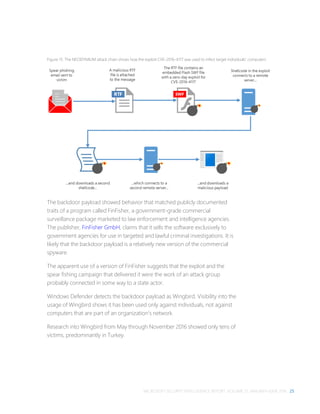
  • 107.
    MICROSOFT SECURITY INTELLIGENCEREPORT, VOLUME 21, JANUARY–JUNE 2016 97  Win32/Crowti (known as “CryptoWall” and “CryptoDefense”), the most commonly encountered ransomware family worldwide in 2H15, declined to much lower levels in 1H16 as its authors stopped actively distributing it. First detected in late 2013, Crowti is a file encrypting ransomware family that typically spreads through spam or is installed by downloader malware and exploits. Microsoft recommends that victims of ransomware infections not pay the so- called fine. Ransomware is distributed by malicious attackers, not legitimate authorities, and paying the ransom is no guarantee that the attacker will restore the affected computer to a usable state. Microsoft provides free tools and utilities, such as the Microsoft Safety Scanner and Windows Defender Offline, that can help remove a variety of malware infections even if the computer’s normal operation is being blocked. See “Ransomware Protection in Windows 10 Anniversary Update” at https://go.microsoft.com/fwlink/?linkid=837485 for information about new features designed to fight ransomware in the latest release of Windows 10, and visit www.microsoft.com/security/portal/mmpc/shared/ransomware.aspx for more information about ransomware and how computer users can avoid being taken advantage of by this type of threat. Threats from targeted attackers Although using a real-time security software product from a reputable vendor and keeping the detection signatures up-to-date remains one of the best ways individuals and organizations can protect themselves against known threats, conventional antimalware software is often less effective against advanced attacks, such as those conducted by targeted attack groups. These groups, which focus on targeting computers at specific institutions, often use specially crafted threats that they test against popular antimalware solutions ahead of time to ensure that they will not be detected. By the time detection signatures are available to stop such a threat, it may have already compromised the organization. To help organizations combat such attacks, Office 365 Advanced Threat Protection, available with select Office 365 plans, provides an additional layer of defense against threats and malicious links that have never been encountered before. When an incoming message includes a potentially dangerous attached file, Office 365 Advanced Threat Protection launches it in a detonation chamber—a
  • 108.
    98 MALICIOUS ANDUNWANTED SOFTWARE virtual sandboxed environment in which potential threats can run without posing harm to any other resources—and monitors it for suspicious behavior such as registry changes, attempts to access memory dumps, changes to executables, and other actions that malware characteristically takes. This monitoring makes it possible to detect and block threats that have never been seen before and for which no detection signatures are available. Some advanced threats avoid taking malicious actions when they determine they are beoing run in a virtual machine. Office 365 Advanced Threat Protection includes anti-sandbox detection features to combat this behavior. Figure 65. How Office 365 Advanced Threat Protection works with Exchange Online Figure 66 illustrates the file types of the malicious attachments blocked by Office 365 Advanced Threat Protection in 1H16. Safe Multiple filters + multiple antivirus engines with Exchange Online protection Links Recipient Unsafe Attachment • Supported file type • Clean by AV/AS filters • Not in Reputation list Detonation chamber (sandbox) Executable? Registry call? Elevation? ……? Sender Safe links rewrite
  • 109.
    MICROSOFT SECURITY INTELLIGENCEREPORT, VOLUME 21, JANUARY–JUNE 2016 99 Figure 66. Types of malicious files blocked by Office 365 Advanced Threat Protection in 1H16 Excludes unknown file types. Totals for JavaScript and Other are incomplete due to a data collection error.  About 30 percent of the malicious files in Figure 66 were delivered inside container files, such as .zip and .rar files.  Microsoft Word files accounted for 38.5 percent of malicious files. Of these, the most common file extensions were .doc, used for the binary file format used in Word 97-2003, and .docm, used for Word documents that contain macros.  JavaScript files accounted for the second largest type of file, at 30.6 percent of the total. JavaScript files also accounted for the overwhelming majority of malicious files contained within .zip files. Overall, about 70 percent of .js files attached to email messages were determined to be malicious, whether in a container file or not.  Executable files accounted for the third largest share of malicious files, at 18.6 percent of the total. This type includes the familiar .exe extension used by most executable programs in Windows, along with a number of other extensions, such as .scr, .com, .pif, and .cpl. Executable files can provide an attacker with an easy way to compromise a computer without relying on exploiting a vulnerability, but most enterprise email servers and programs are configured to block them by default.  Microsoft Excel and URL files each accounted for a small percentage of the total. Word 38.5% JavaScript 30.6% EXE 18.6% Excel 5.1% URL 2.1% Other 5.2%
  • 110.
    100 MALICIOUS ANDUNWANTED SOFTWARE  Other file types accounted for 13.8 percent of the total. Some of the more common file extensions here were .eml, used by Microsoft Outlook to save email messages to disk; .wsf, used by the Windows Script Host; and .jar, a package format used for Java files.  PDF files, which have historically been a popular method for sending malware to targeted victims, accounted for only 0.9 percent of malicious file detections, as attackers have moved from embedding malware directly in PDF files to sending clean PDFs that contain links to malicious URLs. (See page 111 for information about malicious websites.) As Figure 67 demonstrates, the file types used for advanced threats changes significantly from month to month, as targeted attack groups shift between different victims and tactics. Figure 67. Malicious files blocked by Office 365 Advanced Threat Protection in 1H16, by month Excludes unknown file types. Totals for JavaScript and Other in May and June are incomplete due to a data collection error.  Detections of malicious Word files were highest in January and declined each month through May before rebounding in June.  Malicious JavaScript files accounted for more than half of the total in April, then retreated to much lower levels in the following months.  Malicious executables and Excel files were most common in May and June, respectively. 0% 10% 20% 30% 40% 50% 60% 70% 80% 90% 100% January February March April May June Percentofallmaliciousfiles Word JavaScript EXE Excel URL Other
  • 111.
    MICROSOFT SECURITY INTELLIGENCEREPORT, VOLUME 21, JANUARY–JUNE 2016 101 Potentially unwanted applications in the enterprise Microsoft has published the criteria used to classify programs as unwanted software at www.microsoft.com/security/portal/mmpc/shared/objectivecriteria.aspx. Characteristics of unwanted software can include depriving users of adequate choice or control over what the software does to the computer, preventing users from removing the software, or displaying advertisements without clearly identifying their source. Microsoft security products classify unwanted software as threats, and block or remove them when they are encountered. Some programs don’t meet the criteria to be considered unwanted software but still exhibit behaviors that may be considered undesirable, particularly in enterprise environments. Microsoft classifies these programs as potentially unwanted applications (PUA). For example, a program that displays additional advertisements in the browser might not be classified as unwanted software if it clearly identifies itself as the source of the ads, but may be considered potentially unwanted. Users often end up installing these programs because they were installing an application that they wanted, and the installer offered to install additional software—usually with the offer acceptance checked by default and often without the user realizing they are agreeing to install the additional software. These programs can also cause problems for network administrators—they can affect computer performance, increase the workload for the IT help desk, put computers and data at risk of being compromised through exploits, and make it more difficult to identify malware infections among the noise. To provide organizations with additional options for dealing with programs classified as PUA, Microsoft offers enterprise users of System Center Endpoint Protection (SCEP) the ability to block them from being installed on their networks. PUA statistics Figure 68 shows the PUA families blocked most often by SCEP in 2Q16.
  • 112.
    102 MALICIOUS ANDUNWANTED SOFTWARE Figure 68. PUA families blocked in 2Q16  PUA:Win32/InstallCore and PUA:Win32/CandyOpen are detections for installer programs that were built with software bundler utilities (called InstallCore and OpenCandy, respectively) that offer monetization opportunities to software developers, such as pay-per-install services for programs that offer to download other programs alongside the requested application. The OpenCandy installer was frequently encountered bundled with μTorrent, a popular file-sharing program, and paint.net, an image and photo editing program. InstallCore was often bundled with audio and video file conversion programs.  PUA:Win32/AskToolbar and PUA:Win32/MyWebSearch are toolbar programs that are frequently offered for download with other programs through pay-per-install arrangements.  PUA:Win32/RelevantKnowledge is a tool used by a marketing research company to gather analytics about Internet usage from people who install the software. Like many of the other programs discussed in this section, it is often bundled with other software. Win32/InstallCore 22.0% Win32/CandyOpen 8.2% Win32/AskToolbar 6.3% Win32/MyWebSearch 5.7% Win32/RelevantKnowle dge 4.2% Win32/Conduit 4.0% Win32/Isrocore 3.8% Win32/Spigot 3.8% Win32/DownloadAdmin 2.9% Win32/ExpressDownloa der 2.4% Win32/iBryteInstaller 2.2% Win32/DownloadSpons or 2.1% All others 32.4%
  • 113.
    MICROSOFT SECURITY INTELLIGENCEREPORT, VOLUME 21, JANUARY–JUNE 2016 103 PUA programs detected in 1H16 were split nearly evenly between digitally signed and unsigned programs. Figure 69 lists the top signed and unsigned PUA programs detected. Figure 69. The most commonly detected signed and unsigned PUA families in 1H16 Rank Signed application % of Signed Unsigned application % of Unsigned 1 PUA:Win32/InstallCore 23.0% PUA:Win32/InstallCore 34.0% 2 PUA:Win32/CandyOpen 7.5% PUA:Win32/Isrocore 6.2% 3 PUA:Win32/MyWebSearch 6.4% PUA:Win32/CandyOpen 5.8% 4 PUA:Win32/RelevantKnowledge 5.1% PUA:Win32/ExpressDownloader 4.6% 5 PUA:Win32/AskToolbar 5.1% PUA:Win32/DownloadAdmin 4.4% 6 PUA:Win32/Conduit 4.6% PUA:Win32/iBryteInstaller 4.1% 7 PUA:Win32/Spigot 3.6% PUA:Win32/DownloadSponsor 3.6% 8 PUA:Win32/DownloadAdmin 2.8% PUA:Win32/Softonic 2.4% 9 PUA:Win32/Isrocore 2.7% PUA:Win32/Mobogenie 2.2% 10 PUA:Win32/ExpressDownloader 2.4% PUA:Win32/RelevantKnowledge 1.8% Blocking PUA with System Center Endpoint Protection System administrators can configure the PUA protection feature through System Center Configuration Manager (SCCM) or Microsoft Intune. For more information about creating a configuration item to enable PUA protection in System Center Configuration Manager, see How to Configure Endpoint Protection in Configuration Manager and Detect and block Potentially Unwanted Application in Windows 10 on Microsoft TechNet (technet.microsoft.com). For more information about configuring policy settings in Microsoft Intune, see Intune policy settings for Windows 10 devices in Microsoft Intune, also on Microsoft TechNet. Figure 70. PUA is blocked by System Center Endpoint Protection (left) and Windows Defender in Windows 10 (right) When enabled, PUA is blocked and automatically quarantined; users who request more information online are informed that the program was blocked
  • 114.
    104 MALICIOUS ANDUNWANTED SOFTWARE from running on the network because it has a poor reputation. PUA that is already installed on the computer will not be removed. Security software use Recent releases of the MSRT collect and report details about the state of real- time antimalware software on a computer, if the computer’s administrator has chosen to opt in to provide data to Microsoft. This telemetry data makes it possible to analyze security software usage patterns around the world and correlate them with infection rates. Figure 71 shows the percentage of computers worldwide that the MSRT found to be running up-to-date real-time security software each quarter in 2H15 and 1H16. Figure 71. Average monthly percentage of computers reporting security software enabled, 3Q15–2Q16  More than 80 percent of computers reported having real-time security software enabled during each of the past four quarters, increasing to 88 percent by 2Q16. Much of the increase corresponds to increased adoption of Windows 10, which comes with Windows Defender installed and automatically enabled if no other security software is present, replacing installations of older versions of Windows that did not have this feature. 0% 10% 20% 30% 40% 50% 60% 70% 80% 90% 100% 3Q15 4Q15 1Q16 2Q16 PercentofcomputersrunningtheMSRTreportingasprotected
  • 115.
    MICROSOFT SECURITY INTELLIGENCEREPORT, VOLUME 21, JANUARY–JUNE 2016 105 Security software use worldwide Just as infection and encounter rates differ from one country or region to another, so do security software usage rates, as shown in Figure 72. Figure 72. Average security software protection state for the locations with the most computers executing the MSRT in 1H16  All of the locations in Figure 72 reported at least 80 percent of computers protected by real-time security software in 1H16, ranging from 83.8 percent in Russia to 91.5 percent in Germany.  In addition, all of these locations except Russia exceeded the worldwide average protection rate in 2H16. The rate of security software usage in a country or region often correlates with its infection rate. Figure 73 shows the percentage of computers in different countries and regions that reported being protected in 2Q16. 0% 10% 20% 30% 40% 50% 60% 70% 80% 90% 100% PercentofcomputersrunningtheMSRTreportingasprotected
  • 116.
    106 MALICIOUS ANDUNWANTED SOFTWARE Figure 73. Average monthly percent of computers reporting security software enabled in 2Q16, by country/region  The locations with the highest percentage of computers reporting as protected by real-time security software include Finland, with an average of 93.9 percent each month in 2Q16; Denmark, at 92.3 percent; and Norway, at 92.2 percent.  Locations with the fewest computers reporting as fully protected include Libya, at 68.0 percent; Kyrgyzstan, at 77.3 percent; and Algeria, at 78.5 percent. Countries and regions with high percentages of computers reporting as fully unprotected also tend to have high infection rates, as Figure 74 shows.
  • 117.
    MICROSOFT SECURITY INTELLIGENCEREPORT, VOLUME 21, JANUARY–JUNE 2016 107 Figure 74. Infection rates for the locations with the highest percentage of computers reporting as fully unprotected in 1H16 Country/region 1H16 average unprotected % CCM 1Q16 CCM 2Q16 Libya 30.7% 83.5 79.2 Algeria 21.8% 52.2 52.5 Nigeria 21.8% 34.7 29.4 Iraq 20.8% 62.9 60.2 Tanzania 20.5% 33.6 34.8 Cameroon 19.9% 42.4 38.8 Zimbabwe 19.9% 34.6 29.9 Indonesia 19.3% 49.2 37.0 Azerbaijan 19.0% 30.6 24.4 Mongolia 18.4% 68.8 59.9 Worldwide 13.5% 8.4 8.8  The locations in the table all had overall infection rates ranging between 2.8 and 10.0 times as high as the worldwide average each quarter.  Libya, which had the highest percentage of unprotected computers in both quarters of 1H16, also had the highest infection rate in both quarters, as shown in Figure 48 on page 78. Security software use by platform Protection rates can also vary by operating system, as shown in Figure 75.
  • 118.
    108 MALICIOUS ANDUNWANTED SOFTWARE Figure 75. Average monthly security software protection state for supported client versions of Windows in 1H16, by quarter * Includes Windows 8.1  In general, computers running newer versions of Windows tended to report being unprotected less often than computers running older versions.  The high rate of protection with Windows 10 is primarily because of a change in the way Windows Defender operates. To provide Windows 10 users with protection from malware out of the box, Windows Defender is automatically activated upon installation of Windows 10 if no other real-time security product is installed, as opposed to a few days after installation in Windows 8 and Windows 8.1. The reasons computers go unprotected can vary significantly by platform, as Figure 76 illustrates. 0% 5% 10% 15% 20% 25% 30% Windows Vista Windows 7 Windows 8* Windows 10 TH1 Windows 10 TH2 Percentofcomputersreportingasunprotected
  • 119.
    MICROSOFT SECURITY INTELLIGENCEREPORT, VOLUME 21, JANUARY–JUNE 2016 109 Figure 76. Computers running supported client versions of Windows reporting statuses other than Protected in 1H16 * Windows Vista and Windows 7 do not report expired subscriptions.  On Windows Vista and Windows 7, unprotected computers predominantly report having no antimalware software installed at all. On subsequent Windows versions, Windows Defender is enabled by default if no other antimalware software is present, so the number of computers reporting no antimalware software is very low.  On Windows 8 and Windows 8.1, expired versions of commercial antimalware products that are no longer receiving signature updates account for the largest percentage of unprotected computers.  On Windows 10, out-of-date signatures were the most common reason computers lacked protection. Expired subscriptions accounted for a very low percentage of unprotected computers running Windows 10, possibly reflecting both increased use of Windows Defender and new computers with pre-installed trial subscriptions of commercial antimalware products that had yet to expire during the period. Computers on which real-time monitoring had been temporarily turned off, or “snoozed,” accounted for the second highest share. Guidance: Defending against malware Effectively protecting users from malware requires an active effort on the part of organizations and individuals. For in-depth guidance, see Help prevent malware 0% 10% 20% 30% 40% 50% 60% 70% 80% 90% 100% Windows Vista* Windows 7* Windows 8 Windows 8.1 Windows 10 PercentofcomputersreportingasotherthanProtected No AV installed Off Out of date Expired Snoozed
  • 120.
    110 MALICIOUS ANDUNWANTED SOFTWARE infection on your PC at the Microsoft Malware Protection Center website at www.microsoft.com/mmpc. For help understanding the threats that pose the greatest risk to your environment and how to defend against them, see “Fixing the #1 Problem in Computer Security: A Data-Driven Defense,” available from Microsoft TechNet.
  • 121.
    MICROSOFT SECURITY INTELLIGENCEREPORT, VOLUME 21, JANUARY–JUNE 2016 111 Malicious websites Attackers often use websites to conduct phishing attacks or distribute malware. To help protect users from malicious webpages, Microsoft and other browser vendors have developed filters that keep track of sites that host malware and phishing attacks and display prominent warnings when users try to navigate to them. Malicious websites often appear to be completely legitimate, and provide no outward indicators of their malicious nature even to experienced computer users. In many cases, these sites are legitimate websites that have been compromised by malware, SQL injection, or other techniques in efforts by attackers to take advantage of the trust users have invested in such sites. In other cases, attackers run their own sites and use social engineering to draw in traffic. The information in this section is compiled from a variety of sources, including telemetry data produced by SmartScreen Filter in Internet Explorer versions 8 through 11 and Microsoft Edge, from a database of known active phishing and malware hosting sites reported by users of Internet Explorer and other Microsoft products and services, and from malware data provided by Microsoft antimalware technologies. (See “Appendix B: Data sources” on page 137 for more information about the products and services that provided data for this report.)
  • 122.
    112 MALICIOUS WEBSITES Figure77. SmartScreen Filter in Microsoft Edge and Internet Explorer blocks reported phishing and malware distribution sites to protect users Phishing sites Microsoft gathers information about phishing sites and impressions from phishing impressions that are generated by users who choose to enable SmartScreen Filter.25 A phishing impression is a single instance of a user attempting to visit a known phishing site with SmartScreen Filter enabled and being warned, as illustrated in Figure 78. 25 See “Appendix B: Data sources” on page 137 for privacy statements and other information about the products and services used to provide data for this report.
  • 123.
    MICROSOFT SECURITY INTELLIGENCEREPORT, VOLUME 21, JANUARY–JUNE 2016 113 Figure 78. How Microsoft tracks phishing impressions Figure 79 illustrates the volume of phishing impressions tracked by SmartScreen Filter each month in 1H16, compared to the volume of distinct phishing URLs visited. Figure 79. Phishing sites and impressions reported by SmartScreen Filter each month in 1H16, relative to the monthly average for each 0% 20% 40% 60% 80% 100% 120% January February March April May June Percentofmonthlyaverage Sites Impressions Average
  • 124.
    114 MALICIOUS WEBSITES The numbers of active phishing sites and impressions rarely correlate strongly with each other. Phishers sometimes engage in campaigns that temporarily drive more traffic to each phishing page without necessarily increasing the total number of active phishing pages they maintain at the same time. Nevertheless, both sites and impressions remained remarkably stable throughout 1H16, with neither one varying more than about 5 percent from the period average. Target institutions Some types of sites tend to consistently draw many more impressions per site than others. Figure 80 shows the breakdown of phishing impressions by category as reported by SmartScreen Filter. Figure 80. Phishing sites and impressions reported by SmartScreen Filter for each type of phishing site in 1H16  Phishing sites that targeted online services received the largest share of impressions during the period, and accounted for the largest number of active phishing URLs.  Financial institutions have always been popular phishing targets because of their potential for providing direct illicit access to victims’ bank accounts. Sites that targeted financial institutions accounted for the second largest share of both attacks and impressions. 0% 5% 10% 15% 20% 25% 30% 35% 40% 45% 50% Online Services Financial Sites E-Commerce Social Networking Gaming Percentoftotalimpressions/sites Sites Impressions
  • 125.
    MICROSOFT SECURITY INTELLIGENCEREPORT, VOLUME 21, JANUARY–JUNE 2016 115  The other three categories each accounted for a small percentage of both sites and impressions. Global distribution of phishing sites and clients Phishing impression information from SmartScreen Filter includes anonymized information about the IP addresses of the clients making the reports, as well as the IP addresses of the phishing sites themselves. Performing geographic lookups on these addresses makes it possible to analyze patterns among both the computers that host phishing sites and the users that they target. Figure 81. Phishing sites per 1,000 Internet hosts for locations around the world in 1H16  SmartScreen Filter detected 9.1 phishing sites per 1,000 Internet hosts worldwide in 1H16.  Locations hosting higher than average concentrations of phishing sites include Ukraine (18.8 per 1,000 Internet hosts in 1H16), South Africa (15.4), and Australia (14.5). Locations with low concentrations of phishing sites include Taiwan (1.5), Korea (2.0), and China (2.8).
  • 126.
    116 MALICIOUS WEBSITES Figure82. Phishing impressions by client location per 1,000,000 pageviews in in 1H16  SmartScreen Filter reported 17.8 phishing attempts per 1,000,000 pageviews in 1H16.  Locations with unusually high rates of phishing impressions included Nigeria (74.2 phishing impressions per 1,000 pageviews in 1H16), South Africa (62.6), and Spain (57.7).  Locations with unusually low rates of phishing impressions include Korea (1.1 impressions per 1,000,000 pageviews in 1H16), China (1.6), and Russia (2.2). Malware hosting sites SmartScreen Filter helps provide protection against sites that are known to host malware, in addition to phishing sites. SmartScreen Filter uses file and URL reputation data and Microsoft antimalware technologies to determine whether sites distribute unsafe content. As with phishing sites, Microsoft collects anonymized data regarding how many people visit each malware hosting site and uses the information to improve SmartScreen Filter and to better combat malware distribution. Figure 83. SmartScreen Filter in Microsoft Edge and Internet Explorer displays a warning when a user attempts to download an unsafe file Figure 84 compares the volume of active malware hosting sites in the Microsoft database each month with the volume of malware impressions tracked.
  • 127.
    MICROSOFT SECURITY INTELLIGENCEREPORT, VOLUME 21, JANUARY–JUNE 2016 117 Figure 84. Malware hosting sites and impressions tracked each month in 1H16, relative to the monthly average for each  Monthly malware impressions more than tripled from January to June due to several factors, including aggressive campaigns by attackers and improved detection and classification by SmartScreen Filter. In 2015, the MMPC updated its malware evaluation criteria to include ads that are deceptive and misleading, which are now classified as malware by SmartScreen Filter and blocked. Over the past year, the volume of ads that meet these criteria has increased, including an emerging subset designed to take advantage of users seeking technical support. Global distribution of malware hosting sites and clients Figure 85 and Figure 86 show the geographic distribution of malware hosts and computers reporting impressions in 1H16. 0% 20% 40% 60% 80% 100% 120% 140% 160% 180% January February March April May June Percentofmonthlyaverage Sites Impressions Average
  • 128.
    118 MALICIOUS WEBSITES Figure85. Malware distribution sites per 1,000 Internet hosts for locations around the world in 1H16  SmartScreen Filter detected 36.8 malware hosting sites per 1,000 Internet hosts worldwide in 1H16.  China, which had a lower than average concentration of phishing sites (2.8 phishing sites per 1,000 Internet hosts in 1H16), also had a high concentration of malware hosting sites (59.6 malware hosting sites per 1,000 hosts in 1H16). Other locations with large concentrations of malware hosting sites included Vietnam (60.8), Ukraine (53.8), and Thailand (49.4). Locations with low concentrations of malware hosting sites included Finland (14.8), Austria (16.2), and Sweden (16.4). Figure 86. Malware impressions by client location per 1,000,000 pageviews in in 1H16
  • 129.
    MICROSOFT SECURITY INTELLIGENCEREPORT, VOLUME 21, JANUARY–JUNE 2016 119  Malware impressions were much more common than phishing impressions in 1H16. SmartScreen Filter reported 769.7 malware impressions per 1,000,000 pageviews during the period, compared to 17.8 phishing attempts per 1,000,000 pageviews.  Locations that were heavily affected by malware impressions included Ireland (3,228.9 malware impressions per 1,000,000 pageviews in 1H16), Saudi Arabia (3,110.5), and the United Arab Emirates (2,046.2).  Locations with unusually low malware impression rates included Korea (112.0), Japan (206.9), and Slovenia (311.3). Drive-by download sites A drive-by download site is a website that hosts one or more exploits that target vulnerabilities in web browsers and browser add-ons. Users with vulnerable computers can be infected with malware simply by visiting such a website, even without attempting to download anything. Drive-by download pages are usually hosted on legitimate websites to which an attacker has posted exploit code. Attackers gain access to legitimate sites through intrusion or by posting malicious code to a poorly secured web form, like a comment field on a blog. Compromised sites can be hosted anywhere in the world and concern nearly any subject imaginable, making it difficult for even an experienced user to identify a compromised site from a list of search results. Figure 87. One example of a drive-by download attack
  • 130.
    120 MALICIOUS WEBSITES Searchengines such as Bing have taken a number of measures to help protect users from drive-by downloads. As Bing indexes webpages, they are assessed for malicious elements or malicious behavior. Because the owners of compromised sites are usually victims themselves, the sites are not removed from the Bing index. Instead, clicking the link in the list of search results displays a prominent warning, saying that the page may contain malicious software, as shown in Figure 88. Figure 88. A drive-by download warning from Bing Figure 89 shows the concentration of drive-by download pages in countries and regions throughout the world at the end of 1Q16 and 2Q16, respectively.
  • 131.
    MICROSOFT SECURITY INTELLIGENCEREPORT, VOLUME 21, JANUARY–JUNE 2016 121 Figure 89. Drive-by download pages indexed by Bing at the end of 1Q16 (top) and 2Q16 (bottom), per 1,000 URLs in each country/region  Each map shows the concentration of drive-by download URLs tracked by Bing in each country or region on a reference date at the end of the associated quarter, expressed as the number of drive-by download URLs per every 1,000 URLs hosted in the country/region.  Significant locations with high concentrations of drive-by download URLs in both quarters include Taiwan, with 7.4 drive-by URLs for every 1,000 URLs tracked by Bing at the end of 2Q16; Mongolia, with 3.1; and Iran, with 2.6.
  • 132.
    122 MALICIOUS WEBSITES Guidance:Protecting users from unsafe websites One of the best ways organizations can protect their users from malicious and compromised websites is by mandating the use of web browsers with appropriate protection features built in and by promoting safe browsing practices. For in-depth guidance, see “Top security solutions” at www.microsoft.com/en-us/safety/pc-security/solutions.aspx.
  • 133.
    MICROSOFT SECURITY INTELLIGENCEREPORT, VOLUME 21, JANUARY–JUNE 2016 123 Malware at Microsoft: Dealing with threats in the Microsoft environment Microsoft IT Microsoft IT provides information technology services internally for Microsoft employees and resources. Microsoft IT manages more than 600,000 devices for more than 150,000 users across more than 100 countries and regions worldwide. Safeguarding a computing infrastructure of this size requires implementation of strong security policies, technology to help keep malware off the network and away from mission-critical resources, and dealing with malware outbreaks swiftly and comprehensively when they occur. This section of the report compares the potential impact of malware to the levels of antimalware compliance from more than 600,000 workstation computers and devices managed by Microsoft IT between January and June 2016. This data is compiled from multiple sources, including Windows Defender, System Center Endpoint Protection (SCEP), Windows Event Forwarding (WEF), DirectAccess, forensics, and manual submission of suspicious files. Comparing the nature and volume of the malware detected on these computers to the level of protection they receive can illustrate significant trends and provide insights as to the effectiveness of antimalware software and security best practices. Antimalware usage Real-time antimalware software is required on all user devices that connect to the Microsoft corporate network. Windows Defender and System Center Endpoint Protection 2012 (SCEP) are the antimalware solutions that Microsoft IT deploys to its users. To be considered compliant with antimalware policies and standards, user computers must be running the latest version of the Defender or SCEP client, antimalware signatures must be no more than six days old, and real-time protection must be enabled.
  • 134.
    124 MALWARE ATMICROSOFT: DEALING WITH THREATS IN THE MICROSOFT ENVIRONMENT Figure 90 shows the level of antimalware compliance in the Microsoft user workstation environment for each month in 1H16. Figure 90. Percentage of computers at Microsoft running real-time antimalware software each month in 1H16 The average monthly compliance rate at Microsoft exceeded 97.8 percent each month during the first half of the year, reaching a high of 98.8 percent in June. In any network of this size, it is almost inevitable that a small number of computers will be in a noncompliant state at any given time. In most cases, these are computers that are being rebuilt or are otherwise in a state of change when online, rather than computers that have had their antimalware software intentionally disabled. Microsoft IT believes that a compliance rate in excess of 97.8 percent among approximately half a million computers is an acceptable level of compliance. In most cases, attempting to boost a large organization’s compliance rate the rest of the way to 100 percent will likely be a costly endeavor, and the end result— 100 percent compliance—will be unsustainable over time. Malware detections Figure 91 shows the categories of malicious and unwanted software that were most frequently detected at Microsoft in 1H16. 0% 10% 20% 30% 40% 50% 60% 70% 80% 90% 100% January February March April May June Percentofcomputersrunningreal-timeantimalwaresoftware
  • 135.
    MICROSOFT SECURITY INTELLIGENCEREPORT, VOLUME 21, JANUARY–JUNE 2016 125 Figure 91. Top categories of malicious and unwanted software detected by Windows Defender and System Center Endpoint Protection at Microsoft in 1H16 In this section, malware detections are defined as files and processes flagged by SCEP, regardless of the success or failure of automated containment or remediation. Malware detections are a measure of attempted malware activity, and do not necessarily indicate that a computer has been successfully infected. (Note that the methodology for assessing encounters used elsewhere in this report counts unique computers with detections, an approach that differs from the methodology used in this section, in which individual detections are counted. For example, if a computer encountered one trojan family in February and another one in June, it would only be counted once for the purposes of figures such as Figure 51 on page 82. In the preceding Figure 91, it would be counted twice, once for each detection.) Potentially unwanted applications (PUA) accounted for the largest number of detections, with twice as many detections as the next most prevalent category. The large number of PUA detections is the result of Microsoft using the new PUA- blocking features in System Center Endpoint Protection to keep such programs out of enterprise networks. (See “Potentially unwanted applications in the enterprise” on page 101 for more information about this feature.) Figure 92 shows the top 10 file types among threat detections at Microsoft in 1H16. 0 100,000 200,000 300,000 400,000 500,000 600,000 700,000 800,000 900,000 PUA Trojans Exploits Browser Modifiers Downloaders & Droppers Worms Viruses Software Bundlers Other Malware Threatdetections
  • 136.
    126 MALWARE ATMICROSOFT: DEALING WITH THREATS IN THE MICROSOFT ENVIRONMENT Figure 92. Top ten file types used by threats detected at Microsoft in 1H16 Executable program files with the .exe extension were the most commonly detected type of malicious file at Microsoft in 1H16. Malicious files with the .temp extension, typically used for temporary files, were the next most common type of threats, followed by .dll. Transmission vectors Examining the processes targeted by malware can help illustrate the methods that attackers use to propagate it. Figure 93 lists the top five transmission vectors used by the malware encountered at Microsoft in 1H16. Figure 93. The top five transmission vectors used by malware encountered at Microsoft in 1H16 Rank Process Description 1 File transfers in operating system 2 Cloud backup/storage 3 Web browsing 4 Non-operating-system tasks 5 Developing tools The transmission vector most commonly used by infection attempts detected on Microsoft computers in 1H16 involved file transfers made through File Explorer, 0 100,000 200,000 300,000 400,000 500,000 600,000 700,000 800,000 900,000 .exe .temp .dll .lnk .tmp .html .inf .txt .com .tbl Threatdetections
  • 137.
    MICROSOFT SECURITY INTELLIGENCEREPORT, VOLUME 21, JANUARY–JUNE 2016 127 followed by cloud backup and storage services and web browsing. Non- operating-system tasks were fourth, followed by developing tools. Malware infections Because almost all of the computers at Microsoft run real-time security software at all times, most infection attempts are detected and blocked before they are able to infect the target computer. When Defender or SCEP do disinfect a computer, it is usually because the software’s signature database has been updated to enable it to detect a threat that it did not recognize when the computer first encountered the threat. This lack of recognition may be because the threat is a new malware family, a new variant of a known family, a known variant that has been encrypted or otherwise repackaged to avoid detection, or because of some other reason. The MMPC constantly analyzes malware samples submitted to it, develops appropriate detection signatures, and deploys them to customers who use SCEP, Microsoft Security Essentials, and Windows Defender. Figure 94 shows the most commonly detected categories of malicious and unwanted software that SCEP and Defender removed from computers at Microsoft in 1H16. Figure 94. Infections and removals at Microsoft in 1H16, by category 0 10 20 30 40 50 60 70 80 Downloaders & Droppers Worms Trojans Password Stealers & Monitoring Tools Other Malware Threatinfectionsandremovals
  • 138.
    128 MALWARE ATMICROSOFT: DEALING WITH THREATS IN THE MICROSOFT ENVIRONMENT As this chart shows, detection and infection statistics were significantly different in 1H16. For example, exploits, which accounted for more than 300,000 detections at Microsoft in 1H16, was not discovered infecting a single computer internally during the period. Most of the other categories also show clear differences between Figure 91 and Figure 94, although the ordering in the latter chart is significantly influenced by the low volumes involved. Figure 95 shows the top 10 file types used by malware to infect computers at Microsoft in 1H16. Figure 95. Infections and removals at Microsoft in 1H16, by file type Figure 95 is important because it provides information about threats that Defender and SCEP did not detect when they were first encountered—and therefore provides a clue about the areas in which malware authors have been focusing their efforts in recent months. Almost half of the malicious files removed from computers at Microsoft by Defender and SCEP in 1H16 had the extension .doc, used for Microsoft Word binary files. The .js extension used by JavaScript script files was next, followed by malicious .exe files. Nine extensions accounted for the remaining files, with seven extensions accounting for a single file each. 0 5 10 15 20 25 30 35 40 45 50 .doc .js .exe .dll .html .cin .docm .docx .dxn .html .jpg .scr Threatinfectionsandremovals
  • 139.
    MICROSOFT SECURITY INTELLIGENCEREPORT, VOLUME 21, JANUARY–JUNE 2016 129 What IT departments can do to protect their users  Evaluate commercially available management tools, develop a plan, and implement a third-party update mechanism to disseminate non-Microsoft updates.  Ensure that all software deployed on computers in the environment is updated regularly. If the software provider offers an automatic update utility similar to Microsoft Update, ensure that it is enabled by default. See “Windows Update: FAQ” at support.microsoft.com for instructions on enabling automatic updates of Microsoft software.  Ensure that SmartScreen Filter is enabled in Microsoft Edge and Internet Explorer. See “SmartScreen Filter: FAQ” at support.microsoft.com for more information.  Use Group Policy to enforce configurations for Windows Update, Windows Firewall, and SmartScreen Filter. See Knowledge Base article KB328010 at support.microsoft.com, and “Windows Firewall with Advanced Security Deployment Guide” and “Manage Privacy: SmartScreen Filter and Resulting Internet Communication” at technet.microsoft.com for instructions.  Set the default configuration for antimalware to enable real-time protection across all drives, including removable devices.  Enable Windows Defender Cloud Protection in Windows 10 to automatically send information about suspicious files and behaviors to the Windows Defender Cloud, which can help identify and block threats during the first critical hours of an attack. For information about using Group Policy to enable cloud-based protection throughout your organization, see Configure Windows Defender in Windows 10 at Microsoft TechNet.
  • 140.
    130 MALWARE ATMICROSOFT: DEALING WITH THREATS IN THE MICROSOFT ENVIRONMENT Figure 96. Enabling cloud-based protection for Windows Defender in Windows 10  Identify business dependencies on Java and develop a plan to minimize its use where it is not needed.  Use AppLocker to block the installation and use of unwanted software such as Java or peer-to-peer (P2P) applications. See “AppLocker” at technet.microsoft.com for more information.  Implement the Enhanced Mitigation Experience Toolkit (EMET), if possible, to minimize exploitation of vulnerabilities in all software in your environment. See technet.microsoft.com/security/jj653751 for more information.  Implement strong password policies, and require employees to change their passwords periodically.  Strengthen authentication by using smart cards. See “Smart Cards” at technet.microsoft.com for more information.  Use Network Access Protection (NAP) and DirectAccess (DA) to enforce compliance policies for firewall, antimalware, and patch management on remote computers that connect to a corporate network. See “Network
  • 141.
    MICROSOFT SECURITY INTELLIGENCEREPORT, VOLUME 21, JANUARY–JUNE 2016 131 Access Protection” at msdn.microsoft.com and “Windows 7 DirectAccess Explained” at technet.microsoft.com for more information.  Enable the following Windows PowerShell v5 security features via Windows Management Framework 5.0:  Script block logging  System-wide transcripts  Constrained PowerShell  Antimalware integration (AMSI) in Windows 10  For more information about how Microsoft IT works to ensure a trusted computing environment, see the following articles at the Microsoft IT Showcase (microsoft.com/itshowcase):  Microsoft IT uses Windows Defender to boost malware protection  Using Windows Defender telemetry to help mitigate malware attacks
  • 143.
    Appendixes Appendix A: Threatnaming conventions ..........135 Appendix B: Data sources........................................137 Appendix C: Worldwide encounter and infection rates................................................................................140 Glossary.........................................................................145 Threat families referenced in this report............155 Index ..............................................................................162
  • 144.
    134 MALWARE ATMICROSOFT: DEALING WITH THREATS IN THE MICROSOFT ENVIRONMENT
  • 145.
    MICROSOFT SECURITY INTELLIGENCEREPORT, VOLUME 21, JANUARY–JUNE 2016 135 Appendix A: Threat naming conventions Microsoft names the malware and unwanted software that it detects according to the Computer Antivirus Research Organization (CARO) Malware naming scheme. This scheme uses the following format: Figure 97. The Microsoft malware naming convention When Microsoft analysts research a particular threat, they will determine what each of the components of the name will be. Type The type describes what the threat does on a computer. Worms, trojans, and viruses are some of the most common types of threats Microsoft detects. Platform The platform refers to the operating system (such as Windows, Mac OS X, and Android) that the threat is designed to work on. Platforms can also include programming languages and file formats. Family A group of threats with the same name is known as a family. Sometimes different security software companies use different names.
  • 146.
    136 APPENDIX A:THREAT NAMING CONVENTIONS Variant letters Variant letters are used sequentially for each different version or member of a family. For example, the detection for the variant “.AF” would have been created after the detection for the variant “.AE.” Additional information Additional information is sometimes used to describe a specific file or component that is used by another threat in relation to the identified threat. In the preceding example, the !lnk indicates that the threat is a shortcut file used by the Backdoor:Win32/Caphaw.D variant, as shortcut files usually use the extension .lnk.
  • 147.
    MICROSOFT SECURITY INTELLIGENCEREPORT, VOLUME 21, JANUARY–JUNE 2016 137 Appendix B: Data sources Data included in the Microsoft Security Intelligence Report is gathered from a wide range of Microsoft products and services whose users have opted in to provide usage data. The scale and scope of this telemetry data allows the report to deliver the most comprehensive and detailed perspective on the threat landscape that is available in the software industry:  Azure Security Center is a service that helps organizations prevent, detect, and respond to threats by providing increased visibility into the security of cloud workloads and using advanced analytics and threat intelligence to detect attacks.  Bing, the search and decision engine from Microsoft, contains technology that performs billions of webpage scans per year to seek out malicious content. After such content is detected, Bing displays warnings to users about it to help prevent infection.  Exchange Online is the Microsoft-hosted email service for business. Exchange Online antimalware and antispam services scan billions of messages every year to identify and block spam and malware.  The Malicious Software Removal Tool (MSRT) is a free tool that Microsoft designed to help identify and remove specific prevalent malware families from customer computers. The MSRT is primarily released as an important update through Windows Update, Microsoft Update, and Automatic Updates. A version of the tool is also available from the Microsoft Download Center. The MSRT was downloaded and executed more than 600 million times each month on average in 1H16. The MSRT is not a replacement for an up-to-date real-time antivirus solution.  The Microsoft Safety Scanner is a free downloadable security tool that provides on-demand scanning and helps remove malware and other malicious software. The Microsoft Safety Scanner is not a replacement for an up-to-date antivirus solution, because it does not offer real-time protection and cannot prevent a computer from becoming infected.  Microsoft Security Essentials is a free, easy-to-download real-time protection product that provides basic, effective antivirus and antispyware protection for Windows Vista and Windows 7.
  • 148.
    138 APPENDIX B:DATA SOURCES  Microsoft System Center Endpoint Protection (formerly Forefront Client Security and Forefront Endpoint Protection) is a unified product that provides protection from malware and unwanted software for enterprise desktops, laptops, and server operating systems. It uses the Microsoft Malware Protection Engine and the Microsoft antivirus signature database to provide real-time, scheduled, and on-demand protection.  Office 365 is the Microsoft Office subscription service for business and home users. Select business plans include access to Office 365 Advanced Threat Protection.  SmartScreen Filter, a feature in Microsoft Edge and Internet Explorer, offers users protection against phishing sites and sites that host malware. Microsoft maintains a database of phishing and malware sites reported by users of Microsoft Edge, Internet Explorer, and other Microsoft products and services. When a user attempts to visit a site in the database with the filter enabled, the browser displays a warning and blocks navigation to the page.  Windows Defender in Windows 8, Windows 8.1, and Windows 10 provides real-time scanning and removal of malware and unwanted software.  Windows Defender Advanced Threat Protection is a new service built into Windows 10 Anniversary Update that enables enterprise customers to detect, investigate, and remediate advanced persistent threats and data breaches on their networks.  Windows Defender Offline is a downloadable tool that can be used to create a bootable CD, DVD, or USB flash drive to scan a computer for malware and other threats. It does not offer real-time protection and is not a substitute for an up-to-date antimalware solution.
  • 149.
    MICROSOFT SECURITY INTELLIGENCEREPORT, VOLUME 21, JANUARY–JUNE 2016 139 Figure 98. US privacy statements for the Microsoft products and services used in this report Product or service Privacy statement URL Azure Security Center www.microsoft.com/en-us/privacystatement/OnlineServices/Default.aspx Bing privacy.microsoft.com/en-us/privacystatement/ Exchange Online, Office 365 www.microsoft.com/online/legal/v2/?docid=43 Internet Explorer 11 privacy.microsoft.com/en-us/internet-explorer-ie11-preview-privacy-statement Malicious Software Removal Tool www.microsoft.com/en-us/safety/pc-security/msrt-privacy.aspx Microsoft Edge privacy.microsoft.com/en-us/privacystatement/ Microsoft Safety Scanner www.microsoft.com/security/scanner/en-us/privacy.aspx Microsoft Security Essentials windows.microsoft.com/en-us/windows/security-essentials-privacy System Center Endpoint Protection https://www.microsoft.com/privacystatement/en-us/SystemCenter2012R2/ Default.aspx#tilepspSystemCenter2012R2EndpointProtectionModule Windows Defender in Windows 10 privacy.microsoft.com/en-us/privacystatement/ Windows Defender Offline privacy.microsoft.com/en-us/windows-defender-offline-privacy
  • 150.
    140 APPENDIX C:WORLDWIDE ENCOUNTER AND INFECTION RATES Appendix C: Worldwide encounter and infection rates “Malicious and unwanted software” on page 71 explains how threat patterns differ significantly in different parts of the world. Figure 99 shows the infection and encounter rates for 1Q16 and 2Q16 for locations around the world.26 See page 52 for information about how infection and encounter rates are calculated. Figure 99. Encounter and infection rates for locations around the world, 1Q16–2Q16, by quarter (100,000 computers reporting minimum) Country/region CCM 1Q16 CCM 2Q16 ER 1Q16 ER 2Q16 Worldwide 8.4 8.8 18.3% 21.2% Albania 32.3 24.0 35.6% 35.3% Algeria 45.5 44.6 41.2% 39.1% Angola 43.1 42.4 35.1% 36.6% Argentina 15.8 12.7 27.1% 23.0% Armenia 13.7 10.2 38.4% 36.1% Australia 7.7 5.4 14.5% 13.0% Austria 5.7 4.0 13.2% 12.2% Azerbaijan 29.4 23.3 34.7% 33.8% Bahamas, The — 12.0 — — Bahrain 39.4 30.3 32.3% 0.0% Bangladesh 29.2 24.9 42.4% 41.1% Barbados — 10.2 — — Belarus 6.9 5.7 34.5% 32.8% Belgium 8.3 6.0 14.9% 13.5% Bolivia 27.9 25.5 26.7% 26.6% Bosnia and Herzegovina 26.7 17.6 29.3% 26.3% Brazil 14.0 14.3 29.9% 29.4% 26 Encounter rate and CCM are shown for locations with at least 100,000 computers running Microsoft real- time security products and the Malicious Software Removal Tool, respectively, during a quarter. Only computers whose users have opted in to provide data to Microsoft are considered when calculating encounter and infection rates.
  • 151.
    MICROSOFT SECURITY INTELLIGENCEREPORT, VOLUME 21, JANUARY–JUNE 2016 141 Country/region CCM 1Q16 CCM 2Q16 ER 1Q16 ER 2Q16 Bulgaria 12.6 9.8 25.6% 24.2% Cambodia 26.3 23.7 39.1% 39.1% Cameroon 35.7 34.0 — — Canada 7.2 4.9 14.7% 13.5% Chile 16.6 13.0 25.7% 22.7% China 4.6 5.3 19.1% 21.1% Colombia 16.1 13.6 25.1% 23.6% Costa Rica 15.2 10.9 19.2% 17.0% Côte d’Ivoire 25.3 24.8 35.7% 33.8% Croatia 16.4 8.6 25.1% 20.8% Cyprus 16.8 12.0 23.0% 18.1% Czech Republic 7.4 5.5 17.7% 15.2% Denmark 5.1 3.1 12.1% 10.0% Dominican Republic 26.9 22.1 31.0% 27.2% Ecuador 22.0 16.8 26.3% 23.2% Egypt 36.8 34.5 40.9% 37.3% El Salvador 22.5 17.1 23.2% 20.9% Estonia 10.2 4.6 19.8% 17.9% Finland 4.7 2.1 9.2% 7.9% France 6.6 5.6 17.0% 15.3% Georgia 18.7 13.7 31.0% 29.9% Germany 4.3 3.2 13.0% 13.0% Ghana 32.0 29.9 40.3% 33.8% Greece 14.6 8.3 22.4% 18.7% Guadeloupe 10.7 9.7 — — Guatemala 23.8 19.3 22.4% 21.4% Honduras 29.5 22.1 26.0% 23.5% Hong Kong SAR 12.6 7.4 17.7% 17.0% Hungary 8.9 5.7 23.3% 19.2% Iceland 6.9 3.8 14.6% 12.6% India 35.6 26.9 35.4% 32.6% Indonesia 45.1 34.4 47.5% 45.2%
  • 152.
    142 APPENDIX C:WORLDWIDE ENCOUNTER AND INFECTION RATES Country/region CCM 1Q16 CCM 2Q16 ER 1Q16 ER 2Q16 Iraq 62.5 59.8 38.1% 36.9% Ireland 10.3 6.3 14.0% 11.6% Israel 14.3 10.0 25.4% 24.9% Italy 9.1 7.2 22.2% 18.8% Jamaica 25.8 16.9 27.2% 24.2% Japan 2.5 2.2 6.9% 6.6% Jordan 46.3 39.2 37.8% 35.8% Kazakhstan 12.5 10.3 36.3% 34.9% Kenya 26.9 23.1 32.4% 29.9% Korea 6.3 6.6 15.7% 15.8% Kuwait 34.5 25.4 27.1% 26.2% Latvia 9.7 5.2 22.6% 20.5% Lebanon 40.8 33.2 31.2% 29.4% Libya 82.8 78.3 — — Lithuania 13.3 7.1 23.8% 19.9% Luxembourg 7.7 5.1 15.1% 13.9% Macao SAR 15.1 9.8 — — Macedonia, FYRO 26.3 16.7 30.2% 27.5% Malaysia 28.7 20.4 29.6% 27.6% Malta 15.0 8.0 18.7% 16.2% Martinique 9.3 8.3 — — Mauritius 26.8 18.1 29.1% 0.0% Mexico 20.6 17.2 24.4% 23.8% Moldova 12.1 8.6 31.9% 30.1% Mongolia 59.5 55.9 47.0% 49.3% Morocco 39.5 36.0 36.9% 34.9% Mozambique — 32.5 — — Namibia — 18.8 — — Nepal 42.4 39.5 42.1% 41.1% Netherlands 6.6 3.6 15.2% 13.0% New Zealand 7.7 5.4 13.1% 11.8% Nicaragua 21.9 15.3 23.4% 0.0%
  • 153.
    MICROSOFT SECURITY INTELLIGENCEREPORT, VOLUME 21, JANUARY–JUNE 2016 143 Country/region CCM 1Q16 CCM 2Q16 ER 1Q16 ER 2Q16 Nigeria 34.1 28.4 30.3% 28.7% Norway 5.4 3.1 10.7% 10.0% Oman 55.5 45.6 36.9% 35.1% Pakistan 42.6 37.3 48.8% 45.4% Palestinian Authority 48.0 47.9 46.7% 42.4% Panama 18.1 14.5 21.1% 20.8% Paraguay 19.9 16.0 24.4% 22.6% Peru 24.9 21.9 24.6% 25.9% Philippines 42.7 31.5 39.6% 35.6% Poland 9.1 6.9 23.1% 19.7% Portugal 10.1 7.0 22.9% 20.5% Puerto Rico 15.9 10.1 22.2% 19.6% Qatar 31.9 21.4 29.3% 27.8% Réunion 11.8 9.8 19.4% 18.5% Romania 16.2 11.8 27.6% 24.4% Russia 5.8 4.7 27.2% 24.9% Saudi Arabia 38.3 28.8 31.6% 28.6% Senegal 26.5 24.7 38.3% 37.2% Serbia 23.0 13.5 28.3% 25.6% Singapore 12.6 8.1 20.2% 19.4% Slovakia 11.2 7.5 18.6% 15.7% Slovenia 9.8 5.3 18.7% 16.5% South Africa 18.0 14.8 24.0% 23.0% Spain 12.5 8.9 22.6% 19.3% Sri Lanka 26.9 21.2 31.0% 28.8% Sweden 6.3 3.5 12.2% 10.3% Switzerland 5.5 4.3 11.7% 12.9% Taiwan 9.9 7.5 19.8% 22.3% Tanzania 32.5 33.1 41.5% 38.0% Thailand 30.0 25.3 36.4% 34.9% Trinidad and Tobago 20.2 12.0 21.7% 18.5% Tunisia 39.4 34.0 37.4% 36.4%
  • 154.
    144 APPENDIX C:WORLDWIDE ENCOUNTER AND INFECTION RATES Country/region CCM 1Q16 CCM 2Q16 ER 1Q16 ER 2Q16 Turkey 24.9 22.9 34.8% 31.4% Ukraine 6.3 5.2 34.2% 31.7% United Arab Emirates 36.5 23.7 30.4% 27.4% United Kingdom 6.7 4.4 13.7% 11.5% United States 4.9 4.3 11.9% 12.0% Uruguay 16.3 12.7 23.0% 20.3% Venezuela 25.2 21.6 30.4% 28.0% Vietnam 25.7 23.3 45.9% 45.7% Zambia — 27.1 — — Zimbabwe 32.1 27.6 — — Worldwide 8.4 8.8 18.3% 21.2%
  • 155.
    MICROSOFT SECURITY INTELLIGENCEREPORT, VOLUME 21, JANUARY–JUNE 2016 145 Glossary For additional information about these and other terms, visit the MMPC glossary at www.microsoft.com/en-us/security/portal/mmpc/shared/glossary.aspx. account credentials Information presented to a service provider to verify that the holder of the credentials is authorized to access an account. Account credentials typically take the form of user names paired with passwords, but other forms of identification are possible. ActiveX control A software component of Microsoft Windows that can be used to create and distribute small applications through Internet Explorer. ActiveX controls can be developed and used by software to perform functions that would otherwise not be available using typical Internet Explorer capabilities. Because ActiveX controls can be used to perform a wide variety of functions, including downloading and running programs, vulnerabilities discovered in them may be exploited by malware. In addition, cybercriminals may also develop their own ActiveX controls, which can do damage to a computer if a user visits a webpage that contains the malicious ActiveX control. Address Space Layout Randomization (ASLR) A security feature in recent versions of Windows that randomizes the memory locations used by system files and other programs, which makes it harder for an attacker to exploit the system by targeting specific memory locations. adware A program that displays advertisements. Although some adware can be beneficial by subsidizing a program or service, other adware programs may display advertisements without adequate consent. ASLR See Address Space Layout Randomization (ASLR). backdoor trojan A type of trojan that provides attackers with remote unauthorized access to and control of infected computers. Bots are a subcategory of backdoor trojans. Also see botnet.
  • 156.
    146 GLOSSARY Bitcoin A formof digital currency. Bitcoins can be used to buy things online or exchange them for real money. botnet A set of computers controlled by a command-and-control (C&C) computer to execute commands as directed. The C&C computer can issue commands directly (often through Internet Relay Chat [IRC]) or by using a decentralized mechanism, such as peer-to-peer (P2P) networking. Computers in a botnet are often called bots, nodes, or zombies. buffer overflow An error in an application in which the data written into a buffer exceeds the current capacity of that buffer, thus overwriting adjacent memory. Because memory is overwritten, unreliable program behavior may result and, in certain cases, allow arbitrary code to run. C&C See command and control (C&C). CCM Short for computers cleaned per mille (thousand). The number of computers cleaned for every 1,000 executions of the Microsoft Malicious Software Removal Tool (MSRT). For example, if the MSRT has 50,000 executions in a particular location in the first quarter of the year and removes infections from 200 computers, the CCM for that location in the first quarter of the year is 4.0 (200 ÷ 50,000 × 1,000). Also see encounter rate. clean To remove malware or potentially unwanted software from an infected computer. A single cleaning can involve multiple disinfections. cloud-based detection A detection signature that detects files that have been automatically identified as malicious through the cloud-based protection feature of Windows Defender. command and control (C&C) A server that acts as a command center for one or more compromised computers. Botnet operators use C&C servers to issue commands to computers in the botnet.
  • 157.
    MICROSOFT SECURITY INTELLIGENCEREPORT, VOLUME 21, JANUARY–JUNE 2016 147 credentials See account credentials. cross-site scripting Abbreviated XSS. An attack technique in which an attacker inserts malicious HTML and JavaScript into a vulnerable Web page, often in an effort to distribute malware or to steal sensitive information from the Web site or its visitors. Despite the name, cross-site scripting does not necessarily involve multiple websites. Persistent cross-site scripting involves inserting malicious code into a database used by a web application, potentially causing the code to be displayed for large numbers of visitors. Data Execution Prevention (DEP) A security technique designed to prevent buffer overflow attacks. DEP enables the system to mark areas of memory as non-executable, which prevents code in those memory locations from running. DDoS See distributed denial of service (DDoS). DEP See Data Execution Prevention (DEP). detection signature A set of characteristics that can identify a malware family or variant. Signatures are used by antimalware products to determine whether a file is malicious or not. Also see definition. detonation chamber A sandbox environment in which potentially dangerous files can be automatically launched and monitored for possible malicious activity. disclosure Revelation of the existence of a vulnerability to a third party. disinfect To remove a malware or potentially unwanted software component from a computer or to restore functionality to an infected program. Compare with clean. distributed denial of service (DDoS) A form of denial of service (DoS) that uses multiple computers to attack the target. Considerable resources may be required to exhaust a target computer
  • 158.
    148 GLOSSARY and causeit to fail to respond. Often multiple computers are used to perform these types of malicious attack and increase the attack’s chances of success. This can occur, for example, when a number of compromised computers, such as those that comprise a botnet, are commandeered and ordered to access a target network or server over and over again within a small period of time. DNS See Domain Name System. Domain Name System The infrastructure used for name resolution on the Internet. It comprises a hierarchical collection of name servers which translate alphanumeric domain names to numeric IP addresses, and vice versa. downloader See downloader/dropper. downloader/dropper A form of trojan that installs other malicious files to a computer that it has infected, either by downloading them from a remote computer or by obtaining them directly from a copy contained in its own code. dropper See downloader/dropper. encounter An instance of security software detecting a threat and blocking, quarantining, or removing it from the computer. encounter rate The percentage of computers running Microsoft real-time security software that report detecting malware or potentially unwanted software, or report detecting a specific threat or family, during a period. Also see infection rate. exploit Malicious code that takes advantage of software vulnerabilities to infect a computer or perform other harmful actions. exploit kit A collection of exploits bundled together and sold as commercial software. A typical kit contains a collection of web pages that contain exploits for vulnerabilities in popular web browsers and add-ons, along with tools for managing and updating the kit.
  • 159.
    MICROSOFT SECURITY INTELLIGENCEREPORT, VOLUME 21, JANUARY–JUNE 2016 149 firewall A program or device that monitors and regulates traffic between two points, such as a single computer and the network server, or one server to another. generic A type of signature that is capable of detecting a variety of malware samples from a specific family, or of a specific type. hash Text that has been encoded using a one-way cryptographic function that prevents it from being decrypted. Also refers to a checksum produced by a hash function to identify or authenticate data. heuristics A tool or technique that can help identify common patterns. This can be useful for making generic detections for a malware family. IFrame Short for inline frame. An IFrame is an HTML document that is embedded in another HTML document. Because the IFrame loads another webpage, it can be used by criminals to place malicious content, such as a script that downloads and installs spyware, into non-malicious HTML pages that are hosted by trusted websites. in the wild Said of malware that is currently detected on active computers connected to the Internet, as compared to those confined to internal test networks, malware research laboratories, or malware sample lists. infection The presence of malware on a computer, or the act of delivering or installing malware on a computer. Also see encounter. infection rate See CCM. jailbreaking See rooting. Malicious Software Removal Tool A free tool that Microsoft designed to help identify and remove specific prevalent malware families from customer computers. An updated version of the tool is released each month through Windows Update and other updating
  • 160.
    150 GLOSSARY services. TheMSRT is not a replacement for an up-to-date real-time antivirus solution. malware Short for malicious software. The general name for programs that perform unwanted actions on a computer, such as stealing personal information. Some malware can steal banking details, lock a computer until the user pays a ransom, or use the computer to send spam. Viruses, worms and trojans are all types of malware. malware impression A single instance of a user attempting to visit a page known to host malware and being blocked by SmartScreen Filter in Microsoft Edge or Internet Explorer. Also see phishing impression. man-in-the-middle attack A form of eavesdropping in which a malicious hacker gets in the middle of network communications. The malicious hacker can then manipulate messages or gather information without the people doing the communication knowing. monitoring tool Software that monitors activity, usually by capturing keystrokes or screen images. It may also include network sniffing software. Also see password stealer (PWS). MSRT See Malicious Software Removal Tool. P2P See peer-to-peer (P2P). password stealer (PWS) Malware that is specifically used to transmit personal information, such as user names and passwords. A PWS often works in conjunction with a keylogger. Also see monitoring tool. payload The actions conducted by a piece of malware for which it was created. Payloads can include, but are not limited to, downloading files, changing system settings, displaying messages, and logging keystrokes.
  • 161.
    MICROSOFT SECURITY INTELLIGENCEREPORT, VOLUME 21, JANUARY–JUNE 2016 151 peer-to-peer (P2P) A system of network communication in which individual nodes are able to communicate with each other without the use of a central server. phishing A method of credential theft that tricks Internet users into revealing personal or financial information online. Phishers use phony websites or deceptive email messages that mimic trusted businesses and brands to steal personally identifiable information (PII), such as user names, passwords, credit card numbers, and identification numbers. phishing impression A single instance of a user attempting to visit a known phishing page and being blocked by SmartScreen Filter in Microsoft Edge or Internet Explorer. Also see malware impression. potentially unwanted application (PUA) A program that doesn't meet the criteria to be considered unwanted software, but still exhibits behaviors that may be considered undesirable, particularly in enterprise environments. PUA See potentially unwanted application (PUA). ransomware A type of malware that prevents use of a computer or access to the data that it contains until the user pays a certain amount to a remote attacker (the “ransom”). Computers that have ransomware installed usually display a screen containing information on how to pay the “ransom.” A user cannot usually access anything on the computer beyond the screen. rogue security software Software that appears to be beneficial from a security perspective but that provides limited or no security capabilities, generates a significant number of erroneous or misleading alerts, or attempts to socially engineer the user into participating in a fraudulent transaction. rooting Obtaining administrative user rights on a mobile device through the use of exploits. Device owners sometimes use such exploits intentionally to gain access to additional functionality, but these exploits can also be used by attackers to infect devices with malware that bypasses many typical security systems. The
  • 162.
    152 GLOSSARY term “rooting”is typically used in the context of Android devices; the comparable process on iOS devices is more commonly referred to as jailbreaking. rootkit A program whose main purpose is to perform certain functions that cannot be easily detected or undone by a system administrator, such as hiding itself or other malware. sandbox A specially constructed portion of a computing environment in which potentially dangerous programs or processes may run without causing harm to resources outside the sandbox. SEHOP See Structured Exception Handler Overwrite Protection (SEHOP). signature See detection signature. social engineering A technique that defeats security precautions by exploiting human vulnerabilities. Social engineering scams can be both online (such as receiving email messages that ask the recipient to click the attachment, which is actually malware) and offline (such as receiving a phone call from someone posing as a representative from one’s credit card company). Regardless of the method selected, the purpose of a social engineering attack remains the same—to get the targeted user to perform an action of the attacker's choice. software bundler A program that installs unwanted software on a computer at the same time as the software the user is trying to install, without adequate consent. spam Bulk unsolicited email. Malware authors may use spam to distribute malware, either by attaching the malware to email messages or by sending a message containing a link to the malware. Malware may also harvest email addresses for spamming from compromised machines or may use compromised machines to send spam.
  • 163.
    MICROSOFT SECURITY INTELLIGENCEREPORT, VOLUME 21, JANUARY–JUNE 2016 153 spear phishing Phishing that targets a specific person, organization, or group, containing additional information associated with that person, organization, or group to lure the target further into a false sense of security to divulge more sensitive information. spyware A program that collects information, such as the websites a user visits, without adequate consent. Installation may be without prominent notice or without the user’s knowledge. SQL injection A technique in which an attacker enters a specially crafted Structured Query Language (SQL) statement into an ordinary web form. If form input is not filtered and validated before being submitted to a database, the malicious SQL statement may be executed, which could cause significant damage or data loss. Structured Exception Handler Overwrite Protection (SEHOP) A security technique designed to prevent exploits from overwriting exception handlers to gain code execution. SEHOP verifies that a thread’s exception handler list is intact before allowing any of the registered exception handlers to be called. targeted attack A malware attack against a specific group of companies or individuals. This type of attack usually aims to get access to the computer or network, before trying to steal information or disrupt the infected machines. tool In the context of malware, a software program that may have legitimate purposes but may also be used by malware authors or attackers. trojan A generally self-contained program that does not self-replicate but takes malicious action on the computer. unwanted software A program with potentially unwanted functionality that may affect the user’s privacy, security, or computing experience.
  • 164.
    154 GLOSSARY virus Malware thatreplicates, typically by infecting other files in the computer, to allow the execution of the malware code and its propagation when those files are activated. vulnerability A weakness, error, or poor coding technique in a program that may allow an attacker to exploit it for a malicious purpose. watering hole attack A type of targeted attack that involves planting malware at websites visited by people in specific industries or with specific interests. wild See in the wild. worm Malware that spreads by spontaneously sending copies of itself through email or by using other communication mechanisms, such as instant messaging (IM) or peer-to-peer (P2P) applications. XSS See cross-site scripting. zero-day exploit An exploit that targets a zero-day vulnerability. zero-day vulnerability A vulnerability in a software product for which the vendor has not yet published a security update.
  • 165.
    MICROSOFT SECURITY INTELLIGENCEREPORT, VOLUME 21, JANUARY–JUNE 2016 155 Threat families referenced in this report The definitions for the threat families referenced in this report are adapted from the Microsoft Malware Protection Center encyclopedia (www.microsoft.com/security/portal), which contains detailed information about a large number of malicious software and unwanted software families. See the encyclopedia for more in-depth information and guidance for the families listed here and throughout the report. Win32/Adposhel. Adware that can show extra ads inside and outside the web browser. Win32/Anogre. A detection for the Sweet Orange exploit kit, which exploits vulnerabilities in some versions of Windows, Adobe Flash Player, and Java to install malware. INF/Autorun. A family of worms that spreads by copying itself to the mapped drives of an infected computer. The mapped drives may include network or removable drives. JS/Axpergle. A detection for the Angler exploit kit, which exploits vulnerabilities in some versions of Internet Explorer, Silverlight, Adobe Flash Player, and Java to install malware. Win32/Banload. A family of trojans that download other malware. Banload usually downloads Win32/Banker, which steals banking credentials and other sensitive data and sends it back to a remote attacker. Win32/BeeVry. A trojan that modifies a number of settings to prevent the computer from accessing security-related websites, and lower the computer's security. Win32/Bervisec. A software bundler that is typically distributed on German- language websites as an installer for legitimate applications. Some versions also install the browser modifier Win32/Sasquor.
  • 166.
    156 THREAT FAMILIESREFERENCED IN THIS REPORT JS/Bondat. A family of threats that collects information about the computer, infects removable drives, and tries to stop the user from accessing files. It spreads by infecting removable drives, such as USB thumb drives and flash drives. JS/Brolo. A ransomware family that locks the web browser and displays a message, often pretending to be from a law enforcement agency, demanding money to unlock the browser. Win32/Cerber. A ransomware-as-a-service family that encrypts files on the computer and demands payment in Bitcoins for the decryption key. Win32/Copali. A family of worms that can download other malware, including PWS:Win32/Zbot. They spread through infected network and removable drives. Win32/CplLnk. A generic detection for specially-crafted malicious shortcut files that attempt to exploit the vulnerability addressed by Microsoft Security Bulletin MS10-046. Win32/Crowti. A ransomware family that encrypts files on the computer and demands that the user pay a fee to decrypt them, using Bitcoins. Win32/Diplugem. A browser modifier that installs browser add-ons without obtaining the user’s consent. The add-ons show extra advertisements as the user browses the web, and can inject additional ads into web search results pages. SWF/Dlcypt. An Adobe Flash Player file that may be used by attackers to decrypt and execute encrypted JavaScript files. Win32/DLHelper. A software bundler that is often distributed as a mountable .iso disk file. It installs unwanted software alongside the desired applications, including Win32/Pokavampo. O97M/Donoff. A threat that uses an infected Microsoft Office file to download other malware onto the computer. It can arrive as a spam email attachment, usually as a Word file (.doc). Win32/Dynamer. A generic detection for a variety of threats. Win32/EoRezo. Adware that displays targeted advertising to affected users while browsing the Internet, based on downloaded pre-configured information.
  • 167.
    MICROSOFT SECURITY INTELLIGENCEREPORT, VOLUME 21, JANUARY–JUNE 2016 157 JS/FakeBsod. A malicious JavaScript script that attempts to extort money from the user by locking the web browser, displaying a fake error message, and instructing the user to call a phone number to have it unlocked. JS/FakeCall. Rogue security software in the form of a webpage that claims the computer is infected with malware. It asks the user to phone a number to receive technical support to help remove the malware. Win32/Falrile. A cloud-based detection for files that have been automatically identified as malicious by the cloud-based protection feature of Windows Defender. Win32/Fourthrem. A program that installs unwanted software without adequate consent on the computer at the same time as the software the user is trying to install. Win32/Gamarue. A worm that is commonly distributed via exploit kits and social engineering. Variants have been observed stealing information from the local computer and communicating with command-and-control (C&C) servers managed by attackers. AndroidOS/GingerMaster. A malicious program that affects mobile devices running the Android operating system. It may be bundled with clean applications, and is capable of allowing a remote attacker to gain access to the mobile device. Win32/Hadsruda. A cloud-based detection for files that have been automatically identified as malicious by the cloud-based protection feature of Windows Defender. Win32/Hao123. A threat that changes browser settings and makes it difficult to change them back. It is often installed by bundlers that offer free software. HTML/IframeRef. A generic detection for specially formed IFrame tags that point to remote websites that contain malicious content. Win32/Ippedo. A worm that can send sensitive information to a malicious hacker. It spreads through removable drives, such as USB flash drives. DOS/JackTheRipper. A virus that can stop some files from working correctly in Windows XP and earlier operating systems. It spreads by infecting the master boot record (MBR) on connected hard disks and floppy disks.
  • 168.
    158 THREAT FAMILIESREFERENCED IN THIS REPORT VBS/Jenxcus. A worm that gives an attacker control of the computer. It is spread by infected removable drives, like USB flash drives. It can also be downloaded within a torrent file. HTML/Kaixin. A detection for the KaiXin exploit kit, which exploits vulnerabilities in some versions of Adobe Flash Player, Java, and other components in an attempt to spread malware. Win32/Lightmoon. A mass-mailing worm that sends itself to email addresses found on the infected computer. It also attempts to propagate via P2P applications. Some variants can disable system tools, log keystrokes, and take other malicious actions. Win32/Locky. Ransomware that encrypts files on the computer, and directs the user to a Tor webpage to pay for the decryption key. It often arrives via spam as an infected Microsoft Word .doc file. Unix/Lotoor. A detection for specially crafted Android programs that attempt to exploit vulnerabilities in the Android operating system to gain root privilege. Win32/Lodbak. A trojan that is usually installed on removable drives by Win32/Gamarue, and which attempts to install Gamarue when the infected removable drive is connected to a computer. Win32/Macoute. A worm that can spread itself to removable USB drives, and may communicate with a remote host. Win32/Madang. A virus that infects .exe and .scr files, and connects to specific web sites to possibly download other malware. HTML/Meadgive. A detection for the RIG exploit kit, also known as Redkit, Infinity, and Goon. It attempts to exploit vulnerabilities in programs such as Java and Silverlight to install other malware. Win32/Mizenota. A software bundler that installs unwanted software alongside the software the user is trying to install. It has been observed to install Win32/SupTab, Win32/Sasqor, Win32/Smudplu, and others. MSIL/Mofin. A worm that can steal files from your PC and send them to a malicious hacker. It spreads via infected removable drives, such as USB flash drives.
  • 169.
    MICROSOFT SECURITY INTELLIGENCEREPORT, VOLUME 21, JANUARY–JUNE 2016 159 JS/Nemucod. A family of .zip attachments that try to install other malware when opened. Win32/Neobar. A browser modifier that can change web browser settings without adequate consent. It is often installed by software bundlers, and has used the names Best YouTube Downloader, Torrent Search, BonusBerry, and several others. SWF/Netis. An exploit that targets a vulnerability in Adobe Flash Player (CVE- 2015-5119) to download and run files, including malware like Exploit:Python/Hitbrovi.A!dha. JS/NeutrinoEK. A detection for the Neutrino exploit kit, which exploits vulnerabilities in some versions of Adobe Flash Player, Internet Explorer, Silverlight, and Java to install malware. Win32/Nuqel. A worm that spreads via mapped drives and certain instant messaging applications. It may modify system settings, connect to certain websites, download arbitrary files, or take other malicious actions. Win32/Obfuscator. A generic detection for programs that have had their purpose disguised to hinder analysis or detection by antivirus scanners. Such programs commonly employ a combination of methods, including encryption, compression, anti-debugging and anti-emulation techniques. Win32/Ogimant. A threat that claims to help download items from the Internet, but actually downloads and runs files that are specified by a remote attacker. Win32/OutBrowse. A software bundler that installs additional unwanted programs alongside software that the user wishes to install. It can remove or hide the installer’s close button, leaving no way to decline the additional applications. Win32/Pdfjsc. A family of specially crafted PDF files that exploit Adobe Acrobat and Adobe Reader vulnerabilities. Such files contain malicious JavaScript that executes when the file is opened. Win32/Peals. A generic detection for various threats that display trojan characteristics.
  • 170.
    160 THREAT FAMILIESREFERENCED IN THIS REPORT Win32/Prepscram. A software bundler that installs unwanted software alongside the desired applications. It has been observed installing browser modifiers such as Win32/Sasquor, Win32/Soctuseer, and Win32/Flowsurf. Win32/Ramnit. A family of multi-component malware that infects executable files, Microsoft Office files, and HTML files. Win32/Ramnit spreads to removable drives and steals sensitive information such as saved FTP credentials and browser cookies. It may also open a backdoor to await instructions from a remote attacker. Win32/Riccietex. A browser modifier that is distributed as an installer for various applications. When used, it alters shortcuts (.lnk files) that open popular browsers and configures them to open a specific website by default. Win32/Rundas. A cloud-based detection for files that have been automatically identified as malicious by the cloud-based protection feature of Windows Defender. Win32/Sality. A family of polymorphic file infectors that target executable files with the extensions .scr or .exe. They may execute a damaging payload that deletes files with certain extensions and terminates security-related processes and services. Win32/Sasquor. A browser modifier that modifies search and home page settings, and installs services and scheduled tasks to prevent the user from changing them back. It can also download additional malware, including Win32/SupTab and Win32/Xadupi. DOS/Sigru. A virus that can stop some files from working correctly in Windows XP and earlier operating systems. It spreads by infecting the master boot record (MBR) on connected hard disks and floppy disks. Win32/Skeeyah. A generic detection for various threats that display trojan characteristics. Win32/Spursint. A cloud-based detection for files that have been automatically identified as malicious by the cloud-based protection feature of Windows Defender. Win32/Stallmonitz. A software bundler that installs unwanted software, typically Win32/InstallMonitizer, along with the program desired by the user.
  • 171.
    MICROSOFT SECURITY INTELLIGENCEREPORT, VOLUME 21, JANUARY–JUNE 2016 161 Win32/Stuxnet. A multi-component family that spreads via removable volumes by exploiting the vulnerability addressed by Microsoft Security Bulletin MS10- 046. Win32/SupTab. A browser modifier that installs itself and changes the browser’s default search provider, without obtaining the user’s consent for either action. Win32/Sventore. A trojan that can install other malware or unwanted software on the computer. It sometimes attempts to avoid running in virtual environments, or if certain antimalware products are installed. Win32/Tescrypt. Ransomware that encrypts files and extorts payment in Bitcoins from the user for the decryption key. It is sometimes dropped by exploit kits such as Axpergle (Angler) and Neclu (Nuclear). Win32/Tillail. A software bundler that installs unwanted software alongside the software the user is trying to install. It has been observed to install the browser modifier Win32/SupTab. Win32/Virut. A family of file-infecting viruses that target and infect .exe and .scr files accessed on infected systems. Win32/Virut also opens a backdoor by connecting to an IRC server. Win32/Xadupi. A trojan that poses as a useful application, usually called WinZipper or QKSee, but can silently download and install other malware. It is often installed silently by the browser modifiers Win32/Sasquor and Win32/SupTab. Win32/Xiazai. A program that installs unwanted software on the computer at the same time as the software the user is trying to install, without adequate consent.
  • 172.
    162 INDEX Index ActiveX, 57,58, 65–66, 145 Address Space Layout Randomization (ASLR), 39, 145 Adobe Acrobat, 62, 63, 159 Adobe Flash Player, 22, 23, 29, 52, 53, 54, 56, 57, 62–64, 64, 66, 67–68, 87, 91, 155, 156, 158, 159 Adobe Reader, 62, 63, 159 Adobe Security Bulletins, 54, 62, 63, 67 Adposhel, 76, 81, 85, 155 adware, 76, 81, 83, 84, 85, 128, 145, 155, 156 Albania, 140 Algeria, 106, 107, 140 Americas (continents), 79 Android, 44, 60, 61, 152, 157, 158 Angler. See Axpergle Angola, 140 Anogre, 53, 56, 95, 155 Argentina, 140 Armenia, 87, 140 Asia, 69, 70, 86 AskToolbar, 102, 103 ASLR. See Address Space Layout Randomization (ASLR) Australia, 115, 140 Austria, 118, 140 Autorun (malware), 85, 91, 155 Axpergle, 53, 56, 71, 74, 79, 85, 86, 87, 91, 95, 155, 161 Azerbaijan, 107, 140 Azure Security Center, 3–20, 137 backdoors, 6, 24, 25, 26, 82, 84, 87, 145, 160, 161 Bahamas, The, 140 Bahrain, 140 Bangladesh, 140 Banload, 75, 84, 155 Barbados, 140 BeeVry, 75, 155 behavioral analysis, 14–15 Belarus, 87, 140 Belgium, 140 Bervisec, 76, 155 Bing, 119–21, 137, 139 Bitcoin, 92, 95, 146, 156, 161 Bolivia, 140 Bondat, 76, 156 Bosnia and Herzegovina, 96, 140 Brazil, 74, 75, 84, 140 Brolo, 95 browser modifiers, 74, 75, 83, 84, 88, 89, 92, 125, 155, 156, 159, 160, 161 Bulgaria, 94, 95, 141 Cambodia, 141 Cameroon, 107, 141 Canada, 71, 86, 141 CandyOpen, 102, 103 CCM. See computers cleaned per mille Cerber, 95, 96, 156 Chile, 141 China, 68, 74, 80, 84, 85, 115, 116, 118, 141 Chinese language, 74 cloud storage, 4, 5, 126 cloud-based detections, 73, 75, 82, 87, 146, 157, 160 Colombia, 141 Common Vulnerabilities and Exposures. See CVE identifier Common Vulnerability Scoring System (CVSS), 44, 45, 46 computers cleaned per mille, 72 Conduit, 103 Conficker, 14 Control Flow Guard, 29, 63, 70 Conustr, 79 Copali, 80, 156 Costa Rica, 141 Côte d’Ivoire, 141
  • 173.
    MICROSOFT SECURITY INTELLIGENCEREPORT, VOLUME 21, JANUARY–JUNE 2016 163 CplLnk, 51, 53, 54, 60, 156 Credential Guard, 29 Croatia, 95, 141 cross-site scripting, 64, 147, 154 Crowti, 95, 97, 156 CryptoDefense. See Crowti CryptoWall. See Crowti CVE identifier, 35, 43, 51 CVE-2008-2551, 64 CVE-2010-0188, 62 CVE-2010-0840, 57 CVE-2010-1297, 63 CVE-2010-2568. See CplLnk CVE-2010-3336, 62 CVE-2010-3653, 63 CVE-2011-0097, 62 CVE-2011-0611, 63 CVE-2011-1823, 60, 61 CVE-2012-0056, 60 CVE-2012-0158, 62 CVE-2012-0507, 57 CVE-2012-1723, 56, 57, 58, 59 CVE-2012-1889, 64 CVE-2013-0074, 56 CVE-2013-0422, 57, 59 CVE-2013-1493, 56 CVE-2013-2423, 56 CVE-2013-2460, 56 CVE-2013-2551, 56 CVE-2013-3896, 56 CVE-2014-1761, 62 CVE-2014-6332, 61 CVE-2015-0072, 64 CVE-2015-0310, 56 CVE-2015-0311, 56 CVE-2015-0313, 56 CVE-2015-5119, 54, 63, 159 CVE-2015-8651, 56, 57 CVE-2016-0034, 66, 67, 69 CVE-2016-0165, 67 CVE-2016-0167, 67, 69 CVE-2016-0189, 67, 70 CVE-2016-1010, 67 CVE-2016-1019, 57, 67, 68 CVE-2016-4117, 22, 23, 24, 25, 29, 57, 67, 68 CVE-2016-4171, 67, 68 CVSS. See Common Vulnerability Scoring System (CVSS) Cyprus, 141 Czech Republic, 141 Data Execution Prevention (DEP), 39, 147 DDoS. See distributed denial of service Delphi, 22 Denmark, 81, 106, 141 DEP. See Data Execution Prevention (DEP) Diplugem, 83, 88, 92, 156 DirectAccess, 123, 130 distributed denial of service, 5, 6, 147 Dlcypt, 53, 54, 156 DLHelper, 75, 84, 156 Dominican Republic, 141 Donoff, 95, 156 DownloadAdmin, 103 downloaders, 75, 97, 148 Downloaders & Droppers (category), 82, 84, 125, 127 DownloadSponsor, 103 drive-by downloads, 119–21 droppers, 26, 27, 28, 75, 148 Dynamer, 82, 84, 85, 86, 91, 156 Ecuador, 141 Egypt, 141 El Salvador, 141 email, 97–100 EMET. See Enhanced Mitigation Experience Toolkit encounter rate, 71 Enhanced Mitigation Experience Toolkit, 130 EoRezo, 85, 156 Estonia, 141 Europe, 21–34, 62, 79, 86, 87 Exchange Online, 97, 98, 97–100, 137, 139 exploit kits, 52, 53, 54–57, 58, 59, 63, 65, 66, 67, 68, 69, 70, 74, 79, 86, 87, 91, 95, 96, 148, 155, 157, 158, 159, 161 exploits, 35–39, 51, 64, 66, 51–70, 82, 84, 85, 91, 125 Adobe Flash Player, 62–64, 67–68
  • 174.
    164 INDEX browser, 64–65 document,61–62 families, 53–54 Internet Explorer, 69 Java, 57–59 Microsoft Windows, 67 operating system, 59–61 Silverlight, 67, 69 used in targeted attacks, 66–70 zero-day. See zero-day vulnerabilities and exploits ExpressDownloader, 103 FakeBsod, 95 FakeCall, 74, 91, 157 FinFisher, 24, 25, 27, 29 Finland, 81, 106, 118, 141 FireEye, 68, 69 Fourthrem, 75, 157 France, 74, 75, 84, 85, 86, 141 Gamarue, 75, 82, 84, 85, 86, 87, 91, 157, 158 generic detections, v, 54, 55, 59, 75, 82, 84, 86, 149, 156, 157, 159, 160 Georgia (country), 141 German language, 76, 155 Germany, 74, 76, 84, 85, 105, 141 Ghana, 141 GingerBreak. See CVE-2011-1823 GingerMaster, 61 GitHub, 3 Google, 44, 48, 60, 61 Google Chrome, 48 Google Play Store, 44 Greece, 141 Group Policy, 129 Guadeloupe, 141 Guatemala, 141 Hacking Team, 69 Hadsruda, 82, 157 Hao123, 75, 157 HeapAli, 64 Honduras, 141 Hong Kong SAR, 141 Hungary, 141 HVCI. See Hypervisor Code Integrity Hypervisor Code Integrity, 29 iBryteInstaller, 103 Iceland, 81, 141 IExtensionValidation, 52, 57, 63, 64, 65–66, 71 IframeRef, 53, 54, 157 India, 74, 75, 84, 86, 141 Indonesia, 78, 79, 80, 86, 107, 141 InstallCore, 102, 103 Internet Explorer, 48, 52, 56, 57, 58, 61, 63, 64, 65–66, 67, 68, 69, 70, 71, 91, 111, 112, 116, 129, 138, 139, 145, 150, 151, 155, 159 Ippedo, 80, 157 Iran, 121 Iraq, 78, 107, 142 Ireland, 119, 142 Israel, 142 Isrocore, 103 Italy, 94, 95, 142 JackTheRipper, 75, 85, 157 jailbreaking. See rooting Jamaica, 142 Japan, ii, 81, 119, 142 Java Runtime Environment, 52, 53, 56, 57, 58, 59, 57–59, 62, 64, 100, 130, 155, 158, 159 JavaScript, 53, 54, 55, 62, 67, 99, 100, 128, 147, 156, 157, 159 Jenxcus, 85, 87, 158 Jordan, 142 JRE. See Java Runtime Environment Kaixin. See Anogre Kaspersky, 68, 69 Kazakhstan, 142 Kenya, 142 Korea, 68, 70, 95, 115, 116, 119, 142 Kuwait, 142 Kyrgyzstan, 106 Latvia, 142 Lebanon, 142 Libya, 78, 106, 107, 142 Lightmoon, 79, 158 Linux, 47, 59 Lithuania, 142
  • 175.
    MICROSOFT SECURITY INTELLIGENCEREPORT, VOLUME 21, JANUARY–JUNE 2016 165 Lockheed Martin, 7 Locky, 95, 96, 158 Lodbak, 82, 84, 85, 86, 87, 91, 158 Lotoor, 60 Luxembourg, 95, 142 Mac OS X, 59 Macao SAR, 142 Macedonia, FYRO, 96, 142 Macoute, 79, 158 Madang, 79, 158 Magnitude. See Pangimop Malaysia, 142 malicious software. See malware Malicious Software Removal Tool, 72, 78, 87, 89, 104, 105, 137, 139, 140, 146, 149, 150 Malta, 142 malware, v, vii, 3–20, 21, 22, 23, 26, 27, 28, 30–32, 32, 43, 51, 52, 53, 54, 59, 61, 63, 71–110, 111, 112, 116, 117, 118, 119, 123–31, 135–36, 137, 138, 145, 146, 147, 148, 149, 150, 151, 152, 153, 154, 155–61 by country or region, 73–81, 140–44 by platform, 90–92 categories, 81–85 by location, 83–85 families, 85–92 by platform, 90–92 naming, 135–36 ransomware, 92–97 malware hosting, 116–19 by location, 117–19 man-in-the-middle attacks, 5, 44, 150 Martinique, 142 Mauritius, 142 Meadgive, 53, 56, 95, 96, 158 Mexico, 74, 76, 84, 142 Microsoft Digital Crime Unit, 13 Microsoft Digital Crimes Unit, 87 Microsoft Edge, 39, 58, 65, 68, 69, 111, 112, 116, 129, 138, 139, 150, 151 Microsoft Excel, 99, 100 Microsoft Intune, 103 Microsoft IT, 123–31 Microsoft Malware Protection Engine, v, 138 Microsoft Office, 24, 29, 30, 62, 138, 156, 160 Microsoft Outlook, 100 Microsoft Safety Scanner, 97, 137, 139 Microsoft Security Bulletins, 51, 54, 60, 61, 62, 64, 65, 66, 67, 69, 70, 156, 161 Microsoft Security Essentials, 127, 137, 139 Microsoft Update, 91, 129, 137 Microsoft Word, 62, 69, 99, 100, 128, 156, 158 mimikatz, 10, 12, 13 Mizenota, 83, 88, 89, 92, 158 Mobogenie, 103 Mofin, 75, 158 Moldova, 142 Mongolia, 78, 79, 107, 121, 142 Morocco, 78, 142 Mozambique, 142 Mozilla Firefox, 48 MS-DOS, 85 MSRT. See Malicious Software Removal Tool Myanmar, 78, 79 Myntor, 23 MyWebSearch, 102, 103 Namibia, 142 NAP. See Network Access Protection National Vulnerability Database, 43, 47, 48 Nemucod, 95, 159 Neobar, 75, 159 NEODYMIUM, 21–34, 68 Nepal, 142 Netherlands, 142 Netis, 53, 54, 63, 76, 159 Network Access Protection, 130 NeutrinoEK, 53, 56, 57, 95, 159 New Zealand, 142 Nicaragua, 142 Nigeria, 107, 116, 143 North America, 86 Norway, 81, 106, 143 Nuqel, 80, 159 NVD. See National Vulnerability Database Obfuscator, 57, 59, 85, 159
  • 176.
    166 INDEX Obfuscators &Injectors (category), 82, 84, 85, 91 Office 365, 19, 29, 97–100, 138, 139 Office 365 Advanced Threat Protection, 97– 100, 138 Ogimant, 75, 159 Oman, 143 OpenCandy. See CandyOpen Oracle, 58, 59 Other Malware (category), 82, 84, 91, 125, 127 OutBrowse, 88, 89, 90, 159 paint.net, 102 Pakistan, 78, 80, 143 Palestinian Authority, 78, 143 Panama, 143 Pangimop, 96 Paraguay, 143 Password Stealers & Monitoring Tools (category), 82, 84 PDF, 62, 63, 100, 159 Pdfjsc, 53, 62, 159 Peals, 75, 82, 84, 85, 86, 91, 159 Peru, 143 Philippines, 143 phishing, 112–16 by location, 115–16 spear phishing, 23, 24, 153 target institutions, 114–15 PLATINUM, 21 Poland, 143 Portugal, 143 potentially unwanted applications, 101–4, 125 PowerShell, 131 Prepscram, 79, 160 PROMETHIUM, 21–34, 68 Proofpoint, 68 PUA. See potentially unwanted applications Puerto Rico, 143 Qatar, 96, 143 ransomware, 82, 92–97 Ransomware, 5, 84, 85, 158, 161 RDP. See Remote Desktop Protocol RelevantKnowledge, 102, 103 Remote Desktop Protocol, 4, 6 Réunion, 143 Riccietex, 75, 160 RIG. See Meadgive rogue security software, 74, 151 Romania, 143 rooting, 61, 149, 151, 152 rootkits, 27, 152 Rundas, 73, 91, 160 Russia, 56, 74, 75, 84, 86, 96, 105, 116, 143 Russian language, 96 Safari, 48 Sality, 75, 160 SanDisk, 22 Sasquor, 89, 92, 155, 160, 161 Saudi Arabia, 119, 143 ScarCruft, 68 SCCM. See System Center Configuration Manager SCEP. See System Center Endpoint Protection security software, real-time, 104–9 by location, 105–7 by platform, 107–9 SEHOP. See Structured Exception Handler Overwrite Protection (SEHOP) Senegal, 143 Serbia, 143 SharePoint, 4 ShellCode, 53, 63 Sigru, 79, 160 Silverlight, 56, 66, 67, 69, 155, 158, 159 Singapore, 143 Skeeyah, 75, 82, 85, 86, 91, 160 Slovakia, 143 Slovenia, 119, 143 smart cards, 130 SmartScreen Filter, 112–19, 129 Softonic, 103 software bundlers, 74, 75, 76, 79, 83, 84, 88, 89, 92, 102, 125, 152, 155, 156, 158, 159, 160, 161 South Africa, 94, 95, 115, 116, 143
  • 177.
    MICROSOFT SECURITY INTELLIGENCEREPORT, VOLUME 21, JANUARY–JUNE 2016 167 Spain, 116, 143 spam, 63, 95, 96, 97, 137, 150, 152, 156, 158 Spigot, 103 Spursint, 73, 75, 82, 85, 86, 87, 91, 160 SQL, 11, 111, 153 Sri Lanka, 143 Stallmonitz, 92, 160 STRONTIUM, 21, 68 Structured Exception Handler Overwrite Protection (SEHOP), 39, 152, 153 Stuxnet, 54, 161 SupTab, 74, 83, 84, 88, 89, 92, 158, 160, 161 Sventore, 75, 161 Sweden, 81, 118, 143 Sweet Orange. See Anogre Switzerland, 143 System Center Configuration Manager, 103 System Center Endpoint Protection, 101, 103–4, 123, 125, 127, 128, 138, 139 Taiwan, 94, 115, 121, 143 Tanzania, 107, 143 targeted attacks, 21–34, 66–70, 97–100 Tescrypt, 85, 95, 161 Thailand, 118, 143 Tillail, 74, 83, 88, 161 Tor, 95, 158 Trinidad and Tobago, 143 trojans, 75, 82, 84, 85, 87, 91, 125, 127, 145, 148, 153, 155, 158, 159, 160, 161 TrueCrypt, 22 Truvasys, 22, 23, 26, 33, 34 Tunisia, 143 Turkey, 25, 21–34, 74, 75, 84, 144 Turkish language, 23 Ukraine, 87, 115, 118, 144 United Arab Emirates, 119, 144 United Kingdom, 74, 76, 84, 85, 144 United States, 74, 84, 85, 86, 144 unwanted software. See malware Uruguay, 144 Venezuela, 144 Vietnam, 78, 79, 118, 144 viruses, 75, 79, 80, 82, 84, 85, 125, 150, 154, 157, 158, 160 Virut, 80, 161 VMWare, 59 vulnerabilities, v, 8, 9, 21, 29, 35–39, 43–50, 51–70, 83, 91, 119, 130, 145, 148, 152, 155, 158, 159 Adobe Flash Player, 67–68 application, 47–49 browser, 47–49 complexity, 46–47 elevation of privilege (EOP), 35, 36, 37, 38, 67, 69 in Microsoft products, 35–39, 49 industry-wide, 43–44 Internet Explorer, 69 operating system, 47–49 remote code execution (RCE), 35, 36, 37, 38, 62, 67, 69 severity, 44–46 Silverlight, 69 zero-day. See zero-day vulnerabilities and exploits Windows 10, 22, 29, 30, 32, 39, 58, 63, 65, 73, 91, 97, 103, 104, 108, 109, 129, 130, 131, 138, 139 Anniversary Update, 73, 97, 138 Windows 7, 22, 69, 70, 91, 109, 131, 137 Windows 8, 22, 51, 54, 70, 91, 92, 108, 109, 138 Windows 8.1, 70, 91, 92, 108, 109, 138 Windows Defender, ii, 21, 22, 24, 25, 30–32, 32, 51, 73, 82, 87, 103, 104, 108, 109, 123, 125, 127, 129, 130, 131, 138, 139, 146, 157, 160 cloud-based protection, 73 Windows Defender Advanced Threat Protection, 22, 24, 30–32, 138 Windows Defender Offline, 97, 138, 139 Windows Event Forwarding, 123 Windows Firewall, 129 Windows Script Host, 100 Windows Update, 91, 129, 137, 149 Windows Vista, 22, 91, 92, 109, 137 Windows XP, 80, 85, 157, 160 Wingbird, 24, 25, 26, 27, 28, 29, 32, 33
  • 178.
    168 INDEX WinRAR, 22 WinUtils,22 worms, 75, 76, 79, 80, 82, 84, 85, 86, 87, 91, 125, 127, 154, 157, 158, 159 Xadupi, 89, 91, 160, 161 Xiazai, 74, 161 XSS. See cross-site scripting YouTube, 87, 159 Zambia, 144 zero-day vulnerabilities and exploits, 21–34, 37, 38, 59, 63, 67, 68, 69, 70, 154 Zimbabwe, 107, 144 μTorrent, 102
  • 180.
    One Microsoft Way Redmond,WA 98052-6399 microsoft.com/security