MatPlotLib
Prerequiste:-
Python
To install Matplotlib we use pip install matplotlib
Import numpy as np
Import matplotlib.pyplot as plt
https://matplotlib.org/
https://vegibit.com/matplotlib-in-jupyter-notebook/
https://www.youtube.com/watch?v=OZOOLe2imFo
NumPy and Pandas
 NumPy can be used to perform a wide variety of mathematical operations
on arrays. It adds powerful data structures to Python that guarantee
efficient calculations with arrays and matrices and it supplies an enormous
library of high-level mathematical functions that operate on these arrays
and matrices.
 What is Pandas? Pandas is a Python library used for working with data sets.
It has functions for analyzing, cleaning, exploring, and manipulating data.
The name "Pandas" has a reference to both "Panel Data", and "Python Data
Analysis" and was created by Wes McKinney in 2008.
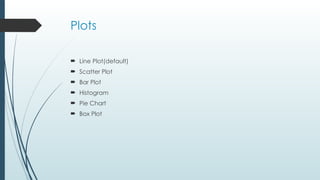
Plots
 Line Plot(default)
 Scatter Plot
 Bar Plot
 Histogram
 Pie Chart
 Box Plot
Line Plot
 For This let us take an example of stock prices to understand it better
 to plot the graph we use plt.plot(xdata,ydata,c=‘’,lw=‘’,linestyle=‘’)
 To display the plot we use plt.show()
 C is used to change color of the line
 Lw is used to set line width
 Linestyle is used to set style of aline for example dotted line
 ,”r—”
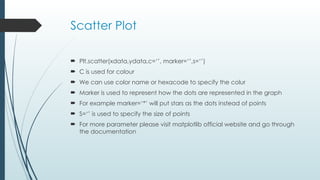
Scatter Plot
 Plt.scatter(xdata,ydata,c=‘’, marker=‘’,s=‘’)
 C is used for colour
 We can use color name or hexacode to specify the colur
 Marker is used to represent how the dots are represented in the graph
 For example marker=‘*’ will put stars as the dots instead of points
 S=‘’ is used to specify the size of points
 For more parameter please visit matplotlib official website and go through
the documentation
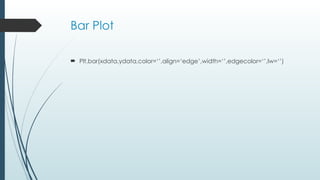
Bar Plot
 Plt.bar(xdata,ydata,color=‘’,align=‘edge’,width=‘’,edgecolor=‘’,lw=‘’)
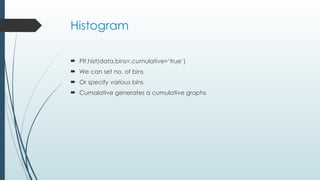
Histogram
 Plt.hist(data,bins=,cumulative=‘true’)
 We can set no. of bins
 Or specify various bins
 Cumalative generates a cumulative graphs
Pie Chart
 Lets us take the example of the various programming language people
prefer
 Plt.pie(data ,label=‘’ explode=‘’ autopct=“%.2f%%
”,pctdistance=‘’,startangle=)
 Explodes need to be another set of array
 Ex explodes=[0,0.3,0.2….]
Box Plot
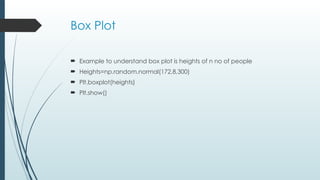
 Example to understand box plot is heights of n no of people
 Heights=np.random.normal(172,8,300)
 Plt.boxplot(heights)
 Plt.show()
Plot Customization
 Example income through various years
 Plt.plot(xdata,ydata)
 Plt.title(“Income of john(in RS)”)#generates title of the plot
 Plt.xlabel(“year”)#generates x axis title
 Plt.ylabel(“yearly income in usd”)
 plt.show
 We can also set fontsize= fontname=“” for all the above functions
Plot customization
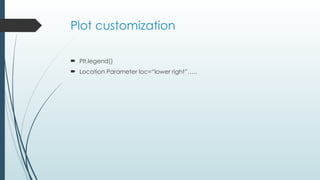
 Plt,legend()
 Location Parameter loc=“lower right”…..
Plot Styles
 From matplotlib import style
 https://matplotlib.org/stable/gallery/style_sheets/style_sheets_reference.ht
ml
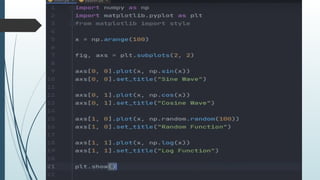
Sub Plots
 Multiple Plots in an single image
Exporting Plots
 Plt.savefig(“name.png”)
 Transperancy,dpi etc are few parameters
3D Graph
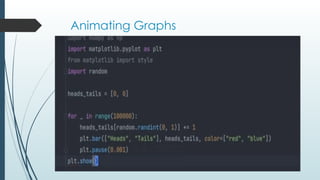
Animating Graphs

MatPlotLib data Science tools and techniques

  • 1.
    MatPlotLib Prerequiste:- Python To install Matplotlibwe use pip install matplotlib Import numpy as np Import matplotlib.pyplot as plt https://matplotlib.org/ https://vegibit.com/matplotlib-in-jupyter-notebook/ https://www.youtube.com/watch?v=OZOOLe2imFo
  • 2.
    NumPy and Pandas NumPy can be used to perform a wide variety of mathematical operations on arrays. It adds powerful data structures to Python that guarantee efficient calculations with arrays and matrices and it supplies an enormous library of high-level mathematical functions that operate on these arrays and matrices.  What is Pandas? Pandas is a Python library used for working with data sets. It has functions for analyzing, cleaning, exploring, and manipulating data. The name "Pandas" has a reference to both "Panel Data", and "Python Data Analysis" and was created by Wes McKinney in 2008.
  • 3.
    Plots  Line Plot(default) Scatter Plot  Bar Plot  Histogram  Pie Chart  Box Plot
  • 4.
    Line Plot  ForThis let us take an example of stock prices to understand it better  to plot the graph we use plt.plot(xdata,ydata,c=‘’,lw=‘’,linestyle=‘’)  To display the plot we use plt.show()  C is used to change color of the line  Lw is used to set line width  Linestyle is used to set style of aline for example dotted line  ,”r—”
  • 5.
    Scatter Plot  Plt.scatter(xdata,ydata,c=‘’,marker=‘’,s=‘’)  C is used for colour  We can use color name or hexacode to specify the colur  Marker is used to represent how the dots are represented in the graph  For example marker=‘*’ will put stars as the dots instead of points  S=‘’ is used to specify the size of points  For more parameter please visit matplotlib official website and go through the documentation
  • 6.
  • 7.
    Histogram  Plt.hist(data,bins=,cumulative=‘true’)  Wecan set no. of bins  Or specify various bins  Cumalative generates a cumulative graphs
  • 8.
    Pie Chart  Letsus take the example of the various programming language people prefer  Plt.pie(data ,label=‘’ explode=‘’ autopct=“%.2f%% ”,pctdistance=‘’,startangle=)  Explodes need to be another set of array  Ex explodes=[0,0.3,0.2….]
  • 9.
    Box Plot  Exampleto understand box plot is heights of n no of people  Heights=np.random.normal(172,8,300)  Plt.boxplot(heights)  Plt.show()
  • 10.
    Plot Customization  Exampleincome through various years  Plt.plot(xdata,ydata)  Plt.title(“Income of john(in RS)”)#generates title of the plot  Plt.xlabel(“year”)#generates x axis title  Plt.ylabel(“yearly income in usd”)  plt.show  We can also set fontsize= fontname=“” for all the above functions
  • 11.
    Plot customization  Plt,legend() Location Parameter loc=“lower right”…..
  • 12.
    Plot Styles  Frommatplotlib import style  https://matplotlib.org/stable/gallery/style_sheets/style_sheets_reference.ht ml
  • 13.
    Sub Plots  MultiplePlots in an single image
  • 15.
    Exporting Plots  Plt.savefig(“name.png”) Transperancy,dpi etc are few parameters
  • 16.
  • 17.