www.deltaww.com
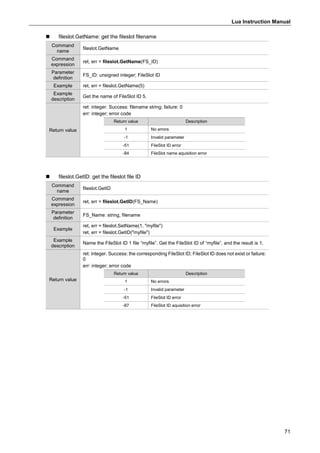
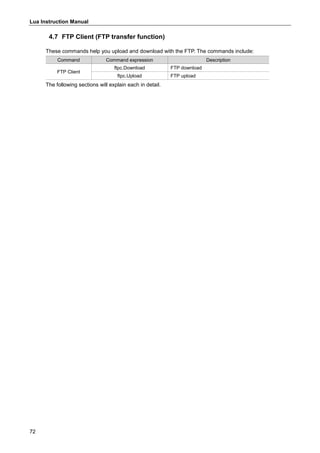
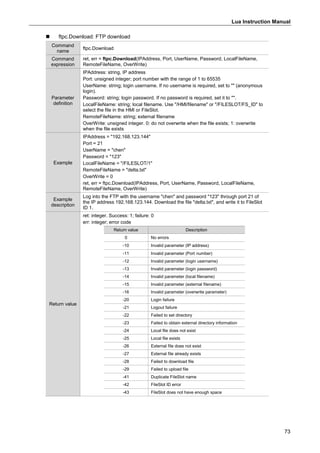
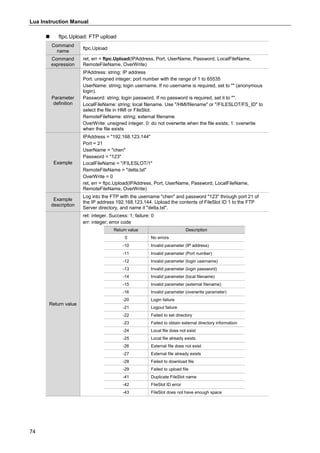
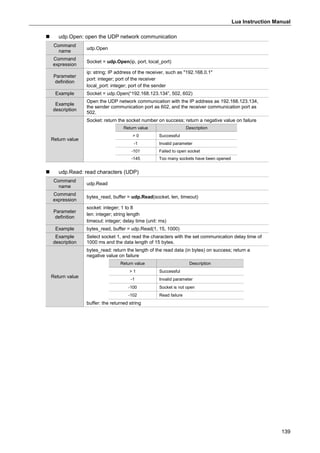
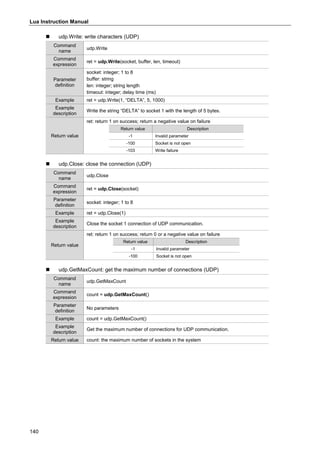
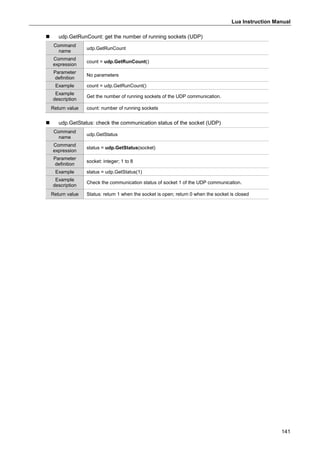
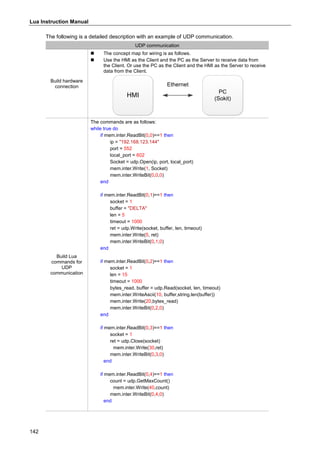
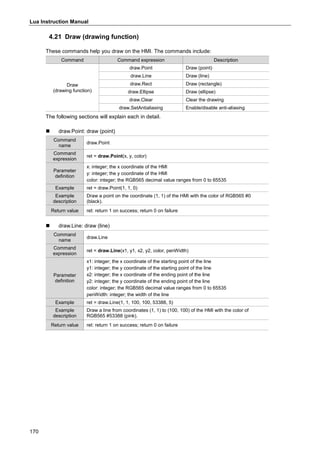
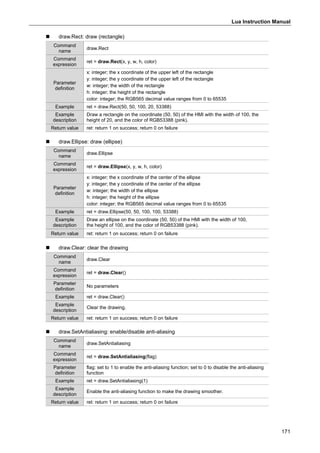
Delta
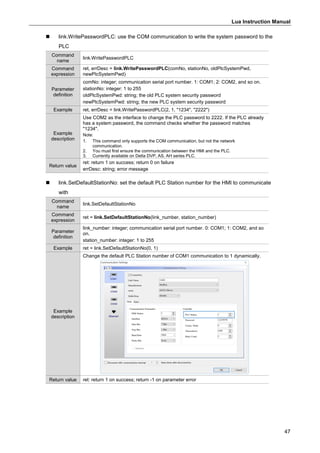
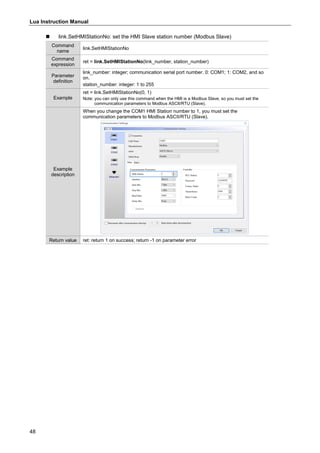
Lua
Instruction
Manual
Delta Lua Instruction Manual
*We reserve the right to change the information in this catalogue without prior notice.
Industrial Automation Headquarters
Taiwan: Delta Electronics, Inc.
Taoyuan Technology Center
No.18, Xinglong Rd., Taoyuan District,
Taoyuan City 33068, Taiwan
TEL: +886-3-362-6301 / FAX: +886-3-371-6301
Asia
China: Delta Electronics (Shanghai) Co., Ltd.
No.182 Minyu Rd., Pudong Shanghai, P.R.C.
Post code : 201209
TEL: +86-21-6872-3988 / FAX: +86-21-6872-3996
Customer Service: 400-820-9595
Japan: Delta Electronics (Japan), Inc.
Industrial Automation Sales Department
2-1-14 Shibadaimon, Minato-ku
Tokyo, Japan 105-0012
TEL: +81-3-5733-1155 / FAX: +81-3-5733-1255
Korea: Delta Electronics (Korea), Inc.
1511, 219, Gasan Digital 1-Ro., Geumcheon-gu,
Seoul, 08501 South Korea
TEL: +82-2-515-5305 / FAX: +82-2-515-5302
Singapore: Delta Energy Systems (Singapore) Pte Ltd.
4 Kaki Bukit Avenue 1, #05-04, Singapore 417939
TEL: +65-6747-5155 / FAX: +65-6744-9228
India: Delta Electronics (India) Pvt. Ltd.
Plot No.43, Sector 35, HSIIDC Gurgaon,
PIN 122001, Haryana, India
TEL: +91-124-4874900 / FAX: +91-124-4874945
Thailand: Delta Electronics (Thailand) PCL.
909 Soi 9, Moo 4, Bangpoo Industrial Estate (E.P.Z),
Pattana 1 Rd., T.Phraksa, A.Muang,
Samutprakarn 10280, Thailand
TEL: +66-2709-2800 / FAX: +66-2709-2827
Australia: Delta Electronics (Australia) Pty Ltd.
Unit 20-21/45 Normanby Rd., Notting Hill Vic 3168, Australia
TEL: +61-3-9543-3720
Americas
USA: Delta Electronics (Americas) Ltd.
5101 Davis Drive, Research Triangle Park, NC 27709, U.S.A.
TEL: +1-919-767-3813 / FAX: +1-919-767-3969
Brazil: Delta Electronics Brazil
Rua Itapeva, 26 - 3°, andar Edificio Itapeva,
One - Bela Vista 01332-000 - São Paulo - SP - Brazil
TEL: +55-12-3932-2300 / FAX: +55-12-3932-237
Mexico: Delta Electronics International Mexico S.A. de C.V.
Gustavo Baz No. 309 Edificio E PB 103
Colonia La Loma, CP 54060
Tlalnepantla, Estado de México
TEL: +52-55-3603-9200
EMEA
EMEA Headquarters: Delta Electronics (Netherlands) B.V.
Sales: Sales.IA.EMEA@deltaww.com
Marketing: Marketing.IA.EMEA@deltaww.com
Technical Support: iatechnicalsupport@deltaww.com
Customer Support: Customer-Support@deltaww.com
Service: Service.IA.emea@deltaww.com
TEL: +31(0)40 800 3900
BENELUX: Delta Electronics (Netherlands) B.V.
Automotive Campus 260, 5708 JZ Helmond, The Netherlands
Mail: Sales.IA.Benelux@deltaww.com
TEL: +31(0)40 800 3900
DACH: Delta Electronics (Netherlands) B.V.
Coesterweg 45,D-59494 Soest,Germany
Mail: Sales.IA.DACH@deltaww.com
TEL: +49(0)2921 987 0
France: Delta Electronics (France) S.A.
ZI du bois Challand 2,15 rue des Pyrénées,
Lisses, 91090 Evry Cedex, France
Mail: Sales.IA.FR@deltaww.com
TEL: +33(0)1 69 77 82 60
Iberia: Delta Electronics Solutions (Spain) S.L.U
Ctra. De Villaverde a Vallecas, 265 1º Dcha Ed.
Hormigueras – P.I. de Vallecas 28031 Madrid
TEL: +34(0)91 223 74 20
Carrer Llacuna 166, 08018 Barcelona, Spain
Mail: Sales.IA.Iberia@deltaww.com
Italy: Delta Electronics (Italy) S.r.l.
Via Meda 2–22060 Novedrate(CO)
Piazza Grazioli 18 00186 Roma Italy
Mail: Sales.IA.Italy@deltaww.com
TEL: +39 039 8900365
Russia: Delta Energy System LLC
Vereyskaya Plaza II, office 112 Vereyskaya str.
17 121357 Moscow Russia
Mail: Sales.IA.RU@deltaww.com
TEL: +7 495 644 3240
Turkey: Delta Greentech Elektronik San. Ltd. Sti. (Turkey)
Şerifali Mah. Hendem Cad. Kule Sok. No:16-A
34775 Ümraniye – İstanbul
Mail: Sales.IA.Turkey@deltaww.com
TEL: + 90 216 499 9910
MEA: Eltek Dubai (Eltek MEA DMCC)
OFFICE 2504, 25th Floor, Saba Tower 1,
Jumeirah Lakes Towers, Dubai, UAE
Mail: Sales.IA.MEA@deltaww.com
TEL: +971(0)4 2690148
DELTA_IA-HMI_LUA_UM_EN_20211208
1
Lua Instruction Manual
1. Introduction to Lua ····························································································2
2. Basic Lua programming syntax ············································································3
3. Lua command list······························································································5
4. Detailed explanation of Lua commands································································12
4.1 Basic syntax ·····························································································13
4.1.1 Type: bool, number, string, nil (data type) ·················································14
4.1.2 Type: table, array (matrix operations)·······················································17
4.1.3 if…then…else…elseif…end, and or not (comparison) ·································20
4.1.4 for var=1, 3 do… end (for loop) ······························································21
4.1.5 while break, repeat until (while, repeat loop)··············································24
4.1.6 +-*/%^ (mathematical operations) ···························································26
4.1.7 function, call function, require return (flow control) ······································27
4.1.8 logic: xor and or not lshift rshift (logical operations)·····································29
4.2 Internal memory - $····················································································31
4.3 Static memory - $M····················································································36
4.4 External link (external memory) ····································································41
4.5 File (read/write/export/delete/print files) ··························································52
4.6 FileSlot (file access) ···················································································64
4.7 FTP Client (FTP transfer function) ·································································72
4.8 Math (mathematical operations)····································································77
4.9 Recipe ····································································································84
4.10 Screen (screen control)·············································································109
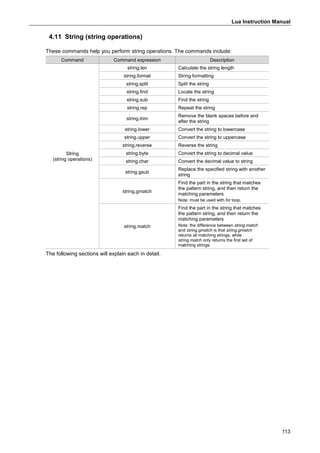
4.11 String (string operations) ············································································113
4.12 System library (system parameters)······························································119
4.13 Serial port communication (COM communication)···········································123
4.14 TCP communication ·················································································130
4.15 UDP communication·················································································138
4.16 Text encoding (encoding format change)·······················································149
4.17 Utility (CRC calculation) ············································································152
4.18 Convert (Floating-point number conversion) ··················································154
4.19 Account (permissions and password setup)···················································156
4.20 Mail ······································································································163
4.21 Draw (drawing function) ············································································170
Lua Instruction Manual
2
1. Introduction to Lua
Lua is a lightweight programming language created by the Computer Graphics Technology
Group (Tecgraf) in Brazil. Its scripting language is simple and easy to learn and use, helping
programmers to quickly complete their programming tasks. With Delta HMI’s support of the Lua
programming language, you can have more flexibility in designing screens.
 Lua editor window
Click [Project] > [Program] > [Main], then you can start writing the Lua programs, as shown in
Figure 1.1.
When writing the Lua program, you can use the program example assistant to quickly get
familiar with the commands, or move the mouse pointer to the commands to see its description.
Refer to Figure 1.2.
Figure 1.1 The Lua programming interface
Figure 1.2 The Lua program example assistant and description
Lua Instruction Manual
3
You can also go to the Action field in the Lua window and click Add to quickly add basic Lua
command templates to the program.
Figure 1.3 Quick input of Lua commands
2. Basic Lua programming syntax
The following is a summary of the basic Lua programming syntax.
Item Description
Chunk or block
 A statement in the Lua program is called a chunk, which can refer to a
command or a group of commands; the execution results are the same.
For example:
====================================================
a=1
mem.inter.WriteBit(1,0,a)
Or
a=1 mem.inter.WriteBit(1,0,a)
Program comments
There are two types of comments in Lua :
 Single-line comment: starts with two dashes (--) and continues until the
end of the line.
Example:
-- Lua
 Multi-line comment: starts with two dashes and two upper brackets (--[[)
and ends with two lower brackets. The contents within these brackets are
skipped and not executed.
Example:
--[[This is
a multi-line
comment]]
Identifiers and
reserved words
 In Lua, variables and function names are represented by identifiers with
combinations of English letters, numbers, and underscores. However, the
first character of the string cannot be a number. Note that when setting
variables, do not use the following 22 reserved words.
local nil not or
and if then else
elseif for end in
do while until repeat
break true false function
return goto - -
Note: Lua is case sensitive, so while goto is a reserved word, GOTO can be a variable.
Lua Instruction Manual
4
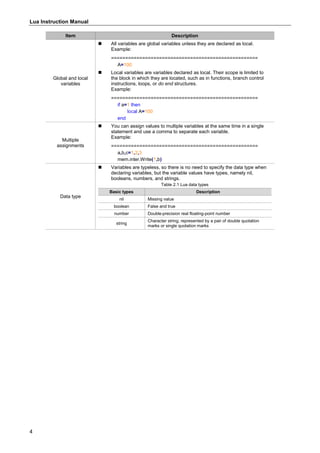
Item Description
Global and local
variables
 All variables are global variables unless they are declared as local.
Example:
====================================================
A=100
 Local variables are variables declared as local. Their scope is limited to
the block in which they are located, such as in functions, branch control
instructions, loops, or do end structures.
Example:
====================================================
if a=1 then
local A=100
end
Multiple
assignments
 You can assign values to multiple variables at the same time in a single
statement and use a comma to separate each variable.
Example:
====================================================
a,b,c=1,2,3
mem.inter.Write(1,b)
Data type
 Variables are typeless, so there is no need to specify the data type when
declaring variables, but the variable values have types, namely nil,
booleans, numbers, and strings.
Table 2.1 Lua data types
Basic types Description
nil Missing value
boolean False and true
number Double-precision real floating-point number
string
Character string; represented by a pair of double quotation
marks or single quotation marks
Lua Instruction Manual
5
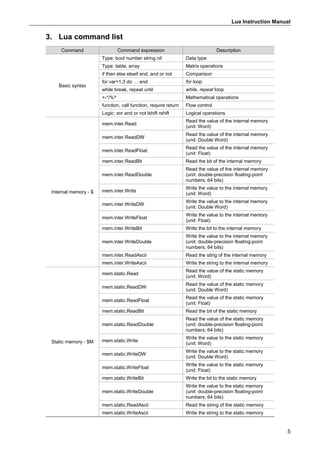
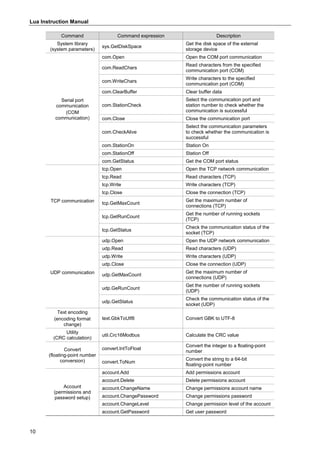
3. Lua command list
Command Command expression Description
Basic syntax
Type: bool number string nil Data type
Type: table, array Matrix operations
if then else elseif end, and or not Comparison
for var=1,3 do … end for loop
while break, repeat until while, repeat loop
+-*/%^ Mathematical operations
function, call function, require return Flow control
Logic: xor and or not lshift rshift Logical operations
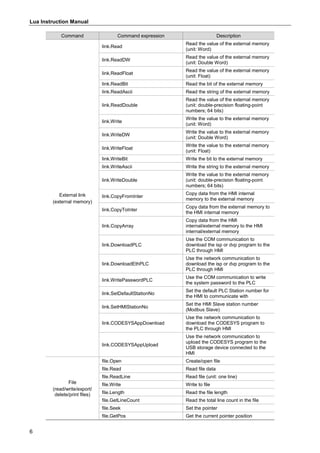
Internal memory - $
mem.inter.Read
Read the value of the internal memory
(unit: Word)
mem.inter.ReadDW
Read the value of the internal memory
(unit: Double Word)
mem.inter.ReadFloat
Read the value of the internal memory
(unit: Float)
mem.inter.ReadBit Read the bit of the internal memory
mem.inter.ReadDouble
Read the value of the internal memory
(unit: double-precision floating-point
numbers; 64 bits)
mem.inter.Write
Write the value to the internal memory
(unit: Word)
mem.inter.WriteDW
Write the value to the internal memory
(unit: Double Word)
mem.inter.WriteFloat
Write the value to the internal memory
(unit: Float)
mem.inter.WriteBit Write the bit to the internal memory
mem.inter.WriteDouble
Write the value to the internal memory
(unit: double-precision floating-point
numbers; 64 bits)
mem.inter.ReadAscii Read the sting of the internal memory
mem.inter.WriteAscii Write the string to the internal memory
Static memory - $M
mem.static.Read
Read the value of the static memory
(unit: Word)
mem.static.ReadDW
Read the value of the static memory
(unit: Double Word)
mem.static.ReadFloat
Read the value of the static memory
(unit: Float)
mem.static.ReadBit Read the bit of the static memory
mem.static.ReadDouble
Read the value of the static memory
(unit: double-precision floating-point
numbers; 64 bits)
mem.static.Write
Write the value to the static memory
(unit: Word)
mem.static.WriteDW
Write the value to the static memory
(unit: Double Word)
mem.static.WriteFloat
Write the value to the static memory
(unit: Float)
mem.static.WriteBit Write the bit to the static memory
mem.static.WriteDouble
Write the value to the static memory
(unit: double-precision floating-point
numbers; 64 bits)
mem.static.ReadAscii Read the string of the static memory
mem.static.WriteAscii Write the string to the static memory
Lua Instruction Manual
6
Command Command expression Description
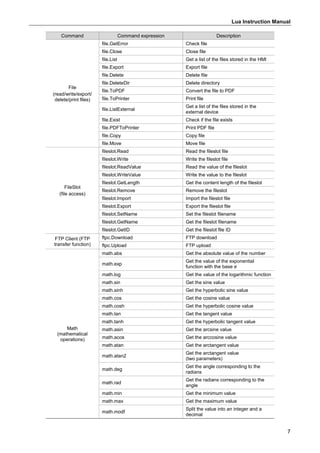
External link
(external memory)
link.Read
Read the value of the external memory
(unit: Word)
link.ReadDW
Read the value of the external memory
(unit: Double Word)
link.ReadFloat
Read the value of the external memory
(unit: Float)
link.ReadBit Read the bit of the external memory
link.ReadAscii Read the string of the external memory
link.ReadDouble
Read the value of the external memory
(unit: double-precision floating-point
numbers; 64 bits)
link.Write
Write the value to the external memory
(unit: Word)
link.WriteDW
Write the value to the external memory
(unit: Double Word)
link.WriteFloat
Write the value to the external memory
(unit: Float)
link.WriteBit Write the bit to the external memory
link.WriteAscii Write the string to the external memory
link.WriteDouble
Write the value to the external memory
(unit: double-precision floating-point
numbers; 64 bits)
link.CopyFromInter
Copy data from the HMI internal
memory to the external memory
link.CopyToInter
Copy data from the external memory to
the HMI internal memory
link.CopyArray
Copy data from the HMI
internal/external memory to the HMI
internal/external memory
link.DownloadPLC
Use the COM communication to
download the isp or dvp program to the
PLC through HMI
link.DownloadEthPLC
Use the network communication to
download the isp or dvp program to the
PLC through HMI
link.WritePasswordPLC
Use the COM communication to write
the system password to the PLC
link.SetDefaultStationNo
Set the default PLC Station number for
the HMI to communicate with
link.SetHMIStationNo
Set the HMI Slave station number
(Modbus Slave)
link.CODESYSAppDownload
Use the network communication to
download the CODESYS program to
the PLC through HMI
link.CODESYSAppUpload
Use the network communication to
upload the CODESYS program to the
USB storage device connected to the
HMI
File
(read/write/export/
delete/print files)
file.Open Create/open file
file.Read Read file data
file.ReadLine Read file (unit: one line)
file.Write Write to file
file.Length Read the file length
file.GetLineCount Read the total line count in the file
file.Seek Set the pointer
file.GetPos Get the current pointer position
Lua Instruction Manual
7
Command Command expression Description
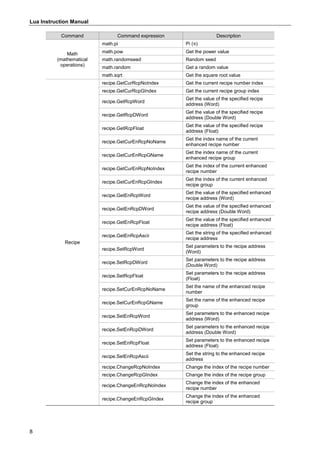
File
(read/write/export/
delete/print files)
file.GetError Check file
file.Close Close file
file.List Get a list of the files stored in the HMI
file.Export Export file
file.Delete Delete file
file.DeleteDir Delete directory
file.ToPDF Convert the file to PDF
file.ToPrinter Print file
file.ListExternal
Get a list of the files stored in the
external device
file.Exist Check if the file exists
file.PDFToPrinter Print PDF file
file.Copy Copy file
file.Move Move file
FileSlot
(file access)
fileslot.Read Read the fileslot file
fileslot.Write Write the fileslot file
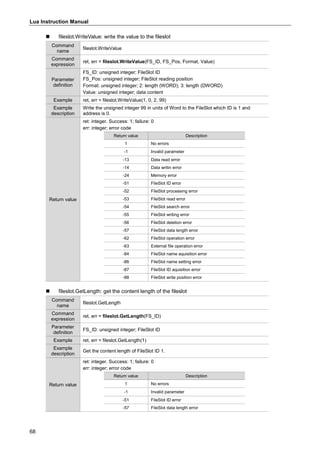
fileslot.ReadValue Read the value of the fileslot
fileslot.WriteValue Write the value to the fileslot
fileslot.GetLength Get the content length of the fileslot
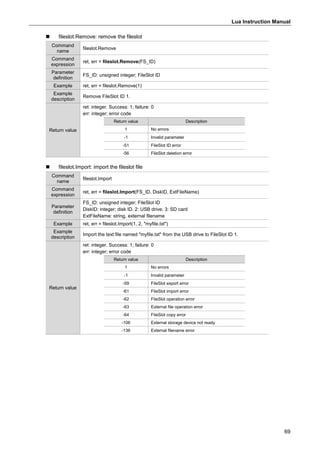
fileslot.Remove Remove the fileslot
fileslot.Import Import the fileslot file
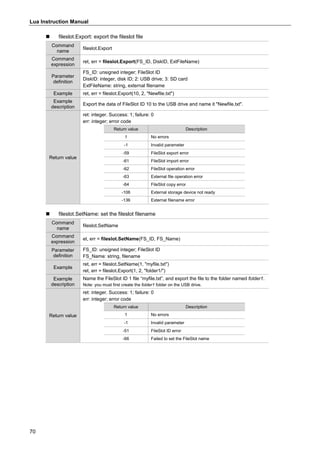
fileslot.Export Export the fileslot file
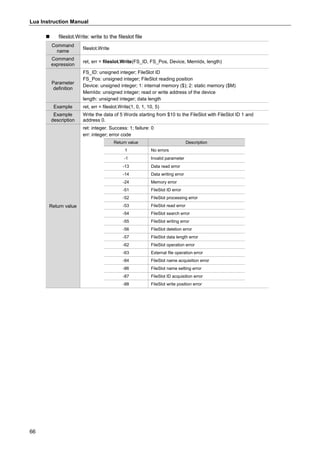
fileslot.SetName Set the fileslot filename
fileslot.GetName Get the fileslot filename
fileslot.GetID Get the fileslot file ID
FTP Client (FTP
transfer function)
ftpc.Download FTP download
ftpc.Upload FTP upload
Math
(mathematical
operations)
math.abs Get the absolute value of the number
math.exp
Get the value of the exponential
function with the base e
math.log Get the value of the logarithmic function
math.sin Get the sine value
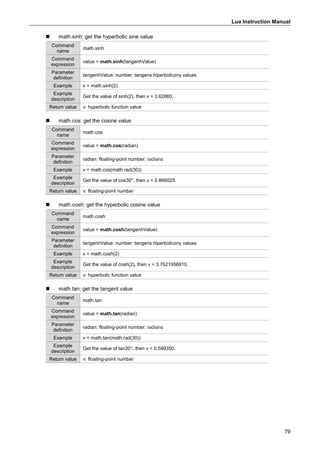
math.sinh Get the hyperbolic sine value
math.cos Get the cosine value
math.cosh Get the hyperbolic cosine value
math.tan Get the tangent value
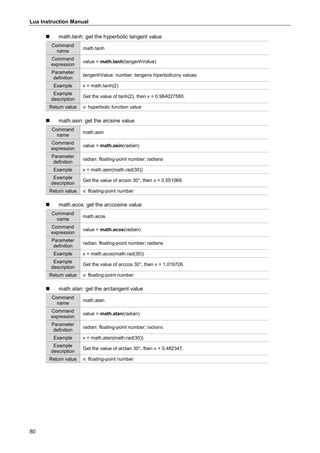
math.tanh Get the hyperbolic tangent value
math.asin Get the arcsine value
math.acos Get the arccosine value
math.atan Get the arctangent value
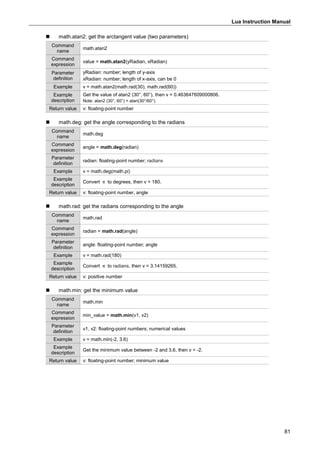
math.atan2
Get the arctangent value
(two parameters)
math.deg
Get the angle corresponding to the
radians
math.rad
Get the radians corresponding to the
angle
math.min Get the minimum value
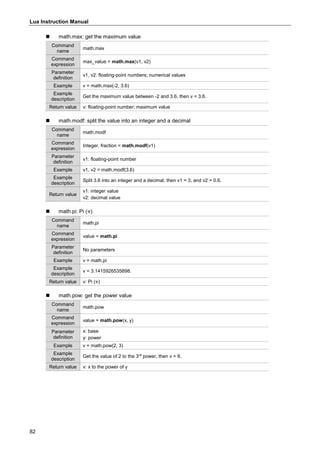
math.max Get the maximum value
math.modf
Split the value into an integer and a
decimal
Lua Instruction Manual
8
Command Command expression Description
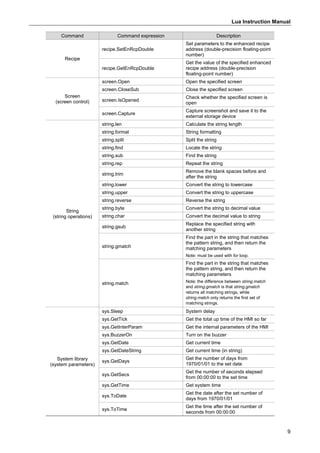
Math
(mathematical
operations)
math.pi Pi (π)
math.pow Get the power value
math.randomseed Random seed
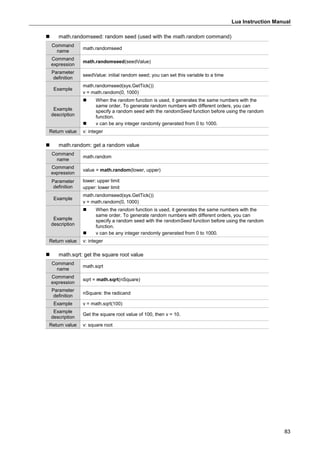
math.random Get a random value
math.sqrt Get the square root value
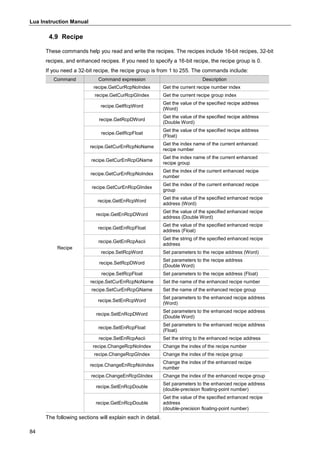
Recipe
recipe.GetCurRcpNoIndex Get the current recipe number index
recipe.GetCurRcpGIndex Get the current recipe group index
recipe.GetRcpWord
Get the value of the specified recipe
address (Word)
recipe.GetRcpDWord
Get the value of the specified recipe
address (Double Word)
recipe.GetRcpFloat
Get the value of the specified recipe
address (Float)
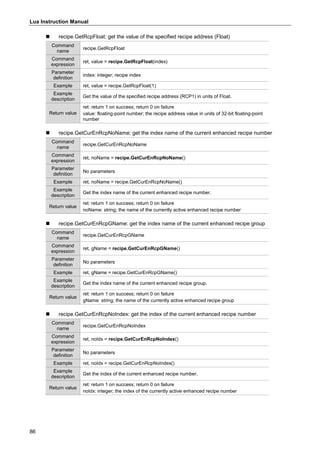
recipe.GetCurEnRcpNoName
Get the index name of the current
enhanced recipe number
recipe.GetCurEnRcpGName
Get the index name of the current
enhanced recipe group
recipe.GetCurEnRcpNoIndex
Get the index of the current enhanced
recipe number
recipe.GetCurEnRcpGIndex
Get the index of the current enhanced
recipe group
recipe.GetEnRcpWord
Get the value of the specified enhanced
recipe address (Word)
recipe.GetEnRcpDWord
Get the value of the specified enhanced
recipe address (Double Word)
recipe.GetEnRcpFloat
Get the value of the specified enhanced
recipe address (Float)
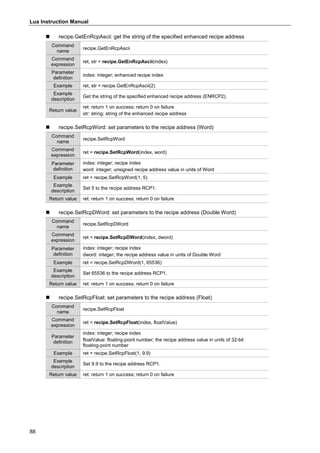
recipe.GetEnRcpAscii
Get the string of the specified enhanced
recipe address
recipe.SetRcpWord
Set parameters to the recipe address
(Word)
recipe.SetRcpDWord
Set parameters to the recipe address
(Double Word)
recipe.SetRcpFloat
Set parameters to the recipe address
(Float)
recipe.SetCurEnRcpNoName
Set the name of the enhanced recipe
number
recipe.SetCurEnRcpGName
Set the name of the enhanced recipe
group
recipe.SetEnRcpWord
Set parameters to the enhanced recipe
address (Word)
recipe.SetEnRcpDWord
Set parameters to the enhanced recipe
address (Double Word)
recipe.SetEnRcpFloat
Set parameters to the enhanced recipe
address (Float)
recipe.SetEnRcpAscii
Set the string to the enhanced recipe
address
recipe.ChangeRcpNoIndex Change the index of the recipe number
recipe.ChangeRcpGIndex Change the index of the recipe group
recipe.ChangeEnRcpNoIndex
Change the index of the enhanced
recipe number
recipe.ChangeEnRcpGIndex
Change the index of the enhanced
recipe group
Lua Instruction Manual
9
Command Command expression Description
Recipe
recipe.SetEnRcpDouble
Set parameters to the enhanced recipe
address (double-precision floating-point
number)
recipe.GetEnRcpDouble
Get the value of the specified enhanced
recipe address (double-precision
floating-point number)
Screen
(screen control)
screen.Open Open the specified screen
screen.CloseSub Close the specified screen
screen.IsOpened
Check whether the specified screen is
open
screen.Capture
Capture screenshot and save it to the
external storage device
String
(string operations)
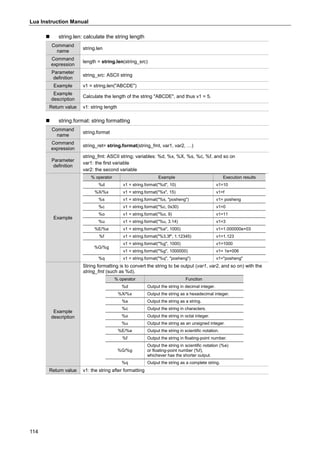
string.len Calculate the string length
string.format String formatting
string.split Split the string
string.find Locate the string
string.sub Find the string
string.rep Repeat the string
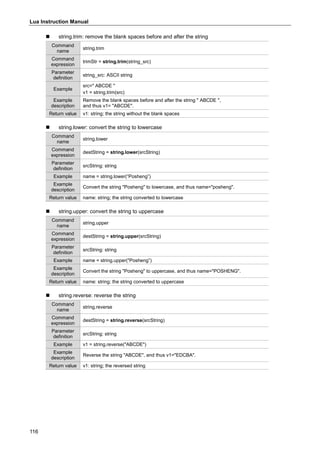
string.trim
Remove the blank spaces before and
after the string
string.lower Convert the string to lowercase
string.upper Convert the string to uppercase
string.reverse Reverse the string
string.byte Convert the string to decimal value
string.char Convert the decimal value to string
string.gsub
Replace the specified string with
another string
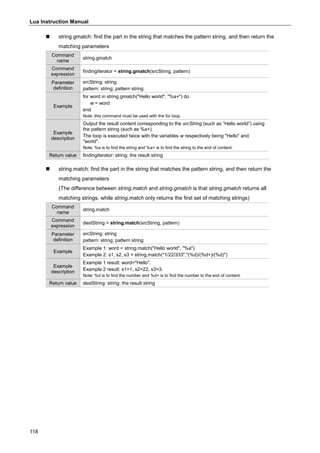
string.gmatch
Find the part in the string that matches
the pattern string, and then return the
matching parameters
Note: must be used with for loop.
string.match
Find the part in the string that matches
the pattern string, and then return the
matching parameters
Note: the difference between string.match
and string.gmatch is that string.gmatch
returns all matching strings, while
string.match only returns the first set of
matching strings.
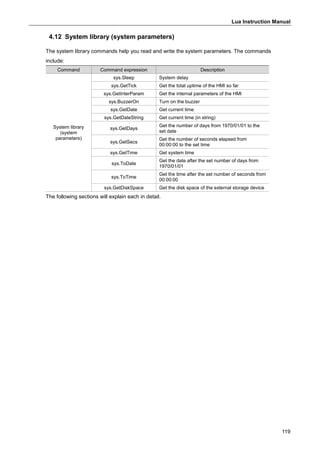
System library
(system parameters)
sys.Sleep System delay
sys.GetTick Get the total up time of the HMI so far
sys.GetInterParam Get the internal parameters of the HMI
sys.BuzzerOn Turn on the buzzer
sys.GetDate Get current time
sys.GetDateString Get current time (in string)
sys.GetDays
Get the number of days from
1970/01/01 to the set date
sys.GetSecs
Get the number of seconds elapsed
from 00:00:00 to the set time
sys.GetTime Get system time
sys.ToDate
Get the date after the set number of
days from 1970/01/01
sys.ToTime
Get the time after the set number of
seconds from 00:00:00
Lua Instruction Manual
10
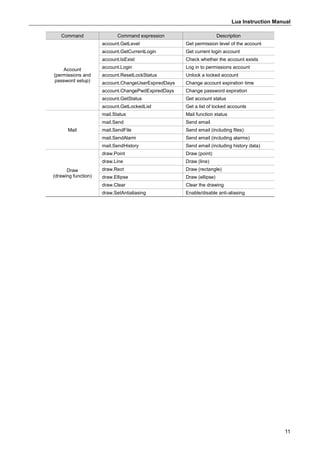
Command Command expression Description
System library
(system parameters)
sys.GetDiskSpace
Get the disk space of the external
storage device
Serial port
communication
(COM
communication)
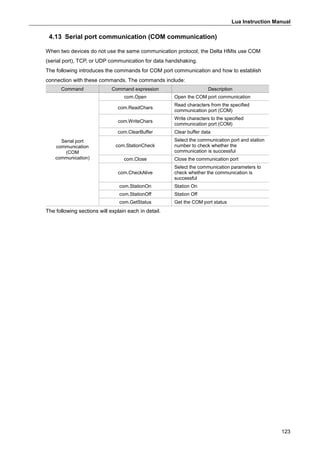
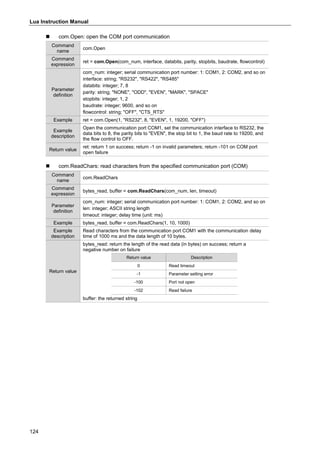
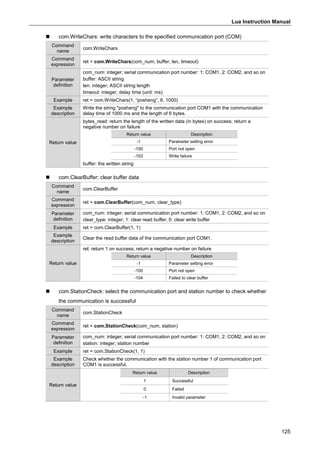
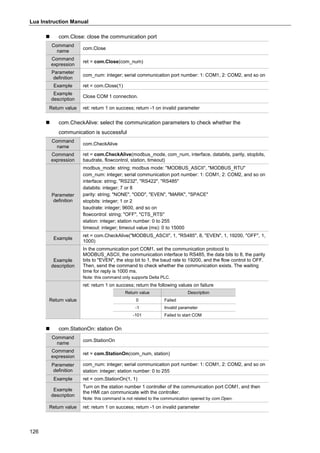
com.Open Open the COM port communication
com.ReadChars
Read characters from the specified
communication port (COM)
com.WriteChars
Write characters to the specified
communication port (COM)
com.ClearBuffer Clear buffer data
com.StationCheck
Select the communication port and
station number to check whether the
communication is successful
com.Close Close the communication port
com.CheckAlive
Select the communication parameters
to check whether the communication is
successful
com.StationOn Station On
com.StationOff Station Off
com.GetStatus Get the COM port status
TCP communication
tcp.Open Open the TCP network communication
tcp.Read Read characters (TCP)
tcp.Write Write characters (TCP)
tcp.Close Close the connection (TCP)
tcp.GetMaxCount
Get the maximum number of
connections (TCP)
tcp.GetRunCount
Get the number of running sockets
(TCP)
tcp.GetStatus
Check the communication status of the
socket (TCP)
UDP communication
udp.Open Open the UDP network communication
udp.Read Read characters (UDP)
udp.Write Write characters (UDP)
udp.Close Close the connection (UDP)
udp.GetMaxCount
Get the maximum number of
connections (UDP)
udp.GeRunCount
Get the number of running sockets
(UDP)
udp.GetStatus
Check the communication status of the
socket (UDP)
Text encoding
(encoding format
change)
text.GbkToUtf8 Convert GBK to UTF-8
Utility
(CRC calculation)
util.Crc16Modbus Calculate the CRC value
Convert
(floating-point number
conversion)
convert.IntToFloat
Convert the integer to a floating-point
number
convert.ToNum
Convert the string to a 64-bit
floating-point number
Account
(permissions and
password setup)
account.Add Add permissions account
account.Delete Delete permissions account
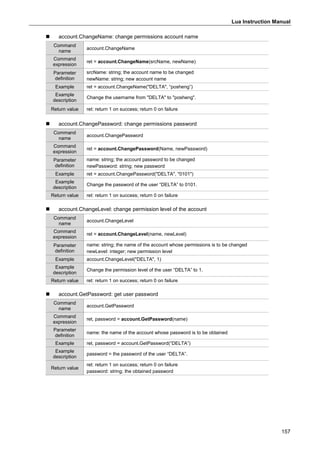
account.ChangeName Change permissions account name
account.ChangePassword Change permissions password
account.ChangeLevel Change permission level of the account
account.GetPassword Get user password
Lua Instruction Manual
11
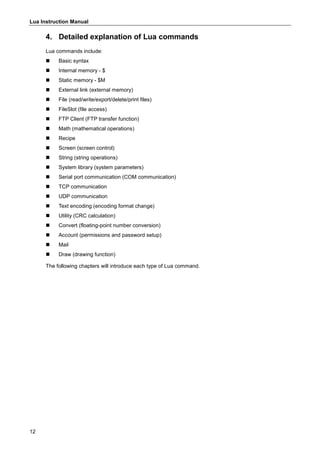
Command Command expression Description
Account
(permissions and
password setup)
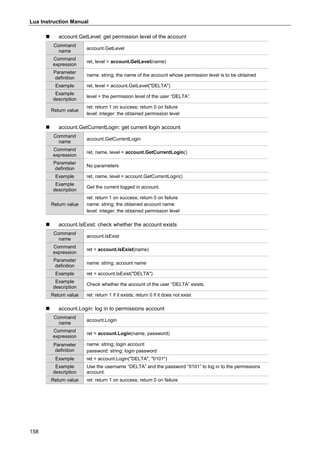
account.GetLevel Get permission level of the account
account.GetCurrentLogin Get current login account
account.IsExist Check whether the account exists
account.Login Log in to permissions account
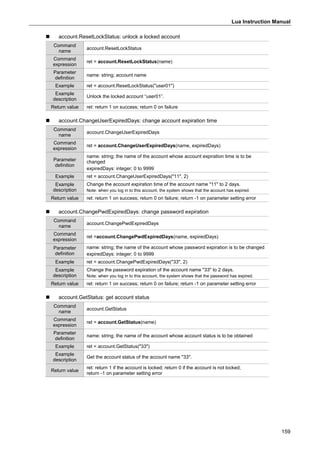
account.ResetLockStatus Unlock a locked account
account.ChangeUserExpiredDays Change account expiration time
account.ChangePwdExpiredDays Change password expiration
account.GetStatus Get account status
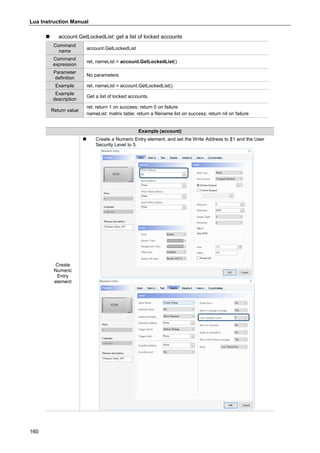
account.GetLockedList Get a list of locked accounts
Mail
mail.Status Mail function status
mail.Send Send email
mail.SendFile Send email (including files)
mail.SendAlarm Send email (including alarms)
mail.SendHistory Send email (including history data)
Draw
(drawing function)
draw.Point Draw (point)
draw.Line Draw (line)
draw.Rect Draw (rectangle)
draw.Ellipse Draw (ellipse)
draw.Clear Clear the drawing
draw.SetAntialiasing Enable/disable anti-aliasing
Lua Instruction Manual
12
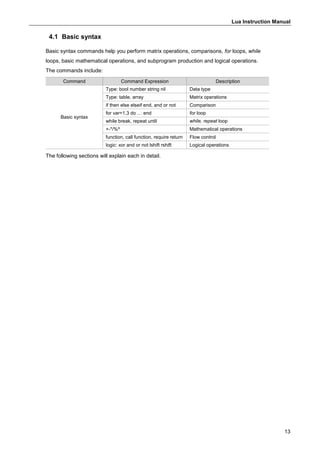
4. Detailed explanation of Lua commands
Lua commands include:
 Basic syntax
 Internal memory - $
 Static memory - $M
 External link (external memory)
 File (read/write/export/delete/print files)
 FileSlot (file access)
 FTP Client (FTP transfer function)
 Math (mathematical operations)
 Recipe
 Screen (screen control)
 String (string operations)
 System library (system parameters)
 Serial port communication (COM communication)
 TCP communication
 UDP communication
 Text encoding (encoding format change)
 Utility (CRC calculation)
 Convert (floating-point number conversion)
 Account (permissions and password setup)
 Mail
 Draw (drawing function)
The following chapters will introduce each type of Lua command.
Lua Instruction Manual
13
4.1 Basic syntax
Basic syntax commands help you perform matrix operations, comparisons, for loops, while
loops, basic mathematical operations, and subprogram production and logical operations.
The commands include:
Command Command Expression Description
Basic syntax
Type: bool number string nil Data type
Type: table, array Matrix operations
if then else elseif end, and or not Comparison
for var=1,3 do … end for loop
while break, repeat until while, repeat loop
+-*/%^ Mathematical operations
function, call function, require return Flow control
logic: xor and or not lshift rshift Logical operations
The following sections will explain each in detail.
Lua Instruction Manual
14
4.1.1 Type: bool, number, string, nil (data type)
Variables do not have types, so there is no need to specify the data type when declaring
variables, but the variable values have types. The types of variables provided by Lua are
Boolean expressions, integers, decimals, and strings. Examples of their use are as follows:
Example
Open Lua
 Click [Project] > [Program] > [Main] to display the Lua editor window.
Build
Lua program
 Set value_bool = true, value_integer = 11, value_double = 13.6,
value_string = "abcd_123".
 When value_bool is true, write value_integer (integer) to $10 with value_integer
as length, write value_double (decimal) to $12 with value_double as length, and
write value_string (string) to $14 with value_string as length.
while true do
value_bool=true
value_integer=11
value_double = 13.6
value_string = "abcd_123"
if value_bool==true then
mem.inter.Write(10,value_integer,string.len(value_integer))
mem.inter.WriteFloat(12,value_double,string.len(value_double))
mem.inter.WriteAscii(14,value_string,string.len(value_string))
end
end
Lua Instruction Manual
15
Example
Create
Numeric Entry
and Character
Entry elements
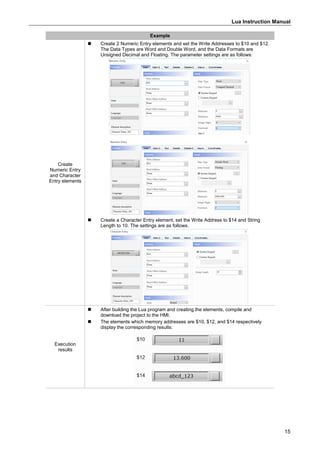
 Create 2 Numeric Entry elements and set the Write Addresses to $10 and $12.
The Data Types are Word and Double Word, and the Data Formats are
Unsigned Decimal and Floating. The parameter settings are as follows:
 Create a Character Entry element, set the Write Address to $14 and String
Length to 10. The settings are as follows.
Execution
results
 After building the Lua program and creating the elements, compile and
download the project to the HMI.
 The elements which memory addresses are $10, $12, and $14 respectively
display the corresponding results:
Lua Instruction Manual
16
Except for the above defined variables (Boolean expressions, integers, decimals, strings), the
undefined variables are not allowed in Lua. Using undefined variables causes the Lua program
to terminate. The following is a simple example.
Example
 Specify the uppercase expression of Delta as v1 and write the v1 string to $100, shown as
follows.
==========================================================
while true do
v1=string.upper(Delta)
mem.inter.WriteAscii(100,v1,string.len(v1))
end
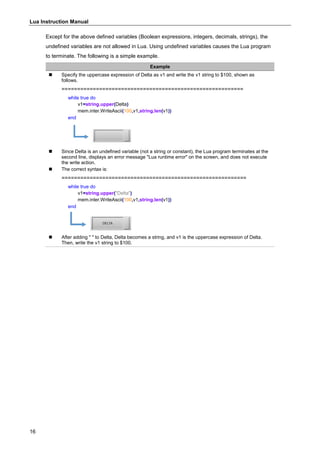
 Since Delta is an undefined variable (not a string or constant), the Lua program terminates at the
second line, displays an error message "Lua runtime error" on the screen, and does not execute
the write action.
 The correct syntax is:
===========================================================
while true do
v1=string.upper("Delta")
mem.inter.WriteAscii(100,v1,string.len(v1))
end
 After adding " " to Delta, Delta becomes a string, and v1 is the uppercase expression of Delta.
Then, write the v1 string to $100.
Lua Instruction Manual
17
4.1.2 Type: table, array (matrix operations)
These commands help you calculate and design the matrix. The following sections will explain
each in detail.
The following tables are the lists for array commands.
 { }: define array
Command
name
t = { }
Command
expression
t = {var1, var2, var3, var4, var5}
Parameter
definition
var1, var2, and so on: elements
Example
t= { 11, 22, 33, "s1", "s2" }
t [1] = 111;
t [2] = 222;
t [3] = 333;
Example
description
After creating the array t= {11, 22, 33, "s1", "s2”}, change t [1] from 11 to 111, t [2]
from 22 to 222, and t [3] from 33 to 333.
Return value No return value
 table.count: get the number of elements in the array
Command
name
table.count
Command
expression
Count = table.count(myTable)
Parameter
definition
myTable: table
Example
t = {11, 22, 33}
count = table.count(t)
t ["a1"] = 10
count = table.count(t)
Example
description
Create an array t = {11, 22, 33}; the t array contains 3 elements.
> Count = 3.
Add t ["a1"] = 10; now, the t array contains 4 elements.
> Count = 4.
Return value Count = integer; the number of items in the table
Lua Instruction Manual
18
 table.insert: insert elements into the array
Command
name
table.insert
Command
expression
table.insert(myTable, [pos, ]value)
Parameter
definition
myTable: table
pos: the position for the element to be inserted (this parameter is not mandatory)
value: basic type
Example
t1 = {1, 3, "four"}
table.insert(t1, 2, "two")
t2 = {1, 3, "four"}
table.insert(t2, "five")
Example
description
Insert the string two into the second position specified in the t array.
t1 = {1, "two", 3, "four"}
If no position is specified, add the string five to the end of the t array.
t2 = {1, 3, "four", "five"}
Return value No return value
 table.remove: remove elements
Command
name
table.remove
Command
expression
table.remove(myTable, [pos, ])
Parameter
definition
myTable: table
pos: the position of the parameter to be removed (this parameter is not mandatory)
Example
t = {1, 4, "three"}
table.remove(t, 2)
t = {1, 4, "three"}
table.remove(t)
Example
description
Remove the parameter of the second position specified in the t array.
t = {1, "three"}
If no position is specified, remove the last parameter.
t2 = {1, 4}
Return value No return value
 table.concat: concatenate the array into a string
Command
name
table.concat
Command
expression
valueString = table.concat(myTable, sepChar)
Parameter
definition
myTable: table
sepChar: string; concatenate the parameters in the table with this string
Example
t = {1, 2, "three", 4, "five"}
str = table.concat(t, ",")
Example
description
Concatenate the t array into a string with ",", str = 1,2,three,4,five.
Return value str = string; the string after combination
Lua Instruction Manual
19
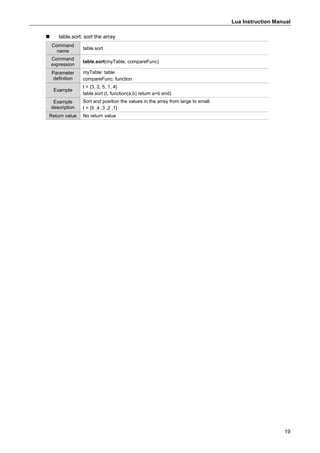
 table.sort: sort the array
Command
name
table.sort
Command
expression
table.sort(myTable, compareFunc)
Parameter
definition
myTable: table
compareFunc: function
Example
t = {3, 2, 5, 1, 4}
table.sort (t, function(a,b) return a>b end)
Example
description
Sort and position the values in the array from large to small.
t = {5 ,4 ,3 ,2 ,1}
Return value No return value
Lua Instruction Manual
20
4.1.3 if…then…else…elseif…end, and or not (comparison)
These commands help you design loops of if conditional expressions in Lua. The following
sections will explain each in detail.
The following table is the list for if...else...end commands.
Basic
syntax
Command Expression Description
Comparison
If…then…end
If Var1 == Var2 then
-- Do Something A
end
If Var1 is equal to Var2,
run action A.
If…then…else…end
If Var1 == Var2 then
--Do Something A
else
--Do Something B
end
If Var1 is equal to Var2,
then run action A,
otherwise run action B.
If…then…elseif…else…end
If Var1 > Var2 then
--Do Something A
elseIf Var1 < Var3
--Do Something B
else
--Do Something C
end
If Var1 is greater than
Var2, run action A;
if Var1 is less than Var3,
run action B, otherwise run
action C.
Example (if…then…elseif…else…end)
Build Lua program
(temperature
response measure)
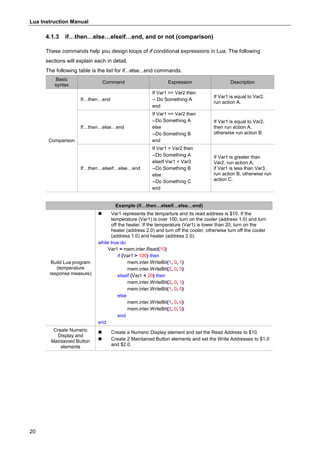
 Var1 represents the temparture and its read address is $10. If the
temperature (Var1) is over 100, turn on the cooler (address 1.0) and turn
off the heater. If the temperature (Var1) is lower than 20, turn on the
heater (address 2.0) and turn off the cooler, otherwise turn off the cooler
(address 1.0) and heater (address 2.0).
while true do
Var1 = mem.inter.Read(10)
if (Var1 > 100) then
mem.inter.WriteBit(1, 0, 1)
mem.inter.WriteBit(2, 0, 0)
elseif (Var1 < 20) then
mem.inter.WriteBit(2, 0, 1)
mem.inter.WriteBit(1, 0, 0)
else
mem.inter.WriteBit(1, 0, 0)
mem.inter.WriteBit(2, 0, 0)
end
end
Create Numeric
Display and
Maintained Button
elements
 Create a Numeric Display element and set the Read Address to $10.
 Create 2 Maintained Button elements and set the Write Addresses to $1.0
and $2.0.
Lua Instruction Manual
21
Example (if…then…elseif…else…end)
Execution results
 After building the Lua program and creating the elements, compile and
download the project to the HMI.
 When the temperature is over 100, trigger $1.0 to turn on the cooler;
when the temperature is lower than 20, turn off $1.0 and trigger $2.0 to
enable the heater. When the temperature is between 20 and 110, turn off
$1.0 and $2.0.
Scenario 1 Scenario 2 Scenario 3
Condition
$100 > 0 $100 < 20 20 < $100 < 110
Execution
results
Bit on $1.0 Bit on $2.0 Bit off $1.0 and $2.0
4.1.4 for var=1, 3 do… end (for loop)
These commands help you design the for loops in Lua. The following sections will explain each
in detail.
The following table is the list of for commands.
 for: execute the loop
Command
name
for
Command
expression
for [condition1] do
--[code block 1]
end
Example
for t= 1, 6 do
mem.inter.Write(t, 123)
end
Example
description
Execute the loop for 6 times and write the value 123 respectively to the internal
memory of $1 to $6.
Return value No return value
Lua Instruction Manual
22
Example 1
Build Lua
program
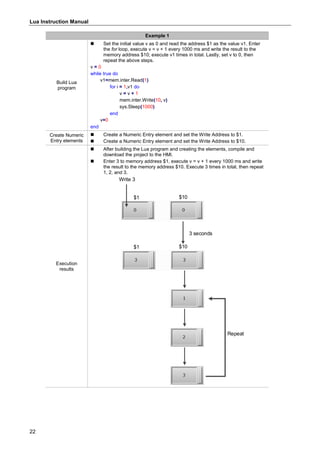
 Set the initial value v as 0 and read the address $1 as the value v1. Enter
the for loop, execute v = v + 1 every 1000 ms and write the result to the
memory address $10; execute v1 times in total. Lastly, set v to 0, then
repeat the above steps.
v = 0
while true do
v1=mem.inter.Read(1)
for i = 1,v1 do
v = v + 1
mem.inter.Write(10, v)
sys.Sleep(1000)
end
v=0
end
Create Numeric
Entry elements
 Create a Numeric Entry element and set the Write Address to $1.
 Create a Numeric Entry element and set the Write Address to $10.
Execution
results
 After building the Lua program and creating the elements, compile and
download the project to the HMI.
 Enter 3 to memory address $1, execute v = v + 1 every 1000 ms and write
the result to the memory address $10. Execute 3 times in total, then repeat
1, 2, and 3.
3 seconds
$1 $10
$1 $10
Write 3
Repeat
Lua Instruction Manual
23
Example 2
Build Lua
program
(Move once
every 1.5
seconds)
 Create a t array. Execute the loop every 1500 ms, each time it searches for
the parameters of the t array, sequentially pairs the parameters to the key
and value variables, and writes the results to $10 and $1. During the
search, the parameters that are already paired will be skipped.
while true do
t = {v1=123, v2="abc", v3=567}
for key,value in pairs(t) do
mem.inter.WriteAscii(10,key,string.len(key))
mem.inter.WriteAscii(1,value,string.len(value))
sys.Sleep(1500)
end
end
Create
Character Entry
elements
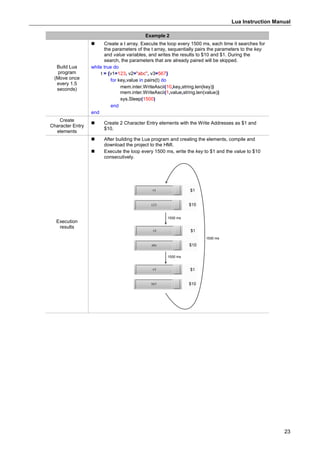
 Create 2 Character Entry elements with the Write Addresses as $1 and
$10.
Execution
results
 After building the Lua program and creating the elements, compile and
download the project to the HMI.
 Execute the loop every 1500 ms, write the key to $1 and the value to $10
consecutively.
1500 ms
1500 ms
1500 ms
Lua Instruction Manual
24
4.1.5 while break, repeat until (while, repeat loop)
These commands help you design the while and repeat loops in Lua. The following sections will
explain each in detail.
 while...end: execute the loop when...
Command
name
while…end
Command
expression
while [condition1] do
-- [code block 1]
end
Parameter
definition
No parameters
Example
while i ~= 5 do
i = i+1
If i > 100 then
break
end
end
Example
description
When i is not equal to 5, execute the loop i = i+1. If i > 100, break out of the loop
with the break command.
Return value No return value
 repeat...until: repeatedly execute the loop until...
Command
name
repeat…until
Command
expression
Repeat
-- [code block 1]
Until [condition1]
Parameter
definition
No parameters
Example
repeat
i = i + 1
until( i > 15 )
Example
description
Repeatedly execute i = i + 1 until i > 15.
Return value No return value
Lua Instruction Manual
25
Example (while, repeat)
Build Lua
program
 Build the Lua program as follows:
while true do
if (mem.inter.ReadBit(10,0)==1) then
v1 = mem.inter.Read(20)
while v1~=10 do
v1 = v1 + 1
sys.Sleep(100)
mem.inter.Write(20, v1)
if v1>=10 then
em.inter.WriteBit(10,0,0)
break
end
end
end
if (mem.inter.Read(100,0)==1) then
repeat
v1 = v1 - 1
sys.Sleep(100)
mem.inter.Write(20, v1)
until( v1 ==0 )
mem.inter.WriteBit(100,0,0)
end
end
 If $10.0 is triggered, read $20 as v1. When v1 is not equal to 10, execute
v1 = v1 + 1 and write the result to $20. If the result (v1) is greater than or
equal to 10, stop the execution.
if (mem.inter.ReadBit(10,0)==1) then
v1 = mem.inter.Read(20)
while v1~=10 do
v1 = v1 + 1
sys.Sleep(100)
mem.inter.Write(20, v1)
if v1>=10 then
mem.inter.WriteBit(10,0,0)
break
end
end
end
 If $100.0 is triggered, repeat v1 = v1 - 1 and write the result to $20 until
v1 = 0, then close $100.0.
if (mem.inter.Read(100,0)==1) then
repeat
v1 = v1 - 1
sys.Sleep(100)
mem.inter.Write(20, v1)
until( v1 ==0 )
mem.inter.WriteBit(100,0,0)
end
Create Numeric
Display and
Maintained
Button elements
 Create a Numeric Display element and set the Write Address to $20.
 Create 2 Maintained Button elements and set the Write Addresses to $10.0
and $100.0.
Lua Instruction Manual
26
Example (while, repeat)
Execution
results
 After building the Lua program and creating the elements, compile and
download the project to the HMI.
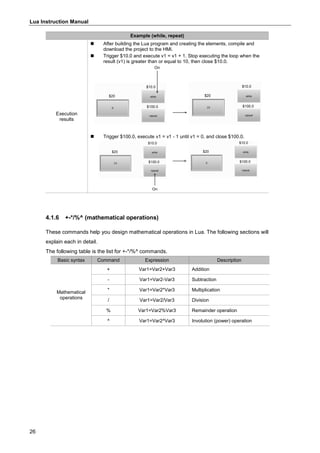
 Trigger $10.0 and execute v1 = v1 + 1. Stop executing the loop when the
result (v1) is greater than or equal to 10, then close $10.0.
On
 Trigger $100.0, execute v1 = v1 - 1 until v1 = 0, and close $100.0.
On
4.1.6 +-*/%^ (mathematical operations)
These commands help you design mathematical operations in Lua. The following sections will
explain each in detail.
The following table is the list for +-*/%^ commands.
Basic syntax Command Expression Description
Mathematical
operations
+ Var1=Var2+Var3 Addition
- Var1=Var2-Var3 Subtraction
* Var1=Var2*Var3 Multiplication
/ Var1=Var2/Var3 Division
% Var1=Var2%Var3 Remainder operation
^ Var1=Var2^Var3 Involution (power) operation
Lua Instruction Manual
27
4.1.7 function, call function, require return (flow control)
A function can wrap and name the Lua code blocks, and it is called in a program for execution,
which makes the program planning simpler. The following sections will explain each in detail.
 function: create a function
Command
name
function
Command
expression
function [function name 1]
-- [code block 1]
return [result 1]
end
Parameter
definition
No parameters
Example
function Add (a, b)
return a+b, a*b
end
Example
description
Create an Add(a, b) command and return the results of a+b and a*b.
Return value No return value
 require: load the module
Command
name
require
Command
expression
require [program name 1]
Parameter
definition
No parameters
Example
-- in Prog001 program
function Add (a, b)
return a+b, a*b
end
-- in main program
require "Prog001"
v1, v2 = Add (10, 20)
Example
description
Create a function Add(a, b) in the Prog001 program, load the Prog001 program in
the main program with the require command, then use the Add(a, b) function to
make v1=10+20, v2=10*20; v1=30, and v2=200.
Return value No return value
Lua Instruction Manual
28
Example (function, call function)
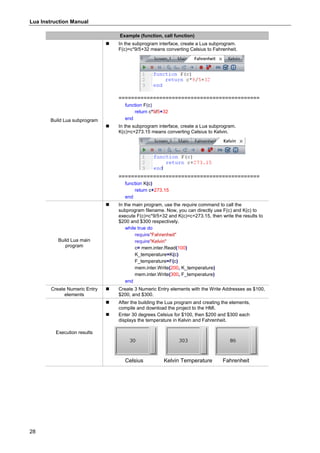
Build Lua subprogram
 In the subprogram interface, create a Lua subprogram.
F(c)=c*9/5+32 means converting Celsius to Fahrenheit.
=============================================
function F(c)
return c*9/5+32
end
 In the subprogram interface, create a Lua subprogram.
K(c)=c+273.15 means converting Celsius to Kelvin.
=============================================
function K(c)
return c+273.15
end
Build Lua main
program
 In the main program, use the require command to call the
subprogram filename. Now, you can directly use F(c) and K(c) to
execute F(c)=c*9/5+32 and K(c)=c+273.15, then write the results to
$200 and $300 respectively.
while true do
require"Fahrenheit"
require"Kelvin"
c= mem.inter.Read(100)
K_temperature=K(c)
F_temperature=F(c)
mem.inter.Write(200, K_temperature)
mem.inter.Write(300, F_temperature)
end
Create Numeric Entry
elements
 Create 3 Numeric Entry elements with the Write Addresses as $100,
$200, and $300.
Execution results
 After the building the Lua program and creating the elements,
compile and download the project to the HMI.
 Enter 30 degrees Celsius for $100, then $200 and $300 each
displays the temperature in Kelvin and Fahrenheit.
Celsius Kelvin Temperature Fahrenheit
Lua Instruction Manual
29
4.1.8 logic: xor and or not lshift rshift (logical operations)
This command helps you to perform logical operations. The following sections will explain each
in detail.
The following are the lists for logical operation commands.
Basic syntax Command Expression examples Description
Logical
operations
math.bxor Var1 = math.bxor(0x01, 0x03)
Var1 performs xor operation
on 0x01 and 0x03.
-- output: Var1 = 2
math.band Var1 = math.band(0x01, 0x03)
Var1 performs and operation
on 0x01 and 0x03.
-- output: Var1 = 1
math.bor Var1 = math.bor(0x01, 0x03)
Var1 performs or operation on
0x01 and 0x03.
-- output: Var1 = 3
math.bnot Var1 = math.bnot(0x01)
Var1 performs not operation
on 0x01.
-- output: Var1 = 0xFFFFFFFE
math.lshift Var1 = math.lshift(0x01, 2)
Convert 1 from hexadecimal to
binary and shift it to the left by
two bits.
-- output: Var1 = 4
math.rshift Var1 = math.rshift(0x04, 2)
Convert 4 from hexadecimal to
binary and shift it to the right
by two bits.
-- output: Var1 = 1
Logical operation list
Operand 1 0 1 0 1
Operand 2 0 0 1 1
XOR 0 1 1 0
AND 0 0 0 1
OR 0 1 1 1
Lua Instruction Manual
30
Example (logic)
Build Lua program
(determining
odd/even number)
 Read $10 as c, perform the and logical operation on c and 1 (it is
known that in the and operation, only 1 and 1 yield 1,which means
that with the and operation, odd numbers and 1 yield 1; even
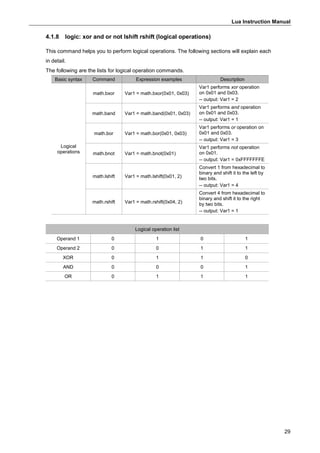
numbers and 1 yield 0). So, if the variable g is 1, judge is the string
“odd number”; if g is 0, judge is the string “even number”. Lastly,
write judge to $100.
===============================================
while true do
c = mem.inter.Read(10)
g = math.band(1, c)
if g==1 then
judge="odd number"
else
judge="even number"
end
mem.inter.WriteAscii(100, judge, string.len(judge))
end
Create Numeric Entry
and Character Display
elements
 Create a Numeric Entry element and set the Write Address to $10.
 Create a Character Display element and set the Read Address to
$100.
Execution results
 After building the Lua program and creating the elements, compile
and download the project to the HMI.
 Enter 1 for $10, then $100 displays odd number.
Enter 2 for $10, then $100 displays even number.
$10 $100
$10 $100
Lua Instruction Manual
31
4.2 Internal memory - $
These commands help you read and write to the internal memory address. The commands
include:
Command Command expression Description
Internal memory - $
mem.inter.Read
Read the value of the internal memory
(unit: Word)
mem.inter.ReadDW
Read the value of the internal memory
(unit: Double Word)
mem.inter.ReadFloat
Read the value of the internal memory
(unit: Float)
mem.inter.ReadBit Read the bit of the internal memory
mem.inter.ReadDouble
Read the value of the internal memory
(unit: double-precision floating-point numbers)
mem.inter.Write
Write the value to the internal memory
(unit: Word)
mem.inter.WriteDW
Write the value to the internal memory
(unit: Double Word)
mem.inter.WriteFloat
Write the value to the internal memory
(unit: Float)
mem.inter.WriteBit Write the bit to the internal memory
mem.inter.ReadAscii Read the string of the internal memory
mem.inter.WriteAscii Write the string to the internal memory
mem.inter.WriteDouble
Write the value to the internal memory
(unit: double-precision floating-point numbers)
The following sections will explain each in detail.
 mem.inter.Read: read the value of the internal memory (unit: Word)
Command
name
mem.inter.Read
Command
expression
Value = mem.inter.Read(index, [value_format])
Parameter
definition
index: integer; memory index with the range of 0 to 199999
value_format: format string. Fill in "signed" for signed numbers; this parameter is not
mandatory.
Example v1 = mem.inter.Read(0)
Example
description
Read the value of $0 in units of Word.
Return value v1: 0x0000 to 0xFFFF; return 0 on failure
 mem.inter.ReadDW: read the value of the internal memory (unit: Double Word)
Command
name
mem.inter.ReadDW
Command
expression
Value = mem.inter.ReadDW(index, [value_format])
Parameter
definition
index: integer; memory index with the range of 0 to 199998
value_format: format string. Fill in "signed" for signed numbers; this parameter is not
mandatory.
Example dw = mem.inter.ReadDW(0)
Example
description
Read the value of $0 in units of Double Word.
Return value v1: 0x00000000 to 0xFFFFFFFF; return 0 on failure
Lua Instruction Manual
32
 mem.inter.ReadFloat: read the value of the internal memory (unit: Float)
Command
name
mem.inter.ReadFloat
Command
expression
Value = mem.inter.ReadFloat(index)
Parameter
definition
index: integer; memory index with the range of 0 to 199998
Example f1 = mem.inter.ReadFloat(0)
Example
description
Read the value of $0 in units of Float.
Return value f1: single-precision floating-point number
 mem.inter.ReadBit: read the bit of the internal memory
Command
name
mem.inter.ReadBit
Command
expression
Result = mem.inter.ReadBit(index, bit)
Parameter
definition
index: integer; memory index with the range of 0 to 199999
bit: integer; BIT index with the range of 0 to 15
Example b1 = mem.inter.ReadBit(0, 15)
Example
description
Read the bit of $0.15.
Return value b1: integer; 1 or 0; return 0 on failure
 mem.inter.ReadDouble: read the value of the internal memory
(unit: double-precision floating-point numbers)
Command
name
mem.inter.ReadDouble
Command
expression
Result = mem.inter.ReadDouble(index)
Parameter
definition
index: integer; memory index with the range of 0 to 199996
Example Q1 = mem.inter.ReadDouble(0)
Example
description
Read the value of $0 in units of double-precision floating-point numbers.
Return value Q1: double-precision floating-point numbers
 mem.inter.Write: write the value to the internal memory (unit: Word)
Command
name
mem.inter.Write
Command
expression
Result = mem.inter.Write(index, value)
Parameter
definition
index: integer; memory index with the range of 0 to 199999
value: decimal integer
Example result = mem.inter.Write(0, 123)
Example
description
Write the value 123 to $0 in units of Word.
Return value Result: return 1 on success; return 0 on failure
Lua Instruction Manual
33
 mem.inter.WriteDW: write the value to the internal memory (unit: Double Word)
Command
name
mem.inter.WriteDW
Command
expression
Result = mem.inter.WriteDW(index, value)
Parameter
definition
index: integer; memory index with the range of 0 to 199998
value: decimal integer
Example result = mem.inter.WriteDW(0, 65536)
Example
description
Write the value 65536 to $0 in units of Double Word.
Return value Result: return 1 on success; return 0 on failure
 mem.inter.WriteFloat: write the value to the internal memory (unit: Float)
Command
name
mem.inter.WriteFloat
Command
expression
Result = mem.inter.WriteFloat(index, float_value)
Parameter
definition
index: integer; memory index with the range of 0 to 199998
float_value: single-precision floating-point number
Example result = mem.inter.WriteFloat(0, 1.23)
Example
description
Write the value 1.23 to $0 in units of Float.
Return value Result: return 1 on success; return 0 on failure
 mem.inter.WriteBit: write the bit to the internal memory
Command
name
mem.inter.WriteBit
Command
expression
Result = mem.inter.WriteBit(index, bit, logic)
Parameter
definition
index: integer; memory index with the range of 0 to 199999
bit: integer; BIT index with the range range of 0 to 15
logic: integer; 1 or 0
Example result = mem.inter.WriteBit(0, 0, 1)
Example
description
Set the $0.0 bit to On.
Return value Result: return 1 on success; return 0 on failure
 mem.inter.WriteDouble: write the value to the internal memory
(unit: double-precision floating-point numbers)
Command
name
mem.inter.WriteDouble
Command
expression
Result = mem.inter.WriteDouble(index, Double_value)
Parameter
definition
index: integer; memory index with the range of 0 to 199996
Double_value: double-precision floating-point number
Example result = mem.inter.WriteDouble(10, 123456789.99)
Example
description
Write 123456789.99 to $10 in units of double-precision floating-point numbers.
Return value Result: return 1 on success; return 0 on failure
Lua Instruction Manual
34
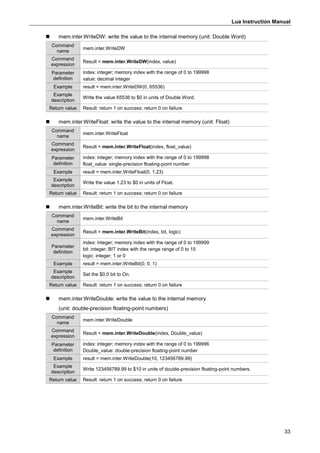
 mem.inter.ReadAscii: read the string of the internal memory
Command
name
mem.inter.ReadAscii
Command
expression
ascii_string = mem.inter.ReadAscii(start_index, string_len)
Parameter
definition
start_index: integer; memory index with the range of 0 to 199999
string_len: integer; ascii number (in bytes)
Example ascii_string = mem.inter.ReadAscii(0, 4)
Example
description
Read the $0 string with the length of 4 bytes.
Return value ascii_string: ascii string
 mem.inter.WriteAscii: write the string to the internal memory
Command
name
mem.inter.WriteAscii
Command
expression
Result = mem.inter.WriteAscii(start_index, asci_string, string_len)
Parameter
definition
start_index: integer; memory index with the range of 0 to 199999
asci_string: ascii string
string_len: integer; ascii number (in bytes)
Example Result = mem.inter.WriteAscii(0, "posheng", string.len("posheng"))
Example
description
Write posheng to $0 with the string length of "posheng".
Note: the characters "0" will be added to the end of the written data.
Return value Result: integer; the number of the written ascii (in bytes)
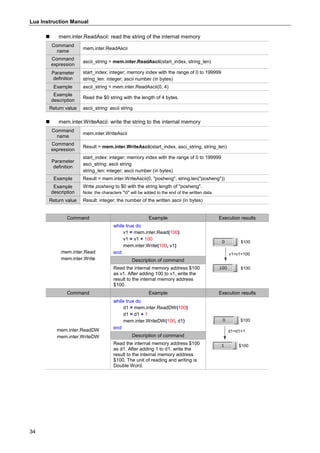
Command Example Execution results
mem.inter.Read
mem.inter.Write
while true do
v1 = mem.inter.Read(100)
v1 = v1 + 100
mem.inter.Write(100, v1)
end
$100
$100
v1=v1+100
Description of command
Read the internal memory address $100
as v1. After adding 100 to v1, write the
result to the internal memory address
$100.
Command Example Execution results
mem.inter.ReadDW
mem.inter.WriteDW
while true do
d1 = mem.inter.ReadDW(100)
d1 = d1 + 1
mem.inter.WriteDW(100, d1)
end
$100
$100
d1=d1+1
Description of command
Read the internal memory address $100
as d1. After adding 1 to d1, write the
result to the internal memory address
$100. The unit of reading and writing is
Double Word.
Lua Instruction Manual
35
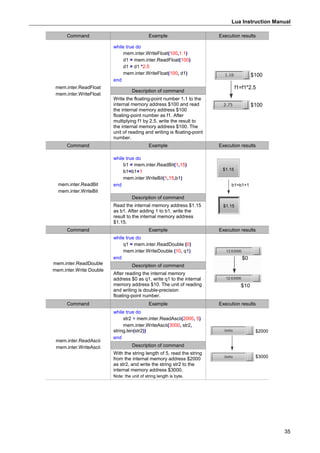
Command Example Execution results
mem.inter.ReadFloat
mem.inter.WriteFloat
while true do
mem.inter.WriteFloat(100,1.1)
d1 = mem.inter.ReadFloat(100)
d1 = d1 *2.5
mem.inter.WriteFloat(100, d1)
end
$100
$100
f1=f1*2.5
Description of command
Write the floating-point number 1.1 to the
internal memory address $100 and read
the internal memory address $100
floating-point number as f1. After
multiplying f1 by 2.5, write the result to
the internal memory address $100. The
unit of reading and writing is floating-point
number.
Command Example Execution results
mem.inter.ReadBit
mem.inter.WriteBit
while true do
b1 = mem.inter.ReadBit(1,15)
b1=b1+1
mem.inter.WriteBit(1,15,b1)
end
$1.15
$1.15
b1=b1+1
Description of command
Read the internal memory address $1.15
as b1. After adding 1 to b1, write the
result to the internal memory address
$1.15.
Command Example Execution results
mem.inter.ReadDouble
mem.inter.Write Double
while true do
q1 = mem.inter.ReadDouble (0)
mem.inter.WriteDouble (10, q1)
end $0
$10
Description of command
After reading the internal memory
address $0 as q1, write q1 to the internal
memory address $10. The unit of reading
and writing is double-precision
floating-point number.
Command Example Execution results
mem.inter.ReadAscii
mem.inter.WriteAscii
while true do
str2 = mem.inter.ReadAscii(2000, 5)
mem.inter.WriteAscii(3000, str2,
string.len(str2))
end
$2000
$3000
Description of command
With the string length of 5, read the string
from the internal memory address $2000
as str2, and write the string str2 to the
internal memory address $3000.
Note: the unit of string length is byte.
Lua Instruction Manual
36
4.3 Static memory - $M
These commands help you read from and write to the internal memory address in the HMI when
the power is off. The commands include:
Command Command expression Description
Static memory - $M
mem.static.Read
Read the value of the static memory
(unit: Word)
mem.static.ReadDW
Read the value of the static memory
(unit: Double Word)
mem.static.ReadFloat
Read the value of the static memory
(unit: Float)
mem.static.ReadBit Read the bit of the static memory
mem.static.ReadDouble
Read the value of the static memory
(unit: double-precision floating-point numbers)
mem.static.Write
Write the value to the static memory
(unit: Word)
mem.static.WriteDW
Write the value to the static memory
(unit: Double Word)
mem.static.WriteFloat
Write the value to the static memory
(unit: Float)
mem.static.WriteBit Write the bit to the static memory
mem.static.WriteDouble
Write the value to the static memory
(unit: double-precision floating-point numbers)
mem.static.ReadAscii Read the string of the static memory
mem.static.WriteAscii Write the string to the static memory
The following will explain each in detail.
 mem.static.Read: read the value of the static memory (unit: Word)
Command
name
mem.static.Read
Command
expression
Value = mem.static.Read(index, [value_format])
Parameter
definition
index: integer; memory index with the range of 0 to 1023
value_format: format string. Fill in "signed" for signed numbers; this parameter is not
mandatory.
Example v1 = mem.static.Read(0)
Example
description
Read the value of $M0 in units of Word.
Return value v1: 0x0000 to 0xFFFF; return 0 on failure
 mem.static.ReadDW: read the value of the static memory (unit: Double Word)
Command
name
mem.static.ReadDW
Command
expression
Value = mem.static.ReadDW(index, [value_format])
Parameter
definition
index: integer; memory index with the range of 0 to 1022
value_format: format string. Fill in "signed" for signed numbers; this parameter is not
mandatory.
Example dw = mem.static.ReadDW(0)
Example
description
Read the value of $M0 in units of Double Word.
Return value dw: 0x00000000 to 0xFFFFFFFF; return 0 on failure
Lua Instruction Manual
37
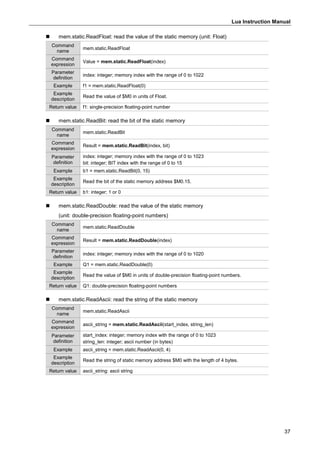
 mem.static.ReadFloat: read the value of the static memory (unit: Float)
Command
name
mem.static.ReadFloat
Command
expression
Value = mem.static.ReadFloat(index)
Parameter
definition
index: integer; memory index with the range of 0 to 1022
Example f1 = mem.static.ReadFloat(0)
Example
description
Read the value of $M0 in units of Float.
Return value f1: single-precision floating-point number
 mem.static.ReadBit: read the bit of the static memory
Command
name
mem.static.ReadBit
Command
expression
Result = mem.static.ReadBit(index, bit)
Parameter
definition
index: integer; memory index with the range of 0 to 1023
bit: integer; BIT index with the range of 0 to 15
Example b1 = mem.static.ReadBit(0, 15)
Example
description
Read the bit of the static memory address $M0.15.
Return value b1: integer; 1 or 0
 mem.static.ReadDouble: read the value of the static memory
(unit: double-precision floating-point numbers)
Command
name
mem.static.ReadDouble
Command
expression
Result = mem.static.ReadDouble(index)
Parameter
definition
index: integer; memory index with the range of 0 to 1020
Example Q1 = mem.static.ReadDouble(0)
Example
description
Read the value of $M0 in units of double-precision floating-point numbers.
Return value Q1: double-precision floating-point numbers
 mem.static.ReadAscii: read the string of the static memory
Command
name
mem.static.ReadAscii
Command
expression
ascii_string = mem.static.ReadAscii(start_index, string_len)
Parameter
definition
start_index: integer; memory index with the range of 0 to 1023
string_len: integer; ascii number (in bytes)
Example ascii_string = mem.static.ReadAscii(0, 4)
Example
description
Read the string of static memory address $M0 with the length of 4 bytes.
Return value ascii_string: ascii string
Lua Instruction Manual
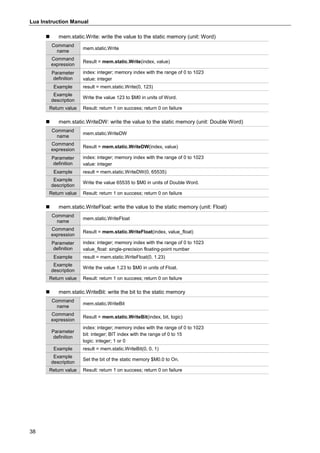
38
 mem.static.Write: write the value to the static memory (unit: Word)
Command
name
mem.static.Write
Command
expression
Result = mem.static.Write(index, value)
Parameter
definition
index: integer; memory index with the range of 0 to 1023
value: integer
Example result = mem.static.Write(0, 123)
Example
description
Write the value 123 to $M0 in units of Word.
Return value Result: return 1 on success; return 0 on failure
 mem.static.WriteDW: write the value to the static memory (unit: Double Word)
Command
name
mem.static.WriteDW
Command
expression
Result = mem.static.WriteDW(index, value)
Parameter
definition
index: integer; memory index with the range of 0 to 1023
value: integer
Example result = mem.static.WriteDW(0, 65535)
Example
description
Write the value 65535 to $M0 in units of Double Word.
Return value Result: return 1 on success; return 0 on failure
 mem.static.WriteFloat: write the value to the static memory (unit: Float)
Command
name
mem.static.WriteFloat
Command
expression
Result = mem.static.WriteFloat(index, value_float)
Parameter
definition
index: integer; memory index with the range of 0 to 1023
value_float: single-precision floating-point number
Example result = mem.static.WriteFloat(0, 1.23)
Example
description
Write the value 1.23 to $M0 in units of Float.
Return value Result: return 1 on success; return 0 on failure
 mem.static.WriteBit: write the bit to the static memory
Command
name
mem.static.WriteBit
Command
expression
Result = mem.static.WriteBit(index, bit, logic)
Parameter
definition
index: integer; memory index with the range of 0 to 1023
bit: integer; BIT index with the range of 0 to 15
logic: integer; 1 or 0
Example result = mem.static.WriteBit(0, 0, 1)
Example
description
Set the bit of the static memory $M0.0 to On.
Return value Result: return 1 on success; return 0 on failure
Lua Instruction Manual
39
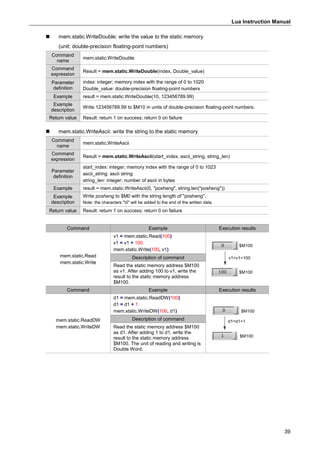
 mem.static.WriteDouble: write the value to the static memory
(unit: double-precision floating-point numbers)
Command
name
mem.static.WriteDouble
Command
expression
Result = mem.static.WriteDouble(index, Double_value)
Parameter
definition
index: integer; memory index with the range of 0 to 1020
Double_value: double-precision floating-point numbers
Example result = mem.static.WriteDouble(10, 123456789.99)
Example
description
Write 123456789.99 to $M10 in units of double-precision floating-point numbers.
Return value Result: return 1 on success; return 0 on failure
 mem.static.WriteAscii: write the string to the static memory
Command
name
mem.static.WriteAscii
Command
expression
Result = mem.static.WriteAscii(start_index, ascii_string, string_len)
Parameter
definition
start_index: integer; memory index with the range of 0 to 1023
ascii_string: ascii string
string_len: integer; number of ascii in bytes
Example result = mem.static.WriteAscii(0, "posheng", string.len("posheng"))
Example
description
Write posheng to $M0 with the string length of "posheng".
Note: the characters "0" will be added to the end of the written data.
Return value Result: return 1 on success; return 0 on failure
Command Example Execution results
mem.static.Read
mem.static.Write
v1 = mem.static.Read(100)
v1 = v1 + 100
mem.static.Write(100, v1)
$M100
$M100
v1=v1+100
Description of command
Read the static memory address $M100
as v1. After adding 100 to v1, write the
result to the static memory address
$M100.
Command Example Execution results
mem.static.ReadDW
mem.static.WriteDW
d1 = mem.static.ReadDW(100)
d1 = d1 + 1
mem.static.WriteDW(100, d1) $M100
$M100
d1=d1+1
Description of command
Read the static memory address $M100
as d1. After adding 1 to d1, write the
result to the static memory address
$M100. The unit of reading and writing is
Double Word.
Lua Instruction Manual
40
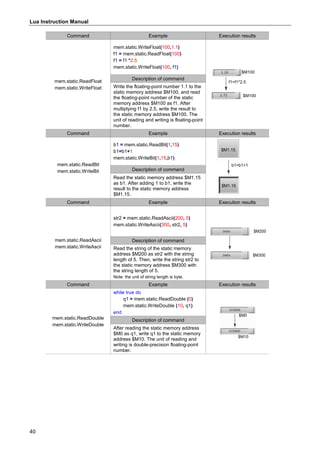
Command Example Execution results
mem.static.ReadFloat
mem.static.WriteFloat
mem.static.WriteFloat(100,1.1)
f1 = mem.static.ReadFloat(100)
f1 = f1 *2.5
mem.static.WriteFloat(100, f1)
$M100
$M100
f1=f1*2.5
Description of command
Write the floating-point number 1.1 to the
static memory address $M100, and read
the floating-point number of the static
memory address $M100 as f1. After
multiplying f1 by 2.5, write the result to
the static memory address $M100. The
unit of reading and writing is floating-point
number.
Command Example Execution results
mem.static.ReadBit
mem.static.WriteBit
b1 = mem.static.ReadBit(1,15)
b1=b1+1
mem.static.WriteBit(1,15,b1)
$M1.15
$M1.15
b1=b1+1
Description of command
Read the static memory address $M1.15
as b1. After adding 1 to b1, write the
result to the static memory address
$M1.15.
Command Example Execution results
mem.static.ReadAscii
mem.static.WriteAscii
str2 = mem.static.ReadAscii(200, 5)
mem.static.WriteAscii(300, str2, 5)
$M200
$M300
Description of command
Read the string of the static memory
address $M200 as str2 with the string
length of 5. Then, write the string str2 to
the static memory address $M300 with
the string length of 5.
Note: the unit of string length is byte.
Command Example Execution results
mem.static.ReadDouble
mem.static.WriteDouble
while true do
q1 = mem.static.ReadDouble (0)
mem.static.WriteDouble (10, q1)
end
$M0
$M10
Description of command
After reading the static memory address
$M0 as q1, write q1 to the static memory
address $M10. The unit of reading and
writing is double-precision floating-point
number.
Lua Instruction Manual
41
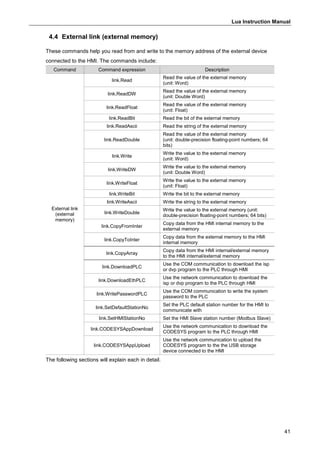
4.4 External link (external memory)
These commands help you read from and write to the memory address of the external device
connected to the HMI. The commands include:
Command Command expression Description
External link
(external
memory)
link.Read
Read the value of the external memory
(unit: Word)
link.ReadDW
Read the value of the external memory
(unit: Double Word)
link.ReadFloat
Read the value of the external memory
(unit: Float)
link.ReadBit Read the bit of the external memory
link.ReadAscii Read the string of the external memory
link.ReadDouble
Read the value of the external memory
(unit: double-precision floating-point numbers; 64
bits)
link.Write
Write the value to the external memory
(unit: Word)
link.WriteDW
Write the value to the external memory
(unit: Double Word)
link.WriteFloat
Write the value to the external memory
(unit: Float)
link.WriteBit Write the bit to the external memory
link.WriteAscii Write the string to the external memory
link.WriteDouble
Write the value to the external memory (unit:
double-precision floating-point numbers; 64 bits)
link.CopyFromInter
Copy data from the HMI internal memory to the
external memory
link.CopyToInter
Copy data from the external memory to the HMI
internal memory
link.CopyArray
Copy data from the HMI internal/external memory
to the HMI internal/external memory
link.DownloadPLC
Use the COM communication to download the isp
or dvp program to the PLC through HMI
link.DownloadEthPLC
Use the network communication to download the
isp or dvp program to the PLC through HMI
link.WritePasswordPLC
Use the COM communication to write the system
password to the PLC
link.SetDefaultStationNo
Set the PLC default station number for the HMI to
communicate with
link.SetHMIStationNo Set the HMI Slave station number (Modbus Slave)
link.CODESYSAppDownload
Use the network communication to download the
CODESYS program to the PLC through HMI
link.CODESYSAppUpload
Use the network communication to upload the
CODESYS program to the the USB storage
device connected to the HMI
The following sections will explain each in detail.
Lua Instruction Manual
42
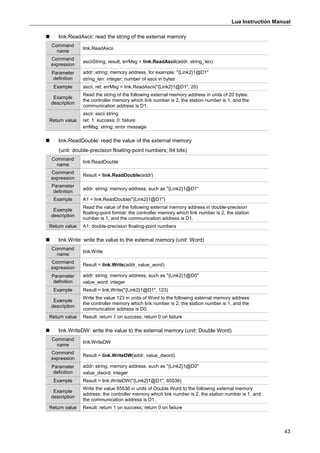
 link.Read: read the value of the external memory (unit: Word)
Command
name
link.Read
Command
expression
Result = link.Read(addr, [value_format])
Parameter
definition
addr: string, memory address, for example: "{Link2}1@D1"
value_format: format string. Fill in "signed" for signed numbers; this parameter is not
mandatory.
Example v1 = link.Read("{Link2}1@D1")
Example
description
Read the values of the following external memory address in units of Word:
the controller memory which link number is 2, the station number is 1, and the
communication address is D1.
Return value v1: integer
 link.ReadDW: read the value of the external memory (unit: Double Word)
Command
name
link.ReadDW
Command
expression
Result = link.ReadDW(addr, [value_format])
Parameter
definition
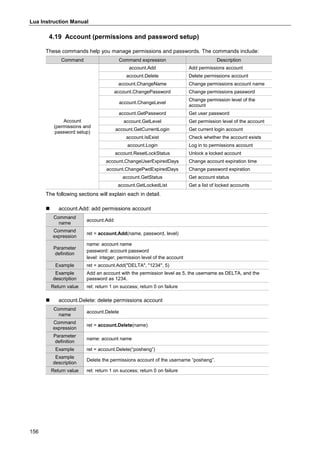
addr: string; memory address, such as "{Link2}1@D1"
value_format: format string. Fill in "signed" for signed numbers; this parameter is not
mandatory.
Example dw = link.ReadDW("{Link2}1@D1")
Example
description
Read the values of the following external memory address in units of Double Word:
the controller memory which link number is 2, the station number is 1, and the
communication address is D1.
Return value dw: integer
 link.ReadFloat: read the value of the external memory (unit: Float)
Command
name
link.ReadFloat
Command
expression
Result = link.ReadFloat(addr)
Parameter
definition
addr: string; memory address,such as "{Link2}1@D1"
Example f1 = link.ReadFloat("{Link2}1@D1")
Example
description
Read the values of the following external memory address in units of Float:
the controller memory which link number is 2, the station number is 1, and the
communication address is D1.
Return value f1: single-precision floating-point number
 link.ReadBit: read the bit of the external memory
Command
name
link.ReadBit
Command
expression
Result = link.ReadBit(addr)
Parameter
definition
addr: string; memory address, such as "{Link2}1@M100"
Example b = link.ReadBit("{Link2}1@M1")
Example
description
Read the bit of the following external memory address:
the controller memory which link number is 2, the station number is 1, and the
communication address is M1.
Return value v1: integer; 1 or 0
Lua Instruction Manual
43
 link.ReadAscii: read the string of the external memory
Command
name
link.ReadAscii
Command
expression
asciiString, result, errMsg = link.ReadAscii(addr, string_len)
Parameter
definition
addr: string; memory address, for example: "{Link2}1@D1"
string_len: integer; number of ascii in bytes
Example ascii, ret, errMsg = link.ReadAscii("{Link2}1@D1", 20)
Example
description
Read the string of the following external memory address in units of 20 bytes:
the controller memory which link number is 2, the station number is 1, and the
communication address is D1.
Return value
ascii: ascii string
ret: 1: success; 0: failure
errMsg: string; error message
 link.ReadDouble: read the value of the external memory
(unit: double-precision floating-point numbers; 64 bits)
Command
name
link.ReadDouble
Command
expression
Result = link.ReadDouble(addr)
Parameter
definition
addr: string; memory address, such as "{Link2}1@D1"
Example A1 = link.ReadDouble("{Link2}1@D1")
Example
description
Read the value of the following external memory address in double-precision
floating-point format: the controller memory which link number is 2, the station
number is 1, and the communication address is D1.
Return value A1: double-precision floating-point numbers
 link.Write: write the value to the external memory (unit: Word)
Command
name
link.Write
Command
expression
Result = link.Write(addr, value_word)
Parameter
definition
addr: string; memory address, such as "{Link2}1@D0"
value_word: integer
Example Result = link.Write("{Link2}1@D1", 123)
Example
description
Write the value 123 in units of Word to the following external memory address:
the controller memory which link number is 2, the station number is 1, and the
communication address is D0.
Return value Result: return 1 on success; return 0 on failure
 link.WriteDW: write the value to the external memory (unit: Double Word)
Command
name
link.WriteDW
Command
expression
Result = link.WriteDW(addr, value_dword)
Parameter
definition
addr: string; memory address, such as "{Link2}1@D0"
value_dword: integer
Example Result = link.WriteDW("{Link2}1@D1", 65536)
Example
description
Write the value 65536 in units of Double Word to the following external memory
address: the controller memory which link number is 2, the station number is 1, and
the communication address is D1.
Return value Result: return 1 on success; return 0 on failure
Lua Instruction Manual
44
 link.WriteFloat: write the value to the external memory (unit: Float)
Command
name
link.WriteFloat
Command
expression
Result = link.WriteFloat(addr, value_float)
Parameter
definition
addr: string; memory address, such as "{Link2}1@D0"
value_float: single-precision floating-point number
Example Result = link.WriteFloat("{Link2}1@D1", 1.23)
Example
description
Write the value 1.23 in units of Float to the following external memory address:
the controller memory which link number is 2, the station number is 1, and the
communication address is D1.
Return value Result: return 1 on success; return 0 on failure
 link.WriteBit: write the bit to the external memory
Command
name
link.WriteBit
Command
expression
Result = link.WriteBit(addr, value_bit)
Parameter
definition
addr: string; memory address, such as "{Link2}1@M100"
value_bit: integer; 1 or 0
Example Result = link.WriteBit("{Link2}1@M1", 1)
Example
description
Set the bit of the following external memory address to On:
the controller memory which link number is 2, the station number is 1, and the
communication address is M1.
Return value Result: return 1 on success; return 0 on failure
 link.WriteAscii: write the string to the external memory
Command
name
link.WriteAscii
Command
expression
Result = link.WriteAscii(addr, ascii, asci_len)
Parameter
definition
addr: string; memory address, such as "{Link2}1@D0"
ascii: string, UTF-8 encoding (in bytes)
asci_len: integer, number of ascii in bytes
Example Result = link.WriteAscii("{Link2}1@D1", "posheng", string.len("posheng"))
Example
description
Write posheng to the following external memory address with the string length of
"posheng": the controller memory which link number is 2, the station number is 1, and
the communication address is D1.
Return value Result: return 1 on success; return 0 on failure
 link.WriteDouble: write the value to the external memory
(unit: double-precision floating-point numbers; 64 bits)
Command
name
link.WriteDouble
Command
expression
Result = link.WriteDouble(addr, value_double)
Parameter
definition
addr: string; memory address, such as "{Link2}1@D0"
value_double: double-precision floating-point number
Example Result = link.WriteDouble("{Link2}1@D1", 1234567.89)
Example
description
Write the value 1234567.89 in units of double-precision floating-point numbers to the
following external memory address:
the controller memory which link number is 2, the station number is 1, and the
communication address is D1.
Return value Result: return 1 on success; return 0 on failure
Lua Instruction Manual
45
 link.CopyFromInter: copy data from the HMI internal memory to the external memory
Command
name
link.CopyFromInter
Command
expression
result = link.CopyFromInter(addr, interMemIndex, wordLen)
Parameter
definition
addr: string; memory address, such as "{Link2}1@D1"
interMemIndex: integer; starting address of the internal memory
wordLen: integer; number of Word
Example Result = link.CopyFromInter("{Link2}1@D1", 100, 6)
Example
description
Move the data with the length of 6 words from the HMI internal memory address $100
to the following external memory address:
the controller memory which link number is 2, the station number is 1, and the
communication address is D1.
Return value Result: return 1 on success; return 0 on failure
 link.CopyToInter: copy data from the external memory to the HMI internal memory
Command
name
link.CopyToInter
Command
expression
result = link.CopyToInter(addr, interMemIndex, wordLen)
Parameter
definition
addr: string; memory address, such as "{Link2}1@D1"
interMemIndex: integer; starting address of the internal memory
wordLen: integer; number of Word
Example Result = link.CopyToInter("{Link2}1@D1", 100, 6)
Example
description
Move the data with the length of 6 words from the controller memory address
(Link number 2, station number 1, communication address D1) to $100 of the HMI.
Return value Result: return 1 on success; return 0 on failure
 link.CopyArray: copy data from the HMI internal/external memory to the HMI
internal/external memory
Command
name
link.CopyArray
Command
expression
result = link.CopyArray(dst_addr, dst_offset, src_addr, src_offset, wordLen)
Parameter
definition
dst_addr: string or integer; target address
dst_offset: integer; target offset length
src_addr: string or integer; source address
src_offset: integer; source offset length
wordLen: integer; copy length
Example
Example 1: result = link.CopyArray(95, 0, 190, 3, 6)
Example 2: result = link.CopyArray(95, 0,"{Link2}1@D0", 0, 6)
Example
description
Example 1: move the data with the length of 6 words from addresses $193 to $198 to
addresses $95 to $100.
Example 2: move the data with the length of 6 words from {Link2}1@D0 -
{Link2}1@D5 to $95 - $100.
Return value Result: return 1 on success; return 0 on failure; return -1 on parameter error
Lua Instruction Manual
46
 link.DownloadPLC: use the COM communication to download the isp or dvp program to
the PLC through HMI
Command
name
link.DownloadPLC
Command
expression
ret, errDesc = link.DownloadPLC(comNo, stationNo, diskID, fileName, projectPwd,
plcSystemSecurityPwd)
Parameter
definition
comNo: integer; communication serial port number, 1: COM1; 2: COM2, and so on
stationNo: integer: 1 to 255
diskID: integer; disk ID; 2: USB drive; 3: SD card
fileName: string; filename, such as ss.dvp and ss.isp
projectPwd: string; project password
plcSystemSecurityPwd: string; PLC system security password
Example ret, errDesc = link.DownloadPLC(2, 1, 2, "EH.dvp", "1234", "5678")
Example
description
Use COM2 as the interface to download the program EH.dvp stored in the USB drive
to the PLC with the project password 1234 and system password 5678.
Note:
1. This command only supports the COM communication, but not the network
communication.
2. You must first ensure the communication between the HMI and the PLC.
3. Currently available on Delta DVP, AS, and AH series PLC.
Return value
ret: return 1 on success; return 0 on failure
errDesc: string; error message
 link.DownloadEthPLC: use the network communication to download the isp or dvp
program to the PLC through HMI
Command
name
link.DownloadEthPLC
Command
expression
ret, errDesc = link.DownloadEthPLC(ip, port, stationNo, diskID, fileName,
projectPwd, plcSystemSecurityPwd)
Parameter
definition
ip: string; "192.168.0.1", and so on
port: integer
stationNo: integer; station number: 1 to 255
diskID: integer; disk ID; 2: USB drive; 3: SD card
fileName: string; filename, such as delta.dvp and delta.isp
projectPwd: string; project password
plcSystemSecurityPwd: string; PLC system security password
Example
ret, errDesc = link.DownloadEthPLC("192.168.123.205", 502, 1, 2, "delta.isp", "1234",
"5678")
Example
description
Using the network as the interface, download the program delta.isp stored in the USB
drive to the PLC with the project password 1234 and system password 5678.
Note:
1. This command only supports the network communication, but not the COM
communication.
2. You must first ensure that the HMI and PLC are in the same network domain.
3. Currently availale on Delta DVP, AS, and AH series PLC.
Return value
ret: return 1 on success; return 0 on failure
errDesc: string; error message
Lua Instruction Manual
47
 link.WritePasswordPLC: use the COM communication to write the system password to the
PLC
Command
name
link.WritePasswordPLC
Command
expression
ret, errDesc = link.WritePasswordPLC(comNo, stationNo, oldPlcSystemPwd,
newPlcSystemPwd)
Parameter
definition
comNo: integer; communication serial port number. 1: COM1; 2: COM2, and so on.
stationNo: integer: 1 to 255
oldPlcSystemPwd: string; the old PLC system security password
newPlcSystemPwd: string; the new PLC system security password
Example ret, errDesc = link.WritePasswordPLC(2, 1, "1234", "2222")
Example
description
Use COM2 as the interface to change the PLC password to 2222. If the PLC already
has a system password, the command checks whether the password matches
"1234".
Note:
1. This command only supports the COM communication, but not the network
communication.
2. You must first ensure the communication between the HMI and the PLC.
3. Currently available on Delta DVP, AS, AH series PLC.
Return value
ret: return 1 on success; return 0 on failure
errDesc: string; error message
 link.SetDefaultStationNo: set the default PLC Station number for the HMI to communicate
with
Command
name
link.SetDefaultStationNo
Command
expression
ret = link.SetDefaultStationNo(link_number, station_number)
Parameter
definition
link_number: integer; communication serial port number. 0: COM1; 1: COM2, and so
on.
station_number: integer: 1 to 255
Example ret = link.SetDefaultStationNo(0, 1)
Example
description
Change the default PLC Station number of COM1 communication to 1 dynamically.
Return value ret: return 1 on success; return -1 on parameter error
Lua Instruction Manual
48
 link.SetHMIStationNo: set the HMI Slave station number (Modbus Slave)
Command
name
link.SetHMIStationNo
Command
expression
ret = link.SetHMIStationNo(link_number, station_number)
Parameter
definition
link_number: integer; communication serial port number. 0: COM1; 1: COM2, and so
on.
station_number: integer: 1 to 255
Example
ret = link.SetHMIStationNo(0, 1)
Note: you can only use this command when the HMI is a Modbus Slave, so you must set the
communication parameters to Modbus ASCII/RTU (Slave).
Example
description
When you change the COM1 HMI Station number to 1, you must set the
communication parameters to Modbus ASCII/RTU (Slave).
Return value ret: return 1 on success; return -1 on parameter error
Lua Instruction Manual
49
 link.CODESYSAppDownload: use the network communication to download the CODESYS
program to the PLC through HMI
Command
name
link.CODESYSAppDownload
Command
expression
ret, errDesc = link.CODESYSAppDownload(connMethodID, address, diskID,
appFile, showMsgBox, username, password)
Parameter
definition
connMethodID: integer; connection code. 0: PLC IP address; 1: PLC logical address
address: string. PLC IP address: "192.168.0.1"; PLC IP logical address: "002D"
diskID: integer; disk ID. 2: USB drive; 8: AX8 controller
appFile: string; application filename, such as "Application.app"
showMsgBox: integer. 1: an error window appears when the download fails;
0: an error window does not appear when the download fails
username: string; authenticated username: "Admin"; blank string "" means no
authentication
password: string; authenticated user password: "12345"; blank string "" means no
authentication
Example
connMethodID = 0
address = "192.168.123.23"
diskID = 2
appFile = "AddressOffset.app"
showMsgBox = 1
username = ""
password = ""
ret, errDesc = link.CODESYSAppDownload(connMethodID, address, diskID, appFile,
showMsgBox, username, password)
Example
description
Download the "AddressOffset.app" program in the USB drive connected to the HMI to
the CODESYS PLC. An error window and error message appear if the download
fails.
Note: the download folder must contain a .CRC file, such as AddressOffset.CRC.
Return value
ret: return 1 on success; return 0 on failure
errDesc: string; error message
Lua Instruction Manual
50
 link.CODESYSAppUpload: use the network communication to upload the CODESYS
program to the USB storage device connected to the HMI
Command
name
link.CODESYSAppUpload
Command
expression
ret, errDesc = link.CODESYSAppUpload(connMethodID, address, diskID, appFile,
showMsgBox, username, password)
Parameter
definition
connMethodID: integer; connection code. 0: PLC IP address; 1: PLC logical address
address: string. PLC IP address: "192.168.0.1"; PLC IP logical address: "002D"
diskID: integer; disk ID. 2: USB drive; 8: AX8 controller
appFile: string; application filename, such as "Application.app"
showMsgBox: integer. 1: an error window appears when the download fails; 0: an
error window does not appear when the download fails
username: string; authenticated username: "Admin"; blank string "" means no
authentication
password: string; authenticated user password: "12345"; blank string "" means no
authentication
Example
connMethodID = 0
address = "192.168.123.23"
diskID = 2
appFile = "DELTA.app"
showMsgBox = 1
username = ""
password = ""
ret, errDesc = link.CODESYSAppUpload(connMethodID, address, diskID, appFile,
showMsgBox, username, password)
Example
description
Upload the CODESYS PLC program to the USB drive connected to the HMI. An error
window and error message appear if the upload fails.
Return value
ret: return 1 on success; return 0 on failure
errDesc: string; error message
Command Example Execution results
link.Read
link.Write
v1 = link.Read("{Link2}1@D1")
v1 = v1 + 100
link.Write("{Link2}1@D2",v1) {Link2}1@D1
{Link2}1@D2
v1=v1+100
Description of command
Read the external memory address
{Link2}1@D1 as v1. After adding 100 to v1,
write the result to the external memory
address {Link2}1@D2. The unit of reading
and writing is Word.
Command Example Execution results
link.ReadDW
link.WriteDW
d1 = link.ReadDW("{Link2}1@D1")
d1 = d1 + 1
link.WriteDW("{Link2}1@D3",d1) {Link2}1@D1
{Link2}1@D3
d1=d1+1
Description of command
Read the external memory address
{Link2}1@D1 as d1. After adding 100 to d1,
write the result to the external memory
address {Link2}1@D3. The unit of reading
and writing is Double Word.
Lua Instruction Manual
51
Command Example Execution results
link.ReadFloat
link.WriteFloat
link.WriteFloat("{Link2}1@D1", 1.1)
f1 = link.ReadFloat("{Link2}1@D1")
f1 = f1 * 2.5
link.WriteFloat("{Link2}1@D3",f1)
{Link2}1@D1
{Link2}1@D3
f1=f1*2.5
Description of command
Write the floating-point number 1.1 to the
external memory address {Link2}1@D1, and
read the external memory address
{Link2}1@D1 floating-point number as f1.
Multiply f1 by 2.5, and write the result to the
external memory address {Link2}1@D3. The
unit of reading and writing is floating-point
number.
Command Example Execution results
link.ReadBit
link.WriteBit
b1 = link.ReadBit("{Link2}1@M0")
b1 = b1 + 1
link.WriteBit("{Link2}1@M1",b1)
{Link2}1@M0
{Link2}1@M1
b1=b1+1
Description of command
Read the external memory address
{Link2}1@M0 as b1, add 1 to b1, and write
the result to the external memory address
{Link2}1@M1.
Command Example Execution results
link.ReadAscii
link.WriteAscii
link.WriteAscii("{Link2}1@D0", "posheng",7)
ascii, ret, errMsg =
link.ReadAscii("{Link2}1@D0", 20)
link.WriteAscii("{Link2}1@D10", 20)
{Link2}1@D0
{Link2}1@D10
Description of command
Write the string “posheng” with the string
length of 7 to the external memory address
{Link2}1@D0. Read the external memory
address {Link2}1@D0 in units of 20 bytes as
the ascii string, and write the ascii string in
units of 20 bytes to the external memory
address {Link2}1@D10.
Command Example Execution results
link.CopyFromInter
link.CopyToInter
result = link.CopyFromInter("{Link2}1@D1",
1, 6)
mem.inter.Write(100,result)
result = link.CopyToInter("{Link2}1@D1", 10,
6)
mem.inter.Write(200,result)
return
return
link.CopyFromInter
link.CopyToInter
$10~$15
{Link2}1@D1~{Link2}1@D6
$1~$6
Description of command
Copy the data of $1 to {Link2}1@D1 with the
length of 6, and write the return value to
$100. Then, copy the data of {Link2}1@D1 to
$10, and write the return value to $200.
Lua Instruction Manual
52
4.5 File (read/write/export/delete/print files)
These commands help you read, write, export, print files, and create pdf files from the files.
The commands include:
Command Command expression Description
File
(read/write/export/
delete/print files)
file.Open Create/open file
file.Read Read file data
file.ReadLine Read file (unit: one line)
file.Write Write to file
file.Length Read the file length
file.GetLineCount Read the total line count in the file
file.Seek Set the pointer
file.GetPos Get the current pointer position
file.GetError Check file
file.Close Close file
file.List Get a list of the files stored in the HMI
file.Export Export file
file.Delete Delete file
file.DeleteDir Delete directory
file.ToPDF Convert the file to PDF
file.ToPrinter Print file
file.ListExternal
Get a list of the files stored in the external
device
file.Exist Check if the file exists
file.PDFToPrinter Print PDF file
file.Copy Copy file
file.Move Move file
The following sections will explain each in detail.
 file.Open: create/open file
Command
name
file.Open
Command
expression
ret, fileHandle = file.Open(disk_id, file_name, add_utf8_id)
Parameter
definition
disk_id: integer; 0: internal memory of HMI; 2: USB drive; 3: SD card
file_name: string; filename
add_utf8_id: 1: add utf-8 identifiers; others: do not add additional identifiers
Example ret, fileHandle = file.Open(2, "myFile001.txt")
Example
description
Open or create a file named "myFile001.txt" in the external USB drive. fileHandle is
the file data to be used for subsequent commands.
Note: if the storage device contains the file you specify, it is opened; if not, a new file with the
name you specify is created.
Return value
ret: return 1 on success; return 0 on failure
fileHandle: integer; file pointer
Return value Description
-1 Invalid parameter
-106 The specified disk is not ready
-107 Cannot open the specified file
-136 Invalid file path
Lua Instruction Manual
53
 file.Read: read file data
Command
name
file.Read
Command
expression
ret, data = file.Read(fileHandle, len)
Parameter
definition
fileHandle: integer; file pointer
len: integer; character length
Example
ret, data = file.Read(fileHandle, 10)
Note: the fileHandle parameter is generated by the file.Open command.
Example
description
With the current pointer position as the initial address, read the fileHandle file data
with the length of 10 bytes. After reading, the current pointer address is changed to
[initial address + read length].
Note: if you need to read a specific pointer address, you can use the file.Seek command to change
the current pointer address.
Return value
ret: integer. Success: the length of the read string; failure: -1
data: character set. Success: character content; failure: nil
 file.ReadLine: read file (unit: one line)
Command
name
file.ReadLine
Command
expression
ret, data = file.ReadLine(fileHandle)
Parameter
definition
fileHandle: integer; file pointer
Example
ret, data = file.ReadLine(fileHandle)
Note: the fileHandle parameter is generated by the file.Open command.
Example
description
With the current pointer position as the initial address, read the fileHandle file data in
units of one line.
Note:
1. A line ends at a carriage return symbol ("/r") or newline symbol ("/n").
2. You can read the file with the third-party software Notepad++ and check for the carriage
return and newline symbols.
Return value
ret: integer; success: the length of the string read; failure: a negative number
Return value Description
-1 Invalid parameter
-102 Read failure
data: character set; success: character content; failure: nil
 file.Write: write to file
Command
name
file.Write
Command
expression
ret = file.Write(fileHandle, buffer, len)
Parameter
definition
fileHandle: integer; file pointer
buffer: Ascii character set; text content (UTF-8 format)
len: integer; length of written characters
Example
ret = file.Write(fileHandle, "posheng", 6)
Note: The fileHandle parameter is generated by the file.Open command.
Example
description
With the current pointer position as the initial address, write the string posheng to the
fileHandle file with the length of 6 bytes.
Note: to read a specific pointer address, you can use the file.Seek command to change the current
pointer address.
Return value ret: integer; success: the length of the written string; failure: -1
Lua Instruction Manual
54
 file.Length: read the file length
Command
name
file.Length
Command
expression
ret, len = file.Length(fileHandle)
Parameter
definition
fileHandle: integer; file pointer
Example
ret, len = file.Length(fileHandle)
Note: the fileHandle parameter is generated by the file.Open command.
Example
description
Read the length of the file fileHandle in Bytes.
Return value
ret: success: 1; failure: 0
len: success: file length; failure: less than 0
 file.GetLineCount: read the total line count in the file
Command
name
file.GetLineCount
Command
expression
ret, lineCount = file.GetLineCount(fileHandle)
Parameter
definition
fileHandle: integer; file pointer
Example
ret, lineCount = file.GetLineCount(fileHandle)
Note: the fileHandle parameter is generated by the file.Open command
Example
description
Read the total number of lines in the file fileHandle.
Note:
1. A line ends at a carriage return symbol ("/r") or newline symbol ("/n").
2. You can read the file with the third-party software Notepad++ and check for the carriage
return and newline symbols.
Return value
ret: success: 1; failure: 0
lineCount: Success: the total number of lines; failure: -1
 file.Seek: set the pointer
Command
name
file.Seek
Command
expression
ret = file.Seek(fileHandle, offset, origin)
Parameter
definition
fileHandle: integer; file pointer
offset: integer; number of offset for the file (in bytes)
origin: the starting reference position of the offset; 0: the start position of the file,
1: current position, 2: the end position of the file
Example
ret = file.Seek(fileHandle, 5, 0)
Note: the fileHandle parameter is generated by the file.Open command.
Example
description
Set the current pointer to a position offset by 5 bytes from the beginning of the file.
Return value ret: success: 1; invalid parameter: others
Lua Instruction Manual
55
 file.GetPos: get the current pointer position
Command
name
file.GetPos
Command
expression
ret, pos = file.GetPos(fileHandle)
Parameter
definition
fileHandle: integer; file pointer
Example
ret, pos = file.GetPos(fileHandle)
Note: the fileHandle parameter is generated by the file.Open command.
Example
description
Get the current pointer position.
Return value
ret: integer; success: 1; failure: -1
pos: integer; file pointer position
 file.GetError: check file
Command
name
file.GetError
Command
expression
ret = file.GetError(fileHandle)
Parameter
definition
fileHandle: integer; file pointer
Example
ret = file.GetError(fileHandle)
Note: the fileHandle parameter is generated by the file.Open command.
Example
description
Check file.
Return value
ret: integer; success: 1; failure: negative number
Return value Description
-1 Invalid
-117 Failed to read data
-118 Failed to access file
 file.Close: close file
Command
name
file.Close
Command
expression
file.Close(fileHandle)
Parameter
definition
fileHandle: integer; file pointer
Example
file.Close(fileHandle)
Note: the fileHandle parameter is generated by the file.Open command.
Example
description
Close the fileHandle file.
Return value No return value
Lua Instruction Manual
56
 file.List: get a list of the files stored in the HMI
Command
name
file.List
Command
expression
ret, nameList = file.List()
Parameter
definition
No parameters
Example ret, nameList = file.List()
Example
description
Get the list of files stored in the HMI; nameList is the list, nameList[1] is the first
filename, nameList[2] is the second filename, and so on.
Return value
ret: success: 1; failure or no file: 0
nameList: matrix table; success: filename list; failure: nil
 file.Export: export file
Command
name
file.Export
Command
expression
ret, errCode = file.Export(name, disk_id)
Parameter
definition
name: string; filename
disk_id: integer; 2: USB drive; 3: SD card
Example ret, errCode = file.Export(“myFile.txt”, 2)
Example
description
Export the file myFile.txt created by file.Open to the external USB device.
Note: only supports txt files.
Return value
ret: integer. Success: 1; failure: 0
errCode: error code
Return value Description
-1 Parameter setting error
-106 External storage device not ready
-110 File does not exist
-111 Export failed
-136 Invalid path
 file.Delete: delete file
Command
name
file.Delete
Command
expression
ret, err, errText = file.Delete(diskNo, fileName)
Parameter
definition
diskNo: integer; 0: HMI; 2: USB drive; 3: SD card
filename: string; filename
Example ret, err, errText = file.Delete(0, “myFile.txt”)
Example
description
Delete the file myFile.txt stored in the HMI.
Return value
ret: integer. Success: 1; failure: 0
err: integer; error code
Return value Description
-1 Parameter setting error
-106 External storage device not ready
-114 Failed to delete
-136 Invalid path
errText: string; error description
Lua Instruction Manual
57
 file.DeleteDir: delete directory
Command
name
file.DeleteDir
Command
expression
ret, err, errText = file.DeleteDir(diskNo, dirName)
Parameter
definition
diskNo: integer; 0: HMI; 2: USB drive; 3: SD card
dirName: string; directory name
Example ret, err, errText = file.DeleteDir(2, "/DELTA")
Example
description
Delete the directory named DELTA saved on the USB drive.
Return value
ret: integer. Success: 1; failure: 0
err: integer; error code
Return value Description
-1 Parameter setting error
-106 External storage device not ready
-114 Failed to delete
-136 Invalid path
errText: string; error description
 file.ToPDF: convert the file to PDF
Command
name
file.ToPDF
Command
expression
ret, errCode = file.ToPDF(disk_id, srcFileName, pdfFileName, paperSize, fontSize,
landscape)
Parameter
definition
disk_id: integer; 0: HMI; 2: USB drive; 3: SD card
srcFileName: string; source filename
pdfFileName: PDF filename
paperSize: string; "A3", "A4"
fontSize: integer; font size: 8, 10, 12 and so on
landscape: integer; 0: portrait; 1: landscape
Example ret, errCode = file.ToPDF(2, "file001.txt", "out001.pdf", "A4", 10, 0)
Example
description
Convert the file file001.txt saved on the USB drive to PDF, and set the name to
out001.pdf, the format to A4, the layout to portrait, and font size to 10.
Return value
ret: integer. Success: 1; failure: 0
errCode: integer; error code
 file.ToPrinter: print file
Command
name
file.ToPrinter
Command
expression
ret, errCode = file.ToPrinter(disk_id, srcFileName, fontSize, outputPDF)
Parameter
definition
disk_id: integer; 0: HMI; 2: USB drive; 3: SD card
srcFileName: string; source filename (must include the file extension), must be a txt
or csv file
fontSize: integer; 8, 10, 12 and so on
outputPDF: integer; 0: do not generate PDF; 1: generate PDF
Example ret, errCode = file.ToPrinter(2, "file001.txt", 10, 1)
Example
description
Print the file file001.txt and convert it to a pdf file to the USB drive with the font size of
10.
Note:
1. Must first set up the printer and connect it to the HMI.
2. See Chapter 26 of the DOPSoft User Manual for printer setup.
Return value
ret: integer. Success: 1; failure: 0
errCode: integer; error code
Lua Instruction Manual
58
 file.ListExternal: get a list of the files stored in the external device
Command
name
file.ListExternal
Command
expression
ret, nameList = file.ListExternal(disk_id, sub_dir)
Parameter
definition
disk_id: integer; 2: USB drive; 3: SD card
sub_dir: string; subdirectory; can be nil
Example ret, nameList = file.ListExternal(2,"file1/file2")
Example
description
Get the file list stored under the USB path /file1/file2; nameList is the list,
nameList[1] is the first filename, nameList[2] is the second filename, and so on.
Return value
ret: integer; success: 1; failure or no file: 0
nameList: array table; success: filename list; failure: nil
 file.Exist: check if the file exists
Command
name
file.Exist
Command
expression
ret, err, errText = file.Exist(disk_id, file_name)
Parameter
definition
disk_id: integer; 0: HMI; 2: USB drive; 3: SD card
file_name: string; filename
Example ret, err, errText = file.Exist(0, "myFile001")
Example
description
Check whether the file myFile001.txt exists in the HMI.
Return value
ret: integer. Success: 1; failure: 0
err: integer; error code
errText: string; error description
 file.PDFToPrinter: print PDF file
Command
name
file.PDFToPrinter
Command
expression
ret, errCode = file.PDFToPrinter(disk_id, srcFileName)
Parameter
definition
disk_id: integer; 0: HMI; 2: USB drive; 3: SD card
srcFileName: string; source PDF filename
Example ret, errCode = file.PDFToPrinter(2, "file001.pdf")
Example
description
Print the file file001.pdf saved on the USB device.
Note: before printing, make sure that the HMI is connected to the printer.
Return value
ret: integer. Success: 1; failure: 0
errCode: integer; error code
Lua Instruction Manual
59
 file.Copy: copy file
Command
name
file.Copy
Command
expression
ret, errCode = file.Copy(src_name, src_disk_id, dest_name, dest_disk_id)
Parameter
definition
src_name: string; source filename
src_disk_id: integer; 0: HMI; 2: USB drive; 3: SD card
dest_name: string; destination filename
dest_disk_id: integer; 0: HMI; 2: USB drive; 3: SD card
Example ret, err = file.Copy("myFile001.txt", 0, "myFile001Out.txt", 2)
Example
description
Copy the file myFile001.txt stored in the HMI to the USB drive, and name the file as
myFile001Out.txt.
Note: if the destination address contains a file with the same filename, the system overwrites
the file.
Return value
ret: integer. Success: 1; failure: 0
err: integer; error code
Return value Description
0 No errors
-1 Invalid parameter
-106 The specified disk is not ready
-110 The specified filename does not exist
-111 Unable to copy file
-136 Invalid file path
 file.Move: move file
Command
name
file.Move
Command
expression
ret, errCode = file.Move(src_name, src_disk_id, dest_name, dest_disk_id)
Parameter
definition
src_name: string; source filename
src_disk_id: integer; 0: HMI; 2: USB drive; 3: SD card
dest_name: string; destination filename
dest_disk_id: integer; 0: HMI; 2: USB drive; 3: SD card
Example ret = file.Move("myFile001.txt", 0, "myFile001Out.txt", 2)
Example
description
Move the file myFile001.txt stored from the HMI to the USB drive, and name the file
as myFile001Out.txt.
Note: if the destination address contains a file with the same filename, the system overwrites
the file.
Return value
ret: integer. Success: 1; failure: 0
err: integer; error code
Return value Description
0 No errors
-1 Invalid parameter
-106 The specified disk is not ready
-110 The specified filename does not exist
-111 Cannot move file
-136 Invalid file path
Lua Instruction Manual
60
Example (handshake the data of two HMIs through the file command)
Build Lua
program
 The concept of handshaking is as follows. Use the file commands on HMI #1 to
create a txt file, write the internal memory address data to the file and then
export the file to the USB drive. Then, insert this USB drive to HMI #2, use the
file commands to read the relevant parameters and write these parameters to
the internal memory of HMI #2.
 Build Lua program, shown as follows.
HMI #1 Lua program:
disk_id = 0
file_name = " DELTA.txt"
ret, fileHandle = file.Open(disk_id, file_name)
while true do
if mem.inter.ReadBit(0,0)==1 then
mem.inter.WriteAscii(1,"posheng",7)
mem.inter.WriteBit(0,0,0)
end
if mem.inter.ReadBit(0,1)==1 then
str_100w=mem.inter.ReadAscii(1,7)
file.Write(fileHandle,str_100w,string.len(str_100w))
file.Close(fileHandle)
mem.inter.WriteBit(0,1,0)
end
if mem.inter.ReadBit(0,2)==1 then
SrcDiskNo = 0
DestDiskNo = 2
ret = file.Move("DELTA.txt", SrcDiskNo, " DELTA.txt", DestDiskNo)
mem.inter.Write(100,ret)
mem.inter.WriteBit(0,2,0)
end
end
Lua Instruction Manual
61
Example (handshake the data of two HMIs through the file command)
Build Lua
program
HMI #2 Lua program:
while true do
if mem.inter.ReadBit(0,3)==1 then
disk_id = 2
file_name = " DELTA.txt"
ret, fileHandle = file.Open(disk_id, file_name)
mem.inter.WriteBit(0,3,0)
end
if mem.inter.ReadBit(0,4)==1 then
ret, len = file.Length(fileHandle)
ret, data = file.Read(fileHandle, len)
mem.inter.WriteAscii(1000,data,string.len(data))
mem.inter.WriteBit(0,4,0)
end
end
Create
elements
 Create 3 Maintained Buttons on HMI #1 with the Write Addresses as $0.0,
$0.1, and $0.2. Then, create a Numeric Entry element with the Write Address
as $100.
 Create 2 Maintained Buttons on HMI #2 with the Write Addresses as $0.3 and
$0.4. Then, create a Character Entry element with the Write Address as $1000.
Lua Instruction Manual
62
Example (handshake the data of two HMIs through the file command)
Execution
results
 After building the Lua program and creating the elements, compile and load the
project respectively to the HMIs.
 When HMI #1 is booted, the HMI creates the DELTA.txt file in the internal
memory.
disk_id = 0
file_name = "DELTA.txt"
ret, fileHandle = file.Open(disk_id, file_name)
 After pressing $0.0, the system writes the string "posheng" to the internal
memory address $1.
if mem.inter.ReadBit(0,0)==1 then
mem.inter.WriteAscii(1,"posheng",7)
mem.inter.WriteBit(0,0,0)
end
 Press $0.1 to read the data of $1 with the string length of 7 bytes, then write the
data to the DELTA.txt file.
if mem.inter.ReadBit(0,1)==1 then
str_100w=mem.inter.ReadAscii(1,7)
file.Write(fileHandle,str_100w,string.len(str_100w))
file.Close(fileHandle)
mem.inter.WriteBit(0,1,0)
end
 Press $0.2 to move the DELTA.txt file stored in the HMI to the USB drive.
if mem.inter.ReadBit(0,2)==1 then
SrcDiskNo = 0
DestDiskNo = 2
ret = file.Move("DELTA.txt", SrcDiskNo, " DELTA.txt", DestDiskNo)
mem.inter.Write(100,ret)
mem.inter.WriteBit(0,2,0)
end
Lua Instruction Manual
63
Example (handshake the data of two HMIs through the file command)
Execution
results
 At this time, the data has been stored on the USB drive. After the storage is
complete, insert the USB drive into HMI #2.
 On HMI #2, press $0.3 to open the "DELTA.txt" file.
if mem.inter.ReadBit(0,3)==1 then
disk_id = 2
file_name = " DELTA.txt"
ret, fileHandle = file.Open(disk_id, file_name)
mem.inter.WriteBit(0,3,0)
end
 Press $0.4 to read "DELTA.txt" and write the data to $1000. Then, you get the
data as "posheng".
if mem.inter.ReadBit(0,4)==1 then
ret, len = file.Length(fileHandle)
ret, data = file.Read(fileHandle, len)
mem.inter.WriteAscii(1000,data,string.len(data))
mem.inter.WriteBit(0,4,0)
end
Lua Instruction Manual
64
4.6 FileSlot (file access)
These commands help you read, write, export files, and create pdf files from the files.
The commands include:
Command Command expression Description
FileSlot
(file access)
fileslot.Read Read the fileslot file
fileslot.Write Write the fileslot file
fileslot.ReadValue Read the value of the fileslot
fileslot.WriteValue Write the value to the fileslot
fileslot.GetLength Get the content length of the fileslot
fileslot.Remove Remove the fileslot
fileslot.Import Import the fileslot file
fileslot.Export Export the fileslot file
fileslot.SetName Set the fileslot filename
fileslot.GetName Get the fileslot filename
fileslot.GetID Get the fileslot file ID
The following sections will explain each in detail.
Lua Instruction Manual
65
 fileslot.Read: read the fileslot file
Command
name
fileslot.Read
Command
expression
ret, err = fileslot.Read(FS_ID, FS_Pos, Device, MemIdx, length)
Parameter
definition
FS_ID: unsigned integer; FileSlot ID
FS_Pos: unsigned integer; FileSlot reading position
Device: unsigned integer; 1: internal memory ($); 2: static memory ($M)
MemIdx: unsigned integer; read or write address of the device
length: unsigned integer; data length
Example ret, err = fileslot.Read(1, 0, 1, 20, 5)
Example
description
Read the data of 5 Words starting from position 0 in the content of FileSlot ID 1 to the
destination address $20.
Return value
ret: integer. Success: 1; failure: 0
err: integer; error code
Return value Description
1 No errors
-1 Invalid parameter
-13 Data read error
-14 Data writing error
-24 Memory error
-51 FileSlot ID error
-52 FileSlot processing error
-53 FileSlot read error
-54 FileSlot search error
-55 FileSlot writing error
-56 FileSlot deletion error
-57 FileSlot data length error
-62 FileSlot operation error
-63 External file operation error
-84 FileSlot name acquisition error
-86 FileSlot name setting error
-87 FileSlot ID acquisition error
-88 FileSlot write position error
Lua Instruction Manual
66
 fileslot.Write: write to the fileslot file
Command
name
fileslot.Write
Command
expression
ret, err = fileslot.Write(FS_ID, FS_Pos, Device, MemIdx, length)
Parameter
definition
FS_ID: unsigned integer; FileSlot ID
FS_Pos: unsigned integer; FileSlot reading position
Device: unsigned integer; 1: internal memory ($); 2: static memory ($M)
MemIdx: unsigned integer; read or write address of the device
length: unsigned integer; data length
Example ret, err = fileslot.Write(1, 0, 1, 10, 5)
Example
description
Write the data of 5 Words starting from $10 to the FileSlot with FileSlot ID 1 and
address 0.
Return value
ret: integer. Success: 1; failure: 0
err: integer; error code
Return value Description
1 No errors
-1 Invalid parameter
-13 Data read error
-14 Data writing error
-24 Memory error
-51 FileSlot ID error
-52 FileSlot processing error
-53 FileSlot read error
-54 FileSlot search error
-55 FileSlot writing error
-56 FileSlot deletion error
-57 FileSlot data length error
-62 FileSlot operation error
-63 External file operation error
-84 FileSlot name acquisition error
-86 FileSlot name setting error
-87 FileSlot ID acquisition error
-88 FileSlot write position error
Lua Instruction Manual
67
 fileslot.ReadValue: read the value of the fileslot
Command
name
fileslot.ReadValue
Command
expression
ret, err = fileslot.ReadValue(FS_ID, FS_Pos, Format, [value_format])
Parameter
definition
FS_ID: unsigned integer; FileSlot ID
FS_Pos: unsigned integer; FileSlot reading position
Format: unsigned integer; 2: length (WORD); 3: length (DWORD)
value_format: string. Fill in "signed" for signed numbers; this parameter is not
mandatory.
Example ret, err = fileslot.ReadValue(1, 0, 2, "SIGNED")
Example
description
Read the FileSlot with FileSlot ID 1 and address 0 in units of signed Word.
Return value
ret: integer. Success: 1; failure: 0
err: integer; error code
Return value Description
1 No errors
-1 Invalid parameter
-13 Data read error
-14 Data writing error
-24 Memory error
-51 FileSlot ID error
-52 FileSlot processing error
-53 FileSlot read error
-54 FileSlot search error
-55 FileSlot writing error
-56 FileSlot deletion error
-57 FileSlot data length error
-62 FileSlot operation error
-63 External file operation error
-84 FileSlot name acquisition error
-86 FileSlot name setting error
-87 FileSlot ID acquisition error
-88 FileSlot write position error
Lua Instruction Manual
68
 fileslot.WriteValue: write the value to the fileslot
Command
name
fileslot.WriteValue
Command
expression
ret, err = fileslot.WriteValue(FS_ID, FS_Pos, Format, Value)
Parameter
definition
FS_ID: unsigned integer; FileSlot ID
FS_Pos: unsigned integer; FileSlot reading position
Format: unsigned integer; 2: length (WORD); 3: length (DWORD)
Value: unsigned integer; data content
Example ret, err = fileslot.WriteValue(1, 0, 2, 99)
Example
description
Write the unsigned integer 99 in units of Word to the FileSlot which ID is 1 and
address is 0.
Return value
ret: integer. Success: 1; failure: 0
err: integer; error code
Return value Description
1 No errors
-1 Invalid parameter
-13 Data read error
-14 Data writin error
-24 Memory error
-51 FileSlot ID error
-52 FileSlot processing error
-53 FileSlot read error
-54 FileSlot search error
-55 FileSlot writing error
-56 FileSlot deletion error
-57 FileSlot data length error
-62 FileSlot operation error
-63 External file operation error
-84 FileSlot name aquisition error
-86 FileSlot name setting error
-87 FileSlot ID aquisition error
-88 FileSlot write position error
 fileslot.GetLength: get the content length of the fileslot
Command
name
fileslot.GetLength
Command
expression
ret, err = fileslot.GetLength(FS_ID)
Parameter
definition
FS_ID: unsigned integer; FileSlot ID
Example ret, err = fileslot.GetLength(1)
Example
description
Get the content length of FileSlot ID 1.
Return value
ret: integer. Success: 1; failure: 0
err: integer; error code
Return value Description
1 No errors
-1 Invalid parameter
-51 FileSlot ID error
-57 FileSlot data length error
Lua Instruction Manual
69
 fileslot.Remove: remove the fileslot
Command
name
fileslot.Remove
Command
expression
ret, err = fileslot.Remove(FS_ID)
Parameter
definition
FS_ID: unsigned integer; FileSlot ID
Example ret, err = fileslot.Remove(1)
Example
description
Remove FileSlot ID 1.
Return value
ret: integer. Success: 1; failure: 0
err: integer; error code
Return value Description
1 No errors
-1 Invalid parameter
-51 FileSlot ID error
-56 FileSlot deletion error
 fileslot.Import: import the fileslot file
Command
name
fileslot.Import
Command
expression
ret, err = fileslot.Import(FS_ID, DiskID, ExtFileName)
Parameter
definition
FS_ID: unsigned integer; FileSlot ID
DiskID: integer; disk ID. 2: USB drive; 3: SD card
ExtFileName: string, external filename
Example ret, err = fileslot.Import(1, 2, "myfile.txt")
Example
description
Import the text file named "myfile.txt" from the USB drive to FileSlot ID 1.
Return value
ret: integer. Success: 1; failure: 0
err: integer; error code
Return value Description
1 No errors
-1 Invalid parameter
-59 FileSlot export error
-61 FileSlot import error
-62 FileSlot operation error
-63 External file operation error
-64 FileSlot copy error
-106 External storage device not ready
-136 External filename error
Lua Instruction Manual
70
 fileslot.Export: export the fileslot file
Command
name
fileslot.Export
Command
expression
ret, err = fileslot.Export(FS_ID, DiskID, ExtFileName)
Parameter
definition
FS_ID: unsigned integer; FileSlot ID
DiskID: integer, disk ID; 2: USB drive; 3: SD card
ExtFileName: string, external filename
Example ret, err = fileslot.Export(10, 2, "Newfile.txt")
Example
description
Export the data of FileSlot ID 10 to the USB drive and name it "Newfile.txt".
Return value
ret: integer. Success: 1; failure: 0
err: integer; error code
Return value Description
1 No errors
-1 Invalid parameter
-59 FileSlot export error
-61 FileSlot import error
-62 FileSlot operation error
-63 External file operation error
-64 FileSlot copy error
-106 External storage device not ready
-136 External filename error
 fileslot.SetName: set the fileslot filename
Command
name
fileslot.SetName
Command
expression
et, err = fileslot.SetName(FS_ID, FS_Name)
Parameter
definition
FS_ID: unsigned integer; FileSlot ID
FS_Name: string, filename
Example
ret, err = fileslot.SetName(1, "myfile.txt")
ret, err = fileslot.Export(1, 2, "folder1/")
Example
description
Name the FileSlot ID 1 file “myfile.txt”, and export the file to the folder named folder1.
Note: you must first create the folder1 folder on the USB drive.
Return value
ret: integer. Success: 1; failure: 0
err: integer; error code
Return value Description
1 No errors
-1 Invalid parameter
-51 FileSlot ID error
-66 Failed to set the FileSlot name
Lua Instruction Manual
71
 fileslot.GetName: get the fileslot filename
Command
name
fileslot.GetName
Command
expression
ret, err = fileslot.GetName(FS_ID)
Parameter
definition
FS_ID: unsigned integer; FileSlot ID
Example ret, err = fileslot.GetName(5)
Example
description
Get the name of FileSlot ID 5.
Return value
ret: integer. Success: filename string; failure: 0
err: integer; error code
Return value Description
1 No errors
-1 Invalid parameter
-51 FileSlot ID error
-84 FileSlot name aquisition error
 fileslot.GetID: get the fileslot file ID
Command
name
fileslot.GetID
Command
expression
ret, err = fileslot.GetID(FS_Name)
Parameter
definition
FS_Name: string, filename
Example
ret, err = fileslot.SetName(1, "myfile")
ret, err = fileslot.GetID("myfile")
Example
description
Name the FileSlot ID 1 file “myfile”. Get the FileSlot ID of “myfile”, and the result is 1.
Return value
ret: integer. Success: the corresponding FileSlot ID; FileSlot ID does not exist or failure:
0
err: integer; error code
Return value Description
1 No errors
-1 Invalid parameter
-51 FileSlot ID error
-87 FileSlot ID aquisition error
Lua Instruction Manual
72
4.7 FTP Client (FTP transfer function)
These commands help you upload and download with the FTP. The commands include:
Command Command expression Description
FTP Client
ftpc.Download FTP download
ftpc.Upload FTP upload
The following sections will explain each in detail.
Lua Instruction Manual
73
 ftpc.Download: FTP download
Command
name
ftpc.Download
Command
expression
ret, err = ftpc.Download(IPAddress, Port, UserName, Password, LocalFileName,
RemoteFileName, OverWrite)
Parameter
definition
IPAddress: string, IP address
Port: unsigned integer; port number with the range of 1 to 65535
UserName: string; login username. If no username is required, set to "" (anonymous
login).
Password: string; login password. If no password is required, set it to "".
LocalFileName: string; local filename. Use "/HMI/filename" or "/FILESLOT/FS_ID" to
select the file in the HMI or FileSlot.
RemoteFileName: string; external filename
OverWrite: unsigned integer. 0: do not overwrite when the file exists; 1: overwrite
when the file exists
Example
IPAddress = "192.168.123.144"
Port = 21
UserName = "chen"
Password = "123"
LocalFileName = "/FILESLOT/1"
RemoteFileName = "delta.txt"
OverWrite = 0
ret, err = ftpc.Download(IPAddress, Port, UserName, Password, LocalFileName,
RemoteFileName, OverWrite)
Example
description
Log into the FTP with the username "chen" and password "123" through port 21 of
the IP address 192.168.123.144. Download the file "delta.txt", and write it to FileSlot
ID 1.
Return value
ret: integer. Success: 1; failure: 0
err: integer; error code
Return value Description
0 No errors
-10 Invalid parameter (IP address)
-11 Invalid parameter (Port number)
-12 Invalid parameter (login username)
-13 Invalid parameter (login password)
-14 Invalid parameter (local filename)
-15 Invalid parameter (external filename)
-16 Invalid parameter (overwrite parameter)
-20 Login failure
-21 Logout failure
-22 Failed to set directory
-23 Failed to obtain external directory information
-24 Local file does not exist
-25 Local file exists
-26 External file does not exist
-27 External file already exists
-28 Failed to download file
-29 Failed to upload file
-41 Duplicate FileSlot name
-42 FileSlot ID error
-43 FileSlot does not have enough space
Lua Instruction Manual
74
 ftpc.Upload: FTP upload
Command
name
ftpc.Upload
Command
expression
ret, err = ftpc.Upload(IPAddress, Port, UserName, Password, LocalFileName,
RemoteFileName, OverWrite)
Parameter
definition
IPAddress: string; IP address
Port: unsigned integer; port number with the range of 1 to 65535
UserName: string; login username. If no username is required, set to "" (anonymous
login).
Password: string; login password. If no password is required, set it to "".
LocalFileName: string; local filename. Use "/HMI/filename" or "/FILESLOT/FS_ID" to
select the file in HMI or FileSlot.
RemoteFileName: string; external filename
OverWrite: unsigned integer. 0: do not overwrite when the file exists; 1: overwrite
when the file exists
Example
IPAddress = "192.168.123.144"
Port = 21
UserName = "chen"
Password = "123"
LocalFileName = "/FILESLOT/1"
RemoteFileName = "delta.txt"
OverWrite = 0
ret, err = ftpc.Upload(IPAddress, Port, UserName, Password, LocalFileName,
RemoteFileName, OverWrite)
Example
description
Log into the FTP with the username "chen" and password "123" through port 21 of
the IP address 192.168.123.144. Upload the contents of FileSlot ID 1 to the FTP
Server directory, and name it "delta.txt".
Return value
ret: integer. Success: 1; failure: 0
err: integer; error code
Return value Description
0 No errors
-10 Invalid parameter (IP address)
-11 Invalid parameter (Port number)
-12 Invalid parameter (login username)
-13 Invalid parameter (login password)
-14 Invalid parameter (local filename)
-15 Invalid parameter (external filename)
-16 Invalid parameter (overwrite parameter)
-20 Login failure
-21 Logout failure
-22 Failed to set directory
-23 Failed to obtain external directory information
-24 Local file does not exist
-25 Local file already exists
-26 External file does not exist
-27 External file already exists
-28 Failed to download file
-29 Failed to upload file
-41 Duplicate FileSlot name
-42 FileSlot ID error
-43 FileSlot does not have enough space
Lua Instruction Manual
75
Example (upload/download files via ftp command)
Build Lua
program
 Build Lua program:
if mem.inter.ReadBit(0,0)==1 then
IPAddress = "192.168.123.144"
Port = 21
UserName = "chen"
Password = ""
LocalFileName = "/FILESLOT/1"
RemoteFileName = "delta.txt"
OverWrite = 0
ret, err = ftpc.Download(IPAddress, Port, UserName, Password,
LocalFileName, RemoteFileName, OverWrite)
mem.inter.WriteBit(0,0,0)
end
Create
elements
 Create two Maintained buttons with the Write Addresses as $0.0 and $500.0.
 Create a Character Entry element with the Write Address as $300.
 Create a Multi-line text input element with the File Name Address as $300 and
the Load File Trigger Address as $500.0.
Lua Instruction Manual
76
Example (upload/download files via ftp command)
Execution
results
 Download a third-party FTP Server software, and create an FTP Server
directory with the software.
 Create a notepad file named "delta.txt", and place it in the above mentioned
FTP Server directory.
 Download the project to the HMI. Trigger $0.0 and download "delta.txt" to
fileslot ID 1.
if mem.inter.ReadBit(0,0)==1 then
IPAddress = "192.168.123.144"
Port = 21
UserName = "chen"
Password = ""
LocalFileName = "/FILESLOT/1"
RemoteFileName = "delta.txt"
OverWrite = 0
ret, err = ftpc.Download(IPAddress, Port, UserName, Password,
LocalFileName, RemoteFileName, OverWrite)
mem.inter.WriteBit(0,0,0)
end
 Enter “/FILESLOT/1” to $300 to trigger $500.0 and display the contents of
FileSlot ID 1 in the Multi-line text input element.
Lua Instruction Manual
77
4.8 Math (mathematical operations)
These commands help you perform mathematical operations. The commands include:
Command Command expression Description
Math
(mathematical
operations)
math.abs Get the absolute value of the number
math.exp
Get the value of the exponential function
with the base e
math.log Get the value of the logarithmic function
math.sin Get the sine value
math.sinh Get the hyperbolic sine value
math.cos Get the cosine value
math.cosh Get the hyperbolic cosine value
math.tan Get the tangent value
math.tanh Get the hyperbolic tangent value
math.asin Get the arcsine value
math.acos Get the arccosine value
math.atan Get the arctangent value
math.atan2 Get the arctangent value (two parameters)
math.deg Get the angle corresponding to the radians
math.rad Get the radians corresponding to the angle
math.min Get the minimum value
math.max Get the maximum value
math.modf Split the value into an integer and a decimal
math.pi Pi (π)
math.pow Get the power value
math.randomseed Random seed
math.random Get a random value
math.sqrt Get the square root value
The following sections will explain each in detail.
Lua Instruction Manual
78
 math.abs: get the absolute value of the number
Command
name
math.abs
Command
expression
value = math.abs(value_number)
Parameter
definition
value_number: signed integer
Example v = math.abs(-123)
Example
description
Get the absolute value of -123, then v = 123.
Return value v: unsigned integer
 math.exp: get the value of the exponential function with the base e
Command
name
math.exp
Command
expression
value = math.exp(x)
Parameter
definition
x: power
Example v = math.exp(1)
Example
description
Get the value of the natural exponential e raised to power 1,
then v = 2.718281828459.
Return value v: the value of the natural exponential e raised to power x
 math.log: get the value of the logarithmic function
Command
name
math.log
Command
expression
value= math.log(x, base)
Parameter
definition
x: value
base: the logarithm base; if left blank, the base is a natural exponent.
Example v = math.log(1000, 10)
Example
description
Use 10 as the base to calculate the logarithmic of 1000, then v = 3.
Return value v: logarithm
 math.sin: get the sine value
Command
name
math.sin
Command
expression
value = math.sin(radian)
Parameter
definition
radian: floating-point number; radians
Example v = math.sin(math.rad(30))
Example
description
v is the value of sin30°, then v = 0.499999.
Return value v: floating-point number
Lua Instruction Manual
79
 math.sinh: get the hyperbolic sine value
Command
name
math.sinh
Command
expression
value = math.sinh(tangenhValue)
Parameter
definition
tangenhValue: number; tangens hiperboliczny values
Example v = math.sinh(2)
Example
description
Get the value of sinh(2), then v = 3.62860.
Return value v: hyperbolic function value
 math.cos: get the cosine value
Command
name
math.cos
Command
expression
value = math.cos(radian)
Parameter
definition
radian: floating-point number; radians
Example v = math.cos(math.rad(30))
Example
description
Get the value of cos30°, then v = 0.866025.
Return value v: floating-point number
 math.cosh: get the hyperbolic cosine value
Command
name
math.cosh
Command
expression
value = math.cosh(tangenhValue)
Parameter
definition
tangenhValue: number; tangens hiperboliczny values
Example v = math.cosh(2)
Example
description
Get the value of cosh(2), then v = 3.7621956910.
Return value v: hyperbolic function value
 math.tan: get the tangent value
Command
name
math.tan
Command
expression
value = math.tan(radian)
Parameter
definition
radian: floating-point number; radians
Example v = math.tan(math.rad(30))
Example
description
Get the value of tan30°, then v = 0.599350.
Return value v: floating-point number
Lua Instruction Manual
80
 math.tanh: get the hyperbolic tangent value
Command
name
math.tanh
Command
expression
value = math.tanh(tangenhValue)
Parameter
definition
tangenhValue: number; tangens hiperboliczny values
Example v = math.tanh(2)
Example
description
Get the value of tanh(2), then v = 0.964027580.
Return value v: hyperbolic function value
 math.asin: get the arcsine value
Command
name
math.asin
Command
expression
value = math.asin(radian)
Parameter
definition
radian: floating-point number; radians
Example v = math.asin(math.rad(30))
Example
description
Get the value of arcsin 30°, then v = 0.551069.
Return value v: floating-point number
 math.acos: get the arccosine value
Command
name
math.acos
Command
expression
value = math.acos(radian)
Parameter
definition
radian: floating-point number; radians
Example v = math.acos(math.rad(30))
Example
description
Get the value of arccos 30°, then v = 1.019726.
Return value v: floating-point number
 math.atan: get the arctangent value
Command
name
math.atan
Command
expression
value = math.atan(radian)
Parameter
definition
radian: floating-point number; radians
Example v = math.atan(math.rad(30))
Example
description
Get the value of arctan 30°, then v = 0.482347.
Return value v: floating-point number
Lua Instruction Manual
81
 math.atan2: get the arctangent value (two parameters)
Command
name
math.atan2
Command
expression
value = math.atan2(yRadian, xRadian)
Parameter
definition
yRadian: number; length of y-axis
xRadian: number; length of x-axis, can be 0
Example v = math.atan2(math.rad(30), math.rad(60))
Example
description
Get the value of atan2 (30°, 60°), then v = 0.463647609000806.
Note: atan2 (30°, 60°) = atan(30°/60°).
Return value v: floating-point number
 math.deg: get the angle corresponding to the radians
Command
name
math.deg
Command
expression
angle = math.deg(radian)
Parameter
definition
radian: floating-point number; radians
Example v = math.deg(math.pi)
Example
description
Convert π to degrees, then v = 180.
Return value v: floating-point number, angle
 math.rad: get the radians corresponding to the angle
Command
name
math.rad
Command
expression
radian = math.rad(angle)
Parameter
definition
angle: floating-point number; angle
Example v = math.rad(180)
Example
description
Convert π to radians, then v = 3.14159265.
Return value v: positive number
 math.min: get the minimum value
Command
name
math.min
Command
expression
min_value = math.min(v1, v2)
Parameter
definition
v1, v2: floating-point numbers; numerical values
Example v = math.min(-2, 3.6)
Example
description
Get the minimum value between -2 and 3.6, then v = -2.
Return value v: floating-point number; minimum value
Lua Instruction Manual
82
 math.max: get the maximum value
Command
name
math.max
Command
expression
max_value = math.max(v1, v2)
Parameter
definition
v1, v2: floating-point numbers; numerical values
Example v = math.max(-2, 3.6)
Example
description
Get the maximum value between -2 and 3.6, then v = 3.6.
Return value v: floating-point number; maximum value
 math.modf: split the value into an integer and a decimal
Command
name
math.modf
Command
expression
Integer, fraction = math.modf(v1)
Parameter
definition
v1: floating-point number
Example v1, v2 = math.modf(3.6)
Example
description
Split 3.6 into an integer and a decimal, then v1 = 3, and v2 = 0.6.
Return value
v1: integer value
v2: decimal value
 math.pi: Pi (π)
Command
name
math.pi
Command
expression
value = math.pi
Parameter
definition
No parameters
Example v = math.pi
Example
description
v = 3.1415926535898.
Return value v: Pi (π)
 math.pow: get the power value
Command
name
math.pow
Command
expression
value = math.pow(x, y)
Parameter
definition
x: base
y: power
Example v = math.pow(2, 3)
Example
description
Get the value of 2 to the 3rd
power, then v = 8.
Return value v: x to the power of y
Lua Instruction Manual
83
 math.randomseed: random seed (used with the math.random command)
Command
name
math.randomseed
Command
expression
math.randomseed(seedValue)
Parameter
definition
seedValue: initial random seed; you can set this variable to a time
Example
math.randomseed(sys.GetTick())
v = math.random(0, 1000)
Example
description
 When the random function is used, it generates the same numbers with the
same order. To generate random numbers with different orders, you can
specify a random seed with the randomSeed function before using the random
function.
 v can be any integer randomly generated from 0 to 1000.
Return value v: integer
 math.random: get a random value
Command
name
math.random
Command
expression
value = math.random(lower, upper)
Parameter
definition
lower: upper limit
upper: lower limit
Example
math.randomseed(sys.GetTick())
v = math.random(0, 1000)
Example
description
 When the random function is used, it generates the same numbers with the
same order. To generate random numbers with different orders, you can
specify a random seed with the randomSeed function before using the random
function.
 v can be any integer randomly generated from 0 to 1000.
Return value v: integer
 math.sqrt: get the square root value
Command
name
math.sqrt
Command
expression
sqrt = math.sqrt(nSquare)
Parameter
definition
nSquare: the radicand
Example v = math.sqrt(100)
Example
description
Get the square root value of 100, then v = 10.
Return value v: square root
Lua Instruction Manual
84
4.9 Recipe
These commands help you read and write the recipes. The recipes include 16-bit recipes, 32-bit
recipes, and enhanced recipes. If you need to specify a 16-bit recipe, the recipe group is 0.
If you need a 32-bit recipe, the recipe group is from 1 to 255. The commands include:
Command Command expression Description
Recipe
recipe.GetCurRcpNoIndex Get the current recipe number index
recipe.GetCurRcpGIndex Get the current recipe group index
recipe.GetRcpWord
Get the value of the specified recipe address
(Word)
recipe.GetRcpDWord
Get the value of the specified recipe address
(Double Word)
recipe.GetRcpFloat
Get the value of the specified recipe address
(Float)
recipe.GetCurEnRcpNoName
Get the index name of the current enhanced
recipe number
recipe.GetCurEnRcpGName
Get the index name of the current enhanced
recipe group
recipe.GetCurEnRcpNoIndex
Get the index of the current enhanced recipe
number
recipe.GetCurEnRcpGIndex
Get the index of the current enhanced recipe
group
recipe.GetEnRcpWord
Get the value of the specified enhanced recipe
address (Word)
recipe.GetEnRcpDWord
Get the value of the specified enhanced recipe
address (Double Word)
recipe.GetEnRcpFloat
Get the value of the specified enhanced recipe
address (Float)
recipe.GetEnRcpAscii
Get the string of the specified enhanced recipe
address
recipe.SetRcpWord Set parameters to the recipe address (Word)
recipe.SetRcpDWord
Set parameters to the recipe address
(Double Word)
recipe.SetRcpFloat Set parameters to the recipe address (Float)
recipe.SetCurEnRcpNoName Set the name of the enhanced recipe number
recipe.SetCurEnRcpGName Set the name of the enhanced recipe group
recipe.SetEnRcpWord
Set parameters to the enhanced recipe address
(Word)
recipe.SetEnRcpDWord
Set parameters to the enhanced recipe address
(Double Word)
recipe.SetEnRcpFloat
Set parameters to the enhanced recipe address
(Float)
recipe.SetEnRcpAscii Set the string to the enhanced recipe address
recipe.ChangeRcpNoIndex Change the index of the recipe number
recipe.ChangeRcpGIndex Change the index of the recipe group
recipe.ChangeEnRcpNoIndex
Change the index of the enhanced recipe
number
recipe.ChangeEnRcpGIndex Change the index of the enhanced recipe group
recipe.SetEnRcpDouble
Set parameters to the enhanced recipe address
(double-precision floating-point number)
recipe.GetEnRcpDouble
Get the value of the specified enhanced recipe
address
(double-precision floating-point number)
The following sections will explain each in detail.
Lua Instruction Manual
85
 recipe.GetCurRcpNoIndex: get the current recipe number index
Command
name
recipe.GetCurRcpNoIndex
Command
expression
ret, noIdx = recipe.GetCurRcpNoIndex()
Parameter
definition
No parameters
Example ret, noIdx = recipe.GetCurRcpNoIndex()
Example
description
Get the current recipe number index.
Return value
ret: return 1 on success; return 0 on failure
noldx: integer; recipe number index
 recipe.GetCurRcpGIndex: get the current recipe group index
Command
name
recipe.GetCurRcpGIndex
Command
expression
ret, gIdx = recipe.GetCurRcpGIndex()
Parameter
definition
No parameters
Example ret, gIdx = recipe.GetCurRcpGIndex()
Example
description
Get the current recipe group index.
Return value
ret: return 1 on success; return 0 on failure
gldx: integer, recipe group index
 recipe.GetRcpWord: get the value of the specified recipe address (Word)
Command
name
recipe.GetRcpWord
Command
expression
ret, value = recipe.GetRcpWord(index)
Parameter
definition
index: integer; recipe index
Example ret, value = recipe.GetRcpWord(1)
Example
description
Get the value of the specified recipe address (RCP1) in units of unsigned Word.
Return value
ret: return 1 on success; return 0 on failure
value: integer; unsigned recipe address value in units of Word
 recipe.GetRcpDWord: get the value of the specified recipe address (Double Word)
Command
name
recipe.GetRcpDWord
Command
expression
ret, value = recipe.GetRcpDWord(index, [value_format])
Parameter
definition
index: integer; recipe index
value_format: formatted string.Fill in "signed" for signed numbers; this parameter is
not mandatory.
Example ret, value = recipe.GetRcpDWord(1)
Example
description
Get the value of the specified recipe address (RCP1) in units of Double Word.
Return value
ret: return 1 on success; return 0 on failure
value: integer; recipe address value in units of Double Word
Lua Instruction Manual
86
 recipe.GetRcpFloat: get the value of the specified recipe address (Float)
Command
name
recipe.GetRcpFloat
Command
expression
ret, value = recipe.GetRcpFloat(index)
Parameter
definition
index: integer; recipe index
Example ret, value = recipe.GetRcpFloat(1)
Example
description
Get the value of the specified recipe address (RCP1) in units of Float.
Return value
ret: return 1 on success; return 0 on failure
value: floating-point number; the recipe address value in units of 32-bit floating-point
number
 recipe.GetCurEnRcpNoName: get the index name of the current enhanced recipe number
Command
name
recipe.GetCurEnRcpNoName
Command
expression
ret, noName = recipe.GetCurEnRcpNoName()
Parameter
definition
No parameters
Example ret, noName = recipe.GetCurEnRcpNoName()
Example
description
Get the index name of the current enhanced recipe number.
Return value
ret: return 1 on success; return 0 on failure
noName: string; the name of the currently active enhanced recipe number
 recipe.GetCurEnRcpGName: get the index name of the current enhanced recipe group
Command
name
recipe.GetCurEnRcpGName
Command
expression
ret, gName = recipe.GetCurEnRcpGName()
Parameter
definition
No parameters
Example ret, gName = recipe.GetCurEnRcpGName()
Example
description
Get the index name of the current enhanced recipe group.
Return value
ret: return 1 on success; return 0 on failure
gName: string; the name of the currently active enhanced recipe group
 recipe.GetCurEnRcpNoIndex: get the index of the current enhanced recipe number
Command
name
recipe.GetCurEnRcpNoIndex
Command
expression
ret, noIdx = recipe.GetCurEnRcpNoIndex()
Parameter
definition
No parameters
Example ret, noIdx = recipe.GetCurEnRcpNoIndex()
Example
description
Get the index of the current enhanced recipe number.
Return value
ret: return 1 on success; return 0 on failure
noIdx: integer; the index of the currently active enhanced recipe number
Lua Instruction Manual
87
 recipe.GetCurEnRcpGIndex: get the index of the current enhanced recipe group
Command
name
recipe.GetCurEnRcpGIndex
Command
expression
ret, gIdx = recipe.GetCurEnRcpGIndex()
Parameter
definition
No parameters
Example ret, gIdx = recipe.GetCurEnRcpGIndex()
Example
description
Get the index of the current enhanced recipe group.
Return value
ret: return 1 on success; return 0 on failure
gIdx: integer; the index of the currently active enhanced recipe group
 recipe.GetEnRcpWord: get the value of the specified enhanced recipe address (Word)
Command
name
recipe.GetEnRcpWord
Command
expression
ret, value = recipe.GetEnRcpWord(index)
Parameter
definition
index: integer; enhanced recipe index
Example ret, value = recipe.GetEnRcpWord(2)
Example
description
Get the value of the specified enhanced recipe address (ENRCP2) in units of
unsigned Word.
Return value
ret: return 1 on success; return 0 on failure
value: integer; the enhanced recipe address value in units of Word
 recipe.GetEnRcpDWord: get the value of the specified enhanced recipe address
(Double Word)
Command
name
recipe.GetEnRcpDWord
Command
expression
ret, value = recipe.GetEnRcpDWord(index, [value_format])
Parameter
definition
index: integer, enhanced recipe index
value_format: formatted string. Fill in "signed" for signed numbers; this parameter is
not mandatory.
Example ret, value = recipe.GetEnRcpDWord(2)
Example
description
Get the value of the specified enhanced recipe address (ENRCP2) in units of
Double Word.
Return value ret: return 1 on success; return 0 on failure
 recipe.GetEnRcpFloat: get the value of the specified enhanced recipe address (Float)
Command
name
recipe.GetEnRcpFloat
Command
expression
ret, value = recipe.GetEnRcpFloat(index)
Parameter
definition
index: Integer, enhanced recipe index
Example ret, value = recipe.GetEnRcpFloat(2)
Example
description
Get the value of the specified enhanced recipe address (ENRCP2) in units of Float.
Return value
ret: return 1 on success; return 0 on failure
value: floating-point number; the enhanced recipe address value in units of 32-bit
floating-point number
Lua Instruction Manual
88
 recipe.GetEnRcpAscii: get the string of the specified enhanced recipe address
Command
name
recipe.GetEnRcpAscii
Command
expression
ret, str = recipe.GetEnRcpAscii(index)
Parameter
definition
index: integer; enhanced recipe index
Example ret, str = recipe.GetEnRcpAscii(2)
Example
description
Get the string of the specified enhanced recipe address (ENRCP2).
Return value
ret: return 1 on success; return 0 on failure
str: string; string of the enhanced recipe address
 recipe.SetRcpWord: set parameters to the recipe address (Word)
Command
name
recipe.SetRcpWord
Command
expression
ret = recipe.SetRcpWord(index, word)
Parameter
definition
index: integer; recipe index
word: integer; unsigned recipe address value in units of Word
Example ret = recipe.SetRcpWord(1, 5)
Example
description
Set 5 to the recipe address RCP1.
Return value ret: return 1 on success; return 0 on failure
 recipe.SetRcpDWord: set parameters to the recipe address (Double Word)
Command
name
recipe.SetRcpDWord
Command
expression
ret = recipe.SetRcpDWord(index, dword)
Parameter
definition
index: integer; recipe index
dword: integer; the recipe address value in units of Double Word
Example ret = recipe.SetRcpDWord(1, 65536)
Example
description
Set 65536 to the recipe address RCP1.
Return value ret: return 1 on success; return 0 on failure
 recipe.SetRcpFloat: set parameters to the recipe address (Float)
Command
name
recipe.SetRcpFloat
Command
expression
ret = recipe.SetRcpFloat(index, floatValue)
Parameter
definition
index: integer; recipe index
floatValue: floating-point number; the recipe address value in units of 32-bit
floating-point number
Example ret = recipe.SetRcpFloat(1, 9.9)
Example
description
Set 9.9 to the recipe address RCP1.
Return value ret: return 1 on success; return 0 on failure
Lua Instruction Manual
89
 recipe.SetCurEnRcpNoName: set the name of the enhanced recipe number
Command
name
recipe.SetCurEnRcpNoName
Command
expression
ret = recipe.SetCurEnRcpNoName(newName)
Parameter
definition
newName: string; the name to be set for the enhanced recipe number
Example ret = recipe.SetCurEnRcpNoName("POSHENG")
Example
description
Set POSHENG as the name of the currently specified enhanced recipe number.
Return value ret: return 1 on success; return 0 on failure
 recipe.SetCurEnRcpGName: set the name of the enhanced recipe group
Command
name
recipe.SetCurEnRcpGName
Command
expression
ret = recipe.SetCurEnRcpGName(newName)
Parameter
definition
newName: string; the name to be set for the enhanced recipe group
Example ret = recipe.SetCurEnRcpGName("POSHENG")
Example
description
Set POSHENG as the name of the currently specified enhanced recipe group.
Return value ret: return 1 on success; return 0 on failure
 recipe.SetEnRcpWord: set parameters to the enhanced recipe address (Word)
Command
name
recipe.SetEnRcpWord
Command
expression
ret = recipe.SetEnRcpWord(index, word)
Parameter
definition
Index: integer; enhanced recipe index
Word: integer; the enhanced recipe address value in units of Word
Example ret = recipe.SetEnRcpWord(1, 88)
Example
description
Set 88 to the current enhanced recipe address ENRCP1.
Return value ret: return 1 on success; return 0 on failure
 recipe.SetEnRcpDWord: set parameters to the enhanced recipe address (Double Word)
Command
name
recipe.SetEnRcpDWord
Command
expression
ret = recipe.SetEnRcpDWord(index, dword)
Parameter
definition
Index: integer; enhanced recipe index
dword: integer; the enhanced recipe address value in units of Double Word
Example ret = recipe.SetEnRcpDWord(2, 65536)
Example
description
Set 65536 to the current enhanced recipe address ENRCP2.
Return value ret: return 1 on success; return 0 on failure
Lua Instruction Manual
90
 recipe.SetEnRcpFloat: set parameters to the enhanced recipe address (Float)
Command
name
recipe.SetEnRcpFloat
Command
expression
ret = recipe.SetEnRcpFloat(index, floatValue)
Parameter
definition
Index: integer; enhanced recipe index
floatValue: floating-point number; the enhanced recipe address value in units of
32-bit floating-point number
Example ret = recipe.SetEnRcpFloat(3, 99.9)
Example
description
Set 99.9 to the enhanced recipe address ENRCP3.
Return value ret: return 1 on success; return 0 on failure
 recipe.SetEnRcpAscii: set the string to the enhanced recipe address
Command
name
recipe.SetEnRcpAscii
Command
expression
ret = recipe.SetEnRcpAscii(index, str, len)
Parameter
definition
Index: integer; enhanced recipe index
str: string; string of the enhanced recipe
len: integer; string length
Example ret = recipe.SetEnRcpAscii(4, "POSHENG", 6)
Example
description
Set POSHENG to the enhanced recipe address ENRCP4 with the length of 6 bytes.
Return value ret: return 1 on success; return 0 on failure
 recipe.ChangeRcpNoIndex: change the index of the recipe number
Command
name
recipe.ChangeRcpNoIndex
Command
expression
ret = recipe.ChangeRcpNoIndex(noIdx)
Parameter
definition
noIdx: integer; recipe number index
Example ret = recipe.ChangeRcpNoIndex(1)
Example
description
Change the recipe number index to 1.
Return value ret: return 1 on success; return 0 on failure
 recipe.ChangeRcpGIndex: change the index of the recipe group
Command
name
recipe.ChangeRcpGIndex
Command
expression
ret = recipe.ChangeRcpGIndex(gIdx)
Parameter
definition
gIdx: integer; recipe group index
Example ret = recipe.ChangeRcpGIndex(1)
Example
description
Change the recipe group index to 1.
Return value ret: return 1 on success; return 0 on failure
Lua Instruction Manual
91
 recipe.ChangeEnRcpNoIndex: change the index of the enhanced recipe number
Command
name
recipe.ChangeEnRcpNoIndex
Command
expression
ret = recipe.ChangeEnRcpNoIndex(noIdx)
Parameter
definition
noIdx: integer; enhanced recipe number index
Example ret = recipe.ChangeEnRcpNoIndex(3)
Example
description
Change the enhanced recipe number index to 3.
Return value ret: return 1 on success; return 0 on failure
 recipe.ChangeEnRcpGIndex: change the index of the enhanced recipe group
Command
name
recipe.ChangeEnRcpGIndex
Command
expression
ret = recipe.ChangeEnRcpGIndex(gIdx)
Parameter
definition
gIdx: integer; enhanced recipe group index
Example ret = recipe.ChangeEnRcpGIndex(2)
Example
description
Change the enhanced recipe group index to 2.
Return value ret: return 1 on success; return 0 on failure
 recipe.SetEnRcpDouble: set parameters to the enhanced recipe address
(double-precision floating-point number)
Command
name
recipe.SetEnRcpDouble
Command
expression
ret = recipe.SetEnRcpDouble(index, doubleValue)
Parameter
definition
Index: integer; enhanced recipe index
doubleValue: floating-point number; the enhanced recipe address value in units of
64-bit floating-point number
Example ret = recipe.SetEnRcpDouble(0, 22.22)
Example
description
Set 22.22 to the enhanced recipe address ENRCP0.
Return value ret: return 1 on success; return 0 on failure
 recipe.GetEnRcpDouble: get the value of the specified enhanced recipe address
(double-precision floating-point number)
Command
name
recipe.GetEnRcpDouble
Command
expression
ret, value = recipe.GetEnRcpDouble(index)
Parameter
definition
Index: integer; enhanced recipe index
Example ret, value = recipe.GetEnRcpDouble(0)
Example
description
Get the value of the specified enhanced recipe address (ENRCP0) in units of 64-bit
floating-point number.
Return value ret: return 1 on success; return 0 on failure
Lua Instruction Manual
92
Examples (recipe.GetCurRcpNoIndex, recipe.GetCurRcpGIndex, recipe.GetRcpWord,
recipe.GetRcpDWord, recipe.GetRcpFloat)
Create 16-bit
and 32-bit
recipes
 In the DOPSoft, go to [Options] > [Recipe] > [16-Bit Recipe] >
to add a recipe with the button.
 In the DOPSoft, go to [Options] > [Recipe] > [32-Bit Recipe] >
to add 2 new recipes with the button.
Group 1:
Group 2:
Build Lua
program
 Enter the Lua command as follows.
index=1
while true do
if mem.inter.ReadBit(0,0)==1 then
ret, noIdx = recipe.GetCurRcpNoIndex()
mem.inter.Write(1, ret)
mem.inter.Write(2,noIdx)
end
if mem.inter.ReadBit(0,1)==1 then
ret, gIdx = recipe.GetCurRcpGIndex()
mem.inter.Write(3, ret)
mem.inter.Write(4,gIdx)
end
if mem.inter.ReadBit(0,2)==1 then
ret, value = recipe.GetRcpWord(index)
mem.inter.Write(5, ret)
mem.inter.Write(6,value)
end
if mem.inter.ReadBit(0,3)==1 then
ret, value = recipe.GetRcpDWord(index)
mem.inter.Write(7, ret)
mem.inter.WriteDW(8,value)
Lua Instruction Manual
93
Examples (recipe.GetCurRcpNoIndex, recipe.GetCurRcpGIndex, recipe.GetRcpWord,
recipe.GetRcpDWord, recipe.GetRcpFloat)
end
if mem.inter.ReadBit(0,4)==1 then
ret, value = recipe.GetRcpFloat(index)
mem.inter.Write(10, ret)
mem.inter.WriteFloat(11,value)
end
end
Create elements
 Create 5 Maintained buttons with the Write Addresses as $0.0, $0.1, $0.2,
$0.3, and $0.4.
 Create 8 Numeric Entry elements with the Data Type as Word and the Data
Format as Unsigned Decimal, and then set the Write Addresses to $1, $2,
$3, $4, $5, $6, $7, and $10.
 Create a Numeric Entry element with the Data Type as Double Word and
the Data Format as Floating, and then set the Write Address to $11.
 Create a Numeric Entry element with the Data Type as Double Word and
the Data Format as Unsigned Decimal, and then set the Write Address to
$8.
 Create 2 Numeric Entry elements, and set the Write Addresses to RCPG
and RCPNO.
Execution
results
 After building the Lua program and creating the elements, compile and
download the project to the HMI.
Lua Instruction Manual
94
Examples (recipe.GetCurRcpNoIndex, recipe.GetCurRcpGIndex, recipe.GetRcpWord,
recipe.GetRcpDWord, recipe.GetRcpFloat)
Execution
results
 Press $0.0 to write the return value to $1 and write the current number
index RCPNO to $2.
if mem.inter.ReadBit(0,0)==1 then
ret, noIdx = recipe.GetCurRcpNoIndex()
mem.inter.Write(1, ret)
mem.inter.Write(2,noIdx)
end.
 Press $0.1 to write the return value to $3 and write the current group index
RCPG to $4.
if mem.inter.ReadBit(0,1)==1 then
ret, gIdx = recipe.GetCurRcpGIndex()
mem.inter.Write(3, ret)
mem.inter.Write(4,gIdx)
end
 Press $0.2. Since the index is 1, the HMI gets the value of RCP1 through
recipe.GetRcpWord, and writes the result to $5 and $6.
if mem.inter.ReadBit(0,2)==1 then
ret, value = recipe.GetRcpWord(index)
mem.inter.Write(5, ret)
mem.inter.Write(6,value)
end
 Switch the recipe group RCPG to 1. Press $0.3 to write RCP to $8 in
Double Word.
if mem.inter.ReadBit(0,3)==1 then
ret, value = recipe.GetRcpDWord(index)
mem.inter.Write(7, ret)
mem.inter.WriteDW(8,value)
end
Lua Instruction Manual
95
Examples (recipe.GetCurRcpNoIndex, recipe.GetCurRcpGIndex, recipe.GetRcpWord,
recipe.GetRcpDWord, recipe.GetRcpFloat)
Execution
results
 Switch the recipe group RCPG to 2. Press $0.4 to write RCP1 to $11.
if mem.inter.ReadBit(0,4)==1 then
ret, value = recipe.GetRcpFloat(index)
mem.inter.Write(10, ret)
mem.inter.WriteFloat(11,value)
end
Example (recipe.GetCurEnRcpNoName, recipe.GetCurEnRcpGName,
recipe.GetCurEnRcpNoIndex, recipe.GetCurEnRcpGIndex, recipe.GetEnRcpWord,
recipe.GetEnRcpDWord, recipe.GetEnRcpFloat, recipe.GetEnRcpAscii)
Create
Enhanced
Recipe
 In the DOPSoft, go to [Options] > [Recipe] > [Enhanced Recipe] >
to add an enhanced recipe with the button.
Build Lua
program
 Enter the Lua command as follows.
while true do
if mem.inter.ReadBit(0,6)==1 then
ret, noName = recipe.GetCurEnRcpNoName()
mem.inter.Write(15,ret)
mem.inter.WriteAscii(16,noName,string.len(noName))
end
if mem.inter.ReadBit(0,7)==1 then
ret, gName = recipe.GetCurEnRcpGName()
mem.inter.Write(20,ret)
mem.inter.WriteAscii(21,gName,string.len(gName))
end
if mem.inter.ReadBit(0,8)==1 then
ret, noIdx = recipe.GetCurEnRcpNoIndex()
mem.inter.Write(25,ret)
mem.inter.Write(26,noIdx)
end
if mem.inter.ReadBit(0,9)==1 then
ret, gIdx = recipe.GetCurEnRcpGIndex()
mem.inter.Write(27,ret)
mem.inter.Write(28,gIdx)
end
if mem.inter.ReadBit(0,10)==1 then
ret, value = recipe.GetEnRcpWord(0)
mem.inter.Write(29,ret)
mem.inter.Write(30,value)
Lua Instruction Manual
96
Example (recipe.GetCurEnRcpNoName, recipe.GetCurEnRcpGName,
recipe.GetCurEnRcpNoIndex, recipe.GetCurEnRcpGIndex, recipe.GetEnRcpWord,
recipe.GetEnRcpDWord, recipe.GetEnRcpFloat, recipe.GetEnRcpAscii)
end
if mem.inter.ReadBit(0,11)==1 then
ret, value = recipe.GetEnRcpDWord(3)
mem.inter.Write(31,ret)
mem.inter.WriteFloat(32,value)
end
if mem.inter.ReadBit(0,12)==1 then
ret, value = recipe.GetEnRcpFloat(1)
mem.inter.Write(34,ret)
mem.inter.WriteFloat(35,value)
end
if mem.inter.ReadBit(0,13)==1 then
ret, str = recipe.GetEnRcpAscii(2)
mem.inter.Write(37,ret)
mem.inter.WriteAscii(38,str,string.len(str))
end
end
Create elements
 Create 8 Maintained buttons with the Write Addresses as $0.6, $0.7, $0.8,
$0.9, $0.10, $0.11, $0.12, and $0.13.
 Create 11 Numeric Entry elements with the Data Type as Word and the
Data Format as Unsigned Decimal, and set the Write Addresses to $15,
$20, $25, $26, $27, $28, $29, $30, $31, $34, and $37.
 Create 3 Character Entry elements with the Write Addresses as $16, $21,
and $38, and the String Lengths as 4, 10, and 10 respectively.
 Create 2 Numeric Entry elements with the Data Type as Double Word and
the Data Format as Float, and set the Write Addresses to $32 and $35.
 Create 2 Numeric Entry elements with the Write Addresses as ENRCPG
and ENRCPNO.
Execution
results
 After building the Lua program and creating the elements, compile and
download the project to the HMI.
Lua Instruction Manual
97
Example (recipe.GetCurEnRcpNoName, recipe.GetCurEnRcpGName,
recipe.GetCurEnRcpNoIndex, recipe.GetCurEnRcpGIndex, recipe.GetEnRcpWord,
recipe.GetEnRcpDWord, recipe.GetEnRcpFloat, recipe.GetEnRcpAscii)
Execution
results
 Press $0.6 to write the return value to $15 and write the name of the current
enhanced recipe number to $16.
if mem.inter.ReadBit(0,6)==1 then
ret, noName = recipe.GetCurEnRcpNoName()
mem.inter.Write(15,ret)
mem.inter.WriteAscii(16,noName,string.len(noName))
end
 Press $0.7 to write the return value to $20 and write the name of the current
enhanced recipe group to $21.
if mem.inter.ReadBit(0,7)==1 then
ret, gName = recipe.GetCurEnRcpGName()
mem.inter.Write(20,ret)
mem.inter.WriteAscii(21,gName,string.len(gName))
end
 Press $0.8 to write the return value to $25 and write the index of the current
enhanced recipe number to $26.
if mem.inter.ReadBit(0,8)==1 then
ret, noIdx = recipe.GetCurEnRcpNoIndex()
mem.inter.Write(25,ret)
mem.inter.Write(26,noIdx)
end
 Press $0.9 to write the return value to $27 and write the index of the current
enhanced recipe group to $28.
if mem.inter.ReadBit(0,9)==1 then
ret, gIdx = recipe.GetCurEnRcpGIndex()
mem.inter.Write(27,ret)
mem.inter.Write(28,gIdx)
end
Lua Instruction Manual
98
Example (recipe.GetCurEnRcpNoName, recipe.GetCurEnRcpGName,
recipe.GetCurEnRcpNoIndex, recipe.GetCurEnRcpGIndex, recipe.GetEnRcpWord,
recipe.GetEnRcpDWord, recipe.GetEnRcpFloat, recipe.GetEnRcpAscii)
Execution
results
 Press $0.10 to write the return value to $29 and write the value of ENRCP0
to $30 in Word.
if mem.inter.ReadBit(0,10)==1 then
ret, value = recipe.GetEnRcpWord(0)
mem.inter.Write(29,ret)
mem.inter.Write(30,value)
end
 Press $0.11 to write the return value to $31 and write the value of ENRCP3
to $32 in Double Word.
if mem.inter.ReadBit(0,11)==1 then
ret, value = recipe.GetEnRcpDWord(3)
mem.inter.Write(31,ret)
mem.inter.WriteFloat(32,value)
end
 Press $0.12 to write the return value to $34 and write ENRCP1 to $35 in
floating-point number.
if mem.inter.ReadBit(0,12)==1 then
ret, value = recipe.GetEnRcpFloat(1)
mem.inter.Write(34,ret)
mem.inter.WriteFloat(35,value)
end
 Press $0.13 to write the return value to $37 and write ENRCP2 to $38 in
string.
if mem.inter.ReadBit(0,13)==1 then
ret, str = recipe.GetEnRcpAscii(2)
mem.inter.Write(37,ret)
mem.inter.WriteAscii(38,str,string.len(str))
end
Lua Instruction Manual
99
Examples (recipe.SetRcpWord, recipe.SetRcpDWord, recipe.SetRcpFloat,
recipe.SetCurEnRcpNoName, recipe.SetCurEnRcpGName, recipe.SetEnRcpWord,
recipe.SetEnRcpDWord, recipe.SetEnRcpFloat, recipe.SetEnRcpAscii,
recipe.ChangeRcpNoIndex, recipe.ChangeRcpGIndex, recipe.ChangeEnRcpNoIndex,
recipe.ChangeEnRcpGIndex)
Create recipes
 In the DOPSoft, go to [Options] > [Recipe] > [16-Bit Recipe] >
to add a recipe with the button.
 In the DOPSoft, go to [Options] > [Recipe] > [32-Bit Recipe] >
to add two recipes with the button.
Group 1:
Group 2:
 In the DOPSoft, go to [Options] > [Recipe] > [Enhanced Recipe] >
to add two enhanced recipes with the button.
Group 1:
Group 2:
Lua Instruction Manual
100
Examples (recipe.SetRcpWord, recipe.SetRcpDWord, recipe.SetRcpFloat,
recipe.SetCurEnRcpNoName, recipe.SetCurEnRcpGName, recipe.SetEnRcpWord,
recipe.SetEnRcpDWord, recipe.SetEnRcpFloat, recipe.SetEnRcpAscii,
recipe.ChangeRcpNoIndex, recipe.ChangeRcpGIndex, recipe.ChangeEnRcpNoIndex,
recipe.ChangeEnRcpGIndex)
Build Lua
program
 Enter the Lua command as follows.
while true do
if mem.inter.ReadBit(100,0)==1 then
index=3
word=100
ret = recipe.SetRcpWord(index, word)
end
if mem.inter.ReadBit(100,1)==1 then
index=3
dword=70000
ret = recipe.SetRcpDWord(index, dword)
end
if mem.inter.ReadBit(100,2)==1 then
index=3
floatValue=10.10
ret = recipe.SetRcpFloat(index, floatValue)
end
if mem.inter.ReadBit(100,3)==1 then
newName="recipe_NoName"
ret = recipe.SetCurEnRcpNoName(newName)
end
if mem.inter.ReadBit(100,4)==1 then
newName="recipe_GName"
ret = recipe.SetCurEnRcpGName(newName)
end
if mem.inter.ReadBit(100,5)==1 then
index=4
word=88
ret = recipe.SetEnRcpWord(index, word)
end
if mem.inter.ReadBit(100,6)==1 then
index=7
dword=70000
ret = recipe.SetEnRcpDWord(index, dword)
end
if mem.inter.ReadBit(100,7)==1 then
index=5
dword=99.99
ret = recipe.SetEnRcpFloat(index, floatValue)
end
if mem.inter.ReadBit(100,8)==1 then
index=6
str="POSHEN"
len=6
ret = recipe.SetEnRcpAscii(index, str, len)
end
Lua Instruction Manual
101
Examples (recipe.SetRcpWord, recipe.SetRcpDWord, recipe.SetRcpFloat,
recipe.SetCurEnRcpNoName, recipe.SetCurEnRcpGName, recipe.SetEnRcpWord,
recipe.SetEnRcpDWord, recipe.SetEnRcpFloat, recipe.SetEnRcpAscii,
recipe.ChangeRcpNoIndex, recipe.ChangeRcpGIndex, recipe.ChangeEnRcpNoIndex,
recipe.ChangeEnRcpGIndex)
if mem.inter.ReadBit(100,9)==1 then
noIdx=2
ret = recipe.ChangeRcpNoIndex(noIdx)
end
if mem.inter.ReadBit(100,10)==1 then
gIdx=2
ret = recipe.ChangeRcpGIndex(gIdx)
end
if mem.inter.ReadBit(100,11)==1 then
noIdx=3
ret = recipe.ChangeEnRcpNoIndex(noIdx)
end
if mem.inter.ReadBit(100,12)==1 then
gIdx=2
ret = recipe.ChangeEnRcpGIndex(gIdx)
end
end
Create elements
 Create 12 Numeric Entry elements with the Write Addresses as RCP0,
RCP1, RCP2, ... RCP11, the Data Type as Word, and the Data Format as
Unsigned Decimal.
 Create 12 Numeric Entry elements with the Write Addresses as RCP0,
RCP1, RCP2, ... RCP11, the Data Type as Double Word, and the Data
Format as Unsigned Decimal.
 Create 12 Numeric Entry elements with the Write Addresses as RCP0,
RCP1, RCP2, ... RCP11, the Data Type as Double Word, and the Data
Format as Floating.
 Create 4 Numeric Entry elements with the Write Addresses as ENRCP0,
ENRCP4, ENRCP8, and ENRCP12, the Data Type as Word, and the Data
Format as Unsigned Decimal.
 Create 4 Numeric Entry Elements with the Write Addresses as ENRCP1,
ENRCP5, ENRCP9, and ENRCP13, the Data Type as Double Word, and
the Data Format as Floating.
 Create 4 Character Entry elements with the Write Addresses as ENRCP2,
ENRCP6, ENRCP10, and ENRCP14, and the String Length as 6.
 Create 4 Numeric Entry elements with the Write Addresses as ENRCP3,
ENRCP7, ENRCP11, and ENRCP15, the Data Type as Double Word, and
the Data Format as Unsigned Decimal.
Lua Instruction Manual
102
Examples (recipe.SetRcpWord, recipe.SetRcpDWord, recipe.SetRcpFloat,
recipe.SetCurEnRcpNoName, recipe.SetCurEnRcpGName, recipe.SetEnRcpWord,
recipe.SetEnRcpDWord, recipe.SetEnRcpFloat, recipe.SetEnRcpAscii,
recipe.ChangeRcpNoIndex, recipe.ChangeRcpGIndex, recipe.ChangeEnRcpNoIndex,
recipe.ChangeEnRcpGIndex)
Create elements
 Create 2 Numeric Entry elements with the Write Addresses as RCPNO and
RCPG.
 Create 2 Character Entry elements with the Write Addresses as
ENRCPGNAME and ENRCPNONAME.
 Create 2 Numeric Entry elements with the Write Addresses as ENRCPNO
and ENRCPG.
 Create 13 Maintained buttons with the Write Addresses as $100.0, $100.1,
$100.2, …, $100.12.
 The following figure shows the results.
Execution
results
 After building the Lua program and creating the elements, compile and
download the project to the HMI.
Lua Instruction Manual
103
Examples (recipe.SetRcpWord, recipe.SetRcpDWord, recipe.SetRcpFloat,
recipe.SetCurEnRcpNoName, recipe.SetCurEnRcpGName, recipe.SetEnRcpWord,
recipe.SetEnRcpDWord, recipe.SetEnRcpFloat, recipe.SetEnRcpAscii,
recipe.ChangeRcpNoIndex, recipe.ChangeRcpGIndex, recipe.ChangeEnRcpNoIndex,
recipe.ChangeEnRcpGIndex)
Execution
results
 Press $100.0 to write the value 100 to the address RCP3 of the recipe in
units of Word.
if mem.inter.ReadBit(100,0)==1 then
index=3
word=100
ret = recipe.SetRcpWord(index, word)
end
 Switch RCPG to 1, and press $100.1 to write the value 70000 to the
address RCP3 of the recipe in units of DWord.
if mem.inter.ReadBit(100,1)==1 then
index=3
dword=70000
ret = recipe.SetRcpDWord(index, dword)
end
Lua Instruction Manual
104
Examples (recipe.SetRcpWord, recipe.SetRcpDWord, recipe.SetRcpFloat,
recipe.SetCurEnRcpNoName, recipe.SetCurEnRcpGName, recipe.SetEnRcpWord,
recipe.SetEnRcpDWord, recipe.SetEnRcpFloat, recipe.SetEnRcpAscii,
recipe.ChangeRcpNoIndex, recipe.ChangeRcpGIndex, recipe.ChangeEnRcpNoIndex,
recipe.ChangeEnRcpGIndex)
Execution
results
 Switch RCPG to 2, and press $100.2 to write the value 10.10 to the
address RCP3 of the recipe in units of Float.
if mem.inter.ReadBit(100,2)==1 then
index=3
floatValue=10.10
ret = recipe.SetRcpFloat(index, floatValue)
end
 Press $100.3 to set the recipe number index name with the string
“recipe_NoName”.
if mem.inter.ReadBit(100,3)==1 then
newName="recipe_NoName"
ret = recipe.SetCurEnRcpNoName(newName)
end
Lua Instruction Manual
105
Examples (recipe.SetRcpWord, recipe.SetRcpDWord, recipe.SetRcpFloat,
recipe.SetCurEnRcpNoName, recipe.SetCurEnRcpGName, recipe.SetEnRcpWord,
recipe.SetEnRcpDWord, recipe.SetEnRcpFloat, recipe.SetEnRcpAscii,
recipe.ChangeRcpNoIndex, recipe.ChangeRcpGIndex, recipe.ChangeEnRcpNoIndex,
recipe.ChangeEnRcpGIndex)
Execution
results
 Press $100.4 to set the recipe group index name with the string
“recipe_GName”.
if mem.inter.ReadBit(100,4)==1 then
newName="recipe_GName"
ret = recipe.SetCurEnRcpGName(newName)
end
 Press $100.5 to write the value 88 to the address ENRCP4 in units of
Word.
if mem.inter.ReadBit(100,5)==1 then
index=4
word=88
ret = recipe.SetEnRcpWord(index, word)
end
Lua Instruction Manual
106
Examples (recipe.SetRcpWord, recipe.SetRcpDWord, recipe.SetRcpFloat,
recipe.SetCurEnRcpNoName, recipe.SetCurEnRcpGName, recipe.SetEnRcpWord,
recipe.SetEnRcpDWord, recipe.SetEnRcpFloat, recipe.SetEnRcpAscii,
recipe.ChangeRcpNoIndex, recipe.ChangeRcpGIndex, recipe.ChangeEnRcpNoIndex,
recipe.ChangeEnRcpGIndex)
Execution
results
 Press $100.6 to write the value 70000 to the address ENRCP7 in units of
Double Word.
if mem.inter.ReadBit(100,6)==1 then
index=7
dword=70000
ret = recipe.SetEnRcpDWord(index, dword)
end
 Press $100.7 to write the value 99.99 to the address ENRCP5 in units of
Float.
if mem.inter.ReadBit(100,7)==1 then
index=5
dword=99.99
ret = recipe.SetEnRcpFloat(index, floatValue)
end
Lua Instruction Manual
107
Examples (recipe.SetRcpWord, recipe.SetRcpDWord, recipe.SetRcpFloat,
recipe.SetCurEnRcpNoName, recipe.SetCurEnRcpGName, recipe.SetEnRcpWord,
recipe.SetEnRcpDWord, recipe.SetEnRcpFloat, recipe.SetEnRcpAscii,
recipe.ChangeRcpNoIndex, recipe.ChangeRcpGIndex, recipe.ChangeEnRcpNoIndex,
recipe.ChangeEnRcpGIndex)
Execution
results
 Press $100.8 to write the string "POSHEN” to the address ENRCP6 with
the length of 6 bytes.
if mem.inter.ReadBit(100,8)==1 then
index=6
str="POSHEN"
len=6
ret = recipe.SetEnRcpAscii(index, str, len)
end
 Press $100.9 to switch RCPNO to 2.
if mem.inter.ReadBit(100,9)==1 then
noIdx=2
ret = recipe.ChangeRcpNoIndex(noIdx)
end
Lua Instruction Manual
108
Examples (recipe.SetRcpWord, recipe.SetRcpDWord, recipe.SetRcpFloat,
recipe.SetCurEnRcpNoName, recipe.SetCurEnRcpGName, recipe.SetEnRcpWord,
recipe.SetEnRcpDWord, recipe.SetEnRcpFloat, recipe.SetEnRcpAscii,
recipe.ChangeRcpNoIndex, recipe.ChangeRcpGIndex, recipe.ChangeEnRcpNoIndex,
recipe.ChangeEnRcpGIndex)
Execution
results
 Press $100.10 to switch RCPG to 2.
if mem.inter.ReadBit(100,10)==1 then
gIdx=2
ret = recipe.ChangeRcpGIndex(gIdx)
end
 Press $100.11 to switch ENRCPNO to 3.
if mem.inter.ReadBit(100,11)==1 then
noIdx=3
ret = recipe.ChangeEnRcpNoIndex(noIdx)
end
 Press $100.12 to switch ENRCPG to 2.
if mem.inter.ReadBit(100,12)==1 then
gIdx=2
ret = recipe.ChangeEnRcpGIndex(gIdx)
end
Lua Instruction Manual
109
4.10 Screen (screen control)
These commands helps you control the screen. The commands include:
Command Command expression Description
Screen
(screen control)
screen.Open Open the specified screen
screen.CloseSub Close the specified screen
screen.IsOpened
Check whether the specified screen is
open
screen.Capture
Capture screenshot and save it to the
external storage device
The following sections will explain each in detail.
 screen.Open: open the specified screen
Command
name
screen.Open
Command
expression
Result= screen.Open(screen_id)
Parameter
definition
screen_id: integer; screen ID: 1 to 65535
Example ret=screen.Open(2)
Example
description
Open the screen with the Screen ID as 2.
Return value ret: return 1 on success; return 0 on failure
 screen.CloseSub: close the specified screen
Command
name
screen.CloseSub
Command
expression
ret = screen.CloseSub(screen_id)
Parameter
definition
screen_id: integer; screen ID: 1 to 65535
Example ret=screen.CloseSub(2)
Example
description
Close the screen with the Screen ID as 2.
Return value ret: return 1 on success; return 0 on failure
 screen.IsOpened: check whether the specified screen is open
Command
name
screen.IsOpened
Command
expression
result = screen.IsOpened(screen_id)
Parameter
definition
screen_id: integer; screen ID: 1 to 65535
Example result = screen.IsOpened(1)
Example
description
Check whether the screen with the Screen ID as 1 is open.
Return value ret: return 1 on open; return 0 on not open
Lua Instruction Manual
110
 screen.Capture: capture screenshot and save it to the external storage device
Command
name
screen.Capture
Command
expression
Result = screen.Capture(disk_ID)
Parameter
definition
disk_ID: integer; disk ID; 2: USB drive; 3: SD card
Example Result = screen.Capture(2)
Example
description
Capture screenshot and save it to the USB drive.
Return value ret: return 1 on success; return 0 on failure
Example (Screen)
Build Lua
program
 Build the Lua program.
 When $10.0 is triggered, the HMI opens Screen_2 and writes the return value to
$1000, and then closes $10.0.
 When $10.1 is triggered, the HMI closes Sub Screen_2 and writes the return
value to $1000, and then closes $10.1.
 When $10.2 is triggered, the HMI checks whether Screen_2 is opened, and
then closes $10.2.
while true do
if (mem.inter.ReadBit(10,0)==1) then
ret=screen.Open(2)
mem.inter.Write(1000,ret)
mem.inter.WriteBit(10, 0, 0)
end
if (mem.inter.ReadBit(10,1)==1) then
screenID = 2
ret = screen.CloseSub(screenID)
mem.inter.Write(1000,ret)
mem.inter.WriteBit(10, 1, 0)
end
if (mem.inter.ReadBit(10,2)==1) then
diskID = 2
ret = screen.IsOpened(diskID)
mem.inter.Write(1000,ret)
mem.inter.WriteBit(10, 2, 0)
end
end
Create
Maintained
buttons
 Create 3 Maintained buttons with the Write Addresses as $10.0, $10.1, and
$10.2.
Create
Screen_2
 In the DOPSoft, go to [Screen] > [New Screen] to create a new screen.
Lua Instruction Manual
111
Example (Screen)
Execution
results
 After building the Lua program and creating the elements, compile and
download the project to the HMI as shown in the following screen:
 When $10.0 is triggered, the HMI opens Screen_2 and returns a success value
to $1000.
Lua Instruction Manual
112
Example (Screen)
Execution
results
 When $10.1 is triggered, the HMI closes Sub Screen_2 and writes a success
value to $1000.
 Trigger $10.2 to check whether Screen_2 is opened. If Screen_2 is closed, the
HMI returns 0 to $1000.
Lua Instruction Manual
113
4.11 String (string operations)
These commands help you perform string operations. The commands include:
Command Command expression Description
String
(string operations)
string.len Calculate the string length
string.format String formatting
string.split Split the string
string.find Locate the string
string.sub Find the string
string.rep Repeat the string
string.trim
Remove the blank spaces before and
after the string
string.lower Convert the string to lowercase
string.upper Convert the string to uppercase
string.reverse Reverse the string
string.byte Convert the string to decimal value
string.char Convert the decimal value to string
string.gsub
Replace the specified string with another
string
string.gmatch
Find the part in the string that matches
the pattern string, and then return the
matching parameters
Note: must be used with for loop.
string.match
Find the part in the string that matches
the pattern string, and then return the
matching parameters
Note: the difference between string.match
and string.gmatch is that string.gmatch
returns all matching strings, while
string.match only returns the first set of
matching strings.
The following sections will explain each in detail.
Lua Instruction Manual
114
 string.len: calculate the string length
Command
name
string.len
Command
expression
length = string.len(string_src)
Parameter
definition
string_src: ASCII string
Example v1 = string.len("ABCDE")
Example
description
Calculate the length of the string "ABCDE", and thus v1 = 5.
Return value v1: string length
 string.format: string formatting
Command
name
string.format
Command
expression
string_ret= string.format(string_fmt, var1, var2, …)
Parameter
definition
string_fmt: ASCII string; variables: %d, %x, %X, %s, %c, %f, and so on
var1: the first variable
var2: the second variable
Example
% operator Example Execution results
%d v1 = string.format("%d", 10) v1=10
%X/%x v1 = string.format("%x", 15) v1=f
%s v1 = string.format("%s, "posheng") v1= posheng
%c v1 = string.format("%c, 0x30) v1=0
%o v1 = string.format("%o, 9) v1=11
%u v1 = string.format("%u, 3.14) v1=3
%E/%e v1 = string.format("%e", 1000) v1=1.000000e+03
%f v1 = string.format("%3.3f", 1.12345) v1=1.123
%G/%g
v1 = string.format("%g", 1000) v1=1000
v1 = string.format("%g", 1000000) v1= 1e+006
%q v1 = string.format("%q", "posheng") v1="posheng"
Example
description
String formatting is to convert the string to be output (var1, var2, and so on) with the
string_fmt (such as %d).
% operator Function
%d Output the string in decimal integer.
%X/%x Output the string as a hexadecimal integer.
%s Output the string as a string.
%c Output the string in characters.
%o Output the string in octal integer.
%u Output the string as an unsigned integer.
%E/%e Output the string in scientific notation.
%f Output the string in floating-point number.
%G/%g
Output the string in scientific notation (%e)
or floating-point number (%f),
whichever has the shorter output.
%q Output the string as a complete string.
Return value v1: the string after formatting
Lua Instruction Manual
115
 string.split: split the string
Command
name
string.split
Command
expression
tName = string.split(src, ",")
Parameter
definition
src: ASCII string
Example
src="John,Andy,Mike"
tName = string.split(src, ",")
Example
description
Separate the string with ",", and thus tName[1]="John", tName[2]="Andy", and
tName[3]="Mike".
Return value tName: array
 string.find: locate the string
Command
name
string.find
Command
expression
found_index, end_index = string.find(string, pattern, [start_index])
Parameter
definition
string: ASCII raw string
pattern: target string
start_index: integer; the starting index of the string with the index base as 1. This
parameter is not mandatory.
Example
src="ABCDE"
v1, v2= string.find(src, "BCD")
Example
description
Locate the string “BCD” in the variable src, and thus v1 is 2 and v2 is 4.
Return value
v1: integer; the starting index of the found string with the index base as 1
v2: integer; the ending index of the found string with the index base as 1
 string.sub: find the string
Command
name
string.sub
Command
expression
string_ret = string.sub(string_src, start_index, [end_index])
Parameter
definition
string_src: ASCII string
start_index: integer; the starting index of the string with the index base as 1
end_index: integer; the ending index of the string with the index base as 1. This
parameter is not mandatory.
Example v1 = string.sub("ABCDE", 2, 4)
Example
description
Get the 2nd
to 4th
bytes of the string "ABCDE", and thus v1= "BCD".
Return value v1: string; the subset of string
 string.rep: repeat the string
Command
name
string.rep
Command
expression
destString = string.rep(srcString, repeatCount)
Parameter
definition
srcString: string
repeatCount: integer; number of repetitions
Example v1 = string.rep("AB+", 2)
Example
description
Repeat the string "AB+" twice, and thus v1= "AB+AB+".
Return value v1: string; the result string
Lua Instruction Manual
116
 string.trim: remove the blank spaces before and after the string
Command
name
string.trim
Command
expression
trimStr = string.trim(string_src)
Parameter
definition
string_src: ASCII string
Example
src=" ABCDE "
v1 = string.trim(src)
Example
description
Remove the blank spaces before and after the string " ABCDE ",
and thus v1= "ABCDE".
Return value v1: string; the string without the blank spaces
 string.lower: convert the string to lowercase
Command
name
string.lower
Command
expression
destString = string.lower(srcString)
Parameter
definition
srcString: string
Example name = string.lower(“Posheng”)
Example
description
Convert the string "Posheng" to lowercase, and thus name="posheng".
Return value name: string; the string converted to lowercase
 string.upper: convert the string to uppercase
Command
name
string.upper
Command
expression
destString = string.upper(srcString)
Parameter
definition
srcString: string
Example name = string.upper("Posheng”)
Example
description
Convert the string "Posheng" to uppercase, and thus name="POSHENG".
Return value name: string; the string converted to uppercase
 string.reverse: reverse the string
Command
name
string.reverse
Command
expression
destString = string.reverse(srcString)
Parameter
definition
srcString: string
Example v1 = string.reverse("ABCDE")
Example
description
Reverse the string "ABCDE", and thus v1="EDCBA".
Return value v1: string; the reversed string
Lua Instruction Manual
117
 string.byte: convert the string to decimal value
Command
name
string.byte
Command
expression
num1, num2, … = string.byte(string, [start_index, [end_index]])
Parameter
definition
string: ASCII string
start_index: integer; the starting index of the string with the index base as 1
end_index: integer; the ending index of the string with the index base as 1. This
parameter is not mandatory.
Example v1 = string.byte("ABCDE", 1)
Example
description
Convert the first byte of the string "ABCDE" to decimal, and thus v1=65.
Return value v1: the returned integer
 string.char: convert the decimal value to string
Command
name
string.char
Command
expression
destString = string.char(il, i2, …)
Parameter
definition
i1: integer; the decimal value to be converted to the corresponding ASCII character
i2: integer; the decimal value to be converted to the corresponding ASCII character
Example v1 = string.char(65,66,67)
Example
description
Convert the decimal values 65, 66, 67 into a string, and thus v1="ABC".
Return value v1: the result string
 string.gsub: replace the specified string with another string
Command
name
string.gsub
Command
expression
destString = string.gsub(srcString, patternString, replacedString)
Parameter
definition
srcString: string
patternString: the string to be replaced
replacedString: variable; the replacing string
Example s = string.gsub("ABCDE", "C", "x")
Example
description
Replace the "C" in the string "ABCDE" with "x", and thus s = "ABxDE".
Return value s: the string after replacement
Lua Instruction Manual
118
 string.gmatch: find the part in the string that matches the pattern string, and then return the
matching parameters
Command
name
string.gmatch
Command
expression
findingIterator = string.gmatch(srcString, pattern)
Parameter
definition
srcString: string
pattern: string; pattern string
Example
for word in string.gmatch("Hello world", "%a+") do
w = word
end
Note: this command must be used with the for loop.
Example
description
Output the result content corresponding to the srcString (such as “Hello world”) using
the pattern string (such as %a+).
The loop is executed twice with the variables w respectively being "Hello" and
"world".
Note: %a is to find the string and %a+ is to find the string to the end of content.
Return value findingIterator: string; the result string
 string.match: find the part in the string that matches the pattern string, and then return the
matching parameters
(The difference between string.match and string.gmatch is that string.gmatch returns all
matching strings, while string.match only returns the first set of matching strings)
Command
name
string.match
Command
expression
destString = string.match(srcString, pattern)
Parameter
definition
srcString: string
pattern: string; pattern string
Example
Example 1: word = string.match("Hello world", "%a")
Example 2: s1, s2, s3 = string.match("1/22/333","(%d)/(%d+)/(%d)")
Example
description
Example 1 result: word="Hello".
Example 2 result: s1=1, s2=22, s3=3.
Note: %d is to find the number and %d+ is to find the number to the end of content.
Return value destString: string; the result string
Lua Instruction Manual
119
4.12 System library (system parameters)
The system library commands help you read and write the system parameters. The commands
include:
Command Command expression Description
System library
(system
parameters)
sys.Sleep System delay
sys.GetTick Get the total uptime of the HMI so far
sys.GetInterParam Get the internal parameters of the HMI
sys.BuzzerOn Turn on the buzzer
sys.GetDate Get current time
sys.GetDateString Get current time (in string)
sys.GetDays
Get the number of days from 1970/01/01 to the
set date
sys.GetSecs
Get the number of seconds elapsed from
00:00:00 to the set time
sys.GetTime Get system time
sys.ToDate
Get the date after the set number of days from
1970/01/01
sys.ToTime
Get the time after the set number of seconds from
00:00:00
sys.GetDiskSpace Get the disk space of the external storage device
The following sections will explain each in detail.
Lua Instruction Manual
120
 sys.Sleep: system delay
Command
name
sys.Sleep
Command
expression
sys.Sleep(time)
Parameter
definition
time: integer (ms)
Example sys.Sleep(1000)
Example
description
The system is delayed for 1000 ms.
Return value No return value
 sys.GetTick: get the total uptime of the HMI so far
Command
name
sys.GetTick
Command
expression
startTick=sys.GetTick()
Parameter
definition
No parameters
Example startTick=sys.GetTick()
Example
description
Get the total uptime of the HMI so far (in milliseconds).
Return value startTick: time; unit: milliseconds
 sys.GetInterParam: get the internal parameters of the HMI
Command
name
sys.GetInterParam
Command
expression
value, ret =sys.GetInterParam("paraName")
Parameter
definition
paraName: string; name of the internal parameter, which is the same as the internal
parameter name in the element address
Example value, ret = sys.GetInterParam("TP_Y")
Example
description
value: the Y coordinate of the position where you pressed the HMI screen.
Return value
y: integer or string; depending on the internal parameters
ret: return 1 on success; return 0 on failure
 sys.BuzzerOn: turn on the buzzer
Command
name
sys.BuzzerOn
Command
expression
sys.BuzzerOn(buzzerType)
Parameter
definition
buzzerType: 0: turn off the buzzer; 1: turn on the buzzer; 2: keep the buzzer on
Example sys.BuzzerOn(1)
Example
description
Turn on the buzzer.
Return value No return value
Lua Instruction Manual
121
 sys.GetDate: get current time
Command
name
sys.GetDate
Command
expression
year, month, day, week = sys.GetDate()
Parameter
definition
No parameters
Example year, month, day, week = sys.GetDate()
Example
description
Get the current time (year, month, date, day of the week).
Return value
year, month, day are the year, month, and date; week indicates Monday to Sunday
with 0 to 6.
 sys.GetDateString: get current time (in string)
Command
name
sys.GetDateString
Command
expression
dateStr = sys.GetDateString()
Parameter
definition
No parameters
Example dateStr = sys.GetDateString()
Example
description
Get the current time (in string).
Return value
dateStr is the system time (in string) represented in the form of year/month/day.
If the system time is January 31, 2019, the variable dateStr is "2019/01/31".
 sys.GetDays: get the number of days from 1970/01/01 to the set date
Command
name
sys.GetDays
Command
expression
days = sys.GetDays(year, month, day)
Parameter
definition
year: integer; the year
month: integer; the month
day: integer; the date
Example days = sys.GetDays(1970, 1, 2)
Example
description
days: the number of days from 1970/01/01 to 1970/01/02, and thus days=1.
Return value days: return the number of days elapsed on success; return nil on failure
 sys.GetSecs: get the number of seconds elapsed from 00:00:00 to the set time
Command
name
sys.GetSecs
Command
expression
Result = sys.GetSecs(hour, minute, second)
Parameter
definition
hour: integer; the hour
minute: integer; the minute
second: integer; the second
Example secs = sys.GetSecs(0, 0, 59)
Example
description
secs: the number of seconds elapsed from 00:00:00 to 00:00:59, and thus secs=59.
Return value secs: return the number of seconds elapsed on success; return nil on failure
Lua Instruction Manual
122
 sys.GetTime: get system time
Command
name
sys.GetTime
Command
expression
h, m, s = sys.GetTime()
Parameter
definition
No parameters
Example h, m, s = sys.GetTime()
Example
description
Get the system time.
Return value If the system time is 11:20:35, h=11, m=20, and s=35.
 sys.ToDate: get the date after the set number of days from 1970/01/01
Command
name
sys.ToDate
Command
expression
year, month, day = sys.ToDate(days)
Parameter
definition
days: number of days elapsed
Example year, month, day = sys.ToDate(5)
Example
description
The year, month, and day represent the date 5 days after 1970/01/01, where
year=1970, month=1, and day=6.
Return value
The year, month, and day are the year, month, and date after the set number of days
from 1970/01/01.
 sys.ToTime: get the time after the set number of seconds from 00:00:00
Command
name
sys.ToTime
Command
expression
hour, minute, second = sys.ToTime(seconds)
Parameter
definition
seconds: number of seconds elapsed
Example hour, minute, second = sys.ToTime(61)
Example
description
The hour, minute, and second represent the time 61 seconds after 00:00:00, where
hour=0, minute=1, and second=1.
Return value
The hour, minute, and second are the hour, minute, and second after the set number
of seconds from 00:00:00.
 sys.GetDiskSpace: get the disk space of the external storage device
Command
name
sys.GetDiskSpace
Command
expression
ret, total, free = sys.GetDiskSpace(disk_id)
Parameter
definition
disk_id: integer; 2: USB drive; 3: SD card
Example ret, total, free = sys.GetDiskSpace(2)
Example
description
Get the total space and remaining space of the USB drive.
Return value
ret: return 1 on success; return a negative number on failure
Return value Description
-1 Parameter setting error
-106 Disk is not ready
total: integer; total disk space (MB)
free: integer; remaining disk space (MB)
Lua Instruction Manual
123
4.13 Serial port communication (COM communication)
When two devices do not use the same communication protocol, the Delta HMIs use COM
(serial port), TCP, or UDP communication for data handshaking.
The following introduces the commands for COM port communication and how to establish
connection with these commands. The commands include:
Command Command expression Description
Serial port
communication
(COM
communication)
com.Open Open the COM port communication
com.ReadChars
Read characters from the specified
communication port (COM)
com.WriteChars
Write characters to the specified
communication port (COM)
com.ClearBuffer Clear buffer data
com.StationCheck
Select the communication port and station
number to check whether the
communication is successful
com.Close Close the communication port
com.CheckAlive
Select the communication parameters to
check whether the communication is
successful
com.StationOn Station On
com.StationOff Station Off
com.GetStatus Get the COM port status
The following sections will explain each in detail.
Lua Instruction Manual
124
 com.Open: open the COM port communication
Command
name
com.Open
Command
expression
ret = com.Open(com_num, interface, databits, parity, stopbits, baudrate, flowcontrol)
Parameter
definition
com_num: integer; serial communication port number: 1: COM1, 2: COM2, and so on
interface: string; "RS232", "RS422", "RS485"
databits: integer; 7, 8
parity: string; "NONE", "ODD", "EVEN", "MARK", "SPACE"
stopbits: integer; 1, 2
baudrate: integer; 9600, and so on
flowcontrol: string; "OFF", "CTS_RTS"
Example ret = com.Open(1, "RS232", 8, "EVEN", 1, 19200, "OFF")
Example
description
Open the communication port COM1, set the communication interface to RS232, the
data bits to 8, the parity bits to "EVEN", the stop bit to 1, the baud rate to 19200, and
the flow control to OFF.
Return value
ret: return 1 on success; return -1 on invalid parameters; return -101 on COM port
open failure
 com.ReadChars: read characters from the specified communication port (COM)
Command
name
com.ReadChars
Command
expression
bytes_read, buffer = com.ReadChars(com_num, len, timeout)
Parameter
definition
com_num: integer; serial communication port number: 1: COM1, 2: COM2, and so on
len: integer; ASCII string length
timeout: integer; delay time (unit: ms)
Example bytes_read, buffer = com.ReadChars(1, 10, 1000)
Example
description
Read characters from the communication port COM1 with the communication delay
time of 1000 ms and the data length of 10 bytes.
Return value
bytes_read: return the length of the read data (in bytes) on success; return a
negative number on failure
Return value Description
0 Read timeout
-1 Parameter setting error
-100 Port not open
-102 Read failure
buffer: the returned string
Lua Instruction Manual
125
 com.WriteChars: write characters to the specified communication port (COM)
Command
name
com.WriteChars
Command
expression
ret = com.WriteChars(com_num, buffer, len, timeout)
Parameter
definition
com_num: integer; serial communication port number: 1: COM1, 2: COM2, and so on
buffer: ASCII string
len: integer; ASCII string length
timeout: integer; delay time (unit: ms)
Example ret = com.WriteChars(1, “posheng”, 6, 1000)
Example
description
Write the string "posheng" to the communication port COM1 with the communication
delay time of 1000 ms and the length of 6 bytes.
Return value
bytes_read: return the length of the written data (in bytes) on success; return a
negative number on failure
Return value Description
-1 Parameter setting error
-100 Port not open
-103 Write failure
buffer: the written string
 com.ClearBuffer: clear buffer data
Command
name
com.ClearBuffer
Command
expression
ret = com.ClearBuffer(com_num, clear_type)
Parameter
definition
com_num: integer; serial communication port number: 1: COM1, 2: COM2, and so on
clear_type: integer; 1: clear read buffer; 0: clear write buffer
Example ret = com.ClearBuffer(1, 1)
Example
description
Clear the read buffer data of the communication port COM1.
Return value
ret: return 1 on success; return a negative number on failure
Return value Description
-1 Parameter setting error
-100 Port not open
-104 Failed to clear buffer
 com.StationCheck: select the communication port and station number to check whether
the communication is successful
Command
name
com.StationCheck
Command
expression
ret = com.StationCheck(com_num, station)
Parameter
definition
com_num: integer; serial communication port number: 1: COM1, 2: COM2, and so on
station: integer; station number
Example ret = com.StationCheck(1, 1)
Example
description
Check whether the communication with the station number 1 of communication port
COM1 is successful.
Return value
Return value Description
1 Successful
0 Failed
-1 Invalid parameter
Lua Instruction Manual
126
 com.Close: close the communication port
Command
name
com.Close
Command
expression
ret = com.Close(com_num)
Parameter
definition
com_num: integer; serial communication port number: 1: COM1, 2: COM2, and so on
Example ret = com.Close(1)
Example
description
Close COM 1 connection.
Return value ret: return 1 on success; return -1 on invalid parameter
 com.CheckAlive: select the communication parameters to check whether the
communication is successful
Command
name
com.CheckAlive
Command
expression
ret = com.CheckAlive(modbus_mode, com_num, interface, databits, parity, stopbits,
baudrate, flowcontrol, station, timeout)
Parameter
definition
modbus_mode: string; modbus mode: "MODBUS_ASCII", "MODBUS_RTU"
com_num: integer; serial communication port number: 1: COM1, 2: COM2, and so on
interface: string; "RS232", "RS422", "RS485"
databits: integer; 7 or 8
parity: string; "NONE", "ODD", "EVEN", "MARK", "SPACE"
stopbits: integer; 1 or 2
baudrate: integer; 9600, and so on
flowcontrol: string; "OFF", "CTS_RTS"
station: integer; station number: 0 to 255
timeout: integer; timeout value (ms): 0 to 15000
Example
ret = com.CheckAlive("MODBUS_ASCII", 1, "RS485", 8, "EVEN", 1, 19200, "OFF", 1,
1000)
Example
description
In the communication port COM1, set the communication protocol to
MODBUS_ASCII, the communication interface to RS485, the data bits to 8, the parity
bits to "EVEN", the stop bit to 1, the baud rate to 19200, and the flow control to OFF.
Then, send the command to check whether the communication exists. The waiting
time for reply is 1000 ms.
Note: this command only supports Delta PLC.
Return value
ret: return 1 on success; return the following values on failure
Return value Description
0 Failed
-1 Invalid parameter
-101 Failed to start COM
 com.StationOn: station On
Command
name
com.StationOn
Command
expression
ret = com.StationOn(com_num, station)
Parameter
definition
com_num: integer; serial communication port number: 1: COM1, 2: COM2, and so on
station: integer; station number: 0 to 255
Example ret = com.StationOn(1, 1)
Example
description
Turn on the station number 1 controller of the communication port COM1, and then
the HMI can communicate with the controller.
Note: this command is not related to the communication opened by com.Open.
Return value ret: return 1 on success; return -1 on invalid parameter
Lua Instruction Manual
127
 com.StationOff: station Off
Command
name
com.StationOff
Command
expression
ret = com.StationOff(com_num, station)
Parameter
definition
com_num: integer; serial communication port number: 1: COM1, 2: COM2, and so on
station: integer; station number: 0 to 255
Example ret = com.StationOff(1, 1)
Example
description
Turn off the station number 1 controller of the communication port COM1, and then
the HMI cannot communicate with the controller.
Note: this command is not related to the communication opened by com.Open.
Return value ret: return 1 on success; return -1 on invalid parameter
 com.GetStatus: get the COM port status
Command
name
com.GetStatus
Command
expression
ret = com.GetStatus(com_num)
Parameter
definition
com_num: integer; serial communication port number: 1: COM1, 2: COM2, and so on
Example ret = com.GetStatus(1)
Example
description
Check the communication status of COM1.
Return value
ret: return 1 on success; return a negative number on failure
Return value Description
-1 Invalid parameter
-100 Port not open
-101 Failed to open COM port
Content of parameter settings
Variable Option Option content Corresponding code
modbus_mode
Communication
Format
MODBUS_ASCII "MODBUS_ASCII"
MODBUS_RTU "MODBUS_RTU"
com_num COM Port
COM 1 1
COM 2 2
COM 3 3
interface Interface
RS232 "RS232"
RS422 "RS422"
RS485 "RS485"
databits Data Bits
7 Bits 7
8 Bits 8
parity Parity Bits
NONE "NONE"
ODD "ODD"
EVEN "EVEN"
MARK "MARK"
SPACE "SPACE"
stopbits Stop Bits
1 Bit 1
2 Bits 2
Lua Instruction Manual
128
Content of parameter settings
Variable Option Option content Corresponding code
baudrate Baud Rate
300 300
600 600
900 900
1200 1200
2400 2400
4800 4800
9600 9600
14400 14400
19200 19200
28800 28800
38400 38400
57600 57600
115200 115200
flowcontrol Flow Control
OFF "OFF"
CTS_RTS "CTS_RTS"
station Station No. 1 ~ 255 1 ~ 255
timeout Communication Time 0 ~ 15000 (ms) 0 ~ 15000
Example (COM communication)
Build hardware
connection
 The concept map of wiring is as follows.
HMI HMI
RS232
RS485
Build Lua commands
for COM
communication
 The commands are as follows:
var1 = com.Open(2, "RS485", 8, "NONE", 1, 9600, "OFF")
mem.inter.Write(11, var1)
while true do
if (mem.inter.ReadBit(50,0)==1) then
buffer = mem.inter.ReadAscii(1000,10)
ret = com.WriteChars(2, buffer, string.len(buffer), 3000)
mem.inter.Write(12, ret)
end
if (mem.inter.ReadBit(60,0)==1) then
var10, buffer = com.ReadChars(2, 10, 3000)
mem.inter.WriteAscii(4,buffer,string.len(buffer))
mem.inter.Write(13, var10)
end
if (mem.inter.ReadBit(70,0)==1) then
ret = com.Close(2)
mem.inter.Write(14, ret)
end
end
 The HMI opens the COM port and writes the return value to the
memory address $1.
var1 = com.Open(2, "RS485", 8, "NONE", 1, 9600, "OFF")
mem.inter.Write(11, var1)
Lua Instruction Manual
129
Example (COM communication)
Build Lua commands
for COM
communication
 When $50.0 is triggered, the HMI reads the variable buffer as the string
of the memory address $1000 with the length of 10 bytes. Then, the
HMI writes the variable buffer to the buffer, and writes the return value
to memory address $12.
if (mem.inter.ReadBit(50,0)==1) then
buffer = mem.inter.ReadAscii(1000,10)
ret = com.WriteChars(2, buffer, string.len(buffer), 3000)
mem.inter.Write(12, ret)
end
 When $60.0 is triggered, the HMI reads the variable buffer from the
communication port COM2 with the data length of 10 bytes. Then, the
HMI writes the read variable buffer to $4, and writes the return value to
the memory address $13.
if (mem.inter.ReadBit(60,0)==1) then
var10, buffer = com.ReadChars(2, 10, 3000)
mem.inter.WriteAscii(4,buffer,string.len(buffer))
mem.inter.Write(13, var10)
end
 When $70.0 is triggered, the HMI closes the communication port COM2
and writes the return value to $14.
if (mem.inter.ReadBit(70,0)==1) then
ret = com.Close(2)
mem.inter.Write(14, ret)
end
Create
Maintained buttons,
Numeric Entry and
Character Entry
elements
 Create 3 Maintained buttons and set the Write Addresses to $50.0,
$60.0, and $70.0.
 Create 4 Numeric Entry elements and set the Write Addresses to $11,
$12, $13, and $14.
 Create 2 Character Entry elements and set the Write Addresses to
$1000 and $4.
Execution results
 After building the Lua program and creating the elements, compile and
download the project to the HMI Screen (two HMIs display the same
screen).
 After the project is downloaded to the HMI, the COM port is
successfully opened, and the success value is returned to $11.
 Write the string DELTA to $1000 and trigger $50.0, and then the string
is written to the buffer.
 On the second HMI, trigger $60.0 to read the buffer data and write it to
the memory address $4.
 Trigger $70.0 to close the communication port COM2.
Lua Instruction Manual
130
4.14 TCP communication
When two devices do not use the same communication protocol, the Delta HMIs use COM
(serial port), TCP, or UDP communication for data handshaking.
The following introduces the commands for TCP communication and how to establish
connection with these commands. The commands include:
Command Command expression Description
TCP communication
tcp.Open
Open the TCP network
communication
tcp.Read Read characters (TCP)
tcp.Write Write characters (TCP)
tcp.Close Close the connection (TCP)
tcp.GetMaxCount
Get the maximum number of
connections (TCP)
tcp.GetRunCount
Get the number of running sockets
(TCP)
tcp.GetStatus
Check the communication status of
the socket (TCP)
The following sections will explain each in detail.
Lua Instruction Manual
131
 tcp.Open: open the TCP network communication
Command
name
tcp.Open
Command
expression
Socket = tcp.Open(ip, port)
Parameter
definition
ip: string; "192.168.0.1", and so on
port: integer
Example Socket = tcp.Open(“192.168.0.1”, 502)
Example
description
Open the network communication; set the IP address to 192.168.0.1
and the port to 502.
Return value
Socket: return the socket number on success; return a negative value on failure
Return value Description
> 0 Successful
-1 Invalid parameter
-101 Failed to open socket
-145 Too many sockets have been opened
 tcp.Read: read characters (TCP)
Command
name
tcp.Read
Command
expression
bytes_read, buffer = tcp.Read(socket, len, timeout)
Parameter
definition
socket: integer; 1 to 8
len: integer; string length
timeout: integer; delay time (unit: ms)
Example bytes_read, buffer = tcp.Read(1, 10, 1000)
Example
description
Select socket 1 and read the characters with the set communication delay time of
1000 ms and the data length of 10 bytes.
Return value
bytes_read: return the length of the read data (in bytes) on success; return a
negative number on failure
Return value Description
> 1 Successful
-1 Invalid parameter
-100 Socket is not open
-102 Read failure
buffer: the returned string
 tcp.Write: write characters (TCP)
Command
name
tcp.Write
Command
expression
ret = tcp.Write(socket, buffer, len, timeout)
Parameter
definition
socket: integer; 1 to 8
buffer: string
len: integer; string length
timeout: integer; delay time (ms)
Example ret = tcp.Write(1, “abc123”, 6, 1000)
Example
description
Send the string “abc123” to socket 1 with the length of 6 bytes.
Return value
ret: return 1 on success; return a negative value on failure
Return value Description
-1 Invalid parameter
-100 Socket is not open
-103 Write failure
Lua Instruction Manual
132
 tcp.Close: close the connection (TCP)
Command
name
tcp.Close
Command
expression
ret = tcp.Close(socket)
Parameter
definition
socket: integer; 1 to 8
Example ret = tcp.Close(1)
Example
description
Close the socket 1 connection of the TCP communication.
Return value
ret: return 1 on success; return a negative value or 0 on failure
Return value Description
-1 Invalid parameter
-100 Socket is not open
 tcp.GetMaxCount: get the maximum number of connections (TCP)
Command
name
tcp.GetMaxCount
Command
expression
count = tcp.GetMaxCount()
Parameter
definition
No parameters
Example count = tcp.GetMaxCount()
Example
description
Get the maximum connection number of TCP communication.
Return value count: the maximum number of sockets in the system
 tcp.GetRunCount: get the number of running sockets (TCP)
Command
name
tcp.GetRunCount
Command
expression
count = tcp.GetRunCount()
Parameter
definition
No parameters
Example count = tcp.GetRunCount()
Example
description
Get the number of running sockets of the TCP communication.
Return value count: the number of running sockets
 tcp.GetStatus: check the communication status of the socket (TCP)
Command
name
tcp.GetStatus
Command
expression
status = tcp.GetStatus(socket)
Parameter
definition
socket: integer; 1 to 8
Example status = tcp.GetStatus(1)
Example
description
Check the communication status of socket 1 of the TCP communication.
Return value Status: return 1 when the socket is open; return 0 when the socket is closed
Lua Instruction Manual
133
The following is a detailed description with an example of TCP communication.
TCP communication
Build hardware
connection
 In the concept map of wiring, the HMI is the Client, and the PC is the Server
which receives data from the Client.
HMI
PC
(Tcp test tool)
Ethernet
Build Lua
commands for
TCP
communication
The commands are as follows:
while true do
if (mem.inter.ReadBit(40,0)==1) then
ip = "192.168.123.45"
port = 503
socket = tcp.Open(ip, port)
mem.inter.Write(1,Socket)
if socket==1 then
mem.inter.WriteBit(40,0,0)
end
end
if (mem.inter.ReadBit(50,0)==1) then
len = 5
timeout = 3000
bytes_read, buffer = tcp.Read(socket, len, timeout)
mem.inter.Write(3,bytes_read)
mem.inter.WriteAscii(200,buffer,string.len(buffer))
end
if (mem.inter.ReadBit(60,0)==1) then
buffer = mem.inter.ReadAscii(110,10)
ret = tcp.Write(1, buffer, string.len(buffer), 1000 )
mem.inter.Write(5, ret,string.len(ret))
end
if (mem.inter.ReadBit(70,0)==1) then
socket = 1
ret = tcp.Close(socket)
mem.inter.Write(7,ret)
end
if (mem.inter.ReadBit(80,0)==1) then
count = tcp.GetMaxCount()
mem.inter.Write(8,count)
end
if (mem.inter.ReadBit(90,0)==1) then
count = tcp.RunCount(socket)
mem.inter.Write(9,count)
end
if (mem.inter.ReadBit(100,0)==1) then
status = tcp.GetStatus(socket)
mem.inter.Write(10,status)
end
end
Lua Instruction Manual
134
TCP communication
Build Lua
commands for
TCP
communication
 When $40.0 is triggered, the HMI turns on the network and writes the return
value to the memory address $1. When the first connection is established,
$40.0 is turned off.
if (mem.inter.ReadBit(40,0)==1) then
ip = "192.168.123.45"
port = 503
socket = tcp.Open(ip, port)
mem.inter.Write(1,Socket)
if socket==1 then
mem.inter.WriteBit(40,0,0)
end
end
 When $50.0 is triggered, the HMI reads the data as buffer with the length of
5 bytes and the communication time of 3000 ms. Then, the HMI writes the
return value to the memory address $3, and writes the data buffer to $200.
if (mem.inter.ReadBit(50,0)==1) then
len = 5
timeout = 3000
bytes_read, buffer = tcp.Read(socket, len, timeout)
mem.inter.Write(3,bytes_read)
mem.inter.WriteAscii(200,buffer,string.len(buffer))
end
 When $60.0 is triggered, the HMI reads the data of memory address $110
as the string “buffer” with the length of 10 bytes. Then, the HMI writes the
read data to the first (socket) connection, and writes the return value to $5.
if (mem.inter.ReadBit(60,0)==1) then
buffer = mem.inter.ReadAscii(110,10)
ret = tcp.Write(1, buffer, string.len(buffer), 1000)
mem.inter.Write(5, ret,string.len(ret))
end
 When $70.0 is triggered, the HMI closes the first (socket) communication,
and writes the return value to $7.
if (mem.inter.ReadBit(70,0)==1) then
socket = 1
ret = tcp.Close(socket)
mem.inter.Write(7,ret)
end
 When $80.0 is triggered, the HMI obtains information about the maximum
number of connections.
if (mem.inter.ReadBit(80,0)==1) then
count = tcp.GetMaxCount()
mem.inter.Write(8,count)
end
 When $90.0 is triggered, the HMI checks whether the specified socket
communication is in use, and writes the return value to $9.
if (mem.inter.ReadBit(90,0)==1) then
count = tcp.RunCount(socket)
mem.inter.Write(9,count)
end
 When $100.0 is triggered, the HMI checks the connection status of the
specified socket.
if (mem.inter.ReadBit(100,0)==1) then
status = tcp.GetStatus(socket)
mem.inter.Write(10,status)
end
Lua Instruction Manual
135
TCP communication
Create
Maintained
buttons,
Numeric Entry
and Character
Entry elements
 Create 7 Maintained buttons and set the Write Addresses to $40.0, $50.0,
$60.0, $70.0, $80.0, $90.0, and $100.0.
 Create 7 Numeric Entry elements and set the Write Addresses to $1, $3,
$5, $7, $8, $9, and $10.
 Create 2 Character Entry elements and set the Write Addresses to $200
and $110.
Execution
results
 After building the Lua program and creating the elements, compile and
download the project to the HMI Screen (two HMIs display the same
screen).
 Open the TCP Test Tool. With the PC as the Server, set the listening port
and then click Bind to wait for the Client to connect.
 Trigger $40.0 to establish a connection. Then, the HMI writes the return
value to $1, and closes $40.0. You can see the connection message in the
TCP Test Tool interface.
 Write a string to $100 to trigger $60.0. Then, the HMI read the string buffer
from $110 and writes it to the communication of the specified socket, and
then writes the return value to $5.
Lua Instruction Manual
136
TCP communication
Execution
results
 Trigger $90.0 and $100.0 to write the return values to $9 and $10
respectively. Because the data is written through the first (socket), $9 and
$10 are both 1, which means that the first (socket) communication is in use.
 Send the string “delta” to the buffer with the TCP Test Tool. When $50.0 is
triggered, the HMI reads the buffer data, writes the data to $100, and writes
the return value to $3.
Lua Instruction Manual
137
TCP communication
Execution
results
 Trigger $80.0, and the maximum number of supported connections of 8 is
obtained.
 Trigger $70.0 to close the first (socket) connection. $9 and $10 display 0,
which indicates that this connection is closed. You can also see from the
TCP Test Tool interface that the connection message disappears.
Lua Instruction Manual
138
4.15 UDP communication
When two devices do not use the same communication protocol, the Delta HMIs use COM
(serial port), TCP, or UDP communication for data handshaking.
The following introduces the commands for UDP communication and how to establish
connection with these commands. The commands include:
Command Command expression Description
UDP communication
udp.Open Open the UDP network communication
udp.Read Read characters (UDP)
udp.Write Write characters (UDP)
udp.Close Close the connection (UDP)
udp.GetMaxCount
Get the maximum number of connections
(UDP)
udp.GeRunCount Get the number of running sockets (UDP)
udp.GetStatus
Check the communication status of the
socket (UDP)
The following sections will explain each in detail.
Lua Instruction Manual
139
 udp.Open: open the UDP network communication
Command
name
udp.Open
Command
expression
Socket = udp.Open(ip, port, local_port)
Parameter
definition
ip: string; IP address of the receiver, such as "192.168.0.1"
port: integer; port of the receiver
local_port: integer; port of the sender
Example Socket = udp.Open(“192.168.123.134”, 502, 602)
Example
description
Open the UDP network communication with the IP address as 192.168.123.134,
the sender communication port as 602, and the receiver communication port as
502.
Return value
Socket: return the socket number on success; return a negative value on failure
Return value Description
> 0 Successful
-1 Invalid parameter
-101 Failed to open socket
-145 Too many sockets have been opened
 udp.Read: read characters (UDP)
Command
name
udp.Read
Command
expression
bytes_read, buffer = udp.Read(socket, len, timeout)
Parameter
definition
socket: integer; 1 to 8
len: integer; string length
timeout: integer; delay time (unit: ms)
Example bytes_read, buffer = udp.Read(1, 15, 1000)
Example
description
Select socket 1, and read the characters with the set communication delay time of
1000 ms and the data length of 15 bytes.
Return value
bytes_read: return the length of the read data (in bytes) on success; return a
negative value on failure
Return value Description
> 1 Successful
-1 Invalid parameter
-100 Socket is not open
-102 Read failure
buffer: the returned string
Lua Instruction Manual
140
 udp.Write: write characters (UDP)
Command
name
udp.Write
Command
expression
ret = udp.Write(socket, buffer, len, timeout)
Parameter
definition
socket: integer; 1 to 8
buffer: string
len: integer; string length
timeout: integer; delay time (ms)
Example ret = udp.Write(1, “DELTA”, 5, 1000)
Example
description
Write the string “DELTA” to socket 1 with the length of 5 bytes.
Return value
ret: return 1 on success; return a negative value on failure
Return value Description
-1 Invalid parameter
-100 Socket is not open
-103 Write failure
 udp.Close: close the connection (UDP)
Command
name
udp.Close
Command
expression
ret = udp.Close(socket)
Parameter
definition
socket: integer; 1 to 8
Example ret = udp.Close(1)
Example
description
Close the socket 1 connection of UDP communication.
Return value
ret: return 1 on success; return 0 or a negative value on failure
Return value Description
-1 Invalid parameter
-100 Socket is not open
 udp.GetMaxCount: get the maximum number of connections (UDP)
Command
name
udp.GetMaxCount
Command
expression
count = udp.GetMaxCount()
Parameter
definition
No parameters
Example count = udp.GetMaxCount()
Example
description
Get the maximum number of connections for UDP communication.
Return value count: the maximum number of sockets in the system
Lua Instruction Manual
141
 udp.GetRunCount: get the number of running sockets (UDP)
Command
name
udp.GetRunCount
Command
expression
count = udp.GetRunCount()
Parameter
definition
No parameters
Example count = udp.GetRunCount()
Example
description
Get the number of running sockets of the UDP communication.
Return value count: number of running sockets
 udp.GetStatus: check the communication status of the socket (UDP)
Command
name
udp.GetStatus
Command
expression
status = udp.GetStatus(socket)
Parameter
definition
socket: integer; 1 to 8
Example status = udp.GetStatus(1)
Example
description
Check the communication status of socket 1 of the UDP communication.
Return value Status: return 1 when the socket is open; return 0 when the socket is closed
Lua Instruction Manual
142
The following is a detailed description with an example of UDP communication.
UDP communication
Build hardware
connection
 The concept map for wiring is as follows.
 Use the HMI as the Client and the PC as the Server to receive data from
the Client. Or use the PC as the Client and the HMI as the Server to receive
data from the Client.
HMI
PC
(Sokit)
Ethernet
Build Lua
commands for
UDP
communication
The commands are as follows:
while true do
if mem.inter.ReadBit(0,0)==1 then
ip = "192.168.123.144"
port = 552
local_port = 602
Socket = udp.Open(ip, port, local_port)
mem.inter.Write(1, Socket)
mem.inter.WriteBit(0,0,0)
end
if mem.inter.ReadBit(0,1)==1 then
socket = 1
buffer = "DELTA"
len = 5
timeout = 1000
ret = udp.Write(socket, buffer, len, timeout)
mem.inter.Write(5, ret)
mem.inter.WriteBit(0,1,0)
end
if mem.inter.ReadBit(0,2)==1 then
socket = 1
len = 15
timeout = 1000
bytes_read, buffer = udp.Read(socket, len, timeout)
mem.inter.WriteAscii(10, buffer,string.len(buffer))
mem.inter.Write(20,bytes_read)
mem.inter.WriteBit(0,2,0)
end
if mem.inter.ReadBit(0,3)==1 then
socket = 1
ret = udp.Close(socket)
mem.inter.Write(30,ret)
mem.inter.WriteBit(0,3,0)
end
if mem.inter.ReadBit(0,4)==1 then
count = udp.GetMaxCount()
mem.inter.Write(40,count)
mem.inter.WriteBit(0,4,0)
end
Lua Instruction Manual
143
UDP communication
Build Lua
commands for
UDP
communication
if mem.inter.ReadBit(0,5)==1 then
count = udp.GetRunCount()
mem.inter.Write(50,count)
mem.inter.WriteBit(0,5,0)
end
if mem.inter.ReadBit(0,6)==1 then
status = udp.GetStatus(1)
mem.inter.Write(60,count)
mem.inter.WriteBit(0,6,0)
end
end
 When $0.0 is triggered, the HMI establishes the network settings with the
HMI Port as 602, the destination IP address as 192.168.123.144, and the
port of the sender as 552. The HMI writes the return value to the memory
address $1, and then closes $0.0.
if mem.inter.ReadBit(0,0)==1 then
ip = "192.168.123.144"
port = 552
local_port = 602
Socket = udp.Open(ip, port, local_port)
mem.inter.Write(1, Socket)
mem.inter.WriteBit(0,0,0)
end
 When $0.1 is triggered, the HMI writes the string "DELTA" to the first
(socket) connection with the length of 5 bytes, writes the return value to $5,
and then closes $0.1.
if mem.inter.ReadBit(0,1)==1 then
socket = 1
buffer = "DELTA"
len =5
timeout = 1000
ret = udp.Write(socket, buffer, len, timeout)
mem.inter.Write(5, ret)
mem.inter.WriteBit(0,1,0)
end
 When $0.2 is triggered, the HMI reads the data buffer with the length of 15
bytes and the communication time of 1000 ms, then writes the data buffer
to $10, writes the return value to the memory address $20, and then closes
$0.2.
if mem.inter.ReadBit(0,2)==1 then
socket = 1
len = 15
timeout = 1000
bytes_read, buffer = udp.Read(socket, len, timeout)
mem.inter.WriteAscii(10, buffer,string.len(buffer))
mem.inter.Write(20,bytes_read)
mem.inter.WriteBit(0,2,0)
end
 When $0.3 is triggered, the HMI closes the first (socket) communication,
writes the return value to $30, and then closes $0.3.
if mem.inter.ReadBit(0,3)==1 then
socket = 1
ret = udp.Close(socket)
mem.inter.Write(30,ret)
mem.inter.WriteBit(0,3,0)
end
Lua Instruction Manual
144
UDP communication
Build Lua
commands for
UDP
communication
 When $0.4 is triggered, the HMI obtains information about the maximum
number of supported connections, writes the value to $40, and closes $0.4.
if mem.inter.ReadBit(0,4)==1 then
count = udp.GetMaxCount()
mem.inter.Write(40,count)
mem.inter.WriteBit(0,4,0)
end
 When $0.5 is triggered, the HMI checks the number of currently running
sockets, writes the value to $50, and closes $0.5.
if mem.inter.ReadBit(0,5)==1 then
count = udp.GetRunCount()
mem.inter.Write(50,count)
mem.inter.WriteBit(0,5,0)
end
 When $0.6 is triggered, the HMI checks the connection status of the
specified socket, writes the value to $60, and closes $0.6.
if mem.inter.ReadBit(0,6)==1 then
status = udp.GetStatus(1)
mem.inter.Write(60,count)
mem.inter.WriteBit(0,6,0)
end
Create
Maintained
buttons,
Numeric Entry
and Character
Entry elements
 Create 7 Maintained buttons and set the Write Addresses to $0.0, $0.1,
$0.2, $0.3, $0.4, $0.5, and $0.6.
 Create 7 Numeric Entry elements and set the Write Addresses to $1, $5,
$20, $30, $40, $50, and $60.
 Create a Character Entry element and set the Write Address to $10.
Lua Instruction Manual
145
UDP communication
Execution
results
 After building the Lua program and creating the elements, compile and
download the project to the HMI.
 Use the third-party software sokit and set the computer as the Server. Set
the listening port and press UDP Listen to wait for the Client to connect.
 Trigger $0.0 to establish connection settings, and the HMI writes the return
value to $1, and then closes $0.1.
Lua Instruction Manual
146
UDP communication
Execution
results
 Trigger $0.1 to write the string “DELTA” to the specified socket
communication, and the HMI writes the return value to $5. You can see the
written content in the third-party software sokit.
 Set the PC as the Client, set the Server IP address and Port, and establish
a connection.
Lua Instruction Manual
147
UDP communication
Execution
results
 Write the string ”delta_0810” to the buffer through sokit. Trigger $0.2 on the
HMI, and the HMI reads the data in the buffer, writes the data to $10, and
writes the return value to $20.
 Trigger $0.4, and the maximum number of supported connections of 8 is
obtained.
Lua Instruction Manual
148
UDP communication
Execution
results
 Trigger $0.5 to get the number of running sockets, and the result is written
to $10.
 Trigger $0.6 to obtain the status of the specified Socket. 1 means opened.
 Trigger $0.3 to close the Socket.
Lua Instruction Manual
149
4.16 Text encoding (encoding format change)
This command helps you convert the encoding format from GBK to UTF-8. The command
includes:
Command Command expression Description
Text encoding
(encoding format change)
text.GbkToUtf8 Convert GBK to UTF-8
The following section will explain the command in detail.
 text.GbkToUtf8: convert GBK to UTF-8
Command
name
text.GbkToUtf8
Command
expression
utf8_len, utf8_string = text.GbkToUtf8(ascii_string, ascii_len)
Parameter
definition
ascii_string: GBK string
ascii_len: integer; string length (in bytes)
Example utf8_len, utf8_string = text.GbkToUtf8("简体", string.len("简体"))
Example
description
Use string.len("简体") as the string length to convert the string "简体" to a string in
UTF-8 format.
Return value
utf8_len: integer; the length of the UTF-8 string after conversion (in bytes); if the
return value is less than or equal to 0, it indicates an exception.
utf8_string: string; the UTF-8 string after conversion; if nil is returned, it indicates an
exception.
Example (text.GbkToUtf8)
Build Lua
program
 Build a Lua program to convert data formats.
 If $10.1 is triggered, the HMI reads the string of Read Address $100 as “buffer”
with the length of 4, converts the string “buffer” to UTF-8 encoding format, and
lastly writes the result string to $600.
while true do
if (mem.inter.ReadBit(10, 1) == 1) then
buffer = mem.inter.ReadAscii(100, 4)
str_bytes, utf_str = text.GbkToUtf8(buffer, 4)
mem.inter.WriteAscii(600, utf_str, str_bytes)
end
end
Lua Instruction Manual
150
Example (text.GbkToUtf8)
Create
Maintained
button,
Numeric
Entry and
Multi-
language
Input
elements
 Create a Maintained button and set the Write Address to $10.1.
 Create a Numeric Entry element, and set the Write Address to $100 and the Data
Format to Hexadecimal.
Lua Instruction Manual
151
Example (text.GbkToUtf8)
Create
Maintained
button,
Numeric
Entry and
Multi-
language
Input
elements
 Create a Multi-language Input element. Set the Write Address to $600, the
Encoding to UTF8, and the String Length to 16.
Note: select at least one language for using the Multi-language Input element.
Execution
results
 After building the Lua program and creating the elements, compile and download
the project to the HMI.
 Enter EFB4A8CC to $100, trigger $10.1, and $600 displays the corresponding
data.
GBK UTF-8
Lua Instruction Manual
152
4.17 Utility (CRC calculation)
This command helps you calculate the CRC value. CRC (Cyclic redundancy check) is used to
verify whether an error has occurred during data transmission. This manual does not cover
further information on CRC. Refer to the data available on the Internet for more information.
The command includes:
Command Command expression Description
Utility (CRC calculation) util.Crc16Modbus Calculate the CRC value
The following section will explain the command in detail.
 util.Crc16Modbus: calculate the CRC value
Command
name
util.Crc16Modbus
Command
expression
crc16 = util.Crc16Modbus(str, strLen, initValue)
Parameter
definition
str: ASCII string
strLen: integer; string length (in bytes)
initValue: initial value; the default is 0xFFFF
Example crc16 = util.Crc16Modbus("abc123", 6, 0xFFFF)
Example
description
Create the initial value 0xFFFF in hexadecimal. Calculate the string "abc123"
(6 bytes in length) with the initial value to get the CRC value.
For the detailed calculation, refer to the information available on the Internet.
Return value crc16: integer; the result of crc16 calculation
Lua Instruction Manual
153
Example (Utility)
Convert the
format with
Lua
 Build the Lua program to convert the data formats, and the value is written to the
memory address $1.
while true do
str = "abc123"
strLen = string.len(str)
initValue = 0xFFFF
crc16 = util.Crc16Modbus(str, strLen, initValue)
mem.inter.Write(1,crc16)
end
Create
Numeric
Entry
element
 Create a Numeric Entry element and set the Write Address to $1.
Execution
results
 After building the Lua program and creating the elements, compile and download
the project to the HMI.
 The Numeric Entry element displays the CRC result calculated from the string
"abc123" and the initial value.
The string for CRC calculation CRC value
abc123
Lua Instruction Manual
154
4.18 Convert (floating-point number conversion)
These commands help you convert the data formats. The commands include:
Command Command expression Description
Convert
(floating-point number
conversion)
convert.IntToFloat
Convert the integer to a floating-point
number
convert.ToNum
Convert the string to a 64-bit
floating-point number
The following sections will explain each in detail.
 convert.IntToFloat: convert the integer to a floating-point number
Command
name
convert.IntToFloat
Command
expression
fVal, ret = convert.IntToFloat(iVal)
Parameter
definition
iVal: 32-bit integer
Example fVal, ret = convert.IntToFloat(0x42F6E666)
Example
description
Convert the data format of 0x42F6E666 from integer to floating-point number.
Return value
ret: return 1 on success; return 0 on failure
fVal: the single-precision floating-point number after conversion
 convert.ToNum: convert the string to a 64-bit floating-point number
Command
name
convert.ToNum
Command
expression
dVal, ret = convert.ToNum(str)
Parameter
definition
str: string, for example: "123"
Example dVal, ret = convert.ToNum("123")
Example
description
Convert the string "123" to a 64-bit floating-point number, and thus dVal = 123.
Return value
ret: return 1 on success; return 0 on failure
dVal: the 64-bit floating-point number after conversion
Lua Instruction Manual
155
convert
Convert the
format with
Lua
 Build the Lua program to convert the data format, and the value is written to the
memory address $1.
while true do
fVal = convert.IntToFloat(0x42F6E666)
mem.inter.WriteFloat(1,fVal)
end
Create
Numeric
Entry
element
 Create a Numeric Entry element, set the Write Address to $1 and the Data Format
to Floating.
Execution
results
 After building the Lua program and creating the elements, compile and download
the project to the HMI.
 The Numeric Entry element displays the result of converting 0x42F6E666 to a
floating-point number.
Integer Float
0x42F6E666
Lua Instruction Manual
156
4.19 Account (permissions and password setup)
These commands help you manage permissions and passwords. The commands include:
Command Command expression Description
Account
(permissions and
password setup)
account.Add Add permissions account
account.Delete Delete permissions account
account.ChangeName Change permissions account name
account.ChangePassword Change permissions password
account.ChangeLevel
Change permission level of the
account
account.GetPassword Get user password
account.GetLevel Get permission level of the account
account.GetCurrentLogin Get current login account
account.IsExist Check whether the account exists
account.Login Log in to permissions account
account.ResetLockStatus Unlock a locked account
account.ChangeUserExpiredDays Change account expiration time
account.ChangePwdExpiredDays Change password expiration
account.GetStatus Get account status
account.GetLockedList Get a list of locked accounts
The following sections will explain each in detail.
 account.Add: add permissions account
Command
name
account.Add
Command
expression
ret = account.Add(name, password, level)
Parameter
definition
name: account name
password: account password
level: integer; permission level of the account
Example ret = account.Add("DELTA", "1234", 5)
Example
description
Add an account with the permission level as 5, the username as DELTA, and the
password as 1234.
Return value ret: return 1 on success; return 0 on failure
 account.Delete: delete permissions account
Command
name
account.Delete
Command
expression
ret = account.Delete(name)
Parameter
definition
name: account name
Example ret = account.Delete(“posheng”)
Example
description
Delete the permissions account of the username “posheng”.
Return value ret: return 1 on success; return 0 on failure
Lua Instruction Manual
157
 account.ChangeName: change permissions account name
Command
name
account.ChangeName
Command
expression
ret = account.ChangeName(srcName, newName)
Parameter
definition
srcName: string; the account name to be changed
newName: string; new account name
Example ret = account.ChangeName("DELTA", “posheng”)
Example
description
Change the username from "DELTA" to "posheng".
Return value ret: return 1 on success; return 0 on failure
 account.ChangePassword: change permissions password
Command
name
account.ChangePassword
Command
expression
ret = account.ChangePassword(Name, newPassword)
Parameter
definition
name: string; the account password to be changed
newPassword: string; new password
Example ret = account.ChangePassword("DELTA", "0101")
Example
description
Change the password of the user “DELTA” to 0101.
Return value ret: return 1 on success; return 0 on failure
 account.ChangeLevel: change permission level of the account
Command
name
account.ChangeLevel
Command
expression
ret = account.ChangeLevel(name, newLevel)
Parameter
definition
name: string; the name of the account whose permissions is to be changed
newLevel: integer; new permission level
Example account.ChangeLevel("DELTA", 1)
Example
description
Change the permission level of the user “DELTA” to 1.
Return value ret: return 1 on success; return 0 on failure
 account.GetPassword: get user password
Command
name
account.GetPassword
Command
expression
ret, password = account.GetPassword(name)
Parameter
definition
name: the name of the account whose password is to be obtained
Example ret, password = account.GetPassword(“DELTA”)
Example
description
password = the password of the user “DELTA”.
Return value
ret: return 1 on success; return 0 on failure
password: string; the obtained password
Lua Instruction Manual
158
 account.GetLevel: get permission level of the account
Command
name
account.GetLevel
Command
expression
ret, level = account.GetLevel(name)
Parameter
definition
name: string; the name of the account whose permission level is to be obtained
Example ret, level = account.GetLevel("DELTA")
Example
description
level = the permission level of the user “DELTA”.
Return value
ret: return 1 on success; return 0 on failure
level: integer; the obtained permission level
 account.GetCurrentLogin: get current login account
Command
name
account.GetCurrentLogin
Command
expression
ret, name, level = account.GetCurrentLogin()
Parameter
definition
No parameters
Example ret, name, level = account.GetCurrentLogin()
Example
description
Get the current logged in account.
Return value
ret: return 1 on success; return 0 on failure
name: string; the obtained account name
level: integer; the obtained permission level
 account.IsExist: check whether the account exists
Command
name
account.IsExist
Command
expression
ret = account.IsExist(name)
Parameter
definition
name: string; account name
Example ret = account.IsExist("DELTA")
Example
description
Check whether the account of the user “DELTA” exists.
Return value ret: return 1 if it exists; return 0 if it does not exist
 account.Login: log in to permissions account
Command
name
account.Login
Command
expression
ret = account.Login(name, password)
Parameter
definition
name: string; login account
password: string; login password
Example ret = account.Login("DELTA", "0101")
Example
description
Use the username “DELTA” and the password “0101” to log in to the permissions
account.
Return value ret: return 1 on success; return 0 on failure
Lua Instruction Manual
159
 account.ResetLockStatus: unlock a locked account
Command
name
account.ResetLockStatus
Command
expression
ret = account.ResetLockStatus(name)
Parameter
definition
name: string; account name
Example ret = account.ResetLockStatus("user01")
Example
description
Unlock the locked account “user01”.
Return value ret: return 1 on success; return 0 on failure
 account.ChangeUserExpiredDays: change account expiration time
Command
name
account.ChangeUserExpiredDays
Command
expression
ret = account.ChangeUserExpiredDays(name, expiredDays)
Parameter
definition
name: string; the name of the account whose account expiration time is to be
changed
expiredDays: integer; 0 to 9999
Example ret = account.ChangeUserExpiredDays("11", 2)
Example
description
Change the account expiration time of the account name "11" to 2 days.
Note: when you log in to this account, the system shows that the account has expired.
Return value ret: return 1 on success; return 0 on failure; return -1 on parameter setting error
 account.ChangePwdExpiredDays: change password expiration
Command
name
account.ChangePwdExpiredDays
Command
expression
ret =account.ChangePwdExpiredDays(name, expiredDays)
Parameter
definition
name: string; the name of the account whose password expiration is to be changed
expiredDays: integer; 0 to 9999
Example ret = account.ChangePwdExpiredDays("33", 2)
Example
description
Change the password expiration of the account name "33" to 2 days.
Note: when you log in to this account, the system shows that the password has expired.
Return value ret: return 1 on success; return 0 on failure; return -1 on parameter setting error
 account.GetStatus: get account status
Command
name
account.GetStatus
Command
expression
ret = account.GetStatus(name)
Parameter
definition
name: string; the name of the account whose account status is to be obtained
Example ret = account.GetStatus("33")
Example
description
Get the account status of the account name "33".
Return value
ret: return 1 if the account is locked; return 0 if the account is not locked;
return -1 on parameter setting error
Lua Instruction Manual
160
 account.GetLockedList: get a list of locked accounts
Command
name
account.GetLockedList
Command
expression
ret, nameList = account.GetLockedList()
Parameter
definition
No parameters
Example ret, nameList = account.GetLockedList()
Example
description
Get a list of locked accounts.
Return value
ret: return 1 on success; return 0 on failure
nameList: matrix table; return a filename list on success; return nil on failure
Example (account)
Create
Numeric
Entry
element
 Create a Numeric Entry element, and set the Write Address to $1 and the User
Security Level to 5.
Lua Instruction Manual
161
Example (account)
Use Lua
to create
permissions
accounts
 Use the Lua program to create permissions accounts. Create a user permissions
account when the memory address $10.0 is triggered. The username is
POSHENG, the password is DELTA, and the permission level is 5.
if (mem.inter.ReadBit(10,0)==1) then
strName = "POSHENG"
strPassword = "DELTA"
intLevel = 5
ret = account.Add(strName, strPassword, intLevel)
end
Log in to
permissions
account
through Lua
 Enter the Lua command shown as follows.
if (mem.inter.ReadBit(10,1)==1) then
strName = "POSHENG"
strPassword = "DELTA"
ret = account.Login(strName, strPassword)
end
Create
Maintained
buttons
 Create 2 Maintained Buttons and set the Write Addresses to $10.0 and $10.1.
Execution
results
 After building the Lua program and creating the elements, compile and download
the project to the HMI.
 Trigger $10.0 to create a permissions account.
 Press the Numeric Entry element, and then you can directly enter the username
and password for login.
 You can also log in to the permissions account by triggering $10.1, and then you
can directly use the Numeric Entry elements.
Lua Instruction Manual
162
Lua Instruction Manual
163
4.20 Mail
You need to complete the SMTP related settings before using these commands to call the Mail
Server to send emails or files through the HMI. The commands include:
Command Command expression Description
Mail
mail.Status Mail function status
mail.Send Send email
mail.SendFile Send email (including files)
mail.SendAlarm Send email (including alarms)
mail.SendHistory Send email (including history data)
The following sections will explain each in detail.
 mail.Status: mail function status
Command
name
mail.Status
Command
expression
status = mail.Status()
Parameter
definition
No parameters
Example status = mail.Status()
Example
description
Get the current mail function status.
Return value
Return value Description
1 The email has been successfully delivered
0
Initial value; no email is being delivered, or the delivery task has just
started
-100 Host connection failed
-101 Disconnected
-102 Authentication is required
-103 Authentication failed
-999 Unknown error
 mail.Send: send email
Command
name
mail.Send
Command
expression
result, error = mail.Send(receiver, subject, content)
Parameter
definition
receiver: string; email recipient
subject: string; email subject. If you don’t need a subject, set it to nil.
content: string; email content. If you don’t need any content, set it to nil.
Example result, error = mail.Send("test@test.com", "test mail subject", "test mail content")
Example
description
Send an email to test@test.com with the subject as "test mail subject" and the
content as "test mail content".
Return value
result: integer; 0: email delivery has not yet started; 1: email delivery has started
error: integer
Return value Description
0
Initial value; no email is being delivered, or the delivery task has
just started
-1 Invalid parameter
-121 SMTP is not set
Lua Instruction Manual
164
 mail.SendFile: send email (including files)
Command
name
mail.SendFile
Command
expression
result, error = mail.SendFile(receiver, subject, content, disk_id, file_path,
password)
Parameter
definition
receiver: string; email recipient
subject: string; email subject. If you don’t need a subject, set it to nil.
content: string; email content. If you don’t need any content, set it to nil.
disk_id: integer; 0: HMI; 2: USB drive; 3: SD card
file_path: string; the file path under the specified disk_id
password: string; file password. If no password is required, set it to nil.
Example
result, error = mail.SendFile("test@test.com", "test mail subject", "test mail content",
2, "test/file.txt", "1234")
Example
description
Compress the file "test/file.txt” stored in the USB drive, and set the password to
"1234". Then, send the file through email to test@test.com with the subject as “test
mail subject” and the content as “test mail content”.
Return value
result: integer; 0: email delivery has not yet started; 1: email delivery has started
error: integer
Return value Description
0 No errors
-1 Invalid parameter
-106 The specified disk is not ready
-107 Cannot open the specified file
-110 The specified file path does not exist
-121 SMTP is not set
-122 An error occurred while the file is being compressed
 mail.SendAlarm: send email (including alarms)
Command
name
mail.SendAlarm
Command
expression
result, error = mail.SendAlarm(receiver, subject, content, password)
Parameter
definition
receiver: string; email recipient
subject: string; email subject. If you don’t need a subject, set it to nil.
content: string; email content. If you don’t need any content, set it to nil.
password: string; file password. If no password is required, set it to nil.
Example
result, error = mail.SendAlarm("test@test.com", "test mail subject", "test mail
content", "1234")
Example
description
Compress the alarm CSV file and set the password to "1234", and then send the
file through email to test@test.com with the subject as “test mail subject” and the
content as “test mail content”.
Return value
result: integer; 0: email delivery has not yet started; 1: email delivery has started
error: integer
Return value Description
0 No errors
-1 Invalid parameter
-107 Cannot open the specified file
-121 SMTP is not set
-122 An error occurred while the file is being compressed
-126 No alarm enabled
-127 Failed to export CSV file
Lua Instruction Manual
165
 mail.SendHistory: send email (including history data)
Command
name
mail.SendHistory
Command
expression
result, error = mail.SendHistory(bufferNo, dayRange, receiver, subject, content,
password)
Parameter
definition
bufferNo: integer; history buffer ID
dayRange: integer; the day range of the history buffer CSV file. You have to enable
the Save As Multi function to set this parameter with the range of 0 to 7. Set it to 0
to export the contents of 7 days to the CSV file.
receiver: string; email recipient
subject: string; email subject. If you don’t need a subject, set it to nil.
content: string; email content. If you don’t need any content, set it to nil.
password: string; file password. If no password is required, set it to nil.
Example
result, error = mail.SendHistory(1, 0, "test@test.com", "test mail subject", "test mail
content", "1234")
Example
description
Compress the CSV file of history buffer ID 1 and set the password to "1234", and
then send the file through email to test@test.com with the subject as “test mail
subject” and the content as “test mail content“.
Return value
result: integer; 0: email delivery has not yet started; 1: email delivery has started
error: integer
Return value Description
0 No errors
-1 Invalid parameter
-107 Cannot open the specified file
-121 SMTP is not set
-128 No history buffer enabled
-129 Incorrect history buffer ID
-130 Incorrect range of days
-131 Failed to export history CSV file
-132 Failed to copy history CSV file
-133 No matching files
Lua Instruction Manual
166
Example (mail)
Write Lua
program
 Go to [Main] in the project tree on the left side and create the Lua command
mail.SendFile.
if mem.inter.ReadBit(1000,0)==1 then
disk_id = 2
file_name = "posheng.txt"
ret, fileHandle = file.Open(disk_id, file_name)
sys.Sleep(1000)
result, error = mail.SendFile("Receiver@yahoo.com.tw", "mail subject", "mail
content", 2, "posheng.txt", "1234")
mem.inter.Write(10,result)
if result ~=1 then
mem.inter.WriteAscii(20,error,string.len(error))
end
mem.inter.WriteBit(1000,0,0)
status = mail.Status()
mem.inter.Write(1,status)
end
 Program description:
If $1000.0 is triggered, the HMI creates a file named "posheng.txt". After the file is
created for 1000 ms, the HMI encrypts the file with the password “1234”, compresses it
into a zip file, and then sends it to Receiver@yahoo.com.tw with the email subject as
"mail subject" and the email content as "mail content". Lastly, the HMI writes the result of
the return value to $10. If the return value is not equal to 1 (that is, the delivery failed),
the HMI writes the error code (such as the specified file path does not exist, cannot open
the specified file, or the disk is not ready) to $20. Then, the HMI sets $1000.0 to off,
checks the SMTP connection status information through mail.Status (such as whether
the connection to the SMTP Server is successful, or whether the authentication is
successful), and returns the data to $1.
Build Lua
program
 Go to [Main] in the project tree on the left side and create the Lua command
mail.SendAlarm.
if mem.inter.ReadBit(1000,1)==1 then
result, error = mail.SendAlarm("Receiver@yahoo.com.tw", "mail subject", "mail
content", "1234")
mem.inter.Write(10,result)
if result ~=1 then
mem.inter.WriteAscii(20,error,string.len(error))
end
status = mail.Status()
mem.inter.Write(1,status)
mem.inter.WriteBit(1000,1,0)
end
 Program description:
If $1000.1 is triggered, the HMI encrypts the alarm data (.CSV) file with the password
“1234”, then compresses it into a zip file, and sends it to Receiver@yahoo.com.tw with
the email subject as "mail subject" and the email content as "mail content". Then, the
HMI writes the result of the return value to $10. If the return value is not equal to 1 (that
is, the delivery failed), the HMI writes the error code to $20. Lastly, the HMI sets $1000.1
to off, checks the SMTP connection status information through mail.Status, and returns
the data to $1.
Lua Instruction Manual
167
Example (mail)
Create
elements
 Create 3 Maintained buttons and set the Write Addresses to $1000.0, $1000.1,
and $2000.0.
 Create 2 Numeric Entry elements and set the Write Addresses to $1 and $10.
 Create a Character Entry element and set the Write Address to $20.
Set alarm
 Go to [Options] > [Alarm Settings] to set the alarm message and set the trigger
address to $2000.0.
Note: alarm1 is triggered when $2000.0 is triggered.
Set SMTP
function
 Set the SMTP function. For details, see CH27 of the DOPSoft User Manual.
Lua Instruction Manual
168
Example (mail)
Execution
results
 After building the Lua program and creating the elements, compile and download
the project to the HMI.
 Click Sendfile, and you can receive the sent file.
Lua Instruction Manual
169
Example (mail)
Execution
results
 Click $2000.0 to trigger the alarm, and click Sendalarm to send an email with
"mail subject" as the subject. Then, you can receive the CSV data of the alarm in
the mailbox.
Lua Instruction Manual
170
4.21 Draw (drawing function)
These commands help you draw on the HMI. The commands include:
Command Command expression Description
Draw
(drawing function)
draw.Point Draw (point)
draw.Line Draw (line)
draw.Rect Draw (rectangle)
draw.Ellipse Draw (ellipse)
draw.Clear Clear the drawing
draw.SetAntialiasing Enable/disable anti-aliasing
The following sections will explain each in detail.
 draw.Point: draw (point)
Command
name
draw.Point
Command
expression
ret = draw.Point(x, y, color)
Parameter
definition
x: integer; the x coordinate of the HMI
y: integer; the y coordinate of the HMI
color: integer; the RGB565 decimal value ranges from 0 to 65535
Example ret = draw.Point(1, 1, 0)
Example
description
Draw a point on the coordinate (1, 1) of the HMI with the color of RGB565 #0
(black).
Return value ret: return 1 on success; return 0 on failure
 draw.Line: draw (line)
Command
name
draw.Line
Command
expression
ret = draw.Line(x1, y1, x2, y2, color, penWidth)
Parameter
definition
x1: integer; the x coordinate of the starting point of the line
y1: integer; the y coordinate of the starting point of the line
x2: integer; the x coordinate of the ending point of the line
y2: integer; the y coordinate of the ending point of the line
color: integer; the RGB565 decimal value ranges from 0 to 65535
penWidth: integer; the width of the line
Example ret = draw.Line(1, 1, 100, 100, 53388, 5)
Example
description
Draw a line from coordinates (1, 1) to (100, 100) of the HMI with the color of
RGB565 #53388 (pink).
Return value ret: return 1 on success; return 0 on failure
Lua Instruction Manual
171
 draw.Rect: draw (rectangle)
Command
name
draw.Rect
Command
expression
ret = draw.Rect(x, y, w, h, color)
Parameter
definition
x: integer; the x coordinate of the upper left of the rectangle
y: integer; the y coordinate of the upper left of the rectangle
w: integer; the width of the rectangle
h: integer; the height of the rectangle
color: integer; the RGB565 decimal value ranges from 0 to 65535
Example ret = draw.Rect(50, 50, 100, 20, 53388)
Example
description
Draw a rectangle on the coordinate (50, 50) of the HMI with the width of 100, the
height of 20, and the color of RGB53388 (pink).
Return value ret: return 1 on success; return 0 on failure
 draw.Ellipse: draw (ellipse)
Command
name
draw.Ellipse
Command
expression
ret = draw.Ellipse(x, y, w, h, color)
Parameter
definition
x: integer; the x coordinate of the center of the ellipse
y: integer; the y coordinate of the center of the ellipse
w: integer; the width of the ellipse
h: integer; the height of the ellipse
color: integer; the RGB565 decimal value ranges from 0 to 65535
Example ret = draw.Ellipse(50, 50, 100, 100, 53388)
Example
description
Draw an ellipse on the coordinate (50, 50) of the HMI with the width of 100,
the height of 100, and the color of RGB53388 (pink).
Return value ret: return 1 on success; return 0 on failure
 draw.Clear: clear the drawing
Command
name
draw.Clear
Command
expression
ret = draw.Clear()
Parameter
definition
No parameters
Example ret = draw.Clear()
Example
description
Clear the drawing.
Return value ret: return 1 on success; return 0 on failure
 draw.SetAntialiasing: enable/disable anti-aliasing
Command
name
draw.SetAntialiasing
Command
expression
ret = draw.SetAntialiasing(flag)
Parameter
definition
flag: set to 1 to enable the anti-aliasing function; set to 0 to disable the anti-aliasing
function
Example ret = draw.SetAntialiasing(1)
Example
description
Enable the anti-aliasing function to make the drawing smoother.
Return value ret: return 1 on success; return 0 on failure
Lua Instruction Manual
172
(This page is intentionally left blank.)
1
Revision History
Release date Version Chapter Revision contents
December, 2021 V1.0
(First edition)
Lua Command Manual
2
(This page is intentionally left blank.)

manual de programacion lua dopsoft para HMI delta

  • 1.
    www.deltaww.com Delta Lua Instruction Manual Delta Lua InstructionManual *We reserve the right to change the information in this catalogue without prior notice. Industrial Automation Headquarters Taiwan: Delta Electronics, Inc. Taoyuan Technology Center No.18, Xinglong Rd., Taoyuan District, Taoyuan City 33068, Taiwan TEL: +886-3-362-6301 / FAX: +886-3-371-6301 Asia China: Delta Electronics (Shanghai) Co., Ltd. No.182 Minyu Rd., Pudong Shanghai, P.R.C. Post code : 201209 TEL: +86-21-6872-3988 / FAX: +86-21-6872-3996 Customer Service: 400-820-9595 Japan: Delta Electronics (Japan), Inc. Industrial Automation Sales Department 2-1-14 Shibadaimon, Minato-ku Tokyo, Japan 105-0012 TEL: +81-3-5733-1155 / FAX: +81-3-5733-1255 Korea: Delta Electronics (Korea), Inc. 1511, 219, Gasan Digital 1-Ro., Geumcheon-gu, Seoul, 08501 South Korea TEL: +82-2-515-5305 / FAX: +82-2-515-5302 Singapore: Delta Energy Systems (Singapore) Pte Ltd. 4 Kaki Bukit Avenue 1, #05-04, Singapore 417939 TEL: +65-6747-5155 / FAX: +65-6744-9228 India: Delta Electronics (India) Pvt. Ltd. Plot No.43, Sector 35, HSIIDC Gurgaon, PIN 122001, Haryana, India TEL: +91-124-4874900 / FAX: +91-124-4874945 Thailand: Delta Electronics (Thailand) PCL. 909 Soi 9, Moo 4, Bangpoo Industrial Estate (E.P.Z), Pattana 1 Rd., T.Phraksa, A.Muang, Samutprakarn 10280, Thailand TEL: +66-2709-2800 / FAX: +66-2709-2827 Australia: Delta Electronics (Australia) Pty Ltd. Unit 20-21/45 Normanby Rd., Notting Hill Vic 3168, Australia TEL: +61-3-9543-3720 Americas USA: Delta Electronics (Americas) Ltd. 5101 Davis Drive, Research Triangle Park, NC 27709, U.S.A. TEL: +1-919-767-3813 / FAX: +1-919-767-3969 Brazil: Delta Electronics Brazil Rua Itapeva, 26 - 3°, andar Edificio Itapeva, One - Bela Vista 01332-000 - São Paulo - SP - Brazil TEL: +55-12-3932-2300 / FAX: +55-12-3932-237 Mexico: Delta Electronics International Mexico S.A. de C.V. Gustavo Baz No. 309 Edificio E PB 103 Colonia La Loma, CP 54060 Tlalnepantla, Estado de México TEL: +52-55-3603-9200 EMEA EMEA Headquarters: Delta Electronics (Netherlands) B.V. Sales: Sales.IA.EMEA@deltaww.com Marketing: Marketing.IA.EMEA@deltaww.com Technical Support: iatechnicalsupport@deltaww.com Customer Support: Customer-Support@deltaww.com Service: Service.IA.emea@deltaww.com TEL: +31(0)40 800 3900 BENELUX: Delta Electronics (Netherlands) B.V. Automotive Campus 260, 5708 JZ Helmond, The Netherlands Mail: Sales.IA.Benelux@deltaww.com TEL: +31(0)40 800 3900 DACH: Delta Electronics (Netherlands) B.V. Coesterweg 45,D-59494 Soest,Germany Mail: Sales.IA.DACH@deltaww.com TEL: +49(0)2921 987 0 France: Delta Electronics (France) S.A. ZI du bois Challand 2,15 rue des Pyrénées, Lisses, 91090 Evry Cedex, France Mail: Sales.IA.FR@deltaww.com TEL: +33(0)1 69 77 82 60 Iberia: Delta Electronics Solutions (Spain) S.L.U Ctra. De Villaverde a Vallecas, 265 1º Dcha Ed. Hormigueras – P.I. de Vallecas 28031 Madrid TEL: +34(0)91 223 74 20 Carrer Llacuna 166, 08018 Barcelona, Spain Mail: Sales.IA.Iberia@deltaww.com Italy: Delta Electronics (Italy) S.r.l. Via Meda 2–22060 Novedrate(CO) Piazza Grazioli 18 00186 Roma Italy Mail: Sales.IA.Italy@deltaww.com TEL: +39 039 8900365 Russia: Delta Energy System LLC Vereyskaya Plaza II, office 112 Vereyskaya str. 17 121357 Moscow Russia Mail: Sales.IA.RU@deltaww.com TEL: +7 495 644 3240 Turkey: Delta Greentech Elektronik San. Ltd. Sti. (Turkey) Şerifali Mah. Hendem Cad. Kule Sok. No:16-A 34775 Ümraniye – İstanbul Mail: Sales.IA.Turkey@deltaww.com TEL: + 90 216 499 9910 MEA: Eltek Dubai (Eltek MEA DMCC) OFFICE 2504, 25th Floor, Saba Tower 1, Jumeirah Lakes Towers, Dubai, UAE Mail: Sales.IA.MEA@deltaww.com TEL: +971(0)4 2690148 DELTA_IA-HMI_LUA_UM_EN_20211208
  • 2.
    1 Lua Instruction Manual 1.Introduction to Lua ····························································································2 2. Basic Lua programming syntax ············································································3 3. Lua command list······························································································5 4. Detailed explanation of Lua commands································································12 4.1 Basic syntax ·····························································································13 4.1.1 Type: bool, number, string, nil (data type) ·················································14 4.1.2 Type: table, array (matrix operations)·······················································17 4.1.3 if…then…else…elseif…end, and or not (comparison) ·································20 4.1.4 for var=1, 3 do… end (for loop) ······························································21 4.1.5 while break, repeat until (while, repeat loop)··············································24 4.1.6 +-*/%^ (mathematical operations) ···························································26 4.1.7 function, call function, require return (flow control) ······································27 4.1.8 logic: xor and or not lshift rshift (logical operations)·····································29 4.2 Internal memory - $····················································································31 4.3 Static memory - $M····················································································36 4.4 External link (external memory) ····································································41 4.5 File (read/write/export/delete/print files) ··························································52 4.6 FileSlot (file access) ···················································································64 4.7 FTP Client (FTP transfer function) ·································································72 4.8 Math (mathematical operations)····································································77 4.9 Recipe ····································································································84 4.10 Screen (screen control)·············································································109 4.11 String (string operations) ············································································113 4.12 System library (system parameters)······························································119 4.13 Serial port communication (COM communication)···········································123 4.14 TCP communication ·················································································130 4.15 UDP communication·················································································138 4.16 Text encoding (encoding format change)·······················································149 4.17 Utility (CRC calculation) ············································································152 4.18 Convert (Floating-point number conversion) ··················································154 4.19 Account (permissions and password setup)···················································156 4.20 Mail ······································································································163 4.21 Draw (drawing function) ············································································170
  • 3.
    Lua Instruction Manual 2 1.Introduction to Lua Lua is a lightweight programming language created by the Computer Graphics Technology Group (Tecgraf) in Brazil. Its scripting language is simple and easy to learn and use, helping programmers to quickly complete their programming tasks. With Delta HMI’s support of the Lua programming language, you can have more flexibility in designing screens.  Lua editor window Click [Project] > [Program] > [Main], then you can start writing the Lua programs, as shown in Figure 1.1. When writing the Lua program, you can use the program example assistant to quickly get familiar with the commands, or move the mouse pointer to the commands to see its description. Refer to Figure 1.2. Figure 1.1 The Lua programming interface Figure 1.2 The Lua program example assistant and description
  • 4.
    Lua Instruction Manual 3 Youcan also go to the Action field in the Lua window and click Add to quickly add basic Lua command templates to the program. Figure 1.3 Quick input of Lua commands 2. Basic Lua programming syntax The following is a summary of the basic Lua programming syntax. Item Description Chunk or block  A statement in the Lua program is called a chunk, which can refer to a command or a group of commands; the execution results are the same. For example: ==================================================== a=1 mem.inter.WriteBit(1,0,a) Or a=1 mem.inter.WriteBit(1,0,a) Program comments There are two types of comments in Lua :  Single-line comment: starts with two dashes (--) and continues until the end of the line. Example: -- Lua  Multi-line comment: starts with two dashes and two upper brackets (--[[) and ends with two lower brackets. The contents within these brackets are skipped and not executed. Example: --[[This is a multi-line comment]] Identifiers and reserved words  In Lua, variables and function names are represented by identifiers with combinations of English letters, numbers, and underscores. However, the first character of the string cannot be a number. Note that when setting variables, do not use the following 22 reserved words. local nil not or and if then else elseif for end in do while until repeat break true false function return goto - - Note: Lua is case sensitive, so while goto is a reserved word, GOTO can be a variable.
  • 5.
    Lua Instruction Manual 4 ItemDescription Global and local variables  All variables are global variables unless they are declared as local. Example: ==================================================== A=100  Local variables are variables declared as local. Their scope is limited to the block in which they are located, such as in functions, branch control instructions, loops, or do end structures. Example: ==================================================== if a=1 then local A=100 end Multiple assignments  You can assign values to multiple variables at the same time in a single statement and use a comma to separate each variable. Example: ==================================================== a,b,c=1,2,3 mem.inter.Write(1,b) Data type  Variables are typeless, so there is no need to specify the data type when declaring variables, but the variable values have types, namely nil, booleans, numbers, and strings. Table 2.1 Lua data types Basic types Description nil Missing value boolean False and true number Double-precision real floating-point number string Character string; represented by a pair of double quotation marks or single quotation marks
  • 6.
    Lua Instruction Manual 5 3.Lua command list Command Command expression Description Basic syntax Type: bool number string nil Data type Type: table, array Matrix operations if then else elseif end, and or not Comparison for var=1,3 do … end for loop while break, repeat until while, repeat loop +-*/%^ Mathematical operations function, call function, require return Flow control Logic: xor and or not lshift rshift Logical operations Internal memory - $ mem.inter.Read Read the value of the internal memory (unit: Word) mem.inter.ReadDW Read the value of the internal memory (unit: Double Word) mem.inter.ReadFloat Read the value of the internal memory (unit: Float) mem.inter.ReadBit Read the bit of the internal memory mem.inter.ReadDouble Read the value of the internal memory (unit: double-precision floating-point numbers; 64 bits) mem.inter.Write Write the value to the internal memory (unit: Word) mem.inter.WriteDW Write the value to the internal memory (unit: Double Word) mem.inter.WriteFloat Write the value to the internal memory (unit: Float) mem.inter.WriteBit Write the bit to the internal memory mem.inter.WriteDouble Write the value to the internal memory (unit: double-precision floating-point numbers; 64 bits) mem.inter.ReadAscii Read the sting of the internal memory mem.inter.WriteAscii Write the string to the internal memory Static memory - $M mem.static.Read Read the value of the static memory (unit: Word) mem.static.ReadDW Read the value of the static memory (unit: Double Word) mem.static.ReadFloat Read the value of the static memory (unit: Float) mem.static.ReadBit Read the bit of the static memory mem.static.ReadDouble Read the value of the static memory (unit: double-precision floating-point numbers; 64 bits) mem.static.Write Write the value to the static memory (unit: Word) mem.static.WriteDW Write the value to the static memory (unit: Double Word) mem.static.WriteFloat Write the value to the static memory (unit: Float) mem.static.WriteBit Write the bit to the static memory mem.static.WriteDouble Write the value to the static memory (unit: double-precision floating-point numbers; 64 bits) mem.static.ReadAscii Read the string of the static memory mem.static.WriteAscii Write the string to the static memory
  • 7.
    Lua Instruction Manual 6 CommandCommand expression Description External link (external memory) link.Read Read the value of the external memory (unit: Word) link.ReadDW Read the value of the external memory (unit: Double Word) link.ReadFloat Read the value of the external memory (unit: Float) link.ReadBit Read the bit of the external memory link.ReadAscii Read the string of the external memory link.ReadDouble Read the value of the external memory (unit: double-precision floating-point numbers; 64 bits) link.Write Write the value to the external memory (unit: Word) link.WriteDW Write the value to the external memory (unit: Double Word) link.WriteFloat Write the value to the external memory (unit: Float) link.WriteBit Write the bit to the external memory link.WriteAscii Write the string to the external memory link.WriteDouble Write the value to the external memory (unit: double-precision floating-point numbers; 64 bits) link.CopyFromInter Copy data from the HMI internal memory to the external memory link.CopyToInter Copy data from the external memory to the HMI internal memory link.CopyArray Copy data from the HMI internal/external memory to the HMI internal/external memory link.DownloadPLC Use the COM communication to download the isp or dvp program to the PLC through HMI link.DownloadEthPLC Use the network communication to download the isp or dvp program to the PLC through HMI link.WritePasswordPLC Use the COM communication to write the system password to the PLC link.SetDefaultStationNo Set the default PLC Station number for the HMI to communicate with link.SetHMIStationNo Set the HMI Slave station number (Modbus Slave) link.CODESYSAppDownload Use the network communication to download the CODESYS program to the PLC through HMI link.CODESYSAppUpload Use the network communication to upload the CODESYS program to the USB storage device connected to the HMI File (read/write/export/ delete/print files) file.Open Create/open file file.Read Read file data file.ReadLine Read file (unit: one line) file.Write Write to file file.Length Read the file length file.GetLineCount Read the total line count in the file file.Seek Set the pointer file.GetPos Get the current pointer position
  • 8.
    Lua Instruction Manual 7 CommandCommand expression Description File (read/write/export/ delete/print files) file.GetError Check file file.Close Close file file.List Get a list of the files stored in the HMI file.Export Export file file.Delete Delete file file.DeleteDir Delete directory file.ToPDF Convert the file to PDF file.ToPrinter Print file file.ListExternal Get a list of the files stored in the external device file.Exist Check if the file exists file.PDFToPrinter Print PDF file file.Copy Copy file file.Move Move file FileSlot (file access) fileslot.Read Read the fileslot file fileslot.Write Write the fileslot file fileslot.ReadValue Read the value of the fileslot fileslot.WriteValue Write the value to the fileslot fileslot.GetLength Get the content length of the fileslot fileslot.Remove Remove the fileslot fileslot.Import Import the fileslot file fileslot.Export Export the fileslot file fileslot.SetName Set the fileslot filename fileslot.GetName Get the fileslot filename fileslot.GetID Get the fileslot file ID FTP Client (FTP transfer function) ftpc.Download FTP download ftpc.Upload FTP upload Math (mathematical operations) math.abs Get the absolute value of the number math.exp Get the value of the exponential function with the base e math.log Get the value of the logarithmic function math.sin Get the sine value math.sinh Get the hyperbolic sine value math.cos Get the cosine value math.cosh Get the hyperbolic cosine value math.tan Get the tangent value math.tanh Get the hyperbolic tangent value math.asin Get the arcsine value math.acos Get the arccosine value math.atan Get the arctangent value math.atan2 Get the arctangent value (two parameters) math.deg Get the angle corresponding to the radians math.rad Get the radians corresponding to the angle math.min Get the minimum value math.max Get the maximum value math.modf Split the value into an integer and a decimal
  • 9.
    Lua Instruction Manual 8 CommandCommand expression Description Math (mathematical operations) math.pi Pi (π) math.pow Get the power value math.randomseed Random seed math.random Get a random value math.sqrt Get the square root value Recipe recipe.GetCurRcpNoIndex Get the current recipe number index recipe.GetCurRcpGIndex Get the current recipe group index recipe.GetRcpWord Get the value of the specified recipe address (Word) recipe.GetRcpDWord Get the value of the specified recipe address (Double Word) recipe.GetRcpFloat Get the value of the specified recipe address (Float) recipe.GetCurEnRcpNoName Get the index name of the current enhanced recipe number recipe.GetCurEnRcpGName Get the index name of the current enhanced recipe group recipe.GetCurEnRcpNoIndex Get the index of the current enhanced recipe number recipe.GetCurEnRcpGIndex Get the index of the current enhanced recipe group recipe.GetEnRcpWord Get the value of the specified enhanced recipe address (Word) recipe.GetEnRcpDWord Get the value of the specified enhanced recipe address (Double Word) recipe.GetEnRcpFloat Get the value of the specified enhanced recipe address (Float) recipe.GetEnRcpAscii Get the string of the specified enhanced recipe address recipe.SetRcpWord Set parameters to the recipe address (Word) recipe.SetRcpDWord Set parameters to the recipe address (Double Word) recipe.SetRcpFloat Set parameters to the recipe address (Float) recipe.SetCurEnRcpNoName Set the name of the enhanced recipe number recipe.SetCurEnRcpGName Set the name of the enhanced recipe group recipe.SetEnRcpWord Set parameters to the enhanced recipe address (Word) recipe.SetEnRcpDWord Set parameters to the enhanced recipe address (Double Word) recipe.SetEnRcpFloat Set parameters to the enhanced recipe address (Float) recipe.SetEnRcpAscii Set the string to the enhanced recipe address recipe.ChangeRcpNoIndex Change the index of the recipe number recipe.ChangeRcpGIndex Change the index of the recipe group recipe.ChangeEnRcpNoIndex Change the index of the enhanced recipe number recipe.ChangeEnRcpGIndex Change the index of the enhanced recipe group
  • 10.
    Lua Instruction Manual 9 CommandCommand expression Description Recipe recipe.SetEnRcpDouble Set parameters to the enhanced recipe address (double-precision floating-point number) recipe.GetEnRcpDouble Get the value of the specified enhanced recipe address (double-precision floating-point number) Screen (screen control) screen.Open Open the specified screen screen.CloseSub Close the specified screen screen.IsOpened Check whether the specified screen is open screen.Capture Capture screenshot and save it to the external storage device String (string operations) string.len Calculate the string length string.format String formatting string.split Split the string string.find Locate the string string.sub Find the string string.rep Repeat the string string.trim Remove the blank spaces before and after the string string.lower Convert the string to lowercase string.upper Convert the string to uppercase string.reverse Reverse the string string.byte Convert the string to decimal value string.char Convert the decimal value to string string.gsub Replace the specified string with another string string.gmatch Find the part in the string that matches the pattern string, and then return the matching parameters Note: must be used with for loop. string.match Find the part in the string that matches the pattern string, and then return the matching parameters Note: the difference between string.match and string.gmatch is that string.gmatch returns all matching strings, while string.match only returns the first set of matching strings. System library (system parameters) sys.Sleep System delay sys.GetTick Get the total up time of the HMI so far sys.GetInterParam Get the internal parameters of the HMI sys.BuzzerOn Turn on the buzzer sys.GetDate Get current time sys.GetDateString Get current time (in string) sys.GetDays Get the number of days from 1970/01/01 to the set date sys.GetSecs Get the number of seconds elapsed from 00:00:00 to the set time sys.GetTime Get system time sys.ToDate Get the date after the set number of days from 1970/01/01 sys.ToTime Get the time after the set number of seconds from 00:00:00
  • 11.
    Lua Instruction Manual 10 CommandCommand expression Description System library (system parameters) sys.GetDiskSpace Get the disk space of the external storage device Serial port communication (COM communication) com.Open Open the COM port communication com.ReadChars Read characters from the specified communication port (COM) com.WriteChars Write characters to the specified communication port (COM) com.ClearBuffer Clear buffer data com.StationCheck Select the communication port and station number to check whether the communication is successful com.Close Close the communication port com.CheckAlive Select the communication parameters to check whether the communication is successful com.StationOn Station On com.StationOff Station Off com.GetStatus Get the COM port status TCP communication tcp.Open Open the TCP network communication tcp.Read Read characters (TCP) tcp.Write Write characters (TCP) tcp.Close Close the connection (TCP) tcp.GetMaxCount Get the maximum number of connections (TCP) tcp.GetRunCount Get the number of running sockets (TCP) tcp.GetStatus Check the communication status of the socket (TCP) UDP communication udp.Open Open the UDP network communication udp.Read Read characters (UDP) udp.Write Write characters (UDP) udp.Close Close the connection (UDP) udp.GetMaxCount Get the maximum number of connections (UDP) udp.GeRunCount Get the number of running sockets (UDP) udp.GetStatus Check the communication status of the socket (UDP) Text encoding (encoding format change) text.GbkToUtf8 Convert GBK to UTF-8 Utility (CRC calculation) util.Crc16Modbus Calculate the CRC value Convert (floating-point number conversion) convert.IntToFloat Convert the integer to a floating-point number convert.ToNum Convert the string to a 64-bit floating-point number Account (permissions and password setup) account.Add Add permissions account account.Delete Delete permissions account account.ChangeName Change permissions account name account.ChangePassword Change permissions password account.ChangeLevel Change permission level of the account account.GetPassword Get user password
  • 12.
    Lua Instruction Manual 11 CommandCommand expression Description Account (permissions and password setup) account.GetLevel Get permission level of the account account.GetCurrentLogin Get current login account account.IsExist Check whether the account exists account.Login Log in to permissions account account.ResetLockStatus Unlock a locked account account.ChangeUserExpiredDays Change account expiration time account.ChangePwdExpiredDays Change password expiration account.GetStatus Get account status account.GetLockedList Get a list of locked accounts Mail mail.Status Mail function status mail.Send Send email mail.SendFile Send email (including files) mail.SendAlarm Send email (including alarms) mail.SendHistory Send email (including history data) Draw (drawing function) draw.Point Draw (point) draw.Line Draw (line) draw.Rect Draw (rectangle) draw.Ellipse Draw (ellipse) draw.Clear Clear the drawing draw.SetAntialiasing Enable/disable anti-aliasing
  • 13.
    Lua Instruction Manual 12 4.Detailed explanation of Lua commands Lua commands include:  Basic syntax  Internal memory - $  Static memory - $M  External link (external memory)  File (read/write/export/delete/print files)  FileSlot (file access)  FTP Client (FTP transfer function)  Math (mathematical operations)  Recipe  Screen (screen control)  String (string operations)  System library (system parameters)  Serial port communication (COM communication)  TCP communication  UDP communication  Text encoding (encoding format change)  Utility (CRC calculation)  Convert (floating-point number conversion)  Account (permissions and password setup)  Mail  Draw (drawing function) The following chapters will introduce each type of Lua command.
  • 14.
    Lua Instruction Manual 13 4.1Basic syntax Basic syntax commands help you perform matrix operations, comparisons, for loops, while loops, basic mathematical operations, and subprogram production and logical operations. The commands include: Command Command Expression Description Basic syntax Type: bool number string nil Data type Type: table, array Matrix operations if then else elseif end, and or not Comparison for var=1,3 do … end for loop while break, repeat until while, repeat loop +-*/%^ Mathematical operations function, call function, require return Flow control logic: xor and or not lshift rshift Logical operations The following sections will explain each in detail.
  • 15.
    Lua Instruction Manual 14 4.1.1Type: bool, number, string, nil (data type) Variables do not have types, so there is no need to specify the data type when declaring variables, but the variable values have types. The types of variables provided by Lua are Boolean expressions, integers, decimals, and strings. Examples of their use are as follows: Example Open Lua  Click [Project] > [Program] > [Main] to display the Lua editor window. Build Lua program  Set value_bool = true, value_integer = 11, value_double = 13.6, value_string = "abcd_123".  When value_bool is true, write value_integer (integer) to $10 with value_integer as length, write value_double (decimal) to $12 with value_double as length, and write value_string (string) to $14 with value_string as length. while true do value_bool=true value_integer=11 value_double = 13.6 value_string = "abcd_123" if value_bool==true then mem.inter.Write(10,value_integer,string.len(value_integer)) mem.inter.WriteFloat(12,value_double,string.len(value_double)) mem.inter.WriteAscii(14,value_string,string.len(value_string)) end end
  • 16.
    Lua Instruction Manual 15 Example Create NumericEntry and Character Entry elements  Create 2 Numeric Entry elements and set the Write Addresses to $10 and $12. The Data Types are Word and Double Word, and the Data Formats are Unsigned Decimal and Floating. The parameter settings are as follows:  Create a Character Entry element, set the Write Address to $14 and String Length to 10. The settings are as follows. Execution results  After building the Lua program and creating the elements, compile and download the project to the HMI.  The elements which memory addresses are $10, $12, and $14 respectively display the corresponding results:
  • 17.
    Lua Instruction Manual 16 Exceptfor the above defined variables (Boolean expressions, integers, decimals, strings), the undefined variables are not allowed in Lua. Using undefined variables causes the Lua program to terminate. The following is a simple example. Example  Specify the uppercase expression of Delta as v1 and write the v1 string to $100, shown as follows. ========================================================== while true do v1=string.upper(Delta) mem.inter.WriteAscii(100,v1,string.len(v1)) end  Since Delta is an undefined variable (not a string or constant), the Lua program terminates at the second line, displays an error message "Lua runtime error" on the screen, and does not execute the write action.  The correct syntax is: =========================================================== while true do v1=string.upper("Delta") mem.inter.WriteAscii(100,v1,string.len(v1)) end  After adding " " to Delta, Delta becomes a string, and v1 is the uppercase expression of Delta. Then, write the v1 string to $100.
  • 18.
    Lua Instruction Manual 17 4.1.2Type: table, array (matrix operations) These commands help you calculate and design the matrix. The following sections will explain each in detail. The following tables are the lists for array commands.  { }: define array Command name t = { } Command expression t = {var1, var2, var3, var4, var5} Parameter definition var1, var2, and so on: elements Example t= { 11, 22, 33, "s1", "s2" } t [1] = 111; t [2] = 222; t [3] = 333; Example description After creating the array t= {11, 22, 33, "s1", "s2”}, change t [1] from 11 to 111, t [2] from 22 to 222, and t [3] from 33 to 333. Return value No return value  table.count: get the number of elements in the array Command name table.count Command expression Count = table.count(myTable) Parameter definition myTable: table Example t = {11, 22, 33} count = table.count(t) t ["a1"] = 10 count = table.count(t) Example description Create an array t = {11, 22, 33}; the t array contains 3 elements. > Count = 3. Add t ["a1"] = 10; now, the t array contains 4 elements. > Count = 4. Return value Count = integer; the number of items in the table
  • 19.
    Lua Instruction Manual 18 table.insert: insert elements into the array Command name table.insert Command expression table.insert(myTable, [pos, ]value) Parameter definition myTable: table pos: the position for the element to be inserted (this parameter is not mandatory) value: basic type Example t1 = {1, 3, "four"} table.insert(t1, 2, "two") t2 = {1, 3, "four"} table.insert(t2, "five") Example description Insert the string two into the second position specified in the t array. t1 = {1, "two", 3, "four"} If no position is specified, add the string five to the end of the t array. t2 = {1, 3, "four", "five"} Return value No return value  table.remove: remove elements Command name table.remove Command expression table.remove(myTable, [pos, ]) Parameter definition myTable: table pos: the position of the parameter to be removed (this parameter is not mandatory) Example t = {1, 4, "three"} table.remove(t, 2) t = {1, 4, "three"} table.remove(t) Example description Remove the parameter of the second position specified in the t array. t = {1, "three"} If no position is specified, remove the last parameter. t2 = {1, 4} Return value No return value  table.concat: concatenate the array into a string Command name table.concat Command expression valueString = table.concat(myTable, sepChar) Parameter definition myTable: table sepChar: string; concatenate the parameters in the table with this string Example t = {1, 2, "three", 4, "five"} str = table.concat(t, ",") Example description Concatenate the t array into a string with ",", str = 1,2,three,4,five. Return value str = string; the string after combination
  • 20.
    Lua Instruction Manual 19 table.sort: sort the array Command name table.sort Command expression table.sort(myTable, compareFunc) Parameter definition myTable: table compareFunc: function Example t = {3, 2, 5, 1, 4} table.sort (t, function(a,b) return a>b end) Example description Sort and position the values in the array from large to small. t = {5 ,4 ,3 ,2 ,1} Return value No return value
  • 21.
    Lua Instruction Manual 20 4.1.3if…then…else…elseif…end, and or not (comparison) These commands help you design loops of if conditional expressions in Lua. The following sections will explain each in detail. The following table is the list for if...else...end commands. Basic syntax Command Expression Description Comparison If…then…end If Var1 == Var2 then -- Do Something A end If Var1 is equal to Var2, run action A. If…then…else…end If Var1 == Var2 then --Do Something A else --Do Something B end If Var1 is equal to Var2, then run action A, otherwise run action B. If…then…elseif…else…end If Var1 > Var2 then --Do Something A elseIf Var1 < Var3 --Do Something B else --Do Something C end If Var1 is greater than Var2, run action A; if Var1 is less than Var3, run action B, otherwise run action C. Example (if…then…elseif…else…end) Build Lua program (temperature response measure)  Var1 represents the temparture and its read address is $10. If the temperature (Var1) is over 100, turn on the cooler (address 1.0) and turn off the heater. If the temperature (Var1) is lower than 20, turn on the heater (address 2.0) and turn off the cooler, otherwise turn off the cooler (address 1.0) and heater (address 2.0). while true do Var1 = mem.inter.Read(10) if (Var1 > 100) then mem.inter.WriteBit(1, 0, 1) mem.inter.WriteBit(2, 0, 0) elseif (Var1 < 20) then mem.inter.WriteBit(2, 0, 1) mem.inter.WriteBit(1, 0, 0) else mem.inter.WriteBit(1, 0, 0) mem.inter.WriteBit(2, 0, 0) end end Create Numeric Display and Maintained Button elements  Create a Numeric Display element and set the Read Address to $10.  Create 2 Maintained Button elements and set the Write Addresses to $1.0 and $2.0.
  • 22.
    Lua Instruction Manual 21 Example(if…then…elseif…else…end) Execution results  After building the Lua program and creating the elements, compile and download the project to the HMI.  When the temperature is over 100, trigger $1.0 to turn on the cooler; when the temperature is lower than 20, turn off $1.0 and trigger $2.0 to enable the heater. When the temperature is between 20 and 110, turn off $1.0 and $2.0. Scenario 1 Scenario 2 Scenario 3 Condition $100 > 0 $100 < 20 20 < $100 < 110 Execution results Bit on $1.0 Bit on $2.0 Bit off $1.0 and $2.0 4.1.4 for var=1, 3 do… end (for loop) These commands help you design the for loops in Lua. The following sections will explain each in detail. The following table is the list of for commands.  for: execute the loop Command name for Command expression for [condition1] do --[code block 1] end Example for t= 1, 6 do mem.inter.Write(t, 123) end Example description Execute the loop for 6 times and write the value 123 respectively to the internal memory of $1 to $6. Return value No return value
  • 23.
    Lua Instruction Manual 22 Example1 Build Lua program  Set the initial value v as 0 and read the address $1 as the value v1. Enter the for loop, execute v = v + 1 every 1000 ms and write the result to the memory address $10; execute v1 times in total. Lastly, set v to 0, then repeat the above steps. v = 0 while true do v1=mem.inter.Read(1) for i = 1,v1 do v = v + 1 mem.inter.Write(10, v) sys.Sleep(1000) end v=0 end Create Numeric Entry elements  Create a Numeric Entry element and set the Write Address to $1.  Create a Numeric Entry element and set the Write Address to $10. Execution results  After building the Lua program and creating the elements, compile and download the project to the HMI.  Enter 3 to memory address $1, execute v = v + 1 every 1000 ms and write the result to the memory address $10. Execute 3 times in total, then repeat 1, 2, and 3. 3 seconds $1 $10 $1 $10 Write 3 Repeat
  • 24.
    Lua Instruction Manual 23 Example2 Build Lua program (Move once every 1.5 seconds)  Create a t array. Execute the loop every 1500 ms, each time it searches for the parameters of the t array, sequentially pairs the parameters to the key and value variables, and writes the results to $10 and $1. During the search, the parameters that are already paired will be skipped. while true do t = {v1=123, v2="abc", v3=567} for key,value in pairs(t) do mem.inter.WriteAscii(10,key,string.len(key)) mem.inter.WriteAscii(1,value,string.len(value)) sys.Sleep(1500) end end Create Character Entry elements  Create 2 Character Entry elements with the Write Addresses as $1 and $10. Execution results  After building the Lua program and creating the elements, compile and download the project to the HMI.  Execute the loop every 1500 ms, write the key to $1 and the value to $10 consecutively. 1500 ms 1500 ms 1500 ms
  • 25.
    Lua Instruction Manual 24 4.1.5while break, repeat until (while, repeat loop) These commands help you design the while and repeat loops in Lua. The following sections will explain each in detail.  while...end: execute the loop when... Command name while…end Command expression while [condition1] do -- [code block 1] end Parameter definition No parameters Example while i ~= 5 do i = i+1 If i > 100 then break end end Example description When i is not equal to 5, execute the loop i = i+1. If i > 100, break out of the loop with the break command. Return value No return value  repeat...until: repeatedly execute the loop until... Command name repeat…until Command expression Repeat -- [code block 1] Until [condition1] Parameter definition No parameters Example repeat i = i + 1 until( i > 15 ) Example description Repeatedly execute i = i + 1 until i > 15. Return value No return value
  • 26.
    Lua Instruction Manual 25 Example(while, repeat) Build Lua program  Build the Lua program as follows: while true do if (mem.inter.ReadBit(10,0)==1) then v1 = mem.inter.Read(20) while v1~=10 do v1 = v1 + 1 sys.Sleep(100) mem.inter.Write(20, v1) if v1>=10 then em.inter.WriteBit(10,0,0) break end end end if (mem.inter.Read(100,0)==1) then repeat v1 = v1 - 1 sys.Sleep(100) mem.inter.Write(20, v1) until( v1 ==0 ) mem.inter.WriteBit(100,0,0) end end  If $10.0 is triggered, read $20 as v1. When v1 is not equal to 10, execute v1 = v1 + 1 and write the result to $20. If the result (v1) is greater than or equal to 10, stop the execution. if (mem.inter.ReadBit(10,0)==1) then v1 = mem.inter.Read(20) while v1~=10 do v1 = v1 + 1 sys.Sleep(100) mem.inter.Write(20, v1) if v1>=10 then mem.inter.WriteBit(10,0,0) break end end end  If $100.0 is triggered, repeat v1 = v1 - 1 and write the result to $20 until v1 = 0, then close $100.0. if (mem.inter.Read(100,0)==1) then repeat v1 = v1 - 1 sys.Sleep(100) mem.inter.Write(20, v1) until( v1 ==0 ) mem.inter.WriteBit(100,0,0) end Create Numeric Display and Maintained Button elements  Create a Numeric Display element and set the Write Address to $20.  Create 2 Maintained Button elements and set the Write Addresses to $10.0 and $100.0.
  • 27.
    Lua Instruction Manual 26 Example(while, repeat) Execution results  After building the Lua program and creating the elements, compile and download the project to the HMI.  Trigger $10.0 and execute v1 = v1 + 1. Stop executing the loop when the result (v1) is greater than or equal to 10, then close $10.0. On  Trigger $100.0, execute v1 = v1 - 1 until v1 = 0, and close $100.0. On 4.1.6 +-*/%^ (mathematical operations) These commands help you design mathematical operations in Lua. The following sections will explain each in detail. The following table is the list for +-*/%^ commands. Basic syntax Command Expression Description Mathematical operations + Var1=Var2+Var3 Addition - Var1=Var2-Var3 Subtraction * Var1=Var2*Var3 Multiplication / Var1=Var2/Var3 Division % Var1=Var2%Var3 Remainder operation ^ Var1=Var2^Var3 Involution (power) operation
  • 28.
    Lua Instruction Manual 27 4.1.7function, call function, require return (flow control) A function can wrap and name the Lua code blocks, and it is called in a program for execution, which makes the program planning simpler. The following sections will explain each in detail.  function: create a function Command name function Command expression function [function name 1] -- [code block 1] return [result 1] end Parameter definition No parameters Example function Add (a, b) return a+b, a*b end Example description Create an Add(a, b) command and return the results of a+b and a*b. Return value No return value  require: load the module Command name require Command expression require [program name 1] Parameter definition No parameters Example -- in Prog001 program function Add (a, b) return a+b, a*b end -- in main program require "Prog001" v1, v2 = Add (10, 20) Example description Create a function Add(a, b) in the Prog001 program, load the Prog001 program in the main program with the require command, then use the Add(a, b) function to make v1=10+20, v2=10*20; v1=30, and v2=200. Return value No return value
  • 29.
    Lua Instruction Manual 28 Example(function, call function) Build Lua subprogram  In the subprogram interface, create a Lua subprogram. F(c)=c*9/5+32 means converting Celsius to Fahrenheit. ============================================= function F(c) return c*9/5+32 end  In the subprogram interface, create a Lua subprogram. K(c)=c+273.15 means converting Celsius to Kelvin. ============================================= function K(c) return c+273.15 end Build Lua main program  In the main program, use the require command to call the subprogram filename. Now, you can directly use F(c) and K(c) to execute F(c)=c*9/5+32 and K(c)=c+273.15, then write the results to $200 and $300 respectively. while true do require"Fahrenheit" require"Kelvin" c= mem.inter.Read(100) K_temperature=K(c) F_temperature=F(c) mem.inter.Write(200, K_temperature) mem.inter.Write(300, F_temperature) end Create Numeric Entry elements  Create 3 Numeric Entry elements with the Write Addresses as $100, $200, and $300. Execution results  After the building the Lua program and creating the elements, compile and download the project to the HMI.  Enter 30 degrees Celsius for $100, then $200 and $300 each displays the temperature in Kelvin and Fahrenheit. Celsius Kelvin Temperature Fahrenheit
  • 30.
    Lua Instruction Manual 29 4.1.8logic: xor and or not lshift rshift (logical operations) This command helps you to perform logical operations. The following sections will explain each in detail. The following are the lists for logical operation commands. Basic syntax Command Expression examples Description Logical operations math.bxor Var1 = math.bxor(0x01, 0x03) Var1 performs xor operation on 0x01 and 0x03. -- output: Var1 = 2 math.band Var1 = math.band(0x01, 0x03) Var1 performs and operation on 0x01 and 0x03. -- output: Var1 = 1 math.bor Var1 = math.bor(0x01, 0x03) Var1 performs or operation on 0x01 and 0x03. -- output: Var1 = 3 math.bnot Var1 = math.bnot(0x01) Var1 performs not operation on 0x01. -- output: Var1 = 0xFFFFFFFE math.lshift Var1 = math.lshift(0x01, 2) Convert 1 from hexadecimal to binary and shift it to the left by two bits. -- output: Var1 = 4 math.rshift Var1 = math.rshift(0x04, 2) Convert 4 from hexadecimal to binary and shift it to the right by two bits. -- output: Var1 = 1 Logical operation list Operand 1 0 1 0 1 Operand 2 0 0 1 1 XOR 0 1 1 0 AND 0 0 0 1 OR 0 1 1 1
  • 31.
    Lua Instruction Manual 30 Example(logic) Build Lua program (determining odd/even number)  Read $10 as c, perform the and logical operation on c and 1 (it is known that in the and operation, only 1 and 1 yield 1,which means that with the and operation, odd numbers and 1 yield 1; even numbers and 1 yield 0). So, if the variable g is 1, judge is the string “odd number”; if g is 0, judge is the string “even number”. Lastly, write judge to $100. =============================================== while true do c = mem.inter.Read(10) g = math.band(1, c) if g==1 then judge="odd number" else judge="even number" end mem.inter.WriteAscii(100, judge, string.len(judge)) end Create Numeric Entry and Character Display elements  Create a Numeric Entry element and set the Write Address to $10.  Create a Character Display element and set the Read Address to $100. Execution results  After building the Lua program and creating the elements, compile and download the project to the HMI.  Enter 1 for $10, then $100 displays odd number. Enter 2 for $10, then $100 displays even number. $10 $100 $10 $100
  • 32.
    Lua Instruction Manual 31 4.2Internal memory - $ These commands help you read and write to the internal memory address. The commands include: Command Command expression Description Internal memory - $ mem.inter.Read Read the value of the internal memory (unit: Word) mem.inter.ReadDW Read the value of the internal memory (unit: Double Word) mem.inter.ReadFloat Read the value of the internal memory (unit: Float) mem.inter.ReadBit Read the bit of the internal memory mem.inter.ReadDouble Read the value of the internal memory (unit: double-precision floating-point numbers) mem.inter.Write Write the value to the internal memory (unit: Word) mem.inter.WriteDW Write the value to the internal memory (unit: Double Word) mem.inter.WriteFloat Write the value to the internal memory (unit: Float) mem.inter.WriteBit Write the bit to the internal memory mem.inter.ReadAscii Read the string of the internal memory mem.inter.WriteAscii Write the string to the internal memory mem.inter.WriteDouble Write the value to the internal memory (unit: double-precision floating-point numbers) The following sections will explain each in detail.  mem.inter.Read: read the value of the internal memory (unit: Word) Command name mem.inter.Read Command expression Value = mem.inter.Read(index, [value_format]) Parameter definition index: integer; memory index with the range of 0 to 199999 value_format: format string. Fill in "signed" for signed numbers; this parameter is not mandatory. Example v1 = mem.inter.Read(0) Example description Read the value of $0 in units of Word. Return value v1: 0x0000 to 0xFFFF; return 0 on failure  mem.inter.ReadDW: read the value of the internal memory (unit: Double Word) Command name mem.inter.ReadDW Command expression Value = mem.inter.ReadDW(index, [value_format]) Parameter definition index: integer; memory index with the range of 0 to 199998 value_format: format string. Fill in "signed" for signed numbers; this parameter is not mandatory. Example dw = mem.inter.ReadDW(0) Example description Read the value of $0 in units of Double Word. Return value v1: 0x00000000 to 0xFFFFFFFF; return 0 on failure
  • 33.
    Lua Instruction Manual 32 mem.inter.ReadFloat: read the value of the internal memory (unit: Float) Command name mem.inter.ReadFloat Command expression Value = mem.inter.ReadFloat(index) Parameter definition index: integer; memory index with the range of 0 to 199998 Example f1 = mem.inter.ReadFloat(0) Example description Read the value of $0 in units of Float. Return value f1: single-precision floating-point number  mem.inter.ReadBit: read the bit of the internal memory Command name mem.inter.ReadBit Command expression Result = mem.inter.ReadBit(index, bit) Parameter definition index: integer; memory index with the range of 0 to 199999 bit: integer; BIT index with the range of 0 to 15 Example b1 = mem.inter.ReadBit(0, 15) Example description Read the bit of $0.15. Return value b1: integer; 1 or 0; return 0 on failure  mem.inter.ReadDouble: read the value of the internal memory (unit: double-precision floating-point numbers) Command name mem.inter.ReadDouble Command expression Result = mem.inter.ReadDouble(index) Parameter definition index: integer; memory index with the range of 0 to 199996 Example Q1 = mem.inter.ReadDouble(0) Example description Read the value of $0 in units of double-precision floating-point numbers. Return value Q1: double-precision floating-point numbers  mem.inter.Write: write the value to the internal memory (unit: Word) Command name mem.inter.Write Command expression Result = mem.inter.Write(index, value) Parameter definition index: integer; memory index with the range of 0 to 199999 value: decimal integer Example result = mem.inter.Write(0, 123) Example description Write the value 123 to $0 in units of Word. Return value Result: return 1 on success; return 0 on failure
  • 34.
    Lua Instruction Manual 33 mem.inter.WriteDW: write the value to the internal memory (unit: Double Word) Command name mem.inter.WriteDW Command expression Result = mem.inter.WriteDW(index, value) Parameter definition index: integer; memory index with the range of 0 to 199998 value: decimal integer Example result = mem.inter.WriteDW(0, 65536) Example description Write the value 65536 to $0 in units of Double Word. Return value Result: return 1 on success; return 0 on failure  mem.inter.WriteFloat: write the value to the internal memory (unit: Float) Command name mem.inter.WriteFloat Command expression Result = mem.inter.WriteFloat(index, float_value) Parameter definition index: integer; memory index with the range of 0 to 199998 float_value: single-precision floating-point number Example result = mem.inter.WriteFloat(0, 1.23) Example description Write the value 1.23 to $0 in units of Float. Return value Result: return 1 on success; return 0 on failure  mem.inter.WriteBit: write the bit to the internal memory Command name mem.inter.WriteBit Command expression Result = mem.inter.WriteBit(index, bit, logic) Parameter definition index: integer; memory index with the range of 0 to 199999 bit: integer; BIT index with the range range of 0 to 15 logic: integer; 1 or 0 Example result = mem.inter.WriteBit(0, 0, 1) Example description Set the $0.0 bit to On. Return value Result: return 1 on success; return 0 on failure  mem.inter.WriteDouble: write the value to the internal memory (unit: double-precision floating-point numbers) Command name mem.inter.WriteDouble Command expression Result = mem.inter.WriteDouble(index, Double_value) Parameter definition index: integer; memory index with the range of 0 to 199996 Double_value: double-precision floating-point number Example result = mem.inter.WriteDouble(10, 123456789.99) Example description Write 123456789.99 to $10 in units of double-precision floating-point numbers. Return value Result: return 1 on success; return 0 on failure
  • 35.
    Lua Instruction Manual 34 mem.inter.ReadAscii: read the string of the internal memory Command name mem.inter.ReadAscii Command expression ascii_string = mem.inter.ReadAscii(start_index, string_len) Parameter definition start_index: integer; memory index with the range of 0 to 199999 string_len: integer; ascii number (in bytes) Example ascii_string = mem.inter.ReadAscii(0, 4) Example description Read the $0 string with the length of 4 bytes. Return value ascii_string: ascii string  mem.inter.WriteAscii: write the string to the internal memory Command name mem.inter.WriteAscii Command expression Result = mem.inter.WriteAscii(start_index, asci_string, string_len) Parameter definition start_index: integer; memory index with the range of 0 to 199999 asci_string: ascii string string_len: integer; ascii number (in bytes) Example Result = mem.inter.WriteAscii(0, "posheng", string.len("posheng")) Example description Write posheng to $0 with the string length of "posheng". Note: the characters "0" will be added to the end of the written data. Return value Result: integer; the number of the written ascii (in bytes) Command Example Execution results mem.inter.Read mem.inter.Write while true do v1 = mem.inter.Read(100) v1 = v1 + 100 mem.inter.Write(100, v1) end $100 $100 v1=v1+100 Description of command Read the internal memory address $100 as v1. After adding 100 to v1, write the result to the internal memory address $100. Command Example Execution results mem.inter.ReadDW mem.inter.WriteDW while true do d1 = mem.inter.ReadDW(100) d1 = d1 + 1 mem.inter.WriteDW(100, d1) end $100 $100 d1=d1+1 Description of command Read the internal memory address $100 as d1. After adding 1 to d1, write the result to the internal memory address $100. The unit of reading and writing is Double Word.
  • 36.
    Lua Instruction Manual 35 CommandExample Execution results mem.inter.ReadFloat mem.inter.WriteFloat while true do mem.inter.WriteFloat(100,1.1) d1 = mem.inter.ReadFloat(100) d1 = d1 *2.5 mem.inter.WriteFloat(100, d1) end $100 $100 f1=f1*2.5 Description of command Write the floating-point number 1.1 to the internal memory address $100 and read the internal memory address $100 floating-point number as f1. After multiplying f1 by 2.5, write the result to the internal memory address $100. The unit of reading and writing is floating-point number. Command Example Execution results mem.inter.ReadBit mem.inter.WriteBit while true do b1 = mem.inter.ReadBit(1,15) b1=b1+1 mem.inter.WriteBit(1,15,b1) end $1.15 $1.15 b1=b1+1 Description of command Read the internal memory address $1.15 as b1. After adding 1 to b1, write the result to the internal memory address $1.15. Command Example Execution results mem.inter.ReadDouble mem.inter.Write Double while true do q1 = mem.inter.ReadDouble (0) mem.inter.WriteDouble (10, q1) end $0 $10 Description of command After reading the internal memory address $0 as q1, write q1 to the internal memory address $10. The unit of reading and writing is double-precision floating-point number. Command Example Execution results mem.inter.ReadAscii mem.inter.WriteAscii while true do str2 = mem.inter.ReadAscii(2000, 5) mem.inter.WriteAscii(3000, str2, string.len(str2)) end $2000 $3000 Description of command With the string length of 5, read the string from the internal memory address $2000 as str2, and write the string str2 to the internal memory address $3000. Note: the unit of string length is byte.
  • 37.
    Lua Instruction Manual 36 4.3Static memory - $M These commands help you read from and write to the internal memory address in the HMI when the power is off. The commands include: Command Command expression Description Static memory - $M mem.static.Read Read the value of the static memory (unit: Word) mem.static.ReadDW Read the value of the static memory (unit: Double Word) mem.static.ReadFloat Read the value of the static memory (unit: Float) mem.static.ReadBit Read the bit of the static memory mem.static.ReadDouble Read the value of the static memory (unit: double-precision floating-point numbers) mem.static.Write Write the value to the static memory (unit: Word) mem.static.WriteDW Write the value to the static memory (unit: Double Word) mem.static.WriteFloat Write the value to the static memory (unit: Float) mem.static.WriteBit Write the bit to the static memory mem.static.WriteDouble Write the value to the static memory (unit: double-precision floating-point numbers) mem.static.ReadAscii Read the string of the static memory mem.static.WriteAscii Write the string to the static memory The following will explain each in detail.  mem.static.Read: read the value of the static memory (unit: Word) Command name mem.static.Read Command expression Value = mem.static.Read(index, [value_format]) Parameter definition index: integer; memory index with the range of 0 to 1023 value_format: format string. Fill in "signed" for signed numbers; this parameter is not mandatory. Example v1 = mem.static.Read(0) Example description Read the value of $M0 in units of Word. Return value v1: 0x0000 to 0xFFFF; return 0 on failure  mem.static.ReadDW: read the value of the static memory (unit: Double Word) Command name mem.static.ReadDW Command expression Value = mem.static.ReadDW(index, [value_format]) Parameter definition index: integer; memory index with the range of 0 to 1022 value_format: format string. Fill in "signed" for signed numbers; this parameter is not mandatory. Example dw = mem.static.ReadDW(0) Example description Read the value of $M0 in units of Double Word. Return value dw: 0x00000000 to 0xFFFFFFFF; return 0 on failure
  • 38.
    Lua Instruction Manual 37 mem.static.ReadFloat: read the value of the static memory (unit: Float) Command name mem.static.ReadFloat Command expression Value = mem.static.ReadFloat(index) Parameter definition index: integer; memory index with the range of 0 to 1022 Example f1 = mem.static.ReadFloat(0) Example description Read the value of $M0 in units of Float. Return value f1: single-precision floating-point number  mem.static.ReadBit: read the bit of the static memory Command name mem.static.ReadBit Command expression Result = mem.static.ReadBit(index, bit) Parameter definition index: integer; memory index with the range of 0 to 1023 bit: integer; BIT index with the range of 0 to 15 Example b1 = mem.static.ReadBit(0, 15) Example description Read the bit of the static memory address $M0.15. Return value b1: integer; 1 or 0  mem.static.ReadDouble: read the value of the static memory (unit: double-precision floating-point numbers) Command name mem.static.ReadDouble Command expression Result = mem.static.ReadDouble(index) Parameter definition index: integer; memory index with the range of 0 to 1020 Example Q1 = mem.static.ReadDouble(0) Example description Read the value of $M0 in units of double-precision floating-point numbers. Return value Q1: double-precision floating-point numbers  mem.static.ReadAscii: read the string of the static memory Command name mem.static.ReadAscii Command expression ascii_string = mem.static.ReadAscii(start_index, string_len) Parameter definition start_index: integer; memory index with the range of 0 to 1023 string_len: integer; ascii number (in bytes) Example ascii_string = mem.static.ReadAscii(0, 4) Example description Read the string of static memory address $M0 with the length of 4 bytes. Return value ascii_string: ascii string
  • 39.
    Lua Instruction Manual 38 mem.static.Write: write the value to the static memory (unit: Word) Command name mem.static.Write Command expression Result = mem.static.Write(index, value) Parameter definition index: integer; memory index with the range of 0 to 1023 value: integer Example result = mem.static.Write(0, 123) Example description Write the value 123 to $M0 in units of Word. Return value Result: return 1 on success; return 0 on failure  mem.static.WriteDW: write the value to the static memory (unit: Double Word) Command name mem.static.WriteDW Command expression Result = mem.static.WriteDW(index, value) Parameter definition index: integer; memory index with the range of 0 to 1023 value: integer Example result = mem.static.WriteDW(0, 65535) Example description Write the value 65535 to $M0 in units of Double Word. Return value Result: return 1 on success; return 0 on failure  mem.static.WriteFloat: write the value to the static memory (unit: Float) Command name mem.static.WriteFloat Command expression Result = mem.static.WriteFloat(index, value_float) Parameter definition index: integer; memory index with the range of 0 to 1023 value_float: single-precision floating-point number Example result = mem.static.WriteFloat(0, 1.23) Example description Write the value 1.23 to $M0 in units of Float. Return value Result: return 1 on success; return 0 on failure  mem.static.WriteBit: write the bit to the static memory Command name mem.static.WriteBit Command expression Result = mem.static.WriteBit(index, bit, logic) Parameter definition index: integer; memory index with the range of 0 to 1023 bit: integer; BIT index with the range of 0 to 15 logic: integer; 1 or 0 Example result = mem.static.WriteBit(0, 0, 1) Example description Set the bit of the static memory $M0.0 to On. Return value Result: return 1 on success; return 0 on failure
  • 40.
    Lua Instruction Manual 39 mem.static.WriteDouble: write the value to the static memory (unit: double-precision floating-point numbers) Command name mem.static.WriteDouble Command expression Result = mem.static.WriteDouble(index, Double_value) Parameter definition index: integer; memory index with the range of 0 to 1020 Double_value: double-precision floating-point numbers Example result = mem.static.WriteDouble(10, 123456789.99) Example description Write 123456789.99 to $M10 in units of double-precision floating-point numbers. Return value Result: return 1 on success; return 0 on failure  mem.static.WriteAscii: write the string to the static memory Command name mem.static.WriteAscii Command expression Result = mem.static.WriteAscii(start_index, ascii_string, string_len) Parameter definition start_index: integer; memory index with the range of 0 to 1023 ascii_string: ascii string string_len: integer; number of ascii in bytes Example result = mem.static.WriteAscii(0, "posheng", string.len("posheng")) Example description Write posheng to $M0 with the string length of "posheng". Note: the characters "0" will be added to the end of the written data. Return value Result: return 1 on success; return 0 on failure Command Example Execution results mem.static.Read mem.static.Write v1 = mem.static.Read(100) v1 = v1 + 100 mem.static.Write(100, v1) $M100 $M100 v1=v1+100 Description of command Read the static memory address $M100 as v1. After adding 100 to v1, write the result to the static memory address $M100. Command Example Execution results mem.static.ReadDW mem.static.WriteDW d1 = mem.static.ReadDW(100) d1 = d1 + 1 mem.static.WriteDW(100, d1) $M100 $M100 d1=d1+1 Description of command Read the static memory address $M100 as d1. After adding 1 to d1, write the result to the static memory address $M100. The unit of reading and writing is Double Word.
  • 41.
    Lua Instruction Manual 40 CommandExample Execution results mem.static.ReadFloat mem.static.WriteFloat mem.static.WriteFloat(100,1.1) f1 = mem.static.ReadFloat(100) f1 = f1 *2.5 mem.static.WriteFloat(100, f1) $M100 $M100 f1=f1*2.5 Description of command Write the floating-point number 1.1 to the static memory address $M100, and read the floating-point number of the static memory address $M100 as f1. After multiplying f1 by 2.5, write the result to the static memory address $M100. The unit of reading and writing is floating-point number. Command Example Execution results mem.static.ReadBit mem.static.WriteBit b1 = mem.static.ReadBit(1,15) b1=b1+1 mem.static.WriteBit(1,15,b1) $M1.15 $M1.15 b1=b1+1 Description of command Read the static memory address $M1.15 as b1. After adding 1 to b1, write the result to the static memory address $M1.15. Command Example Execution results mem.static.ReadAscii mem.static.WriteAscii str2 = mem.static.ReadAscii(200, 5) mem.static.WriteAscii(300, str2, 5) $M200 $M300 Description of command Read the string of the static memory address $M200 as str2 with the string length of 5. Then, write the string str2 to the static memory address $M300 with the string length of 5. Note: the unit of string length is byte. Command Example Execution results mem.static.ReadDouble mem.static.WriteDouble while true do q1 = mem.static.ReadDouble (0) mem.static.WriteDouble (10, q1) end $M0 $M10 Description of command After reading the static memory address $M0 as q1, write q1 to the static memory address $M10. The unit of reading and writing is double-precision floating-point number.
  • 42.
    Lua Instruction Manual 41 4.4External link (external memory) These commands help you read from and write to the memory address of the external device connected to the HMI. The commands include: Command Command expression Description External link (external memory) link.Read Read the value of the external memory (unit: Word) link.ReadDW Read the value of the external memory (unit: Double Word) link.ReadFloat Read the value of the external memory (unit: Float) link.ReadBit Read the bit of the external memory link.ReadAscii Read the string of the external memory link.ReadDouble Read the value of the external memory (unit: double-precision floating-point numbers; 64 bits) link.Write Write the value to the external memory (unit: Word) link.WriteDW Write the value to the external memory (unit: Double Word) link.WriteFloat Write the value to the external memory (unit: Float) link.WriteBit Write the bit to the external memory link.WriteAscii Write the string to the external memory link.WriteDouble Write the value to the external memory (unit: double-precision floating-point numbers; 64 bits) link.CopyFromInter Copy data from the HMI internal memory to the external memory link.CopyToInter Copy data from the external memory to the HMI internal memory link.CopyArray Copy data from the HMI internal/external memory to the HMI internal/external memory link.DownloadPLC Use the COM communication to download the isp or dvp program to the PLC through HMI link.DownloadEthPLC Use the network communication to download the isp or dvp program to the PLC through HMI link.WritePasswordPLC Use the COM communication to write the system password to the PLC link.SetDefaultStationNo Set the PLC default station number for the HMI to communicate with link.SetHMIStationNo Set the HMI Slave station number (Modbus Slave) link.CODESYSAppDownload Use the network communication to download the CODESYS program to the PLC through HMI link.CODESYSAppUpload Use the network communication to upload the CODESYS program to the the USB storage device connected to the HMI The following sections will explain each in detail.
  • 43.
    Lua Instruction Manual 42 link.Read: read the value of the external memory (unit: Word) Command name link.Read Command expression Result = link.Read(addr, [value_format]) Parameter definition addr: string, memory address, for example: "{Link2}1@D1" value_format: format string. Fill in "signed" for signed numbers; this parameter is not mandatory. Example v1 = link.Read("{Link2}1@D1") Example description Read the values of the following external memory address in units of Word: the controller memory which link number is 2, the station number is 1, and the communication address is D1. Return value v1: integer  link.ReadDW: read the value of the external memory (unit: Double Word) Command name link.ReadDW Command expression Result = link.ReadDW(addr, [value_format]) Parameter definition addr: string; memory address, such as "{Link2}1@D1" value_format: format string. Fill in "signed" for signed numbers; this parameter is not mandatory. Example dw = link.ReadDW("{Link2}1@D1") Example description Read the values of the following external memory address in units of Double Word: the controller memory which link number is 2, the station number is 1, and the communication address is D1. Return value dw: integer  link.ReadFloat: read the value of the external memory (unit: Float) Command name link.ReadFloat Command expression Result = link.ReadFloat(addr) Parameter definition addr: string; memory address,such as "{Link2}1@D1" Example f1 = link.ReadFloat("{Link2}1@D1") Example description Read the values of the following external memory address in units of Float: the controller memory which link number is 2, the station number is 1, and the communication address is D1. Return value f1: single-precision floating-point number  link.ReadBit: read the bit of the external memory Command name link.ReadBit Command expression Result = link.ReadBit(addr) Parameter definition addr: string; memory address, such as "{Link2}1@M100" Example b = link.ReadBit("{Link2}1@M1") Example description Read the bit of the following external memory address: the controller memory which link number is 2, the station number is 1, and the communication address is M1. Return value v1: integer; 1 or 0
  • 44.
    Lua Instruction Manual 43 link.ReadAscii: read the string of the external memory Command name link.ReadAscii Command expression asciiString, result, errMsg = link.ReadAscii(addr, string_len) Parameter definition addr: string; memory address, for example: "{Link2}1@D1" string_len: integer; number of ascii in bytes Example ascii, ret, errMsg = link.ReadAscii("{Link2}1@D1", 20) Example description Read the string of the following external memory address in units of 20 bytes: the controller memory which link number is 2, the station number is 1, and the communication address is D1. Return value ascii: ascii string ret: 1: success; 0: failure errMsg: string; error message  link.ReadDouble: read the value of the external memory (unit: double-precision floating-point numbers; 64 bits) Command name link.ReadDouble Command expression Result = link.ReadDouble(addr) Parameter definition addr: string; memory address, such as "{Link2}1@D1" Example A1 = link.ReadDouble("{Link2}1@D1") Example description Read the value of the following external memory address in double-precision floating-point format: the controller memory which link number is 2, the station number is 1, and the communication address is D1. Return value A1: double-precision floating-point numbers  link.Write: write the value to the external memory (unit: Word) Command name link.Write Command expression Result = link.Write(addr, value_word) Parameter definition addr: string; memory address, such as "{Link2}1@D0" value_word: integer Example Result = link.Write("{Link2}1@D1", 123) Example description Write the value 123 in units of Word to the following external memory address: the controller memory which link number is 2, the station number is 1, and the communication address is D0. Return value Result: return 1 on success; return 0 on failure  link.WriteDW: write the value to the external memory (unit: Double Word) Command name link.WriteDW Command expression Result = link.WriteDW(addr, value_dword) Parameter definition addr: string; memory address, such as "{Link2}1@D0" value_dword: integer Example Result = link.WriteDW("{Link2}1@D1", 65536) Example description Write the value 65536 in units of Double Word to the following external memory address: the controller memory which link number is 2, the station number is 1, and the communication address is D1. Return value Result: return 1 on success; return 0 on failure
  • 45.
    Lua Instruction Manual 44 link.WriteFloat: write the value to the external memory (unit: Float) Command name link.WriteFloat Command expression Result = link.WriteFloat(addr, value_float) Parameter definition addr: string; memory address, such as "{Link2}1@D0" value_float: single-precision floating-point number Example Result = link.WriteFloat("{Link2}1@D1", 1.23) Example description Write the value 1.23 in units of Float to the following external memory address: the controller memory which link number is 2, the station number is 1, and the communication address is D1. Return value Result: return 1 on success; return 0 on failure  link.WriteBit: write the bit to the external memory Command name link.WriteBit Command expression Result = link.WriteBit(addr, value_bit) Parameter definition addr: string; memory address, such as "{Link2}1@M100" value_bit: integer; 1 or 0 Example Result = link.WriteBit("{Link2}1@M1", 1) Example description Set the bit of the following external memory address to On: the controller memory which link number is 2, the station number is 1, and the communication address is M1. Return value Result: return 1 on success; return 0 on failure  link.WriteAscii: write the string to the external memory Command name link.WriteAscii Command expression Result = link.WriteAscii(addr, ascii, asci_len) Parameter definition addr: string; memory address, such as "{Link2}1@D0" ascii: string, UTF-8 encoding (in bytes) asci_len: integer, number of ascii in bytes Example Result = link.WriteAscii("{Link2}1@D1", "posheng", string.len("posheng")) Example description Write posheng to the following external memory address with the string length of "posheng": the controller memory which link number is 2, the station number is 1, and the communication address is D1. Return value Result: return 1 on success; return 0 on failure  link.WriteDouble: write the value to the external memory (unit: double-precision floating-point numbers; 64 bits) Command name link.WriteDouble Command expression Result = link.WriteDouble(addr, value_double) Parameter definition addr: string; memory address, such as "{Link2}1@D0" value_double: double-precision floating-point number Example Result = link.WriteDouble("{Link2}1@D1", 1234567.89) Example description Write the value 1234567.89 in units of double-precision floating-point numbers to the following external memory address: the controller memory which link number is 2, the station number is 1, and the communication address is D1. Return value Result: return 1 on success; return 0 on failure
  • 46.
    Lua Instruction Manual 45 link.CopyFromInter: copy data from the HMI internal memory to the external memory Command name link.CopyFromInter Command expression result = link.CopyFromInter(addr, interMemIndex, wordLen) Parameter definition addr: string; memory address, such as "{Link2}1@D1" interMemIndex: integer; starting address of the internal memory wordLen: integer; number of Word Example Result = link.CopyFromInter("{Link2}1@D1", 100, 6) Example description Move the data with the length of 6 words from the HMI internal memory address $100 to the following external memory address: the controller memory which link number is 2, the station number is 1, and the communication address is D1. Return value Result: return 1 on success; return 0 on failure  link.CopyToInter: copy data from the external memory to the HMI internal memory Command name link.CopyToInter Command expression result = link.CopyToInter(addr, interMemIndex, wordLen) Parameter definition addr: string; memory address, such as "{Link2}1@D1" interMemIndex: integer; starting address of the internal memory wordLen: integer; number of Word Example Result = link.CopyToInter("{Link2}1@D1", 100, 6) Example description Move the data with the length of 6 words from the controller memory address (Link number 2, station number 1, communication address D1) to $100 of the HMI. Return value Result: return 1 on success; return 0 on failure  link.CopyArray: copy data from the HMI internal/external memory to the HMI internal/external memory Command name link.CopyArray Command expression result = link.CopyArray(dst_addr, dst_offset, src_addr, src_offset, wordLen) Parameter definition dst_addr: string or integer; target address dst_offset: integer; target offset length src_addr: string or integer; source address src_offset: integer; source offset length wordLen: integer; copy length Example Example 1: result = link.CopyArray(95, 0, 190, 3, 6) Example 2: result = link.CopyArray(95, 0,"{Link2}1@D0", 0, 6) Example description Example 1: move the data with the length of 6 words from addresses $193 to $198 to addresses $95 to $100. Example 2: move the data with the length of 6 words from {Link2}1@D0 - {Link2}1@D5 to $95 - $100. Return value Result: return 1 on success; return 0 on failure; return -1 on parameter error
  • 47.
    Lua Instruction Manual 46 link.DownloadPLC: use the COM communication to download the isp or dvp program to the PLC through HMI Command name link.DownloadPLC Command expression ret, errDesc = link.DownloadPLC(comNo, stationNo, diskID, fileName, projectPwd, plcSystemSecurityPwd) Parameter definition comNo: integer; communication serial port number, 1: COM1; 2: COM2, and so on stationNo: integer: 1 to 255 diskID: integer; disk ID; 2: USB drive; 3: SD card fileName: string; filename, such as ss.dvp and ss.isp projectPwd: string; project password plcSystemSecurityPwd: string; PLC system security password Example ret, errDesc = link.DownloadPLC(2, 1, 2, "EH.dvp", "1234", "5678") Example description Use COM2 as the interface to download the program EH.dvp stored in the USB drive to the PLC with the project password 1234 and system password 5678. Note: 1. This command only supports the COM communication, but not the network communication. 2. You must first ensure the communication between the HMI and the PLC. 3. Currently available on Delta DVP, AS, and AH series PLC. Return value ret: return 1 on success; return 0 on failure errDesc: string; error message  link.DownloadEthPLC: use the network communication to download the isp or dvp program to the PLC through HMI Command name link.DownloadEthPLC Command expression ret, errDesc = link.DownloadEthPLC(ip, port, stationNo, diskID, fileName, projectPwd, plcSystemSecurityPwd) Parameter definition ip: string; "192.168.0.1", and so on port: integer stationNo: integer; station number: 1 to 255 diskID: integer; disk ID; 2: USB drive; 3: SD card fileName: string; filename, such as delta.dvp and delta.isp projectPwd: string; project password plcSystemSecurityPwd: string; PLC system security password Example ret, errDesc = link.DownloadEthPLC("192.168.123.205", 502, 1, 2, "delta.isp", "1234", "5678") Example description Using the network as the interface, download the program delta.isp stored in the USB drive to the PLC with the project password 1234 and system password 5678. Note: 1. This command only supports the network communication, but not the COM communication. 2. You must first ensure that the HMI and PLC are in the same network domain. 3. Currently availale on Delta DVP, AS, and AH series PLC. Return value ret: return 1 on success; return 0 on failure errDesc: string; error message
  • 48.
    Lua Instruction Manual 47 link.WritePasswordPLC: use the COM communication to write the system password to the PLC Command name link.WritePasswordPLC Command expression ret, errDesc = link.WritePasswordPLC(comNo, stationNo, oldPlcSystemPwd, newPlcSystemPwd) Parameter definition comNo: integer; communication serial port number. 1: COM1; 2: COM2, and so on. stationNo: integer: 1 to 255 oldPlcSystemPwd: string; the old PLC system security password newPlcSystemPwd: string; the new PLC system security password Example ret, errDesc = link.WritePasswordPLC(2, 1, "1234", "2222") Example description Use COM2 as the interface to change the PLC password to 2222. If the PLC already has a system password, the command checks whether the password matches "1234". Note: 1. This command only supports the COM communication, but not the network communication. 2. You must first ensure the communication between the HMI and the PLC. 3. Currently available on Delta DVP, AS, AH series PLC. Return value ret: return 1 on success; return 0 on failure errDesc: string; error message  link.SetDefaultStationNo: set the default PLC Station number for the HMI to communicate with Command name link.SetDefaultStationNo Command expression ret = link.SetDefaultStationNo(link_number, station_number) Parameter definition link_number: integer; communication serial port number. 0: COM1; 1: COM2, and so on. station_number: integer: 1 to 255 Example ret = link.SetDefaultStationNo(0, 1) Example description Change the default PLC Station number of COM1 communication to 1 dynamically. Return value ret: return 1 on success; return -1 on parameter error
  • 49.
    Lua Instruction Manual 48 link.SetHMIStationNo: set the HMI Slave station number (Modbus Slave) Command name link.SetHMIStationNo Command expression ret = link.SetHMIStationNo(link_number, station_number) Parameter definition link_number: integer; communication serial port number. 0: COM1; 1: COM2, and so on. station_number: integer: 1 to 255 Example ret = link.SetHMIStationNo(0, 1) Note: you can only use this command when the HMI is a Modbus Slave, so you must set the communication parameters to Modbus ASCII/RTU (Slave). Example description When you change the COM1 HMI Station number to 1, you must set the communication parameters to Modbus ASCII/RTU (Slave). Return value ret: return 1 on success; return -1 on parameter error
  • 50.
    Lua Instruction Manual 49 link.CODESYSAppDownload: use the network communication to download the CODESYS program to the PLC through HMI Command name link.CODESYSAppDownload Command expression ret, errDesc = link.CODESYSAppDownload(connMethodID, address, diskID, appFile, showMsgBox, username, password) Parameter definition connMethodID: integer; connection code. 0: PLC IP address; 1: PLC logical address address: string. PLC IP address: "192.168.0.1"; PLC IP logical address: "002D" diskID: integer; disk ID. 2: USB drive; 8: AX8 controller appFile: string; application filename, such as "Application.app" showMsgBox: integer. 1: an error window appears when the download fails; 0: an error window does not appear when the download fails username: string; authenticated username: "Admin"; blank string "" means no authentication password: string; authenticated user password: "12345"; blank string "" means no authentication Example connMethodID = 0 address = "192.168.123.23" diskID = 2 appFile = "AddressOffset.app" showMsgBox = 1 username = "" password = "" ret, errDesc = link.CODESYSAppDownload(connMethodID, address, diskID, appFile, showMsgBox, username, password) Example description Download the "AddressOffset.app" program in the USB drive connected to the HMI to the CODESYS PLC. An error window and error message appear if the download fails. Note: the download folder must contain a .CRC file, such as AddressOffset.CRC. Return value ret: return 1 on success; return 0 on failure errDesc: string; error message
  • 51.
    Lua Instruction Manual 50 link.CODESYSAppUpload: use the network communication to upload the CODESYS program to the USB storage device connected to the HMI Command name link.CODESYSAppUpload Command expression ret, errDesc = link.CODESYSAppUpload(connMethodID, address, diskID, appFile, showMsgBox, username, password) Parameter definition connMethodID: integer; connection code. 0: PLC IP address; 1: PLC logical address address: string. PLC IP address: "192.168.0.1"; PLC IP logical address: "002D" diskID: integer; disk ID. 2: USB drive; 8: AX8 controller appFile: string; application filename, such as "Application.app" showMsgBox: integer. 1: an error window appears when the download fails; 0: an error window does not appear when the download fails username: string; authenticated username: "Admin"; blank string "" means no authentication password: string; authenticated user password: "12345"; blank string "" means no authentication Example connMethodID = 0 address = "192.168.123.23" diskID = 2 appFile = "DELTA.app" showMsgBox = 1 username = "" password = "" ret, errDesc = link.CODESYSAppUpload(connMethodID, address, diskID, appFile, showMsgBox, username, password) Example description Upload the CODESYS PLC program to the USB drive connected to the HMI. An error window and error message appear if the upload fails. Return value ret: return 1 on success; return 0 on failure errDesc: string; error message Command Example Execution results link.Read link.Write v1 = link.Read("{Link2}1@D1") v1 = v1 + 100 link.Write("{Link2}1@D2",v1) {Link2}1@D1 {Link2}1@D2 v1=v1+100 Description of command Read the external memory address {Link2}1@D1 as v1. After adding 100 to v1, write the result to the external memory address {Link2}1@D2. The unit of reading and writing is Word. Command Example Execution results link.ReadDW link.WriteDW d1 = link.ReadDW("{Link2}1@D1") d1 = d1 + 1 link.WriteDW("{Link2}1@D3",d1) {Link2}1@D1 {Link2}1@D3 d1=d1+1 Description of command Read the external memory address {Link2}1@D1 as d1. After adding 100 to d1, write the result to the external memory address {Link2}1@D3. The unit of reading and writing is Double Word.
  • 52.
    Lua Instruction Manual 51 CommandExample Execution results link.ReadFloat link.WriteFloat link.WriteFloat("{Link2}1@D1", 1.1) f1 = link.ReadFloat("{Link2}1@D1") f1 = f1 * 2.5 link.WriteFloat("{Link2}1@D3",f1) {Link2}1@D1 {Link2}1@D3 f1=f1*2.5 Description of command Write the floating-point number 1.1 to the external memory address {Link2}1@D1, and read the external memory address {Link2}1@D1 floating-point number as f1. Multiply f1 by 2.5, and write the result to the external memory address {Link2}1@D3. The unit of reading and writing is floating-point number. Command Example Execution results link.ReadBit link.WriteBit b1 = link.ReadBit("{Link2}1@M0") b1 = b1 + 1 link.WriteBit("{Link2}1@M1",b1) {Link2}1@M0 {Link2}1@M1 b1=b1+1 Description of command Read the external memory address {Link2}1@M0 as b1, add 1 to b1, and write the result to the external memory address {Link2}1@M1. Command Example Execution results link.ReadAscii link.WriteAscii link.WriteAscii("{Link2}1@D0", "posheng",7) ascii, ret, errMsg = link.ReadAscii("{Link2}1@D0", 20) link.WriteAscii("{Link2}1@D10", 20) {Link2}1@D0 {Link2}1@D10 Description of command Write the string “posheng” with the string length of 7 to the external memory address {Link2}1@D0. Read the external memory address {Link2}1@D0 in units of 20 bytes as the ascii string, and write the ascii string in units of 20 bytes to the external memory address {Link2}1@D10. Command Example Execution results link.CopyFromInter link.CopyToInter result = link.CopyFromInter("{Link2}1@D1", 1, 6) mem.inter.Write(100,result) result = link.CopyToInter("{Link2}1@D1", 10, 6) mem.inter.Write(200,result) return return link.CopyFromInter link.CopyToInter $10~$15 {Link2}1@D1~{Link2}1@D6 $1~$6 Description of command Copy the data of $1 to {Link2}1@D1 with the length of 6, and write the return value to $100. Then, copy the data of {Link2}1@D1 to $10, and write the return value to $200.
  • 53.
    Lua Instruction Manual 52 4.5File (read/write/export/delete/print files) These commands help you read, write, export, print files, and create pdf files from the files. The commands include: Command Command expression Description File (read/write/export/ delete/print files) file.Open Create/open file file.Read Read file data file.ReadLine Read file (unit: one line) file.Write Write to file file.Length Read the file length file.GetLineCount Read the total line count in the file file.Seek Set the pointer file.GetPos Get the current pointer position file.GetError Check file file.Close Close file file.List Get a list of the files stored in the HMI file.Export Export file file.Delete Delete file file.DeleteDir Delete directory file.ToPDF Convert the file to PDF file.ToPrinter Print file file.ListExternal Get a list of the files stored in the external device file.Exist Check if the file exists file.PDFToPrinter Print PDF file file.Copy Copy file file.Move Move file The following sections will explain each in detail.  file.Open: create/open file Command name file.Open Command expression ret, fileHandle = file.Open(disk_id, file_name, add_utf8_id) Parameter definition disk_id: integer; 0: internal memory of HMI; 2: USB drive; 3: SD card file_name: string; filename add_utf8_id: 1: add utf-8 identifiers; others: do not add additional identifiers Example ret, fileHandle = file.Open(2, "myFile001.txt") Example description Open or create a file named "myFile001.txt" in the external USB drive. fileHandle is the file data to be used for subsequent commands. Note: if the storage device contains the file you specify, it is opened; if not, a new file with the name you specify is created. Return value ret: return 1 on success; return 0 on failure fileHandle: integer; file pointer Return value Description -1 Invalid parameter -106 The specified disk is not ready -107 Cannot open the specified file -136 Invalid file path
  • 54.
    Lua Instruction Manual 53 file.Read: read file data Command name file.Read Command expression ret, data = file.Read(fileHandle, len) Parameter definition fileHandle: integer; file pointer len: integer; character length Example ret, data = file.Read(fileHandle, 10) Note: the fileHandle parameter is generated by the file.Open command. Example description With the current pointer position as the initial address, read the fileHandle file data with the length of 10 bytes. After reading, the current pointer address is changed to [initial address + read length]. Note: if you need to read a specific pointer address, you can use the file.Seek command to change the current pointer address. Return value ret: integer. Success: the length of the read string; failure: -1 data: character set. Success: character content; failure: nil  file.ReadLine: read file (unit: one line) Command name file.ReadLine Command expression ret, data = file.ReadLine(fileHandle) Parameter definition fileHandle: integer; file pointer Example ret, data = file.ReadLine(fileHandle) Note: the fileHandle parameter is generated by the file.Open command. Example description With the current pointer position as the initial address, read the fileHandle file data in units of one line. Note: 1. A line ends at a carriage return symbol ("/r") or newline symbol ("/n"). 2. You can read the file with the third-party software Notepad++ and check for the carriage return and newline symbols. Return value ret: integer; success: the length of the string read; failure: a negative number Return value Description -1 Invalid parameter -102 Read failure data: character set; success: character content; failure: nil  file.Write: write to file Command name file.Write Command expression ret = file.Write(fileHandle, buffer, len) Parameter definition fileHandle: integer; file pointer buffer: Ascii character set; text content (UTF-8 format) len: integer; length of written characters Example ret = file.Write(fileHandle, "posheng", 6) Note: The fileHandle parameter is generated by the file.Open command. Example description With the current pointer position as the initial address, write the string posheng to the fileHandle file with the length of 6 bytes. Note: to read a specific pointer address, you can use the file.Seek command to change the current pointer address. Return value ret: integer; success: the length of the written string; failure: -1
  • 55.
    Lua Instruction Manual 54 file.Length: read the file length Command name file.Length Command expression ret, len = file.Length(fileHandle) Parameter definition fileHandle: integer; file pointer Example ret, len = file.Length(fileHandle) Note: the fileHandle parameter is generated by the file.Open command. Example description Read the length of the file fileHandle in Bytes. Return value ret: success: 1; failure: 0 len: success: file length; failure: less than 0  file.GetLineCount: read the total line count in the file Command name file.GetLineCount Command expression ret, lineCount = file.GetLineCount(fileHandle) Parameter definition fileHandle: integer; file pointer Example ret, lineCount = file.GetLineCount(fileHandle) Note: the fileHandle parameter is generated by the file.Open command Example description Read the total number of lines in the file fileHandle. Note: 1. A line ends at a carriage return symbol ("/r") or newline symbol ("/n"). 2. You can read the file with the third-party software Notepad++ and check for the carriage return and newline symbols. Return value ret: success: 1; failure: 0 lineCount: Success: the total number of lines; failure: -1  file.Seek: set the pointer Command name file.Seek Command expression ret = file.Seek(fileHandle, offset, origin) Parameter definition fileHandle: integer; file pointer offset: integer; number of offset for the file (in bytes) origin: the starting reference position of the offset; 0: the start position of the file, 1: current position, 2: the end position of the file Example ret = file.Seek(fileHandle, 5, 0) Note: the fileHandle parameter is generated by the file.Open command. Example description Set the current pointer to a position offset by 5 bytes from the beginning of the file. Return value ret: success: 1; invalid parameter: others
  • 56.
    Lua Instruction Manual 55 file.GetPos: get the current pointer position Command name file.GetPos Command expression ret, pos = file.GetPos(fileHandle) Parameter definition fileHandle: integer; file pointer Example ret, pos = file.GetPos(fileHandle) Note: the fileHandle parameter is generated by the file.Open command. Example description Get the current pointer position. Return value ret: integer; success: 1; failure: -1 pos: integer; file pointer position  file.GetError: check file Command name file.GetError Command expression ret = file.GetError(fileHandle) Parameter definition fileHandle: integer; file pointer Example ret = file.GetError(fileHandle) Note: the fileHandle parameter is generated by the file.Open command. Example description Check file. Return value ret: integer; success: 1; failure: negative number Return value Description -1 Invalid -117 Failed to read data -118 Failed to access file  file.Close: close file Command name file.Close Command expression file.Close(fileHandle) Parameter definition fileHandle: integer; file pointer Example file.Close(fileHandle) Note: the fileHandle parameter is generated by the file.Open command. Example description Close the fileHandle file. Return value No return value
  • 57.
    Lua Instruction Manual 56 file.List: get a list of the files stored in the HMI Command name file.List Command expression ret, nameList = file.List() Parameter definition No parameters Example ret, nameList = file.List() Example description Get the list of files stored in the HMI; nameList is the list, nameList[1] is the first filename, nameList[2] is the second filename, and so on. Return value ret: success: 1; failure or no file: 0 nameList: matrix table; success: filename list; failure: nil  file.Export: export file Command name file.Export Command expression ret, errCode = file.Export(name, disk_id) Parameter definition name: string; filename disk_id: integer; 2: USB drive; 3: SD card Example ret, errCode = file.Export(“myFile.txt”, 2) Example description Export the file myFile.txt created by file.Open to the external USB device. Note: only supports txt files. Return value ret: integer. Success: 1; failure: 0 errCode: error code Return value Description -1 Parameter setting error -106 External storage device not ready -110 File does not exist -111 Export failed -136 Invalid path  file.Delete: delete file Command name file.Delete Command expression ret, err, errText = file.Delete(diskNo, fileName) Parameter definition diskNo: integer; 0: HMI; 2: USB drive; 3: SD card filename: string; filename Example ret, err, errText = file.Delete(0, “myFile.txt”) Example description Delete the file myFile.txt stored in the HMI. Return value ret: integer. Success: 1; failure: 0 err: integer; error code Return value Description -1 Parameter setting error -106 External storage device not ready -114 Failed to delete -136 Invalid path errText: string; error description
  • 58.
    Lua Instruction Manual 57 file.DeleteDir: delete directory Command name file.DeleteDir Command expression ret, err, errText = file.DeleteDir(diskNo, dirName) Parameter definition diskNo: integer; 0: HMI; 2: USB drive; 3: SD card dirName: string; directory name Example ret, err, errText = file.DeleteDir(2, "/DELTA") Example description Delete the directory named DELTA saved on the USB drive. Return value ret: integer. Success: 1; failure: 0 err: integer; error code Return value Description -1 Parameter setting error -106 External storage device not ready -114 Failed to delete -136 Invalid path errText: string; error description  file.ToPDF: convert the file to PDF Command name file.ToPDF Command expression ret, errCode = file.ToPDF(disk_id, srcFileName, pdfFileName, paperSize, fontSize, landscape) Parameter definition disk_id: integer; 0: HMI; 2: USB drive; 3: SD card srcFileName: string; source filename pdfFileName: PDF filename paperSize: string; "A3", "A4" fontSize: integer; font size: 8, 10, 12 and so on landscape: integer; 0: portrait; 1: landscape Example ret, errCode = file.ToPDF(2, "file001.txt", "out001.pdf", "A4", 10, 0) Example description Convert the file file001.txt saved on the USB drive to PDF, and set the name to out001.pdf, the format to A4, the layout to portrait, and font size to 10. Return value ret: integer. Success: 1; failure: 0 errCode: integer; error code  file.ToPrinter: print file Command name file.ToPrinter Command expression ret, errCode = file.ToPrinter(disk_id, srcFileName, fontSize, outputPDF) Parameter definition disk_id: integer; 0: HMI; 2: USB drive; 3: SD card srcFileName: string; source filename (must include the file extension), must be a txt or csv file fontSize: integer; 8, 10, 12 and so on outputPDF: integer; 0: do not generate PDF; 1: generate PDF Example ret, errCode = file.ToPrinter(2, "file001.txt", 10, 1) Example description Print the file file001.txt and convert it to a pdf file to the USB drive with the font size of 10. Note: 1. Must first set up the printer and connect it to the HMI. 2. See Chapter 26 of the DOPSoft User Manual for printer setup. Return value ret: integer. Success: 1; failure: 0 errCode: integer; error code
  • 59.
    Lua Instruction Manual 58 file.ListExternal: get a list of the files stored in the external device Command name file.ListExternal Command expression ret, nameList = file.ListExternal(disk_id, sub_dir) Parameter definition disk_id: integer; 2: USB drive; 3: SD card sub_dir: string; subdirectory; can be nil Example ret, nameList = file.ListExternal(2,"file1/file2") Example description Get the file list stored under the USB path /file1/file2; nameList is the list, nameList[1] is the first filename, nameList[2] is the second filename, and so on. Return value ret: integer; success: 1; failure or no file: 0 nameList: array table; success: filename list; failure: nil  file.Exist: check if the file exists Command name file.Exist Command expression ret, err, errText = file.Exist(disk_id, file_name) Parameter definition disk_id: integer; 0: HMI; 2: USB drive; 3: SD card file_name: string; filename Example ret, err, errText = file.Exist(0, "myFile001") Example description Check whether the file myFile001.txt exists in the HMI. Return value ret: integer. Success: 1; failure: 0 err: integer; error code errText: string; error description  file.PDFToPrinter: print PDF file Command name file.PDFToPrinter Command expression ret, errCode = file.PDFToPrinter(disk_id, srcFileName) Parameter definition disk_id: integer; 0: HMI; 2: USB drive; 3: SD card srcFileName: string; source PDF filename Example ret, errCode = file.PDFToPrinter(2, "file001.pdf") Example description Print the file file001.pdf saved on the USB device. Note: before printing, make sure that the HMI is connected to the printer. Return value ret: integer. Success: 1; failure: 0 errCode: integer; error code
  • 60.
    Lua Instruction Manual 59 file.Copy: copy file Command name file.Copy Command expression ret, errCode = file.Copy(src_name, src_disk_id, dest_name, dest_disk_id) Parameter definition src_name: string; source filename src_disk_id: integer; 0: HMI; 2: USB drive; 3: SD card dest_name: string; destination filename dest_disk_id: integer; 0: HMI; 2: USB drive; 3: SD card Example ret, err = file.Copy("myFile001.txt", 0, "myFile001Out.txt", 2) Example description Copy the file myFile001.txt stored in the HMI to the USB drive, and name the file as myFile001Out.txt. Note: if the destination address contains a file with the same filename, the system overwrites the file. Return value ret: integer. Success: 1; failure: 0 err: integer; error code Return value Description 0 No errors -1 Invalid parameter -106 The specified disk is not ready -110 The specified filename does not exist -111 Unable to copy file -136 Invalid file path  file.Move: move file Command name file.Move Command expression ret, errCode = file.Move(src_name, src_disk_id, dest_name, dest_disk_id) Parameter definition src_name: string; source filename src_disk_id: integer; 0: HMI; 2: USB drive; 3: SD card dest_name: string; destination filename dest_disk_id: integer; 0: HMI; 2: USB drive; 3: SD card Example ret = file.Move("myFile001.txt", 0, "myFile001Out.txt", 2) Example description Move the file myFile001.txt stored from the HMI to the USB drive, and name the file as myFile001Out.txt. Note: if the destination address contains a file with the same filename, the system overwrites the file. Return value ret: integer. Success: 1; failure: 0 err: integer; error code Return value Description 0 No errors -1 Invalid parameter -106 The specified disk is not ready -110 The specified filename does not exist -111 Cannot move file -136 Invalid file path
  • 61.
    Lua Instruction Manual 60 Example(handshake the data of two HMIs through the file command) Build Lua program  The concept of handshaking is as follows. Use the file commands on HMI #1 to create a txt file, write the internal memory address data to the file and then export the file to the USB drive. Then, insert this USB drive to HMI #2, use the file commands to read the relevant parameters and write these parameters to the internal memory of HMI #2.  Build Lua program, shown as follows. HMI #1 Lua program: disk_id = 0 file_name = " DELTA.txt" ret, fileHandle = file.Open(disk_id, file_name) while true do if mem.inter.ReadBit(0,0)==1 then mem.inter.WriteAscii(1,"posheng",7) mem.inter.WriteBit(0,0,0) end if mem.inter.ReadBit(0,1)==1 then str_100w=mem.inter.ReadAscii(1,7) file.Write(fileHandle,str_100w,string.len(str_100w)) file.Close(fileHandle) mem.inter.WriteBit(0,1,0) end if mem.inter.ReadBit(0,2)==1 then SrcDiskNo = 0 DestDiskNo = 2 ret = file.Move("DELTA.txt", SrcDiskNo, " DELTA.txt", DestDiskNo) mem.inter.Write(100,ret) mem.inter.WriteBit(0,2,0) end end
  • 62.
    Lua Instruction Manual 61 Example(handshake the data of two HMIs through the file command) Build Lua program HMI #2 Lua program: while true do if mem.inter.ReadBit(0,3)==1 then disk_id = 2 file_name = " DELTA.txt" ret, fileHandle = file.Open(disk_id, file_name) mem.inter.WriteBit(0,3,0) end if mem.inter.ReadBit(0,4)==1 then ret, len = file.Length(fileHandle) ret, data = file.Read(fileHandle, len) mem.inter.WriteAscii(1000,data,string.len(data)) mem.inter.WriteBit(0,4,0) end end Create elements  Create 3 Maintained Buttons on HMI #1 with the Write Addresses as $0.0, $0.1, and $0.2. Then, create a Numeric Entry element with the Write Address as $100.  Create 2 Maintained Buttons on HMI #2 with the Write Addresses as $0.3 and $0.4. Then, create a Character Entry element with the Write Address as $1000.
  • 63.
    Lua Instruction Manual 62 Example(handshake the data of two HMIs through the file command) Execution results  After building the Lua program and creating the elements, compile and load the project respectively to the HMIs.  When HMI #1 is booted, the HMI creates the DELTA.txt file in the internal memory. disk_id = 0 file_name = "DELTA.txt" ret, fileHandle = file.Open(disk_id, file_name)  After pressing $0.0, the system writes the string "posheng" to the internal memory address $1. if mem.inter.ReadBit(0,0)==1 then mem.inter.WriteAscii(1,"posheng",7) mem.inter.WriteBit(0,0,0) end  Press $0.1 to read the data of $1 with the string length of 7 bytes, then write the data to the DELTA.txt file. if mem.inter.ReadBit(0,1)==1 then str_100w=mem.inter.ReadAscii(1,7) file.Write(fileHandle,str_100w,string.len(str_100w)) file.Close(fileHandle) mem.inter.WriteBit(0,1,0) end  Press $0.2 to move the DELTA.txt file stored in the HMI to the USB drive. if mem.inter.ReadBit(0,2)==1 then SrcDiskNo = 0 DestDiskNo = 2 ret = file.Move("DELTA.txt", SrcDiskNo, " DELTA.txt", DestDiskNo) mem.inter.Write(100,ret) mem.inter.WriteBit(0,2,0) end
  • 64.
    Lua Instruction Manual 63 Example(handshake the data of two HMIs through the file command) Execution results  At this time, the data has been stored on the USB drive. After the storage is complete, insert the USB drive into HMI #2.  On HMI #2, press $0.3 to open the "DELTA.txt" file. if mem.inter.ReadBit(0,3)==1 then disk_id = 2 file_name = " DELTA.txt" ret, fileHandle = file.Open(disk_id, file_name) mem.inter.WriteBit(0,3,0) end  Press $0.4 to read "DELTA.txt" and write the data to $1000. Then, you get the data as "posheng". if mem.inter.ReadBit(0,4)==1 then ret, len = file.Length(fileHandle) ret, data = file.Read(fileHandle, len) mem.inter.WriteAscii(1000,data,string.len(data)) mem.inter.WriteBit(0,4,0) end
  • 65.
    Lua Instruction Manual 64 4.6FileSlot (file access) These commands help you read, write, export files, and create pdf files from the files. The commands include: Command Command expression Description FileSlot (file access) fileslot.Read Read the fileslot file fileslot.Write Write the fileslot file fileslot.ReadValue Read the value of the fileslot fileslot.WriteValue Write the value to the fileslot fileslot.GetLength Get the content length of the fileslot fileslot.Remove Remove the fileslot fileslot.Import Import the fileslot file fileslot.Export Export the fileslot file fileslot.SetName Set the fileslot filename fileslot.GetName Get the fileslot filename fileslot.GetID Get the fileslot file ID The following sections will explain each in detail.
  • 66.
    Lua Instruction Manual 65 fileslot.Read: read the fileslot file Command name fileslot.Read Command expression ret, err = fileslot.Read(FS_ID, FS_Pos, Device, MemIdx, length) Parameter definition FS_ID: unsigned integer; FileSlot ID FS_Pos: unsigned integer; FileSlot reading position Device: unsigned integer; 1: internal memory ($); 2: static memory ($M) MemIdx: unsigned integer; read or write address of the device length: unsigned integer; data length Example ret, err = fileslot.Read(1, 0, 1, 20, 5) Example description Read the data of 5 Words starting from position 0 in the content of FileSlot ID 1 to the destination address $20. Return value ret: integer. Success: 1; failure: 0 err: integer; error code Return value Description 1 No errors -1 Invalid parameter -13 Data read error -14 Data writing error -24 Memory error -51 FileSlot ID error -52 FileSlot processing error -53 FileSlot read error -54 FileSlot search error -55 FileSlot writing error -56 FileSlot deletion error -57 FileSlot data length error -62 FileSlot operation error -63 External file operation error -84 FileSlot name acquisition error -86 FileSlot name setting error -87 FileSlot ID acquisition error -88 FileSlot write position error
  • 67.
    Lua Instruction Manual 66 fileslot.Write: write to the fileslot file Command name fileslot.Write Command expression ret, err = fileslot.Write(FS_ID, FS_Pos, Device, MemIdx, length) Parameter definition FS_ID: unsigned integer; FileSlot ID FS_Pos: unsigned integer; FileSlot reading position Device: unsigned integer; 1: internal memory ($); 2: static memory ($M) MemIdx: unsigned integer; read or write address of the device length: unsigned integer; data length Example ret, err = fileslot.Write(1, 0, 1, 10, 5) Example description Write the data of 5 Words starting from $10 to the FileSlot with FileSlot ID 1 and address 0. Return value ret: integer. Success: 1; failure: 0 err: integer; error code Return value Description 1 No errors -1 Invalid parameter -13 Data read error -14 Data writing error -24 Memory error -51 FileSlot ID error -52 FileSlot processing error -53 FileSlot read error -54 FileSlot search error -55 FileSlot writing error -56 FileSlot deletion error -57 FileSlot data length error -62 FileSlot operation error -63 External file operation error -84 FileSlot name acquisition error -86 FileSlot name setting error -87 FileSlot ID acquisition error -88 FileSlot write position error
  • 68.
    Lua Instruction Manual 67 fileslot.ReadValue: read the value of the fileslot Command name fileslot.ReadValue Command expression ret, err = fileslot.ReadValue(FS_ID, FS_Pos, Format, [value_format]) Parameter definition FS_ID: unsigned integer; FileSlot ID FS_Pos: unsigned integer; FileSlot reading position Format: unsigned integer; 2: length (WORD); 3: length (DWORD) value_format: string. Fill in "signed" for signed numbers; this parameter is not mandatory. Example ret, err = fileslot.ReadValue(1, 0, 2, "SIGNED") Example description Read the FileSlot with FileSlot ID 1 and address 0 in units of signed Word. Return value ret: integer. Success: 1; failure: 0 err: integer; error code Return value Description 1 No errors -1 Invalid parameter -13 Data read error -14 Data writing error -24 Memory error -51 FileSlot ID error -52 FileSlot processing error -53 FileSlot read error -54 FileSlot search error -55 FileSlot writing error -56 FileSlot deletion error -57 FileSlot data length error -62 FileSlot operation error -63 External file operation error -84 FileSlot name acquisition error -86 FileSlot name setting error -87 FileSlot ID acquisition error -88 FileSlot write position error
  • 69.
    Lua Instruction Manual 68 fileslot.WriteValue: write the value to the fileslot Command name fileslot.WriteValue Command expression ret, err = fileslot.WriteValue(FS_ID, FS_Pos, Format, Value) Parameter definition FS_ID: unsigned integer; FileSlot ID FS_Pos: unsigned integer; FileSlot reading position Format: unsigned integer; 2: length (WORD); 3: length (DWORD) Value: unsigned integer; data content Example ret, err = fileslot.WriteValue(1, 0, 2, 99) Example description Write the unsigned integer 99 in units of Word to the FileSlot which ID is 1 and address is 0. Return value ret: integer. Success: 1; failure: 0 err: integer; error code Return value Description 1 No errors -1 Invalid parameter -13 Data read error -14 Data writin error -24 Memory error -51 FileSlot ID error -52 FileSlot processing error -53 FileSlot read error -54 FileSlot search error -55 FileSlot writing error -56 FileSlot deletion error -57 FileSlot data length error -62 FileSlot operation error -63 External file operation error -84 FileSlot name aquisition error -86 FileSlot name setting error -87 FileSlot ID aquisition error -88 FileSlot write position error  fileslot.GetLength: get the content length of the fileslot Command name fileslot.GetLength Command expression ret, err = fileslot.GetLength(FS_ID) Parameter definition FS_ID: unsigned integer; FileSlot ID Example ret, err = fileslot.GetLength(1) Example description Get the content length of FileSlot ID 1. Return value ret: integer. Success: 1; failure: 0 err: integer; error code Return value Description 1 No errors -1 Invalid parameter -51 FileSlot ID error -57 FileSlot data length error
  • 70.
    Lua Instruction Manual 69 fileslot.Remove: remove the fileslot Command name fileslot.Remove Command expression ret, err = fileslot.Remove(FS_ID) Parameter definition FS_ID: unsigned integer; FileSlot ID Example ret, err = fileslot.Remove(1) Example description Remove FileSlot ID 1. Return value ret: integer. Success: 1; failure: 0 err: integer; error code Return value Description 1 No errors -1 Invalid parameter -51 FileSlot ID error -56 FileSlot deletion error  fileslot.Import: import the fileslot file Command name fileslot.Import Command expression ret, err = fileslot.Import(FS_ID, DiskID, ExtFileName) Parameter definition FS_ID: unsigned integer; FileSlot ID DiskID: integer; disk ID. 2: USB drive; 3: SD card ExtFileName: string, external filename Example ret, err = fileslot.Import(1, 2, "myfile.txt") Example description Import the text file named "myfile.txt" from the USB drive to FileSlot ID 1. Return value ret: integer. Success: 1; failure: 0 err: integer; error code Return value Description 1 No errors -1 Invalid parameter -59 FileSlot export error -61 FileSlot import error -62 FileSlot operation error -63 External file operation error -64 FileSlot copy error -106 External storage device not ready -136 External filename error
  • 71.
    Lua Instruction Manual 70 fileslot.Export: export the fileslot file Command name fileslot.Export Command expression ret, err = fileslot.Export(FS_ID, DiskID, ExtFileName) Parameter definition FS_ID: unsigned integer; FileSlot ID DiskID: integer, disk ID; 2: USB drive; 3: SD card ExtFileName: string, external filename Example ret, err = fileslot.Export(10, 2, "Newfile.txt") Example description Export the data of FileSlot ID 10 to the USB drive and name it "Newfile.txt". Return value ret: integer. Success: 1; failure: 0 err: integer; error code Return value Description 1 No errors -1 Invalid parameter -59 FileSlot export error -61 FileSlot import error -62 FileSlot operation error -63 External file operation error -64 FileSlot copy error -106 External storage device not ready -136 External filename error  fileslot.SetName: set the fileslot filename Command name fileslot.SetName Command expression et, err = fileslot.SetName(FS_ID, FS_Name) Parameter definition FS_ID: unsigned integer; FileSlot ID FS_Name: string, filename Example ret, err = fileslot.SetName(1, "myfile.txt") ret, err = fileslot.Export(1, 2, "folder1/") Example description Name the FileSlot ID 1 file “myfile.txt”, and export the file to the folder named folder1. Note: you must first create the folder1 folder on the USB drive. Return value ret: integer. Success: 1; failure: 0 err: integer; error code Return value Description 1 No errors -1 Invalid parameter -51 FileSlot ID error -66 Failed to set the FileSlot name
  • 72.
    Lua Instruction Manual 71 fileslot.GetName: get the fileslot filename Command name fileslot.GetName Command expression ret, err = fileslot.GetName(FS_ID) Parameter definition FS_ID: unsigned integer; FileSlot ID Example ret, err = fileslot.GetName(5) Example description Get the name of FileSlot ID 5. Return value ret: integer. Success: filename string; failure: 0 err: integer; error code Return value Description 1 No errors -1 Invalid parameter -51 FileSlot ID error -84 FileSlot name aquisition error  fileslot.GetID: get the fileslot file ID Command name fileslot.GetID Command expression ret, err = fileslot.GetID(FS_Name) Parameter definition FS_Name: string, filename Example ret, err = fileslot.SetName(1, "myfile") ret, err = fileslot.GetID("myfile") Example description Name the FileSlot ID 1 file “myfile”. Get the FileSlot ID of “myfile”, and the result is 1. Return value ret: integer. Success: the corresponding FileSlot ID; FileSlot ID does not exist or failure: 0 err: integer; error code Return value Description 1 No errors -1 Invalid parameter -51 FileSlot ID error -87 FileSlot ID aquisition error
  • 73.
    Lua Instruction Manual 72 4.7FTP Client (FTP transfer function) These commands help you upload and download with the FTP. The commands include: Command Command expression Description FTP Client ftpc.Download FTP download ftpc.Upload FTP upload The following sections will explain each in detail.
  • 74.
    Lua Instruction Manual 73 ftpc.Download: FTP download Command name ftpc.Download Command expression ret, err = ftpc.Download(IPAddress, Port, UserName, Password, LocalFileName, RemoteFileName, OverWrite) Parameter definition IPAddress: string, IP address Port: unsigned integer; port number with the range of 1 to 65535 UserName: string; login username. If no username is required, set to "" (anonymous login). Password: string; login password. If no password is required, set it to "". LocalFileName: string; local filename. Use "/HMI/filename" or "/FILESLOT/FS_ID" to select the file in the HMI or FileSlot. RemoteFileName: string; external filename OverWrite: unsigned integer. 0: do not overwrite when the file exists; 1: overwrite when the file exists Example IPAddress = "192.168.123.144" Port = 21 UserName = "chen" Password = "123" LocalFileName = "/FILESLOT/1" RemoteFileName = "delta.txt" OverWrite = 0 ret, err = ftpc.Download(IPAddress, Port, UserName, Password, LocalFileName, RemoteFileName, OverWrite) Example description Log into the FTP with the username "chen" and password "123" through port 21 of the IP address 192.168.123.144. Download the file "delta.txt", and write it to FileSlot ID 1. Return value ret: integer. Success: 1; failure: 0 err: integer; error code Return value Description 0 No errors -10 Invalid parameter (IP address) -11 Invalid parameter (Port number) -12 Invalid parameter (login username) -13 Invalid parameter (login password) -14 Invalid parameter (local filename) -15 Invalid parameter (external filename) -16 Invalid parameter (overwrite parameter) -20 Login failure -21 Logout failure -22 Failed to set directory -23 Failed to obtain external directory information -24 Local file does not exist -25 Local file exists -26 External file does not exist -27 External file already exists -28 Failed to download file -29 Failed to upload file -41 Duplicate FileSlot name -42 FileSlot ID error -43 FileSlot does not have enough space
  • 75.
    Lua Instruction Manual 74 ftpc.Upload: FTP upload Command name ftpc.Upload Command expression ret, err = ftpc.Upload(IPAddress, Port, UserName, Password, LocalFileName, RemoteFileName, OverWrite) Parameter definition IPAddress: string; IP address Port: unsigned integer; port number with the range of 1 to 65535 UserName: string; login username. If no username is required, set to "" (anonymous login). Password: string; login password. If no password is required, set it to "". LocalFileName: string; local filename. Use "/HMI/filename" or "/FILESLOT/FS_ID" to select the file in HMI or FileSlot. RemoteFileName: string; external filename OverWrite: unsigned integer. 0: do not overwrite when the file exists; 1: overwrite when the file exists Example IPAddress = "192.168.123.144" Port = 21 UserName = "chen" Password = "123" LocalFileName = "/FILESLOT/1" RemoteFileName = "delta.txt" OverWrite = 0 ret, err = ftpc.Upload(IPAddress, Port, UserName, Password, LocalFileName, RemoteFileName, OverWrite) Example description Log into the FTP with the username "chen" and password "123" through port 21 of the IP address 192.168.123.144. Upload the contents of FileSlot ID 1 to the FTP Server directory, and name it "delta.txt". Return value ret: integer. Success: 1; failure: 0 err: integer; error code Return value Description 0 No errors -10 Invalid parameter (IP address) -11 Invalid parameter (Port number) -12 Invalid parameter (login username) -13 Invalid parameter (login password) -14 Invalid parameter (local filename) -15 Invalid parameter (external filename) -16 Invalid parameter (overwrite parameter) -20 Login failure -21 Logout failure -22 Failed to set directory -23 Failed to obtain external directory information -24 Local file does not exist -25 Local file already exists -26 External file does not exist -27 External file already exists -28 Failed to download file -29 Failed to upload file -41 Duplicate FileSlot name -42 FileSlot ID error -43 FileSlot does not have enough space
  • 76.
    Lua Instruction Manual 75 Example(upload/download files via ftp command) Build Lua program  Build Lua program: if mem.inter.ReadBit(0,0)==1 then IPAddress = "192.168.123.144" Port = 21 UserName = "chen" Password = "" LocalFileName = "/FILESLOT/1" RemoteFileName = "delta.txt" OverWrite = 0 ret, err = ftpc.Download(IPAddress, Port, UserName, Password, LocalFileName, RemoteFileName, OverWrite) mem.inter.WriteBit(0,0,0) end Create elements  Create two Maintained buttons with the Write Addresses as $0.0 and $500.0.  Create a Character Entry element with the Write Address as $300.  Create a Multi-line text input element with the File Name Address as $300 and the Load File Trigger Address as $500.0.
  • 77.
    Lua Instruction Manual 76 Example(upload/download files via ftp command) Execution results  Download a third-party FTP Server software, and create an FTP Server directory with the software.  Create a notepad file named "delta.txt", and place it in the above mentioned FTP Server directory.  Download the project to the HMI. Trigger $0.0 and download "delta.txt" to fileslot ID 1. if mem.inter.ReadBit(0,0)==1 then IPAddress = "192.168.123.144" Port = 21 UserName = "chen" Password = "" LocalFileName = "/FILESLOT/1" RemoteFileName = "delta.txt" OverWrite = 0 ret, err = ftpc.Download(IPAddress, Port, UserName, Password, LocalFileName, RemoteFileName, OverWrite) mem.inter.WriteBit(0,0,0) end  Enter “/FILESLOT/1” to $300 to trigger $500.0 and display the contents of FileSlot ID 1 in the Multi-line text input element.
  • 78.
    Lua Instruction Manual 77 4.8Math (mathematical operations) These commands help you perform mathematical operations. The commands include: Command Command expression Description Math (mathematical operations) math.abs Get the absolute value of the number math.exp Get the value of the exponential function with the base e math.log Get the value of the logarithmic function math.sin Get the sine value math.sinh Get the hyperbolic sine value math.cos Get the cosine value math.cosh Get the hyperbolic cosine value math.tan Get the tangent value math.tanh Get the hyperbolic tangent value math.asin Get the arcsine value math.acos Get the arccosine value math.atan Get the arctangent value math.atan2 Get the arctangent value (two parameters) math.deg Get the angle corresponding to the radians math.rad Get the radians corresponding to the angle math.min Get the minimum value math.max Get the maximum value math.modf Split the value into an integer and a decimal math.pi Pi (π) math.pow Get the power value math.randomseed Random seed math.random Get a random value math.sqrt Get the square root value The following sections will explain each in detail.
  • 79.
    Lua Instruction Manual 78 math.abs: get the absolute value of the number Command name math.abs Command expression value = math.abs(value_number) Parameter definition value_number: signed integer Example v = math.abs(-123) Example description Get the absolute value of -123, then v = 123. Return value v: unsigned integer  math.exp: get the value of the exponential function with the base e Command name math.exp Command expression value = math.exp(x) Parameter definition x: power Example v = math.exp(1) Example description Get the value of the natural exponential e raised to power 1, then v = 2.718281828459. Return value v: the value of the natural exponential e raised to power x  math.log: get the value of the logarithmic function Command name math.log Command expression value= math.log(x, base) Parameter definition x: value base: the logarithm base; if left blank, the base is a natural exponent. Example v = math.log(1000, 10) Example description Use 10 as the base to calculate the logarithmic of 1000, then v = 3. Return value v: logarithm  math.sin: get the sine value Command name math.sin Command expression value = math.sin(radian) Parameter definition radian: floating-point number; radians Example v = math.sin(math.rad(30)) Example description v is the value of sin30°, then v = 0.499999. Return value v: floating-point number
  • 80.
    Lua Instruction Manual 79 math.sinh: get the hyperbolic sine value Command name math.sinh Command expression value = math.sinh(tangenhValue) Parameter definition tangenhValue: number; tangens hiperboliczny values Example v = math.sinh(2) Example description Get the value of sinh(2), then v = 3.62860. Return value v: hyperbolic function value  math.cos: get the cosine value Command name math.cos Command expression value = math.cos(radian) Parameter definition radian: floating-point number; radians Example v = math.cos(math.rad(30)) Example description Get the value of cos30°, then v = 0.866025. Return value v: floating-point number  math.cosh: get the hyperbolic cosine value Command name math.cosh Command expression value = math.cosh(tangenhValue) Parameter definition tangenhValue: number; tangens hiperboliczny values Example v = math.cosh(2) Example description Get the value of cosh(2), then v = 3.7621956910. Return value v: hyperbolic function value  math.tan: get the tangent value Command name math.tan Command expression value = math.tan(radian) Parameter definition radian: floating-point number; radians Example v = math.tan(math.rad(30)) Example description Get the value of tan30°, then v = 0.599350. Return value v: floating-point number
  • 81.
    Lua Instruction Manual 80 math.tanh: get the hyperbolic tangent value Command name math.tanh Command expression value = math.tanh(tangenhValue) Parameter definition tangenhValue: number; tangens hiperboliczny values Example v = math.tanh(2) Example description Get the value of tanh(2), then v = 0.964027580. Return value v: hyperbolic function value  math.asin: get the arcsine value Command name math.asin Command expression value = math.asin(radian) Parameter definition radian: floating-point number; radians Example v = math.asin(math.rad(30)) Example description Get the value of arcsin 30°, then v = 0.551069. Return value v: floating-point number  math.acos: get the arccosine value Command name math.acos Command expression value = math.acos(radian) Parameter definition radian: floating-point number; radians Example v = math.acos(math.rad(30)) Example description Get the value of arccos 30°, then v = 1.019726. Return value v: floating-point number  math.atan: get the arctangent value Command name math.atan Command expression value = math.atan(radian) Parameter definition radian: floating-point number; radians Example v = math.atan(math.rad(30)) Example description Get the value of arctan 30°, then v = 0.482347. Return value v: floating-point number
  • 82.
    Lua Instruction Manual 81 math.atan2: get the arctangent value (two parameters) Command name math.atan2 Command expression value = math.atan2(yRadian, xRadian) Parameter definition yRadian: number; length of y-axis xRadian: number; length of x-axis, can be 0 Example v = math.atan2(math.rad(30), math.rad(60)) Example description Get the value of atan2 (30°, 60°), then v = 0.463647609000806. Note: atan2 (30°, 60°) = atan(30°/60°). Return value v: floating-point number  math.deg: get the angle corresponding to the radians Command name math.deg Command expression angle = math.deg(radian) Parameter definition radian: floating-point number; radians Example v = math.deg(math.pi) Example description Convert π to degrees, then v = 180. Return value v: floating-point number, angle  math.rad: get the radians corresponding to the angle Command name math.rad Command expression radian = math.rad(angle) Parameter definition angle: floating-point number; angle Example v = math.rad(180) Example description Convert π to radians, then v = 3.14159265. Return value v: positive number  math.min: get the minimum value Command name math.min Command expression min_value = math.min(v1, v2) Parameter definition v1, v2: floating-point numbers; numerical values Example v = math.min(-2, 3.6) Example description Get the minimum value between -2 and 3.6, then v = -2. Return value v: floating-point number; minimum value
  • 83.
    Lua Instruction Manual 82 math.max: get the maximum value Command name math.max Command expression max_value = math.max(v1, v2) Parameter definition v1, v2: floating-point numbers; numerical values Example v = math.max(-2, 3.6) Example description Get the maximum value between -2 and 3.6, then v = 3.6. Return value v: floating-point number; maximum value  math.modf: split the value into an integer and a decimal Command name math.modf Command expression Integer, fraction = math.modf(v1) Parameter definition v1: floating-point number Example v1, v2 = math.modf(3.6) Example description Split 3.6 into an integer and a decimal, then v1 = 3, and v2 = 0.6. Return value v1: integer value v2: decimal value  math.pi: Pi (π) Command name math.pi Command expression value = math.pi Parameter definition No parameters Example v = math.pi Example description v = 3.1415926535898. Return value v: Pi (π)  math.pow: get the power value Command name math.pow Command expression value = math.pow(x, y) Parameter definition x: base y: power Example v = math.pow(2, 3) Example description Get the value of 2 to the 3rd power, then v = 8. Return value v: x to the power of y
  • 84.
    Lua Instruction Manual 83 math.randomseed: random seed (used with the math.random command) Command name math.randomseed Command expression math.randomseed(seedValue) Parameter definition seedValue: initial random seed; you can set this variable to a time Example math.randomseed(sys.GetTick()) v = math.random(0, 1000) Example description  When the random function is used, it generates the same numbers with the same order. To generate random numbers with different orders, you can specify a random seed with the randomSeed function before using the random function.  v can be any integer randomly generated from 0 to 1000. Return value v: integer  math.random: get a random value Command name math.random Command expression value = math.random(lower, upper) Parameter definition lower: upper limit upper: lower limit Example math.randomseed(sys.GetTick()) v = math.random(0, 1000) Example description  When the random function is used, it generates the same numbers with the same order. To generate random numbers with different orders, you can specify a random seed with the randomSeed function before using the random function.  v can be any integer randomly generated from 0 to 1000. Return value v: integer  math.sqrt: get the square root value Command name math.sqrt Command expression sqrt = math.sqrt(nSquare) Parameter definition nSquare: the radicand Example v = math.sqrt(100) Example description Get the square root value of 100, then v = 10. Return value v: square root
  • 85.
    Lua Instruction Manual 84 4.9Recipe These commands help you read and write the recipes. The recipes include 16-bit recipes, 32-bit recipes, and enhanced recipes. If you need to specify a 16-bit recipe, the recipe group is 0. If you need a 32-bit recipe, the recipe group is from 1 to 255. The commands include: Command Command expression Description Recipe recipe.GetCurRcpNoIndex Get the current recipe number index recipe.GetCurRcpGIndex Get the current recipe group index recipe.GetRcpWord Get the value of the specified recipe address (Word) recipe.GetRcpDWord Get the value of the specified recipe address (Double Word) recipe.GetRcpFloat Get the value of the specified recipe address (Float) recipe.GetCurEnRcpNoName Get the index name of the current enhanced recipe number recipe.GetCurEnRcpGName Get the index name of the current enhanced recipe group recipe.GetCurEnRcpNoIndex Get the index of the current enhanced recipe number recipe.GetCurEnRcpGIndex Get the index of the current enhanced recipe group recipe.GetEnRcpWord Get the value of the specified enhanced recipe address (Word) recipe.GetEnRcpDWord Get the value of the specified enhanced recipe address (Double Word) recipe.GetEnRcpFloat Get the value of the specified enhanced recipe address (Float) recipe.GetEnRcpAscii Get the string of the specified enhanced recipe address recipe.SetRcpWord Set parameters to the recipe address (Word) recipe.SetRcpDWord Set parameters to the recipe address (Double Word) recipe.SetRcpFloat Set parameters to the recipe address (Float) recipe.SetCurEnRcpNoName Set the name of the enhanced recipe number recipe.SetCurEnRcpGName Set the name of the enhanced recipe group recipe.SetEnRcpWord Set parameters to the enhanced recipe address (Word) recipe.SetEnRcpDWord Set parameters to the enhanced recipe address (Double Word) recipe.SetEnRcpFloat Set parameters to the enhanced recipe address (Float) recipe.SetEnRcpAscii Set the string to the enhanced recipe address recipe.ChangeRcpNoIndex Change the index of the recipe number recipe.ChangeRcpGIndex Change the index of the recipe group recipe.ChangeEnRcpNoIndex Change the index of the enhanced recipe number recipe.ChangeEnRcpGIndex Change the index of the enhanced recipe group recipe.SetEnRcpDouble Set parameters to the enhanced recipe address (double-precision floating-point number) recipe.GetEnRcpDouble Get the value of the specified enhanced recipe address (double-precision floating-point number) The following sections will explain each in detail.
  • 86.
    Lua Instruction Manual 85 recipe.GetCurRcpNoIndex: get the current recipe number index Command name recipe.GetCurRcpNoIndex Command expression ret, noIdx = recipe.GetCurRcpNoIndex() Parameter definition No parameters Example ret, noIdx = recipe.GetCurRcpNoIndex() Example description Get the current recipe number index. Return value ret: return 1 on success; return 0 on failure noldx: integer; recipe number index  recipe.GetCurRcpGIndex: get the current recipe group index Command name recipe.GetCurRcpGIndex Command expression ret, gIdx = recipe.GetCurRcpGIndex() Parameter definition No parameters Example ret, gIdx = recipe.GetCurRcpGIndex() Example description Get the current recipe group index. Return value ret: return 1 on success; return 0 on failure gldx: integer, recipe group index  recipe.GetRcpWord: get the value of the specified recipe address (Word) Command name recipe.GetRcpWord Command expression ret, value = recipe.GetRcpWord(index) Parameter definition index: integer; recipe index Example ret, value = recipe.GetRcpWord(1) Example description Get the value of the specified recipe address (RCP1) in units of unsigned Word. Return value ret: return 1 on success; return 0 on failure value: integer; unsigned recipe address value in units of Word  recipe.GetRcpDWord: get the value of the specified recipe address (Double Word) Command name recipe.GetRcpDWord Command expression ret, value = recipe.GetRcpDWord(index, [value_format]) Parameter definition index: integer; recipe index value_format: formatted string.Fill in "signed" for signed numbers; this parameter is not mandatory. Example ret, value = recipe.GetRcpDWord(1) Example description Get the value of the specified recipe address (RCP1) in units of Double Word. Return value ret: return 1 on success; return 0 on failure value: integer; recipe address value in units of Double Word
  • 87.
    Lua Instruction Manual 86 recipe.GetRcpFloat: get the value of the specified recipe address (Float) Command name recipe.GetRcpFloat Command expression ret, value = recipe.GetRcpFloat(index) Parameter definition index: integer; recipe index Example ret, value = recipe.GetRcpFloat(1) Example description Get the value of the specified recipe address (RCP1) in units of Float. Return value ret: return 1 on success; return 0 on failure value: floating-point number; the recipe address value in units of 32-bit floating-point number  recipe.GetCurEnRcpNoName: get the index name of the current enhanced recipe number Command name recipe.GetCurEnRcpNoName Command expression ret, noName = recipe.GetCurEnRcpNoName() Parameter definition No parameters Example ret, noName = recipe.GetCurEnRcpNoName() Example description Get the index name of the current enhanced recipe number. Return value ret: return 1 on success; return 0 on failure noName: string; the name of the currently active enhanced recipe number  recipe.GetCurEnRcpGName: get the index name of the current enhanced recipe group Command name recipe.GetCurEnRcpGName Command expression ret, gName = recipe.GetCurEnRcpGName() Parameter definition No parameters Example ret, gName = recipe.GetCurEnRcpGName() Example description Get the index name of the current enhanced recipe group. Return value ret: return 1 on success; return 0 on failure gName: string; the name of the currently active enhanced recipe group  recipe.GetCurEnRcpNoIndex: get the index of the current enhanced recipe number Command name recipe.GetCurEnRcpNoIndex Command expression ret, noIdx = recipe.GetCurEnRcpNoIndex() Parameter definition No parameters Example ret, noIdx = recipe.GetCurEnRcpNoIndex() Example description Get the index of the current enhanced recipe number. Return value ret: return 1 on success; return 0 on failure noIdx: integer; the index of the currently active enhanced recipe number
  • 88.
    Lua Instruction Manual 87 recipe.GetCurEnRcpGIndex: get the index of the current enhanced recipe group Command name recipe.GetCurEnRcpGIndex Command expression ret, gIdx = recipe.GetCurEnRcpGIndex() Parameter definition No parameters Example ret, gIdx = recipe.GetCurEnRcpGIndex() Example description Get the index of the current enhanced recipe group. Return value ret: return 1 on success; return 0 on failure gIdx: integer; the index of the currently active enhanced recipe group  recipe.GetEnRcpWord: get the value of the specified enhanced recipe address (Word) Command name recipe.GetEnRcpWord Command expression ret, value = recipe.GetEnRcpWord(index) Parameter definition index: integer; enhanced recipe index Example ret, value = recipe.GetEnRcpWord(2) Example description Get the value of the specified enhanced recipe address (ENRCP2) in units of unsigned Word. Return value ret: return 1 on success; return 0 on failure value: integer; the enhanced recipe address value in units of Word  recipe.GetEnRcpDWord: get the value of the specified enhanced recipe address (Double Word) Command name recipe.GetEnRcpDWord Command expression ret, value = recipe.GetEnRcpDWord(index, [value_format]) Parameter definition index: integer, enhanced recipe index value_format: formatted string. Fill in "signed" for signed numbers; this parameter is not mandatory. Example ret, value = recipe.GetEnRcpDWord(2) Example description Get the value of the specified enhanced recipe address (ENRCP2) in units of Double Word. Return value ret: return 1 on success; return 0 on failure  recipe.GetEnRcpFloat: get the value of the specified enhanced recipe address (Float) Command name recipe.GetEnRcpFloat Command expression ret, value = recipe.GetEnRcpFloat(index) Parameter definition index: Integer, enhanced recipe index Example ret, value = recipe.GetEnRcpFloat(2) Example description Get the value of the specified enhanced recipe address (ENRCP2) in units of Float. Return value ret: return 1 on success; return 0 on failure value: floating-point number; the enhanced recipe address value in units of 32-bit floating-point number
  • 89.
    Lua Instruction Manual 88 recipe.GetEnRcpAscii: get the string of the specified enhanced recipe address Command name recipe.GetEnRcpAscii Command expression ret, str = recipe.GetEnRcpAscii(index) Parameter definition index: integer; enhanced recipe index Example ret, str = recipe.GetEnRcpAscii(2) Example description Get the string of the specified enhanced recipe address (ENRCP2). Return value ret: return 1 on success; return 0 on failure str: string; string of the enhanced recipe address  recipe.SetRcpWord: set parameters to the recipe address (Word) Command name recipe.SetRcpWord Command expression ret = recipe.SetRcpWord(index, word) Parameter definition index: integer; recipe index word: integer; unsigned recipe address value in units of Word Example ret = recipe.SetRcpWord(1, 5) Example description Set 5 to the recipe address RCP1. Return value ret: return 1 on success; return 0 on failure  recipe.SetRcpDWord: set parameters to the recipe address (Double Word) Command name recipe.SetRcpDWord Command expression ret = recipe.SetRcpDWord(index, dword) Parameter definition index: integer; recipe index dword: integer; the recipe address value in units of Double Word Example ret = recipe.SetRcpDWord(1, 65536) Example description Set 65536 to the recipe address RCP1. Return value ret: return 1 on success; return 0 on failure  recipe.SetRcpFloat: set parameters to the recipe address (Float) Command name recipe.SetRcpFloat Command expression ret = recipe.SetRcpFloat(index, floatValue) Parameter definition index: integer; recipe index floatValue: floating-point number; the recipe address value in units of 32-bit floating-point number Example ret = recipe.SetRcpFloat(1, 9.9) Example description Set 9.9 to the recipe address RCP1. Return value ret: return 1 on success; return 0 on failure
  • 90.
    Lua Instruction Manual 89 recipe.SetCurEnRcpNoName: set the name of the enhanced recipe number Command name recipe.SetCurEnRcpNoName Command expression ret = recipe.SetCurEnRcpNoName(newName) Parameter definition newName: string; the name to be set for the enhanced recipe number Example ret = recipe.SetCurEnRcpNoName("POSHENG") Example description Set POSHENG as the name of the currently specified enhanced recipe number. Return value ret: return 1 on success; return 0 on failure  recipe.SetCurEnRcpGName: set the name of the enhanced recipe group Command name recipe.SetCurEnRcpGName Command expression ret = recipe.SetCurEnRcpGName(newName) Parameter definition newName: string; the name to be set for the enhanced recipe group Example ret = recipe.SetCurEnRcpGName("POSHENG") Example description Set POSHENG as the name of the currently specified enhanced recipe group. Return value ret: return 1 on success; return 0 on failure  recipe.SetEnRcpWord: set parameters to the enhanced recipe address (Word) Command name recipe.SetEnRcpWord Command expression ret = recipe.SetEnRcpWord(index, word) Parameter definition Index: integer; enhanced recipe index Word: integer; the enhanced recipe address value in units of Word Example ret = recipe.SetEnRcpWord(1, 88) Example description Set 88 to the current enhanced recipe address ENRCP1. Return value ret: return 1 on success; return 0 on failure  recipe.SetEnRcpDWord: set parameters to the enhanced recipe address (Double Word) Command name recipe.SetEnRcpDWord Command expression ret = recipe.SetEnRcpDWord(index, dword) Parameter definition Index: integer; enhanced recipe index dword: integer; the enhanced recipe address value in units of Double Word Example ret = recipe.SetEnRcpDWord(2, 65536) Example description Set 65536 to the current enhanced recipe address ENRCP2. Return value ret: return 1 on success; return 0 on failure
  • 91.
    Lua Instruction Manual 90 recipe.SetEnRcpFloat: set parameters to the enhanced recipe address (Float) Command name recipe.SetEnRcpFloat Command expression ret = recipe.SetEnRcpFloat(index, floatValue) Parameter definition Index: integer; enhanced recipe index floatValue: floating-point number; the enhanced recipe address value in units of 32-bit floating-point number Example ret = recipe.SetEnRcpFloat(3, 99.9) Example description Set 99.9 to the enhanced recipe address ENRCP3. Return value ret: return 1 on success; return 0 on failure  recipe.SetEnRcpAscii: set the string to the enhanced recipe address Command name recipe.SetEnRcpAscii Command expression ret = recipe.SetEnRcpAscii(index, str, len) Parameter definition Index: integer; enhanced recipe index str: string; string of the enhanced recipe len: integer; string length Example ret = recipe.SetEnRcpAscii(4, "POSHENG", 6) Example description Set POSHENG to the enhanced recipe address ENRCP4 with the length of 6 bytes. Return value ret: return 1 on success; return 0 on failure  recipe.ChangeRcpNoIndex: change the index of the recipe number Command name recipe.ChangeRcpNoIndex Command expression ret = recipe.ChangeRcpNoIndex(noIdx) Parameter definition noIdx: integer; recipe number index Example ret = recipe.ChangeRcpNoIndex(1) Example description Change the recipe number index to 1. Return value ret: return 1 on success; return 0 on failure  recipe.ChangeRcpGIndex: change the index of the recipe group Command name recipe.ChangeRcpGIndex Command expression ret = recipe.ChangeRcpGIndex(gIdx) Parameter definition gIdx: integer; recipe group index Example ret = recipe.ChangeRcpGIndex(1) Example description Change the recipe group index to 1. Return value ret: return 1 on success; return 0 on failure
  • 92.
    Lua Instruction Manual 91 recipe.ChangeEnRcpNoIndex: change the index of the enhanced recipe number Command name recipe.ChangeEnRcpNoIndex Command expression ret = recipe.ChangeEnRcpNoIndex(noIdx) Parameter definition noIdx: integer; enhanced recipe number index Example ret = recipe.ChangeEnRcpNoIndex(3) Example description Change the enhanced recipe number index to 3. Return value ret: return 1 on success; return 0 on failure  recipe.ChangeEnRcpGIndex: change the index of the enhanced recipe group Command name recipe.ChangeEnRcpGIndex Command expression ret = recipe.ChangeEnRcpGIndex(gIdx) Parameter definition gIdx: integer; enhanced recipe group index Example ret = recipe.ChangeEnRcpGIndex(2) Example description Change the enhanced recipe group index to 2. Return value ret: return 1 on success; return 0 on failure  recipe.SetEnRcpDouble: set parameters to the enhanced recipe address (double-precision floating-point number) Command name recipe.SetEnRcpDouble Command expression ret = recipe.SetEnRcpDouble(index, doubleValue) Parameter definition Index: integer; enhanced recipe index doubleValue: floating-point number; the enhanced recipe address value in units of 64-bit floating-point number Example ret = recipe.SetEnRcpDouble(0, 22.22) Example description Set 22.22 to the enhanced recipe address ENRCP0. Return value ret: return 1 on success; return 0 on failure  recipe.GetEnRcpDouble: get the value of the specified enhanced recipe address (double-precision floating-point number) Command name recipe.GetEnRcpDouble Command expression ret, value = recipe.GetEnRcpDouble(index) Parameter definition Index: integer; enhanced recipe index Example ret, value = recipe.GetEnRcpDouble(0) Example description Get the value of the specified enhanced recipe address (ENRCP0) in units of 64-bit floating-point number. Return value ret: return 1 on success; return 0 on failure
  • 93.
    Lua Instruction Manual 92 Examples(recipe.GetCurRcpNoIndex, recipe.GetCurRcpGIndex, recipe.GetRcpWord, recipe.GetRcpDWord, recipe.GetRcpFloat) Create 16-bit and 32-bit recipes  In the DOPSoft, go to [Options] > [Recipe] > [16-Bit Recipe] > to add a recipe with the button.  In the DOPSoft, go to [Options] > [Recipe] > [32-Bit Recipe] > to add 2 new recipes with the button. Group 1: Group 2: Build Lua program  Enter the Lua command as follows. index=1 while true do if mem.inter.ReadBit(0,0)==1 then ret, noIdx = recipe.GetCurRcpNoIndex() mem.inter.Write(1, ret) mem.inter.Write(2,noIdx) end if mem.inter.ReadBit(0,1)==1 then ret, gIdx = recipe.GetCurRcpGIndex() mem.inter.Write(3, ret) mem.inter.Write(4,gIdx) end if mem.inter.ReadBit(0,2)==1 then ret, value = recipe.GetRcpWord(index) mem.inter.Write(5, ret) mem.inter.Write(6,value) end if mem.inter.ReadBit(0,3)==1 then ret, value = recipe.GetRcpDWord(index) mem.inter.Write(7, ret) mem.inter.WriteDW(8,value)
  • 94.
    Lua Instruction Manual 93 Examples(recipe.GetCurRcpNoIndex, recipe.GetCurRcpGIndex, recipe.GetRcpWord, recipe.GetRcpDWord, recipe.GetRcpFloat) end if mem.inter.ReadBit(0,4)==1 then ret, value = recipe.GetRcpFloat(index) mem.inter.Write(10, ret) mem.inter.WriteFloat(11,value) end end Create elements  Create 5 Maintained buttons with the Write Addresses as $0.0, $0.1, $0.2, $0.3, and $0.4.  Create 8 Numeric Entry elements with the Data Type as Word and the Data Format as Unsigned Decimal, and then set the Write Addresses to $1, $2, $3, $4, $5, $6, $7, and $10.  Create a Numeric Entry element with the Data Type as Double Word and the Data Format as Floating, and then set the Write Address to $11.  Create a Numeric Entry element with the Data Type as Double Word and the Data Format as Unsigned Decimal, and then set the Write Address to $8.  Create 2 Numeric Entry elements, and set the Write Addresses to RCPG and RCPNO. Execution results  After building the Lua program and creating the elements, compile and download the project to the HMI.
  • 95.
    Lua Instruction Manual 94 Examples(recipe.GetCurRcpNoIndex, recipe.GetCurRcpGIndex, recipe.GetRcpWord, recipe.GetRcpDWord, recipe.GetRcpFloat) Execution results  Press $0.0 to write the return value to $1 and write the current number index RCPNO to $2. if mem.inter.ReadBit(0,0)==1 then ret, noIdx = recipe.GetCurRcpNoIndex() mem.inter.Write(1, ret) mem.inter.Write(2,noIdx) end.  Press $0.1 to write the return value to $3 and write the current group index RCPG to $4. if mem.inter.ReadBit(0,1)==1 then ret, gIdx = recipe.GetCurRcpGIndex() mem.inter.Write(3, ret) mem.inter.Write(4,gIdx) end  Press $0.2. Since the index is 1, the HMI gets the value of RCP1 through recipe.GetRcpWord, and writes the result to $5 and $6. if mem.inter.ReadBit(0,2)==1 then ret, value = recipe.GetRcpWord(index) mem.inter.Write(5, ret) mem.inter.Write(6,value) end  Switch the recipe group RCPG to 1. Press $0.3 to write RCP to $8 in Double Word. if mem.inter.ReadBit(0,3)==1 then ret, value = recipe.GetRcpDWord(index) mem.inter.Write(7, ret) mem.inter.WriteDW(8,value) end
  • 96.
    Lua Instruction Manual 95 Examples(recipe.GetCurRcpNoIndex, recipe.GetCurRcpGIndex, recipe.GetRcpWord, recipe.GetRcpDWord, recipe.GetRcpFloat) Execution results  Switch the recipe group RCPG to 2. Press $0.4 to write RCP1 to $11. if mem.inter.ReadBit(0,4)==1 then ret, value = recipe.GetRcpFloat(index) mem.inter.Write(10, ret) mem.inter.WriteFloat(11,value) end Example (recipe.GetCurEnRcpNoName, recipe.GetCurEnRcpGName, recipe.GetCurEnRcpNoIndex, recipe.GetCurEnRcpGIndex, recipe.GetEnRcpWord, recipe.GetEnRcpDWord, recipe.GetEnRcpFloat, recipe.GetEnRcpAscii) Create Enhanced Recipe  In the DOPSoft, go to [Options] > [Recipe] > [Enhanced Recipe] > to add an enhanced recipe with the button. Build Lua program  Enter the Lua command as follows. while true do if mem.inter.ReadBit(0,6)==1 then ret, noName = recipe.GetCurEnRcpNoName() mem.inter.Write(15,ret) mem.inter.WriteAscii(16,noName,string.len(noName)) end if mem.inter.ReadBit(0,7)==1 then ret, gName = recipe.GetCurEnRcpGName() mem.inter.Write(20,ret) mem.inter.WriteAscii(21,gName,string.len(gName)) end if mem.inter.ReadBit(0,8)==1 then ret, noIdx = recipe.GetCurEnRcpNoIndex() mem.inter.Write(25,ret) mem.inter.Write(26,noIdx) end if mem.inter.ReadBit(0,9)==1 then ret, gIdx = recipe.GetCurEnRcpGIndex() mem.inter.Write(27,ret) mem.inter.Write(28,gIdx) end if mem.inter.ReadBit(0,10)==1 then ret, value = recipe.GetEnRcpWord(0) mem.inter.Write(29,ret) mem.inter.Write(30,value)
  • 97.
    Lua Instruction Manual 96 Example(recipe.GetCurEnRcpNoName, recipe.GetCurEnRcpGName, recipe.GetCurEnRcpNoIndex, recipe.GetCurEnRcpGIndex, recipe.GetEnRcpWord, recipe.GetEnRcpDWord, recipe.GetEnRcpFloat, recipe.GetEnRcpAscii) end if mem.inter.ReadBit(0,11)==1 then ret, value = recipe.GetEnRcpDWord(3) mem.inter.Write(31,ret) mem.inter.WriteFloat(32,value) end if mem.inter.ReadBit(0,12)==1 then ret, value = recipe.GetEnRcpFloat(1) mem.inter.Write(34,ret) mem.inter.WriteFloat(35,value) end if mem.inter.ReadBit(0,13)==1 then ret, str = recipe.GetEnRcpAscii(2) mem.inter.Write(37,ret) mem.inter.WriteAscii(38,str,string.len(str)) end end Create elements  Create 8 Maintained buttons with the Write Addresses as $0.6, $0.7, $0.8, $0.9, $0.10, $0.11, $0.12, and $0.13.  Create 11 Numeric Entry elements with the Data Type as Word and the Data Format as Unsigned Decimal, and set the Write Addresses to $15, $20, $25, $26, $27, $28, $29, $30, $31, $34, and $37.  Create 3 Character Entry elements with the Write Addresses as $16, $21, and $38, and the String Lengths as 4, 10, and 10 respectively.  Create 2 Numeric Entry elements with the Data Type as Double Word and the Data Format as Float, and set the Write Addresses to $32 and $35.  Create 2 Numeric Entry elements with the Write Addresses as ENRCPG and ENRCPNO. Execution results  After building the Lua program and creating the elements, compile and download the project to the HMI.
  • 98.
    Lua Instruction Manual 97 Example(recipe.GetCurEnRcpNoName, recipe.GetCurEnRcpGName, recipe.GetCurEnRcpNoIndex, recipe.GetCurEnRcpGIndex, recipe.GetEnRcpWord, recipe.GetEnRcpDWord, recipe.GetEnRcpFloat, recipe.GetEnRcpAscii) Execution results  Press $0.6 to write the return value to $15 and write the name of the current enhanced recipe number to $16. if mem.inter.ReadBit(0,6)==1 then ret, noName = recipe.GetCurEnRcpNoName() mem.inter.Write(15,ret) mem.inter.WriteAscii(16,noName,string.len(noName)) end  Press $0.7 to write the return value to $20 and write the name of the current enhanced recipe group to $21. if mem.inter.ReadBit(0,7)==1 then ret, gName = recipe.GetCurEnRcpGName() mem.inter.Write(20,ret) mem.inter.WriteAscii(21,gName,string.len(gName)) end  Press $0.8 to write the return value to $25 and write the index of the current enhanced recipe number to $26. if mem.inter.ReadBit(0,8)==1 then ret, noIdx = recipe.GetCurEnRcpNoIndex() mem.inter.Write(25,ret) mem.inter.Write(26,noIdx) end  Press $0.9 to write the return value to $27 and write the index of the current enhanced recipe group to $28. if mem.inter.ReadBit(0,9)==1 then ret, gIdx = recipe.GetCurEnRcpGIndex() mem.inter.Write(27,ret) mem.inter.Write(28,gIdx) end
  • 99.
    Lua Instruction Manual 98 Example(recipe.GetCurEnRcpNoName, recipe.GetCurEnRcpGName, recipe.GetCurEnRcpNoIndex, recipe.GetCurEnRcpGIndex, recipe.GetEnRcpWord, recipe.GetEnRcpDWord, recipe.GetEnRcpFloat, recipe.GetEnRcpAscii) Execution results  Press $0.10 to write the return value to $29 and write the value of ENRCP0 to $30 in Word. if mem.inter.ReadBit(0,10)==1 then ret, value = recipe.GetEnRcpWord(0) mem.inter.Write(29,ret) mem.inter.Write(30,value) end  Press $0.11 to write the return value to $31 and write the value of ENRCP3 to $32 in Double Word. if mem.inter.ReadBit(0,11)==1 then ret, value = recipe.GetEnRcpDWord(3) mem.inter.Write(31,ret) mem.inter.WriteFloat(32,value) end  Press $0.12 to write the return value to $34 and write ENRCP1 to $35 in floating-point number. if mem.inter.ReadBit(0,12)==1 then ret, value = recipe.GetEnRcpFloat(1) mem.inter.Write(34,ret) mem.inter.WriteFloat(35,value) end  Press $0.13 to write the return value to $37 and write ENRCP2 to $38 in string. if mem.inter.ReadBit(0,13)==1 then ret, str = recipe.GetEnRcpAscii(2) mem.inter.Write(37,ret) mem.inter.WriteAscii(38,str,string.len(str)) end
  • 100.
    Lua Instruction Manual 99 Examples(recipe.SetRcpWord, recipe.SetRcpDWord, recipe.SetRcpFloat, recipe.SetCurEnRcpNoName, recipe.SetCurEnRcpGName, recipe.SetEnRcpWord, recipe.SetEnRcpDWord, recipe.SetEnRcpFloat, recipe.SetEnRcpAscii, recipe.ChangeRcpNoIndex, recipe.ChangeRcpGIndex, recipe.ChangeEnRcpNoIndex, recipe.ChangeEnRcpGIndex) Create recipes  In the DOPSoft, go to [Options] > [Recipe] > [16-Bit Recipe] > to add a recipe with the button.  In the DOPSoft, go to [Options] > [Recipe] > [32-Bit Recipe] > to add two recipes with the button. Group 1: Group 2:  In the DOPSoft, go to [Options] > [Recipe] > [Enhanced Recipe] > to add two enhanced recipes with the button. Group 1: Group 2:
  • 101.
    Lua Instruction Manual 100 Examples(recipe.SetRcpWord, recipe.SetRcpDWord, recipe.SetRcpFloat, recipe.SetCurEnRcpNoName, recipe.SetCurEnRcpGName, recipe.SetEnRcpWord, recipe.SetEnRcpDWord, recipe.SetEnRcpFloat, recipe.SetEnRcpAscii, recipe.ChangeRcpNoIndex, recipe.ChangeRcpGIndex, recipe.ChangeEnRcpNoIndex, recipe.ChangeEnRcpGIndex) Build Lua program  Enter the Lua command as follows. while true do if mem.inter.ReadBit(100,0)==1 then index=3 word=100 ret = recipe.SetRcpWord(index, word) end if mem.inter.ReadBit(100,1)==1 then index=3 dword=70000 ret = recipe.SetRcpDWord(index, dword) end if mem.inter.ReadBit(100,2)==1 then index=3 floatValue=10.10 ret = recipe.SetRcpFloat(index, floatValue) end if mem.inter.ReadBit(100,3)==1 then newName="recipe_NoName" ret = recipe.SetCurEnRcpNoName(newName) end if mem.inter.ReadBit(100,4)==1 then newName="recipe_GName" ret = recipe.SetCurEnRcpGName(newName) end if mem.inter.ReadBit(100,5)==1 then index=4 word=88 ret = recipe.SetEnRcpWord(index, word) end if mem.inter.ReadBit(100,6)==1 then index=7 dword=70000 ret = recipe.SetEnRcpDWord(index, dword) end if mem.inter.ReadBit(100,7)==1 then index=5 dword=99.99 ret = recipe.SetEnRcpFloat(index, floatValue) end if mem.inter.ReadBit(100,8)==1 then index=6 str="POSHEN" len=6 ret = recipe.SetEnRcpAscii(index, str, len) end
  • 102.
    Lua Instruction Manual 101 Examples(recipe.SetRcpWord, recipe.SetRcpDWord, recipe.SetRcpFloat, recipe.SetCurEnRcpNoName, recipe.SetCurEnRcpGName, recipe.SetEnRcpWord, recipe.SetEnRcpDWord, recipe.SetEnRcpFloat, recipe.SetEnRcpAscii, recipe.ChangeRcpNoIndex, recipe.ChangeRcpGIndex, recipe.ChangeEnRcpNoIndex, recipe.ChangeEnRcpGIndex) if mem.inter.ReadBit(100,9)==1 then noIdx=2 ret = recipe.ChangeRcpNoIndex(noIdx) end if mem.inter.ReadBit(100,10)==1 then gIdx=2 ret = recipe.ChangeRcpGIndex(gIdx) end if mem.inter.ReadBit(100,11)==1 then noIdx=3 ret = recipe.ChangeEnRcpNoIndex(noIdx) end if mem.inter.ReadBit(100,12)==1 then gIdx=2 ret = recipe.ChangeEnRcpGIndex(gIdx) end end Create elements  Create 12 Numeric Entry elements with the Write Addresses as RCP0, RCP1, RCP2, ... RCP11, the Data Type as Word, and the Data Format as Unsigned Decimal.  Create 12 Numeric Entry elements with the Write Addresses as RCP0, RCP1, RCP2, ... RCP11, the Data Type as Double Word, and the Data Format as Unsigned Decimal.  Create 12 Numeric Entry elements with the Write Addresses as RCP0, RCP1, RCP2, ... RCP11, the Data Type as Double Word, and the Data Format as Floating.  Create 4 Numeric Entry elements with the Write Addresses as ENRCP0, ENRCP4, ENRCP8, and ENRCP12, the Data Type as Word, and the Data Format as Unsigned Decimal.  Create 4 Numeric Entry Elements with the Write Addresses as ENRCP1, ENRCP5, ENRCP9, and ENRCP13, the Data Type as Double Word, and the Data Format as Floating.  Create 4 Character Entry elements with the Write Addresses as ENRCP2, ENRCP6, ENRCP10, and ENRCP14, and the String Length as 6.  Create 4 Numeric Entry elements with the Write Addresses as ENRCP3, ENRCP7, ENRCP11, and ENRCP15, the Data Type as Double Word, and the Data Format as Unsigned Decimal.
  • 103.
    Lua Instruction Manual 102 Examples(recipe.SetRcpWord, recipe.SetRcpDWord, recipe.SetRcpFloat, recipe.SetCurEnRcpNoName, recipe.SetCurEnRcpGName, recipe.SetEnRcpWord, recipe.SetEnRcpDWord, recipe.SetEnRcpFloat, recipe.SetEnRcpAscii, recipe.ChangeRcpNoIndex, recipe.ChangeRcpGIndex, recipe.ChangeEnRcpNoIndex, recipe.ChangeEnRcpGIndex) Create elements  Create 2 Numeric Entry elements with the Write Addresses as RCPNO and RCPG.  Create 2 Character Entry elements with the Write Addresses as ENRCPGNAME and ENRCPNONAME.  Create 2 Numeric Entry elements with the Write Addresses as ENRCPNO and ENRCPG.  Create 13 Maintained buttons with the Write Addresses as $100.0, $100.1, $100.2, …, $100.12.  The following figure shows the results. Execution results  After building the Lua program and creating the elements, compile and download the project to the HMI.
  • 104.
    Lua Instruction Manual 103 Examples(recipe.SetRcpWord, recipe.SetRcpDWord, recipe.SetRcpFloat, recipe.SetCurEnRcpNoName, recipe.SetCurEnRcpGName, recipe.SetEnRcpWord, recipe.SetEnRcpDWord, recipe.SetEnRcpFloat, recipe.SetEnRcpAscii, recipe.ChangeRcpNoIndex, recipe.ChangeRcpGIndex, recipe.ChangeEnRcpNoIndex, recipe.ChangeEnRcpGIndex) Execution results  Press $100.0 to write the value 100 to the address RCP3 of the recipe in units of Word. if mem.inter.ReadBit(100,0)==1 then index=3 word=100 ret = recipe.SetRcpWord(index, word) end  Switch RCPG to 1, and press $100.1 to write the value 70000 to the address RCP3 of the recipe in units of DWord. if mem.inter.ReadBit(100,1)==1 then index=3 dword=70000 ret = recipe.SetRcpDWord(index, dword) end
  • 105.
    Lua Instruction Manual 104 Examples(recipe.SetRcpWord, recipe.SetRcpDWord, recipe.SetRcpFloat, recipe.SetCurEnRcpNoName, recipe.SetCurEnRcpGName, recipe.SetEnRcpWord, recipe.SetEnRcpDWord, recipe.SetEnRcpFloat, recipe.SetEnRcpAscii, recipe.ChangeRcpNoIndex, recipe.ChangeRcpGIndex, recipe.ChangeEnRcpNoIndex, recipe.ChangeEnRcpGIndex) Execution results  Switch RCPG to 2, and press $100.2 to write the value 10.10 to the address RCP3 of the recipe in units of Float. if mem.inter.ReadBit(100,2)==1 then index=3 floatValue=10.10 ret = recipe.SetRcpFloat(index, floatValue) end  Press $100.3 to set the recipe number index name with the string “recipe_NoName”. if mem.inter.ReadBit(100,3)==1 then newName="recipe_NoName" ret = recipe.SetCurEnRcpNoName(newName) end
  • 106.
    Lua Instruction Manual 105 Examples(recipe.SetRcpWord, recipe.SetRcpDWord, recipe.SetRcpFloat, recipe.SetCurEnRcpNoName, recipe.SetCurEnRcpGName, recipe.SetEnRcpWord, recipe.SetEnRcpDWord, recipe.SetEnRcpFloat, recipe.SetEnRcpAscii, recipe.ChangeRcpNoIndex, recipe.ChangeRcpGIndex, recipe.ChangeEnRcpNoIndex, recipe.ChangeEnRcpGIndex) Execution results  Press $100.4 to set the recipe group index name with the string “recipe_GName”. if mem.inter.ReadBit(100,4)==1 then newName="recipe_GName" ret = recipe.SetCurEnRcpGName(newName) end  Press $100.5 to write the value 88 to the address ENRCP4 in units of Word. if mem.inter.ReadBit(100,5)==1 then index=4 word=88 ret = recipe.SetEnRcpWord(index, word) end
  • 107.
    Lua Instruction Manual 106 Examples(recipe.SetRcpWord, recipe.SetRcpDWord, recipe.SetRcpFloat, recipe.SetCurEnRcpNoName, recipe.SetCurEnRcpGName, recipe.SetEnRcpWord, recipe.SetEnRcpDWord, recipe.SetEnRcpFloat, recipe.SetEnRcpAscii, recipe.ChangeRcpNoIndex, recipe.ChangeRcpGIndex, recipe.ChangeEnRcpNoIndex, recipe.ChangeEnRcpGIndex) Execution results  Press $100.6 to write the value 70000 to the address ENRCP7 in units of Double Word. if mem.inter.ReadBit(100,6)==1 then index=7 dword=70000 ret = recipe.SetEnRcpDWord(index, dword) end  Press $100.7 to write the value 99.99 to the address ENRCP5 in units of Float. if mem.inter.ReadBit(100,7)==1 then index=5 dword=99.99 ret = recipe.SetEnRcpFloat(index, floatValue) end
  • 108.
    Lua Instruction Manual 107 Examples(recipe.SetRcpWord, recipe.SetRcpDWord, recipe.SetRcpFloat, recipe.SetCurEnRcpNoName, recipe.SetCurEnRcpGName, recipe.SetEnRcpWord, recipe.SetEnRcpDWord, recipe.SetEnRcpFloat, recipe.SetEnRcpAscii, recipe.ChangeRcpNoIndex, recipe.ChangeRcpGIndex, recipe.ChangeEnRcpNoIndex, recipe.ChangeEnRcpGIndex) Execution results  Press $100.8 to write the string "POSHEN” to the address ENRCP6 with the length of 6 bytes. if mem.inter.ReadBit(100,8)==1 then index=6 str="POSHEN" len=6 ret = recipe.SetEnRcpAscii(index, str, len) end  Press $100.9 to switch RCPNO to 2. if mem.inter.ReadBit(100,9)==1 then noIdx=2 ret = recipe.ChangeRcpNoIndex(noIdx) end
  • 109.
    Lua Instruction Manual 108 Examples(recipe.SetRcpWord, recipe.SetRcpDWord, recipe.SetRcpFloat, recipe.SetCurEnRcpNoName, recipe.SetCurEnRcpGName, recipe.SetEnRcpWord, recipe.SetEnRcpDWord, recipe.SetEnRcpFloat, recipe.SetEnRcpAscii, recipe.ChangeRcpNoIndex, recipe.ChangeRcpGIndex, recipe.ChangeEnRcpNoIndex, recipe.ChangeEnRcpGIndex) Execution results  Press $100.10 to switch RCPG to 2. if mem.inter.ReadBit(100,10)==1 then gIdx=2 ret = recipe.ChangeRcpGIndex(gIdx) end  Press $100.11 to switch ENRCPNO to 3. if mem.inter.ReadBit(100,11)==1 then noIdx=3 ret = recipe.ChangeEnRcpNoIndex(noIdx) end  Press $100.12 to switch ENRCPG to 2. if mem.inter.ReadBit(100,12)==1 then gIdx=2 ret = recipe.ChangeEnRcpGIndex(gIdx) end
  • 110.
    Lua Instruction Manual 109 4.10Screen (screen control) These commands helps you control the screen. The commands include: Command Command expression Description Screen (screen control) screen.Open Open the specified screen screen.CloseSub Close the specified screen screen.IsOpened Check whether the specified screen is open screen.Capture Capture screenshot and save it to the external storage device The following sections will explain each in detail.  screen.Open: open the specified screen Command name screen.Open Command expression Result= screen.Open(screen_id) Parameter definition screen_id: integer; screen ID: 1 to 65535 Example ret=screen.Open(2) Example description Open the screen with the Screen ID as 2. Return value ret: return 1 on success; return 0 on failure  screen.CloseSub: close the specified screen Command name screen.CloseSub Command expression ret = screen.CloseSub(screen_id) Parameter definition screen_id: integer; screen ID: 1 to 65535 Example ret=screen.CloseSub(2) Example description Close the screen with the Screen ID as 2. Return value ret: return 1 on success; return 0 on failure  screen.IsOpened: check whether the specified screen is open Command name screen.IsOpened Command expression result = screen.IsOpened(screen_id) Parameter definition screen_id: integer; screen ID: 1 to 65535 Example result = screen.IsOpened(1) Example description Check whether the screen with the Screen ID as 1 is open. Return value ret: return 1 on open; return 0 on not open
  • 111.
    Lua Instruction Manual 110 screen.Capture: capture screenshot and save it to the external storage device Command name screen.Capture Command expression Result = screen.Capture(disk_ID) Parameter definition disk_ID: integer; disk ID; 2: USB drive; 3: SD card Example Result = screen.Capture(2) Example description Capture screenshot and save it to the USB drive. Return value ret: return 1 on success; return 0 on failure Example (Screen) Build Lua program  Build the Lua program.  When $10.0 is triggered, the HMI opens Screen_2 and writes the return value to $1000, and then closes $10.0.  When $10.1 is triggered, the HMI closes Sub Screen_2 and writes the return value to $1000, and then closes $10.1.  When $10.2 is triggered, the HMI checks whether Screen_2 is opened, and then closes $10.2. while true do if (mem.inter.ReadBit(10,0)==1) then ret=screen.Open(2) mem.inter.Write(1000,ret) mem.inter.WriteBit(10, 0, 0) end if (mem.inter.ReadBit(10,1)==1) then screenID = 2 ret = screen.CloseSub(screenID) mem.inter.Write(1000,ret) mem.inter.WriteBit(10, 1, 0) end if (mem.inter.ReadBit(10,2)==1) then diskID = 2 ret = screen.IsOpened(diskID) mem.inter.Write(1000,ret) mem.inter.WriteBit(10, 2, 0) end end Create Maintained buttons  Create 3 Maintained buttons with the Write Addresses as $10.0, $10.1, and $10.2. Create Screen_2  In the DOPSoft, go to [Screen] > [New Screen] to create a new screen.
  • 112.
    Lua Instruction Manual 111 Example(Screen) Execution results  After building the Lua program and creating the elements, compile and download the project to the HMI as shown in the following screen:  When $10.0 is triggered, the HMI opens Screen_2 and returns a success value to $1000.
  • 113.
    Lua Instruction Manual 112 Example(Screen) Execution results  When $10.1 is triggered, the HMI closes Sub Screen_2 and writes a success value to $1000.  Trigger $10.2 to check whether Screen_2 is opened. If Screen_2 is closed, the HMI returns 0 to $1000.
  • 114.
    Lua Instruction Manual 113 4.11String (string operations) These commands help you perform string operations. The commands include: Command Command expression Description String (string operations) string.len Calculate the string length string.format String formatting string.split Split the string string.find Locate the string string.sub Find the string string.rep Repeat the string string.trim Remove the blank spaces before and after the string string.lower Convert the string to lowercase string.upper Convert the string to uppercase string.reverse Reverse the string string.byte Convert the string to decimal value string.char Convert the decimal value to string string.gsub Replace the specified string with another string string.gmatch Find the part in the string that matches the pattern string, and then return the matching parameters Note: must be used with for loop. string.match Find the part in the string that matches the pattern string, and then return the matching parameters Note: the difference between string.match and string.gmatch is that string.gmatch returns all matching strings, while string.match only returns the first set of matching strings. The following sections will explain each in detail.
  • 115.
    Lua Instruction Manual 114 string.len: calculate the string length Command name string.len Command expression length = string.len(string_src) Parameter definition string_src: ASCII string Example v1 = string.len("ABCDE") Example description Calculate the length of the string "ABCDE", and thus v1 = 5. Return value v1: string length  string.format: string formatting Command name string.format Command expression string_ret= string.format(string_fmt, var1, var2, …) Parameter definition string_fmt: ASCII string; variables: %d, %x, %X, %s, %c, %f, and so on var1: the first variable var2: the second variable Example % operator Example Execution results %d v1 = string.format("%d", 10) v1=10 %X/%x v1 = string.format("%x", 15) v1=f %s v1 = string.format("%s, "posheng") v1= posheng %c v1 = string.format("%c, 0x30) v1=0 %o v1 = string.format("%o, 9) v1=11 %u v1 = string.format("%u, 3.14) v1=3 %E/%e v1 = string.format("%e", 1000) v1=1.000000e+03 %f v1 = string.format("%3.3f", 1.12345) v1=1.123 %G/%g v1 = string.format("%g", 1000) v1=1000 v1 = string.format("%g", 1000000) v1= 1e+006 %q v1 = string.format("%q", "posheng") v1="posheng" Example description String formatting is to convert the string to be output (var1, var2, and so on) with the string_fmt (such as %d). % operator Function %d Output the string in decimal integer. %X/%x Output the string as a hexadecimal integer. %s Output the string as a string. %c Output the string in characters. %o Output the string in octal integer. %u Output the string as an unsigned integer. %E/%e Output the string in scientific notation. %f Output the string in floating-point number. %G/%g Output the string in scientific notation (%e) or floating-point number (%f), whichever has the shorter output. %q Output the string as a complete string. Return value v1: the string after formatting
  • 116.
    Lua Instruction Manual 115 string.split: split the string Command name string.split Command expression tName = string.split(src, ",") Parameter definition src: ASCII string Example src="John,Andy,Mike" tName = string.split(src, ",") Example description Separate the string with ",", and thus tName[1]="John", tName[2]="Andy", and tName[3]="Mike". Return value tName: array  string.find: locate the string Command name string.find Command expression found_index, end_index = string.find(string, pattern, [start_index]) Parameter definition string: ASCII raw string pattern: target string start_index: integer; the starting index of the string with the index base as 1. This parameter is not mandatory. Example src="ABCDE" v1, v2= string.find(src, "BCD") Example description Locate the string “BCD” in the variable src, and thus v1 is 2 and v2 is 4. Return value v1: integer; the starting index of the found string with the index base as 1 v2: integer; the ending index of the found string with the index base as 1  string.sub: find the string Command name string.sub Command expression string_ret = string.sub(string_src, start_index, [end_index]) Parameter definition string_src: ASCII string start_index: integer; the starting index of the string with the index base as 1 end_index: integer; the ending index of the string with the index base as 1. This parameter is not mandatory. Example v1 = string.sub("ABCDE", 2, 4) Example description Get the 2nd to 4th bytes of the string "ABCDE", and thus v1= "BCD". Return value v1: string; the subset of string  string.rep: repeat the string Command name string.rep Command expression destString = string.rep(srcString, repeatCount) Parameter definition srcString: string repeatCount: integer; number of repetitions Example v1 = string.rep("AB+", 2) Example description Repeat the string "AB+" twice, and thus v1= "AB+AB+". Return value v1: string; the result string
  • 117.
    Lua Instruction Manual 116 string.trim: remove the blank spaces before and after the string Command name string.trim Command expression trimStr = string.trim(string_src) Parameter definition string_src: ASCII string Example src=" ABCDE " v1 = string.trim(src) Example description Remove the blank spaces before and after the string " ABCDE ", and thus v1= "ABCDE". Return value v1: string; the string without the blank spaces  string.lower: convert the string to lowercase Command name string.lower Command expression destString = string.lower(srcString) Parameter definition srcString: string Example name = string.lower(“Posheng”) Example description Convert the string "Posheng" to lowercase, and thus name="posheng". Return value name: string; the string converted to lowercase  string.upper: convert the string to uppercase Command name string.upper Command expression destString = string.upper(srcString) Parameter definition srcString: string Example name = string.upper("Posheng”) Example description Convert the string "Posheng" to uppercase, and thus name="POSHENG". Return value name: string; the string converted to uppercase  string.reverse: reverse the string Command name string.reverse Command expression destString = string.reverse(srcString) Parameter definition srcString: string Example v1 = string.reverse("ABCDE") Example description Reverse the string "ABCDE", and thus v1="EDCBA". Return value v1: string; the reversed string
  • 118.
    Lua Instruction Manual 117 string.byte: convert the string to decimal value Command name string.byte Command expression num1, num2, … = string.byte(string, [start_index, [end_index]]) Parameter definition string: ASCII string start_index: integer; the starting index of the string with the index base as 1 end_index: integer; the ending index of the string with the index base as 1. This parameter is not mandatory. Example v1 = string.byte("ABCDE", 1) Example description Convert the first byte of the string "ABCDE" to decimal, and thus v1=65. Return value v1: the returned integer  string.char: convert the decimal value to string Command name string.char Command expression destString = string.char(il, i2, …) Parameter definition i1: integer; the decimal value to be converted to the corresponding ASCII character i2: integer; the decimal value to be converted to the corresponding ASCII character Example v1 = string.char(65,66,67) Example description Convert the decimal values 65, 66, 67 into a string, and thus v1="ABC". Return value v1: the result string  string.gsub: replace the specified string with another string Command name string.gsub Command expression destString = string.gsub(srcString, patternString, replacedString) Parameter definition srcString: string patternString: the string to be replaced replacedString: variable; the replacing string Example s = string.gsub("ABCDE", "C", "x") Example description Replace the "C" in the string "ABCDE" with "x", and thus s = "ABxDE". Return value s: the string after replacement
  • 119.
    Lua Instruction Manual 118 string.gmatch: find the part in the string that matches the pattern string, and then return the matching parameters Command name string.gmatch Command expression findingIterator = string.gmatch(srcString, pattern) Parameter definition srcString: string pattern: string; pattern string Example for word in string.gmatch("Hello world", "%a+") do w = word end Note: this command must be used with the for loop. Example description Output the result content corresponding to the srcString (such as “Hello world”) using the pattern string (such as %a+). The loop is executed twice with the variables w respectively being "Hello" and "world". Note: %a is to find the string and %a+ is to find the string to the end of content. Return value findingIterator: string; the result string  string.match: find the part in the string that matches the pattern string, and then return the matching parameters (The difference between string.match and string.gmatch is that string.gmatch returns all matching strings, while string.match only returns the first set of matching strings) Command name string.match Command expression destString = string.match(srcString, pattern) Parameter definition srcString: string pattern: string; pattern string Example Example 1: word = string.match("Hello world", "%a") Example 2: s1, s2, s3 = string.match("1/22/333","(%d)/(%d+)/(%d)") Example description Example 1 result: word="Hello". Example 2 result: s1=1, s2=22, s3=3. Note: %d is to find the number and %d+ is to find the number to the end of content. Return value destString: string; the result string
  • 120.
    Lua Instruction Manual 119 4.12System library (system parameters) The system library commands help you read and write the system parameters. The commands include: Command Command expression Description System library (system parameters) sys.Sleep System delay sys.GetTick Get the total uptime of the HMI so far sys.GetInterParam Get the internal parameters of the HMI sys.BuzzerOn Turn on the buzzer sys.GetDate Get current time sys.GetDateString Get current time (in string) sys.GetDays Get the number of days from 1970/01/01 to the set date sys.GetSecs Get the number of seconds elapsed from 00:00:00 to the set time sys.GetTime Get system time sys.ToDate Get the date after the set number of days from 1970/01/01 sys.ToTime Get the time after the set number of seconds from 00:00:00 sys.GetDiskSpace Get the disk space of the external storage device The following sections will explain each in detail.
  • 121.
    Lua Instruction Manual 120 sys.Sleep: system delay Command name sys.Sleep Command expression sys.Sleep(time) Parameter definition time: integer (ms) Example sys.Sleep(1000) Example description The system is delayed for 1000 ms. Return value No return value  sys.GetTick: get the total uptime of the HMI so far Command name sys.GetTick Command expression startTick=sys.GetTick() Parameter definition No parameters Example startTick=sys.GetTick() Example description Get the total uptime of the HMI so far (in milliseconds). Return value startTick: time; unit: milliseconds  sys.GetInterParam: get the internal parameters of the HMI Command name sys.GetInterParam Command expression value, ret =sys.GetInterParam("paraName") Parameter definition paraName: string; name of the internal parameter, which is the same as the internal parameter name in the element address Example value, ret = sys.GetInterParam("TP_Y") Example description value: the Y coordinate of the position where you pressed the HMI screen. Return value y: integer or string; depending on the internal parameters ret: return 1 on success; return 0 on failure  sys.BuzzerOn: turn on the buzzer Command name sys.BuzzerOn Command expression sys.BuzzerOn(buzzerType) Parameter definition buzzerType: 0: turn off the buzzer; 1: turn on the buzzer; 2: keep the buzzer on Example sys.BuzzerOn(1) Example description Turn on the buzzer. Return value No return value
  • 122.
    Lua Instruction Manual 121 sys.GetDate: get current time Command name sys.GetDate Command expression year, month, day, week = sys.GetDate() Parameter definition No parameters Example year, month, day, week = sys.GetDate() Example description Get the current time (year, month, date, day of the week). Return value year, month, day are the year, month, and date; week indicates Monday to Sunday with 0 to 6.  sys.GetDateString: get current time (in string) Command name sys.GetDateString Command expression dateStr = sys.GetDateString() Parameter definition No parameters Example dateStr = sys.GetDateString() Example description Get the current time (in string). Return value dateStr is the system time (in string) represented in the form of year/month/day. If the system time is January 31, 2019, the variable dateStr is "2019/01/31".  sys.GetDays: get the number of days from 1970/01/01 to the set date Command name sys.GetDays Command expression days = sys.GetDays(year, month, day) Parameter definition year: integer; the year month: integer; the month day: integer; the date Example days = sys.GetDays(1970, 1, 2) Example description days: the number of days from 1970/01/01 to 1970/01/02, and thus days=1. Return value days: return the number of days elapsed on success; return nil on failure  sys.GetSecs: get the number of seconds elapsed from 00:00:00 to the set time Command name sys.GetSecs Command expression Result = sys.GetSecs(hour, minute, second) Parameter definition hour: integer; the hour minute: integer; the minute second: integer; the second Example secs = sys.GetSecs(0, 0, 59) Example description secs: the number of seconds elapsed from 00:00:00 to 00:00:59, and thus secs=59. Return value secs: return the number of seconds elapsed on success; return nil on failure
  • 123.
    Lua Instruction Manual 122 sys.GetTime: get system time Command name sys.GetTime Command expression h, m, s = sys.GetTime() Parameter definition No parameters Example h, m, s = sys.GetTime() Example description Get the system time. Return value If the system time is 11:20:35, h=11, m=20, and s=35.  sys.ToDate: get the date after the set number of days from 1970/01/01 Command name sys.ToDate Command expression year, month, day = sys.ToDate(days) Parameter definition days: number of days elapsed Example year, month, day = sys.ToDate(5) Example description The year, month, and day represent the date 5 days after 1970/01/01, where year=1970, month=1, and day=6. Return value The year, month, and day are the year, month, and date after the set number of days from 1970/01/01.  sys.ToTime: get the time after the set number of seconds from 00:00:00 Command name sys.ToTime Command expression hour, minute, second = sys.ToTime(seconds) Parameter definition seconds: number of seconds elapsed Example hour, minute, second = sys.ToTime(61) Example description The hour, minute, and second represent the time 61 seconds after 00:00:00, where hour=0, minute=1, and second=1. Return value The hour, minute, and second are the hour, minute, and second after the set number of seconds from 00:00:00.  sys.GetDiskSpace: get the disk space of the external storage device Command name sys.GetDiskSpace Command expression ret, total, free = sys.GetDiskSpace(disk_id) Parameter definition disk_id: integer; 2: USB drive; 3: SD card Example ret, total, free = sys.GetDiskSpace(2) Example description Get the total space and remaining space of the USB drive. Return value ret: return 1 on success; return a negative number on failure Return value Description -1 Parameter setting error -106 Disk is not ready total: integer; total disk space (MB) free: integer; remaining disk space (MB)
  • 124.
    Lua Instruction Manual 123 4.13Serial port communication (COM communication) When two devices do not use the same communication protocol, the Delta HMIs use COM (serial port), TCP, or UDP communication for data handshaking. The following introduces the commands for COM port communication and how to establish connection with these commands. The commands include: Command Command expression Description Serial port communication (COM communication) com.Open Open the COM port communication com.ReadChars Read characters from the specified communication port (COM) com.WriteChars Write characters to the specified communication port (COM) com.ClearBuffer Clear buffer data com.StationCheck Select the communication port and station number to check whether the communication is successful com.Close Close the communication port com.CheckAlive Select the communication parameters to check whether the communication is successful com.StationOn Station On com.StationOff Station Off com.GetStatus Get the COM port status The following sections will explain each in detail.
  • 125.
    Lua Instruction Manual 124 com.Open: open the COM port communication Command name com.Open Command expression ret = com.Open(com_num, interface, databits, parity, stopbits, baudrate, flowcontrol) Parameter definition com_num: integer; serial communication port number: 1: COM1, 2: COM2, and so on interface: string; "RS232", "RS422", "RS485" databits: integer; 7, 8 parity: string; "NONE", "ODD", "EVEN", "MARK", "SPACE" stopbits: integer; 1, 2 baudrate: integer; 9600, and so on flowcontrol: string; "OFF", "CTS_RTS" Example ret = com.Open(1, "RS232", 8, "EVEN", 1, 19200, "OFF") Example description Open the communication port COM1, set the communication interface to RS232, the data bits to 8, the parity bits to "EVEN", the stop bit to 1, the baud rate to 19200, and the flow control to OFF. Return value ret: return 1 on success; return -1 on invalid parameters; return -101 on COM port open failure  com.ReadChars: read characters from the specified communication port (COM) Command name com.ReadChars Command expression bytes_read, buffer = com.ReadChars(com_num, len, timeout) Parameter definition com_num: integer; serial communication port number: 1: COM1, 2: COM2, and so on len: integer; ASCII string length timeout: integer; delay time (unit: ms) Example bytes_read, buffer = com.ReadChars(1, 10, 1000) Example description Read characters from the communication port COM1 with the communication delay time of 1000 ms and the data length of 10 bytes. Return value bytes_read: return the length of the read data (in bytes) on success; return a negative number on failure Return value Description 0 Read timeout -1 Parameter setting error -100 Port not open -102 Read failure buffer: the returned string
  • 126.
    Lua Instruction Manual 125 com.WriteChars: write characters to the specified communication port (COM) Command name com.WriteChars Command expression ret = com.WriteChars(com_num, buffer, len, timeout) Parameter definition com_num: integer; serial communication port number: 1: COM1, 2: COM2, and so on buffer: ASCII string len: integer; ASCII string length timeout: integer; delay time (unit: ms) Example ret = com.WriteChars(1, “posheng”, 6, 1000) Example description Write the string "posheng" to the communication port COM1 with the communication delay time of 1000 ms and the length of 6 bytes. Return value bytes_read: return the length of the written data (in bytes) on success; return a negative number on failure Return value Description -1 Parameter setting error -100 Port not open -103 Write failure buffer: the written string  com.ClearBuffer: clear buffer data Command name com.ClearBuffer Command expression ret = com.ClearBuffer(com_num, clear_type) Parameter definition com_num: integer; serial communication port number: 1: COM1, 2: COM2, and so on clear_type: integer; 1: clear read buffer; 0: clear write buffer Example ret = com.ClearBuffer(1, 1) Example description Clear the read buffer data of the communication port COM1. Return value ret: return 1 on success; return a negative number on failure Return value Description -1 Parameter setting error -100 Port not open -104 Failed to clear buffer  com.StationCheck: select the communication port and station number to check whether the communication is successful Command name com.StationCheck Command expression ret = com.StationCheck(com_num, station) Parameter definition com_num: integer; serial communication port number: 1: COM1, 2: COM2, and so on station: integer; station number Example ret = com.StationCheck(1, 1) Example description Check whether the communication with the station number 1 of communication port COM1 is successful. Return value Return value Description 1 Successful 0 Failed -1 Invalid parameter
  • 127.
    Lua Instruction Manual 126 com.Close: close the communication port Command name com.Close Command expression ret = com.Close(com_num) Parameter definition com_num: integer; serial communication port number: 1: COM1, 2: COM2, and so on Example ret = com.Close(1) Example description Close COM 1 connection. Return value ret: return 1 on success; return -1 on invalid parameter  com.CheckAlive: select the communication parameters to check whether the communication is successful Command name com.CheckAlive Command expression ret = com.CheckAlive(modbus_mode, com_num, interface, databits, parity, stopbits, baudrate, flowcontrol, station, timeout) Parameter definition modbus_mode: string; modbus mode: "MODBUS_ASCII", "MODBUS_RTU" com_num: integer; serial communication port number: 1: COM1, 2: COM2, and so on interface: string; "RS232", "RS422", "RS485" databits: integer; 7 or 8 parity: string; "NONE", "ODD", "EVEN", "MARK", "SPACE" stopbits: integer; 1 or 2 baudrate: integer; 9600, and so on flowcontrol: string; "OFF", "CTS_RTS" station: integer; station number: 0 to 255 timeout: integer; timeout value (ms): 0 to 15000 Example ret = com.CheckAlive("MODBUS_ASCII", 1, "RS485", 8, "EVEN", 1, 19200, "OFF", 1, 1000) Example description In the communication port COM1, set the communication protocol to MODBUS_ASCII, the communication interface to RS485, the data bits to 8, the parity bits to "EVEN", the stop bit to 1, the baud rate to 19200, and the flow control to OFF. Then, send the command to check whether the communication exists. The waiting time for reply is 1000 ms. Note: this command only supports Delta PLC. Return value ret: return 1 on success; return the following values on failure Return value Description 0 Failed -1 Invalid parameter -101 Failed to start COM  com.StationOn: station On Command name com.StationOn Command expression ret = com.StationOn(com_num, station) Parameter definition com_num: integer; serial communication port number: 1: COM1, 2: COM2, and so on station: integer; station number: 0 to 255 Example ret = com.StationOn(1, 1) Example description Turn on the station number 1 controller of the communication port COM1, and then the HMI can communicate with the controller. Note: this command is not related to the communication opened by com.Open. Return value ret: return 1 on success; return -1 on invalid parameter
  • 128.
    Lua Instruction Manual 127 com.StationOff: station Off Command name com.StationOff Command expression ret = com.StationOff(com_num, station) Parameter definition com_num: integer; serial communication port number: 1: COM1, 2: COM2, and so on station: integer; station number: 0 to 255 Example ret = com.StationOff(1, 1) Example description Turn off the station number 1 controller of the communication port COM1, and then the HMI cannot communicate with the controller. Note: this command is not related to the communication opened by com.Open. Return value ret: return 1 on success; return -1 on invalid parameter  com.GetStatus: get the COM port status Command name com.GetStatus Command expression ret = com.GetStatus(com_num) Parameter definition com_num: integer; serial communication port number: 1: COM1, 2: COM2, and so on Example ret = com.GetStatus(1) Example description Check the communication status of COM1. Return value ret: return 1 on success; return a negative number on failure Return value Description -1 Invalid parameter -100 Port not open -101 Failed to open COM port Content of parameter settings Variable Option Option content Corresponding code modbus_mode Communication Format MODBUS_ASCII "MODBUS_ASCII" MODBUS_RTU "MODBUS_RTU" com_num COM Port COM 1 1 COM 2 2 COM 3 3 interface Interface RS232 "RS232" RS422 "RS422" RS485 "RS485" databits Data Bits 7 Bits 7 8 Bits 8 parity Parity Bits NONE "NONE" ODD "ODD" EVEN "EVEN" MARK "MARK" SPACE "SPACE" stopbits Stop Bits 1 Bit 1 2 Bits 2
  • 129.
    Lua Instruction Manual 128 Contentof parameter settings Variable Option Option content Corresponding code baudrate Baud Rate 300 300 600 600 900 900 1200 1200 2400 2400 4800 4800 9600 9600 14400 14400 19200 19200 28800 28800 38400 38400 57600 57600 115200 115200 flowcontrol Flow Control OFF "OFF" CTS_RTS "CTS_RTS" station Station No. 1 ~ 255 1 ~ 255 timeout Communication Time 0 ~ 15000 (ms) 0 ~ 15000 Example (COM communication) Build hardware connection  The concept map of wiring is as follows. HMI HMI RS232 RS485 Build Lua commands for COM communication  The commands are as follows: var1 = com.Open(2, "RS485", 8, "NONE", 1, 9600, "OFF") mem.inter.Write(11, var1) while true do if (mem.inter.ReadBit(50,0)==1) then buffer = mem.inter.ReadAscii(1000,10) ret = com.WriteChars(2, buffer, string.len(buffer), 3000) mem.inter.Write(12, ret) end if (mem.inter.ReadBit(60,0)==1) then var10, buffer = com.ReadChars(2, 10, 3000) mem.inter.WriteAscii(4,buffer,string.len(buffer)) mem.inter.Write(13, var10) end if (mem.inter.ReadBit(70,0)==1) then ret = com.Close(2) mem.inter.Write(14, ret) end end  The HMI opens the COM port and writes the return value to the memory address $1. var1 = com.Open(2, "RS485", 8, "NONE", 1, 9600, "OFF") mem.inter.Write(11, var1)
  • 130.
    Lua Instruction Manual 129 Example(COM communication) Build Lua commands for COM communication  When $50.0 is triggered, the HMI reads the variable buffer as the string of the memory address $1000 with the length of 10 bytes. Then, the HMI writes the variable buffer to the buffer, and writes the return value to memory address $12. if (mem.inter.ReadBit(50,0)==1) then buffer = mem.inter.ReadAscii(1000,10) ret = com.WriteChars(2, buffer, string.len(buffer), 3000) mem.inter.Write(12, ret) end  When $60.0 is triggered, the HMI reads the variable buffer from the communication port COM2 with the data length of 10 bytes. Then, the HMI writes the read variable buffer to $4, and writes the return value to the memory address $13. if (mem.inter.ReadBit(60,0)==1) then var10, buffer = com.ReadChars(2, 10, 3000) mem.inter.WriteAscii(4,buffer,string.len(buffer)) mem.inter.Write(13, var10) end  When $70.0 is triggered, the HMI closes the communication port COM2 and writes the return value to $14. if (mem.inter.ReadBit(70,0)==1) then ret = com.Close(2) mem.inter.Write(14, ret) end Create Maintained buttons, Numeric Entry and Character Entry elements  Create 3 Maintained buttons and set the Write Addresses to $50.0, $60.0, and $70.0.  Create 4 Numeric Entry elements and set the Write Addresses to $11, $12, $13, and $14.  Create 2 Character Entry elements and set the Write Addresses to $1000 and $4. Execution results  After building the Lua program and creating the elements, compile and download the project to the HMI Screen (two HMIs display the same screen).  After the project is downloaded to the HMI, the COM port is successfully opened, and the success value is returned to $11.  Write the string DELTA to $1000 and trigger $50.0, and then the string is written to the buffer.  On the second HMI, trigger $60.0 to read the buffer data and write it to the memory address $4.  Trigger $70.0 to close the communication port COM2.
  • 131.
    Lua Instruction Manual 130 4.14TCP communication When two devices do not use the same communication protocol, the Delta HMIs use COM (serial port), TCP, or UDP communication for data handshaking. The following introduces the commands for TCP communication and how to establish connection with these commands. The commands include: Command Command expression Description TCP communication tcp.Open Open the TCP network communication tcp.Read Read characters (TCP) tcp.Write Write characters (TCP) tcp.Close Close the connection (TCP) tcp.GetMaxCount Get the maximum number of connections (TCP) tcp.GetRunCount Get the number of running sockets (TCP) tcp.GetStatus Check the communication status of the socket (TCP) The following sections will explain each in detail.
  • 132.
    Lua Instruction Manual 131 tcp.Open: open the TCP network communication Command name tcp.Open Command expression Socket = tcp.Open(ip, port) Parameter definition ip: string; "192.168.0.1", and so on port: integer Example Socket = tcp.Open(“192.168.0.1”, 502) Example description Open the network communication; set the IP address to 192.168.0.1 and the port to 502. Return value Socket: return the socket number on success; return a negative value on failure Return value Description > 0 Successful -1 Invalid parameter -101 Failed to open socket -145 Too many sockets have been opened  tcp.Read: read characters (TCP) Command name tcp.Read Command expression bytes_read, buffer = tcp.Read(socket, len, timeout) Parameter definition socket: integer; 1 to 8 len: integer; string length timeout: integer; delay time (unit: ms) Example bytes_read, buffer = tcp.Read(1, 10, 1000) Example description Select socket 1 and read the characters with the set communication delay time of 1000 ms and the data length of 10 bytes. Return value bytes_read: return the length of the read data (in bytes) on success; return a negative number on failure Return value Description > 1 Successful -1 Invalid parameter -100 Socket is not open -102 Read failure buffer: the returned string  tcp.Write: write characters (TCP) Command name tcp.Write Command expression ret = tcp.Write(socket, buffer, len, timeout) Parameter definition socket: integer; 1 to 8 buffer: string len: integer; string length timeout: integer; delay time (ms) Example ret = tcp.Write(1, “abc123”, 6, 1000) Example description Send the string “abc123” to socket 1 with the length of 6 bytes. Return value ret: return 1 on success; return a negative value on failure Return value Description -1 Invalid parameter -100 Socket is not open -103 Write failure
  • 133.
    Lua Instruction Manual 132 tcp.Close: close the connection (TCP) Command name tcp.Close Command expression ret = tcp.Close(socket) Parameter definition socket: integer; 1 to 8 Example ret = tcp.Close(1) Example description Close the socket 1 connection of the TCP communication. Return value ret: return 1 on success; return a negative value or 0 on failure Return value Description -1 Invalid parameter -100 Socket is not open  tcp.GetMaxCount: get the maximum number of connections (TCP) Command name tcp.GetMaxCount Command expression count = tcp.GetMaxCount() Parameter definition No parameters Example count = tcp.GetMaxCount() Example description Get the maximum connection number of TCP communication. Return value count: the maximum number of sockets in the system  tcp.GetRunCount: get the number of running sockets (TCP) Command name tcp.GetRunCount Command expression count = tcp.GetRunCount() Parameter definition No parameters Example count = tcp.GetRunCount() Example description Get the number of running sockets of the TCP communication. Return value count: the number of running sockets  tcp.GetStatus: check the communication status of the socket (TCP) Command name tcp.GetStatus Command expression status = tcp.GetStatus(socket) Parameter definition socket: integer; 1 to 8 Example status = tcp.GetStatus(1) Example description Check the communication status of socket 1 of the TCP communication. Return value Status: return 1 when the socket is open; return 0 when the socket is closed
  • 134.
    Lua Instruction Manual 133 Thefollowing is a detailed description with an example of TCP communication. TCP communication Build hardware connection  In the concept map of wiring, the HMI is the Client, and the PC is the Server which receives data from the Client. HMI PC (Tcp test tool) Ethernet Build Lua commands for TCP communication The commands are as follows: while true do if (mem.inter.ReadBit(40,0)==1) then ip = "192.168.123.45" port = 503 socket = tcp.Open(ip, port) mem.inter.Write(1,Socket) if socket==1 then mem.inter.WriteBit(40,0,0) end end if (mem.inter.ReadBit(50,0)==1) then len = 5 timeout = 3000 bytes_read, buffer = tcp.Read(socket, len, timeout) mem.inter.Write(3,bytes_read) mem.inter.WriteAscii(200,buffer,string.len(buffer)) end if (mem.inter.ReadBit(60,0)==1) then buffer = mem.inter.ReadAscii(110,10) ret = tcp.Write(1, buffer, string.len(buffer), 1000 ) mem.inter.Write(5, ret,string.len(ret)) end if (mem.inter.ReadBit(70,0)==1) then socket = 1 ret = tcp.Close(socket) mem.inter.Write(7,ret) end if (mem.inter.ReadBit(80,0)==1) then count = tcp.GetMaxCount() mem.inter.Write(8,count) end if (mem.inter.ReadBit(90,0)==1) then count = tcp.RunCount(socket) mem.inter.Write(9,count) end if (mem.inter.ReadBit(100,0)==1) then status = tcp.GetStatus(socket) mem.inter.Write(10,status) end end
  • 135.
    Lua Instruction Manual 134 TCPcommunication Build Lua commands for TCP communication  When $40.0 is triggered, the HMI turns on the network and writes the return value to the memory address $1. When the first connection is established, $40.0 is turned off. if (mem.inter.ReadBit(40,0)==1) then ip = "192.168.123.45" port = 503 socket = tcp.Open(ip, port) mem.inter.Write(1,Socket) if socket==1 then mem.inter.WriteBit(40,0,0) end end  When $50.0 is triggered, the HMI reads the data as buffer with the length of 5 bytes and the communication time of 3000 ms. Then, the HMI writes the return value to the memory address $3, and writes the data buffer to $200. if (mem.inter.ReadBit(50,0)==1) then len = 5 timeout = 3000 bytes_read, buffer = tcp.Read(socket, len, timeout) mem.inter.Write(3,bytes_read) mem.inter.WriteAscii(200,buffer,string.len(buffer)) end  When $60.0 is triggered, the HMI reads the data of memory address $110 as the string “buffer” with the length of 10 bytes. Then, the HMI writes the read data to the first (socket) connection, and writes the return value to $5. if (mem.inter.ReadBit(60,0)==1) then buffer = mem.inter.ReadAscii(110,10) ret = tcp.Write(1, buffer, string.len(buffer), 1000) mem.inter.Write(5, ret,string.len(ret)) end  When $70.0 is triggered, the HMI closes the first (socket) communication, and writes the return value to $7. if (mem.inter.ReadBit(70,0)==1) then socket = 1 ret = tcp.Close(socket) mem.inter.Write(7,ret) end  When $80.0 is triggered, the HMI obtains information about the maximum number of connections. if (mem.inter.ReadBit(80,0)==1) then count = tcp.GetMaxCount() mem.inter.Write(8,count) end  When $90.0 is triggered, the HMI checks whether the specified socket communication is in use, and writes the return value to $9. if (mem.inter.ReadBit(90,0)==1) then count = tcp.RunCount(socket) mem.inter.Write(9,count) end  When $100.0 is triggered, the HMI checks the connection status of the specified socket. if (mem.inter.ReadBit(100,0)==1) then status = tcp.GetStatus(socket) mem.inter.Write(10,status) end
  • 136.
    Lua Instruction Manual 135 TCPcommunication Create Maintained buttons, Numeric Entry and Character Entry elements  Create 7 Maintained buttons and set the Write Addresses to $40.0, $50.0, $60.0, $70.0, $80.0, $90.0, and $100.0.  Create 7 Numeric Entry elements and set the Write Addresses to $1, $3, $5, $7, $8, $9, and $10.  Create 2 Character Entry elements and set the Write Addresses to $200 and $110. Execution results  After building the Lua program and creating the elements, compile and download the project to the HMI Screen (two HMIs display the same screen).  Open the TCP Test Tool. With the PC as the Server, set the listening port and then click Bind to wait for the Client to connect.  Trigger $40.0 to establish a connection. Then, the HMI writes the return value to $1, and closes $40.0. You can see the connection message in the TCP Test Tool interface.  Write a string to $100 to trigger $60.0. Then, the HMI read the string buffer from $110 and writes it to the communication of the specified socket, and then writes the return value to $5.
  • 137.
    Lua Instruction Manual 136 TCPcommunication Execution results  Trigger $90.0 and $100.0 to write the return values to $9 and $10 respectively. Because the data is written through the first (socket), $9 and $10 are both 1, which means that the first (socket) communication is in use.  Send the string “delta” to the buffer with the TCP Test Tool. When $50.0 is triggered, the HMI reads the buffer data, writes the data to $100, and writes the return value to $3.
  • 138.
    Lua Instruction Manual 137 TCPcommunication Execution results  Trigger $80.0, and the maximum number of supported connections of 8 is obtained.  Trigger $70.0 to close the first (socket) connection. $9 and $10 display 0, which indicates that this connection is closed. You can also see from the TCP Test Tool interface that the connection message disappears.
  • 139.
    Lua Instruction Manual 138 4.15UDP communication When two devices do not use the same communication protocol, the Delta HMIs use COM (serial port), TCP, or UDP communication for data handshaking. The following introduces the commands for UDP communication and how to establish connection with these commands. The commands include: Command Command expression Description UDP communication udp.Open Open the UDP network communication udp.Read Read characters (UDP) udp.Write Write characters (UDP) udp.Close Close the connection (UDP) udp.GetMaxCount Get the maximum number of connections (UDP) udp.GeRunCount Get the number of running sockets (UDP) udp.GetStatus Check the communication status of the socket (UDP) The following sections will explain each in detail.
  • 140.
    Lua Instruction Manual 139 udp.Open: open the UDP network communication Command name udp.Open Command expression Socket = udp.Open(ip, port, local_port) Parameter definition ip: string; IP address of the receiver, such as "192.168.0.1" port: integer; port of the receiver local_port: integer; port of the sender Example Socket = udp.Open(“192.168.123.134”, 502, 602) Example description Open the UDP network communication with the IP address as 192.168.123.134, the sender communication port as 602, and the receiver communication port as 502. Return value Socket: return the socket number on success; return a negative value on failure Return value Description > 0 Successful -1 Invalid parameter -101 Failed to open socket -145 Too many sockets have been opened  udp.Read: read characters (UDP) Command name udp.Read Command expression bytes_read, buffer = udp.Read(socket, len, timeout) Parameter definition socket: integer; 1 to 8 len: integer; string length timeout: integer; delay time (unit: ms) Example bytes_read, buffer = udp.Read(1, 15, 1000) Example description Select socket 1, and read the characters with the set communication delay time of 1000 ms and the data length of 15 bytes. Return value bytes_read: return the length of the read data (in bytes) on success; return a negative value on failure Return value Description > 1 Successful -1 Invalid parameter -100 Socket is not open -102 Read failure buffer: the returned string
  • 141.
    Lua Instruction Manual 140 udp.Write: write characters (UDP) Command name udp.Write Command expression ret = udp.Write(socket, buffer, len, timeout) Parameter definition socket: integer; 1 to 8 buffer: string len: integer; string length timeout: integer; delay time (ms) Example ret = udp.Write(1, “DELTA”, 5, 1000) Example description Write the string “DELTA” to socket 1 with the length of 5 bytes. Return value ret: return 1 on success; return a negative value on failure Return value Description -1 Invalid parameter -100 Socket is not open -103 Write failure  udp.Close: close the connection (UDP) Command name udp.Close Command expression ret = udp.Close(socket) Parameter definition socket: integer; 1 to 8 Example ret = udp.Close(1) Example description Close the socket 1 connection of UDP communication. Return value ret: return 1 on success; return 0 or a negative value on failure Return value Description -1 Invalid parameter -100 Socket is not open  udp.GetMaxCount: get the maximum number of connections (UDP) Command name udp.GetMaxCount Command expression count = udp.GetMaxCount() Parameter definition No parameters Example count = udp.GetMaxCount() Example description Get the maximum number of connections for UDP communication. Return value count: the maximum number of sockets in the system
  • 142.
    Lua Instruction Manual 141 udp.GetRunCount: get the number of running sockets (UDP) Command name udp.GetRunCount Command expression count = udp.GetRunCount() Parameter definition No parameters Example count = udp.GetRunCount() Example description Get the number of running sockets of the UDP communication. Return value count: number of running sockets  udp.GetStatus: check the communication status of the socket (UDP) Command name udp.GetStatus Command expression status = udp.GetStatus(socket) Parameter definition socket: integer; 1 to 8 Example status = udp.GetStatus(1) Example description Check the communication status of socket 1 of the UDP communication. Return value Status: return 1 when the socket is open; return 0 when the socket is closed
  • 143.
    Lua Instruction Manual 142 Thefollowing is a detailed description with an example of UDP communication. UDP communication Build hardware connection  The concept map for wiring is as follows.  Use the HMI as the Client and the PC as the Server to receive data from the Client. Or use the PC as the Client and the HMI as the Server to receive data from the Client. HMI PC (Sokit) Ethernet Build Lua commands for UDP communication The commands are as follows: while true do if mem.inter.ReadBit(0,0)==1 then ip = "192.168.123.144" port = 552 local_port = 602 Socket = udp.Open(ip, port, local_port) mem.inter.Write(1, Socket) mem.inter.WriteBit(0,0,0) end if mem.inter.ReadBit(0,1)==1 then socket = 1 buffer = "DELTA" len = 5 timeout = 1000 ret = udp.Write(socket, buffer, len, timeout) mem.inter.Write(5, ret) mem.inter.WriteBit(0,1,0) end if mem.inter.ReadBit(0,2)==1 then socket = 1 len = 15 timeout = 1000 bytes_read, buffer = udp.Read(socket, len, timeout) mem.inter.WriteAscii(10, buffer,string.len(buffer)) mem.inter.Write(20,bytes_read) mem.inter.WriteBit(0,2,0) end if mem.inter.ReadBit(0,3)==1 then socket = 1 ret = udp.Close(socket) mem.inter.Write(30,ret) mem.inter.WriteBit(0,3,0) end if mem.inter.ReadBit(0,4)==1 then count = udp.GetMaxCount() mem.inter.Write(40,count) mem.inter.WriteBit(0,4,0) end
  • 144.
    Lua Instruction Manual 143 UDPcommunication Build Lua commands for UDP communication if mem.inter.ReadBit(0,5)==1 then count = udp.GetRunCount() mem.inter.Write(50,count) mem.inter.WriteBit(0,5,0) end if mem.inter.ReadBit(0,6)==1 then status = udp.GetStatus(1) mem.inter.Write(60,count) mem.inter.WriteBit(0,6,0) end end  When $0.0 is triggered, the HMI establishes the network settings with the HMI Port as 602, the destination IP address as 192.168.123.144, and the port of the sender as 552. The HMI writes the return value to the memory address $1, and then closes $0.0. if mem.inter.ReadBit(0,0)==1 then ip = "192.168.123.144" port = 552 local_port = 602 Socket = udp.Open(ip, port, local_port) mem.inter.Write(1, Socket) mem.inter.WriteBit(0,0,0) end  When $0.1 is triggered, the HMI writes the string "DELTA" to the first (socket) connection with the length of 5 bytes, writes the return value to $5, and then closes $0.1. if mem.inter.ReadBit(0,1)==1 then socket = 1 buffer = "DELTA" len =5 timeout = 1000 ret = udp.Write(socket, buffer, len, timeout) mem.inter.Write(5, ret) mem.inter.WriteBit(0,1,0) end  When $0.2 is triggered, the HMI reads the data buffer with the length of 15 bytes and the communication time of 1000 ms, then writes the data buffer to $10, writes the return value to the memory address $20, and then closes $0.2. if mem.inter.ReadBit(0,2)==1 then socket = 1 len = 15 timeout = 1000 bytes_read, buffer = udp.Read(socket, len, timeout) mem.inter.WriteAscii(10, buffer,string.len(buffer)) mem.inter.Write(20,bytes_read) mem.inter.WriteBit(0,2,0) end  When $0.3 is triggered, the HMI closes the first (socket) communication, writes the return value to $30, and then closes $0.3. if mem.inter.ReadBit(0,3)==1 then socket = 1 ret = udp.Close(socket) mem.inter.Write(30,ret) mem.inter.WriteBit(0,3,0) end
  • 145.
    Lua Instruction Manual 144 UDPcommunication Build Lua commands for UDP communication  When $0.4 is triggered, the HMI obtains information about the maximum number of supported connections, writes the value to $40, and closes $0.4. if mem.inter.ReadBit(0,4)==1 then count = udp.GetMaxCount() mem.inter.Write(40,count) mem.inter.WriteBit(0,4,0) end  When $0.5 is triggered, the HMI checks the number of currently running sockets, writes the value to $50, and closes $0.5. if mem.inter.ReadBit(0,5)==1 then count = udp.GetRunCount() mem.inter.Write(50,count) mem.inter.WriteBit(0,5,0) end  When $0.6 is triggered, the HMI checks the connection status of the specified socket, writes the value to $60, and closes $0.6. if mem.inter.ReadBit(0,6)==1 then status = udp.GetStatus(1) mem.inter.Write(60,count) mem.inter.WriteBit(0,6,0) end Create Maintained buttons, Numeric Entry and Character Entry elements  Create 7 Maintained buttons and set the Write Addresses to $0.0, $0.1, $0.2, $0.3, $0.4, $0.5, and $0.6.  Create 7 Numeric Entry elements and set the Write Addresses to $1, $5, $20, $30, $40, $50, and $60.  Create a Character Entry element and set the Write Address to $10.
  • 146.
    Lua Instruction Manual 145 UDPcommunication Execution results  After building the Lua program and creating the elements, compile and download the project to the HMI.  Use the third-party software sokit and set the computer as the Server. Set the listening port and press UDP Listen to wait for the Client to connect.  Trigger $0.0 to establish connection settings, and the HMI writes the return value to $1, and then closes $0.1.
  • 147.
    Lua Instruction Manual 146 UDPcommunication Execution results  Trigger $0.1 to write the string “DELTA” to the specified socket communication, and the HMI writes the return value to $5. You can see the written content in the third-party software sokit.  Set the PC as the Client, set the Server IP address and Port, and establish a connection.
  • 148.
    Lua Instruction Manual 147 UDPcommunication Execution results  Write the string ”delta_0810” to the buffer through sokit. Trigger $0.2 on the HMI, and the HMI reads the data in the buffer, writes the data to $10, and writes the return value to $20.  Trigger $0.4, and the maximum number of supported connections of 8 is obtained.
  • 149.
    Lua Instruction Manual 148 UDPcommunication Execution results  Trigger $0.5 to get the number of running sockets, and the result is written to $10.  Trigger $0.6 to obtain the status of the specified Socket. 1 means opened.  Trigger $0.3 to close the Socket.
  • 150.
    Lua Instruction Manual 149 4.16Text encoding (encoding format change) This command helps you convert the encoding format from GBK to UTF-8. The command includes: Command Command expression Description Text encoding (encoding format change) text.GbkToUtf8 Convert GBK to UTF-8 The following section will explain the command in detail.  text.GbkToUtf8: convert GBK to UTF-8 Command name text.GbkToUtf8 Command expression utf8_len, utf8_string = text.GbkToUtf8(ascii_string, ascii_len) Parameter definition ascii_string: GBK string ascii_len: integer; string length (in bytes) Example utf8_len, utf8_string = text.GbkToUtf8("简体", string.len("简体")) Example description Use string.len("简体") as the string length to convert the string "简体" to a string in UTF-8 format. Return value utf8_len: integer; the length of the UTF-8 string after conversion (in bytes); if the return value is less than or equal to 0, it indicates an exception. utf8_string: string; the UTF-8 string after conversion; if nil is returned, it indicates an exception. Example (text.GbkToUtf8) Build Lua program  Build a Lua program to convert data formats.  If $10.1 is triggered, the HMI reads the string of Read Address $100 as “buffer” with the length of 4, converts the string “buffer” to UTF-8 encoding format, and lastly writes the result string to $600. while true do if (mem.inter.ReadBit(10, 1) == 1) then buffer = mem.inter.ReadAscii(100, 4) str_bytes, utf_str = text.GbkToUtf8(buffer, 4) mem.inter.WriteAscii(600, utf_str, str_bytes) end end
  • 151.
    Lua Instruction Manual 150 Example(text.GbkToUtf8) Create Maintained button, Numeric Entry and Multi- language Input elements  Create a Maintained button and set the Write Address to $10.1.  Create a Numeric Entry element, and set the Write Address to $100 and the Data Format to Hexadecimal.
  • 152.
    Lua Instruction Manual 151 Example(text.GbkToUtf8) Create Maintained button, Numeric Entry and Multi- language Input elements  Create a Multi-language Input element. Set the Write Address to $600, the Encoding to UTF8, and the String Length to 16. Note: select at least one language for using the Multi-language Input element. Execution results  After building the Lua program and creating the elements, compile and download the project to the HMI.  Enter EFB4A8CC to $100, trigger $10.1, and $600 displays the corresponding data. GBK UTF-8
  • 153.
    Lua Instruction Manual 152 4.17Utility (CRC calculation) This command helps you calculate the CRC value. CRC (Cyclic redundancy check) is used to verify whether an error has occurred during data transmission. This manual does not cover further information on CRC. Refer to the data available on the Internet for more information. The command includes: Command Command expression Description Utility (CRC calculation) util.Crc16Modbus Calculate the CRC value The following section will explain the command in detail.  util.Crc16Modbus: calculate the CRC value Command name util.Crc16Modbus Command expression crc16 = util.Crc16Modbus(str, strLen, initValue) Parameter definition str: ASCII string strLen: integer; string length (in bytes) initValue: initial value; the default is 0xFFFF Example crc16 = util.Crc16Modbus("abc123", 6, 0xFFFF) Example description Create the initial value 0xFFFF in hexadecimal. Calculate the string "abc123" (6 bytes in length) with the initial value to get the CRC value. For the detailed calculation, refer to the information available on the Internet. Return value crc16: integer; the result of crc16 calculation
  • 154.
    Lua Instruction Manual 153 Example(Utility) Convert the format with Lua  Build the Lua program to convert the data formats, and the value is written to the memory address $1. while true do str = "abc123" strLen = string.len(str) initValue = 0xFFFF crc16 = util.Crc16Modbus(str, strLen, initValue) mem.inter.Write(1,crc16) end Create Numeric Entry element  Create a Numeric Entry element and set the Write Address to $1. Execution results  After building the Lua program and creating the elements, compile and download the project to the HMI.  The Numeric Entry element displays the CRC result calculated from the string "abc123" and the initial value. The string for CRC calculation CRC value abc123
  • 155.
    Lua Instruction Manual 154 4.18Convert (floating-point number conversion) These commands help you convert the data formats. The commands include: Command Command expression Description Convert (floating-point number conversion) convert.IntToFloat Convert the integer to a floating-point number convert.ToNum Convert the string to a 64-bit floating-point number The following sections will explain each in detail.  convert.IntToFloat: convert the integer to a floating-point number Command name convert.IntToFloat Command expression fVal, ret = convert.IntToFloat(iVal) Parameter definition iVal: 32-bit integer Example fVal, ret = convert.IntToFloat(0x42F6E666) Example description Convert the data format of 0x42F6E666 from integer to floating-point number. Return value ret: return 1 on success; return 0 on failure fVal: the single-precision floating-point number after conversion  convert.ToNum: convert the string to a 64-bit floating-point number Command name convert.ToNum Command expression dVal, ret = convert.ToNum(str) Parameter definition str: string, for example: "123" Example dVal, ret = convert.ToNum("123") Example description Convert the string "123" to a 64-bit floating-point number, and thus dVal = 123. Return value ret: return 1 on success; return 0 on failure dVal: the 64-bit floating-point number after conversion
  • 156.
    Lua Instruction Manual 155 convert Convertthe format with Lua  Build the Lua program to convert the data format, and the value is written to the memory address $1. while true do fVal = convert.IntToFloat(0x42F6E666) mem.inter.WriteFloat(1,fVal) end Create Numeric Entry element  Create a Numeric Entry element, set the Write Address to $1 and the Data Format to Floating. Execution results  After building the Lua program and creating the elements, compile and download the project to the HMI.  The Numeric Entry element displays the result of converting 0x42F6E666 to a floating-point number. Integer Float 0x42F6E666
  • 157.
    Lua Instruction Manual 156 4.19Account (permissions and password setup) These commands help you manage permissions and passwords. The commands include: Command Command expression Description Account (permissions and password setup) account.Add Add permissions account account.Delete Delete permissions account account.ChangeName Change permissions account name account.ChangePassword Change permissions password account.ChangeLevel Change permission level of the account account.GetPassword Get user password account.GetLevel Get permission level of the account account.GetCurrentLogin Get current login account account.IsExist Check whether the account exists account.Login Log in to permissions account account.ResetLockStatus Unlock a locked account account.ChangeUserExpiredDays Change account expiration time account.ChangePwdExpiredDays Change password expiration account.GetStatus Get account status account.GetLockedList Get a list of locked accounts The following sections will explain each in detail.  account.Add: add permissions account Command name account.Add Command expression ret = account.Add(name, password, level) Parameter definition name: account name password: account password level: integer; permission level of the account Example ret = account.Add("DELTA", "1234", 5) Example description Add an account with the permission level as 5, the username as DELTA, and the password as 1234. Return value ret: return 1 on success; return 0 on failure  account.Delete: delete permissions account Command name account.Delete Command expression ret = account.Delete(name) Parameter definition name: account name Example ret = account.Delete(“posheng”) Example description Delete the permissions account of the username “posheng”. Return value ret: return 1 on success; return 0 on failure
  • 158.
    Lua Instruction Manual 157 account.ChangeName: change permissions account name Command name account.ChangeName Command expression ret = account.ChangeName(srcName, newName) Parameter definition srcName: string; the account name to be changed newName: string; new account name Example ret = account.ChangeName("DELTA", “posheng”) Example description Change the username from "DELTA" to "posheng". Return value ret: return 1 on success; return 0 on failure  account.ChangePassword: change permissions password Command name account.ChangePassword Command expression ret = account.ChangePassword(Name, newPassword) Parameter definition name: string; the account password to be changed newPassword: string; new password Example ret = account.ChangePassword("DELTA", "0101") Example description Change the password of the user “DELTA” to 0101. Return value ret: return 1 on success; return 0 on failure  account.ChangeLevel: change permission level of the account Command name account.ChangeLevel Command expression ret = account.ChangeLevel(name, newLevel) Parameter definition name: string; the name of the account whose permissions is to be changed newLevel: integer; new permission level Example account.ChangeLevel("DELTA", 1) Example description Change the permission level of the user “DELTA” to 1. Return value ret: return 1 on success; return 0 on failure  account.GetPassword: get user password Command name account.GetPassword Command expression ret, password = account.GetPassword(name) Parameter definition name: the name of the account whose password is to be obtained Example ret, password = account.GetPassword(“DELTA”) Example description password = the password of the user “DELTA”. Return value ret: return 1 on success; return 0 on failure password: string; the obtained password
  • 159.
    Lua Instruction Manual 158 account.GetLevel: get permission level of the account Command name account.GetLevel Command expression ret, level = account.GetLevel(name) Parameter definition name: string; the name of the account whose permission level is to be obtained Example ret, level = account.GetLevel("DELTA") Example description level = the permission level of the user “DELTA”. Return value ret: return 1 on success; return 0 on failure level: integer; the obtained permission level  account.GetCurrentLogin: get current login account Command name account.GetCurrentLogin Command expression ret, name, level = account.GetCurrentLogin() Parameter definition No parameters Example ret, name, level = account.GetCurrentLogin() Example description Get the current logged in account. Return value ret: return 1 on success; return 0 on failure name: string; the obtained account name level: integer; the obtained permission level  account.IsExist: check whether the account exists Command name account.IsExist Command expression ret = account.IsExist(name) Parameter definition name: string; account name Example ret = account.IsExist("DELTA") Example description Check whether the account of the user “DELTA” exists. Return value ret: return 1 if it exists; return 0 if it does not exist  account.Login: log in to permissions account Command name account.Login Command expression ret = account.Login(name, password) Parameter definition name: string; login account password: string; login password Example ret = account.Login("DELTA", "0101") Example description Use the username “DELTA” and the password “0101” to log in to the permissions account. Return value ret: return 1 on success; return 0 on failure
  • 160.
    Lua Instruction Manual 159 account.ResetLockStatus: unlock a locked account Command name account.ResetLockStatus Command expression ret = account.ResetLockStatus(name) Parameter definition name: string; account name Example ret = account.ResetLockStatus("user01") Example description Unlock the locked account “user01”. Return value ret: return 1 on success; return 0 on failure  account.ChangeUserExpiredDays: change account expiration time Command name account.ChangeUserExpiredDays Command expression ret = account.ChangeUserExpiredDays(name, expiredDays) Parameter definition name: string; the name of the account whose account expiration time is to be changed expiredDays: integer; 0 to 9999 Example ret = account.ChangeUserExpiredDays("11", 2) Example description Change the account expiration time of the account name "11" to 2 days. Note: when you log in to this account, the system shows that the account has expired. Return value ret: return 1 on success; return 0 on failure; return -1 on parameter setting error  account.ChangePwdExpiredDays: change password expiration Command name account.ChangePwdExpiredDays Command expression ret =account.ChangePwdExpiredDays(name, expiredDays) Parameter definition name: string; the name of the account whose password expiration is to be changed expiredDays: integer; 0 to 9999 Example ret = account.ChangePwdExpiredDays("33", 2) Example description Change the password expiration of the account name "33" to 2 days. Note: when you log in to this account, the system shows that the password has expired. Return value ret: return 1 on success; return 0 on failure; return -1 on parameter setting error  account.GetStatus: get account status Command name account.GetStatus Command expression ret = account.GetStatus(name) Parameter definition name: string; the name of the account whose account status is to be obtained Example ret = account.GetStatus("33") Example description Get the account status of the account name "33". Return value ret: return 1 if the account is locked; return 0 if the account is not locked; return -1 on parameter setting error
  • 161.
    Lua Instruction Manual 160 account.GetLockedList: get a list of locked accounts Command name account.GetLockedList Command expression ret, nameList = account.GetLockedList() Parameter definition No parameters Example ret, nameList = account.GetLockedList() Example description Get a list of locked accounts. Return value ret: return 1 on success; return 0 on failure nameList: matrix table; return a filename list on success; return nil on failure Example (account) Create Numeric Entry element  Create a Numeric Entry element, and set the Write Address to $1 and the User Security Level to 5.
  • 162.
    Lua Instruction Manual 161 Example(account) Use Lua to create permissions accounts  Use the Lua program to create permissions accounts. Create a user permissions account when the memory address $10.0 is triggered. The username is POSHENG, the password is DELTA, and the permission level is 5. if (mem.inter.ReadBit(10,0)==1) then strName = "POSHENG" strPassword = "DELTA" intLevel = 5 ret = account.Add(strName, strPassword, intLevel) end Log in to permissions account through Lua  Enter the Lua command shown as follows. if (mem.inter.ReadBit(10,1)==1) then strName = "POSHENG" strPassword = "DELTA" ret = account.Login(strName, strPassword) end Create Maintained buttons  Create 2 Maintained Buttons and set the Write Addresses to $10.0 and $10.1. Execution results  After building the Lua program and creating the elements, compile and download the project to the HMI.  Trigger $10.0 to create a permissions account.  Press the Numeric Entry element, and then you can directly enter the username and password for login.  You can also log in to the permissions account by triggering $10.1, and then you can directly use the Numeric Entry elements.
  • 163.
  • 164.
    Lua Instruction Manual 163 4.20Mail You need to complete the SMTP related settings before using these commands to call the Mail Server to send emails or files through the HMI. The commands include: Command Command expression Description Mail mail.Status Mail function status mail.Send Send email mail.SendFile Send email (including files) mail.SendAlarm Send email (including alarms) mail.SendHistory Send email (including history data) The following sections will explain each in detail.  mail.Status: mail function status Command name mail.Status Command expression status = mail.Status() Parameter definition No parameters Example status = mail.Status() Example description Get the current mail function status. Return value Return value Description 1 The email has been successfully delivered 0 Initial value; no email is being delivered, or the delivery task has just started -100 Host connection failed -101 Disconnected -102 Authentication is required -103 Authentication failed -999 Unknown error  mail.Send: send email Command name mail.Send Command expression result, error = mail.Send(receiver, subject, content) Parameter definition receiver: string; email recipient subject: string; email subject. If you don’t need a subject, set it to nil. content: string; email content. If you don’t need any content, set it to nil. Example result, error = mail.Send("test@test.com", "test mail subject", "test mail content") Example description Send an email to test@test.com with the subject as "test mail subject" and the content as "test mail content". Return value result: integer; 0: email delivery has not yet started; 1: email delivery has started error: integer Return value Description 0 Initial value; no email is being delivered, or the delivery task has just started -1 Invalid parameter -121 SMTP is not set
  • 165.
    Lua Instruction Manual 164 mail.SendFile: send email (including files) Command name mail.SendFile Command expression result, error = mail.SendFile(receiver, subject, content, disk_id, file_path, password) Parameter definition receiver: string; email recipient subject: string; email subject. If you don’t need a subject, set it to nil. content: string; email content. If you don’t need any content, set it to nil. disk_id: integer; 0: HMI; 2: USB drive; 3: SD card file_path: string; the file path under the specified disk_id password: string; file password. If no password is required, set it to nil. Example result, error = mail.SendFile("test@test.com", "test mail subject", "test mail content", 2, "test/file.txt", "1234") Example description Compress the file "test/file.txt” stored in the USB drive, and set the password to "1234". Then, send the file through email to test@test.com with the subject as “test mail subject” and the content as “test mail content”. Return value result: integer; 0: email delivery has not yet started; 1: email delivery has started error: integer Return value Description 0 No errors -1 Invalid parameter -106 The specified disk is not ready -107 Cannot open the specified file -110 The specified file path does not exist -121 SMTP is not set -122 An error occurred while the file is being compressed  mail.SendAlarm: send email (including alarms) Command name mail.SendAlarm Command expression result, error = mail.SendAlarm(receiver, subject, content, password) Parameter definition receiver: string; email recipient subject: string; email subject. If you don’t need a subject, set it to nil. content: string; email content. If you don’t need any content, set it to nil. password: string; file password. If no password is required, set it to nil. Example result, error = mail.SendAlarm("test@test.com", "test mail subject", "test mail content", "1234") Example description Compress the alarm CSV file and set the password to "1234", and then send the file through email to test@test.com with the subject as “test mail subject” and the content as “test mail content”. Return value result: integer; 0: email delivery has not yet started; 1: email delivery has started error: integer Return value Description 0 No errors -1 Invalid parameter -107 Cannot open the specified file -121 SMTP is not set -122 An error occurred while the file is being compressed -126 No alarm enabled -127 Failed to export CSV file
  • 166.
    Lua Instruction Manual 165 mail.SendHistory: send email (including history data) Command name mail.SendHistory Command expression result, error = mail.SendHistory(bufferNo, dayRange, receiver, subject, content, password) Parameter definition bufferNo: integer; history buffer ID dayRange: integer; the day range of the history buffer CSV file. You have to enable the Save As Multi function to set this parameter with the range of 0 to 7. Set it to 0 to export the contents of 7 days to the CSV file. receiver: string; email recipient subject: string; email subject. If you don’t need a subject, set it to nil. content: string; email content. If you don’t need any content, set it to nil. password: string; file password. If no password is required, set it to nil. Example result, error = mail.SendHistory(1, 0, "test@test.com", "test mail subject", "test mail content", "1234") Example description Compress the CSV file of history buffer ID 1 and set the password to "1234", and then send the file through email to test@test.com with the subject as “test mail subject” and the content as “test mail content“. Return value result: integer; 0: email delivery has not yet started; 1: email delivery has started error: integer Return value Description 0 No errors -1 Invalid parameter -107 Cannot open the specified file -121 SMTP is not set -128 No history buffer enabled -129 Incorrect history buffer ID -130 Incorrect range of days -131 Failed to export history CSV file -132 Failed to copy history CSV file -133 No matching files
  • 167.
    Lua Instruction Manual 166 Example(mail) Write Lua program  Go to [Main] in the project tree on the left side and create the Lua command mail.SendFile. if mem.inter.ReadBit(1000,0)==1 then disk_id = 2 file_name = "posheng.txt" ret, fileHandle = file.Open(disk_id, file_name) sys.Sleep(1000) result, error = mail.SendFile("Receiver@yahoo.com.tw", "mail subject", "mail content", 2, "posheng.txt", "1234") mem.inter.Write(10,result) if result ~=1 then mem.inter.WriteAscii(20,error,string.len(error)) end mem.inter.WriteBit(1000,0,0) status = mail.Status() mem.inter.Write(1,status) end  Program description: If $1000.0 is triggered, the HMI creates a file named "posheng.txt". After the file is created for 1000 ms, the HMI encrypts the file with the password “1234”, compresses it into a zip file, and then sends it to Receiver@yahoo.com.tw with the email subject as "mail subject" and the email content as "mail content". Lastly, the HMI writes the result of the return value to $10. If the return value is not equal to 1 (that is, the delivery failed), the HMI writes the error code (such as the specified file path does not exist, cannot open the specified file, or the disk is not ready) to $20. Then, the HMI sets $1000.0 to off, checks the SMTP connection status information through mail.Status (such as whether the connection to the SMTP Server is successful, or whether the authentication is successful), and returns the data to $1. Build Lua program  Go to [Main] in the project tree on the left side and create the Lua command mail.SendAlarm. if mem.inter.ReadBit(1000,1)==1 then result, error = mail.SendAlarm("Receiver@yahoo.com.tw", "mail subject", "mail content", "1234") mem.inter.Write(10,result) if result ~=1 then mem.inter.WriteAscii(20,error,string.len(error)) end status = mail.Status() mem.inter.Write(1,status) mem.inter.WriteBit(1000,1,0) end  Program description: If $1000.1 is triggered, the HMI encrypts the alarm data (.CSV) file with the password “1234”, then compresses it into a zip file, and sends it to Receiver@yahoo.com.tw with the email subject as "mail subject" and the email content as "mail content". Then, the HMI writes the result of the return value to $10. If the return value is not equal to 1 (that is, the delivery failed), the HMI writes the error code to $20. Lastly, the HMI sets $1000.1 to off, checks the SMTP connection status information through mail.Status, and returns the data to $1.
  • 168.
    Lua Instruction Manual 167 Example(mail) Create elements  Create 3 Maintained buttons and set the Write Addresses to $1000.0, $1000.1, and $2000.0.  Create 2 Numeric Entry elements and set the Write Addresses to $1 and $10.  Create a Character Entry element and set the Write Address to $20. Set alarm  Go to [Options] > [Alarm Settings] to set the alarm message and set the trigger address to $2000.0. Note: alarm1 is triggered when $2000.0 is triggered. Set SMTP function  Set the SMTP function. For details, see CH27 of the DOPSoft User Manual.
  • 169.
    Lua Instruction Manual 168 Example(mail) Execution results  After building the Lua program and creating the elements, compile and download the project to the HMI.  Click Sendfile, and you can receive the sent file.
  • 170.
    Lua Instruction Manual 169 Example(mail) Execution results  Click $2000.0 to trigger the alarm, and click Sendalarm to send an email with "mail subject" as the subject. Then, you can receive the CSV data of the alarm in the mailbox.
  • 171.
    Lua Instruction Manual 170 4.21Draw (drawing function) These commands help you draw on the HMI. The commands include: Command Command expression Description Draw (drawing function) draw.Point Draw (point) draw.Line Draw (line) draw.Rect Draw (rectangle) draw.Ellipse Draw (ellipse) draw.Clear Clear the drawing draw.SetAntialiasing Enable/disable anti-aliasing The following sections will explain each in detail.  draw.Point: draw (point) Command name draw.Point Command expression ret = draw.Point(x, y, color) Parameter definition x: integer; the x coordinate of the HMI y: integer; the y coordinate of the HMI color: integer; the RGB565 decimal value ranges from 0 to 65535 Example ret = draw.Point(1, 1, 0) Example description Draw a point on the coordinate (1, 1) of the HMI with the color of RGB565 #0 (black). Return value ret: return 1 on success; return 0 on failure  draw.Line: draw (line) Command name draw.Line Command expression ret = draw.Line(x1, y1, x2, y2, color, penWidth) Parameter definition x1: integer; the x coordinate of the starting point of the line y1: integer; the y coordinate of the starting point of the line x2: integer; the x coordinate of the ending point of the line y2: integer; the y coordinate of the ending point of the line color: integer; the RGB565 decimal value ranges from 0 to 65535 penWidth: integer; the width of the line Example ret = draw.Line(1, 1, 100, 100, 53388, 5) Example description Draw a line from coordinates (1, 1) to (100, 100) of the HMI with the color of RGB565 #53388 (pink). Return value ret: return 1 on success; return 0 on failure
  • 172.
    Lua Instruction Manual 171 draw.Rect: draw (rectangle) Command name draw.Rect Command expression ret = draw.Rect(x, y, w, h, color) Parameter definition x: integer; the x coordinate of the upper left of the rectangle y: integer; the y coordinate of the upper left of the rectangle w: integer; the width of the rectangle h: integer; the height of the rectangle color: integer; the RGB565 decimal value ranges from 0 to 65535 Example ret = draw.Rect(50, 50, 100, 20, 53388) Example description Draw a rectangle on the coordinate (50, 50) of the HMI with the width of 100, the height of 20, and the color of RGB53388 (pink). Return value ret: return 1 on success; return 0 on failure  draw.Ellipse: draw (ellipse) Command name draw.Ellipse Command expression ret = draw.Ellipse(x, y, w, h, color) Parameter definition x: integer; the x coordinate of the center of the ellipse y: integer; the y coordinate of the center of the ellipse w: integer; the width of the ellipse h: integer; the height of the ellipse color: integer; the RGB565 decimal value ranges from 0 to 65535 Example ret = draw.Ellipse(50, 50, 100, 100, 53388) Example description Draw an ellipse on the coordinate (50, 50) of the HMI with the width of 100, the height of 100, and the color of RGB53388 (pink). Return value ret: return 1 on success; return 0 on failure  draw.Clear: clear the drawing Command name draw.Clear Command expression ret = draw.Clear() Parameter definition No parameters Example ret = draw.Clear() Example description Clear the drawing. Return value ret: return 1 on success; return 0 on failure  draw.SetAntialiasing: enable/disable anti-aliasing Command name draw.SetAntialiasing Command expression ret = draw.SetAntialiasing(flag) Parameter definition flag: set to 1 to enable the anti-aliasing function; set to 0 to disable the anti-aliasing function Example ret = draw.SetAntialiasing(1) Example description Enable the anti-aliasing function to make the drawing smoother. Return value ret: return 1 on success; return 0 on failure
  • 173.
    Lua Instruction Manual 172 (Thispage is intentionally left blank.)
  • 174.
    1 Revision History Release dateVersion Chapter Revision contents December, 2021 V1.0 (First edition)
  • 175.
    Lua Command Manual 2 (Thispage is intentionally left blank.)