MANAGEMENT
INFORMATION
SYSTEM IN RETAIL
UNIT-1
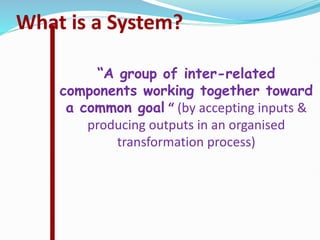
What is a System?
“A group of inter-related
components working together toward
a common goal “ (by accepting inputs &
producing outputs in an organised
transformation process)
Fundamental System Concept
OUTPUT
PROCESS
INPUT
•Raw Material •Manufacturing Process •Finished Goods
•Data
•Data Calculations •Management Information
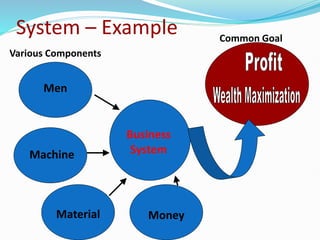
System – Example
Business
System
Men
Machine
Material Money
Various Components
Common Goal
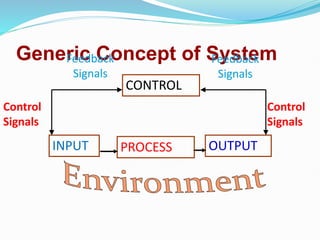
Generic Concept of System
OUTPUT
PROCESS
INPUT
CONTROL
Control
Signals
Control
Signals
Feedback
Signals
Feedback
Signals
TYPES OF SYSTEM
1. Conceptual and Empirical
2. Natural and Manufactured
3. Closed and open
4. Adaptive and non adaptive
5. Deterministic and Probabilistic system
6. Permanent and Temporary system
7. Stationary and non stationary system
8. Subsystem and super system
Elements (components of a
system)
 Inputs
 Processors
 Outputs
 Control
 Feedback
 Environment
 Boundaries and interfaces
Characteristics of system
 Organisation
 Interaction
 Interdependence
 Integration
 Central objective
Meaning and characteristics of
Information system
 Information systems are a special class of systems whose main objective is to store, retrieve and
process, communicate and secure data.
 Information systems which help management at different levels to take suitable decisions are called
management information systems.
Characteristics of Information system
 Management oriented/Directed
 Business Driven/ Justified
 Integrated
 Heavy Planning Element
 Subsystem concept
 Understandable:
 Relevant:
 Complete
 Available:
 Reliable:
 Concise
 Timely
 Cost-effective
Management oriented/Directed
 System is designed from the top down, need to be designed with strategic management
need.
 Example : Marketing information system needs to be designed in way that is easily
tracked by sales person, sales territory, product line etc.
Business Driven/ Justified
 Plans of information system must be linked with overall plans of enterprise.
 Information system is aligned with and driven by the overriding objectives and strategies
of organization.
Integrated
 Integration of information subsystem together provides more meaningful management
information .
 Integrated information system blends information from several operational area for
increasing business effectiveness.
Heavy Planning Element
 Plan is essential for developing a proper information system. And it includes
enhancement of existing IS , implementing new IS along with intermediate altering
Possibilities.
Subsystem concept
 The breakdown of IS into meaningful subsystems sets stage for proper implementation
and increases performance effectiveness.
 Subsystems need to focus on manageable entities assigned and computerized by
programming teams.
Understandable
 Easy to understood by the receiver so that he will interpret, decode any abbreviations,
shorthand notations contained in the information.
Relevant
 Needs to be pertinent and meaningful to the decision maker and should be relevant to the
area of operation.
Complete
 It should contain all the facts that are necessary for the decision maker to satisfactorily solve the problem.
Available
 Information may be useless if it is not readily accessible ‘ in the desired form, when it is needed.
Reliable
 The information should be counted on to be trustworthy. It should be accurate, consistent with facts and
verifiable.
Concise
 Too much information is a big burden on management and cannot be processed in time. Information should
be to the point and just enough – no more, no less.
Timely
 Information must be delivered at the right time and the right place to the right person. Premature information
can become obsolete or be forgotten
Cost-effective
 The information is not desirable if the solution is more costly than the problem. The cost of gathering data
and processing it into information must be weighed against the benefits
NEED FOR INFORMATION SYSTEM
IS an Integrating force with a great need in highly competitive business world
in the following aspects.
Business Communication system
 Managers can use information systems even more efficiently by storing
documents in folders that they share with the employees who need the
information.
Business Operations Management
 Information systems can offer more complete and more recent information,
allowing to operate company more efficiently.
 Information systems used to gain a cost advantage over competitors
Company Decision-Making
 If more than one better choice is available, company can use the information
system to run different options.
 For each possibility, the system can calculate key indicators such as sales,
costs and profits to help determining which alternative gives the most
beneficial result.
Company Record-Keeping
 Company needs records of its activities for financial and regulatory
purposes as well as for finding the causes of problems and taking corrective
action.
 The information system stores documents and revision histories,
communication records and operational data.
Types of Information Systems
There are various types of information systems, few of them are listed below
i) Operations support system
 Transaction processing system
 Workflow system
 Enterprise resource planning and
 Expert systems.
ii) Management support system
 Decision support system
 executive information system
 Management information system
i) Operations support system
 Supports information processing requirements of day to day business operations.
Transaction processing system
 TPS is used for periodic report generation in a scheduled manner.
 TPS is also used for producing reports on demand.
 Eg: sales order entry, payroll, and shipping records etc
Workflow system
 A workflow system is a rule-based management system that directs, coordinates
and monitors the execution of an interrelated set of tasks arranged to form a business
process. There are three types of workflow software.
 Administrative workflow systems focus on the tracking of expense reports, travel
requests, messages.
 An Ad-hoc workflow system deals with the shaping of product, sales proposals and
strategic plans.
 Production workflow systems are concerned with mortgage loans and insurance
claims.
Enterprise resource planning
 Business process management software that allows an organization to use a system
of integrated programs capable of managing a company’s vital business operations for an
entire multi-site, global organization.
Expert systems.
 An expert system is a computer based information system in which knowledge is
represented in data, in which the processing of the knowledge is directed primarily
by computer programs.
 The expert systems have the ability to make suggestions and act like an expert in a
particular field of an organization. Eg: Artificial intelligence; Robotic systems.
ii) Management support system
 Supports decision making needs of strategic(top), operating(supervisory),
tactical(middle) management.
Decision support system
 A decision support system has sophisticated data analysis tools, which support and
assist all aspects of problem-specific decision-making.
 DSS is used when the problem is complex and the information needed to make the
best decision is difficult to obtain and use.
 DSS helps in the appropriate decision-making process and does not make any
decision.
Executive information system
 An Executive Information System (EIS) is also called the Executive Support
System.
 it must be easy to use so that executives can use it without any assistance. EIS can
do trend analysis.
 The results are usually presented in a graphical form tailored to
the executive’s information needs.
Management information system
 Provides the management routine summary of basic operations
of the organization.
 MIS consolidates the data on sales, production etc. MIS
provides routine information to managers and decision makers.
 The primary objective behind installing an MIS in the
organization is to increase operational efficiency.
INFORMATION SYSTEM RESOURCES
1.PEOPLE RESOURCES
 People are required for the operation of all information systems includes
end users and IS specialists.
 End users (also called users or clients) are people who use an information
system or the information it produces. They can be accountants,
salespersons, engineers, clerks, customers, or managers.
 IS Specialists are people who develop and operate information systems.
They include systems analysts, programmers, computer operators, and
other managerial technical, and clerical IS personnel.
2.HARDWARE RESOURCES
 Hardware resources includes all physical devices and materials used
in information processing. computers and other equipment, all data
media,, all tangible objects on which data is recorded, from sheets of
paper to magnetic disks.
 Computer peripherals, such as a keyboard or electronic mouse for
input and video screen or printer for output of information, and
magnetic or optical disks for storage of data resources.
3.SOFTWARE RESOURCES
 software is the sets of operating instructions called
programs, which direct and control computer hardwares.
 System Software, such as an operating system program,
which controls and supports the operations of a
computer system.
 Application Software, which are programs that direct
processing of computers by end users. Examples are a
sales analysis program, a payroll program.
 Procedures, which are operating instructions for the
people who will use an information system.
Examples are instructions for filling out a paper form or
using a software package.
4.DATA RESOURCES
 Data can take many forms, including alphanumeric
data, Text data, image data, such as graphic shapes and
figures; and audio data.
 The data resources of information systems are typically
organized into,
 Database that hold processed and organized data.
 Knowledge bases that hold knowledge in variety of
forms such as facts, rules, and case examples about
successful business practices.
SYSTEM DEVELOPMENT LIFE CYCLE
Seven phases of the SDLC
1. Planning
2. Systems Analysis and Requirements
3. Systems Design
4. Development
5. Integration and Testing
6. Implementation
7. Operations and Maintenance
1.Planning
 It identifies whether or not there is the need for a new system to achieve a business's
strategic objectives.
 This is a preliminary plan initiative to acquire the resources to modify or improve a
service.
 And to find out the scope of the problem and determine solutions with consideration
to Resources, costs, time.
2. Systems Analysis and Requirements
 Systems analysis is vital in determining business needs as well as how they can be
met, who will be responsible for project, and what sort of time expected.
 Analyzed Using several system analysis tools like CASE (Computer Aided
Systems/Software Engineering), Requirements gathering, Structured analysis.
3. Systems Design
 The third phase describes the necessary specifications, features and
operations that will satisfy the functional requirements of the proposed
system.
 It includes the essential components (hardware and/or software) structure
(networking capabilities), processing and procedures for the system to
accomplish its objectives.
4. Development
 The fourth phase is when the real work begins—in particular, when a
programmer, network engineer and/or database developer are brought on to
do the major work on the project.
 The development phase marks the end of the initial section of the process.
Additionally, this phase signifies the start of production.
5. Integration and Testing
 The phase involves systems integration and system testing (of programs and
procedures) carried out by a Quality Assurance (QA) professional to
determine if the proposed design meets business goals.
 Testing may be repeated to check for errors, bugs until the end user finds it
acceptable.
6. Implementation
 The sixth phase is when the majority of the code for the program is written.
Additionally, this phase involves the actual installation of the newly-
developed system.
 This step puts the project into production by moving the data and
components from the old system and placing them in the new system.
 While this can be a risky (and complicated) move, the cutover typically
happens during off-peak hours, thus minimizing the risk
7. Operations and Maintenance
 The final phase involves maintenance and regular required
updates.
 This step is when end users can fine-tune the system to
boost performance or meet additional user requirements.

Management information system for BBA STUDENTS

  • 1.
  • 2.
    What is aSystem? “A group of inter-related components working together toward a common goal “ (by accepting inputs & producing outputs in an organised transformation process)
  • 3.
    Fundamental System Concept OUTPUT PROCESS INPUT •RawMaterial •Manufacturing Process •Finished Goods •Data •Data Calculations •Management Information
  • 4.
    System – Example Business System Men Machine MaterialMoney Various Components Common Goal
  • 5.
    Generic Concept ofSystem OUTPUT PROCESS INPUT CONTROL Control Signals Control Signals Feedback Signals Feedback Signals
  • 6.
    TYPES OF SYSTEM 1.Conceptual and Empirical 2. Natural and Manufactured 3. Closed and open 4. Adaptive and non adaptive 5. Deterministic and Probabilistic system 6. Permanent and Temporary system 7. Stationary and non stationary system 8. Subsystem and super system
  • 7.
    Elements (components ofa system)  Inputs  Processors  Outputs  Control  Feedback  Environment  Boundaries and interfaces
  • 8.
    Characteristics of system Organisation  Interaction  Interdependence  Integration  Central objective
  • 9.
    Meaning and characteristicsof Information system  Information systems are a special class of systems whose main objective is to store, retrieve and process, communicate and secure data.  Information systems which help management at different levels to take suitable decisions are called management information systems. Characteristics of Information system  Management oriented/Directed  Business Driven/ Justified  Integrated  Heavy Planning Element  Subsystem concept  Understandable:  Relevant:  Complete  Available:  Reliable:  Concise  Timely  Cost-effective
  • 10.
    Management oriented/Directed  Systemis designed from the top down, need to be designed with strategic management need.  Example : Marketing information system needs to be designed in way that is easily tracked by sales person, sales territory, product line etc. Business Driven/ Justified  Plans of information system must be linked with overall plans of enterprise.  Information system is aligned with and driven by the overriding objectives and strategies of organization. Integrated  Integration of information subsystem together provides more meaningful management information .  Integrated information system blends information from several operational area for increasing business effectiveness.
  • 11.
    Heavy Planning Element Plan is essential for developing a proper information system. And it includes enhancement of existing IS , implementing new IS along with intermediate altering Possibilities. Subsystem concept  The breakdown of IS into meaningful subsystems sets stage for proper implementation and increases performance effectiveness.  Subsystems need to focus on manageable entities assigned and computerized by programming teams. Understandable  Easy to understood by the receiver so that he will interpret, decode any abbreviations, shorthand notations contained in the information. Relevant  Needs to be pertinent and meaningful to the decision maker and should be relevant to the area of operation.
  • 12.
    Complete  It shouldcontain all the facts that are necessary for the decision maker to satisfactorily solve the problem. Available  Information may be useless if it is not readily accessible ‘ in the desired form, when it is needed. Reliable  The information should be counted on to be trustworthy. It should be accurate, consistent with facts and verifiable. Concise  Too much information is a big burden on management and cannot be processed in time. Information should be to the point and just enough – no more, no less. Timely  Information must be delivered at the right time and the right place to the right person. Premature information can become obsolete or be forgotten Cost-effective  The information is not desirable if the solution is more costly than the problem. The cost of gathering data and processing it into information must be weighed against the benefits
  • 13.
    NEED FOR INFORMATIONSYSTEM IS an Integrating force with a great need in highly competitive business world in the following aspects. Business Communication system  Managers can use information systems even more efficiently by storing documents in folders that they share with the employees who need the information. Business Operations Management  Information systems can offer more complete and more recent information, allowing to operate company more efficiently.  Information systems used to gain a cost advantage over competitors
  • 14.
    Company Decision-Making  Ifmore than one better choice is available, company can use the information system to run different options.  For each possibility, the system can calculate key indicators such as sales, costs and profits to help determining which alternative gives the most beneficial result. Company Record-Keeping  Company needs records of its activities for financial and regulatory purposes as well as for finding the causes of problems and taking corrective action.  The information system stores documents and revision histories, communication records and operational data.
  • 15.
    Types of InformationSystems There are various types of information systems, few of them are listed below i) Operations support system  Transaction processing system  Workflow system  Enterprise resource planning and  Expert systems. ii) Management support system  Decision support system  executive information system  Management information system
  • 16.
    i) Operations supportsystem  Supports information processing requirements of day to day business operations. Transaction processing system  TPS is used for periodic report generation in a scheduled manner.  TPS is also used for producing reports on demand.  Eg: sales order entry, payroll, and shipping records etc Workflow system  A workflow system is a rule-based management system that directs, coordinates and monitors the execution of an interrelated set of tasks arranged to form a business process. There are three types of workflow software.  Administrative workflow systems focus on the tracking of expense reports, travel requests, messages.  An Ad-hoc workflow system deals with the shaping of product, sales proposals and strategic plans.  Production workflow systems are concerned with mortgage loans and insurance claims.
  • 17.
    Enterprise resource planning Business process management software that allows an organization to use a system of integrated programs capable of managing a company’s vital business operations for an entire multi-site, global organization. Expert systems.  An expert system is a computer based information system in which knowledge is represented in data, in which the processing of the knowledge is directed primarily by computer programs.  The expert systems have the ability to make suggestions and act like an expert in a particular field of an organization. Eg: Artificial intelligence; Robotic systems. ii) Management support system  Supports decision making needs of strategic(top), operating(supervisory), tactical(middle) management.
  • 18.
    Decision support system A decision support system has sophisticated data analysis tools, which support and assist all aspects of problem-specific decision-making.  DSS is used when the problem is complex and the information needed to make the best decision is difficult to obtain and use.  DSS helps in the appropriate decision-making process and does not make any decision. Executive information system  An Executive Information System (EIS) is also called the Executive Support System.  it must be easy to use so that executives can use it without any assistance. EIS can do trend analysis.
  • 19.
     The resultsare usually presented in a graphical form tailored to the executive’s information needs. Management information system  Provides the management routine summary of basic operations of the organization.  MIS consolidates the data on sales, production etc. MIS provides routine information to managers and decision makers.  The primary objective behind installing an MIS in the organization is to increase operational efficiency.
  • 20.
    INFORMATION SYSTEM RESOURCES 1.PEOPLERESOURCES  People are required for the operation of all information systems includes end users and IS specialists.  End users (also called users or clients) are people who use an information system or the information it produces. They can be accountants, salespersons, engineers, clerks, customers, or managers.  IS Specialists are people who develop and operate information systems. They include systems analysts, programmers, computer operators, and other managerial technical, and clerical IS personnel. 2.HARDWARE RESOURCES  Hardware resources includes all physical devices and materials used in information processing. computers and other equipment, all data media,, all tangible objects on which data is recorded, from sheets of paper to magnetic disks.  Computer peripherals, such as a keyboard or electronic mouse for input and video screen or printer for output of information, and magnetic or optical disks for storage of data resources.
  • 21.
    3.SOFTWARE RESOURCES  softwareis the sets of operating instructions called programs, which direct and control computer hardwares.  System Software, such as an operating system program, which controls and supports the operations of a computer system.  Application Software, which are programs that direct processing of computers by end users. Examples are a sales analysis program, a payroll program.  Procedures, which are operating instructions for the people who will use an information system. Examples are instructions for filling out a paper form or using a software package.
  • 22.
    4.DATA RESOURCES  Datacan take many forms, including alphanumeric data, Text data, image data, such as graphic shapes and figures; and audio data.  The data resources of information systems are typically organized into,  Database that hold processed and organized data.  Knowledge bases that hold knowledge in variety of forms such as facts, rules, and case examples about successful business practices.
  • 23.
    SYSTEM DEVELOPMENT LIFECYCLE Seven phases of the SDLC 1. Planning 2. Systems Analysis and Requirements 3. Systems Design 4. Development 5. Integration and Testing 6. Implementation 7. Operations and Maintenance
  • 24.
    1.Planning  It identifieswhether or not there is the need for a new system to achieve a business's strategic objectives.  This is a preliminary plan initiative to acquire the resources to modify or improve a service.  And to find out the scope of the problem and determine solutions with consideration to Resources, costs, time. 2. Systems Analysis and Requirements  Systems analysis is vital in determining business needs as well as how they can be met, who will be responsible for project, and what sort of time expected.  Analyzed Using several system analysis tools like CASE (Computer Aided Systems/Software Engineering), Requirements gathering, Structured analysis.
  • 25.
    3. Systems Design The third phase describes the necessary specifications, features and operations that will satisfy the functional requirements of the proposed system.  It includes the essential components (hardware and/or software) structure (networking capabilities), processing and procedures for the system to accomplish its objectives. 4. Development  The fourth phase is when the real work begins—in particular, when a programmer, network engineer and/or database developer are brought on to do the major work on the project.  The development phase marks the end of the initial section of the process. Additionally, this phase signifies the start of production.
  • 26.
    5. Integration andTesting  The phase involves systems integration and system testing (of programs and procedures) carried out by a Quality Assurance (QA) professional to determine if the proposed design meets business goals.  Testing may be repeated to check for errors, bugs until the end user finds it acceptable. 6. Implementation  The sixth phase is when the majority of the code for the program is written. Additionally, this phase involves the actual installation of the newly- developed system.  This step puts the project into production by moving the data and components from the old system and placing them in the new system.  While this can be a risky (and complicated) move, the cutover typically happens during off-peak hours, thus minimizing the risk
  • 27.
    7. Operations andMaintenance  The final phase involves maintenance and regular required updates.  This step is when end users can fine-tune the system to boost performance or meet additional user requirements.