Douglas G. Stinson
douglasgstinson.com
doug@douglasgstinson.com
This presentation can be found at http://www.douglasgstinson.com/
Click on “Presentations”
 Purpose/Theme
 Visual documentation, reference …
 Monograph (focus on the artist): Portfolio, retrospective, catalog
 Telling a story (journalism, documentary, life event, creative
fiction, creative non-fiction…)
 Illustrate a book that is primarily text
 Creating a “work of art” (whatever “art” means), book as
“sculpture”...
 Audience
 General Public? Specialists? Fellow photographers? Collectors?
Friends and Family?
 What do you want people to take away when they experience
your book?
 Odyssey by Linda Connor
 Expression of the artist’s vision and physical and intellectual
journey
 Photos on facing pages, titles in the endnotes
 Some quotes scattered throughout
 Interviews with the photographer
 (note: Chronicle Books is a San Francisco based publisher)
 The Disappearance of Darkness by Robert Burley
 Explicit documentary storytelling/memoir
 Lots of text
 Chapter structure
 Technical notes
 Sacred / Profane VII
 Work by a group of artists
 Layout of each chapter reflects the desires of that artist
 White vs. black background
 Frames vs. full bleed
 Single image/page vs. multi-image layout
 Fold-out page
 Printing and Binding by Edition One Books
 Berkeley CA
 Short-run (5 – 500 copies), self-published books for art and
design professionals
 This book $65 each for a print run of ~20
“With work between the covers of a book, what
matters is how well the book works as a whole.
Individual photographs, though they are important, do
not matter so much. When a photographer takes a
group of related photographs and sequences the
images so that each resonates with its fellows, then
this, more and more photographers are coming to
believe, is where photographs sing their song to the
fullest.”
– Brian Steptoe, FRPS
 What supports your intent?
 Size: Intimate => small, Grand => Large
 Shape
 Aspect ratio of individual photographs
 Multiple photographs per page
 Type of paper
 Cover material and design
 Hard vs. soft cover. Dust jacket or bare?
1. Gather a large pool of images with something in
common with your purpose. GO WIDE. Turn off the
critic.
 “250 bad images, 200 not so good images, 75 great images”
Science Fiction writer
Theodore Sturgeon once
said “90% of everything is
crap”. We just don’t know
what is good and what
sucks.
From Austin Klenon Show your Work!
1. Gather a large pool of images with something in
common with your purpose. GO WIDE. Turn off the
critic.
 “250 bad images, 200 not so good images, 75 great images”
2. Make small, cheep prints.
3. Separate the prints into piles
From Austin Klenon Show your Work!
1. Gather a large pool of images with something in
common with your purpose. GO WIDE. Turn off the
critic.
 “250 bad images, 200 not so good images, 75 great images”
2. Make small, cheep prints.
3. Separate the prints into piles
4. Go away. Relax. Do something else. Get some sleep.
5. Repeat step 3
6. Put photos next to each other, starting with pairs.
 Which ones go together, based on visual elements or
content, because they support or contrast with each other?
 Should they be on the same spread, or on sequential
pages?
 Do they need fine tuning before they fit together?
 Start discarding images that “don’t fit”, are repetitive or
have “unfixable” technical problems.
 “Your book is only as strong as your weakest image.”
7. Go away. Relax. Do something else. Get some sleep.
8. Repeat step 6
9. Arrange the images in a sequence.
 Think of your book as a movie
Story lines: Flat, Cluster, Arc, Scatter
From Austin Klenon Show your Work!
Movie “Memento”, example of a “scatter” sequence
9. Arrange the images in a sequence.
 Think of your book as a movie
Story lines: Flat, Cluster, Arc, Scatter
 Should the photos be on odd or even pages?
 Should the images face each other?
 Do you need to insert blank pages to control the timing /
flow of the narrative?
(Adapted from Keith Smith The Structure of the Visual Book)
9. Arrange the images in a sequence.
 Think of your book as a movie
Story lines: Flat, Cluster, Arc, Scatter
 Should the photos be on odd or even pages? Should the
images face each other? Do you need to insert blank pages
to control the timing / flow of the narrative?
 Use “place holder” images, if the perfect image is not
readily at hand.
 Note images that may need fine tuning
 Continue to toss photos that don’t fit or are redundant
 Where should text or non-photo graphic elements go?
10. Go away. Relax. Do something else. Get some sleep.
11. Repeat step 9
12. Build a mock-up
13. Flip through the mock up to see how the book “reads”.
14. Use the mock-up to get feedback from friends who
represent your target audience or whose aesthetic
judgment you trust.
15. Re-edit and repeat step 12.
15. Fine-tune the images in a photo-editing program
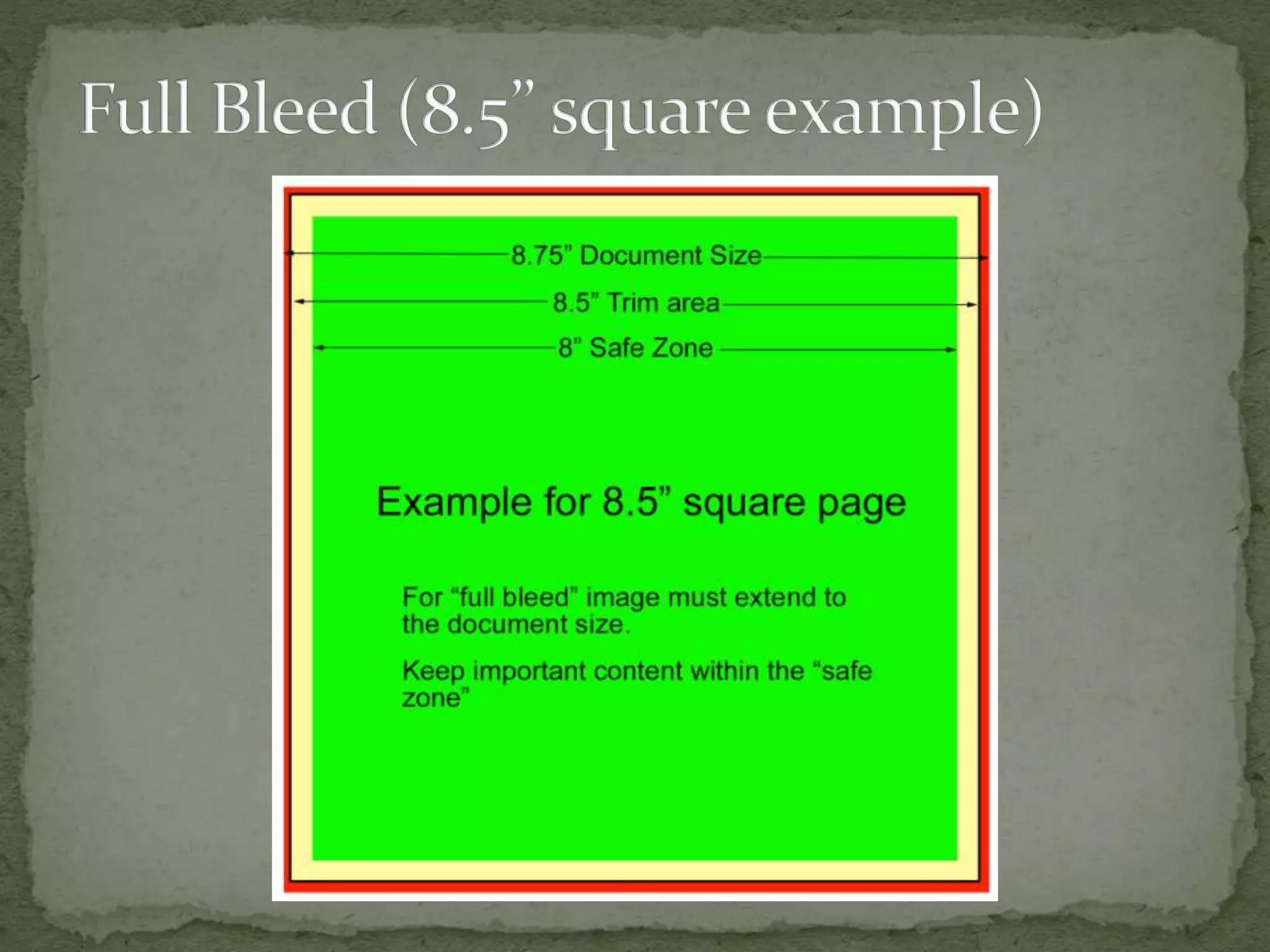
 Final crop. Must be to desired aspect ratio.
 Color adjustments (Suggested color space is Adobe RGB)
 Other adjustments (cloning, contrast, burn and dodge)
 Flatten the image if it contains multiple layers
 Set pixels/inch to the optimum setting depending on the
final printing method
 Re-size the image to the dimensions it will be in the final
book
 Sharpen the image
 Save (using a new file name!) in the file format
recommended for the final printing method.
 Typical print run 5,000 – 7,000
 Research photobook publishing companies, identify those that have
previously published works similar to yours
 Look for smaller firms that specialize in emerging artists
 Prepare a proposal for the book, selling the concept by
 describing who would be interested in buying it –primary and
secondary (they should be among the publisher’s current customers)
 explaining why it is important and what trends it speaks to
 Stating what similar books have been published and how yours differs
 Include a biography with publishing history and credentials in the field
 Include a mock-up to demonstrate you have a solid concept and the
capability of executing the project
 Show your work to a publisher at a portfolio review or book festival
Steidl: https://steidl.de/
Little Steidl: https://littlesteidl.de/
Taschen: https://www.taschen.com/
Datz Press: datzpress@datzpress.com
Aperture: http://aperture.org/photobookawards/
Chronicle Books: submissions@chroniclebooks.com (in San Francisco)
Daylight Books: info@daylightbooks.org.
Decode Books: books@decodebooks.com
Études Blue Books: info@etudes-studio.com
The Ice Plant: jacques@theiceplant.cc
Libraryman: TONY@LIBRARYMAN.SE
Little Big Man: http://littlebigmanbooks.com
Mörel Books: info@morelbooks.com
Peperoni Books: info@peperoni-books.de
TBW Books: lester@tbwbooks.com (in Oakland CA)
Maluku Editions: info.malulu@gmail.com
Abbeville Press: abbeville.com (not currently accepting submissions)
Radius Books: radiusbooks.org
Lists:
http://fotoroom.co/international-photobook-publishers/
https://thephotobook.wordpress.com/resources/photo-book-publishers/
 Highest Quality
 Maximum flexibility among commercial printers
 Strong customer support through production
 Limited to non-existent support post production
 Examples:
 Edition One (Berkeley – Ben Zlotkin)
 Bookmobile (Minneapolis)
 Typically, you need to create a PDF file that is exactly like
the final book
 Scribus (free), InDesign (Industry standard), Quarkxpress,
Pages(?)
 LightRoom plug-in
 On-line tool with templates
 PDF individual images in Photoshop, string together with
Adobe Acrobat
 Good quality
 Limited support
 Limited flexibility – pick from menu
 Provide Store Front and distribution through Amazon,
Ingram, etc.
 Top Picks for Photobooks
 BLURB
 LULU
 Bookbaby (1 proof then minimum order of 25)
 You need to create a PDF files that is exactly like the final
book
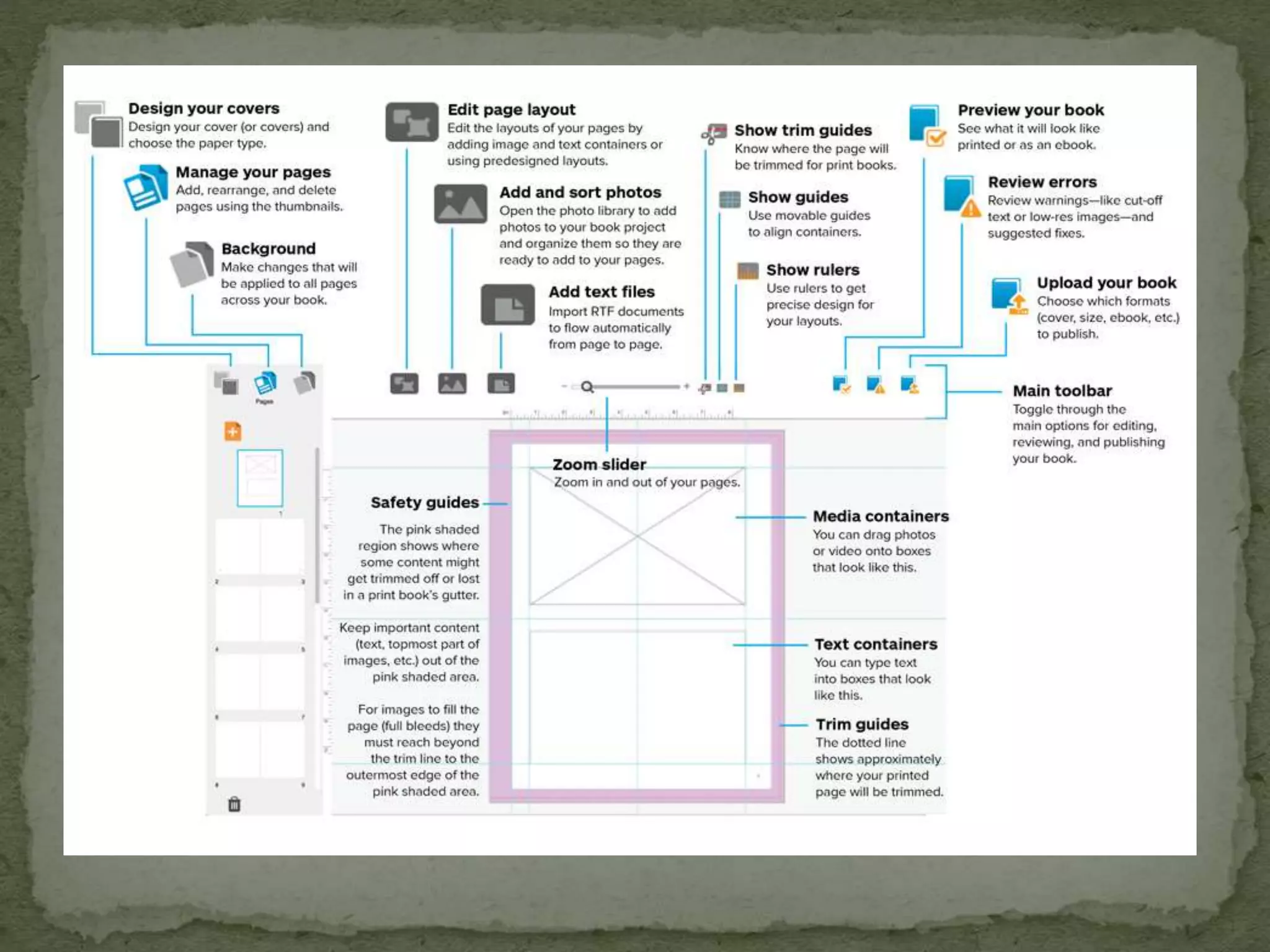
 Bookwright, a free page layout tool from BLURB
 Scribus (free), InDesign, Quarkxpress, Pages(?)
 LightRoom plug-in
 On-line tool with templates
 PDF individual images in Photoshop, string together with
Adobe Acrobat
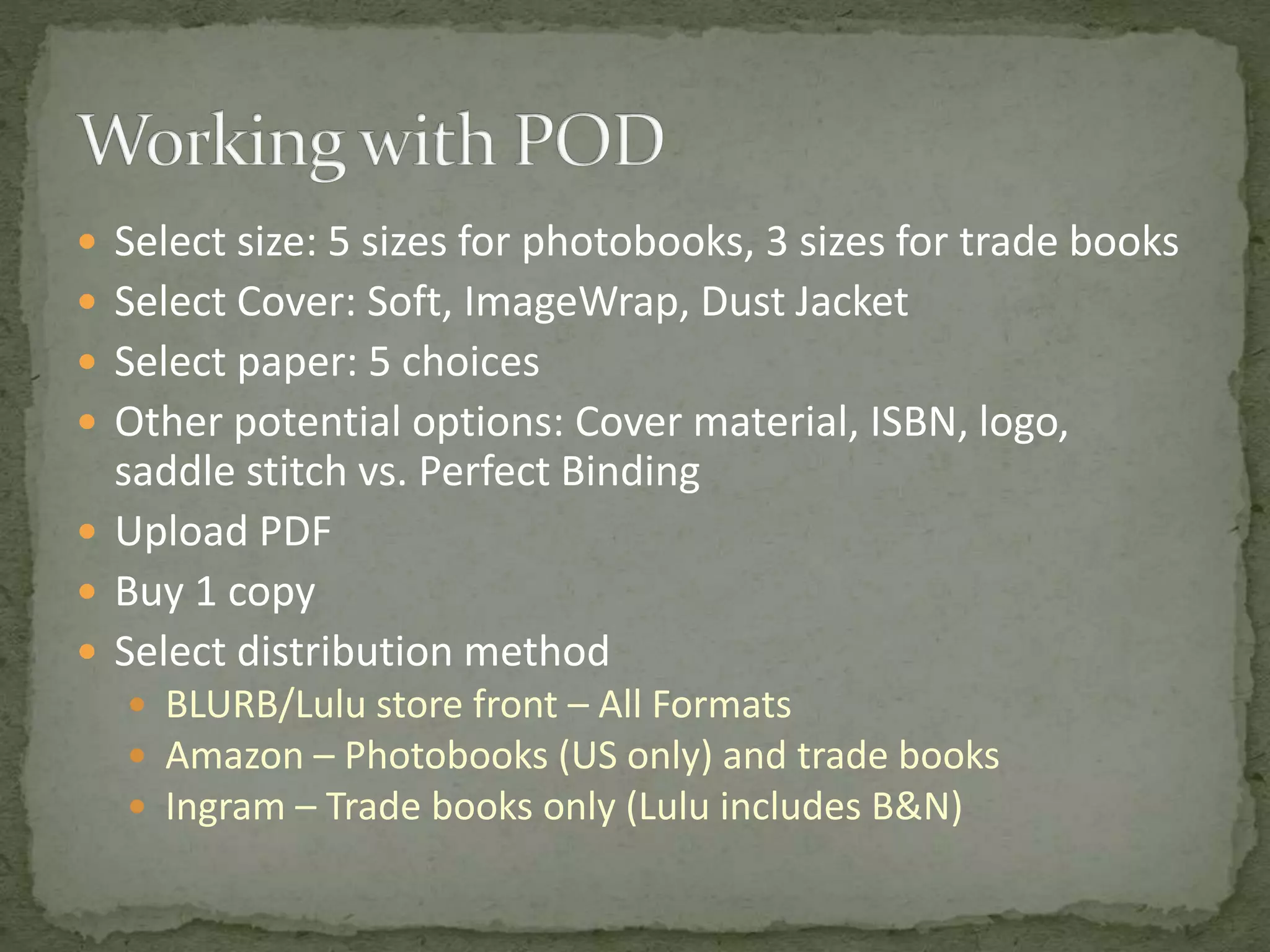
 Select size: 5 sizes for photobooks, 3 sizes for trade books
 Select Cover: Soft, ImageWrap, Dust Jacket
 Select paper: 5 choices
 Other potential options: Cover material, ISBN, logo,
saddle stitch vs. Perfect Binding
 Upload PDF
 Buy 1 copy
 Select distribution method
 BLURB/Lulu store front – All Formats
 Amazon – Photobooks (US only) and trade books
 Ingram – Trade books only (Lulu includes B&N)
 Available from most “photofinishers”: MPIX, Bay Photo.
 Wide selection of templates, but little customization
 For FotoClave 2017, Lucy Beck evaluated books from the
three companies with the best reviews and selected
Mixbook (https://www.mixbook.com/) based on color
quality
 Total Control
 Total Flexibility – limited only by your imagination
 Each book is an original piece of art
 Expensive
 Maximum effort!
 Do everything: Print and bind
 You print, bookbinder binds
 Create a plain paper mock-up of the signatures
 For saddle stitched books, 4 pages per sheet
 Two sheets / signature if DIY
 Fold paper and create signature
 Number the pages
 Label “A” and “B” sides
 Identify what goes on each page
 Select a paper
 Double sided
 Generally 203 gsm or less
 Chose long or short grain so grain is parallel to the spine in
the final book (Most papers are long grain. Moab and Red
River offer papers with different grain directions)
 Typically Matte or Semi-gloss
Experiment!
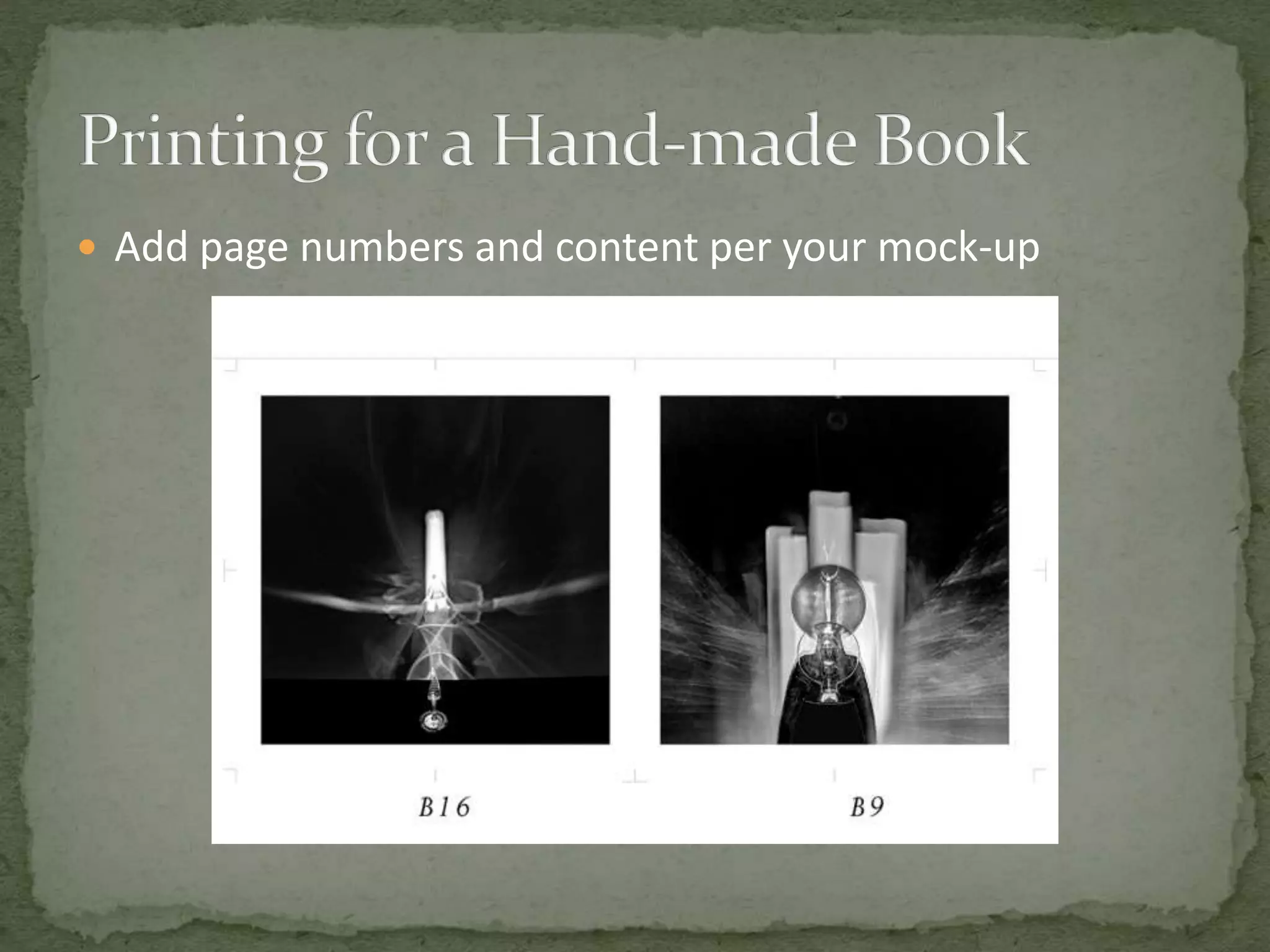
 Create a Master File
 Add page numbers and content per your mock-up
 Create an “A” side
 Rotate image 90° CCW
 Print
 Put small dot on edge that first comes out of printer. This will be the
leading edge when you print the “B” side
 Let dry over night
 Spray with Moab Desert Varnish.
 Let dry overnight
 Create a “B” side
 Rotate image 90° CW
 Print with edge with “A” side down and dot at leading edge
 Check for alignment between “A” and “B” sides, and correct and re-
print if necessary
 San Francisco Center for the Book, https://www.sfcb.org/
 Super Classy Publishing (Andy Rottner),
http://www.superclassypublishing.com
 John DeMerritt Bookbinding,
http://www.johndemerrittbookbinding.com
 Paper weights and thickness: http://www.paper-
paper.com/weight.html
 Holly Constantine, Sequencing a Photobook Lecture,
https://hollyconstantinephotography.wordpress.com/2013/02/22/s
equencing-a-photobook-lecture/
 Harvey Benge, The Photobook – some thoughts on editing and
sequencing, http://harveybenge.blogspot.com/2012/03/photobook-
some-thoughts-on-editing-and.html
 Joerg Colberg, How to make a photobook,
http://jmcolberg.com/weblog/extended/archives/how_to_make_a_
photobook/
 Collecting feedback, making mock-ups: Aperture's The Photobook
Review, Issues 1 & 2,
http://www.gregoryhalpern.com/documents/PBR.pdf,
http://fotomuseum.adlibhosting.com/texts/The_Photoboook_Revie
w_3_fall_2012.pdf
 CODEX International Book Fair and Symposium
 Every 2 years, Feb 5th – 8th, 2019
 PhotoAlliance mini-fair and symposium on The Photo
Book at SFAI, day before CODEX starts
 PhotoAlliance Portfolio Review in March at SFAI
 Keith Smith The structure of the Visual Book
 Ellen Lupton Thinking with Type

Making a Photo Book

  • 1.
    Douglas G. Stinson douglasgstinson.com doug@douglasgstinson.com Thispresentation can be found at http://www.douglasgstinson.com/ Click on “Presentations”
  • 3.
     Purpose/Theme  Visualdocumentation, reference …  Monograph (focus on the artist): Portfolio, retrospective, catalog  Telling a story (journalism, documentary, life event, creative fiction, creative non-fiction…)  Illustrate a book that is primarily text  Creating a “work of art” (whatever “art” means), book as “sculpture”...  Audience  General Public? Specialists? Fellow photographers? Collectors? Friends and Family?  What do you want people to take away when they experience your book?
  • 5.
     Odyssey byLinda Connor  Expression of the artist’s vision and physical and intellectual journey  Photos on facing pages, titles in the endnotes  Some quotes scattered throughout  Interviews with the photographer  (note: Chronicle Books is a San Francisco based publisher)  The Disappearance of Darkness by Robert Burley  Explicit documentary storytelling/memoir  Lots of text  Chapter structure  Technical notes
  • 6.
     Sacred /Profane VII  Work by a group of artists  Layout of each chapter reflects the desires of that artist  White vs. black background  Frames vs. full bleed  Single image/page vs. multi-image layout  Fold-out page  Printing and Binding by Edition One Books  Berkeley CA  Short-run (5 – 500 copies), self-published books for art and design professionals  This book $65 each for a print run of ~20
  • 10.
    “With work betweenthe covers of a book, what matters is how well the book works as a whole. Individual photographs, though they are important, do not matter so much. When a photographer takes a group of related photographs and sequences the images so that each resonates with its fellows, then this, more and more photographers are coming to believe, is where photographs sing their song to the fullest.” – Brian Steptoe, FRPS
  • 12.
     What supportsyour intent?  Size: Intimate => small, Grand => Large  Shape  Aspect ratio of individual photographs  Multiple photographs per page  Type of paper  Cover material and design  Hard vs. soft cover. Dust jacket or bare?
  • 13.
    1. Gather alarge pool of images with something in common with your purpose. GO WIDE. Turn off the critic.  “250 bad images, 200 not so good images, 75 great images”
  • 14.
    Science Fiction writer TheodoreSturgeon once said “90% of everything is crap”. We just don’t know what is good and what sucks. From Austin Klenon Show your Work!
  • 15.
    1. Gather alarge pool of images with something in common with your purpose. GO WIDE. Turn off the critic.  “250 bad images, 200 not so good images, 75 great images” 2. Make small, cheep prints. 3. Separate the prints into piles
  • 16.
    From Austin KlenonShow your Work!
  • 17.
    1. Gather alarge pool of images with something in common with your purpose. GO WIDE. Turn off the critic.  “250 bad images, 200 not so good images, 75 great images” 2. Make small, cheep prints. 3. Separate the prints into piles 4. Go away. Relax. Do something else. Get some sleep. 5. Repeat step 3
  • 18.
    6. Put photosnext to each other, starting with pairs.  Which ones go together, based on visual elements or content, because they support or contrast with each other?  Should they be on the same spread, or on sequential pages?  Do they need fine tuning before they fit together?  Start discarding images that “don’t fit”, are repetitive or have “unfixable” technical problems.  “Your book is only as strong as your weakest image.” 7. Go away. Relax. Do something else. Get some sleep. 8. Repeat step 6
  • 19.
    9. Arrange theimages in a sequence.  Think of your book as a movie Story lines: Flat, Cluster, Arc, Scatter
  • 20.
    From Austin KlenonShow your Work!
  • 21.
    Movie “Memento”, exampleof a “scatter” sequence
  • 22.
    9. Arrange theimages in a sequence.  Think of your book as a movie Story lines: Flat, Cluster, Arc, Scatter  Should the photos be on odd or even pages?  Should the images face each other?  Do you need to insert blank pages to control the timing / flow of the narrative?
  • 25.
    (Adapted from KeithSmith The Structure of the Visual Book)
  • 43.
    9. Arrange theimages in a sequence.  Think of your book as a movie Story lines: Flat, Cluster, Arc, Scatter  Should the photos be on odd or even pages? Should the images face each other? Do you need to insert blank pages to control the timing / flow of the narrative?  Use “place holder” images, if the perfect image is not readily at hand.  Note images that may need fine tuning  Continue to toss photos that don’t fit or are redundant  Where should text or non-photo graphic elements go? 10. Go away. Relax. Do something else. Get some sleep. 11. Repeat step 9
  • 44.
    12. Build amock-up 13. Flip through the mock up to see how the book “reads”. 14. Use the mock-up to get feedback from friends who represent your target audience or whose aesthetic judgment you trust. 15. Re-edit and repeat step 12.
  • 45.
    15. Fine-tune theimages in a photo-editing program  Final crop. Must be to desired aspect ratio.  Color adjustments (Suggested color space is Adobe RGB)  Other adjustments (cloning, contrast, burn and dodge)  Flatten the image if it contains multiple layers  Set pixels/inch to the optimum setting depending on the final printing method  Re-size the image to the dimensions it will be in the final book  Sharpen the image  Save (using a new file name!) in the file format recommended for the final printing method.
  • 47.
     Typical printrun 5,000 – 7,000  Research photobook publishing companies, identify those that have previously published works similar to yours  Look for smaller firms that specialize in emerging artists  Prepare a proposal for the book, selling the concept by  describing who would be interested in buying it –primary and secondary (they should be among the publisher’s current customers)  explaining why it is important and what trends it speaks to  Stating what similar books have been published and how yours differs  Include a biography with publishing history and credentials in the field  Include a mock-up to demonstrate you have a solid concept and the capability of executing the project  Show your work to a publisher at a portfolio review or book festival
  • 48.
    Steidl: https://steidl.de/ Little Steidl:https://littlesteidl.de/ Taschen: https://www.taschen.com/ Datz Press: datzpress@datzpress.com Aperture: http://aperture.org/photobookawards/ Chronicle Books: submissions@chroniclebooks.com (in San Francisco) Daylight Books: info@daylightbooks.org. Decode Books: books@decodebooks.com Études Blue Books: info@etudes-studio.com The Ice Plant: jacques@theiceplant.cc Libraryman: TONY@LIBRARYMAN.SE Little Big Man: http://littlebigmanbooks.com Mörel Books: info@morelbooks.com Peperoni Books: info@peperoni-books.de TBW Books: lester@tbwbooks.com (in Oakland CA) Maluku Editions: info.malulu@gmail.com Abbeville Press: abbeville.com (not currently accepting submissions) Radius Books: radiusbooks.org Lists: http://fotoroom.co/international-photobook-publishers/ https://thephotobook.wordpress.com/resources/photo-book-publishers/
  • 49.
     Highest Quality Maximum flexibility among commercial printers  Strong customer support through production  Limited to non-existent support post production  Examples:  Edition One (Berkeley – Ben Zlotkin)  Bookmobile (Minneapolis)
  • 50.
     Typically, youneed to create a PDF file that is exactly like the final book  Scribus (free), InDesign (Industry standard), Quarkxpress, Pages(?)  LightRoom plug-in  On-line tool with templates  PDF individual images in Photoshop, string together with Adobe Acrobat
  • 51.
     Good quality Limited support  Limited flexibility – pick from menu  Provide Store Front and distribution through Amazon, Ingram, etc.  Top Picks for Photobooks  BLURB  LULU  Bookbaby (1 proof then minimum order of 25)
  • 52.
     You needto create a PDF files that is exactly like the final book  Bookwright, a free page layout tool from BLURB  Scribus (free), InDesign, Quarkxpress, Pages(?)  LightRoom plug-in  On-line tool with templates  PDF individual images in Photoshop, string together with Adobe Acrobat
  • 54.
     Select size:5 sizes for photobooks, 3 sizes for trade books  Select Cover: Soft, ImageWrap, Dust Jacket  Select paper: 5 choices  Other potential options: Cover material, ISBN, logo, saddle stitch vs. Perfect Binding  Upload PDF  Buy 1 copy  Select distribution method  BLURB/Lulu store front – All Formats  Amazon – Photobooks (US only) and trade books  Ingram – Trade books only (Lulu includes B&N)
  • 56.
     Available frommost “photofinishers”: MPIX, Bay Photo.  Wide selection of templates, but little customization  For FotoClave 2017, Lucy Beck evaluated books from the three companies with the best reviews and selected Mixbook (https://www.mixbook.com/) based on color quality
  • 57.
     Total Control Total Flexibility – limited only by your imagination  Each book is an original piece of art  Expensive  Maximum effort!  Do everything: Print and bind  You print, bookbinder binds
  • 59.
     Create aplain paper mock-up of the signatures  For saddle stitched books, 4 pages per sheet  Two sheets / signature if DIY  Fold paper and create signature  Number the pages  Label “A” and “B” sides  Identify what goes on each page
  • 60.
     Select apaper  Double sided  Generally 203 gsm or less  Chose long or short grain so grain is parallel to the spine in the final book (Most papers are long grain. Moab and Red River offer papers with different grain directions)  Typically Matte or Semi-gloss Experiment!
  • 61.
     Create aMaster File
  • 62.
     Add pagenumbers and content per your mock-up
  • 63.
     Create an“A” side  Rotate image 90° CCW  Print  Put small dot on edge that first comes out of printer. This will be the leading edge when you print the “B” side  Let dry over night  Spray with Moab Desert Varnish.  Let dry overnight  Create a “B” side  Rotate image 90° CW  Print with edge with “A” side down and dot at leading edge  Check for alignment between “A” and “B” sides, and correct and re- print if necessary
  • 64.
     San FranciscoCenter for the Book, https://www.sfcb.org/  Super Classy Publishing (Andy Rottner), http://www.superclassypublishing.com  John DeMerritt Bookbinding, http://www.johndemerrittbookbinding.com  Paper weights and thickness: http://www.paper- paper.com/weight.html
  • 65.
     Holly Constantine,Sequencing a Photobook Lecture, https://hollyconstantinephotography.wordpress.com/2013/02/22/s equencing-a-photobook-lecture/  Harvey Benge, The Photobook – some thoughts on editing and sequencing, http://harveybenge.blogspot.com/2012/03/photobook- some-thoughts-on-editing-and.html  Joerg Colberg, How to make a photobook, http://jmcolberg.com/weblog/extended/archives/how_to_make_a_ photobook/  Collecting feedback, making mock-ups: Aperture's The Photobook Review, Issues 1 & 2, http://www.gregoryhalpern.com/documents/PBR.pdf, http://fotomuseum.adlibhosting.com/texts/The_Photoboook_Revie w_3_fall_2012.pdf
  • 66.
     CODEX InternationalBook Fair and Symposium  Every 2 years, Feb 5th – 8th, 2019  PhotoAlliance mini-fair and symposium on The Photo Book at SFAI, day before CODEX starts  PhotoAlliance Portfolio Review in March at SFAI
  • 67.
     Keith SmithThe structure of the Visual Book  Ellen Lupton Thinking with Type

Editor's Notes

  • #3  By botanist Anna Atkins, Photographs of British Algæ. Cyanotype Impressions, 1843-1853 Technique learned from the inventor and her friend, John Herschel Sold by Christie’s for $406,460 Joshua Chuang, Senior Curator of Photography at The New York Public Library searches WorldCat Université de Montréal  First Question: What is the purpose of your photobook? In this case purpose was to produce an objective, permanent record to further our scientific understanding of the natural world
  • #5  Just over 100 years later, Photobooks came into their own with the publication of Robert Frank’s The Americans, 1958 The layout – photo on the right, left page blank except for the title, become the classic style for a photobook, still popular. All horizontal and all vertical images are the same size and positioned at the same location on the page. Purpose -- The content of the individual photographs dominates, the book format simply provides a way of collecting photographs with a consistent theme. The theme could be as simple as “My trip to Yellowstone” or “A Portfolio of the type of work I create”. The theme could be more sophisticated. In the case of The Americans, “The book as a whole created a complicated portrait of the period that was viewed as skeptical of contemporary values and evocative of ubiquitous loneliness” according to Wikipedia. Text -- The Americans includes text in the form of an Introduction. You may think your book would benefit from this as well, although it is certainly optional. The introduction if often written by the artist, providing background or context to help the reader understand and appreciate the work. But it can also be written by a friend who might have a unique perspective on the photographs. The legend goes that Frank showed Kerouac several of his photos the night they first met, standing, smoking, talking on the sidewalk in the dark outside a New York Party. Undoubtedly, Frank’s images of America struck a chord with Kerouac, so much so that he agreed to write an introduction to the published collection. You may be thinking, gee, how lucky to get an intro written by a famous person like Kerouac, however neither of them were well-known at the time. Frank became famous with the publication of this book and Kerouac with the publication of On the Road two years later. Colophon -- a statement at the end of a book, typically with a printer's emblem, giving information about its authorship and printing. In art book, the colophon can be very creative and different in design from the rest of the book Show Linda Connor’s Book as an example of a different layout, less journalistic “The photographs were notable for their distanced view of both high and low strata of American society. The book as a whole created a complicated portrait of the period that was viewed as skeptical of contemporary values and evocative of ubiquitous loneliness.” -Wikipedia
  • #8  In the 1960s, Ed Ruscha more or less reinvented the artist’s book. 7 1/8” x 25 feet. You can own a copy for $7,900.
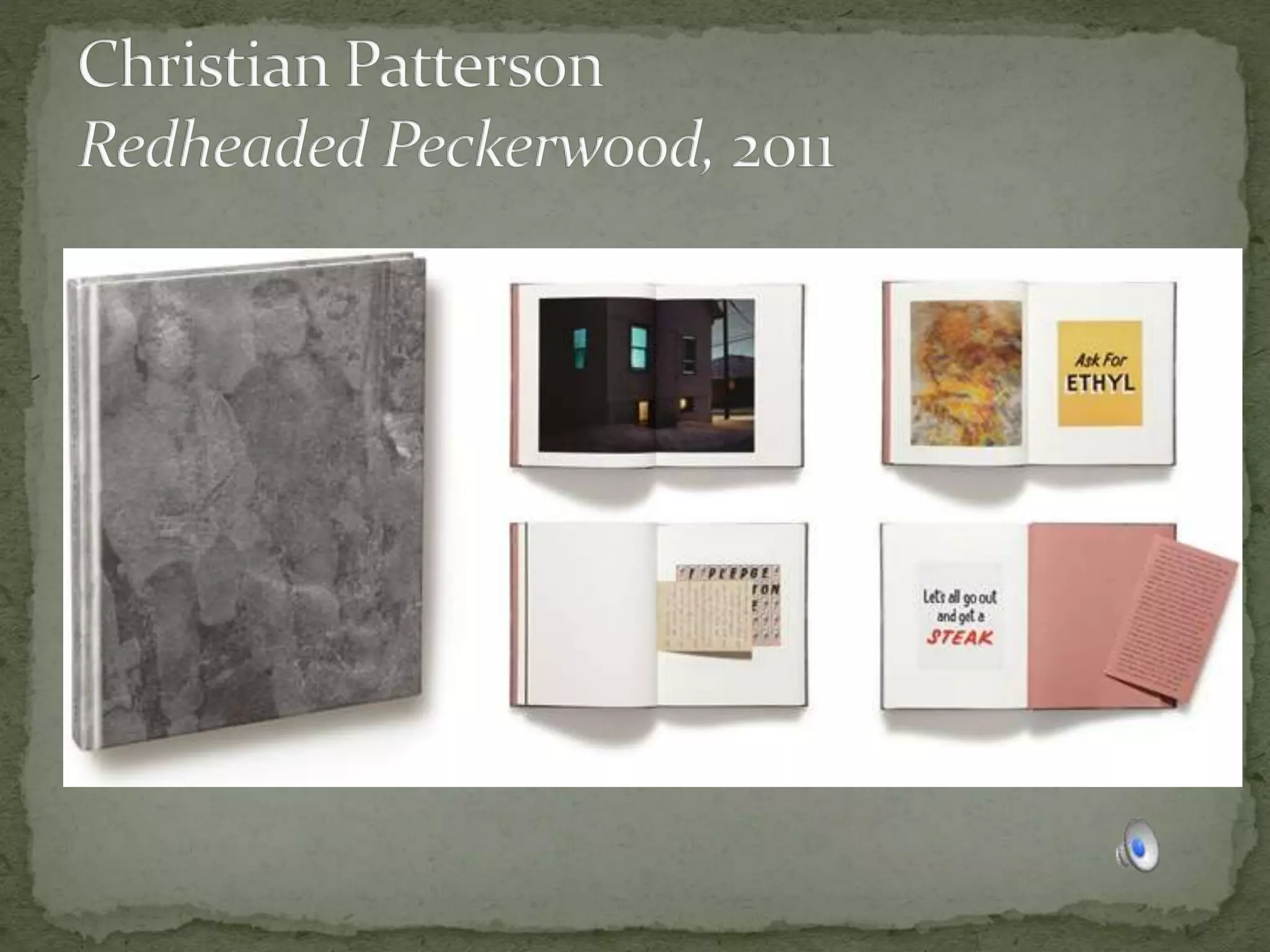
  • #9  Redheaded Peckerwood is a work with a tragic underlying narrative – the story of 19 year old Charles Starkweather and 14 year old Caril Ann Fugate who murdered ten people, including Fugate’s family, during a three day killing spree across Nebraska to the point of their capture in Douglas, Wyoming. The images record places and things central to the story, depict ideas inspired by it, and capture other moments and discoveries along the way. In book form, the work is presented as a sort of visual crime dossier, including pieces of paper which are inserted into the book. From a technical perspective, the photographs incorporate and reference the techniques of photojournalism, forensic photography, image appropriation, reenactment and documentary landscape photography. Convey emotion of the story, rather than literal documetary “peckerwood” == “White Trash”
  • #20 Flat: linear progression from begining to end Cluster
  • #22  Film “Memento”: Pierce stars as a man who suffers from anterograde amnesia (the inability to form new memories) and is searching for the persons who attacked him and killed his wife. Memento is presented as two different sequences of scenes interspersed during the film: a series in black-and-white that is shown chronologically, and a series of color sequences shown in reverse order (simulating in the audience the mental state of the protagonist who can remember only about five to seven minutes before amnesia sets in). The two sequences "meet" at the end of the film, producing one complete and cohesive narrative.[4]
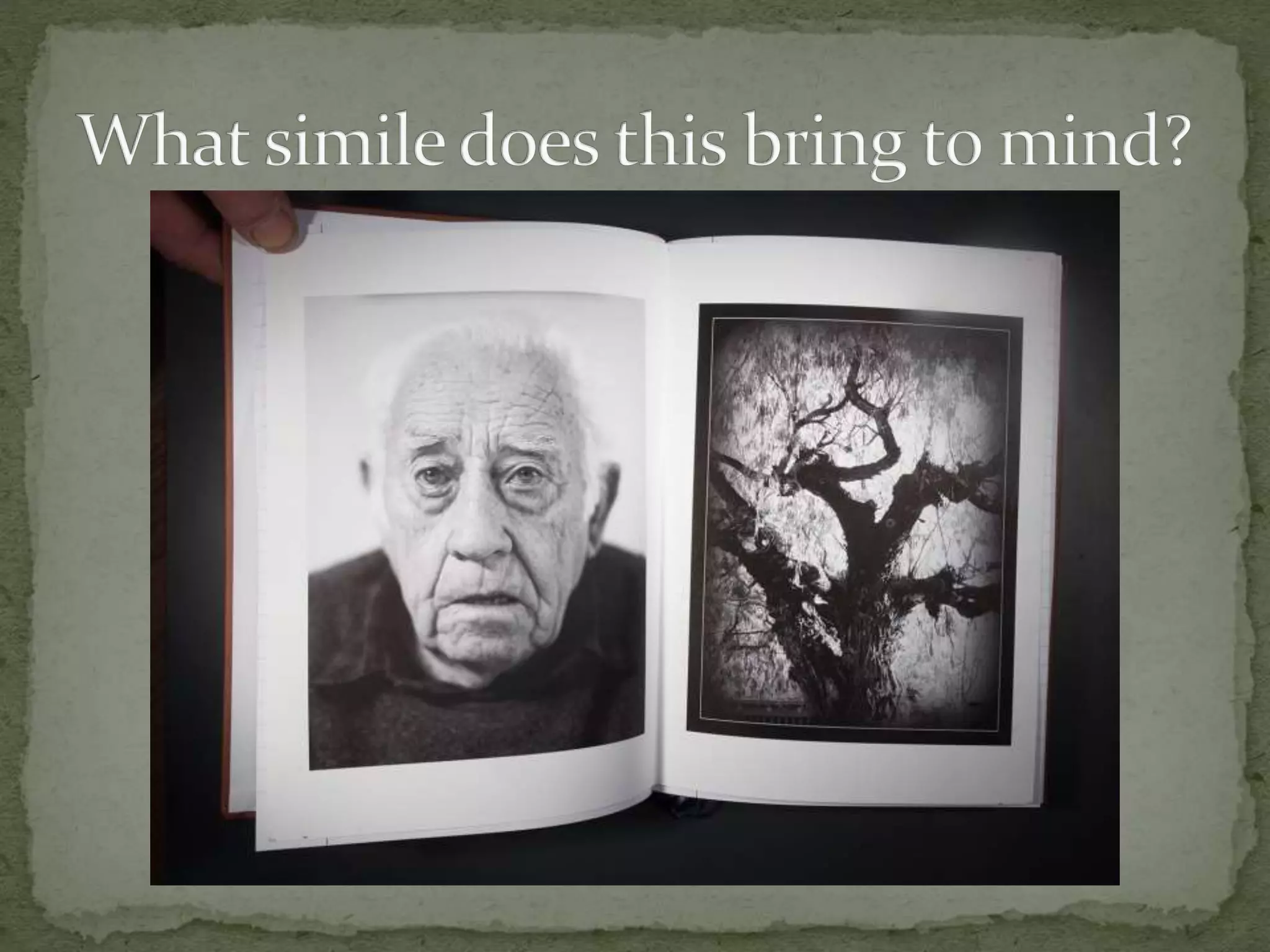
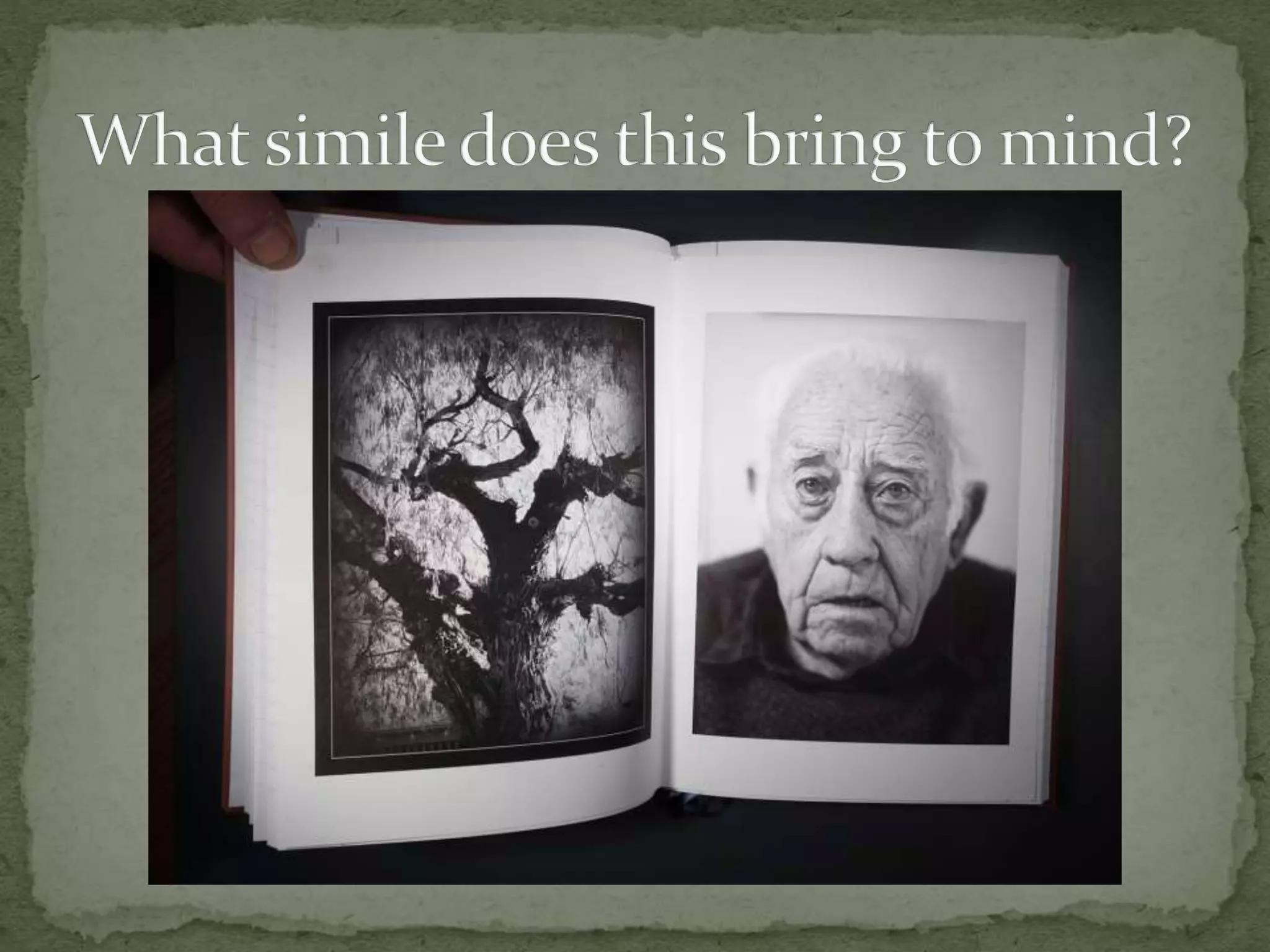
  • #23  Show old man and oak tree
  • #44  Old man and tree analogy Use Curves of Tangent Rays as example
  • #52  Show St. Christopher Book (which is more important, text or photos?) Interesting factoid: Every Saturday, Eileen Gittens, founder and CEO of BLURB, reads every book came came in in the last 10 minutes. Photos of 40 people Show St Christopher Book
  • #55  Blurb uses HP Indigo press, Lulu uses Xerox Show paper Samples
  • #58  Show “Curves of Tangent Rays” Cover insert “Chapter” graphics” Face pages of a different subject Credits Colophon