3-2: Structures
Objectives:
 Learn how to manipulate lists (arrays)
 Learn how to automate repetitive actions (loops)
 Learn how to make decisions in code (conditionals)
Set up the Pi kits. Start the X Windows System (startx)and launch IDLE.
Briefly review the syntax from the last session. We will make use of variables and
strings, especially.
Most of the time we don't deal with just one thing. Consider a trip to the grocery
store: does the shopping list contain only one item? Sometimes, but most of the
time it is rather longer than that. Python lets us represent lists of things easily. We
put them between square brackets [].
>>> groceries = ['milk', 'french fries', 'TACOS', 'ketchup', "lettuce", 'penguins',
'MORE TACOS']
>>> groceries
['milk', 'french fries', 'TACOS', 'ketchup', 'lettuce', 'penguins', 'MORE TACOS']
>>>
Notice that they are in the same order as they were when you entered them.
How many are there? In order to find out, we can use a function of Python
called len (for length).
Functions are repeatable actions. If you hand a box of stuff to somebody and
ask them to count what's inside, they can do that, and tell you the number. The
len function follows exactly the same principles. We give the len function a list –
or a variable that contains a list – and it tells us how many things are inside it.
We do the giving by putting it inside parentheses ().
>>> len(groceries)
7
>>>
Okay, so we have seven items on the list. Can we get the second item on the
list? Yes! But Python does a weird counting thing. The first item is number zero,
the second item is number one, and so on. The last item on this grocery list is
number six. Many programming languages start counting at zero, so as strange
as this might be, it is a useful thing to remember.
In order to get an item from the list, we enclose the item we want after the
variable name. For the third item, we do the following:
>>> groceries[2]
'TACOS'
>>>
Remember that we start counting from zero, so the third item is at position
number two. This is commonly pronounced “groceries sub two” because we
are finding an item with a particular subscript in the array.
Now, what if we want to alphabetize the grocery list? For this task, we can ask
the list to go off and sort itself. We do so with a dot, and since it already knows
what to do, we don't have to give the sort function anything in particular, so we
give it just an empty parameter list – that is, nothing between the parentheses.
>>> groceries.sort()
>>> groceries
['MORE TACOS', 'TACOS', 'french fries', 'ketchup', 'lettuce', 'milk', 'penguins']
>>>
This idea of asking a thing to do something is very, very powerful: it allows us to
model the world around us. What if we were to write a dog, and then we could
ask it to bark(quietly)and fetch(newspaper)? After receiving the newspaper,
could we ask it if it isCoveredInSlobber()or if it isCurrent()?
At any rate, what if we want to print each item in the grocery list on a separate
line? First of all, we can print something using the print()function:
>>> print("hello")
hello
>>>
This is important because it can be used in virtually any program, not just the
interactive IDLE environment. So now we can print each item in turn.
>>> groceries[0]
'MORE TACOS'
>>> groceries[1]
'TACOS'
>>> groceries[2]
'french fries'
>>> groceries[3]
'ketchup'
I don't know about you, but I'm getting tired of typing “groceries” over and over
again. Let's take a short cut and tell the computer to do that for us. The way
we go about this is using a loop:
for item in groceries:
print(item)
This is a fairly readable syntax. Python will go through the list of groceries, and for
each thing on the list it will call it an “item” and then it will print it.
At this stage it is critical to point out a couple of syntactic elements. First of all,
the colon (:) indicates that we are not done with what we are doing. Second,
indent ation matters. Although it is simply whitespace, many of the most
common errors result from misaligned or missing indentation within program
structures.
Let's do the same thing another way. Instead of iterating over some items, let's
iterate over some numbers. The following syntax lets us do this:
>>> for index in range(0, 5):
print(index)
0
1
2
3
4
>>>
Notice that the first number of the range (0) is included, but the last number of
the range (5) is excluded. Remember how len(groceries) told us there are 7
items in the list? This works out nicely for us, because the zero-based counting
scheme means that item 6 is the last one in the list, and a range from 0 to 7 will
include 6 but not 7. Let's put the pieces together.
>>> for index in range(0, len(groceries)):
print(groceries[index])
MORE TACOS
TACOS
french fries
ketchup
lettuce
milk
penguins
>>>
Now let's number the items.
>>> for index in range(0, len(groceries)):
print(`index` + ": " + groceries[index])
0: MORE TACOS
1: TACOS
2: french fries
3: ketchup
4: lettuce
5: milk
6: penguins
That's great, but wouldn't it be nice (for humans) to start the list at 1? We could
do the following:
>>> for index in range(0, len(groceries)):
print(`index + 1` + ": " + groceries[index])
1: MORE TACOS
2: TACOS
3: french fries
4: ketchup
5: lettuce
6: milk
7: penguins
>>>
This is starting to get complicated. Let's simplify a little bit by splitting up the print
statement.
>>> for index in range(0, len(groceries)):
num = index + 1
print(`num` +": " + groceries[index])
1: MORE TACOS
2: TACOS
3: french fries
4: ketchup
5: lettuce
6: milk
7: penguins
>>>
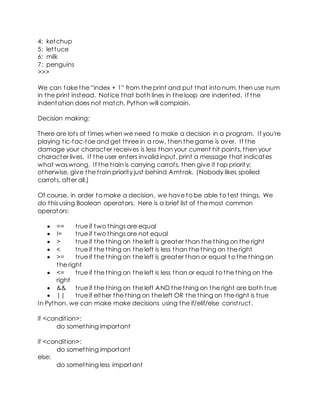
We can take the “index + 1” from the print and put that into num, then use num
in the print instead. Notice that both lines in the loop are indented. If the
indentation does not match, Python will complain.
Decision making:
There are lots of times when we need to make a decision in a program. If you're
playing tic-tac-toe and get three in a row, then the game is over. If the
damage your character receives is less than your current hit points, then your
character lives. If the user enters invalid input, print a message that indicates
what was wrong. If the train is carrying carrots, then give it top priority;
otherwise, give the train priority just behind Amtrak. (Nobody likes spoiled
carrots, after all.)
Of course, in order to make a decision, we have to be able to test things. We
do this using Boolean operators. Here is a brief list of the most common
operators:
 == true if two things are equal
 != true if two things are not equal
 > true if the thing on the left is greater than the thing on the right
 < true if the thing on the left is less than the thing on the right
 >= true if the thing on the left is greater than or equal t o the thing on
the right
 <= true if the thing on the left is less than or equal to the thing on the
right
 && true if the thing on the left AND the thing on the right are both true
 || true if either the thing on the left OR the thing on the right is true
In Python, we can make make decisions using the if/elif/else construct.
if <condition>:
do something important
if <condition>:
do something important
else:
do something less important
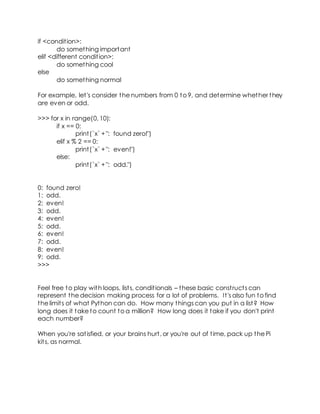
if <condition>:
do something important
elif <different condition>:
do something cool
else
do something normal
For example, let's consider the numbers from 0 to 9, and determine whether they
are even or odd.
>>> for x in range(0, 10):
if x == 0:
print(`x` +": found zero!")
elif x % 2 == 0:
print(`x` +": even!")
else:
print(`x` +": odd.")
0: found zero!
1: odd.
2: even!
3: odd.
4: even!
5: odd.
6: even!
7: odd.
8: even!
9: odd.
>>>
Feel free to play with loops, lists, conditionals – these basic constructs can
represent the decision making process for a lot of problems. It's also fun to find
the limits of what Python can do. How many things can you put in a list? How
long does it take to count to a million? How long does it take if you don't print
each number?
When you're satisfied, or your brains hurt, or you're out of time, pack up the Pi
kits, as normal.

Magic 8 ball prorgramming or structure is fun

  • 1.
    3-2: Structures Objectives:  Learnhow to manipulate lists (arrays)  Learn how to automate repetitive actions (loops)  Learn how to make decisions in code (conditionals) Set up the Pi kits. Start the X Windows System (startx)and launch IDLE. Briefly review the syntax from the last session. We will make use of variables and strings, especially. Most of the time we don't deal with just one thing. Consider a trip to the grocery store: does the shopping list contain only one item? Sometimes, but most of the time it is rather longer than that. Python lets us represent lists of things easily. We put them between square brackets []. >>> groceries = ['milk', 'french fries', 'TACOS', 'ketchup', "lettuce", 'penguins', 'MORE TACOS'] >>> groceries ['milk', 'french fries', 'TACOS', 'ketchup', 'lettuce', 'penguins', 'MORE TACOS'] >>> Notice that they are in the same order as they were when you entered them. How many are there? In order to find out, we can use a function of Python called len (for length). Functions are repeatable actions. If you hand a box of stuff to somebody and ask them to count what's inside, they can do that, and tell you the number. The len function follows exactly the same principles. We give the len function a list – or a variable that contains a list – and it tells us how many things are inside it. We do the giving by putting it inside parentheses (). >>> len(groceries) 7 >>> Okay, so we have seven items on the list. Can we get the second item on the list? Yes! But Python does a weird counting thing. The first item is number zero, the second item is number one, and so on. The last item on this grocery list is number six. Many programming languages start counting at zero, so as strange as this might be, it is a useful thing to remember. In order to get an item from the list, we enclose the item we want after the
  • 2.
    variable name. Forthe third item, we do the following: >>> groceries[2] 'TACOS' >>> Remember that we start counting from zero, so the third item is at position number two. This is commonly pronounced “groceries sub two” because we are finding an item with a particular subscript in the array. Now, what if we want to alphabetize the grocery list? For this task, we can ask the list to go off and sort itself. We do so with a dot, and since it already knows what to do, we don't have to give the sort function anything in particular, so we give it just an empty parameter list – that is, nothing between the parentheses. >>> groceries.sort() >>> groceries ['MORE TACOS', 'TACOS', 'french fries', 'ketchup', 'lettuce', 'milk', 'penguins'] >>> This idea of asking a thing to do something is very, very powerful: it allows us to model the world around us. What if we were to write a dog, and then we could ask it to bark(quietly)and fetch(newspaper)? After receiving the newspaper, could we ask it if it isCoveredInSlobber()or if it isCurrent()? At any rate, what if we want to print each item in the grocery list on a separate line? First of all, we can print something using the print()function: >>> print("hello") hello >>> This is important because it can be used in virtually any program, not just the interactive IDLE environment. So now we can print each item in turn. >>> groceries[0] 'MORE TACOS' >>> groceries[1] 'TACOS' >>> groceries[2] 'french fries' >>> groceries[3] 'ketchup'
  • 3.
    I don't knowabout you, but I'm getting tired of typing “groceries” over and over again. Let's take a short cut and tell the computer to do that for us. The way we go about this is using a loop: for item in groceries: print(item) This is a fairly readable syntax. Python will go through the list of groceries, and for each thing on the list it will call it an “item” and then it will print it. At this stage it is critical to point out a couple of syntactic elements. First of all, the colon (:) indicates that we are not done with what we are doing. Second, indent ation matters. Although it is simply whitespace, many of the most common errors result from misaligned or missing indentation within program structures. Let's do the same thing another way. Instead of iterating over some items, let's iterate over some numbers. The following syntax lets us do this: >>> for index in range(0, 5): print(index) 0 1 2 3 4 >>> Notice that the first number of the range (0) is included, but the last number of the range (5) is excluded. Remember how len(groceries) told us there are 7 items in the list? This works out nicely for us, because the zero-based counting scheme means that item 6 is the last one in the list, and a range from 0 to 7 will include 6 but not 7. Let's put the pieces together. >>> for index in range(0, len(groceries)): print(groceries[index]) MORE TACOS TACOS french fries ketchup lettuce
  • 4.
    milk penguins >>> Now let's numberthe items. >>> for index in range(0, len(groceries)): print(`index` + ": " + groceries[index]) 0: MORE TACOS 1: TACOS 2: french fries 3: ketchup 4: lettuce 5: milk 6: penguins That's great, but wouldn't it be nice (for humans) to start the list at 1? We could do the following: >>> for index in range(0, len(groceries)): print(`index + 1` + ": " + groceries[index]) 1: MORE TACOS 2: TACOS 3: french fries 4: ketchup 5: lettuce 6: milk 7: penguins >>> This is starting to get complicated. Let's simplify a little bit by splitting up the print statement. >>> for index in range(0, len(groceries)): num = index + 1 print(`num` +": " + groceries[index]) 1: MORE TACOS 2: TACOS 3: french fries
  • 5.
    4: ketchup 5: lettuce 6:milk 7: penguins >>> We can take the “index + 1” from the print and put that into num, then use num in the print instead. Notice that both lines in the loop are indented. If the indentation does not match, Python will complain. Decision making: There are lots of times when we need to make a decision in a program. If you're playing tic-tac-toe and get three in a row, then the game is over. If the damage your character receives is less than your current hit points, then your character lives. If the user enters invalid input, print a message that indicates what was wrong. If the train is carrying carrots, then give it top priority; otherwise, give the train priority just behind Amtrak. (Nobody likes spoiled carrots, after all.) Of course, in order to make a decision, we have to be able to test things. We do this using Boolean operators. Here is a brief list of the most common operators:  == true if two things are equal  != true if two things are not equal  > true if the thing on the left is greater than the thing on the right  < true if the thing on the left is less than the thing on the right  >= true if the thing on the left is greater than or equal t o the thing on the right  <= true if the thing on the left is less than or equal to the thing on the right  && true if the thing on the left AND the thing on the right are both true  || true if either the thing on the left OR the thing on the right is true In Python, we can make make decisions using the if/elif/else construct. if <condition>: do something important if <condition>: do something important else: do something less important
  • 6.
    if <condition>: do somethingimportant elif <different condition>: do something cool else do something normal For example, let's consider the numbers from 0 to 9, and determine whether they are even or odd. >>> for x in range(0, 10): if x == 0: print(`x` +": found zero!") elif x % 2 == 0: print(`x` +": even!") else: print(`x` +": odd.") 0: found zero! 1: odd. 2: even! 3: odd. 4: even! 5: odd. 6: even! 7: odd. 8: even! 9: odd. >>> Feel free to play with loops, lists, conditionals – these basic constructs can represent the decision making process for a lot of problems. It's also fun to find the limits of what Python can do. How many things can you put in a list? How long does it take to count to a million? How long does it take if you don't print each number? When you're satisfied, or your brains hurt, or you're out of time, pack up the Pi kits, as normal.