LSIViewer 2.0
A Client Oriented Online Visualization
Tool for Geospatial Vector Data
September 19th , 2017
Lab for Spatial Informatics(LSI), IIIT-H
K. Manikanta, Dr K. S. Rajan
INDIA
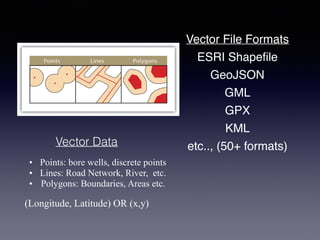
Vector Data
• Points: bore wells, discrete points
• Lines: Road Network, River, etc.
• Polygons: Boundaries, Areas etc.
(Longitude, Latitude) OR (x,y)
ESRI Shapefile
GeoJSON
GML
GPX
KML
etc.., (50+ formats)
Vector File Formats
Working with Vector Models
• How do we perform below tasks?
• Creation
• Deletion
• Manipulation
• Finite Visualization
This gave rise to Desktop based GIS Application Software
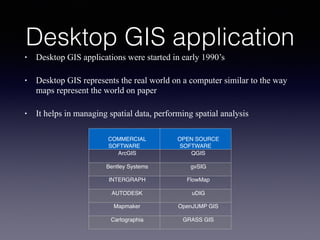
Desktop GIS application
• Desktop GIS applications were started in early 1990’s
• Desktop GIS represents the real world on a computer similar to the way
maps represent the world on paper
• It helps in managing spatial data, performing spatial analysis
COMMERCIAL
SOFTWARE
OPEN SOURCE
SOFTWARE
ArcGIS QGIS
Bentley Systems gvSIG
INTERGRAPH FlowMap
AUTODESK uDIG
Mapmaker OpenJUMP GIS
Cartographia GRASS GIS
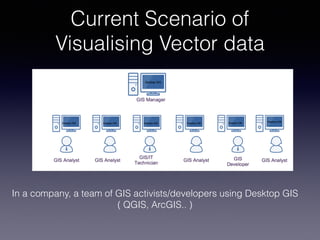
In a company, a team of GIS activists/developers using Desktop GIS
( QGIS, ArcGIS.. )
Current Scenario of
Visualising Vector data
• Disadvantages of Desktop Applications
• Sharing data
• Need to install the application
• Can not support multiple Devices
• Expensive(Commercial software)
What do we want to
achieve?
• System which is
• Installation-free
• OS independent
• Multiple Devices
• GIS Abilities - zoom, pan, label, style
• Data rendering comparable to a desktop GIS application
• Open Source
OBJECTIVES
• System which is
• Installation-free
• OS independent
• Multiple Devices
• GIS Abilities - zoom, pan, label, style
• Data rendering comparable to a desktop GIS application
• Open Source
• One solution to
• Installation_free + Platform independent + Multiple Devices
• Web Browser based
BUT ?
• client-server paradigm
• Server is dominating
• Rendering on server side
• More server calls
• Multiple data transfer
• Client is dumb - Only a display device
Current state of art
OGC Standards
• To support images in web…
• WMS was introduced (1999)
• Client requests the server for a geographical layers
• Server responds with one or more geo-registered images(JPEG, PNG etc)
• To edit the map..
• WFS was introduced (2005)
• An interface allowing requests for geographical features across the web using
platform-independent calls
• Feature can be thought as a source code behind the map
• Both WMS and WFS follows a client-server paradigm
• WMS and WFS - Server centric approach :
• Disadvantages:
• Time overhead for every data transfer
• High bandwidth demand for large data
• Continuous network connection
• Cannot be scalable if server is handling all the
rendering and other computations
• Introduction of Web 2.0 - 2014
• HTML5 canvas - allows for dynamic, scriptable
rendering of 2D shapes and bitmap images
• Efficiency improved in Javascript V8 engine
• GeoJSON has been introduced : Javascript object
notation for Geographical objects
• Client “can be” more powerful now
With the aforementioned goals and a powerful client
we designed and developed a
Online Geospatial Vector Visualization System
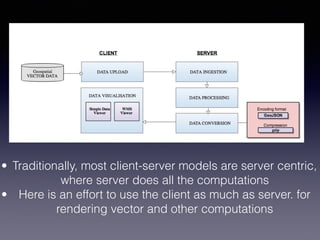
Architecture of LSIViewer 2.0
• Traditionally, most client-server models are server centric,
where server does all the computations
• Here is an effort to use the client as much as server. for
rendering vector and other computations
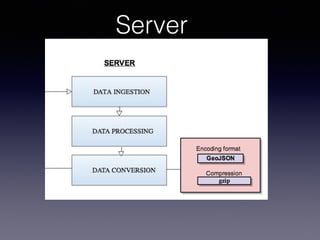
Server
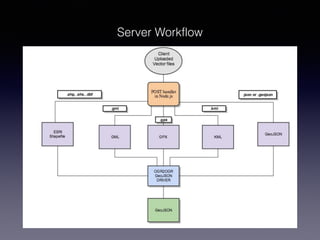
Server Workflow
Server
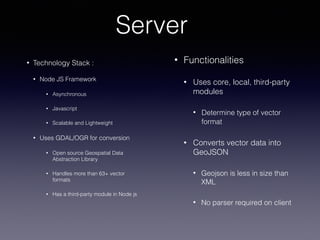
• Functionalities
• Uses core, local, third-party
modules
• Determine type of vector
format
• Converts vector data into
GeoJSON
• Geojson is less in size than
XML
• No parser required on client
• Technology Stack :
• Node JS Framework
• Asynchronous
• Javascript
• Scalable and Lightweight
• Uses GDAL/OGR for conversion
• Open source Geospatial Data
Abstraction Library
• Handles more than 63+ vector
formats
• Has a third-party module in Node js
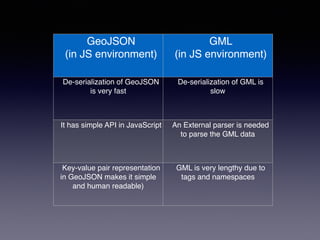
GeoJSON
(in JS environment)
GML
(in JS environment)
De-serialization of GeoJSON
is very fast
De-serialization of GML is
slow
It has simple API in JavaScript An External parser is needed
to parse the GML data
Key-value pair representation
in GeoJSON makes it simple
and human readable)
GML is very lengthy due to
tags and namespaces
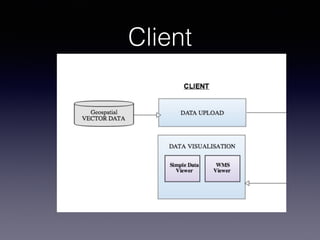
Client
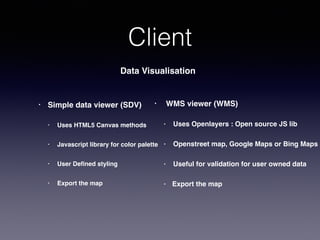
Client
Data Visualisation
• Simple data viewer (SDV)
• Uses HTML5 Canvas methods
• Javascript library for color palette
• User Defined styling
• Export the map
• WMS viewer (WMS)
• Uses Openlayers : Open source JS lib
• Openstreet map, Google Maps or Bing Maps
• Useful for validation for user owned data
• Export the map
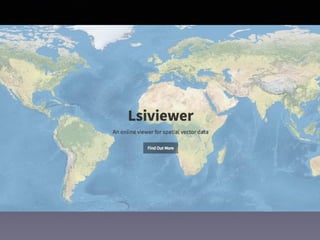
LSIViewer 2.0
An online viewer for Geospatial vector data using javascript and canvas
lsi.iiit.ac.in/lsiviewer
SDV Functionalities
• Supports visualisation of 5 popular vector formats
• ESRI Shapefile, Geojson, GPX, KML, GML
• Zoom
• Pan
• Label with attributes
• Attribute table
• User defined styling
• Export the map
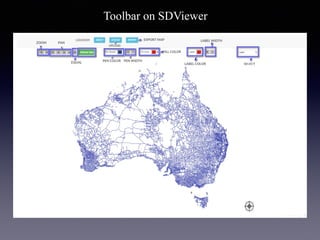
Toolbar on SDViewer
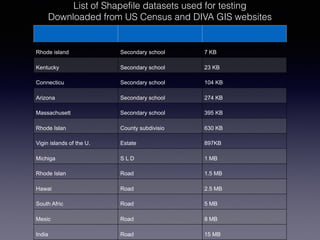
List of Shapefile datasets used for testing
Downloaded from US Census and DIVA GIS websites
Rhode island Secondary school 7 KB
Kentucky Secondary school 23 KB
Connecticu Secondary school 104 KB
Arizona Secondary school 274 KB
Massachusett Secondary school 395 KB
Rhode Islan County subdivisio 630 KB
Vigin islands of the U. Estate 897KB
Michiga S L D 1 MB
Rhode Islan Road 1.5 MB
Hawai Road 2.5 MB
South Afric Road 5 MB
Mexic Road 8 MB
India Road 15 MB
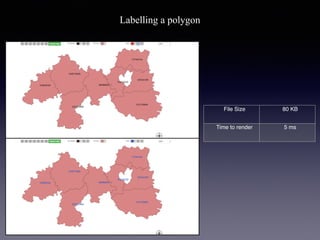
Labelling a polygon
File Size 80 KB
Time to render 5 ms
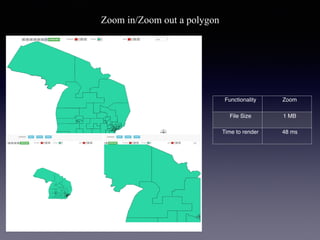
Functionality Zoom
File Size 1 MB
Time to render 48 ms
Zoom in/Zoom out a polygon
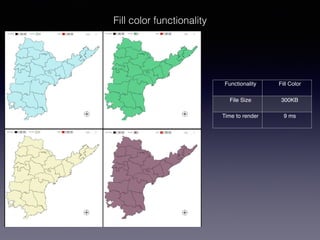
Functionality Fill Color
File Size 300KB
Time to render 9 ms
Fill color functionality
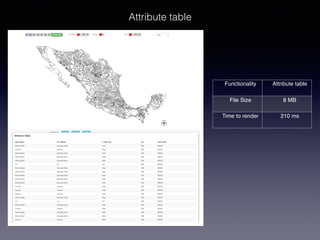
Functionality Attribute table
File Size 8 MB
Time to render 210 ms
Attribute table
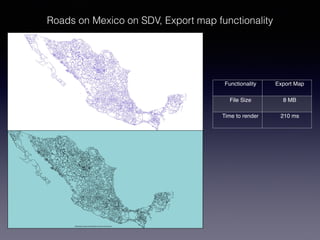
Functionality Export Map
File Size 8 MB
Time to render 210 ms
Roads on Mexico on SDV, Export map functionality
WMS Functionalities
• Supports visualisation of 5 popular vector formats
• ESRI Shapefile, Geojson, GPX, KML, GML
• Zoom
• Pan
• Attribute table
• Export the map
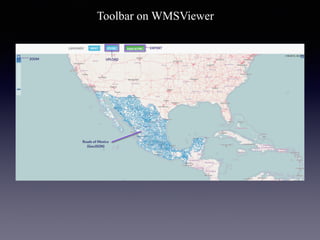
Toolbar on WMSViewer
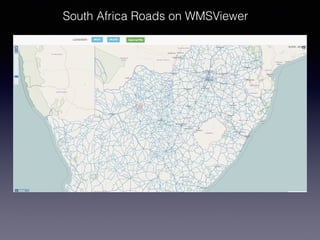
South Africa Roads on WMSViewer
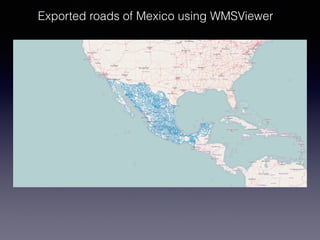
Exported roads of Mexico using WMSViewer
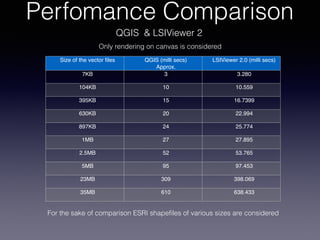
Perfomance Comparison
QGIS & LSIViewer 2
Size of the vector files QGIS (milli secs)
Approx.
LSIViewer 2.0 (milli secs)
7KB 3 3.280
104KB 10 10.559
395KB 15 16.7399
630KB 20 22.994
897KB 24 25.774
1MB 27 27.895
2.5MB 52 53.765
5MB 95 97.453
23MB 309 398.069
35MB 610 638.433
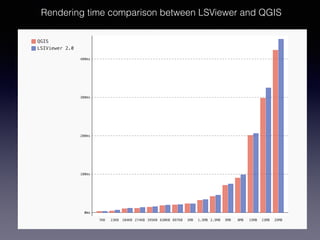
For the sake of comparison ESRI shapefiles of various sizes are considered
Only rendering on canvas is considered
Rendering time comparison between LSViewer and QGIS
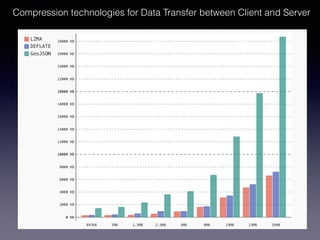
Compression technologies for Data Transfer between Client and Server
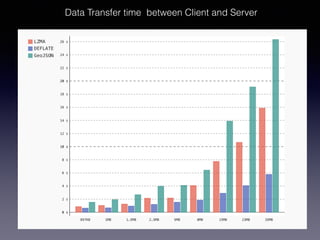
Data Transfer time between Client and Server
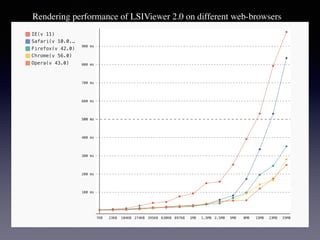
Rendering performance of LSIViewer 2.0 on different web-browsers
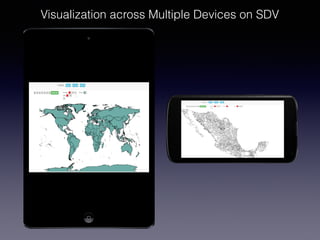
Visualization across Multiple Devices on SDV
Source code released :
https://github.com/LSI-IIIT/lsiviewerjs
Unique Features of
LSIViewer 2.0
• An online service that Moves away from server-client
paradigm of data rendering to client-oriented.
• The advantages of using the application on multiple
devices.
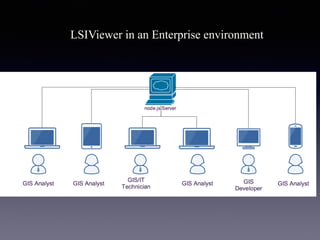
• Can become a good collaborative framework(single
installation - multiple users - as in an enterprise)
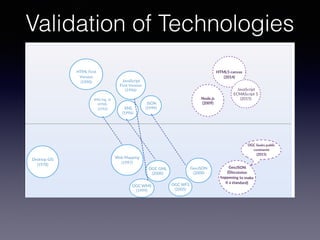
Validation of Technologies
Future work
• To Support other Geospatial Vector formats
• To build Enterprise level collaboration tool like
Google docs
• Support Multiple Vector Layers
• Adding Projection
LSIViewer in an Enterprise environment
LSIViewer - http://lsi.iiit.ac.in/lsiviewer
Thank you

LSIVIEWER 2.0-A CLIENT-ORIENTED ONLINE VISUALIZATION TOOL FOR GEOSPATIAL VECTOR DATA

  • 1.
    LSIViewer 2.0 A ClientOriented Online Visualization Tool for Geospatial Vector Data September 19th , 2017 Lab for Spatial Informatics(LSI), IIIT-H K. Manikanta, Dr K. S. Rajan INDIA
  • 2.
    Vector Data • Points:bore wells, discrete points • Lines: Road Network, River, etc. • Polygons: Boundaries, Areas etc. (Longitude, Latitude) OR (x,y) ESRI Shapefile GeoJSON GML GPX KML etc.., (50+ formats) Vector File Formats
  • 3.
    Working with VectorModels • How do we perform below tasks? • Creation • Deletion • Manipulation • Finite Visualization This gave rise to Desktop based GIS Application Software
  • 4.
    Desktop GIS application •Desktop GIS applications were started in early 1990’s • Desktop GIS represents the real world on a computer similar to the way maps represent the world on paper • It helps in managing spatial data, performing spatial analysis COMMERCIAL SOFTWARE OPEN SOURCE SOFTWARE ArcGIS QGIS Bentley Systems gvSIG INTERGRAPH FlowMap AUTODESK uDIG Mapmaker OpenJUMP GIS Cartographia GRASS GIS
  • 5.
    In a company,a team of GIS activists/developers using Desktop GIS ( QGIS, ArcGIS.. ) Current Scenario of Visualising Vector data
  • 6.
    • Disadvantages ofDesktop Applications • Sharing data • Need to install the application • Can not support multiple Devices • Expensive(Commercial software)
  • 7.
    What do wewant to achieve?
  • 8.
    • System whichis • Installation-free • OS independent • Multiple Devices • GIS Abilities - zoom, pan, label, style • Data rendering comparable to a desktop GIS application • Open Source
  • 9.
    OBJECTIVES • System whichis • Installation-free • OS independent • Multiple Devices • GIS Abilities - zoom, pan, label, style • Data rendering comparable to a desktop GIS application • Open Source
  • 10.
    • One solutionto • Installation_free + Platform independent + Multiple Devices • Web Browser based
  • 11.
  • 12.
    • client-server paradigm •Server is dominating • Rendering on server side • More server calls • Multiple data transfer • Client is dumb - Only a display device Current state of art
  • 13.
    OGC Standards • Tosupport images in web… • WMS was introduced (1999) • Client requests the server for a geographical layers • Server responds with one or more geo-registered images(JPEG, PNG etc) • To edit the map.. • WFS was introduced (2005) • An interface allowing requests for geographical features across the web using platform-independent calls • Feature can be thought as a source code behind the map • Both WMS and WFS follows a client-server paradigm
  • 14.
    • WMS andWFS - Server centric approach : • Disadvantages: • Time overhead for every data transfer • High bandwidth demand for large data • Continuous network connection • Cannot be scalable if server is handling all the rendering and other computations
  • 15.
    • Introduction ofWeb 2.0 - 2014 • HTML5 canvas - allows for dynamic, scriptable rendering of 2D shapes and bitmap images • Efficiency improved in Javascript V8 engine • GeoJSON has been introduced : Javascript object notation for Geographical objects • Client “can be” more powerful now
  • 16.
    With the aforementionedgoals and a powerful client we designed and developed a Online Geospatial Vector Visualization System
  • 18.
  • 19.
    • Traditionally, mostclient-server models are server centric, where server does all the computations • Here is an effort to use the client as much as server. for rendering vector and other computations
  • 20.
  • 21.
  • 22.
    Server • Functionalities • Usescore, local, third-party modules • Determine type of vector format • Converts vector data into GeoJSON • Geojson is less in size than XML • No parser required on client • Technology Stack : • Node JS Framework • Asynchronous • Javascript • Scalable and Lightweight • Uses GDAL/OGR for conversion • Open source Geospatial Data Abstraction Library • Handles more than 63+ vector formats • Has a third-party module in Node js
  • 23.
    GeoJSON (in JS environment) GML (inJS environment) De-serialization of GeoJSON is very fast De-serialization of GML is slow It has simple API in JavaScript An External parser is needed to parse the GML data Key-value pair representation in GeoJSON makes it simple and human readable) GML is very lengthy due to tags and namespaces
  • 24.
  • 25.
    Client Data Visualisation • Simpledata viewer (SDV) • Uses HTML5 Canvas methods • Javascript library for color palette • User Defined styling • Export the map • WMS viewer (WMS) • Uses Openlayers : Open source JS lib • Openstreet map, Google Maps or Bing Maps • Useful for validation for user owned data • Export the map
  • 26.
    LSIViewer 2.0 An onlineviewer for Geospatial vector data using javascript and canvas lsi.iiit.ac.in/lsiviewer
  • 27.
    SDV Functionalities • Supportsvisualisation of 5 popular vector formats • ESRI Shapefile, Geojson, GPX, KML, GML • Zoom • Pan • Label with attributes • Attribute table • User defined styling • Export the map
  • 28.
  • 29.
    List of Shapefiledatasets used for testing Downloaded from US Census and DIVA GIS websites Rhode island Secondary school 7 KB Kentucky Secondary school 23 KB Connecticu Secondary school 104 KB Arizona Secondary school 274 KB Massachusett Secondary school 395 KB Rhode Islan County subdivisio 630 KB Vigin islands of the U. Estate 897KB Michiga S L D 1 MB Rhode Islan Road 1.5 MB Hawai Road 2.5 MB South Afric Road 5 MB Mexic Road 8 MB India Road 15 MB
  • 30.
    Labelling a polygon FileSize 80 KB Time to render 5 ms
  • 31.
    Functionality Zoom File Size1 MB Time to render 48 ms Zoom in/Zoom out a polygon
  • 32.
    Functionality Fill Color FileSize 300KB Time to render 9 ms Fill color functionality
  • 33.
    Functionality Attribute table FileSize 8 MB Time to render 210 ms Attribute table
  • 34.
    Functionality Export Map FileSize 8 MB Time to render 210 ms Roads on Mexico on SDV, Export map functionality
  • 35.
    WMS Functionalities • Supportsvisualisation of 5 popular vector formats • ESRI Shapefile, Geojson, GPX, KML, GML • Zoom • Pan • Attribute table • Export the map
  • 36.
  • 37.
    South Africa Roadson WMSViewer
  • 38.
    Exported roads ofMexico using WMSViewer
  • 39.
    Perfomance Comparison QGIS &LSIViewer 2 Size of the vector files QGIS (milli secs) Approx. LSIViewer 2.0 (milli secs) 7KB 3 3.280 104KB 10 10.559 395KB 15 16.7399 630KB 20 22.994 897KB 24 25.774 1MB 27 27.895 2.5MB 52 53.765 5MB 95 97.453 23MB 309 398.069 35MB 610 638.433 For the sake of comparison ESRI shapefiles of various sizes are considered Only rendering on canvas is considered
  • 40.
    Rendering time comparisonbetween LSViewer and QGIS
  • 41.
    Compression technologies forData Transfer between Client and Server
  • 42.
    Data Transfer timebetween Client and Server
  • 43.
    Rendering performance ofLSIViewer 2.0 on different web-browsers
  • 44.
  • 45.
    Source code released: https://github.com/LSI-IIIT/lsiviewerjs
  • 46.
    Unique Features of LSIViewer2.0 • An online service that Moves away from server-client paradigm of data rendering to client-oriented. • The advantages of using the application on multiple devices. • Can become a good collaborative framework(single installation - multiple users - as in an enterprise)
  • 47.
  • 48.
    Future work • ToSupport other Geospatial Vector formats • To build Enterprise level collaboration tool like Google docs • Support Multiple Vector Layers • Adding Projection
  • 49.
    LSIViewer in anEnterprise environment
  • 50.