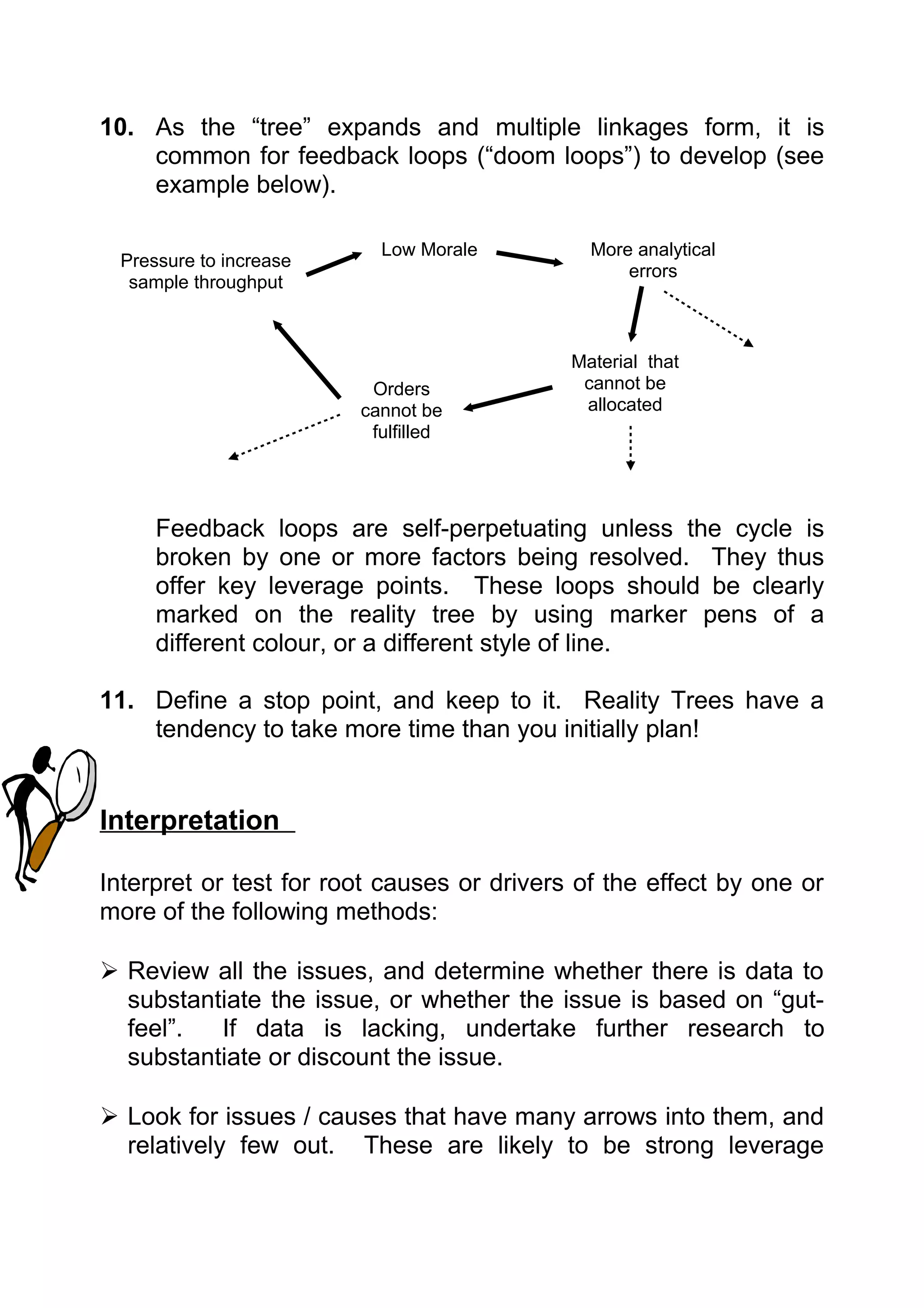
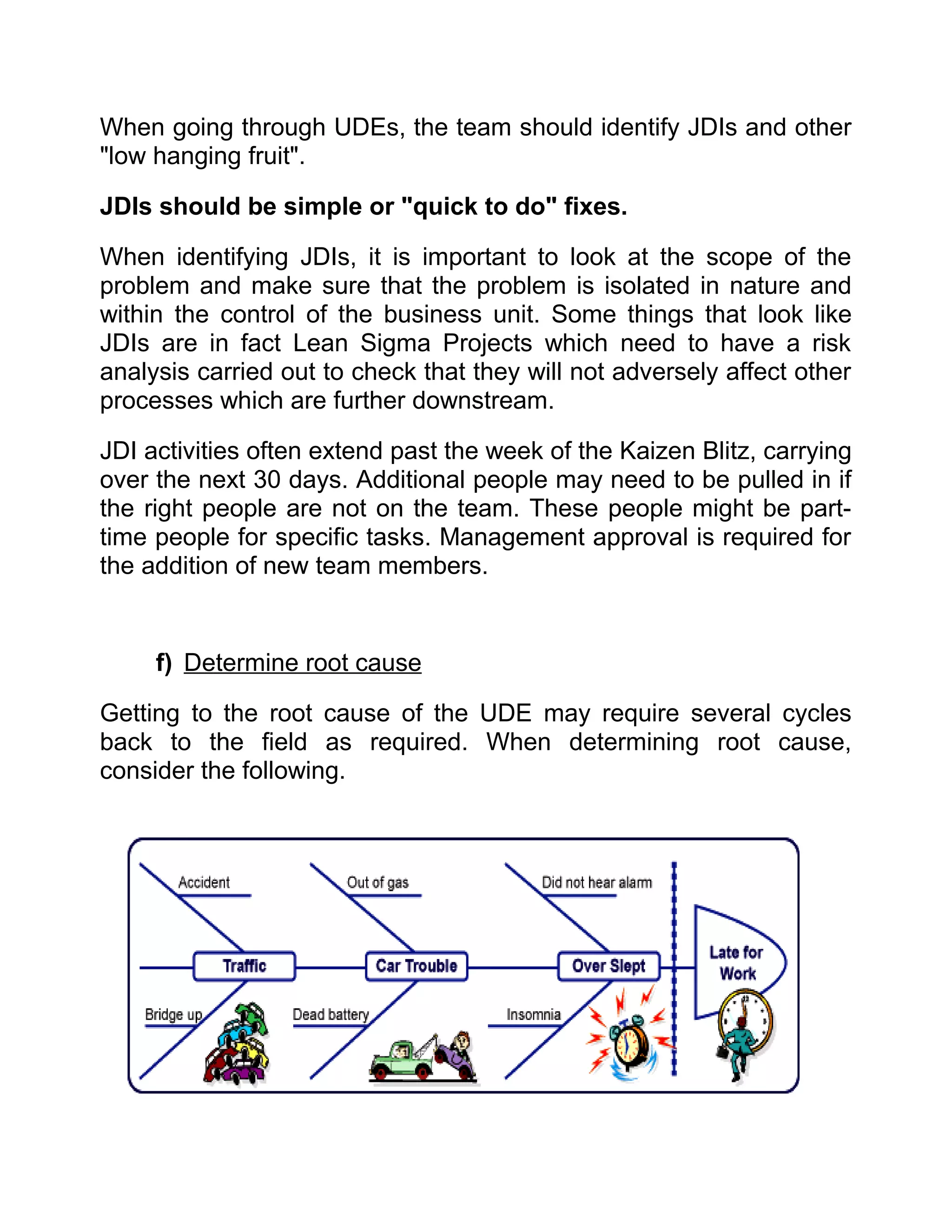
Preface

The changing business environment along with fierce competition and
pressures from the investors have forced even highly stable and mature
organizations to look for ways of improving productivity and excellence in
every echelon of business. The business gurus and perfectionists have
long been in the process of coining theories and suggesting methodologies
for transforming businesses and sustaining Excellencies. These strategic
initiatives really provide miracle benefits, alone; General Electric claims
benefits worth US $ 12b from six sigma initiatives.


The challenges faced by the various manufacturing sectors are even more
severe and required a pool of strategies to be remained in business.
Though Operational Excellence tools provide equally good mechanism of
achieving accelerated excellence in services and non manufacturing sector
yet it’s applicability in manufacturing sector have harvested un parallel
results and we believe can do even far more better.


Operational excellence is the most advance form of strategic initiatives and
combines all the theories and methodologies in the journey to excellence.
Substantial amount of material on the subject is available on the Internet in
the form of publications, books and articles. Our focus was to exploit these
sources and develop a guide book covering important principles and tools
required for embedding operational excellence as a way of life in
convenient desk top book form.


All our efforts were to precise and concise the available material into a
meaningful and useful publication. Hope, our humble effort will help in
reinforcing the understanding of Operational Excellence Philosophy.


Dr. Abid Ali                                               Sajjad Shaukat
Operational Excellence – Principles and Tools
                          Table of Contents

1. Data Analysis and Presentation
    a. Pareto Charts
    b. Histogram
    c. Radar Analysis
2. Issue Analysis
    a.   5 Whys
    b.   Brainstorming
    c.   Issue Diagrams
    d.   Fishbone Diagram
    e.   Reality Tree
3. Preparing For Change
    a.   FMEA
    b.   Force Field Analysis
    c.   Gantt Chart
    d.   Project Start
    e.   DMAIC Process
4. Process Mapping
    a.   Time Value Map
    b.   Logical Flow Chart
    c.   Value Stream Mapping
    d.   Load Charts
    e.   IPO Diagram
5. Problem Solving
    a. Problem Solving Method
6. Organizing the Workplace
    a. 5 S
    b. Visual Factory
7. Statistical Process Control
    a. SPC / Control Charts
    b. Design of Experiments (DOE)
8. Meeting Tools
    a. Spacer
    b. AAR
9. Additional Tools
    a.   Prioritization Model
    b.   Kaizen Blitz
    c.   Six Sigma Vs Lean Sigma
    d.   Kanbans
DATA ANALYSIS & PRESENTATION

                       Pareto Charts


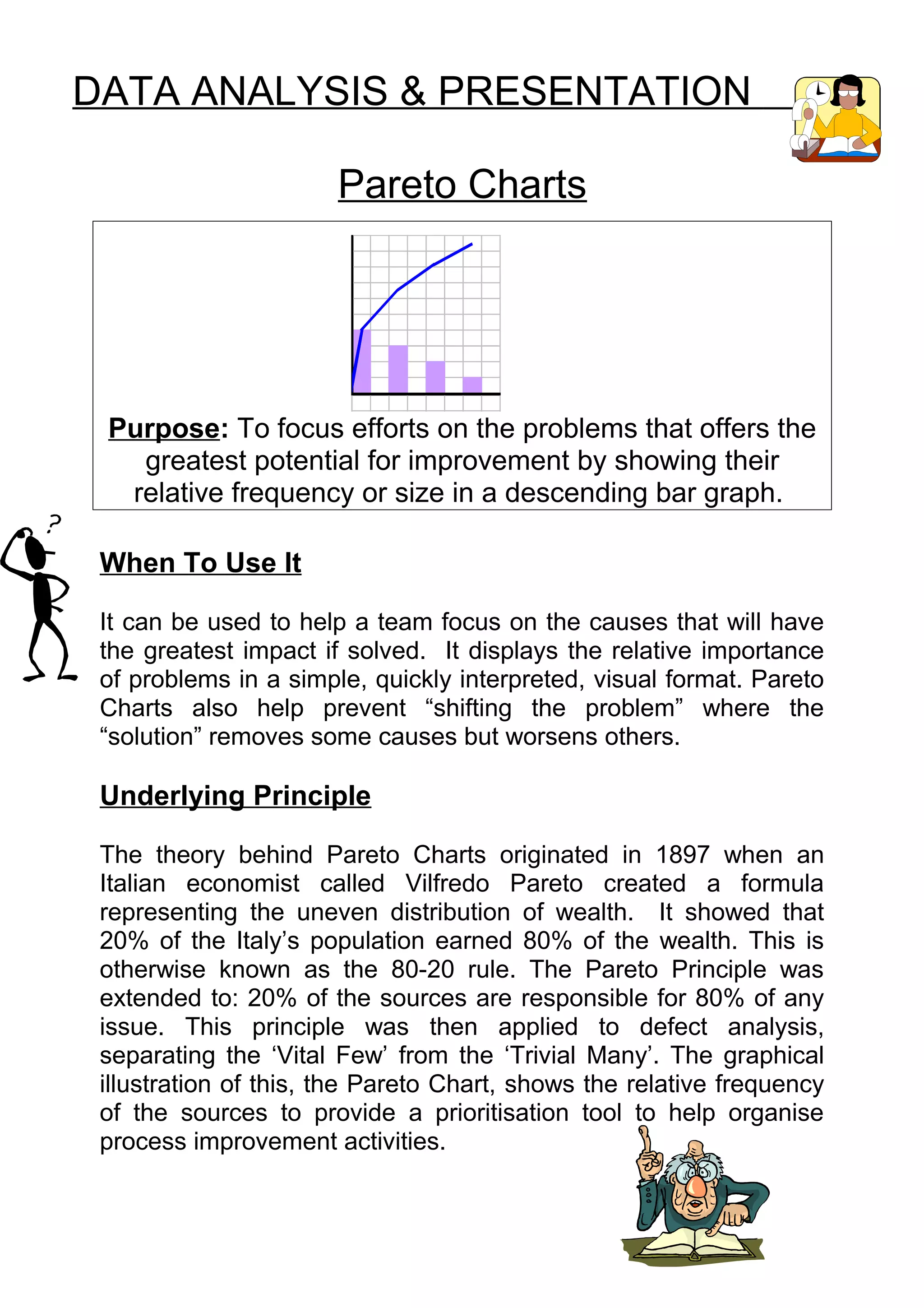
 Purpose: To focus efforts on the problems that offers the
   greatest potential for improvement by showing their
  relative frequency or size in a descending bar graph.

 When To Use It

 It can be used to help a team focus on the causes that will have
 the greatest impact if solved. It displays the relative importance
 of problems in a simple, quickly interpreted, visual format. Pareto
 Charts also help prevent “shifting the problem” where the
 “solution” removes some causes but worsens others.

 Underlying Principle

 The theory behind Pareto Charts originated in 1897 when an
 Italian economist called Vilfredo Pareto created a formula
 representing the uneven distribution of wealth. It showed that
 20% of the Italy’s population earned 80% of the wealth. This is
 otherwise known as the 80-20 rule. The Pareto Principle was
 extended to: 20% of the sources are responsible for 80% of any
 issue. This principle was then applied to defect analysis,
 separating the ‘Vital Few’ from the ‘Trivial Many’. The graphical
 illustration of this, the Pareto Chart, shows the relative frequency
 of the sources to provide a prioritisation tool to help organise
 process improvement activities.
Construction:
  PLEASE NOTE THAT GUIDELINES TO TAKE YOU THROUGH THE
  EXCEL SPREADSHEET PRODUCTION OF PARETO CHARTS ARE
          PRESENTED AT THE END OF THIS SECTION.

1. Decide which problem you want to know more about.
 E.g. Being late to work

2. Choose the causes or problems that will be monitored,
   compared and ranked.
    This can be done by brainstorming or with data collection.

   For brainstorming (see Brainstorming Module) ask what might
   be the typical causes, issues or problems surrounding your
   general problem area.
   Collect all ideas and then choose the top six - ten issues.

   If using the brainstorming method, use Post It notes, with only
   1 idea clearly written on each Post-It note in felt tip pen.

    E.g. reasons for being late:
    - Oversleeping                        (oversleep)
    - Things to be done at home           (house tasks)
    - Arguing with spouse/ children       (argue)
    - Leaving things behind               (go back)
    - Traffic                             (traffic)
    - Had to take kids to school          (kids)
    For data collecting, base these top six - ten issues on existing
    data.
3. Choose the most meaningful unit of measurement for your
   issues.
    This will normally be one of:
      - time
      - frequency
      - cost
      - size
      - errors
E.g. frequency

4. Choose the relevant period of time to be studied.
   For example, if measuring late deliveries to the customer,
   doing it over a month may show a different pattern to
   collecting data over a week. While Fridays may regularly show
   late deliveries, it may actually be that the bulk of the problems
   occur at month end or at a particularly busy period in the
   month. Longer studies tend to translate to better information.

       E.g. 1 month

5. Gather the necessary data on each problem category either by
   ’real time’ or reviewing historical data.
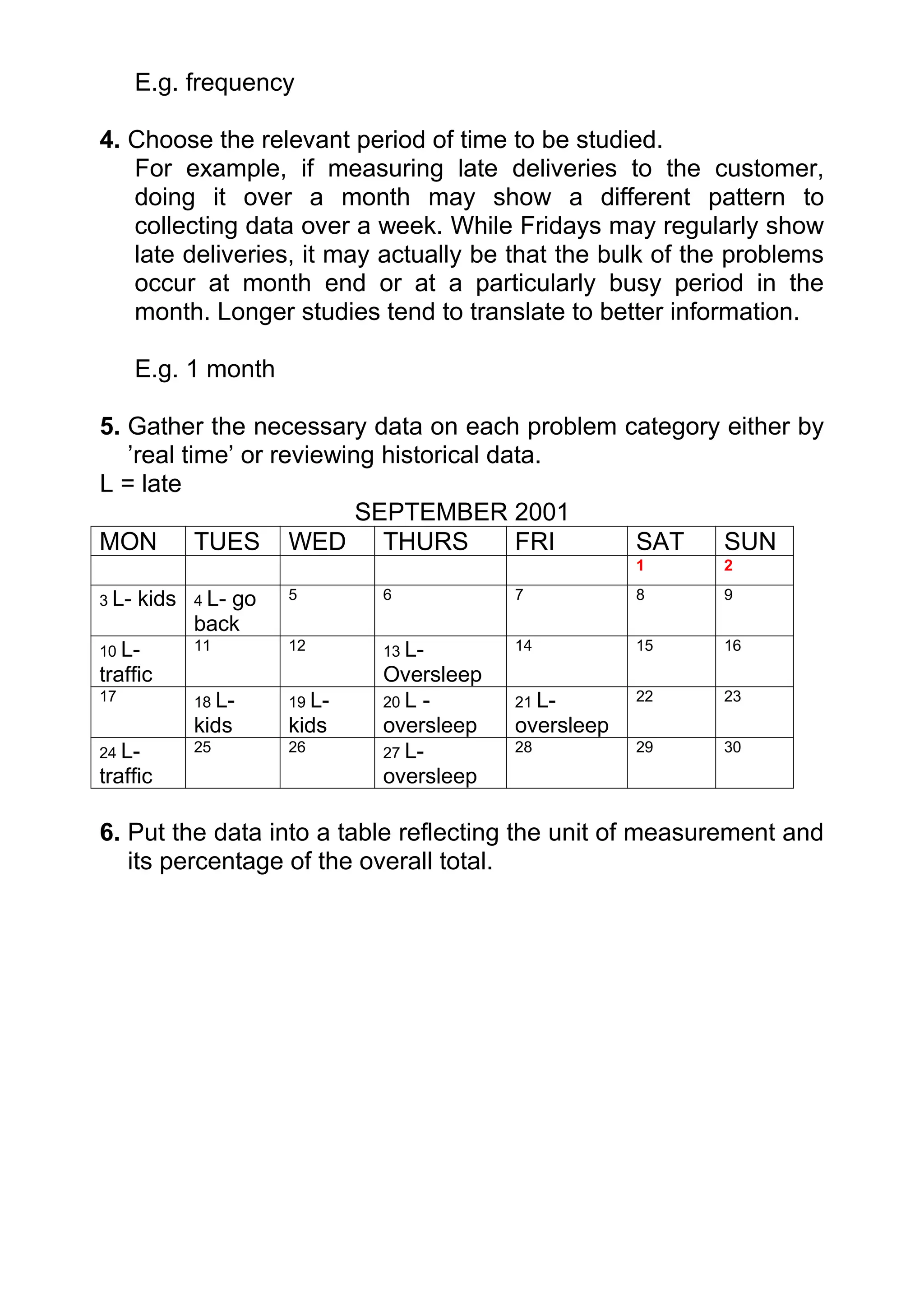
L = late
                          SEPTEMBER 2001
MON TUES WED THURS                       FRI  SAT     SUN
                                                      1    2

3 L-   kids   4 L-
                 go   5       6           7           8    9
              back
10 L-         11      12      13 L-       14          15   16
traffic                       Oversleep
17            18 L-   19 L-   20 L -      21 L-       22   23
              kids    kids    oversleep   oversleep
24 L-         25      26      27 L-       28          29   30
traffic                       oversleep

6. Put the data into a table reflecting the unit of measurement and
   its percentage of the overall total.
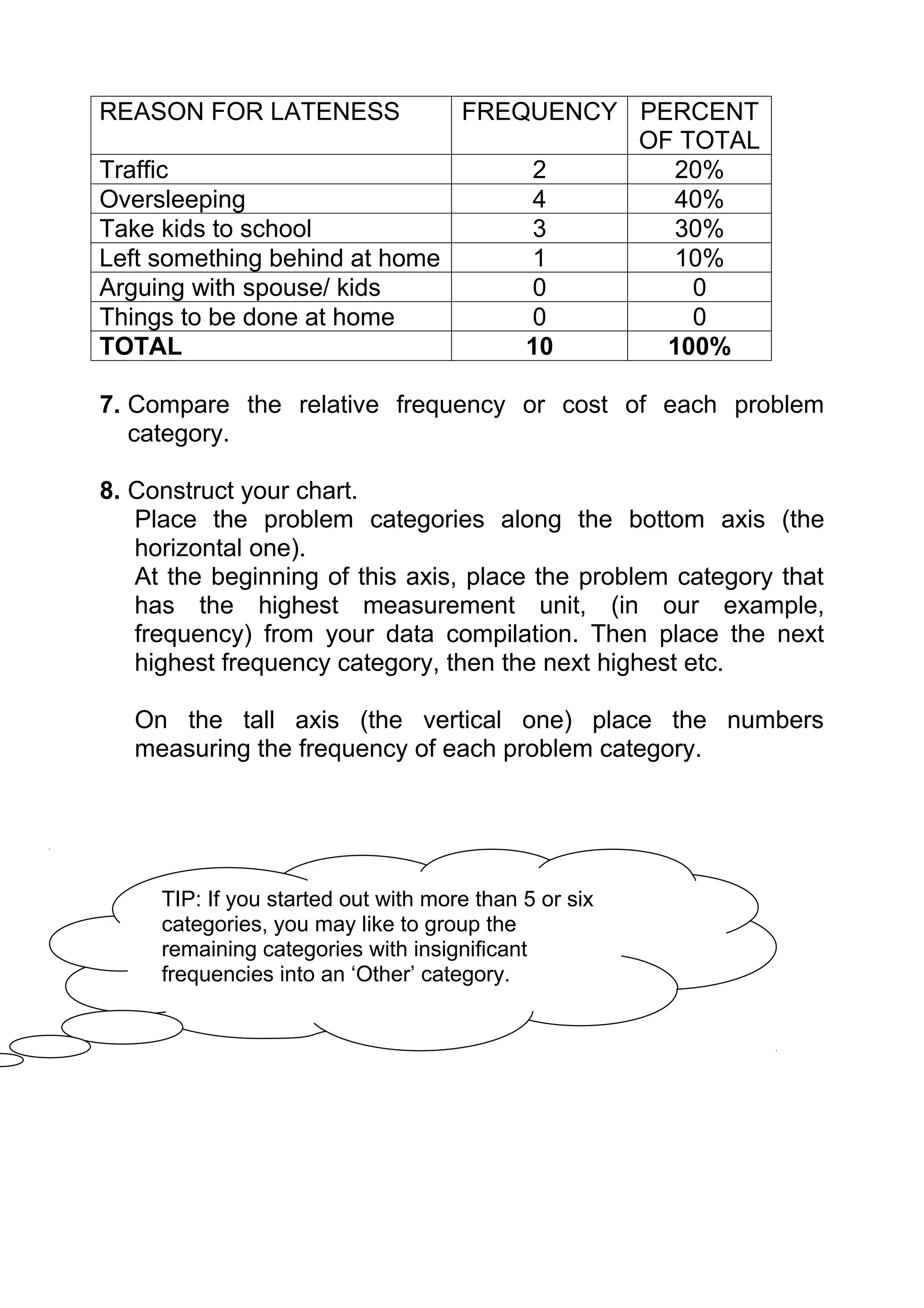
REASON FOR LATENESS           FREQUENCY PERCENT
                                        OF TOTAL
Traffic                           2       20%
Oversleeping                      4       40%
Take kids to school               3       30%
Left something behind at home     1       10%
Arguing with spouse/ kids         0         0
Things to be done at home         0         0
TOTAL                             10      100%

7. Compare the relative frequency or cost of each problem
   category.

8. Construct your chart.
   Place the problem categories along the bottom axis (the
   horizontal one).
   At the beginning of this axis, place the problem category that
   has the highest measurement unit, (in our example,
   frequency) from your data compilation. Then place the next
   highest frequency category, then the next highest etc.

   On the tall axis (the vertical one) place the numbers
   measuring the frequency of each problem category.


     TIP: If you started out with more than 5 or six
     categories, you may like to group the
     remaining categories with insignificant
     frequencies into an ‘Other’ category.
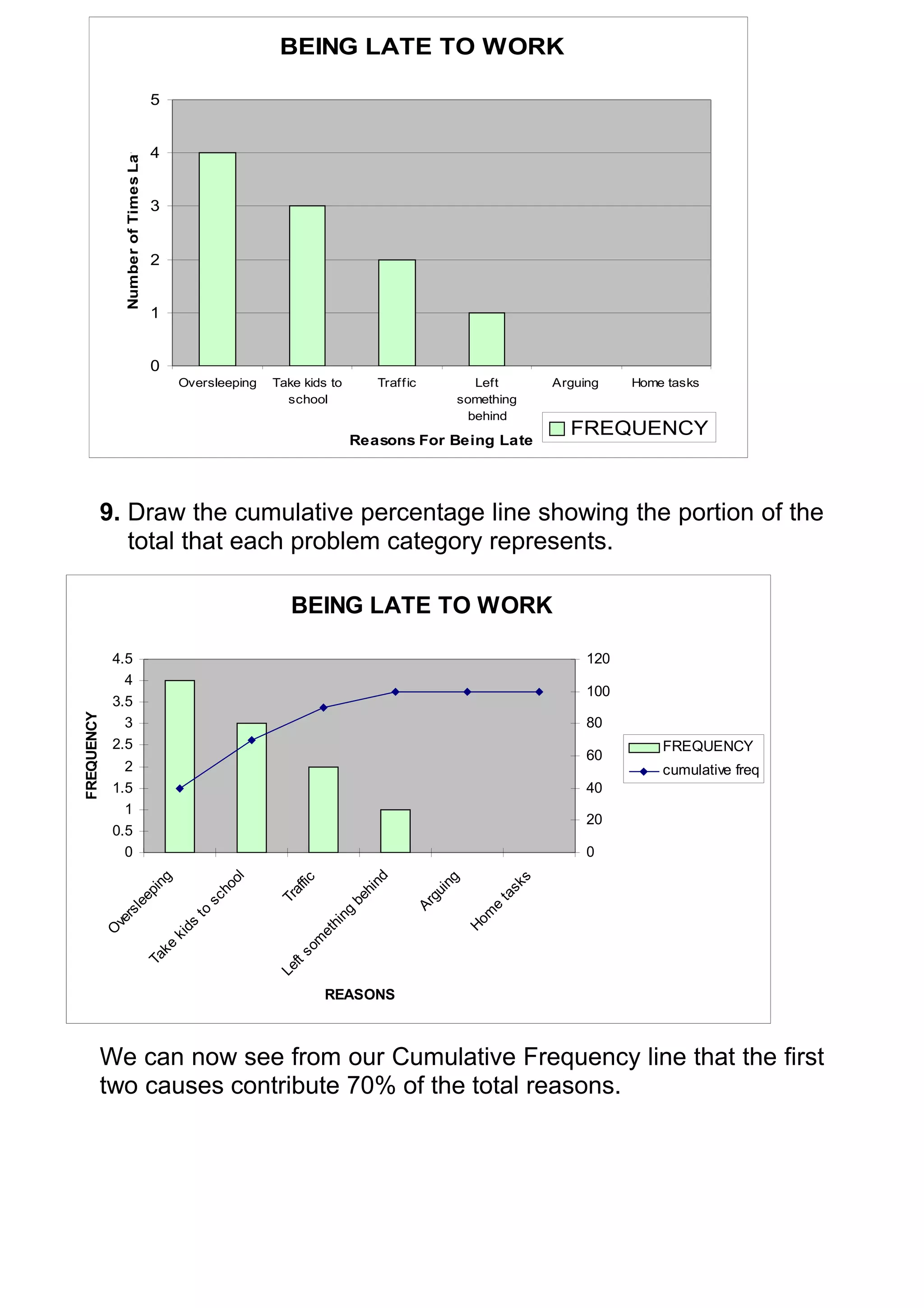
BEING LATE TO WORK

                                      5

               Number of Times Late
                                      4


                                      3


                                      2


                                      1


                                      0
                                             Oversleeping   Take kids to        Traff ic        Left             Arguing    Home tasks
                                                              school                         something
                                                                                               behind
                                                                                                                   FREQUENCY
                                                                           Reasons For Being Late


            9. Draw the cumulative percentage line showing the portion of the
               total that each problem category represents.

                                                               BEING LATE TO WORK

             4.5                                                                                                      120
               4
                                                                                                                      100
             3.5
FREQUENCY


               3                                                                                                      80
             2.5                                                                                                                FREQUENCY
                                                                                                                      60
               2                                                                                                                cumulative freq
             1.5                                                                                                      40
               1
                                                                                                                      20
             0.5
               0                                                                                                      0
                                                                                nd
                                                      ol
                         ng


                                                                                                             s
                                                                                             g
                                                                fic


                                                                                                        sk
                                                                                           in
                                                    ho


                                                              af


                                                                             hi
                      pi


                                                                                         gu


                                                                                                        ta
                                                            Tr


                                                                           be
                                                  sc
                    ee


                                                                                       Ar


                                                                                                   e
                  l


                                               to


                                                                         ng
               rs


                                                                                                    m
             ve


                                                                                                 Ho
                                                                      hi
                                             ds
            O


                                                                      et
                                          ki


                                                                om
                                        ke


                                                                 s
                                      Ta


                                                              ft
                                                            Le


                                                                      REASONS


            We can now see from our Cumulative Frequency line that the first
            two causes contribute 70% of the total reasons.
However it is important to remember that this chart only shows
      one measurement. If for example, our late to work chart was then
      calculated with how many minutes each event made you late, you
      may get quite a different picture.
REASON FOR LATENESS                               FREQUENCY               HOW LATE        TOTAL MINS
                                                  (from original graph)   (MINUTES)          LATE
Traffic                                                    2                  15            30 mins
Oversleeping                                               4                  10            40 mins
Take kids to school                                        3                  45           135 mins
Left something behind at home                              1                  20            20 mins
Arguing with spouse/ kids                                  0                   5             0 mins
Things to be done at home                                  0                  10             0 mins
      By incorporating this into our graph, we can see that even though
      we are most often late by oversleeping, it is when we have to take
      the kids to school that causes the substantial lateness.


                                         BEING LATE TO WORK
                                160                                                       120
                                140                                                       100
         Minutes late


                                120
                                100                                                       80
                                 80                                                       60
                                 60                                                       40
                                 40
                                 20                                                       20
                                  0                                                       0
                                                 ol


                                                 g


                                                                                 g


                                                                                  s
                                                                  fic

                                                                 ...
                                               in


                                                                               in

                                                                              sk
                                              ho


                                                                af

                                                               be
                                             ep


                                                                            gu

                                                                            ta
                                                              Tr
                                    sc

                                           le


                                                                         Ar
                                                            ng


                                                                          e
                                to


                                        rs


                                                                        m
                                                         hi


                                                                                      total minutes late
                                      ve


                                                                      Ho
                               ds


                                                      et
                                     O


                                                      om
                           ki


                                                                                      cumulative freq
                          ke


                                                    s
                        Ta


                                                 ft
                                               Le


                                                  Reasons for being late

                        TOOL TAKEAWAY: (remember this if nothing else!) – The
                        most important thing about Pareto charts is to make sure you are
                        analysing the right unit of measurement, in order to effect the real
                        underlying issue.
Computer Tips

Use Excel to complete your Pareto charts.

Make the table of your data collection into an excel spreadsheet.
Make sure you include the column titles for whatever unit of
measurement you have used, along the top of the table with the
causes listed down the left hand side and the frequency recorded
in the columns. Your table should have three columns, with the
Causes, Frequency and Cumulative Percentage total in the third
column. Make sure your Categories are in the correct order with
the most frequent at the top of the table.
REASON FOR LATENESS     FREQUENCY cumulative %
Oversleeping                4         40
Take kids to school         3         70
Traffic                     2         90
Left something behind       1        100
Arguing                     0        100
Home tasks                  0        100


Once your table is complete, highlight the table, then use the
Chart Wizard button to complete the Chart.
The chart wizard button looks like

Alternatively on the Chart drop down menu at the top of the page,
select the ‘Chart’ option.

Click on the chart wizard and a dialogue box will come up with
two option tabs at the top; Standard Types or Custom Types.
Select Custom Types, scroll down the chart types until you reach
“Line – Column on 2 Axes”.

Once this is selected, click on ‘next’ button at the bottom of the
dialogue box.

The next step of the Chart Wizard will bring up the text you have
previously highlighted from your table.
You should have the Series to be displayed in ‘columns’.
Once this is done, click on
At Step three of the chart wizard you should enter in the title of
your chart, and the titles of the axes. The X axis is the title of
your categories i.e. Reasons For Being Late, while the Y axis is
the unit of measurement used, i.e. Number of times late.
Click on Next once these boxes are complete.

Select the option to have the graph as an object in either your
current worksheet, or if you want the graph on a whole separate
page, then select it to be placed as a new sheet.
Click on finish and your graph will appear.

To change any of the details, highlight your chart again and go
through the steps until you reach the information you want to
change.

Alternatively if you click on the part of the chart you want to
change (i.e. titles, formatting etc) it should let you change it.

Note any changes to the data in your original table will
automatically be reflected in your Pareto Chart.

Interpretation

Generally, the tallest bars indicate the biggest contributors to the
overall problem. So normally you would pick these categories to
deal with first.

However you need to remember that Pareto charts only deal with
one dimension at a time, and other variables may have an impact
on your decision making.

See some of the variations suggested below to provide further
ideas on interpretation.

Variations

The Pareto Chart is one of the most widely and relatively used
improvement tools. The variations used most frequently are:
A. Major Cause Breakdowns in which the “tallest bar” is
        broken into subcauses in a second, linked Pareto.

    For example- breaking down the causes for oversleeping
    might come down to:
    - forgot to set alarm
    - late night the night before
    - children up all night
    - slept through the alarm

     B. Before and After in which the “new Pareto” bars are
        drawn side by side with the original Pareto, showing the
        effect of a change. It can be drawn as one chart or two
        separate charts.

     C. Change the Source of Data in which data is collected
        on the same problem but from different departments,
        locations, equipment, and so on, and shown in side-by-
        side Pareto Charts.

     D. Change Measurement Scale in which the same
        categories are used but measured differently. Typically
        “cost” and “frequency” are alternated.
        (in this module, frequency and time were used)

Example Problems (Good to practise on)

* There is never enough milk in the fridge
* Types of errors on letters
* Types of department complaints

For Further Information:

See your mentor expert
See your local advocate
Check the ‘Memory Jogger’ book (held by advocate)
DATA ANALYSIS & PRESENTATION

                        Histograms


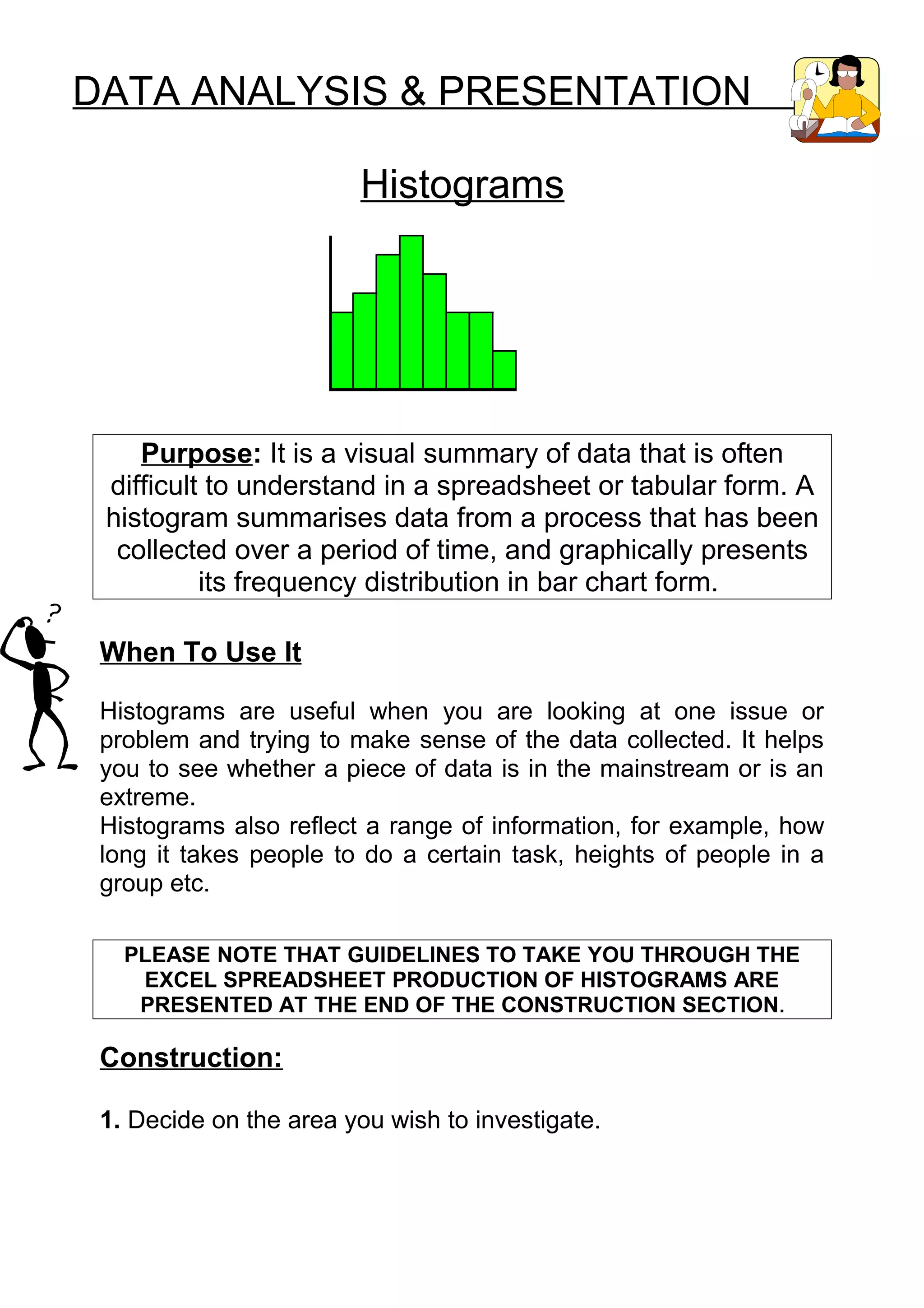
    Purpose: It is a visual summary of data that is often
 difficult to understand in a spreadsheet or tabular form. A
 histogram summarises data from a process that has been
  collected over a period of time, and graphically presents
          its frequency distribution in bar chart form.

 When To Use It

 Histograms are useful when you are looking at one issue or
 problem and trying to make sense of the data collected. It helps
 you to see whether a piece of data is in the mainstream or is an
 extreme.
 Histograms also reflect a range of information, for example, how
 long it takes people to do a certain task, heights of people in a
 group etc.

   PLEASE NOTE THAT GUIDELINES TO TAKE YOU THROUGH THE
    EXCEL SPREADSHEET PRODUCTION OF HISTOGRAMS ARE
    PRESENTED AT THE END OF THE CONSTRUCTION SECTION .

 Construction:

 1. Decide on the area you wish to investigate.
2. Decide what you want to measure about the issue. Your data
   must be variable, i.e. measured on a continuous scale. For
   example: temperature, time, dimensions, height, weight,
   speed, cost.
i.e. monthly rental on 1 bedroom flat in London

3. Collect data on the issue. The more data points you have the
   more useful your graph will be.
     50 is a good number of data points, as it will reflect any
     trends. Normally over 50 data points should be collected to
     see meaningful patterns.


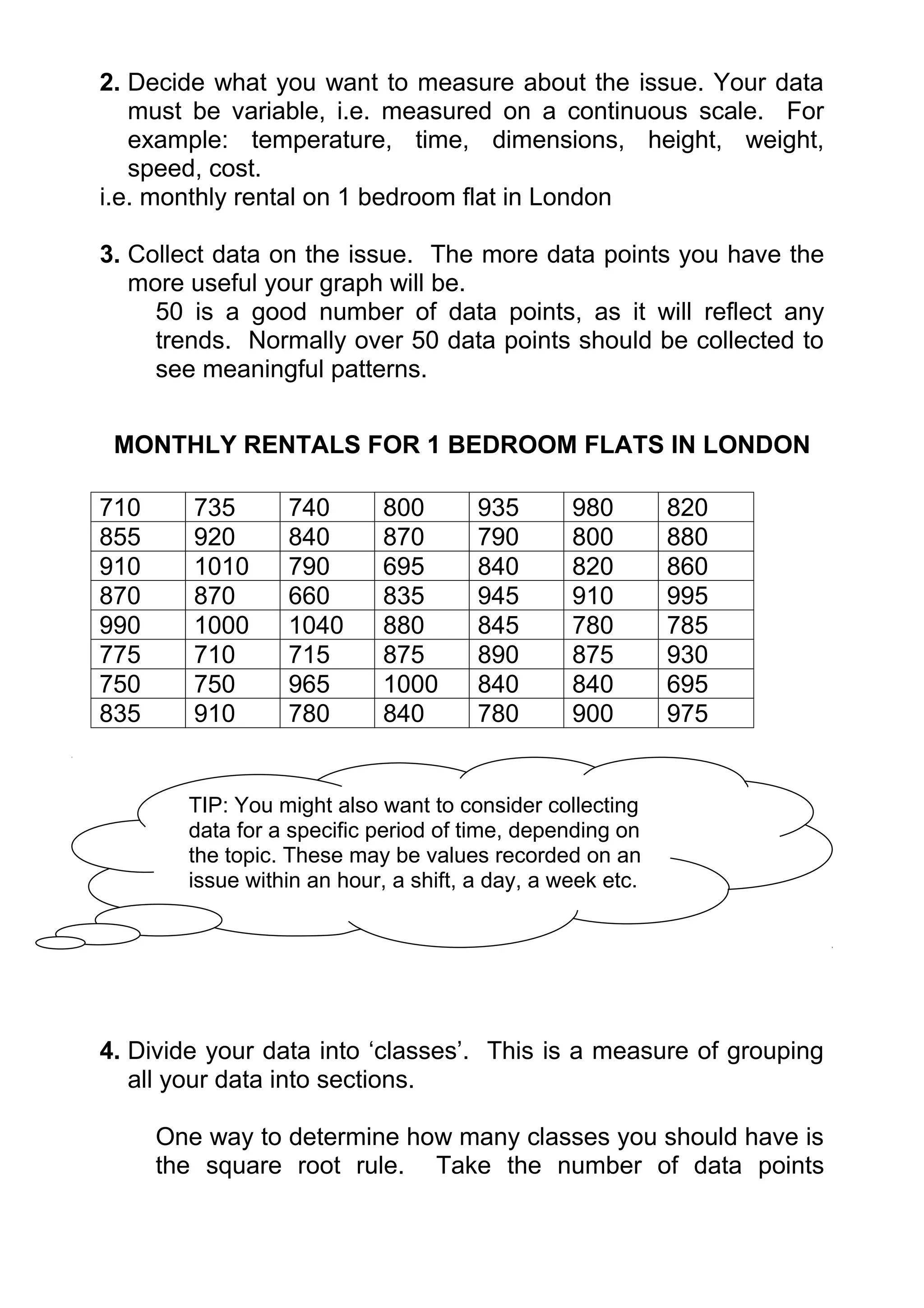
 MONTHLY RENTALS FOR 1 BEDROOM FLATS IN LONDON

710      735      740        800       935       980        820
855      920      840        870       790       800        880
910      1010     790        695       840       820        860
870      870      660        835       945       910        995
990      1000     1040       880       845       780        785
775      710      715        875       890       875        930
750      750      965        1000      840       840        695
835      910      780        840       780       900        975


        TIP: You might also want to consider collecting
        data for a specific period of time, depending on
        the topic. These may be values recorded on an
        issue within an hour, a shift, a day, a week etc.


4. Divide your data into ‘classes’. This is a measure of grouping
   all your data into sections.

      One way to determine how many classes you should have is
      the square root rule. Take the number of data points
collected, and find the square root.            Round it up to the
    nearest whole number


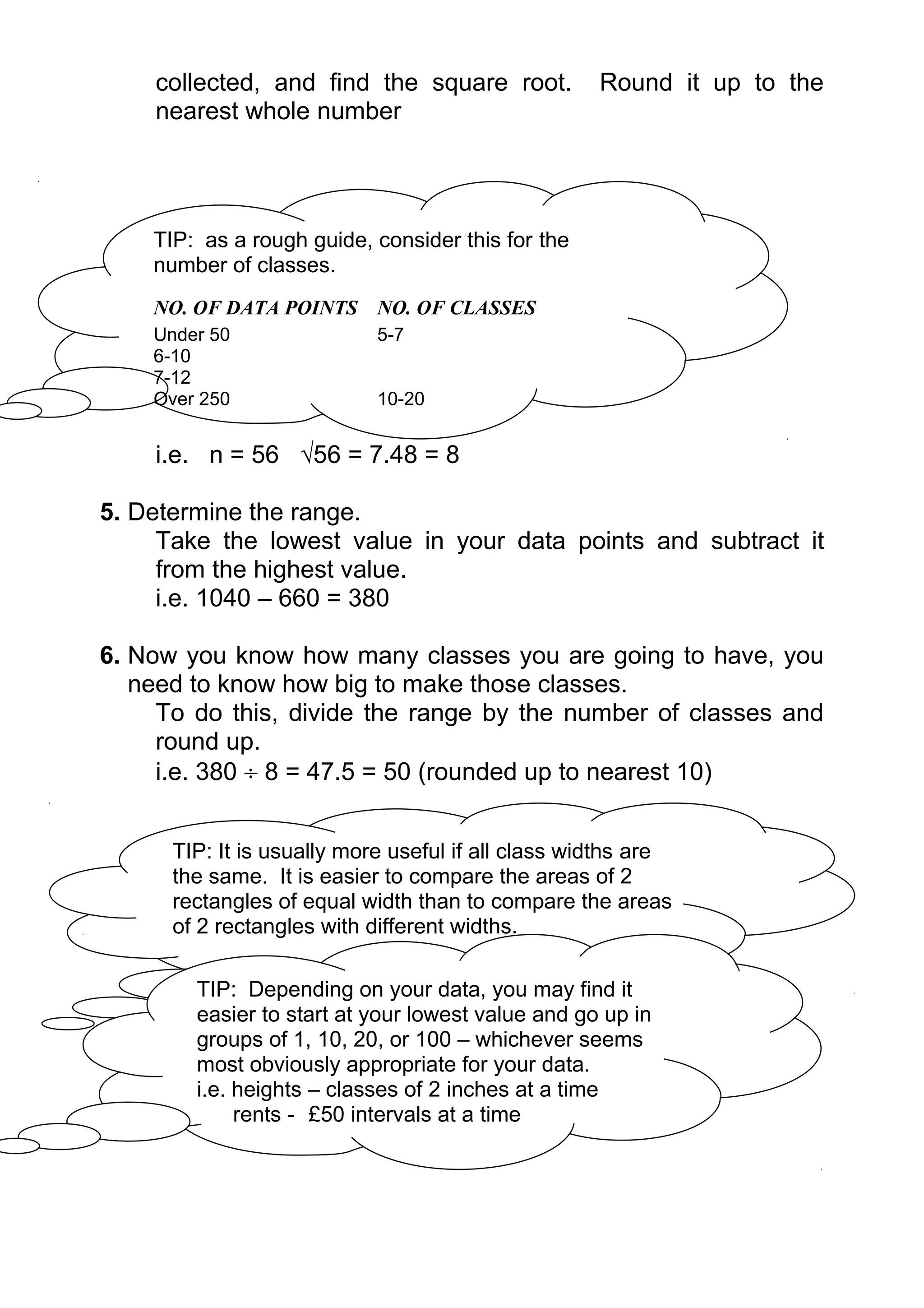
    TIP: as a rough guide, consider this for the
    number of classes.
    NO. OF DATA POINTS NO. OF CLASSES
    Under 50                5-7
    6-10
    7-12
    Over 250                10-20


    i.e. n = 56 √56 = 7.48 = 8

5. Determine the range.
     Take the lowest value in your data points and subtract it
     from the highest value.
     i.e. 1040 – 660 = 380

6. Now you know how many classes you are going to have, you
   need to know how big to make those classes.
     To do this, divide the range by the number of classes and
     round up.
     i.e. 380 ÷ 8 = 47.5 = 50 (rounded up to nearest 10)


      TIP: It is usually more useful if all class widths are
      the same. It is easier to compare the areas of 2
      rectangles of equal width than to compare the areas
      of 2 rectangles with different widths.

        TIP: Depending on your data, you may find it
        easier to start at your lowest value and go up in
        groups of 1, 10, 20, or 100 – whichever seems
        most obviously appropriate for your data.
        i.e. heights – classes of 2 inches at a time
             rents - £50 intervals at a time
7. Now construct your classes.
         It is important that your first class should contain your lowest
         value and your last class should contain your highest value.
         If the first or last class is empty, you may need to change the
         class width, the number of classes or the anchoring (the
         number system) of the classes.

                            650 - 699
                            700 – 749
                            750 – 799
                            800 – 849
                            850 – 899
                            900 – 949
                            950 – 999
                           1000 - 1049

    8. For a final check on your classes, look to make sure they are:
         - exhaustive – so every data point can be inserted into a
         class. The classes must span the entire range of data
         collected.
         - mutually exclusive - the classes do not overlap and each
         data point fits into only 1 class.

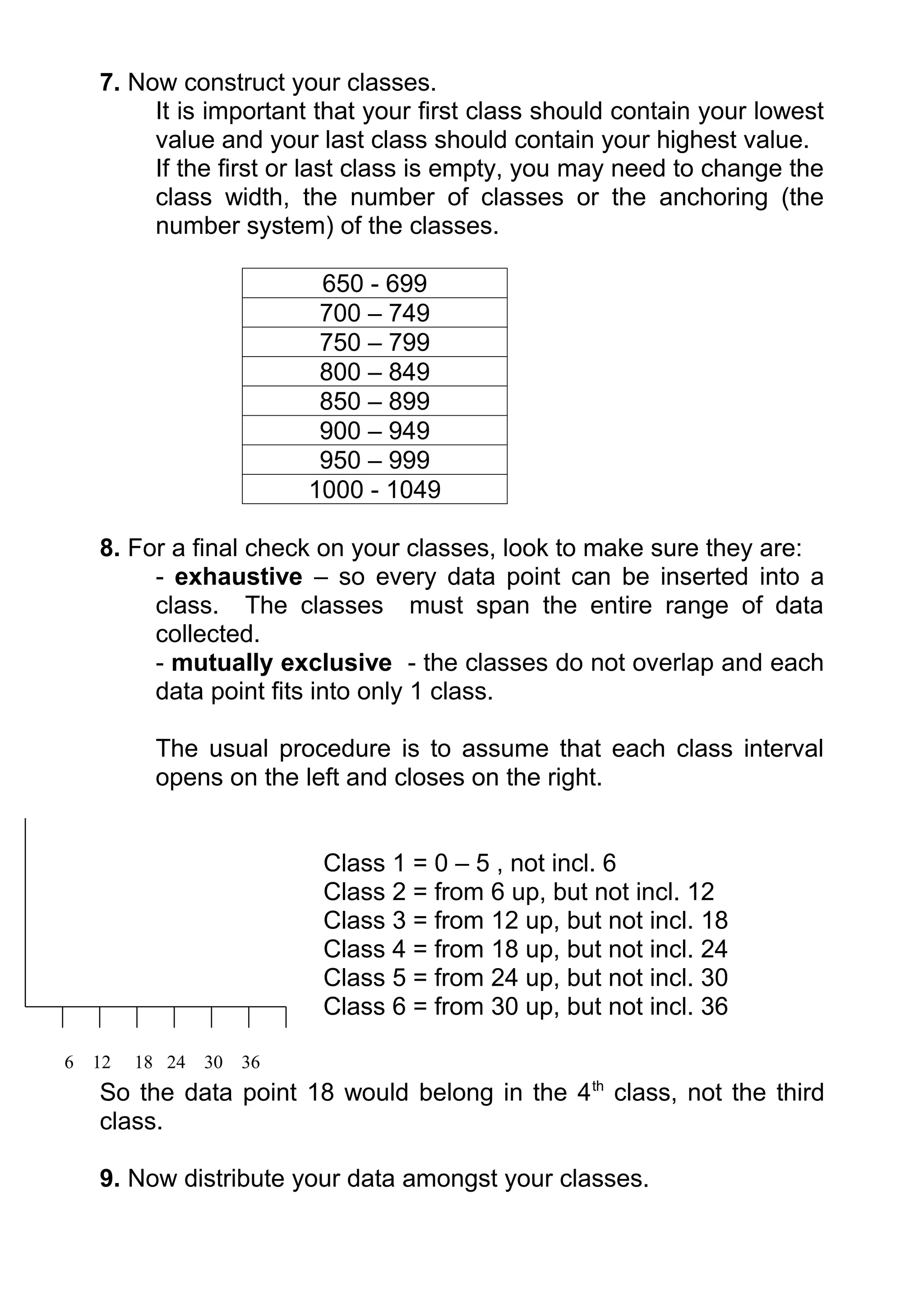
           The usual procedure is to assume that each class interval
           opens on the left and closes on the right.


                            Class 1 = 0 – 5 , not incl. 6
                            Class 2 = from 6 up, but not incl. 12
                            Class 3 = from 12 up, but not incl. 18
                            Class 4 = from 18 up, but not incl. 24
                            Class 5 = from 24 up, but not incl. 30
                            Class 6 = from 30 up, but not incl. 36

6   12   18 24   30   36
    So the data point 18 would belong in the 4 th class, not the third
    class.

    9. Now distribute your data amongst your classes.
650 - 699     660 695 695
700 – 749     710 735 740 710 715
750 – 799     790 790 780 785 775                         750   750      780 780
800 – 849     800 820 840 800 840                         820   835      845 840 840 835 840
850 – 899     855 880 860 870 870                         880   875      890 875 870
900 – 949     935 920 910 945 910                         910   930      900
950 – 999     980 990 995 975 965
1000 - 1049   1010 1000 1040 1000


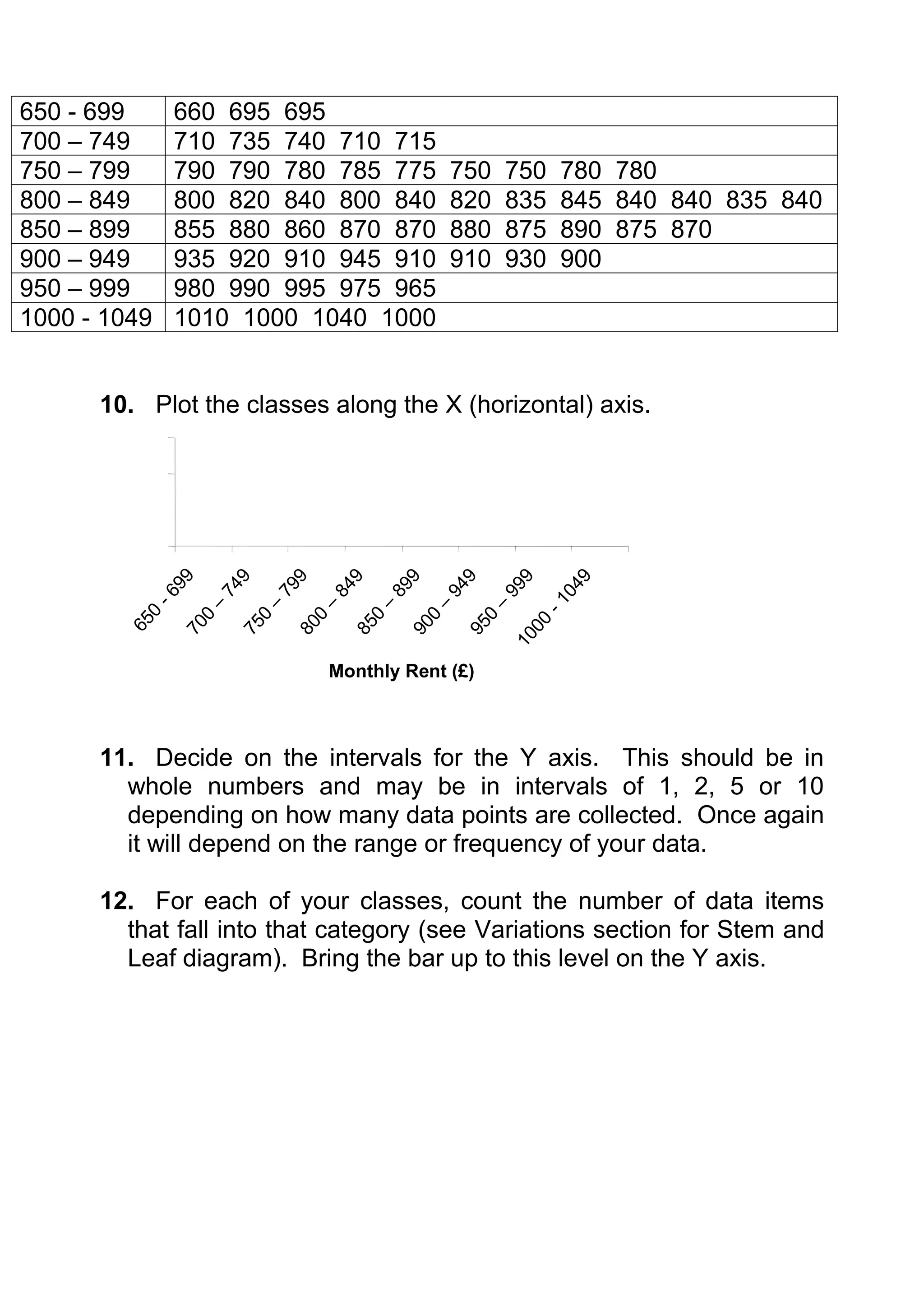
      10. Plot the classes along the X (horizontal) axis.
              99


                       9


                                 9


                                         9


                                                  9


                                                          9


                                                                  9


                                                                           9
                                                                         04
                     74


                              79

                                      84


                                               89


                                                       94


                                                                99
          -6


                                                                      -1
                           –


                                             –
                   –


                                     –


                                                      –


                                                              –
          0


                          0


                                           0
                 0


                                  0


                                                   0


                                                            0
        65


                                                                    00
                                         85
               70


                       75


                                80


                                                 90


                                                          95

                                                                  10


                                      Monthly Rent (£)


      11. Decide on the intervals for the Y axis. This should be in
        whole numbers and may be in intervals of 1, 2, 5 or 10
        depending on how many data points are collected. Once again
        it will depend on the range or frequency of your data.

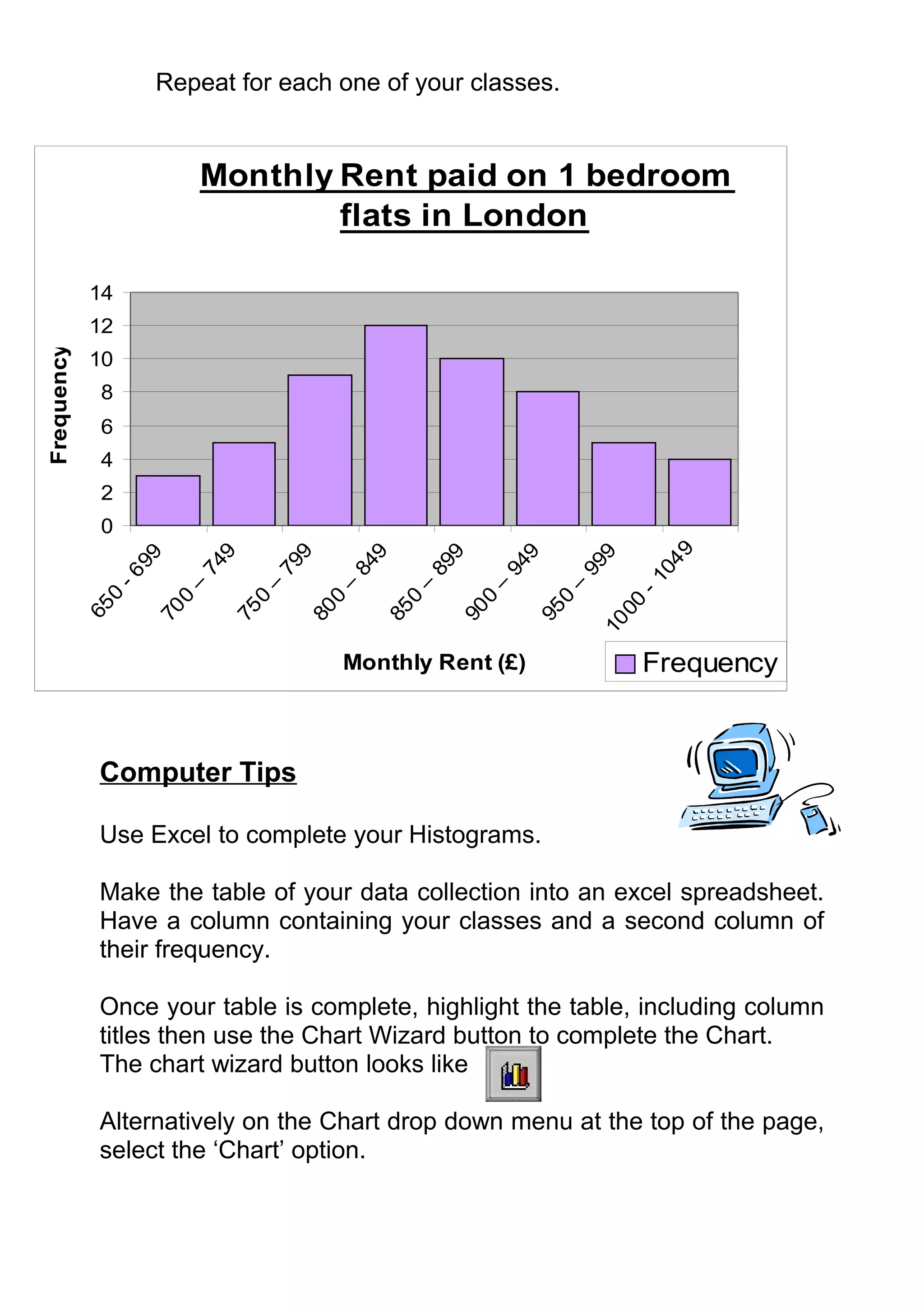
      12. For each of your classes, count the number of data items
        that fall into that category (see Variations section for Stem and
        Leaf diagram). Bring the bar up to this level on the Y axis.
Repeat for each one of your classes.


                           Monthly Rent paid on 1 bedroom
                                   flats in London

            14
            12
Frequency


            10
              8
              6
              4
              2
              0


                                                                                   9
                             9


                                      9


                                               9


                                                        9


                                                                 9


                                                                          9
                   99


                                                                                04
                           74


                                    79


                                             84


                                                      89


                                                               94


                                                                        99
              -6


                                                                              -1
                        –


                                 –


                                          –


                                                   –


                                                            –


                                                                     –
               0


                       0


                                0


                                         0


                                                  0


                                                           0


                                                                    0


                                                                            00
            65


                    70


                             75


                                      80


                                               85


                                                        90


                                                                 95


                                                                         10

                                          Monthly Rent (£)                    Frequency


             Computer Tips

             Use Excel to complete your Histograms.

             Make the table of your data collection into an excel spreadsheet.
             Have a column containing your classes and a second column of
             their frequency.

             Once your table is complete, highlight the table, including column
             titles then use the Chart Wizard button to complete the Chart.
             The chart wizard button looks like

             Alternatively on the Chart drop down menu at the top of the page,
             select the ‘Chart’ option.
Click on the chart wizard and a dialogue box will come up with
two option tabs at the top; Standard Types or Custom Types.
Select Standard Types, and highlight “Column”.

Once this is selected, click on ‘next’ button at the bottom of the
dialogue box.

The next step of the Chart Wizard will bring up the text you have
previously highlighted from your table.
You should have the Series to be displayed in ‘columns’.
Once this is done, click on

At Step three of the chart wizard you should enter in the title of
your chart, and the titles of the axes. The X axis is the title of
your categories i.e. Monthly Rent (£), while the Y axis is the unit
of measurement used, i.e. Frequency.
Click on Next once these boxes are complete.

Select the option to have the graph as an object in either your
current worksheet, or if you want the graph on a whole separate
page, then select it to be placed as a new sheet.
Click on finish and your graph will appear.

To change any of the details, highlight your chart again and go
through the steps until you reach the information you want to
change.

Alternatively if you click on the part of the chart you want to
change (i.e. titles, formatting etc) it should let you change it.

Note any changes to the data in your original table will
automatically be reflected in your Histogram.

Interpretation

Histograms show centering, dispersion (spread) and shape
(relative frequency) of data.
The shape of the Histogram (the frequency distribution) tells us a
lost about probability. If a height Histogram was representative of
the overall population, we could conclude the probability of finding
people v. short (under 65 inches) or very tall (over 72 inches) is
low.

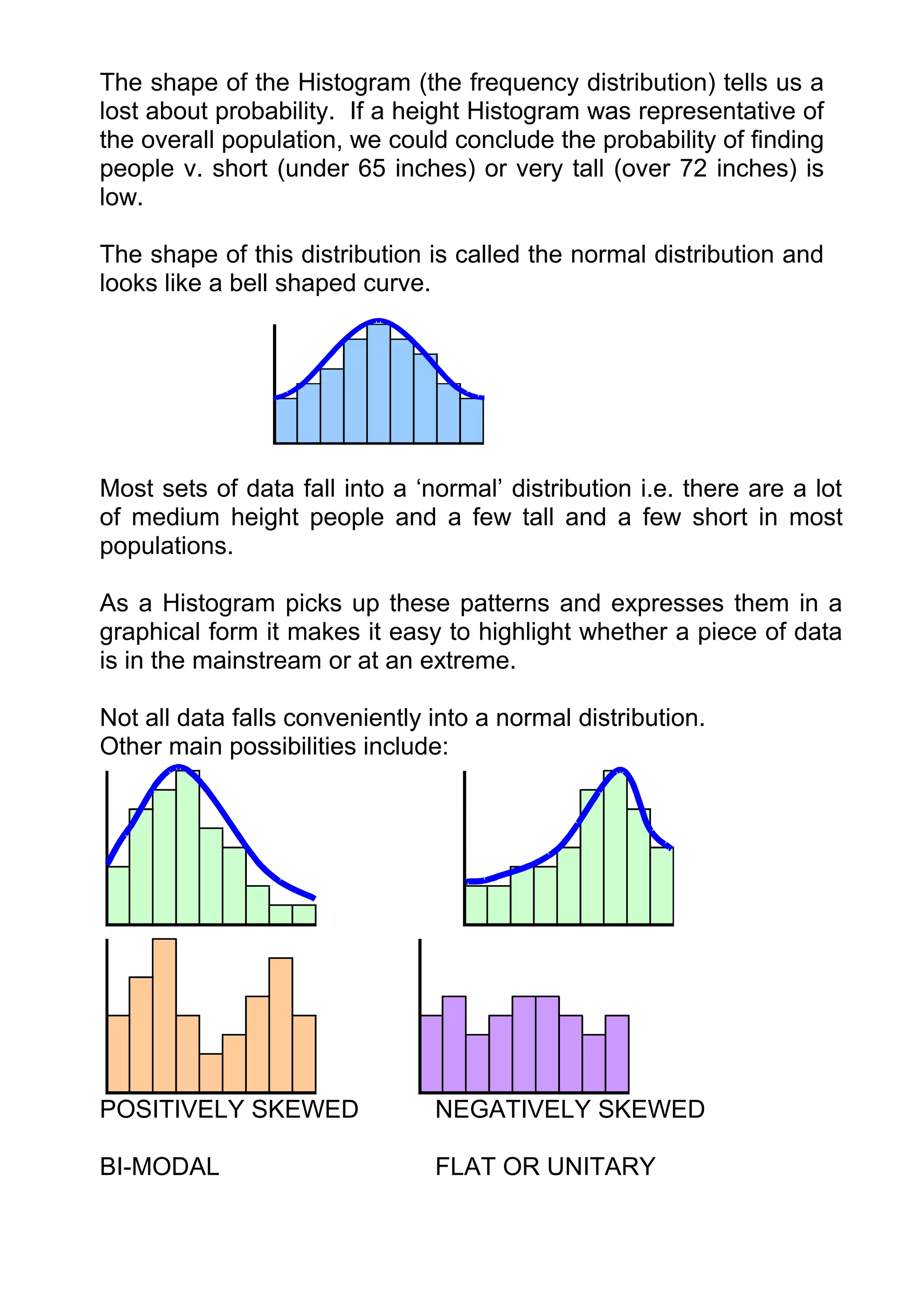
The shape of this distribution is called the normal distribution and
looks like a bell shaped curve.


Most sets of data fall into a ‘normal’ distribution i.e. there are a lot
of medium height people and a few tall and a few short in most
populations.

As a Histogram picks up these patterns and expresses them in a
graphical form it makes it easy to highlight whether a piece of data
is in the mainstream or at an extreme.

Not all data falls conveniently into a normal distribution.
Other main possibilities include:


POSITIVELY SKEWED               NEGATIVELY SKEWED

BI-MODAL                        FLAT OR UNITARY
To interpret your Histogram you need to ask:
Why this shaped distribution and what is it telling us?

For example, if assessing how long it took to perform a certain
task and it falls into normal distribution, you may look to cut out
the extremes, in order to have more values fall into the centre.

Alternatively if it is a skewed distribution you may only need to
adjust 1 extreme.

Histograms can be good comparison diagrams. Constructing a
second Histogram some time after the original may reflect the
changes made as steps taken to improve processes.
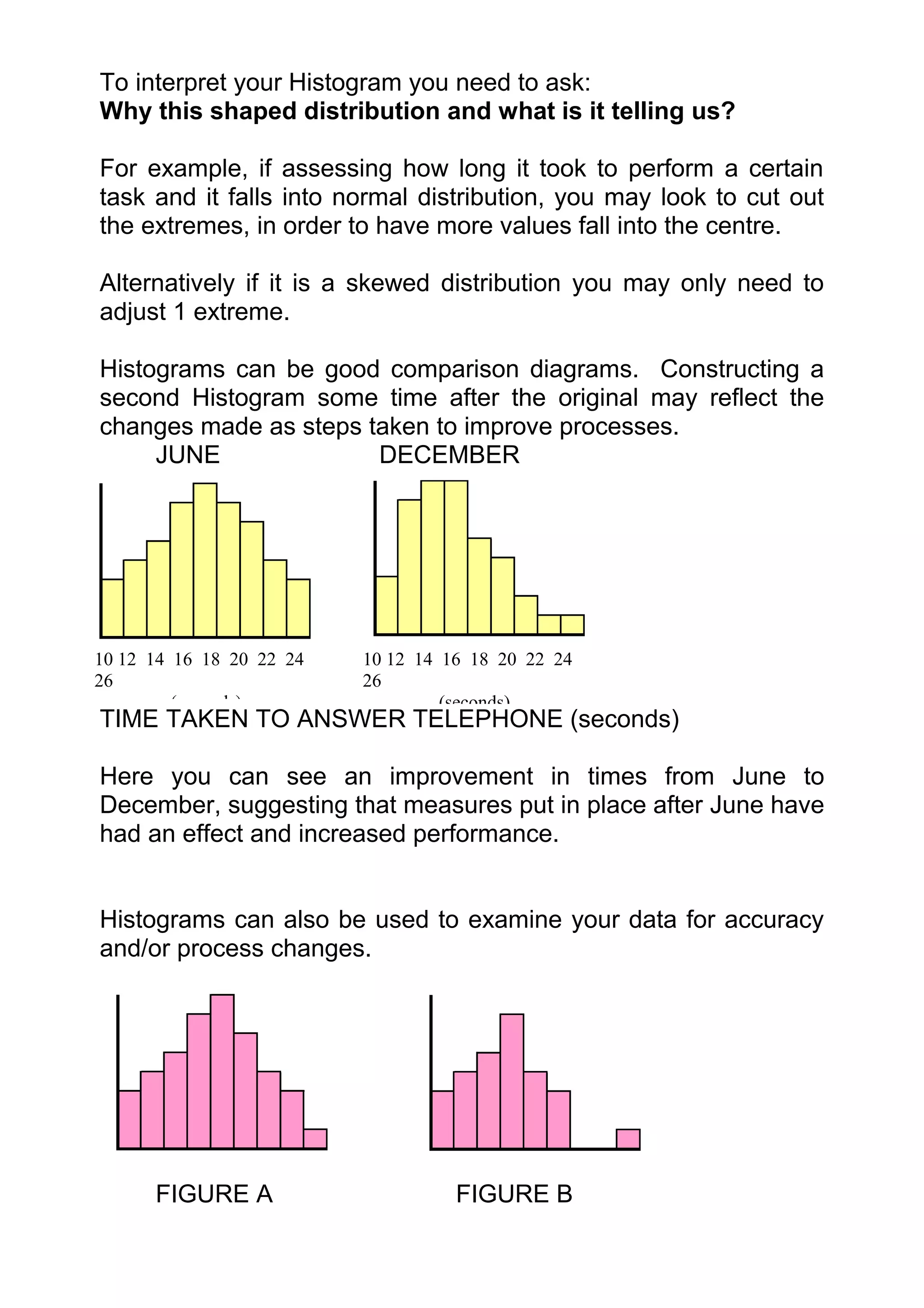
     JUNE              DECEMBER


10 12 14 16 18 20 22 24   10 12 14 16 18 20 22 24
26                        26
         (seconds)                 (seconds)
TIME TAKEN TO ANSWER TELEPHONE (seconds)

Here you can see an improvement in times from June to
December, suggesting that measures put in place after June have
had an effect and increased performance.


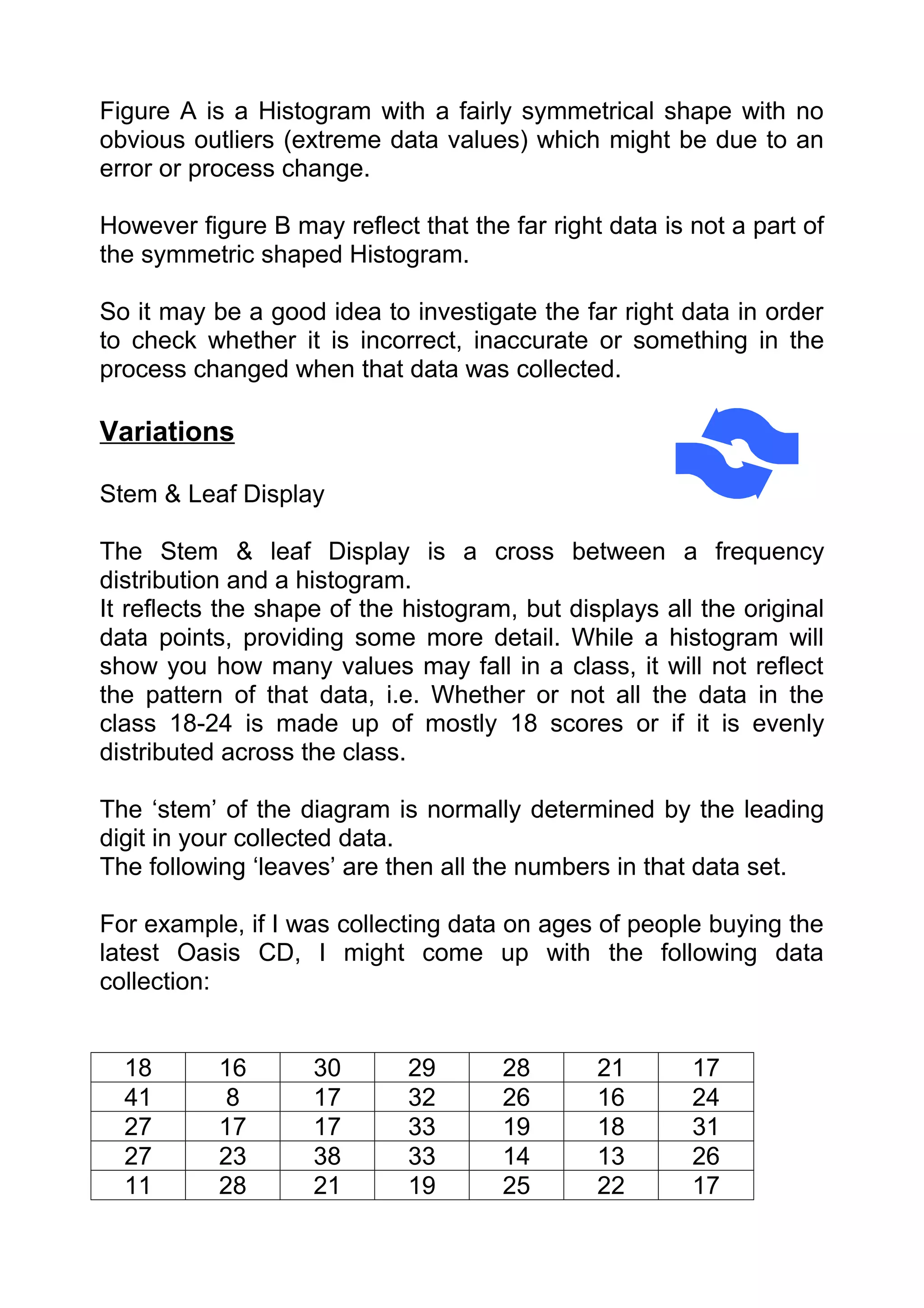
Histograms can also be used to examine your data for accuracy
and/or process changes.


      FIGURE A                      FIGURE B
Figure A is a Histogram with a fairly symmetrical shape with no
obvious outliers (extreme data values) which might be due to an
error or process change.

However figure B may reflect that the far right data is not a part of
the symmetric shaped Histogram.

So it may be a good idea to investigate the far right data in order
to check whether it is incorrect, inaccurate or something in the
process changed when that data was collected.

Variations

Stem & Leaf Display

The Stem & leaf Display is a cross between a frequency
distribution and a histogram.
It reflects the shape of the histogram, but displays all the original
data points, providing some more detail. While a histogram will
show you how many values may fall in a class, it will not reflect
the pattern of that data, i.e. Whether or not all the data in the
class 18-24 is made up of mostly 18 scores or if it is evenly
distributed across the class.

The ‘stem’ of the diagram is normally determined by the leading
digit in your collected data.
The following ‘leaves’ are then all the numbers in that data set.

For example, if I was collecting data on ages of people buying the
latest Oasis CD, I might come up with the following data
collection:


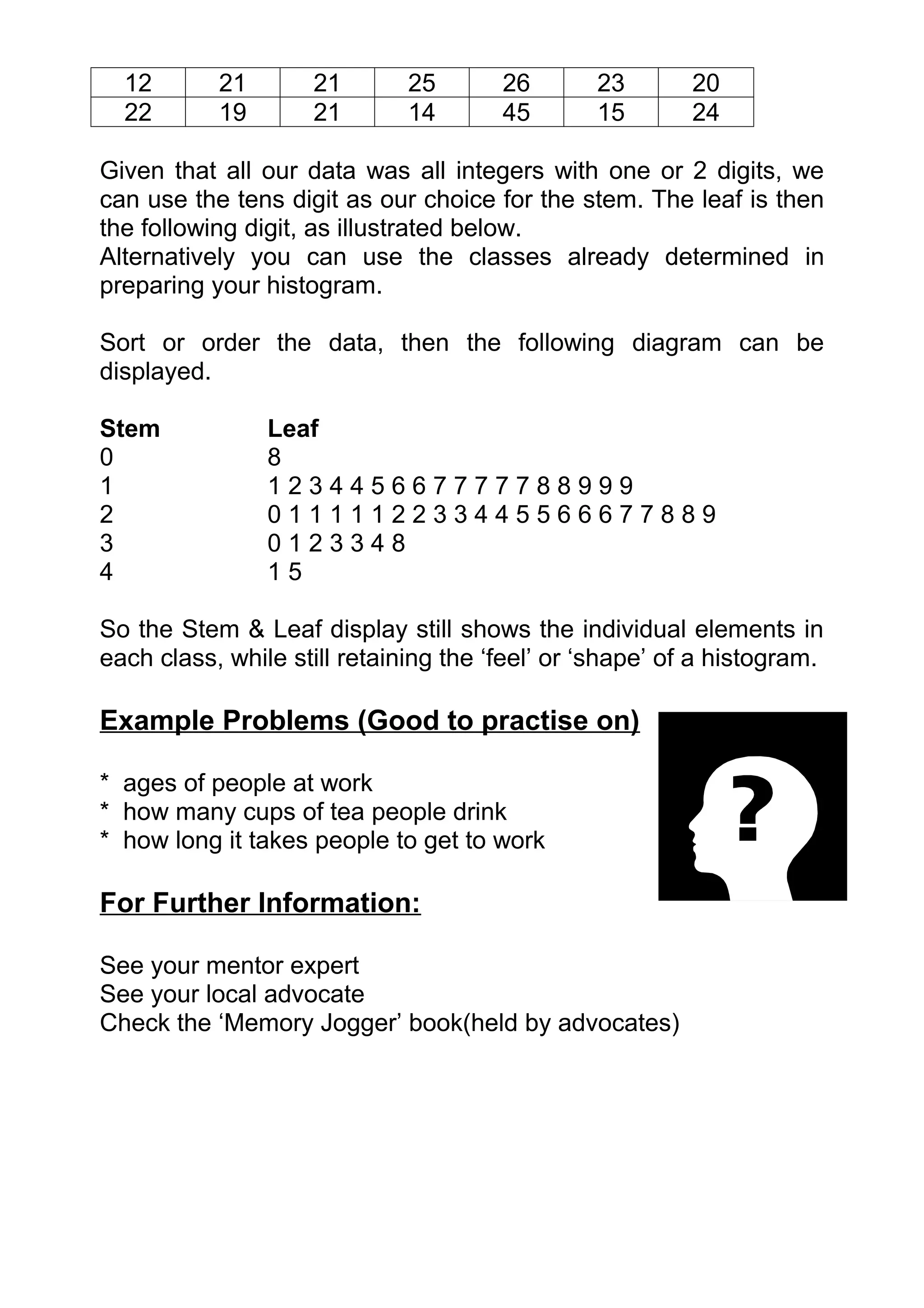
  18       16       30       29       28       21       17
  41        8       17       32       26       16       24
  27       17       17       33       19       18       31
  27       23       38       33       14       13       26
  11       28       21       19       25       22       17
12       21       21        25       26       23        20
  22       19       21        14       45       15        24

Given that all our data was all integers with one or 2 digits, we
can use the tens digit as our choice for the stem. The leaf is then
the following digit, as illustrated below.
Alternatively you can use the classes already determined in
preparing your histogram.

Sort or order the data, then the following diagram can be
displayed.

Stem            Leaf
0               8
1               123445667777788999
2               0111112233445566677889
3               0123348
4               15

So the Stem & Leaf display still shows the individual elements in
each class, while still retaining the ‘feel’ or ‘shape’ of a histogram.

Example Problems (Good to practise on)

* ages of people at work
* how many cups of tea people drink
* how long it takes people to get to work

For Further Information:

See your mentor expert
See your local advocate
Check the ‘Memory Jogger’ book(held by advocates)
DATA ANALYSIS & PRESENTATION

                        Radar Charts


      Purpose: To visually show in one graphic the size of
       gaps among a number of both current performance
             areas and ideal performance areas.
 When To Use It

 Radar Charts are useful to illustrate strengths and weaknesses in
 important areas of performance.

 Construction:
   PLEASE NOTE THAT GUIDELINES TO TAKE YOU THROUGH THE
   EXCEL SPREADSHEET PRODUCTION OF RADAR CHARTS ARE
           PRESENTED AT THE END OF THIS SECTION.

 1. Decide on the issue to be assessed.           It may be the
    performance of an organization, groups or process.
 i.e. skill areas I need to improve to go for a job promotion

 2. Assemble the right team of people capable of rating the
    selected organization, group or process. Try to get varied
    perspectives to avoid ‘blind spots’.
 i.e. probably just me, or if appropriate, my boss or my partner

 3. Select the rating categories. On average, choose between 5-
    10 categories you want to rate performance on.
Brainstorm to create the categories. Alternatively, if you
     have done previous study of this issue, you may like to use
     the category headings from an Issue Diagram (see Issue
     Diagram Module)

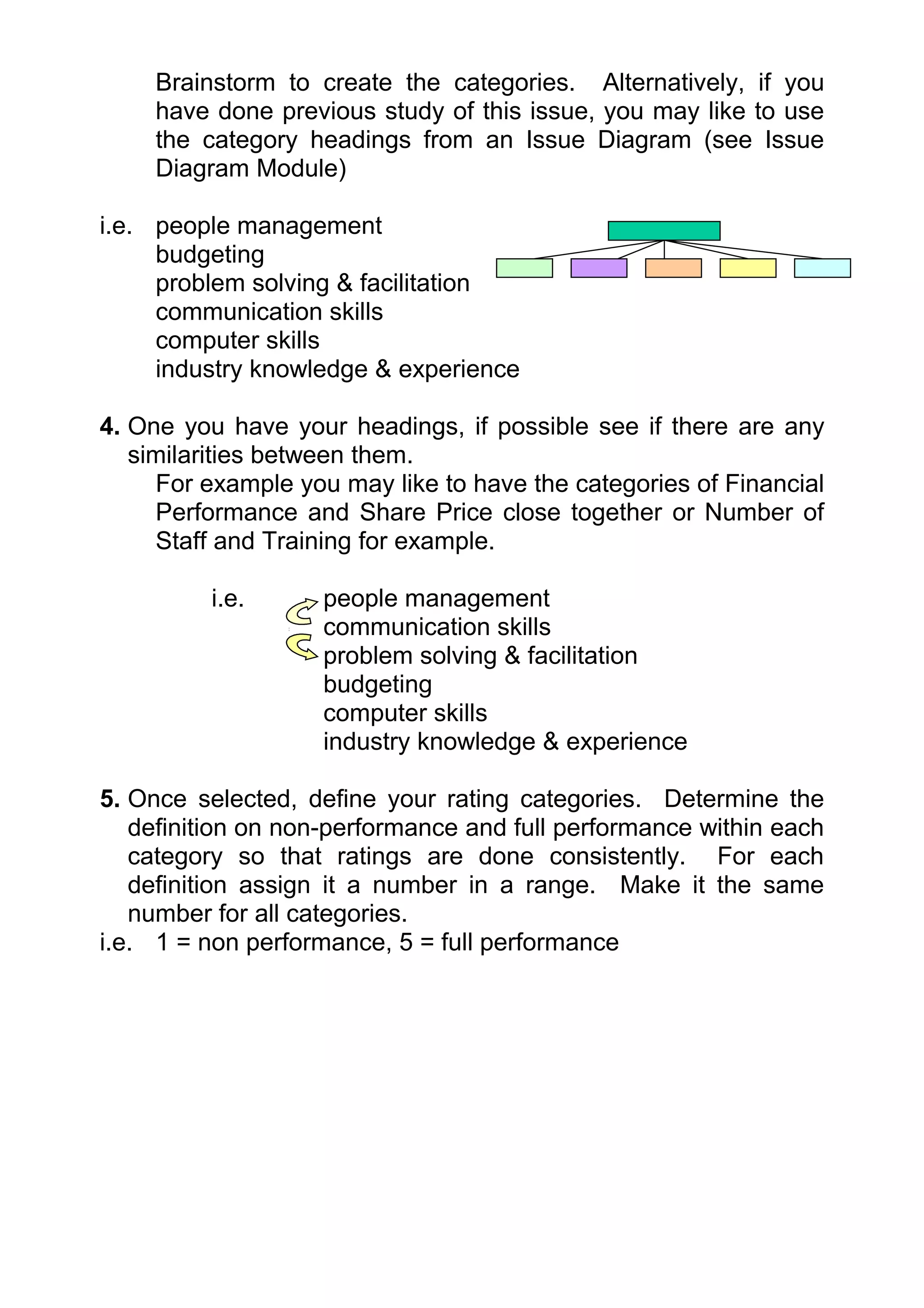
i.e. people management
     budgeting
     problem solving & facilitation
     communication skills
     computer skills
     industry knowledge & experience

4. One you have your headings, if possible see if there are any
   similarities between them.
     For example you may like to have the categories of Financial
     Performance and Share Price close together or Number of
     Staff and Training for example.

          i.e.      people management
                    communication skills
                    problem solving & facilitation
                    budgeting
                    computer skills
                    industry knowledge & experience

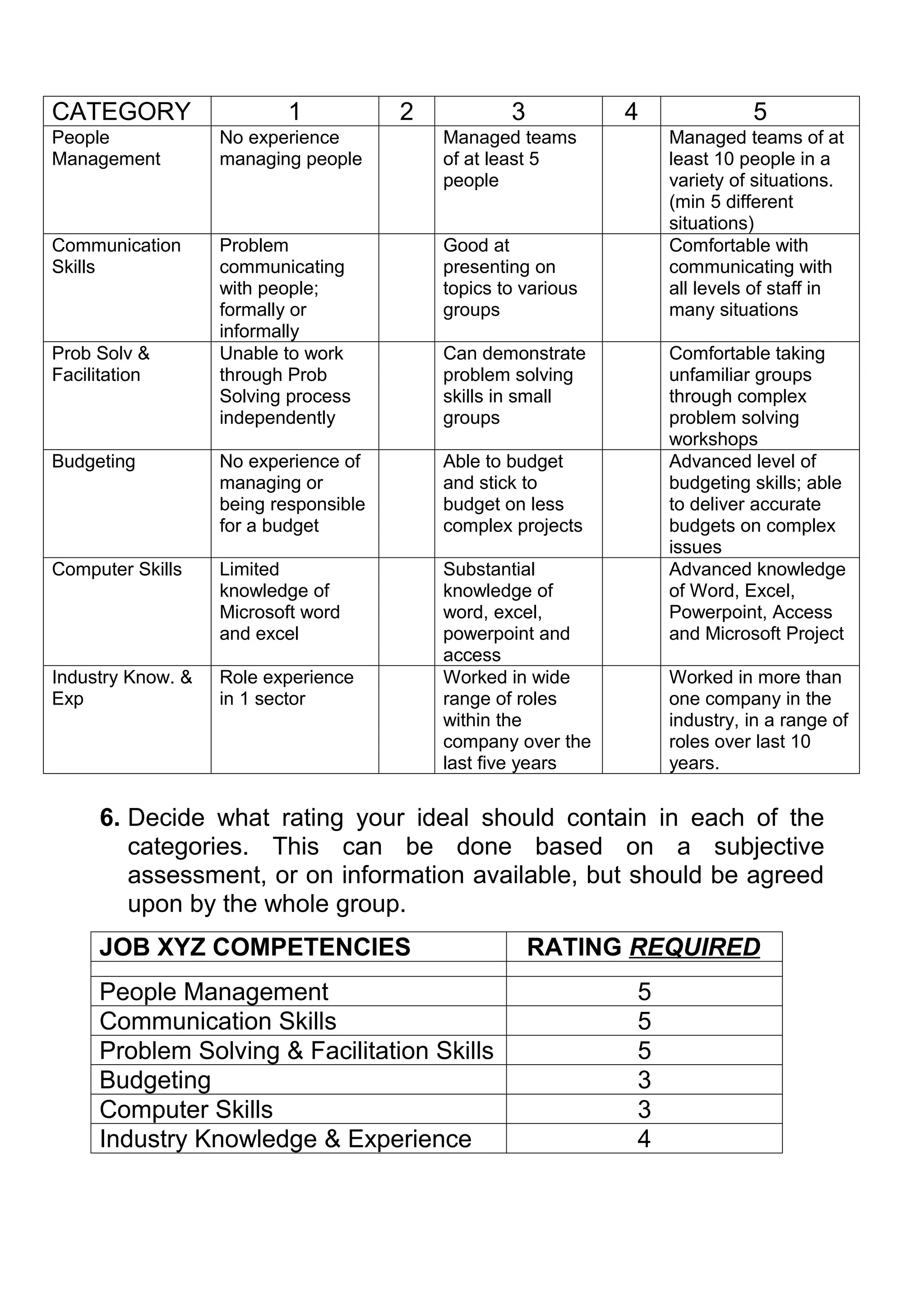
5. Once selected, define your rating categories. Determine the
   definition on non-performance and full performance within each
   category so that ratings are done consistently. For each
   definition assign it a number in a range. Make it the same
   number for all categories.
i.e. 1 = non performance, 5 = full performance
CATEGORY                  1            2           3           4             5
People             No experience           Managed teams           Managed teams of at
Management         managing people         of at least 5           least 10 people in a
                                           people                  variety of situations.
                                                                   (min 5 different
                                                                   situations)
Communication      Problem                 Good at                 Comfortable with
Skills             communicating           presenting on           communicating with
                   with people;            topics to various       all levels of staff in
                   formally or             groups                  many situations
                   informally
Prob Solv &        Unable to work          Can demonstrate         Comfortable taking
Facilitation       through Prob            problem solving         unfamiliar groups
                   Solving process         skills in small         through complex
                   independently           groups                  problem solving
                                                                   workshops
Budgeting          No experience of        Able to budget          Advanced level of
                   managing or             and stick to            budgeting skills; able
                   being responsible       budget on less          to deliver accurate
                   for a budget            complex projects        budgets on complex
                                                                   issues
Computer Skills    Limited                 Substantial             Advanced knowledge
                   knowledge of            knowledge of            of Word, Excel,
                   Microsoft word          word, excel,            Powerpoint, Access
                   and excel               powerpoint and          and Microsoft Project
                                           access
Industry Know. &   Role experience         Worked in wide          Worked in more than
Exp                in 1 sector             range of roles          one company in the
                                           within the              industry, in a range of
                                           company over the        roles over last 10
                                           last five years         years.


     6. Decide what rating your ideal should contain in each of the
        categories. This can be done based on a subjective
        assessment, or on information available, but should be agreed
        upon by the whole group.
     JOB XYZ COMPETENCIES                              RATING REQUIRED
     People Management                                         5
     Communication Skills                                      5
     Problem Solving & Facilitation Skills                     5
     Budgeting                                                 3
     Computer Skills                                           3
     Industry Knowledge & Experience                           4
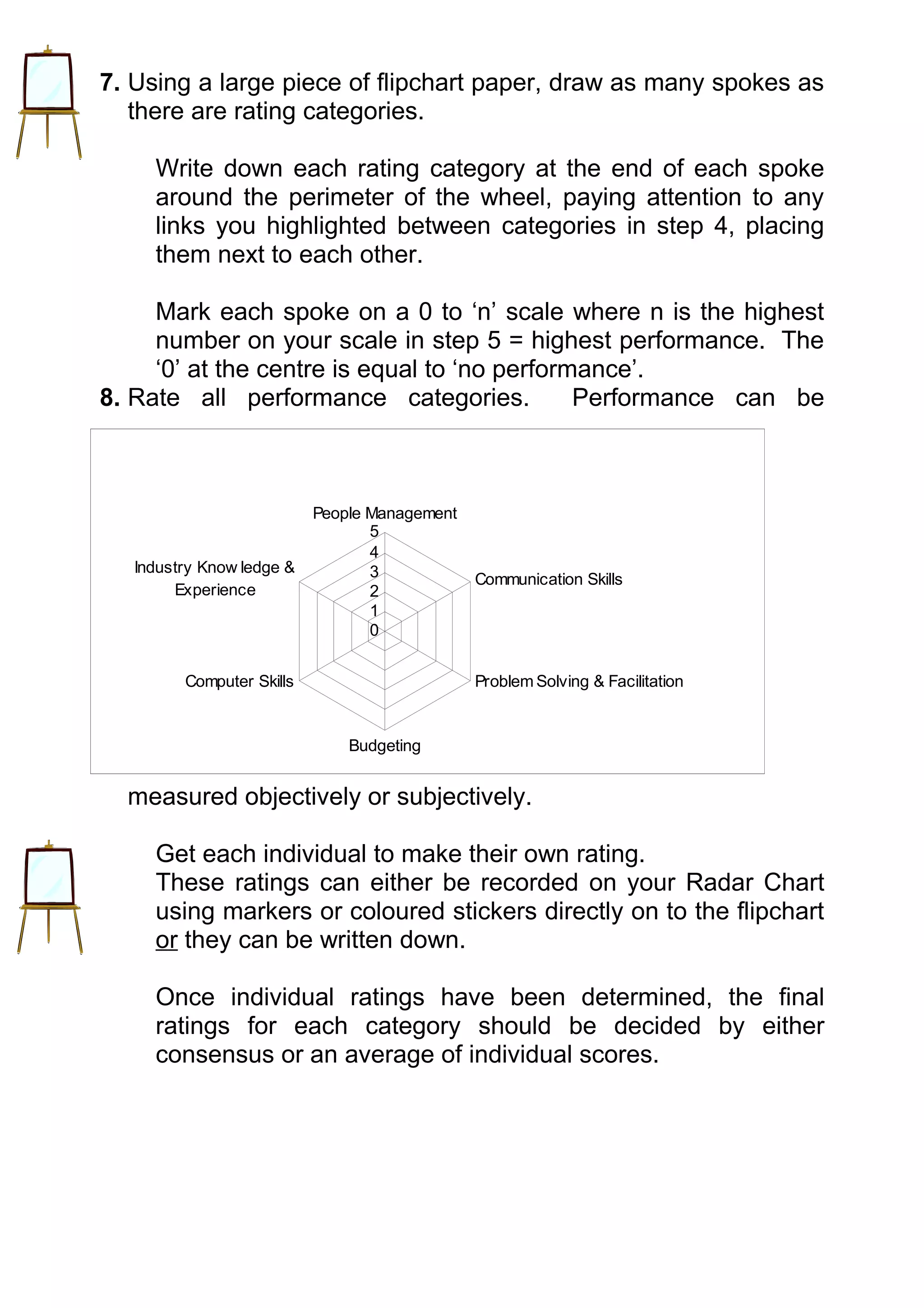
7. Using a large piece of flipchart paper, draw as many spokes as
   there are rating categories.

     Write down each rating category at the end of each spoke
     around the perimeter of the wheel, paying attention to any
     links you highlighted between categories in step 4, placing
     them next to each other.

     Mark each spoke on a 0 to ‘n’ scale where n is the highest
     number on your scale in step 5 = highest performance. The
     ‘0’ at the centre is equal to ‘no performance’.
8. Rate all performance categories.           Performance can be


                           People Management
                                  5
                                  4
   Industry Know ledge &          3            Communication Skills
        Experience                2
                                  1
                                  0


         Computer Skills                       Problem Solving & Facilitation


                               Budgeting


  measured objectively or subjectively.

     Get each individual to make their own rating.
     These ratings can either be recorded on your Radar Chart
     using markers or coloured stickers directly on to the flipchart
     or they can be written down.

     Once individual ratings have been determined, the final
     ratings for each category should be decided by either
     consensus or an average of individual scores.
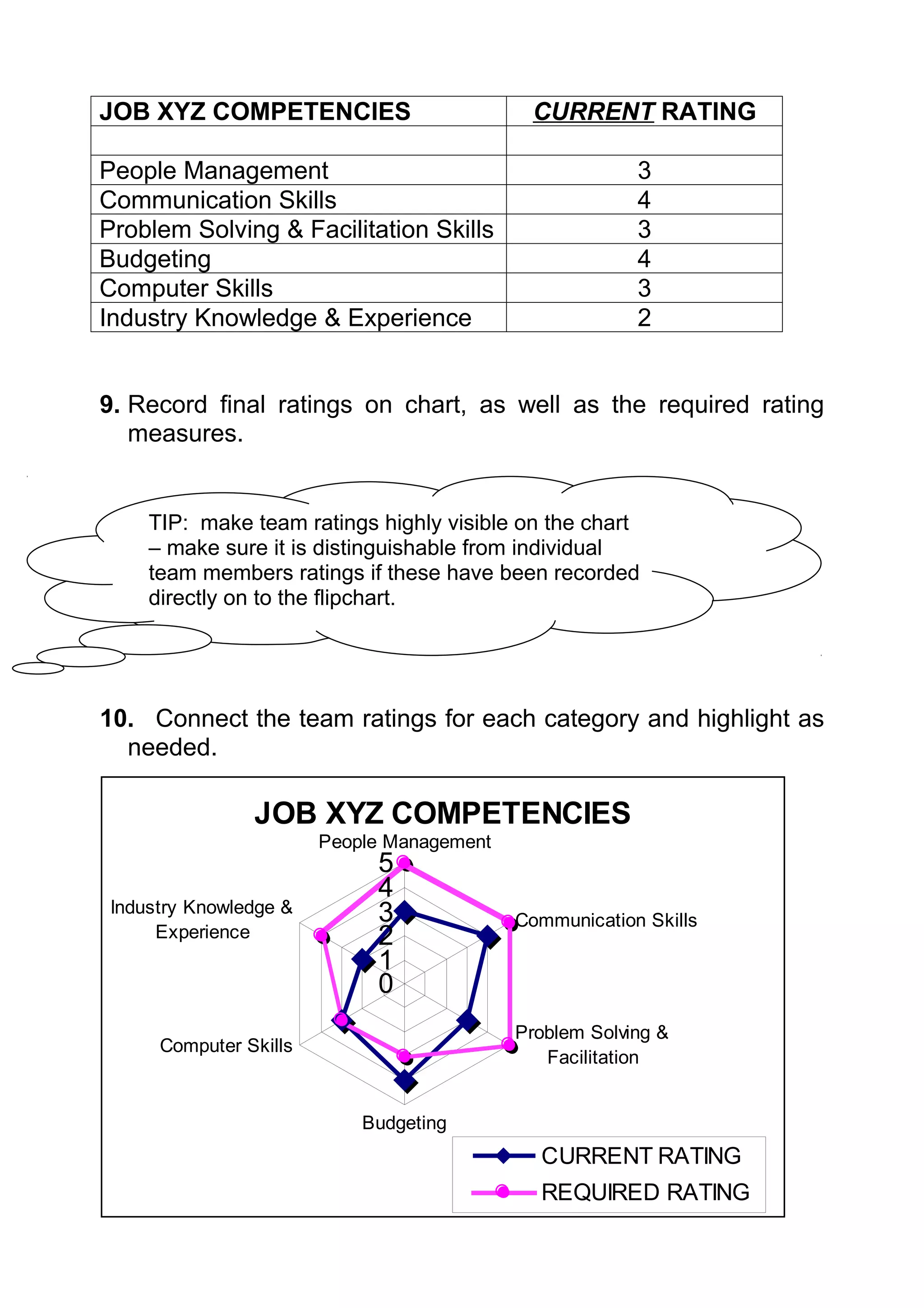
JOB XYZ COMPETENCIES                         CURRENT RATING

People Management                                        3
Communication Skills                                     4
Problem Solving & Facilitation Skills                    3
Budgeting                                                4
Computer Skills                                          3
Industry Knowledge & Experience                          2


9. Record final ratings on chart, as well as the required rating
   measures.


     TIP: make team ratings highly visible on the chart
     – make sure it is distinguishable from individual
     team members ratings if these have been recorded
     directly on to the flipchart.


10. Connect the team ratings for each category and highlight as
  needed.

                JOB XYZ COMPETENCIES
                        People Management
                             5
                             4
 Industry Knowledge &        3              Communication Skills
      Experience             2
                             1
                             0
                                            Problem Solving &
      Computer Skills
                                               Facilitation


                            Budgeting
                                              CURRENT RATING
                                              REQUIRED RATING
Computer Tips

Use Excel to complete your Radar Charts.

Make the table of your data collection into an excel spreadsheet.
Have one column for your Category heading, one column for your
Required Rating and one column for your Current Rating.
Once your table is complete, highlight the table, then use the
Chart Wizard button to complete the Chart.
The chart wizard button looks like

Alternatively on the Chart drop down menu at the top of the page,
select the ‘Chart’ option.

Click on the chart wizard and a dialogue box will come up with
two option tabs at the top; Standard Types or Custom Types.
Select Standard Types, and highlight “Radar”.

Once this is selected, click on ‘next’ button at the bottom of the
dialogue box.

The next step of the Chart Wizard will bring up the text you have
previously highlighted from your table.
You should have the Series to be displayed in ‘columns’.
Once this is done, click on

At Step three of the chart wizard you need to enter in the title of
your chart.
Click on Next once this is complete.

Select the option to have the graph as an object in either your
current worksheet, or if you want the graph on a whole separate
page, then select it to be placed as a new sheet.
Click on finish and your graph will appear.

To change any of the details, highlight your chart again and go
through the steps until you reach the information you want to
change.
Alternatively if you click on the part of the chart you want to
change (i.e. titles, formatting etc) it should let you change it.

Note any changes to the data in your original table will
automatically be reflected in your Radar Chart.

Interpretation

The interpretation of your Radar Chart lies in the difference
between the two shapes. The Radar chart will show you what
areas you have not yet reached the required performance level
and also what areas you have exceeded the required
performance level.

Using our example, our skill level was fine for the competencies
of Computer Skills and Budgeting, but our skill levels were not up
to the required level for Industry Knowledge & Experience, People
Management, Communication and Problem Solving & Facilitation
Skills.

The overall ratings will identify the categories with the biggest
performance gaps.      However it will not show the relative
importance of the categories themselves.

For example, the potential employer may believe that not being
up to scratch on People Management is not as important as
having the right level of skills for Communication. They may
decide that sending you on a course will take you near enough to
the required level.

When selecting a performance measure to improve, work on the
biggest gap in the most critical category.

For our job at XYZ, the area requiring the most work might be our
Industry Knowledge & Experience and our Problem Solving &
Facilitation skills.

The Radar Chart works well as a visual ‘report card’. It
can be used to review progress towards a required
state over time. Post the Radar Chart in a prominent
place. Review progress regularly and update the chart
accordingly.
Variations

A Radar Chart doesn’t have to measure performance but can also
be a pictorial reflection of the ‘shape’ of the issue, reflecting its
priorities.

Given the same categories the shape can then be redrawn to
reflect the change needed to move away from the ‘old’ shape to
the ‘new’ shape.
Work can then begin on how to achieve this process.

One Radar Chart can also reflect the range of ratings within the
team, the average team rating, the deserved level of performance
for each category and the level required to be world class
standard per that category.

Example Problems (Good to practise on)

* 5s in your area (see module on 5S)
* options for buying a new car

For Further Information:

See your mentor expert
See your local advocate
Check the ‘Memory Jogger’ book (held by advocates)
ISSUES ANALYSIS

                   5 Whys Analysis


 Purpose: To be able to move past symptoms and get to
           the true root cause of a problem.

When To Use It

The 5 Whys Analysis is a good tool to use when you quickly want
to get to the root cause of a problem. It can be used in
conjunction with a Fishbone Analysis (see Fishbone Analysis
Module) and Pareto Chart (see Pareto Chart Module).

Construction:

The 5 Whys Analysis is a brainstorming technique that identifies
root cause by asking WHY events occurred or conditions existed.

The simple yet powerful tool gets you write down the problem and
ask why, peeling back the layers unitl you get to a root cause.
It involves selecting one event associated with an action and asks
why the event occurred. This produces the most direct cause for
each event. Then, for each of these sub events or cause, in turn
you need to ask why that happened.
It has been found that by the time you ask why 5 times, and got 5
sensible answers, you can normally see where the problem
originated, thereby enabling you to treat the root cause rather
than the symptoms.
Example of Using 5 Whys To Discover Root Cause

PROBLEM:        There is a damp patch on the ceiling


Because water is dripping through from the roof


Because there is a hole under the eaves


Because birds have been nesting there


Because they can’t nest in the trees


Because there are no trees tall enough for them to stay out of
reach of the cat!!

So need to secure hole in eaves and provide birdhouse that cat
can’t get to.
      TIP: Ensure that the 5 Whys still make sense
      when you read them backwards.


If you can’t finish the 5 Whys, because you get stuck on an ‘I
don’t know’ answer, you need to go out and find out why, before
continuing with the 5 Whys Analysis.
Example from a kitchen range manufacturer

PROBLEM: There is too much work in process inventory, yet we
never seem to have the right parts.
                              WHY? 1


The enamelling process is unpredictable, and the press room
does not respond quickly enough.

                              WHY? 2


It takes them too long to make a changeover between parts, so
the lot sizes are too big, and often the wrong parts.

                              WHY? 3

Many of the stamping dies make several different parts, and
must be reconfigured in the tool room between runs, which takes
as long as eight hours.
                              WHY? 4

The original project management team had cost overruns on the
building site work, so they skimped on the number of dies they
traded dedicated dies and small lot sizes for high work-in process
(which was not measured by their project budget!)

                              WHY? 5
ROOT CAUSE:
Company management did not understand lean Manufacturing
and they did not set appropriate targets when the plant was
launched.

   TIP: Quite often, a 5 Whys Analysis will point to the
Example using themanagement or training issue!
   root cause being a template:
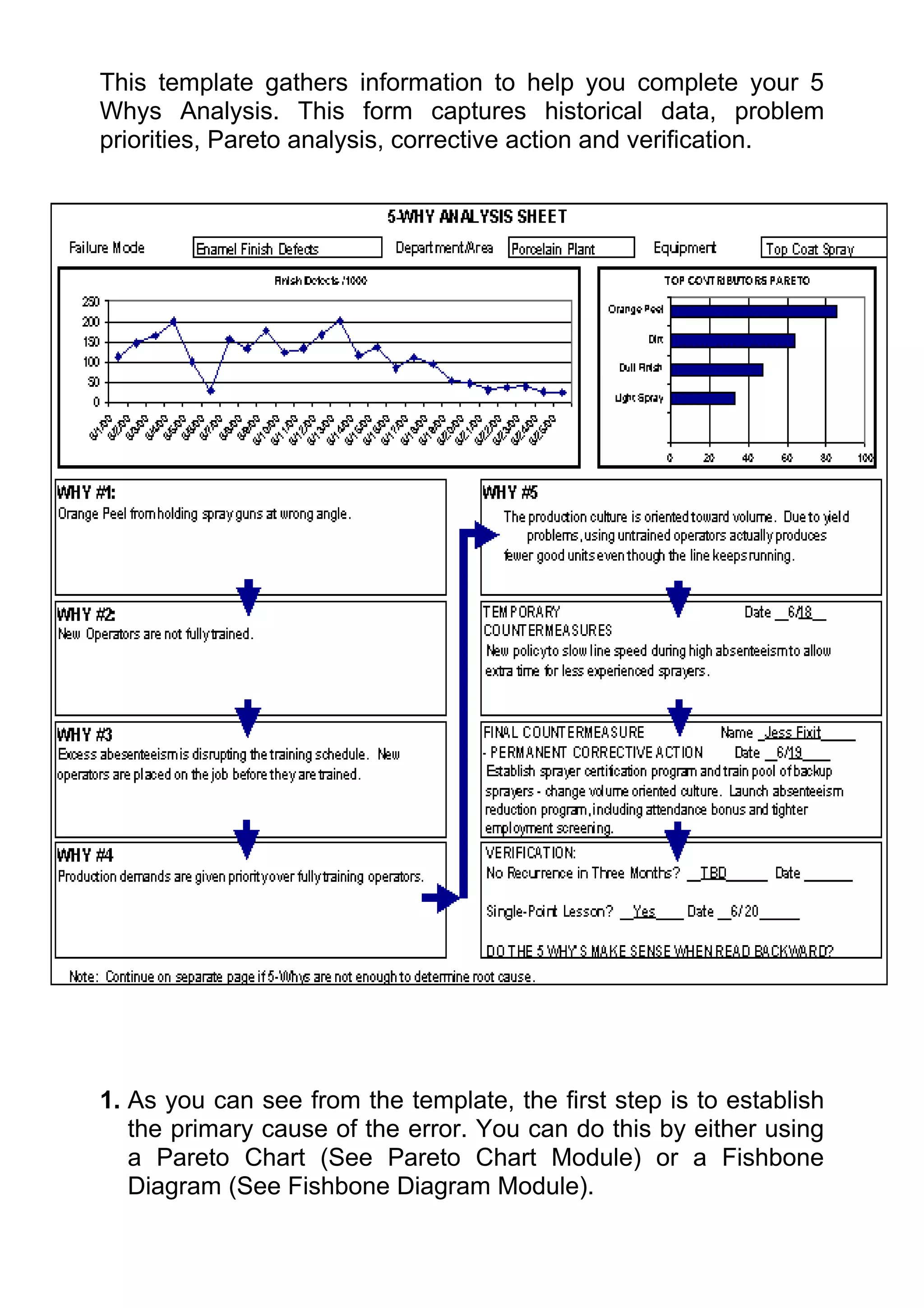
This template gathers information to help you complete your 5
Whys Analysis. This form captures historical data, problem
priorities, Pareto analysis, corrective action and verification.


1. As you can see from the template, the first step is to establish
   the primary cause of the error. You can do this by either using
   a Pareto Chart (See Pareto Chart Module) or a Fishbone
   Diagram (See Fishbone Diagram Module).
2. Once the top cause has been selected, then ask the question
   as to why that happens 5 times.

3. Once root cause is determined, establish temporary and
   permanent measures to correct the error.

4. Update in three months time to show improvement.

Historical Example:


        FOR WANT OF A NAIL A SHOE WAS LOST
       FOR WANT OF A SHOE A HORSE WAS LOST
      FOR WANT OF A HORSE A RIDER WAS LOST
      FOR WANT OF A RIDER AN ARMY WAS LOST
     FOR WANT OF AN ARMY A BATTLE WAS LOST
       FOR WANT OF A BATTLE A WAR WAS LOST
      FOR WANT OF A WAR A KINGDOM WAS LOST
 AND ALL FOR THE WANT OF A LITTLE HORSESHOE NAIL.
Example Problems (Good to practise on)

* why is the monthly report always late?
* why do I always get injured playing sport?
* why do we have high staff turnover in our department?

For Further Information:

See your mentor expert
See your local advocate
ISSUES ANALYSIS

                     Brainstorming


  Purpose: To establish a common method for teams to
 creatively and efficiently generate a high volume of ideas
 on any topic by creating a process that is free of criticism
                        and judgment.

When To Use It

Can be used individually, but is usually more effective in a group
when you need to generate a lot of ideas; whether they be
solutions or causes or data.
Brainstorming is a well known but often badly practised technique
– it is important to learn to use it properly.

Also remember that many solutions to complex problems come
from ideas that might seem ‘crazy’ at first, so brainstorming is
intended to encourage fresh thinking and ‘crazy’ ideas.

Rules For Brainstorming:
There are five simple rules designed to prevent barriers to the
flow of ideas.
1. NO CRITICISM
There should be no criticism of any ideas thrown up during a
session. This means suspending any judgement of ideas and
suggestions until the appropriate time.


   TIP: This can be very challenging and difficult to deal with!
   Perhaps have a forfeit of penalty system for those “Yes,
   but…” people.
   This should also apply to body language as well, which
   can also be negative and critical.
   Also, make sure you don’t succumb to self censorship,
   criticising in your head what you are thinking that might
   stop you from suggesting ideas.


No criticism is important as what may seem unrealistic and way
off base can sometimes be enough to develop into a good idea or
inspire someone else along a different track altogether.

Remember that the brain is a complex machine and our thoughts
are rarely in a logical ordered fashion, but instead tend to jump
around randomly – there is no telling what can spark off a great
suggestion from someone else.

2. FREEWHEELING
Often we have our best ideas when our brain waves are in the so-
called ‘Theta’ pattern. This occurs when we are just dropping off
to sleep, just waking up, driving on a long journey or relaxing in a
bath or shower, times during which our minds roam free. It is this
state you should try and encourage in a brainstorming session.
As such, freewheeling encourages people to come up with
random ideas ‘off the top of their heads’. Don’t worry about how


       TIP: Maybe spend a few minutes concentrating
       on the most way-out ideas possible concerning
       the current topic as part of your brainstorming
       session.
impractical the ideas are. In fact brainstorming sessions are much
more effective if really crazy ideas are encouraged.
There are two ways to record the ideas from the brainstorm.
The first is to have everyone call out the ideas and have a scribe
write them down. This lets others generate ideas from everyone
else’s ideas, but it can be difficult to get all the ideas down and
quieter members of the group may not be heard.
The second approach is to have individuals’ complete Post-It
notes, using 1 Post-It per idea. This approach is effective where
you may have a mix of seniority or someone that exerts personal
power and others withdraw. It can also let you move the ideas
around once the brainstorming process is finished. However, be
aware that the Post-It note approaches which can sometimes
mean people get caught up in their own thinking channel without
an opportunity to be inspired by the ideas from everyone else. If
the Post-It note approach is used, ensure there is time set aside
to read out each of the Post-It notes – with NO criticism – and
then a few further minutes for any last minute brainstorms.

To decide which approach to use, the facilitator should ask the
group which approach they would prefer, and try and gain
consensus.
Whichever approach is used, the facilitator needs to make sure
the points noted are accurate and specific enough.


3. QUANTITY
Brainstorming promotes quantity over quality. Take existing
suggestions or ideas and use them as a springboard for further
possibilities.

Typically groups might like to aim at producing 100 ideas in 20
minutes, although if a brainstorming session is going well, a list of
250 ideas can easily be produced.

4. RECORD ALL IDEAS
Every single idea must be written down, however extraordinary it
may seem, and even if it is that same as a previous idea but
expressed in a different way.
It is also important to make sure the group can see the list being
compiled.
The scribe, who should be someone different to the facilitator,
needs to write the ideas on flipchart paper and the sheets need to
be posted around the room when full so that they remain in view
and therefore ‘live’.

   TIP: All team members should be prepared to help the
   scribe get all ideas down by repeating themselves. The
   scribe should abbreviate as much as possible without
   changing the content of the suggestion.


5. INCUBATE
If possible, give yourself an opportunity to process the ideas.
‘Sleeping on it’ ensures you have had the chance to really think
about the brainstormed suggestions. This is not always possible
but do try and put some kind of break in there, even if it is just for
5 or 10 minutes.


      TIP: Many problem solving groups incubate their
      brainstorming sessions for a week and come back to
      the lists at the next group meeting with a further few
      minutes of brainstorming to see if any more ideas
      have occurred to anyone during the week.


Steps For Running Brainstorming Meetings:

As well as the rules of brainstorming there are also some steps to
note in running a successful brainstorming meeting and
evaluating the ideas after they have been incubated.

     Step One:
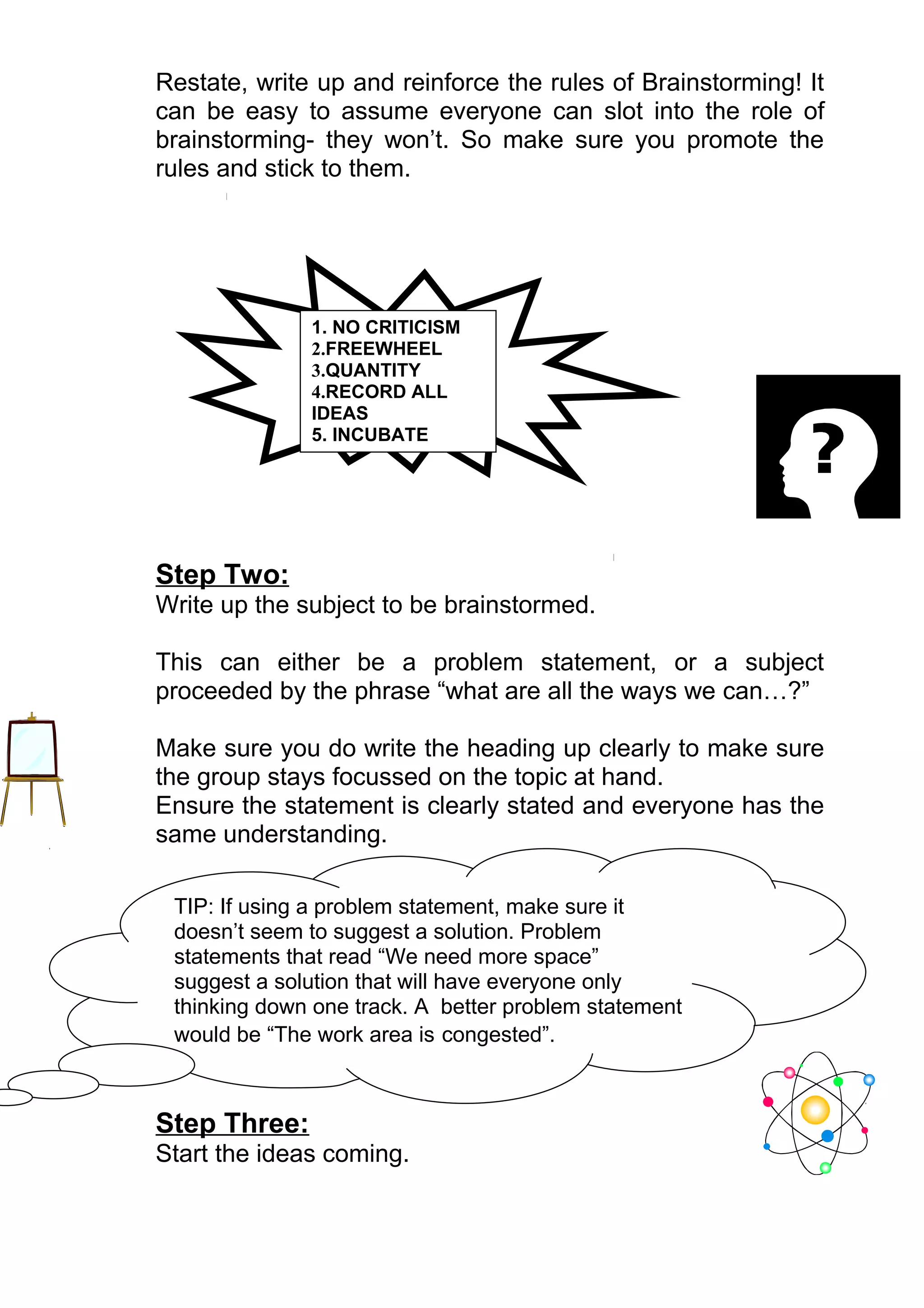
Restate, write up and reinforce the rules of Brainstorming! It
can be easy to assume everyone can slot into the role of
brainstorming- they won’t. So make sure you promote the
rules and stick to them.


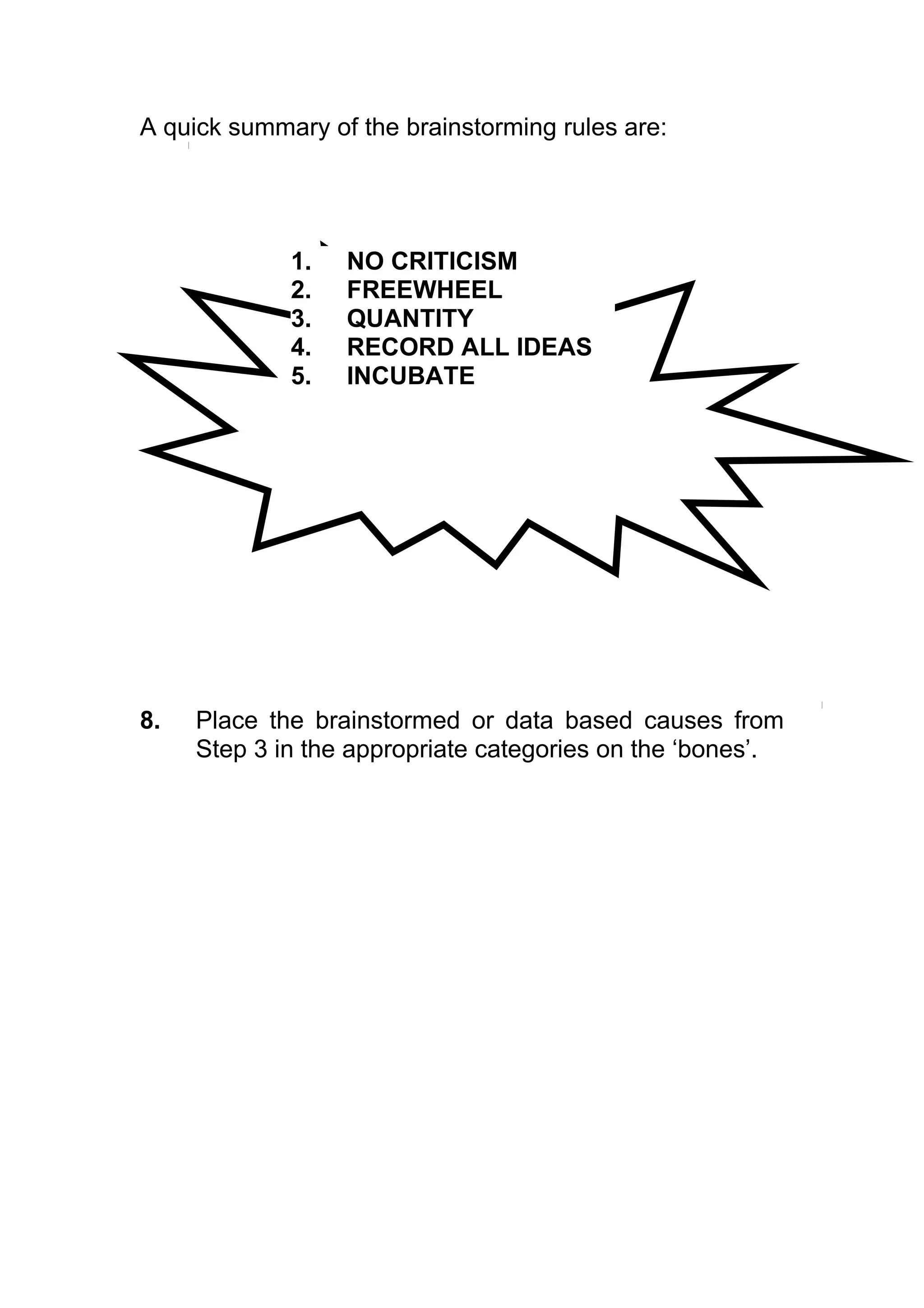
              1. NO CRITICISM
              2.FREEWHEEL
              3.QUANTITY
              4.RECORD ALL
              IDEAS
              5. INCUBATE


Step Two:
Write up the subject to be brainstormed.

This can either be a problem statement, or a subject
proceeded by the phrase “what are all the ways we can…?”

Make sure you do write the heading up clearly to make sure
the group stays focussed on the topic at hand.
Ensure the statement is clearly stated and everyone has the
same understanding.

 TIP: If using a problem statement, make sure it
 doesn’t seem to suggest a solution. Problem
 statements that read “We need more space”
 suggest a solution that will have everyone only
 thinking down one track. A better problem statement
 would be “The work area is congested”.


Step Three:
Start the ideas coming.
You can do this in a structured way by going around the
room and taking it in turns to call out ideas. If someone can
not think of a suggestion he or she just says ‘pass’ and the
next person carries on so as not to halt the flow of ideas.
This way makes sure everyone is involved and ideas come
one at a time which makes it easier to record them.

However the unstructured approach is generally more
popular.
This is more a free for all session, letting anyone call out an
idea at any time. This is more difficult for the person writing
to keep up with, but has the advantage of letting the ideas
come more freely which results in better quality
brainstorming.

Let people know how long the generating ideas part will go
for; this will make it easier for people to suspend their
negative tendencies to criticise and evaluate immediately if


they know how long they have to suspend them for.
However make sure you remain flexible with this rule.
Sometimes there can be a lot lost by restricting people to
time – if ideas are flowing, or conversely not flowing at all,
people may need a bit more time.

The role of facilitator is important here. The facilitator should
be able to appreciate when to step in to start off the flow of
ideas and when to ease off and let the ideas run. Once the
flow of ideas has started to plateau or stall, the facilitator
should step in and try rephrasing the topic to get a different
    angle. Example questions might be:
-   What would you like done differently about XYZ?
-   What’s dumb about what we do?
-   What do other people perceive as problems in this area?
-   What things or areas could we make better?

    Towards the end of the time ask for any last suggestions to
    give people a chance to get any last thoughts down.

    Step Four:
    Record all ideas and make sure the list is visible to all group
    members as mentioned in Brainstorming Rule 4.


    Step Five:
    As mentioned in rule 5 of the Brainstorming rules, incubating
    the ideas is an important and valuable part of the process.
    Maybe post the list of brainstormed suggestions somewhere
    in the work area. This keeps the subject in mind and can
    help the incubation process.

    Step Six:
    Now you need to evaluate the ideas. The best way of
    organising the evaluation is to begin by grouping the items
    on the list into themes. This should be before any items are
    rejected as being impractical.

    Once sorted, each theme can then be examined to find
    instant winners, ideas that can be quickly and easily
    implemented.
    For a problem solving session you can also evaluate the
    ideas using the Pareto Principle (see module on Pareto
Charts) to isolate the one or two ideas that would solve most
of the problem.
Variations

To generate the flow of ideas you may like to switch between the
structured and unstructured method of brainstorming. If the group
is silent early on, or if the manager has had a lot of input early on,
start off in the freewheeling mode and then switch to the round
robin, structured fashion.
Or if people start to fidget waiting for their turn, switch to the free
wheeling session, but ensure everyone gets a turn to be heard.

Try and make your brainstorming sessions something different.
Another rule could be: Don’t Treat It Like A Meeting. Sitting
around a table can be boring, so encourage people to get up and
pace around or even just stay standing - this can contribute to
the ‘Eureka!’ effect.
You may also like to give everyone access to paper and bright
coloured pens. Sometimes just doodling can spark off ideas, or
alternatively instead of writing the statement to be brainstormed,
draw the situation to further stimulate creative minds.

One further idea is to bring in at least one employee who
is NOT affiliated intimately with the initiative being discussed. This
allows an impartial witness to any short-sightedness and lets you
show other departments how good you are!!

The following are two articles written about the brainstorming
process at Ideo, one of Silicone Valleys foremost creative product
design companies.
7 Secrets to Good Brainstorming
Generating rafts of good ideas is Ideo’s business. Here’s how this
world-class product-development firm keeps the lightbulbs blazing
bright.
by Linda Tischler

According to The Economist's Innovation Survey, half of the U.S.
economy's current growth comes from companies that didn't exist 10 years
ago. Corporate titans have learned to fear the prodigy in his dorm room or
the garage-based whiz kid who's forging a bullet with their company's name
on it. "Innovate or die" is not an idle threat. It's the harsh reality of the
modern, fast-forward economy.
Silicon Valley-based Ideo has sparked some of the most innovative products
of the past decade -- the Apple mouse, the Polaroid I-Zone Pocket Camera,
and the Palm V, among others. But Ideo staffers don't just sit around
waiting for good ideas to pop into their heads. The company has
institutionalized a process whereby ideas are coaxed to the surface through
regular, structured brainstorming sessions. At Ideo, idea-generation
exercises are "practically a religion," Kelley says.
On any given day, multiple brainstorming sessions may spawn hundreds of
ideas and burn through just as many chocolate-chip cookies, the preferred
fuel of world-class idea mongers. Indeed, collective idea generation is so
important at Ideo that a staffer caught trying to noodle a problem alone at
his desk may be called on the carpet for wasting his time and the client's
money.
"The social ecology at many American companies says that when you're
stuck, you're supposed to go back to your desk and think harder, because
you were hired for your skills," Kelley says. "At Ideo, the culture is exactly
the opposite. You have a social obligation to get help."
But a poorly planned brainstorming session could cause more harm than
good, That's why Ideo follows strict rules for sparking good ideas.
Some are simple truths: Morning meetings work best; 3 - 10 participants
should take part; and cookies always spur creativity. Some, like those
outlined below, are a bit more refined.

1. Sharpen the focus.
Start with a well-honed statement of the problem at hand. Edgy is better
than fuzzy. The best topic statements focus outward on a specific customer
need or service enhancement rather than inward on some organizational
goal.

2. Write playful rules.
Ideo's primary brainstorming rules are simple: "Defer judgment" and "One
conversation at a time." The firm believes in its rules so strongly that they're
stenciled in 8-inch letters on conference-room walls. "If I'm the facilitator
and somebody starts a critique or people start talking, I can enforce the
rules without making it feel personal," Kelley says. Other rules include, "Go
for quantity," "Be visual," and "Encourage wild ideas."

3. Number your ideas.
"This rule seems counterintuitive -- the opposite of creativity," Kelley says.
"But numbered lists create goals to motivate participants. You can say, 'Let's
try to get to 100 ideas.' Also, lists provide a reference point if you want to
jump back and forth between ideas."

4. Build and jump.
Most brainstorming sessions follow a power curve: They start out slowly,
build to a crescendo, and then start to plateau. The best facilitators nurture
the conversation in its early stages, step out of the way as the ideas start to
flow, and then jump in again when energy starts to peter out.
"We go for two things in a brainstorm: fluency and flexibility," Kelley says.
"Fluency is a very rapid flow of ideas, so there's never more than a moment
of silence. Flexibility is approaching the same idea from different
viewpoints."

5. Make the space remember.
Good facilitators should also write ideas down on an accessible surface. Ideo
used to hold its brainstorms in rooms wallpapered with whiteboards or
butcher paper. Lately, however, the group has started using easel-sized
Post-it notes. "When the facilitator tries to pull together all the ideas after
the session," Kelley says, "she can stack up nice, tidy rectangular things
instead of spreading butcher paper all the way down the hall."

6. Stretch your mental muscles.
Brainstorming, like marathon running, should begin with warm-up exercises.
Ideo studied various methods of prepping for a session. For a project on the
toy industry, for example, Ideo divided the group into three teams: The first
team did no preparation. The second listened to a lecture on the technology
involved and read background books. The third team took a field trip to a
toy store. Far and away, the toy-store team produced ideas in greater
quantity and quality than the other two.

7. Get physical.
At Ideo, brainstorming sessions are often occasions for show-and-tell.
Participants bring examples of competitors' products, objects that relate to
the problem, or elegant solutions from other fields as springboards for ideas.
Ideo also keeps materials on hand -- blocks, foam core, tubing -- to build
crude models of a concept.
Six Surefire Ways to Kill a Brainstorm

Coming up with good ideas -- even in an ideal environment -- is hard
work. But these tactics will guarantee failure.
by Linda Tischler

A poorly planned brainstorming session could cause more harm than good.
And more frustration than anything else. That's why Silicon Valley design
firm Ideo follows strict rules for sparking good ideas.
These are not those rules.
The six strategies below are absolute no-no's -- surefire innovation killers
from Tom Kelley, general manger of Ideo Product Development.

1. Let the boss speak first.
Nothing kills a brainstorming session like a dominating CEO or the
brownnosers who rush to agree with his every statement. Ideo recommends
that bosses lock themselves out of idea-generation sessions all together.
Send him out for doughnuts, and you'll get better results.


2. Give everybody a turn.
Kelley remembers packing 16 people into a room for one particular meeting.
Each person had two minutes to speak. It was democratic. It was painful. It
was pointless. It was a performance, not a brainstorm. "In a real
brainstorm, the focus should never be on just one person," Kelley says.

3. Ask the experts only.
When it comes to generating truly innovative ideas, deep expertise in a field
can actually be a drawback. "In a brainstorm, we're looking for breadth,"
Kelley says. Cross-pollination from seemingly unrelated fields can lead to
authentic breakthroughs.

4. Go off-site.
By conducting off-site brainstorming sessions, you only reinforce the concept
that great ideas only come on the beach or at high altitudes -- not in the
proximity of your daily work.

5. No silly stuff.
Kelley remembers one brainstorming session doomed by the boss's opening
remarks: All ideas had to result in something the firm could patent and
manufacture. The silence that followed was deafening. Silly is important.
Wild ideas are welcome. Brainstorming should be fun.

6. Write down everything.
Obsessive note taking is toxic to brainstorming. It shifts the focus to the
wrong side of the brain. It makes the session feel like History 101. Doodles
and sketches are fine. A short note that preserves a thought is acceptable.
But detailed writing destroys momentum, dissipates energy, and distracts
from the main purpose of the exercise: unfettered thinking. Each session
should have an assigned scribe who records suggestions. And that person
should not be the group facilitator.


Example Problems (Good to practise on)

* Where to go for my birthday
* Christmas presents
* Coming up with a name for a rock band
* Promotion ideas for a business

For Further Information:
See your mentor expert
See your local advocate
ISSUES ANALYSIS

                   Issue Diagrams


   Purpose: To identify the problem attributes and the
  specific areas that you are going to address. It will not
                     provide solutions.

When To Use It

The Issue Diagram is a tool that you can use as an individual
when you have a specific problem/ objective or in a team
environment where you are trying to get consensus in what the
problem is. It can be especially powerful in multi-functional
discussions.
You can use the Issue Diagram when you have a lot of issues
around a topic as it allows you to organise and summarise natural
groupings to understand the essence of a problem.

Construction:
Two methods: Top Down and Bottom Up.
Generally Bottom Up is easiest to use.
Bottom Up:

1. Place 2-3 pieces of Flipchart paper on the wall.

2. On a whiteboard, or separate piece of Flipchart paper,
   write a broad problem statement. It should be as
   generic as possible and brought into by everybody.
   i.e. “I can’t afford to buy a house”
   Alternatively you can write down an effect
   i.e. “The Zido cycle is too long”

3. Brainstorm by asking “what are all the issues
   contributing to this problem?”.
   Follow the brainstorming rules (see Brainstorming
   Module).
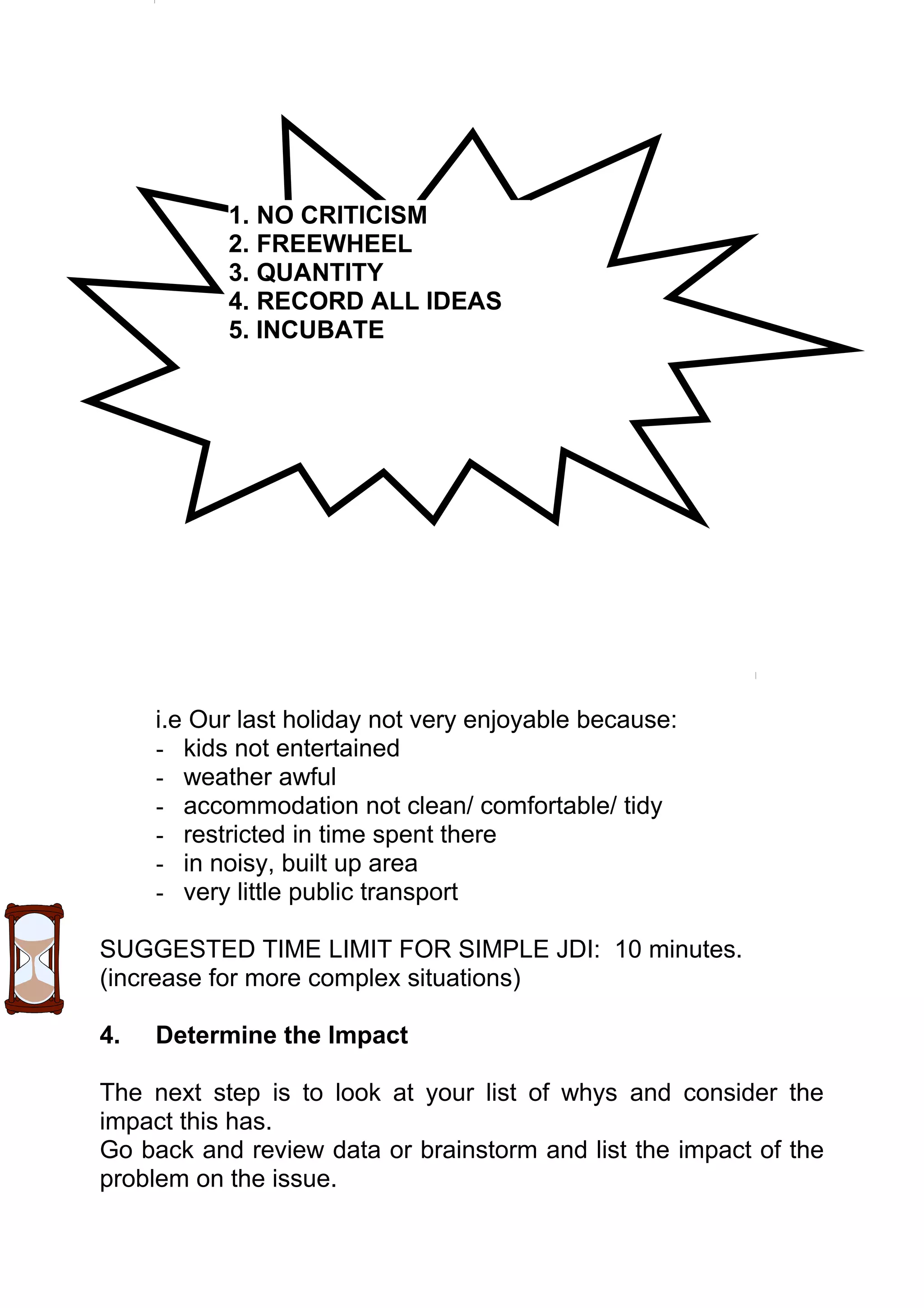
   A quick summary of the brainstorming rules are:


              1. NO CRITICISM
              2. FREEWHEEL
              3. QUANTITY
              4. RECORD ALL IDEAS
              5. INCUBATE
4. Use thin tipped felt pens on Post-It notes. This makes it
                easy for everyone to read. It is also important to use
                Post-Its so that you can shift ideas into groups as
                necessary. Make sure there is only 1 idea per Post-It.
             5. Be prepared to put things to one side if you are getting
                bogged down – return when appropriate. Don’t allow
                solutions to be discussed. Don’t lay blame – encourage
                openness and honesty.


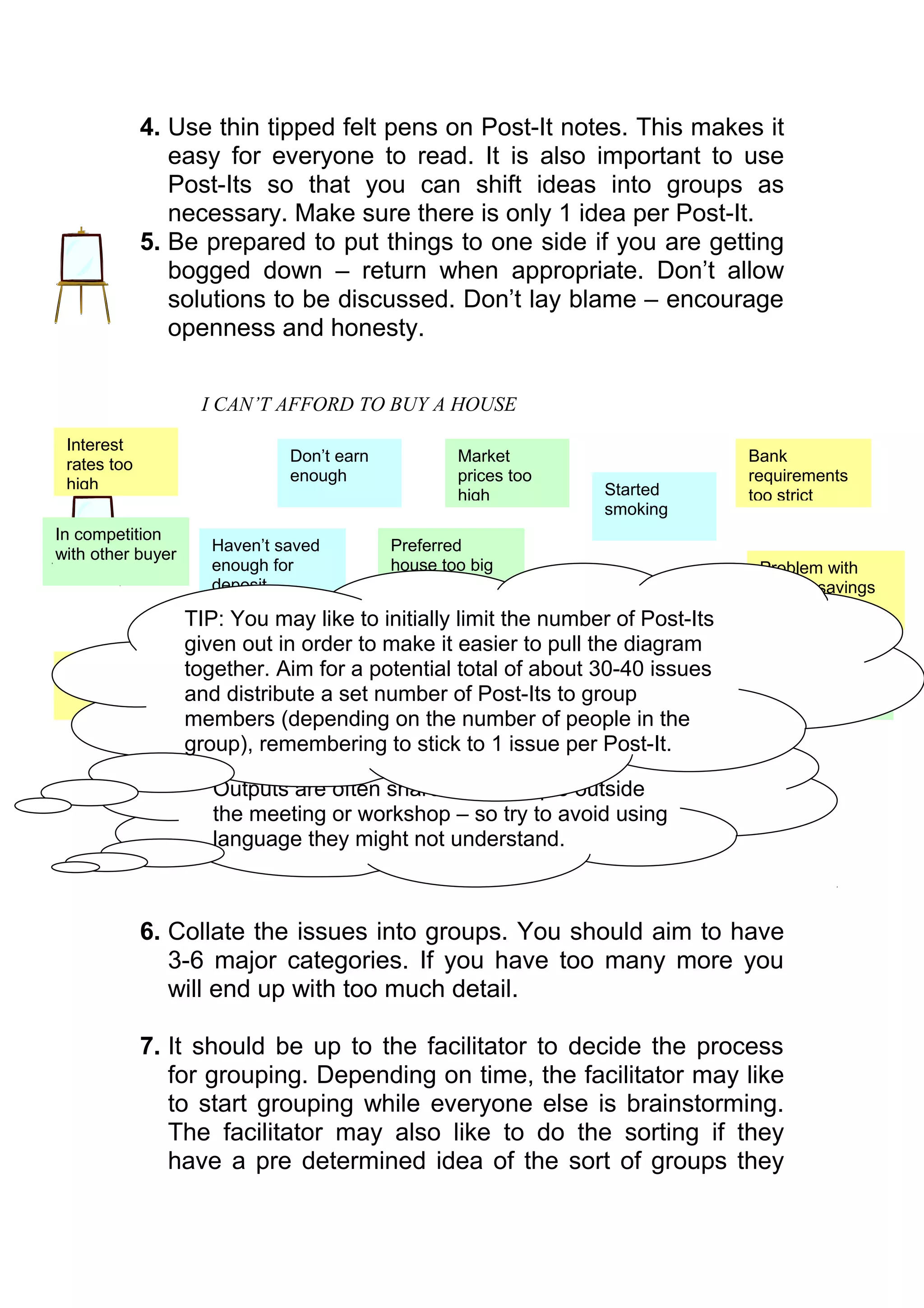
                    I CAN’T AFFORD TO BUY A HOUSE
 Interest
 rates too                     Don’t earn          Market                        Bank
                               enough              prices too                    requirements
 high                                                             Started
                                                   high                          too strict
                                                                  smoking
In competition
                      Haven’t saved         Preferred
with other buyer
                      enough for            house too big                         Problem with
                      deposit               and expensive                         bank & savings
                                                                Need to keep      history
                   TIP: You may like to initially limit the number of Post-Its
                                                                 savings for
                                            Not earning
                   given out in order to make it interest to pullbackup – job
                                            good
                                                   easier         the diagram
                        Bills too high
 Money tied                                 rate total of aboutsituationissues
                   together. Aim for a potentialon                30-40              Only looking
 up in shares      and distribute a set number of Post-Its to group
                                            savings                                  in expensive
                                                                                     area
                   members (depending on the number of people in the
                   group), remembering to stick to 1 issue per Post-It.
                      TIP: Don’t make your points too technical.
                      Outputs are often shared with people outside
                      the meeting or workshop – so try to avoid using
                      language they might not understand.


             6. Collate the issues into groups. You should aim to have
                3-6 major categories. If you have too many more you
                will end up with too much detail.

             7. It should be up to the facilitator to decide the process
                for grouping. Depending on time, the facilitator may like
                to start grouping while everyone else is brainstorming.
                The facilitator may also like to do the sorting if they
                have a pre determined idea of the sort of groups they
would like to see it split into. This doesn’t need to be a
        hard and fast sorting process but good as a prompt.
         Alternatively, without talking, get everyone to sort the ideas
         simultaneously. Sorting in silence will focus everyone on the
         meaning behind and the connections among all ideas, instead
         of emotions and ‘history’ that often arrives in discussions.
        Move the Post-Its where they fit best for you; don’t ask,
        simply move any notes you think belong in another grouping.
        If an idea is moved back & forth, try to see the logical
        connection the other person is making. It may be a good idea
        to create a duplicate Post-It if agreement can’t be reached.


            TIP: It is ok for some notes to stand alone. These
            loners can be as important as others that fit into
            groupings naturally.


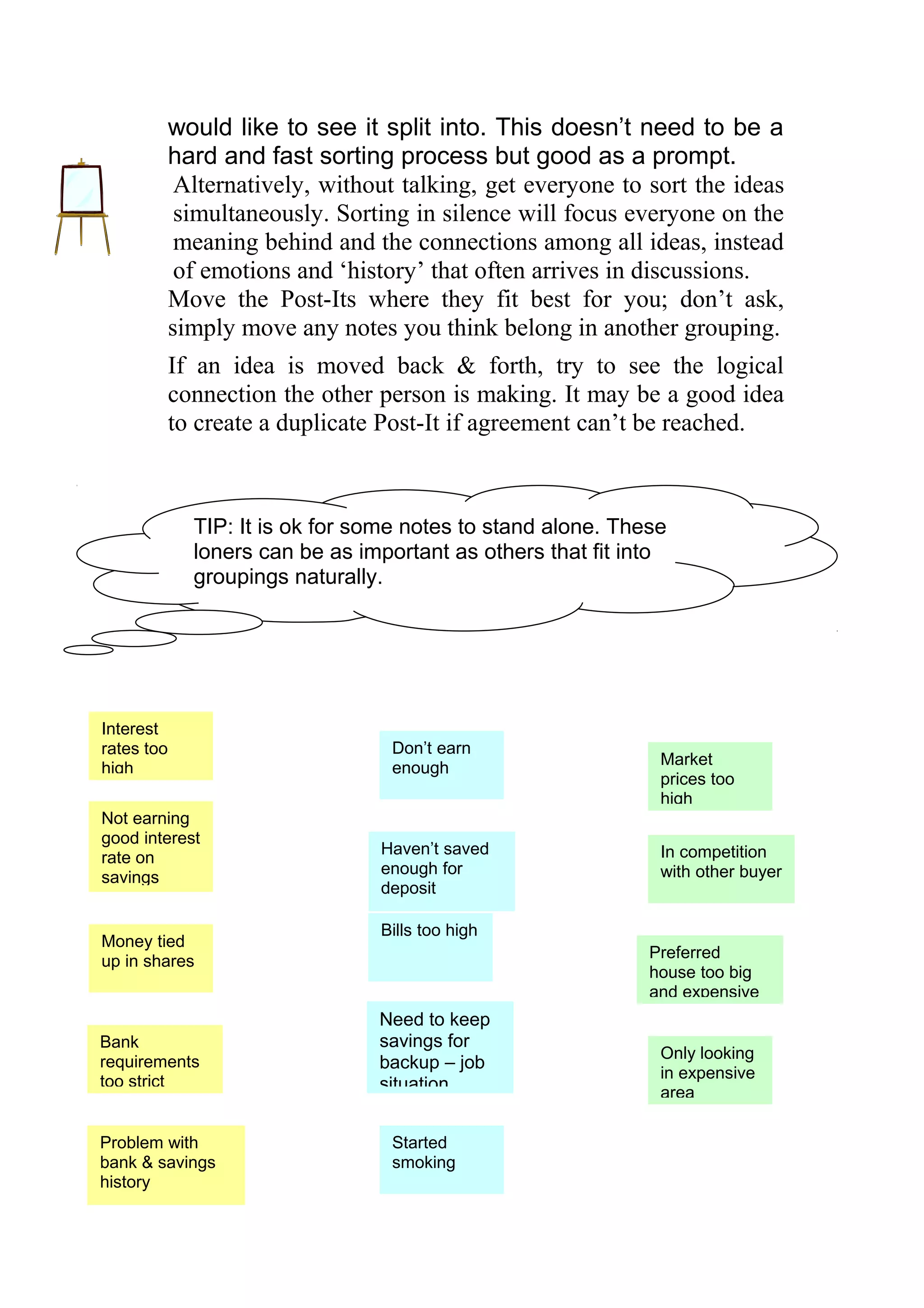
                I CAN’T AFFORD TOi BUY A HOUSE

Interest
rates too                        Don’t earn
                                                             Market
high                             enough
                                                             prices too
                                                             high
Not earning
good interest
                                Haven’t saved                In competition
rate on
                                enough for                   with other buyer
savings
                                deposit

                                Bills too high
Money tied
                                                            Preferred
up in shares
                                                            house too big
                                                            and expensive
                                Need to keep
Bank                            savings for
                                                             Only looking
requirements                    backup – job
too strict                                                   in expensive
                                situation                    area

Problem with                     Started
bank & savings                   smoking
history
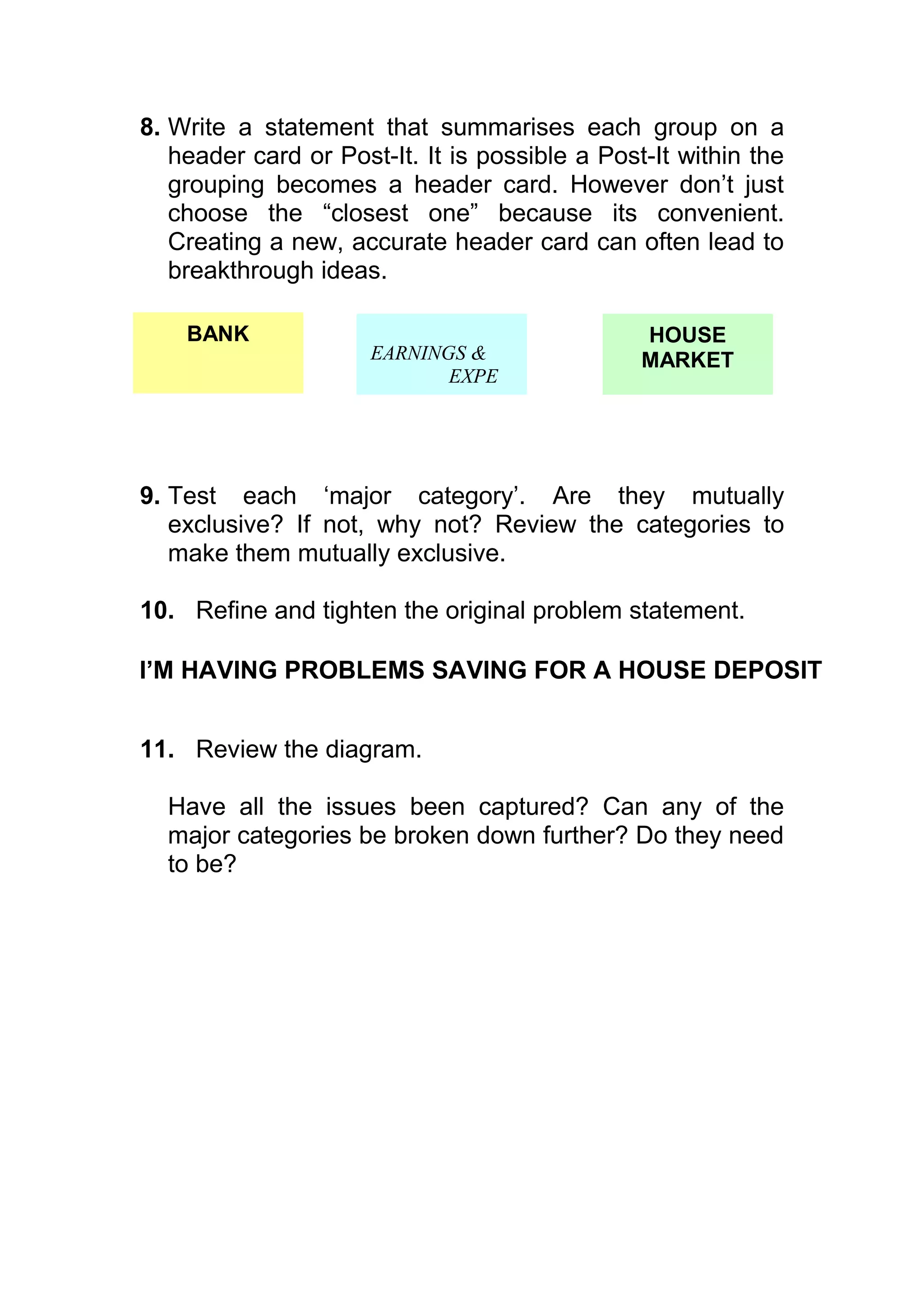
8. Write a statement that summarises each group on a
   header card or Post-It. It is possible a Post-It within the
   grouping becomes a header card. However don’t just
   choose the “closest one” because its convenient.
   Creating a new, accurate header card can often lead to
   breakthrough ideas.

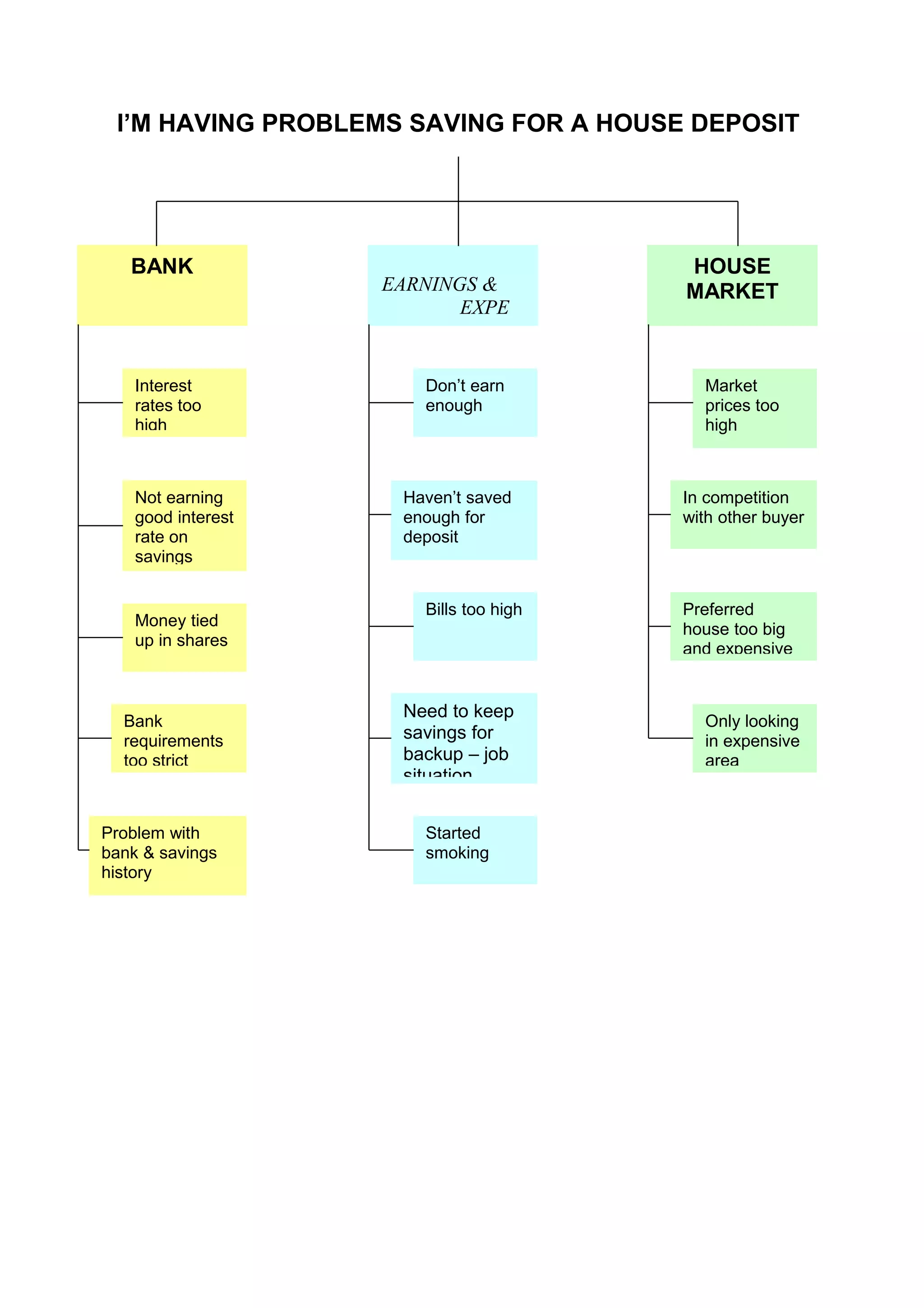
    BANK                                        HOUSE
                      EARNINGS &                MARKET
                             EXPE


9. Test each ‘major category’. Are they mutually
   exclusive? If not, why not? Review the categories to
   make them mutually exclusive.

10. Refine and tighten the original problem statement.

I’M HAVING PROBLEMS SAVING FOR A HOUSE DEPOSIT


11. Review the diagram.

  Have all the issues been captured? Can any of the
  major categories be broken down further? Do they need
  to be?
I’M HAVING PROBLEMS SAVING FOR A HOUSE DEPOSIT


   BANK                                 HOUSE
                    EARNINGS &          MARKET
                           EXPE


    Interest           Don’t earn         Market
    rates too          enough             prices too
    high                                  high


    Not earning      Haven’t saved      In competition
    good interest    enough for         with other buyer
    rate on          deposit
    savings


                       Bills too high   Preferred
    Money tied                          house too big
    up in shares                        and expensive


                     Need to keep
  Bank                                    Only looking
  requirements       savings for          in expensive
  too strict         backup – job         area
                     situation


Problem with           Started
bank & savings         smoking
history
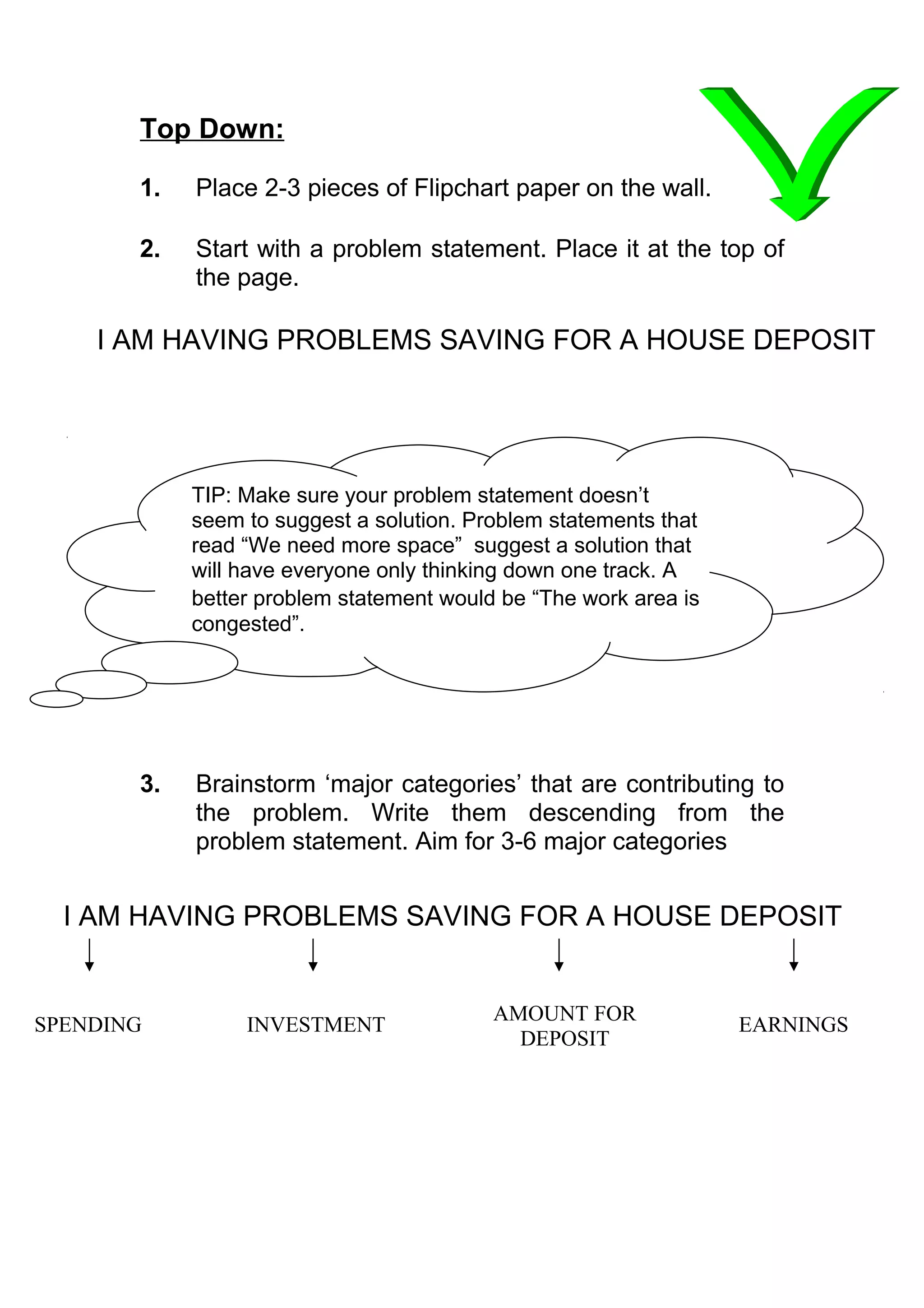
Top Down:

       1.   Place 2-3 pieces of Flipchart paper on the wall.

       2.   Start with a problem statement. Place it at the top of
            the page.

    I AM HAVING PROBLEMS SAVING FOR A HOUSE DEPOSIT


            TIP: Make sure your problem statement doesn’t
            seem to suggest a solution. Problem statements that
            read “We need more space” suggest a solution that
            will have everyone only thinking down one track. A
            better problem statement would be “The work area is
            congested”.


       3.   Brainstorm ‘major categories’ that are contributing to
            the problem. Write them descending from the
            problem statement. Aim for 3-6 major categories


  I AM HAVING PROBLEMS SAVING FOR A HOUSE DEPOSIT


                                          AMOUNT FOR
SPENDING         INVESTMENT                                       EARNINGS
                                            DEPOSIT
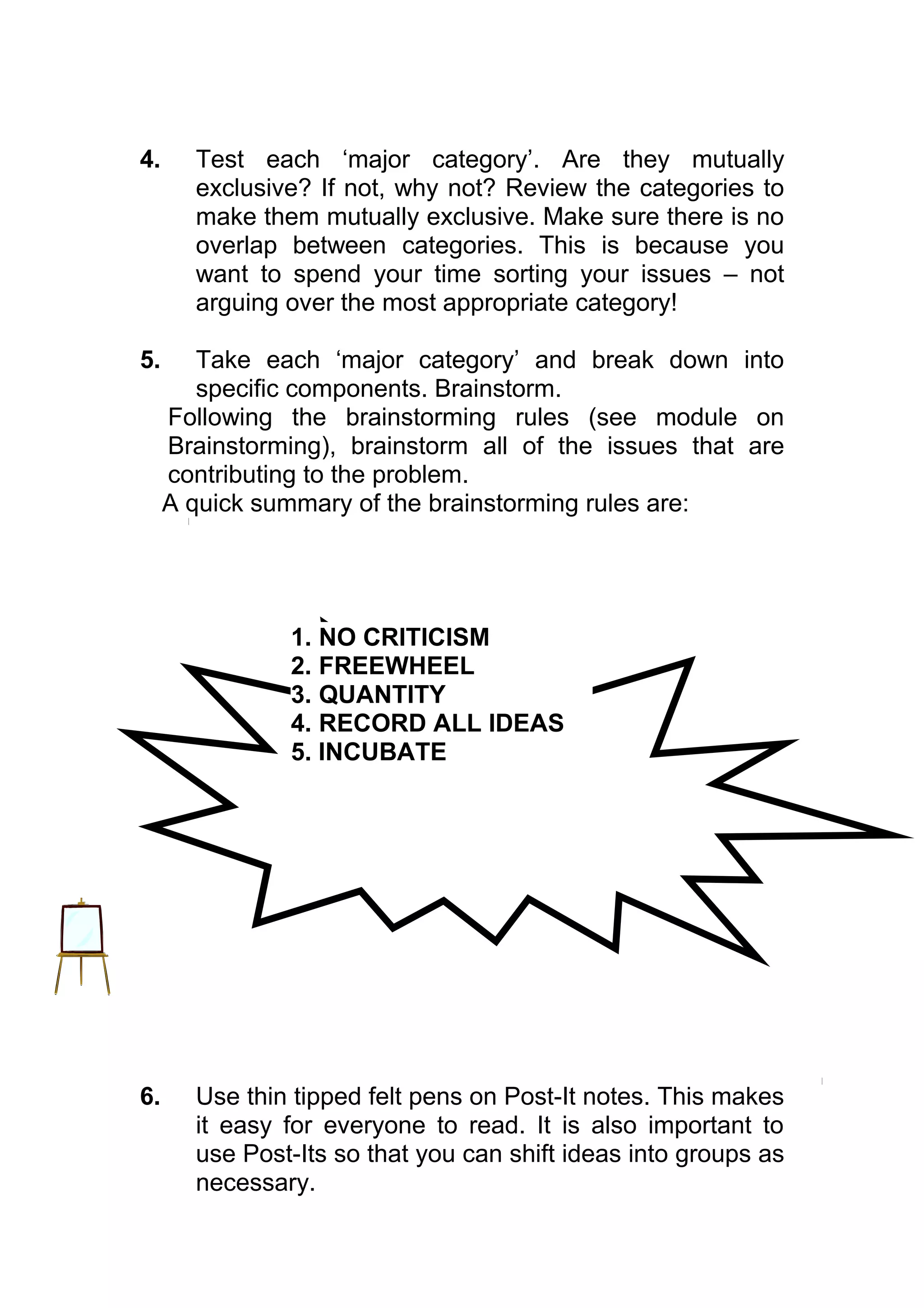
4.     Test each ‘major category’. Are they mutually
       exclusive? If not, why not? Review the categories to
       make them mutually exclusive. Make sure there is no
       overlap between categories. This is because you
       want to spend your time sorting your issues – not
       arguing over the most appropriate category!

5.      Take each ‘major category’ and break down into
        specific components. Brainstorm.
     Following the brainstorming rules (see module on
     Brainstorming), brainstorm all of the issues that are
     contributing to the problem.
     A quick summary of the brainstorming rules are:


               1. NO CRITICISM
               2. FREEWHEEL
               3. QUANTITY
               4. RECORD ALL IDEAS
               5. INCUBATE


6.     Use thin tipped felt pens on Post-It notes. This makes
       it easy for everyone to read. It is also important to
       use Post-Its so that you can shift ideas into groups as
       necessary.
7.   Be prepared to put things to one side if you are
     getting bogged down – return when appropriate.
     Don’t allow solutions to be discussed. Don’t lay
     blame – encourage openness and honesty.
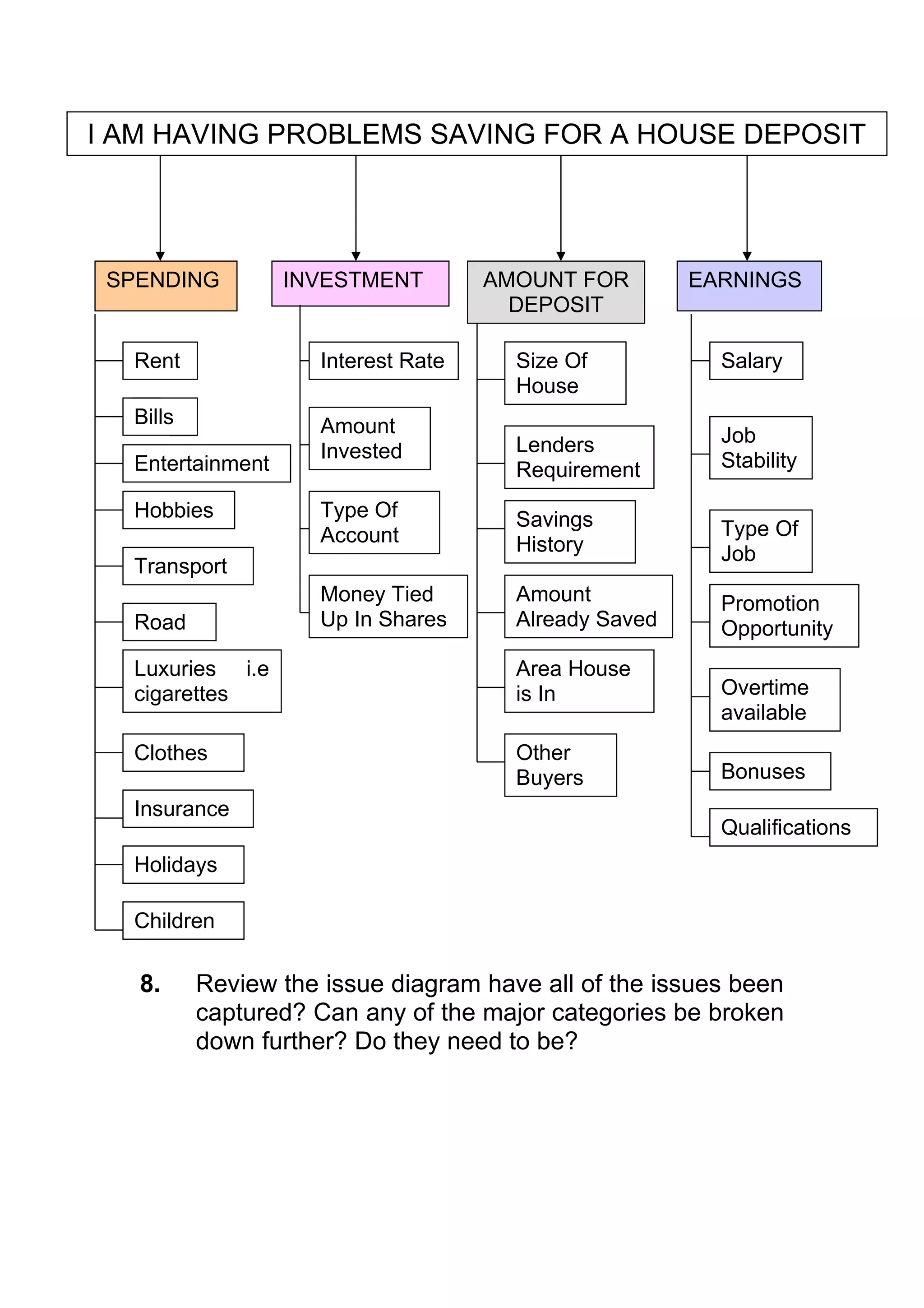
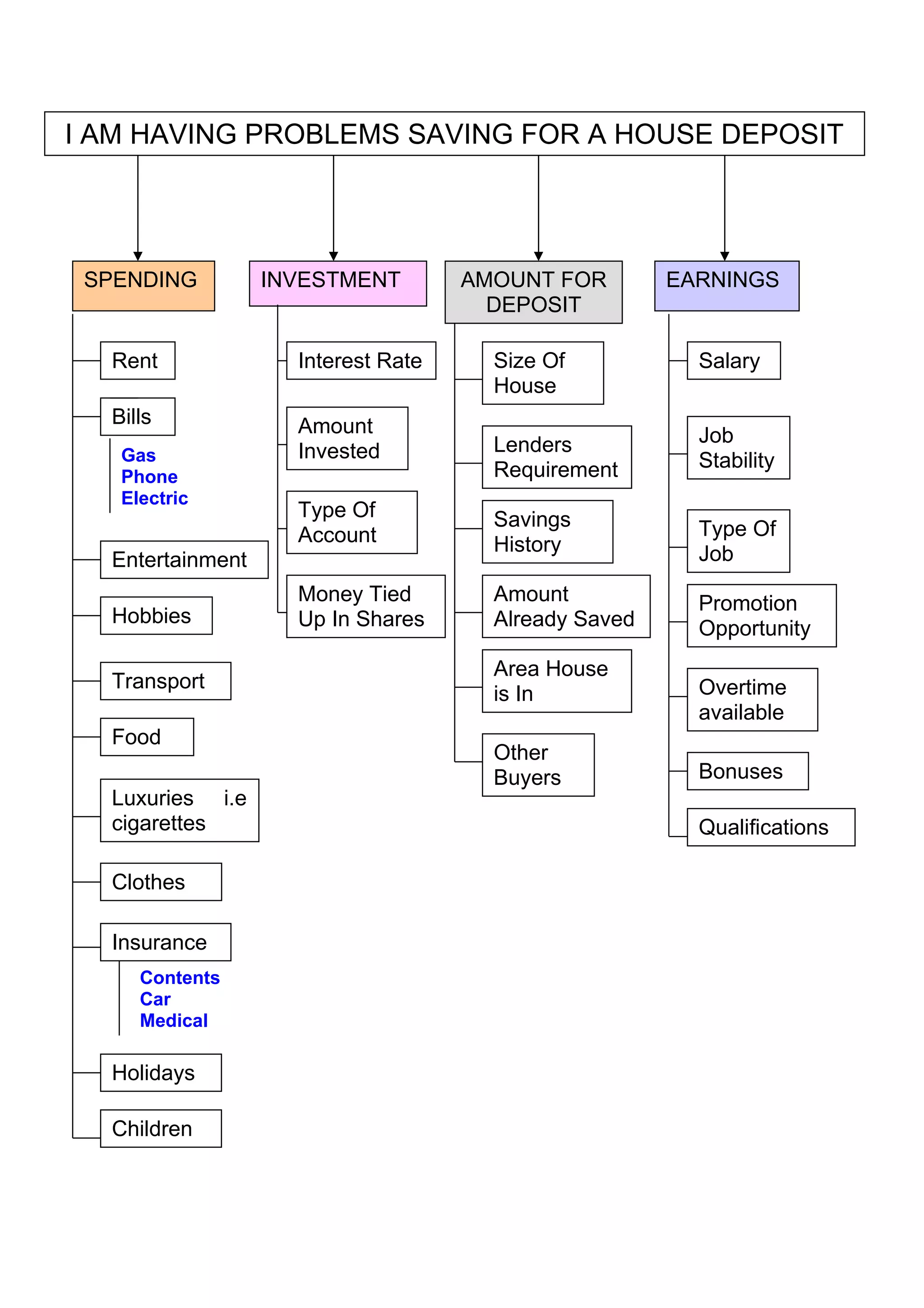
I AM HAVING PROBLEMS SAVING FOR A HOUSE DEPOSIT


 SPENDING         INVESTMENT         AMOUNT FOR        EARNINGS
                                       DEPOSIT

  Rent               Interest Rate     Size Of           Salary
                                       House
  Bills              Amount
                                       Lenders           Job
                     Invested                            Stability
  Entertainment                        Requirement
  Hobbies            Type Of           Savings
                     Account                             Type Of
                                       History           Job
  Transport
                     Money Tied        Amount            Promotion
  Road               Up In Shares      Already Saved     Opportunity
  Luxuries i.e                         Area House
  cigarettes                           is In             Overtime
                                                         available
  Clothes                              Other
                                       Buyers            Bonuses
  Insurance
                                                         Qualifications
  Holidays

  Children

   8.     Review the issue diagram have all of the issues been
          captured? Can any of the major categories be broken
          down further? Do they need to be?
I AM HAVING PROBLEMS SAVING FOR A HOUSE DEPOSIT


 SPENDING         INVESTMENT        AMOUNT FOR        EARNINGS
                                      DEPOSIT

  Rent              Interest Rate     Size Of           Salary
                                      House
  Bills             Amount
                                      Lenders           Job
   Gas              Invested                            Stability
   Phone                              Requirement
   Electric
                    Type Of           Savings
                    Account                             Type Of
                                      History           Job
  Entertainment
                    Money Tied        Amount            Promotion
  Hobbies           Up In Shares      Already Saved     Opportunity
                                      Area House
  Transport                                             Overtime
                                      is In
                                                        available
  Food
                                      Other
                                      Buyers            Bonuses
  Luxuries i.e
  cigarettes                                            Qualifications

  Clothes

  Insurance
     Contents
     Car
     Medical

  Holidays

  Children
Interpretation

Look at the issue diagram and through the team identify
the perceived major causes for the problem. Prove the
major cause i.e. collate data to prove the theory
Move to Solution mode – identify what you are going to
do.
You may choose to deal with the area with the most
causes, or some causes may stick out as being more
significant than others.

Example Problems (Good to practise on)

Deciding what school to send your children to
Deciding where to go on holiday
A process is taking too long
The work area is too crowded

For Further Information:

See your mentor expert
See your local advocate
Check the ‘Memory Jogger’ book(held by advocates
ISSUES ANALYSIS

Cause & Effect / Fishbone Analysis


  Purpose: To determine the root cause(s) of the
problem so that solutions will have an impact on the
real problem and not just the effects of the problem.

When To Use It

When you need to explore, identify and graphically
display, in increasing detail, all of the possible causes or
variables related to a problem, condition or process to
discover its root cause.

Construction:
1. Decide what you are trying to achieve.
Are you trying to solve a problem or are you trying to
identify variables in a process?

For a problem solving tool, devise the problem statement
that best describes the issue you want to determine the
root cause of.
This statement should describe the problem, be clear and
concise and understood by everyone.
i.e. The car is going through petrol faster
TIP: Make sure your problem statement doesn’t
     seem to suggest a solution. Problem statements that
     read “We need more space” suggest a solution that
     will have everyone only thinking down one track. A
     better problem statement would be “The work area is
     congested”.


If using the tool to identify variables in a process, then
write down the name of the process. E.g. hplc method
reference

2.    Tape together 3 pieces of flipchart paper and place
      on wall.

3.    Write the problem statement/ process name in a box
      in the middle of the far right hand side of the paper,
      at the ‘head’ of the fish, followed by a line which is
      the ‘backbone’.
                                                            PROBLEM
                                                           STATEMENT/
                                                            PROCESS


4.    Depending on which version you are using, there are
      two ways to categorise the causes.

The causes can be determined by
a) representing each step in the process involved (a
   process classification type fishbone) or
b) deciding the ‘major’ causes for problem solving and
   then asking of each major cause: - ‘why does this
   happen?’ (a dispersion analysis type fishbone)

5.    From the ‘back bone’ of the fish, draw one fishbone
      for each major cause category or step in the process.
For a Process Classification Type Fishbone, a maximum
  of 6-8 major steps should be identified, to ensure major
  classes of cause.

  For a Dispersion Analysis Type Fishbone, the most
  common way to group the major causes is under the 6 M
  categories:  Manpower/      Machines/     Measurement/
  Methods/ Materials/ Mother Earth (Environment).

 MANPOWER      MACHINES          ENVIRONMENTAL


                                                             PROBLEM
                                                            STATEMENT


MEASUREMENT     METHODS          MATERIALS


        TIP: Other types of groupings may be Places/
        Procedures/ People/ Policies or Surroundings/
        Suppliers/ Systems/ Skills.
        Don’t confine yourself to these however; add and
        delete categories as you feel are appropriate.
        Make the categories fit the problem. For example,
        particular problem statements may mean you
        need to focus on areas such as Communications
        or Training, so you should add a ‘fishbone’ for
        this.


  6.   Generate the major causes to build the diagram.
       These causes many come from:
           - brainstorming (see Brainstorming Module)
           - data collection
Group members can call out suggestions for causes/
variables to the facilitator. The group member should also
state which category the cause comes under. If they don’t
know, then the facilitator should decide, as opening up a
discussion for each cause will make the process very
long!

Another recommended alternative is to use Post It notes
for each idea. This makes it easier to move causes around
between category as well as re-word them at a later date if
necessary.
Also use thin tipped felt tip pens so that everyone can
read the Post Its.

If you are having problems getting ideas started, use the
cause categories as catalyst questions.
For example, what in “materials” might cause the car to be
going through petrol faster?

7.   Make sure you follow the Brainstorming rules to get
     the best ideas. Remember Brainstorming is about
     quantity   over   quality.  (Refer   Module     on
     Brainstorming).
A quick summary of the brainstorming rules are:


             1.   NO CRITICISM
             2.   FREEWHEEL
             3.   QUANTITY
             4.   RECORD ALL IDEAS
             5.   INCUBATE


8.   Place the brainstormed or data based causes from
     Step 3 in the appropriate categories on the ‘bones’.
MEASUREMENT                METHODS                MATERIALS
                  Car not being            Poor quality
Odometer          maintained               of petrol
faulty


                          Driven with
                          window open
                                              Air filter blocked


Petrol gauge reading         Car used to
incorrect                    tow caravan
                                                                        THE CAR IS
                                                                        GOING
     Car being             Car is getting older                         THROUGH
     used more                                        Spend more time   PETROL FASTER
                          Handbrake left on           in traffic jams

                           Petrol Leak

  Different            Tires are wearing
  driver
                                                  Bad weather
                                                  conditions
                   Blown head gasket

                 Air conditioning on

MANPOWER                MACHINES              MOTHER NATURE

      9. For each cause listed on the bones, ask repeatedly:
      -why does it happen? OR
      -what could happen?
      This will give rise to a deeper understanding of the
      problem and identify further causes.
MEASUREMENT                         METHODS                                 MATERIALS
                    Car not being maintained                 Poor quality of petrol
Odometer                        too busy
faulty                          can’t afford                        change of supplier
Been damaged                    forget about it                     now using unleaded
                                                                    bits in petrol
                              Driven with window open
                                      window broken                            Air filter blocked
Petrol gauge incorrect
                                      hot
     Car not being maintained         muggy                                           getting old

                                           Car used to tow caravan
                                                                                                               THE CAR IS
                                                                                                                 GOING
                                             Car is getting older                                              THROUGH
        Car being used more                                                Spend more time in traffic jams   PETROL FASTER
        daughter using car                   Handbrake left on                  new job
        more shopping                     inexperienced driver                  new route to work
        more holidays                      Petrol Leak                          road works
        train strike                      hole in tank                          more accidents
                                          damaged pipes
 Different driver                  Tires are wearing                 Bad weather conditions
daughter just got    not enough air
licence                                                        English ‘summertime’
                     being driven badly by daughter            need to drive cautiously
change of owner
                             Blown head gasket                 due to road conditions
                         Air conditioning on
                            muggy hot weather
 MANPOWER                                 MACHINES                             MOTHER NATURE
10. Check for sufficiency along each bone – are all aspects of
      cause addressed?
If not, then add new category type and roots.

Interpretation

Interpret or test for root causes or drivers of the effect by one or
more of the following methods:

 Look for causes that appear repeatedly

 Looking for obvious clues – i.e. one branch of your fishbone
  having the majority of causes attached to it.

 Select key causes through an unstructured consensus process
  or one that is structured, such as multi voting.

 Gather data through check sheets or in other formats to
  determine the relative frequencies and weightings of the
  different causes.

The Cause & Effect Fishbone is an integral part of the PF/ CE/
CNX/ SOP process. For further details on this, please contact
your mentor expert.

Variations

FISHBONE SOLUTIONS DIAGRAM
The Fishbone diagram can also be used as a solution generating
tool, as opposed to a cause discovery tool.
To use it as a Solutions tool, follow Steps 1-3.
Then decide which categories you are going to brainstorm for
solutions to the problem. You may use the same category titles as
you have used for the Cause & Effect Fishbone.
Then follow the Brainstorming rules to come up with solutions in
each area.

OPEN AIR FISHBONE

Traditionally, Cause & Effect Diagrams have been created in a
meeting setting. The completed fishbone is reviewed by others
and or confirmed with data collection.

An effective alternative is to display a large, highly visible blank
fishbone chart with a problem statement at the head in a
prominent work area. Everyone posts both potential causes and
solutions on post-it notes in each of the categories.

Causes and solutions are reviewed, tested and posted.

This technique opens up the process to the knowledge and
creativity of every person in the operation.

Example Problems (Good to practise on)

PROBLEM SOLVING

•   There is never fresh milk in the fridge
•   The lawn mower keeps breaking down
•   I can’t get my reports in on time

PROCESS VARIABLES

•   Planning to go on holiday
•   Getting documents authorised


     Remember the Fishbone diagram only
     represents a point in time and it can be useful
     to revisit the tool to see if there are new
     causes or variables affecting the situation
     since improvements were made.
For Further Information:

See your mentor expert
See your local advocate
Check the ‘Memory Jogger’ book (held by advocates)
WORKING WITH IDEAS

                      Reality Tree


  Purpose: To determine the root cause(s) of complex
problems so that solutions will have an impact on the real
     problem and not just the effects of the problem.

When to Use It

When you need to identify, understand and clarify complex cause
and effect relationships to find the causes and solutions to a
problem and to determine the key factors in the situation under
study. They are particularly suitable when there are multiple
interrelated problems, and when it is felt that the problem under
discussion may only be a symptom. The reality tree is a form of
cognitive map that shows links and causal relationships between
variables. Reality Trees help promote multi-directional rather
than linear thinking, and so are a more free and broader version
of a cause and effect (fishbone) diagram.

Construction:
1.   Decide what you are trying to achieve.

     The central idea, problem or issue to be discussed must be
     described clearly and accepted by everyone involved.
Write down the problem statement that best describes the
      issue you want to determine the root cause of, and ensure
      everyone shares a common understanding of it.

      I.e. The site speed limit is frequently exceeded.


     TIP: Make sure your problem statement doesn’t
     seem to suggest a solution. Problem statements that
     read “We need more space” suggest a solution that
     will have everyone only thinking down one track. A
     better problem statement would be “The work area is
     congested”.


2.    Tape together 3-6 pieces of flipchart paper and place on
      wall.


              TIP: The bigger the better, since these
              diagrams can get quite large and complex.


3.    Write the problem statement in a box in the centre of the
      paper.


4.    As a group, generate the issues, causes and related
      problems which are believed to be affecting the central
      problem(s). These generally come from both brainstorming
      and data collection.
Each issue or cause should be recorded, in summary form,
     on a Post-It note. Only one issue or problem should be
     recorded on each Post-It.

           TIP: Thin marker pens should be used to
           make the issues easily visible from a
           distance. Writing should be large and
           clear.


     Think:
     What undesirable effects (UDE’s) are we seeing that are
     associated with the central problem(s).

5.   Make sure you follow the Brainstorming rules to get the best
     ideas. Remember Brainstorming is about quantity over
     quality. (Refer Module on Brainstorming).
     A quick summary of the brainstorming rules are:


             1.   NO CRITICISM
             2.   FREEWHEEL
             3.   QUANTITY
             4.   RECORD ALL IDEAS
             5.   INCUBATE
6.   Place the brainstormed or data based causes from Step 4
     on the edge of the flipchart paper, and review these as a
     group. Remove any duplicated Post-It's. As a group,
     reword any unclear or ambiguous Post-It’s. Pick the Post-It
     believed to have the strongest relationship with the central
     problem, and place that on the flipchart near to the central
     problem / issue.

7.   As a group, systematically build the cause and effect
     relationship between the various issues identified on Post-It
     notes.

     On the flipchart, position the Post-It notes developed during
     the brainstorm adjacent to other Post-Its where a cause and
     effect relationship is evident.

     The facilitator should seek clarification by asking questions:
       ♦ Why does this happen?
       ♦ What could happen?
       ♦ Is the cause/effect relationship direct?
       ♦ Are other factors involved / do other factors contribute?
       ♦ Which other factors?
       ♦ Why do these happen?…….

     This will give rise to a deeper understanding of the problem
     and identify further causes. These should be captured by
     generating additional Post-It's.

8.   Check each linkage for sufficiency since there could be other
     factors contributing towards or compounding the problem –
     is the relationship between causes and symptoms direct, or
     is there some other factor that contributes.

     Are all aspects of cause addressed by the Post-It notes?
     If not, then add further Post-It notes.
9.   Move the Post-It notes around until the group is happy that
     the relationship is properly captured. Once the group
     reaches consensus, apply arrows between the Post-It notes
     to highlight how the causes and effects are related. Arrows
     should point from cause to effect. This is illustrated in the
     following excerpt from the book by Eliyahu M. Goldratt, “It’s
     not Luck” (Gower Publishing Ltd., 1994).


 Companies have already                  Companies are falling
  cut all costs they know                 short of their stated
         how to cut                         financial targets


                    There is unprecedented
                    pressure to take actions
                     that will increase sales


              TIP: If two or more factors together are responsible for an
              effect (as in the example above), then it is common to
              circle them. This shows that the factors do not work in
              isolation. Such linkages are often noticed when you check
              the diagram for sufficiency (Steps 7-8).


     Reality trees are read in the direction of the arrows to
     indicate the cause and effect relationship. For instance, the
     excerpt above would be read thus: If ‘companies have
     already cut all costs….’ and ‘…they are falling short of their
     stated financial targets’ then ‘there is an unprecedented
     pressure to take actions that will increase sales’.
10. As the “tree” expands and multiple linkages form, it is
    common for feedback loops (“doom loops”) to develop (see
    example below).

                          Low Morale          More analytical
 Pressure to increase
                                                  errors
  sample throughput


                                            Material that
                         Orders              cannot be
                        cannot be            allocated
                         fulfilled


     Feedback loops are self-perpetuating unless the cycle is
     broken by one or more factors being resolved. They thus
     offer key leverage points. These loops should be clearly
     marked on the reality tree by using marker pens of a
     different colour, or a different style of line.

11. Define a stop point, and keep to it. Reality Trees have a
    tendency to take more time than you initially plan!


Interpretation

Interpret or test for root causes or drivers of the effect by one or
more of the following methods:

 Review all the issues, and determine whether there is data to
  substantiate the issue, or whether the issue is based on “gut-
  feel”.  If data is lacking, undertake further research to
  substantiate or discount the issue.

 Look for issues / causes that have many arrows into them, and
  relatively few out. These are likely to be strong leverage
points. Review the “branches” feeding these issues for areas
     to tackle.

 Look for feedback loops. One or more of the issues in the
  feedback cycle will need to be resolved.

 Select key causes through an unstructured consensus process
  or one that is structured, such as multi-voting.

 Gather data to determine the relative frequencies and
  weightings of the different causes.

Example Reality Trees are given as Appendices 1 and 2.

Variations

The Interrelationship Digraph (ID) can also be used as a variant
of the reality tree to systematically identify, analyse and classify
the cause and effect relationships that exist between a range of
critical issues.

This tool has the benefit of being easy to apply, easy to train-out,
and is likely to take less time than the reality tree. It is also more
appealing to those who like to follow systematic logical
processes. Similar to reality trees, Interrelationship Digraphs are
created in a meeting setting, often with teams of 4-6 people.
They work best if the team are reasonably knowledgeable of the
subject under discussion.
1.     Agree on the issue/ problem statement. Make sure that it is
       clearly understood and bought in to by all team members.

2.     Then follow the Brainstorming rules to come up with a range
       of issues / ideas associated with the original issue or
       problem. It is suggested that Post-It notes are used.
3.     Review the issues / ideas, and agree the ones that are likely
       to be most pivotal. Ideally, you are looking for between 5-25
       issues / ideas. (TIP: The techniques of grouping ideas or
       voting may help you refine the output from the original
       brainstorm).

4.     Arrange the selected Post-it notes in a large circular pattern,
       leaving as much space as possible for drawing arrows. Mark
       each Post-it with an identifying number or letter for easy
       reference.

5.     Look for cause / influence relationships between all the
       ideas and draw relationship arrows. Arrow direction should
       be from cause to effect.


        TIP: Work through each Post-It systematically.
        Ask of each combination:
        Is there a cause / influence relationship?
        If yes, which direction of cause / influence is
        stronger?


6.     Tally the number of outgoing and incoming arrows and
       select key items for further planning.

     • A large number of outgoing arrows indicate an item that is
       a root cause or driver.
     • A large number of incoming arrows indicate a key
       outcome.


An example Interrelationship Digraph is given as Appendix 3.
Example Problems (Good to practise on)

PROBLEM SOLVING

Why do people drive too fast?
Why do we miss customer orders?
What are the reasons for unauthorised staff absences?


For Further Information:

•   See your mentor expert
•   See your local advocate
•   Check the ‘Memory Jogger’ book(held by advocates)
•   The reality tree is also described by Eliyahu M. Goldratt in his
    book “It’s Not Luck” (Gower Publishing Limited, 1994).
PREPARING FOR CHANGE

     Failure Mode And Effects Analysis
                 (FMEA)


Purpose: A tool for systematically reviewing the causes,
effects and risks of systems or process failures. It lets you
 identify what can go wrong, what’s the impact of it going
wrong and then if its important enough, what actions you
need to undertake to make sure it doesn’t go wrong in the
                         first place!

When To Use It

An FMEA is used to prompt action to improve the design or
robustness (reliability) of a process.
An FMEA highlights weaknesses in the current design or process
IN TERMS OF THE CUSTOMER and it is good for prioritising and
organising continuous improvement efforts on areas which offer
the greatest return.

It should be applied when you want to carry out a significant
change to make sure the change takes place smoothly, i.e. you
don’t start off only to find out that something down the track will
stop you from completing it.
It is also useful to carry out when you have a plan defined in a
new area so you aren’t following any type of existing blueprint or
template.
Introduction:
An FMEA asks two basic questions:
- how (i.e. in what ways) can this element fail [failure
  modes]?
- What will happen to the system and it’s environment if this
  element does fail in each of the ways available to it
  [failure effects] ?
This module will mostly refer to FMEA in terms of systems or
processes. However it can also be applied to any new ways of
working or implementation of any change process or required
action.

FMEA looks at both potential failures and faults in a system. This
includes the systems:
   - inability to function in the desired manner or operating in an


    undesired manner (a fault)

-     a fault or breakage, wear out, compromised construction (a


      TIP: Don’t forget to include human error and
      hostile environments in your analysis, as they can
      often be overlooked as sources of failure modes.


      failure).

A failure mode is the manner in which the fault occurs, i.e. where
or how the element fails.
Effects can be analysed in terms of each of the targets - the
effect on the inputs should it fail. These may include categories
such as personnel/ people, product or equipment.
Construction
1.    Define the process, product, problem area, system or defect
                to be studied.
                For a process, use a process flow diagram. (see module on
                Logical Flow Charts)
                For a product use blueprints or a prototype.
                i.e. taking a phone order for flowers

Answer                        Get delivery       Get credit      Get card         Thank and            Process
                Take order
 phone                          address         card details     message           hang up             Payment


 Wait until         Make up                                                            Courier delivers
                                     Wait for
delivery date        order                                     Give flowers & address to courier
                                                                                             flowers
                                     courier


          2.    Through brainstorming, experience, collected data or review,
                list all the possible failure modes for the issue. This includes
                everything that could possibly go wrong, where things could
                break down, not turn up, malfunction etc. A Fishbone
                Analysis diagram can also be used. (See Fishbone Analysis
                module).
          PROCESS STEP                POSSIBLE FAILURE MODES
          Answer phone                Phone disconnects
                                      Phone not answered before customer hangs up
          Take order                  Misunderstand order
                                      Don’t have specific request of customer
          Get delivery address        Write down wrong deliver address
                                      Customer gives wrong address
          Get credit card details     Write down wrong details
                                      Customer reads out wrong number
          Get card message            Misspell customers name
          Thanks and hang up          Hang up before customer has finished
          Process payment             Card number is rejected
                                      Machine breaks down
          Wait until delivery date    Forget about order
          Make up order               Run out of stock
Wait for courier               -
        Give flowers & address         Give wrong details to courier
        to courier
        Courier delivers flowers       Courier delivers wrong order/msg to wrong
                                       address
        3.      Once the failure modes have been identified and listed, a
                number of assessments have to be made in relation to each
                one of those modes.
                       For each failure mode you need to assess:
                       a) how dangerous a failure it is (severity)
                       b) how likely it is to happen (probability of occurrence)
                       c) if it does happen, how likely is it to be noticed
                          (probability of detection)
                       For each of these questions a rating of 1-5 should be
                       given.

                 TIP: Normally 5 will be high (i.e. bad) and 1 low,
                 but you should always indicate this on your chart
                 as well. These assessments may be made on
                 historical data or on a subjective guess.


PROCESS STEP               POSSIBLE FAILURE MODES           SEVERITY    PROB OF     PROB OF
                                                                       OCCURENCE   DETECTION
Answer phone               Phone disconnects                   4           1          4
                           Phone not answered before           4           3          4
                           customer hangs up
Take order                 Misunderstand order                 3           3          2
                           Don’t have specific request of      2           2          4
                           customer
Get delivery address       Write down wrong delivery           5           2          5
                           address
                           Customer gives wrong address        5           1          5
Get credit card details    Write down wrong details            4           2          4
                           Customer reads out wrong            4           1          4
                           number
Get card message           Misspell customers name             2           2          4
Thanks and hang up         Hang up before customer has         1           1          3
                           finished
Process payment            Card number is rejected             5           2          5
                           Machine breaks down                 3           1          1
                           Wrong number inputted               4           1          2
Wait until delivery date   Forget about order                  5           1          5
Make up order             Run out of stock                    4              2           4
Give flowers & address    Give wrong details to courier       5              1           5
to courier
Courier        delivers   Courier      delivers    wrong      5              3           5
flowers                   order/msg to wrong address
        4.     Once you have made these three assessments multiply the
               numbers together to get your RPN, your Risk Preference
               Number.

PROCESS STEP              POSSIBLE FAILURE MODES           SEVERITY   PROB OF    PROB OF     RPN
                                                                      OCCUR-     DETECTION
                                                                      ENCE
Answer phone             Phone disconnects                    4          1           4       16
                         Phone not answered before            4          3           4       48
                         customer hangs up
Take order               Misunderstand order                  3          3           2       18
                         Don’t have specific request of       2          2           4       16
                         customer
Get delivery address     Write down wrong delivery            5          2           5       50
                         address
                         Customer gives wrong address         5          1           5       25
Get credit card details  Write down wrong details             4          2           4       32
                         Customer reads out wrong             4          1           4       16
                         number
Get card message         Misspell customers name              2          2           4       16
Thanks and hang up       Hang up before customer has          1          1           3        3
                         finished
Process payment          Card number is rejected              5          2           5       50
                         Machine breaks down                  3          1           1        3
                         Wrong number inputted                4          1           2        8
Wait until delivery date Forget about order                   5          1           5       25
Make up order            Run out of stock                     4          2           4       32
Give flowers & address Give wrong details to courier          5          1           5       25
to courier
Courier delivers         Courier delivers wrong               5          3           5       75
flowers                  order/msg to wrong address


        5.     Rank your failure modes in order according to their RPN.
               Concentrate resources to work on avoiding the failure
               modes with the biggest RPN’s.


                  TIP: If completing many FMEA’s, to make the
                  RPN’s as objective a possible, establish set
                  guidelines for assessing the values of severity,
                  occurrence and detection.
PROCESS STEP            POSSIBLE FAILURE MODES            SEVERITY   PROB OF   PROB OF     RPN
                                                                     OCCUR-    DETECTION
                                                                     ENCE
Courier delivers         Courier delivers wrong              5          3          5       75
flowers                  order/msg to wrong address
Get delivery address     Write down wrong delivery           5          2          5       50
                         address
Process payment          Card number is rejected             5          2          5       50
Answer phone             Phone not answered before           4          3          4       48
                         customer hangs up
Make up order            Run out of stock                    4          2          4       32
Get credit card details  Write down wrong details            4          2          4       32
Get delivery address     Customer gives wrong address        5          1          5       25
Wait until delivery date Forget about order                  5          1          5       25
Give flowers & address Give wrong details to courier         5          1          5       25
to courier
Take order               Misunderstand order                 3          3          2       18
Take order               Don’t have specific request of      2          2          4       16
                         customer
Get card message         Misspell customers name             2          2          4       16
Get credit card details  Customer reads out wrong            4          1          4       16
                         number
Answer phone             Phone disconnects                   4          1          4       16
Process payment          Wrong number inputted               4          1          2        8
Thanks and hang up       Hang up before customer has         1          1          3        3
                         finished
Process payment          Machine breaks down                 3          1          1        3


        6.    Check your failure modes and identify any that have controls
              already in place to deal with this issue.

        7.    Create an action plan to rectify some of your potential failure
              modes.
        i.e.
        - Attach address card to flowers and make sure courier double
           checks cards address with delivery address
        - Add in a process step that involves reading all details back to
           the customer
        - get contact details from customer in case order can not be
           filled, wrong details given etc
- make sure there are enough staff in flower shop to answer the
  phone

8.   Have one person own the FMEA. They can then be
     responsible for assigning actions to rectify faults and
     following up on the progress of those actions.

9.   If you are using a project plan you should identify these
     actions and build those actions into the plan at the
     appropriate place to make sure that the change occurs
     smoothly.

Interpretation

An FMEA is used to prompt action to improve the design and
reliability of an action.
Once you have ranked your RPN, work on the failure mode with
the biggest RPN, as this is the one that demands the most urgent
improvement activity. This one will also make the biggest impact
on providing a better service or product to your answer.

Variations

More complex FMEA’s can be done on whole systems. This
involves a complex procedure of breaking a system into its
subsystems, assemblies, components, piece parts and interfaces.
At each level, the question is asked, starting at the general
system:
- will a failure of the system result in intolerable/ undesirable
    loss?
If the answer is no, the analysis ends.
If the answer is yes, the same question is applied to each of the
subsystems.
If the same question asked for each of the subsytems has an
answer of no, the analysis ends.
If yes, the question is applied to each assembly and so on until all
FMEA have been identified on the process.
Note however this can be very time consuming and tedious and is
best used in conjunction with an FMEA software program.
A FMEA can also be seen as a more detailed complex form of
Forcefield Analysis. (see module on Forcefield Analysis)

A further variation on an FMEA is called a FMECA. This
is a FMEA with an extra component in it that measures
Criticality.

Example Problems (Good to practise on)
•   A meeting goes badly
•   What can go wrong on holiday
•   Having your in-laws to stay!
•   Changing how the kids get to school
For Further Information:
See your mentor expert
See your local advocate
PREPARING FOR CHANGE

                 Forcefield Analysis


      Purpose: To identify the forces & factors in place that
       support or work against the solution of an issue or
        problem so that the positives can be re-informed
          and/or the negatives eliminated or reduced.

When To Use It

  •   To review the preferred solution from Kaizens & Baselines
      or other problem solving sessions to determine whether the
      solution will be successful or not
  •   To identify the reasons why the preferred solution would not
      be successful and come up with actions to make sure the
      implementation is successful
  •   To present the “positives” and “negatives” of a situation so
      they are easily compared.
  •   To help people to think together about all the aspects of
      making the desired change a permanent one.
  •   To encourage agreement about the relative priority of
      factors on each side of the “balance sheet”.
  •   To provide honest reflection on the real underlying roots of
      a problem and its solution.
Construction:
1.    Agree a solution to review following on from a problem
      solving session, a kaizen or baseline. (see Problem Solving
      module)

2.    At the top of the flipchart write a description of the ideal
      situation or solution you would like to achieve

      Eg   Ideal Solution/Situation: Buying a new car

3.    On flipchart paper draw a grid with three columns.

           IDEAL SOLUTION: BUYING A NEW CAR
     DRIVING FORCES    RESTRAINING FORCES     COUNTER-MEASURES


4.    Brainstorm the forces that are driving you towards the ideal
      situation. These forces may be internal or external and are
      reasons that support the ideal solution.
A quick summary of the brainstorming rules are: (refer
Brainstorming module for more information)


         1. NO CRITICISM
         2. FREEWHEEL
         3. QUANTITY
         4. RECORD ALL IDEAS
         5. INCUBATE


Some questions to ask might include:
Are people behind it? How powerful are they? Are there
resources to support it? Is there a business need? Is there
a financial benefit? List them on the left hand side under a
heading that says “POSITIVES” or “FOR” or “DRIVING
FORCES”

IDEAL SOLUTION: BUYING A NEW CAR
   DRIVING FORCES         RESTRAINING FORCES   COUNTER-MEASURES

Car is old & unreliable

High repair costs

Car will fail MOT
Safety features are not
     present in current car

5.   Brainstorm the forces that are restraining you from reaching
     the ideal situation. These forces may be internal or external.
     These may include corporate systems/policy, regulatory,
     GMP, monetary constraints, time, ownership, resources,
     supporting functions, or culture as well as the converse of
     your drivers. List them on the middle column under a
     heading that says “NEGATIVES” or “AGAINST” or
     “RESTRAINING FORCES”

     IDEAL SOLUTION: BUYING A NEW CAR
         DRIVING FORCES        RESTRAINING FORCES     COUNTER-MEASURES

     Car is old & unreliable   Cost of Purchase

     High repair costs         Fear of buying a car
                               with hidden problems
     Car will fail MOT         Higher insurance
                               requirements
     Safety features are not
     present in current car
6.   Prioritise the driving forces that can be strengthened. (This
     can be done by either circling or underlining the most
     important ones, putting coloured dots beside them or
     numbering them upwards)

     IDEAL SOLUTION: BUYING A NEW CAR
         DRIVING FORCES        RESTRAINING FORCES     COUNTER-MEASURES

     Car is old & unreliable   Cost of Purchase

     High repair costs         Fear of buying a car
                               with hidden problems
     Car will fail MOT         Higher insurance
                               requirements
     Safety features are not
     present in current car
7.   Prioritise the restraining forces that would allow the most
     movement towards the ideal state if they were removed
     (This can be done by either circling the most important ones,
     putting coloured dots beside them or numbering them
     upwards)


     IDEAL SOLUTION: BUYING A NEW CAR
         DRIVING FORCES         RESTRAINING FORCES      COUNTER-MEASURES

     Car is old & unreliable    Cost of Purchase

     High repair costs          Fear of buying a car
                                with hidden
                                problems
     Car will fail MOT          Higher insurance
                                requirements
     Safety features are not
     present in current car

8.   Weigh up the drivers and restraining forces. Where the
     restraining force is more than the driving force, identify a
     counter measure that can be taken that will make the driving
     force more powerful than the restraining force. Highlight
     what counter-measures could be put in place to eliminate or
     reduce the effect of the opposing force in the right hand
     column.

     IDEAL SOLUTION: BUYING A NEW CAR
         DRIVING FORCES              RESTRAINING         COUNTER-MEASURES
                                       FORCES
      Car is old & unreliable    Cost of Purchase       Shop around for prices
                                                        Shop around for car
                                                        loan deals
      High repair costs          Fear of buying a car   Involve AA in
                                 with hidden problems   assessing car
condition
                                                    Buy from reputable
                                                    dealer
                                                    Take a mechanic to
                                                    review car
       Car will fail MOT         Higher insurance   Shop around for prices
                                 requirements       Relate higher costs to
                                                    lower running costs
       Safety features are not
       present in current car


Interpretation:

When choosing a target for change, remember that simply
focussing on the positive factors for a change can have the
opposite effect. It is often more helpful to remove barriers.
This tends to break the change bottleneck rather than just
pushing on all the good reasons to change.
Remember, if the restraining forces are greater than the driving
forces then the solution will become more difficult to implement. If
there are too many strong restraining forces you may need to
reconsider your solution.

Example Problems (Good to practise on)
•   Forcefield Analysis For Fear Of Public Speaking (see
    attached example when completed)
•   Forcefield Analysis for introducing a system of planning
    for repairs & maintenance
Variations
Forcefield analysis is an important step in brainstorming
Forcefield analysis can be considered a simpler version of an
FMEA. (see module on FMEA for further information).
For Further Information:
See your mentor expert
See your local advocate
Check the ‘Memory Jogger’ book(held by advocates)
FORCEFIELD ANALYSIS
    This diagram shows the forces acting in favour of the change, and the opposing (resisting) forces. The forces for and against are not necessarily
    equal and opposite, but for each opposing force there must be at least one effective counter-measure:


    IDEAL SOLUTION :


               FOR                                               OPPOSING                                     COUNTER-MEASURES

•                                                                                             
•                                                                                             
•                                                                                             
•                                                                                             
•                                                                                             
•                                                                                             
FORCEFIELD ANALYSIS
    This diagram shows the forces acting in favour of the change, and the opposing (resisting) forces. The forces for and against are not necessarily
    equal and opposite, but for each opposing force there must be at least one effective counter-measure:

    IDEAL SOLUTION : To operate an effective planning system within repairs & maintenance

               FOR                                               OPPOSING                                       COUNTER-MEASURES

Higher productivity - 50% more                       The extra workload in screening                   Should be more than made up for by the
jobs per week on East Site, leading                    work.                                              Productivity gains. Involve tradesmen
to:                                                                                                       in screening work?
•   Reduced backlog                                  The impact on the organisation when               1. Ask the Customers on the East Site if
•   Reduced Out of Tolerance                          staff put in place to deal directly with               they prefer the new system or the old
                                                       work are bypassed and work is being                    one.
    (OOT) %
                                                       screened first.                                    2. Emphasise the improvements to
•   Higher plant availability
                                                                                                              Production in improved budgetary
•   Opportunity to re-deploy staff                                                                           control.
    to FMECA etc.                                    Changing culture of staff in Prodn.               Record data and substantiate the
•   Necessary platform to operate                      and Maint. to plan more work.                      benefits.
    Stores delivery system etc.        
                                                      Implementation of ERP programme                   "If the spec reflects the new GBP
                                                       may block other work, yet ERP may                  documents being produced then their
                                                       not happen at Dartford for several                 support is almost guaranteed." SNC
                                                       years.
                                                      CSV issues may prevent CMMS                       Understand the CSV concerns and find a
                                                       being linked to other systems, or data             compliant, workable solution.
                                                       extracts from it.
FORCEFIELD ANALYSIS
    This diagram shows the forces acting in favour of the change, and the opposing (resisting) forces. The forces for and against are not necessarily
    equal and opposite, but for each opposing force there must be at least one effective counter-measure:

    IDEAL SOLUTION : To speak confidently , clearly and concisely in any situation

               FOR                                               OPPOSING                                       COUNTER-MEASURES

•   Increases self esteem                            Past Embarrassments                               1. Practice beforehand either with
                                                                                                              friends or by yourself
                                                                                                          2. Things can only get better
•   Helps career                                     Afraid To Make Mistakes                           Practice beforehand either with friends
                                                                                                          or by yourself
•   Communicates ideas                               Lack of knowledge on the topic                    1. Spend some time revising.
                                                                                                          2. Make the point early in presentation
                                                                                                              that you are not that familiar with
                                                                                                              area
•   Contributes to a plan/solution                   Afraid people will be indifferent                 Think of ways to make talk interesting –
                                                                                                          viuals, audience participation
•   Encourages others to speak                       Afraid people will laugh                          Practice beforehand either with friends
                                                                                                          or by yourself
•   Helps others to change                           May forget what to say                            Use index cards for key points
•   Increases energy of group                         Too revealing of personal thoughts                Get views from friends
•   Helps clarify speakers ideas by                   Afraid of offending group                         Find out what the likely views of
    getting feedback from others                                                                          audience are in advance and tailor
                                                                                                          presentation accordingly
•   Recognition from others                           Fear that nervousness will show                   Practice beforehand either with friends
                                                                                                          or by yourself
•   Helps others to see new                           Lack of confidence in personal                    Buy some new clothes
    perspective                                        appearance
PREPARING FOR CHANGE

                    Gantt Charts


    Purpose: To represent visually a plan for a project or
                      other activity.

When To Use It
   1. To show the sequence of activities and when they should
      happen. This helps agree a realistic completion date for
      the project or activity.
   2. To monitor progress against the plan, and if necessary
      forecast a new completion date to compare with the
      original one.

Construction:

   Here is a Gantt Chart:
Plan for …….. JDI
                          Monday 05-Nov 6-11 7-11 8-11 9-11 10-11 11-11 12-11 13-11 14-11 15-11 16-11
    Define Problem and Benefits
    Identify Alternatives
    Select Solution
    Agreement to Proceed
    Execution
                                                                     The task start dates
        Item 1                                                       and durations
        Item 2
        Item 3
                                                                     shown as bars
    Complete                                                         across here.
    After Action Review


                                 Tasks
                                 down here


    The Gantt Chart view displays basic task information in
    columns and a bar graph. Because the Gantt Chart makes it
    easy to see the schedule for tasks, most people use this
    view to build their initial plan, view the schedule, and make
    adjustments to the plan.

             TOOL TAKEAWAY: (remember this if nothing else!)
             While the appearance and level of detail in the Plan may be
             important, even more important is to plan the project
             properly.That should throw up issues and challenges which
             could be vital to the project. Hence the maxim: "the plan is
             nothing - planning is everything."

Creating a Plan
    Let's start with a non-work example to get the feel of it,
    something simple like "Make a cup of tea". Of course it's
    easy but we would also apply the following approach to
    much more complex activities.

    1.       List all the necessary tasks. You could get to lots of
             detail. Not just pour in the milk, but get it out of the
             Fridge. You might also like to check it's not gone off
             before pouring it in. In equivalent work situations you
             can generate a task list by brainstorming, from a project
             Scope or User Specification and so forth. So here's a
             list of tasks for making the tea:
                    Get a cup out.
                    Warm the pot.
Leave the tea for 5 minutes.
            Get the pot out.
            Find the tea-bags.
            Pour the tea.
            Check the cup is clean.
            Boil the water.
            Turn on the tap.
            Fill the kettle.
            Add the milk and sugar.
            Switch on the kettle at the mains.
            Stir the tea.
            Find a spoon.
 Is this the complete list? Are the tasks in the right order?
 Will you waste time and money if you don't plan better?

 2.   With more complex activities, planners group the tasks.
      This helps them sequence the tasks. It also helps them
      check if any are missing. Let's do it. Groups could be:
      a. Check ingredients
      b. Boil the water
      c. Brew the tea.
      d. Serve the tea.
  Sorting these:
  Check ingredients
      a. Get the pot out.
      b. Find the tea-bags.
      c. Find a spoon.
      d. Get a cup out.
      e. Check the cup is clean.
   What about the milk? Here's a benefit of grouping activities
   logically.
      a. Get the milk out and check it's fresh.
    Boil the water
      a. Turn on the tap.
      b. Fill the kettle.
      c. Switch on the kettle at the mains.
      d. Boil the water.
Brew the tea
a.
                          Warm the pot.
                               b.
                          Here's another one: empty the pot and add the tea-bags.
                               c.
                          Pour in the water
                               d.
                          Leave the tea for 5 minutes.
                Serve the tea
                       a. Put the milk and sugar in the cup.
                       b. Pour the tea.
                       c. Stir the tea.
       This logical grouping of tasks is called a Work Breakdown
       Structure. It is often represented as a pyramid:
                                                                         M a k e a c u p o f te a


                       C h e c k in g re d ie n ts               B o il th e w a te r               B re w th e te a   S e rv e th e te a

     G e t th e p o t o u t                  F in d th e te a -b a g s                       Here we have the project
                                                                                             name at the top, the main
       F in d a s p o o n                       G e t a cu p o ut                            tasks below, then groups
                                                                                             of sub-tasks beneath. For
                                                                                             clarity, only one branch is
C h e c k th e c u p is c le a n              G e t th e m ilk o u t
                                                                                             shown.
TIP: This is like an Issues Diagram. The Team
   can use the same techniques of brainstorming,
   5Why's etc. to create the Work Breakdown
   Structure.


  The Team, or Sub-Teams, can add as many levels of detail
  as necessary.
       d. Once you have listed the tasks in sequence you
          need to assign a duration to each task, to record
          how long each task will take.

You will also need to record a start date/time so you can look at
tasks which can be performed at the same time.

Make sure your list of activities is in the correct order and then
transfer to a Gantt chart program. This will produce your chart
for you.
In Microsoft Project your Gantt chart looks like this:


                                              Summary task
                                              duration
Or in Excel:
Plan to Make a Cup of Tea
                                   Time 1    2   3   4   5   6      7 8 9 10 11 12 13 14 15 16 17 18 19 20 21 22 23 24 25
Check ingredients                                                  Check ingredients
   Get the pot out.
   Find the tea-bags.                                                                 Summary task
   Find a spoon.                                                                      duration
   Get a cup out.
   Check the cup is clean.
   Get the milk out.
Boil the water                                                                         Boil the water
   Turn on the tap.
   Fill the kettle.
   Switch on the kettle at the mains.
   Boil the water.
Brew the tea                                                                                                  Brew the tea
   Warm the pot.
   Empty the pot and add the tea-bags.
   Pour in the water
   Leave the tea for 5 minutes.
Serve the tea                                                                                                           Serve
   Put the milk and sugar in the cup.
   Pour the tea.
   Stir the tea.

                                 Key:       Main Tasks
                                            Sub-Tasks
                                            Complete - enjoy it!


        Note that the tasks are in order of their start times.

        To produce the chart in Excel you need to list the activities in
        Column A. Put in the summary activities; i.e.

                Check ingredients
                Boil the water
                Brew the tea.
                Serve the tea.

        Under each one of the summary activities then also list each
        of the breakdown activities in Column B.
        i.e.
     Check ingredients
         1. Get the pot out.
         2. Find the tea-bags.
         3. Find a spoon.
         4. Get a cup out.
         5. Check the cup is clean.
6. What about the milk? Here's a benefit of grouping activities
      logically.
   7. Get the milk out and check it's fresh.

From Column C onwards, list each of the time segments,
whether it is in minutes, days, weeks etc.

For each of the summary activities, show the entire duration
of that set of activities by filling in the set number of time
segments.
 i.e. Check ingredients
1.     Get the pot out.                         1 min
2.     Find the tea-bags.                       1 min
3.     Find a spoon.                            1 min
4.     Get a cup out.                           1 min
5.     Check the cup is clean.                  1 min
6.     Get the milk out and check it's fresh.   1 min
Total Duration for Check ingredients is 6 mins.
This means you need to fill in the time segments for 1-6 minutes.

For the following tasks under the summary activity then fill in
the duration of each activity individually.

Interpretation
These Gantt Charts show the activities and when they are


due to start.      It is simple to mark up how far each is
complete. The snag is that it does not show which tasks
   depend on other(s), so it is not clear whether Item 3 can
   start if Item 2 is delayed. Professional planning packages
   like MS Project solve this by having a database behind the
   scenes. This shows the links between tasks with blue
   arrows:
   This can be important on projects with many
   simultaneous tasks.
Using MS Project
   The market leader in Gantt Charts is MS Project, but it is not
   part of MS Office. Order it through the link below if your
   need justifies it. Otherwise use the attached template in MS
   Excel. Other features that MS Project, and other planning
   packages have, include:
    • Critical Path - this shows the quickest time for the
       project. Any delay to any tasks on the Critical Path, by
       definition, delay the project. Other activities have some
       spare time, also called float or slack.
    • The percentage progress can be added to each task.
       MS Project then goes further by predicting a revised
       completion date if tasks finish earlier or later.
    This view shows what happened when the milk was found
    to be off, and some-one was sent out to get some quickly
    from the shop! Now 2 people are involved and there are
    some parallel activities:
Another useful feature is the Baseline, (the original plan). It is
often important to compare the current position with the Baseline:
The original plan is the Baseline, and these are compared here:


Quiz Time: (Answers upside down at the bottom of the page)
         a. Is Will on the Critical Path? Yes/No
         b. How much longer will it take to make the tea because the
                milk was off?
           c.   By good planning, the problem with the milk was found
                early. How much longer would it have taken if the milk
                was only checked when it was about to be poured?

     Answers:
Example Problems (Good to practise on)

• Plan a party
• Plan a holiday

For Further Information:

• See your mentor expert
• See your local advocate
Preparing for Change

     Application of Accelerating Change
      Methodology to facilitate change.
This tool is designed for application to any project that will result
in people experiencing change, for example, changes in ways or
working or changes in job roles. The application of ACM will make
the project run smoother and help make the changes sustainable.
This tool has been customised from the ACM training provided by
IMA for specific application to LeanSigma projects, but it could be
applied any project that involves change.

This approach generates links between the development of the
Project Plan (PDP Project Development Plan) and the application
of ACM (Accelerating Change Methodology).

The approach requires a kick off workshop involving the Project
Manager, key team members, and the Sponsor (The sponsor
need not be present at the whole workshop, but must be present
for the section on Sponsorship, and ideally at the start)
                                                   Team understands
  Project Initiation Form                             the change

                            PROJECT KICK OFF         Responsibilities
                               WORKSHOP           assigned, understood
       Draft PDP                                    and committed to

                                                   Expectations of and
 Project team identified                           from Sponsor clear
      and present           One and a half days        and agreed
      Facilitator
 (knowledgeable about                             PDP agreed including:-
   ACM application)                                       Plan
                                                      Involvement
                                                  Communications plan
The sections of the PDP and sections of the Workshop agenda
are linked as follows: -

PDP section                                Workshop/Pres
                                            entation
                                            Agenda
                                            section
Objectives                                 Define the change
Scope                                      Define the change
Benefits                                   Define the change
Critical Success Factors                   Critical Success Factors
Approach                                   Approach
Issues & Risks                             Issues & Risks
Organisation- Sponsorship                  Organisation Part 1- Sponsorship
Organisation- Roles and Responsibilities   Organisation Part 1 Sponsorship
Organisation- Targets                      Organisation Part 2- Target readiness
Organisation-Agents                        Organisation Part 2- Build agent capacity
The Plan- Main tasks
The Plan- Communications                   Communications Planning
The Plan- Motivation                       Motivation and Involvement Planning
The Plan- Time frame and resource          Define the change (by when)
requirements

What to do
If you want to use this approach you will need to download the
PowerPoint presentation “Application of ACM to project start up”.
Read the presentation including the facilitators notes that are in
the notes view. If you haven’t used this approach before or are
unfamiliar with it you should engage the help of a facilitator that is.
Most of the LeanSigma Experts at Dartford Primary Supply are
trained in ACM, otherwise contact the site Training and
Development Department for a list of people trained in ACM.
The presentation and notes pages contain most of the materials
you need, but for a complete list of handouts with links open the
Word file called “Handout List”

Other Links
GSK has an ACM website which contains the original ACM
materials from which the above was developed.
Preparing for Change

                 DMAIC Process
In order to eliminate COPQ and detect variation and process
spread, Six Sigma uses the five-step Design, Measure, Analyze,
Improve and Control (DMAIC) process shown below.

The DMAIC process applies statistical tools to analyze facts and
data with detailed attention to the optimization, improvement,
defect elimination and re-engineering of processes, whether
operational or transactional.
Phase 1 – Define
Define Phase Activities
The first step in Six Sigma is to define the problem. Too often, the
Define phase is overlooked even though it can be the most critical
phase, setting the direction for the entire project. A poorly defined
project can cause many problems and delays during later stages.

Remember, time spent on this stage is time well spent!
Establish      Problem     Definition,                 Customer
Requirements, and Scope
Define the Project/Problem
Prior to defining the project, it is necessary to define the problem
that you are trying to fix.

What is the problem: Write the problem statement
from the customer perspective.
Who is the customer: When determining customer
requirements, establish who the customer is from
available data.
What is the cost of poor quality? : Cost of poor quality is
the financial cost of activities and lost opportunity as a
consequence of waste and variation within our processes.

What are the critical-to-quality definitions? : Establish
what is important to the customer as far as quality is concerned.
Gather this information from discussions with the customer.

What are the operational limitations? Make sure that you
understand your own and the customers operational limits.

Problem Statement
A good problem definition should include:

  •   What needs to be accomplished? Quantify this if possible.
  •   When does the problem need to be resolved by?
  •   Which key metrics will be tracked?

Take a look at the example on the right to see an example of a
good problem statement.
Tools used to support these activities:
    •   QFD
    •   Surveys
    •   Pareto
    •   7 Wastes

  A good problem definition should include:

    •   What needs to be accomplished? Quantify this if possible.
    •   When does the problem need to be resolved by?
•   Which key metrics will be tracked?


Map the Process and Establish Benefits
Map the Process
Once the project scope and target have been defined, the next
step in the Define phase is to map the process and identify the
hidden factory operations. This can be done by Value Stream
Mapping (VSM) or by developing a process map as shown on the
right. Make sure to map the process as it is and not how you think
it should be.

Establish Benefits
Next, determine if the benefits can be quantified in terms of:

  •   Manpower or hours saved
  •   Materials saved
  •   Waste reduction
  •   Yield improvements
  •   Sales increase or volume variances
  •   Cost avoidance
Tools used to support activity
    •   Process Mapping
    •   Value Stream Mapping (VSM)
    •   SIPOC

Project Planning
Identify previous experience
Prior to developing a project charter, review past projects using
People Connect and LiveLink to search for information on similar
projects or to identify people with previous experience or
knowledge that may be utilised.

Generate Project Charter/PIF
Leverage information from existing projects to generate a project
charter and/or PIF. These documents detail the project scope and
benefits and should be generated in consultation with the
appropriate stakeholders. Make sure to carefully identify correct
stakeholders and ensure resources are available. You may want
to include a Failure Mode and Effect Analysis in the project
charter.

Note, at this point in time no analysis of the problem has occurred
and there is no identified solution. The project plan may not detail
all aspects of the project. In particular, the Improve phase of the
DMAIC process. The time and detailed steps to complete this will
not be established until a root cause has been identified and
solution specified.

Tools used to support activity
     •   LiveLink
     •   People Connect
     •   PIF
     •   Project Charter
     •   FMEA
     •   ACM (also known as AIM)
     •   5 Whys

Sponsor Mapping
Generate stakeholder/sponsor map
Finally, develop a stakeholder/sponsor map to identify internal
stakeholders who will be critical to the successful creation and
implementation of the Six Sigma project. This map clearly
identifies all key stakeholders, the roles they will play in the
project, and it enables effective communication.
Phase 2 – Measure
Measure Phase Activities


The purpose of the Measure phase is to gather information on the
current situation to provide a clearer focus for your improvement
effort.

Often a problem is caused by a number of factors that influence it
to varying degrees, as shown in the IPO chart below.
During the Measure phase, each of the potential causes of the
problem should be identified. Later we'll want to focus on the
factors that have the most influence on the problem, but at this
stage, no suggestions should be ignored, dismissed, or
considered unimportant.

Gather Data and Determine Data Type
Gather Data
During the Measure phase, we refine the work that was done
during the Define phase by gathering additional information on
inputs and outputs. The collection process should be driven by
the data and not by prior conclusions and assumptions. (Your
future recommendations should only be made with adequate data
and should not be accepted without strong data-based support.)

Data collection methods may include computer run data, surveys
and logs, observation and journaling, and content analysis.
Determine Type of Data
Processes are assessed based on the type of data. Some
processes have attribute data, where the outcome is good or bad,
such as on time or not on time. Other processes have continuous
data, such as minutes late. When possible, continuous data is
preferred over attribute data because continuous data provides
more information about the process for a given sample size.

Data Analysis and Customer Satisfaction
Visualise and Summarise Data
Once data has been collected, it must be sorted and analysed in
order to identify areas that consume time, resources, or space
that do not contribute to satisfying the customer. Data analysis
methods may include determining the number of occurrences,
summaries or conclusions from data sets, averages, trends, or
totals.

The data should be as visual as possible. Refined data will begin
to clearly point out issues and potential direction of the team.
Challenge Metrics/Measure Against VOC
Once the data is summarised, variation is measured to see how
closely the process meets customer requirements. Variation
represents the number of defects in a process. The higher the
Sigma level, the lower the number of defects produced in the
process and the closer you are to meeting customer satisfaction.

Tools Used:
     •   Process Maps
     •   Pie Charts
     •   Pareto
     •   Histogram
     •   Run Charts
     •   Control Charts
     •   Summary Statistics
     •   QFD Flow-down

Carry Out MSA on Outputs
A Measurement Systems Analysis (MSA) is a test to see how
much variation is coming from the measurement system itself.
Conducting a MSA is important because it will discover how much
"noise" is occurring due to the measuring system.

In order to accurately measure a variable it is necessary to use an
accurate gage or measuring instrument. Six Sigma requires that
all measurements made are accurate, precise, and can be used
to make comparisons. The image on the right shows what the
output might look like if there was variation between operators or
gages.

In order to compare variables, it is necessary to reduce the
amount of variation in the measuring system. If measurements of
the same variable differ and fluctuate, then it is difficult to
compare the results. Often it is necessary to calibrate measuring
instruments and processes in order to ensure accuracy.


Re-define the Problem/Project Based on Data
The data collected during the Measure phase will help you to
pinpoint the location of the problem. You will also have a better
idea how well the process measures up against customer
requirements. Make sure to use this new information to refine the
problem statement and project scope that was the output of the
Define phase.

Remember, now is the time to make changes. Redefining the
project later in the process will cause rework!

Phase 3 – Analyse
Analyse Phase Activities
The purpose of the Analyse phase is to identify the root causes of
defects and to confirm them with data.
Verify Gap between Current State and Target


During the Analysis phase, we use all of the data that was
collected and summarised during the Measure phase. A major
goal of this phase is to compare the current state of the process
to where we want the process to be according to what the
customer has specified. This comparison helps us determine the
"gap" or the difference between the two.

When making this comparison, it is very important to use recent
data and not historical data or data depicting where you think the
process should be. Recent data is data that has been collected
within the last month.

Tools Used:
     •   Hypothesis Testing
     •   Sample Size Determination
     •   Confidence Intervals

Review Changes in Current State
Assess Input and Output Stability
Once you've done an analysis of the current state, you are ready
to identify the reasons for the gap between the current state and
the target. Look at the data in terms of whether or not the process
is stable. Ask yourself if the defects are due to variation, because
the mean needs to shift, or both. This information will also help
you clarify which of the Analysis tools to use.

Identify Special Causes
At this stage, you can also hypothesise a number of theories
(using one or more of the Analysis tools) and validate each with
data. Validate to confirm that there is a correlation between your
hypothesis and the actual root cause.

When determining root cause, consider the following.

  •   Use Cause and Effect diagrams to brainstorm all causes of
      the undesirable effect (UDE).
  •   Indicate causes that are under the organisation's control,
      those that are "noise" and those that can be experimented
      with.
  •   Use matrix weighting based on impact and ease of solution
      to select primary candidates.

Tools Used:
      •   Hypothesis Testing
      •   Histograms
      •   Control Charts
      •   Cusums
      •   Normality Checks
      •   Historical Data Analysis
      •   Correlation
      •   Regression
      •   Cause and Effect Diagram
      •   5 Whys
      •   PF/CE/CNX/SOP
      •   MSA

Review Change in Target
Determine if Target was Previously Achieved
Previous projects within GSK or even within your own operation
can be a good source of information. When conducting Six Sigma
projects, make sure to determine whether or not your target has
been achieved by a similar project to gather any key learnings.
Knowledge Management Tools such as Livelink, People Connect,
and AARs can help you with this task.

Identify Potential Improvement Opportunities
Try to identify lessons learned such as best practices and possible
improvement ideas that you can use during the Improve phase.

Tools Used:
      •   Knowledge Management Tools
      •   Brainstorming
      •   Reality Tree
      •   Inter-relationship Diagraph
      •   Load Charts
      •   Layout Tools

Phase Four - Improve Phase
Improve Phase Activities
The purpose of the Improve phase is to:

  •   Develop, try out, and implement solutions that address the
      root causes
  •   Use data to evaluate results for the solutions and the plans
      used to carry them out
Analyse Causes/Improvements and Identify Possible
Solutions
The Analysis phase feeds information to the Improve phase on
the KPIs that need to be improved and the direction that they
need to change. These changes can include reducing the
measure, improving it in terms of target, or reducing the variation
around it.

Next, the team brainstorms solutions and selects the most
reasonable solution by asking:

  •   Will it control the problem?
  •   Can it be easily implemented? Is payback reasonable? Can
      we obtain buy-in?
  •   Try to identify lessons learned such as best practices and
      possible improvement ideas that you can use during the
      Improve phase.

These questions allow you to compare how well the possible
solutions fit into the specifications of the ideal solution, enabling
you to filter numerous solutions down to a couple of realistic ones.

Tools Used:
      •   DoE
      •   Brainstorming
      •   Solution Selection Tools
      •   Value Stream Mapping
      •   Process Design Process

Implement the Solution
Develop Implementation Plans
Once a solution has been selected, document who will do what,
when, and look for opportunities for the team to begin some
implementation as soon as possible. Having something to show
at the end of the day builds a lot of team pride.
Run Trial/Pilot
Pilot ideas, to determine their effectiveness rather than debate
them endlessly. Walk through the new process with specific
products and pilot with a range of products, from simple to
complex.

Six Sigma is very much about trial and error. During an
implementation event, the team follows a cycle of implementing a
change, testing it out, and then modifying it and retrying. This
process is called the continuous improvement cycle and it
exemplifies the commitment to constant progress and
enhancement of our corporation.

Tools Used:
     •   Project Planning Tools
     •   FMEA
     •   ACM (also known as AIM)
     •   Kaizen
     •   Control Charts
     •   Hypothesis Testing
     •   Sample Size Determination
     •   Confidence Intervals

Measure Results and Evaluate
Develop Implementation Plans
Once you've implemented a solution, you need to measure the
results and evaluate whether or not the KPIVs have had an actual
anticipated effect on the KPOVs as stated in the project statement
that was developed during the Define phase.
Has the target been achieved?
If the improvement can be validated, you are ready to move on to
the Control stage.

If you have not made the anticipated improvement, then you need
to go back and look at the KPIVs. (You may have picked the
wrong KPIV or you may have made an error during the Analysis
phase.) Go back to the Analyse phase and determine root cause
again to make sure you pick the appropriate KPIV that has a
significant impact on the KPOV.


Tools Used:
  •   Control Charts
  •   Hypothesis Testing
  •   Sample Size Determination
  •   Confidence Intervals

Phase Five - Control Phase
Control Phase Activities
To ensure improvements gained are sustained long after the end
of your Six Sigma project, it is essential the appropriate
mechanism is put in place to maintain the levels of performance
achieved by the project.

The purpose of the Control phase is to:
•   Maintain the gains that you have achieved by standardising
     your methods for processes
 •   Anticipate future improvements and make plans to preserve
     the lessons learned from this improvement effort


Sustain Improvement
At this point in the process, the improvements that we set out to
achieve have been made. We've demonstrated a short-term
capability of having an impact on the key process measures. Now
the aim of the Control phase is to find a mechanism to ensure that
the improvement has a sustained impact on the critical measures.

SOPs should be updated and personnel should receive training
on process changes. These activities help establish and
implement a methodology to sustain improvements.

A monitoring protocol should also be established and
implemented. The SPC tools can be used to measure the process
and keep track of the critical variables that have an impact on the
process output. Refer to the SPC eLearning course for more
information on these tools.

Tools Used:
     •   Standard Work
     •   ACM (also known as AIM)
     •   Performance & Development Planning (PDP)
     •   Control Charts
     •   RACI
     •   MSA
     •   Visual Factory

Project Closure
The second part of the Control phase is focused on project
closure. The first step in closing the project is to conduct an After
Action Review (AAR). AARs are a simple, fast, and an extremely
effective way of capturing the key learnings and benefits delivered
from your projects and sharing them with others. Through the
AAR, you will summarise and communicate learnings to the rest
of GSK.

Areas of improvement that were identified during the project that
were not included in the scope of work should be recommended
for future consideration. These improvement areas may turn into
other Six Sigma or Lean projects!

Finally, validate the benefits achieved by working with Finance to
make sure we have captured the project in terms of financial
measures. Financial measures may include reporting and
adjusting budgets. Non-financial benefits should also be captured.

Tools Used
     •   After Action Review (AAR)
     •   Project Closure Report
     •   Communication Plan
     •   Livelink
     •   People Connect
     •   ERA Lean Sigma
     •   Benefits Capture Tools

Example Problems (Good to practise on)

• Problem solving
• New initiatives

For Further Information:

• See your mentor expert
• See your local advocate:
PROCESS MAPPING

                 Time Value Map


What is it?

The Time Value Map is a chart, which describes graphically the
proportion of time in a process spent on value adding activities,
non-value-adding activities and waiting time.


Why use it?

The concepts of value-adding, non-value-adding and waiting time
(one of the 'Seven Types of Waste') are central to LeanSigma. The
Time Value Map is used to understand how long a process takes
and of this time, how much was used performing value-adding
activities, non-value-adding activities and how much time was
spent waiting.


When to use it?

When you need to analyse what opportunities are available to
increase velocity (speed) and decrease waste in processes. It is
used in productivity, throughput and velocity projects.
How to use it?

  1. Determine the total processing time of the process being
     investigated.
  2. Draw a horizontal arrow across a large sheet of paper to
     represent this processing time.
  3. Analyse the steps in the process (refer Process Flow
     Diagram) and create segments representing these activities
     with the thickness of the segment being proportional to the
     time taken.
  4. Determine the waiting time between sequential steps.
     Value-added activities are colour coded green and appear
above the horizontal line representing the total cycle time.
     Non-value-added activities are colour coded red and appear
     below the processing time line. Waiting time is left as white
     space on the chart.
  5. Arrange the activities in order and in the right position
     relative to the time that they occur, leaving waiting time
     between the activities.        Place the value-added (green)
     activities above the line and the non-value-added activities
     (red) below the line.
  6. Draw in any feedback loops (for example for rework) and
     label these feedback loops with yield (i.e. how much product
     feeds back through this loop). Calculate the proportion of
     total activity time (total of green and red) to the total time.
     This gives the proportion of waiting time to activity time.
     Also calculate the proportion of value-added time to non-
     value-added time.


Further Information
If you require any further information on the Tools provided or
how to use them, please contact you Mentor Expert.

Example Problems (Good to practise on)

* getting ready for work
* making a cup of tea

For Further Information:

See your mentor expert
See your local advocate
Check the ‘Memory Jogger’ book(held by advocates)
PROCESS MAPPING

                Logical Flow Charts


 Purpose: To divide up a process into consecutive unit
   operations and show them visually. Flow charts also
    illustrate the actual flow or sequence of events in a
process that any product or service follows. The resulting
   ‘map’ will provide key information to help in problem
  solving, statistical process control, and standard work
                             design.

When To Use It

This tool should be used to map out all processes before applying
variation reduction and standard work methodology etc.
It can be useful for allowing a team to gain agreement on steps of
a process. It also highlights which activities may impact the
process performance.
Flowcharts can also be used as a training aid to understand the
complete process.


Construction:
1.   Clearly define the boundaries of the
       process, ie where it starts and where it
       ends
            i.e. cooking a roast dinner
            start – in the kitchen, all ingredients available (so
            does not include shopping for ingredients)
            finish – dinner served on the table

  2.   Decide on the level of detail required. The flowchart
       may be at a macro level showing major functions or
       activities or at a micro level, going into greater detail.
       A macro level will give you an understanding of the
       general process flow; a micro level will show every
       action and decision point.

  3.    Brainstorm a list of all the steps in the process. It may
        be a good idea to get the team members to write these
        down on Post-it notes.
These steps may include activities, inputs, outputs or decisions.


                                    Roasting
  Prepare         Prepare all
                                    dish
  Roast           vegetables
  chicken                                           Test
                                                    chicken
                                                             Put
                                                                   Carve
                                                             vegetables
                                                                   chicken
                                                           Put vegetables
                                                             on to boil
                                                           in roasting
                                                           dish
                                                         Put chicken in
                                                         roasting dish in
                                                             Put chicken
                                                         preheated oven
                                                             in roasting
                                                                   Roast
                                                             dish chicken
                                                                   Serve
                                                                   dinner
4.      Arrange the Post-it™ notes in sequential order. Make
                               sure parallel steps are shown in parallel etc.


  Prepare                         Prepare all                       Put chicken
  Roast                           vegetables        Roasting
                                                                    in roasting
  chicken                                           dish
                                                                    dish


  Put chicken in                                         Put vegetables    Put
                                     Roast
  roasting dish                                          in roasting       vegetables
                                     chicken
  preheated oven                                         dish              on to boil


                                                Serve
     Test                     Carve
                                                dinner
     chicken                  chicken


                       5.      Complete a sanity check of the process and include
                               any missing steps. You can do this by completing a
                               mental ‘walk-through’ of the process.


                             TIP: Unless you are flowcharting a new process,
                             sequence what actually happens instead of
                             what the ideal is. This will help you identify
                             where any probable causes of problems are in
                             the process.


                       6.      Draw the flow chart using appropriate symbols.

                     Examples of an operation or activity might be manufacture or
o p e r a t io n /   analysis
   a c t iv it y


                                          Examples of a Wait step might be the delay
                      Wait                when a procedure is sitting on someone’s
                                          desk to be authorised.
An example of a Transport step might be
                T ra n s p o rt                moving an intermediate from store to a
                                               manufacturing building, or taking a sample to
                                               the laboratory.

                                               An example of a Store might be putting
                      Stor                     material into a warehouse.
                      e


                                               An example of a Decision activity might be
                                               passing a batch through QA analysis. It may
                    D e c is io n
                                               also represent a Yes/No question being
                                               asked.


  Prepare                           Prepare          Put              Put chicken   Wait for
  Roast                               all            chicken in       in roasting   chicken to
  chicken                          vegetable         roasting         dish in       cook
                                       s             dish             preheated
                                                                      oven


Put                                                                   Carve
vegetables in                                                                       Serve
                                  Wait for             Test           chicken
roasting dish                                                                       dinner to the
                                  chicken to           chicke
in preheated                                                                        table
                                  cook                 n – is it
oven
                                                       cooked
                                                       ??

                              Put
                              vegetable
                              s on to
                              boil


                   7.             Arrows should be added in to show the direction of the
                                  flow of material through the process.
Prepare             Prepare        Put                    Put          Wait for
Roast                  all         chicken in             chicken in   chicken to
chicken            vegetable       roasting               roasting     cook
                       s           dish                   dish in
                                                          preheated
                                                          oven


                                             NO

                                                    YES
                                                             Carve     Serve
                   Wait for             Test                 chicken   dinner to the
Put                                                                    table
vegetables         chicken to           chicke
in roasting        cook                 n – is it
dish in
preheated                               cooked
oven                                    ??


                       Put
                       vegetable
                       s on to
                       boil


              8.    Don’t forget to identify your work. Include the title of
                    your process, the date the diagram was made and
                    names of all the team members.


          Interpretation
Flow chart diagrams can show up any of the following things:
- unexpected complexity
- problem areas
- redundancy
- unneccessary loops
All these are areas where simplification and standardization many
be possible.

You can also use this technique to compare an actual versus
ideal flow of a process to help identify improvement opportunities.

Variations

Top-down Flowchart

This chart is a picture of the major steps in a work process. It
minimises the detail to focus only on those steps essential to the
process. It usually does not include inspection, rework, and other
steps that result in quality problems. Teams sometimes study the
top-down flowchart to look for ways to simplify or reduce the
number of steps to make the process more efficient and effective

Planning a Party
       1.0              2.0                 3.0
 Determine party       find            Invite gudes
      size            Location

  1.1 Decide on      2.1 Decide        3.1 complete
      budget            theme           invitations


  1.2 Decide on       2.2 Select         3.2 Send
     guest list        location         invitations


Deployment Flowchart
This chart shows the people or departments responsible and the
flow of the process steps or tasks they are assigned. It is useful
to clarify roles and tract accountability as well as to indicate
dependencies in the sequence of events.

 Chris                      Karin                 Lauren

    Plans ad
                                         No
                                               Sends ad


                                     e e
                                  tim ther
                             gr do to
         Writes ad                               out
                                    Is


                              s ic
                                  h
                               ap
                               Draws
                              graphics


                               Ad
                             complet
                               ed
Workflow Flowchart

This type of chart is used to show the flow of people, materials,
paperwork, etc., within a work setting. When redundancies,
duplications, and unnecessary complexities are identified in a
path, people can take action to reduce or eliminate these
problems.

Example Problems (Good to practise on)

* getting ready for work
* making a cup of tea

For Further Information:

See your mentor expert
See your local advocate
Check the ‘Memory Jogger’ book(held by advocates)
Process Mapping

              Value Stream Mapping
A Value Stream is all the actions/activities involved in producing a
product starting from scratch. Value Stream encompasses "door
to door" production flow, from customer demand back through
production and all the way back to the raw materials which either
formulate or are used in primary packaging of the product. You
notice that we start at the customer end ("Consumer") and work
backwards. This is because the customer drives the Value
Stream for our product.


Value Stream is the stream of events that bring a product to
market.

Example: Manufacturing Toothpaste
The Value Stream follows a single component or product family.
A family is a group of products that pass through similar
processing steps and use common equipment. Drawing all
product flows on one map is too complicated; therefore, we need
to draw the processing steps (material and information) for one
product family from door to door.
To help you understand the concepts of Value Stream Mapping,
and Current State/Future State Mapping, we're going to use a
simple example, manufacturing toothpaste.

As with any product, the consumer is the ultimate reason for our
production. For toothpaste, the consumers are everyone.
Upstream of them is the finished goods, in our case, the finished
toothpaste in the package, ready to ship to the store. Going
upstream one more step, we have the product manufacturer or in
the case of toothpaste the "Mixing" station that puts all the
ingredients of the toothpaste together. The next upstream step is
our component manufacturer, or "Pre-Mixing" station where the
intermediates get put together, such as gum into "gum slurry".

And finally, there are the raw materials such as water, sodium
fluoride, flavor, silica, gum, and the packaging components
(tubes, boxes, shippers). These items make up the high-level
Value Stream for our toothpaste example.


What is Value Stream Mapping?
Value Stream Mapping is a way to look at the production
processes through the eyes of the product. It is a tool that helps
to depict the flow of material and information as a product makes
its way through the Value Stream. Value Stream Mapping deals
with tracking product, not money.
To create a Value Stream Map, first follow a product's production
path from customer to supplier, and carefully draw a visual
representation of every process within the material and
information flows - this is referred to as a "Current State Map".
Next ask a key set of questions and draw a map depicting how
value should flow - this is called a "Future State Map". These key
questions will be explained in detail in the Future State Mapping
section.

Remember, Value Stream Mapping deals with tracking
product, not money.

Why Value Stream Mapping
It helps us in identifying and ultimately removing waste and
inefficiencies in our process, so we can improve our overall
productivity and profitability.

Types of Waste


Overproduction: Producing more than what is needed before it is needed.
Inventory: Maintaining excess inventory of raw materials, parts in process, or finished goods.
Transportation: Wasting effort to transport materials, parts, or finished products into or out of
storage, or between processes.
Waiting: Wasting time waiting for tools, supplies, parts, etc.
Motion: Wasting motion to pick up parts or stack parts. Also wasted walking between locations
as part of an operator task.
Processing: Doing more work then necessary.
Defects: Repairing or completing rework.
Value-Added Versus Non Value-Added
Now that we have a good idea of the types of waste in the
process, we need to know how to classify them and determine
which items can and should be eliminated. To do this, we need to
understand what is value-added or non value-added to the
process.


  Value added work is anything that
  changes the fit, form, or function of a
  product or process. Value added items
  are anything the customer is willing to
  pay for.
  Non value added, but necessary work
  is required to run the business, but
  does not change the fit, form, or
  function of the product. It will be
  termed as non value added.
  Non vale added, not necessary work
  is any item that does not change the fit,
  form, or function and thus does not add
  value to the final product and should
  be eliminated.


Notice that there are actually two kinds of waste. Non value-
added work is a waste that can and should be eliminated. Non
value-added but necessary work quite often cannot be eliminated,
but where possible, we should work to reduce them and minimize
their impact on the overall value of the product.

Current State Mapping
What is a Current State Map?
A Current State Map is a visual representation or blueprint of a
plant's current Value Stream, including the material, products,
information, and how these items flow or move within the plant.

The Current State Mapping process for a product begins with
mapping the entire Value Stream within a single plant.
This map must be a living document and be constantly updated
as we make improvements in the plant. Letting the information
stagnate quickly diminishes the validity of the content.

Why is it Useful to Create a Current State Map?
Mapping the current state of a plant helps to identify waste and
the sources of waste in the production process. Once we identify
them, we can develop a plan to get rid of them.

However, Current State Mapping will not ensure that our plants
become lean. It is only a tool to help assess the current plant
situation and identify issues with the current situation. Then you
can focus on creating a vision of an ideal state. Once you have
achieved your ideal state, it will become your current state from
which you can continuously improve.

To summarise, creating a Current State Map:

  •   Provides a visual depiction of flow to use as part of the
      decision making process of where to improve the process.
  •   Allows for identification of the sources of the seven wastes in
      the Value Stream.
  •   Demonstrates the linkages between information flow and
      material flow.
  •   Becomes the basis for developing a plan for improving flow
      and eliminating waste throughout the Value Stream.

Mapping the Current Information and Material Flows
The first step in Current State Mapping is assessing the plant's
current situation.

We need to understand the different flows and processes. Current
State Mapping visually presents all of the processes necessary to
make a product and shows a linkage between the different types
of material flow and information flow.
It provides the process information
                                               that tells each process or materials
                                               what to do or what to make next.

                                               It is the movement of product
                                               through a production process.


We must map both of these flows in a Current State Map to easily
see how the information flowing in the plant links to the material
flowing in the plant. For this process, we will use a variety of icons
that will be introduced throughout the remainder of this course.

Current State Mapping Icons
Material Icons


  Manufacturing          Out side sources       Truck Shipment            Inventory
   Process Box                                                             triangle


Stripped Arrow           Solid Arrow           Operator Icon              Data Box


Manufacturing Process Box: Indicates a manufacturing Process, one process box equals an
area of flow, this icon can also be used to indicate processes for departments within the process,
such as planning.
Out Side Sources: Shows customers, suppliers and outside manufacturing processes.
Truck Shipments: Indicates shipments made to and from the factory along with the frequency
of these shipments.
Inventory Triangle: Tracks inventory between processes; the count and time data information
noted directly below this triangle is considered to be a part of this Icon.
Stripped Arrow: Shows movement of production material that is produced and moved forward
before the next process needs it; usually based on a schedule (Called push method)
Solid Arrow: Shows movement of finished product to the customer or incoming raw materials.
Operator: Represents a person viewed from above. It is used to show the number of operators at
a given operation. The number of operators is next to the icon in parentheses.
Data Box: Records information concerning a manufacturing process, department and customer.
This icon is placed under manufacturing process boxes.

Information icons
Information icons are used to indicate the flow of material, along
with the physical data being transmitted. This can be either
electronic or manual.


    Straight Arrow         Lightening Bolt
                               Arrow                  Information Box
Straight Arrow: Represents manual information flow – for example production schedule or
shipping schedule.
Lightening Bolt Arrow: Shows Electronic information Flow – for example compute
information transfer (electronic data interchange), telephone, and fax.
Information Box: Describes an information flow such as weekly or daily schedules; these boxes
are part of the straight arrow or lightening bolt arrow.
Starting a Current State Map
Consider our toothpaste example. Who do we make toothpaste
for? The customers! Without the customer, we would be out of
business.

So, the customer is the driving force behind any product and
Value Stream. If you improve a Value Stream starting from
anywhere else, you risk making improvements to a process that
do not give the customer what they want or need. So, let's start to
build our Current State Map with the customer.

We begin to map the current state by identifying the customer
using the outside source or factory icon.
Now that we have the first piece of our Current State Map, where
should we look next?

Let's go ahead and add the icons for the other processes in the
product's development, working from the customer, back to the
beginning of the process.

You may notice that the manufacturing process box icons we are
adding to the Current State Map are not for discrete workstations,
they are for job families. The general rule is that a process box
indicates a process in which the material is flowing. Our Current
State Maps will be unmanageable if we draw every single process
and it will be difficult to identify the Value Stream, and more
importantly, the non value-added items. So we use a
manufacturing process box to indicate one area of material flow.
The process box stops wherever processes are disconnected and
the material flow stops. Even though we start at the end of the
process, the flow of a product through the plant is from left to
right. These icons are placed on the bottom half of the map in the
order of processing steps. Keep in mind that this won't
necessarily reflect the physical layout of the plant.
Now that the Current State Map includes all of the job families
within the factory walls, the next item to add is our supplier
information. Remember, we create the map working back from
the customer to the start of the value stream, and with the
supplier, we are now at the start of the material flow.

Notice that the supplier icon is an outside source or factory icon.
Next we added a solid arrow from our supplier to our first process
box, indicating incoming raw materials. We also added a truck
icon to represent how often we receive shipments.


Next we need to consider the information that drives our process.
Are we building our product based on our customer requirements,
or are we making as much product as possible? To determine this
information, we look at the information flow. This comes from our
Planning office, which tells the plant what to build and when. The
information flow can come in either electronic (indicated as a
lightening bolt) or paper based (indicated as a straight arrow).

For example, starting at the customer, we receive their
requirements by a fax (shown as a lightening bolt). The Planning
office creates production schedules and walks these paper
schedules to the plant (shown as straight arrows). And finally, the
Planning office faxes or emails the suppliers a schedule of
materials required for the specified time (shown as a lightening
bolt).

A key to information flow is to know how often we receive orders
from the customer. If it is not often enough, we are guessing on
what to manufacture and not making product based on customer
requirements.


Now that the Current State Map has most of the process items
and information from the Planning office, we need to look at how
material flows at our plant.

If we are making as much product as possible, which is very
common in non-lean production, material flow is drawn as a
striped push arrow between the process boxes. Push means that
material is being pushed from one process to the next without any
regard for what is needed. This happens when each process is
operating as an independent island, disconnected from the
customer requirements. Material is being pushed by the producer
and not pulled by the customer. We will learn how to correct this
condition later in this text.
For now, we will assume that our plant is producing toothpaste
this way.


Now that we have the supplier information and information flow,
we need to add the flow of material from the plant to our
customer. This should be based on how we supply our product to
our customer.

In our example of manufacturing toothpaste, we show this as a
solid arrow from our last process box to our customer. We also
added a truck icon that indicates the frequency of shipments
made to our customer.


When material is pushed through the process and not pulled by
the customer, we overproduce and end up with material in
storage.

So, we need to consider where material is accumulating as
inventory between processes or job families. These accumulation
points tell us where material is stopping and shows a potential
opportunity to remove one of our seven wastes - Inventory. To
indicate this accumulation, we use a triangle icon to represent the
inventory between processes.

Keep in mind that if inventory accumulates in more than one
place between processes, we need to draw a triangle for each
place.


We now have the majority of our icon information for our Current
State Map, a great first step. But, we do not have all of the
information necessary to determine the Value Stream, identify
opportunities for improvement, and begin to eliminate waste. In
the next section, we will determine how to gather the additional
information necessary to create the remainder of the Current
State Map.
Collect and Record Data
Now we will begin to fill in the necessary process date for our
Current State Map. We'll also look at some typical process data
and identify potential areas for improvement.

In the Current State Mapping section, we identified how to
capture and identify material and information flow in a Current
State Map, using the production of toothpaste as an example.

The next step in the mapping process is to collect and record
data. To complete this task, you will need to walk the factory floor
to gather the true processing data. Record your information into
data boxes, like the ones shown here.

Notice that the data boxes are placed under each manufacturing
process box icon. These boxes allow us to record data specific to
each of the plant processes.


Typical Process Data
Before gathering the data, we need to understand the
requirements for the Current State Map to be effective. Let's look
at an example of the data we might use.
Next, we'll define these data fields. Let's review the typical
process data in our example.


                               Cycle time is the amount of time it takes an operator
                               to do all of their work elements before repeating them.
                               Change over time is the time required to change a
                               process area from performing one function to another.
                               Uptime is the amount of time the machine is actually
                               running and producing materials.
                               Pack size is the size of the batch that is moved on to
                               the next process.
                               Work time is the number of minutes or seconds
                               worked in a day. This can be stated as shifts per day.
                               Scrap rate is the calculated amount of scrap in a
                               process.


Beyond the typical data captured in the data box, additional
information will help when creating the ideal or future state of the
plant. This additional data includes customer and supplier data
and other plant information. Although some data captures
identical information, each process box contains unique data.

Next, we will create a Current State Map for our toothpaste plant.

Toothpaste Plant: Process Example
Before we start mapping the Toothpaste Plant, let's look at one of
the processes together. The first process in the production of
toothpaste is "Incoming Quality Assurance".

We gathered the following information from the Incoming Quality
Assurance department as we walked our plant floor.

  •   All areas of the plant work 2 shifts per day, 5 days a week.
  •   One operator begins a new QA check every 50 seconds.
  •   To change to a different QA check, they need approximately
      40 minutes for changing over the lab equipment.
  •   Their test equipment does not operate efficiently and they
      are only able to produce QA lab results about 60% of the
      time.
  •   About 12% of the raw materials have to be thrown out based
      on the lab results.

Let's fill in the data on our Current State Map.


Evaluating the Current State Map
Now that the basics of the Current State Map are complete, what
do we do with this information?

Remember, the reason for creating the Current State Map was to
see how to improve our manufacturing process and eliminate
waste.

Although this shows our current state, we are still missing some
vital data - timing. By knowing the amount of time required for a
product to progress through the entire process, along with the
time within each individual process, we can determine where to
make adjustments to level out the time, remove inventory,
eliminate waste, reduce costs, and maximize our profit.


Current State Map Timelines
There are two sets of times that need to be added to the Value
   Stream:
  • Production Lead-time: The time required for a single
     product to move through the entire process – beginning to
     the end, including supplier inventory and shipping to the
     customer.
  • Processing Time: The time when the process is changing
     the fit, form, or function of an aspect of the product. This can
     be seen by adding up all of the cycle times for each area of
     the production.
As you read these consider this; the shorter your production lead-
   time, the shorter the time between paying for the raw materials
   from the supplier and getting paid for the finished products.
Let's look at production lead-time and processing time in our
   plant.

Production Lead-time for our Toothpaste

We've added a timeline at the bottom of our Current State Map
under the process boxes and inventory triangles to help record
our production lead-time.
The first inventory triangle in our production process is between
our supplier and our Incoming QA process. It takes five days. This
ensures enough inventory in the plant between shipments. We
put that time on our first upper line of the timeline. To complete
the timeline, we transfer all the inventory days to the timeline


Process Lead-time for our Toothpaste
Next, we need to determine our cycle times or processing time for
each process. As with the production lead-time, the information
for the processing time is contained within the Current State Map.
For example, the Incoming QA department has a process time or
cycle time of 50 seconds. We put that time on our first lower line
of the timeline.

To complete the timeline, we transfer all the cycle times to the
timeline.


Examine the Current State Map Timeline
Now we know that the production lead-time is 16 days from the
time we receive our raw materials from the supplier until we get a
shipment of toothpaste to the customer. The process time is 282
seconds. That tells us that of those 16 days, it takes us only 282
seconds or approximately 4 ¾ minutes to actually make
toothpaste for delivery to our customer.
So clearly, the very next thing to do is to use the map to find and
eliminate waste!


Identifying Areas for Improvement
The Current State Map provides a visual representation of our
Value Stream and potential areas for improvement. Some
common improvement opportunities include:

  •   Difference between production lead-time and process time
  •   Overall equipment effectiveness
  •   Excess inventory
  •   Scrap
  •   Change over time

Future State Mapping
Using the Current State Map
In the Mapping Process Data section we created the Current
State Map. It provides a lot of information, but it only shows the
current state, not the ideal state. Now we need to identify areas
for improvement on the Current State Map.

To accomplish this, we'll explore some lean manufacturing
strategies. The proper application of these strategies is
fundamental to Future State Mapping and an improved Value
Stream.
Takt Time
How often a process produces one part or product, based on the
rate of sales, to meet customer requirements.


One of the first strategies we'll look at is the concept of takt time.

When we started creating our Current State Map, we identified
that customer requirements drive every process in the plant. With
that in mind, the first step to take towards making our plant more
efficient is to calculate the rate we need to produce our product to
meet our customer's demand. This rate is called takt time.
Calculation
To better understand takt time, let's complete a takt time
calculation for our Toothpaste Plant.

The Current State Map shows that the customer requires 4600
cases every week. Viewing the map we also know that the plant
works two 8-hour shifts a day, 5 days a week with two 10-minute
breaks every shift.

As stated earlier, takt time is the available time (in minutes and
seconds) divided by the customer demand.

To begin, we need to calculate the number of minutes or seconds
available per shift - the top number in the calculation.

We know that there are 2 shifts per day of 8 hours each and a
total of 20 minutes of breaks per shift (2, 10-minute breaks per
shift).

Using this information, we can determine that there are 27,600
seconds available in each standard shift day to make toothpaste.

The calculations below show how we arrived at this number.


Next, we need to determine the number of cases we need to
produce each shift to meet our customer's toothpaste demand:
the bottom number in the calculation. Knowing that the customer
needs 4600 cases per week, we use this calculation to determine
that the plant must make 460 cases each shift.


Using this information, the takt time for our plant can be
calculated by dividing the 27,600 seconds per shift by the 460
cases to be produced per shift. The result is the production of a
case every 60 seconds, which is our takt time.


Cycle-time versus Takt Time
Now that we've defined and calculated takt time, let's look at
cycle-time and how the two fit together.
Cycle-time: The amount of time it takes for an operator to
   move, start to finish, through one complete work cycle.

When creating a Future State Map, our goal is to bring cycle-time
and takt time within a few seconds of one another.

It is important to remember that takt time is a target time of the
ideal production rate necessary to meet customer demand
requirements. However, all production processes have some
downtime. For this reason we do not exactly match takt time and
cycle-time because we need to leave some room for potential
quality issues or line stoppages.

When looking at trying to bring cycle-time close to the takt time,
we need to consider the following factors:

     •   Unplanned equipment downtime
     •   Equipment changeovers
     •   Necessary inventory
     •   Lead-times for supply material
     •   Other external factors

Although these factors do not affect the cycle-time, they do affect
the time required to make a product and they impact our ability to
bring the cycle-time close to the takt time.

Strategies to Migrate from a Push System to a
Continuous Flow System
Now that we are familiar with the first strategy of takt time versus
cycle-time, we need to see how it can help us improve our
process and Value Stream. During the next few pages, we will
discuss each of the following strategies: push, pull, FIFO, and
continuous flow. Keep in mind that our goal is to go from a push
system to a continuous flow system.
Pull versus Push Systems
In traditional manufacturing, a push system produces as much
product as possible with the goal of producing to capacity. This, in
turn, produces so much excess inventory that there is a demand
for more storage, driving up cost. This situation can also create
damaged product due to accidents in the storage area or the
production of obsolete or outdated items that will sit in inventory,
waiting for a customer.

A pull system bases its production requirements directly on
product consumption. This system is based on companies
watching how U.S. supermarkets managed floor inventory by
routinely filling the empty spaces produced when a customer pulls
a product off the shelf. Typically, with a pull system, line-side flow
racks are replenished from a local storage location, (often
referred to as a supermarket) based on the amount of parts
actually consumed in the production process. In our pull system,
the downstream process or external vendor "pulls" the product
based on the consumer. The upstream process then produces
and ships enough parts to the supermarket to replace the number
of parts that the supermarket sent to the line. Remember the
customer should be the main pull!

Our goal is to move from a push system to a pull system.Push is
a method used to build to capacity. Push systems produce as
much inventory as possible.

Push System


Pull System
FIFO - First In, First Out
Up to this point we have talked about pull systems that use just-
in-time delivery. However, there are instances where it is not
practical to keep an inventory of all possible part variations in a
pull system supermarket. For these situations we use a concept
called      FIFO      -     First      In,     First     Out.

Specifically, we use FIFO when the process uses:

  •   Parts that have a short shelf life
  •   Costly parts that are used infrequently
  •   Custom parts that have a long lead-time

If we have situations where FIFO is necessary, we implement a
FIFO lane. The FIFO lanes bridge the gap between two
decoupled processes to substitute for a supermarket and
maintain a flow between them. FIFO lanes contain room for only a
certain number of parts; once the FIFO lane is full, it allows for no
additional product to be built until the product in the FIFO lane is
used.
Continuous Flow
The next strategy we need to examine concerns how our product
moves through the Value Stream. Ideally, the product should
move continuously through our plant.

Although continuous flow is ideal, it is not always possible. For
example, some processes are designed to operate at very fast or
slow cycle-times and need to change over to serve multiple
product families. Other areas require products that are built in a
distant plant.

So what do we do? We flow where we can and pull where we
cannot.

Production Kanban
Another important strategy in the process is the concept of
Kanbans. Kanbans are used in a pull process to signal to the
operator or the previous process what to make and pass on.

Kanbans provide a physical and often visual signal to a material
handler of what product he should pull from the supermarket.
There are two types: a Production Kanban triggers production of
parts, while a Withdrawal Kanban is a shopping list that instructs
the material handler to get and transfer parts.

Inventory Control
One of the key steps that can help achieve the future state is to
reduce the waste of excess inventory, sometimes referred to as a
controlled buffer. How can you tell if the excess inventory is
required or wasteful?

As a general rule, if inventory is not required to allow for
continuous flow or to overcome normal equipment downtime, the
inventory should be eliminated.

Excess Inventory that is not required = Waste

Excess inventory may be required if;
  Uneven cycle times exist
  Suppliers are far from the plant
  Some processes do not continuously flow with other
  processes
A plant will always have some inventory for specific needs.
Identifying inventory that is waste requires careful review of
existing inventory and the reason for carrying this inventory.
When looking at a stockpile of inventory, consider the questions
below to determine if the inventory is necessary or if it is waste
that can be eliminated.

Is the inventory obsolete materials? Dispose it off

Is the inventory required by the subsequent process (line
balance) or to keep the product line moving smoothly? Keep
the inventory but get the level as low as possible.

Must we purchase or bring in items in large lot sizes? Keep
the lot sizes as small as possible. Trade off between inventory
waste and volume discounts.

Is the manufacturer producing products in small lots? Keep
the inventory as low as possible.
Future State Mapping Icons


Supermarket: Represents a controlled inventory of parts used to schedule production at a point
further along in the manufacturing process.
Withdrawal or Pull Arrow: Shows the pull of materials, usually from a supermarket.
Fifo: This icon indicates a device to limit quantity and ensure FIFO flow of controlled quantities
of material between processes. Maximum quantity should be noted.
Production Kanban: Tells a process how many of a specific product can be produced and gives
permission to do so. (Dotted line indicates production Kanban path)
Withdrawal Kanban: Tells a process how many of a specific product can be withdrawn and
gives permission to do so. (dotted line indicates withdrawal Kanban path.
Kanban Post: Indicates the place where Kanbans are collected and held for pick up.

There is one last type of icon to discuss. It is the Kaizen
Lightening Burst. It is used as a visual indicator on the Current
State Map to help you decide how to transition from your Current
State to the Future State. We will show you how to use these
next.
Toothpaste Plant Future State Map
Now that we have covered the various procedures used to help
transform from a mass production system to a lean one, let's use
the new icons to create a Future State Map of the Value Stream
at our Toothpaste Plant.

Using the strategies we've covered in this section, we need to
identify how to improve our process, reduce waste, and increase
quality.

Our goal is to build a line of production where individual
processes are linked to the customer either by continuous flow or
pull. This ensures that each process only produces what is
needed - when it is needed.

Keep these key items in mind as we walk through creating the
Future State Map:

  •   Takt time - 60 seconds
  •   Strive for a cycle-time slightly less than the takt time
  •   Cycle-times for all areas should be as close as possible to
      takt time
  •   Excess inventory increases costs, causing unnecessary
      expenses associated with building our toothpaste cases
  •   Excess inventory makes it more difficult to meet the
      changing customer requests

Let's begin by highlighting the sources of waste in our Current
State Map using the Kaizen lightening burst icon. As we progress
through the process of creating a Future State Map, we will
address each item identified by the Kaizen lightening burst.
Let's begin the Value Stream improvement effort by looking at the
flow of information from the Planning office. In particular, we will
look at the frequency that the office sends schedules to the
supplier and receives schedules from the customer.

By increasing the frequency of receiving and sending out
schedules, we can receive inventory in smaller batches to ensure
the plant is only building what the customer wants when they
want it. This will also reduce the costs for excess parts we are
going to keep in our shop.
There are three areas of communication with the Planning office
that we need to examine:

  •   Customer - Smile-Mart sends weekly orders along with 30,
      60, and 90-day forecasts to Planning
  •   Supplier - Planning sends Silica & Stuff weekly schedules
      along with 6-week forecasts
  •   Plant Processes - Planning sends a weekly schedule to
      every process in the plant.

We examines the Current State Map to see if there's any way to
change the frequency of the flow of information in order to reduce
the amount of inventory that needs to be held in the plant due to:

  •   Receiving smaller batch sizes from suppliers
  •   Sending smaller batch sizes to customer
•   Improving ability to build based on customer demand
      requirements


Now that we have looked at the information flowing into and out of
the Planning office, let's look at the number of shipments going
into and out of the plant. We need to look at the shipments of
toothpaste from the plant to the customer and the shipments of
raw materials from the supplier to the plant.

Benefits of controlling shipments from the plant includes reduced
inventory due to:

  •   Reduced inventory for raw materials
  •   Reduced paperwork associated with each shipment
  •   Increased ability to adjust orders on short notice
Next let's look at how we can utilize supermarkets and Kanbans
to reduce excess inventory.

By implementing a supermarket and Withdraw Kanban between
the Incoming QA department and Planning, costly inventory and
storage in the plant has been eliminated. We now receive only
what our plant needs, when it needs it.

By implementing another supermarket area and Production
Kanban between Incoming QA and Mixing, overproducing product
is prevented and the plant only makes what they need, when they
need it.

In summary, benefits of implementing supermarkets and Kanbans
include:

  •   Reduced inventories between processes
  •   Improved scheduling processes with the supplier while
      reducing Planning office involvement
  •   A trigger to tell upstream processes what to produce
When the material is pulled to the incoming
   QA department, a card is placed in a Kanban
   post. The planning office will then pick up the
   card and that will signal them to tell the
   supplier what to produce and deliver at the
   plant.


When mixing receives its hourly schedule
from planning and pulls what it needs from the
supermarket, a signal will be sent to the
incoming QA area to tell them how much to
replenish the supermarket. This area is now
driving the schedule for the upstream
processes.
Now let's look at ways that we can create continuous flow in the
plant. If we can combine the Pre-Mixing process with the Mixing
process then we can create a continuous flow. We determined
that this was possible by reviewing the cycle-times, inventory, and
synergies between the two areas.

Benefits of merging processes include:

  •   Levelled cycle-times
  •   Operators potentially freed-up to work on additional
      improvements
  •   Elimination of inventory between these process areas


                             By creating a continuous flow we reduced the
                             inventory between Pre-Mixing and Mixing.
                             We also were able to equalize the work
                             between the workers in the process area.
                             Combining these two areas removed the
                             inventory storage between the work stations,
                             improved the flow, removed the production
                             lead time associated with these areas, and
                             provide a method to equalize work load. At
                             some time in the future we may consider
                             removing an operator from this area and using
                             that person to begin looking for additional
                             waste elimination efforts.


To further improve continuous flow, let's look at where FIFO (First
In, First Out) may help. We have identified three areas that will
benefit from adding a FIFO lane:
•   Between the Mixing area and the Filling and Packaging
      department
  •   Between the Filling and Packaging department and the Final
      QA department
  •   Between the Final QA department and the Shipping area

All of these FIFO lanes reduce inventory and the associated
production lead-time we hope to get these inventories further
reduced in the future, but see these reductions as a great start.

Benefits of implementing FIFO include:

  •   Reduced production lead-time between process areas
  •   Decreased time in inventory and inventory carry costs
  •   Reduced inventory requirements
  •   A trigger to tell downstream processes what to produce and
      when to produce it
FIFO lane with a maximum of three              FIFO lane with a maximum
        hours of inventory. This FIFO lane             of 3 hours of Inventory.
        will signal filling and packaging how          This will signal final QA
        much to produce, and they will only            how much to send on to
        produce what is needed, when it is             shipping.
        needed.


                                      FIFO lane with a maximum of 2 hours of
                                      inventory. This will signal shipping what
                                      quantities to ship, based on customer orders.


Next let's turn our attention to improving the process areas. To
improve these areas, we implemented standardized work
processes and other quality processes. We then began to monitor
the data associated with each area, maintaining a watchful eye to
ensure that the cycle-time was approaching the takt time, but not
exceeding it. The changes we made occurred over time as we
tried many improvement efforts and sought help from the workers
in our plant. Some improvements were immediately effective,
some did not work well, and some actually decreased quality. We
continued to try new methods and ideas, keeping those that
worked and removing those that did not improve quality or time.

Benefits of cycle-time levelling include:

  •   Reduced overproduction
  •   Inventory inefficiencies identified
  •   Work process inefficiencies identified
In the combined mixing
                                                         process, we balanced out
                                                         the work in this area
      We determined that we could slow                   between two workers so
      this process from 50 seconds down to               both workers are working
      55 seconds and concentrate on the                  equal time with a cycle time
      other quality items. Our data shows                of 57 seconds. The two
      that this area reduced the scrap rate              operators were able to
      from 12% to 2%, increased uptime                   implement other quality
      from 60 to 80% and reduced change                  processes to reduce the
      over time from 40 to 15 minutes                    scrap rate from 2% to 1%
                                                         improve uptime from 50%
                                                         to    85%     and    reduce
                                                         changeover time from 20
                                                         minutes to 5 minutes


           In the filling and                           In the final QA
           packaging area,                              area, we slowed
           we worked to                                 down the cycle
           speed up the                                 time a small
           process so this                              amount from 55
           area completes a                             to 57 seconds.
           process every 58                             Again,
           seconds.       Our                           implementing
           data shows that                              quality processes,
           this area reduced                            we reduced scrap
           scrap rate from                              rate from 1% to .
           2% to .5% and                                5% and increased
           increased uptime
Periodically, we recalculate
                          the                 productionuptime       from
                                                          lead-time and
                                                      cycle-
           from 65% to                                  90%to 97%.
times for 92%. plant. This
            our           can help identify other areas for
improvement. We do this the same way we did for the Current
State Map.

Benefits of periodically reviewing production lead-time and cycle-
time includes identifying additional areas for improvement, such
as:

  •   Inventory waste
  •   Merging of processes
  •   Information flow
  •   General waste and inefficiencies

We'll calculate the new lead-time and cycle-times and then
compare them to the Current State Map.
Next, bring
        down the cycle
        – times. This                  To calculate the lead time,
        shows that the                 transfer the inventory times to
        total process                  the timeline . This shows that the
        time is now 227                production lead time is 3 days.
        seconds.


If you remember from the Mapping Process Data section, it took
16 days from the time we received parts from the supplier to get a
finished case of toothpaste to our customer. Of those 16 days, it
took approximately 4 ¾ minutes to actually make the case of
toothpaste.

Since we calculated the new lead-time and cycle-time, we see
that it takes 3 days from the time the plant receives raw materials
from the supplier to get a finished case of toothpaste to our
customer. Of those three days, the plant has improved the
processing time from 282 seconds to 227 seconds or
approximately 3 ¾ minutes.

It is now taking 1 minute less to make the same amount of
toothpaste and we have much less money tied up in inventory just
sitting in our plant.
Example Problems (Good to practise on)

* Getting ready for work
* Preparing for a meeting

For Further Information:

See your mentor expert
See your local advocate
PROCESS MAPPING

                    LOAD CHARTS

Purpose: To provide a visual comparison of the workload
               of either machines or operators

When To Use It

Load charts are used to determine the load on plant kit or
operators when looking at capacity utilisation. The Load Chart will
show you where you have an issue with capacity i.e. a bottleneck
or under utilisation.

How To Use It

• Analyse the activity of the plant or operator(s), using the 7-
  cycle analysis tool documenting each activity and time spent
  on it.
• Translate this data in to a stacked bar graph – see example
  below.
• Annotate the chart with the known capacity of the machine or
  operator.
• Analyse the data to determine where there are bottlenecks and
  determine a plan to remove them.
Load Chart for Smooth Operators et al
                                                                       machine
                                                                       capacity
                     6
Daily Time (hours)


                     5
                     4                                                        Clean Up
                     3                                                        Remove
                                                                              Useful Task
                     2                                                        Prepare
                     1
                     0
                         Tom       Dick     Harry     Fred    Ginger
                                          Operators


• The work is a 5 stage process and each stage is must be
  performed by each machine.
• Each operator runs one machine
• As you can see Fred spends a lot of time on tasks which are
  not Useful.     He is a bottleneck in this process and this is
  therefore the area to concentrate on.
• Dick is also a bottleneck but that is because he is spending the
  most time out of all of the operators on Useful Tasks. In this
  instance you can look to see if you can spread his workload
  across other operators e.g. Tom and Harry who have capacity
  available.
Example Problems (Good to practise on)

* Worker efficiency comparisons
* Capacity utilization analysis

For Further Information:

See your mentor expert
See your local advocate
PROCESS MAPPING

                        IPO Diagrams


               INPUT           PROCESS             OUTPUT
      Purpose: To visually represent a process or activity
       and illustrate the relationship between inputs and
                              outputs.

When To Use It

To seek clarification on the expected outputs of a process or
activity, and be able to provide the appropriate inputs and process
to gain the required outputs. To illustrate how input variables
determine output variables.

Construction:

1.   Define the process or activity. This could be a set of
     manufacturing steps, a budgeting process or a meeting.
     e.g. baking some cookies for the next team meeting

2.   Decide on the ‘Outputs’. These can be anything from
     performing a service, completing a task or producing a
     product. Specifically they should list the quality
     characteristics of your end goal. They may be critical
     success factors or specific things that need to happen or be
     present, or a list of criteria for the outcome of the process.
The Outputs should usually be defined from a CUSTOMER
  PERSPECTIVE.
  Questions to help you list the outputs might include:
  - What makes this process valuable to the customer?
  - What key responses define this process as good or bad
    from the customers point of view?

   TIP: The Output(s) may be one thing or they may be six
   things. However, all outputs should be as MEASURABLE
   as possible.


IPO:

  INPUTS           PROCESS             OUTPUTS
                                    Perform A Service


                                    Produce A Product


                                    Complete A Task


 E.g. baking some cookies for the next team meeting


 Out Puts would include:
COOKIES IPO:

      INPUTS              PROCESS              OUTPUTS

                                            At least 24 cookies


                                            No Nuts (Tim is allergic)

                                            Need to be not too
                                            chewy

                                            Chocolate chip!

                                            Ready for
                                            Thursday morning


3.    Once you know what you need to achieve your outputs, you
      need to look at everything you need to meet these goals: the
      Inputs.

     You need to provide all the parts or information that you
     require in order to produce/ achieve your outputs.

     These may include the right people, materials, equipment,
     policies, procedures, methods and environmental resources
     that have an effect on your desired output


               TIP: You can do the Inputs part, by using a
               Fishbone Analysis (see Fishbone Analysis
               Module)
INPUTS                 PROCESS         OUTPUTS
        Empowered People
                                             Perform A Service
        Material
        Equipment
        Policies                             Produce A Product

        Procedures
        Methods                              Complete A Task
        Environment


       COOKIES IPO:

          INPUTS                 PROCESS      OUTPUTS
        A cook (Me !)
        Ingredients                        At least 24 cookies
        Baking Tray, mixer etc
        Clean kitchen                      No Nuts (Tim is allergic)
        Oven at right temp
                                           Need to be not too
        Recipe
                                           chewy
        Cook for right time
        Make time in                       Chocolate chip!
        diary to bake!
                                           Ready for
        Container to take                  Thursday morning
        cookies to work.
4.   Once you have determined these two parts of the diagram
     you need to decide on the process.

     This process is the relationship between what you need to
     do to your inputs in order to get your expected outputs.
IPO:
   INPUTS            PROCESS             OUTPUTS

 Empowered People
                                      Perform A Service
 Material
                      ACTIVITY:
 Equipment
                     A blending
                     of Inputs to     Produce A Product
 Policies
                     achieve the
 Procedures            desired
 Methods               Outputs.
                                      Complete A Task

 Environment


  TOOL TAKEAWAY: (remember this if nothing else!)
  Once your outputs have been determined from the customers
  perspective, if you then focus on ensuring you have the right
  inputs into the process, your outputs will take care of
  themselves.
Interpretation

AN IPO diagram is useful in providing a 50,000 foot high
overview. It is good for gaining a common understanding of all
requirements of a process or activity.


Variations
IPO diagrams are particularly useful as meeting preparation tools.

The following instructions are the same as those at the beginning
of the module, but refer more specifically to use IPO diagrams for
meetings.

1.   Decide that you need to hold a meeting to deal with a
     specific topic.

2.   Decide what you want to get out of the meeting. These are
     your ‘Outputs’.
     They could be critical success factors or specific things that
     you want to happen. It can include decisions that need to be
     made, or a list of actions.
     It can involve things such as performing a service,
     completing a task, or producing a product.
     Outputs should usually be defined from a CUSTOMER
     perspective.

          TIP: The Output(s) may be one thing or they may be
          six things. However, all outputs should be as
          MEASURABLE as possible.
3.     Once you know what you want your meeting to achieve, you
       should look at all the resources you will require to meet
       these goals; the Inputs.
       These could include that you make sure all the right people
       are invited; ideally everyone with a say in how you will
       achieve your meeting objectives, as listed in your Outputs.
       So check that all those necessary to make the decision you
       require are going to be present, ensure everyone there is
       empowered and that you have all the supporting information
       required that they might need.
       Inputs also cover the list of resources you will need; any
       equipment, handouts, other team members experience, or a
       review of a similar exercise completed in the past.

             TIP: You can do the Inputs part, by using a
             Fishbone Analysis (see Fishbone Analysis
             Module)

4.     Once you have determined these two parts of the process
       you can either determine a process before the meeting , or
       come up with a process in the meeting. This process should
       utilise your inputs in order to achieve your specified outputs.

Benefits of using IPO diagrams in meetings
•    So the organiser knows what they want to achieve out of the
     meeting.
•    So everyone else has a clear idea of what the meeting is trying
     to achieve.
•    You can ensure you have all the support information and
     resources ready before you go into the meeting.
•    To determine a specified process that matches resources to
     outcomes.
Example Problems (Good to practise on)

* IPO for making toast
* IPO for team meetings
* IPO for your next holiday
* IPO for hanging wallpaper

For Further Information:

See your mentor expert
See your local advocate
PROBLEM SOLVING
                Problem Solving Method


Purpose: A structured and well organized way to look at
     a problem, consider alternative ways to deal with it and
          help select the best, most workable solution.

When To Use It
The problem-solving model can be used in many situations to
provide a structured way of investigating and resolving problems. It
can be used to assist in solving problems with chemical processes,
admin processes, ways of working or any organisational issue.
Essentially it is a methodology that stops you from jumping to a
solution – which is frequently wrong. It means all potential ways
forward are brought out and it is decided with the support of
everyone involved, not just the most senior person!
Construction:
1.     Place 6 sheets of Flipchart paper on the wall of the room.
       Head up each sheet as follows:
         PROBLEM              PROBLEM           IDEAL SOLUTION
        STATEMENT            STATEMENT               SPEC


          PROBLEM
      STATEMENT WHY?


A.                     B.                  C.
D.                   E.                 F.
     ALTERNATIVE          ALTERNATIVE        ACTION PLAN
      SOLUTIONS            SELECTED:


                          FORCEFIELD
                           ANALYSIS


Heading each flipchart in this way will help you work through the
method in a visual way that lets everyone in the session follow
what is happening. It also gives you a storyboard to go through,
should you have to present your solution or process to anyone
outside the meeting or in an out brief.

It may also help you build a business case for your output
because others can see you have followed a well structured
objective process.

Note: You may need to use more than one piece of flipchart
paper per section, this is just a guideline.

2.      Write Your Problem Statement

Decide on the problem to be looked at and construct a problem
statement.
The problem statement should describe the issue you would like
a solution to.
It may come from previous analysis tools used such as baselines,
kaizens, issues diagrams, fishbone analysis, or can be agreed
upon in the session to deal with a specific problem.
The problem statement should document the problem, which the
group is to solve so that every team member has the same
understanding of what it is that must be improved.
It should be clear, concise and understood by all.
The problem statement should be written as a single
sentence stating what the problem is, on Flipchart A.

     TIP: Try and make your problem statement
     understandable by people who may not be present
     during the construction. This will stop you from
     making too many assumptions about everyone’s
     understanding of the issue.


     i.e. Need to think of somewhere new to go on holiday

     SUGGESTED TIME LIMIT FOR SIMPLE JDI: 10 minutes.
     (increase for more complex situations)

3.   Ask Why?

Below you Problem Statement on Flipchart A, ask ‘why?’ to
establish the reasons the problem occurs and list all responses
received.

You can do this using a brainstorming process, reviewing any
existing data or using root cause tools such as Fishbone Analysis
or 5 Whys (see modules on Fishbone Analysis and 5 Whys).

A quick summary of the brainstorming rules are: (see
Brainstorming Module for further information.)
1. NO CRITICISM
           2. FREEWHEEL
           3. QUANTITY
           4. RECORD ALL IDEAS
           5. INCUBATE


     i.e Our last holiday not very enjoyable because:
     - kids not entertained
     - weather awful
     - accommodation not clean/ comfortable/ tidy
     - restricted in time spent there
     - in noisy, built up area
     - very little public transport

SUGGESTED TIME LIMIT FOR SIMPLE JDI: 10 minutes.
(increase for more complex situations)

4.   Determine the Impact

The next step is to look at your list of whys and consider the
impact this has.
Go back and review data or brainstorm and list the impact of the
problem on the issue.
Write the list of impacts up on Flipchart B.

This part of the process underlies the foundations of the Problem
Statement and generates a common understanding to the group
of the impact in different functional areas and provides a broad
picture of the area being investigated.

          i.e. kids get bored easily
               mum & dad stressed
               lots of housework to do
               can’t unwind & relax easily
               worried about kids playing outside due to traffic
          etc
               people not very friendly

SUGGESTED TIME LIMIT FOR SIMPLE JDI: 10 minutes.
(increase for more complex situations)

It is important that steps 1-4 are completed properly – it can be
too easy otherwise to move straight to solution mode without
clarifying the problem so everyone has the same understanding
of the issue. Going straight to solution mode can also result in an
action plan that doesn’t necessarily attack the core problem.
If no real impact can be determined, then the may
be no point in following on with the process, so it
is important to consider this.

5.   Create your Ideal Solution Specification.

This is a list of the criteria you want your solution to meet.
It is not going straight to what you think the ideal solution should
be, but rather what sort of things your ideal solution should
contain, a description of what your solution should ‘look & smell
like’.
If your Problem Statement is Point A, i.e. where we are now, then
the Solution Specification can be seen as Point B. The next step,
will look at ways to get from A to B.
Have the team brainstorm the attributes of a perfect solution to
the problem onto Flipchart C. These should include any critical
success factors, i.e. things the solution won’t work without. It may
include resources required, particular people you need to involve
or get support from, or constraints re timing, cost and
communication.
This should be easier to generate given you have already
examined the impact of the problem. Your Ideal Solution
Specification should aim to alleviate as much of the problem as
possible, particularly those impacts listed in Step 4.


   TIP: This can also be viewed as ‘clean sheet’ thinking
   time. That is, if you could start it over from the beginning
   and do it perfectly, what sort of things would you identify
   as being important?


Once the brainstorming is completed review all suggestions and
group into 3 areas:
MUST HAVES: final action plan must focus on these (M)
NICE TO HAVE: final action plan may include these but not
                 essential (N)
UNREALISTIC: remove (xx)
Highlight the MUST-HAVE attributes using brightly coloured
markers or rewrite them onto a new Flipchart.
          i.e.
           Ideal Solution Criteria              Must have/ Nice to have
           Kids entertainment                             M
           Reasonably priced                              M
           Educational/ cultural                          N
           Sunshine                                       M
Relaxing for Mum & Dad                  M
          Creche available                        N
          Babysitting service available           M
          Transfers to accommodation included     N
          Beach                                   M
          Pool                                    M
          Sports facilities (tennis, bikes)       N
          Other families                          M
          Limited housework involved              N
          No more than 2 hour flight              M
          At least 6 days long                    N

SUGGESTED TIME LIMIT FOR SIMPLE JDI: 10 mins brainstorm
 (increase for more complex situations) 5 mins sort

6.   Generate Alternatives
This part of the process involves listing all the alternative
solutions to a problem.
Brainstorming can do this, but it is important to list each
alternative in a clear and concise way.
This step is where you look at your current point , where you are
(Point A) and look at where you want to be (Point B) and examine
all the different ways to try and get from A to B.


The advantages of doing this include:
- Stopping the team from jumping straight into a solution mode
  which may be the wrong one.
- Showing others an objective thought process has been
  undertaken and it is not just a tick-the-box activity, has not
  been driven by a single function and is really aimed at doing
  the best for the business/ customers.
- Allowing everyone to contribute. This can be especially
  important in a situation where someone is in a senior position,
  exerts personal influence or just shouts the loudest!
This stage just involves listing the alternatives and they should
not be evaluated or deleted at this stage.
Brainstorm using Post-It notes onto Flipchart D.
i.e.
     - Self catering holiday in Spain
     - All inclusive hotel deal on Greek Island
     - Hotel at Disneyland Paris
     - B&B in Blackpool
     - House in Lake District
     - Villa in Tuscany
     - Hotel in Canaries
     - Camping in Brighton
     - Visit grandparents in Glasgow
     - Have daytrips locally
     - Bargain package holiday to Majorca

SUGGESTED TIME LIMIT FOR SIMPLE JDI: 15 minutes.
(increase for more complex situations)

7.   Select an Alternative

Review the list of alternatives generated.
Assess each alternative, or combination of alternatives against
your ideal solution spec to determine the solution of best fit

Compare the alternatives to your original solution specification
defined in Step 2, on flipchart C. Choose the alternative that
meets the most criteria, most importantly in the ‘must-haves’ list
of criteria on Flipchart A.

     If there is agreement that none of the alternatives meet the
     solution specification to an adequate degree, either the
     solution specification or the alternatives generated may have
     to be reviewed.

At this stage you also need to consider practicalities such as
being cost effective, the ease of implementation and ability to
meet business needs.
You may like to use a Radar Chart to display these and compare
          these criteria. (See module on Radar Charts).

          Before moving on, seek agreement from all team members that
          the best alternative has been selected.
          Write the solution on Flipchart E.


       It is important you aim to reach consensus. Normally consensus
       is possible when
       - everyone agrees on the current reality
       - everyone agrees on the major causes
       - you have a clear and well understood problem statement
       - you have a rigorous and fair process for evaluating
           alternatives.
       If you don’t get consensus, determine what data will convince the
       ‘objectors’ and go out and collect it. If that doesn’t work, try your
       preferred approach as a ‘pilot’ solution.
       i.e.
Holiday Option
                             ment
                             Entertain-
                             Kids

                                          Cost

                                                     Sunshine

                                                                Relaxing

                                                                           service
                                                                           Babysitting

                                                                                         Beach

                                                                                                 Pool
                                                                                                        families
                                                                                                        Other
                                                                                                                   flight
                                                                                                                   Max. 2 hr

                                                                                                                                   TOTAL:
Self catering in Spain                                                                                                         5
                                                                                                                
All inclusive Greek island                                                                                                     7
                                                                                                  
Hotel @ Disneyland Paris                         ?                                                                             6
                                                                                                               
B&B in Blackpool                                 ?                                                                             4
                                                                                                                 
House in Lake District                           ?                                                                             3
                                                                                                                  
Villa in Tuscany                                                                                                               5
                                                                                                                
Camping in Brighton                              ?                                                                             4
                                                                                                                 
Grandparents in Glasgow                                                                                                        3
                                                                                                                  
Local daytrips                                   ?                                                                             4
                                                                                                                 
Package holiday in Majorca                                                                                                     9
                                                                                                            

          SUGGESTED TIME LIMIT FOR SIMPLE JDI: 10 minutes.
(increase for more complex situations)

 8.   Complete a Forcefield Analysis

 Once your preferred solution has been selected it is useful to look
 at drivers supporting the solution implementation, as well as
 barriers that will need to be overcome or minimised.

 Divide this section of Flipchart E into three columns.

 On the far-left column, list the forces driving the solution. I.e.
 those things supporting the solution. Are people behind it? Are
 there resources to support it? Is there a business need? Is there
 a financial benefit?

 In the middle column, list the constraints or restraining forces that
 will hinder the preferred solution. These may include corporate
 systems/policy, regulatory, GMP, monetary constraints, time,
 ownership, resources, supporting functions, or culture as well as
 the converse of your drivers.

DRIVING FORCES       RESTRAINING FORCES               COUNTER MEASURES


 Weigh up the drivers and restraining forces where the restraining
 force is more than the driving force, identifying a counter measure
 that can be taken that will make the driving force more powerful
 than the restraining force.
DRIVING FORCE:
financial benefit         RESTRAINING FORCE:             COUNTERMEASURE
£50k per year             no resources to carry out      : gain resources or
                          work                           drop something else


 Remember if the restraining forces are greater than the driving
 forces then the solution will become more difficult to implement. If
there are too many strong restraining forces you may need to
     reconsider your solution.

   (For further information see the Forcefield Analysis Module).
   i.e.
                     RESTRAINING         COUNTER MEASURES
DRIVING FORCES FORCES
Haven’t been to Spain     May not like food          Find out what sort of food hotel has
before
Learn about new culture   Don’t speak language       Learn some basic phrases
                                                     Find out if hotel staff speak English
Fun for kids
Nice long break           Kids get bored away too    Find lots for them to do
                          long                       Check out hotel entertainment options
Friends loved it          No friends out there       Be prepared to meet new people
                                                     Check with tour companies other
                                                     families will also be there
                                                     Invite other friends to join us
Good weather              Might get sunburned/ ill   Take sunscreen/ medical kit
     SUGGESTED TIME LIMIT FOR SIMPLE JDI: 15 minutes.
     (increase for more complex situations)

     9.      Write Up An Action Plan

     Once you have reviewed progress and the solution(s) you will
     undertake, you need to identify:

     - actions
     - who is responsible for each action
     - deadlines for each action
     - further team reviews (if required)

     Make sure everyone thinks it makes sense and agrees with it.
     Write up on Flipchart F.


            TIP: Review the whole process and make sure it
            makes sense by reading your findings back like a
            story.
i.e.
ACTIONS LIST

-   book holiday
-   pay for holiday
-   book dog into kennel
-   get neighbour to feed cat
-   buy sunscreen, sun hats etc
-   check passports valid
-   check kids happy with decision!
-   Confirm leave at work
-   Cancel papers and milk
-   Ask friends if interested in joining us

Have a nice time!!!
Variations
Use this as an alternative approach to work through Just Do Its
(JDI’s)
Example Problems (Good to practise on)

•   Your next JDI
•   Buying a new TV/ Fridge/ Car
•   Deciding what to do for your next birthday

For Further Information:

See your mentor expert
See your local advocate
ORGANISING THE WORKPLACE

                               5S
                                                   Sustain
                                     Standardise
                           Shine
               Store
   Sort


Purpose: It is a methodology for creating and maintaining
   an organized, clean, high performance workplace.

When To Use It

At the start of any improvement effort it is useful to step back and
look at the work area to understand the support requirements for
any given activity. An organised, clean working environment will
help to reduce waste, errors, improve the efficiency of the
operation and the working environment. 5S provides the tools to
do this in a structured way.

Introduction

5S is a 5 level standard for organisation of the workplace. The 5
levels (from most disorganised to most organised) are:

• 1S = “Seiri” = Sort = Clearing up: eliminating non needed
  material

• 2S = “Seiton” = Storage = Organizing: a place for everything

• 3S = “Seiso” = Shine = Cleaning: eliminating dirt/spills, etc.
• 4S = “Seketsu”= Standardize = making all spaces and places
  the same

• 5S = “Shitsuke” = Sustain = Maintaining - continued
  compliance automatic

Construction:
You need to train the whole of the work team to get a common
understanding of the system and to get buy in to the actions that
are required by everyone to make it work. Links to a 5S slide
presentation that can be used for this are given below; this should
take no more than1.5 hours and ideally will include a ‘first
impressions’ assessment of the area. The following generally
covers the material included in the presentation.
1S – “Seiri” = Sort = Clearing up: Get rid of what is
not needed.
• Clear workplace and remove all un-needed items
  such as racks, tools, containers, equipment, excess
  materials                                                   S ort
• What Can We Get Rid of?
• Check Points for Your Workplace:                        Throw out
• Can you find any unnecessary things cluttering up         rubbish
  your workplace?
• Is there any unnecessary material or equipment left
  lying around?
• Are there any tools or materials left on the floor?
• Are all unnecessary items sorted out, classified,
  stored and labeled?
• Are all gauges and tools properly classified and
  stored?
Tips: Define personal space first (and stay out).
     Start at one corner touch everything. Ask questions
     about each thing: How often do you use it? Where
     does it go? Place stuff based on frequency of use.
     Place red tags (see next section) on unnecessary
     stuff.


Create a “Red Tag Program”
This is a simple way of ensuring that you don’t really annoy
everyone by throwing out their most cherished possessions – well
at least not without giving them an opportunity to object – and
basically involves identifying those items not required for
disposal/removal.

• Red tagging visually identifies what is not needed in the
  workplace. Red Tags ask “Why am I here?”
• Establish rules for what is needed and where it belongs.
• Attach Red Tags to all unneeded items and out of place items.
  Write the specific reason for Red-Tagging, sign and date each
  tag.
• Remove and store Red Tagged items in a temporary holding
  area.
• Sort through and dispose of those items that are truly
  unnecessary. Prepare all other items for relocation. Ensure
  that all interested parties agree.
• Determine ways to improve the workplace so that unnecessary
  items do not accumulate.
• Continue to Red Tag regularly.

The holding area is a temporary local storage place for items that
need to be removed from the work area but cannot be discarded
until interested parties have agreed upon disposal.
The Holding area should have a designated individual who looks
       after the area ensuring that it is cleared in a timely manner
       according to an agreed standard.


       RED TAG PROGRAMME
LOCATION:
item name/description:
                                                                    This is a simple
ref number/id:
                                                                    label printed out
                                                                    and stuck on the
reason for disposal/remov al:
                                                                    items considered
tag issued by :                                                     to be surplus to
                                                                    requirements for
disposal method:                                                    whatever reason.
                                                                    The link gives
date posted:                                                        access      to  the
                                                                    spreadsheet      for
   THIS ITEM WILL BE REMOVED FROM THE AREA WITHIN SEVEN DAYS        printing these out.
 UNLESS THE TAG ISSUER IS NOTIFIED: IT WILL REMAIN WITHIN THE RED
    TAG STORAGE AREA FOR A FURTHER TWENTY ONE DAYS BEFORE
                            DISPOSAL


       2S = “Seiton” = Storage = Organizing: a place for
       everything - Organize what’s Left!   Arrange and
       Identify      for       ease        of       use.

       •    Everything has a place: Everything in it’s place
                                                                            S tor
       •    Designate locations in a variety of ways              e
                                                                Find a
       •    Lines on the floor                                 suitable
       •    Signs hung from the ceiling
                                                             storage area
       •    Tool boards…..
                                                                              for
       • Fix Storage Methods and Places                                  everything
• Check Points for Your Workplace:
     • Are the positions of main corridors, aisles and storage places
       clearly marked?
     • Are tools divided into specialized use and “regular items?”
     • Are all pallets always stacked to the proper heights?
     • Is anything stored around fire extinguishers?
     • Does the floor have any depressions, protrusions, cracks or
       obstacles?


            Tips: A place for everything, everything in its place.
            The LeanSigma part of 5s is to be organized... know
            what you have and where it’s kept to get rid of waste of
            searching. Tool boxes are a bad idea .... cause
            redundant tools, and you have to go to them to get the
            right tools, tools not visible nor at workstation, few will
            know where they are.


     3S = “Seiso” = Shine = Cleaning: eliminating
     dirt/spills, etc. Clean up what’s left! Clean Daily.

                • Paint, refurbish, etc….Get the remaining items into
                  the same condition as when they were new!
S hine
                • Cleaning               is            careful            checking!
Clean all
surface         • Check Points for Your Workplace:
 areas          • Look carefully at the floor, aisles and around
                  equipment. How much, dirt and dust can you find?
                • Are any parts of the equipment dirty?
                • Are any air, electrical supply lines or gas & water pipes
                  oily, dirty or need of repair?
• Are service outlets clogged with dirt?
       • Are light bulbs, reflectors or shades dirty?

4S = “Seketsu”= Standardize = making all spaces and
places the same - Standardize cleanup methods.

• Make Sort, Storage, and Shine a daily habit     S tandardise
• A state that exists when Sort, Storage, and Shine
                                                     Communicate
  are maintained in their fully implemented state
• Assign responsibilities to apply these procedures    the 5S
• Integrate Sort, Storage, and Shine into regular procedure for
  work activities                                     your area
• Check on the maintenance of Sort, Storage, and
  Shine
• Do you have standards, procedures, and
  assigned responsibilities for Sort, Storage, and
  Shine?


  Tips: The goal of the forth S is to achieve a state in
  which the first three S’s are thoroughly maintained and
  consistently applied in all work areas. Check to make
  sure you are sharing information so there is no
  unnecessary searching and no errors.
  Standardize how organizing and cleaning will be done
  and make standards visible so any abnormal condition
  can be easily and immediately recognized. Maintain and
  devise methods for maintaining adherence to this state
  and prevent deviations from standards. For example:
  Prevent accumulation; ensure that everything is returned
  to its home; maintain cleanliness (clean up after
  yourself). Devise ways to monitor effectiveness of your
  control efforts.
5S = “Shitsuke” = Sustain = Maintaining - continued
      compliance automatic - Set discipline, plan, schedule

S ustain             • Follow the Rules That You Set!
                     • Involve Workers in the production of Standard
Participate in site-
                       Documents and Check Sheets
   wide monthly      • Develop Habits You Won’t Forget!
   assessment        • Check Points for Your Workplace:
        RESULTS
 & display results • Do you have a daily inspection routine and is it
                       followed?
                     • Are work order reports executed properly and at
                       the right time?
                     • Do you have a regularly maintained 5S radar
                       chart?

          Tips: Sustaining ideas: Shadow boards, Check
          sheets, Recognizing good areas, Management
          participation in the activities.


      Assessment

      Assessment is a key activity and should be carried out on a
      regular (weekly, two weekly or monthly) basis depending on the
      overall status of the 5S activity. Initially the assessments should
      be carried out more frequently and reduced gradually to monthly
      as progress is made.

      Links to typical assessment checklists for a laboratory and office
      are given at the end of this module.
5S RADAR CHART

The radar chart is used to map progress using the data from the
assessment checklist within the area. It should be displayed in a
prominent location and updated on completion of the assessment.

Links to the chart template shown below are provided. This format
allows progress to be monitored over a twelve month period as
well as indicating clearly the current status.
                                       5S RADAR CHART
                                SORT
                               20
                                                                          individual   overall
                                                                                                     5S RATING
                               15                                           score      score
                                                                             0           0       start
                               10                                           0-4         0-20     poor
                                                                            4-8        20-40     fair
       SUSTAIN                                          STORE              8-12        40-60     good
                               5
                                                                           12-16       60-80     excellent
                               0                                           16-20       80-100    outstanding


          STANDARDISE                           SHINE


      Sept.      Oct.   Nov.    Dec.     Jan.      Feb.     Mar.   Apr.     May         Jun.        Jul.       Aug.
100
 80
 60
 40
 20
  0


(Also see module on Radar Charts)

      Tip: laminate the chart at A3 size and use dry wipe
      pens to avoid having to print out it out every time it
      is updated.
Lessons Learned
•   Start with cross functional team
•   Discuss benefits
•   Train then immediately do
•   Agree on a vision
•   Agree on standards
•   Define the area to do
•   Define roles
•       Don’t let participants walk away

Keys to Success

• Get everyone involved
• Get commitment and authorization for facility wide
    improvement
•   Have leaders set expectations & do follow-up
•   Establish standards
•   Establish routines
•   Keep it simple


Example Problems (Good to practise on)

* your own kitchen or bedroom
* your bathroom cabinet
* your own work area

For Further Information:

See your mentor expert
See your local advocate
VISUAL FACTORY


  Purpose: To show information, signals and controls by
   use of simple visual indicators within the workplace.

What are the Objectives of Visual Factory

The objectives of Visual Factory are that every member of staff at
their workplace can quickly recognise:

For example:
  • What work needs to be done
  • What work has been done and the performance that has
    been achieved
  • When and when not to carry out an activity
  • How to do work and to schedule other set standards
  • Whether they are or are not meeting the schedule and other
    performance standards
  • How to do work without error
  • Whether they are, or are not performing the work without
    error
  • How to operate equipment and whether equipment is
    operating correctly
  • How materials and work pieces should move
  • When and how to replenish materials
When To Use Visual Factory

Anywhere and at any time that information, signals or controls
need to be communicated to a number of people within a work
area. It allows information to be commonly available at a glance
for all to view.


The Benefits of Visual Factory

In combination with the implementation of other lean
manufacturing methodology, visual factory can provide and help
to sustain a wide variety of benefits:

For example:
  • Clarity of a team or individual’s role and tasks,
  • Create an environment that allows staff to motivate
    themselves
  • Adherence to standard work i.e. gaining all the advantages
    intended in a standard work design
  • Meeting required performance standards
  • Reducing error and variation
  • Improving work flow velocity and overall lead times
  • Reduced work in progress, inventory and storage space
    needs
  • Reduced planning and replenishment effort
  • Reduced need for supplemental monitoring, auditing and
    work checking
  • Increased compliance
  • Increased individual productivity
  • Fewer defects and higher quality
  • Fewer breakdowns of equipment and therefore improved
    overall equipment effectiveness
• Efficient and effective navigation and organisation; choices
     are made clear
   • Savings in time and cost
   • Improving the maintenance of the workplace
   • Improvements to production schedules
   • Making inventories simple
   • Reductions to waste and motion


A Successful Visual Factory

There are a number of success criteria that good visual factory
implementation needs to meet in order to maximise the chances
that the audience will successfully recognise and interpret the
information, signal or control:

   • Highly visible
   • Highly visual
   • Simple e.g. ‘go’ vs ‘no go’, pass-fail, in control – out of
     control, etc.
   • Immediate and ‘live’

Ideally the visual factory information, signal or control will not add
work in it’s own right, ie. the information, signal or control arises
as a natural consequence of the work load rather than requiring
staff to routinely do extra work to generate it .

Once implemented the success of the visual factory will rely on:

   • The material shown in the visual factory being regularly
     updated
   • There is an effective system in place to update the material
   • That responsibilities for maintaining the visual factory are
     clearly defined
Operation of Visual Factory concepts at different
levels in an organisation

Visual factory concepts can be applied at a number of different
levels within the organisation. Different concepts meet different
objectives.
Selection of these visual factory concepts can be done by
reference to the ‘table of application’.
The table below summarises the level of application and the type
of objectives which would typically be addressed. The lower the
level the more detailed and specific the visual factory information,
signal or control.


Level             Objective
Site              Share of factory information e.g. KPI’s
Operations Area / Share of Operations area performance information e.g.
functional area Schedule Adherence
                  Share work team performance information
Work Team         Signal what work needs to be done
                  Signal what work has been done
                  Signal what work needs to be done
                  Signal what work has been done
                  Indication how to do work correctly Vs incorrectly
Individual
                  Real time feedback – if work is being performed correctly
                  Maintain work and material flow
                  Indicate equipment performance


Example Problems (Good to practise on)

* Educating Lab personnel
* Standard operating procedures

For Further Information:

See your mentor expert
See your local advocate
4a


4b


4c


4d
STATISTICAL PROCESS CONTROL

                  SPC Control Charts

               Statistical Process Control (SPC)
            “Listening to the voice of the process”


       Purpose: Provides an ‘early warning system’ that
        provides you with information on what is process
     critical. It allows you to take corrective action before a
                       process failure occurs.

When To Use It

If your manager asks you to walk through a river and that the
water was 3 feet deep on average you may want to but ….. if you
were then told it ranged from zero to 15 feet deep you may
change your mind ! Control Charts work on this principle in that
the average value may sound okay but ….. the range is too large.

Control charts can be used on any process where measurements
can occur. For example, they can be applied to batch yields,
batch processing times, documentation approval times, analysis
times, material dispatch times etc.

They allow you to analyse variation in the process.
Control Charts are extremely powerful tools especially when used
in ‘real time’, i.e. control chart analysis is undertaken at the time
the measurement is taken. Corrective action can be taken at this
time instead of weeks after the event !.
However, prior to introducing Control Charts make sure that
there is no impact upon Good Manufacturing Practice (GMP).
Refer to Operational Quality and/or QA Validation for advice.

Introduction
Statistical Process Control (SPC) methodology is based upon the
performance of the process that you are measuring. It is not
based upon meeting a specification or limit that has been set.
This is referred to as ‘Listening to the Voice of the Process’.

A control chart looks like this:


A control chart displays the recorded measurement of a process.
It also shows the boundaries that measurement SHOULD fall into.
This makes it easy to see when the process is performing outside
of the range required.


PLEASE NOTE THIS MODULE WILL PROVIDE ONLY AN OVERVIEW
OF A VERY COMPLEX TOOL. PLEASE REFER TO A LEANSIGMA
EXPERT FOR FURTHER ADVICE.


Data collection:
1.   Define the process or activity where the Control Chart is to
     be applied.
2.   Construct an IPO diagram for your process or activity
     This lists the inputs and outputs to the process.
     Identify what inputs and outputs are, or can be, measured
     (Refer to the module on IPO diagrams for details)
3.   Determine the variable (the input or output) where you are
     going to apply the Control Chart.


        TIP: Apply the Control Chart to the input if you know
        that variation leads to a detrimental effect on the
        output. Apply the Control Chart to the output if you do
        not know what causes the detrimental effect.


4.   Confirm that the measurement system used will provide you
     with the required data for constructing the Control Chart.

          You cannot proceed until a relevant measurement
          system is available.


5.   Collate the data to be used in the construction of the Control
     Chart. Place in an Excel spreadsheet.

     • The data should be as accurate as possible, e.g. batch …
       weighs …..kgs.

     • It is critical that the data is correctly ordered according to
       what you are trying to measure. For example, the quality
       of a batch is determined when the batch is manufactured.
       Control Charts looking at batch quality must be related to
       the order of manufacture and not the order of analysis.
• A minimum of 25-30 data points must be available
         although the larger the number of data points the more
         realistic the Control Chart, i.e. outliers are smoothed out.
         (Outliers are extreme data that doesn’t fit in the limits of
         the bulk of the data and are often due to process or data
         collection error).

       • Significant outliers can be removed but only of there is a
         clear reason identified and that this reason is resolved so
         that it will not occur again.

Simple Control Chart construction using SPC KISS
software

1.     Confirm the SPC KISS drop down menu is available.
2.     Select the data for SPC analysis using the left hand button
       on your mouse.
3.     From the drop down menu select.


SPC KISS>Diagrams>Histograms

The software will give you the option to change the visual format
of the Histogram.

•    Anchor point           The first data point used

•    Class width
                            The range contained in each bar

•    No. of classes         No. of bars

4.     The Histogram can be formatted using the routine Excel
       menus. (Refer to the module on Histograms)
5.                 Look at the Histogram created. Confirm that it contains the
                   correct range of data points then look at the distribution of
                   the data. Is it normally distributed?

                                         Histogram showing normal distributiuon

                         3.5

                          3

                         2.5
     # of Observations


                          2

                         1.5

                          1

                         0.5

                          0
                               0 to <1    1 to <2   2 to <3   3 to <4   4 to <5   5 to <6   6 to <=7
                                                              Classes

DO NOT create a Control Chart if you do not have normal
distribution. It will not provide you with the correct information.

Ask yourself these questions.

• Is the data normally distributed?
• Is there a clear reason for it being non-normal distribution?
• Can you make it normally distributed?

Seek assistance from a qualified Statistician in PPT-A if you do
not have normal distribution. Do not proceed.

6.                 From the drop down menu select.


SPC KISS>Control Limits>Individual Moving Range
•    Select 3 standards deviations
               •    Select display zones on chart
               •    Do not select any other function

        7.          The software will create an Individuals Chart and a Moving
                    Range Chart. Delete the Moving Range Chart as it is not
                    relevant to simple control chart construction.
        8.          Look at the Individuals Chart. The following information
                    should be noted:

                                  Individuals Chart with 3 Standard Deviations Control Limits : Ionisable chlorine


        11.9
                                                                                                                                              The Upper Control
        11.7                                                                                                                                        Limit
        11.5

        11.3                       Data points                                                                               The data mean
        11.1
        10.9
                                                                                                                     The Lower Control                            Series1
        10.7                                                                                                               Limit                                  Center = 9.7469
        10.5                                                                                                                                                      UCL = 10.3451
% w/w


        10.3                                                                                                                                                      LCL = 9.1487
        10.1                                                                                                                                                      Zone A Above
         9.9                                                                                                                                                      Zone B Above
                                                                                                                                                                  Zone A Below
         9.7
                                                                                                                                                                  Zone B Below
         9.5

         9.3

         9.1

         8.9
         8.7

         8.5
               1


                             28


                                       46


                                                                91
                   10
                        19


                                  37


                                            55
                                                 64

                                                      73
                                                           82


                                                                     100
                                                                           109

                                                                                 118
                                                                                       127
                                                                                             136
                                                                                                   145

                                                                                                         154
                                                                                                               163
                                                                                                                     172

                                                                                                                           181
                                                                                                                                 190


                                                                                                                                             208
                                                                                                                                                   217
                                                                                                                                       199


                                                                           Run

        The software shows the following:

        • The Lower Control Limit (LCL) which is the data mean - 3
          standard deviations

        • The Upper Control Limit (UCL) which is the data mean + 3
          standard deviations
• Data points fall into Zones which can be shown as follows:


     + 3 STANDARD
       D E V IA T IO N                                 UCL
                               ZONE A
     + 2 STANDARD
       D E V IA T IO N
                               ZONE B
     + 1 STANDARD
       D E V IA T IO N
                               ZONE C
        MEAN
                               ZONE C
     - 1 STANDARD
        D E V IA T IO N
                               ZONE B
     - 2 STANDARD
        D E V IA T IO N
                               ZONE A
     -3 S T A N D A R D
       D E V IA T IO N                                 LCL


Control Chart Implementation

1.      Determine the level of control that you want to employ.
        There are two options:

Control limit breaches Apply the LCL and/or UCL and whilst
                       values fall between these values no
                       further action is required
Trend analysis                Looks at data trends within the LCL and
                              UCL


         TIP: Trend analysis should be employed when
         your LCL and/or UCL is close to the specification
         or target, i.e. when the control limit is close to the
         target it is highly probable that a breach will be
         outside the target. This provides little/no benefit.


2.       Control limit breaches

For control limit breaches document the limits and communicate
to users how these are to be used.

It is strongly recommended that you determine how
investigations should be undertaken prior to introduction to
ensure that a consistent approach is followed by every user.

3.       Trend analysis

Using manual ‘tick charts’

A ‘tick’ chart is a paper system that can be used to track data and
a key benefit from this approach is that it can be displayed in the
area where the data is obtained. It does not require access to a
PC. An example tick chart is attached as an appendix.

The process to follow is:

• Obtain the measurement
• Enter the value on the control chart in the relevant zone
• Check the trend against ‘Out of Control Symptoms’ criteria.
  These are:

     -     one or more points are outside the control limits
-       7 consecutive points are on the same side of the
          centerline
  -       7 consecutive intervals are either entirely increasing or
          entirely decreasing
  -       2 out of 3 consecutive points are in the same Zone A or
          beyond
  -       4 out of 5 consecutive points are in the same Zone B or
          beyond
  -       14 consecutive points alternate up and down repeatedly
  -       14 consecutive points are in either Zone C (i.e., in center
          third)

If these are not met do nothing. If one of these is met it is
indicative of a potential loss of control which if not resolved will
lead to a failure to meet the target. Undertake an investigation to
determine why this has occurred and undertake corrective action.

Using SPC KISS software

Add extra data to the spreadsheet that as used to establish the
control limits. Recalculate the control chart by selecting from the
drop down menu

SPC KISS>Control Limits>Individual Moving Range

      •   Select 3 standards deviations
      •   Select display zones on chart
      •   Select out of control checking
      •   Do not select any other function

The software will check the data against the ‘Out of Control
Symptoms’ and will highlight that fail to meet the criteria. Look at
the Individuals Chart(s).

The following shows points where some of these symptoms have
been met
Individuals Chart with 3 Standard Deviations Control Limits


                    11.9

                    11.7

                    11.5

                    11.3

                    11.1

                    10.9
                                                                                                                                                                      Series1
Individuals Value


                    10.7
                                                                                                                                                                      Center = 9.7469
                    10.5                                                                                                                                              UCL = 10.3451
                    10.3                                                                                                                                              LCL = 9.1487
                                                                                                                                                                      Zone A Above
                    10.1
                                                                                                                                                                      Zone B Above
                     9.9
                                                                                                                                                                      Zone A Below
                     9.7                                                                                                                                              Zone B Below
                     9.5

                     9.3

                     9.1

                     8.9

                     8.7

                     8.5
                                                                                  100


                                                                                                                            163

                                                                                                                                  172

                                                                                                                                        181


                                                                                                                                                                217
                                                                                        109

                                                                                              118

                                                                                                    127

                                                                                                          136

                                                                                                                145

                                                                                                                      154


                                                                                                                                              190

                                                                                                                                                    199

                                                                                                                                                          208
                                              37

                                                   46
                               10

                                    19

                                         28


                                                        55

                                                              64

                                                                   73

                                                                        82

                                                                             91
                           1


                                                                                        Run


                    The advantage of the software is that you enter data and it
                    performs the checking for you.

                               The software is not validated and MUST not be used to
                                make GMP decisions. Refer to Operational Quality/
                                       QA Validation for guidance if unclear


                    Benefits of using Control Charts

                                    • It provides everyone with process knowledge
                                    • It allows you to stop significant issues arising as you have
                                      spotted them and have dealt with them at the time that a
                                      detrimental trend has been identified
                                    • It allows you to spot the ‘real’ issues that need resolution
• There is consistency in that everyone uses the same rules
       and that ‘gut feel’ is removed.

Alternatives to SPC KISS

If you do not have access to this software you can use either
Excel or a calculator to calculate the mean and the standard
deviation and use the above approach


            TIP: Create a Histogram before doing this. The
            data must be normally distributed.


Example Problems (Good to practise on)

* Preparation of graphs
* Process capability studies

For Further Information:

See your mentor expert
See your local advocate
STATISTICAL PROCESS CONTROL

            Design of Experiment (DOE)


Scope

This document gives some background to what Experimental
Design is, what it can be used for and the LeanSigma
approach to carrying it out.   It is not a detailed training
package for carrying out Design of Experiment. If after
reading this document, you believe you have a process that
may benefit from Design of Experiment then you are advised
to contact your Mentor LeanSigma Expert or a Product and
Process Technology Statistician for guidance.

Definitions:
  The term experiment is defined as the systematic procedure
 carried out under controlled conditions in order to discover an
unknown effect, to test or establish a hypothesis, or to illustrate a
                           known effect.

Design of Experiment or Experimental Design is defined as the
purposeful changing of inputs (factors) to a process or activity in
  order to observe the corresponding changes in the outputs
                         (responses).
Purpose: To improve any process that has measurable
           inputs and outputs by:-
• Obtaining the maximum amount of information using the
  minimum amount of resources.
• Determining which factors (inputs) shift the average response,
  which shift the variability, which shift both and which have no
  effect.
• Build empirical (mathematical) models relating the response of
  interest to the input factors.
• Find factor settings that optimize the response and minimize
  the cost.
• Validate (confirm) results.


Components of Experimental Design

Consider the following diagram of a cake-baking process (Figure
1).


                            Figure 1
There are three aspects of the process that are analyzed by a
designed experiment:

1.     Factors or inputs to the process.

     Factors can be classified as either controllable or
     uncontrollable variables. In this case, the controllable factors
     are the ingredients for the cake and the oven that the cake is
     baked in. The controllable variables will be referred to
     throughout the material as factors. Note that the ingredients list
     was shortened for this example - there could be many other
     ingredients that have a significant bearing on the end result
     (oil, water, flavoring, etc). Likewise, there could be other types
     of factors, such as the mixing method or tools, the sequence of
     mixing, or even the people involved. People are generally
     considered a Noise Factor (see the glossary) - an
     uncontrollable which causes variability under normal
     conditions, but we can control it during the experiment using
     blocking and randomization. Potential factors can be
     categorized using the Fishbone Chart (Cause & Effect
     Diagram) available from the Toolbox.

2.     Levels, or settings of each factor.

     Examples include the oven temperature setting and the
     amounts of sugar, flour, and eggs.

3.     Response, or output of the experiment.

     In the case of cake baking, the taste, consistency, and
     appearance of the cake are measurable outcomes potentially
     influenced by the factors and their respective levels.
     Experimenters often desire to avoid optimising the process for
     one response at the expense of another. For this reason,
     important outcomes are measured and analyzed to determine
     the factors and their settings that will provide the best overall
outcome for the critical-to-quality characteristics - both
   measurable variables and assessable attributes.

Where can DOE be Applied?

Traditionally DOE is thought of as a scientist's tool being used by
Chemists, Physicists and especially in our industry by
Pharmacologists to identify the best chemical reaction conditions
or the optimum dosing regime for new products. In primary we
tend to think of it applying to our chemical process, as below.

               FACTORS            LEVELS                        RESPONSES
           (Variables , Inputs)   (Settings)              (Outcomes, characteristics)


  VESSEL                           Temperature / mixing
                       V209


  RAW
MATERIAL
   1                                Quantity


 STARTING
 MATERIAL                           Quantity
     1

                                                                           Colour
                                                                         Impurities
                                                                        Particle size
   RAW
 MATERIAL                           Quantity
    2

Although the diagram above is a good example of where DOE
can be used it is important not to be constrained by the paradigm
that Design of Experiment is only for scientists. DOE can and is
applied to any process where the factors and responses can be
defined and measured. Responses that are continuous e.g. time,
% provide for better experimental analysis but categorical
responses can also be used e.g. Poor, Fair good and very good if
there are sufficient levels that can be assigned integer values (i.e
1, 2, 3 &4) therefore allowing analysis.
Examples of Processes that can have DOE applied:-

     Behavioural :- How to get people to cross the road at a
                    Zebra crossing, filling out a batch record
                    sheet. Negotiating with your partner.

     Physical:-      Chemistry, pump operation to avoid
                     breakdown, reliability of HPLC system,
                     Delivery   route     planning.   Petrol
                     consumption. Wine making.

What’s different about DOE?

Traditional experimentation typically uses one of the following two
techniques:-

One factor at a time:- A popular, but inefficient way to conduct a
                      designed experiment. No mathematical
                      model can be generated to predict the
                      response for a large number of variables.
                      No ability to estimate if factors (inputs)
                      interact. To test all factors a large number
                      of resources are typically required.

Best Guess :-          Precisely that. The most common
                       approach to experimentation relying on the
                       technical       knowledge       of      the
                       experimenter(s). No mathematical model
                       can be generated to predict the response
                       for a large number of variables. Cannot
                       be sure that all key factors are taken into
                       account. No ability to estimate if factors
                       (inputs) interact. How many guesses are
                       needed before you get the answer?

Design of Experiment aims to get the best information about a
process with the minimum amount of effort. Typically DOE uses
a screening experiment to isolate the key 2-6 factors before
carrying out a modelling experiment. Both types of experiment
involve changing more than one factor at a time but in a
controlled manner that allows statistics to differentiate between
the effects. This ultimately allows-

          • A predictive mathematical model for the process to
            be generated that allows different scenarios to be
            assessed without having to experiment in the future.
          • Interactions between factors to be considered not
            just the factors themselves.
          • Variation effects as well as changes in the average
            response to be evaluated.
          • An enormous increase in knowledge about the
            process.

The benefits of DOE are undisputed but the amount of resources
required to ensure the best outcome should not be
underestimated. That is why a structured and thorough approach
is necessary to ensure that all factors and responses have been
considered and can be adequately measured and controlled
before experimentation starts.

Potential Objectives of DOE's

Designed experiments are a powerful tool in making
improvements to processes and have many potential uses:-

1.   Comparing Alternatives.

In the case of our cake-baking example, we might want to
compare the results from two different types of flour. If it turned
out that the flour from different vendors was not significant, we
could select the lowest-cost vendor. If flour were significant, then
we would select the best flour. The experiment(s) should allow us
to make an informed decision that evaluates both quality and
cost.
2.   Identifying the Significant Inputs                (Factors)
     Affecting an Output (Response).

Separating the vital few from the trivial many. We might ask a
question: "What are the significant factors beyond flour, eggs,
sugar and baking?"

3.   Achieving an Optimal Process Output (Response).

"What are the necessary factors, and what are the levels of those
factors, to achieve the exact taste and consistency of Mom's
chocolate cake?

4.   Reducing Variability.

"Can the recipe be changed so it is more likely to always come
out the same?"

5.   Minimizing, Maximizing, or targeting an Output
     (Response).

"How can the cake be made as moist as possible without
disintegrating?"

6.   Improving process or product "Robustness" -
     fitness for use under varying conditions.

"Can the factors and their levels (recipe) be modified so the cake
will come out nearly the same no matter what type of oven is
used?"

7.   Balancing Tradeoffs when there are multiple
     Critical to Quality Characteristics (CTQC's) that
     require optimization.
"How do you produce the best tasting cake with the simplest
recipe (least number of ingredients) and shortest baking time?"

LeanSigma Structured approach to DOE

The following 2 pages describe the 12 steps in the LeanSigma
approach to DOE which if followed accurately and diligently will
make for a successful experiment. Various other LeanSigma
tools are used as part of the process. E.g. Process or Logical
Flow Chart, Problem Solving Method, Cause and Effect (with
variable partitioning Constant, Noise EXperimental and Standard
Operating Procedure).       Before starting to go through this
approach it is recommended that your Mentor LeanSigma Expert
is contacted.
I.     STATEMENT OF THE PROBLEM:
                                            ______________________________________
       _________________________________________________________________
       ___
       _________________________________________________________________
       ___
       (During this step you should estimate your current level of quality by way of pk , dpm,
       C total loss. This estimate will then be compared with improvements found after
       or
       Step
       XII.)

II.    OBJECTIVE OF THE EXPERIMENT:
       _________________________________________________________________
       __________________________________________________________________
       ___
       ___
       ________________________________________________________________
       ___
III.   START DATE: _________________           END DATE:
                                                        __________________________
IV.    SELECT QUALITY CHARACTERISTICS (also known as responses,
       variables, or output variables). These characteristics should be related to
                                                  dependent
       customer expectations.
       needs and

                                                                   How will you measure
                                                                   the response? Is the
                                                                   measurement Method
       RESPONSE            TYPE      ANTICIPATED RANGE             accurate and precise?
1.
2.
3.

V.     COMPLETE A LITERATURE REVIEW, PROCESS FLOW DIAGRAM,
       AND
       CAUSE/EFFECT DIAGRAM. FROM THE CAUSE/EFFECT DIAGRAM
       SELECT (also known as parameters or input variables) which are anticipated
       FACTORS
       have an effect on the response. Write Standard Operating Procedures for all
                   to
       variables be held constant.
       that are to


FACTOR       TYPE     CONTROL-       RANGE OF      LEVELS      ANTICIPATED             HOW
                       LABLE         INTEREST                 INTERACTIONS           MEASURED
                      OR NOISE                                    WITH
1.

2.

3.

4.

5.
VI.    DETERMINE THE NUMBER OF RESOURCES TO BE USED IN THE EXPERIMENT.
         Consider the desired number, the cost per resource, time per experimental trial, the
         maximum allowable number of resources and Rules of Thumb (Appendix M)
         recommendation.


  VII.   WHICH DESIGN TYPES AND ANALYSIS STRATEGIES ARE APPROPRIATE?
         (Discuss advantages and disadvantages of each. See Rules of Thumb (Appendix M)
         recommendation.)


  VIII. SELECT THE BEST DESIGN TYPE AND ANALYSIS STRATEGY TO SUIT YOUR
        NEEDS.


  IX.    CAN ALL THE RUNS BE RANDOMIZED? _________________________________
         WHICH FACTORS ARE MOST DIFFICULT TO RANDOMIZE? _________________


  X.     CONDUCT THE EXPERIMENT AND RECORD THE DATA. (Monitor both of these
         events for accuracy.)


  XI.    ANALYZE THE DATA, DRAW CONCLUSIONS, MAKE PREDICTIONS, AND DO
         CONFIRMATORY TESTS.


  XII.   ASSESS RESULTS, MAKE DECISIONS, AND DOCUMENT YOUR RESULTS.
         (Evaluate your new state of quality and compare with the quality level prior to the
         improvement effort. Estimate your return on investment. If necessary, conduct more
         experimentation.)

Example Problems (Good to practise on)

* Chemical Analysis
* Changing formulation of a product

For Further Information:

See your mentor expert
See your local advocate
MEETINGS PREPARATION

                         SPACER


     Purpose: A tool to help you prepare for any type of
                          meeting

When To Use It

SPACER can be used to prepare for meetings, site visits, or
as an introduction to training, coaching or mentoring
sessions.
Once completed it should be sent to everyone else involved
in the meeting and mentioned in the SPACER.

Construction:
SPACER is a very easy tool to use and simply involves filling
in the relevant information for each one of the sections.

SPACER is a mnemonic for the following categories.

1.     S = SAFETY – this involves any safety issues you need
       to be aware of and you need to let all other participants
       know about.

This can include fire exits and procedures, particularly if you
are using an unfamiliar training room or meetings room.
Safety may also involve any particular safety equipment
required. For example if the meeting involves visiting part of
the production area you should specify what safety equipment
should be worn (i.e. safety goggles, overalls, shoes, hard hat)
and who is responsible for supplying these.
Or this section may just identify who is responsible for
notifying participants of any safety requirements.

2.   P = PURPOSE. This should describe the reason for the
     meeting. This should be kept as simple and brief as
     possible, with a description of what final outcome is
     expected. It may also cover any relevant history as to
     why the meeting was called.


3.   A = AGENDA. In this space include your agenda for the
     session. This lets people know what topics are being
     covered, who is responsible for reporting on the item and
     introducing it and how much time has been allocated to
     each agenda item.


            TIP: The agenda may be derived from the
            process part of a meeting IPO diagram (see
            IPO module).
4.   C = CODE OF CONDUCT. This may be added to
     during the meeting but initial expectations regarding
     code of conduct or ground rules should be indicated.
     This may include how questions are to be dealt with –
     whether a Q & A session will follow any presentations or
     if questions are welcome at any time. It may also
     include specifications such as if the invitee is unable to
     attend the meeting, whether or not they are required to
     send someone to represent them/ their area.

5.   E = EXPECTATIONS – this should include what it is
     hoped participants will gain from the session. Providing
     this information is useful as people can plan further work
     based around what they intend to gain from the meeting.
     Conversely, if information or decisions are not included
     where participants expected them, these can be
     nominated to be included as part of the agenda, or as
     part of the ANY OTHER BUSINESS section on the
     agenda.

6.   R = ROLES AND RESPONSIBILITES. This item
     outlines who is responsible for all items about the
     meeting. It may include administrative responsibility
     such as who is responsible for arranging rooms,
     refreshments, and transport. Or more meeting related
     requirements such as who is responsible for providing
     data, who is chairing the meeting, timekeeping, minute
     takers etc. It may also identify any pre work required.
Benefits of using the SPACER template for
meetings

     •  So the organiser knows what they want to achieve out
     of the meeting.

     • So everyone else has a clear idea of what the
     meeting is trying to achieve.

     • You can ensure you have all the support information
     and resources ready before you go into the meeting.


Example Problems (Good to practise on)

Try using this tool for your next CORE brief or team meeting.

For Further Information:

See your mentor expert
See your local advocate
MEETINGS PREPARATION

               After Action Review


Purpose: To elicit group feedback, following a meeting,
      workshop, kaizen or similar event, to gain an
appreciation of which aspects went well and which areas
   could be improved upon. This learning can then be
 applied to future events to make them more successful.


When To Use It
After Action Reviews (AAR’s) are of particular use after a
workshop, kaizen or baseline event. However, it is good practice
to carry out a brief After Action Review (AAR) at the end of every
meeting.

It is important that an AAR is completed as soon as possible after
the actual event, since people’s memories of the event will fade
very quickly once they return to their normal work duties.


Construction
1.   If possible, plan a time slot for an AAR as an agenda item at
     the end of the meeting or workshop. This is generally the
most effective approach, since you will have all the relevant
     people present and things will be fresh in their minds.

     It is common for workshops and kaizen events to have
     representation from several different working shifts, with
     some attendees coming in on rest days. It can thus prove
     difficult to assemble the whole team post-event.


2.   If it is not possible to hold the AAR during the actual
     workshop or kaizen event, perhaps because of the timing of
     an outbrief at the end of the event, then schedule a 30
     minute meeting to be held within 1-3 days of the event.

     If there is a longer time interval between the workshop or
     kaizen event and its AAR, then it is likely that the feedback
     will be less focussed since people will have forgotten
     aspects which they might have had strong views about
     during the event itself.

     Where it proves difficult to get feedback from one or two of
     the participants, for instance due to participants working
     different shift patterns, it may be useful to nominate one
     person to see those participants individually, and to record
     their views.


         TIP: After Action Reviews that are conducted remotely (e.g.
         an AAR template sent out electronically to those that attended
        the event) are more likely to fail. It is likely that you will have
        to chase the attendees for their feedback, and that there will be
                     little thought put into their responses.


3.   The areas to be discussed in an After Action Review are:

       ♦ The plan (prior to the event)
♦    Objectives / Goals (overall and personal)
♦    Steps actually undertaken
♦    Differences between actual and plan (what/why)
♦    What went well
♦    What didn’t go so well
♦    Suggestions for improvements
♦    An overall ranking of the event.


    TIP: An AAR of a meeting may review some, or all, of the
    following:

       Preparation
           Was all relevant information available
           Were presentations received in time
           Were justified apologies received in time
           If deputies attended, had they been adequately
           briefed
           Were the facilities suitable
       Was the purpose of the meeting clear
           Had the right people been invited
           Did everyone know why they were invited
       Was the meeting effectively chaired
           Was the agenda followed
           Did the meeting keep to time
           Was the focus of the meeting maintained
           Did attendees have space for their views and
           were they heard
       Were actions adequately captured
           Were they SMART and allocated to an
           appropriate attendee to champion
       Suggestions for improving the next meeting

    It may not be necessary to formally record all discussion
    points from an AAR of a meeting, but proposed
    improvements should be captured (either formally or
    informally).
4.   Time can be saved at the AAR by preparing the flipchart
     sheets in advance with the headings shown in Step 3 above.
     It is generally possible to chart the original plan and the
     Objectives / Goals in advance of the AAR, since these are
     generally non-contentious.

     Completed flipcharts should be stuck up on the walls so that
     they are clearly visible to those attending the AAR. They
     prove a useful reference point whilst other areas of the AAR
     are being discussed.

5.   If some attendees are not familiar with the AAR process, it
     can prove useful to establish some ground rules.

     Some people may feel uncomfortable in expressing negative
     views about the event or its organisation, since they may
     have concerns about some future retribution.

     It may be necessary to reinforce the messages that all views
     are valued, that without honest feedback it will be difficult to
     improve future events, and that comments will be
     anonymous in any write-up of the AAR. This should reduce
     inhibitions about expressing their views openly.

6.   Under each heading, the views of attendees should be
     recorded on the flipcharts as bullet points. It is usual to draw
     out these points by applying brainstorming techniques.
     Discussions on each topic should continue until ideas dry
     up.

     It is usual for some points to generate discussion, and this
     discussion should be encouraged since it may help to
     generate suggestions for improvements.

7.   It is common at an AAR to find one or two of the participants
     to be more vocal than others.
It is important that the facilitator listens and watches closely
     for vocal or visual agreement or dissent. Where the
     facilitator suspects alternative views that are not being
     voiced openly, they should attempt use of open questioning
     techniques to draw out alternative views from the less vocal
     attendees.

8.   At the end of the AAR, it is helpful for those who attended


     the workshop of kaizen event to give their overall rating of
     the event.
     It may be helpful to use an anonymous voting system for
     this.

     Each person present at the AAR could be given a sticker to
     place in the appropriate place on a chart as they leave the
     room.
Organisation of Event
                                                        (or "Content")

                                                                           
         (or "Enjoyment") Success of Event


                                             


                                             


                                             


Interpretation
Make sure that you incorporate the lessons learned when
planning your next event.

Example Problems (Good to practise on)

* Your next meeting
* Day at office

For Further Information:

See your mentor expert
See your local advocate
AFTER ACTION REVIEW TEMPLATE
Event for review:

Participant Group:

The Plan
(prior to the event):
Objectives/Goals
(overall and personal):

Steps actually
undertaken:
Differences between
actual and plan:
(what/why)
What went well:           •


What didn’t go so well:   •


Suggestions for           •
improvements:

How would you rank the        Poor   Satisfactory   Good
event:
AFTER ACTION REVIEW TEMPLATE

Event for review:         Zidovudine Baseline 30 July to 3 August 2001

Participant Group:        SY,HW,EJ,IM,PJ,BT,MR,CP,AB,RC,CS,CW,JW,TP,AS,BSS,AM,JS,GG

The Plan                  •   Data collection not completed early enough, therefore data analysis not progressed
(prior to the event):     •   Experts not full time week before
                          •   Good pre-training event
                          •   Data presented well e.g. Production, QA already available in graphic form
                          •   Room was excellent
                          •   Scope agreed well beforehand with Value Stream
                          •   Nominees good, Warehouse rep would have been an advantage

Objectives/Goals
(overall and personal):   •   Shifted from outset , emphasis on cost to immediate supply
                          •   Sponsor “wants” rather than baseline team
                          •   Should have included an objective on cost
                          •   The original objectives were too specific
                          •   “Out of box” didn’t come out

Steps actually
undertaken:               •   Followed baseline process
                          •   Introduction was good
                          •   Lack of understanding of objective part on Monday
                          •   Tues/Wed/Thurs were good
                          •   Absence of Monday outbrief was missed
                          •   Friday outbrief cancelled but planning morning gave good end to event to relax team
                          •   Attendance at outbrief was patchy
AFTER ACTION REVIEW TEMPLATE

Differences between       •   Event went as planned apart from already mentioned in previous areas
actual and plan:
(what/why)
What went well:           •   Good team
                          •   Lot of good quality data
                          •   Process went well (apart from Monday)
                          •   Reality trees – went well
                          •   Right projects arrived at (ca 50 – 60% correct?)
                          •   Facilities were good
                          •   Sponsors presence very helpful, SMC dropping in appreciated
What didn’t go so well:   •   Finance data not posted clearly enough
                          •   Outbrief attendance (Monday attendance has to be pre-arranged)
                          •   Unexpected absences during week for other “essential” meetings
                          •   Repetition because of process
                          •   Some of the critical data not presented although available
                          •   Objective setting with the team
                          •   SMC outbrief behaviours
                          •   Experts unable to commit themselves to the output from the baseline
Suggestions for           •   Less specific objectives/targets from the sponsor, team to decide based on data
improvements:             •   Cost targets incorporated earlier in week
                          •   “Steering” group to high leverage projects should be in expert’s minds!
                          •   Aim data requests at reducing waste/variability
                          •   Impetus at end of week needs to be kept going by having a plan for continuation
                          •   Expert commitment beyond baseline needs to be sorted out before the event
AFTER ACTION REVIEW TEMPLATE


                                                      4
How would you rank the   Poor   Satisfactory   Good
event:
ADDITIONAL TOOLS

             Prioritisation model

                           Purpose:
 This process provides a structured approach for prioritizing
  & challenging Initiatives to ensure only those that support
  delivery of business goals and add value, are progressed

When To Use It

This relatively simple prioritization model will be of use where
multiple initiatives are competing for limited resources (manpower,
time & money) in order to be implemented successfully. The model
provides a logical and objective framework to identify those
initiatives that add significant value and can be implemented with
minimal difficulty.

Construction:

1.   To kick things off it will be worth answering the following
     questions for each of the initiatives being considered:
         • Is there a business case?
         • Is it in line with the 2/1 plan?
         • Does it replace existing projects?
         • Does it require incremental resource?
         • Why does GMS need it?
         • How will it improve or enable achievement of financial
            targets?
• How will it improve or enable achievement of non-
            financial scorecard measures?
          • How will it improve ways of working ?
          • Is it more important than other projects that already
            have resource?

The answers to the above questions should be incorporated in a
Project Initiation Form (PIF). A link to a PIF template is provided at
the end of this document.

2.   Develop & agree assessment criteria for Value & Difficulty.
     The attached table will provides an example of possible criteria
     and scoring guide. The actual criteria and Low/Med/High
     thresholds used should be agreed with the stakeholders. It is
     recommended that the number of criteria be kept at or below 5.

Value
Score                  (Low) 1-3        (Med) 4-6            (High) 7-10

Criteria
                   <25% of KPIs     25-75% of KPIs     >75% of KPIs
Non-financial      favourably       favourably         favourably impacted
    benefits –     impacted         impacted
    KPIs
                   <100k            100k-1m            >1m
Financial

Alignment with
     goals GMS
     strategy
     GMS/site
     divisional
Short term         <30% alignment   30-70% alignment   70% alignment with
                   with strategy    with strategy      strategy
Medium term        -                 -                  -

Long term          -                 -                 -
                   <30% chance of   30-70% chance of   >70% chance of
Benefit delivery   delivering the   delivering the     delivering the
                   benefit          benefit            benefit
Difficulty
Score                     (Low) 1-3             (Med) 4-6            (High) 7-10

Criteria

                   >70%                30-70%                 <30%
Probability of
    success
                   Local impact only   Divisional impact      GMS wide impact
Resources          (site)
                   <30% chance of      30-70% chance of       >70% chance of
Risk to business   supply              supply interruption    supply interruption.
     supply/       interruption                               Major interruption
     business                                                 of supply likely
     continuity
                   <30% chance of      30-70% chance of       >70% chance of
Compliance         internal or         internal or external   internal or external
                   external failure    failure                failure


3.   For each Initiative assess by Site and / or Function:-
     • Value of Initiative when implemented
     • Difficulty of implementation
A spreadsheet is available to help achieve this and an example is
shown below. A link to a blank spreadsheet is provided in the link
section at the end of this document.
4.      Plot on a Value versus Difficulty Matrix.


 High
              Progress with
              vigour                                   Challenge
                                                       ways to
                                                       reduce
                                                       difficulty
Value


                  Challenge
                                   ?
                                                             X
                                               Kill!
                  with vigour
                                               (Are these
                                               enablers?)
 Low
            Low                   Difficulty                    High
5.      Discuss with Stakeholders to review and determine              agreed
        position on matrix

6.      Develop strategy and response to owner / stakeholders.
        .e.g.:
               • Assess initiatives against value to be delivered and
                 difficulty of implementation.
               • Propose implementation of high value, low difficulty
                 initiatives - resource constrained?
               • Challenge all others with the owner to reduce difficulty
                 of implementation and increase value delivered.
• Stop initiatives that have low value and high difficulty.
Example Problems (Good to practise on)

* Labour Allocation
* Capex decisions

For Further Information:

See your mentor expert
See your local advocate
ADDITIONAL TOOLS


                 Lean Sigma Kaizen
What is a Kaizen Blitz?
Kaizen is a Japanese term that means "to make better" or a
continuous, incremental improvement of an activity to create more
value with less waste.

Blitz is a German term that means "lightning" or a fast hit to
achieve a tactical objective.

A Kaizen Blitz is typically a one-week "event" where cross-functional
teams focus on making process improvements to achieve defined
business objectives. A Kaizen Blitz is:

  •   A data driven process applying Lean Sigma tools and pre-work
      before the event
  •   Facilitated by a "Sensei" or "Master" in the application of Lean
      Sigma
  •   Supported by management for quick response on decision
      making and resource prioritization

A Kaizen Blitz event should ideally aim to support three cycles of
learning as shown in the image below.
Why carry out Kaizen?

Kaizen Blitz is important for two main reasons - business results
and employee motivation.

Employee Motivation
Kaizen Blitz improves morale by giving employees the opportunity
to see their improvement ideas taken seriously, implemented
immediately, and make a difference. It involves employees in Lean
Sigma by exposing teams to practical applications of the Lean
Sigma Tools. Plus, Kaizen Blitz is a great opportunity to reinforce a
continuous improvement culture by modeling the desired behaviors
and approach.

Business Results
In the Kaizen Blitz event, objectives are set and tied to key metrics,
such as improving efficiency and cycle time reduction. By achieving
business results and implementing improvements within a week, a
Kaizen Blitz highlights the power of Lean Sigma. Because a Kaizen
Blitz focuses on understanding and improving processes that often
have Site wide implications, results can improve safety, quality, cost
and delivery. The image below shows a chart highlighting the %age
of line time attributed to downtime and changeovers – good topics
for a Kaizen Blitz


Where should we conduct Kaizen Blitz events?
Kaizen Blitz is best applied to process improvements that are critical
to business from a quality, cost, or delivery perspective.


What are the elements of a successful Kaizen Blitz?
We can anticipate whether or not a Kaizen Blitz is going to be
successful by looking at certain factors.
1. Goals must be tied to critical business issues
    2. Resources requirement must be catered for and there
       should be no obstacles. Speedy implementation is the goal.
    3. Must be led by a leader who will and can make decisions
       and would be held accountable.
    4. Members must have an understanding of continuous
       improvement, Kaizen Blitz, and the selected area.
       Teamwork across functions and a non blaming attitude are
       essential.

Overview of Kaizen Blitz process
There are three phases in the Kaizen Blitz process - initiation and
planning, execution, and closeout.
1. Initiation   and Planning
     a) Identify the subject and scope of event

Area selection
The Kaizen process must start with the process owner or the person
who is in charge of the area to ensure that change can be made
and will stick. Typically, the process owner or a Lean Sigma expert
will recommend a particular area for a Kaizen Blitz, such as a
machine, line, or department. Process owners and Lean Sigma
experts should choose areas where risks of unforeseen
consequences to ongoing operations in that area are minimized.

Problem selection
Elimination of waste and reduction in variation should be the focus
of a Kaizen Blitz.

Defining the scope of the event is important to ensure the Kaizen
goal and objectives are realistic. The scope of the event should be
focused on implementing Lean Sigma methods to identify and
eliminate waste

Considerations for selecting Kaizen Blitz focus
Process owners and Lean Sigma experts should consider certain
factors when deciding whether or not a particular area is suitable for
a Kaizen Blitz Process owners and Lean Sigma experts should
consider certain factors when deciding whether or not a particular
area is suitable for a Kaizen Blitz. The factors that should be
considered are;

      Logistics Required

          • Availability of meeting locations near the process area
• Availability of support services (moving people and
            rearrangements of floor space)
          • Impact of handing over the process area to team for
            trials

      Risk assessment

          • What can go wrong?

          • How severe can the impact be

          • What can be done to prevent consequences

      Resource Availability

          • Will the proper resources be available

     b) Gather initial data

Now that a Kaizen Blitz area and rational have been determined, we
are ready to start collecting data to determine the Kaizen Blitz
objectives and team requirements.

The Lean Sigma expert should work with someone familiar with the
process to map the current process and to gather the initial data. At
this phase, it is important to collect as much data as possible. Team
members should ask for all data possible and not worry about data
gaps at this point.

     c) Team selection

A Kaizen Blitz team is made up of a group of individuals with a
variety of job roles, with the core of the team being the individuals
who actually do the work in the area of focus. These individuals are
often people who can, with the support of management, make
change stick. Team members may take part in the entire event or
may be brought in for specific reasons.

Sponsor

The sponsor has the resources to support the team and the powers
to remove the barriers. The sponsor sets objectives and maintains
focus on achieving results.

Area supervisor

He is a subject matter expert who has to live with the results and
has a lot at stake, a strong sense of ownership, experience with
lean sigma and commitment to objectives. He will be involved in the
day to day activities of the exercise.

Team members

Team members are chosen for their knowledge, innovation, creative
thinking, credibility, and teaming /communication skills. These
individuals are the doers and will participate in all the Kaizen Blitz
day to day activities.

Lean Sigma expert

He works to keep the team on track, has significant experience in
applying lean sigma Tools, and an ability to drive team towards the
desired outcome using a Lean Sigma Approach. He may assist
multiple teams but must be 100% dedicated during the week.

Other members

These members help the team out on part time basis and may
include support staff like painters, electricians, maintenance
workers, administrative assistants, and individuals with specialty
knowledge.
d) Communicate with team members and their managers

Once the team has been selected, the team leader and Lean Sigma
expert should plan the date of the event and verify team member
availability. It is also a good idea to send letters to team members
and their managers outlining the importance of the event and time
commitment.

     e) Data collection

What role does data play?

Data collection is a vital part of the initiation and planning process
because it is the data that will define the team's focus for the week.
The collection process should be driven by the data and not by prior
conclusions and assumptions. Recommendations should only be
made with adequate data and should not be accepted without
strong data-based support.

How is the data collected?

Typically, two or three team members are selected to collect data.
These team members may be a subject matter expert (SME) and
the Lean Sigma expert. They will employ a variety of data collection
methods over several weeks to prepare for the Kaizen Blitz event.
Data collection methods may include computer run data, surveys
and logs, observation and journaling, and content analysis.

Data analysis

Once data has been collected, it must be sorted and analyzed in
order to identify areas that consume time, resources, or space and
do not contribute to satisfying the customer. Data analysis methods
may include determining the number of occurrences, summaries or
conclusions from data sets, averages, trends, or totals.

Communicating data to the team
No team should have to sift through the entire initial data during a
Kaizen Blitz. A couple of team members should prepare the data for
the team. The data should be as visual as possible. Refined data
will begin to clearly point out issues and potential direction of the
team. Data presentation methods may include pie charts, histogram
(bar chart), trend lines, and matrix weightings.

      f) Prepare the team

Because Kaizen events are fast paced and are aimed at producing
considerable improvements in a short amount of time, it is important
to ensure that each team member is ready to get started on day
one. Team members must be familiar with the area selection and
the Kaizen process in order to add value during the event.

Gather the full team the week prior to the Kaizen event (Thursday or
Friday before) and do a pre-training of Kaizen and the subject area.

Here is a sample pre-training agenda.

  •   Pre-training agenda

      •   Kaizen Blitz review/process review
      •   Objectives (ex. 50% reduction in cycle time)
      •   Discuss the area of focus
      •   Current state/data
      •   Specifics of Kaizen process, 5S, visual factory, etc.
      •   Future state
      •   Initial data charts
2. Kaizen      event (Execution)
It is now the week of the event. All the preparations have been
leading up to this moment. Management has agreed to the goals
and objectives, the data have been collected, and the team is ready
to get started! Let's take a look at the agenda for the week.
a) Conduct kick-off meeting

The entire Kaizen Blitz team, along with senior management,
gathers for the kick-off meeting. The meeting consists of a
leadership briefing, discussion of current state, presentation of
objectives and targets, and savings if targets are hit.

Here is a typical Kaizen Blitz kick-off agenda:

  •   Kaizen Blitz kick-off agenda

      •   What is a Kaizen Blitz? (15 minutes)
      •   Brainstorm on focus topics (10 minutes)
      •   Prioritize topics based on business needs, objectives, and
          strategy (10 minutes)
      •   Identify areas in business to apply topics (15 minutes)
•   Select three Kaizen Blitz objectives (10 minutes)
     •   Name Lean Sigma master (facilitator) and team leaders (5
         minutes)
     •   Assign action items (10 minutes)

     b) Confirm scope and objectives

Once the current state has been reviewed and the processes have
been mapped out, the team should return to the meeting room and
confirm the scope and objectives for the week.

     c) Review current state

After the kick-off meeting, the team agrees on the targets for the
week and begins reviewing the current state of the Kaizen Blitz
area. Often, teams will start reviewing the current state by observing
the process on the shop floor and by looking at the data collected
during the planning phase.

     d) Analyze undesirable effects (UDEs)

Next, the team analyses the UDEs to determine the root cause of
the problems.

How are UDEs identified?

Let's take a look at the steps involved in identifying UDEs.

     •   Using stick on notes or cards, apply the data to the current
         state map. Data may indicate volumes, times, delays, etc.
     •   Next, use the data graphs to highlight areas of greatest
         waste. Wastes may be in the form of time, scrap, inventory,
         motion, etc.
     •   Finally, identify areas with the "biggest bang for the buck".

     e) Identify Just Do Its (JDIs)
When going through UDEs, the team should identify JDIs and other
"low hanging fruit".

JDIs should be simple or "quick to do" fixes.

When identifying JDIs, it is important to look at the scope of the
problem and make sure that the problem is isolated in nature and
within the control of the business unit. Some things that look like
JDIs are in fact Lean Sigma Projects which need to have a risk
analysis carried out to check that they will not adversely affect other
processes which are further downstream.

JDI activities often extend past the week of the Kaizen Blitz, carrying
over the next 30 days. Additional people may need to be pulled in if
the right people are not on the team. These people might be part-
time people for specific tasks. Management approval is required for
the addition of new team members.


     f) Determine root cause

Getting to the root cause of the UDE may require several cycles
back to the field as required. When determining root cause,
consider the following.
•
    •
    •
    •
    •
    •


Prioritization of causes

    •   Use Cause and Effect diagrams to brainstorm all causes of
        the UDE. Refer to the image above to see how a cause-
        effect diagram for the problem of being late for work might
        be constructed.
    •   Indicate causes that are under the organization’s control,
        those that are "noise" and those that can be experimented
        with.
    •   Use matrix weighting based on impact and ease of solution
        to select primary candidates.

Generate "problem statements"

"Problem statements" clearly document      the problem which the
group is to solve so that every team       member has the same
understanding of what it is that must       be improved. Problem
statements must be clear, concise, and     understood by all. They
document:

    •   What is the problem?
    •   Why is it important to address?
    •   What is the impact in terms of key metrics?


    g) Implement the solution
A large part of a Kaizen Blitz event week is about generating
solutions. The team brainstorms solutions and selects the most
reasonable solution by asking:
      • Will it control the problem?
      • Is it easily implementable?
      • Is payback reasonable?
      • Can we obtain buy-in?


Once a solution has been selected, document who will do what,
when, and look for opportunities for the team to begin some
implementation as soon as possible. Having something to show at
the end of the day builds a lot of team pride. Pilot ideas to determine
their effectiveness rather than debate them endlessly. Walk through
the new process with specific products and Pilot with a range of
products, from simple to complex.

Kaizen Blitz 80/20 rule

Remember to keep the 80/20 rule in mind when generating and
implementing solutions. Avoid "analysis paralysis" or you can waste
80% of date collection time and effort collecting the final 20% of the
data. When you have sufficient information to make an informed
decision (usually about 80% of the relevant data), stop data
collection and move on. Finally, act on the data and learn from
doing. Did the solution work? Process modifications will probably
result from this exercise - don't be surprised.
     h) Apply the continuous improvement cycle

Kaizen Blitz is very much about trial and error. During an event, the
team follows a cycle of implementing a change, testing it out, and
then modifying it and retrying. This process is called the continuous
improvement cycle and it is the commitment to constant progress
and enhancement of a corporation.
3. Event closure (Closeout)
To make sure that improvement changes stick well after the week of
the event, it is important that the Kaizen Blitz process is properly
closed and that loose ends are not left hanging.

     a) Present proposals and alternatives

The last step in the Kaizen Blitz week and the first step of the
closeout process is the final presentation to Executives and
Sponsors highlighting the week and results. It is important to make
sure that all team members are "on board" and in agreement with
the results being presented.
Proposals and alternatives should be presented, and all team
members should be encouraged to participate. The team has
worked hard to achieve the week's results and so it is important to
recognize all members for their efforts. To help you better
understand what to expect, take a look at the typical leadership
presentation agenda below.
     • Objectives for the week
     • Team members
     • Approach or explanation of what was done by showing
       some examples of data collected and tools applied
     • Solutions implemented, including before and after photos,
       drawings and/or data
     • Results achieved, including the completed objectives form
     • Open action items listing the item, who is responsible, and
       the date of completion

     b) Ensure ownership

Why?

Too often, people tend to want to go back to the previous state.
Management buy in is key to preventing this from happening.
Remember, the people doing the work will not be motivated if the
management is not motivated.

How?

After presenting the results to the site leadership team, the Kaizen
team leader and Lean Sigma Expert should ensure ownership from
leadership and identify next steps. Take advantage of the power
of the Kaizen Blitz and obtain management approval for
changes now. All Kaizen Blitz solutions should aim to be fully
implemented within 60 days.
c) After Action Reviews (AAR)

We suggest you perform an After Action Review (AAR) following
each Kaizen Blitz to improve your application of Kaizen. The team
leaders should complete this review within one week of event
completion.


     d) Follow up review meeting

A follow up activity should be scheduled for typically two to three
months following the Blitz. The focus of the follow up meeting is to
ensure all open action items have been completed, to verify that the
results are on track, and to capture lessons learned since
implementation.

     Follow up review meeting agenda

       •   Review open action items to ensure closure (15 minutes)
       •   Look at the last few months of actual performance versus
           projected results from Kaizen (30 minutes)
             o Are results on track?
   Root cause for any variation
                     Corrective action plans
              o What is being put in place to sustain the gains?
              o How well have employees adapted to the new ways
                 of working?
        •   Discuss lessons learned post implementation and
            suggested improvements (30 minutes)
        •   Walk the process (~60 minutes

Kaizen Blitz tools
This section provides you with an overview of typical tools that you
may use when participating in a Kaizen Blitz.

        •   IPO Chart
        •   Standard work
              o Standardised Work Sheets
              o Work Combination Sheets
              o Takt time
        •   Quick Changeover
        •   Error proofing
        •   5S and Visual Factory
        •   Just Do It (JDI)
        •   Layout
        •   Kanban

Kaizen Blitz Hints and Tips
To help make your Kaizen Blitz successful, take a look at these
hints and tips.

  •   Break complex issues and processes up between sub-teams.
  •   Ensure the room for the event is big enough. (Think of a size
      then double it. Remember that you require a large wall space
      for the preliminary data display and additional space for the
      teams work.)
•   Clearly label all data in a story format.
  •   When the team is split into sub-teams, appoint team leaders
      for each team and agree to touch base during the day to
      ensure progress is in line.
  •   Attempt to record the event electronically whilst underway. This
      will save time, effort and confusion after closure, giving a very
      accurate record.
  •   Display data on flip chart pages for ease of collation after
      closure.
  •   Keep all the data, you may need to book the room for an extra
      day to collect and collate.
  •   Reward and celebrate the team's work!

Example Problems (Good to practise on)

*. Office Layout Redesign
*. Flow of Materials

For Further Information:

See your mentor expert
See your local advocate
ADDITIONAL TOOLS

       Six Sigma in a Lean Environment
Lean means to exceed customer expectations in terms of quality,
cost, and delivery time using minimum resources to maximize profit.
Lean manufacturing is a very hands-on methodology focused
around 5 principles (from Womack & Jones' "Lean Thinking"):

   •   Specify value in the eyes of the customer
   •   Identify the value stream
   •   Make value flow without interruptions
   •   Let the customer pull value from the producer
   •   Pursue perfection

Lean manufacturing makes production and non-manufacturing
systems more efficient and reduces the seven wastes inherent in a
system.


Overproduction: Producing more than what is needed before it is needed.
Inventory: Maintaining excess inventory of raw materials, parts in process, or finished
goods.
Transportation: Wasting effort to transport materials, parts, or finished products into or out
of storage, or between processes.
Waiting: Wasting time waiting for tools, supplies, parts, etc.
Motion: Wasting motion to pick up parts or stack parts. Also wasted walking between
locations as part of an operator task.
Processing: Doing more work then necessary.
Defects: Repairing or completing rework.


The Lean Temple
Customer: Customer expectations in terms of quality, cost, and delivery time should be
met using minimum resources to maximize profit. Tools that ensure customer focus
include;
        Quality functions deployment (QFD)
        Calculating Takt Time
        Voice of customer (VOC)

Highest Quality, Lowest Cost
Creating the highest quality products with the lowest cost is met by applying a Kaizen
Culture, conducting Kaizen Events, using problem solving tools, and creating workgroups
focused on problems and counter measures.

Human Centered Work: People are assets and need to understand business objectives
and goals. Human centered work is based on clear roles and responsibilities, a no blame
culture, and a workgroup structure. Tools that reinforce human centered work include;
    • Policy deployment
    • Continuous improvement teams

Just – In – Time: Inventory represents hidden cost. Just in time is having the right part in
the right place at the right time in the right quantity. Just – In – Time tools include;
   • Theory of Constraints (TOC)
   • Materials Systems
   • Production Smoothing
   • Flow/Pull
   • SMED

Built In Quality: Built in quality is important in meeting customer expectations. Tools that
ensure built in quality include;
   • Design of Experiments (DoE)
   • Automation
   • Visual Control
   • Design for Manufacturability (DFM)
   • FMEA

Problem Solving: A problem is an issue that deviates from the standard. There are three
main factors to consider – the standard, the deviation away from the standard, and the time
period over which the problem has been monitored and data has been compiled.

Stability and Standardization: Stability and standardization is about improving process
capability and documenting standard ways to perform tasks, centered around human
movement, in a manner that will provide for continuos improvement through the elimination
of waste. Stability and standardization tools include;
    • Measurement system analysis (MSA)
    • Statistical process control (SPC)
    • 5S
    • Standard Work
•   Total Productive Maintenance (TPM)

What is Six Sigma?


Six Sigma is a management philosophy and methodology focused
on satisfying customer requirements and increasing profits.

Six Sigma uses a five step process and applied statistical tools to
analyze facts and data with detailed attention to the optimization,
improvement, defect elimination and re-engineering of processes,
whether operational or transactional.

We will learn more about Six Sigma on the following pages.

Where did Six Sigma originate?
Six Sigma was originally packaged by Motorola.

Throughout the 1970s and 80s, Motorola was experiencing strong
competition    from   Japanese      companies.     The  Japanese
manufactured electronics products with dramatically reduced levels
of defects, even when operating in the United States.

Finally, Motorola executives recognized that in order to compete
and survive in the electronics market, they needed to improve their
quality levels. To do this, they created the Six Sigma methodology
in 1982.

Six Sigma tools
Several tools are used throughout the Six Sigma process to achieve
high-performance results. We will reference these tools throughout
this course. The most common Six Sigma tools are:

  •   Basic and advanced statistical analysis
  •   Process capability Cp, Cpk
  •   Probability
  •   Hypothesis testing
  •   Analysis of Variance (ANOVA)
  •   Regression analysis
  •   Design of Experiments (DoE)
  •   Statistical Process Control (SPC)
•   Response Surface Method analysis (RSM)


Lean and Six Sigma
Now that we've outlined the fundamentals of Lean and Six Sigma,
let's look at them in relation to each other.

Both Lean and Six Sigma aim to reduce waste and eliminate non
value-add work throughout the organization in order to improve
customer satisfaction. Lean aims to exceed customer expectations
in terms of quality, cost, and delivery time while minimizing
resources and eliminating the 7 wastes. Six Sigma aims to reduce
variation in business processes by re-engineering and optimizing
processes, eliminating the causes of defects and problems.

Six Sigma
Six Sigma is an analytical and statistical set of tools that reduce
variation in production processes, eliminates the root causes of
defects and problems, and helps to eliminate problems that might
arise in the future. Six Sigma results in;
   • Measure of Process Capabilities
   • Understanding of Root Cause Variation
   • Reduced Process Variation


Lean Manufacturing is a very hands on methodology focused
around five principles;
  • Specify value in the eyes of the customer
  • Identify the value stream
  • Make value flow without interruptions
  • Let the customer pull value from the Producer
  • Pursue perfection
What is the result of combining Lean manufacturing and
Six Sigma?
The combination of lean manufacturing practices and Six Sigma
methodology results in a synergy that;
  • Enables true “world class” manufacturing practice
  • Facilitates adaptation of agile manufacturing capability
  • Focuses on root cause analysis of poor productivity
  • Demonstrates rapid improvements with sustained cost benefits


Lean and Six Sigma Example
In order to see how Lean manufacturing and Six Sigma could be
used together successfully, let's look at the elements of producing a
drug capsule.
Lean Manufacturing Focuses on the dynamics of a process to
improve productivity and remove waste, such as;

  •   Improving Material Flow
  •   Reducing Machine Set Up
  •   Removing Unnecessary steps in the process
  •   Increasing Machine Efficiency
  •   Removing factors that drive costs, e.g. Cost of poor quality,
      time, and inventory.

In other words lean manufacturing focuses on everything that
surrounds a process in order to improve customer service and
value.

Six Sigma focused on the mechanics of a process to remove
sources of variation and unpredictable quality, such as;

  •   Variation in preparing paper work
  •   Material Variation
  •   Process Variation
  •   Tool wear
  •   Mechanics of a machine
By combining both techniques, we effectively improve process
capability and overall productivity in a controlled and sustained
manner!

What is Six Sigma?
So, what is a Six Sigma? Sigma is a Greek letter used, in statistics,
as a symbol for a measure of variability called the standard
deviation. The sigma level of a process refers to how many
standard deviations the process mean is from the nearest
specification limit. When we refer to a Six Sigma process, we are
referring to having 6 standard deviations from our process mean to
the closest customer specification limit.

1 sigma is the same as 1 standard deviation from the mean, as
shown on the right. A Six Sigma level process equates to 3.4
defects per million opportunities. (This commonly used definition of
Six Sigma does include a 1.5 sigma shift for long term
performance.)

Remember, the higher the Sigma level, the lower the number of
defects produced in the process!
Examples of Sigma Level
                                      1 Sigma Level Process
                                      Spelling: 170 Misspelled words per
                                      page of a book.
                                      Time: 31.75 years lost in a century
                                      2 Sigma Level Process
                                      Spelling: 25 Misspelled words per
                                      page of a book.
                                      Time: 4.5 years lost in a century
                                      3 Sigma Level Process
                                      Spelling: 1.5 Misspelled words per
                                      page of a book.
                                      Time: 3. 5 months lost in a century
                                      4 Sigma Level Process
                                      Spelling: 1 Misspelled words every
                                      30 pages of a book.
                                      Time: 2.5 days lost in a century
                                      5 Sigma Level Process
                                      Spelling: 1 Misspelled word in a set
                                      of encyclopedias.
                                      Time: 30 minutes lost in a century
                                      6 Sigma Level Process
                                      Spelling: 1 Misspelled word in all of
                                      the books in a town library.
                                      Time: 6 seconds lost in a century


The Route to Implementing Six Sigma
Now that you are familiar with the fundamentals of Six Sigma, let's
look at how and why Six Sigma gets implemented.

A five-step process and applied statistical tools are used that focus
on:

  •   Satisfying customer requirements
  •   Reducing the Cost of Poor Quality (COPQ)
  •   Increasing profits

We will learn more about COPQ next.

Why is it Important to Combat COPQ?
As we mentioned before, Motorola developed Six Sigma when it
recognized that its market share was rapidly diminishing since
people were buying higher quality Japanese goods. In order to
compete, Motorola decided to improve the quality and the price of
their goods for their customers.

Motorola recognized that the cost of a product is made up of
manufacture and delivery costs plus profit. They also recognized
that some of their manufacturing and delivery costs were due to the
Cost of Poor Quality (COPQ).

Over the lifecycle of a product, the price is reduced due to
competition. If the COPQ and fixed costs are not also reduced, then
the profits are eroded. However, if the COPQ is reduced, then profit
levels can be maintained over the life of the product, as shown in
the image on the following page.

Joseph M. Juran, sometimes referred to as the "father of quality",
declared in 1988 that the COPQ sustained by an average company
is equivalent to 24% of its revenues.

Six Sigma systematically identifies and eliminates sources of
process variation, directly combating the COPQ!
Why Implement Six Sigma?
By implementing Six Sigma, we aim to reduce process spread and
process shift so that all of our business processes are operating
within required specifications and tolerances.

Six Sigma allows us to identify processes that are off-target and
correct them!

The images on this page show visually how process spread and
process variation can be identified and what they might look like
when they are corrected.
DMAIC Process
In order to eliminate COPQ and detect variation and process
spread, Six Sigma uses the five-step Design, Measure, Analyse,
Improve and Control (DMAIC) process shown below.

The DMAIC process applies statistical tools to analyze facts and
data with detailed attention to the optimization, improvement, defect
elimination and re-engineering of processes, whether operational or
transactional.
Lean Transformation Implementation Method
This section describes what is involved in implementing Six Sigma
within a Lean organization.

The Lean Temple and Six Sigma
So where does Six Sigma fit into the Lean Temple?

Lean and Six Sigma appear to be very different process
improvement methodologies, but together they create a very
powerful business improvement tool.

Implementing the Lean standardization tools will enable rapid
savings and improvements to be made; a Six Sigma program may
not generate savings until the first wave of projects are completed.

Five Stages of Lean Transformation Using Six Sigma
There are five stages of a Lean transformation using Six Sigma.
Stage 1: Process Out of Control
The first stage is the recognition that the processes are out of
control or can be improved.

Stage 2: Implementation of Implementation of Lean
Tools and Six Sigma Training
The second stage requires the implementation of Lean tools in
order to stabilize and improve the processes. This includes the use
of 5S activities, Visual Factory, Standardized work and TPM. This
stage will have an immediate impact on processes and will eliminate
externalities that would hinder the Six Sigma implementation.

Stage 3: Practical Problem Solving and Six Sigma
The third stage requires the implementation of Six Sigma and
Problem Solving. This stage will enable major improvements to be
made and significant cost reductions to be tackled.

Stage 4: Just In Time and Built In Quality
The fourth stage requires implementing a JIT system and improving
built in quality. Major Lean Process improvements are implemented
with assistance from Lean Sigma Experts.

Stage 5: Continuous Improvement
The final stage requires continuous improvements to be made to the
systems, including Kaizen Activities and Six Sigma Projects. The
Six Sigma Tools are used in order to continually improve systems
and eliminate problems which arise. The objective should be to
improve Six Sigma quality in each business process.

Problem Complexity and Scope
There are a number of different factors affecting problem solving,
such as the scope of the problem, is it large or small, easy or
difficult to resolve, will it generate large savings? Based on the
answers to these questions, various levels of individuals are needed
for problem solving.

The image on the right shows the percentage of problems that can
be solved by the various levels of individuals as potential savings
and complexity increases.
5% of the Problems: The top level of the pyramid is made up of large scale, costly
problems which may require management involvement in order to resolve. The savings
here are more significant and are usually carried out by Black Belts or other experienced
Lean Sigma Practitioners.

15% of the Problems: 15% of the business problems are relatively complex and will
require practical problem solving tools. These problems will generate significant savings
and benefits and are usually carried out by Green Belts or Lean Sigma Experts.

80% of the Problems: Approximately 80% of the problems are relatively small and easy to
resolve using 5 whys? Analysis. Individually, these problems will not be complex or
generate major savings, although benefits will be found and multiple solutions will have a
cumulative effect. These can be managed by those on the Job, such as team leaders and
operators, usually trained to lean sigma advocate level and able to implement JDI’s. (Just
do its)

Problem Resolution and Escalation
In a Lean organization, problem solving follows the Plan, Do,
Check, Act (PDCA) cycle:

   •   Plan what needs to be done
   •   Trial the changes
   •   Verify improvements
   •   Implement the changes
   •   Plan further improvements, etc.

If a problem cannot be resolved, it is promoted to a higher level that
uses more complicated tools. Using Lean Sigma experts should aid
to rapidly identify the tools and techniques required to resolve the
problems and therefore eliminate unnecessary steps.
How Do You Find Projects?
This section prepares you for finding Six Sigma projects.

We will discuss:

  •   Project selection
  •   Customer priorities
  •   Where to find projects

Project Selection
In many organizations projects are chosen depending on products
with high costs, scrap levels, rework, etc. These projects are the
easiest to see and are therefore the easiest to tackle.

One of the most important things to consider when undertaking a
Six Sigma project is the customers and their requirements. An
important task is to discuss the requirements of the customer with
the Marketing team or with the customer directly. Before doing this,
it is important to understand who the customer is and what is
important to them.

When looking for projects, it is important to identify the impact of the
project on customers and also determine the value of customer
satisfaction.


What Are the Customer's Priorities?
The areas below include many generic factors that are of
importance to customers for any type of product. These examples
are not specific to pharmaceuticals. When reviewing these areas,
ask yourself, "What are the factors of importance to your
customers?"

  •   Quality: Quality factors include failures and the mean time
      between failures.
  •   Cost: Cost factors include initial costs, costs to operate,
      maintain, and repair, and finance cost.
  •   Service: Service factors include sales and service experience
      and communications.
•   Delivery: Delivery factors include order to delivery time and
      time to repair.
  •   Performance: Performance factors include speed and
      accuracy.
  •   Functionality: Functionality factors include consumer needs.
  •   Appearance: Appearance factors include size and handling.

Where to Find Projects
Finding projects is like looking at an iceberg. The obvious areas can
be seen in the Visual Factory - above the water line.

But most projects can be found below the water line, in the Hidden
Factory. These projects are much harder to find but can generate
great savings.
Tips for Successful Implementations
The most important aspect of a Lean and Six Sigma implementation
is the total support of senior management. Successful
implementations require senior management support to promote the
program throughout the organization.

Let's now take a look at some mistakes that Experts/Project
Managers and Sponsors/Senior Managers have made on Six Sigma
projects to learn more about making Six Sigma successful.

Expert and Project Manager Mistakes:
  •   Not severing themselves from their old job, at least during
      training.
  •   Failing to appreciate complexity of dealing with people
      following return.
  •   Failing to recognize “improve” as the most difficult phase to
      implement.
  •   Spending too much time on the computer and not enough on
      the shop floor.
  •   Not communicating effectively with management.
  •   Presenting results as a science project.
  •   Creating an exclusive club attitude around the program and
      team.
  •   Not sharing credit for the solution with team.
  •   Generating false data
  •   Not understanding tools required to perform an analysis
  •   Not taking a road block to the champion after having tried to
      unsuccessfully break it

Sponsor/Senior Manager Mistakes
  •   No concept of customer expectations or requirements
  •   No leadership at the executive level
  •   Deploying Six Sigma without a goal, strategy, or master
      schedule.
•   Not communicating deployment plans throughout organization
  •   Believing a single initiative will solve all problems
  •   Limited project feedback
  •   Executives and champions do not show up for report outs.
  •   Not having multiple projects lined up for people who are
      training in Six Sigma tools and who are appointed full time to
      lean projects
  •   Project selection process does not identify projects related to
      business objectives.
  •   No buy in at the process owner and middle management level.
  •   No rewards or recognition program
  •   Training people in lean and six sigma concepts without
      providing them with ready access to a computer

Example Problems (Good to practise on)

* Process Capability Studies
* Measure of Variation

For Further Information:

See your mentor expert
See your local advocate
ADDITIONAL TOOLS

                          Kanban
What is it?
Back Ground: Kanban was developed in the 1950’s at Toyota and
has been extensively used in their plants and supply base since
1962 It is now used extensively in a wide range of industries across
the world Kanbans are very effective in the right circumstances

Definition: A Japanese word that means signboard. It is a signal,
but not always a card, authorizing production or delivery of required
materials, and is initiated by consumption.


•   Kanban is a system whereby production or delivery of a material
    is initiated by the consumption of down stream material.
•   Signals are used, such as cards, to inform operators that material
    must now be replenished.
•   This is distinct from the usual means of replenishment, which is
    based on a requirement calculated on an assumed future
    consumption, rather than an actual consumption.


Why use it?
•    Kanban is the most effective and simple way to introduce pull into
     a process.
•    Using Kanban cards, containers or squares give an immediate
     signal to upstream parts of the process to replenish a part or
     material and in what quantity.
•    Kanban can be used to ensure production flows at the pull of
     some downstream consumption.

Why Pull System
•    To improve the customer service
•    To control the stock
•    To reduce cycle times
•    To decentralize the production control

                   To Improve customer service

    Push system
                                     Order


      Micronisation /           Filling/Assembly      Packaging           Distribution
         Blending

                                             Customer Lead time

    Pull system
                                                                  Order

                                K
                                a
     Micronisation / Blending   n      Filling /     Packaging            Distribution
                                b     Assembly
                                a
                                                Customer Lead Time
                                n
To control the stocks
 Push system

           Stock
          Quantity

                             Storage
                             Time
Pull system                 Weeks


              Stock


                           Weeks


     To decentralize the production control
      One says to me                   I decide WHAT and WHEN
        what I must                            to produce
         produce


                                               Board
                                               Kanban


    Push system                          Pull system
When to use it?
•   Whenever replenishment of parts or materials must be performed
    according to downstream consumption.
•   It should be used only when the quality of materials to be moved
    is known to be acceptable and when production processes are
    standardised and stabilised. The production plan should be load
    smoothed and the sequence of production finalised.
•

Best circumstances for a Kanban

• Constant demand or smoothed production
     o unstable or erratic demand causes the greatest difficulty
     o Best practice companies manage demand fluctuations
• Processes are robust and of high quality
• Processes are flexible
     o quick setup times,
     o small lot production
     o flexible workforce
• No conflicting priorities
• Environment of continuous improvement and employee
  involvement

Kanban Types
• Single Card’ systems
    o Authorises both movement and production
• ‘Dual Card’ systems
    o Production Kanban
          Signifies the quantity that the preceding workstation
            should produce. i.e signal to make
    o Withdrawal Kanban
 Signifies the quantity that the subsequent workstation
           should withdraw (move quantity may differ from lot
           size)
          There are two withdrawal methods:
              • Constant quantity but inconstant cycle
              • Constant cycle but inconstant quantity
• Mizusumashi!
• Heijunka
    o Producing at a level load

Kanban Types at Toyota

4   Express Kanban: An express kanban is issued when there is a
    shortage of a part and is used only in extraordinary
    circumstances.
4   Emergency Kanban: Issued when there is a need to replace
    defective parts.
4   Job-order Kanban: An item that is required for a particular job
    and is not recurrent.
4   Through Kanban: If two or more processes are adjacent to
    each other and can be considered as a single process then a
    through kanban is used to control both.
4   Common Kanban: A combination of withdrawal and production
    kanbans into one - it is used where the two processes are
    located very close to each other and the two processes have a
    common supervisor.
4   Cart or Truck as a Kanban : For some processes the number
    of carts or containers used has the same effect as a kanban.
    When there are no empty carts then production must cease.
4   Label: At Toyota a chain conveyor is used to transport certain
    components. Labels attached to the hooks on the conveyor
    detail which parts are to be placed on the hanger
4    Electric Kanban or Full Work System: Where automated
     equipment feeds other automated equipment a method is
     necessary to prevent one machine from continuing to produce
     when the subsequent machine is out of step. In this instance
     limit switches are used to prevent the build-up of work in
     process.
4    Visual Kanban: An extension of the cart or truck as kanban.
     An empty container, empty kanban square, line on a wall,
     diptube mark on a tank, coloured golf balls, coloured tags etc.

How to use it?

Kanban can be a very simple procedure to implement, however, the
circumstances of its use must be carefully analysed to ensure the
Kanban quantity is optimal.

Things to consider when introducing a Kanban:

    1. What type of signal would be best to communicate the
       information (e.g. a card, some electronic display or a container
       of the right size)?
    2. What is the information you want the Kanban to signal (e.g.
       start production, move materials, replenish materials)?
    3. What is the signal that you want to initiated the Kanban (e.g.
       consumption of what downstream material)?
    4. What is the Kanban quantity that is required to replenish the
       downstream process to ensure that production flows and is not
       interrupted?
    5. What type of Kanban will work best? An in-process Kanban is
       used to regulate the flow of materials within the production
       process. A material Kanban is used to replenish materials
       consumed by the production process or to signal between
       disconnected parts of the process (e.g. between manufacturing
and the laboratory).        Material Kanbans include supplier,
     production and withdrawal Kanbans.
  6. Is the quality of material sufficiently reliable to go to Kanban?
  7. Is the production process sufficiently standardised and
     stabilised to go to Kanban?
  8. Is the final production plan confirmed, correctly sequenced and
     load smoothed?

Kanban Rules
Rule 1
• Stock can only be withdrawn by an open kanban
• Only the amount indicated on the kanban can be withdrawn
• A kanban should always be attached to the physical product

Rule 2
• The preceding process should produce its products in the
  quantities withdrawn by the subsequent process
• Production greater than the number of kanbans requested is not
  allowed
• Schedule priority in a multi-product workcentre is driven by the
  order in which the kanbans arrive

Rule 3:
• Never knowingly pass on a defective product.

Rule 4:
• The number of active kanbans should be continuously reduced.

Rule 5:
• Use kanbans to adjust to changes in the production rate

How Many Kanbans ?
• Total number of kanbans sets the maximum inventory possible
•
• The number of kanbans should be limited to the minimum
  number required to support the system
•
• The minimum number is the number required during the time
  taken to replenish
     o lead-time to return kanbans
     o lead-time to produce materials
     o lead-time to transport materials
     o make frequency (setups and capacity)
The formula for number of Kanbans can be stated as;

Number of Kanbans = ADDxR x (1+SF)
                        k

ADD = Average Daily Demand
R = Replenishment Time (Waiting Time+Processing Time)
SF = Safety Factor
K = Container Size (batch size)

Example Problems (Good to practise on)

* Ordering of Materials
* Testing of Materials

For Further Information:

See your mentor expert
See your local advocate

Ls Tools And Principles

  • 2.
    Preface The changing businessenvironment along with fierce competition and pressures from the investors have forced even highly stable and mature organizations to look for ways of improving productivity and excellence in every echelon of business. The business gurus and perfectionists have long been in the process of coining theories and suggesting methodologies for transforming businesses and sustaining Excellencies. These strategic initiatives really provide miracle benefits, alone; General Electric claims benefits worth US $ 12b from six sigma initiatives. The challenges faced by the various manufacturing sectors are even more severe and required a pool of strategies to be remained in business. Though Operational Excellence tools provide equally good mechanism of achieving accelerated excellence in services and non manufacturing sector yet it’s applicability in manufacturing sector have harvested un parallel results and we believe can do even far more better. Operational excellence is the most advance form of strategic initiatives and combines all the theories and methodologies in the journey to excellence. Substantial amount of material on the subject is available on the Internet in the form of publications, books and articles. Our focus was to exploit these sources and develop a guide book covering important principles and tools required for embedding operational excellence as a way of life in convenient desk top book form. All our efforts were to precise and concise the available material into a meaningful and useful publication. Hope, our humble effort will help in reinforcing the understanding of Operational Excellence Philosophy. Dr. Abid Ali Sajjad Shaukat
  • 3.
    Operational Excellence –Principles and Tools Table of Contents 1. Data Analysis and Presentation a. Pareto Charts b. Histogram c. Radar Analysis 2. Issue Analysis a. 5 Whys b. Brainstorming c. Issue Diagrams d. Fishbone Diagram e. Reality Tree 3. Preparing For Change a. FMEA b. Force Field Analysis c. Gantt Chart d. Project Start e. DMAIC Process 4. Process Mapping a. Time Value Map b. Logical Flow Chart c. Value Stream Mapping d. Load Charts e. IPO Diagram 5. Problem Solving a. Problem Solving Method 6. Organizing the Workplace a. 5 S b. Visual Factory 7. Statistical Process Control a. SPC / Control Charts b. Design of Experiments (DOE) 8. Meeting Tools a. Spacer b. AAR 9. Additional Tools a. Prioritization Model b. Kaizen Blitz c. Six Sigma Vs Lean Sigma d. Kanbans
  • 5.
    DATA ANALYSIS &PRESENTATION Pareto Charts Purpose: To focus efforts on the problems that offers the greatest potential for improvement by showing their relative frequency or size in a descending bar graph. When To Use It It can be used to help a team focus on the causes that will have the greatest impact if solved. It displays the relative importance of problems in a simple, quickly interpreted, visual format. Pareto Charts also help prevent “shifting the problem” where the “solution” removes some causes but worsens others. Underlying Principle The theory behind Pareto Charts originated in 1897 when an Italian economist called Vilfredo Pareto created a formula representing the uneven distribution of wealth. It showed that 20% of the Italy’s population earned 80% of the wealth. This is otherwise known as the 80-20 rule. The Pareto Principle was extended to: 20% of the sources are responsible for 80% of any issue. This principle was then applied to defect analysis, separating the ‘Vital Few’ from the ‘Trivial Many’. The graphical illustration of this, the Pareto Chart, shows the relative frequency of the sources to provide a prioritisation tool to help organise process improvement activities.
  • 6.
    Construction: PLEASENOTE THAT GUIDELINES TO TAKE YOU THROUGH THE EXCEL SPREADSHEET PRODUCTION OF PARETO CHARTS ARE PRESENTED AT THE END OF THIS SECTION. 1. Decide which problem you want to know more about. E.g. Being late to work 2. Choose the causes or problems that will be monitored, compared and ranked. This can be done by brainstorming or with data collection. For brainstorming (see Brainstorming Module) ask what might be the typical causes, issues or problems surrounding your general problem area. Collect all ideas and then choose the top six - ten issues. If using the brainstorming method, use Post It notes, with only 1 idea clearly written on each Post-It note in felt tip pen. E.g. reasons for being late: - Oversleeping (oversleep) - Things to be done at home (house tasks) - Arguing with spouse/ children (argue) - Leaving things behind (go back) - Traffic (traffic) - Had to take kids to school (kids) For data collecting, base these top six - ten issues on existing data. 3. Choose the most meaningful unit of measurement for your issues. This will normally be one of: - time - frequency - cost - size - errors
  • 7.
    E.g. frequency 4. Choosethe relevant period of time to be studied. For example, if measuring late deliveries to the customer, doing it over a month may show a different pattern to collecting data over a week. While Fridays may regularly show late deliveries, it may actually be that the bulk of the problems occur at month end or at a particularly busy period in the month. Longer studies tend to translate to better information. E.g. 1 month 5. Gather the necessary data on each problem category either by ’real time’ or reviewing historical data. L = late SEPTEMBER 2001 MON TUES WED THURS FRI SAT SUN 1 2 3 L- kids 4 L- go 5 6 7 8 9 back 10 L- 11 12 13 L- 14 15 16 traffic Oversleep 17 18 L- 19 L- 20 L - 21 L- 22 23 kids kids oversleep oversleep 24 L- 25 26 27 L- 28 29 30 traffic oversleep 6. Put the data into a table reflecting the unit of measurement and its percentage of the overall total.
  • 8.
    REASON FOR LATENESS FREQUENCY PERCENT OF TOTAL Traffic 2 20% Oversleeping 4 40% Take kids to school 3 30% Left something behind at home 1 10% Arguing with spouse/ kids 0 0 Things to be done at home 0 0 TOTAL 10 100% 7. Compare the relative frequency or cost of each problem category. 8. Construct your chart. Place the problem categories along the bottom axis (the horizontal one). At the beginning of this axis, place the problem category that has the highest measurement unit, (in our example, frequency) from your data compilation. Then place the next highest frequency category, then the next highest etc. On the tall axis (the vertical one) place the numbers measuring the frequency of each problem category. TIP: If you started out with more than 5 or six categories, you may like to group the remaining categories with insignificant frequencies into an ‘Other’ category.
  • 9.
    BEING LATE TOWORK 5 Number of Times Late 4 3 2 1 0 Oversleeping Take kids to Traff ic Left Arguing Home tasks school something behind FREQUENCY Reasons For Being Late 9. Draw the cumulative percentage line showing the portion of the total that each problem category represents. BEING LATE TO WORK 4.5 120 4 100 3.5 FREQUENCY 3 80 2.5 FREQUENCY 60 2 cumulative freq 1.5 40 1 20 0.5 0 0 nd ol ng s g fic sk in ho af hi pi gu ta Tr be sc ee Ar e l to ng rs m ve Ho hi ds O et ki om ke s Ta ft Le REASONS We can now see from our Cumulative Frequency line that the first two causes contribute 70% of the total reasons.
  • 10.
    However it isimportant to remember that this chart only shows one measurement. If for example, our late to work chart was then calculated with how many minutes each event made you late, you may get quite a different picture. REASON FOR LATENESS FREQUENCY HOW LATE TOTAL MINS (from original graph) (MINUTES) LATE Traffic 2 15 30 mins Oversleeping 4 10 40 mins Take kids to school 3 45 135 mins Left something behind at home 1 20 20 mins Arguing with spouse/ kids 0 5 0 mins Things to be done at home 0 10 0 mins By incorporating this into our graph, we can see that even though we are most often late by oversleeping, it is when we have to take the kids to school that causes the substantial lateness. BEING LATE TO WORK 160 120 140 100 Minutes late 120 100 80 80 60 60 40 40 20 20 0 0 ol g g s fic ... in in sk ho af be ep gu ta Tr sc le Ar ng e to rs m hi total minutes late ve Ho ds et O om ki cumulative freq ke s Ta ft Le Reasons for being late TOOL TAKEAWAY: (remember this if nothing else!) – The most important thing about Pareto charts is to make sure you are analysing the right unit of measurement, in order to effect the real underlying issue.
  • 11.
    Computer Tips Use Excelto complete your Pareto charts. Make the table of your data collection into an excel spreadsheet. Make sure you include the column titles for whatever unit of measurement you have used, along the top of the table with the causes listed down the left hand side and the frequency recorded in the columns. Your table should have three columns, with the Causes, Frequency and Cumulative Percentage total in the third column. Make sure your Categories are in the correct order with the most frequent at the top of the table. REASON FOR LATENESS FREQUENCY cumulative % Oversleeping 4 40 Take kids to school 3 70 Traffic 2 90 Left something behind 1 100 Arguing 0 100 Home tasks 0 100 Once your table is complete, highlight the table, then use the Chart Wizard button to complete the Chart. The chart wizard button looks like Alternatively on the Chart drop down menu at the top of the page, select the ‘Chart’ option. Click on the chart wizard and a dialogue box will come up with two option tabs at the top; Standard Types or Custom Types. Select Custom Types, scroll down the chart types until you reach “Line – Column on 2 Axes”. Once this is selected, click on ‘next’ button at the bottom of the dialogue box. The next step of the Chart Wizard will bring up the text you have previously highlighted from your table. You should have the Series to be displayed in ‘columns’. Once this is done, click on
  • 12.
    At Step threeof the chart wizard you should enter in the title of your chart, and the titles of the axes. The X axis is the title of your categories i.e. Reasons For Being Late, while the Y axis is the unit of measurement used, i.e. Number of times late. Click on Next once these boxes are complete. Select the option to have the graph as an object in either your current worksheet, or if you want the graph on a whole separate page, then select it to be placed as a new sheet. Click on finish and your graph will appear. To change any of the details, highlight your chart again and go through the steps until you reach the information you want to change. Alternatively if you click on the part of the chart you want to change (i.e. titles, formatting etc) it should let you change it. Note any changes to the data in your original table will automatically be reflected in your Pareto Chart. Interpretation Generally, the tallest bars indicate the biggest contributors to the overall problem. So normally you would pick these categories to deal with first. However you need to remember that Pareto charts only deal with one dimension at a time, and other variables may have an impact on your decision making. See some of the variations suggested below to provide further ideas on interpretation. Variations The Pareto Chart is one of the most widely and relatively used improvement tools. The variations used most frequently are:
  • 13.
    A. Major CauseBreakdowns in which the “tallest bar” is broken into subcauses in a second, linked Pareto. For example- breaking down the causes for oversleeping might come down to: - forgot to set alarm - late night the night before - children up all night - slept through the alarm B. Before and After in which the “new Pareto” bars are drawn side by side with the original Pareto, showing the effect of a change. It can be drawn as one chart or two separate charts. C. Change the Source of Data in which data is collected on the same problem but from different departments, locations, equipment, and so on, and shown in side-by- side Pareto Charts. D. Change Measurement Scale in which the same categories are used but measured differently. Typically “cost” and “frequency” are alternated. (in this module, frequency and time were used) Example Problems (Good to practise on) * There is never enough milk in the fridge * Types of errors on letters * Types of department complaints For Further Information: See your mentor expert See your local advocate Check the ‘Memory Jogger’ book (held by advocate)
  • 14.
    DATA ANALYSIS &PRESENTATION Histograms Purpose: It is a visual summary of data that is often difficult to understand in a spreadsheet or tabular form. A histogram summarises data from a process that has been collected over a period of time, and graphically presents its frequency distribution in bar chart form. When To Use It Histograms are useful when you are looking at one issue or problem and trying to make sense of the data collected. It helps you to see whether a piece of data is in the mainstream or is an extreme. Histograms also reflect a range of information, for example, how long it takes people to do a certain task, heights of people in a group etc. PLEASE NOTE THAT GUIDELINES TO TAKE YOU THROUGH THE EXCEL SPREADSHEET PRODUCTION OF HISTOGRAMS ARE PRESENTED AT THE END OF THE CONSTRUCTION SECTION . Construction: 1. Decide on the area you wish to investigate.
  • 15.
    2. Decide whatyou want to measure about the issue. Your data must be variable, i.e. measured on a continuous scale. For example: temperature, time, dimensions, height, weight, speed, cost. i.e. monthly rental on 1 bedroom flat in London 3. Collect data on the issue. The more data points you have the more useful your graph will be. 50 is a good number of data points, as it will reflect any trends. Normally over 50 data points should be collected to see meaningful patterns. MONTHLY RENTALS FOR 1 BEDROOM FLATS IN LONDON 710 735 740 800 935 980 820 855 920 840 870 790 800 880 910 1010 790 695 840 820 860 870 870 660 835 945 910 995 990 1000 1040 880 845 780 785 775 710 715 875 890 875 930 750 750 965 1000 840 840 695 835 910 780 840 780 900 975 TIP: You might also want to consider collecting data for a specific period of time, depending on the topic. These may be values recorded on an issue within an hour, a shift, a day, a week etc. 4. Divide your data into ‘classes’. This is a measure of grouping all your data into sections. One way to determine how many classes you should have is the square root rule. Take the number of data points
  • 16.
    collected, and findthe square root. Round it up to the nearest whole number TIP: as a rough guide, consider this for the number of classes. NO. OF DATA POINTS NO. OF CLASSES Under 50 5-7 6-10 7-12 Over 250 10-20 i.e. n = 56 √56 = 7.48 = 8 5. Determine the range. Take the lowest value in your data points and subtract it from the highest value. i.e. 1040 – 660 = 380 6. Now you know how many classes you are going to have, you need to know how big to make those classes. To do this, divide the range by the number of classes and round up. i.e. 380 ÷ 8 = 47.5 = 50 (rounded up to nearest 10) TIP: It is usually more useful if all class widths are the same. It is easier to compare the areas of 2 rectangles of equal width than to compare the areas of 2 rectangles with different widths. TIP: Depending on your data, you may find it easier to start at your lowest value and go up in groups of 1, 10, 20, or 100 – whichever seems most obviously appropriate for your data. i.e. heights – classes of 2 inches at a time rents - £50 intervals at a time
  • 17.
    7. Now constructyour classes. It is important that your first class should contain your lowest value and your last class should contain your highest value. If the first or last class is empty, you may need to change the class width, the number of classes or the anchoring (the number system) of the classes. 650 - 699 700 – 749 750 – 799 800 – 849 850 – 899 900 – 949 950 – 999 1000 - 1049 8. For a final check on your classes, look to make sure they are: - exhaustive – so every data point can be inserted into a class. The classes must span the entire range of data collected. - mutually exclusive - the classes do not overlap and each data point fits into only 1 class. The usual procedure is to assume that each class interval opens on the left and closes on the right. Class 1 = 0 – 5 , not incl. 6 Class 2 = from 6 up, but not incl. 12 Class 3 = from 12 up, but not incl. 18 Class 4 = from 18 up, but not incl. 24 Class 5 = from 24 up, but not incl. 30 Class 6 = from 30 up, but not incl. 36 6 12 18 24 30 36 So the data point 18 would belong in the 4 th class, not the third class. 9. Now distribute your data amongst your classes.
  • 18.
    650 - 699 660 695 695 700 – 749 710 735 740 710 715 750 – 799 790 790 780 785 775 750 750 780 780 800 – 849 800 820 840 800 840 820 835 845 840 840 835 840 850 – 899 855 880 860 870 870 880 875 890 875 870 900 – 949 935 920 910 945 910 910 930 900 950 – 999 980 990 995 975 965 1000 - 1049 1010 1000 1040 1000 10. Plot the classes along the X (horizontal) axis. 99 9 9 9 9 9 9 9 04 74 79 84 89 94 99 -6 -1 – – – – – – 0 0 0 0 0 0 0 65 00 85 70 75 80 90 95 10 Monthly Rent (£) 11. Decide on the intervals for the Y axis. This should be in whole numbers and may be in intervals of 1, 2, 5 or 10 depending on how many data points are collected. Once again it will depend on the range or frequency of your data. 12. For each of your classes, count the number of data items that fall into that category (see Variations section for Stem and Leaf diagram). Bring the bar up to this level on the Y axis.
  • 19.
    Repeat for eachone of your classes. Monthly Rent paid on 1 bedroom flats in London 14 12 Frequency 10 8 6 4 2 0 9 9 9 9 9 9 9 99 04 74 79 84 89 94 99 -6 -1 – – – – – – 0 0 0 0 0 0 0 00 65 70 75 80 85 90 95 10 Monthly Rent (£) Frequency Computer Tips Use Excel to complete your Histograms. Make the table of your data collection into an excel spreadsheet. Have a column containing your classes and a second column of their frequency. Once your table is complete, highlight the table, including column titles then use the Chart Wizard button to complete the Chart. The chart wizard button looks like Alternatively on the Chart drop down menu at the top of the page, select the ‘Chart’ option.
  • 20.
    Click on thechart wizard and a dialogue box will come up with two option tabs at the top; Standard Types or Custom Types. Select Standard Types, and highlight “Column”. Once this is selected, click on ‘next’ button at the bottom of the dialogue box. The next step of the Chart Wizard will bring up the text you have previously highlighted from your table. You should have the Series to be displayed in ‘columns’. Once this is done, click on At Step three of the chart wizard you should enter in the title of your chart, and the titles of the axes. The X axis is the title of your categories i.e. Monthly Rent (£), while the Y axis is the unit of measurement used, i.e. Frequency. Click on Next once these boxes are complete. Select the option to have the graph as an object in either your current worksheet, or if you want the graph on a whole separate page, then select it to be placed as a new sheet. Click on finish and your graph will appear. To change any of the details, highlight your chart again and go through the steps until you reach the information you want to change. Alternatively if you click on the part of the chart you want to change (i.e. titles, formatting etc) it should let you change it. Note any changes to the data in your original table will automatically be reflected in your Histogram. Interpretation Histograms show centering, dispersion (spread) and shape (relative frequency) of data.
  • 21.
    The shape ofthe Histogram (the frequency distribution) tells us a lost about probability. If a height Histogram was representative of the overall population, we could conclude the probability of finding people v. short (under 65 inches) or very tall (over 72 inches) is low. The shape of this distribution is called the normal distribution and looks like a bell shaped curve. Most sets of data fall into a ‘normal’ distribution i.e. there are a lot of medium height people and a few tall and a few short in most populations. As a Histogram picks up these patterns and expresses them in a graphical form it makes it easy to highlight whether a piece of data is in the mainstream or at an extreme. Not all data falls conveniently into a normal distribution. Other main possibilities include: POSITIVELY SKEWED NEGATIVELY SKEWED BI-MODAL FLAT OR UNITARY
  • 22.
    To interpret yourHistogram you need to ask: Why this shaped distribution and what is it telling us? For example, if assessing how long it took to perform a certain task and it falls into normal distribution, you may look to cut out the extremes, in order to have more values fall into the centre. Alternatively if it is a skewed distribution you may only need to adjust 1 extreme. Histograms can be good comparison diagrams. Constructing a second Histogram some time after the original may reflect the changes made as steps taken to improve processes. JUNE DECEMBER 10 12 14 16 18 20 22 24 10 12 14 16 18 20 22 24 26 26 (seconds) (seconds) TIME TAKEN TO ANSWER TELEPHONE (seconds) Here you can see an improvement in times from June to December, suggesting that measures put in place after June have had an effect and increased performance. Histograms can also be used to examine your data for accuracy and/or process changes. FIGURE A FIGURE B
  • 23.
    Figure A isa Histogram with a fairly symmetrical shape with no obvious outliers (extreme data values) which might be due to an error or process change. However figure B may reflect that the far right data is not a part of the symmetric shaped Histogram. So it may be a good idea to investigate the far right data in order to check whether it is incorrect, inaccurate or something in the process changed when that data was collected. Variations Stem & Leaf Display The Stem & leaf Display is a cross between a frequency distribution and a histogram. It reflects the shape of the histogram, but displays all the original data points, providing some more detail. While a histogram will show you how many values may fall in a class, it will not reflect the pattern of that data, i.e. Whether or not all the data in the class 18-24 is made up of mostly 18 scores or if it is evenly distributed across the class. The ‘stem’ of the diagram is normally determined by the leading digit in your collected data. The following ‘leaves’ are then all the numbers in that data set. For example, if I was collecting data on ages of people buying the latest Oasis CD, I might come up with the following data collection: 18 16 30 29 28 21 17 41 8 17 32 26 16 24 27 17 17 33 19 18 31 27 23 38 33 14 13 26 11 28 21 19 25 22 17
  • 24.
    12 21 21 25 26 23 20 22 19 21 14 45 15 24 Given that all our data was all integers with one or 2 digits, we can use the tens digit as our choice for the stem. The leaf is then the following digit, as illustrated below. Alternatively you can use the classes already determined in preparing your histogram. Sort or order the data, then the following diagram can be displayed. Stem Leaf 0 8 1 123445667777788999 2 0111112233445566677889 3 0123348 4 15 So the Stem & Leaf display still shows the individual elements in each class, while still retaining the ‘feel’ or ‘shape’ of a histogram. Example Problems (Good to practise on) * ages of people at work * how many cups of tea people drink * how long it takes people to get to work For Further Information: See your mentor expert See your local advocate Check the ‘Memory Jogger’ book(held by advocates)
  • 25.
    DATA ANALYSIS &PRESENTATION Radar Charts Purpose: To visually show in one graphic the size of gaps among a number of both current performance areas and ideal performance areas. When To Use It Radar Charts are useful to illustrate strengths and weaknesses in important areas of performance. Construction: PLEASE NOTE THAT GUIDELINES TO TAKE YOU THROUGH THE EXCEL SPREADSHEET PRODUCTION OF RADAR CHARTS ARE PRESENTED AT THE END OF THIS SECTION. 1. Decide on the issue to be assessed. It may be the performance of an organization, groups or process. i.e. skill areas I need to improve to go for a job promotion 2. Assemble the right team of people capable of rating the selected organization, group or process. Try to get varied perspectives to avoid ‘blind spots’. i.e. probably just me, or if appropriate, my boss or my partner 3. Select the rating categories. On average, choose between 5- 10 categories you want to rate performance on.
  • 26.
    Brainstorm to createthe categories. Alternatively, if you have done previous study of this issue, you may like to use the category headings from an Issue Diagram (see Issue Diagram Module) i.e. people management budgeting problem solving & facilitation communication skills computer skills industry knowledge & experience 4. One you have your headings, if possible see if there are any similarities between them. For example you may like to have the categories of Financial Performance and Share Price close together or Number of Staff and Training for example. i.e. people management communication skills problem solving & facilitation budgeting computer skills industry knowledge & experience 5. Once selected, define your rating categories. Determine the definition on non-performance and full performance within each category so that ratings are done consistently. For each definition assign it a number in a range. Make it the same number for all categories. i.e. 1 = non performance, 5 = full performance
  • 27.
    CATEGORY 1 2 3 4 5 People No experience Managed teams Managed teams of at Management managing people of at least 5 least 10 people in a people variety of situations. (min 5 different situations) Communication Problem Good at Comfortable with Skills communicating presenting on communicating with with people; topics to various all levels of staff in formally or groups many situations informally Prob Solv & Unable to work Can demonstrate Comfortable taking Facilitation through Prob problem solving unfamiliar groups Solving process skills in small through complex independently groups problem solving workshops Budgeting No experience of Able to budget Advanced level of managing or and stick to budgeting skills; able being responsible budget on less to deliver accurate for a budget complex projects budgets on complex issues Computer Skills Limited Substantial Advanced knowledge knowledge of knowledge of of Word, Excel, Microsoft word word, excel, Powerpoint, Access and excel powerpoint and and Microsoft Project access Industry Know. & Role experience Worked in wide Worked in more than Exp in 1 sector range of roles one company in the within the industry, in a range of company over the roles over last 10 last five years years. 6. Decide what rating your ideal should contain in each of the categories. This can be done based on a subjective assessment, or on information available, but should be agreed upon by the whole group. JOB XYZ COMPETENCIES RATING REQUIRED People Management 5 Communication Skills 5 Problem Solving & Facilitation Skills 5 Budgeting 3 Computer Skills 3 Industry Knowledge & Experience 4
  • 28.
    7. Using alarge piece of flipchart paper, draw as many spokes as there are rating categories. Write down each rating category at the end of each spoke around the perimeter of the wheel, paying attention to any links you highlighted between categories in step 4, placing them next to each other. Mark each spoke on a 0 to ‘n’ scale where n is the highest number on your scale in step 5 = highest performance. The ‘0’ at the centre is equal to ‘no performance’. 8. Rate all performance categories. Performance can be People Management 5 4 Industry Know ledge & 3 Communication Skills Experience 2 1 0 Computer Skills Problem Solving & Facilitation Budgeting measured objectively or subjectively. Get each individual to make their own rating. These ratings can either be recorded on your Radar Chart using markers or coloured stickers directly on to the flipchart or they can be written down. Once individual ratings have been determined, the final ratings for each category should be decided by either consensus or an average of individual scores.
  • 29.
    JOB XYZ COMPETENCIES CURRENT RATING People Management 3 Communication Skills 4 Problem Solving & Facilitation Skills 3 Budgeting 4 Computer Skills 3 Industry Knowledge & Experience 2 9. Record final ratings on chart, as well as the required rating measures. TIP: make team ratings highly visible on the chart – make sure it is distinguishable from individual team members ratings if these have been recorded directly on to the flipchart. 10. Connect the team ratings for each category and highlight as needed. JOB XYZ COMPETENCIES People Management 5 4 Industry Knowledge & 3 Communication Skills Experience 2 1 0 Problem Solving & Computer Skills Facilitation Budgeting CURRENT RATING REQUIRED RATING
  • 30.
    Computer Tips Use Excelto complete your Radar Charts. Make the table of your data collection into an excel spreadsheet. Have one column for your Category heading, one column for your Required Rating and one column for your Current Rating. Once your table is complete, highlight the table, then use the Chart Wizard button to complete the Chart. The chart wizard button looks like Alternatively on the Chart drop down menu at the top of the page, select the ‘Chart’ option. Click on the chart wizard and a dialogue box will come up with two option tabs at the top; Standard Types or Custom Types. Select Standard Types, and highlight “Radar”. Once this is selected, click on ‘next’ button at the bottom of the dialogue box. The next step of the Chart Wizard will bring up the text you have previously highlighted from your table. You should have the Series to be displayed in ‘columns’. Once this is done, click on At Step three of the chart wizard you need to enter in the title of your chart. Click on Next once this is complete. Select the option to have the graph as an object in either your current worksheet, or if you want the graph on a whole separate page, then select it to be placed as a new sheet. Click on finish and your graph will appear. To change any of the details, highlight your chart again and go through the steps until you reach the information you want to change.
  • 31.
    Alternatively if youclick on the part of the chart you want to change (i.e. titles, formatting etc) it should let you change it. Note any changes to the data in your original table will automatically be reflected in your Radar Chart. Interpretation The interpretation of your Radar Chart lies in the difference between the two shapes. The Radar chart will show you what areas you have not yet reached the required performance level and also what areas you have exceeded the required performance level. Using our example, our skill level was fine for the competencies of Computer Skills and Budgeting, but our skill levels were not up to the required level for Industry Knowledge & Experience, People Management, Communication and Problem Solving & Facilitation Skills. The overall ratings will identify the categories with the biggest performance gaps. However it will not show the relative importance of the categories themselves. For example, the potential employer may believe that not being up to scratch on People Management is not as important as having the right level of skills for Communication. They may decide that sending you on a course will take you near enough to the required level. When selecting a performance measure to improve, work on the biggest gap in the most critical category. For our job at XYZ, the area requiring the most work might be our Industry Knowledge & Experience and our Problem Solving & Facilitation skills. The Radar Chart works well as a visual ‘report card’. It can be used to review progress towards a required
  • 32.
    state over time.Post the Radar Chart in a prominent place. Review progress regularly and update the chart accordingly. Variations A Radar Chart doesn’t have to measure performance but can also be a pictorial reflection of the ‘shape’ of the issue, reflecting its priorities. Given the same categories the shape can then be redrawn to reflect the change needed to move away from the ‘old’ shape to the ‘new’ shape. Work can then begin on how to achieve this process. One Radar Chart can also reflect the range of ratings within the team, the average team rating, the deserved level of performance for each category and the level required to be world class standard per that category. Example Problems (Good to practise on) * 5s in your area (see module on 5S) * options for buying a new car For Further Information: See your mentor expert See your local advocate Check the ‘Memory Jogger’ book (held by advocates)
  • 34.
    ISSUES ANALYSIS 5 Whys Analysis Purpose: To be able to move past symptoms and get to the true root cause of a problem. When To Use It The 5 Whys Analysis is a good tool to use when you quickly want to get to the root cause of a problem. It can be used in conjunction with a Fishbone Analysis (see Fishbone Analysis Module) and Pareto Chart (see Pareto Chart Module). Construction: The 5 Whys Analysis is a brainstorming technique that identifies root cause by asking WHY events occurred or conditions existed. The simple yet powerful tool gets you write down the problem and ask why, peeling back the layers unitl you get to a root cause. It involves selecting one event associated with an action and asks why the event occurred. This produces the most direct cause for each event. Then, for each of these sub events or cause, in turn you need to ask why that happened. It has been found that by the time you ask why 5 times, and got 5 sensible answers, you can normally see where the problem originated, thereby enabling you to treat the root cause rather than the symptoms.
  • 35.
    Example of Using5 Whys To Discover Root Cause PROBLEM: There is a damp patch on the ceiling Because water is dripping through from the roof Because there is a hole under the eaves Because birds have been nesting there Because they can’t nest in the trees Because there are no trees tall enough for them to stay out of reach of the cat!! So need to secure hole in eaves and provide birdhouse that cat can’t get to. TIP: Ensure that the 5 Whys still make sense when you read them backwards. If you can’t finish the 5 Whys, because you get stuck on an ‘I don’t know’ answer, you need to go out and find out why, before continuing with the 5 Whys Analysis.
  • 36.
    Example from akitchen range manufacturer PROBLEM: There is too much work in process inventory, yet we never seem to have the right parts. WHY? 1 The enamelling process is unpredictable, and the press room does not respond quickly enough. WHY? 2 It takes them too long to make a changeover between parts, so the lot sizes are too big, and often the wrong parts. WHY? 3 Many of the stamping dies make several different parts, and must be reconfigured in the tool room between runs, which takes as long as eight hours. WHY? 4 The original project management team had cost overruns on the building site work, so they skimped on the number of dies they traded dedicated dies and small lot sizes for high work-in process (which was not measured by their project budget!) WHY? 5 ROOT CAUSE: Company management did not understand lean Manufacturing and they did not set appropriate targets when the plant was launched. TIP: Quite often, a 5 Whys Analysis will point to the Example using themanagement or training issue! root cause being a template:
  • 37.
    This template gathersinformation to help you complete your 5 Whys Analysis. This form captures historical data, problem priorities, Pareto analysis, corrective action and verification. 1. As you can see from the template, the first step is to establish the primary cause of the error. You can do this by either using a Pareto Chart (See Pareto Chart Module) or a Fishbone Diagram (See Fishbone Diagram Module).
  • 38.
    2. Once thetop cause has been selected, then ask the question as to why that happens 5 times. 3. Once root cause is determined, establish temporary and permanent measures to correct the error. 4. Update in three months time to show improvement. Historical Example: FOR WANT OF A NAIL A SHOE WAS LOST FOR WANT OF A SHOE A HORSE WAS LOST FOR WANT OF A HORSE A RIDER WAS LOST FOR WANT OF A RIDER AN ARMY WAS LOST FOR WANT OF AN ARMY A BATTLE WAS LOST FOR WANT OF A BATTLE A WAR WAS LOST FOR WANT OF A WAR A KINGDOM WAS LOST AND ALL FOR THE WANT OF A LITTLE HORSESHOE NAIL.
  • 39.
    Example Problems (Goodto practise on) * why is the monthly report always late? * why do I always get injured playing sport? * why do we have high staff turnover in our department? For Further Information: See your mentor expert See your local advocate
  • 40.
    ISSUES ANALYSIS Brainstorming Purpose: To establish a common method for teams to creatively and efficiently generate a high volume of ideas on any topic by creating a process that is free of criticism and judgment. When To Use It Can be used individually, but is usually more effective in a group when you need to generate a lot of ideas; whether they be solutions or causes or data. Brainstorming is a well known but often badly practised technique – it is important to learn to use it properly. Also remember that many solutions to complex problems come from ideas that might seem ‘crazy’ at first, so brainstorming is intended to encourage fresh thinking and ‘crazy’ ideas. Rules For Brainstorming: There are five simple rules designed to prevent barriers to the flow of ideas.
  • 41.
    1. NO CRITICISM Thereshould be no criticism of any ideas thrown up during a session. This means suspending any judgement of ideas and suggestions until the appropriate time. TIP: This can be very challenging and difficult to deal with! Perhaps have a forfeit of penalty system for those “Yes, but…” people. This should also apply to body language as well, which can also be negative and critical. Also, make sure you don’t succumb to self censorship, criticising in your head what you are thinking that might stop you from suggesting ideas. No criticism is important as what may seem unrealistic and way off base can sometimes be enough to develop into a good idea or inspire someone else along a different track altogether. Remember that the brain is a complex machine and our thoughts are rarely in a logical ordered fashion, but instead tend to jump around randomly – there is no telling what can spark off a great suggestion from someone else. 2. FREEWHEELING Often we have our best ideas when our brain waves are in the so- called ‘Theta’ pattern. This occurs when we are just dropping off to sleep, just waking up, driving on a long journey or relaxing in a bath or shower, times during which our minds roam free. It is this state you should try and encourage in a brainstorming session. As such, freewheeling encourages people to come up with random ideas ‘off the top of their heads’. Don’t worry about how TIP: Maybe spend a few minutes concentrating on the most way-out ideas possible concerning the current topic as part of your brainstorming session.
  • 42.
    impractical the ideasare. In fact brainstorming sessions are much more effective if really crazy ideas are encouraged. There are two ways to record the ideas from the brainstorm. The first is to have everyone call out the ideas and have a scribe write them down. This lets others generate ideas from everyone else’s ideas, but it can be difficult to get all the ideas down and quieter members of the group may not be heard. The second approach is to have individuals’ complete Post-It notes, using 1 Post-It per idea. This approach is effective where you may have a mix of seniority or someone that exerts personal power and others withdraw. It can also let you move the ideas around once the brainstorming process is finished. However, be aware that the Post-It note approaches which can sometimes mean people get caught up in their own thinking channel without an opportunity to be inspired by the ideas from everyone else. If the Post-It note approach is used, ensure there is time set aside to read out each of the Post-It notes – with NO criticism – and then a few further minutes for any last minute brainstorms. To decide which approach to use, the facilitator should ask the group which approach they would prefer, and try and gain consensus. Whichever approach is used, the facilitator needs to make sure the points noted are accurate and specific enough. 3. QUANTITY Brainstorming promotes quantity over quality. Take existing suggestions or ideas and use them as a springboard for further possibilities. Typically groups might like to aim at producing 100 ideas in 20 minutes, although if a brainstorming session is going well, a list of 250 ideas can easily be produced. 4. RECORD ALL IDEAS Every single idea must be written down, however extraordinary it may seem, and even if it is that same as a previous idea but expressed in a different way.
  • 43.
    It is alsoimportant to make sure the group can see the list being compiled. The scribe, who should be someone different to the facilitator, needs to write the ideas on flipchart paper and the sheets need to be posted around the room when full so that they remain in view and therefore ‘live’. TIP: All team members should be prepared to help the scribe get all ideas down by repeating themselves. The scribe should abbreviate as much as possible without changing the content of the suggestion. 5. INCUBATE If possible, give yourself an opportunity to process the ideas. ‘Sleeping on it’ ensures you have had the chance to really think about the brainstormed suggestions. This is not always possible but do try and put some kind of break in there, even if it is just for 5 or 10 minutes. TIP: Many problem solving groups incubate their brainstorming sessions for a week and come back to the lists at the next group meeting with a further few minutes of brainstorming to see if any more ideas have occurred to anyone during the week. Steps For Running Brainstorming Meetings: As well as the rules of brainstorming there are also some steps to note in running a successful brainstorming meeting and evaluating the ideas after they have been incubated. Step One:
  • 44.
    Restate, write upand reinforce the rules of Brainstorming! It can be easy to assume everyone can slot into the role of brainstorming- they won’t. So make sure you promote the rules and stick to them. 1. NO CRITICISM 2.FREEWHEEL 3.QUANTITY 4.RECORD ALL IDEAS 5. INCUBATE Step Two: Write up the subject to be brainstormed. This can either be a problem statement, or a subject proceeded by the phrase “what are all the ways we can…?” Make sure you do write the heading up clearly to make sure the group stays focussed on the topic at hand. Ensure the statement is clearly stated and everyone has the same understanding. TIP: If using a problem statement, make sure it doesn’t seem to suggest a solution. Problem statements that read “We need more space” suggest a solution that will have everyone only thinking down one track. A better problem statement would be “The work area is congested”. Step Three: Start the ideas coming.
  • 45.
    You can dothis in a structured way by going around the room and taking it in turns to call out ideas. If someone can not think of a suggestion he or she just says ‘pass’ and the next person carries on so as not to halt the flow of ideas. This way makes sure everyone is involved and ideas come one at a time which makes it easier to record them. However the unstructured approach is generally more popular. This is more a free for all session, letting anyone call out an idea at any time. This is more difficult for the person writing to keep up with, but has the advantage of letting the ideas come more freely which results in better quality brainstorming. Let people know how long the generating ideas part will go for; this will make it easier for people to suspend their negative tendencies to criticise and evaluate immediately if they know how long they have to suspend them for. However make sure you remain flexible with this rule. Sometimes there can be a lot lost by restricting people to time – if ideas are flowing, or conversely not flowing at all, people may need a bit more time. The role of facilitator is important here. The facilitator should be able to appreciate when to step in to start off the flow of ideas and when to ease off and let the ideas run. Once the flow of ideas has started to plateau or stall, the facilitator
  • 46.
    should step inand try rephrasing the topic to get a different angle. Example questions might be: - What would you like done differently about XYZ? - What’s dumb about what we do? - What do other people perceive as problems in this area? - What things or areas could we make better? Towards the end of the time ask for any last suggestions to give people a chance to get any last thoughts down. Step Four: Record all ideas and make sure the list is visible to all group members as mentioned in Brainstorming Rule 4. Step Five: As mentioned in rule 5 of the Brainstorming rules, incubating the ideas is an important and valuable part of the process. Maybe post the list of brainstormed suggestions somewhere in the work area. This keeps the subject in mind and can help the incubation process. Step Six: Now you need to evaluate the ideas. The best way of organising the evaluation is to begin by grouping the items on the list into themes. This should be before any items are rejected as being impractical. Once sorted, each theme can then be examined to find instant winners, ideas that can be quickly and easily implemented. For a problem solving session you can also evaluate the ideas using the Pareto Principle (see module on Pareto
  • 47.
    Charts) to isolatethe one or two ideas that would solve most of the problem.
  • 48.
    Variations To generate theflow of ideas you may like to switch between the structured and unstructured method of brainstorming. If the group is silent early on, or if the manager has had a lot of input early on, start off in the freewheeling mode and then switch to the round robin, structured fashion. Or if people start to fidget waiting for their turn, switch to the free wheeling session, but ensure everyone gets a turn to be heard. Try and make your brainstorming sessions something different. Another rule could be: Don’t Treat It Like A Meeting. Sitting around a table can be boring, so encourage people to get up and pace around or even just stay standing - this can contribute to the ‘Eureka!’ effect. You may also like to give everyone access to paper and bright coloured pens. Sometimes just doodling can spark off ideas, or alternatively instead of writing the statement to be brainstormed, draw the situation to further stimulate creative minds. One further idea is to bring in at least one employee who is NOT affiliated intimately with the initiative being discussed. This allows an impartial witness to any short-sightedness and lets you show other departments how good you are!! The following are two articles written about the brainstorming process at Ideo, one of Silicone Valleys foremost creative product design companies.
  • 49.
    7 Secrets toGood Brainstorming Generating rafts of good ideas is Ideo’s business. Here’s how this world-class product-development firm keeps the lightbulbs blazing bright. by Linda Tischler According to The Economist's Innovation Survey, half of the U.S. economy's current growth comes from companies that didn't exist 10 years ago. Corporate titans have learned to fear the prodigy in his dorm room or the garage-based whiz kid who's forging a bullet with their company's name on it. "Innovate or die" is not an idle threat. It's the harsh reality of the modern, fast-forward economy. Silicon Valley-based Ideo has sparked some of the most innovative products of the past decade -- the Apple mouse, the Polaroid I-Zone Pocket Camera, and the Palm V, among others. But Ideo staffers don't just sit around waiting for good ideas to pop into their heads. The company has institutionalized a process whereby ideas are coaxed to the surface through regular, structured brainstorming sessions. At Ideo, idea-generation exercises are "practically a religion," Kelley says. On any given day, multiple brainstorming sessions may spawn hundreds of ideas and burn through just as many chocolate-chip cookies, the preferred fuel of world-class idea mongers. Indeed, collective idea generation is so important at Ideo that a staffer caught trying to noodle a problem alone at his desk may be called on the carpet for wasting his time and the client's money. "The social ecology at many American companies says that when you're stuck, you're supposed to go back to your desk and think harder, because you were hired for your skills," Kelley says. "At Ideo, the culture is exactly the opposite. You have a social obligation to get help." But a poorly planned brainstorming session could cause more harm than good, That's why Ideo follows strict rules for sparking good ideas. Some are simple truths: Morning meetings work best; 3 - 10 participants should take part; and cookies always spur creativity. Some, like those outlined below, are a bit more refined. 1. Sharpen the focus. Start with a well-honed statement of the problem at hand. Edgy is better than fuzzy. The best topic statements focus outward on a specific customer need or service enhancement rather than inward on some organizational goal. 2. Write playful rules. Ideo's primary brainstorming rules are simple: "Defer judgment" and "One conversation at a time." The firm believes in its rules so strongly that they're stenciled in 8-inch letters on conference-room walls. "If I'm the facilitator and somebody starts a critique or people start talking, I can enforce the
  • 50.
    rules without makingit feel personal," Kelley says. Other rules include, "Go for quantity," "Be visual," and "Encourage wild ideas." 3. Number your ideas. "This rule seems counterintuitive -- the opposite of creativity," Kelley says. "But numbered lists create goals to motivate participants. You can say, 'Let's try to get to 100 ideas.' Also, lists provide a reference point if you want to jump back and forth between ideas." 4. Build and jump. Most brainstorming sessions follow a power curve: They start out slowly, build to a crescendo, and then start to plateau. The best facilitators nurture the conversation in its early stages, step out of the way as the ideas start to flow, and then jump in again when energy starts to peter out. "We go for two things in a brainstorm: fluency and flexibility," Kelley says. "Fluency is a very rapid flow of ideas, so there's never more than a moment of silence. Flexibility is approaching the same idea from different viewpoints." 5. Make the space remember. Good facilitators should also write ideas down on an accessible surface. Ideo used to hold its brainstorms in rooms wallpapered with whiteboards or butcher paper. Lately, however, the group has started using easel-sized Post-it notes. "When the facilitator tries to pull together all the ideas after the session," Kelley says, "she can stack up nice, tidy rectangular things instead of spreading butcher paper all the way down the hall." 6. Stretch your mental muscles. Brainstorming, like marathon running, should begin with warm-up exercises. Ideo studied various methods of prepping for a session. For a project on the toy industry, for example, Ideo divided the group into three teams: The first team did no preparation. The second listened to a lecture on the technology involved and read background books. The third team took a field trip to a toy store. Far and away, the toy-store team produced ideas in greater quantity and quality than the other two. 7. Get physical. At Ideo, brainstorming sessions are often occasions for show-and-tell. Participants bring examples of competitors' products, objects that relate to the problem, or elegant solutions from other fields as springboards for ideas. Ideo also keeps materials on hand -- blocks, foam core, tubing -- to build crude models of a concept.
  • 51.
    Six Surefire Waysto Kill a Brainstorm Coming up with good ideas -- even in an ideal environment -- is hard work. But these tactics will guarantee failure. by Linda Tischler A poorly planned brainstorming session could cause more harm than good. And more frustration than anything else. That's why Silicon Valley design firm Ideo follows strict rules for sparking good ideas. These are not those rules. The six strategies below are absolute no-no's -- surefire innovation killers from Tom Kelley, general manger of Ideo Product Development. 1. Let the boss speak first. Nothing kills a brainstorming session like a dominating CEO or the brownnosers who rush to agree with his every statement. Ideo recommends that bosses lock themselves out of idea-generation sessions all together. Send him out for doughnuts, and you'll get better results. 2. Give everybody a turn. Kelley remembers packing 16 people into a room for one particular meeting. Each person had two minutes to speak. It was democratic. It was painful. It was pointless. It was a performance, not a brainstorm. "In a real brainstorm, the focus should never be on just one person," Kelley says. 3. Ask the experts only. When it comes to generating truly innovative ideas, deep expertise in a field can actually be a drawback. "In a brainstorm, we're looking for breadth," Kelley says. Cross-pollination from seemingly unrelated fields can lead to authentic breakthroughs. 4. Go off-site. By conducting off-site brainstorming sessions, you only reinforce the concept that great ideas only come on the beach or at high altitudes -- not in the proximity of your daily work. 5. No silly stuff. Kelley remembers one brainstorming session doomed by the boss's opening remarks: All ideas had to result in something the firm could patent and manufacture. The silence that followed was deafening. Silly is important. Wild ideas are welcome. Brainstorming should be fun. 6. Write down everything. Obsessive note taking is toxic to brainstorming. It shifts the focus to the wrong side of the brain. It makes the session feel like History 101. Doodles
  • 52.
    and sketches arefine. A short note that preserves a thought is acceptable. But detailed writing destroys momentum, dissipates energy, and distracts from the main purpose of the exercise: unfettered thinking. Each session should have an assigned scribe who records suggestions. And that person should not be the group facilitator. Example Problems (Good to practise on) * Where to go for my birthday * Christmas presents * Coming up with a name for a rock band * Promotion ideas for a business For Further Information: See your mentor expert See your local advocate
  • 53.
    ISSUES ANALYSIS Issue Diagrams Purpose: To identify the problem attributes and the specific areas that you are going to address. It will not provide solutions. When To Use It The Issue Diagram is a tool that you can use as an individual when you have a specific problem/ objective or in a team environment where you are trying to get consensus in what the problem is. It can be especially powerful in multi-functional discussions. You can use the Issue Diagram when you have a lot of issues around a topic as it allows you to organise and summarise natural groupings to understand the essence of a problem. Construction: Two methods: Top Down and Bottom Up. Generally Bottom Up is easiest to use.
  • 54.
    Bottom Up: 1. Place2-3 pieces of Flipchart paper on the wall. 2. On a whiteboard, or separate piece of Flipchart paper, write a broad problem statement. It should be as generic as possible and brought into by everybody. i.e. “I can’t afford to buy a house” Alternatively you can write down an effect i.e. “The Zido cycle is too long” 3. Brainstorm by asking “what are all the issues contributing to this problem?”. Follow the brainstorming rules (see Brainstorming Module). A quick summary of the brainstorming rules are: 1. NO CRITICISM 2. FREEWHEEL 3. QUANTITY 4. RECORD ALL IDEAS 5. INCUBATE
  • 55.
    4. Use thintipped felt pens on Post-It notes. This makes it easy for everyone to read. It is also important to use Post-Its so that you can shift ideas into groups as necessary. Make sure there is only 1 idea per Post-It. 5. Be prepared to put things to one side if you are getting bogged down – return when appropriate. Don’t allow solutions to be discussed. Don’t lay blame – encourage openness and honesty. I CAN’T AFFORD TO BUY A HOUSE Interest rates too Don’t earn Market Bank enough prices too requirements high Started high too strict smoking In competition Haven’t saved Preferred with other buyer enough for house too big Problem with deposit and expensive bank & savings Need to keep history TIP: You may like to initially limit the number of Post-Its savings for Not earning given out in order to make it interest to pullbackup – job good easier the diagram Bills too high Money tied rate total of aboutsituationissues together. Aim for a potentialon 30-40 Only looking up in shares and distribute a set number of Post-Its to group savings in expensive area members (depending on the number of people in the group), remembering to stick to 1 issue per Post-It. TIP: Don’t make your points too technical. Outputs are often shared with people outside the meeting or workshop – so try to avoid using language they might not understand. 6. Collate the issues into groups. You should aim to have 3-6 major categories. If you have too many more you will end up with too much detail. 7. It should be up to the facilitator to decide the process for grouping. Depending on time, the facilitator may like to start grouping while everyone else is brainstorming. The facilitator may also like to do the sorting if they have a pre determined idea of the sort of groups they
  • 56.
    would like tosee it split into. This doesn’t need to be a hard and fast sorting process but good as a prompt. Alternatively, without talking, get everyone to sort the ideas simultaneously. Sorting in silence will focus everyone on the meaning behind and the connections among all ideas, instead of emotions and ‘history’ that often arrives in discussions. Move the Post-Its where they fit best for you; don’t ask, simply move any notes you think belong in another grouping. If an idea is moved back & forth, try to see the logical connection the other person is making. It may be a good idea to create a duplicate Post-It if agreement can’t be reached. TIP: It is ok for some notes to stand alone. These loners can be as important as others that fit into groupings naturally. I CAN’T AFFORD TOi BUY A HOUSE Interest rates too Don’t earn Market high enough prices too high Not earning good interest Haven’t saved In competition rate on enough for with other buyer savings deposit Bills too high Money tied Preferred up in shares house too big and expensive Need to keep Bank savings for Only looking requirements backup – job too strict in expensive situation area Problem with Started bank & savings smoking history
  • 57.
    8. Write astatement that summarises each group on a header card or Post-It. It is possible a Post-It within the grouping becomes a header card. However don’t just choose the “closest one” because its convenient. Creating a new, accurate header card can often lead to breakthrough ideas. BANK HOUSE EARNINGS & MARKET EXPE 9. Test each ‘major category’. Are they mutually exclusive? If not, why not? Review the categories to make them mutually exclusive. 10. Refine and tighten the original problem statement. I’M HAVING PROBLEMS SAVING FOR A HOUSE DEPOSIT 11. Review the diagram. Have all the issues been captured? Can any of the major categories be broken down further? Do they need to be?
  • 58.
    I’M HAVING PROBLEMSSAVING FOR A HOUSE DEPOSIT BANK HOUSE EARNINGS & MARKET EXPE Interest Don’t earn Market rates too enough prices too high high Not earning Haven’t saved In competition good interest enough for with other buyer rate on deposit savings Bills too high Preferred Money tied house too big up in shares and expensive Need to keep Bank Only looking requirements savings for in expensive too strict backup – job area situation Problem with Started bank & savings smoking history
  • 59.
    Top Down: 1. Place 2-3 pieces of Flipchart paper on the wall. 2. Start with a problem statement. Place it at the top of the page. I AM HAVING PROBLEMS SAVING FOR A HOUSE DEPOSIT TIP: Make sure your problem statement doesn’t seem to suggest a solution. Problem statements that read “We need more space” suggest a solution that will have everyone only thinking down one track. A better problem statement would be “The work area is congested”. 3. Brainstorm ‘major categories’ that are contributing to the problem. Write them descending from the problem statement. Aim for 3-6 major categories I AM HAVING PROBLEMS SAVING FOR A HOUSE DEPOSIT AMOUNT FOR SPENDING INVESTMENT EARNINGS DEPOSIT
  • 60.
    4. Test each ‘major category’. Are they mutually exclusive? If not, why not? Review the categories to make them mutually exclusive. Make sure there is no overlap between categories. This is because you want to spend your time sorting your issues – not arguing over the most appropriate category! 5. Take each ‘major category’ and break down into specific components. Brainstorm. Following the brainstorming rules (see module on Brainstorming), brainstorm all of the issues that are contributing to the problem. A quick summary of the brainstorming rules are: 1. NO CRITICISM 2. FREEWHEEL 3. QUANTITY 4. RECORD ALL IDEAS 5. INCUBATE 6. Use thin tipped felt pens on Post-It notes. This makes it easy for everyone to read. It is also important to use Post-Its so that you can shift ideas into groups as necessary.
  • 61.
    7. Be prepared to put things to one side if you are getting bogged down – return when appropriate. Don’t allow solutions to be discussed. Don’t lay blame – encourage openness and honesty.
  • 62.
    I AM HAVINGPROBLEMS SAVING FOR A HOUSE DEPOSIT SPENDING INVESTMENT AMOUNT FOR EARNINGS DEPOSIT Rent Interest Rate Size Of Salary House Bills Amount Lenders Job Invested Stability Entertainment Requirement Hobbies Type Of Savings Account Type Of History Job Transport Money Tied Amount Promotion Road Up In Shares Already Saved Opportunity Luxuries i.e Area House cigarettes is In Overtime available Clothes Other Buyers Bonuses Insurance Qualifications Holidays Children 8. Review the issue diagram have all of the issues been captured? Can any of the major categories be broken down further? Do they need to be?
  • 64.
    I AM HAVINGPROBLEMS SAVING FOR A HOUSE DEPOSIT SPENDING INVESTMENT AMOUNT FOR EARNINGS DEPOSIT Rent Interest Rate Size Of Salary House Bills Amount Lenders Job Gas Invested Stability Phone Requirement Electric Type Of Savings Account Type Of History Job Entertainment Money Tied Amount Promotion Hobbies Up In Shares Already Saved Opportunity Area House Transport Overtime is In available Food Other Buyers Bonuses Luxuries i.e cigarettes Qualifications Clothes Insurance Contents Car Medical Holidays Children
  • 65.
    Interpretation Look at theissue diagram and through the team identify the perceived major causes for the problem. Prove the major cause i.e. collate data to prove the theory Move to Solution mode – identify what you are going to do. You may choose to deal with the area with the most causes, or some causes may stick out as being more significant than others. Example Problems (Good to practise on) Deciding what school to send your children to Deciding where to go on holiday A process is taking too long The work area is too crowded For Further Information: See your mentor expert See your local advocate Check the ‘Memory Jogger’ book(held by advocates
  • 66.
    ISSUES ANALYSIS Cause &Effect / Fishbone Analysis Purpose: To determine the root cause(s) of the problem so that solutions will have an impact on the real problem and not just the effects of the problem. When To Use It When you need to explore, identify and graphically display, in increasing detail, all of the possible causes or variables related to a problem, condition or process to discover its root cause. Construction: 1. Decide what you are trying to achieve. Are you trying to solve a problem or are you trying to identify variables in a process? For a problem solving tool, devise the problem statement that best describes the issue you want to determine the root cause of. This statement should describe the problem, be clear and concise and understood by everyone. i.e. The car is going through petrol faster
  • 67.
    TIP: Make sureyour problem statement doesn’t seem to suggest a solution. Problem statements that read “We need more space” suggest a solution that will have everyone only thinking down one track. A better problem statement would be “The work area is congested”. If using the tool to identify variables in a process, then write down the name of the process. E.g. hplc method reference 2. Tape together 3 pieces of flipchart paper and place on wall. 3. Write the problem statement/ process name in a box in the middle of the far right hand side of the paper, at the ‘head’ of the fish, followed by a line which is the ‘backbone’. PROBLEM STATEMENT/ PROCESS 4. Depending on which version you are using, there are two ways to categorise the causes. The causes can be determined by a) representing each step in the process involved (a process classification type fishbone) or b) deciding the ‘major’ causes for problem solving and then asking of each major cause: - ‘why does this happen?’ (a dispersion analysis type fishbone) 5. From the ‘back bone’ of the fish, draw one fishbone for each major cause category or step in the process.
  • 68.
    For a ProcessClassification Type Fishbone, a maximum of 6-8 major steps should be identified, to ensure major classes of cause. For a Dispersion Analysis Type Fishbone, the most common way to group the major causes is under the 6 M categories: Manpower/ Machines/ Measurement/ Methods/ Materials/ Mother Earth (Environment). MANPOWER MACHINES ENVIRONMENTAL PROBLEM STATEMENT MEASUREMENT METHODS MATERIALS TIP: Other types of groupings may be Places/ Procedures/ People/ Policies or Surroundings/ Suppliers/ Systems/ Skills. Don’t confine yourself to these however; add and delete categories as you feel are appropriate. Make the categories fit the problem. For example, particular problem statements may mean you need to focus on areas such as Communications or Training, so you should add a ‘fishbone’ for this. 6. Generate the major causes to build the diagram. These causes many come from: - brainstorming (see Brainstorming Module) - data collection
  • 69.
    Group members cancall out suggestions for causes/ variables to the facilitator. The group member should also state which category the cause comes under. If they don’t know, then the facilitator should decide, as opening up a discussion for each cause will make the process very long! Another recommended alternative is to use Post It notes for each idea. This makes it easier to move causes around between category as well as re-word them at a later date if necessary. Also use thin tipped felt tip pens so that everyone can read the Post Its. If you are having problems getting ideas started, use the cause categories as catalyst questions. For example, what in “materials” might cause the car to be going through petrol faster? 7. Make sure you follow the Brainstorming rules to get the best ideas. Remember Brainstorming is about quantity over quality. (Refer Module on Brainstorming).
  • 70.
    A quick summaryof the brainstorming rules are: 1. NO CRITICISM 2. FREEWHEEL 3. QUANTITY 4. RECORD ALL IDEAS 5. INCUBATE 8. Place the brainstormed or data based causes from Step 3 in the appropriate categories on the ‘bones’.
  • 71.
    MEASUREMENT METHODS MATERIALS Car not being Poor quality Odometer maintained of petrol faulty Driven with window open Air filter blocked Petrol gauge reading Car used to incorrect tow caravan THE CAR IS GOING Car being Car is getting older THROUGH used more Spend more time PETROL FASTER Handbrake left on in traffic jams Petrol Leak Different Tires are wearing driver Bad weather conditions Blown head gasket Air conditioning on MANPOWER MACHINES MOTHER NATURE 9. For each cause listed on the bones, ask repeatedly: -why does it happen? OR -what could happen? This will give rise to a deeper understanding of the problem and identify further causes.
  • 72.
    MEASUREMENT METHODS MATERIALS Car not being maintained Poor quality of petrol Odometer too busy faulty can’t afford change of supplier Been damaged forget about it now using unleaded bits in petrol Driven with window open window broken Air filter blocked Petrol gauge incorrect hot Car not being maintained muggy getting old Car used to tow caravan THE CAR IS GOING Car is getting older THROUGH Car being used more Spend more time in traffic jams PETROL FASTER daughter using car Handbrake left on new job more shopping inexperienced driver new route to work more holidays Petrol Leak road works train strike hole in tank more accidents damaged pipes Different driver Tires are wearing Bad weather conditions daughter just got not enough air licence English ‘summertime’ being driven badly by daughter need to drive cautiously change of owner Blown head gasket due to road conditions Air conditioning on muggy hot weather MANPOWER MACHINES MOTHER NATURE
  • 73.
    10. Check forsufficiency along each bone – are all aspects of cause addressed? If not, then add new category type and roots. Interpretation Interpret or test for root causes or drivers of the effect by one or more of the following methods:  Look for causes that appear repeatedly  Looking for obvious clues – i.e. one branch of your fishbone having the majority of causes attached to it.  Select key causes through an unstructured consensus process or one that is structured, such as multi voting.  Gather data through check sheets or in other formats to determine the relative frequencies and weightings of the different causes. The Cause & Effect Fishbone is an integral part of the PF/ CE/ CNX/ SOP process. For further details on this, please contact your mentor expert. Variations FISHBONE SOLUTIONS DIAGRAM The Fishbone diagram can also be used as a solution generating tool, as opposed to a cause discovery tool. To use it as a Solutions tool, follow Steps 1-3. Then decide which categories you are going to brainstorm for solutions to the problem. You may use the same category titles as you have used for the Cause & Effect Fishbone.
  • 74.
    Then follow theBrainstorming rules to come up with solutions in each area. OPEN AIR FISHBONE Traditionally, Cause & Effect Diagrams have been created in a meeting setting. The completed fishbone is reviewed by others and or confirmed with data collection. An effective alternative is to display a large, highly visible blank fishbone chart with a problem statement at the head in a prominent work area. Everyone posts both potential causes and solutions on post-it notes in each of the categories. Causes and solutions are reviewed, tested and posted. This technique opens up the process to the knowledge and creativity of every person in the operation. Example Problems (Good to practise on) PROBLEM SOLVING • There is never fresh milk in the fridge • The lawn mower keeps breaking down • I can’t get my reports in on time PROCESS VARIABLES • Planning to go on holiday • Getting documents authorised Remember the Fishbone diagram only represents a point in time and it can be useful to revisit the tool to see if there are new causes or variables affecting the situation since improvements were made.
  • 75.
    For Further Information: Seeyour mentor expert See your local advocate Check the ‘Memory Jogger’ book (held by advocates)
  • 76.
    WORKING WITH IDEAS Reality Tree Purpose: To determine the root cause(s) of complex problems so that solutions will have an impact on the real problem and not just the effects of the problem. When to Use It When you need to identify, understand and clarify complex cause and effect relationships to find the causes and solutions to a problem and to determine the key factors in the situation under study. They are particularly suitable when there are multiple interrelated problems, and when it is felt that the problem under discussion may only be a symptom. The reality tree is a form of cognitive map that shows links and causal relationships between variables. Reality Trees help promote multi-directional rather than linear thinking, and so are a more free and broader version of a cause and effect (fishbone) diagram. Construction: 1. Decide what you are trying to achieve. The central idea, problem or issue to be discussed must be described clearly and accepted by everyone involved.
  • 77.
    Write down theproblem statement that best describes the issue you want to determine the root cause of, and ensure everyone shares a common understanding of it. I.e. The site speed limit is frequently exceeded. TIP: Make sure your problem statement doesn’t seem to suggest a solution. Problem statements that read “We need more space” suggest a solution that will have everyone only thinking down one track. A better problem statement would be “The work area is congested”. 2. Tape together 3-6 pieces of flipchart paper and place on wall. TIP: The bigger the better, since these diagrams can get quite large and complex. 3. Write the problem statement in a box in the centre of the paper. 4. As a group, generate the issues, causes and related problems which are believed to be affecting the central problem(s). These generally come from both brainstorming and data collection.
  • 78.
    Each issue orcause should be recorded, in summary form, on a Post-It note. Only one issue or problem should be recorded on each Post-It. TIP: Thin marker pens should be used to make the issues easily visible from a distance. Writing should be large and clear. Think: What undesirable effects (UDE’s) are we seeing that are associated with the central problem(s). 5. Make sure you follow the Brainstorming rules to get the best ideas. Remember Brainstorming is about quantity over quality. (Refer Module on Brainstorming). A quick summary of the brainstorming rules are: 1. NO CRITICISM 2. FREEWHEEL 3. QUANTITY 4. RECORD ALL IDEAS 5. INCUBATE
  • 79.
    6. Place the brainstormed or data based causes from Step 4 on the edge of the flipchart paper, and review these as a group. Remove any duplicated Post-It's. As a group, reword any unclear or ambiguous Post-It’s. Pick the Post-It believed to have the strongest relationship with the central problem, and place that on the flipchart near to the central problem / issue. 7. As a group, systematically build the cause and effect relationship between the various issues identified on Post-It notes. On the flipchart, position the Post-It notes developed during the brainstorm adjacent to other Post-Its where a cause and effect relationship is evident. The facilitator should seek clarification by asking questions: ♦ Why does this happen? ♦ What could happen? ♦ Is the cause/effect relationship direct? ♦ Are other factors involved / do other factors contribute? ♦ Which other factors? ♦ Why do these happen?……. This will give rise to a deeper understanding of the problem and identify further causes. These should be captured by generating additional Post-It's. 8. Check each linkage for sufficiency since there could be other factors contributing towards or compounding the problem – is the relationship between causes and symptoms direct, or is there some other factor that contributes. Are all aspects of cause addressed by the Post-It notes? If not, then add further Post-It notes.
  • 80.
    9. Move the Post-It notes around until the group is happy that the relationship is properly captured. Once the group reaches consensus, apply arrows between the Post-It notes to highlight how the causes and effects are related. Arrows should point from cause to effect. This is illustrated in the following excerpt from the book by Eliyahu M. Goldratt, “It’s not Luck” (Gower Publishing Ltd., 1994). Companies have already Companies are falling cut all costs they know short of their stated how to cut financial targets There is unprecedented pressure to take actions that will increase sales TIP: If two or more factors together are responsible for an effect (as in the example above), then it is common to circle them. This shows that the factors do not work in isolation. Such linkages are often noticed when you check the diagram for sufficiency (Steps 7-8). Reality trees are read in the direction of the arrows to indicate the cause and effect relationship. For instance, the excerpt above would be read thus: If ‘companies have already cut all costs….’ and ‘…they are falling short of their stated financial targets’ then ‘there is an unprecedented pressure to take actions that will increase sales’.
  • 81.
    10. As the“tree” expands and multiple linkages form, it is common for feedback loops (“doom loops”) to develop (see example below). Low Morale More analytical Pressure to increase errors sample throughput Material that Orders cannot be cannot be allocated fulfilled Feedback loops are self-perpetuating unless the cycle is broken by one or more factors being resolved. They thus offer key leverage points. These loops should be clearly marked on the reality tree by using marker pens of a different colour, or a different style of line. 11. Define a stop point, and keep to it. Reality Trees have a tendency to take more time than you initially plan! Interpretation Interpret or test for root causes or drivers of the effect by one or more of the following methods:  Review all the issues, and determine whether there is data to substantiate the issue, or whether the issue is based on “gut- feel”. If data is lacking, undertake further research to substantiate or discount the issue.  Look for issues / causes that have many arrows into them, and relatively few out. These are likely to be strong leverage
  • 82.
    points. Review the“branches” feeding these issues for areas to tackle.  Look for feedback loops. One or more of the issues in the feedback cycle will need to be resolved.  Select key causes through an unstructured consensus process or one that is structured, such as multi-voting.  Gather data to determine the relative frequencies and weightings of the different causes. Example Reality Trees are given as Appendices 1 and 2. Variations The Interrelationship Digraph (ID) can also be used as a variant of the reality tree to systematically identify, analyse and classify the cause and effect relationships that exist between a range of critical issues. This tool has the benefit of being easy to apply, easy to train-out, and is likely to take less time than the reality tree. It is also more appealing to those who like to follow systematic logical processes. Similar to reality trees, Interrelationship Digraphs are created in a meeting setting, often with teams of 4-6 people. They work best if the team are reasonably knowledgeable of the subject under discussion. 1. Agree on the issue/ problem statement. Make sure that it is clearly understood and bought in to by all team members. 2. Then follow the Brainstorming rules to come up with a range of issues / ideas associated with the original issue or problem. It is suggested that Post-It notes are used.
  • 83.
    3. Review the issues / ideas, and agree the ones that are likely to be most pivotal. Ideally, you are looking for between 5-25 issues / ideas. (TIP: The techniques of grouping ideas or voting may help you refine the output from the original brainstorm). 4. Arrange the selected Post-it notes in a large circular pattern, leaving as much space as possible for drawing arrows. Mark each Post-it with an identifying number or letter for easy reference. 5. Look for cause / influence relationships between all the ideas and draw relationship arrows. Arrow direction should be from cause to effect. TIP: Work through each Post-It systematically. Ask of each combination: Is there a cause / influence relationship? If yes, which direction of cause / influence is stronger? 6. Tally the number of outgoing and incoming arrows and select key items for further planning. • A large number of outgoing arrows indicate an item that is a root cause or driver. • A large number of incoming arrows indicate a key outcome. An example Interrelationship Digraph is given as Appendix 3.
  • 84.
    Example Problems (Goodto practise on) PROBLEM SOLVING Why do people drive too fast? Why do we miss customer orders? What are the reasons for unauthorised staff absences? For Further Information: • See your mentor expert • See your local advocate • Check the ‘Memory Jogger’ book(held by advocates) • The reality tree is also described by Eliyahu M. Goldratt in his book “It’s Not Luck” (Gower Publishing Limited, 1994).
  • 86.
    PREPARING FOR CHANGE Failure Mode And Effects Analysis (FMEA) Purpose: A tool for systematically reviewing the causes, effects and risks of systems or process failures. It lets you identify what can go wrong, what’s the impact of it going wrong and then if its important enough, what actions you need to undertake to make sure it doesn’t go wrong in the first place! When To Use It An FMEA is used to prompt action to improve the design or robustness (reliability) of a process. An FMEA highlights weaknesses in the current design or process IN TERMS OF THE CUSTOMER and it is good for prioritising and organising continuous improvement efforts on areas which offer the greatest return. It should be applied when you want to carry out a significant change to make sure the change takes place smoothly, i.e. you don’t start off only to find out that something down the track will stop you from completing it. It is also useful to carry out when you have a plan defined in a new area so you aren’t following any type of existing blueprint or template.
  • 87.
    Introduction: An FMEA askstwo basic questions: - how (i.e. in what ways) can this element fail [failure modes]? - What will happen to the system and it’s environment if this element does fail in each of the ways available to it [failure effects] ? This module will mostly refer to FMEA in terms of systems or processes. However it can also be applied to any new ways of working or implementation of any change process or required action. FMEA looks at both potential failures and faults in a system. This includes the systems: - inability to function in the desired manner or operating in an undesired manner (a fault) - a fault or breakage, wear out, compromised construction (a TIP: Don’t forget to include human error and hostile environments in your analysis, as they can often be overlooked as sources of failure modes. failure). A failure mode is the manner in which the fault occurs, i.e. where or how the element fails. Effects can be analysed in terms of each of the targets - the effect on the inputs should it fail. These may include categories such as personnel/ people, product or equipment. Construction
  • 88.
    1. Define the process, product, problem area, system or defect to be studied. For a process, use a process flow diagram. (see module on Logical Flow Charts) For a product use blueprints or a prototype. i.e. taking a phone order for flowers Answer Get delivery Get credit Get card Thank and Process Take order phone address card details message hang up Payment Wait until Make up Courier delivers Wait for delivery date order Give flowers & address to courier flowers courier 2. Through brainstorming, experience, collected data or review, list all the possible failure modes for the issue. This includes everything that could possibly go wrong, where things could break down, not turn up, malfunction etc. A Fishbone Analysis diagram can also be used. (See Fishbone Analysis module). PROCESS STEP POSSIBLE FAILURE MODES Answer phone Phone disconnects Phone not answered before customer hangs up Take order Misunderstand order Don’t have specific request of customer Get delivery address Write down wrong deliver address Customer gives wrong address Get credit card details Write down wrong details Customer reads out wrong number Get card message Misspell customers name Thanks and hang up Hang up before customer has finished Process payment Card number is rejected Machine breaks down Wait until delivery date Forget about order Make up order Run out of stock
  • 89.
    Wait for courier - Give flowers & address Give wrong details to courier to courier Courier delivers flowers Courier delivers wrong order/msg to wrong address 3. Once the failure modes have been identified and listed, a number of assessments have to be made in relation to each one of those modes. For each failure mode you need to assess: a) how dangerous a failure it is (severity) b) how likely it is to happen (probability of occurrence) c) if it does happen, how likely is it to be noticed (probability of detection) For each of these questions a rating of 1-5 should be given. TIP: Normally 5 will be high (i.e. bad) and 1 low, but you should always indicate this on your chart as well. These assessments may be made on historical data or on a subjective guess. PROCESS STEP POSSIBLE FAILURE MODES SEVERITY PROB OF PROB OF OCCURENCE DETECTION Answer phone Phone disconnects 4 1 4 Phone not answered before 4 3 4 customer hangs up Take order Misunderstand order 3 3 2 Don’t have specific request of 2 2 4 customer Get delivery address Write down wrong delivery 5 2 5 address Customer gives wrong address 5 1 5 Get credit card details Write down wrong details 4 2 4 Customer reads out wrong 4 1 4 number Get card message Misspell customers name 2 2 4 Thanks and hang up Hang up before customer has 1 1 3 finished Process payment Card number is rejected 5 2 5 Machine breaks down 3 1 1 Wrong number inputted 4 1 2 Wait until delivery date Forget about order 5 1 5
  • 90.
    Make up order Run out of stock 4 2 4 Give flowers & address Give wrong details to courier 5 1 5 to courier Courier delivers Courier delivers wrong 5 3 5 flowers order/msg to wrong address 4. Once you have made these three assessments multiply the numbers together to get your RPN, your Risk Preference Number. PROCESS STEP POSSIBLE FAILURE MODES SEVERITY PROB OF PROB OF RPN OCCUR- DETECTION ENCE Answer phone Phone disconnects 4 1 4 16 Phone not answered before 4 3 4 48 customer hangs up Take order Misunderstand order 3 3 2 18 Don’t have specific request of 2 2 4 16 customer Get delivery address Write down wrong delivery 5 2 5 50 address Customer gives wrong address 5 1 5 25 Get credit card details Write down wrong details 4 2 4 32 Customer reads out wrong 4 1 4 16 number Get card message Misspell customers name 2 2 4 16 Thanks and hang up Hang up before customer has 1 1 3 3 finished Process payment Card number is rejected 5 2 5 50 Machine breaks down 3 1 1 3 Wrong number inputted 4 1 2 8 Wait until delivery date Forget about order 5 1 5 25 Make up order Run out of stock 4 2 4 32 Give flowers & address Give wrong details to courier 5 1 5 25 to courier Courier delivers Courier delivers wrong 5 3 5 75 flowers order/msg to wrong address 5. Rank your failure modes in order according to their RPN. Concentrate resources to work on avoiding the failure modes with the biggest RPN’s. TIP: If completing many FMEA’s, to make the RPN’s as objective a possible, establish set guidelines for assessing the values of severity, occurrence and detection.
  • 91.
    PROCESS STEP POSSIBLE FAILURE MODES SEVERITY PROB OF PROB OF RPN OCCUR- DETECTION ENCE Courier delivers Courier delivers wrong 5 3 5 75 flowers order/msg to wrong address Get delivery address Write down wrong delivery 5 2 5 50 address Process payment Card number is rejected 5 2 5 50 Answer phone Phone not answered before 4 3 4 48 customer hangs up Make up order Run out of stock 4 2 4 32 Get credit card details Write down wrong details 4 2 4 32 Get delivery address Customer gives wrong address 5 1 5 25 Wait until delivery date Forget about order 5 1 5 25 Give flowers & address Give wrong details to courier 5 1 5 25 to courier Take order Misunderstand order 3 3 2 18 Take order Don’t have specific request of 2 2 4 16 customer Get card message Misspell customers name 2 2 4 16 Get credit card details Customer reads out wrong 4 1 4 16 number Answer phone Phone disconnects 4 1 4 16 Process payment Wrong number inputted 4 1 2 8 Thanks and hang up Hang up before customer has 1 1 3 3 finished Process payment Machine breaks down 3 1 1 3 6. Check your failure modes and identify any that have controls already in place to deal with this issue. 7. Create an action plan to rectify some of your potential failure modes. i.e. - Attach address card to flowers and make sure courier double checks cards address with delivery address - Add in a process step that involves reading all details back to the customer - get contact details from customer in case order can not be filled, wrong details given etc
  • 92.
    - make surethere are enough staff in flower shop to answer the phone 8. Have one person own the FMEA. They can then be responsible for assigning actions to rectify faults and following up on the progress of those actions. 9. If you are using a project plan you should identify these actions and build those actions into the plan at the appropriate place to make sure that the change occurs smoothly. Interpretation An FMEA is used to prompt action to improve the design and reliability of an action. Once you have ranked your RPN, work on the failure mode with the biggest RPN, as this is the one that demands the most urgent improvement activity. This one will also make the biggest impact on providing a better service or product to your answer. Variations More complex FMEA’s can be done on whole systems. This involves a complex procedure of breaking a system into its subsystems, assemblies, components, piece parts and interfaces. At each level, the question is asked, starting at the general system: - will a failure of the system result in intolerable/ undesirable loss? If the answer is no, the analysis ends. If the answer is yes, the same question is applied to each of the subsystems. If the same question asked for each of the subsytems has an answer of no, the analysis ends. If yes, the question is applied to each assembly and so on until all FMEA have been identified on the process.
  • 93.
    Note however thiscan be very time consuming and tedious and is best used in conjunction with an FMEA software program. A FMEA can also be seen as a more detailed complex form of Forcefield Analysis. (see module on Forcefield Analysis) A further variation on an FMEA is called a FMECA. This is a FMEA with an extra component in it that measures Criticality. Example Problems (Good to practise on) • A meeting goes badly • What can go wrong on holiday • Having your in-laws to stay! • Changing how the kids get to school For Further Information: See your mentor expert See your local advocate
  • 94.
    PREPARING FOR CHANGE Forcefield Analysis Purpose: To identify the forces & factors in place that support or work against the solution of an issue or problem so that the positives can be re-informed and/or the negatives eliminated or reduced. When To Use It • To review the preferred solution from Kaizens & Baselines or other problem solving sessions to determine whether the solution will be successful or not • To identify the reasons why the preferred solution would not be successful and come up with actions to make sure the implementation is successful • To present the “positives” and “negatives” of a situation so they are easily compared. • To help people to think together about all the aspects of making the desired change a permanent one. • To encourage agreement about the relative priority of factors on each side of the “balance sheet”. • To provide honest reflection on the real underlying roots of a problem and its solution. Construction:
  • 95.
    1. Agree a solution to review following on from a problem solving session, a kaizen or baseline. (see Problem Solving module) 2. At the top of the flipchart write a description of the ideal situation or solution you would like to achieve Eg Ideal Solution/Situation: Buying a new car 3. On flipchart paper draw a grid with three columns. IDEAL SOLUTION: BUYING A NEW CAR DRIVING FORCES RESTRAINING FORCES COUNTER-MEASURES 4. Brainstorm the forces that are driving you towards the ideal situation. These forces may be internal or external and are reasons that support the ideal solution.
  • 96.
    A quick summaryof the brainstorming rules are: (refer Brainstorming module for more information) 1. NO CRITICISM 2. FREEWHEEL 3. QUANTITY 4. RECORD ALL IDEAS 5. INCUBATE Some questions to ask might include: Are people behind it? How powerful are they? Are there resources to support it? Is there a business need? Is there a financial benefit? List them on the left hand side under a heading that says “POSITIVES” or “FOR” or “DRIVING FORCES” IDEAL SOLUTION: BUYING A NEW CAR DRIVING FORCES RESTRAINING FORCES COUNTER-MEASURES Car is old & unreliable High repair costs Car will fail MOT
  • 97.
    Safety features arenot present in current car 5. Brainstorm the forces that are restraining you from reaching the ideal situation. These forces may be internal or external. These may include corporate systems/policy, regulatory, GMP, monetary constraints, time, ownership, resources, supporting functions, or culture as well as the converse of your drivers. List them on the middle column under a heading that says “NEGATIVES” or “AGAINST” or “RESTRAINING FORCES” IDEAL SOLUTION: BUYING A NEW CAR DRIVING FORCES RESTRAINING FORCES COUNTER-MEASURES Car is old & unreliable Cost of Purchase High repair costs Fear of buying a car with hidden problems Car will fail MOT Higher insurance requirements Safety features are not present in current car 6. Prioritise the driving forces that can be strengthened. (This can be done by either circling or underlining the most important ones, putting coloured dots beside them or numbering them upwards) IDEAL SOLUTION: BUYING A NEW CAR DRIVING FORCES RESTRAINING FORCES COUNTER-MEASURES Car is old & unreliable Cost of Purchase High repair costs Fear of buying a car with hidden problems Car will fail MOT Higher insurance requirements Safety features are not present in current car
  • 98.
    7. Prioritise the restraining forces that would allow the most movement towards the ideal state if they were removed (This can be done by either circling the most important ones, putting coloured dots beside them or numbering them upwards) IDEAL SOLUTION: BUYING A NEW CAR DRIVING FORCES RESTRAINING FORCES COUNTER-MEASURES Car is old & unreliable Cost of Purchase High repair costs Fear of buying a car with hidden problems Car will fail MOT Higher insurance requirements Safety features are not present in current car 8. Weigh up the drivers and restraining forces. Where the restraining force is more than the driving force, identify a counter measure that can be taken that will make the driving force more powerful than the restraining force. Highlight what counter-measures could be put in place to eliminate or reduce the effect of the opposing force in the right hand column. IDEAL SOLUTION: BUYING A NEW CAR DRIVING FORCES RESTRAINING COUNTER-MEASURES FORCES Car is old & unreliable Cost of Purchase Shop around for prices Shop around for car loan deals High repair costs Fear of buying a car Involve AA in with hidden problems assessing car
  • 99.
    condition Buy from reputable dealer Take a mechanic to review car Car will fail MOT Higher insurance Shop around for prices requirements Relate higher costs to lower running costs Safety features are not present in current car Interpretation: When choosing a target for change, remember that simply focussing on the positive factors for a change can have the opposite effect. It is often more helpful to remove barriers. This tends to break the change bottleneck rather than just pushing on all the good reasons to change. Remember, if the restraining forces are greater than the driving forces then the solution will become more difficult to implement. If there are too many strong restraining forces you may need to reconsider your solution. Example Problems (Good to practise on) • Forcefield Analysis For Fear Of Public Speaking (see attached example when completed) • Forcefield Analysis for introducing a system of planning for repairs & maintenance Variations Forcefield analysis is an important step in brainstorming Forcefield analysis can be considered a simpler version of an FMEA. (see module on FMEA for further information).
  • 100.
    For Further Information: Seeyour mentor expert See your local advocate Check the ‘Memory Jogger’ book(held by advocates)
  • 101.
    FORCEFIELD ANALYSIS This diagram shows the forces acting in favour of the change, and the opposing (resisting) forces. The forces for and against are not necessarily equal and opposite, but for each opposing force there must be at least one effective counter-measure: IDEAL SOLUTION : FOR  OPPOSING COUNTER-MEASURES •    •    •    •    •    •   
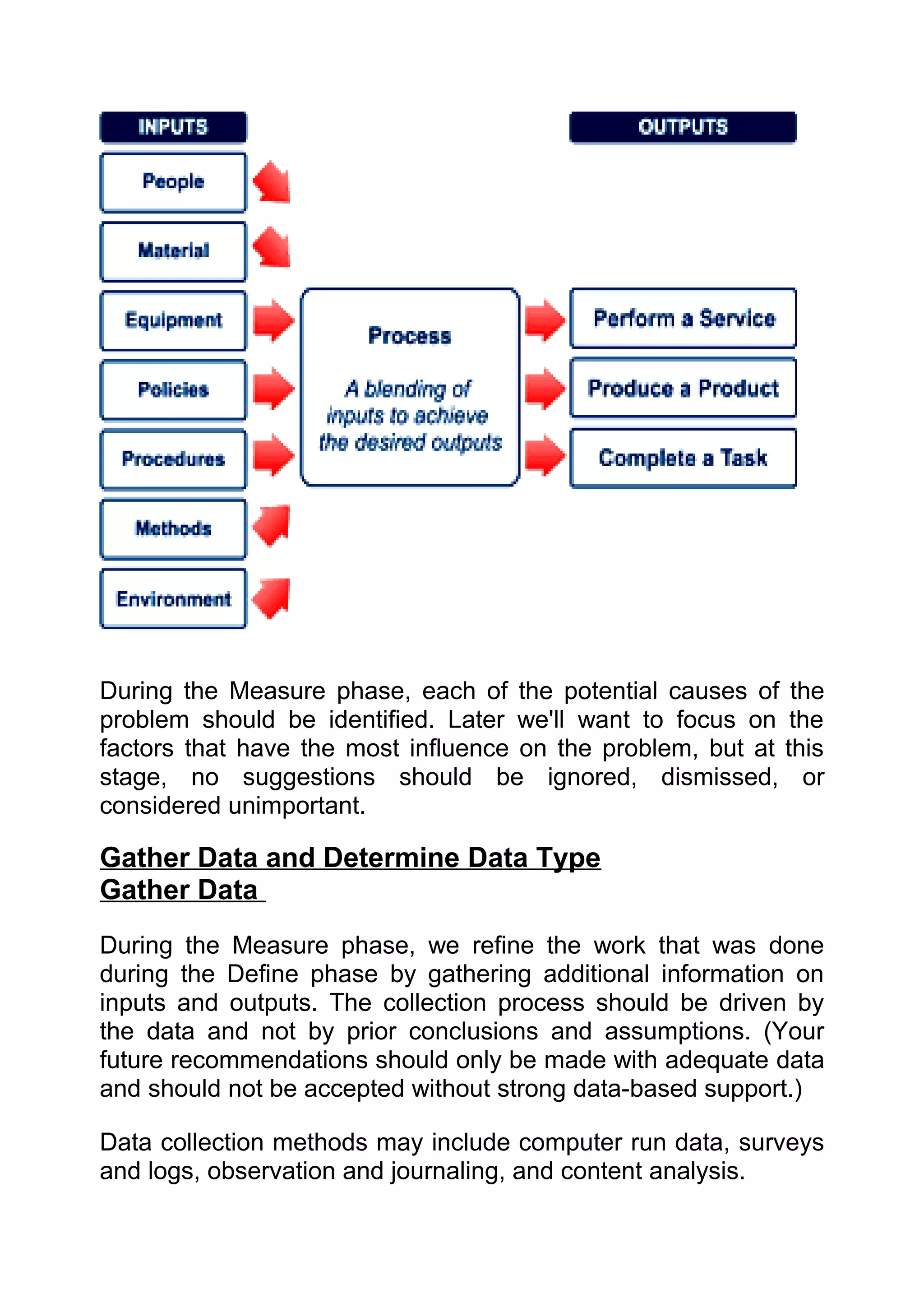
  • 102.
    FORCEFIELD ANALYSIS This diagram shows the forces acting in favour of the change, and the opposing (resisting) forces. The forces for and against are not necessarily equal and opposite, but for each opposing force there must be at least one effective counter-measure: IDEAL SOLUTION : To operate an effective planning system within repairs & maintenance FOR  OPPOSING COUNTER-MEASURES Higher productivity - 50% more   The extra workload in screening  Should be more than made up for by the jobs per week on East Site, leading work. Productivity gains. Involve tradesmen to: in screening work? • Reduced backlog   The impact on the organisation when  1. Ask the Customers on the East Site if • Reduced Out of Tolerance  staff put in place to deal directly with they prefer the new system or the old work are bypassed and work is being one. (OOT) % screened first. 2. Emphasise the improvements to • Higher plant availability Production in improved budgetary • Opportunity to re-deploy staff  control. to FMECA etc.   Changing culture of staff in Prodn.  Record data and substantiate the • Necessary platform to operate and Maint. to plan more work. benefits. Stores delivery system etc.   Implementation of ERP programme  "If the spec reflects the new GBP may block other work, yet ERP may documents being produced then their not happen at Dartford for several support is almost guaranteed." SNC years.  CSV issues may prevent CMMS  Understand the CSV concerns and find a being linked to other systems, or data compliant, workable solution. extracts from it.
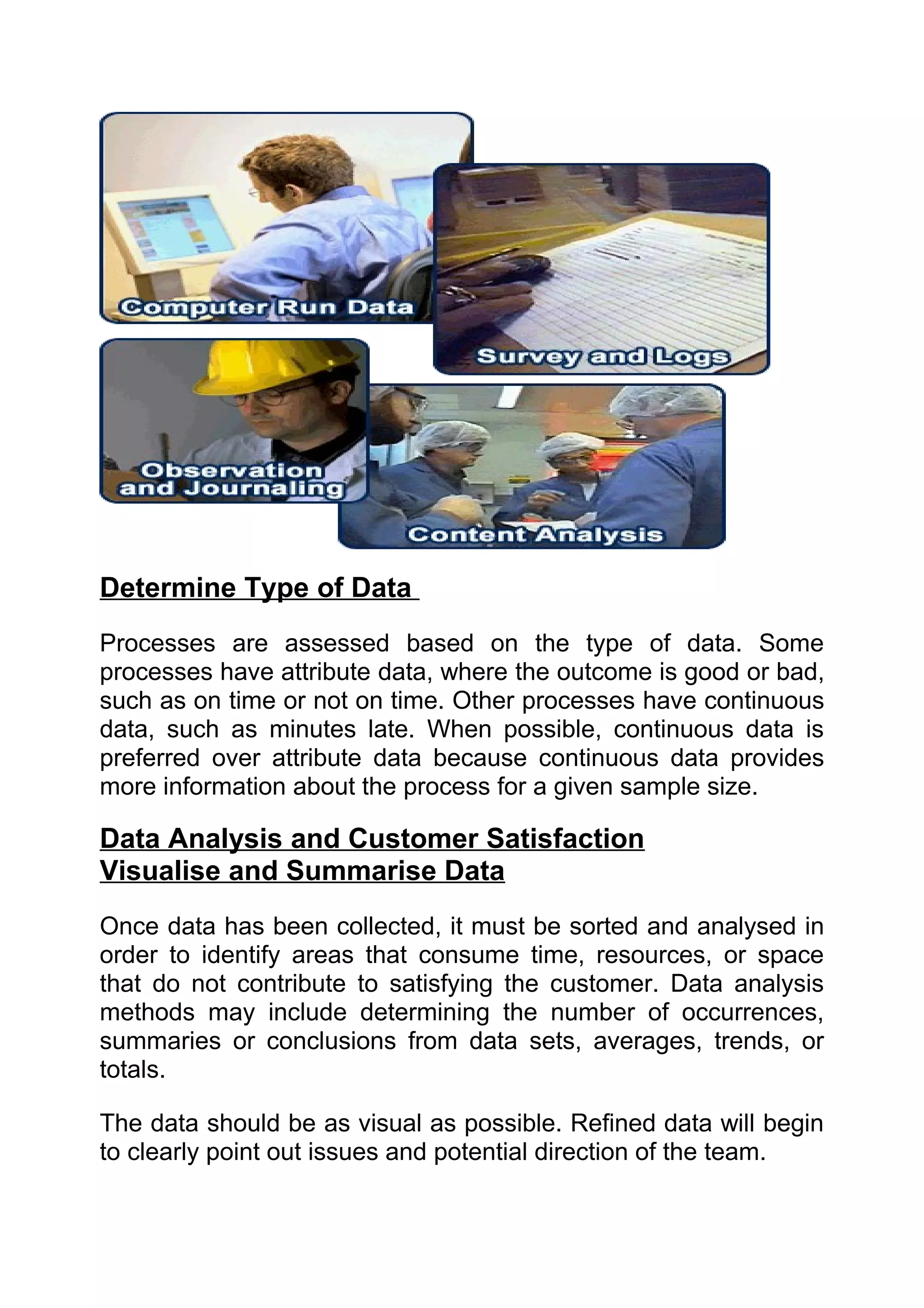
  • 103.
    FORCEFIELD ANALYSIS This diagram shows the forces acting in favour of the change, and the opposing (resisting) forces. The forces for and against are not necessarily equal and opposite, but for each opposing force there must be at least one effective counter-measure: IDEAL SOLUTION : To speak confidently , clearly and concisely in any situation FOR  OPPOSING COUNTER-MEASURES • Increases self esteem   Past Embarrassments  1. Practice beforehand either with friends or by yourself 2. Things can only get better • Helps career   Afraid To Make Mistakes  Practice beforehand either with friends or by yourself • Communicates ideas   Lack of knowledge on the topic  1. Spend some time revising. 2. Make the point early in presentation that you are not that familiar with area • Contributes to a plan/solution   Afraid people will be indifferent  Think of ways to make talk interesting – viuals, audience participation • Encourages others to speak   Afraid people will laugh  Practice beforehand either with friends or by yourself • Helps others to change   May forget what to say  Use index cards for key points • Increases energy of group  Too revealing of personal thoughts  Get views from friends • Helps clarify speakers ideas by  Afraid of offending group  Find out what the likely views of getting feedback from others audience are in advance and tailor presentation accordingly • Recognition from others  Fear that nervousness will show  Practice beforehand either with friends or by yourself • Helps others to see new  Lack of confidence in personal  Buy some new clothes perspective appearance
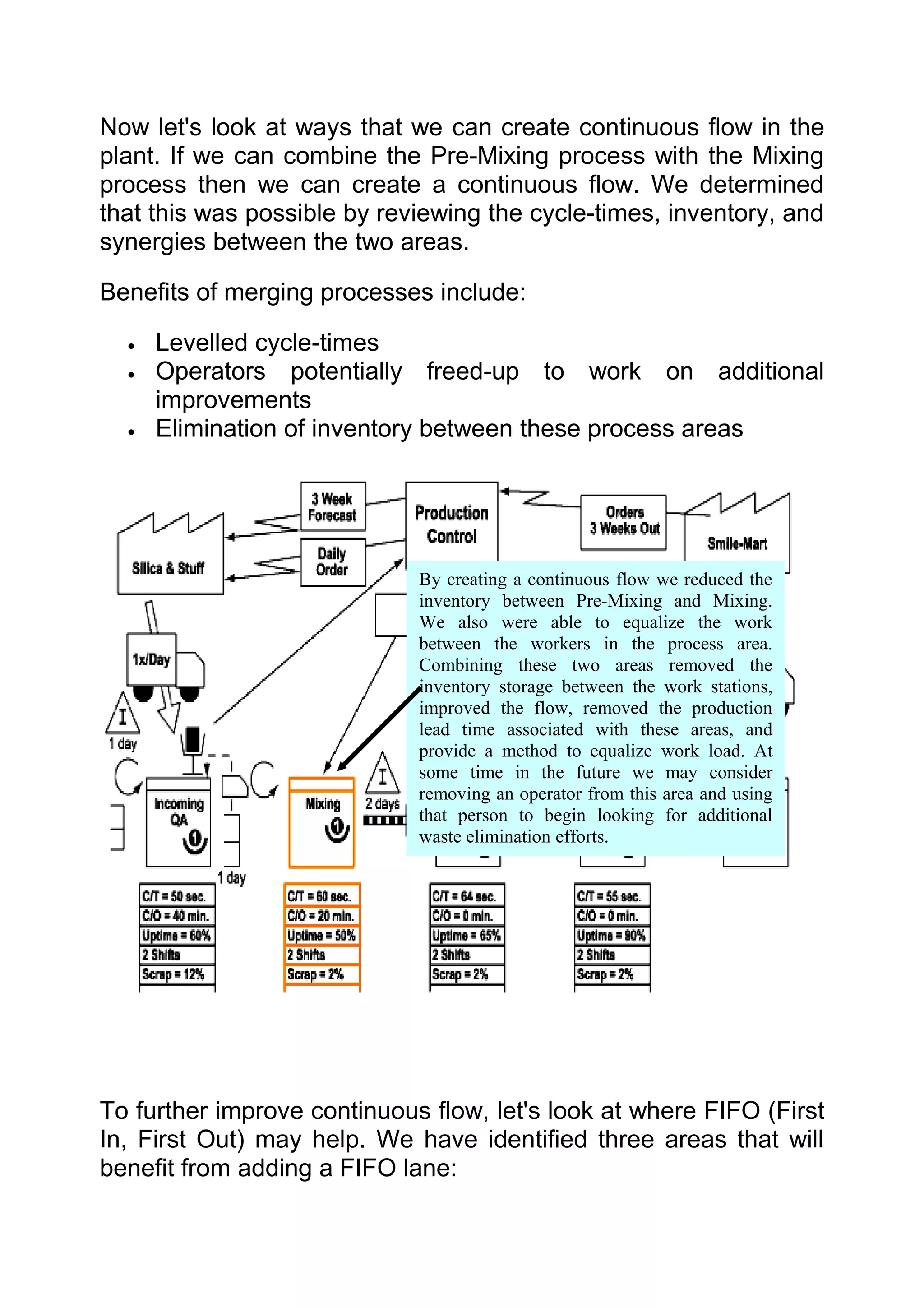
  • 104.
    PREPARING FOR CHANGE Gantt Charts Purpose: To represent visually a plan for a project or other activity. When To Use It 1. To show the sequence of activities and when they should happen. This helps agree a realistic completion date for the project or activity. 2. To monitor progress against the plan, and if necessary forecast a new completion date to compare with the original one. Construction: Here is a Gantt Chart:
  • 105.
    Plan for ……..JDI Monday 05-Nov 6-11 7-11 8-11 9-11 10-11 11-11 12-11 13-11 14-11 15-11 16-11 Define Problem and Benefits Identify Alternatives Select Solution Agreement to Proceed Execution The task start dates Item 1 and durations Item 2 Item 3 shown as bars Complete across here. After Action Review Tasks down here The Gantt Chart view displays basic task information in columns and a bar graph. Because the Gantt Chart makes it easy to see the schedule for tasks, most people use this view to build their initial plan, view the schedule, and make adjustments to the plan. TOOL TAKEAWAY: (remember this if nothing else!) While the appearance and level of detail in the Plan may be important, even more important is to plan the project properly.That should throw up issues and challenges which could be vital to the project. Hence the maxim: "the plan is nothing - planning is everything." Creating a Plan Let's start with a non-work example to get the feel of it, something simple like "Make a cup of tea". Of course it's easy but we would also apply the following approach to much more complex activities. 1. List all the necessary tasks. You could get to lots of detail. Not just pour in the milk, but get it out of the Fridge. You might also like to check it's not gone off before pouring it in. In equivalent work situations you can generate a task list by brainstorming, from a project Scope or User Specification and so forth. So here's a list of tasks for making the tea: Get a cup out. Warm the pot.
  • 106.
    Leave the teafor 5 minutes. Get the pot out. Find the tea-bags. Pour the tea. Check the cup is clean. Boil the water. Turn on the tap. Fill the kettle. Add the milk and sugar. Switch on the kettle at the mains. Stir the tea. Find a spoon. Is this the complete list? Are the tasks in the right order? Will you waste time and money if you don't plan better? 2. With more complex activities, planners group the tasks. This helps them sequence the tasks. It also helps them check if any are missing. Let's do it. Groups could be: a. Check ingredients b. Boil the water c. Brew the tea. d. Serve the tea. Sorting these: Check ingredients a. Get the pot out. b. Find the tea-bags. c. Find a spoon. d. Get a cup out. e. Check the cup is clean. What about the milk? Here's a benefit of grouping activities logically. a. Get the milk out and check it's fresh. Boil the water a. Turn on the tap. b. Fill the kettle. c. Switch on the kettle at the mains. d. Boil the water. Brew the tea
  • 107.
    a. Warm the pot. b. Here's another one: empty the pot and add the tea-bags. c. Pour in the water d. Leave the tea for 5 minutes. Serve the tea a. Put the milk and sugar in the cup. b. Pour the tea. c. Stir the tea. This logical grouping of tasks is called a Work Breakdown Structure. It is often represented as a pyramid: M a k e a c u p o f te a C h e c k in g re d ie n ts B o il th e w a te r B re w th e te a S e rv e th e te a G e t th e p o t o u t F in d th e te a -b a g s Here we have the project name at the top, the main F in d a s p o o n G e t a cu p o ut tasks below, then groups of sub-tasks beneath. For clarity, only one branch is C h e c k th e c u p is c le a n G e t th e m ilk o u t shown.
  • 108.
    TIP: This islike an Issues Diagram. The Team can use the same techniques of brainstorming, 5Why's etc. to create the Work Breakdown Structure. The Team, or Sub-Teams, can add as many levels of detail as necessary. d. Once you have listed the tasks in sequence you need to assign a duration to each task, to record how long each task will take. You will also need to record a start date/time so you can look at tasks which can be performed at the same time. Make sure your list of activities is in the correct order and then transfer to a Gantt chart program. This will produce your chart for you. In Microsoft Project your Gantt chart looks like this: Summary task duration
  • 109.
    Or in Excel: Planto Make a Cup of Tea Time 1 2 3 4 5 6 7 8 9 10 11 12 13 14 15 16 17 18 19 20 21 22 23 24 25 Check ingredients Check ingredients Get the pot out. Find the tea-bags. Summary task Find a spoon. duration Get a cup out. Check the cup is clean. Get the milk out. Boil the water Boil the water Turn on the tap. Fill the kettle. Switch on the kettle at the mains. Boil the water. Brew the tea Brew the tea Warm the pot. Empty the pot and add the tea-bags. Pour in the water Leave the tea for 5 minutes. Serve the tea Serve Put the milk and sugar in the cup. Pour the tea. Stir the tea. Key: Main Tasks Sub-Tasks Complete - enjoy it! Note that the tasks are in order of their start times. To produce the chart in Excel you need to list the activities in Column A. Put in the summary activities; i.e. Check ingredients Boil the water Brew the tea. Serve the tea. Under each one of the summary activities then also list each of the breakdown activities in Column B. i.e. Check ingredients 1. Get the pot out. 2. Find the tea-bags. 3. Find a spoon. 4. Get a cup out. 5. Check the cup is clean.
  • 110.
    6. What aboutthe milk? Here's a benefit of grouping activities logically. 7. Get the milk out and check it's fresh. From Column C onwards, list each of the time segments, whether it is in minutes, days, weeks etc. For each of the summary activities, show the entire duration of that set of activities by filling in the set number of time segments. i.e. Check ingredients 1. Get the pot out. 1 min 2. Find the tea-bags. 1 min 3. Find a spoon. 1 min 4. Get a cup out. 1 min 5. Check the cup is clean. 1 min 6. Get the milk out and check it's fresh. 1 min Total Duration for Check ingredients is 6 mins. This means you need to fill in the time segments for 1-6 minutes. For the following tasks under the summary activity then fill in the duration of each activity individually. Interpretation These Gantt Charts show the activities and when they are due to start. It is simple to mark up how far each is
  • 111.
    complete. The snagis that it does not show which tasks depend on other(s), so it is not clear whether Item 3 can start if Item 2 is delayed. Professional planning packages like MS Project solve this by having a database behind the scenes. This shows the links between tasks with blue arrows: This can be important on projects with many simultaneous tasks. Using MS Project The market leader in Gantt Charts is MS Project, but it is not part of MS Office. Order it through the link below if your need justifies it. Otherwise use the attached template in MS Excel. Other features that MS Project, and other planning packages have, include: • Critical Path - this shows the quickest time for the project. Any delay to any tasks on the Critical Path, by definition, delay the project. Other activities have some spare time, also called float or slack. • The percentage progress can be added to each task. MS Project then goes further by predicting a revised completion date if tasks finish earlier or later. This view shows what happened when the milk was found to be off, and some-one was sent out to get some quickly from the shop! Now 2 people are involved and there are some parallel activities:
  • 112.
    Another useful featureis the Baseline, (the original plan). It is often important to compare the current position with the Baseline: The original plan is the Baseline, and these are compared here: Quiz Time: (Answers upside down at the bottom of the page) a. Is Will on the Critical Path? Yes/No b. How much longer will it take to make the tea because the milk was off? c. By good planning, the problem with the milk was found early. How much longer would it have taken if the milk was only checked when it was about to be poured? Answers:
  • 113.
    Example Problems (Goodto practise on) • Plan a party • Plan a holiday For Further Information: • See your mentor expert • See your local advocate
  • 114.
    Preparing for Change Application of Accelerating Change Methodology to facilitate change. This tool is designed for application to any project that will result in people experiencing change, for example, changes in ways or working or changes in job roles. The application of ACM will make the project run smoother and help make the changes sustainable. This tool has been customised from the ACM training provided by IMA for specific application to LeanSigma projects, but it could be applied any project that involves change. This approach generates links between the development of the Project Plan (PDP Project Development Plan) and the application of ACM (Accelerating Change Methodology). The approach requires a kick off workshop involving the Project Manager, key team members, and the Sponsor (The sponsor need not be present at the whole workshop, but must be present for the section on Sponsorship, and ideally at the start) Team understands Project Initiation Form the change PROJECT KICK OFF Responsibilities WORKSHOP assigned, understood Draft PDP and committed to Expectations of and Project team identified from Sponsor clear and present One and a half days and agreed Facilitator (knowledgeable about PDP agreed including:- ACM application) Plan Involvement Communications plan
  • 115.
    The sections ofthe PDP and sections of the Workshop agenda are linked as follows: - PDP section Workshop/Pres entation Agenda section Objectives Define the change Scope Define the change Benefits Define the change Critical Success Factors Critical Success Factors Approach Approach Issues & Risks Issues & Risks Organisation- Sponsorship Organisation Part 1- Sponsorship Organisation- Roles and Responsibilities Organisation Part 1 Sponsorship Organisation- Targets Organisation Part 2- Target readiness Organisation-Agents Organisation Part 2- Build agent capacity The Plan- Main tasks The Plan- Communications Communications Planning The Plan- Motivation Motivation and Involvement Planning The Plan- Time frame and resource Define the change (by when) requirements What to do If you want to use this approach you will need to download the PowerPoint presentation “Application of ACM to project start up”. Read the presentation including the facilitators notes that are in the notes view. If you haven’t used this approach before or are unfamiliar with it you should engage the help of a facilitator that is. Most of the LeanSigma Experts at Dartford Primary Supply are trained in ACM, otherwise contact the site Training and Development Department for a list of people trained in ACM. The presentation and notes pages contain most of the materials you need, but for a complete list of handouts with links open the Word file called “Handout List” Other Links GSK has an ACM website which contains the original ACM materials from which the above was developed.
  • 116.
    Preparing for Change DMAIC Process In order to eliminate COPQ and detect variation and process spread, Six Sigma uses the five-step Design, Measure, Analyze, Improve and Control (DMAIC) process shown below. The DMAIC process applies statistical tools to analyze facts and data with detailed attention to the optimization, improvement, defect elimination and re-engineering of processes, whether operational or transactional.
  • 117.
    Phase 1 –Define Define Phase Activities The first step in Six Sigma is to define the problem. Too often, the Define phase is overlooked even though it can be the most critical phase, setting the direction for the entire project. A poorly defined project can cause many problems and delays during later stages. Remember, time spent on this stage is time well spent!
  • 118.
    Establish Problem Definition, Customer Requirements, and Scope Define the Project/Problem Prior to defining the project, it is necessary to define the problem that you are trying to fix. What is the problem: Write the problem statement from the customer perspective. Who is the customer: When determining customer requirements, establish who the customer is from available data. What is the cost of poor quality? : Cost of poor quality is the financial cost of activities and lost opportunity as a consequence of waste and variation within our processes. What are the critical-to-quality definitions? : Establish what is important to the customer as far as quality is concerned. Gather this information from discussions with the customer. What are the operational limitations? Make sure that you understand your own and the customers operational limits. Problem Statement A good problem definition should include: • What needs to be accomplished? Quantify this if possible. • When does the problem need to be resolved by? • Which key metrics will be tracked? Take a look at the example on the right to see an example of a good problem statement.
  • 119.
    Tools used tosupport these activities: • QFD • Surveys • Pareto • 7 Wastes A good problem definition should include: • What needs to be accomplished? Quantify this if possible. • When does the problem need to be resolved by?
  • 120.
    Which key metrics will be tracked? Map the Process and Establish Benefits Map the Process Once the project scope and target have been defined, the next step in the Define phase is to map the process and identify the hidden factory operations. This can be done by Value Stream Mapping (VSM) or by developing a process map as shown on the right. Make sure to map the process as it is and not how you think it should be. Establish Benefits Next, determine if the benefits can be quantified in terms of: • Manpower or hours saved • Materials saved • Waste reduction • Yield improvements • Sales increase or volume variances • Cost avoidance
  • 121.
    Tools used tosupport activity • Process Mapping • Value Stream Mapping (VSM) • SIPOC Project Planning Identify previous experience
  • 122.
    Prior to developinga project charter, review past projects using People Connect and LiveLink to search for information on similar projects or to identify people with previous experience or knowledge that may be utilised. Generate Project Charter/PIF Leverage information from existing projects to generate a project charter and/or PIF. These documents detail the project scope and benefits and should be generated in consultation with the appropriate stakeholders. Make sure to carefully identify correct stakeholders and ensure resources are available. You may want to include a Failure Mode and Effect Analysis in the project charter. Note, at this point in time no analysis of the problem has occurred and there is no identified solution. The project plan may not detail all aspects of the project. In particular, the Improve phase of the DMAIC process. The time and detailed steps to complete this will not be established until a root cause has been identified and solution specified. Tools used to support activity • LiveLink • People Connect • PIF • Project Charter • FMEA • ACM (also known as AIM) • 5 Whys Sponsor Mapping Generate stakeholder/sponsor map Finally, develop a stakeholder/sponsor map to identify internal stakeholders who will be critical to the successful creation and implementation of the Six Sigma project. This map clearly
  • 123.
    identifies all keystakeholders, the roles they will play in the project, and it enables effective communication.
  • 124.
    Phase 2 –Measure Measure Phase Activities The purpose of the Measure phase is to gather information on the current situation to provide a clearer focus for your improvement effort. Often a problem is caused by a number of factors that influence it to varying degrees, as shown in the IPO chart below.
  • 125.
    During the Measurephase, each of the potential causes of the problem should be identified. Later we'll want to focus on the factors that have the most influence on the problem, but at this stage, no suggestions should be ignored, dismissed, or considered unimportant. Gather Data and Determine Data Type Gather Data During the Measure phase, we refine the work that was done during the Define phase by gathering additional information on inputs and outputs. The collection process should be driven by the data and not by prior conclusions and assumptions. (Your future recommendations should only be made with adequate data and should not be accepted without strong data-based support.) Data collection methods may include computer run data, surveys and logs, observation and journaling, and content analysis.
  • 126.
    Determine Type ofData Processes are assessed based on the type of data. Some processes have attribute data, where the outcome is good or bad, such as on time or not on time. Other processes have continuous data, such as minutes late. When possible, continuous data is preferred over attribute data because continuous data provides more information about the process for a given sample size. Data Analysis and Customer Satisfaction Visualise and Summarise Data Once data has been collected, it must be sorted and analysed in order to identify areas that consume time, resources, or space that do not contribute to satisfying the customer. Data analysis methods may include determining the number of occurrences, summaries or conclusions from data sets, averages, trends, or totals. The data should be as visual as possible. Refined data will begin to clearly point out issues and potential direction of the team.
  • 127.
    Challenge Metrics/Measure AgainstVOC Once the data is summarised, variation is measured to see how closely the process meets customer requirements. Variation represents the number of defects in a process. The higher the Sigma level, the lower the number of defects produced in the process and the closer you are to meeting customer satisfaction. Tools Used: • Process Maps • Pie Charts • Pareto • Histogram • Run Charts • Control Charts • Summary Statistics • QFD Flow-down Carry Out MSA on Outputs A Measurement Systems Analysis (MSA) is a test to see how much variation is coming from the measurement system itself. Conducting a MSA is important because it will discover how much "noise" is occurring due to the measuring system. In order to accurately measure a variable it is necessary to use an accurate gage or measuring instrument. Six Sigma requires that
  • 128.
    all measurements madeare accurate, precise, and can be used to make comparisons. The image on the right shows what the output might look like if there was variation between operators or gages. In order to compare variables, it is necessary to reduce the amount of variation in the measuring system. If measurements of the same variable differ and fluctuate, then it is difficult to compare the results. Often it is necessary to calibrate measuring instruments and processes in order to ensure accuracy. Re-define the Problem/Project Based on Data The data collected during the Measure phase will help you to pinpoint the location of the problem. You will also have a better idea how well the process measures up against customer requirements. Make sure to use this new information to refine the problem statement and project scope that was the output of the Define phase. Remember, now is the time to make changes. Redefining the project later in the process will cause rework! Phase 3 – Analyse Analyse Phase Activities
  • 129.
    The purpose ofthe Analyse phase is to identify the root causes of defects and to confirm them with data.
  • 130.
    Verify Gap betweenCurrent State and Target During the Analysis phase, we use all of the data that was collected and summarised during the Measure phase. A major goal of this phase is to compare the current state of the process to where we want the process to be according to what the customer has specified. This comparison helps us determine the "gap" or the difference between the two. When making this comparison, it is very important to use recent data and not historical data or data depicting where you think the process should be. Recent data is data that has been collected within the last month. Tools Used: • Hypothesis Testing • Sample Size Determination • Confidence Intervals Review Changes in Current State Assess Input and Output Stability Once you've done an analysis of the current state, you are ready to identify the reasons for the gap between the current state and the target. Look at the data in terms of whether or not the process is stable. Ask yourself if the defects are due to variation, because
  • 131.
    the mean needsto shift, or both. This information will also help you clarify which of the Analysis tools to use. Identify Special Causes At this stage, you can also hypothesise a number of theories (using one or more of the Analysis tools) and validate each with data. Validate to confirm that there is a correlation between your hypothesis and the actual root cause. When determining root cause, consider the following. • Use Cause and Effect diagrams to brainstorm all causes of the undesirable effect (UDE). • Indicate causes that are under the organisation's control, those that are "noise" and those that can be experimented with. • Use matrix weighting based on impact and ease of solution to select primary candidates. Tools Used: • Hypothesis Testing • Histograms • Control Charts • Cusums • Normality Checks • Historical Data Analysis • Correlation • Regression • Cause and Effect Diagram • 5 Whys • PF/CE/CNX/SOP • MSA Review Change in Target Determine if Target was Previously Achieved
  • 132.
    Previous projects withinGSK or even within your own operation can be a good source of information. When conducting Six Sigma projects, make sure to determine whether or not your target has been achieved by a similar project to gather any key learnings. Knowledge Management Tools such as Livelink, People Connect, and AARs can help you with this task. Identify Potential Improvement Opportunities Try to identify lessons learned such as best practices and possible improvement ideas that you can use during the Improve phase. Tools Used: • Knowledge Management Tools • Brainstorming • Reality Tree • Inter-relationship Diagraph • Load Charts • Layout Tools Phase Four - Improve Phase Improve Phase Activities The purpose of the Improve phase is to: • Develop, try out, and implement solutions that address the root causes • Use data to evaluate results for the solutions and the plans used to carry them out
  • 134.
    Analyse Causes/Improvements andIdentify Possible Solutions The Analysis phase feeds information to the Improve phase on the KPIs that need to be improved and the direction that they need to change. These changes can include reducing the measure, improving it in terms of target, or reducing the variation around it. Next, the team brainstorms solutions and selects the most reasonable solution by asking: • Will it control the problem? • Can it be easily implemented? Is payback reasonable? Can we obtain buy-in? • Try to identify lessons learned such as best practices and possible improvement ideas that you can use during the Improve phase. These questions allow you to compare how well the possible solutions fit into the specifications of the ideal solution, enabling you to filter numerous solutions down to a couple of realistic ones. Tools Used: • DoE • Brainstorming • Solution Selection Tools • Value Stream Mapping • Process Design Process Implement the Solution Develop Implementation Plans Once a solution has been selected, document who will do what, when, and look for opportunities for the team to begin some implementation as soon as possible. Having something to show at the end of the day builds a lot of team pride.
  • 135.
    Run Trial/Pilot Pilot ideas,to determine their effectiveness rather than debate them endlessly. Walk through the new process with specific products and pilot with a range of products, from simple to complex. Six Sigma is very much about trial and error. During an implementation event, the team follows a cycle of implementing a change, testing it out, and then modifying it and retrying. This process is called the continuous improvement cycle and it exemplifies the commitment to constant progress and enhancement of our corporation. Tools Used: • Project Planning Tools • FMEA • ACM (also known as AIM) • Kaizen • Control Charts • Hypothesis Testing • Sample Size Determination • Confidence Intervals Measure Results and Evaluate Develop Implementation Plans Once you've implemented a solution, you need to measure the results and evaluate whether or not the KPIVs have had an actual anticipated effect on the KPOVs as stated in the project statement that was developed during the Define phase.
  • 136.
    Has the targetbeen achieved? If the improvement can be validated, you are ready to move on to the Control stage. If you have not made the anticipated improvement, then you need to go back and look at the KPIVs. (You may have picked the wrong KPIV or you may have made an error during the Analysis phase.) Go back to the Analyse phase and determine root cause again to make sure you pick the appropriate KPIV that has a significant impact on the KPOV. Tools Used: • Control Charts • Hypothesis Testing • Sample Size Determination • Confidence Intervals Phase Five - Control Phase Control Phase Activities To ensure improvements gained are sustained long after the end of your Six Sigma project, it is essential the appropriate mechanism is put in place to maintain the levels of performance achieved by the project. The purpose of the Control phase is to:
  • 137.
    Maintain the gains that you have achieved by standardising your methods for processes • Anticipate future improvements and make plans to preserve the lessons learned from this improvement effort Sustain Improvement
  • 138.
    At this pointin the process, the improvements that we set out to achieve have been made. We've demonstrated a short-term capability of having an impact on the key process measures. Now the aim of the Control phase is to find a mechanism to ensure that the improvement has a sustained impact on the critical measures. SOPs should be updated and personnel should receive training on process changes. These activities help establish and implement a methodology to sustain improvements. A monitoring protocol should also be established and implemented. The SPC tools can be used to measure the process and keep track of the critical variables that have an impact on the process output. Refer to the SPC eLearning course for more information on these tools. Tools Used: • Standard Work • ACM (also known as AIM) • Performance & Development Planning (PDP) • Control Charts • RACI • MSA • Visual Factory Project Closure The second part of the Control phase is focused on project closure. The first step in closing the project is to conduct an After Action Review (AAR). AARs are a simple, fast, and an extremely effective way of capturing the key learnings and benefits delivered from your projects and sharing them with others. Through the AAR, you will summarise and communicate learnings to the rest of GSK. Areas of improvement that were identified during the project that were not included in the scope of work should be recommended
  • 139.
    for future consideration.These improvement areas may turn into other Six Sigma or Lean projects! Finally, validate the benefits achieved by working with Finance to make sure we have captured the project in terms of financial measures. Financial measures may include reporting and adjusting budgets. Non-financial benefits should also be captured. Tools Used • After Action Review (AAR) • Project Closure Report • Communication Plan • Livelink • People Connect • ERA Lean Sigma • Benefits Capture Tools Example Problems (Good to practise on) • Problem solving • New initiatives For Further Information: • See your mentor expert • See your local advocate:
  • 141.
    PROCESS MAPPING Time Value Map What is it? The Time Value Map is a chart, which describes graphically the proportion of time in a process spent on value adding activities, non-value-adding activities and waiting time. Why use it? The concepts of value-adding, non-value-adding and waiting time (one of the 'Seven Types of Waste') are central to LeanSigma. The Time Value Map is used to understand how long a process takes and of this time, how much was used performing value-adding activities, non-value-adding activities and how much time was spent waiting. When to use it? When you need to analyse what opportunities are available to increase velocity (speed) and decrease waste in processes. It is used in productivity, throughput and velocity projects.
  • 142.
    How to useit? 1. Determine the total processing time of the process being investigated. 2. Draw a horizontal arrow across a large sheet of paper to represent this processing time. 3. Analyse the steps in the process (refer Process Flow Diagram) and create segments representing these activities with the thickness of the segment being proportional to the time taken. 4. Determine the waiting time between sequential steps. Value-added activities are colour coded green and appear
  • 143.
    above the horizontalline representing the total cycle time. Non-value-added activities are colour coded red and appear below the processing time line. Waiting time is left as white space on the chart. 5. Arrange the activities in order and in the right position relative to the time that they occur, leaving waiting time between the activities. Place the value-added (green) activities above the line and the non-value-added activities (red) below the line. 6. Draw in any feedback loops (for example for rework) and label these feedback loops with yield (i.e. how much product feeds back through this loop). Calculate the proportion of total activity time (total of green and red) to the total time. This gives the proportion of waiting time to activity time. Also calculate the proportion of value-added time to non- value-added time. Further Information If you require any further information on the Tools provided or how to use them, please contact you Mentor Expert. Example Problems (Good to practise on) * getting ready for work * making a cup of tea For Further Information: See your mentor expert See your local advocate Check the ‘Memory Jogger’ book(held by advocates)
  • 144.
    PROCESS MAPPING Logical Flow Charts Purpose: To divide up a process into consecutive unit operations and show them visually. Flow charts also illustrate the actual flow or sequence of events in a process that any product or service follows. The resulting ‘map’ will provide key information to help in problem solving, statistical process control, and standard work design. When To Use It This tool should be used to map out all processes before applying variation reduction and standard work methodology etc. It can be useful for allowing a team to gain agreement on steps of a process. It also highlights which activities may impact the process performance. Flowcharts can also be used as a training aid to understand the complete process. Construction:
  • 145.
    1. Clearly define the boundaries of the process, ie where it starts and where it ends i.e. cooking a roast dinner start – in the kitchen, all ingredients available (so does not include shopping for ingredients) finish – dinner served on the table 2. Decide on the level of detail required. The flowchart may be at a macro level showing major functions or activities or at a micro level, going into greater detail. A macro level will give you an understanding of the general process flow; a micro level will show every action and decision point. 3. Brainstorm a list of all the steps in the process. It may be a good idea to get the team members to write these down on Post-it notes. These steps may include activities, inputs, outputs or decisions. Roasting Prepare Prepare all dish Roast vegetables chicken Test chicken Put Carve vegetables chicken Put vegetables on to boil in roasting dish Put chicken in roasting dish in Put chicken preheated oven in roasting Roast dish chicken Serve dinner
  • 146.
    4. Arrange the Post-it™ notes in sequential order. Make sure parallel steps are shown in parallel etc. Prepare Prepare all Put chicken Roast vegetables Roasting in roasting chicken dish dish Put chicken in Put vegetables Put Roast roasting dish in roasting vegetables chicken preheated oven dish on to boil Serve Test Carve dinner chicken chicken 5. Complete a sanity check of the process and include any missing steps. You can do this by completing a mental ‘walk-through’ of the process. TIP: Unless you are flowcharting a new process, sequence what actually happens instead of what the ideal is. This will help you identify where any probable causes of problems are in the process. 6. Draw the flow chart using appropriate symbols. Examples of an operation or activity might be manufacture or o p e r a t io n / analysis a c t iv it y Examples of a Wait step might be the delay Wait when a procedure is sitting on someone’s desk to be authorised.
  • 147.
    An example ofa Transport step might be T ra n s p o rt moving an intermediate from store to a manufacturing building, or taking a sample to the laboratory. An example of a Store might be putting Stor material into a warehouse. e An example of a Decision activity might be passing a batch through QA analysis. It may D e c is io n also represent a Yes/No question being asked. Prepare Prepare Put Put chicken Wait for Roast all chicken in in roasting chicken to chicken vegetable roasting dish in cook s dish preheated oven Put Carve vegetables in Serve Wait for Test chicken roasting dish dinner to the chicken to chicke in preheated table cook n – is it oven cooked ?? Put vegetable s on to boil 7. Arrows should be added in to show the direction of the flow of material through the process.
  • 148.
    Prepare Prepare Put Put Wait for Roast all chicken in chicken in chicken to chicken vegetable roasting roasting cook s dish dish in preheated oven NO YES Carve Serve Wait for Test chicken dinner to the Put table vegetables chicken to chicke in roasting cook n – is it dish in preheated cooked oven ?? Put vegetable s on to boil 8. Don’t forget to identify your work. Include the title of your process, the date the diagram was made and names of all the team members. Interpretation
  • 149.
    Flow chart diagramscan show up any of the following things: - unexpected complexity - problem areas - redundancy - unneccessary loops All these are areas where simplification and standardization many be possible. You can also use this technique to compare an actual versus ideal flow of a process to help identify improvement opportunities. Variations Top-down Flowchart This chart is a picture of the major steps in a work process. It minimises the detail to focus only on those steps essential to the process. It usually does not include inspection, rework, and other steps that result in quality problems. Teams sometimes study the top-down flowchart to look for ways to simplify or reduce the number of steps to make the process more efficient and effective Planning a Party 1.0 2.0 3.0 Determine party find Invite gudes size Location 1.1 Decide on 2.1 Decide 3.1 complete budget theme invitations 1.2 Decide on 2.2 Select 3.2 Send guest list location invitations Deployment Flowchart
  • 150.
    This chart showsthe people or departments responsible and the flow of the process steps or tasks they are assigned. It is useful to clarify roles and tract accountability as well as to indicate dependencies in the sequence of events. Chris Karin Lauren Plans ad No Sends ad e e tim ther gr do to Writes ad out Is s ic h ap Draws graphics Ad complet ed Workflow Flowchart This type of chart is used to show the flow of people, materials, paperwork, etc., within a work setting. When redundancies, duplications, and unnecessary complexities are identified in a path, people can take action to reduce or eliminate these problems. Example Problems (Good to practise on) * getting ready for work * making a cup of tea For Further Information: See your mentor expert See your local advocate Check the ‘Memory Jogger’ book(held by advocates)
  • 151.
    Process Mapping Value Stream Mapping A Value Stream is all the actions/activities involved in producing a product starting from scratch. Value Stream encompasses "door to door" production flow, from customer demand back through production and all the way back to the raw materials which either formulate or are used in primary packaging of the product. You notice that we start at the customer end ("Consumer") and work backwards. This is because the customer drives the Value Stream for our product. Value Stream is the stream of events that bring a product to market. Example: Manufacturing Toothpaste The Value Stream follows a single component or product family. A family is a group of products that pass through similar processing steps and use common equipment. Drawing all product flows on one map is too complicated; therefore, we need to draw the processing steps (material and information) for one product family from door to door.
  • 152.
    To help youunderstand the concepts of Value Stream Mapping, and Current State/Future State Mapping, we're going to use a simple example, manufacturing toothpaste. As with any product, the consumer is the ultimate reason for our production. For toothpaste, the consumers are everyone. Upstream of them is the finished goods, in our case, the finished toothpaste in the package, ready to ship to the store. Going upstream one more step, we have the product manufacturer or in the case of toothpaste the "Mixing" station that puts all the ingredients of the toothpaste together. The next upstream step is our component manufacturer, or "Pre-Mixing" station where the intermediates get put together, such as gum into "gum slurry". And finally, there are the raw materials such as water, sodium fluoride, flavor, silica, gum, and the packaging components (tubes, boxes, shippers). These items make up the high-level Value Stream for our toothpaste example. What is Value Stream Mapping? Value Stream Mapping is a way to look at the production processes through the eyes of the product. It is a tool that helps to depict the flow of material and information as a product makes its way through the Value Stream. Value Stream Mapping deals with tracking product, not money.
  • 153.
    To create aValue Stream Map, first follow a product's production path from customer to supplier, and carefully draw a visual representation of every process within the material and information flows - this is referred to as a "Current State Map". Next ask a key set of questions and draw a map depicting how value should flow - this is called a "Future State Map". These key questions will be explained in detail in the Future State Mapping section. Remember, Value Stream Mapping deals with tracking product, not money. Why Value Stream Mapping It helps us in identifying and ultimately removing waste and inefficiencies in our process, so we can improve our overall productivity and profitability. Types of Waste Overproduction: Producing more than what is needed before it is needed. Inventory: Maintaining excess inventory of raw materials, parts in process, or finished goods. Transportation: Wasting effort to transport materials, parts, or finished products into or out of storage, or between processes. Waiting: Wasting time waiting for tools, supplies, parts, etc. Motion: Wasting motion to pick up parts or stack parts. Also wasted walking between locations as part of an operator task. Processing: Doing more work then necessary. Defects: Repairing or completing rework.
  • 154.
    Value-Added Versus NonValue-Added Now that we have a good idea of the types of waste in the process, we need to know how to classify them and determine which items can and should be eliminated. To do this, we need to understand what is value-added or non value-added to the process. Value added work is anything that changes the fit, form, or function of a product or process. Value added items are anything the customer is willing to pay for. Non value added, but necessary work is required to run the business, but does not change the fit, form, or function of the product. It will be termed as non value added. Non vale added, not necessary work is any item that does not change the fit, form, or function and thus does not add value to the final product and should be eliminated. Notice that there are actually two kinds of waste. Non value- added work is a waste that can and should be eliminated. Non value-added but necessary work quite often cannot be eliminated, but where possible, we should work to reduce them and minimize their impact on the overall value of the product. Current State Mapping What is a Current State Map? A Current State Map is a visual representation or blueprint of a plant's current Value Stream, including the material, products, information, and how these items flow or move within the plant. The Current State Mapping process for a product begins with mapping the entire Value Stream within a single plant.
  • 155.
    This map mustbe a living document and be constantly updated as we make improvements in the plant. Letting the information stagnate quickly diminishes the validity of the content. Why is it Useful to Create a Current State Map? Mapping the current state of a plant helps to identify waste and the sources of waste in the production process. Once we identify them, we can develop a plan to get rid of them. However, Current State Mapping will not ensure that our plants become lean. It is only a tool to help assess the current plant situation and identify issues with the current situation. Then you can focus on creating a vision of an ideal state. Once you have achieved your ideal state, it will become your current state from which you can continuously improve. To summarise, creating a Current State Map: • Provides a visual depiction of flow to use as part of the decision making process of where to improve the process. • Allows for identification of the sources of the seven wastes in the Value Stream. • Demonstrates the linkages between information flow and material flow. • Becomes the basis for developing a plan for improving flow and eliminating waste throughout the Value Stream. Mapping the Current Information and Material Flows The first step in Current State Mapping is assessing the plant's current situation. We need to understand the different flows and processes. Current State Mapping visually presents all of the processes necessary to make a product and shows a linkage between the different types of material flow and information flow.
  • 156.
    It provides theprocess information that tells each process or materials what to do or what to make next. It is the movement of product through a production process. We must map both of these flows in a Current State Map to easily see how the information flowing in the plant links to the material flowing in the plant. For this process, we will use a variety of icons that will be introduced throughout the remainder of this course. Current State Mapping Icons Material Icons Manufacturing Out side sources Truck Shipment Inventory Process Box triangle Stripped Arrow Solid Arrow Operator Icon Data Box Manufacturing Process Box: Indicates a manufacturing Process, one process box equals an area of flow, this icon can also be used to indicate processes for departments within the process, such as planning. Out Side Sources: Shows customers, suppliers and outside manufacturing processes. Truck Shipments: Indicates shipments made to and from the factory along with the frequency of these shipments. Inventory Triangle: Tracks inventory between processes; the count and time data information noted directly below this triangle is considered to be a part of this Icon. Stripped Arrow: Shows movement of production material that is produced and moved forward before the next process needs it; usually based on a schedule (Called push method) Solid Arrow: Shows movement of finished product to the customer or incoming raw materials.
  • 157.
    Operator: Represents aperson viewed from above. It is used to show the number of operators at a given operation. The number of operators is next to the icon in parentheses. Data Box: Records information concerning a manufacturing process, department and customer. This icon is placed under manufacturing process boxes. Information icons Information icons are used to indicate the flow of material, along with the physical data being transmitted. This can be either electronic or manual. Straight Arrow Lightening Bolt Arrow Information Box Straight Arrow: Represents manual information flow – for example production schedule or shipping schedule. Lightening Bolt Arrow: Shows Electronic information Flow – for example compute information transfer (electronic data interchange), telephone, and fax. Information Box: Describes an information flow such as weekly or daily schedules; these boxes are part of the straight arrow or lightening bolt arrow. Starting a Current State Map Consider our toothpaste example. Who do we make toothpaste for? The customers! Without the customer, we would be out of business. So, the customer is the driving force behind any product and Value Stream. If you improve a Value Stream starting from anywhere else, you risk making improvements to a process that do not give the customer what they want or need. So, let's start to build our Current State Map with the customer. We begin to map the current state by identifying the customer using the outside source or factory icon.
  • 158.
    Now that wehave the first piece of our Current State Map, where should we look next? Let's go ahead and add the icons for the other processes in the product's development, working from the customer, back to the beginning of the process. You may notice that the manufacturing process box icons we are adding to the Current State Map are not for discrete workstations, they are for job families. The general rule is that a process box indicates a process in which the material is flowing. Our Current State Maps will be unmanageable if we draw every single process and it will be difficult to identify the Value Stream, and more importantly, the non value-added items. So we use a manufacturing process box to indicate one area of material flow. The process box stops wherever processes are disconnected and the material flow stops. Even though we start at the end of the process, the flow of a product through the plant is from left to right. These icons are placed on the bottom half of the map in the order of processing steps. Keep in mind that this won't necessarily reflect the physical layout of the plant.
  • 159.
    Now that theCurrent State Map includes all of the job families within the factory walls, the next item to add is our supplier information. Remember, we create the map working back from the customer to the start of the value stream, and with the supplier, we are now at the start of the material flow. Notice that the supplier icon is an outside source or factory icon. Next we added a solid arrow from our supplier to our first process box, indicating incoming raw materials. We also added a truck icon to represent how often we receive shipments. Next we need to consider the information that drives our process. Are we building our product based on our customer requirements, or are we making as much product as possible? To determine this information, we look at the information flow. This comes from our Planning office, which tells the plant what to build and when. The
  • 160.
    information flow cancome in either electronic (indicated as a lightening bolt) or paper based (indicated as a straight arrow). For example, starting at the customer, we receive their requirements by a fax (shown as a lightening bolt). The Planning office creates production schedules and walks these paper schedules to the plant (shown as straight arrows). And finally, the Planning office faxes or emails the suppliers a schedule of materials required for the specified time (shown as a lightening bolt). A key to information flow is to know how often we receive orders from the customer. If it is not often enough, we are guessing on what to manufacture and not making product based on customer requirements. Now that the Current State Map has most of the process items and information from the Planning office, we need to look at how material flows at our plant. If we are making as much product as possible, which is very common in non-lean production, material flow is drawn as a striped push arrow between the process boxes. Push means that material is being pushed from one process to the next without any regard for what is needed. This happens when each process is operating as an independent island, disconnected from the customer requirements. Material is being pushed by the producer and not pulled by the customer. We will learn how to correct this condition later in this text.
  • 161.
    For now, wewill assume that our plant is producing toothpaste this way. Now that we have the supplier information and information flow, we need to add the flow of material from the plant to our customer. This should be based on how we supply our product to our customer. In our example of manufacturing toothpaste, we show this as a solid arrow from our last process box to our customer. We also added a truck icon that indicates the frequency of shipments made to our customer. When material is pushed through the process and not pulled by the customer, we overproduce and end up with material in storage. So, we need to consider where material is accumulating as inventory between processes or job families. These accumulation points tell us where material is stopping and shows a potential opportunity to remove one of our seven wastes - Inventory. To
  • 162.
    indicate this accumulation,we use a triangle icon to represent the inventory between processes. Keep in mind that if inventory accumulates in more than one place between processes, we need to draw a triangle for each place. We now have the majority of our icon information for our Current State Map, a great first step. But, we do not have all of the information necessary to determine the Value Stream, identify opportunities for improvement, and begin to eliminate waste. In the next section, we will determine how to gather the additional information necessary to create the remainder of the Current State Map.
  • 163.
    Collect and RecordData Now we will begin to fill in the necessary process date for our Current State Map. We'll also look at some typical process data and identify potential areas for improvement. In the Current State Mapping section, we identified how to capture and identify material and information flow in a Current State Map, using the production of toothpaste as an example. The next step in the mapping process is to collect and record data. To complete this task, you will need to walk the factory floor to gather the true processing data. Record your information into data boxes, like the ones shown here. Notice that the data boxes are placed under each manufacturing process box icon. These boxes allow us to record data specific to each of the plant processes. Typical Process Data Before gathering the data, we need to understand the requirements for the Current State Map to be effective. Let's look at an example of the data we might use.
  • 164.
    Next, we'll definethese data fields. Let's review the typical process data in our example. Cycle time is the amount of time it takes an operator to do all of their work elements before repeating them. Change over time is the time required to change a process area from performing one function to another. Uptime is the amount of time the machine is actually running and producing materials. Pack size is the size of the batch that is moved on to the next process. Work time is the number of minutes or seconds worked in a day. This can be stated as shifts per day. Scrap rate is the calculated amount of scrap in a process. Beyond the typical data captured in the data box, additional information will help when creating the ideal or future state of the plant. This additional data includes customer and supplier data and other plant information. Although some data captures identical information, each process box contains unique data. Next, we will create a Current State Map for our toothpaste plant. Toothpaste Plant: Process Example
  • 165.
    Before we startmapping the Toothpaste Plant, let's look at one of the processes together. The first process in the production of toothpaste is "Incoming Quality Assurance". We gathered the following information from the Incoming Quality Assurance department as we walked our plant floor. • All areas of the plant work 2 shifts per day, 5 days a week. • One operator begins a new QA check every 50 seconds. • To change to a different QA check, they need approximately 40 minutes for changing over the lab equipment. • Their test equipment does not operate efficiently and they are only able to produce QA lab results about 60% of the time. • About 12% of the raw materials have to be thrown out based on the lab results. Let's fill in the data on our Current State Map. Evaluating the Current State Map Now that the basics of the Current State Map are complete, what do we do with this information? Remember, the reason for creating the Current State Map was to see how to improve our manufacturing process and eliminate waste. Although this shows our current state, we are still missing some vital data - timing. By knowing the amount of time required for a product to progress through the entire process, along with the time within each individual process, we can determine where to
  • 166.
    make adjustments tolevel out the time, remove inventory, eliminate waste, reduce costs, and maximize our profit. Current State Map Timelines There are two sets of times that need to be added to the Value Stream: • Production Lead-time: The time required for a single product to move through the entire process – beginning to the end, including supplier inventory and shipping to the customer. • Processing Time: The time when the process is changing the fit, form, or function of an aspect of the product. This can be seen by adding up all of the cycle times for each area of the production.
  • 167.
    As you readthese consider this; the shorter your production lead- time, the shorter the time between paying for the raw materials from the supplier and getting paid for the finished products. Let's look at production lead-time and processing time in our plant. Production Lead-time for our Toothpaste We've added a timeline at the bottom of our Current State Map under the process boxes and inventory triangles to help record our production lead-time. The first inventory triangle in our production process is between our supplier and our Incoming QA process. It takes five days. This ensures enough inventory in the plant between shipments. We put that time on our first upper line of the timeline. To complete the timeline, we transfer all the inventory days to the timeline Process Lead-time for our Toothpaste Next, we need to determine our cycle times or processing time for each process. As with the production lead-time, the information
  • 168.
    for the processingtime is contained within the Current State Map. For example, the Incoming QA department has a process time or cycle time of 50 seconds. We put that time on our first lower line of the timeline. To complete the timeline, we transfer all the cycle times to the timeline. Examine the Current State Map Timeline Now we know that the production lead-time is 16 days from the time we receive our raw materials from the supplier until we get a shipment of toothpaste to the customer. The process time is 282 seconds. That tells us that of those 16 days, it takes us only 282 seconds or approximately 4 ¾ minutes to actually make toothpaste for delivery to our customer.
  • 169.
    So clearly, thevery next thing to do is to use the map to find and eliminate waste! Identifying Areas for Improvement The Current State Map provides a visual representation of our Value Stream and potential areas for improvement. Some common improvement opportunities include: • Difference between production lead-time and process time • Overall equipment effectiveness • Excess inventory • Scrap • Change over time Future State Mapping Using the Current State Map In the Mapping Process Data section we created the Current State Map. It provides a lot of information, but it only shows the current state, not the ideal state. Now we need to identify areas for improvement on the Current State Map. To accomplish this, we'll explore some lean manufacturing strategies. The proper application of these strategies is fundamental to Future State Mapping and an improved Value Stream.
  • 170.
    Takt Time How oftena process produces one part or product, based on the rate of sales, to meet customer requirements. One of the first strategies we'll look at is the concept of takt time. When we started creating our Current State Map, we identified that customer requirements drive every process in the plant. With that in mind, the first step to take towards making our plant more efficient is to calculate the rate we need to produce our product to meet our customer's demand. This rate is called takt time.
  • 171.
    Calculation To better understandtakt time, let's complete a takt time calculation for our Toothpaste Plant. The Current State Map shows that the customer requires 4600 cases every week. Viewing the map we also know that the plant works two 8-hour shifts a day, 5 days a week with two 10-minute breaks every shift. As stated earlier, takt time is the available time (in minutes and seconds) divided by the customer demand. To begin, we need to calculate the number of minutes or seconds available per shift - the top number in the calculation. We know that there are 2 shifts per day of 8 hours each and a total of 20 minutes of breaks per shift (2, 10-minute breaks per shift). Using this information, we can determine that there are 27,600 seconds available in each standard shift day to make toothpaste. The calculations below show how we arrived at this number. Next, we need to determine the number of cases we need to produce each shift to meet our customer's toothpaste demand:
  • 172.
    the bottom numberin the calculation. Knowing that the customer needs 4600 cases per week, we use this calculation to determine that the plant must make 460 cases each shift. Using this information, the takt time for our plant can be calculated by dividing the 27,600 seconds per shift by the 460 cases to be produced per shift. The result is the production of a case every 60 seconds, which is our takt time. Cycle-time versus Takt Time Now that we've defined and calculated takt time, let's look at cycle-time and how the two fit together.
  • 173.
    Cycle-time: The amountof time it takes for an operator to move, start to finish, through one complete work cycle. When creating a Future State Map, our goal is to bring cycle-time and takt time within a few seconds of one another. It is important to remember that takt time is a target time of the ideal production rate necessary to meet customer demand requirements. However, all production processes have some downtime. For this reason we do not exactly match takt time and cycle-time because we need to leave some room for potential quality issues or line stoppages. When looking at trying to bring cycle-time close to the takt time, we need to consider the following factors: • Unplanned equipment downtime • Equipment changeovers • Necessary inventory • Lead-times for supply material • Other external factors Although these factors do not affect the cycle-time, they do affect the time required to make a product and they impact our ability to bring the cycle-time close to the takt time. Strategies to Migrate from a Push System to a Continuous Flow System Now that we are familiar with the first strategy of takt time versus cycle-time, we need to see how it can help us improve our process and Value Stream. During the next few pages, we will discuss each of the following strategies: push, pull, FIFO, and continuous flow. Keep in mind that our goal is to go from a push system to a continuous flow system.
  • 174.
    Pull versus PushSystems In traditional manufacturing, a push system produces as much product as possible with the goal of producing to capacity. This, in turn, produces so much excess inventory that there is a demand for more storage, driving up cost. This situation can also create damaged product due to accidents in the storage area or the production of obsolete or outdated items that will sit in inventory, waiting for a customer. A pull system bases its production requirements directly on product consumption. This system is based on companies watching how U.S. supermarkets managed floor inventory by routinely filling the empty spaces produced when a customer pulls a product off the shelf. Typically, with a pull system, line-side flow racks are replenished from a local storage location, (often referred to as a supermarket) based on the amount of parts actually consumed in the production process. In our pull system, the downstream process or external vendor "pulls" the product based on the consumer. The upstream process then produces and ships enough parts to the supermarket to replace the number of parts that the supermarket sent to the line. Remember the customer should be the main pull! Our goal is to move from a push system to a pull system.Push is a method used to build to capacity. Push systems produce as much inventory as possible. Push System Pull System
  • 175.
    FIFO - FirstIn, First Out Up to this point we have talked about pull systems that use just- in-time delivery. However, there are instances where it is not practical to keep an inventory of all possible part variations in a pull system supermarket. For these situations we use a concept called FIFO - First In, First Out. Specifically, we use FIFO when the process uses: • Parts that have a short shelf life • Costly parts that are used infrequently • Custom parts that have a long lead-time If we have situations where FIFO is necessary, we implement a FIFO lane. The FIFO lanes bridge the gap between two decoupled processes to substitute for a supermarket and maintain a flow between them. FIFO lanes contain room for only a certain number of parts; once the FIFO lane is full, it allows for no additional product to be built until the product in the FIFO lane is used.
  • 176.
    Continuous Flow The nextstrategy we need to examine concerns how our product moves through the Value Stream. Ideally, the product should move continuously through our plant. Although continuous flow is ideal, it is not always possible. For example, some processes are designed to operate at very fast or slow cycle-times and need to change over to serve multiple product families. Other areas require products that are built in a distant plant. So what do we do? We flow where we can and pull where we cannot. Production Kanban Another important strategy in the process is the concept of Kanbans. Kanbans are used in a pull process to signal to the operator or the previous process what to make and pass on. Kanbans provide a physical and often visual signal to a material handler of what product he should pull from the supermarket. There are two types: a Production Kanban triggers production of parts, while a Withdrawal Kanban is a shopping list that instructs the material handler to get and transfer parts. Inventory Control
  • 177.
    One of thekey steps that can help achieve the future state is to reduce the waste of excess inventory, sometimes referred to as a controlled buffer. How can you tell if the excess inventory is required or wasteful? As a general rule, if inventory is not required to allow for continuous flow or to overcome normal equipment downtime, the inventory should be eliminated. Excess Inventory that is not required = Waste Excess inventory may be required if; Uneven cycle times exist Suppliers are far from the plant Some processes do not continuously flow with other processes A plant will always have some inventory for specific needs. Identifying inventory that is waste requires careful review of existing inventory and the reason for carrying this inventory. When looking at a stockpile of inventory, consider the questions below to determine if the inventory is necessary or if it is waste that can be eliminated. Is the inventory obsolete materials? Dispose it off Is the inventory required by the subsequent process (line balance) or to keep the product line moving smoothly? Keep the inventory but get the level as low as possible. Must we purchase or bring in items in large lot sizes? Keep the lot sizes as small as possible. Trade off between inventory waste and volume discounts. Is the manufacturer producing products in small lots? Keep the inventory as low as possible.
  • 178.
    Future State MappingIcons Supermarket: Represents a controlled inventory of parts used to schedule production at a point further along in the manufacturing process. Withdrawal or Pull Arrow: Shows the pull of materials, usually from a supermarket. Fifo: This icon indicates a device to limit quantity and ensure FIFO flow of controlled quantities of material between processes. Maximum quantity should be noted. Production Kanban: Tells a process how many of a specific product can be produced and gives permission to do so. (Dotted line indicates production Kanban path) Withdrawal Kanban: Tells a process how many of a specific product can be withdrawn and gives permission to do so. (dotted line indicates withdrawal Kanban path. Kanban Post: Indicates the place where Kanbans are collected and held for pick up. There is one last type of icon to discuss. It is the Kaizen Lightening Burst. It is used as a visual indicator on the Current State Map to help you decide how to transition from your Current State to the Future State. We will show you how to use these next.
  • 179.
    Toothpaste Plant FutureState Map Now that we have covered the various procedures used to help transform from a mass production system to a lean one, let's use the new icons to create a Future State Map of the Value Stream at our Toothpaste Plant. Using the strategies we've covered in this section, we need to identify how to improve our process, reduce waste, and increase quality. Our goal is to build a line of production where individual processes are linked to the customer either by continuous flow or pull. This ensures that each process only produces what is needed - when it is needed. Keep these key items in mind as we walk through creating the Future State Map: • Takt time - 60 seconds • Strive for a cycle-time slightly less than the takt time • Cycle-times for all areas should be as close as possible to takt time • Excess inventory increases costs, causing unnecessary expenses associated with building our toothpaste cases • Excess inventory makes it more difficult to meet the changing customer requests Let's begin by highlighting the sources of waste in our Current State Map using the Kaizen lightening burst icon. As we progress through the process of creating a Future State Map, we will address each item identified by the Kaizen lightening burst.
  • 180.
    Let's begin theValue Stream improvement effort by looking at the flow of information from the Planning office. In particular, we will look at the frequency that the office sends schedules to the supplier and receives schedules from the customer. By increasing the frequency of receiving and sending out schedules, we can receive inventory in smaller batches to ensure the plant is only building what the customer wants when they want it. This will also reduce the costs for excess parts we are going to keep in our shop.
  • 181.
    There are threeareas of communication with the Planning office that we need to examine: • Customer - Smile-Mart sends weekly orders along with 30, 60, and 90-day forecasts to Planning • Supplier - Planning sends Silica & Stuff weekly schedules along with 6-week forecasts • Plant Processes - Planning sends a weekly schedule to every process in the plant. We examines the Current State Map to see if there's any way to change the frequency of the flow of information in order to reduce the amount of inventory that needs to be held in the plant due to: • Receiving smaller batch sizes from suppliers • Sending smaller batch sizes to customer
  • 182.
    Improving ability to build based on customer demand requirements Now that we have looked at the information flowing into and out of the Planning office, let's look at the number of shipments going into and out of the plant. We need to look at the shipments of toothpaste from the plant to the customer and the shipments of raw materials from the supplier to the plant. Benefits of controlling shipments from the plant includes reduced inventory due to: • Reduced inventory for raw materials • Reduced paperwork associated with each shipment • Increased ability to adjust orders on short notice
  • 183.
    Next let's lookat how we can utilize supermarkets and Kanbans to reduce excess inventory. By implementing a supermarket and Withdraw Kanban between the Incoming QA department and Planning, costly inventory and storage in the plant has been eliminated. We now receive only what our plant needs, when it needs it. By implementing another supermarket area and Production Kanban between Incoming QA and Mixing, overproducing product is prevented and the plant only makes what they need, when they need it. In summary, benefits of implementing supermarkets and Kanbans include: • Reduced inventories between processes • Improved scheduling processes with the supplier while reducing Planning office involvement • A trigger to tell upstream processes what to produce
  • 184.
    When the materialis pulled to the incoming QA department, a card is placed in a Kanban post. The planning office will then pick up the card and that will signal them to tell the supplier what to produce and deliver at the plant. When mixing receives its hourly schedule from planning and pulls what it needs from the supermarket, a signal will be sent to the incoming QA area to tell them how much to replenish the supermarket. This area is now driving the schedule for the upstream processes.
  • 185.
    Now let's lookat ways that we can create continuous flow in the plant. If we can combine the Pre-Mixing process with the Mixing process then we can create a continuous flow. We determined that this was possible by reviewing the cycle-times, inventory, and synergies between the two areas. Benefits of merging processes include: • Levelled cycle-times • Operators potentially freed-up to work on additional improvements • Elimination of inventory between these process areas By creating a continuous flow we reduced the inventory between Pre-Mixing and Mixing. We also were able to equalize the work between the workers in the process area. Combining these two areas removed the inventory storage between the work stations, improved the flow, removed the production lead time associated with these areas, and provide a method to equalize work load. At some time in the future we may consider removing an operator from this area and using that person to begin looking for additional waste elimination efforts. To further improve continuous flow, let's look at where FIFO (First In, First Out) may help. We have identified three areas that will benefit from adding a FIFO lane:
  • 186.
    Between the Mixing area and the Filling and Packaging department • Between the Filling and Packaging department and the Final QA department • Between the Final QA department and the Shipping area All of these FIFO lanes reduce inventory and the associated production lead-time we hope to get these inventories further reduced in the future, but see these reductions as a great start. Benefits of implementing FIFO include: • Reduced production lead-time between process areas • Decreased time in inventory and inventory carry costs • Reduced inventory requirements • A trigger to tell downstream processes what to produce and when to produce it
  • 187.
    FIFO lane witha maximum of three FIFO lane with a maximum hours of inventory. This FIFO lane of 3 hours of Inventory. will signal filling and packaging how This will signal final QA much to produce, and they will only how much to send on to produce what is needed, when it is shipping. needed. FIFO lane with a maximum of 2 hours of inventory. This will signal shipping what quantities to ship, based on customer orders. Next let's turn our attention to improving the process areas. To improve these areas, we implemented standardized work processes and other quality processes. We then began to monitor the data associated with each area, maintaining a watchful eye to ensure that the cycle-time was approaching the takt time, but not exceeding it. The changes we made occurred over time as we tried many improvement efforts and sought help from the workers in our plant. Some improvements were immediately effective, some did not work well, and some actually decreased quality. We continued to try new methods and ideas, keeping those that worked and removing those that did not improve quality or time. Benefits of cycle-time levelling include: • Reduced overproduction • Inventory inefficiencies identified • Work process inefficiencies identified
  • 188.
    In the combinedmixing process, we balanced out the work in this area We determined that we could slow between two workers so this process from 50 seconds down to both workers are working 55 seconds and concentrate on the equal time with a cycle time other quality items. Our data shows of 57 seconds. The two that this area reduced the scrap rate operators were able to from 12% to 2%, increased uptime implement other quality from 60 to 80% and reduced change processes to reduce the over time from 40 to 15 minutes scrap rate from 2% to 1% improve uptime from 50% to 85% and reduce changeover time from 20 minutes to 5 minutes In the filling and In the final QA packaging area, area, we slowed we worked to down the cycle speed up the time a small process so this amount from 55 area completes a to 57 seconds. process every 58 Again, seconds. Our implementing data shows that quality processes, this area reduced we reduced scrap scrap rate from rate from 1% to . 2% to .5% and 5% and increased increased uptime Periodically, we recalculate the productionuptime from lead-time and cycle- from 65% to 90%to 97%. times for 92%. plant. This our can help identify other areas for improvement. We do this the same way we did for the Current State Map. Benefits of periodically reviewing production lead-time and cycle- time includes identifying additional areas for improvement, such as: • Inventory waste • Merging of processes • Information flow • General waste and inefficiencies We'll calculate the new lead-time and cycle-times and then compare them to the Current State Map.
  • 189.
    Next, bring down the cycle – times. This To calculate the lead time, shows that the transfer the inventory times to total process the timeline . This shows that the time is now 227 production lead time is 3 days. seconds. If you remember from the Mapping Process Data section, it took 16 days from the time we received parts from the supplier to get a finished case of toothpaste to our customer. Of those 16 days, it took approximately 4 ¾ minutes to actually make the case of toothpaste. Since we calculated the new lead-time and cycle-time, we see that it takes 3 days from the time the plant receives raw materials from the supplier to get a finished case of toothpaste to our customer. Of those three days, the plant has improved the processing time from 282 seconds to 227 seconds or approximately 3 ¾ minutes. It is now taking 1 minute less to make the same amount of toothpaste and we have much less money tied up in inventory just sitting in our plant.
  • 190.
    Example Problems (Goodto practise on) * Getting ready for work * Preparing for a meeting For Further Information: See your mentor expert See your local advocate
  • 191.
    PROCESS MAPPING LOAD CHARTS Purpose: To provide a visual comparison of the workload of either machines or operators When To Use It Load charts are used to determine the load on plant kit or operators when looking at capacity utilisation. The Load Chart will show you where you have an issue with capacity i.e. a bottleneck or under utilisation. How To Use It • Analyse the activity of the plant or operator(s), using the 7- cycle analysis tool documenting each activity and time spent on it. • Translate this data in to a stacked bar graph – see example below. • Annotate the chart with the known capacity of the machine or operator. • Analyse the data to determine where there are bottlenecks and determine a plan to remove them.
  • 192.
    Load Chart forSmooth Operators et al machine capacity 6 Daily Time (hours) 5 4 Clean Up 3 Remove Useful Task 2 Prepare 1 0 Tom Dick Harry Fred Ginger Operators • The work is a 5 stage process and each stage is must be performed by each machine. • Each operator runs one machine • As you can see Fred spends a lot of time on tasks which are not Useful. He is a bottleneck in this process and this is therefore the area to concentrate on. • Dick is also a bottleneck but that is because he is spending the most time out of all of the operators on Useful Tasks. In this instance you can look to see if you can spread his workload across other operators e.g. Tom and Harry who have capacity available. Example Problems (Good to practise on) * Worker efficiency comparisons * Capacity utilization analysis For Further Information: See your mentor expert
  • 193.
  • 194.
    PROCESS MAPPING IPO Diagrams INPUT PROCESS OUTPUT Purpose: To visually represent a process or activity and illustrate the relationship between inputs and outputs. When To Use It To seek clarification on the expected outputs of a process or activity, and be able to provide the appropriate inputs and process to gain the required outputs. To illustrate how input variables determine output variables. Construction: 1. Define the process or activity. This could be a set of manufacturing steps, a budgeting process or a meeting. e.g. baking some cookies for the next team meeting 2. Decide on the ‘Outputs’. These can be anything from performing a service, completing a task or producing a product. Specifically they should list the quality characteristics of your end goal. They may be critical success factors or specific things that need to happen or be present, or a list of criteria for the outcome of the process.
  • 195.
    The Outputs shouldusually be defined from a CUSTOMER PERSPECTIVE. Questions to help you list the outputs might include: - What makes this process valuable to the customer? - What key responses define this process as good or bad from the customers point of view? TIP: The Output(s) may be one thing or they may be six things. However, all outputs should be as MEASURABLE as possible. IPO: INPUTS PROCESS OUTPUTS Perform A Service Produce A Product Complete A Task E.g. baking some cookies for the next team meeting Out Puts would include:
  • 196.
    COOKIES IPO: INPUTS PROCESS OUTPUTS At least 24 cookies No Nuts (Tim is allergic) Need to be not too chewy Chocolate chip! Ready for Thursday morning 3. Once you know what you need to achieve your outputs, you need to look at everything you need to meet these goals: the Inputs. You need to provide all the parts or information that you require in order to produce/ achieve your outputs. These may include the right people, materials, equipment, policies, procedures, methods and environmental resources that have an effect on your desired output TIP: You can do the Inputs part, by using a Fishbone Analysis (see Fishbone Analysis Module)
  • 197.
    INPUTS PROCESS OUTPUTS Empowered People Perform A Service Material Equipment Policies Produce A Product Procedures Methods Complete A Task Environment COOKIES IPO: INPUTS PROCESS OUTPUTS A cook (Me !) Ingredients At least 24 cookies Baking Tray, mixer etc Clean kitchen No Nuts (Tim is allergic) Oven at right temp Need to be not too Recipe chewy Cook for right time Make time in Chocolate chip! diary to bake! Ready for Container to take Thursday morning cookies to work. 4. Once you have determined these two parts of the diagram you need to decide on the process. This process is the relationship between what you need to do to your inputs in order to get your expected outputs.
  • 198.
    IPO: INPUTS PROCESS OUTPUTS Empowered People Perform A Service Material ACTIVITY: Equipment A blending of Inputs to Produce A Product Policies achieve the Procedures desired Methods Outputs. Complete A Task Environment TOOL TAKEAWAY: (remember this if nothing else!) Once your outputs have been determined from the customers perspective, if you then focus on ensuring you have the right inputs into the process, your outputs will take care of themselves.
  • 199.
    Interpretation AN IPO diagramis useful in providing a 50,000 foot high overview. It is good for gaining a common understanding of all requirements of a process or activity. Variations IPO diagrams are particularly useful as meeting preparation tools. The following instructions are the same as those at the beginning of the module, but refer more specifically to use IPO diagrams for meetings. 1. Decide that you need to hold a meeting to deal with a specific topic. 2. Decide what you want to get out of the meeting. These are your ‘Outputs’. They could be critical success factors or specific things that you want to happen. It can include decisions that need to be made, or a list of actions. It can involve things such as performing a service, completing a task, or producing a product. Outputs should usually be defined from a CUSTOMER perspective. TIP: The Output(s) may be one thing or they may be six things. However, all outputs should be as MEASURABLE as possible.
  • 200.
    3. Once you know what you want your meeting to achieve, you should look at all the resources you will require to meet these goals; the Inputs. These could include that you make sure all the right people are invited; ideally everyone with a say in how you will achieve your meeting objectives, as listed in your Outputs. So check that all those necessary to make the decision you require are going to be present, ensure everyone there is empowered and that you have all the supporting information required that they might need. Inputs also cover the list of resources you will need; any equipment, handouts, other team members experience, or a review of a similar exercise completed in the past. TIP: You can do the Inputs part, by using a Fishbone Analysis (see Fishbone Analysis Module) 4. Once you have determined these two parts of the process you can either determine a process before the meeting , or come up with a process in the meeting. This process should utilise your inputs in order to achieve your specified outputs. Benefits of using IPO diagrams in meetings • So the organiser knows what they want to achieve out of the meeting. • So everyone else has a clear idea of what the meeting is trying to achieve. • You can ensure you have all the support information and resources ready before you go into the meeting. • To determine a specified process that matches resources to outcomes.
  • 201.
    Example Problems (Goodto practise on) * IPO for making toast * IPO for team meetings * IPO for your next holiday * IPO for hanging wallpaper For Further Information: See your mentor expert See your local advocate
  • 203.
    PROBLEM SOLVING Problem Solving Method Purpose: A structured and well organized way to look at a problem, consider alternative ways to deal with it and help select the best, most workable solution. When To Use It The problem-solving model can be used in many situations to provide a structured way of investigating and resolving problems. It can be used to assist in solving problems with chemical processes, admin processes, ways of working or any organisational issue. Essentially it is a methodology that stops you from jumping to a solution – which is frequently wrong. It means all potential ways forward are brought out and it is decided with the support of everyone involved, not just the most senior person! Construction: 1. Place 6 sheets of Flipchart paper on the wall of the room. Head up each sheet as follows: PROBLEM PROBLEM IDEAL SOLUTION STATEMENT STATEMENT SPEC PROBLEM STATEMENT WHY? A. B. C.
  • 204.
    D. E. F. ALTERNATIVE ALTERNATIVE ACTION PLAN SOLUTIONS SELECTED: FORCEFIELD ANALYSIS Heading each flipchart in this way will help you work through the method in a visual way that lets everyone in the session follow what is happening. It also gives you a storyboard to go through, should you have to present your solution or process to anyone outside the meeting or in an out brief. It may also help you build a business case for your output because others can see you have followed a well structured objective process. Note: You may need to use more than one piece of flipchart paper per section, this is just a guideline. 2. Write Your Problem Statement Decide on the problem to be looked at and construct a problem statement. The problem statement should describe the issue you would like a solution to. It may come from previous analysis tools used such as baselines, kaizens, issues diagrams, fishbone analysis, or can be agreed upon in the session to deal with a specific problem. The problem statement should document the problem, which the group is to solve so that every team member has the same understanding of what it is that must be improved. It should be clear, concise and understood by all.
  • 205.
    The problem statementshould be written as a single sentence stating what the problem is, on Flipchart A. TIP: Try and make your problem statement understandable by people who may not be present during the construction. This will stop you from making too many assumptions about everyone’s understanding of the issue. i.e. Need to think of somewhere new to go on holiday SUGGESTED TIME LIMIT FOR SIMPLE JDI: 10 minutes. (increase for more complex situations) 3. Ask Why? Below you Problem Statement on Flipchart A, ask ‘why?’ to establish the reasons the problem occurs and list all responses received. You can do this using a brainstorming process, reviewing any existing data or using root cause tools such as Fishbone Analysis or 5 Whys (see modules on Fishbone Analysis and 5 Whys). A quick summary of the brainstorming rules are: (see Brainstorming Module for further information.)
  • 206.
    1. NO CRITICISM 2. FREEWHEEL 3. QUANTITY 4. RECORD ALL IDEAS 5. INCUBATE i.e Our last holiday not very enjoyable because: - kids not entertained - weather awful - accommodation not clean/ comfortable/ tidy - restricted in time spent there - in noisy, built up area - very little public transport SUGGESTED TIME LIMIT FOR SIMPLE JDI: 10 minutes. (increase for more complex situations) 4. Determine the Impact The next step is to look at your list of whys and consider the impact this has. Go back and review data or brainstorm and list the impact of the problem on the issue.
  • 207.
    Write the listof impacts up on Flipchart B. This part of the process underlies the foundations of the Problem Statement and generates a common understanding to the group of the impact in different functional areas and provides a broad picture of the area being investigated. i.e. kids get bored easily mum & dad stressed lots of housework to do can’t unwind & relax easily worried about kids playing outside due to traffic etc people not very friendly SUGGESTED TIME LIMIT FOR SIMPLE JDI: 10 minutes. (increase for more complex situations) It is important that steps 1-4 are completed properly – it can be too easy otherwise to move straight to solution mode without clarifying the problem so everyone has the same understanding of the issue. Going straight to solution mode can also result in an action plan that doesn’t necessarily attack the core problem. If no real impact can be determined, then the may be no point in following on with the process, so it is important to consider this. 5. Create your Ideal Solution Specification. This is a list of the criteria you want your solution to meet. It is not going straight to what you think the ideal solution should be, but rather what sort of things your ideal solution should contain, a description of what your solution should ‘look & smell like’. If your Problem Statement is Point A, i.e. where we are now, then the Solution Specification can be seen as Point B. The next step, will look at ways to get from A to B.
  • 208.
    Have the teambrainstorm the attributes of a perfect solution to the problem onto Flipchart C. These should include any critical success factors, i.e. things the solution won’t work without. It may include resources required, particular people you need to involve or get support from, or constraints re timing, cost and communication. This should be easier to generate given you have already examined the impact of the problem. Your Ideal Solution Specification should aim to alleviate as much of the problem as possible, particularly those impacts listed in Step 4. TIP: This can also be viewed as ‘clean sheet’ thinking time. That is, if you could start it over from the beginning and do it perfectly, what sort of things would you identify as being important? Once the brainstorming is completed review all suggestions and group into 3 areas: MUST HAVES: final action plan must focus on these (M) NICE TO HAVE: final action plan may include these but not essential (N) UNREALISTIC: remove (xx) Highlight the MUST-HAVE attributes using brightly coloured markers or rewrite them onto a new Flipchart. i.e. Ideal Solution Criteria Must have/ Nice to have Kids entertainment M Reasonably priced M Educational/ cultural N Sunshine M
  • 209.
    Relaxing for Mum& Dad M Creche available N Babysitting service available M Transfers to accommodation included N Beach M Pool M Sports facilities (tennis, bikes) N Other families M Limited housework involved N No more than 2 hour flight M At least 6 days long N SUGGESTED TIME LIMIT FOR SIMPLE JDI: 10 mins brainstorm (increase for more complex situations) 5 mins sort 6. Generate Alternatives This part of the process involves listing all the alternative solutions to a problem. Brainstorming can do this, but it is important to list each alternative in a clear and concise way. This step is where you look at your current point , where you are (Point A) and look at where you want to be (Point B) and examine all the different ways to try and get from A to B. The advantages of doing this include: - Stopping the team from jumping straight into a solution mode which may be the wrong one. - Showing others an objective thought process has been undertaken and it is not just a tick-the-box activity, has not been driven by a single function and is really aimed at doing the best for the business/ customers. - Allowing everyone to contribute. This can be especially important in a situation where someone is in a senior position, exerts personal influence or just shouts the loudest! This stage just involves listing the alternatives and they should not be evaluated or deleted at this stage. Brainstorm using Post-It notes onto Flipchart D.
  • 210.
    i.e. - Self catering holiday in Spain - All inclusive hotel deal on Greek Island - Hotel at Disneyland Paris - B&B in Blackpool - House in Lake District - Villa in Tuscany - Hotel in Canaries - Camping in Brighton - Visit grandparents in Glasgow - Have daytrips locally - Bargain package holiday to Majorca SUGGESTED TIME LIMIT FOR SIMPLE JDI: 15 minutes. (increase for more complex situations) 7. Select an Alternative Review the list of alternatives generated. Assess each alternative, or combination of alternatives against your ideal solution spec to determine the solution of best fit Compare the alternatives to your original solution specification defined in Step 2, on flipchart C. Choose the alternative that meets the most criteria, most importantly in the ‘must-haves’ list of criteria on Flipchart A. If there is agreement that none of the alternatives meet the solution specification to an adequate degree, either the solution specification or the alternatives generated may have to be reviewed. At this stage you also need to consider practicalities such as being cost effective, the ease of implementation and ability to meet business needs.
  • 211.
    You may liketo use a Radar Chart to display these and compare these criteria. (See module on Radar Charts). Before moving on, seek agreement from all team members that the best alternative has been selected. Write the solution on Flipchart E. It is important you aim to reach consensus. Normally consensus is possible when - everyone agrees on the current reality - everyone agrees on the major causes - you have a clear and well understood problem statement - you have a rigorous and fair process for evaluating alternatives. If you don’t get consensus, determine what data will convince the ‘objectors’ and go out and collect it. If that doesn’t work, try your preferred approach as a ‘pilot’ solution. i.e. Holiday Option ment Entertain- Kids Cost Sunshine Relaxing service Babysitting Beach Pool families Other flight Max. 2 hr TOTAL: Self catering in Spain 5      All inclusive Greek island 7        Hotel @ Disneyland Paris ? 6       B&B in Blackpool ? 4     House in Lake District ? 3    Villa in Tuscany 5      Camping in Brighton ? 4     Grandparents in Glasgow 3    Local daytrips ? 4     Package holiday in Majorca 9          SUGGESTED TIME LIMIT FOR SIMPLE JDI: 10 minutes.
  • 212.
    (increase for morecomplex situations) 8. Complete a Forcefield Analysis Once your preferred solution has been selected it is useful to look at drivers supporting the solution implementation, as well as barriers that will need to be overcome or minimised. Divide this section of Flipchart E into three columns. On the far-left column, list the forces driving the solution. I.e. those things supporting the solution. Are people behind it? Are there resources to support it? Is there a business need? Is there a financial benefit? In the middle column, list the constraints or restraining forces that will hinder the preferred solution. These may include corporate systems/policy, regulatory, GMP, monetary constraints, time, ownership, resources, supporting functions, or culture as well as the converse of your drivers. DRIVING FORCES RESTRAINING FORCES COUNTER MEASURES Weigh up the drivers and restraining forces where the restraining force is more than the driving force, identifying a counter measure that can be taken that will make the driving force more powerful than the restraining force. DRIVING FORCE: financial benefit RESTRAINING FORCE: COUNTERMEASURE £50k per year no resources to carry out : gain resources or work drop something else Remember if the restraining forces are greater than the driving forces then the solution will become more difficult to implement. If
  • 213.
    there are toomany strong restraining forces you may need to reconsider your solution. (For further information see the Forcefield Analysis Module). i.e. RESTRAINING COUNTER MEASURES DRIVING FORCES FORCES Haven’t been to Spain May not like food Find out what sort of food hotel has before Learn about new culture Don’t speak language Learn some basic phrases Find out if hotel staff speak English Fun for kids Nice long break Kids get bored away too Find lots for them to do long Check out hotel entertainment options Friends loved it No friends out there Be prepared to meet new people Check with tour companies other families will also be there Invite other friends to join us Good weather Might get sunburned/ ill Take sunscreen/ medical kit SUGGESTED TIME LIMIT FOR SIMPLE JDI: 15 minutes. (increase for more complex situations) 9. Write Up An Action Plan Once you have reviewed progress and the solution(s) you will undertake, you need to identify: - actions - who is responsible for each action - deadlines for each action - further team reviews (if required) Make sure everyone thinks it makes sense and agrees with it. Write up on Flipchart F. TIP: Review the whole process and make sure it makes sense by reading your findings back like a story.
  • 214.
    i.e. ACTIONS LIST - book holiday - pay for holiday - book dog into kennel - get neighbour to feed cat - buy sunscreen, sun hats etc - check passports valid - check kids happy with decision! - Confirm leave at work - Cancel papers and milk - Ask friends if interested in joining us Have a nice time!!! Variations Use this as an alternative approach to work through Just Do Its (JDI’s) Example Problems (Good to practise on) • Your next JDI • Buying a new TV/ Fridge/ Car • Deciding what to do for your next birthday For Further Information: See your mentor expert See your local advocate
  • 216.
    ORGANISING THE WORKPLACE 5S Sustain Standardise Shine Store Sort Purpose: It is a methodology for creating and maintaining an organized, clean, high performance workplace. When To Use It At the start of any improvement effort it is useful to step back and look at the work area to understand the support requirements for any given activity. An organised, clean working environment will help to reduce waste, errors, improve the efficiency of the operation and the working environment. 5S provides the tools to do this in a structured way. Introduction 5S is a 5 level standard for organisation of the workplace. The 5 levels (from most disorganised to most organised) are: • 1S = “Seiri” = Sort = Clearing up: eliminating non needed material • 2S = “Seiton” = Storage = Organizing: a place for everything • 3S = “Seiso” = Shine = Cleaning: eliminating dirt/spills, etc.
  • 217.
    • 4S =“Seketsu”= Standardize = making all spaces and places the same • 5S = “Shitsuke” = Sustain = Maintaining - continued compliance automatic Construction: You need to train the whole of the work team to get a common understanding of the system and to get buy in to the actions that are required by everyone to make it work. Links to a 5S slide presentation that can be used for this are given below; this should take no more than1.5 hours and ideally will include a ‘first impressions’ assessment of the area. The following generally covers the material included in the presentation. 1S – “Seiri” = Sort = Clearing up: Get rid of what is not needed. • Clear workplace and remove all un-needed items such as racks, tools, containers, equipment, excess materials S ort • What Can We Get Rid of? • Check Points for Your Workplace: Throw out • Can you find any unnecessary things cluttering up rubbish your workplace? • Is there any unnecessary material or equipment left lying around? • Are there any tools or materials left on the floor? • Are all unnecessary items sorted out, classified, stored and labeled? • Are all gauges and tools properly classified and stored?
  • 218.
    Tips: Define personalspace first (and stay out). Start at one corner touch everything. Ask questions about each thing: How often do you use it? Where does it go? Place stuff based on frequency of use. Place red tags (see next section) on unnecessary stuff. Create a “Red Tag Program” This is a simple way of ensuring that you don’t really annoy everyone by throwing out their most cherished possessions – well at least not without giving them an opportunity to object – and basically involves identifying those items not required for disposal/removal. • Red tagging visually identifies what is not needed in the workplace. Red Tags ask “Why am I here?” • Establish rules for what is needed and where it belongs. • Attach Red Tags to all unneeded items and out of place items. Write the specific reason for Red-Tagging, sign and date each tag. • Remove and store Red Tagged items in a temporary holding area. • Sort through and dispose of those items that are truly unnecessary. Prepare all other items for relocation. Ensure that all interested parties agree. • Determine ways to improve the workplace so that unnecessary items do not accumulate. • Continue to Red Tag regularly. The holding area is a temporary local storage place for items that need to be removed from the work area but cannot be discarded until interested parties have agreed upon disposal.
  • 219.
    The Holding areashould have a designated individual who looks after the area ensuring that it is cleared in a timely manner according to an agreed standard. RED TAG PROGRAMME LOCATION: item name/description: This is a simple ref number/id: label printed out and stuck on the reason for disposal/remov al: items considered tag issued by : to be surplus to requirements for disposal method: whatever reason. The link gives date posted: access to the spreadsheet for THIS ITEM WILL BE REMOVED FROM THE AREA WITHIN SEVEN DAYS printing these out. UNLESS THE TAG ISSUER IS NOTIFIED: IT WILL REMAIN WITHIN THE RED TAG STORAGE AREA FOR A FURTHER TWENTY ONE DAYS BEFORE DISPOSAL 2S = “Seiton” = Storage = Organizing: a place for everything - Organize what’s Left! Arrange and Identify for ease of use. • Everything has a place: Everything in it’s place S tor • Designate locations in a variety of ways e Find a • Lines on the floor suitable • Signs hung from the ceiling storage area • Tool boards….. for • Fix Storage Methods and Places everything
  • 220.
    • Check Pointsfor Your Workplace: • Are the positions of main corridors, aisles and storage places clearly marked? • Are tools divided into specialized use and “regular items?” • Are all pallets always stacked to the proper heights? • Is anything stored around fire extinguishers? • Does the floor have any depressions, protrusions, cracks or obstacles? Tips: A place for everything, everything in its place. The LeanSigma part of 5s is to be organized... know what you have and where it’s kept to get rid of waste of searching. Tool boxes are a bad idea .... cause redundant tools, and you have to go to them to get the right tools, tools not visible nor at workstation, few will know where they are. 3S = “Seiso” = Shine = Cleaning: eliminating dirt/spills, etc. Clean up what’s left! Clean Daily. • Paint, refurbish, etc….Get the remaining items into the same condition as when they were new! S hine • Cleaning is careful checking! Clean all surface • Check Points for Your Workplace: areas • Look carefully at the floor, aisles and around equipment. How much, dirt and dust can you find? • Are any parts of the equipment dirty? • Are any air, electrical supply lines or gas & water pipes oily, dirty or need of repair?
  • 221.
    • Are serviceoutlets clogged with dirt? • Are light bulbs, reflectors or shades dirty? 4S = “Seketsu”= Standardize = making all spaces and places the same - Standardize cleanup methods. • Make Sort, Storage, and Shine a daily habit S tandardise • A state that exists when Sort, Storage, and Shine Communicate are maintained in their fully implemented state • Assign responsibilities to apply these procedures the 5S • Integrate Sort, Storage, and Shine into regular procedure for work activities your area • Check on the maintenance of Sort, Storage, and Shine • Do you have standards, procedures, and assigned responsibilities for Sort, Storage, and Shine? Tips: The goal of the forth S is to achieve a state in which the first three S’s are thoroughly maintained and consistently applied in all work areas. Check to make sure you are sharing information so there is no unnecessary searching and no errors. Standardize how organizing and cleaning will be done and make standards visible so any abnormal condition can be easily and immediately recognized. Maintain and devise methods for maintaining adherence to this state and prevent deviations from standards. For example: Prevent accumulation; ensure that everything is returned to its home; maintain cleanliness (clean up after yourself). Devise ways to monitor effectiveness of your control efforts.
  • 222.
    5S = “Shitsuke”= Sustain = Maintaining - continued compliance automatic - Set discipline, plan, schedule S ustain • Follow the Rules That You Set! • Involve Workers in the production of Standard Participate in site- Documents and Check Sheets wide monthly • Develop Habits You Won’t Forget! assessment • Check Points for Your Workplace: RESULTS & display results • Do you have a daily inspection routine and is it followed? • Are work order reports executed properly and at the right time? • Do you have a regularly maintained 5S radar chart? Tips: Sustaining ideas: Shadow boards, Check sheets, Recognizing good areas, Management participation in the activities. Assessment Assessment is a key activity and should be carried out on a regular (weekly, two weekly or monthly) basis depending on the overall status of the 5S activity. Initially the assessments should be carried out more frequently and reduced gradually to monthly as progress is made. Links to typical assessment checklists for a laboratory and office are given at the end of this module.
  • 223.
    5S RADAR CHART Theradar chart is used to map progress using the data from the assessment checklist within the area. It should be displayed in a prominent location and updated on completion of the assessment. Links to the chart template shown below are provided. This format allows progress to be monitored over a twelve month period as well as indicating clearly the current status. 5S RADAR CHART SORT 20 individual overall 5S RATING 15 score score 0 0 start 10 0-4 0-20 poor 4-8 20-40 fair SUSTAIN STORE 8-12 40-60 good 5 12-16 60-80 excellent 0 16-20 80-100 outstanding STANDARDISE SHINE Sept. Oct. Nov. Dec. Jan. Feb. Mar. Apr. May Jun. Jul. Aug. 100 80 60 40 20 0 (Also see module on Radar Charts) Tip: laminate the chart at A3 size and use dry wipe pens to avoid having to print out it out every time it is updated.
  • 224.
    Lessons Learned • Start with cross functional team • Discuss benefits • Train then immediately do • Agree on a vision • Agree on standards • Define the area to do • Define roles • Don’t let participants walk away Keys to Success • Get everyone involved • Get commitment and authorization for facility wide improvement • Have leaders set expectations & do follow-up • Establish standards • Establish routines • Keep it simple Example Problems (Good to practise on) * your own kitchen or bedroom * your bathroom cabinet * your own work area For Further Information: See your mentor expert See your local advocate
  • 225.
    VISUAL FACTORY Purpose: To show information, signals and controls by use of simple visual indicators within the workplace. What are the Objectives of Visual Factory The objectives of Visual Factory are that every member of staff at their workplace can quickly recognise: For example: • What work needs to be done • What work has been done and the performance that has been achieved • When and when not to carry out an activity • How to do work and to schedule other set standards • Whether they are or are not meeting the schedule and other performance standards • How to do work without error • Whether they are, or are not performing the work without error • How to operate equipment and whether equipment is operating correctly • How materials and work pieces should move • When and how to replenish materials
  • 226.
    When To UseVisual Factory Anywhere and at any time that information, signals or controls need to be communicated to a number of people within a work area. It allows information to be commonly available at a glance for all to view. The Benefits of Visual Factory In combination with the implementation of other lean manufacturing methodology, visual factory can provide and help to sustain a wide variety of benefits: For example: • Clarity of a team or individual’s role and tasks, • Create an environment that allows staff to motivate themselves • Adherence to standard work i.e. gaining all the advantages intended in a standard work design • Meeting required performance standards • Reducing error and variation • Improving work flow velocity and overall lead times • Reduced work in progress, inventory and storage space needs • Reduced planning and replenishment effort • Reduced need for supplemental monitoring, auditing and work checking • Increased compliance • Increased individual productivity • Fewer defects and higher quality • Fewer breakdowns of equipment and therefore improved overall equipment effectiveness
  • 227.
    • Efficient andeffective navigation and organisation; choices are made clear • Savings in time and cost • Improving the maintenance of the workplace • Improvements to production schedules • Making inventories simple • Reductions to waste and motion A Successful Visual Factory There are a number of success criteria that good visual factory implementation needs to meet in order to maximise the chances that the audience will successfully recognise and interpret the information, signal or control: • Highly visible • Highly visual • Simple e.g. ‘go’ vs ‘no go’, pass-fail, in control – out of control, etc. • Immediate and ‘live’ Ideally the visual factory information, signal or control will not add work in it’s own right, ie. the information, signal or control arises as a natural consequence of the work load rather than requiring staff to routinely do extra work to generate it . Once implemented the success of the visual factory will rely on: • The material shown in the visual factory being regularly updated • There is an effective system in place to update the material • That responsibilities for maintaining the visual factory are clearly defined
  • 228.
    Operation of VisualFactory concepts at different levels in an organisation Visual factory concepts can be applied at a number of different levels within the organisation. Different concepts meet different objectives. Selection of these visual factory concepts can be done by reference to the ‘table of application’. The table below summarises the level of application and the type of objectives which would typically be addressed. The lower the level the more detailed and specific the visual factory information, signal or control. Level Objective Site Share of factory information e.g. KPI’s Operations Area / Share of Operations area performance information e.g. functional area Schedule Adherence Share work team performance information Work Team Signal what work needs to be done Signal what work has been done Signal what work needs to be done Signal what work has been done Indication how to do work correctly Vs incorrectly Individual Real time feedback – if work is being performed correctly Maintain work and material flow Indicate equipment performance Example Problems (Good to practise on) * Educating Lab personnel * Standard operating procedures For Further Information: See your mentor expert See your local advocate
  • 230.
  • 231.
    STATISTICAL PROCESS CONTROL SPC Control Charts Statistical Process Control (SPC) “Listening to the voice of the process” Purpose: Provides an ‘early warning system’ that provides you with information on what is process critical. It allows you to take corrective action before a process failure occurs. When To Use It If your manager asks you to walk through a river and that the water was 3 feet deep on average you may want to but ….. if you were then told it ranged from zero to 15 feet deep you may change your mind ! Control Charts work on this principle in that the average value may sound okay but ….. the range is too large. Control charts can be used on any process where measurements can occur. For example, they can be applied to batch yields, batch processing times, documentation approval times, analysis times, material dispatch times etc. They allow you to analyse variation in the process. Control Charts are extremely powerful tools especially when used in ‘real time’, i.e. control chart analysis is undertaken at the time
  • 232.
    the measurement istaken. Corrective action can be taken at this time instead of weeks after the event !. However, prior to introducing Control Charts make sure that there is no impact upon Good Manufacturing Practice (GMP). Refer to Operational Quality and/or QA Validation for advice. Introduction Statistical Process Control (SPC) methodology is based upon the performance of the process that you are measuring. It is not based upon meeting a specification or limit that has been set. This is referred to as ‘Listening to the Voice of the Process’. A control chart looks like this: A control chart displays the recorded measurement of a process. It also shows the boundaries that measurement SHOULD fall into. This makes it easy to see when the process is performing outside of the range required. PLEASE NOTE THIS MODULE WILL PROVIDE ONLY AN OVERVIEW OF A VERY COMPLEX TOOL. PLEASE REFER TO A LEANSIGMA EXPERT FOR FURTHER ADVICE. Data collection:
  • 233.
    1. Define the process or activity where the Control Chart is to be applied. 2. Construct an IPO diagram for your process or activity This lists the inputs and outputs to the process. Identify what inputs and outputs are, or can be, measured (Refer to the module on IPO diagrams for details) 3. Determine the variable (the input or output) where you are going to apply the Control Chart. TIP: Apply the Control Chart to the input if you know that variation leads to a detrimental effect on the output. Apply the Control Chart to the output if you do not know what causes the detrimental effect. 4. Confirm that the measurement system used will provide you with the required data for constructing the Control Chart. You cannot proceed until a relevant measurement system is available. 5. Collate the data to be used in the construction of the Control Chart. Place in an Excel spreadsheet. • The data should be as accurate as possible, e.g. batch … weighs …..kgs. • It is critical that the data is correctly ordered according to what you are trying to measure. For example, the quality of a batch is determined when the batch is manufactured. Control Charts looking at batch quality must be related to the order of manufacture and not the order of analysis.
  • 234.
    • A minimumof 25-30 data points must be available although the larger the number of data points the more realistic the Control Chart, i.e. outliers are smoothed out. (Outliers are extreme data that doesn’t fit in the limits of the bulk of the data and are often due to process or data collection error). • Significant outliers can be removed but only of there is a clear reason identified and that this reason is resolved so that it will not occur again. Simple Control Chart construction using SPC KISS software 1. Confirm the SPC KISS drop down menu is available. 2. Select the data for SPC analysis using the left hand button on your mouse. 3. From the drop down menu select. SPC KISS>Diagrams>Histograms The software will give you the option to change the visual format of the Histogram. • Anchor point The first data point used • Class width The range contained in each bar • No. of classes No. of bars 4. The Histogram can be formatted using the routine Excel menus. (Refer to the module on Histograms)
  • 235.
    5. Look at the Histogram created. Confirm that it contains the correct range of data points then look at the distribution of the data. Is it normally distributed? Histogram showing normal distributiuon 3.5 3 2.5 # of Observations 2 1.5 1 0.5 0 0 to <1 1 to <2 2 to <3 3 to <4 4 to <5 5 to <6 6 to <=7 Classes DO NOT create a Control Chart if you do not have normal distribution. It will not provide you with the correct information. Ask yourself these questions. • Is the data normally distributed? • Is there a clear reason for it being non-normal distribution? • Can you make it normally distributed? Seek assistance from a qualified Statistician in PPT-A if you do not have normal distribution. Do not proceed. 6. From the drop down menu select. SPC KISS>Control Limits>Individual Moving Range
  • 236.
    Select 3 standards deviations • Select display zones on chart • Do not select any other function 7. The software will create an Individuals Chart and a Moving Range Chart. Delete the Moving Range Chart as it is not relevant to simple control chart construction. 8. Look at the Individuals Chart. The following information should be noted: Individuals Chart with 3 Standard Deviations Control Limits : Ionisable chlorine 11.9 The Upper Control 11.7 Limit 11.5 11.3 Data points The data mean 11.1 10.9 The Lower Control Series1 10.7 Limit Center = 9.7469 10.5 UCL = 10.3451 % w/w 10.3 LCL = 9.1487 10.1 Zone A Above 9.9 Zone B Above Zone A Below 9.7 Zone B Below 9.5 9.3 9.1 8.9 8.7 8.5 1 28 46 91 10 19 37 55 64 73 82 100 109 118 127 136 145 154 163 172 181 190 208 217 199 Run The software shows the following: • The Lower Control Limit (LCL) which is the data mean - 3 standard deviations • The Upper Control Limit (UCL) which is the data mean + 3 standard deviations
  • 237.
    • Data pointsfall into Zones which can be shown as follows: + 3 STANDARD D E V IA T IO N UCL ZONE A + 2 STANDARD D E V IA T IO N ZONE B + 1 STANDARD D E V IA T IO N ZONE C MEAN ZONE C - 1 STANDARD D E V IA T IO N ZONE B - 2 STANDARD D E V IA T IO N ZONE A -3 S T A N D A R D D E V IA T IO N LCL Control Chart Implementation 1. Determine the level of control that you want to employ. There are two options: Control limit breaches Apply the LCL and/or UCL and whilst values fall between these values no further action is required
  • 238.
    Trend analysis Looks at data trends within the LCL and UCL TIP: Trend analysis should be employed when your LCL and/or UCL is close to the specification or target, i.e. when the control limit is close to the target it is highly probable that a breach will be outside the target. This provides little/no benefit. 2. Control limit breaches For control limit breaches document the limits and communicate to users how these are to be used. It is strongly recommended that you determine how investigations should be undertaken prior to introduction to ensure that a consistent approach is followed by every user. 3. Trend analysis Using manual ‘tick charts’ A ‘tick’ chart is a paper system that can be used to track data and a key benefit from this approach is that it can be displayed in the area where the data is obtained. It does not require access to a PC. An example tick chart is attached as an appendix. The process to follow is: • Obtain the measurement • Enter the value on the control chart in the relevant zone • Check the trend against ‘Out of Control Symptoms’ criteria. These are: - one or more points are outside the control limits
  • 239.
    - 7 consecutive points are on the same side of the centerline - 7 consecutive intervals are either entirely increasing or entirely decreasing - 2 out of 3 consecutive points are in the same Zone A or beyond - 4 out of 5 consecutive points are in the same Zone B or beyond - 14 consecutive points alternate up and down repeatedly - 14 consecutive points are in either Zone C (i.e., in center third) If these are not met do nothing. If one of these is met it is indicative of a potential loss of control which if not resolved will lead to a failure to meet the target. Undertake an investigation to determine why this has occurred and undertake corrective action. Using SPC KISS software Add extra data to the spreadsheet that as used to establish the control limits. Recalculate the control chart by selecting from the drop down menu SPC KISS>Control Limits>Individual Moving Range • Select 3 standards deviations • Select display zones on chart • Select out of control checking • Do not select any other function The software will check the data against the ‘Out of Control Symptoms’ and will highlight that fail to meet the criteria. Look at the Individuals Chart(s). The following shows points where some of these symptoms have been met
  • 240.
    Individuals Chart with3 Standard Deviations Control Limits 11.9 11.7 11.5 11.3 11.1 10.9 Series1 Individuals Value 10.7 Center = 9.7469 10.5 UCL = 10.3451 10.3 LCL = 9.1487 Zone A Above 10.1 Zone B Above 9.9 Zone A Below 9.7 Zone B Below 9.5 9.3 9.1 8.9 8.7 8.5 100 163 172 181 217 109 118 127 136 145 154 190 199 208 37 46 10 19 28 55 64 73 82 91 1 Run The advantage of the software is that you enter data and it performs the checking for you. The software is not validated and MUST not be used to make GMP decisions. Refer to Operational Quality/ QA Validation for guidance if unclear Benefits of using Control Charts • It provides everyone with process knowledge • It allows you to stop significant issues arising as you have spotted them and have dealt with them at the time that a detrimental trend has been identified • It allows you to spot the ‘real’ issues that need resolution
  • 241.
    • There isconsistency in that everyone uses the same rules and that ‘gut feel’ is removed. Alternatives to SPC KISS If you do not have access to this software you can use either Excel or a calculator to calculate the mean and the standard deviation and use the above approach TIP: Create a Histogram before doing this. The data must be normally distributed. Example Problems (Good to practise on) * Preparation of graphs * Process capability studies For Further Information: See your mentor expert See your local advocate
  • 242.
    STATISTICAL PROCESS CONTROL Design of Experiment (DOE) Scope This document gives some background to what Experimental Design is, what it can be used for and the LeanSigma approach to carrying it out. It is not a detailed training package for carrying out Design of Experiment. If after reading this document, you believe you have a process that may benefit from Design of Experiment then you are advised to contact your Mentor LeanSigma Expert or a Product and Process Technology Statistician for guidance. Definitions: The term experiment is defined as the systematic procedure carried out under controlled conditions in order to discover an unknown effect, to test or establish a hypothesis, or to illustrate a known effect. Design of Experiment or Experimental Design is defined as the purposeful changing of inputs (factors) to a process or activity in order to observe the corresponding changes in the outputs (responses).
  • 243.
    Purpose: To improveany process that has measurable inputs and outputs by:- • Obtaining the maximum amount of information using the minimum amount of resources. • Determining which factors (inputs) shift the average response, which shift the variability, which shift both and which have no effect. • Build empirical (mathematical) models relating the response of interest to the input factors. • Find factor settings that optimize the response and minimize the cost. • Validate (confirm) results. Components of Experimental Design Consider the following diagram of a cake-baking process (Figure 1). Figure 1
  • 244.
    There are threeaspects of the process that are analyzed by a designed experiment: 1. Factors or inputs to the process. Factors can be classified as either controllable or uncontrollable variables. In this case, the controllable factors are the ingredients for the cake and the oven that the cake is baked in. The controllable variables will be referred to throughout the material as factors. Note that the ingredients list was shortened for this example - there could be many other ingredients that have a significant bearing on the end result (oil, water, flavoring, etc). Likewise, there could be other types of factors, such as the mixing method or tools, the sequence of mixing, or even the people involved. People are generally considered a Noise Factor (see the glossary) - an uncontrollable which causes variability under normal conditions, but we can control it during the experiment using blocking and randomization. Potential factors can be categorized using the Fishbone Chart (Cause & Effect Diagram) available from the Toolbox. 2. Levels, or settings of each factor. Examples include the oven temperature setting and the amounts of sugar, flour, and eggs. 3. Response, or output of the experiment. In the case of cake baking, the taste, consistency, and appearance of the cake are measurable outcomes potentially influenced by the factors and their respective levels. Experimenters often desire to avoid optimising the process for one response at the expense of another. For this reason, important outcomes are measured and analyzed to determine the factors and their settings that will provide the best overall
  • 245.
    outcome for thecritical-to-quality characteristics - both measurable variables and assessable attributes. Where can DOE be Applied? Traditionally DOE is thought of as a scientist's tool being used by Chemists, Physicists and especially in our industry by Pharmacologists to identify the best chemical reaction conditions or the optimum dosing regime for new products. In primary we tend to think of it applying to our chemical process, as below. FACTORS LEVELS RESPONSES (Variables , Inputs) (Settings) (Outcomes, characteristics) VESSEL Temperature / mixing V209 RAW MATERIAL 1 Quantity STARTING MATERIAL Quantity 1 Colour Impurities Particle size RAW MATERIAL Quantity 2 Although the diagram above is a good example of where DOE can be used it is important not to be constrained by the paradigm that Design of Experiment is only for scientists. DOE can and is applied to any process where the factors and responses can be defined and measured. Responses that are continuous e.g. time, % provide for better experimental analysis but categorical responses can also be used e.g. Poor, Fair good and very good if there are sufficient levels that can be assigned integer values (i.e 1, 2, 3 &4) therefore allowing analysis.
  • 246.
    Examples of Processesthat can have DOE applied:- Behavioural :- How to get people to cross the road at a Zebra crossing, filling out a batch record sheet. Negotiating with your partner. Physical:- Chemistry, pump operation to avoid breakdown, reliability of HPLC system, Delivery route planning. Petrol consumption. Wine making. What’s different about DOE? Traditional experimentation typically uses one of the following two techniques:- One factor at a time:- A popular, but inefficient way to conduct a designed experiment. No mathematical model can be generated to predict the response for a large number of variables. No ability to estimate if factors (inputs) interact. To test all factors a large number of resources are typically required. Best Guess :- Precisely that. The most common approach to experimentation relying on the technical knowledge of the experimenter(s). No mathematical model can be generated to predict the response for a large number of variables. Cannot be sure that all key factors are taken into account. No ability to estimate if factors (inputs) interact. How many guesses are needed before you get the answer? Design of Experiment aims to get the best information about a process with the minimum amount of effort. Typically DOE uses
  • 247.
    a screening experimentto isolate the key 2-6 factors before carrying out a modelling experiment. Both types of experiment involve changing more than one factor at a time but in a controlled manner that allows statistics to differentiate between the effects. This ultimately allows- • A predictive mathematical model for the process to be generated that allows different scenarios to be assessed without having to experiment in the future. • Interactions between factors to be considered not just the factors themselves. • Variation effects as well as changes in the average response to be evaluated. • An enormous increase in knowledge about the process. The benefits of DOE are undisputed but the amount of resources required to ensure the best outcome should not be underestimated. That is why a structured and thorough approach is necessary to ensure that all factors and responses have been considered and can be adequately measured and controlled before experimentation starts. Potential Objectives of DOE's Designed experiments are a powerful tool in making improvements to processes and have many potential uses:- 1. Comparing Alternatives. In the case of our cake-baking example, we might want to compare the results from two different types of flour. If it turned out that the flour from different vendors was not significant, we could select the lowest-cost vendor. If flour were significant, then we would select the best flour. The experiment(s) should allow us to make an informed decision that evaluates both quality and cost.
  • 248.
    2. Identifying the Significant Inputs (Factors) Affecting an Output (Response). Separating the vital few from the trivial many. We might ask a question: "What are the significant factors beyond flour, eggs, sugar and baking?" 3. Achieving an Optimal Process Output (Response). "What are the necessary factors, and what are the levels of those factors, to achieve the exact taste and consistency of Mom's chocolate cake? 4. Reducing Variability. "Can the recipe be changed so it is more likely to always come out the same?" 5. Minimizing, Maximizing, or targeting an Output (Response). "How can the cake be made as moist as possible without disintegrating?" 6. Improving process or product "Robustness" - fitness for use under varying conditions. "Can the factors and their levels (recipe) be modified so the cake will come out nearly the same no matter what type of oven is used?" 7. Balancing Tradeoffs when there are multiple Critical to Quality Characteristics (CTQC's) that require optimization.
  • 249.
    "How do youproduce the best tasting cake with the simplest recipe (least number of ingredients) and shortest baking time?" LeanSigma Structured approach to DOE The following 2 pages describe the 12 steps in the LeanSigma approach to DOE which if followed accurately and diligently will make for a successful experiment. Various other LeanSigma tools are used as part of the process. E.g. Process or Logical Flow Chart, Problem Solving Method, Cause and Effect (with variable partitioning Constant, Noise EXperimental and Standard Operating Procedure). Before starting to go through this approach it is recommended that your Mentor LeanSigma Expert is contacted.
  • 250.
    I. STATEMENT OF THE PROBLEM: ______________________________________ _________________________________________________________________ ___ _________________________________________________________________ ___ (During this step you should estimate your current level of quality by way of pk , dpm, C total loss. This estimate will then be compared with improvements found after or Step XII.) II. OBJECTIVE OF THE EXPERIMENT: _________________________________________________________________ __________________________________________________________________ ___ ___ ________________________________________________________________ ___ III. START DATE: _________________ END DATE: __________________________ IV. SELECT QUALITY CHARACTERISTICS (also known as responses, variables, or output variables). These characteristics should be related to dependent customer expectations. needs and How will you measure the response? Is the measurement Method RESPONSE TYPE ANTICIPATED RANGE accurate and precise? 1. 2. 3. V. COMPLETE A LITERATURE REVIEW, PROCESS FLOW DIAGRAM, AND CAUSE/EFFECT DIAGRAM. FROM THE CAUSE/EFFECT DIAGRAM SELECT (also known as parameters or input variables) which are anticipated FACTORS have an effect on the response. Write Standard Operating Procedures for all to variables be held constant. that are to FACTOR TYPE CONTROL- RANGE OF LEVELS ANTICIPATED HOW LABLE INTEREST INTERACTIONS MEASURED OR NOISE WITH 1. 2. 3. 4. 5.
  • 251.
    VI. DETERMINE THE NUMBER OF RESOURCES TO BE USED IN THE EXPERIMENT. Consider the desired number, the cost per resource, time per experimental trial, the maximum allowable number of resources and Rules of Thumb (Appendix M) recommendation. VII. WHICH DESIGN TYPES AND ANALYSIS STRATEGIES ARE APPROPRIATE? (Discuss advantages and disadvantages of each. See Rules of Thumb (Appendix M) recommendation.) VIII. SELECT THE BEST DESIGN TYPE AND ANALYSIS STRATEGY TO SUIT YOUR NEEDS. IX. CAN ALL THE RUNS BE RANDOMIZED? _________________________________ WHICH FACTORS ARE MOST DIFFICULT TO RANDOMIZE? _________________ X. CONDUCT THE EXPERIMENT AND RECORD THE DATA. (Monitor both of these events for accuracy.) XI. ANALYZE THE DATA, DRAW CONCLUSIONS, MAKE PREDICTIONS, AND DO CONFIRMATORY TESTS. XII. ASSESS RESULTS, MAKE DECISIONS, AND DOCUMENT YOUR RESULTS. (Evaluate your new state of quality and compare with the quality level prior to the improvement effort. Estimate your return on investment. If necessary, conduct more experimentation.) Example Problems (Good to practise on) * Chemical Analysis * Changing formulation of a product For Further Information: See your mentor expert See your local advocate
  • 253.
    MEETINGS PREPARATION SPACER Purpose: A tool to help you prepare for any type of meeting When To Use It SPACER can be used to prepare for meetings, site visits, or as an introduction to training, coaching or mentoring sessions. Once completed it should be sent to everyone else involved in the meeting and mentioned in the SPACER. Construction: SPACER is a very easy tool to use and simply involves filling in the relevant information for each one of the sections. SPACER is a mnemonic for the following categories. 1. S = SAFETY – this involves any safety issues you need to be aware of and you need to let all other participants know about. This can include fire exits and procedures, particularly if you are using an unfamiliar training room or meetings room.
  • 254.
    Safety may alsoinvolve any particular safety equipment required. For example if the meeting involves visiting part of the production area you should specify what safety equipment should be worn (i.e. safety goggles, overalls, shoes, hard hat) and who is responsible for supplying these. Or this section may just identify who is responsible for notifying participants of any safety requirements. 2. P = PURPOSE. This should describe the reason for the meeting. This should be kept as simple and brief as possible, with a description of what final outcome is expected. It may also cover any relevant history as to why the meeting was called. 3. A = AGENDA. In this space include your agenda for the session. This lets people know what topics are being covered, who is responsible for reporting on the item and introducing it and how much time has been allocated to each agenda item. TIP: The agenda may be derived from the process part of a meeting IPO diagram (see IPO module).
  • 255.
    4. C = CODE OF CONDUCT. This may be added to during the meeting but initial expectations regarding code of conduct or ground rules should be indicated. This may include how questions are to be dealt with – whether a Q & A session will follow any presentations or if questions are welcome at any time. It may also include specifications such as if the invitee is unable to attend the meeting, whether or not they are required to send someone to represent them/ their area. 5. E = EXPECTATIONS – this should include what it is hoped participants will gain from the session. Providing this information is useful as people can plan further work based around what they intend to gain from the meeting. Conversely, if information or decisions are not included where participants expected them, these can be nominated to be included as part of the agenda, or as part of the ANY OTHER BUSINESS section on the agenda. 6. R = ROLES AND RESPONSIBILITES. This item outlines who is responsible for all items about the meeting. It may include administrative responsibility such as who is responsible for arranging rooms, refreshments, and transport. Or more meeting related requirements such as who is responsible for providing data, who is chairing the meeting, timekeeping, minute takers etc. It may also identify any pre work required.
  • 256.
    Benefits of usingthe SPACER template for meetings • So the organiser knows what they want to achieve out of the meeting. • So everyone else has a clear idea of what the meeting is trying to achieve. • You can ensure you have all the support information and resources ready before you go into the meeting. Example Problems (Good to practise on) Try using this tool for your next CORE brief or team meeting. For Further Information: See your mentor expert See your local advocate
  • 257.
    MEETINGS PREPARATION After Action Review Purpose: To elicit group feedback, following a meeting, workshop, kaizen or similar event, to gain an appreciation of which aspects went well and which areas could be improved upon. This learning can then be applied to future events to make them more successful. When To Use It After Action Reviews (AAR’s) are of particular use after a workshop, kaizen or baseline event. However, it is good practice to carry out a brief After Action Review (AAR) at the end of every meeting. It is important that an AAR is completed as soon as possible after the actual event, since people’s memories of the event will fade very quickly once they return to their normal work duties. Construction 1. If possible, plan a time slot for an AAR as an agenda item at the end of the meeting or workshop. This is generally the
  • 258.
    most effective approach,since you will have all the relevant people present and things will be fresh in their minds. It is common for workshops and kaizen events to have representation from several different working shifts, with some attendees coming in on rest days. It can thus prove difficult to assemble the whole team post-event. 2. If it is not possible to hold the AAR during the actual workshop or kaizen event, perhaps because of the timing of an outbrief at the end of the event, then schedule a 30 minute meeting to be held within 1-3 days of the event. If there is a longer time interval between the workshop or kaizen event and its AAR, then it is likely that the feedback will be less focussed since people will have forgotten aspects which they might have had strong views about during the event itself. Where it proves difficult to get feedback from one or two of the participants, for instance due to participants working different shift patterns, it may be useful to nominate one person to see those participants individually, and to record their views. TIP: After Action Reviews that are conducted remotely (e.g. an AAR template sent out electronically to those that attended the event) are more likely to fail. It is likely that you will have to chase the attendees for their feedback, and that there will be little thought put into their responses. 3. The areas to be discussed in an After Action Review are: ♦ The plan (prior to the event)
  • 259.
    Objectives / Goals (overall and personal) ♦ Steps actually undertaken ♦ Differences between actual and plan (what/why) ♦ What went well ♦ What didn’t go so well ♦ Suggestions for improvements ♦ An overall ranking of the event. TIP: An AAR of a meeting may review some, or all, of the following: Preparation Was all relevant information available Were presentations received in time Were justified apologies received in time If deputies attended, had they been adequately briefed Were the facilities suitable Was the purpose of the meeting clear Had the right people been invited Did everyone know why they were invited Was the meeting effectively chaired Was the agenda followed Did the meeting keep to time Was the focus of the meeting maintained Did attendees have space for their views and were they heard Were actions adequately captured Were they SMART and allocated to an appropriate attendee to champion Suggestions for improving the next meeting It may not be necessary to formally record all discussion points from an AAR of a meeting, but proposed improvements should be captured (either formally or informally).
  • 260.
    4. Time can be saved at the AAR by preparing the flipchart sheets in advance with the headings shown in Step 3 above. It is generally possible to chart the original plan and the Objectives / Goals in advance of the AAR, since these are generally non-contentious. Completed flipcharts should be stuck up on the walls so that they are clearly visible to those attending the AAR. They prove a useful reference point whilst other areas of the AAR are being discussed. 5. If some attendees are not familiar with the AAR process, it can prove useful to establish some ground rules. Some people may feel uncomfortable in expressing negative views about the event or its organisation, since they may have concerns about some future retribution. It may be necessary to reinforce the messages that all views are valued, that without honest feedback it will be difficult to improve future events, and that comments will be anonymous in any write-up of the AAR. This should reduce inhibitions about expressing their views openly. 6. Under each heading, the views of attendees should be recorded on the flipcharts as bullet points. It is usual to draw out these points by applying brainstorming techniques. Discussions on each topic should continue until ideas dry up. It is usual for some points to generate discussion, and this discussion should be encouraged since it may help to generate suggestions for improvements. 7. It is common at an AAR to find one or two of the participants to be more vocal than others.
  • 261.
    It is importantthat the facilitator listens and watches closely for vocal or visual agreement or dissent. Where the facilitator suspects alternative views that are not being voiced openly, they should attempt use of open questioning techniques to draw out alternative views from the less vocal attendees. 8. At the end of the AAR, it is helpful for those who attended the workshop of kaizen event to give their overall rating of the event. It may be helpful to use an anonymous voting system for this. Each person present at the AAR could be given a sticker to place in the appropriate place on a chart as they leave the room.
  • 262.
    Organisation of Event (or "Content")    (or "Enjoyment") Success of Event    Interpretation Make sure that you incorporate the lessons learned when planning your next event. Example Problems (Good to practise on) * Your next meeting * Day at office For Further Information: See your mentor expert See your local advocate
  • 263.
    AFTER ACTION REVIEWTEMPLATE Event for review: Participant Group: The Plan (prior to the event): Objectives/Goals (overall and personal): Steps actually undertaken: Differences between actual and plan: (what/why) What went well: • What didn’t go so well: • Suggestions for • improvements: How would you rank the Poor Satisfactory Good event:
  • 264.
    AFTER ACTION REVIEWTEMPLATE Event for review: Zidovudine Baseline 30 July to 3 August 2001 Participant Group: SY,HW,EJ,IM,PJ,BT,MR,CP,AB,RC,CS,CW,JW,TP,AS,BSS,AM,JS,GG The Plan • Data collection not completed early enough, therefore data analysis not progressed (prior to the event): • Experts not full time week before • Good pre-training event • Data presented well e.g. Production, QA already available in graphic form • Room was excellent • Scope agreed well beforehand with Value Stream • Nominees good, Warehouse rep would have been an advantage Objectives/Goals (overall and personal): • Shifted from outset , emphasis on cost to immediate supply • Sponsor “wants” rather than baseline team • Should have included an objective on cost • The original objectives were too specific • “Out of box” didn’t come out Steps actually undertaken: • Followed baseline process • Introduction was good • Lack of understanding of objective part on Monday • Tues/Wed/Thurs were good • Absence of Monday outbrief was missed • Friday outbrief cancelled but planning morning gave good end to event to relax team • Attendance at outbrief was patchy
  • 265.
    AFTER ACTION REVIEWTEMPLATE Differences between • Event went as planned apart from already mentioned in previous areas actual and plan: (what/why) What went well: • Good team • Lot of good quality data • Process went well (apart from Monday) • Reality trees – went well • Right projects arrived at (ca 50 – 60% correct?) • Facilities were good • Sponsors presence very helpful, SMC dropping in appreciated What didn’t go so well: • Finance data not posted clearly enough • Outbrief attendance (Monday attendance has to be pre-arranged) • Unexpected absences during week for other “essential” meetings • Repetition because of process • Some of the critical data not presented although available • Objective setting with the team • SMC outbrief behaviours • Experts unable to commit themselves to the output from the baseline Suggestions for • Less specific objectives/targets from the sponsor, team to decide based on data improvements: • Cost targets incorporated earlier in week • “Steering” group to high leverage projects should be in expert’s minds! • Aim data requests at reducing waste/variability • Impetus at end of week needs to be kept going by having a plan for continuation • Expert commitment beyond baseline needs to be sorted out before the event
  • 266.
    AFTER ACTION REVIEWTEMPLATE 4 How would you rank the Poor Satisfactory Good event:
  • 268.
    ADDITIONAL TOOLS Prioritisation model Purpose: This process provides a structured approach for prioritizing & challenging Initiatives to ensure only those that support delivery of business goals and add value, are progressed When To Use It This relatively simple prioritization model will be of use where multiple initiatives are competing for limited resources (manpower, time & money) in order to be implemented successfully. The model provides a logical and objective framework to identify those initiatives that add significant value and can be implemented with minimal difficulty. Construction: 1. To kick things off it will be worth answering the following questions for each of the initiatives being considered: • Is there a business case? • Is it in line with the 2/1 plan? • Does it replace existing projects? • Does it require incremental resource? • Why does GMS need it? • How will it improve or enable achievement of financial targets?
  • 269.
    • How willit improve or enable achievement of non- financial scorecard measures? • How will it improve ways of working ? • Is it more important than other projects that already have resource? The answers to the above questions should be incorporated in a Project Initiation Form (PIF). A link to a PIF template is provided at the end of this document. 2. Develop & agree assessment criteria for Value & Difficulty. The attached table will provides an example of possible criteria and scoring guide. The actual criteria and Low/Med/High thresholds used should be agreed with the stakeholders. It is recommended that the number of criteria be kept at or below 5. Value
  • 270.
    Score (Low) 1-3 (Med) 4-6 (High) 7-10 Criteria <25% of KPIs 25-75% of KPIs >75% of KPIs Non-financial favourably favourably favourably impacted benefits – impacted impacted KPIs <100k 100k-1m >1m Financial Alignment with goals GMS strategy GMS/site divisional Short term <30% alignment 30-70% alignment 70% alignment with with strategy with strategy strategy Medium term - - - Long term - - - <30% chance of 30-70% chance of >70% chance of Benefit delivery delivering the delivering the delivering the benefit benefit benefit
  • 271.
    Difficulty Score (Low) 1-3 (Med) 4-6 (High) 7-10 Criteria >70% 30-70% <30% Probability of success Local impact only Divisional impact GMS wide impact Resources (site) <30% chance of 30-70% chance of >70% chance of Risk to business supply supply interruption supply interruption. supply/ interruption Major interruption business of supply likely continuity <30% chance of 30-70% chance of >70% chance of Compliance internal or internal or external internal or external external failure failure failure 3. For each Initiative assess by Site and / or Function:- • Value of Initiative when implemented • Difficulty of implementation A spreadsheet is available to help achieve this and an example is shown below. A link to a blank spreadsheet is provided in the link section at the end of this document.
  • 272.
    4. Plot on a Value versus Difficulty Matrix. High Progress with vigour Challenge ways to reduce difficulty Value Challenge ? X Kill! with vigour (Are these enablers?) Low Low Difficulty High 5. Discuss with Stakeholders to review and determine agreed position on matrix 6. Develop strategy and response to owner / stakeholders. .e.g.: • Assess initiatives against value to be delivered and difficulty of implementation. • Propose implementation of high value, low difficulty initiatives - resource constrained? • Challenge all others with the owner to reduce difficulty of implementation and increase value delivered.
  • 273.
    • Stop initiativesthat have low value and high difficulty. Example Problems (Good to practise on) * Labour Allocation * Capex decisions For Further Information: See your mentor expert See your local advocate
  • 274.
    ADDITIONAL TOOLS Lean Sigma Kaizen What is a Kaizen Blitz? Kaizen is a Japanese term that means "to make better" or a continuous, incremental improvement of an activity to create more value with less waste. Blitz is a German term that means "lightning" or a fast hit to achieve a tactical objective. A Kaizen Blitz is typically a one-week "event" where cross-functional teams focus on making process improvements to achieve defined business objectives. A Kaizen Blitz is: • A data driven process applying Lean Sigma tools and pre-work before the event • Facilitated by a "Sensei" or "Master" in the application of Lean Sigma • Supported by management for quick response on decision making and resource prioritization A Kaizen Blitz event should ideally aim to support three cycles of learning as shown in the image below.
  • 275.
    Why carry outKaizen? Kaizen Blitz is important for two main reasons - business results and employee motivation. Employee Motivation Kaizen Blitz improves morale by giving employees the opportunity to see their improvement ideas taken seriously, implemented immediately, and make a difference. It involves employees in Lean Sigma by exposing teams to practical applications of the Lean Sigma Tools. Plus, Kaizen Blitz is a great opportunity to reinforce a continuous improvement culture by modeling the desired behaviors and approach. Business Results In the Kaizen Blitz event, objectives are set and tied to key metrics, such as improving efficiency and cycle time reduction. By achieving business results and implementing improvements within a week, a Kaizen Blitz highlights the power of Lean Sigma. Because a Kaizen Blitz focuses on understanding and improving processes that often have Site wide implications, results can improve safety, quality, cost and delivery. The image below shows a chart highlighting the %age
  • 276.
    of line timeattributed to downtime and changeovers – good topics for a Kaizen Blitz Where should we conduct Kaizen Blitz events? Kaizen Blitz is best applied to process improvements that are critical to business from a quality, cost, or delivery perspective. What are the elements of a successful Kaizen Blitz? We can anticipate whether or not a Kaizen Blitz is going to be successful by looking at certain factors.
  • 277.
    1. Goals mustbe tied to critical business issues 2. Resources requirement must be catered for and there should be no obstacles. Speedy implementation is the goal. 3. Must be led by a leader who will and can make decisions and would be held accountable. 4. Members must have an understanding of continuous improvement, Kaizen Blitz, and the selected area. Teamwork across functions and a non blaming attitude are essential. Overview of Kaizen Blitz process There are three phases in the Kaizen Blitz process - initiation and planning, execution, and closeout.
  • 278.
    1. Initiation and Planning a) Identify the subject and scope of event Area selection The Kaizen process must start with the process owner or the person who is in charge of the area to ensure that change can be made and will stick. Typically, the process owner or a Lean Sigma expert will recommend a particular area for a Kaizen Blitz, such as a machine, line, or department. Process owners and Lean Sigma experts should choose areas where risks of unforeseen consequences to ongoing operations in that area are minimized. Problem selection Elimination of waste and reduction in variation should be the focus of a Kaizen Blitz. Defining the scope of the event is important to ensure the Kaizen goal and objectives are realistic. The scope of the event should be focused on implementing Lean Sigma methods to identify and eliminate waste Considerations for selecting Kaizen Blitz focus Process owners and Lean Sigma experts should consider certain factors when deciding whether or not a particular area is suitable for a Kaizen Blitz Process owners and Lean Sigma experts should consider certain factors when deciding whether or not a particular area is suitable for a Kaizen Blitz. The factors that should be considered are;  Logistics Required • Availability of meeting locations near the process area
  • 279.
    • Availability ofsupport services (moving people and rearrangements of floor space) • Impact of handing over the process area to team for trials  Risk assessment • What can go wrong? • How severe can the impact be • What can be done to prevent consequences  Resource Availability • Will the proper resources be available b) Gather initial data Now that a Kaizen Blitz area and rational have been determined, we are ready to start collecting data to determine the Kaizen Blitz objectives and team requirements. The Lean Sigma expert should work with someone familiar with the process to map the current process and to gather the initial data. At this phase, it is important to collect as much data as possible. Team members should ask for all data possible and not worry about data gaps at this point. c) Team selection A Kaizen Blitz team is made up of a group of individuals with a variety of job roles, with the core of the team being the individuals who actually do the work in the area of focus. These individuals are often people who can, with the support of management, make
  • 280.
    change stick. Teammembers may take part in the entire event or may be brought in for specific reasons. Sponsor The sponsor has the resources to support the team and the powers to remove the barriers. The sponsor sets objectives and maintains focus on achieving results. Area supervisor He is a subject matter expert who has to live with the results and has a lot at stake, a strong sense of ownership, experience with lean sigma and commitment to objectives. He will be involved in the day to day activities of the exercise. Team members Team members are chosen for their knowledge, innovation, creative thinking, credibility, and teaming /communication skills. These individuals are the doers and will participate in all the Kaizen Blitz day to day activities. Lean Sigma expert He works to keep the team on track, has significant experience in applying lean sigma Tools, and an ability to drive team towards the desired outcome using a Lean Sigma Approach. He may assist multiple teams but must be 100% dedicated during the week. Other members These members help the team out on part time basis and may include support staff like painters, electricians, maintenance workers, administrative assistants, and individuals with specialty knowledge.
  • 281.
    d) Communicate withteam members and their managers Once the team has been selected, the team leader and Lean Sigma expert should plan the date of the event and verify team member availability. It is also a good idea to send letters to team members and their managers outlining the importance of the event and time commitment. e) Data collection What role does data play? Data collection is a vital part of the initiation and planning process because it is the data that will define the team's focus for the week. The collection process should be driven by the data and not by prior conclusions and assumptions. Recommendations should only be made with adequate data and should not be accepted without strong data-based support. How is the data collected? Typically, two or three team members are selected to collect data. These team members may be a subject matter expert (SME) and the Lean Sigma expert. They will employ a variety of data collection methods over several weeks to prepare for the Kaizen Blitz event. Data collection methods may include computer run data, surveys and logs, observation and journaling, and content analysis. Data analysis Once data has been collected, it must be sorted and analyzed in order to identify areas that consume time, resources, or space and do not contribute to satisfying the customer. Data analysis methods may include determining the number of occurrences, summaries or conclusions from data sets, averages, trends, or totals. Communicating data to the team
  • 282.
    No team shouldhave to sift through the entire initial data during a Kaizen Blitz. A couple of team members should prepare the data for the team. The data should be as visual as possible. Refined data will begin to clearly point out issues and potential direction of the team. Data presentation methods may include pie charts, histogram (bar chart), trend lines, and matrix weightings. f) Prepare the team Because Kaizen events are fast paced and are aimed at producing considerable improvements in a short amount of time, it is important to ensure that each team member is ready to get started on day one. Team members must be familiar with the area selection and the Kaizen process in order to add value during the event. Gather the full team the week prior to the Kaizen event (Thursday or Friday before) and do a pre-training of Kaizen and the subject area. Here is a sample pre-training agenda. • Pre-training agenda • Kaizen Blitz review/process review • Objectives (ex. 50% reduction in cycle time) • Discuss the area of focus • Current state/data • Specifics of Kaizen process, 5S, visual factory, etc. • Future state • Initial data charts 2. Kaizen event (Execution) It is now the week of the event. All the preparations have been leading up to this moment. Management has agreed to the goals and objectives, the data have been collected, and the team is ready to get started! Let's take a look at the agenda for the week.
  • 283.
    a) Conduct kick-offmeeting The entire Kaizen Blitz team, along with senior management, gathers for the kick-off meeting. The meeting consists of a leadership briefing, discussion of current state, presentation of objectives and targets, and savings if targets are hit. Here is a typical Kaizen Blitz kick-off agenda: • Kaizen Blitz kick-off agenda • What is a Kaizen Blitz? (15 minutes) • Brainstorm on focus topics (10 minutes) • Prioritize topics based on business needs, objectives, and strategy (10 minutes) • Identify areas in business to apply topics (15 minutes)
  • 284.
    Select three Kaizen Blitz objectives (10 minutes) • Name Lean Sigma master (facilitator) and team leaders (5 minutes) • Assign action items (10 minutes) b) Confirm scope and objectives Once the current state has been reviewed and the processes have been mapped out, the team should return to the meeting room and confirm the scope and objectives for the week. c) Review current state After the kick-off meeting, the team agrees on the targets for the week and begins reviewing the current state of the Kaizen Blitz area. Often, teams will start reviewing the current state by observing the process on the shop floor and by looking at the data collected during the planning phase. d) Analyze undesirable effects (UDEs) Next, the team analyses the UDEs to determine the root cause of the problems. How are UDEs identified? Let's take a look at the steps involved in identifying UDEs. • Using stick on notes or cards, apply the data to the current state map. Data may indicate volumes, times, delays, etc. • Next, use the data graphs to highlight areas of greatest waste. Wastes may be in the form of time, scrap, inventory, motion, etc. • Finally, identify areas with the "biggest bang for the buck". e) Identify Just Do Its (JDIs)
  • 285.
    When going throughUDEs, the team should identify JDIs and other "low hanging fruit". JDIs should be simple or "quick to do" fixes. When identifying JDIs, it is important to look at the scope of the problem and make sure that the problem is isolated in nature and within the control of the business unit. Some things that look like JDIs are in fact Lean Sigma Projects which need to have a risk analysis carried out to check that they will not adversely affect other processes which are further downstream. JDI activities often extend past the week of the Kaizen Blitz, carrying over the next 30 days. Additional people may need to be pulled in if the right people are not on the team. These people might be part- time people for specific tasks. Management approval is required for the addition of new team members. f) Determine root cause Getting to the root cause of the UDE may require several cycles back to the field as required. When determining root cause, consider the following.
  • 286.
    • • • • • Prioritization of causes • Use Cause and Effect diagrams to brainstorm all causes of the UDE. Refer to the image above to see how a cause- effect diagram for the problem of being late for work might be constructed. • Indicate causes that are under the organization’s control, those that are "noise" and those that can be experimented with. • Use matrix weighting based on impact and ease of solution to select primary candidates. Generate "problem statements" "Problem statements" clearly document the problem which the group is to solve so that every team member has the same understanding of what it is that must be improved. Problem statements must be clear, concise, and understood by all. They document: • What is the problem? • Why is it important to address? • What is the impact in terms of key metrics? g) Implement the solution
  • 287.
    A large partof a Kaizen Blitz event week is about generating solutions. The team brainstorms solutions and selects the most reasonable solution by asking: • Will it control the problem? • Is it easily implementable? • Is payback reasonable? • Can we obtain buy-in? Once a solution has been selected, document who will do what, when, and look for opportunities for the team to begin some implementation as soon as possible. Having something to show at the end of the day builds a lot of team pride. Pilot ideas to determine their effectiveness rather than debate them endlessly. Walk through the new process with specific products and Pilot with a range of products, from simple to complex. Kaizen Blitz 80/20 rule Remember to keep the 80/20 rule in mind when generating and implementing solutions. Avoid "analysis paralysis" or you can waste 80% of date collection time and effort collecting the final 20% of the data. When you have sufficient information to make an informed decision (usually about 80% of the relevant data), stop data collection and move on. Finally, act on the data and learn from doing. Did the solution work? Process modifications will probably result from this exercise - don't be surprised. h) Apply the continuous improvement cycle Kaizen Blitz is very much about trial and error. During an event, the team follows a cycle of implementing a change, testing it out, and then modifying it and retrying. This process is called the continuous improvement cycle and it is the commitment to constant progress and enhancement of a corporation.
  • 288.
    3. Event closure(Closeout) To make sure that improvement changes stick well after the week of the event, it is important that the Kaizen Blitz process is properly closed and that loose ends are not left hanging. a) Present proposals and alternatives The last step in the Kaizen Blitz week and the first step of the closeout process is the final presentation to Executives and Sponsors highlighting the week and results. It is important to make sure that all team members are "on board" and in agreement with the results being presented.
  • 289.
    Proposals and alternativesshould be presented, and all team members should be encouraged to participate. The team has worked hard to achieve the week's results and so it is important to recognize all members for their efforts. To help you better understand what to expect, take a look at the typical leadership presentation agenda below. • Objectives for the week • Team members • Approach or explanation of what was done by showing some examples of data collected and tools applied • Solutions implemented, including before and after photos, drawings and/or data • Results achieved, including the completed objectives form • Open action items listing the item, who is responsible, and the date of completion b) Ensure ownership Why? Too often, people tend to want to go back to the previous state. Management buy in is key to preventing this from happening. Remember, the people doing the work will not be motivated if the management is not motivated. How? After presenting the results to the site leadership team, the Kaizen team leader and Lean Sigma Expert should ensure ownership from leadership and identify next steps. Take advantage of the power of the Kaizen Blitz and obtain management approval for changes now. All Kaizen Blitz solutions should aim to be fully implemented within 60 days.
  • 290.
    c) After ActionReviews (AAR) We suggest you perform an After Action Review (AAR) following each Kaizen Blitz to improve your application of Kaizen. The team leaders should complete this review within one week of event completion. d) Follow up review meeting A follow up activity should be scheduled for typically two to three months following the Blitz. The focus of the follow up meeting is to ensure all open action items have been completed, to verify that the results are on track, and to capture lessons learned since implementation. Follow up review meeting agenda • Review open action items to ensure closure (15 minutes) • Look at the last few months of actual performance versus projected results from Kaizen (30 minutes) o Are results on track?
  • 291.
    Root cause for any variation  Corrective action plans o What is being put in place to sustain the gains? o How well have employees adapted to the new ways of working? • Discuss lessons learned post implementation and suggested improvements (30 minutes) • Walk the process (~60 minutes Kaizen Blitz tools This section provides you with an overview of typical tools that you may use when participating in a Kaizen Blitz. • IPO Chart • Standard work o Standardised Work Sheets o Work Combination Sheets o Takt time • Quick Changeover • Error proofing • 5S and Visual Factory • Just Do It (JDI) • Layout • Kanban Kaizen Blitz Hints and Tips To help make your Kaizen Blitz successful, take a look at these hints and tips. • Break complex issues and processes up between sub-teams. • Ensure the room for the event is big enough. (Think of a size then double it. Remember that you require a large wall space for the preliminary data display and additional space for the teams work.)
  • 292.
    Clearly label all data in a story format. • When the team is split into sub-teams, appoint team leaders for each team and agree to touch base during the day to ensure progress is in line. • Attempt to record the event electronically whilst underway. This will save time, effort and confusion after closure, giving a very accurate record. • Display data on flip chart pages for ease of collation after closure. • Keep all the data, you may need to book the room for an extra day to collect and collate. • Reward and celebrate the team's work! Example Problems (Good to practise on) *. Office Layout Redesign *. Flow of Materials For Further Information: See your mentor expert See your local advocate
  • 293.
    ADDITIONAL TOOLS Six Sigma in a Lean Environment Lean means to exceed customer expectations in terms of quality, cost, and delivery time using minimum resources to maximize profit. Lean manufacturing is a very hands-on methodology focused around 5 principles (from Womack & Jones' "Lean Thinking"): • Specify value in the eyes of the customer • Identify the value stream • Make value flow without interruptions • Let the customer pull value from the producer • Pursue perfection Lean manufacturing makes production and non-manufacturing systems more efficient and reduces the seven wastes inherent in a system. Overproduction: Producing more than what is needed before it is needed. Inventory: Maintaining excess inventory of raw materials, parts in process, or finished goods.
  • 294.
    Transportation: Wasting effortto transport materials, parts, or finished products into or out of storage, or between processes. Waiting: Wasting time waiting for tools, supplies, parts, etc. Motion: Wasting motion to pick up parts or stack parts. Also wasted walking between locations as part of an operator task. Processing: Doing more work then necessary. Defects: Repairing or completing rework. The Lean Temple
  • 295.
    Customer: Customer expectationsin terms of quality, cost, and delivery time should be met using minimum resources to maximize profit. Tools that ensure customer focus include;  Quality functions deployment (QFD)  Calculating Takt Time  Voice of customer (VOC) Highest Quality, Lowest Cost Creating the highest quality products with the lowest cost is met by applying a Kaizen Culture, conducting Kaizen Events, using problem solving tools, and creating workgroups focused on problems and counter measures. Human Centered Work: People are assets and need to understand business objectives and goals. Human centered work is based on clear roles and responsibilities, a no blame culture, and a workgroup structure. Tools that reinforce human centered work include; • Policy deployment • Continuous improvement teams Just – In – Time: Inventory represents hidden cost. Just in time is having the right part in the right place at the right time in the right quantity. Just – In – Time tools include; • Theory of Constraints (TOC) • Materials Systems • Production Smoothing • Flow/Pull • SMED Built In Quality: Built in quality is important in meeting customer expectations. Tools that ensure built in quality include; • Design of Experiments (DoE) • Automation • Visual Control • Design for Manufacturability (DFM) • FMEA Problem Solving: A problem is an issue that deviates from the standard. There are three main factors to consider – the standard, the deviation away from the standard, and the time period over which the problem has been monitored and data has been compiled. Stability and Standardization: Stability and standardization is about improving process capability and documenting standard ways to perform tasks, centered around human movement, in a manner that will provide for continuos improvement through the elimination of waste. Stability and standardization tools include; • Measurement system analysis (MSA) • Statistical process control (SPC) • 5S • Standard Work
  • 296.
    Total Productive Maintenance (TPM) What is Six Sigma? Six Sigma is a management philosophy and methodology focused on satisfying customer requirements and increasing profits. Six Sigma uses a five step process and applied statistical tools to analyze facts and data with detailed attention to the optimization, improvement, defect elimination and re-engineering of processes, whether operational or transactional. We will learn more about Six Sigma on the following pages. Where did Six Sigma originate?
  • 297.
    Six Sigma wasoriginally packaged by Motorola. Throughout the 1970s and 80s, Motorola was experiencing strong competition from Japanese companies. The Japanese manufactured electronics products with dramatically reduced levels of defects, even when operating in the United States. Finally, Motorola executives recognized that in order to compete and survive in the electronics market, they needed to improve their quality levels. To do this, they created the Six Sigma methodology in 1982. Six Sigma tools Several tools are used throughout the Six Sigma process to achieve high-performance results. We will reference these tools throughout this course. The most common Six Sigma tools are: • Basic and advanced statistical analysis • Process capability Cp, Cpk • Probability • Hypothesis testing • Analysis of Variance (ANOVA) • Regression analysis • Design of Experiments (DoE) • Statistical Process Control (SPC)
  • 298.
    Response Surface Method analysis (RSM) Lean and Six Sigma
  • 299.
    Now that we'veoutlined the fundamentals of Lean and Six Sigma, let's look at them in relation to each other. Both Lean and Six Sigma aim to reduce waste and eliminate non value-add work throughout the organization in order to improve customer satisfaction. Lean aims to exceed customer expectations in terms of quality, cost, and delivery time while minimizing resources and eliminating the 7 wastes. Six Sigma aims to reduce variation in business processes by re-engineering and optimizing processes, eliminating the causes of defects and problems. Six Sigma Six Sigma is an analytical and statistical set of tools that reduce variation in production processes, eliminates the root causes of defects and problems, and helps to eliminate problems that might arise in the future. Six Sigma results in; • Measure of Process Capabilities • Understanding of Root Cause Variation • Reduced Process Variation Lean Manufacturing is a very hands on methodology focused around five principles; • Specify value in the eyes of the customer • Identify the value stream • Make value flow without interruptions • Let the customer pull value from the Producer • Pursue perfection
  • 300.
    What is theresult of combining Lean manufacturing and Six Sigma? The combination of lean manufacturing practices and Six Sigma methodology results in a synergy that; • Enables true “world class” manufacturing practice • Facilitates adaptation of agile manufacturing capability • Focuses on root cause analysis of poor productivity • Demonstrates rapid improvements with sustained cost benefits Lean and Six Sigma Example In order to see how Lean manufacturing and Six Sigma could be used together successfully, let's look at the elements of producing a drug capsule.
  • 301.
    Lean Manufacturing Focuseson the dynamics of a process to improve productivity and remove waste, such as; • Improving Material Flow • Reducing Machine Set Up • Removing Unnecessary steps in the process • Increasing Machine Efficiency • Removing factors that drive costs, e.g. Cost of poor quality, time, and inventory. In other words lean manufacturing focuses on everything that surrounds a process in order to improve customer service and value. Six Sigma focused on the mechanics of a process to remove sources of variation and unpredictable quality, such as; • Variation in preparing paper work • Material Variation • Process Variation • Tool wear • Mechanics of a machine
  • 302.
    By combining bothtechniques, we effectively improve process capability and overall productivity in a controlled and sustained manner! What is Six Sigma? So, what is a Six Sigma? Sigma is a Greek letter used, in statistics, as a symbol for a measure of variability called the standard deviation. The sigma level of a process refers to how many standard deviations the process mean is from the nearest specification limit. When we refer to a Six Sigma process, we are referring to having 6 standard deviations from our process mean to the closest customer specification limit. 1 sigma is the same as 1 standard deviation from the mean, as shown on the right. A Six Sigma level process equates to 3.4 defects per million opportunities. (This commonly used definition of Six Sigma does include a 1.5 sigma shift for long term performance.) Remember, the higher the Sigma level, the lower the number of defects produced in the process!
  • 303.
    Examples of SigmaLevel 1 Sigma Level Process Spelling: 170 Misspelled words per page of a book. Time: 31.75 years lost in a century 2 Sigma Level Process Spelling: 25 Misspelled words per page of a book. Time: 4.5 years lost in a century 3 Sigma Level Process Spelling: 1.5 Misspelled words per page of a book. Time: 3. 5 months lost in a century 4 Sigma Level Process Spelling: 1 Misspelled words every 30 pages of a book. Time: 2.5 days lost in a century 5 Sigma Level Process Spelling: 1 Misspelled word in a set of encyclopedias. Time: 30 minutes lost in a century 6 Sigma Level Process Spelling: 1 Misspelled word in all of the books in a town library. Time: 6 seconds lost in a century The Route to Implementing Six Sigma Now that you are familiar with the fundamentals of Six Sigma, let's look at how and why Six Sigma gets implemented. A five-step process and applied statistical tools are used that focus on: • Satisfying customer requirements • Reducing the Cost of Poor Quality (COPQ) • Increasing profits We will learn more about COPQ next. Why is it Important to Combat COPQ?
  • 304.
    As we mentionedbefore, Motorola developed Six Sigma when it recognized that its market share was rapidly diminishing since people were buying higher quality Japanese goods. In order to compete, Motorola decided to improve the quality and the price of their goods for their customers. Motorola recognized that the cost of a product is made up of manufacture and delivery costs plus profit. They also recognized that some of their manufacturing and delivery costs were due to the Cost of Poor Quality (COPQ). Over the lifecycle of a product, the price is reduced due to competition. If the COPQ and fixed costs are not also reduced, then the profits are eroded. However, if the COPQ is reduced, then profit levels can be maintained over the life of the product, as shown in the image on the following page. Joseph M. Juran, sometimes referred to as the "father of quality", declared in 1988 that the COPQ sustained by an average company is equivalent to 24% of its revenues. Six Sigma systematically identifies and eliminates sources of process variation, directly combating the COPQ!
  • 305.
    Why Implement SixSigma? By implementing Six Sigma, we aim to reduce process spread and process shift so that all of our business processes are operating within required specifications and tolerances. Six Sigma allows us to identify processes that are off-target and correct them! The images on this page show visually how process spread and process variation can be identified and what they might look like when they are corrected.
  • 306.
    DMAIC Process In orderto eliminate COPQ and detect variation and process spread, Six Sigma uses the five-step Design, Measure, Analyse, Improve and Control (DMAIC) process shown below. The DMAIC process applies statistical tools to analyze facts and data with detailed attention to the optimization, improvement, defect elimination and re-engineering of processes, whether operational or transactional.
  • 307.
    Lean Transformation ImplementationMethod This section describes what is involved in implementing Six Sigma within a Lean organization. The Lean Temple and Six Sigma So where does Six Sigma fit into the Lean Temple? Lean and Six Sigma appear to be very different process improvement methodologies, but together they create a very powerful business improvement tool. Implementing the Lean standardization tools will enable rapid savings and improvements to be made; a Six Sigma program may not generate savings until the first wave of projects are completed. Five Stages of Lean Transformation Using Six Sigma There are five stages of a Lean transformation using Six Sigma.
  • 308.
    Stage 1: ProcessOut of Control The first stage is the recognition that the processes are out of control or can be improved. Stage 2: Implementation of Implementation of Lean Tools and Six Sigma Training The second stage requires the implementation of Lean tools in order to stabilize and improve the processes. This includes the use of 5S activities, Visual Factory, Standardized work and TPM. This stage will have an immediate impact on processes and will eliminate externalities that would hinder the Six Sigma implementation. Stage 3: Practical Problem Solving and Six Sigma The third stage requires the implementation of Six Sigma and Problem Solving. This stage will enable major improvements to be made and significant cost reductions to be tackled. Stage 4: Just In Time and Built In Quality
  • 309.
    The fourth stagerequires implementing a JIT system and improving built in quality. Major Lean Process improvements are implemented with assistance from Lean Sigma Experts. Stage 5: Continuous Improvement The final stage requires continuous improvements to be made to the systems, including Kaizen Activities and Six Sigma Projects. The Six Sigma Tools are used in order to continually improve systems and eliminate problems which arise. The objective should be to improve Six Sigma quality in each business process. Problem Complexity and Scope There are a number of different factors affecting problem solving, such as the scope of the problem, is it large or small, easy or difficult to resolve, will it generate large savings? Based on the answers to these questions, various levels of individuals are needed for problem solving. The image on the right shows the percentage of problems that can be solved by the various levels of individuals as potential savings and complexity increases.
  • 310.
    5% of theProblems: The top level of the pyramid is made up of large scale, costly problems which may require management involvement in order to resolve. The savings here are more significant and are usually carried out by Black Belts or other experienced Lean Sigma Practitioners. 15% of the Problems: 15% of the business problems are relatively complex and will require practical problem solving tools. These problems will generate significant savings and benefits and are usually carried out by Green Belts or Lean Sigma Experts. 80% of the Problems: Approximately 80% of the problems are relatively small and easy to resolve using 5 whys? Analysis. Individually, these problems will not be complex or generate major savings, although benefits will be found and multiple solutions will have a cumulative effect. These can be managed by those on the Job, such as team leaders and operators, usually trained to lean sigma advocate level and able to implement JDI’s. (Just do its) Problem Resolution and Escalation In a Lean organization, problem solving follows the Plan, Do, Check, Act (PDCA) cycle: • Plan what needs to be done • Trial the changes • Verify improvements • Implement the changes • Plan further improvements, etc. If a problem cannot be resolved, it is promoted to a higher level that uses more complicated tools. Using Lean Sigma experts should aid to rapidly identify the tools and techniques required to resolve the problems and therefore eliminate unnecessary steps.
  • 311.
    How Do YouFind Projects? This section prepares you for finding Six Sigma projects. We will discuss: • Project selection • Customer priorities • Where to find projects Project Selection In many organizations projects are chosen depending on products with high costs, scrap levels, rework, etc. These projects are the easiest to see and are therefore the easiest to tackle. One of the most important things to consider when undertaking a Six Sigma project is the customers and their requirements. An important task is to discuss the requirements of the customer with the Marketing team or with the customer directly. Before doing this,
  • 312.
    it is importantto understand who the customer is and what is important to them. When looking for projects, it is important to identify the impact of the project on customers and also determine the value of customer satisfaction. What Are the Customer's Priorities? The areas below include many generic factors that are of importance to customers for any type of product. These examples are not specific to pharmaceuticals. When reviewing these areas, ask yourself, "What are the factors of importance to your customers?" • Quality: Quality factors include failures and the mean time between failures. • Cost: Cost factors include initial costs, costs to operate, maintain, and repair, and finance cost. • Service: Service factors include sales and service experience and communications.
  • 313.
    Delivery: Delivery factors include order to delivery time and time to repair. • Performance: Performance factors include speed and accuracy. • Functionality: Functionality factors include consumer needs. • Appearance: Appearance factors include size and handling. Where to Find Projects Finding projects is like looking at an iceberg. The obvious areas can be seen in the Visual Factory - above the water line. But most projects can be found below the water line, in the Hidden Factory. These projects are much harder to find but can generate great savings.
  • 314.
    Tips for SuccessfulImplementations The most important aspect of a Lean and Six Sigma implementation is the total support of senior management. Successful implementations require senior management support to promote the program throughout the organization. Let's now take a look at some mistakes that Experts/Project Managers and Sponsors/Senior Managers have made on Six Sigma projects to learn more about making Six Sigma successful. Expert and Project Manager Mistakes: • Not severing themselves from their old job, at least during training. • Failing to appreciate complexity of dealing with people following return. • Failing to recognize “improve” as the most difficult phase to implement. • Spending too much time on the computer and not enough on the shop floor. • Not communicating effectively with management. • Presenting results as a science project. • Creating an exclusive club attitude around the program and team. • Not sharing credit for the solution with team. • Generating false data • Not understanding tools required to perform an analysis • Not taking a road block to the champion after having tried to unsuccessfully break it Sponsor/Senior Manager Mistakes • No concept of customer expectations or requirements • No leadership at the executive level • Deploying Six Sigma without a goal, strategy, or master schedule.
  • 315.
    Not communicating deployment plans throughout organization • Believing a single initiative will solve all problems • Limited project feedback • Executives and champions do not show up for report outs. • Not having multiple projects lined up for people who are training in Six Sigma tools and who are appointed full time to lean projects • Project selection process does not identify projects related to business objectives. • No buy in at the process owner and middle management level. • No rewards or recognition program • Training people in lean and six sigma concepts without providing them with ready access to a computer Example Problems (Good to practise on) * Process Capability Studies * Measure of Variation For Further Information: See your mentor expert See your local advocate
  • 316.
    ADDITIONAL TOOLS Kanban What is it? Back Ground: Kanban was developed in the 1950’s at Toyota and has been extensively used in their plants and supply base since 1962 It is now used extensively in a wide range of industries across the world Kanbans are very effective in the right circumstances Definition: A Japanese word that means signboard. It is a signal, but not always a card, authorizing production or delivery of required materials, and is initiated by consumption. • Kanban is a system whereby production or delivery of a material is initiated by the consumption of down stream material. • Signals are used, such as cards, to inform operators that material must now be replenished. • This is distinct from the usual means of replenishment, which is based on a requirement calculated on an assumed future consumption, rather than an actual consumption. Why use it?
  • 317.
    Kanban is the most effective and simple way to introduce pull into a process. • Using Kanban cards, containers or squares give an immediate signal to upstream parts of the process to replenish a part or material and in what quantity. • Kanban can be used to ensure production flows at the pull of some downstream consumption. Why Pull System • To improve the customer service • To control the stock • To reduce cycle times • To decentralize the production control To Improve customer service Push system Order Micronisation / Filling/Assembly Packaging Distribution Blending Customer Lead time Pull system Order K a Micronisation / Blending n Filling / Packaging Distribution b Assembly a Customer Lead Time n
  • 318.
    To control thestocks Push system Stock Quantity Storage Time Pull system Weeks Stock Weeks To decentralize the production control One says to me I decide WHAT and WHEN what I must to produce produce Board Kanban Push system Pull system
  • 319.
    When to useit? • Whenever replenishment of parts or materials must be performed according to downstream consumption. • It should be used only when the quality of materials to be moved is known to be acceptable and when production processes are standardised and stabilised. The production plan should be load smoothed and the sequence of production finalised. • Best circumstances for a Kanban • Constant demand or smoothed production o unstable or erratic demand causes the greatest difficulty o Best practice companies manage demand fluctuations • Processes are robust and of high quality • Processes are flexible o quick setup times, o small lot production o flexible workforce • No conflicting priorities • Environment of continuous improvement and employee involvement Kanban Types • Single Card’ systems o Authorises both movement and production • ‘Dual Card’ systems o Production Kanban  Signifies the quantity that the preceding workstation should produce. i.e signal to make o Withdrawal Kanban
  • 320.
     Signifies thequantity that the subsequent workstation should withdraw (move quantity may differ from lot size)  There are two withdrawal methods: • Constant quantity but inconstant cycle • Constant cycle but inconstant quantity • Mizusumashi! • Heijunka o Producing at a level load Kanban Types at Toyota 4 Express Kanban: An express kanban is issued when there is a shortage of a part and is used only in extraordinary circumstances. 4 Emergency Kanban: Issued when there is a need to replace defective parts. 4 Job-order Kanban: An item that is required for a particular job and is not recurrent. 4 Through Kanban: If two or more processes are adjacent to each other and can be considered as a single process then a through kanban is used to control both. 4 Common Kanban: A combination of withdrawal and production kanbans into one - it is used where the two processes are located very close to each other and the two processes have a common supervisor. 4 Cart or Truck as a Kanban : For some processes the number of carts or containers used has the same effect as a kanban. When there are no empty carts then production must cease. 4 Label: At Toyota a chain conveyor is used to transport certain components. Labels attached to the hooks on the conveyor detail which parts are to be placed on the hanger
  • 321.
    4 Electric Kanban or Full Work System: Where automated equipment feeds other automated equipment a method is necessary to prevent one machine from continuing to produce when the subsequent machine is out of step. In this instance limit switches are used to prevent the build-up of work in process. 4 Visual Kanban: An extension of the cart or truck as kanban. An empty container, empty kanban square, line on a wall, diptube mark on a tank, coloured golf balls, coloured tags etc. How to use it? Kanban can be a very simple procedure to implement, however, the circumstances of its use must be carefully analysed to ensure the Kanban quantity is optimal. Things to consider when introducing a Kanban: 1. What type of signal would be best to communicate the information (e.g. a card, some electronic display or a container of the right size)? 2. What is the information you want the Kanban to signal (e.g. start production, move materials, replenish materials)? 3. What is the signal that you want to initiated the Kanban (e.g. consumption of what downstream material)? 4. What is the Kanban quantity that is required to replenish the downstream process to ensure that production flows and is not interrupted? 5. What type of Kanban will work best? An in-process Kanban is used to regulate the flow of materials within the production process. A material Kanban is used to replenish materials consumed by the production process or to signal between disconnected parts of the process (e.g. between manufacturing
  • 322.
    and the laboratory). Material Kanbans include supplier, production and withdrawal Kanbans. 6. Is the quality of material sufficiently reliable to go to Kanban? 7. Is the production process sufficiently standardised and stabilised to go to Kanban? 8. Is the final production plan confirmed, correctly sequenced and load smoothed? Kanban Rules Rule 1 • Stock can only be withdrawn by an open kanban • Only the amount indicated on the kanban can be withdrawn • A kanban should always be attached to the physical product Rule 2 • The preceding process should produce its products in the quantities withdrawn by the subsequent process • Production greater than the number of kanbans requested is not allowed • Schedule priority in a multi-product workcentre is driven by the order in which the kanbans arrive Rule 3: • Never knowingly pass on a defective product. Rule 4: • The number of active kanbans should be continuously reduced. Rule 5: • Use kanbans to adjust to changes in the production rate How Many Kanbans ?
  • 323.
    • Total numberof kanbans sets the maximum inventory possible • • The number of kanbans should be limited to the minimum number required to support the system • • The minimum number is the number required during the time taken to replenish o lead-time to return kanbans o lead-time to produce materials o lead-time to transport materials o make frequency (setups and capacity) The formula for number of Kanbans can be stated as; Number of Kanbans = ADDxR x (1+SF) k ADD = Average Daily Demand R = Replenishment Time (Waiting Time+Processing Time) SF = Safety Factor K = Container Size (batch size) Example Problems (Good to practise on) * Ordering of Materials * Testing of Materials For Further Information: See your mentor expert See your local advocate