European Schoolnet
Learning Resource Exchange
     http://lreforschools.eun.org


   David Massart <dmassart@acm.org>
Outline
•   What is the LRE?
•   200,000+ OERs that ‘travel well’
•   How does the LRE work?
•   LRE Subcommittee
•   Latest developments
Learning Resource Exchange (LRE)
• Result of an effort started in 2002
• By European Schoolnet (EUN) and its supporting
  European Ministries of Education (MoEs)
• With support of the European Commission
  (CELEBRATE, CALIBRATE, MELT, ASPECT and
  eQNet)
• Self-sustained since 2008
• Covers all aspects linked to access to OERs:
  Interoperability and
  standard, Legal, Quality, Infrastructure, Pedagogy,
   Retrieval
Catalogue of Quality OERs
for K-12 Education in Europe
200,000+ Open Educational Resources
50+ LRE Content Providers
200,000+ OERs that
Trans-national Topics
               (MUST BE PRESENT)
The resource addresses curriculum topics
   that could be considered trans-national.
   For example, teaching multiplication is
   usually covered in every national
   curriculum, but teaching the folklore of a
   very specific region is not. It can also be
   a resource well suited for use in multi-
   disciplinary or cross-curricular contexts.
http://lreforschools.eun.org/web/guest/resour
   ce-details?resourceId=280919
http://lreforschools.eun.org/web/guest/resour
   ce-details?resourceId=400452


                                             www.europeanschoolnet.org - www.eun.org   8
Knowledge of a specific language is not
                      needed
              (MUST BE PRESENT)

The resource can be used without having to translate
    accompanying
texts and/or the resource may be available in at least 3
    European
languages.
    For example, a resource might be a video where
    the narrative can be turned off, or it employs icons,
    images, animations, maps, etc. making its contents
    understandable for everyone.
http://lreforschools.eun.org/web/guest/resource-
    details?resourceId=400117
http://lreforschools.eun.org/web/guest/resource-
    details?resourceId=264342


                                                   www.europeanschoolnet.org - www.eun.org   9
Stored as a file type that is usable
   with generally available software*
The resource can be used in any
environment (online and off-line) and
runs on multiple platforms (also
hand-held, IWB).
    For example this can be an
    animation that plays in a web
    browser without the need for
    additional software.
http://lreforschools.eun.org/web/gues
    t/resource-
    details?resourceId=264832
http://lreforschools.eun.org/web/gues
    t/resource-
    details?resourceId=250809

                                        www.europeanschoolnet.org - www.eun.org   10
Methodological support for teachers
          is not needed
Subject teachers can easily
recognize how this resource meets
their curriculum requirements or how
this resource could be used in a
teaching scenario without further
instructions. This criteria should not
be used to assess the usability
(technical qualities) of a resource.
http://lreforschools.eun.org/web/gues
    t/resource-
    details?resourceId=399084
http://lreforschools.eun.org/web/gues
    t/resource-
    details?resourceId=401108


                                         www.europeanschoolnet.org - www.eun.org   11
Intuitive and easy to use

The resource is intuitive to use in the
sense that it has a user-friendly
interface and is easy to navigate for
both teachers and students without
having to read or translate complex
operating instructions.
Example are resources with simple
    button commands to create maps for
    use on computers, printouts or
    interactive white boards.
http://lreforschools.eun.org/web/guest/res
    ource-details?resourceId=261871
http://lreforschools.eun.org/web/guest/res
    ource-details?resourceId=280960


                                             www.europeanschoolnet.org - www.eun.org   12
Interactivity with or without feedback in a digital
                           environment
This kind of resource invites or requires a significant
degree of user input or engagement, other than just
reading something on a page in an online or offline
environment.
     The interactivity can be simple or complex. Simple
     forms can be feedback on correct or incorrect
     answers in a drill/practice scenario. Complex forms
     can be lab activities that produce different results
     depending on user actions or hints to help complete
     tasks successfully in an online environment. An
     interactive resource that does not provide feedback
     but still requires user input would be a geometric 3D
     shape that can be moved and turned.
http://lreforschools.eun.org/web/guest/resou
    rce-details?resourceId=248375
http://lreforschools.eun.org/web/guest/resou
    rce-details?resourceId=264849


                                                             www.europeanschoolnet.org - www.eun.org   13
Clear license status (MUST BE PRESENT)
The user can easily find information about the
    license/rights (sometimes called Terms of Use,
    Copyright or Permissions) for this resource.
These statements explain if users or educators are
    allowed to make copies, or remix or redistribute
    a resource, or use images from the site in a
    blog without contacting the photographer, or if
    they can put this resource in a VLE like Moodle,
    etc.
This license/rights information should be
    understandable for a typical user.
http://lreforschools.eun.org/web/guest/resource-
    details?resourceId=265528
http://lreforschools.eun.org/web/guest/resource-
    details?resourceId=399091


                                                       www.europeanschoolnet.org - www.eun.org   14
Catalogue Service for Learning
        Environments
LRE Widget
http://lrewidget.eun.org/
LRE Portal
http://lreforschools.eun.org/
http://www.klascement.net/lre/zoeken/?extra_url=&previous=&q=&filter_group%5B%5D=all&e
         xtra%5Bdatabase%5D=LRE&extra%5Buser%5D=&cmdFilter=filter_activated
http://www.stemit.be/focus/europees
http://dum.rvp.cz/index.html
http://www.skolverket.se/skolutveckling/itiskola
    n/digitala-larresurser/sok-med-spindeln
http://www.ggflondemand.com/faces/home/home.jsf
Metadata & Metadata Acquisition
LRE Metadata Application Profile (1)
http://lreforschools.eun.org/web/guest/metadata
LRE Metadata Application Profile (2)
http://lreforschools.eun.org/web/guest/metadata
LRE Protocols
Inside the Dark Cloud
Once collected (or generated), metadata is
1. Controlled
2. Corrected / Completed
3. Identified
4. Transformed into an LRE format (CMR)
5. Translated
6. Indexed
Metadata Control (Negotiation)
Metadata Control (In Action)
Metadata Correction / Completion
LRE Metadata Format (CMR)
Metadata Lifecycle & Identity
LRE Subcommittee
• LRE governing body
• Meets twice a year
• Founding members and Associate members have
  one vote each and elect a Chair
• Technical Advisory Board – chaired by EUN
• Decisions on operation of LRE and annual workplan
  decided by Founding and Associate members
• Changes to statutes of LRE Governing Committee
  and LRE membership rules require majority
  decision by Founding members (MoE)
Types of LRE Members
• LRE Founding members – EUN MoEs
• LRE Associate members
  – Territorial, regional, municipal authorities
  – Commercial and public sector content providers
  – Tools’ providers
• LRE Subscription members (limited to 1 year)
  – Smaller organizations exploring LRE added value
LRE Subcommittee Members
•   Belgium                 •   The Netherlands (chair)
•   Czech Rep.              •   Norway
•   Finland                 •   Portugal
•   Italy                   •   Sweden
•   Lithuania               •   Switzerland


Currently discussing with SMEs, MoEs, Projects
Beyond Metadata
Beyond Metadata: Social Data
LRE Social Data Manager
Location of LRE Portal Visitors (2012)
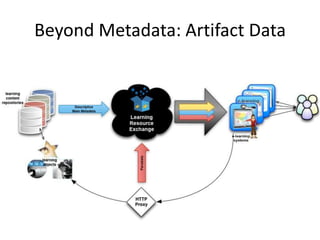
Beyond Metadata: Artifact Data
LRE Proxy (under development)
• This proxy is very similar to URL
shorteners such as goo.gl or tinyurl.com
• LRE “short” URLs are used in the LRE
metadata to replace resource locations
• Each time users consult the LRE catalog to
access OERs, they contact the LRE Proxy
that captures data before redirecting the
users to the actual resources
OER Analytics
• Associated with metadata, interaction data enables
   – Improved curation, searching, ranking, and recommending
     of OERs
   – Better data on which OERs are most likely to be used and
     where
• Valuable source of analytics of OERs’ audience
  preferences
• Helps to identify quality resources by crowdsourcing
• Makes it possible to measure
   – Impacts of marketing campaigns for the uptake of OERs
   – Shifts in educational policies on OERs globally

• D. Massart and E. Shulman. Interaction Data Exchange.
  D-Lib Magazine, May/June 2013. (forthcoming)
SENnet
http://sennet.eun.org
For Further Information

              WEB:
  http://lreforschools.eun.org
             EMAIL:
     lre-contact@eun.org

The Learning Resource Exchange (LRE)

  • 1.
    European Schoolnet Learning ResourceExchange http://lreforschools.eun.org David Massart <dmassart@acm.org>
  • 2.
    Outline • What is the LRE? • 200,000+ OERs that ‘travel well’ • How does the LRE work? • LRE Subcommittee • Latest developments
  • 3.
    Learning Resource Exchange(LRE) • Result of an effort started in 2002 • By European Schoolnet (EUN) and its supporting European Ministries of Education (MoEs) • With support of the European Commission (CELEBRATE, CALIBRATE, MELT, ASPECT and eQNet) • Self-sustained since 2008 • Covers all aspects linked to access to OERs: Interoperability and standard, Legal, Quality, Infrastructure, Pedagogy, Retrieval
  • 4.
    Catalogue of QualityOERs for K-12 Education in Europe
  • 5.
  • 6.
    50+ LRE ContentProviders
  • 7.
  • 8.
    Trans-national Topics (MUST BE PRESENT) The resource addresses curriculum topics that could be considered trans-national. For example, teaching multiplication is usually covered in every national curriculum, but teaching the folklore of a very specific region is not. It can also be a resource well suited for use in multi- disciplinary or cross-curricular contexts. http://lreforschools.eun.org/web/guest/resour ce-details?resourceId=280919 http://lreforschools.eun.org/web/guest/resour ce-details?resourceId=400452 www.europeanschoolnet.org - www.eun.org 8
  • 9.
    Knowledge of aspecific language is not needed (MUST BE PRESENT) The resource can be used without having to translate accompanying texts and/or the resource may be available in at least 3 European languages. For example, a resource might be a video where the narrative can be turned off, or it employs icons, images, animations, maps, etc. making its contents understandable for everyone. http://lreforschools.eun.org/web/guest/resource- details?resourceId=400117 http://lreforschools.eun.org/web/guest/resource- details?resourceId=264342 www.europeanschoolnet.org - www.eun.org 9
  • 10.
    Stored as afile type that is usable with generally available software* The resource can be used in any environment (online and off-line) and runs on multiple platforms (also hand-held, IWB). For example this can be an animation that plays in a web browser without the need for additional software. http://lreforschools.eun.org/web/gues t/resource- details?resourceId=264832 http://lreforschools.eun.org/web/gues t/resource- details?resourceId=250809 www.europeanschoolnet.org - www.eun.org 10
  • 11.
    Methodological support forteachers is not needed Subject teachers can easily recognize how this resource meets their curriculum requirements or how this resource could be used in a teaching scenario without further instructions. This criteria should not be used to assess the usability (technical qualities) of a resource. http://lreforschools.eun.org/web/gues t/resource- details?resourceId=399084 http://lreforschools.eun.org/web/gues t/resource- details?resourceId=401108 www.europeanschoolnet.org - www.eun.org 11
  • 12.
    Intuitive and easyto use The resource is intuitive to use in the sense that it has a user-friendly interface and is easy to navigate for both teachers and students without having to read or translate complex operating instructions. Example are resources with simple button commands to create maps for use on computers, printouts or interactive white boards. http://lreforschools.eun.org/web/guest/res ource-details?resourceId=261871 http://lreforschools.eun.org/web/guest/res ource-details?resourceId=280960 www.europeanschoolnet.org - www.eun.org 12
  • 13.
    Interactivity with orwithout feedback in a digital environment This kind of resource invites or requires a significant degree of user input or engagement, other than just reading something on a page in an online or offline environment. The interactivity can be simple or complex. Simple forms can be feedback on correct or incorrect answers in a drill/practice scenario. Complex forms can be lab activities that produce different results depending on user actions or hints to help complete tasks successfully in an online environment. An interactive resource that does not provide feedback but still requires user input would be a geometric 3D shape that can be moved and turned. http://lreforschools.eun.org/web/guest/resou rce-details?resourceId=248375 http://lreforschools.eun.org/web/guest/resou rce-details?resourceId=264849 www.europeanschoolnet.org - www.eun.org 13
  • 14.
    Clear license status(MUST BE PRESENT) The user can easily find information about the license/rights (sometimes called Terms of Use, Copyright or Permissions) for this resource. These statements explain if users or educators are allowed to make copies, or remix or redistribute a resource, or use images from the site in a blog without contacting the photographer, or if they can put this resource in a VLE like Moodle, etc. This license/rights information should be understandable for a typical user. http://lreforschools.eun.org/web/guest/resource- details?resourceId=265528 http://lreforschools.eun.org/web/guest/resource- details?resourceId=399091 www.europeanschoolnet.org - www.eun.org 14
  • 15.
    Catalogue Service forLearning Environments
  • 16.
  • 17.
  • 18.
    http://www.klascement.net/lre/zoeken/?extra_url=&previous=&q=&filter_group%5B%5D=all&e xtra%5Bdatabase%5D=LRE&extra%5Buser%5D=&cmdFilter=filter_activated
  • 19.
  • 20.
  • 21.
    http://www.skolverket.se/skolutveckling/itiskola n/digitala-larresurser/sok-med-spindeln
  • 22.
  • 23.
  • 24.
    LRE Metadata ApplicationProfile (1) http://lreforschools.eun.org/web/guest/metadata
  • 25.
    LRE Metadata ApplicationProfile (2) http://lreforschools.eun.org/web/guest/metadata
  • 26.
  • 27.
    Inside the DarkCloud Once collected (or generated), metadata is 1. Controlled 2. Corrected / Completed 3. Identified 4. Transformed into an LRE format (CMR) 5. Translated 6. Indexed
  • 28.
  • 29.
  • 30.
  • 31.
  • 32.
  • 33.
  • 34.
  • 35.
    LRE Subcommittee • LREgoverning body • Meets twice a year • Founding members and Associate members have one vote each and elect a Chair • Technical Advisory Board – chaired by EUN • Decisions on operation of LRE and annual workplan decided by Founding and Associate members • Changes to statutes of LRE Governing Committee and LRE membership rules require majority decision by Founding members (MoE)
  • 36.
    Types of LREMembers • LRE Founding members – EUN MoEs • LRE Associate members – Territorial, regional, municipal authorities – Commercial and public sector content providers – Tools’ providers • LRE Subscription members (limited to 1 year) – Smaller organizations exploring LRE added value
  • 37.
    LRE Subcommittee Members • Belgium • The Netherlands (chair) • Czech Rep. • Norway • Finland • Portugal • Italy • Sweden • Lithuania • Switzerland Currently discussing with SMEs, MoEs, Projects
  • 38.
  • 39.
  • 40.
  • 41.
    Location of LREPortal Visitors (2012)
  • 42.
  • 43.
    LRE Proxy (underdevelopment) • This proxy is very similar to URL shorteners such as goo.gl or tinyurl.com • LRE “short” URLs are used in the LRE metadata to replace resource locations • Each time users consult the LRE catalog to access OERs, they contact the LRE Proxy that captures data before redirecting the users to the actual resources
  • 44.
    OER Analytics • Associatedwith metadata, interaction data enables – Improved curation, searching, ranking, and recommending of OERs – Better data on which OERs are most likely to be used and where • Valuable source of analytics of OERs’ audience preferences • Helps to identify quality resources by crowdsourcing • Makes it possible to measure – Impacts of marketing campaigns for the uptake of OERs – Shifts in educational policies on OERs globally • D. Massart and E. Shulman. Interaction Data Exchange. D-Lib Magazine, May/June 2013. (forthcoming)
  • 45.
  • 47.
    For Further Information WEB: http://lreforschools.eun.org EMAIL: lre-contact@eun.org

Editor's Notes

  • #19 http://www.klascement.net/lre/zoeken/?extra_url=&amp;previous=&amp;q=&amp;filter_group%5B%5D=all&amp;extra%5Bdatabase%5D=LRE&amp;extra%5Buser%5D=&amp;cmdFilter=filter_activated
  • #20 http://www.stemit.be/focus/europees
  • #21 http://dum.rvp.cz/index.html
  • #22 http://www.skolverket.se/skolutveckling/itiskolan/digitala-larresurser/sok-med-spindeln
  • #23 http://www.ggflondemand.com/faces/home/home.jsf
  • #39 IMS ILOX as a framework to manage and exchange “authoritative” and “non-authoritative” metadata of different natures and origins in a conceptually clean way.