DEPARTMENT OF EDUCATION
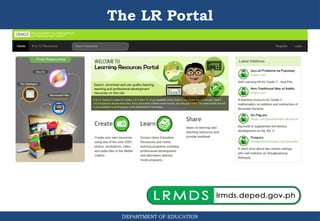
1.Anyone can access the LR Portal after
registering as a member
Registering with:
• Non-DepEd email – can access and
download learning materials only
• DepEd email – can access and download
all learner’s materials AND teacher’s
guides materials in the LR Portal
Accessing the LR Portal
5.
DEPARTMENT OF EDUCATION
2.DepEd unit/personnel can be given additional
roles:
a. Developer role – can upload learning
resources in the LR Portal
b. QA role – can access and mark and LR as
‘Reviewed’ ready for publishing
c. Publisher role – can publish an LR
d. Administrator role – can manage and assign
user roles to different people
Accessing the LR Portal
6.
DEPARTMENT OF EDUCATION
LRPortal User Accounts/Roles
• Member
– browse and
download published
learning resources
7.
DEPARTMENT OF EDUCATION
LRPortal User Accounts/Roles
• Administrator
(LRMDS Unit)
– add users/members
– assign roles to
members
– add/edit curriculum
competencies
– add/edit language
types
8.
DEPARTMENT OF EDUCATION
LRPortal User Accounts/Roles
• Administrator
– generate reports on
the status of LRs in
the portal (no. of LRs
published)
– assign reviewers
(QAs) for LRs to be
published
9.
DEPARTMENT OF EDUCATION
LRPortal User Accounts/Roles
• Developer(Cataloguer)
(LRMDS Unit)
– add new learning
resource (LR)
– create/edit metadata of
resource
10.
DEPARTMENT OF EDUCATION
LRPortal User Accounts/Roles
• QA (DepEd personnel)
Supervisors
LREs
– view and download LRs
for review
– edit metadata of learning
resources for review
11.
DEPARTMENT OF EDUCATION
LRPortal User Accounts/Roles
• Publisher
(CO & Regional
LRMDS Unit)
– Edit metadata
– Publish reviewed
resource
12.
DEPARTMENT OF EDUCATION
Accessto Published Resources
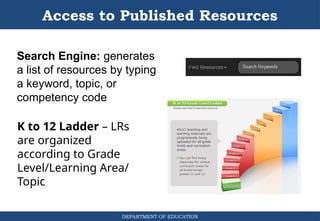
K to 12 Ladder – LRs
are organized
according to Grade
Level/Learning Area/
Topic
Search Engine: generates
a list of resources by typing
a keyword, topic, or
competency code
13.
DEPARTMENT OF EDUCATION
Accessto Published Resources
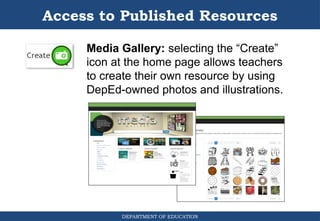
Media Gallery: selecting the “Create”
icon at the home page allows teachers
to create their own resource by using
DepEd-owned photos and illustrations.