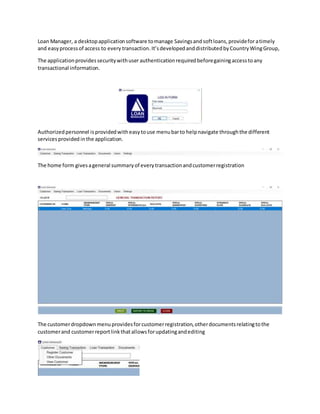
Loan Manager, a desktopapplicationsoftware tomanage Savingsand softloans,provideforatimely
and easyprocessof access to every transaction.It’sdevelopedanddistributedbyCountryWingGroup,
The applicationprovidessecuritywithuser authenticationrequiredbeforegainingaccesstoany
transactional information.
Authorizedpersonnel isprovidedwitheasytouse menubarto helpnavigate throughthe different
servicesprovided inthe application.
The home form givesageneral summaryof everytransactionandcustomerregistration
The customerdropdownmenuprovidesforcustomerregistration,otherdocumentsrelatingtothe
customerand customerreportlinkthatallowsforupdatingandediting
The Add new Customerformisforregistrationof customerswhomaybe membersof the organization
and nonmemberswhoare seakingtoreceive sevicesfromthe organization.
The form allowsforoptionsof savingthe customerinformationwithorwithoutapassportimage.
The other document formprovidesoptionstosave otherdocumentsthatmybe requiredduring
customeror membershipvetting
One can eithersearchbyname or byregistrationnumber.
The SavingTransactiondropdownmenu hasthe Depsitandthe withdraw menus
The Depositform allowsone toinputan amountdepositedmyamember intothe account
Organizationsthathave a designatedamounttobe depositedcanrecordthe full amount,andlater
record the depositsthatcanbe done ininstallments.(Thisservice isoptional,one candecide toignore
it).
Everyamountdepositedisimmediatelyreflectedonthe general transactionreport.
The withdrawal formallowsone towithdraw fromthe savingsafterselectingthe member’sname from
the dropdown.
It indicatestotal amountdeposited andnotmore thatthat can be withdrawnfromthe system
Again,everyamountwithdrawnfromthe systemisimmediatelyreflectedinthe general transaction
report.
To viewdetailedinformationaboutsavingandwithdrawals,doubleclickonarecord in the general
transactionformand youwill geta formas bellow.
The loan Transactiondropdownmenuprovidesforloans,returnonLoansand loanservice reportas
seenbellow
The loansform providesloanservicestobothmembersandnonmembersregisteredintothe system.
On selectingthe member,the systemchecksforthe amountsavedandcalculatesthe principal giventhe
percentage selectedof the savingsbalance.
An annual interestrate caneitherbe selectedorentered,withthe durationof paymentinmonths.A
start date of paymentcanbe selectedif itisnotthe currentdate.
Securitiesandsuritiescanbe uploadedbyclickingonthe “uploadsecurityimages”button
Clickingonthe calculate buttonwill generate anamotizationtableforthe loanasshownin the image
bellow.
The amortizationtable indicatesthe loanprincipal amount,durationof payment,interestrate,loan
paymentstartdate,monthlypay,total amountpayable,total interestandpayoff date.
Each loan will be givenaunique IDthatis automaticallygeneratedasseenfromthe image above.
The return onloans form allowsforrecordingamountpaidbackbasedon the monthlycommitmentfee
statedon the monthlycommitmentfield.
The customer’sname has tobe selectedfromthe dropdownfollowedbythe loanIDthat is unique to
each loangiventothe customer.
The imagesprovidedforsecurityandsuretycanbe navigatedfromthe rightside of the formby clicking
on eitherthe PREV buttonor NEXTbutton.
The loan service reportformallowsforone toview all transactionspertainingindividualloansand
servicingof those loansincludingprovisionforprinting.
There are twotabs providedinthisform, one showingthe loandetailsandanothershowingpayment
detailsasindicatedbellow
A detailedloanstatementcanbe printedoutfromthisform, a sample isas bellow
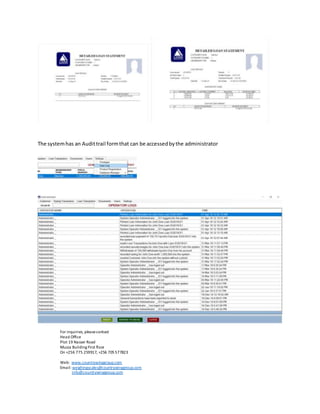
The systemhas an Audittrail formthat can be accessedbythe administrator
For inquiries, pleasecontact
Head Office
Plot 19 Nasser Road
Muzza Building First floor
On +256 775 259917, +256 705577823
Web: www.countrywinggroup.com
Email: weighingscales@countrywinggroup.com
info@countrywinggroup.com

Loan manager technical and user writeup

  • 1.
    Loan Manager, adesktopapplicationsoftware tomanage Savingsand softloans,provideforatimely and easyprocessof access to every transaction.It’sdevelopedanddistributedbyCountryWingGroup, The applicationprovidessecuritywithuser authenticationrequiredbeforegainingaccesstoany transactional information. Authorizedpersonnel isprovidedwitheasytouse menubarto helpnavigate throughthe different servicesprovided inthe application. The home form givesageneral summaryof everytransactionandcustomerregistration The customerdropdownmenuprovidesforcustomerregistration,otherdocumentsrelatingtothe customerand customerreportlinkthatallowsforupdatingandediting
  • 2.
    The Add newCustomerformisforregistrationof customerswhomaybe membersof the organization and nonmemberswhoare seakingtoreceive sevicesfromthe organization. The form allowsforoptionsof savingthe customerinformationwithorwithoutapassportimage. The other document formprovidesoptionstosave otherdocumentsthatmybe requiredduring customeror membershipvetting One can eithersearchbyname or byregistrationnumber.
  • 3.
    The SavingTransactiondropdownmenu hastheDepsitandthe withdraw menus The Depositform allowsone toinputan amountdepositedmyamember intothe account Organizationsthathave a designatedamounttobe depositedcanrecordthe full amount,andlater record the depositsthatcanbe done ininstallments.(Thisservice isoptional,one candecide toignore it). Everyamountdepositedisimmediatelyreflectedonthe general transactionreport. The withdrawal formallowsone towithdraw fromthe savingsafterselectingthe member’sname from the dropdown. It indicatestotal amountdeposited andnotmore thatthat can be withdrawnfromthe system Again,everyamountwithdrawnfromthe systemisimmediatelyreflectedinthe general transaction report.
  • 4.
    To viewdetailedinformationaboutsavingandwithdrawals,doubleclickonarecord inthe general transactionformand youwill geta formas bellow. The loan Transactiondropdownmenuprovidesforloans,returnonLoansand loanservice reportas seenbellow The loansform providesloanservicestobothmembersandnonmembersregisteredintothe system. On selectingthe member,the systemchecksforthe amountsavedandcalculatesthe principal giventhe percentage selectedof the savingsbalance. An annual interestrate caneitherbe selectedorentered,withthe durationof paymentinmonths.A start date of paymentcanbe selectedif itisnotthe currentdate. Securitiesandsuritiescanbe uploadedbyclickingonthe “uploadsecurityimages”button Clickingonthe calculate buttonwill generate anamotizationtableforthe loanasshownin the image bellow.
  • 5.
    The amortizationtable indicatestheloanprincipal amount,durationof payment,interestrate,loan paymentstartdate,monthlypay,total amountpayable,total interestandpayoff date. Each loan will be givenaunique IDthatis automaticallygeneratedasseenfromthe image above. The return onloans form allowsforrecordingamountpaidbackbasedon the monthlycommitmentfee statedon the monthlycommitmentfield. The customer’sname has tobe selectedfromthe dropdownfollowedbythe loanIDthat is unique to each loangiventothe customer. The imagesprovidedforsecurityandsuretycanbe navigatedfromthe rightside of the formby clicking on eitherthe PREV buttonor NEXTbutton.
  • 6.
    The loan servicereportformallowsforone toview all transactionspertainingindividualloansand servicingof those loansincludingprovisionforprinting. There are twotabs providedinthisform, one showingthe loandetailsandanothershowingpayment detailsasindicatedbellow A detailedloanstatementcanbe printedoutfromthisform, a sample isas bellow
  • 7.
    The systemhas anAudittrail formthat can be accessedbythe administrator For inquiries, pleasecontact Head Office Plot 19 Nasser Road Muzza Building First floor On +256 775 259917, +256 705577823 Web: www.countrywinggroup.com Email: weighingscales@countrywinggroup.com info@countrywinggroup.com