❏ JAVA CHARACTER LITERALS
❏ JAVA STRING LITERALS
LITERALS
AND
VARIABLES
❏ JAVA CHARACTER LITERALS
❏ JAVA STRING LITERALS
LITERALS
AND
VARIABLES
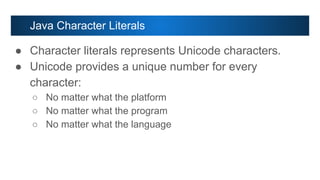
Java Character Literals
● Character literals represents Unicode characters.
● Unicode provides a unique number for every
character:
○ No matter what the platform
○ No matter what the program
○ No matter what the language
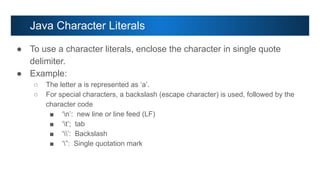
● To use a character literals, enclose the character in single quote
delimiter.
● Example:
○ The letter a is represented as ‘a’.
○ For special characters, a backslash (escape character) is used, followed by the
character code
■ ‘n’: new line or line feed (LF)
■ ‘t’; tab
■ ‘’: Backslash
■ ‘”: Single quotation mark
Java Character Literals
● To use a character literals, enclose the character in single quote
delimiter.
● Example:
○ Characters from other languages or other symbols can be represented by Unicode
values
■ For Alphabet A, use ‘u0041’
■ For number 4 in devanagri script, use ‘u096A’
■ For hourglass symbol, use ‘u23f3’
Java Character Literals
● Sequence of character is known as String
● String literal is values placed inside double quotation mark
● Example:
■ “”: Empty String
■ “ “; Single space
■ “A”: String containing single character A
■ “Java”: String for the text Java
■ “Hellon”: String containing Hello and newline or linefeed character (Note:
use of escape sequence)
■ “””: String containing double quote
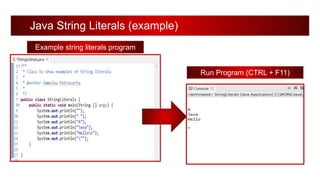
Java String Literals
Java String Literals (example)
Example string literals program
Run Program (CTRL + F11)
Java null Literals
❏ Null literal is defined in Java source code file as null.
❏ Assign null literals to object reference variables
❏ Example
❏ String name = null;
❏ Object obj = null;
Note: String and Object are classes in Java
Variables in Java
● A variable has a:
■ Data type - indicates the type of value, variable can hold. Ex. Integer numbers, floating
point numbers, String and so on.
■ Name type - the variable name must follow rules for identifiers.
● Declare a variable as follows:
<data type> <name> [=initial value];
● The Java programming language is statically-typed, which means that the
<data type> must first be declared before variables can be used and it can’t
be changed later.
Variables in Java
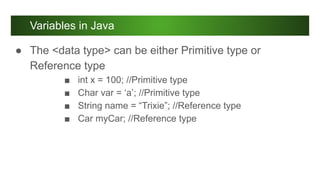
● The <data type> can be either Primitive type or
Reference type
■ int x = 100; //Primitive type
■ Char var = ‘a’; //Primitive type
■ String name = “Trixie”; //Reference type
■ Car myCar; //Reference type
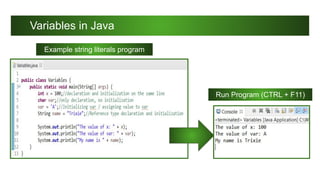
Variables in Java
Example string literals program
Run Program (CTRL + F11)

LITERALS AND VARIABLES (1).pdf

  • 1.
    ❏ JAVA CHARACTERLITERALS ❏ JAVA STRING LITERALS LITERALS AND VARIABLES
  • 2.
    ❏ JAVA CHARACTERLITERALS ❏ JAVA STRING LITERALS LITERALS AND VARIABLES
  • 3.
    Java Character Literals ●Character literals represents Unicode characters. ● Unicode provides a unique number for every character: ○ No matter what the platform ○ No matter what the program ○ No matter what the language
  • 4.
    ● To usea character literals, enclose the character in single quote delimiter. ● Example: ○ The letter a is represented as ‘a’. ○ For special characters, a backslash (escape character) is used, followed by the character code ■ ‘n’: new line or line feed (LF) ■ ‘t’; tab ■ ‘’: Backslash ■ ‘”: Single quotation mark Java Character Literals
  • 5.
    ● To usea character literals, enclose the character in single quote delimiter. ● Example: ○ Characters from other languages or other symbols can be represented by Unicode values ■ For Alphabet A, use ‘u0041’ ■ For number 4 in devanagri script, use ‘u096A’ ■ For hourglass symbol, use ‘u23f3’ Java Character Literals
  • 6.
    ● Sequence ofcharacter is known as String ● String literal is values placed inside double quotation mark ● Example: ■ “”: Empty String ■ “ “; Single space ■ “A”: String containing single character A ■ “Java”: String for the text Java ■ “Hellon”: String containing Hello and newline or linefeed character (Note: use of escape sequence) ■ “””: String containing double quote Java String Literals
  • 7.
    Java String Literals(example) Example string literals program Run Program (CTRL + F11)
  • 8.
    Java null Literals ❏Null literal is defined in Java source code file as null. ❏ Assign null literals to object reference variables ❏ Example ❏ String name = null; ❏ Object obj = null; Note: String and Object are classes in Java
  • 9.
    Variables in Java ●A variable has a: ■ Data type - indicates the type of value, variable can hold. Ex. Integer numbers, floating point numbers, String and so on. ■ Name type - the variable name must follow rules for identifiers. ● Declare a variable as follows: <data type> <name> [=initial value]; ● The Java programming language is statically-typed, which means that the <data type> must first be declared before variables can be used and it can’t be changed later.
  • 10.
    Variables in Java ●The <data type> can be either Primitive type or Reference type ■ int x = 100; //Primitive type ■ Char var = ‘a’; //Primitive type ■ String name = “Trixie”; //Reference type ■ Car myCar; //Reference type
  • 11.
    Variables in Java Examplestring literals program Run Program (CTRL + F11)