JAVA PROGRAMMING
Mr.M.S.N.MURTY,
ASSISTANT PROFESSOR,
DEPARTMENT OF CSE,
UNIT-1
• PROGRAM STRUCTURE IN JAVA
• INTRODUCTION
• WRITING SIMPLE JAVA PROGRAM
• JAVA STATEMENTS
• COMMAND LINE ARGUMENTS
• USER INPUT TO PROGRAMS
INTRODUCTION
• JAVA Is an object oriented programming Language.
• Initially it was OAK in 1991,later renamed as Java.
• Introduced by James Gosling in 1995
• Sun Microsystems released the first version in1996
as Java1.0.
• Adopted features from C and C++.
• Features include Simple, Platform Independent,
Portable, Robust, Secured, Multi Threaded, Object-
Oriented
• Supports all OOPs Concepts
I
Java Programming- Set up
• If we want to write , execute and run our java
programs, we need to install jdk software.
• We have to set two environment variables
PATH and CLASSPATH.
• JDK will be installed inside program files of your C
drive
• JDK can be downloaded from the site:
https://www.oracle.com/java/technologies/downlo
ads/
PATH and CLASSPATH
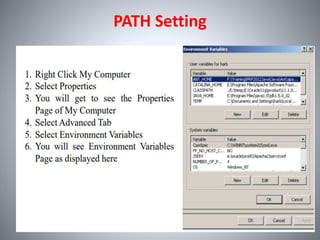
• PATH tells the operating system which
directories(folders) to search for executable files,
in response to commands issued by a user .
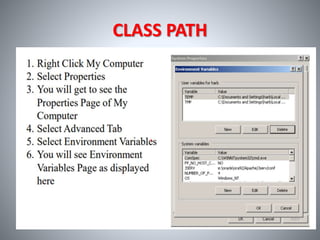
• CLASSPATH is a parameter which tells the JVM or
the Compiler, where to locate classes that are not
part of Java Development ToolKit(JDK).
PATH Setting
CLASS PATH
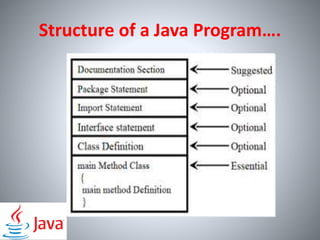
Structure of a Simple Java Program
• Documentation Section
• Package Statement
• Import Statement
• Interface Section
• Class Definition
• Main Method Class
Structure of a Java Program….
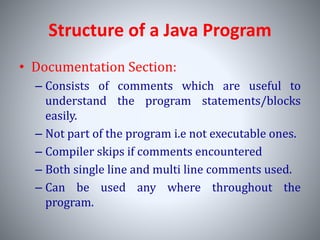
Structure of a Java Program
• Documentation Section:
– Consists of comments which are useful to
understand the program statements/blocks
easily.
– Not part of the program i.e not executable ones.
– Compiler skips if comments encountered
– Both single line and multi line comments used.
– Can be used any where throughout the
program.
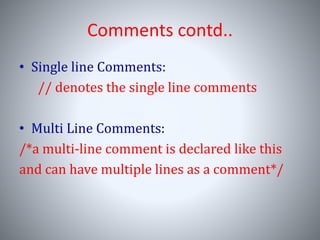
Comments contd..
• Single line Comments:
// denotes the single line comments
• Multi Line Comments:
/*a multi-line comment is declared like this
and can have multiple lines as a comment*/
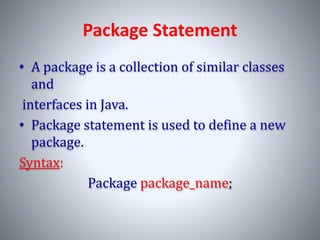
Package Statement
• A package is a collection of similar classes
and
interfaces in Java.
• Package statement is used to define a new
package.
Syntax:
Package package_name;
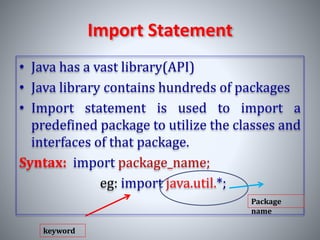
Import Statement
• Java has a vast library(API)
• Java library contains hundreds of packages
• Import statement is used to import a
predefined package to utilize the classes and
interfaces of that package.
Syntax: import package_name;
eg: import java.util.*;
keyword
Package
name
Class Definition
• Class definition contains instance variables and instance
methods.
• Class definition provides the structure for the real
objects
• A java program can contain more classes.
Syntax:
class class_name
{
//instance variable declarations;
//instance method_defintions
}
Sample java program
import java.lang.*;
class Sample //class definition
{
public static void main(String arg[])
{
System.out.println("Welcome to JAVA!");
}
}
/*this program displays “Welcome to JAVA!” on
the console*/
Sample java program
Main method:
main() method is the starting point of a Java
program.
public static void main()
• public, means that it can be used outside of this class
as well.
• static means that we want to access a method
without making its objects. As we call the main
method without creating any objects.
• void indicates that it does not return any value. The
main is declared as void because it does not return
any value.
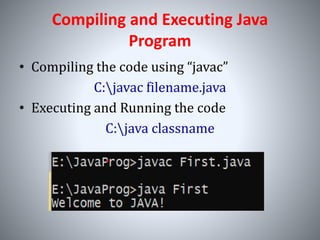
Compiling and Executing Java
Program
• Compiling the code using “javac”
C:javac filename.java
• Executing and Running the code
C:java classname
Command Line Arguments
java Simple <argument1> <argument2>….<argument-
n>
We can access these arguments in our program, using String
Array that we passed to the main method as –String arg[]
arg[0] arg[1] arg[n]
. . . .
Command Line Arguments
class Simple
{
public static void main(String[] args)
{
int i1 = Integer.parseInt(args[0]);
int i2 = Integer.parseInt(args[1]);
System.out.println(i1+i2);
}
}
When we compile the above code successfully and execute it
as Java Simple 10 20, the output will be :
30
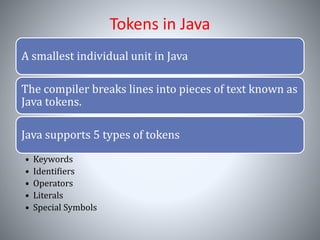
Tokens in Java
A smallest individual unit in Java
The compiler breaks lines into pieces of text known as
Java tokens.
Java supports 5 types of tokens
• Keywords
• Identifiers
• Operators
• Literals
• Special Symbols
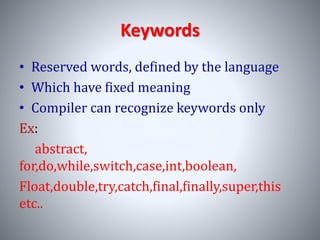
Keywords
• Reserved words, defined by the language
• Which have fixed meaning
• Compiler can recognize keywords only
Ex:
abstract,
for,do,while,switch,case,int,boolean,
Float,double,try,catch,final,finally,super,this
etc..
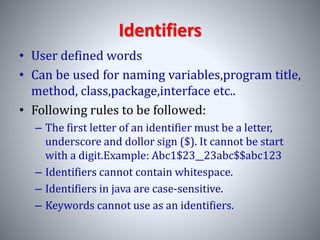
Identifiers
• User defined words
• Can be used for naming variables,program title,
method, class,package,interface etc..
• Following rules to be followed:
– The first letter of an identifier must be a letter,
underscore and dollor sign ($). It cannot be start
with a digit.Example: Abc1$23__23abc$$abc123
– Identifiers cannot contain whitespace.
– Identifiers in java are case-sensitive.
– Keywords cannot use as an identifiers.
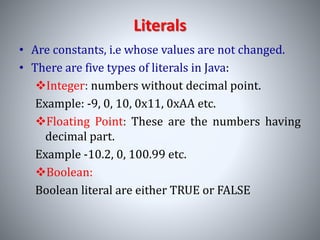
Literals
• Are constants, i.e whose values are not changed.
• There are five types of literals in Java:
Integer: numbers without decimal point.
Example: -9, 0, 10, 0x11, 0xAA etc.
Floating Point: These are the numbers having
decimal part.
Example -10.2, 0, 100.99 etc.
Boolean:
Boolean literal are either TRUE or FALSE
Literals contd..
String:
A string literal is a sequence of characters
enclosed in double quotes.
Eg: “Welcome to JAVA”
Character:A character literal is a symbol
enclosed in single quotes.
Eg: ‘ * ’,’ N ’,’ $ ’,’ 9 ’
Special Symbols
• It is a set of few characters which have special
meaning known to Java compiler and cannot be
used by any other purpose.
Ex: [], {}, (), ;,.,*,= etc..
• Square Brackets []: It is used to defined array
element reference.
• Parentheses(): These special symbol are used to
call the functions and parameters.
• Braces{}: This indicates the starting and ending
of the code.

JAVA PROGRAMMING

  • 1.
  • 2.
    UNIT-1 • PROGRAM STRUCTUREIN JAVA • INTRODUCTION • WRITING SIMPLE JAVA PROGRAM • JAVA STATEMENTS • COMMAND LINE ARGUMENTS • USER INPUT TO PROGRAMS
  • 3.
    INTRODUCTION • JAVA Isan object oriented programming Language. • Initially it was OAK in 1991,later renamed as Java. • Introduced by James Gosling in 1995 • Sun Microsystems released the first version in1996 as Java1.0. • Adopted features from C and C++. • Features include Simple, Platform Independent, Portable, Robust, Secured, Multi Threaded, Object- Oriented • Supports all OOPs Concepts I
  • 4.
    Java Programming- Setup • If we want to write , execute and run our java programs, we need to install jdk software. • We have to set two environment variables PATH and CLASSPATH. • JDK will be installed inside program files of your C drive • JDK can be downloaded from the site: https://www.oracle.com/java/technologies/downlo ads/
  • 5.
    PATH and CLASSPATH •PATH tells the operating system which directories(folders) to search for executable files, in response to commands issued by a user . • CLASSPATH is a parameter which tells the JVM or the Compiler, where to locate classes that are not part of Java Development ToolKit(JDK).
  • 6.
  • 7.
  • 8.
    Structure of aSimple Java Program • Documentation Section • Package Statement • Import Statement • Interface Section • Class Definition • Main Method Class
  • 9.
    Structure of aJava Program….
  • 10.
    Structure of aJava Program • Documentation Section: – Consists of comments which are useful to understand the program statements/blocks easily. – Not part of the program i.e not executable ones. – Compiler skips if comments encountered – Both single line and multi line comments used. – Can be used any where throughout the program.
  • 11.
    Comments contd.. • Singleline Comments: // denotes the single line comments • Multi Line Comments: /*a multi-line comment is declared like this and can have multiple lines as a comment*/
  • 12.
    Package Statement • Apackage is a collection of similar classes and interfaces in Java. • Package statement is used to define a new package. Syntax: Package package_name;
  • 13.
    Import Statement • Javahas a vast library(API) • Java library contains hundreds of packages • Import statement is used to import a predefined package to utilize the classes and interfaces of that package. Syntax: import package_name; eg: import java.util.*; keyword Package name
  • 14.
    Class Definition • Classdefinition contains instance variables and instance methods. • Class definition provides the structure for the real objects • A java program can contain more classes. Syntax: class class_name { //instance variable declarations; //instance method_defintions }
  • 15.
    Sample java program importjava.lang.*; class Sample //class definition { public static void main(String arg[]) { System.out.println("Welcome to JAVA!"); } } /*this program displays “Welcome to JAVA!” on the console*/
  • 16.
    Sample java program Mainmethod: main() method is the starting point of a Java program. public static void main() • public, means that it can be used outside of this class as well. • static means that we want to access a method without making its objects. As we call the main method without creating any objects. • void indicates that it does not return any value. The main is declared as void because it does not return any value.
  • 17.
    Compiling and ExecutingJava Program • Compiling the code using “javac” C:javac filename.java • Executing and Running the code C:java classname
  • 18.
    Command Line Arguments javaSimple <argument1> <argument2>….<argument- n> We can access these arguments in our program, using String Array that we passed to the main method as –String arg[] arg[0] arg[1] arg[n] . . . .
  • 19.
    Command Line Arguments classSimple { public static void main(String[] args) { int i1 = Integer.parseInt(args[0]); int i2 = Integer.parseInt(args[1]); System.out.println(i1+i2); } } When we compile the above code successfully and execute it as Java Simple 10 20, the output will be : 30
  • 20.
    Tokens in Java Asmallest individual unit in Java The compiler breaks lines into pieces of text known as Java tokens. Java supports 5 types of tokens • Keywords • Identifiers • Operators • Literals • Special Symbols
  • 21.
    Keywords • Reserved words,defined by the language • Which have fixed meaning • Compiler can recognize keywords only Ex: abstract, for,do,while,switch,case,int,boolean, Float,double,try,catch,final,finally,super,this etc..
  • 22.
    Identifiers • User definedwords • Can be used for naming variables,program title, method, class,package,interface etc.. • Following rules to be followed: – The first letter of an identifier must be a letter, underscore and dollor sign ($). It cannot be start with a digit.Example: Abc1$23__23abc$$abc123 – Identifiers cannot contain whitespace. – Identifiers in java are case-sensitive. – Keywords cannot use as an identifiers.
  • 23.
    Literals • Are constants,i.e whose values are not changed. • There are five types of literals in Java: Integer: numbers without decimal point. Example: -9, 0, 10, 0x11, 0xAA etc. Floating Point: These are the numbers having decimal part. Example -10.2, 0, 100.99 etc. Boolean: Boolean literal are either TRUE or FALSE
  • 24.
    Literals contd.. String: A stringliteral is a sequence of characters enclosed in double quotes. Eg: “Welcome to JAVA” Character:A character literal is a symbol enclosed in single quotes. Eg: ‘ * ’,’ N ’,’ $ ’,’ 9 ’
  • 25.
    Special Symbols • Itis a set of few characters which have special meaning known to Java compiler and cannot be used by any other purpose. Ex: [], {}, (), ;,.,*,= etc.. • Square Brackets []: It is used to defined array element reference. • Parentheses(): These special symbol are used to call the functions and parameters. • Braces{}: This indicates the starting and ending of the code.