Python Collections
There arefour collection data types in the Python programming
language:
• List:
It is a collection which is ordered and changeable. Allows
duplicate members.
• Tuple:
It is a collection which is ordered and unchangeable. Allows
duplicate members.
• Set:
It is a collection which is unordered and unindexed. No duplicate
members
• Dictionary :
It is a collection which is unordered, changeable and indexed. No
duplicate members.
3.
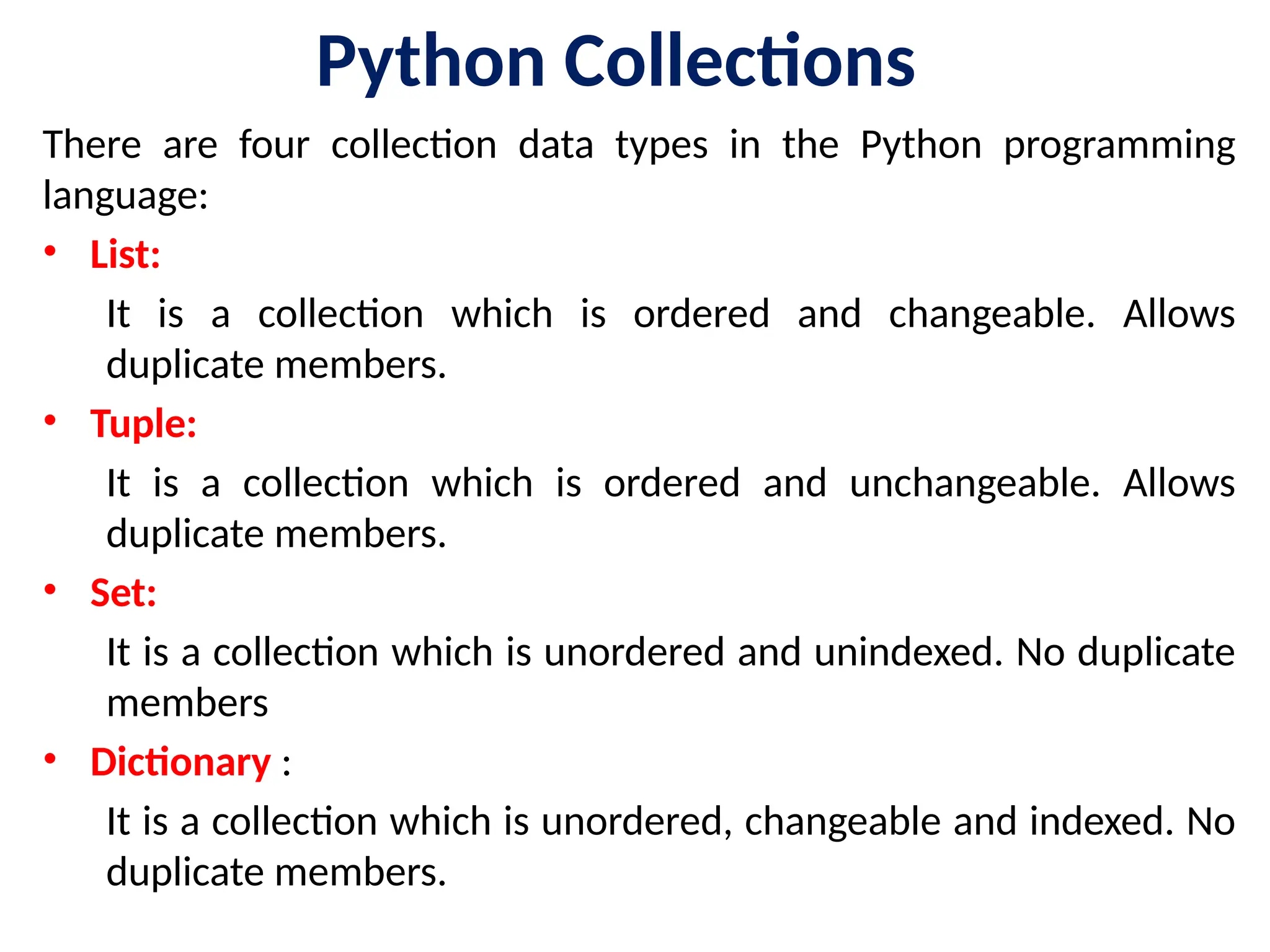
Introduction
• Programs commonlyneed to store a large number of values.
Suppose, for instance, that you need to read 100 numbers,
compute their average, and then find out how many of the
numbers are above the average.
• Your program first reads the numbers and computes their
average, then compares each number with the average to
determine whether it is above the average.
• In order to accomplish this task, the numbers must all be stored in
variables.
• To do this, you would have to create 100 variables and repeatedly
write almost identical code 100 times. Writing a program this way
is impractical. So, how do you solve this problem?
4.
Solution
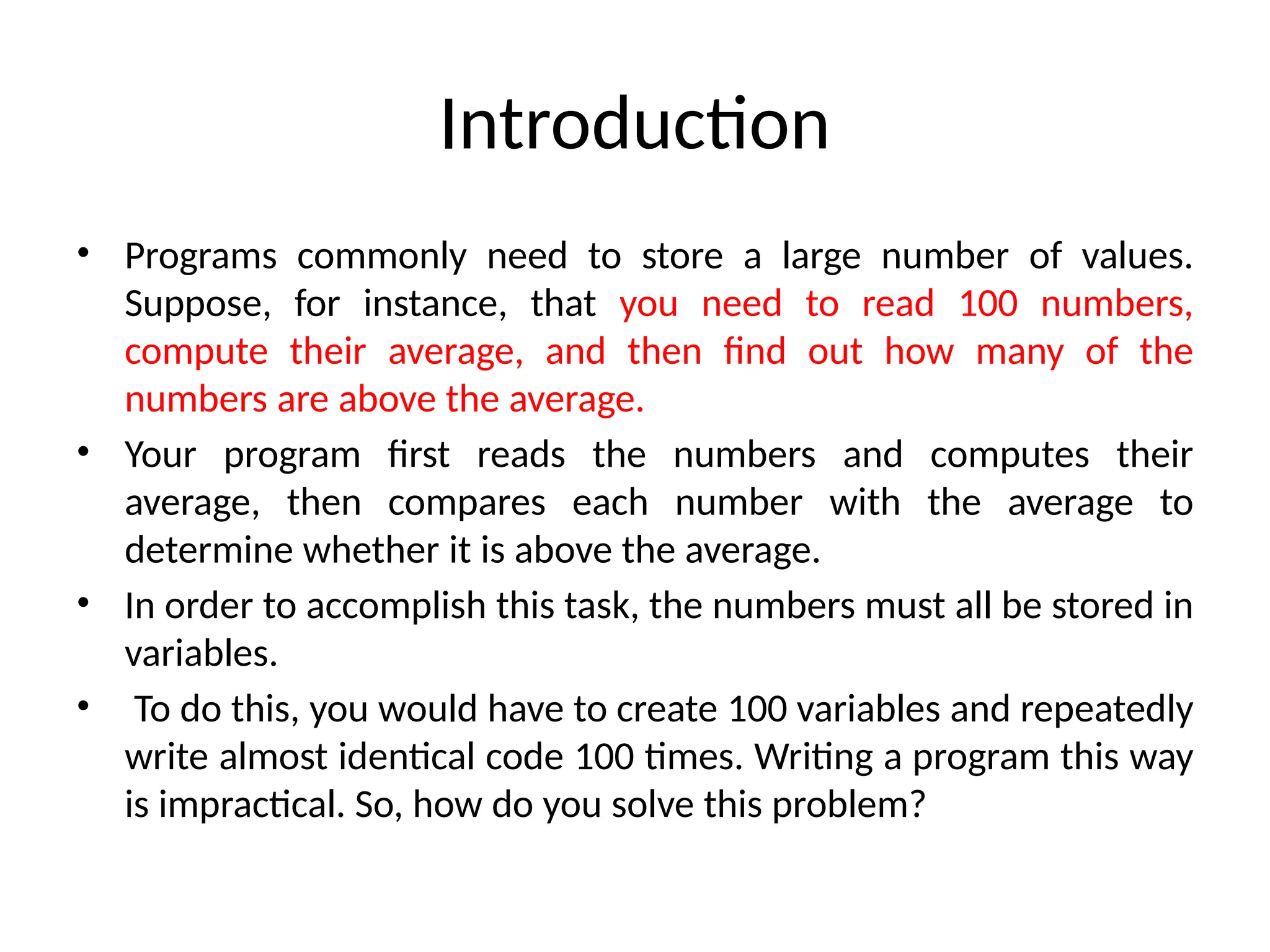
• An efficient,organized approach is needed.
• Python provides a type called a list that stores a sequential collection of
elements. In our example, you can store all 100 numbers in a list and
access them through a single list variable.
5.
List
• A listcan store a collection of data of any size
• Lists are just like the arrays, declared in other languages.
• Lists need not be homogeneous always which makes it a most powerful
tool in Python.
• A single list may contain DataTypes like Integers, Strings, as well as Objects.
• Lists are mutable, and hence, they can be altered even after their creation.
• List in Python are ordered and have a definite count.
List: A list is a built-in sequence type in Python, defined by the list class. It's a
collection of ordered, mutable elements that can be of different data
types.
6.
Introduction
• A listis a sequential collection of Python data
values, where each value is identified by an
index. The values that make up a list are called
its elements.
• Lists are similar to strings, which are ordered
collections of characters, except that the
elements of a list can have any type and for
any one list, the items can be of different type
7.
List Basics
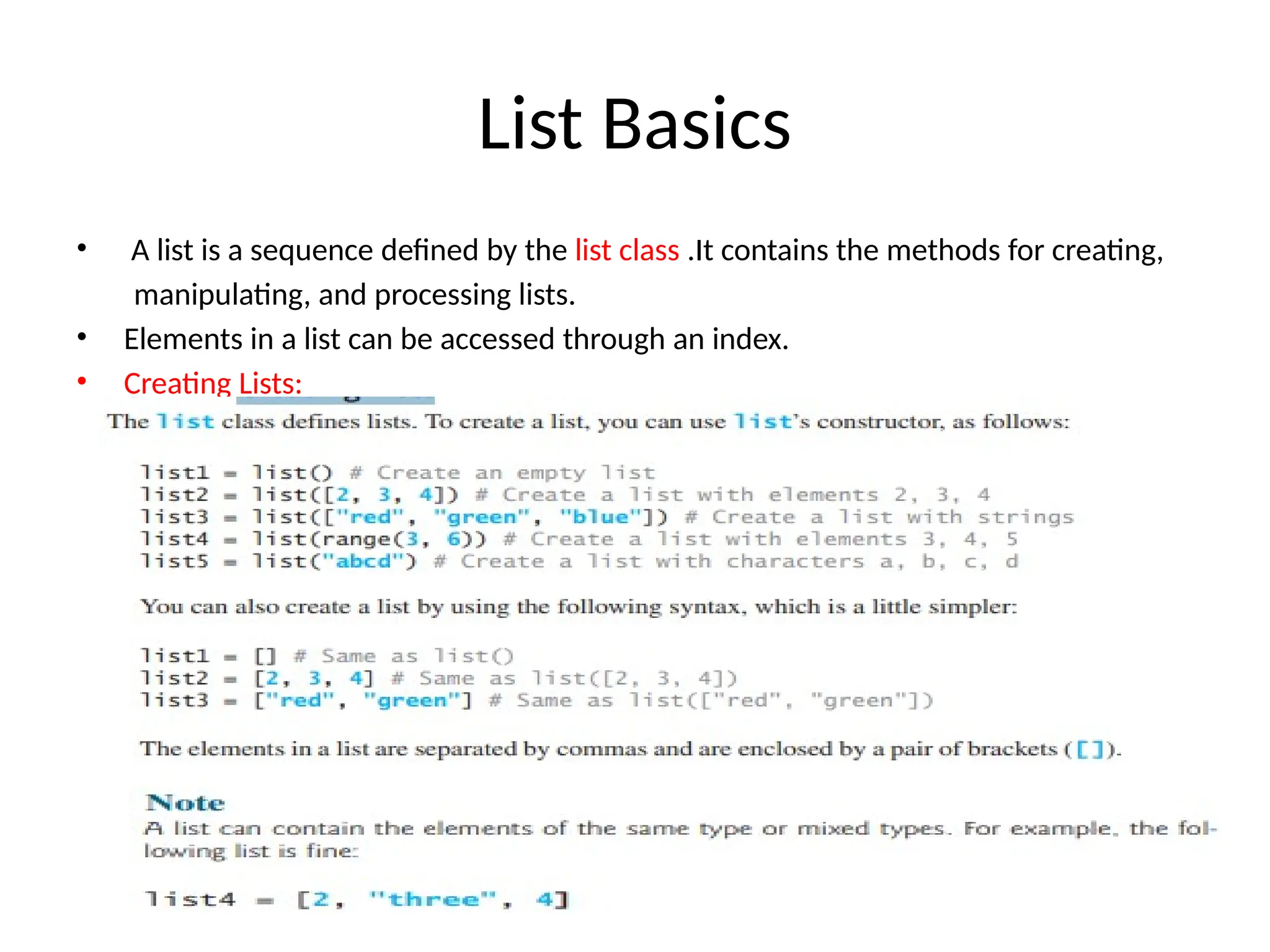
• Alist is a sequence defined by the list class .It contains the methods for creating,
manipulating, and processing lists.
• Elements in a list can be accessed through an index.
• Creating Lists:
8.
List Values
• Thereare several ways to create a new list. The simplest is to enclose the elements
in square brackets ( [ and ]).
• [10, 20, 30, 40]
• ["spam", "bungee", "swallow"]
• The first example is a list of four integers.
• The second is a list of three strings.
• As we said above, the elements of a list don’t have to be the same type.
• The following list contains a string, a float, an integer, and another list.
• ["hello", 2.0, 5, [10, 20]]
• A list within another list is said to be nested and the inner list is often called
a sublist.
• Finally, there is a special list that contains no elements. It is called the empty list
and is denoted [].
9.
List Is aSequence Type
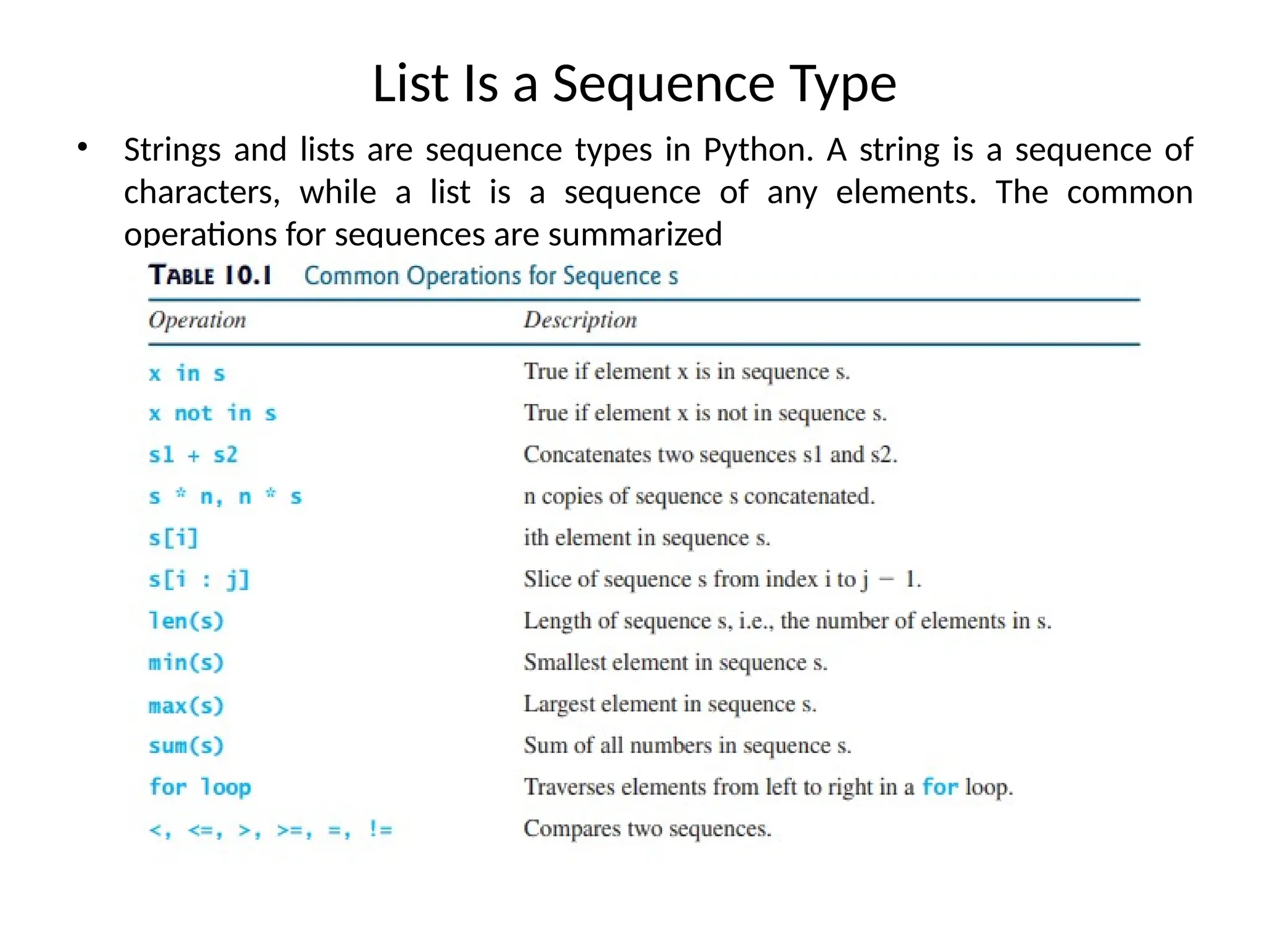
• Strings and lists are sequence types in Python. A string is a sequence of
characters, while a list is a sequence of any elements. The common
operations for sequences are summarized
10.
Functions for Lists
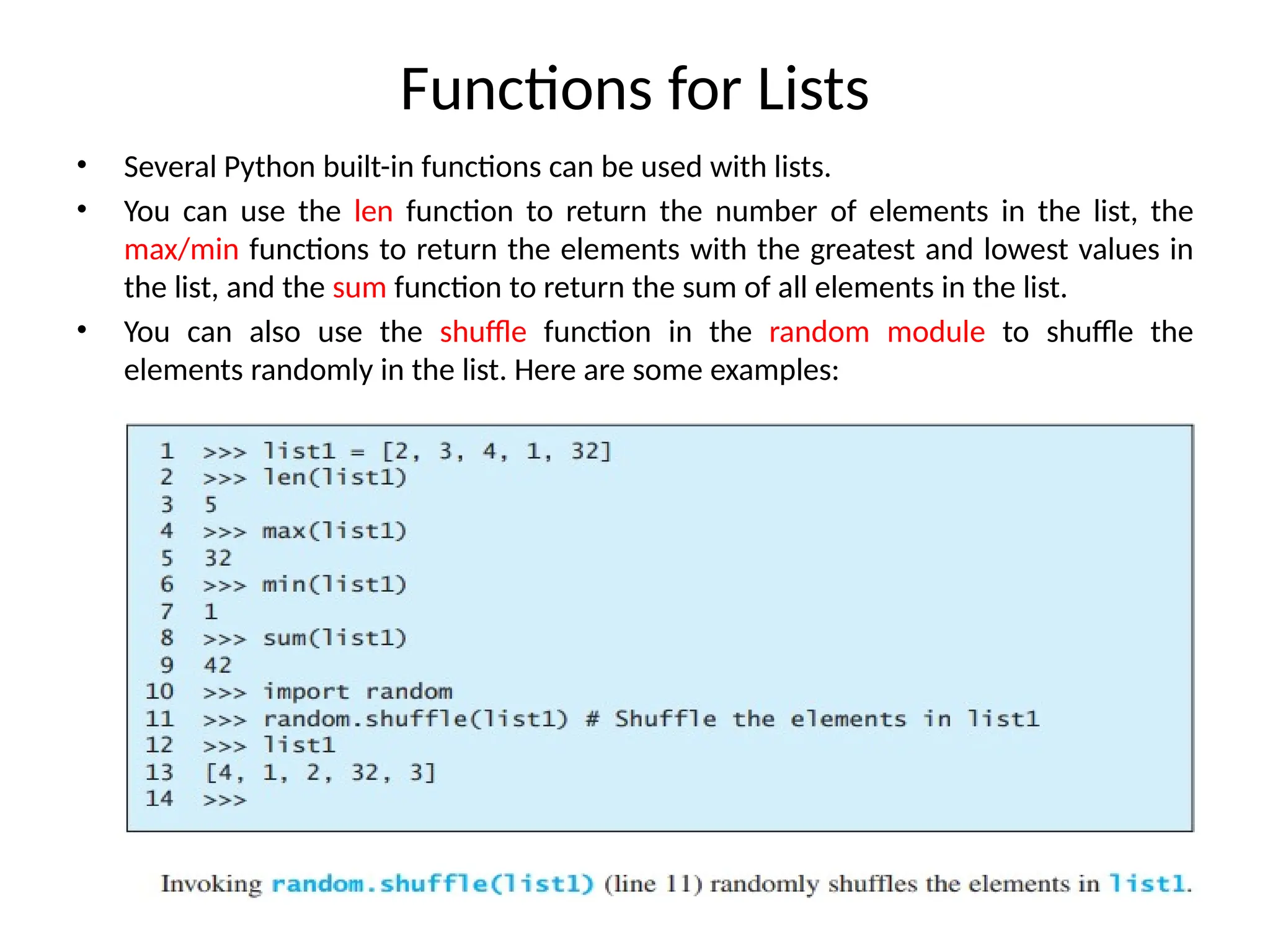
•Several Python built-in functions can be used with lists.
• You can use the len function to return the number of elements in the list, the
max/min functions to return the elements with the greatest and lowest values in
the list, and the sum function to return the sum of all elements in the list.
• You can also use the shuffle function in the random module to shuffle the
elements randomly in the list. Here are some examples:
11.
List Length
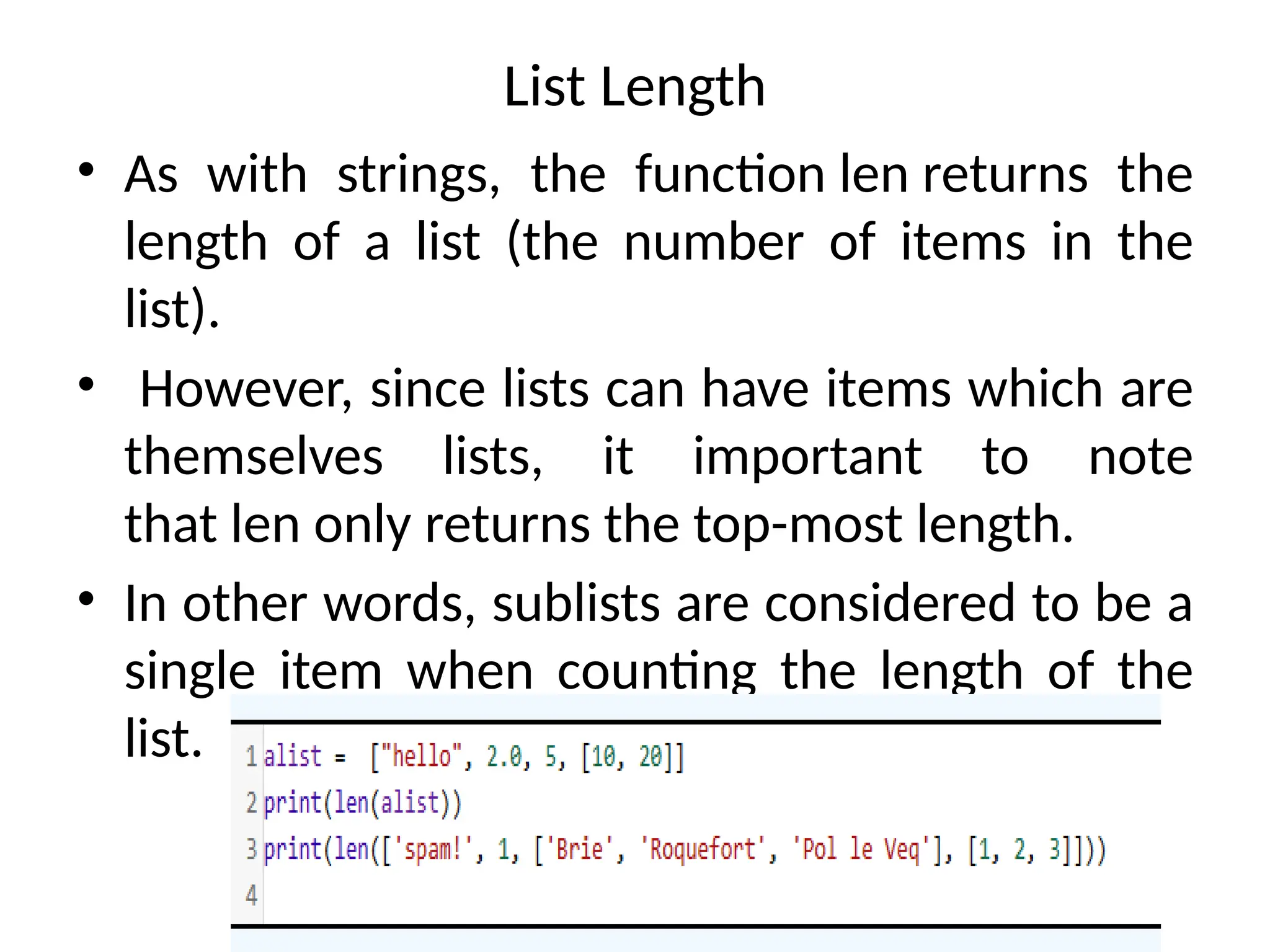
• Aswith strings, the function len returns the
length of a list (the number of items in the
list).
• However, since lists can have items which are
themselves lists, it important to note
that len only returns the top-most length.
• In other words, sublists are considered to be a
single item when counting the length of the
list.
12.
Index Operator []
• An element in a list can be accessed through the index operator, using the
following syntax: myList[index]
• List indexes are 0 based; that is, they range from 0 to len(myList)-1, as illustrated in
Figure 10.1.
• myList = [5.6, 4.5, 3.3, 13.2, 4.0, 34.33, 34.0, 45.45, 99.993, 11123]
•myList[index] can be used just like a variable, so it is also known as an
indexed variable.
•For example, the following code adds the values in myList[0] and myList[1] to
myList[2]
myList[2] = myList[0] + myList[1]
13.
Contd..
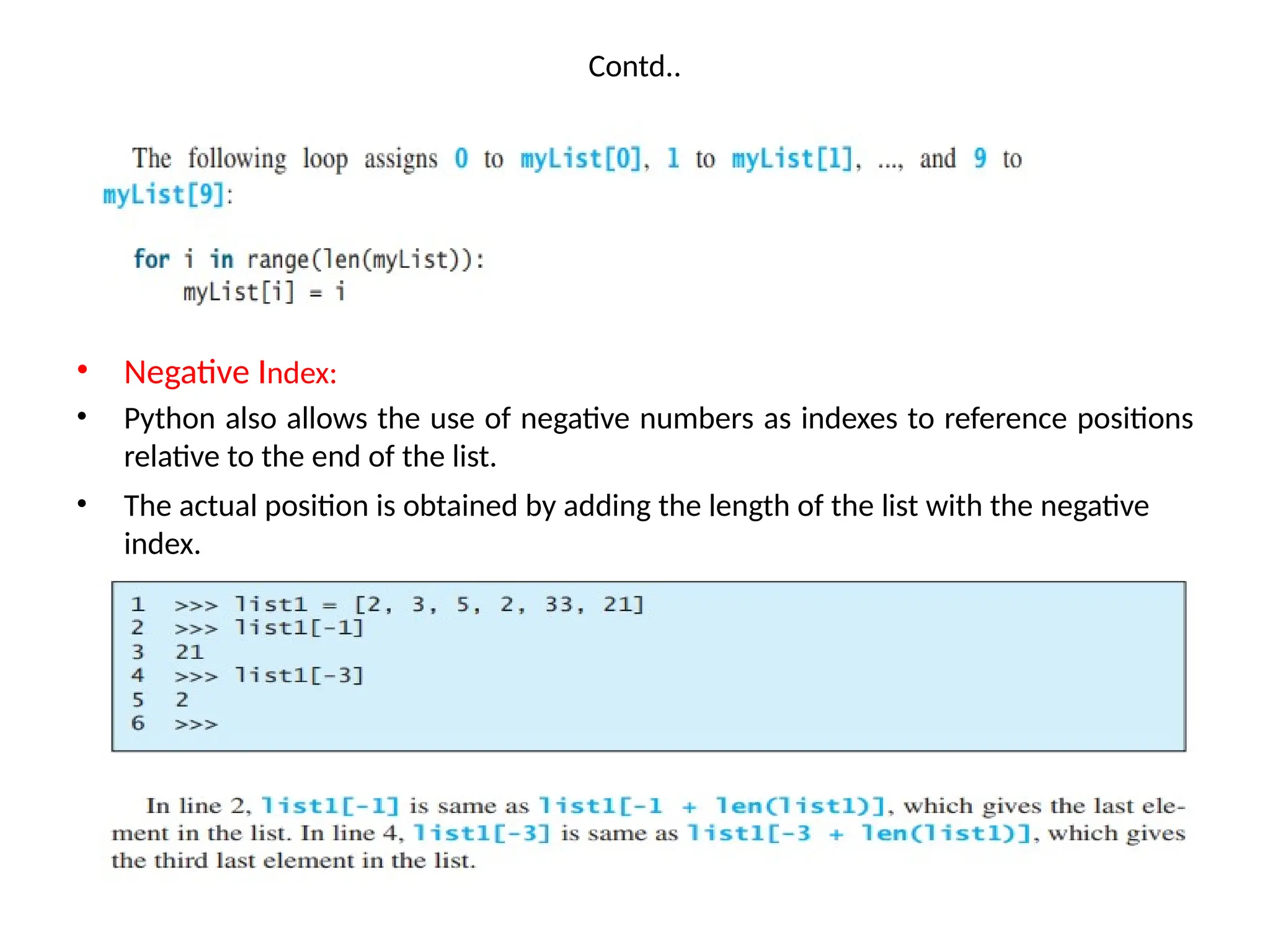
• Negative Index:
•Python also allows the use of negative numbers as indexes to reference positions
relative to the end of the list.
• The actual position is obtained by adding the length of the list with the negative
index.
14.
Accessing Elements
• Thesyntax for accessing the elements of a list is the same as the syntax for
accessing the characters of a string.
• We use the index operator ( [] – not to be confused with an empty list).
The expression inside the brackets specifies the index.
• Remember that the indices start at 0. Any integer expression can be used
as an index and as with strings, negative index values will locate items
from the right instead of from the left.
o/p:
15.
The +, *,and in/not in Operators
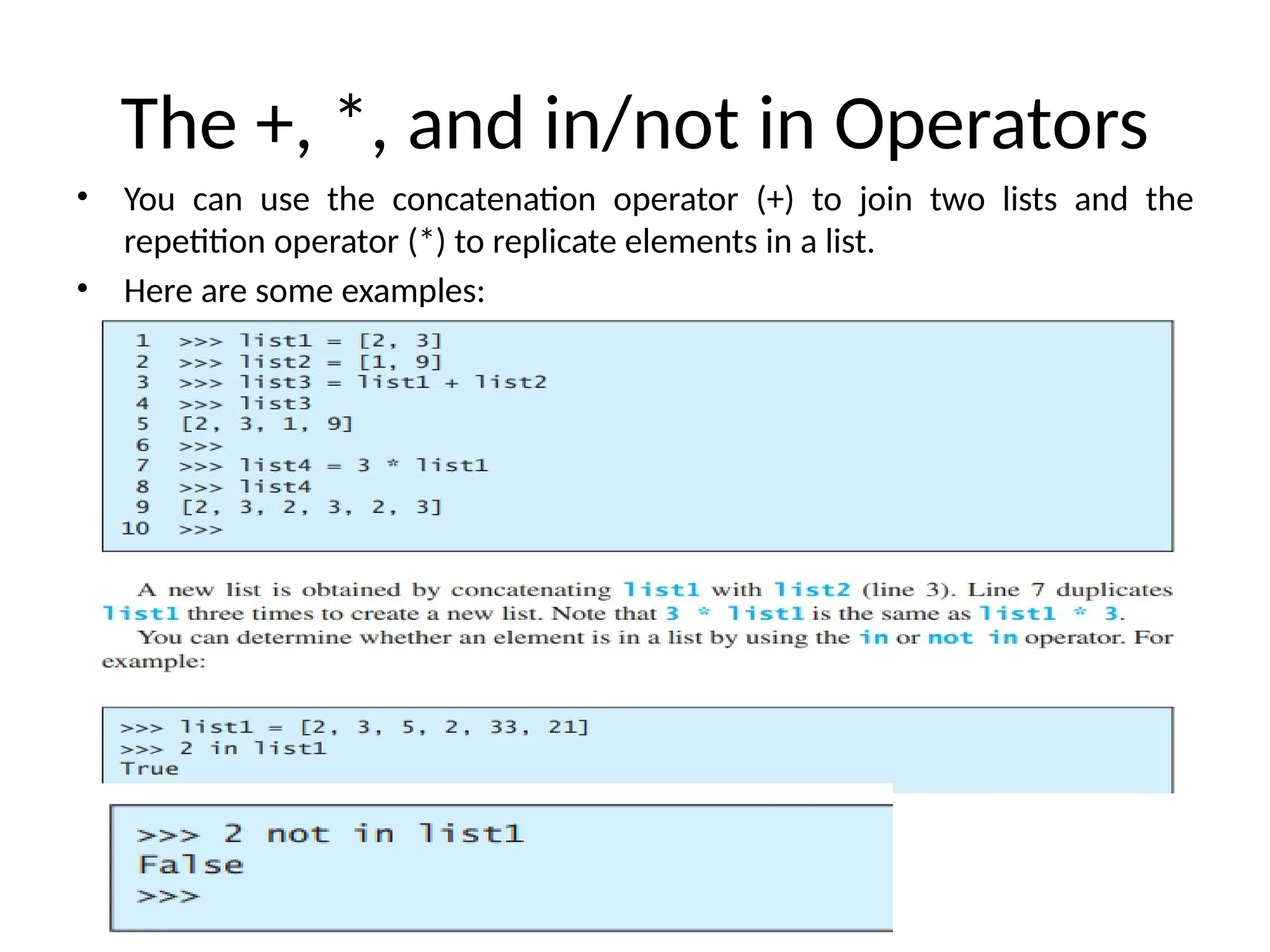
• You can use the concatenation operator (+) to join two lists and the
repetition operator (*) to replicate elements in a list.
• Here are some examples:
16.
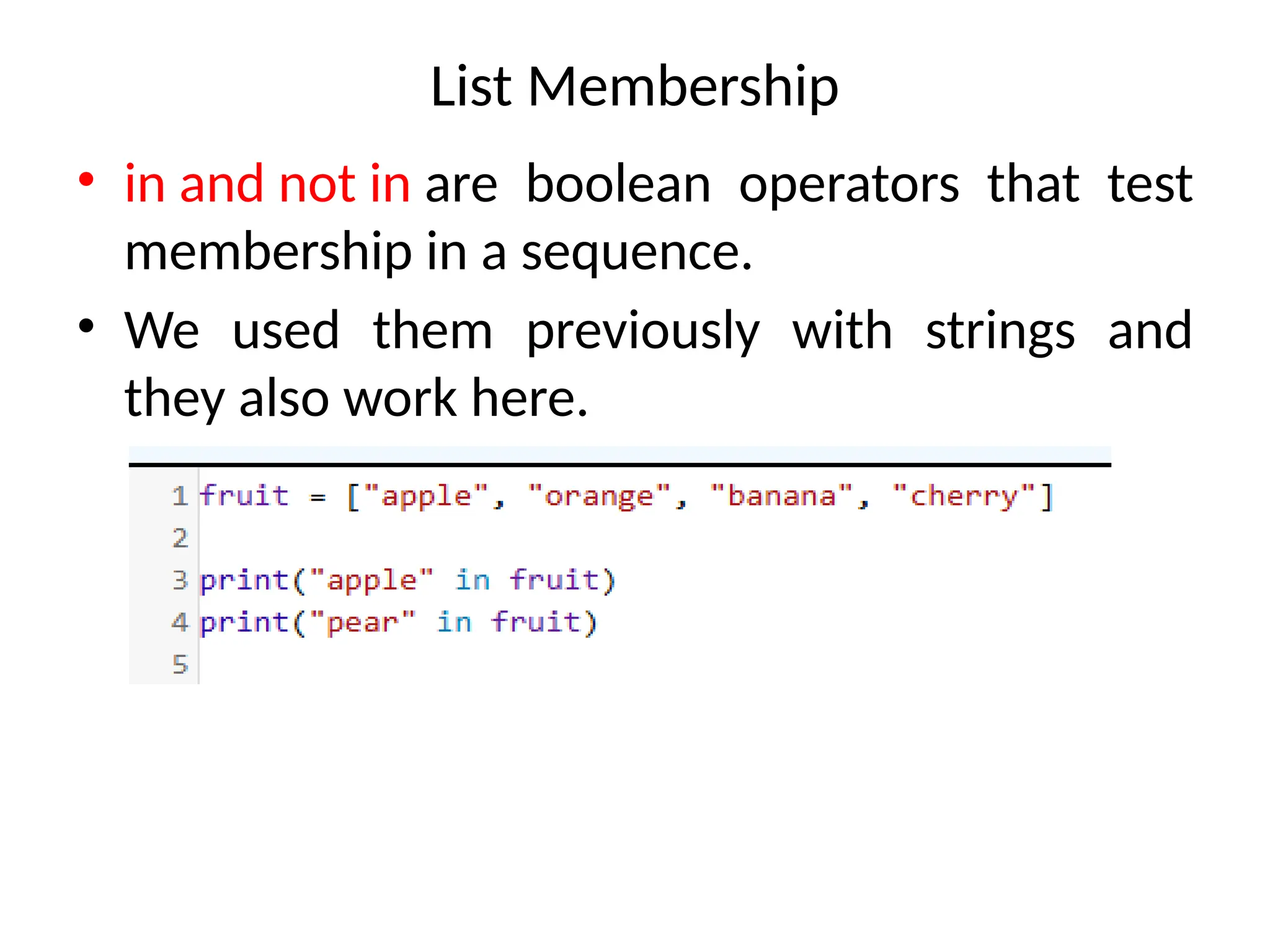
List Membership
• inand not in are boolean operators that test
membership in a sequence.
• We used them previously with strings and
they also work here.
17.
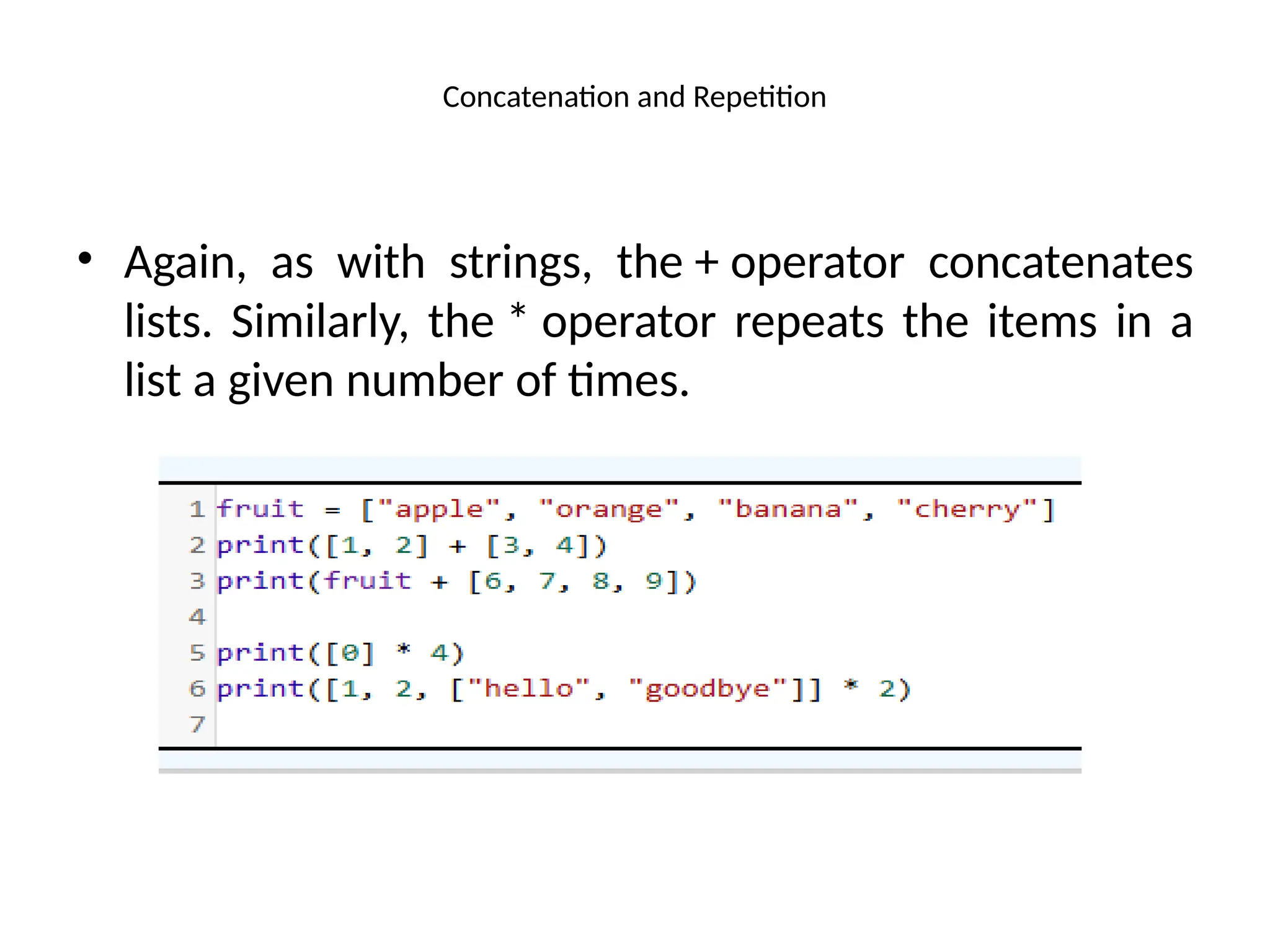
Concatenation and Repetition
•Again, as with strings, the + operator concatenates
lists. Similarly, the * operator repeats the items in a
list a given number of times.
18.
List Slicing [start: end]
• List Slicing [start : end] The index operator allows you to select an element
at the specified index.
• The slicing operator returns a slice of the list using the syntax list[start :
end].
• The slice is a sublist from index start to index end – 1. Here are some
examples:
19.
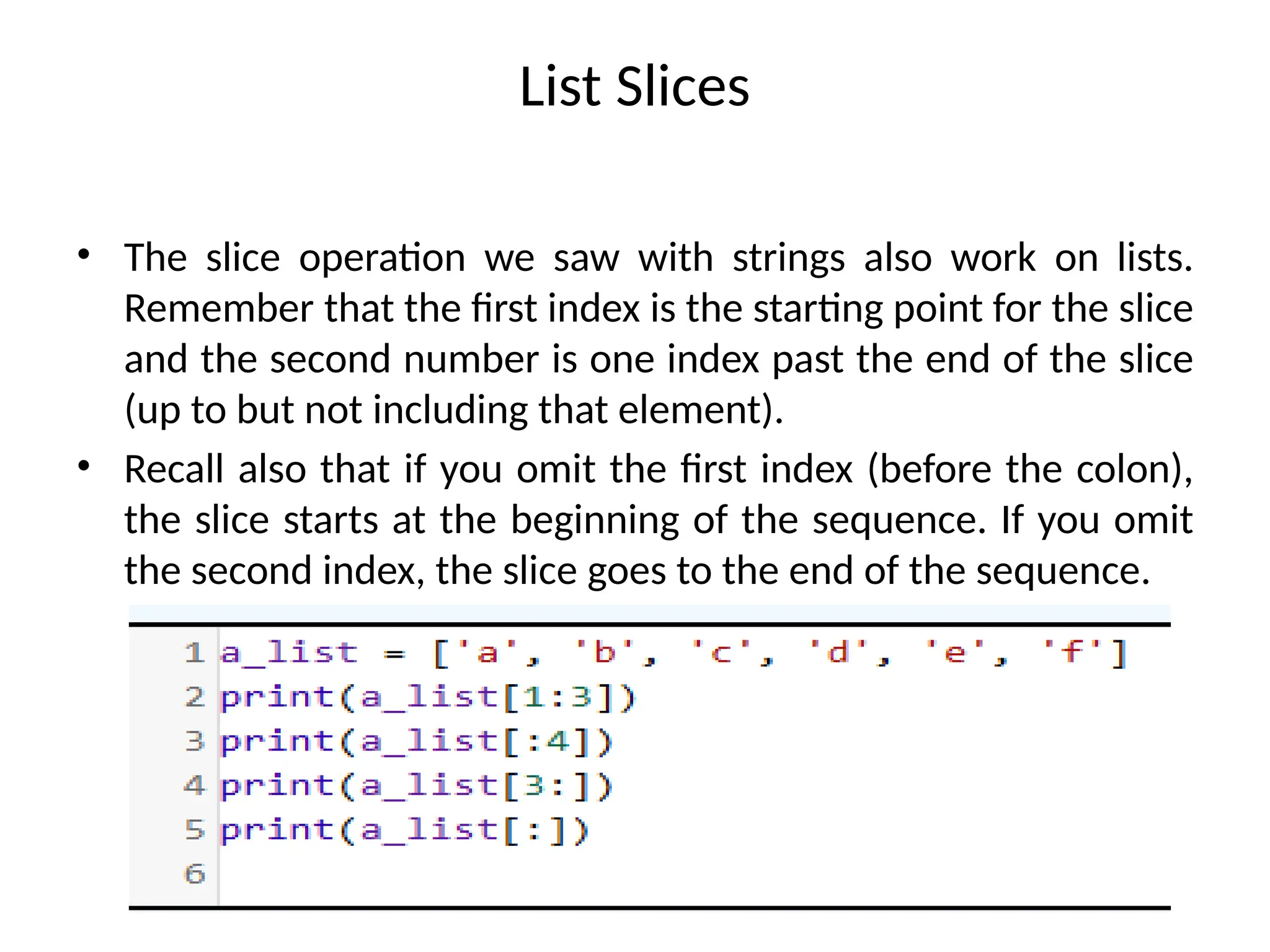
List Slices
• Theslice operation we saw with strings also work on lists.
Remember that the first index is the starting point for the slice
and the second number is one index past the end of the slice
(up to but not including that element).
• Recall also that if you omit the first index (before the colon),
the slice starts at the beginning of the sequence. If you omit
the second index, the slice goes to the end of the sequence.
20.
Contd..
• You canuse a negative index in slicing.
• For example:
Note:
If start >= end, list[start : end] returns an empty list. If end specifies a position
beyond the end of the list, Python will use the length of the list for end instead.
21.
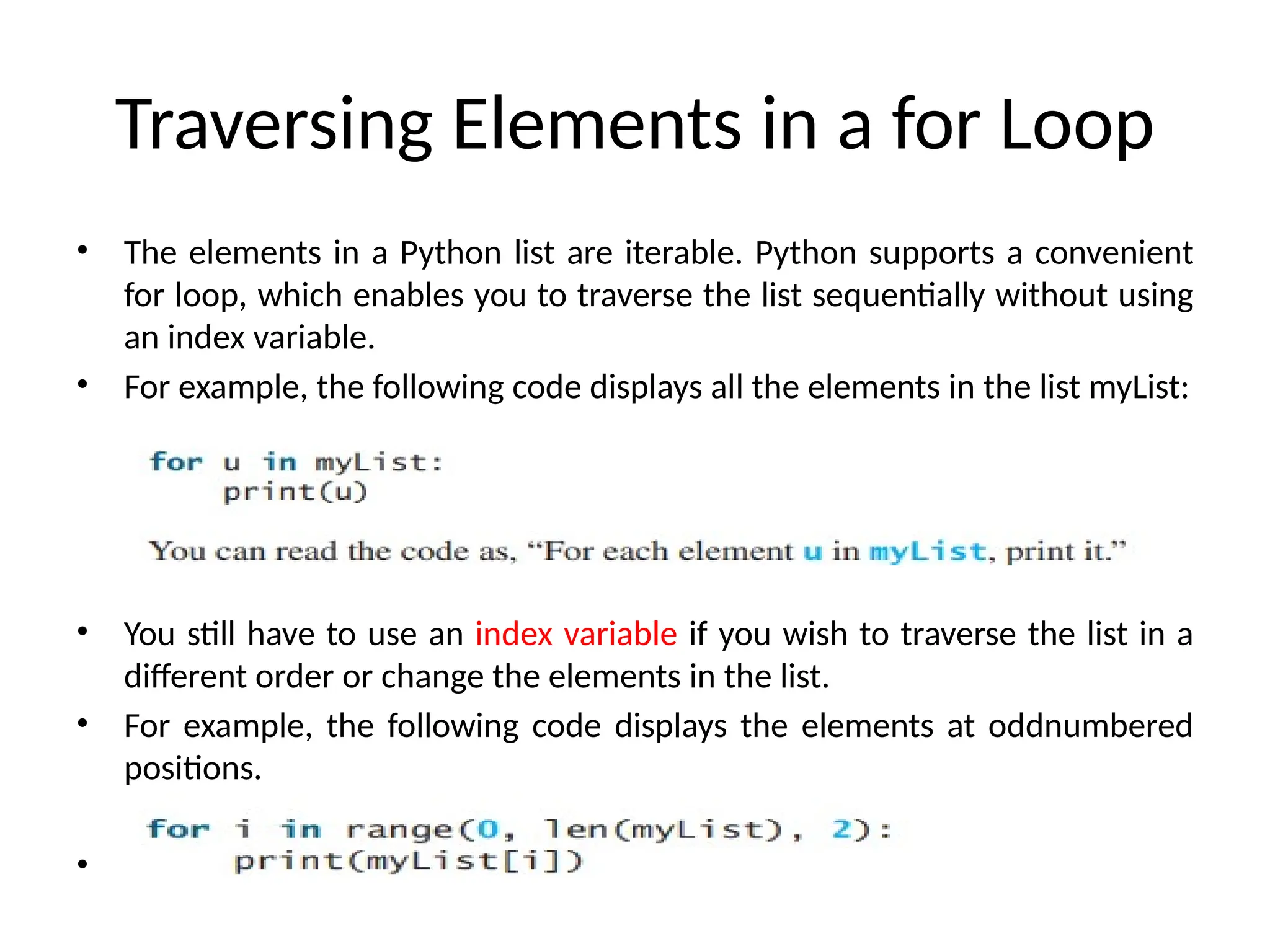
Traversing Elements ina for Loop
• The elements in a Python list are iterable. Python supports a convenient
for loop, which enables you to traverse the list sequentially without using
an index variable.
• For example, the following code displays all the elements in the list myList:
• You still have to use an index variable if you wish to traverse the list in a
different order or change the elements in the list.
• For example, the following code displays the elements at oddnumbered
positions.
•
22.
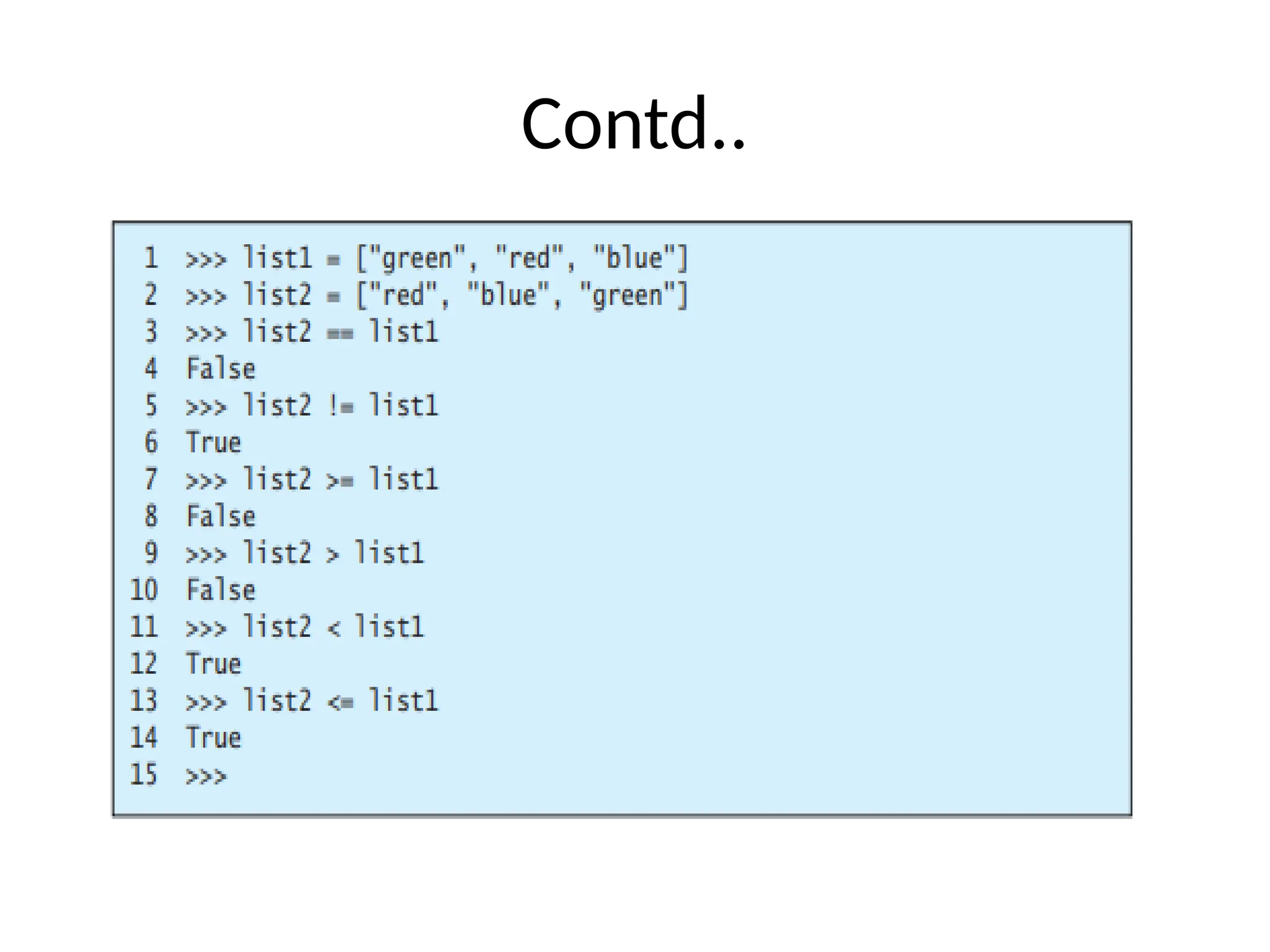
Comparing Lists
• Youcan compare lists using the comparison
operators (>, >=, <=, ==, and !=).
• For this to work, the two lists must contain the same
type of elements.
• The comparison uses lexicographical ordering: the
first two elements are compared, and if they differ
this determines the outcome of the comparison; if
they are equal, the next two elements are compared,
and so on, until either list is exhausted
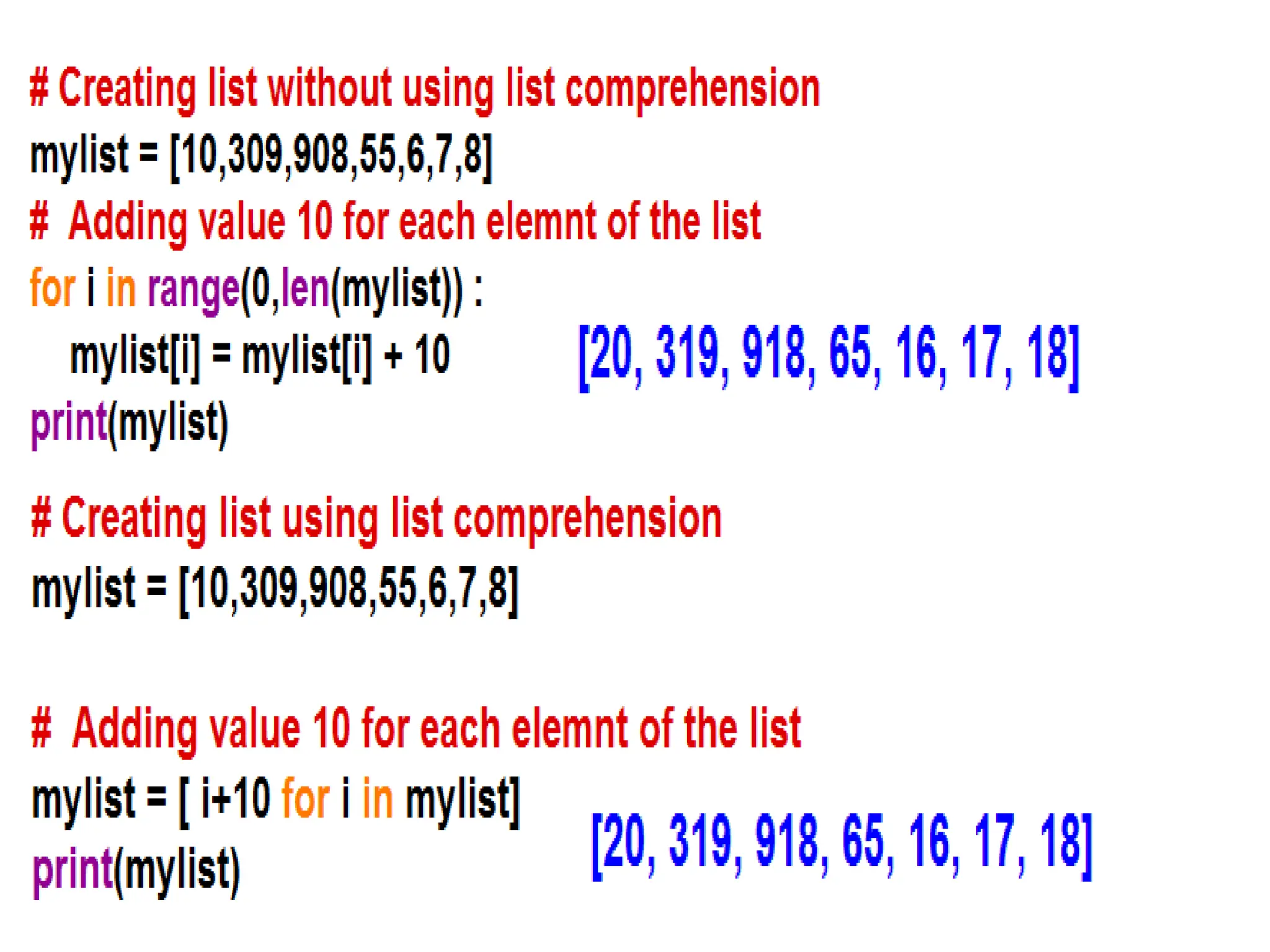
List comprehension
• Listcomprehension is a concise way to create lists in
Python. Instead of using a loop, you can generate a new
list in a single line of code.
• Syntax:
[expression for item in iterable if condition]
• expression – what to do with each item
• item – variable representing each element in the iterable
(like a list or range)
• iterable – the collection you're looping through
• condition – (optional) filter to include only certain items
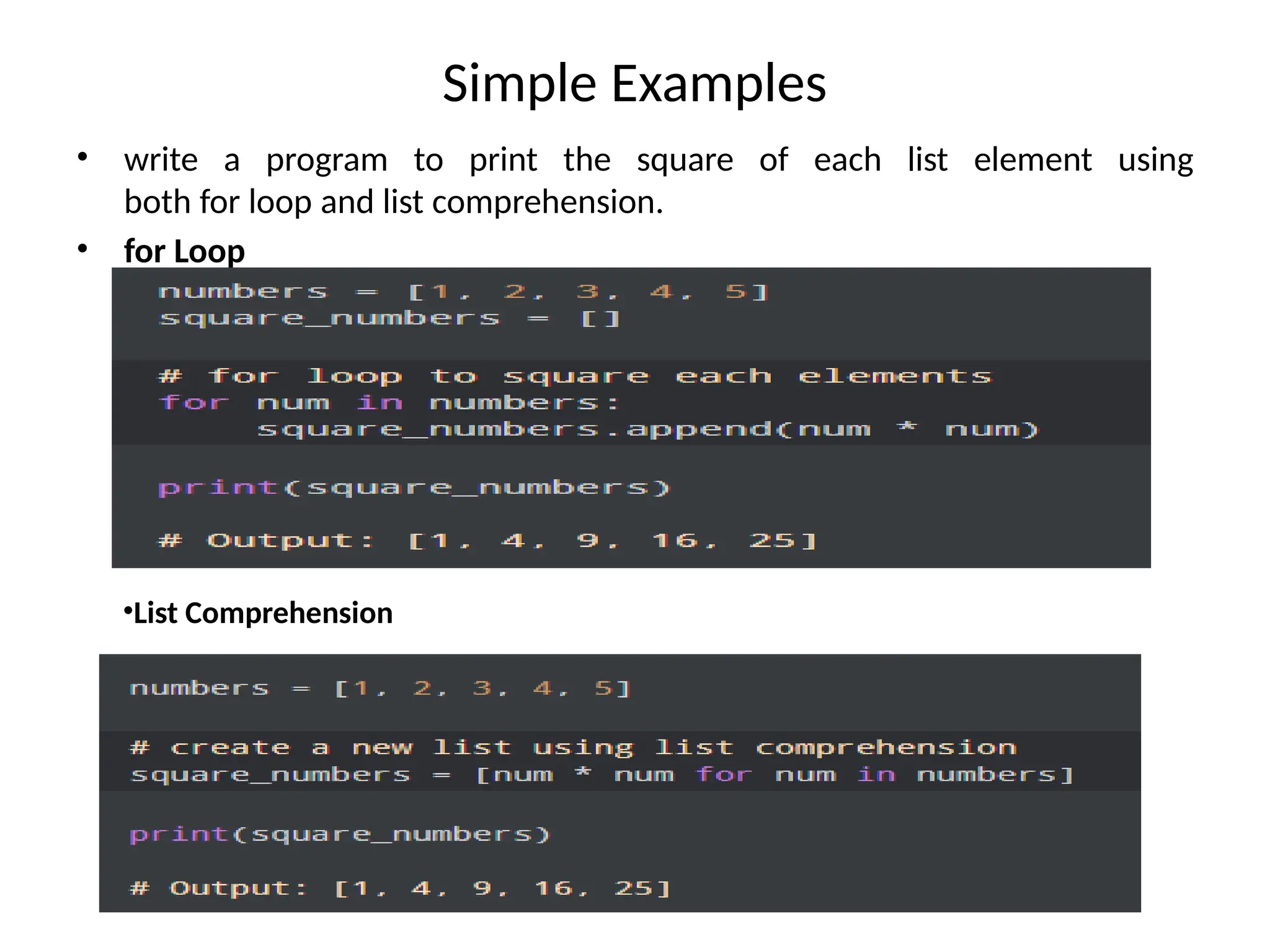
25.
Simple Examples
• writea program to print the square of each list element using
both for loop and list comprehension.
• for Loop
•List Comprehension
26.
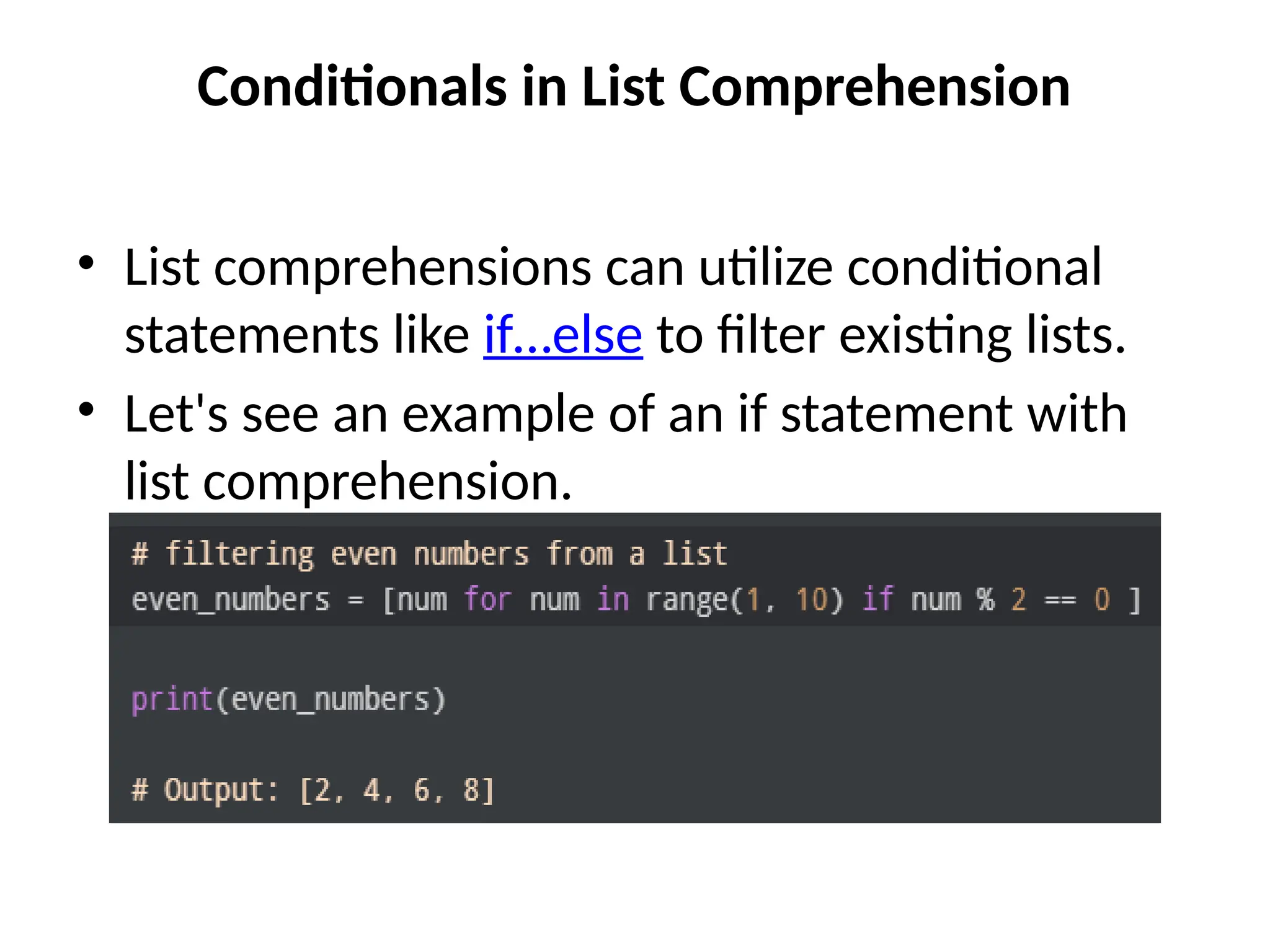
Conditionals in ListComprehension
• List comprehensions can utilize conditional
statements like if…else to filter existing lists.
• Let's see an example of an if statement with
list comprehension.
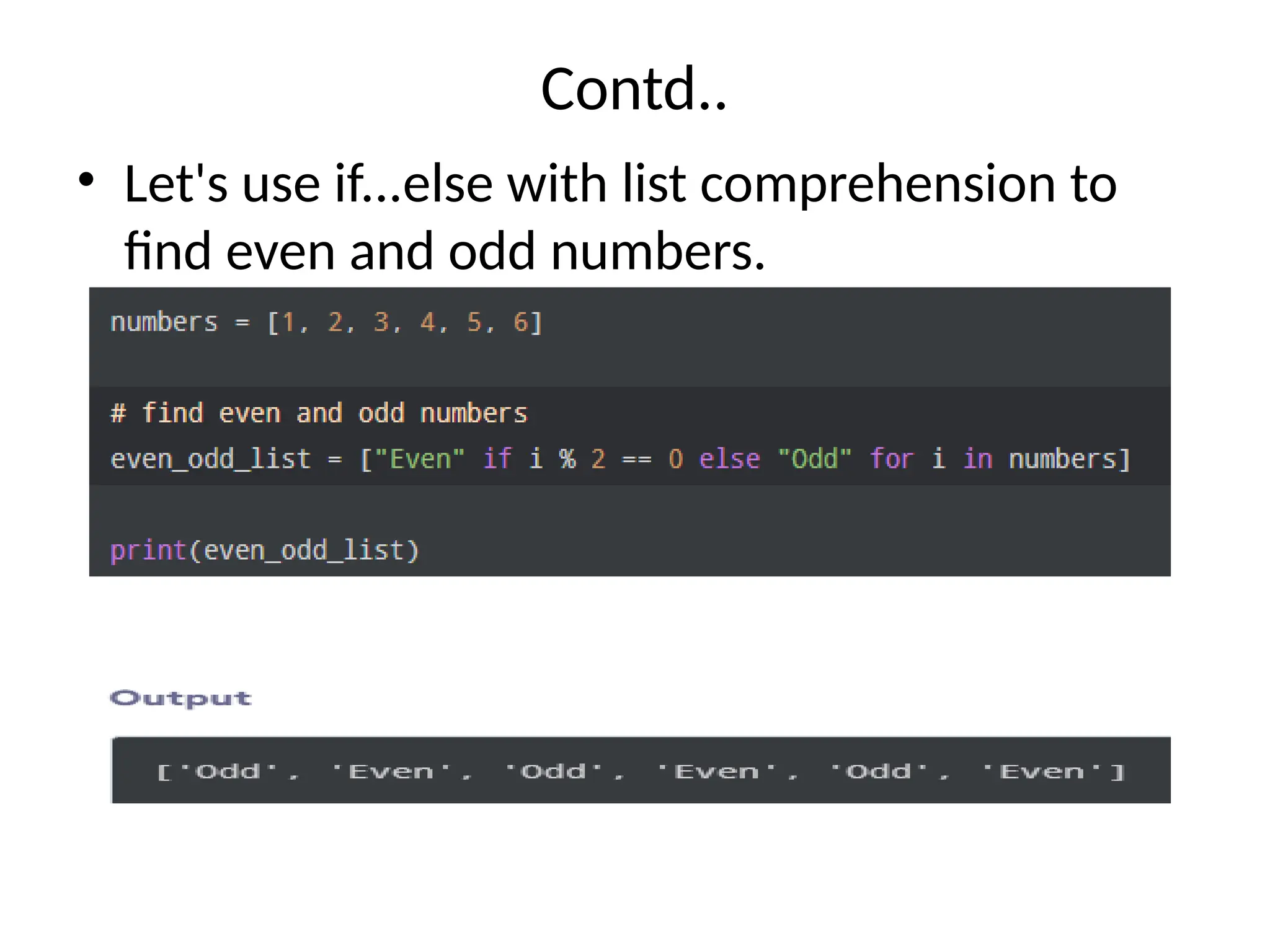
27.
Contd..
• Let's useif...else with list comprehension to
find even and odd numbers.
28.
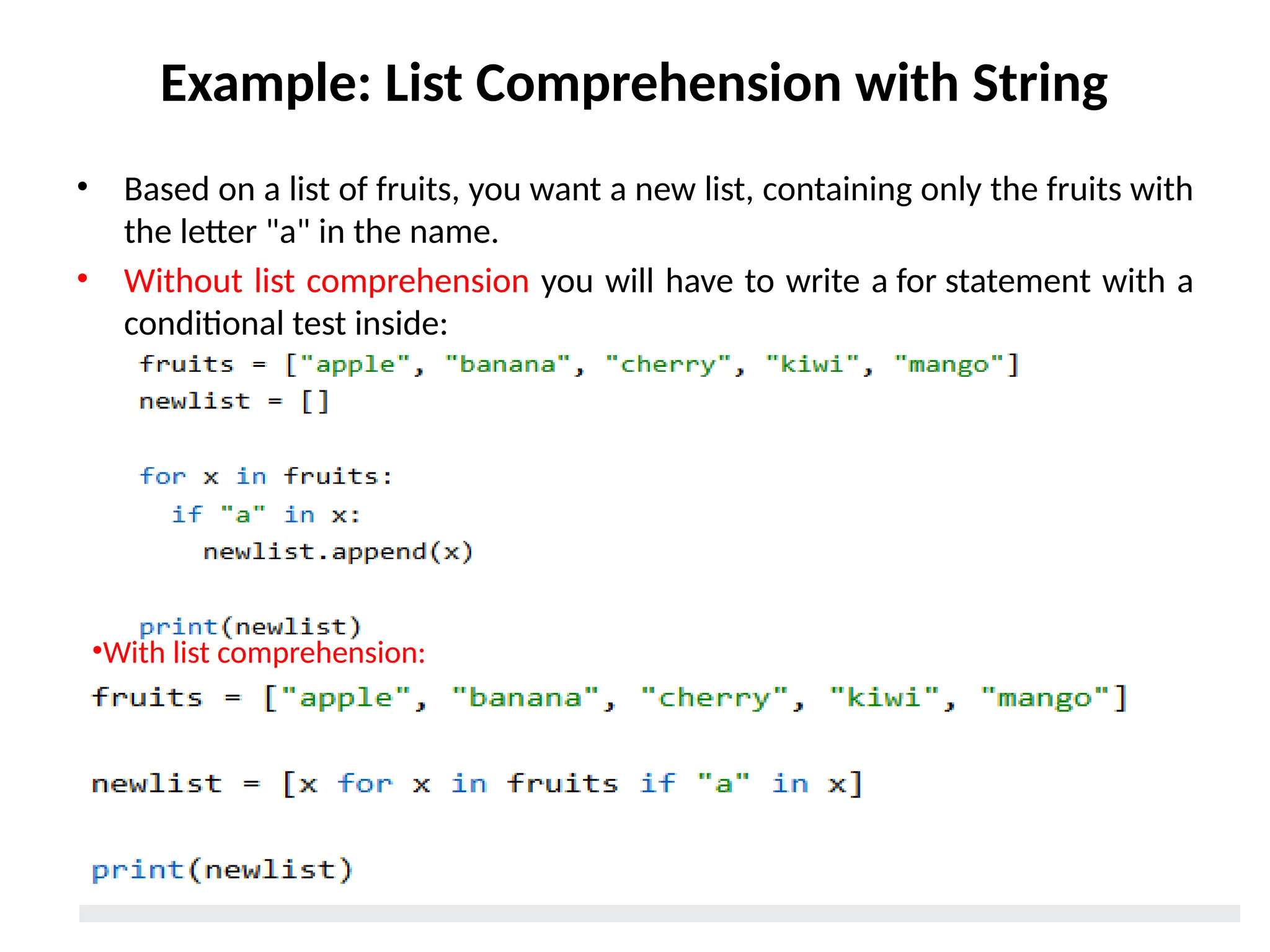
Example: List Comprehensionwith String
• Based on a list of fruits, you want a new list, containing only the fruits with
the letter "a" in the name.
• Without list comprehension you will have to write a for statement with a
conditional test inside:
•With list comprehension:
29.
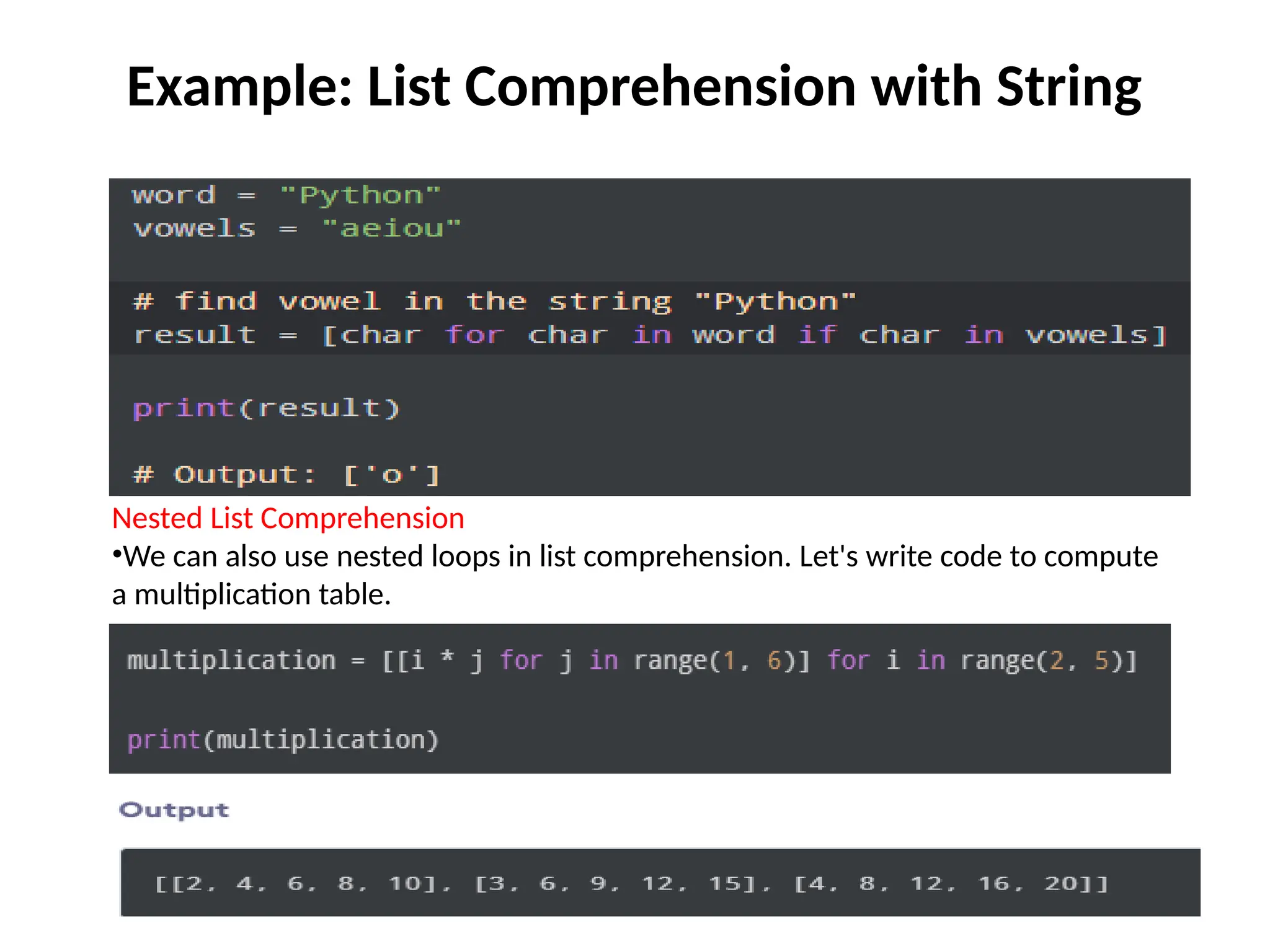
Example: List Comprehensionwith String
Nested List Comprehension
•We can also use nested loops in list comprehension. Let's write code to compute
a multiplication table.
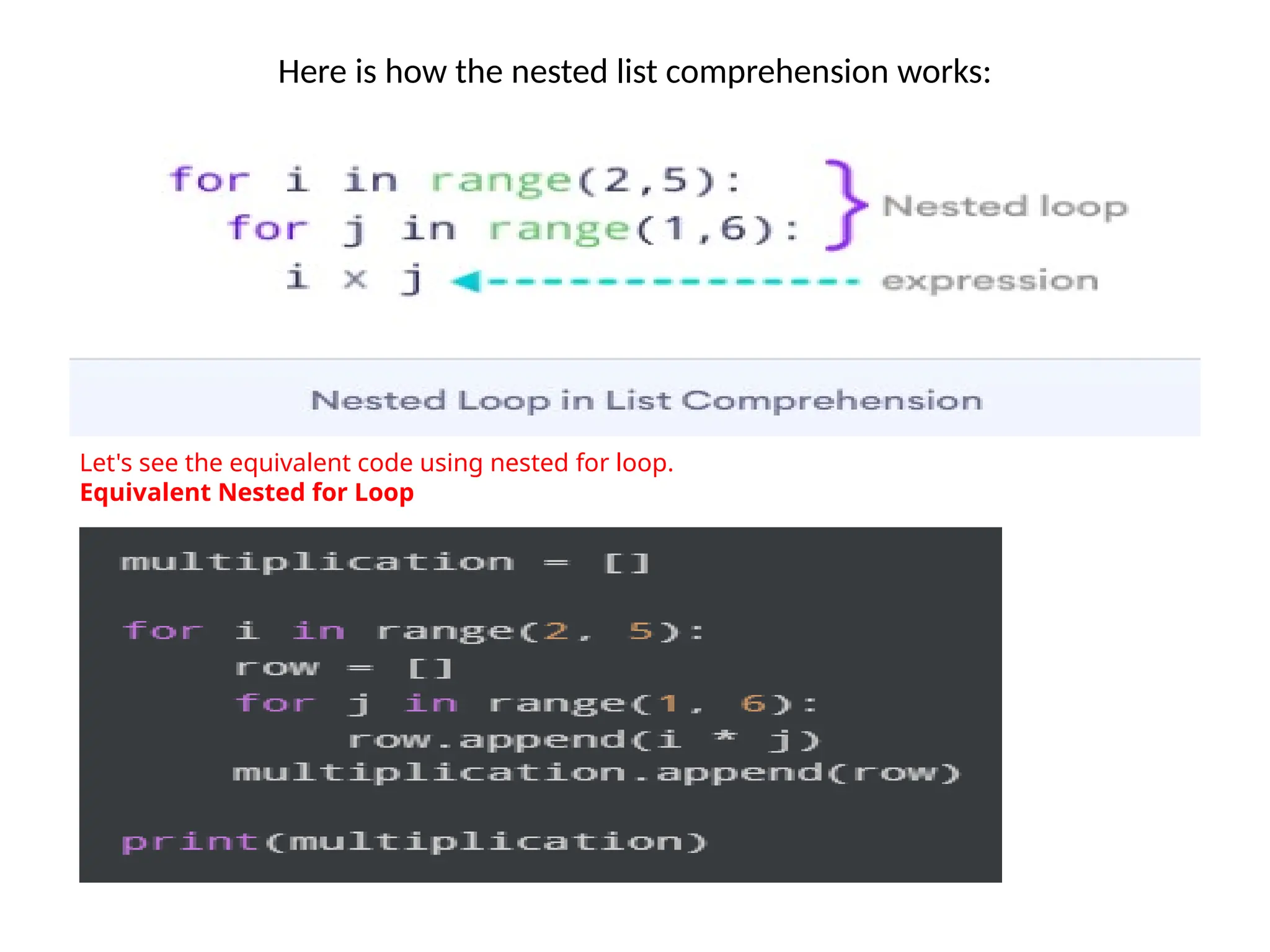
30.
Here is howthe nested list comprehension works:
Let's see the equivalent code using nested for loop.
Equivalent Nested for Loop
31.
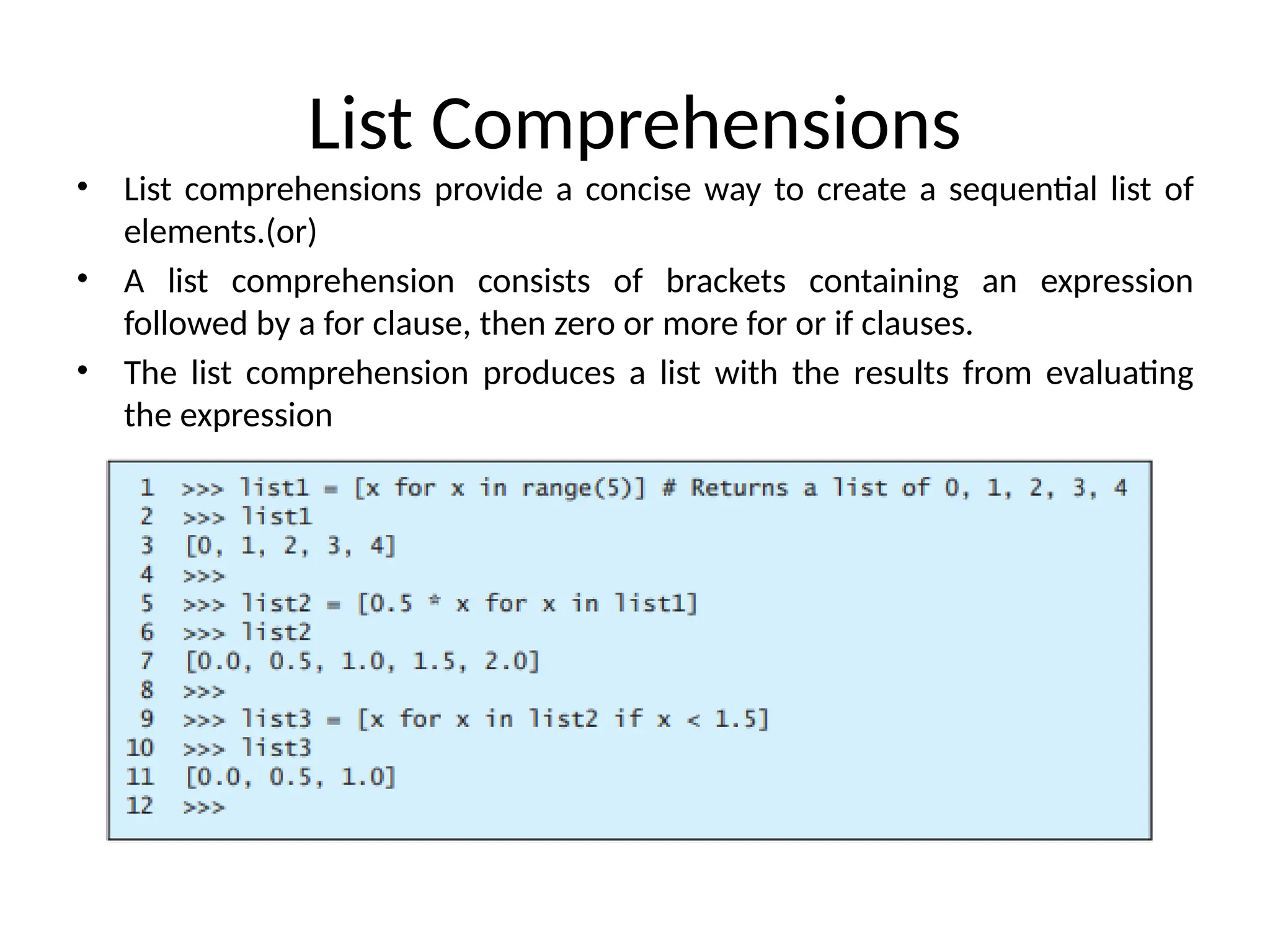
List Comprehensions
• Listcomprehensions provide a concise way to create a sequential list of
elements.(or)
• A list comprehension consists of brackets containing an expression
followed by a for clause, then zero or more for or if clauses.
• The list comprehension produces a list with the results from evaluating
the expression
32.
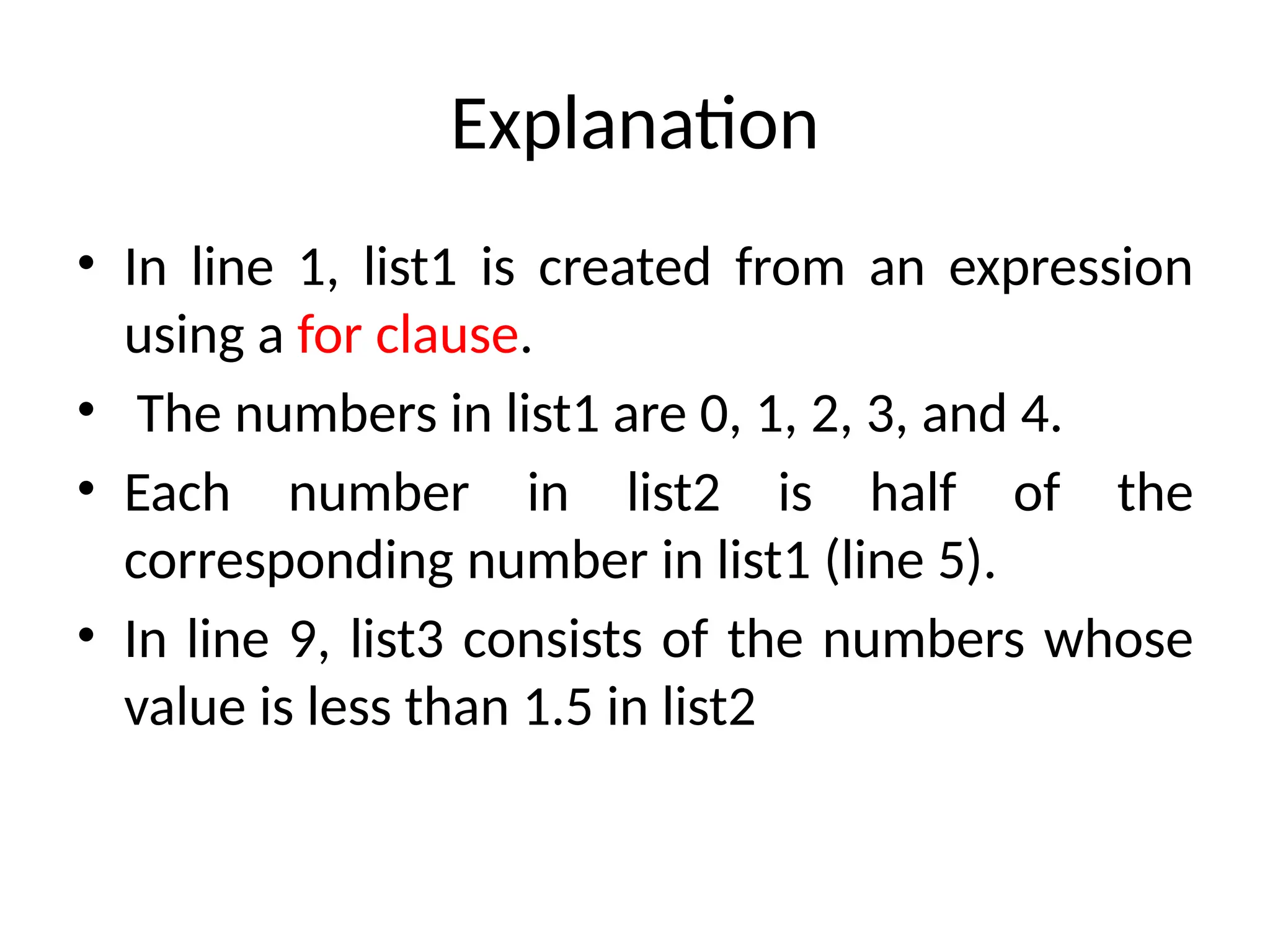
Explanation
• In line1, list1 is created from an expression
using a for clause.
• The numbers in list1 are 0, 1, 2, 3, and 4.
• Each number in list2 is half of the
corresponding number in list1 (line 5).
• In line 9, list3 consists of the numbers whose
value is less than 1.5 in list2
33.
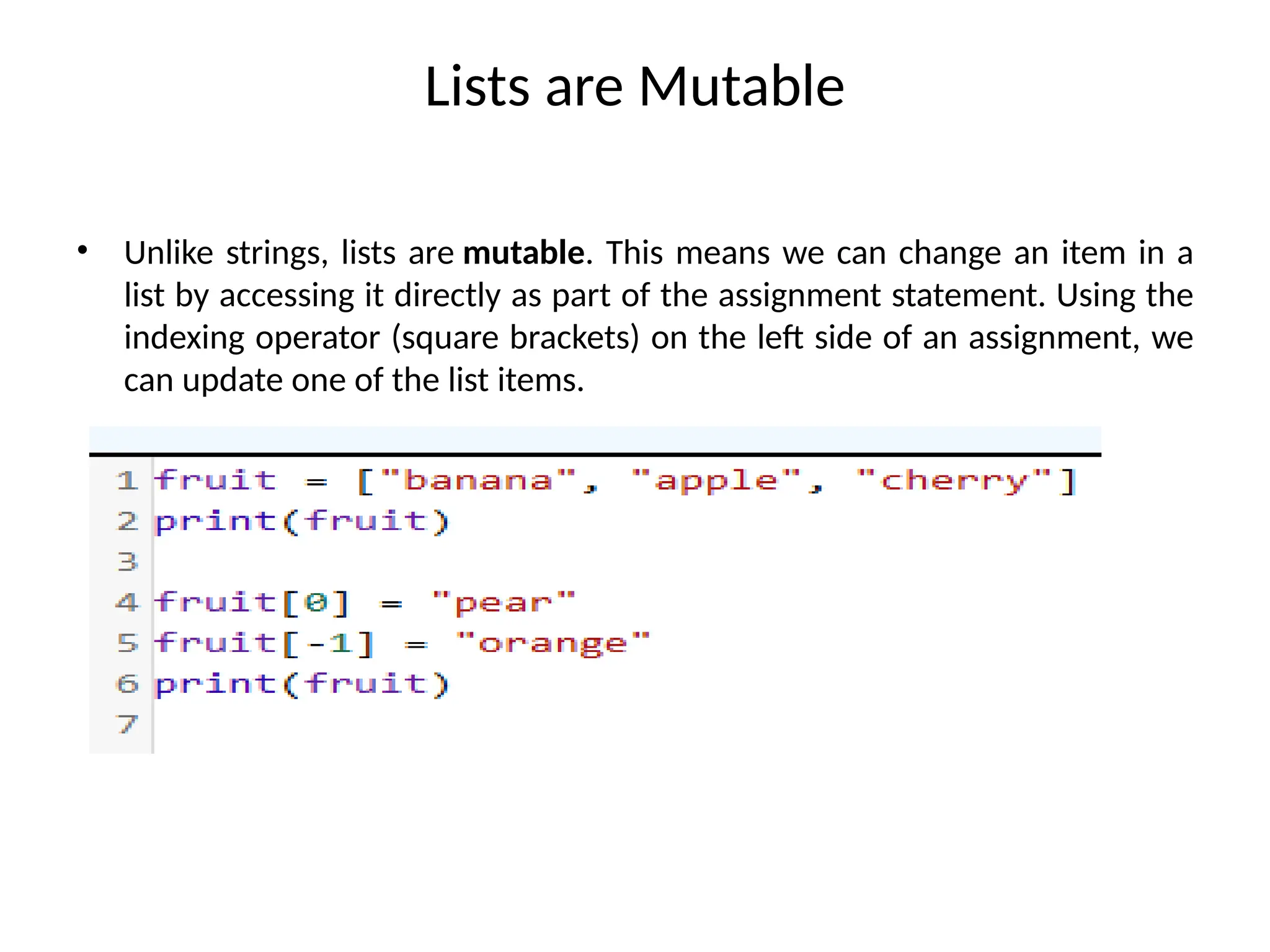
Lists are Mutable
•Unlike strings, lists are mutable. This means we can change an item in a
list by accessing it directly as part of the assignment statement. Using the
indexing operator (square brackets) on the left side of an assignment, we
can update one of the list items.
34.
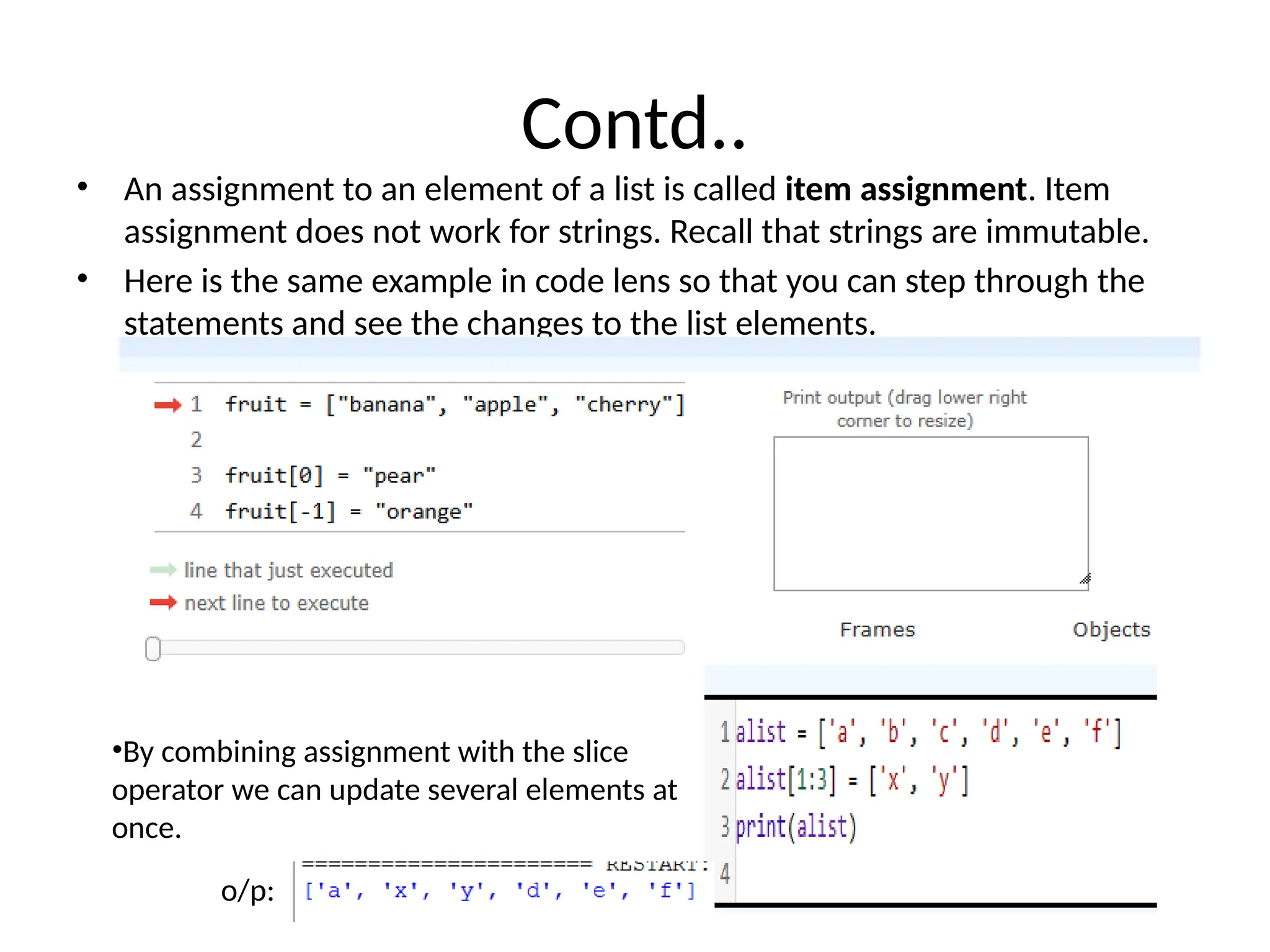
Contd..
• An assignmentto an element of a list is called item assignment. Item
assignment does not work for strings. Recall that strings are immutable.
• Here is the same example in code lens so that you can step through the
statements and see the changes to the list elements.
•By combining assignment with the slice
operator we can update several elements at
once.
o/p:
35.
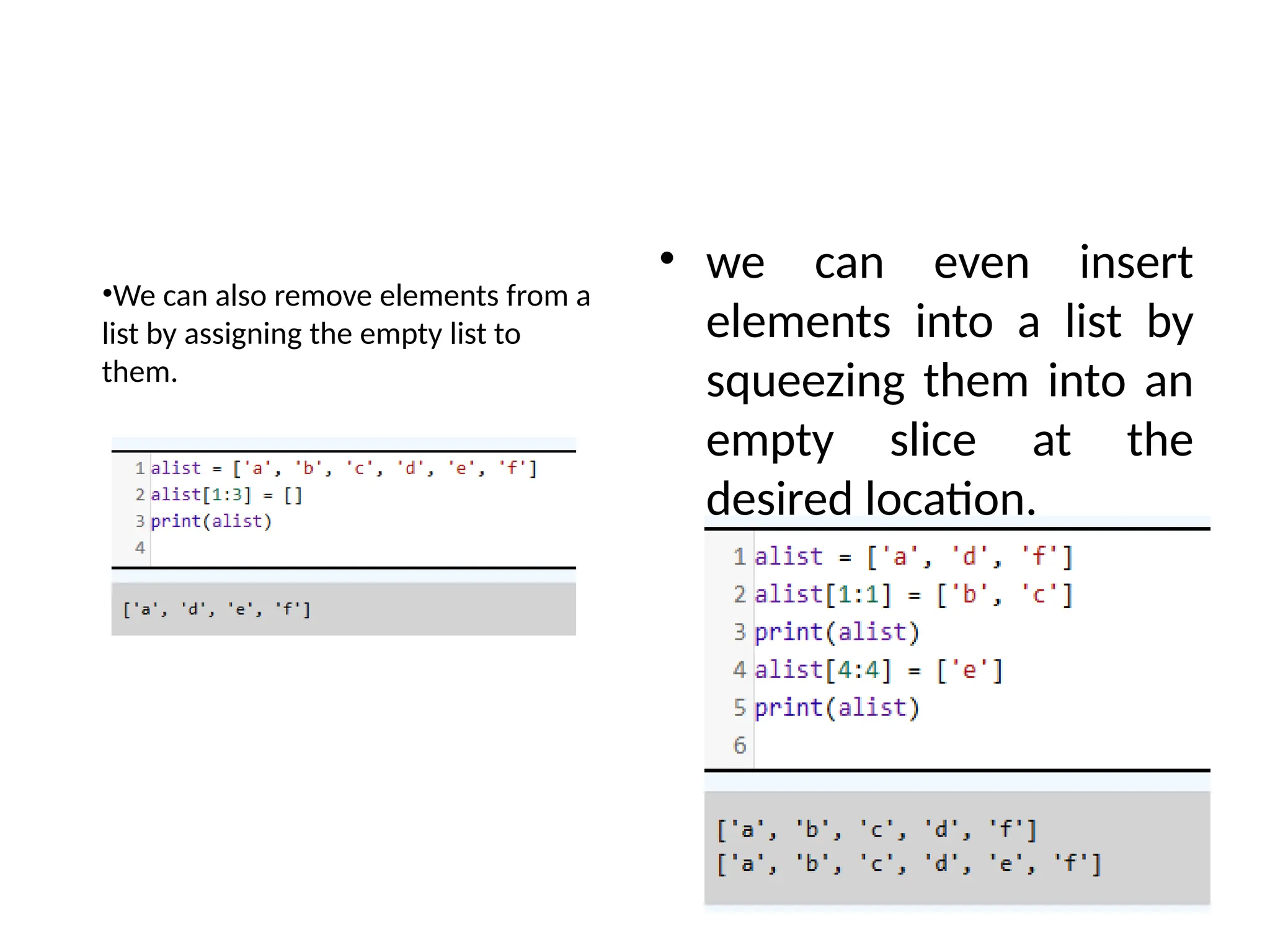
• we caneven insert
elements into a list by
squeezing them into an
empty slice at the
desired location.
•We can also remove elements from a
list by assigning the empty list to
them.
36.
List Deletion
• Usingslices to delete list elements can be
awkward and therefore error-prone.
• Python provides an alternative that is more
readable. The del statement removes an
element from a list by using its position.
['one', 'three']
['a', 'f']
37.
The List operators
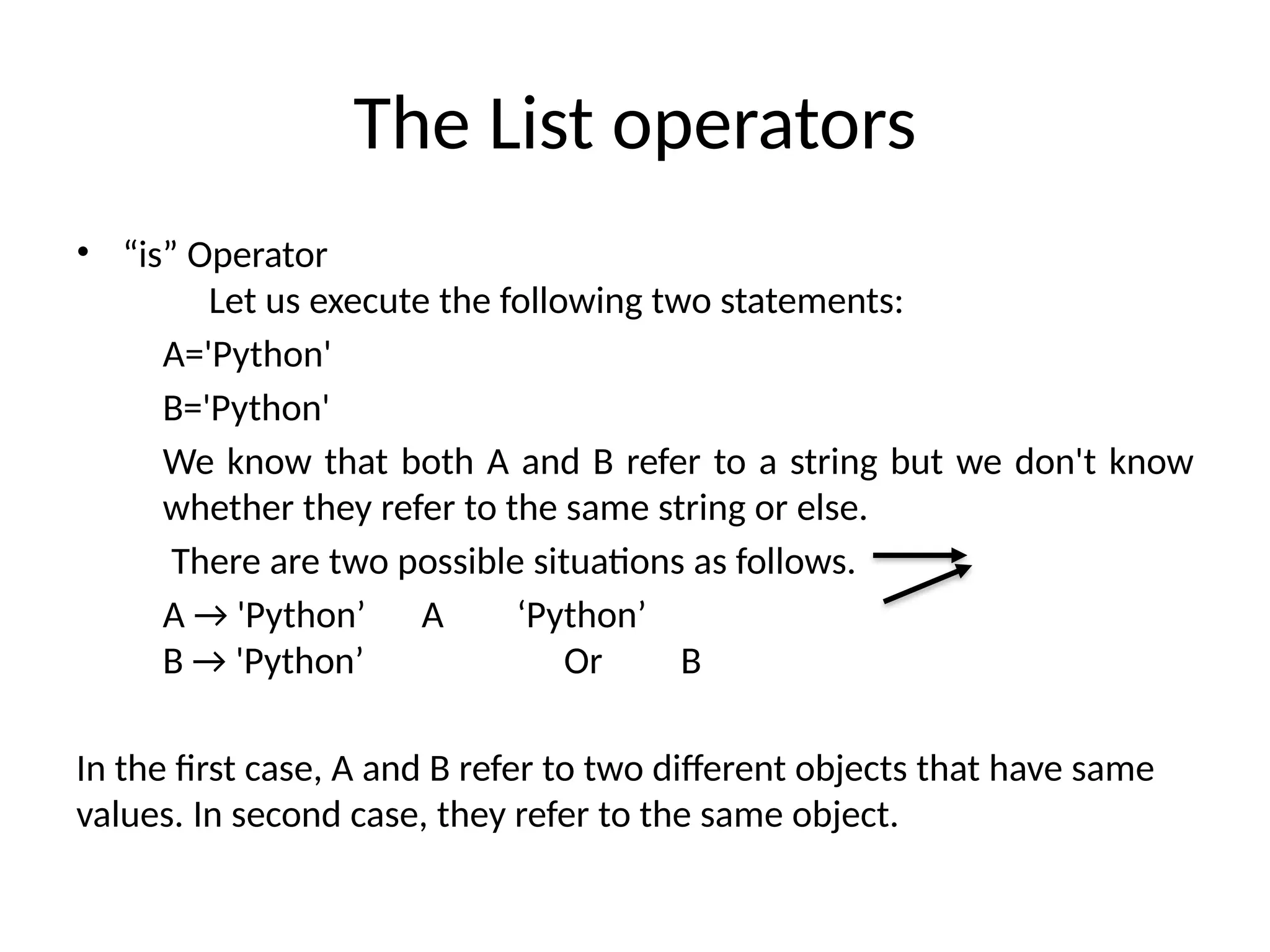
•“is” Operator
Let us execute the following two statements:
A='Python'
B='Python'
We know that both A and B refer to a string but we don't know
whether they refer to the same string or else.
There are two possible situations as follows.
A → 'Python’ A ‘Python’
B → 'Python’ Or B
In the first case, A and B refer to two different objects that have same
values. In second case, they refer to the same object.
38.
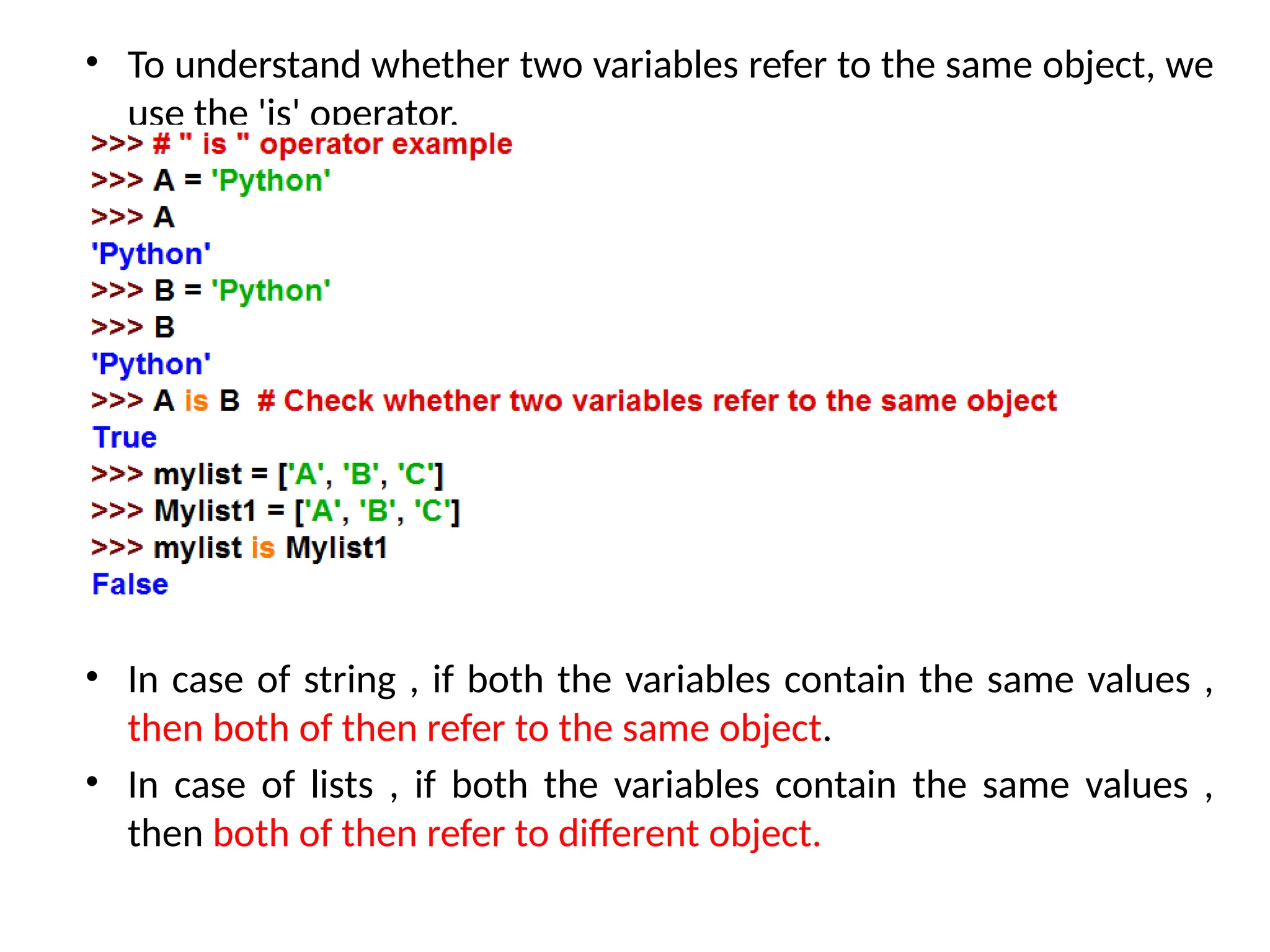
• To understandwhether two variables refer to the same object, we
use the 'is' operator.
• In case of string , if both the variables contain the same values ,
then both of then refer to the same object.
• In case of lists , if both the variables contain the same values ,
then both of then refer to different object.
39.
The List operators
•The del Operator
del list_name[a : b] :- This method deletes all the elements
in range starting from index ‘a’ till ‘b’ mentioned in
arguments.
40.
Mutability – Listaliasing and list cloning
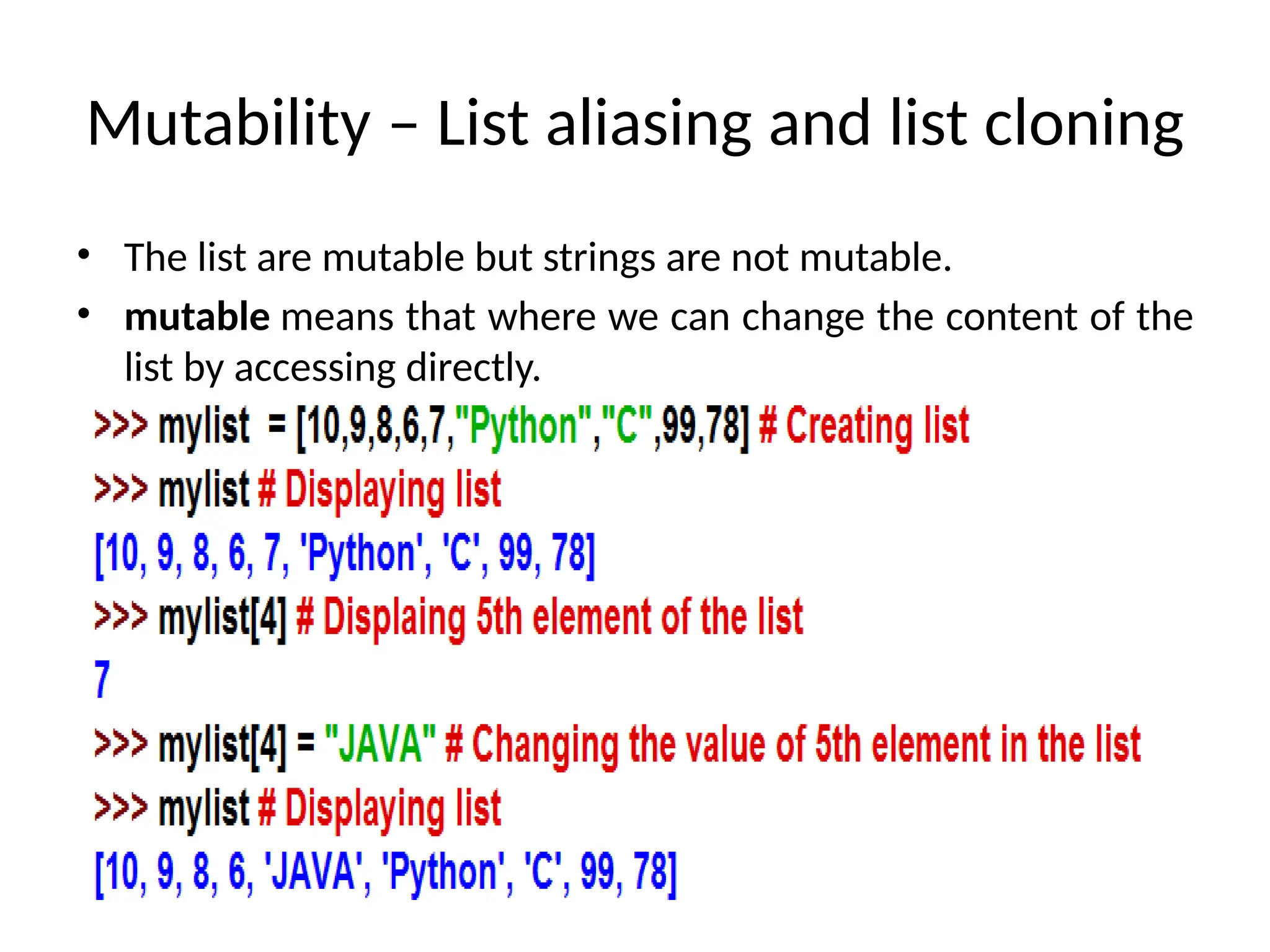
• The list are mutable but strings are not mutable.
• mutable means that where we can change the content of the
list by accessing directly.
41.
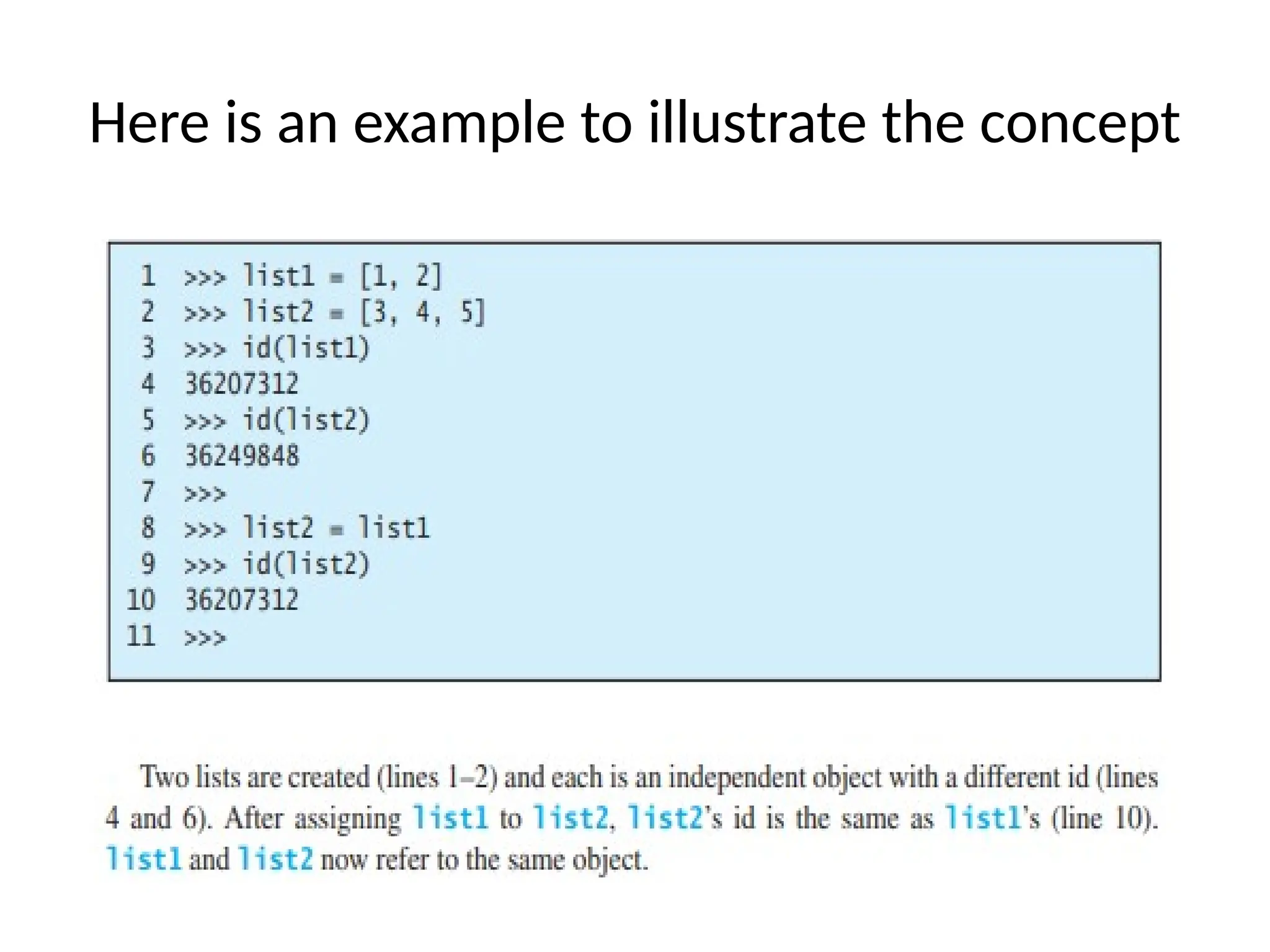
List Aliasing
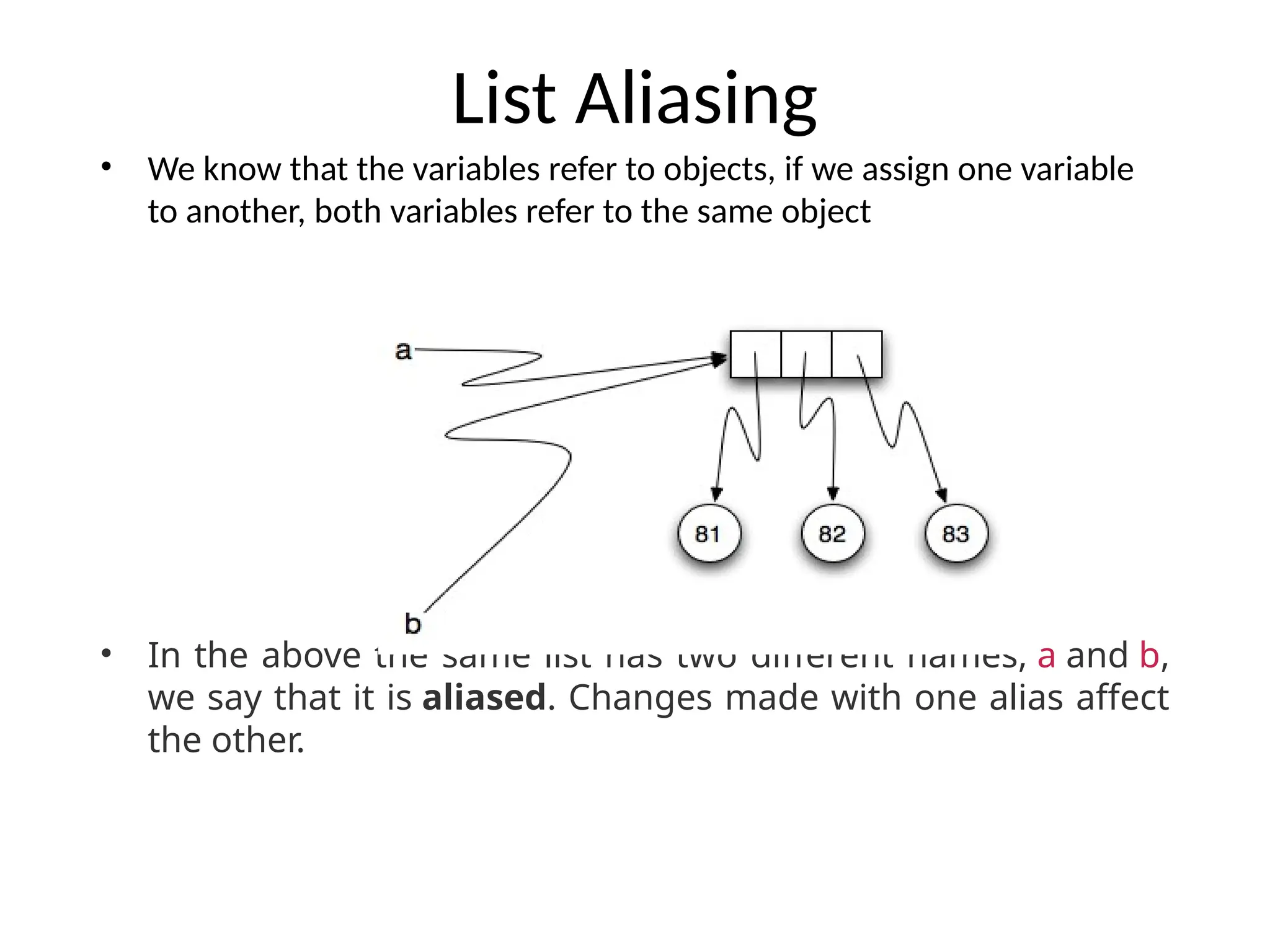
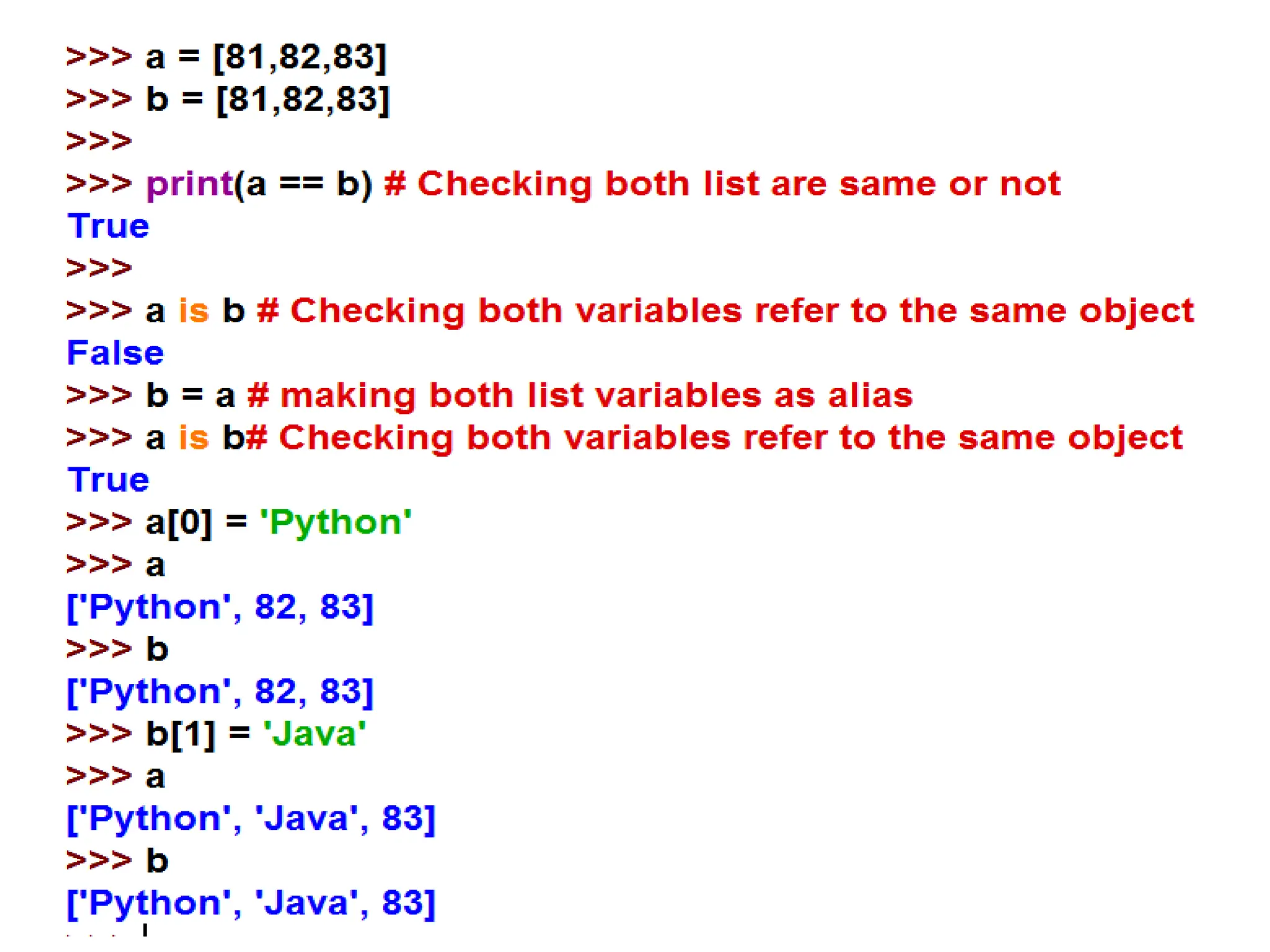
• Weknow that the variables refer to objects, if we assign one variable
to another, both variables refer to the same object
• In the above the same list has two different names, a and b,
we say that it is aliased. Changes made with one alias affect
the other.
43.
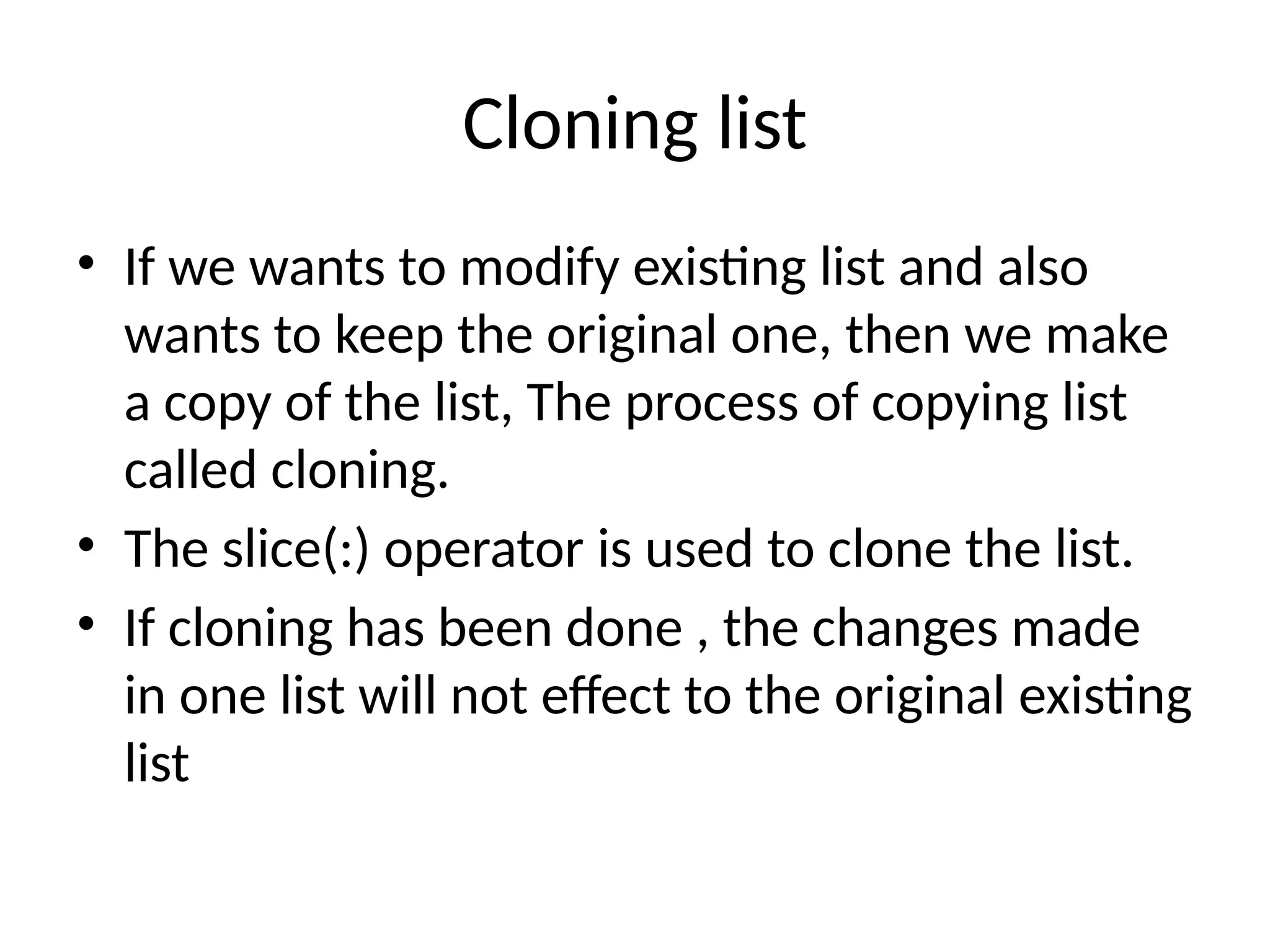
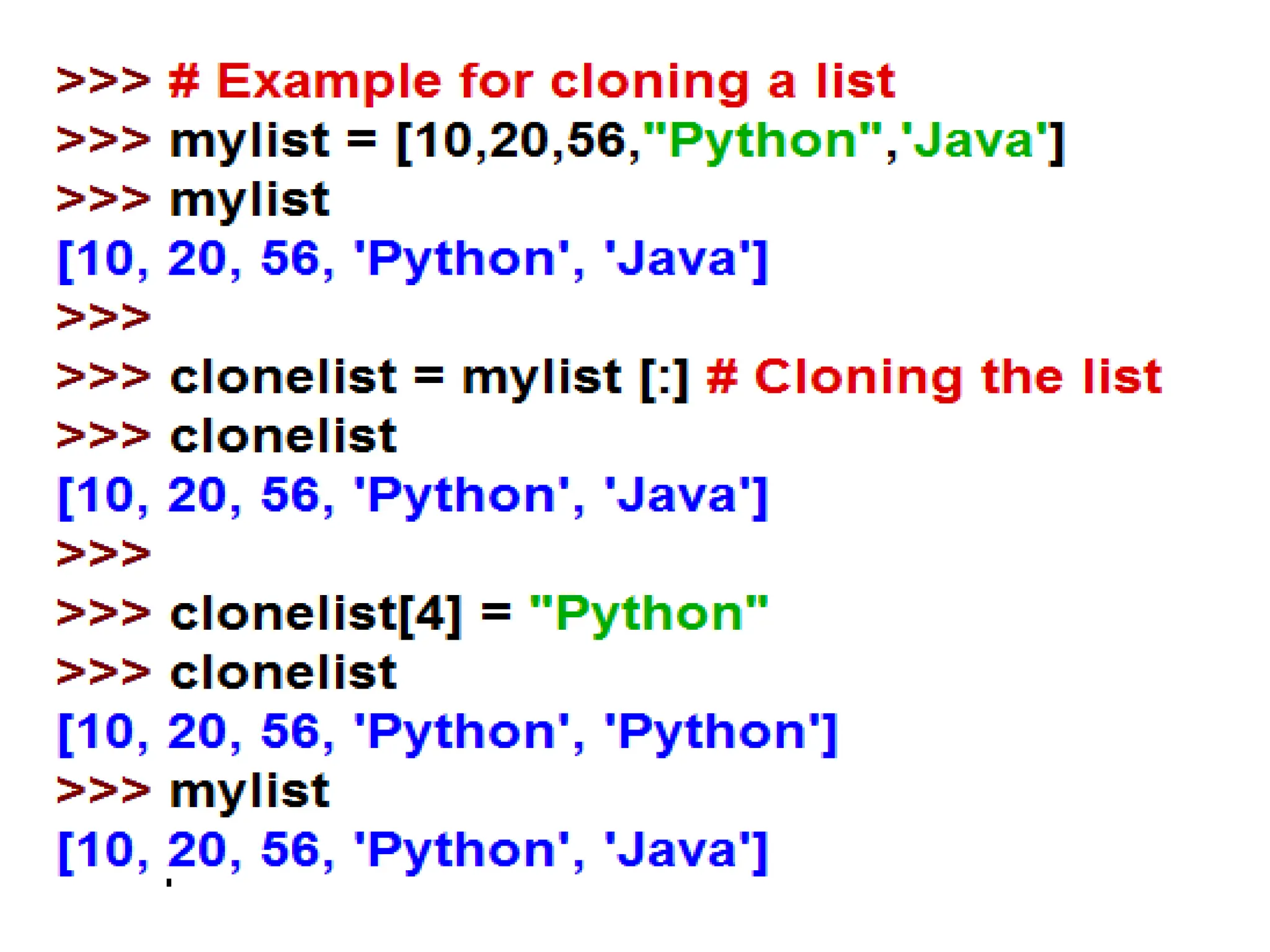
Cloning list
• Ifwe wants to modify existing list and also
wants to keep the original one, then we make
a copy of the list, The process of copying list
called cloning.
• The slice(:) operator is used to clone the list.
• If cloning has been done , the changes made
in one list will not effect to the original existing
list
45.
List Comprehensions
• Thelist comprehension is used to create a new list from
existing sequences.
• It is a tool for transforming a given list into another list.
• List comprehensions provide a concise way to create lists.
• List Comprehension is defined as an elegant way to define,
create a list in Python and consists of brackets that contains
an expression followed by for clause.
Syntax :
[ expression for item in list if conditional ]
• It is efficient in both computationally and in terms of
coding space and time.
47.
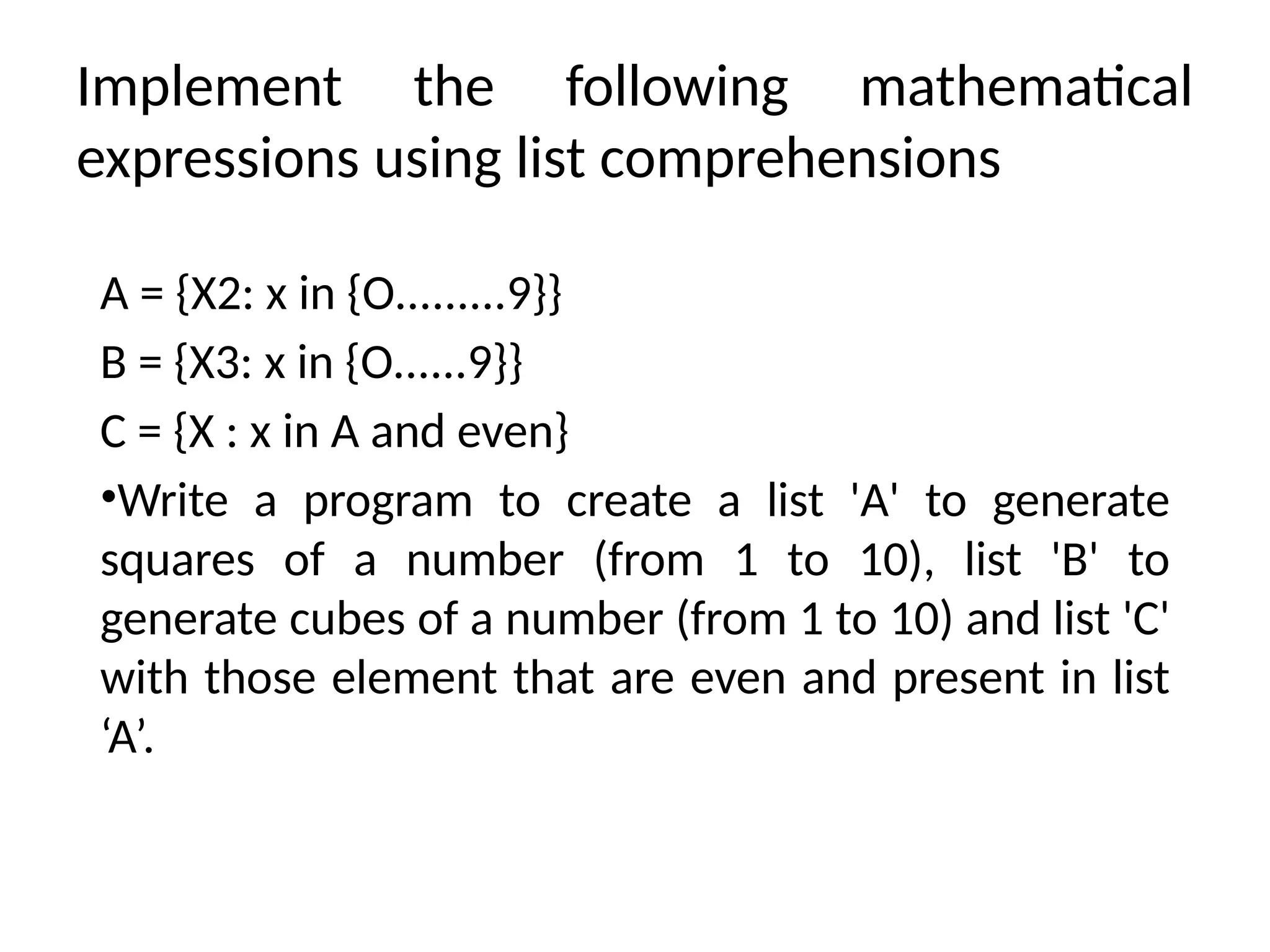
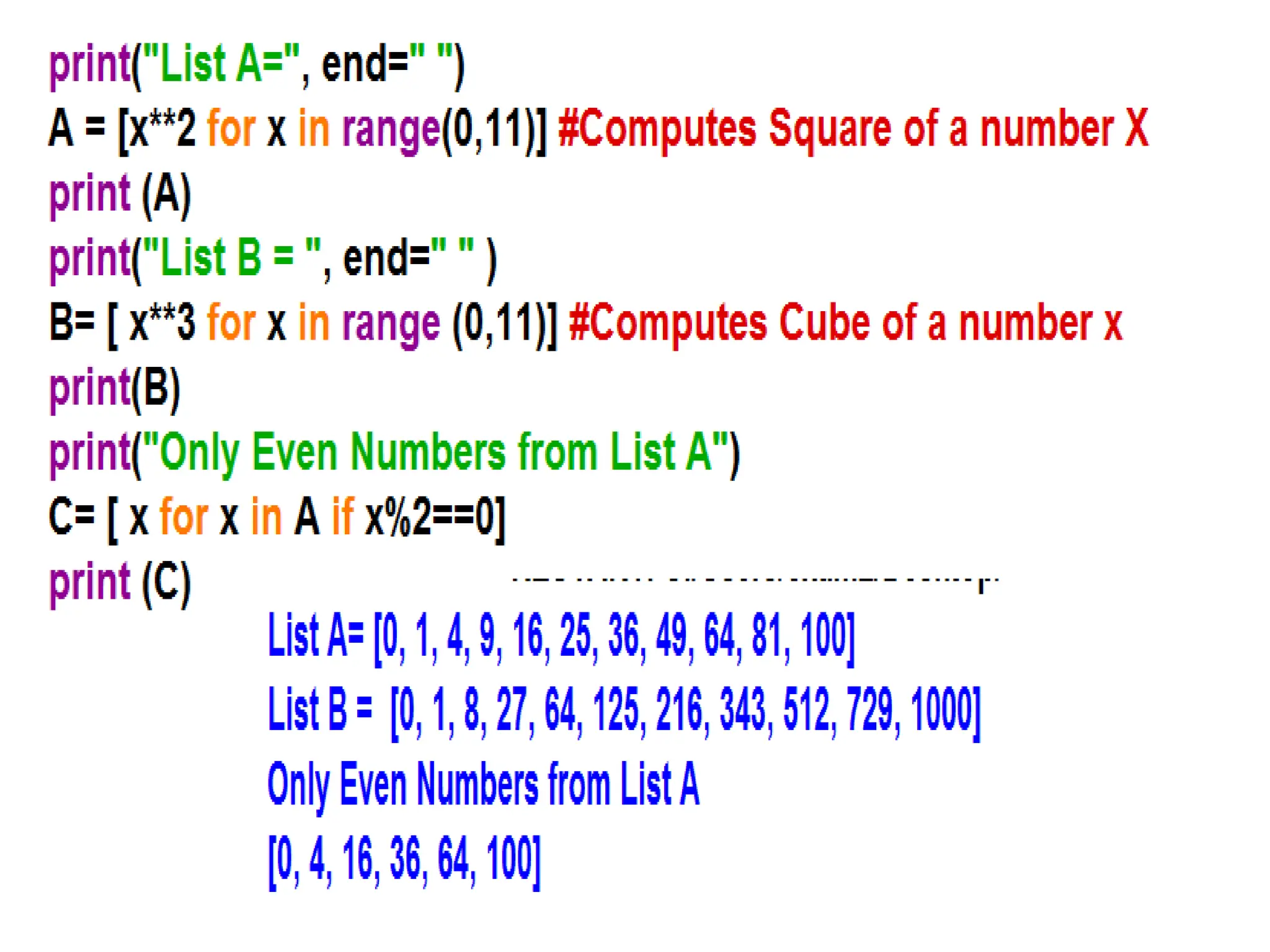
Implement the followingmathematical
expressions using list comprehensions
A = {X2: x in {O.........9}}
B = {X3: x in {O......9}}
C = {X : x in A and even}
•Write a program to create a list 'A' to generate
squares of a number (from 1 to 10), list 'B' to
generate cubes of a number (from 1 to 10) and list 'C'
with those element that are even and present in list
‘A’.
49.
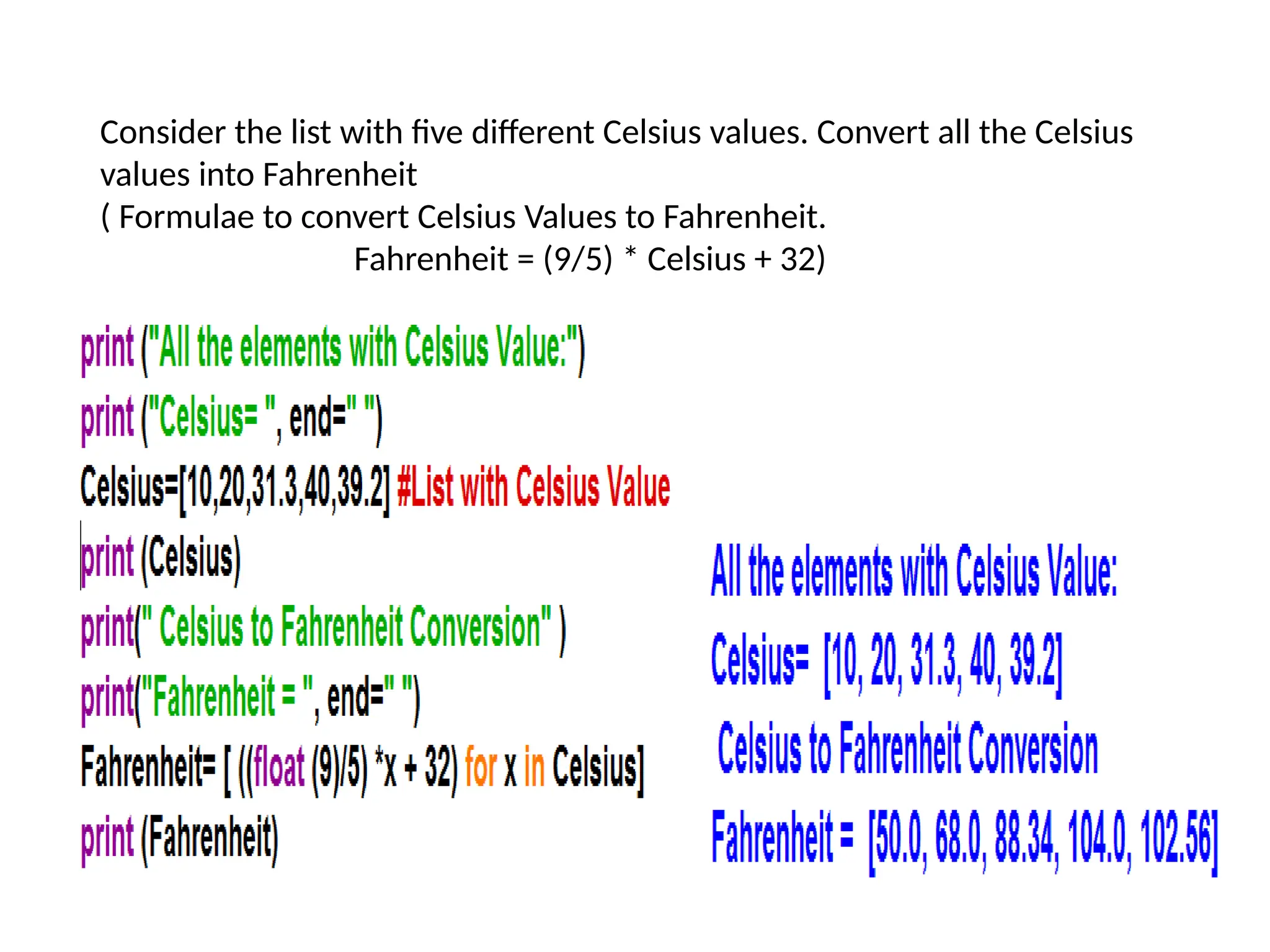
Consider the listwith five different Celsius values. Convert all the Celsius
values into Fahrenheit
( Formulae to convert Celsius Values to Fahrenheit.
Fahrenheit = (9/5) * Celsius + 32)
50.
Consider the listwith mixed type of elements, such as L1 = [1,
'X', 4,5.6, ‘z', 9, 'a', 0, 41] . Create another list using list
comprehension which consists of only the integer's present in
LI.
51.
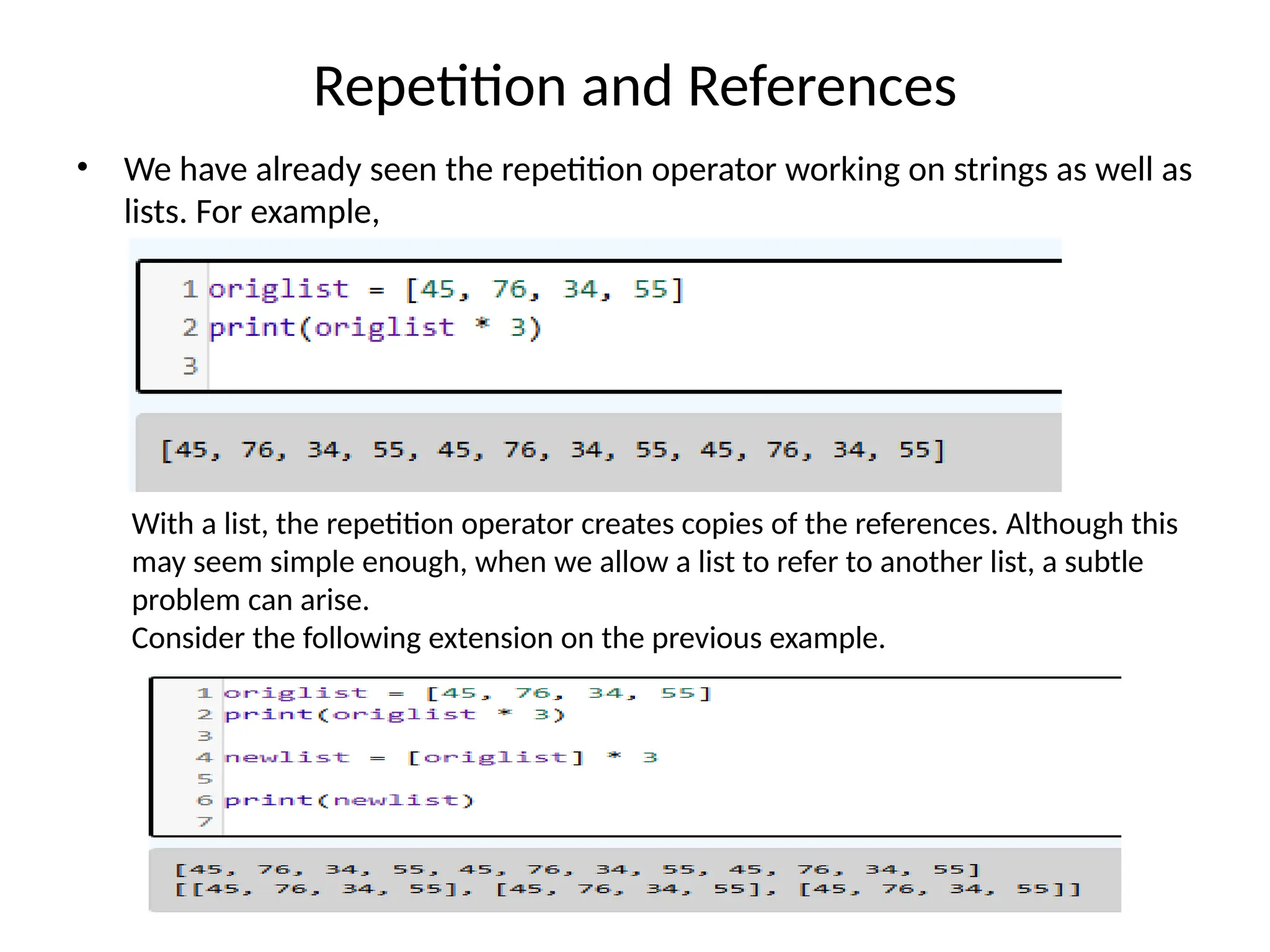
Repetition and References
•We have already seen the repetition operator working on strings as well as
lists. For example,
With a list, the repetition operator creates copies of the references. Although this
may seem simple enough, when we allow a list to refer to another list, a subtle
problem can arise.
Consider the following extension on the previous example.
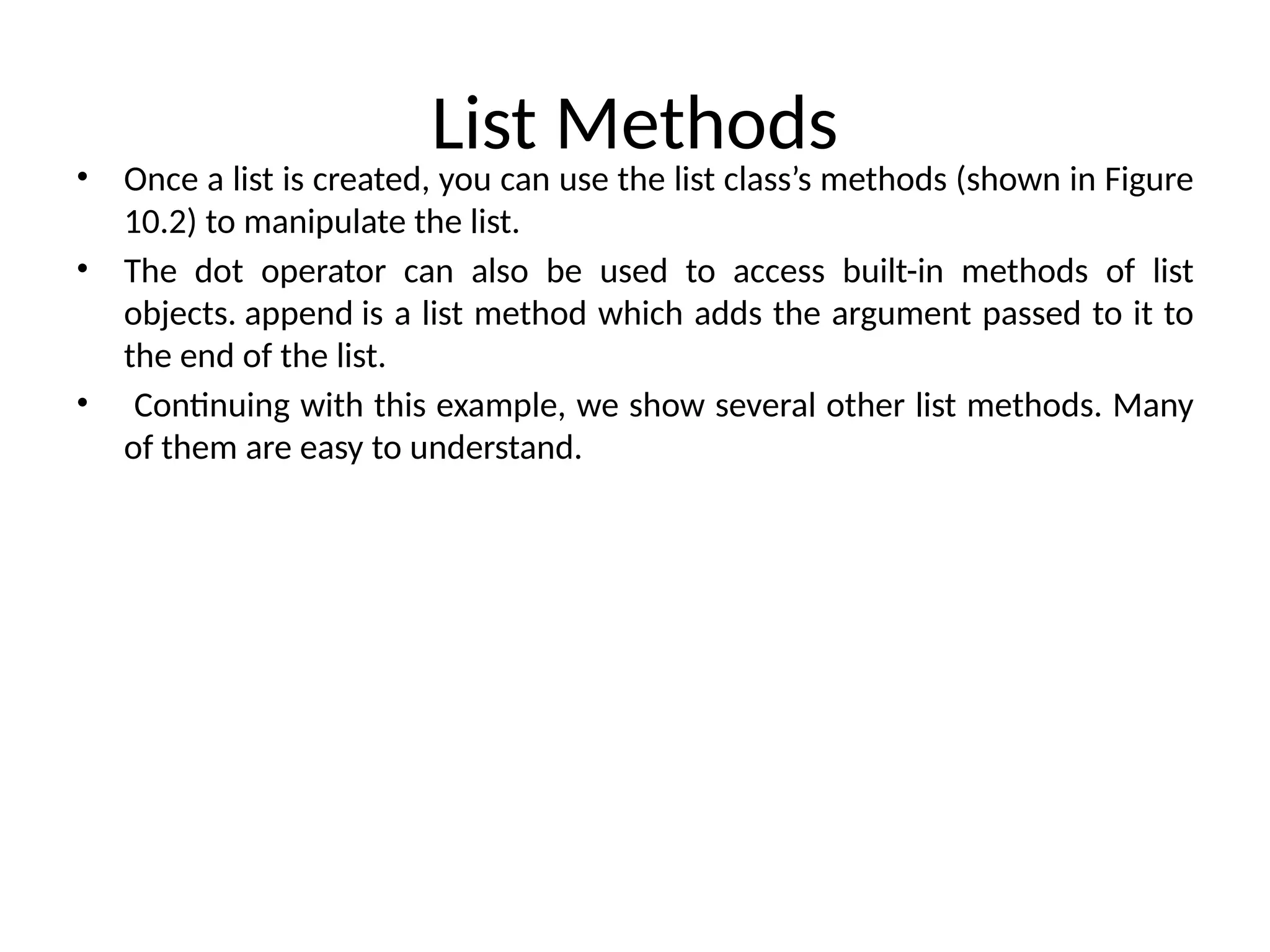
List Methods
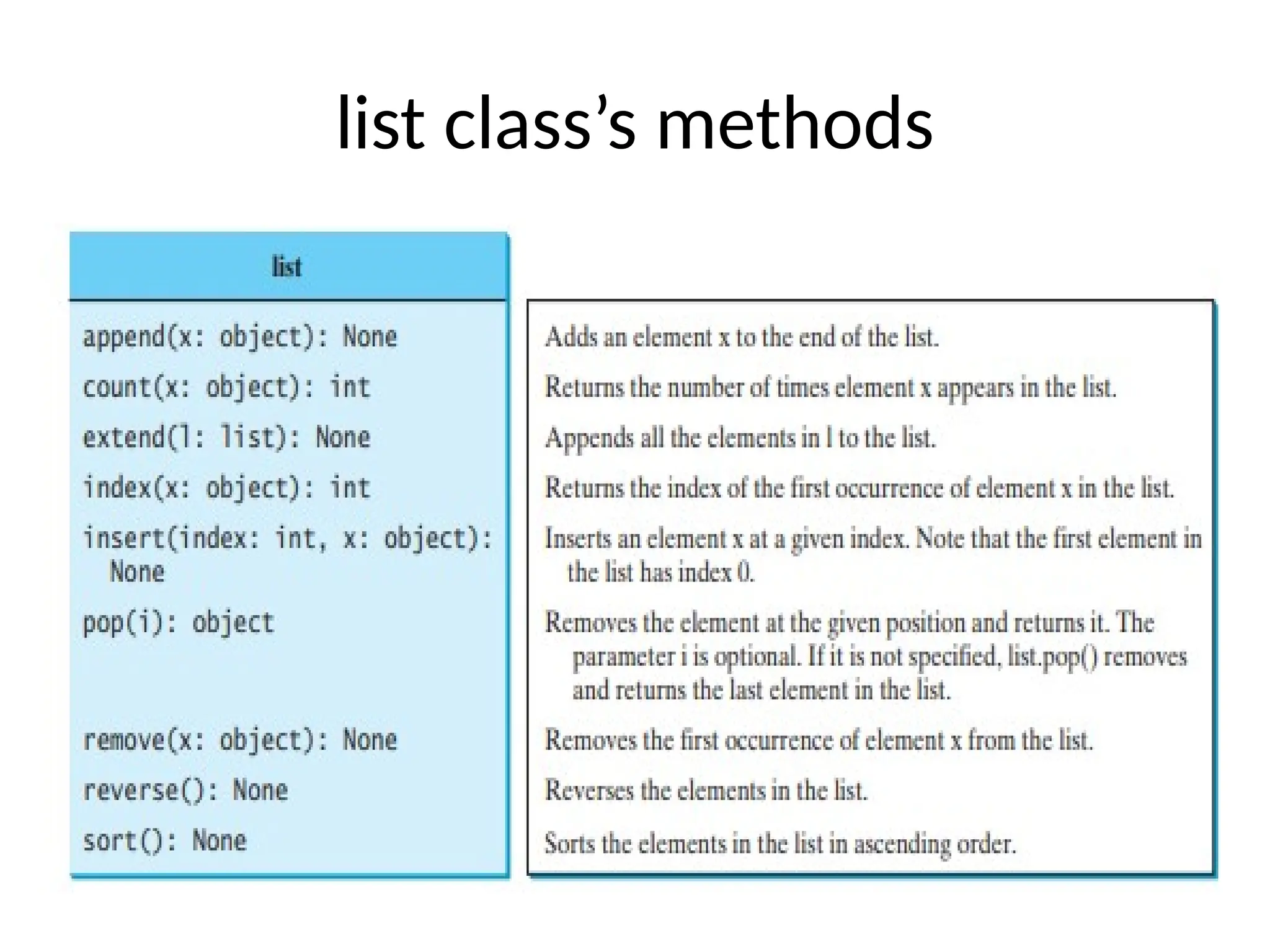
• Oncea list is created, you can use the list class’s methods (shown in Figure
10.2) to manipulate the list.
• The dot operator can also be used to access built-in methods of list
objects. append is a list method which adds the argument passed to it to
the end of the list.
• Continuing with this example, we show several other list methods. Many
of them are easy to understand.
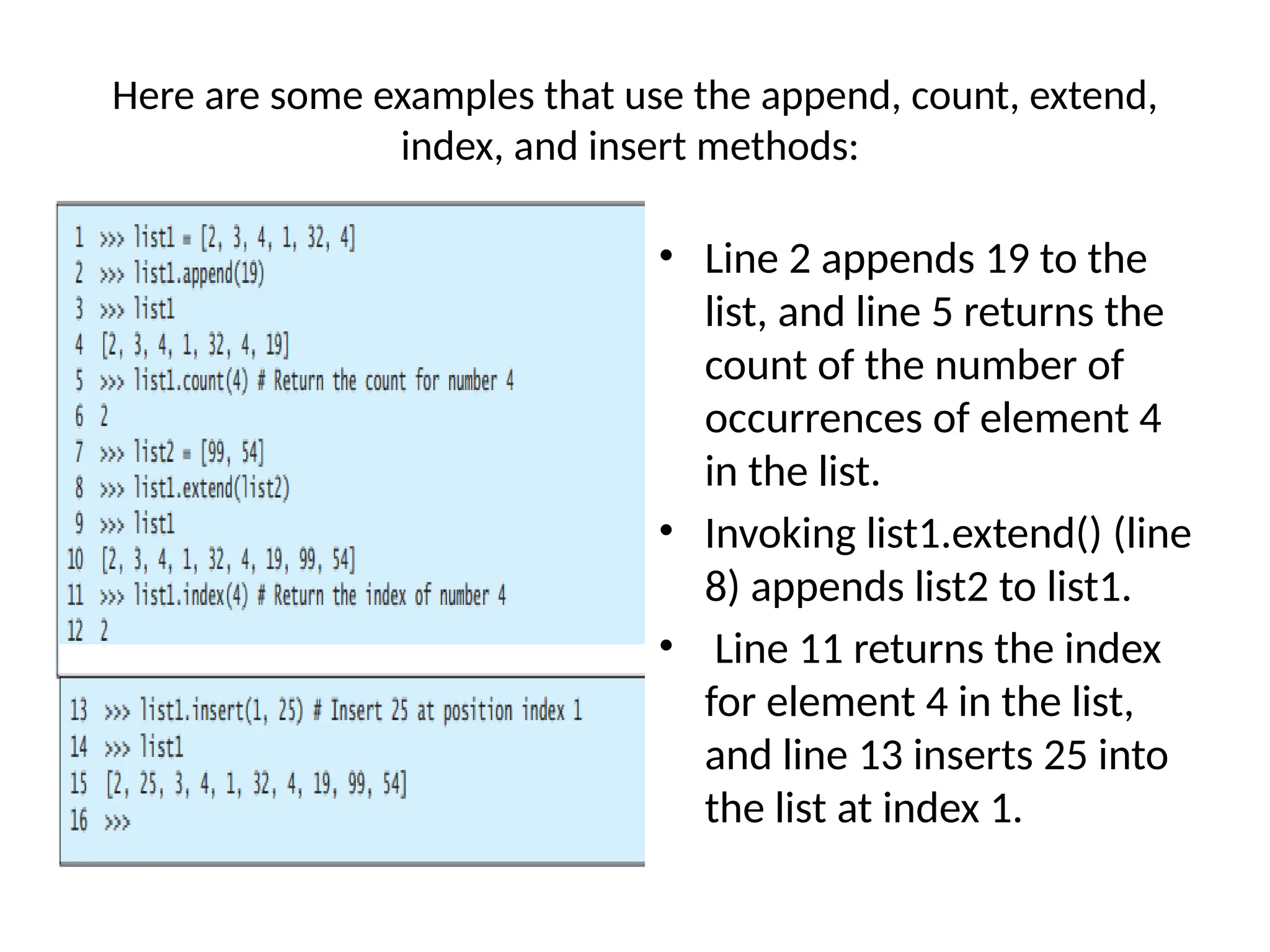
Here are someexamples that use the append, count, extend,
index, and insert methods:
• Line 2 appends 19 to the
list, and line 5 returns the
count of the number of
occurrences of element 4
in the list.
• Invoking list1.extend() (line
8) appends list2 to list1.
• Line 11 returns the index
for element 4 in the list,
and line 13 inserts 25 into
the list at index 1.
56.
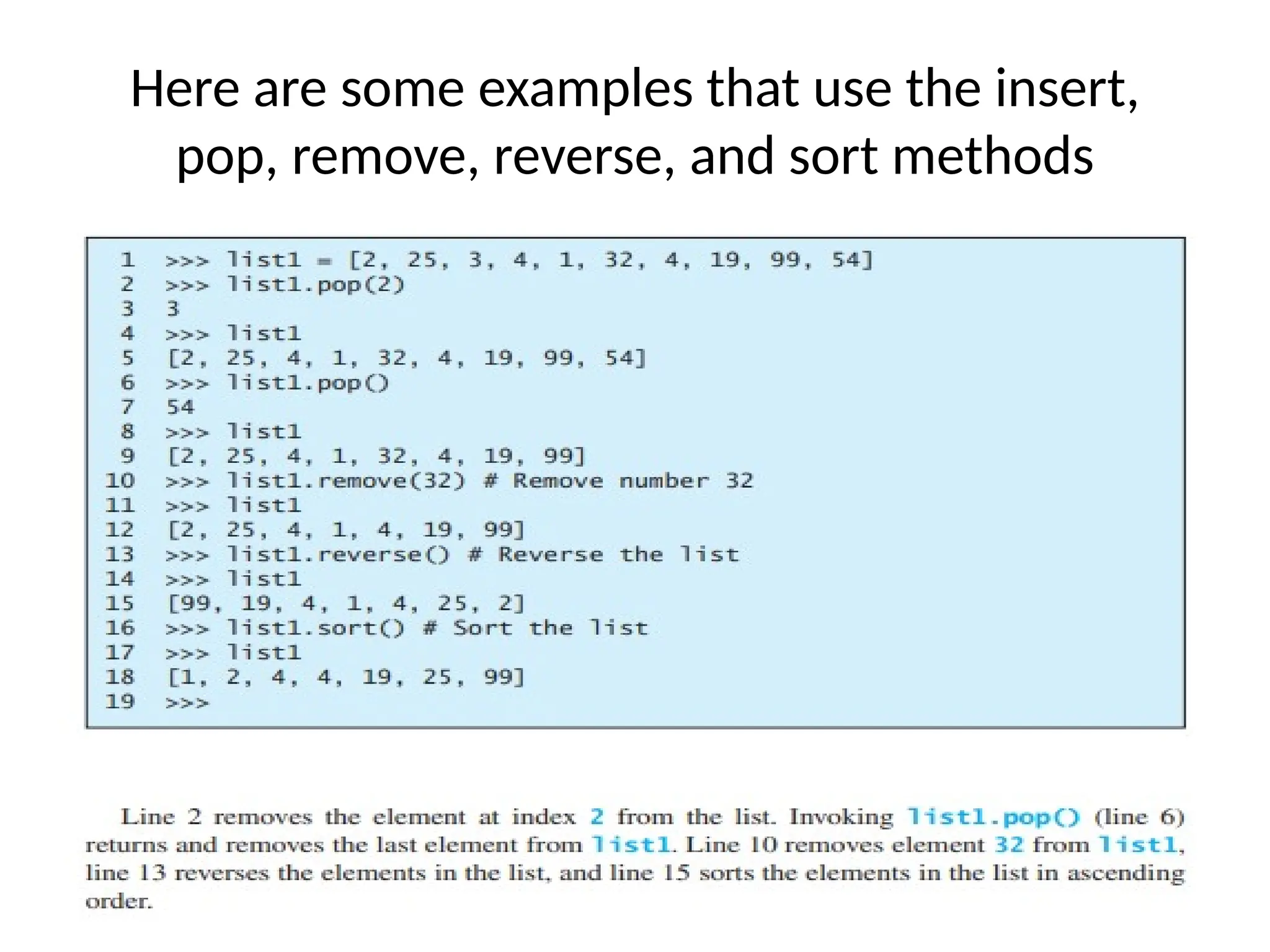
Here are someexamples that use the insert,
pop, remove, reverse, and sort methods
Contd..
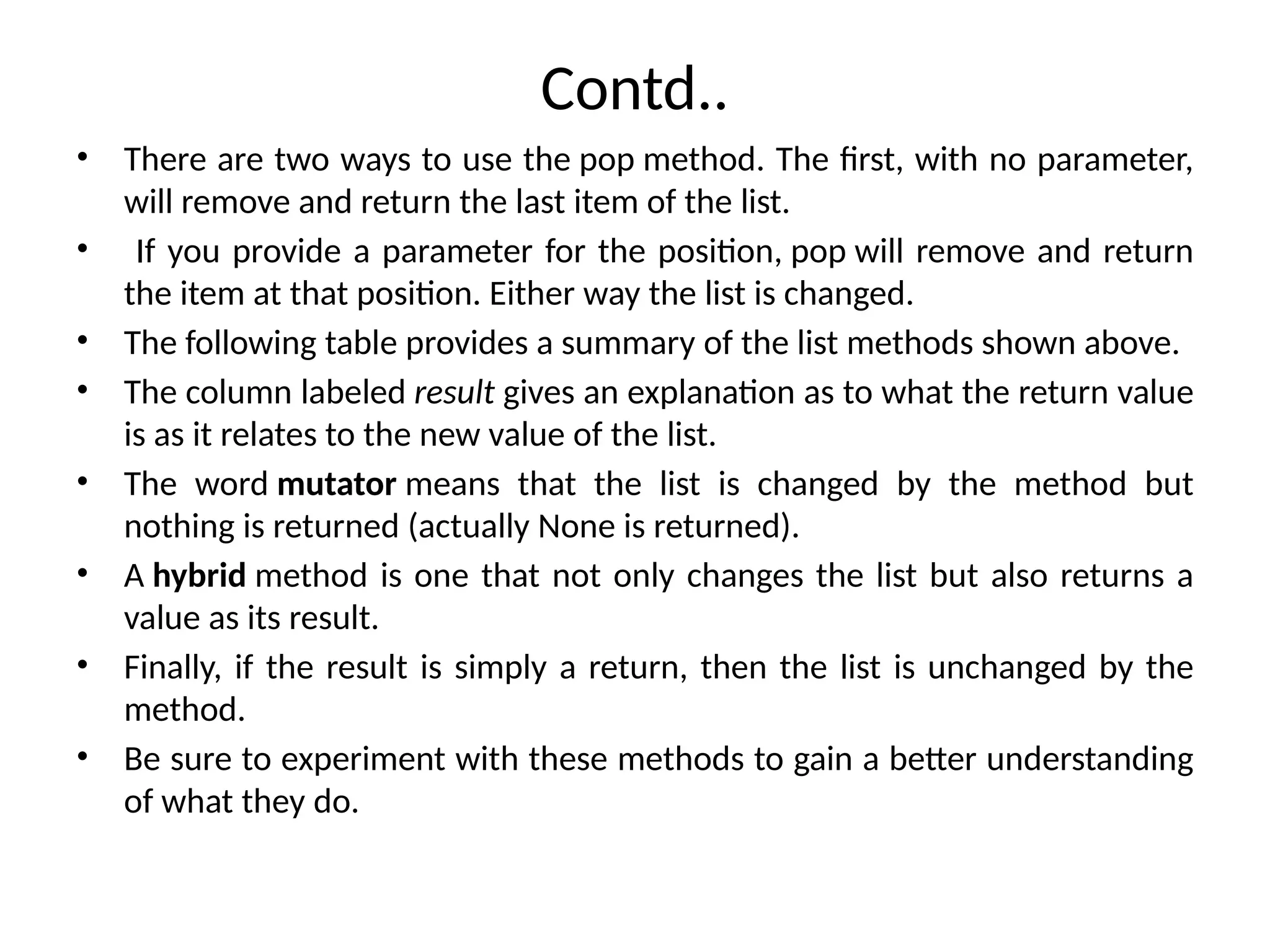
• There aretwo ways to use the pop method. The first, with no parameter,
will remove and return the last item of the list.
• If you provide a parameter for the position, pop will remove and return
the item at that position. Either way the list is changed.
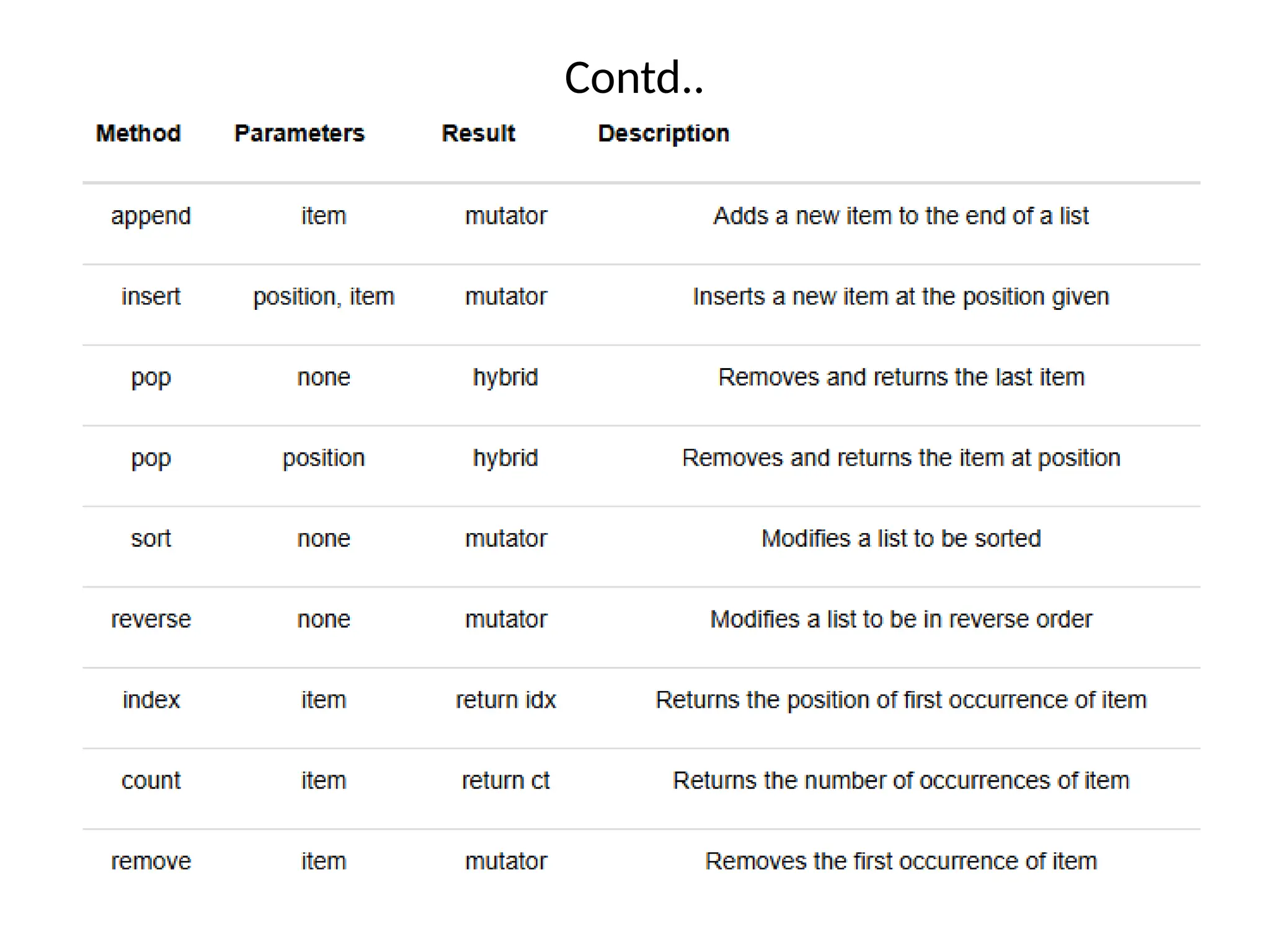
• The following table provides a summary of the list methods shown above.
• The column labeled result gives an explanation as to what the return value
is as it relates to the new value of the list.
• The word mutator means that the list is changed by the method but
nothing is returned (actually None is returned).
• A hybrid method is one that not only changes the list but also returns a
value as its result.
• Finally, if the result is simply a return, then the list is unchanged by the
method.
• Be sure to experiment with these methods to gain a better understanding
of what they do.
Contd..
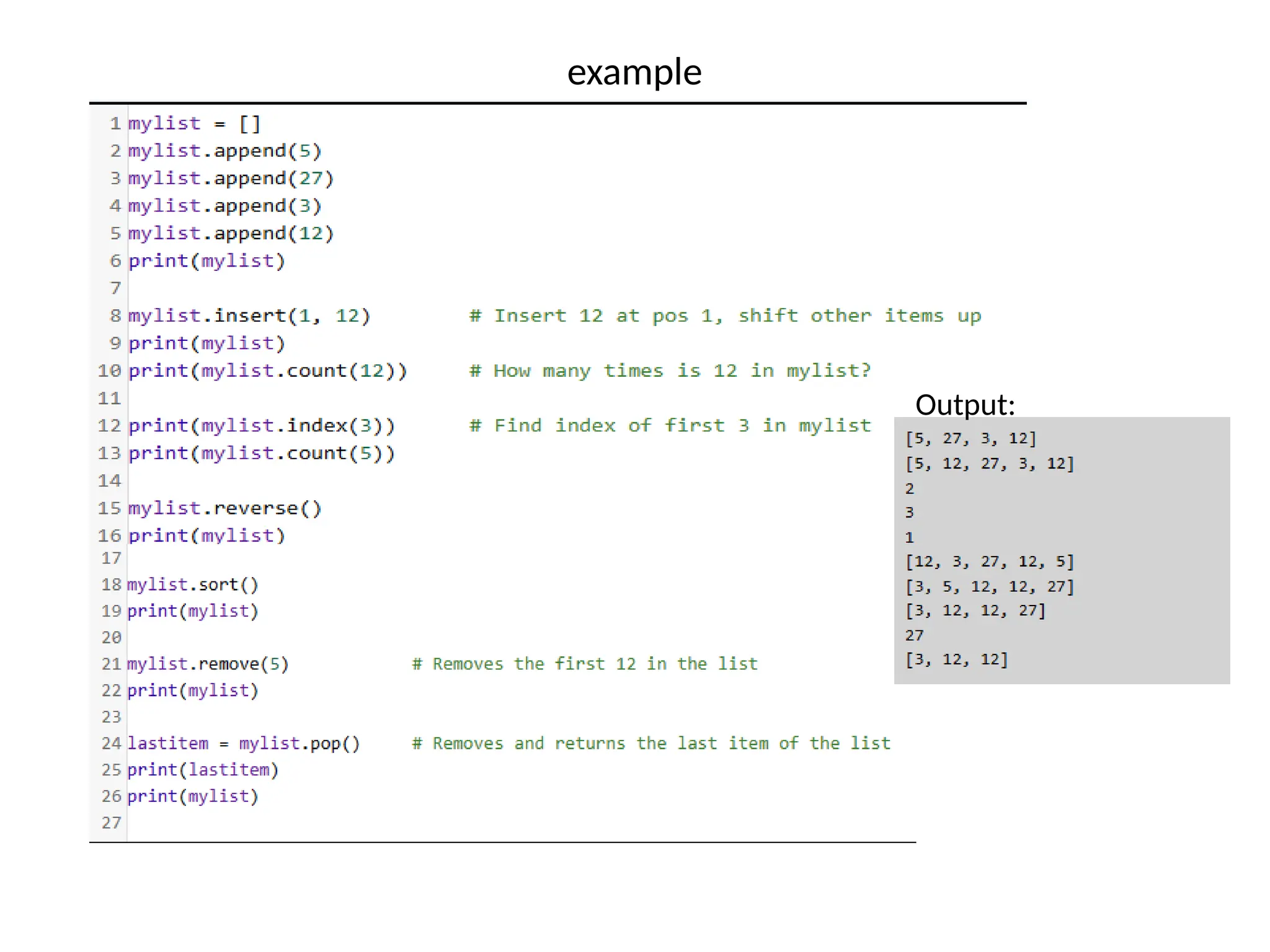
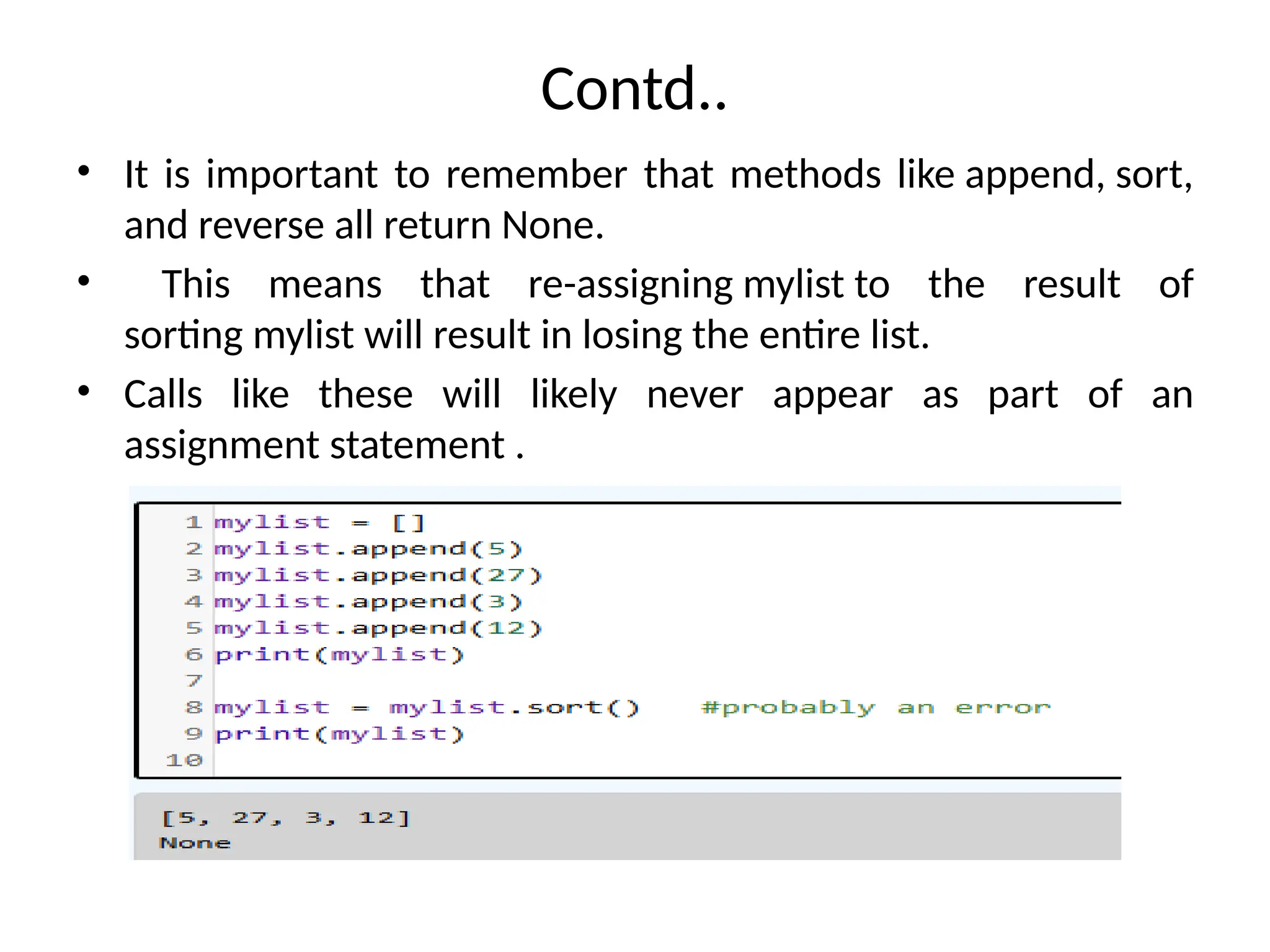
• It isimportant to remember that methods like append, sort,
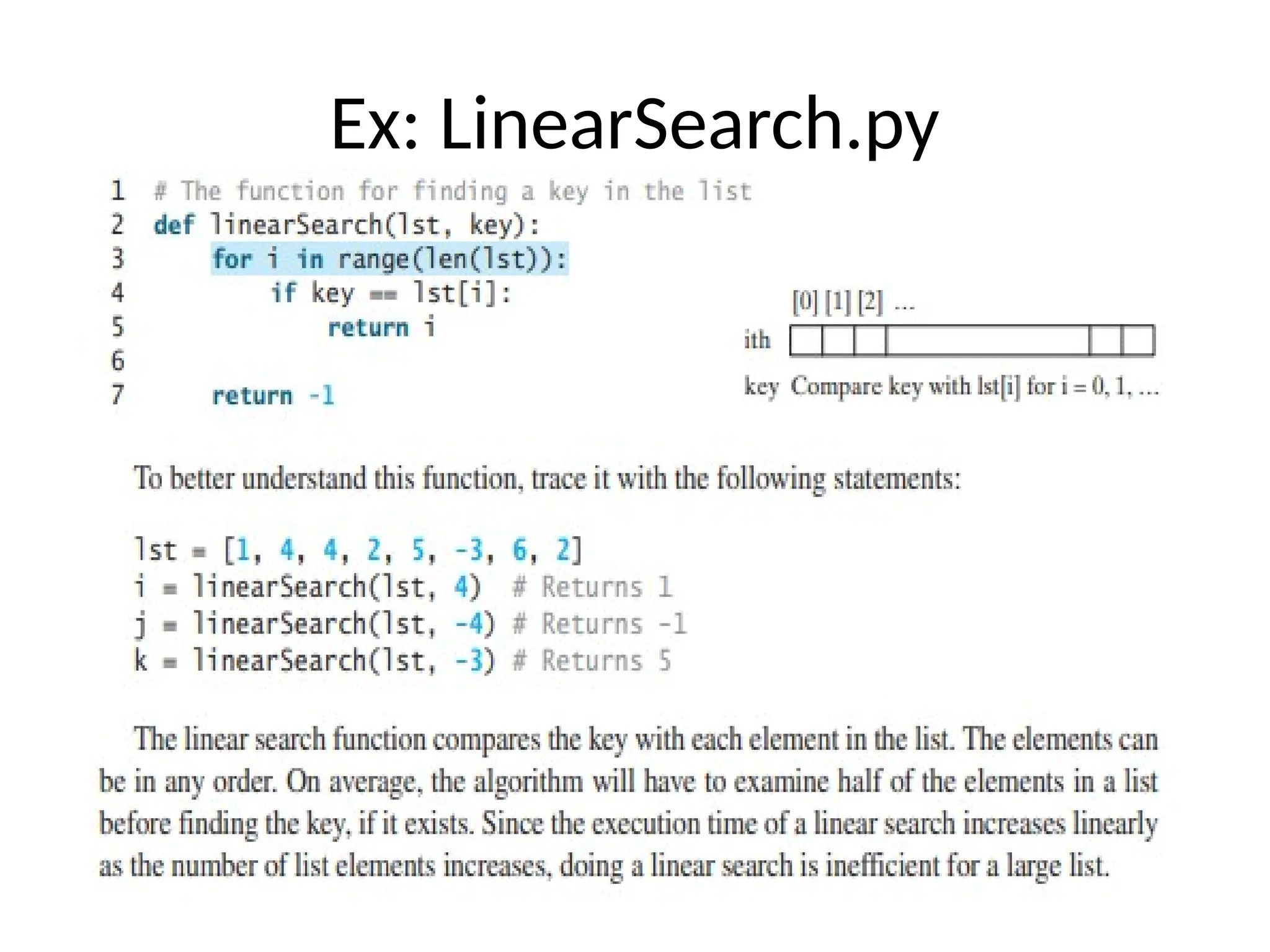
and reverse all return None.
• This means that re-assigning mylist to the result of
sorting mylist will result in losing the entire list.
• Calls like these will likely never appear as part of an
assignment statement .
61.
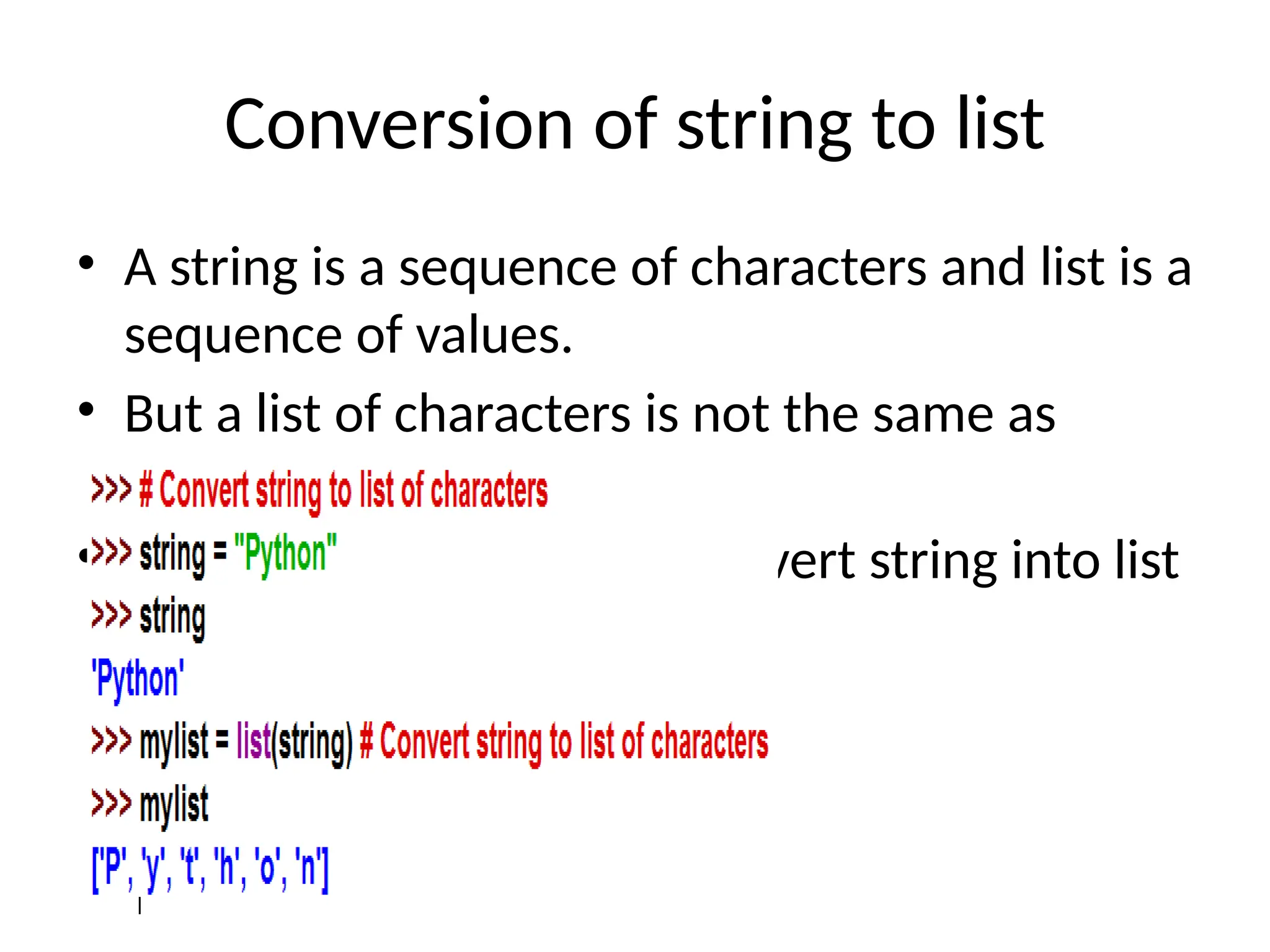
Conversion of stringto list
• A string is a sequence of characters and list is a
sequence of values.
• But a list of characters is not the same as
string.
• List() function is used to convert string into list
values
62.
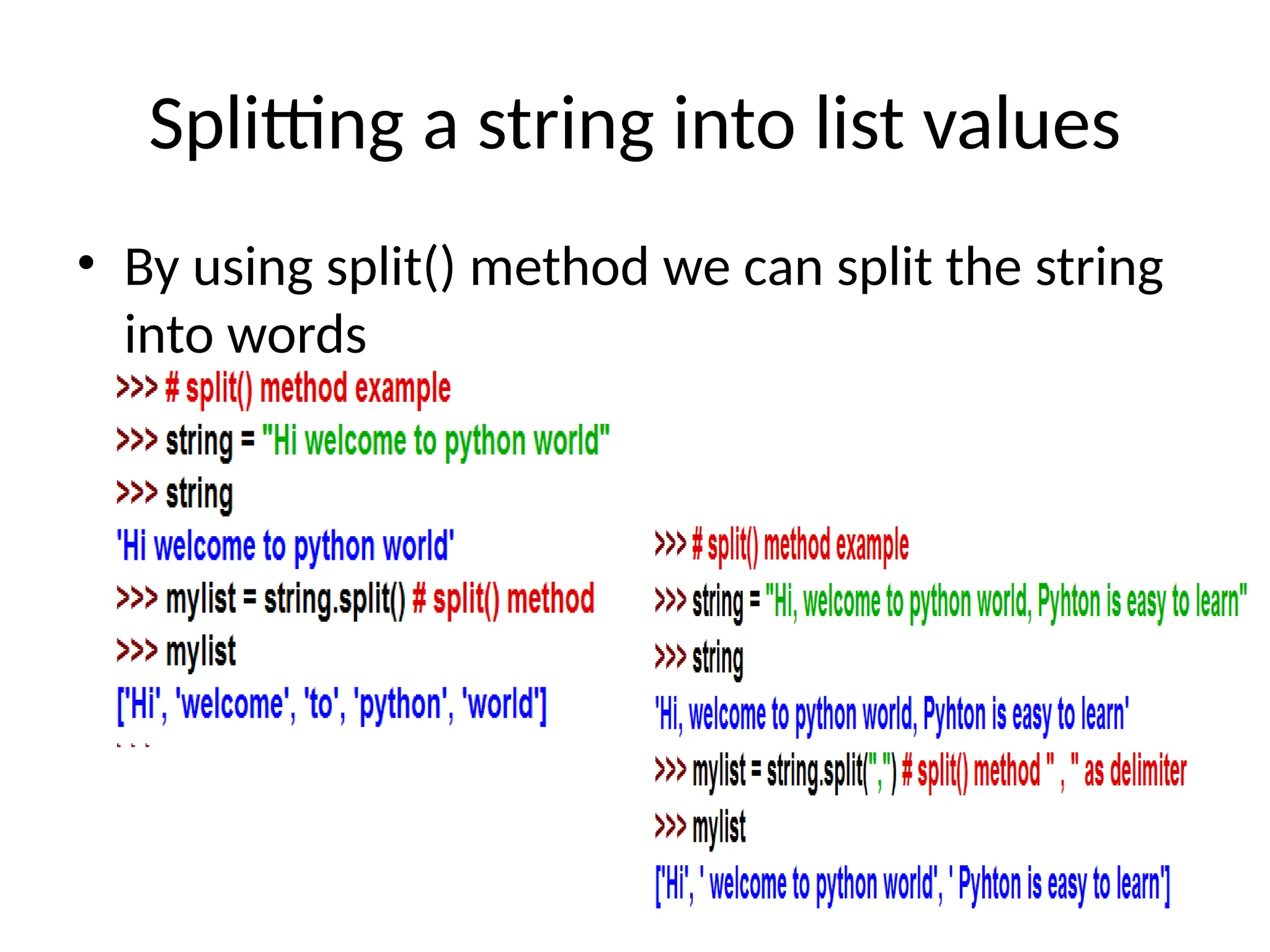
Splitting a stringinto list values
• By using split() method we can split the string
into words
63.
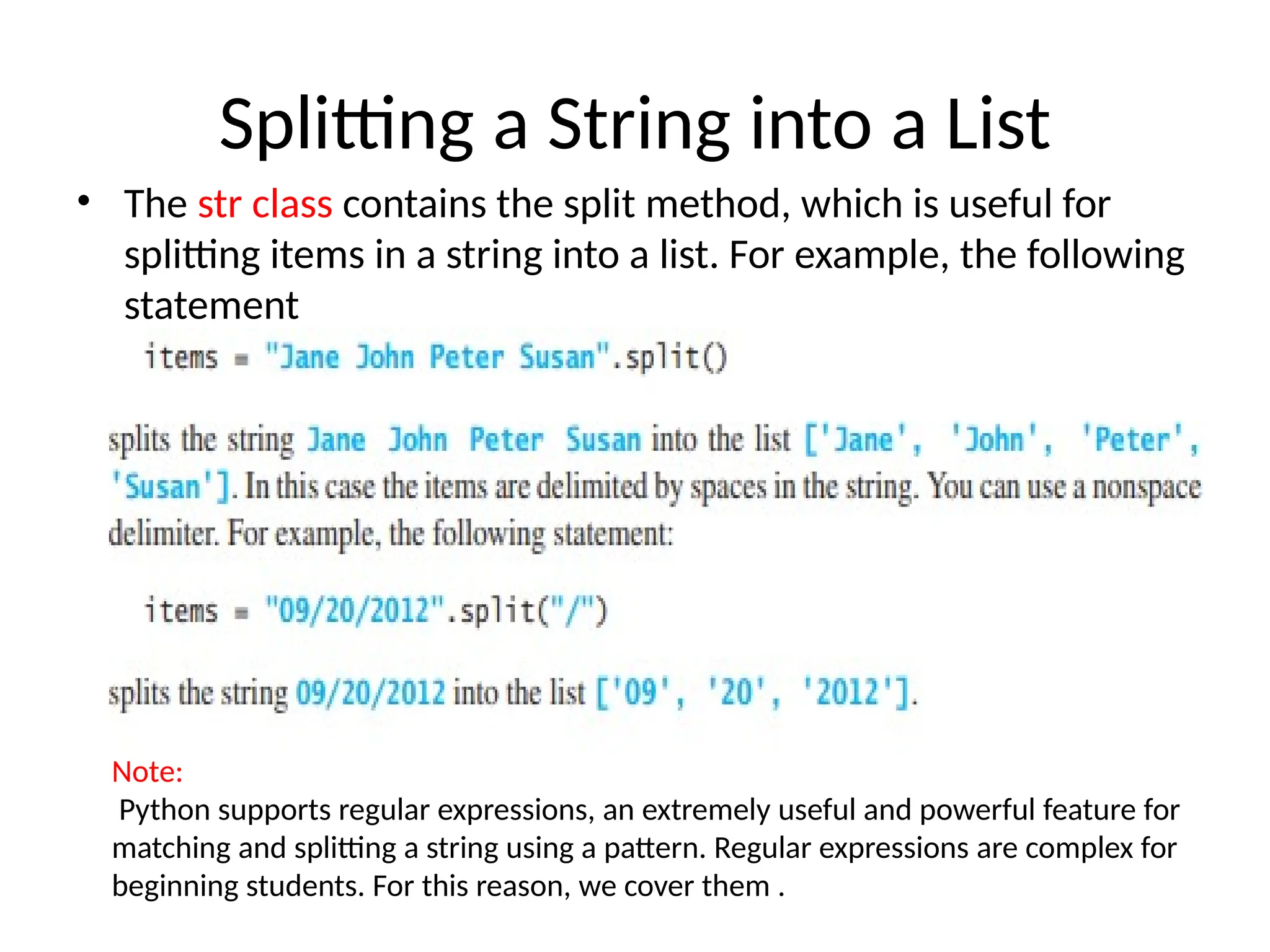
Splitting a Stringinto a List
• The str class contains the split method, which is useful for
splitting items in a string into a list. For example, the following
statement
Note:
Python supports regular expressions, an extremely useful and powerful feature for
matching and splitting a string using a pattern. Regular expressions are complex for
beginning students. For this reason, we cover them .
64.
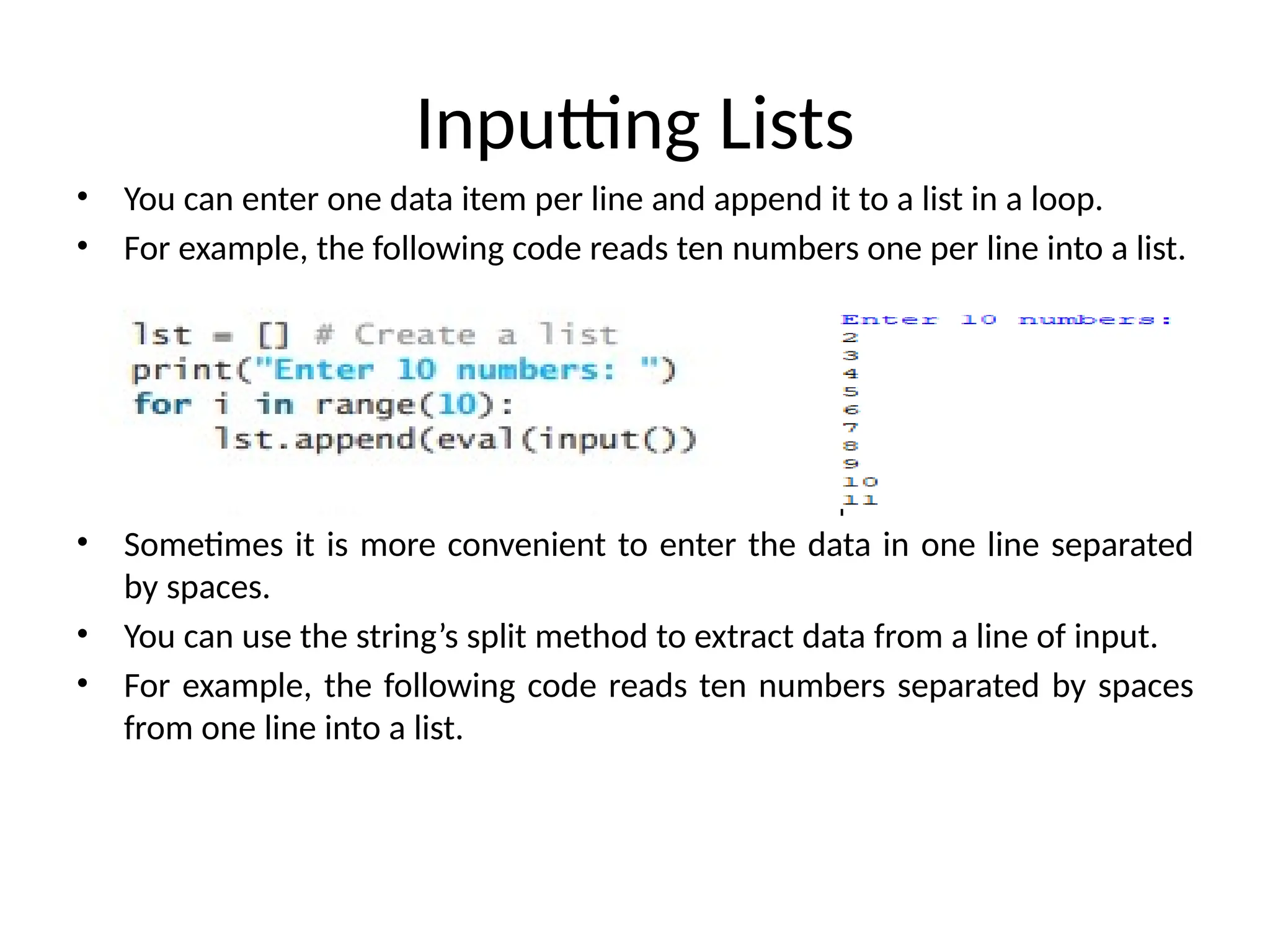
Inputting Lists
• Youcan enter one data item per line and append it to a list in a loop.
• For example, the following code reads ten numbers one per line into a list.
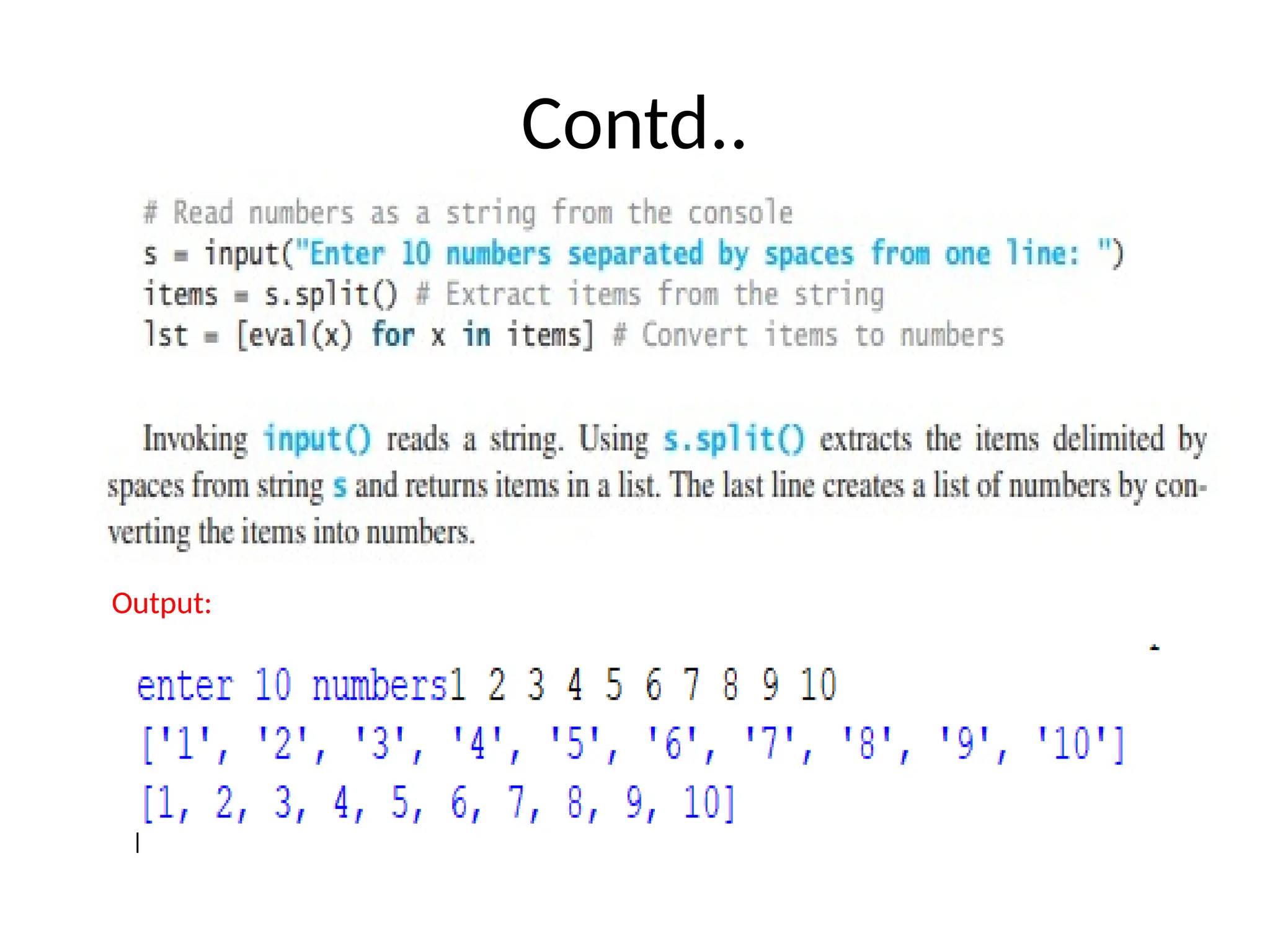
• Sometimes it is more convenient to enter the data in one line separated
by spaces.
• You can use the string’s split method to extract data from a line of input.
• For example, the following code reads ten numbers separated by spaces
from one line into a list.
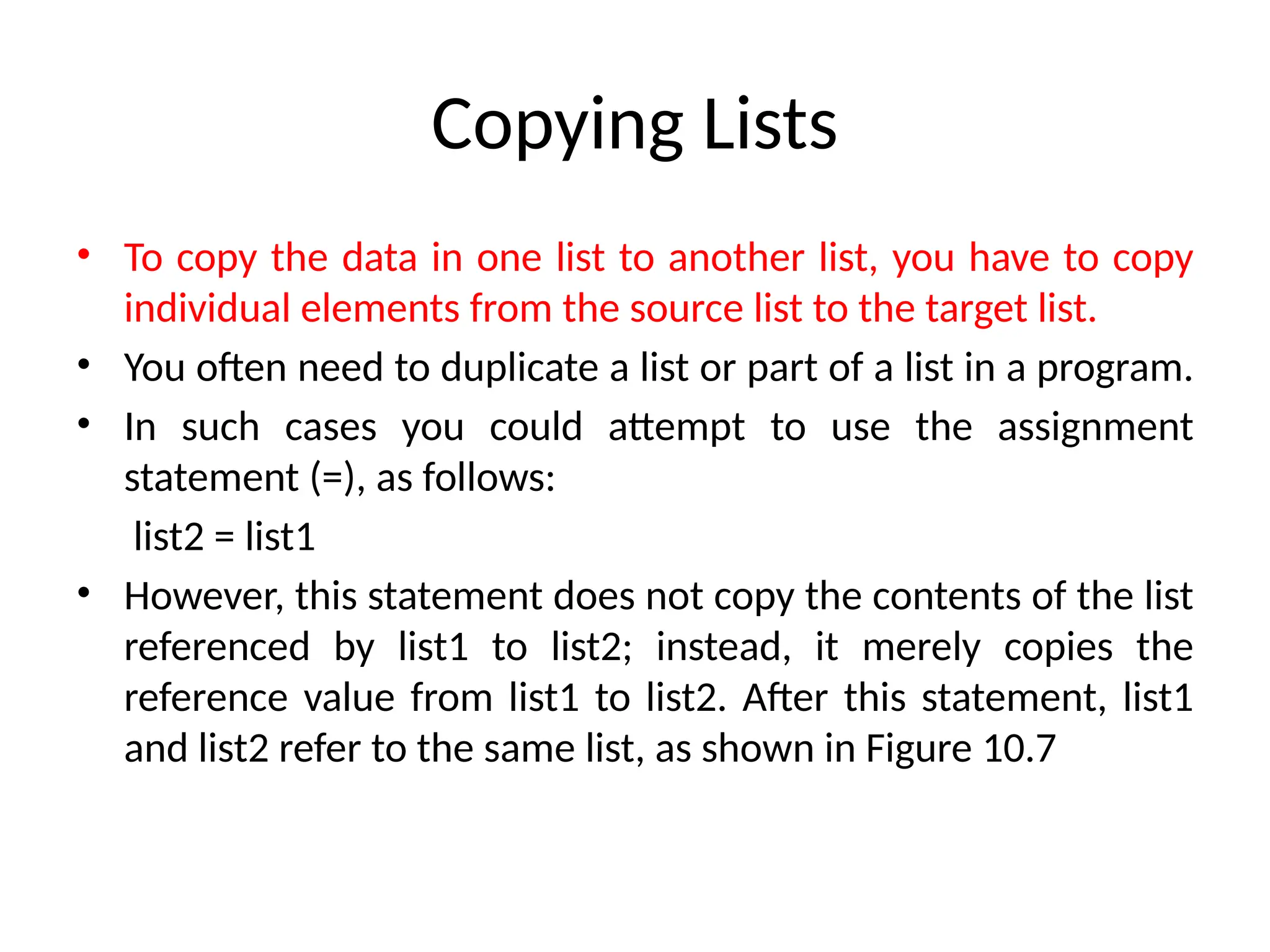
Copying Lists
• Tocopy the data in one list to another list, you have to copy
individual elements from the source list to the target list.
• You often need to duplicate a list or part of a list in a program.
• In such cases you could attempt to use the assignment
statement (=), as follows:
list2 = list1
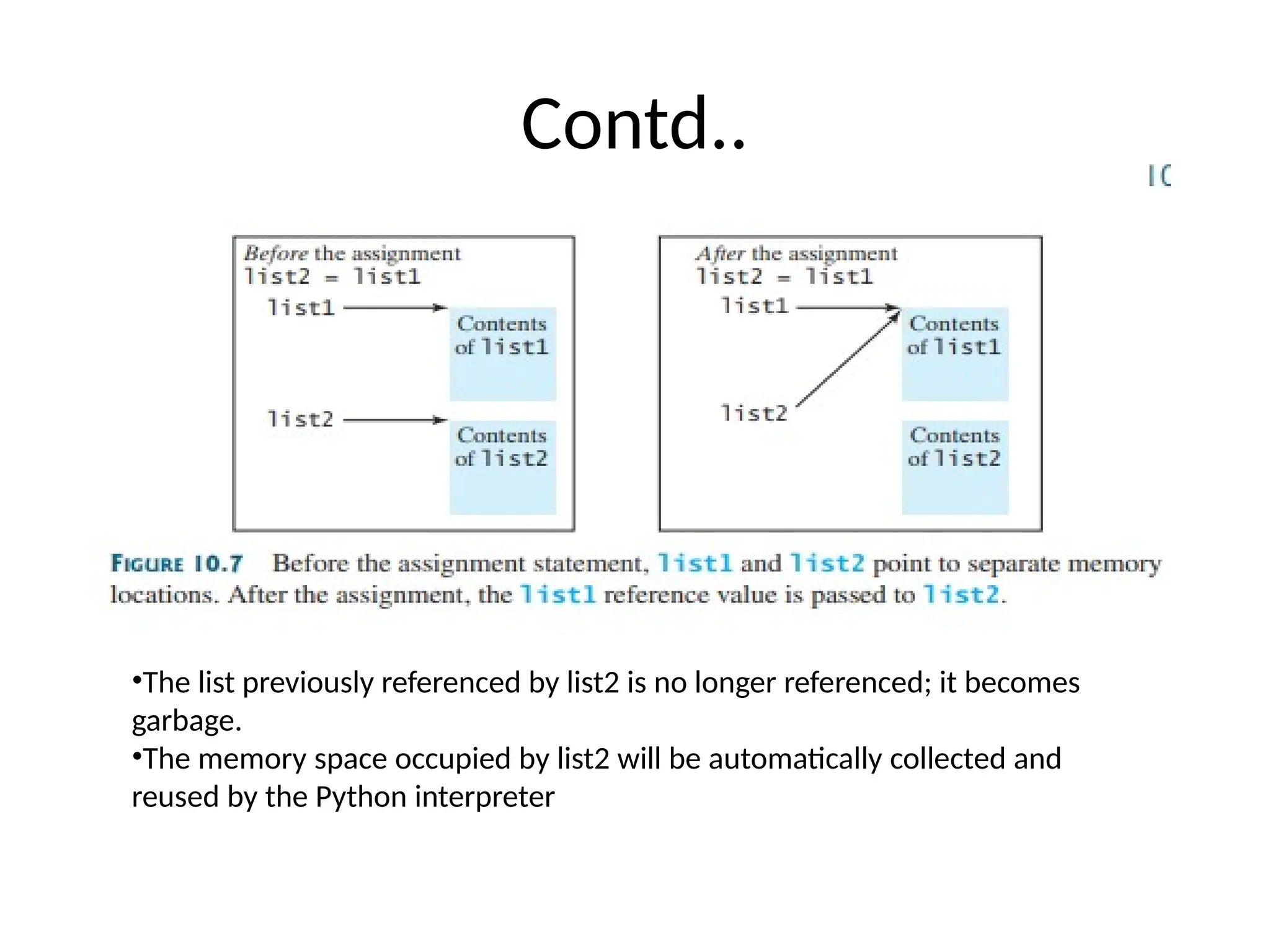
• However, this statement does not copy the contents of the list
referenced by list1 to list2; instead, it merely copies the
reference value from list1 to list2. After this statement, list1
and list2 refer to the same list, as shown in Figure 10.7
67.
Contd..
•The list previouslyreferenced by list2 is no longer referenced; it becomes
garbage.
•The memory space occupied by list2 will be automatically collected and
reused by the Python interpreter
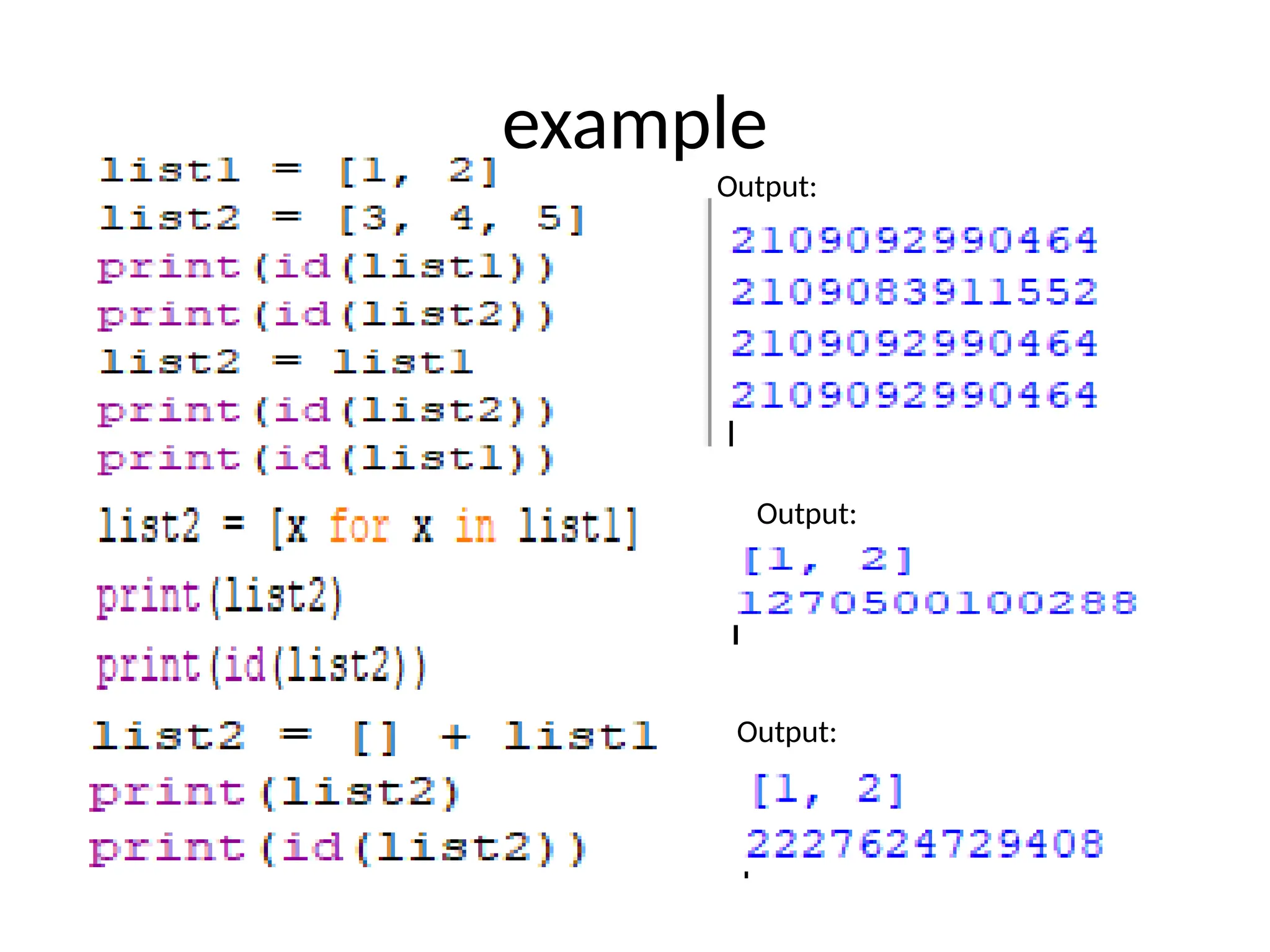
• To geta duplicate copy of list1 into list2, you can use:
list2 = [x for x in list1]
or simply:
list2 = [] + list1
•What is the output of the following code? Output:
What is the output of the following code?
Output:
71.
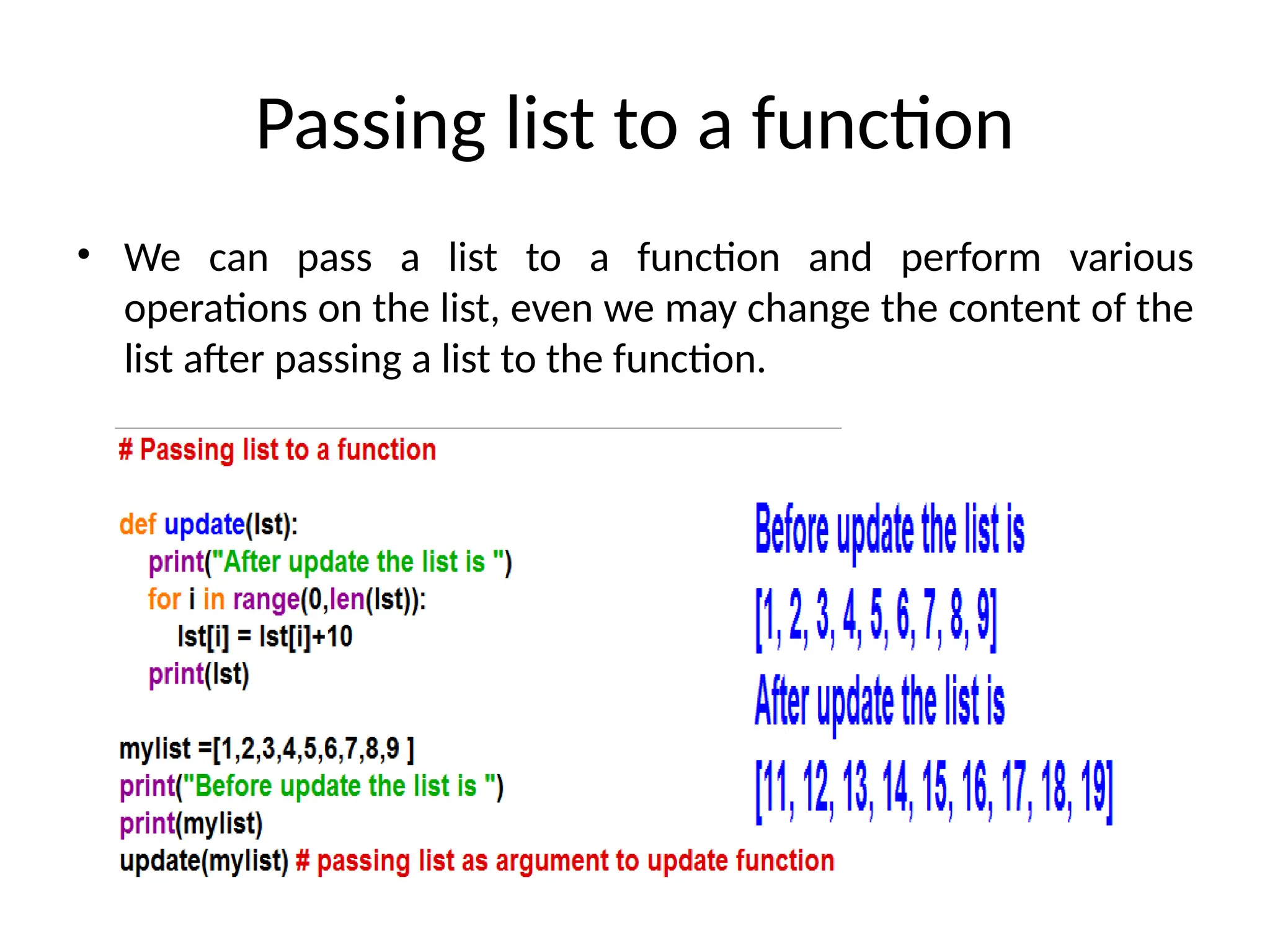
Passing list toa function
• We can pass a list to a function and perform various
operations on the list, even we may change the content of the
list after passing a list to the function.
72.
Passing Lists toFunctions
• When passing a list to a function, the contents of the list may
change after the function call, since a list is a mutable object.
• Since list is an object, passing a list to a function is just like passing
an object to a function.
• For example, the following function displays the elements in a list.
•You can invoke it by passing a list. For instance, the following
statement invokes the printList function to display 3, 1, 2, 6, 4, and
2.
printList([3, 1, 2, 6, 4, 2]) # creates a list and passes it to the function
•Note :
•The preceding statement creates a list and passes it to the function. There is no
explicit reference variable for the list. Such a list is called an anonymous list.
73.
Since a listis a mutable object, the contents of a list may change
in the function. Take the code in Listing 10.5, for example:
PassListArgument.py
Output:
x is 1
y[0] is 5555
74.
Code explanation
• Inthis sample run, you see that after m is invoked (line 5, x remains 1, but
y[0] is changed to 5555.
• Step 5: def m(number,numbers): This line defines a function named m
that accepts two parameters: number and numbers.
• Step 6: number = 1001 # Assign a new value to number Inside the m
function, the parameter number (which received the value of x) is
reassigned the value 1001. Important: This assignment only affects the
local variable number within the m function. It does not change the value
of the original variable x in the main function. This is because integers are
immutable in Python, and arguments are passed by value.
• Step 7: numbers[0] = 5555 # Assign a new value to numbers[0] The first
element of the list numbers (which refers to the same list as y in the main
function) is accessed using index 0 and its value is changed to 5555.
Important: Lists are mutable in Python, and when a list is passed as an
argument to a function, any modifications made to the list within the
function will affect the original list in the calling function. This is because
lists are passed by reference (or more accurately, a reference to the list
object is passed).
75.
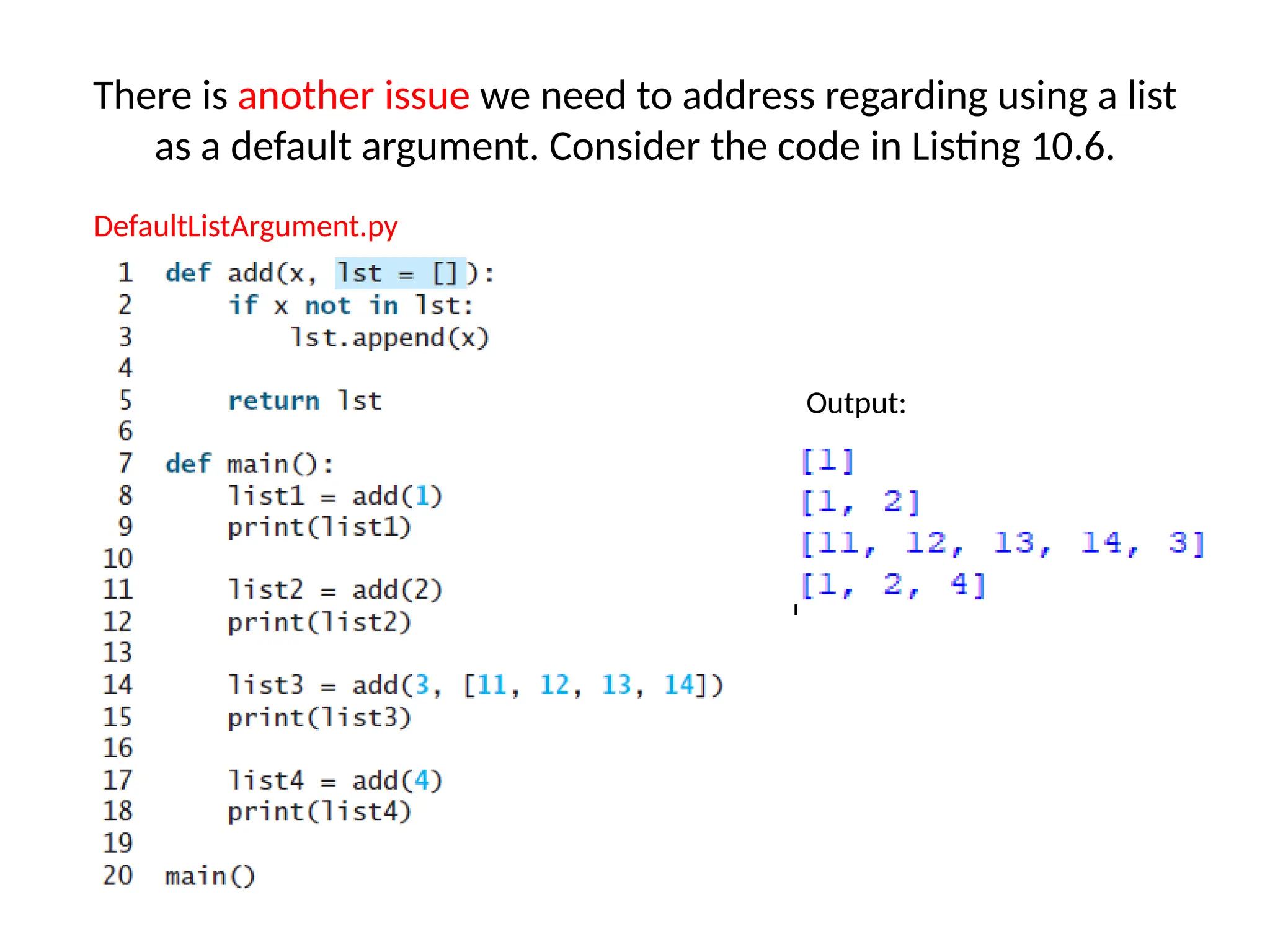
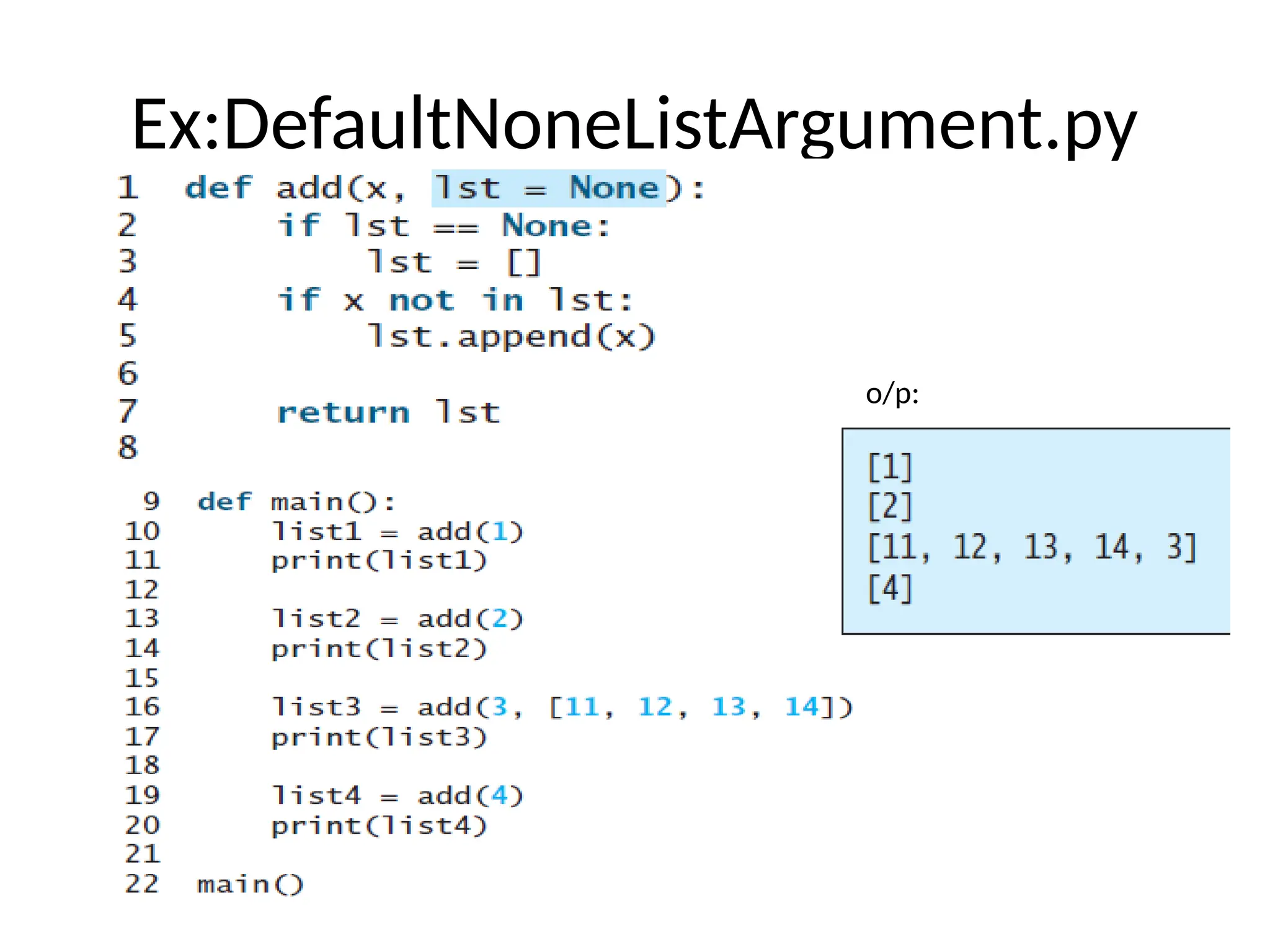
There is anotherissue we need to address regarding using a list
as a default argument. Consider the code in Listing 10.6.
DefaultListArgument.py
Output:
76.
Code explanation
• Step1: def add(x, lst=[]): This line defines a function named add
that takes two arguments:
• x: The value to potentially add to the list.
• lst: A list. It has a default value of an empty list []. Important:
Default mutable arguments in Python can lead to unexpected
behavior because the same list object is reused across multiple calls
to the function when the default is used.
• Step 2: if x not in lst: Inside the add function, this line checks if the
value of x is already present in the lst.
• Step 3: lst.append(x) If the condition in the if statement is true (i.e.,
x is not in lst), this line appends the value of x to the end of the lst.
• Step 4: return lst The function add returns the modified lst.
77.
Contd..
• Step 5:def main(): This line defines the main function, which is the
entry point of our script.
• Step 6: list1 = add(1) The add function is called with x=1 and the
default value for lst (which is an empty list the first time it's used
with the default).
• 1 is not in [], so 1 is appended to the list.
• The function returns [1], which is assigned to list1.
• print(list1) outputs [1].
• Step 7: list2 = add(2) The add function is called again with x=2 and
the same default list that was used in the previous call (because it's
a mutable default argument). This list now contains [1].
• 2 is not in [1], so 2 is appended to the list.
• The function returns [1, 2], which is assigned to list2.
• print(list2) outputs [1, 2].
78.
Contd..
• Step 8:list3 = add(3, [11, 12, 13, 14]) The add function is called with x=3
and a new list [11, 12, 13, 14] is explicitly provided for the lst argument.
• 3 is not in [11, 12, 13, 14], so 3 is appended to this new list.
• The function returns [11, 12, 13, 14, 3], which is assigned to list3.
• print(list3) outputs [11, 12, 13, 14, 3].
• Step 9: list4 = add(4) The add function is called again with x=4 and the
default list. Remember, this is the same list object that was modified in
the second call. It currently contains [1, 2].
• 4 is not in [1, 2], so 4 is appended to this list.
• The function returns [1, 2, 4], which is assigned to list4.
• print(list4) outputs [1, 2, 4].
• Step 10: main() # Call the main function Finally, the main function is
called, initiating the execution of the steps above.
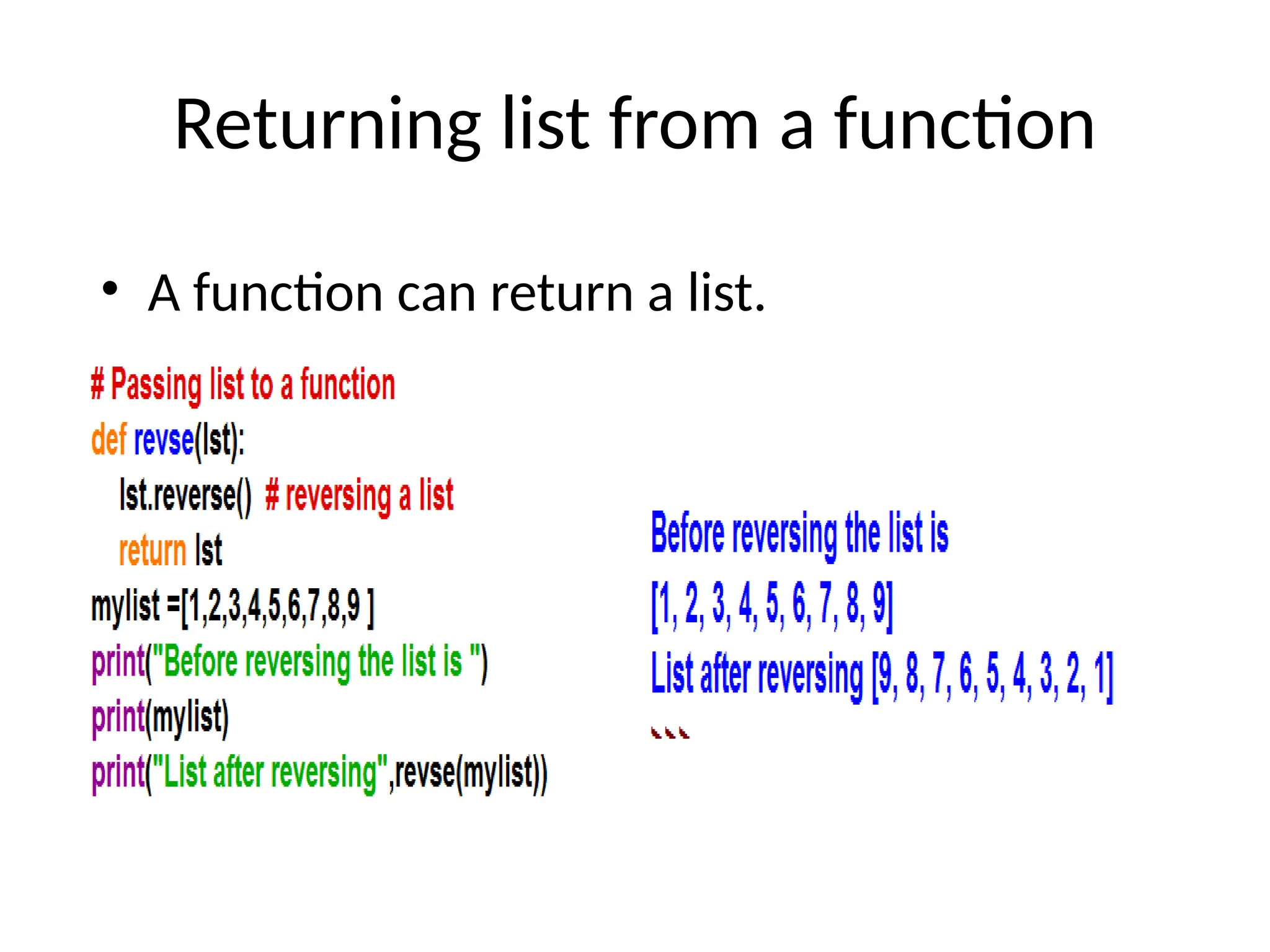
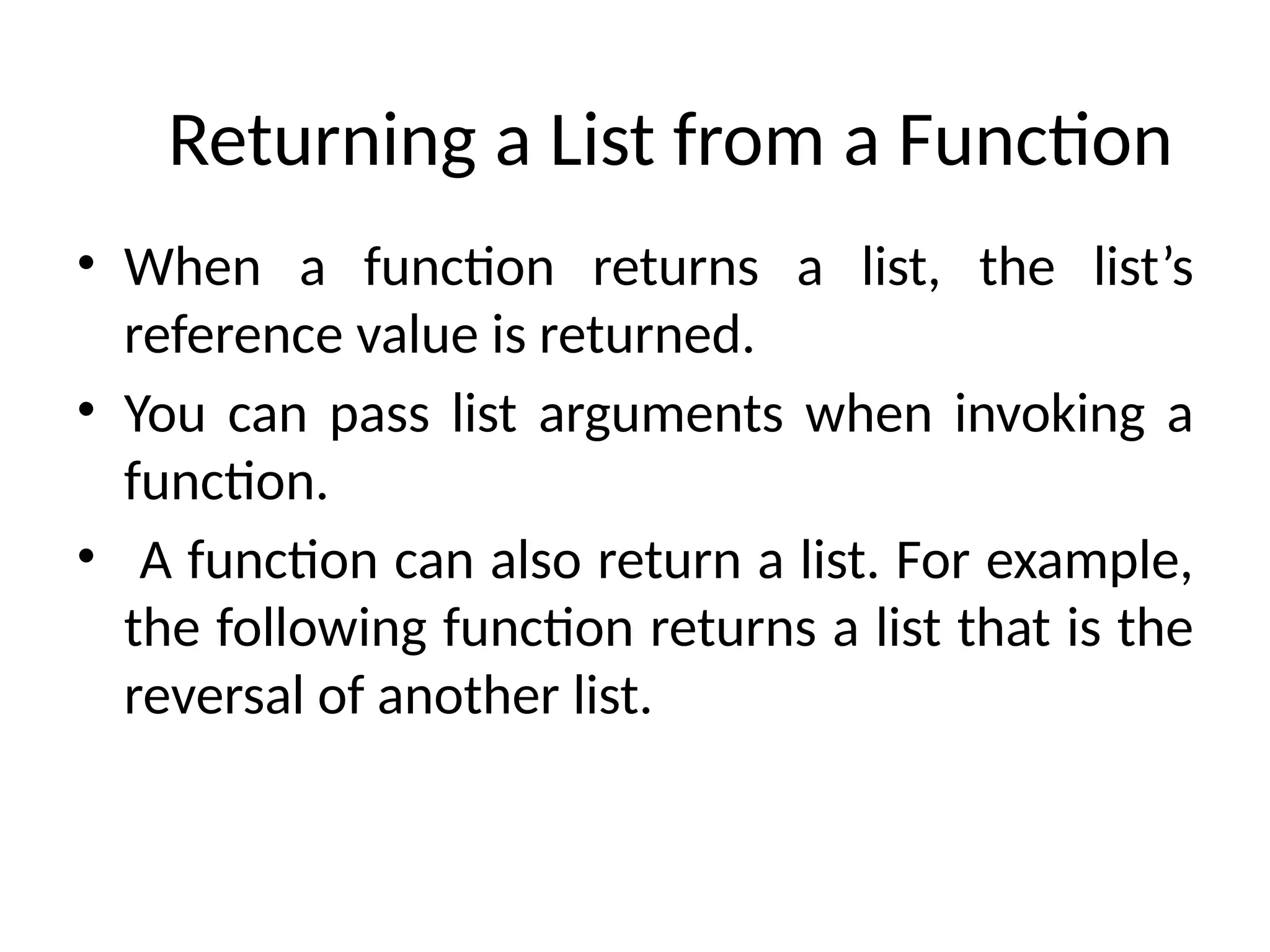
Returning a Listfrom a Function
• When a function returns a list, the list’s
reference value is returned.
• You can pass list arguments when invoking a
function.
• A function can also return a list. For example,
the following function returns a list that is the
reversal of another list.
82.
example
• Explanation:
• Step1: def reverse(lst): This line defines a function named reverse that takes one
argument: lst, which is expected to be a list.
• Step 2: result = [] Inside the reverse function, an empty list named result is
created. This list will store the reversed elements of the input list.
• Step 3: for element in lst: This line starts a for loop. The loop will iterate through
each element in the input list lst one by one.
83.
Code explanation
• Step4: result.insert(0, element) Inside the loop, for each element retrieved from the input
lst, the insert() method is called on the result list.
• result.insert(0, element) inserts the current element at index 0 of the result list. This means
the new element is always added to the beginning of the result list.
• Let's trace the loop with the example list1 = [1, 2, 3, 4, 5, 6]:
• Iteration 1:
– element is 1.
– result.insert(0, 1) is executed. result becomes [1].
• Iteration 2:
– element is 2.
– result.insert(0, 2) is executed. result becomes [2, 1].
• Iteration 3:
– element is 3.
– result.insert(0, 3) is executed. result becomes [3, 2, 1].
• Iteration 4:
– element is 4.
– result.insert(0, 4) is executed. result becomes [4, 3, 2, 1].
• Iteration 5:
– element is 5.
– result.insert(0, 5) is executed. result becomes [5, 4, 3, 2, 1].
• Iteration 6:
– element is 6.
– result.insert(0, 6) is executed. result becomes [6, 5, 4, 3, 2, 1].
84.
Contd..
• Step 5:return result After the loop has finished processing all
the elements in the input lst, the function returns the result
list, which now contains the elements of the original list in
reverse order.
• Step 6: list1 = [1, 2, 3, 4, 5, 6] Outside the function, a list
named list1 is created and initialized with the numbers 1
through 6.
• Step 7: list2 = reverse(list1) The reverse function is called with
list1 as the argument. The function executes as described in
the previous steps and returns the reversed list [6, 5, 4, 3, 2,
1]. This returned list is then assigned to the variable list2.
85.
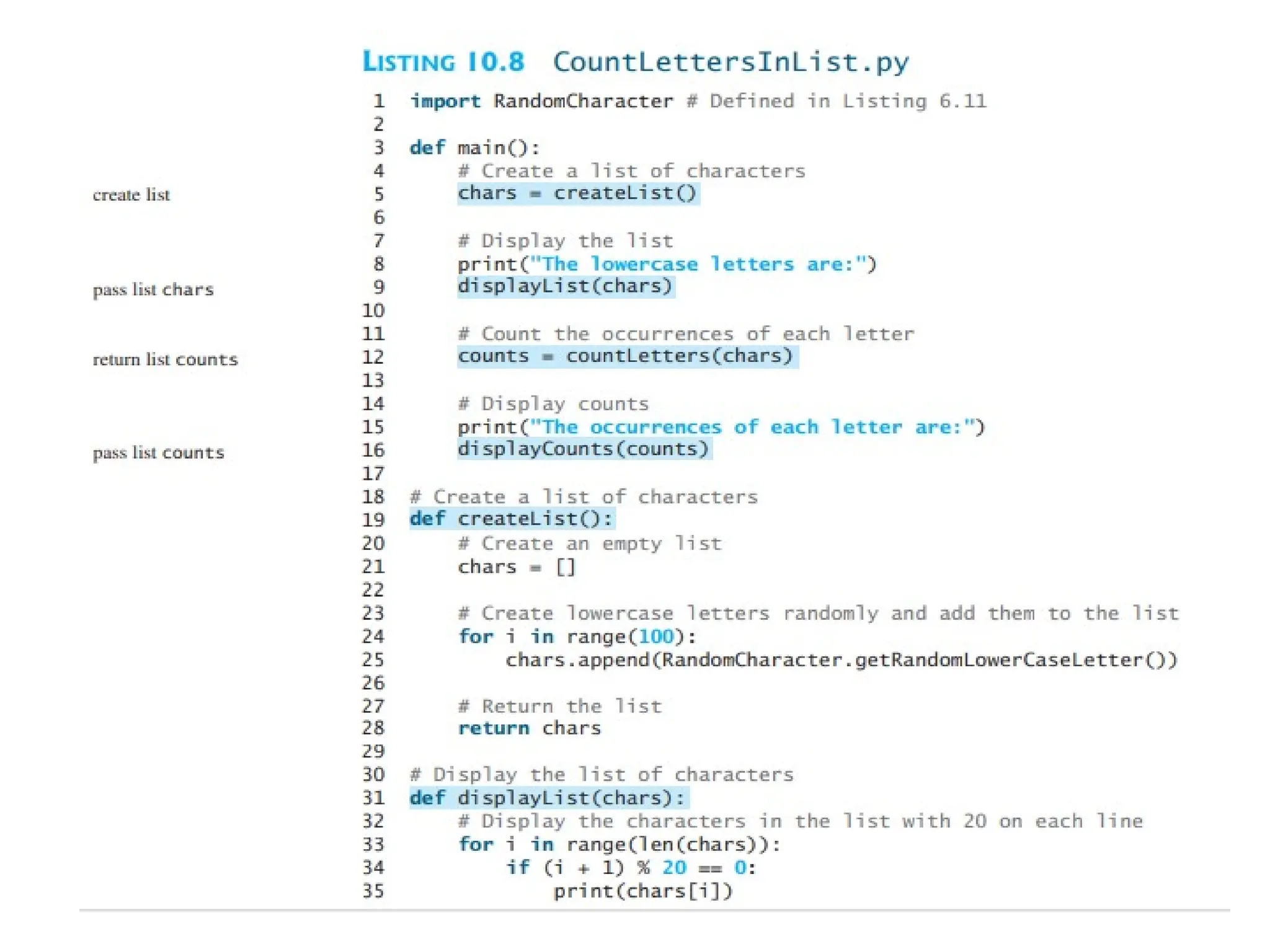
Case Study
• Keypoint:
• Counting the Occurrences of Each Letter The program in this section counts the
occurrence of each letter among 100 letters
• Problem:
• Generates 100 lowercase letters randomly and assigns them to a list of characters,
named chars, as shown in Figure 10.8a. You can obtain a random letter by using
the getRandomLowerCaseLetter() function in the RandomCharacter module.
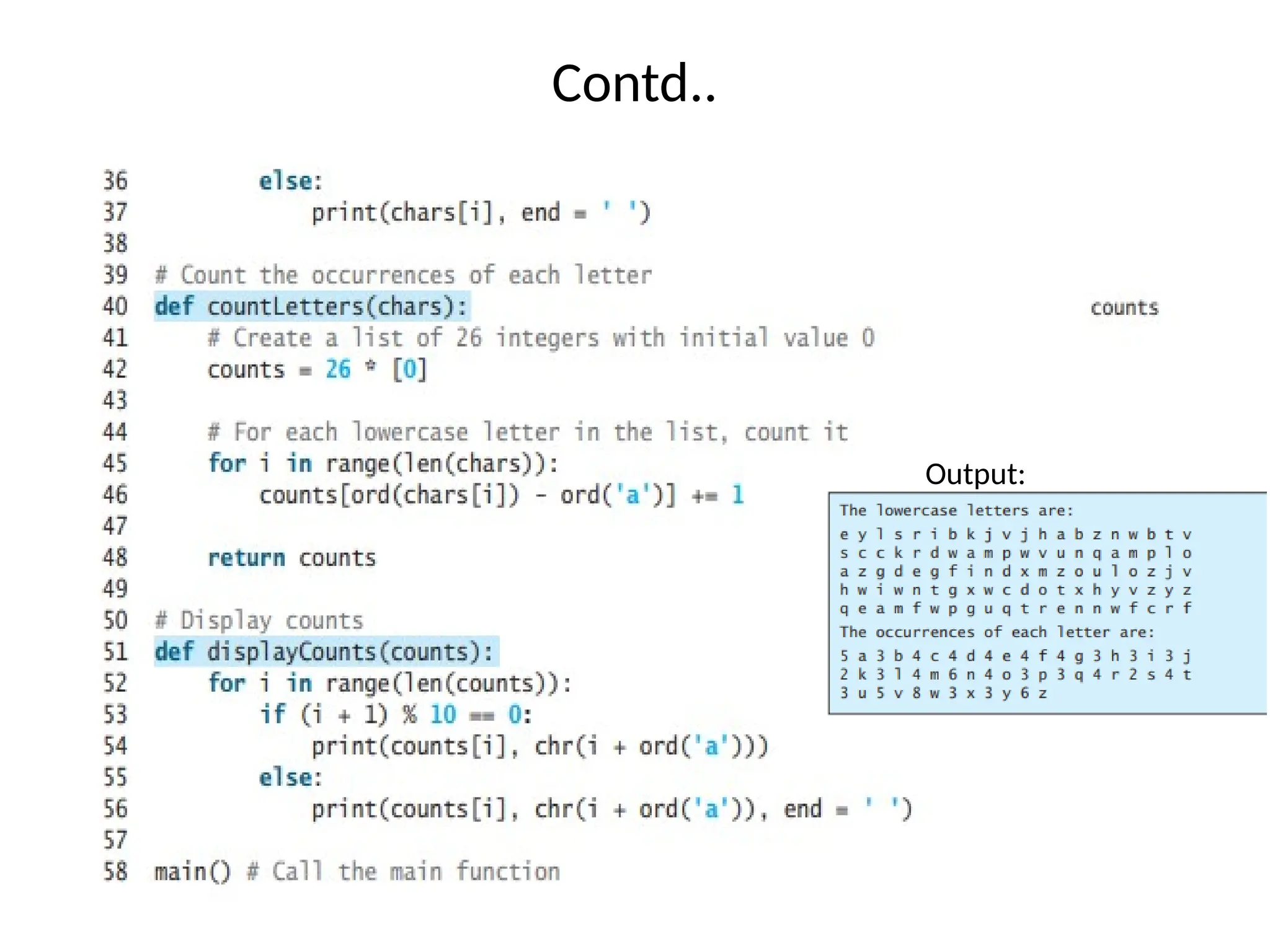
• Figure 10.8b Counts the occurrences of each letter in the list. To do so, it creates a
list named counts that has 26 int values, each of which counts the occurrences of a
letter, as shown in Figure 10.8b. That is, counts[0] counts the number of times a
appears in the list, counts[1] counts the number of time b appears, and so on.
Searching Lists
• Keypoint:
• If a list is sorted, a binary search is more efficient than a linear search for
finding an element in the list.
• Searching is the process of looking for a specific element in a list—for
example, discovering whether a certain score is included in a list of
scores.
• The list class provides the index method for searching and returning the
index of a matching element from a list.
• It also supports the in and not in operators for determining whether an
element is in a list. Searching is a common task in computer
programming.
• Many algorithms are devoted to searching.
• This section discusses two commonly used approaches: linear searches
and binary searches
89.
The Linear SearchApproach
• The linear search approach compares the key
element key sequentially with each element in
the list.
• It continues to do so until the key matches an
element in the list or the list is exhausted
without a match being found.
• If a match is found, the linear search returns the
matching element’s index in the list.
• If no match is found, the search returns -1.
The Binary SearchApproach
• A binary search is the other common search approach for a
list of values. For a binary search to work, the elements in the
list must already be ordered. Assume that the list is in
ascending order.
• A binary search first compares the key with the element in the
middle of the list.
• Consider the following three cases:
■ If the key is less than the list’s middle element, you need to
continue to search for the key only in the first half of the list.
■ If the key is equal to the list’s middle element, the search
ends with a match.
■ If the key is greater than the list’s middle element, you
need to continue to search for the key only in the second half
of the list.
92.
Explanation
• The portionof the list being searched shrinks by half after each
comparison.
• Let low and high denote, respectively, the first index and last index of the
list that is currently being searched.
• Initially, low is 0 and high is len(lst)–1. Let mid denote the index of the
middle element, so mid is (low + high) // 2.
• Figure 10.9 shows how to find the key 11 in the list [2, 4, 7, 10, 11, 45, 50,
59, 60, 66, 69, 70, 79] using a binary search.
93.
Contd..
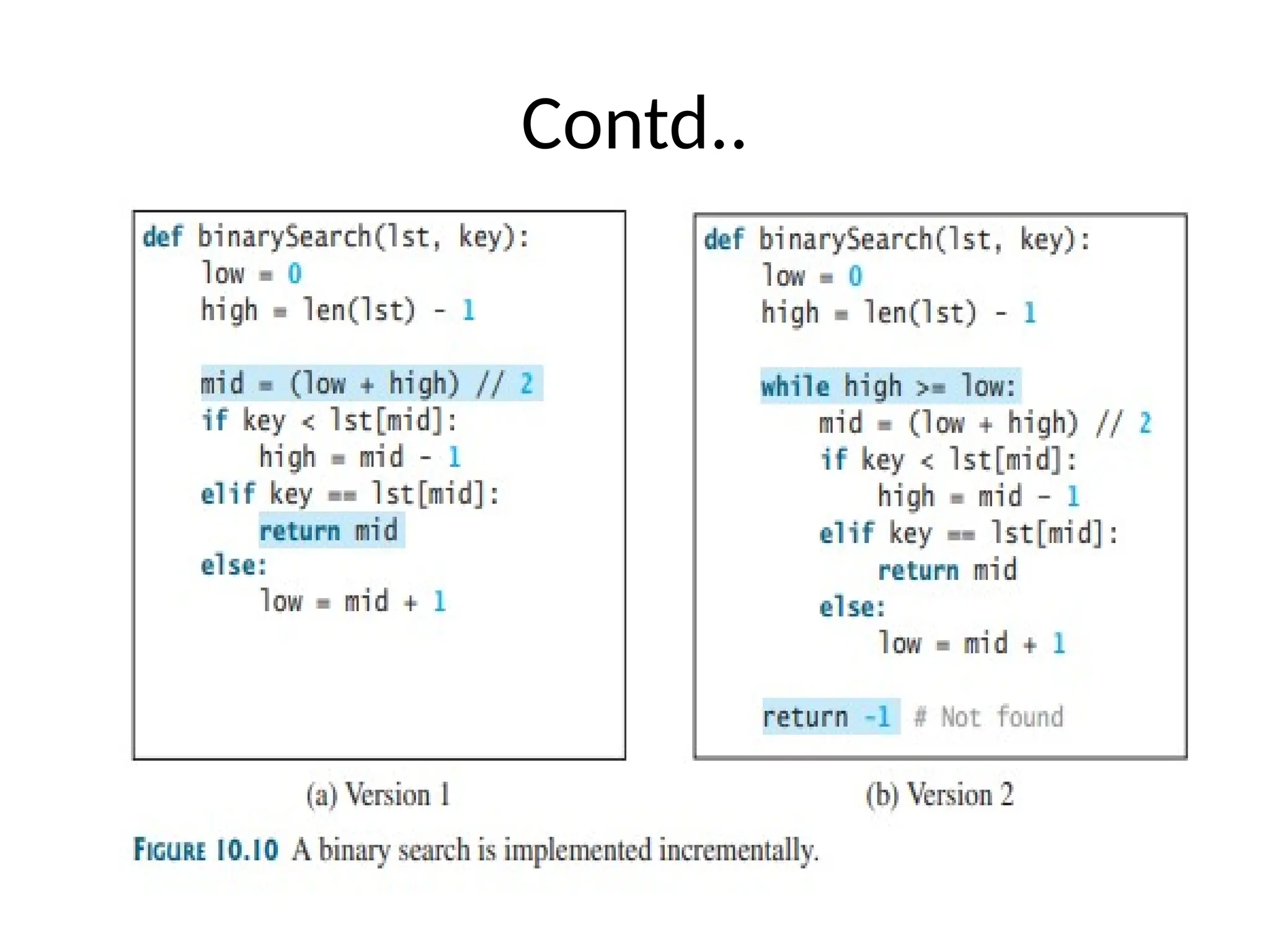
• Figure 10.10a.It compares the key with the middle element in the list,
whose low index is 0 and high index is len(lst) - 1.
• If key < lst[mid], set the high index to mid - 1; if key == lst[mid], a match is
found and the program returns mid; if key > lst[mid], set the low index to
mid + 1.
• Next, consider implementing the function to perform a search repeatedly
by adding a loop, as shown in Figure 10.10b.
• The search ends if the key is found, or if the key is not found when low >
high
explanation
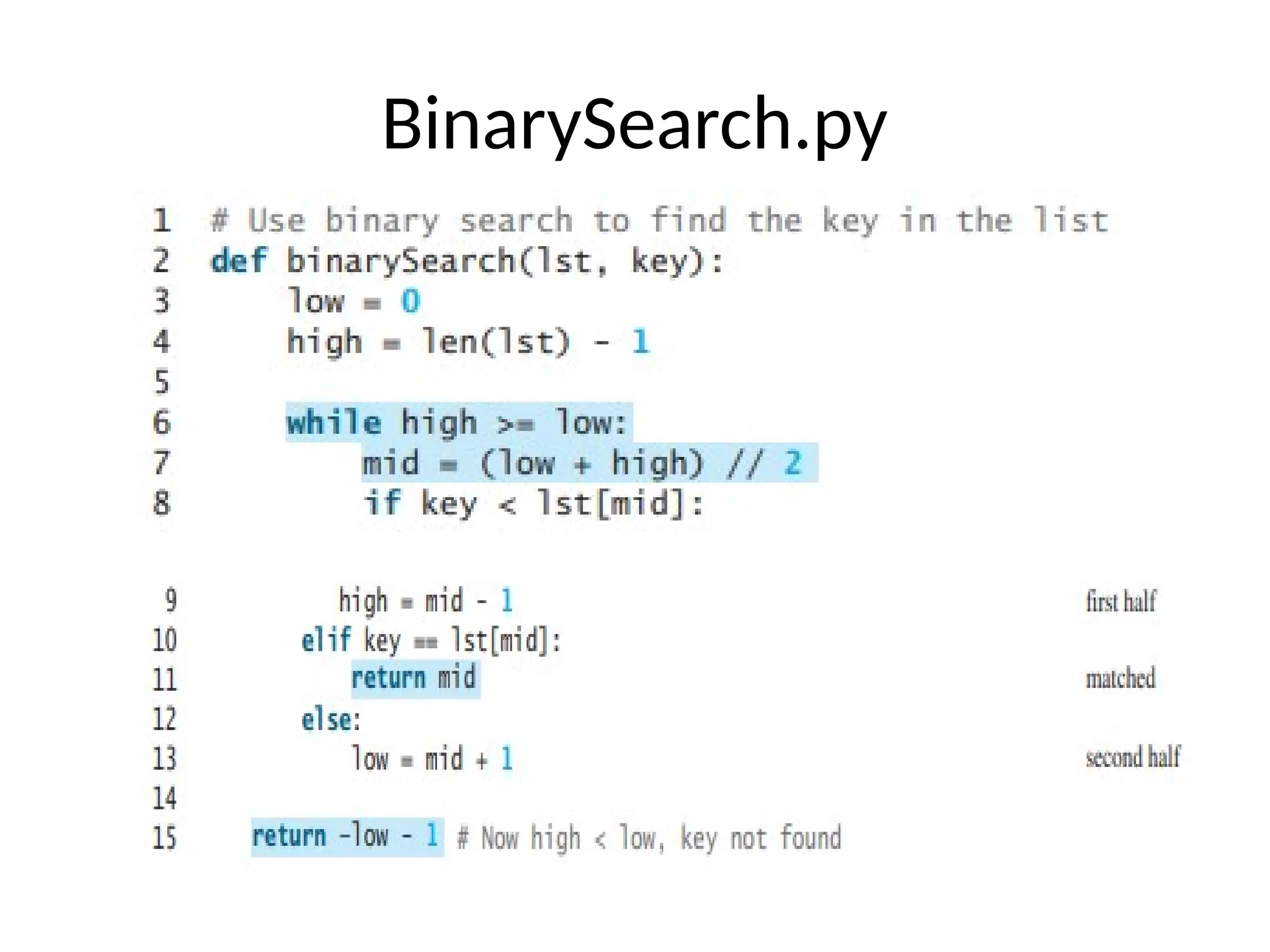
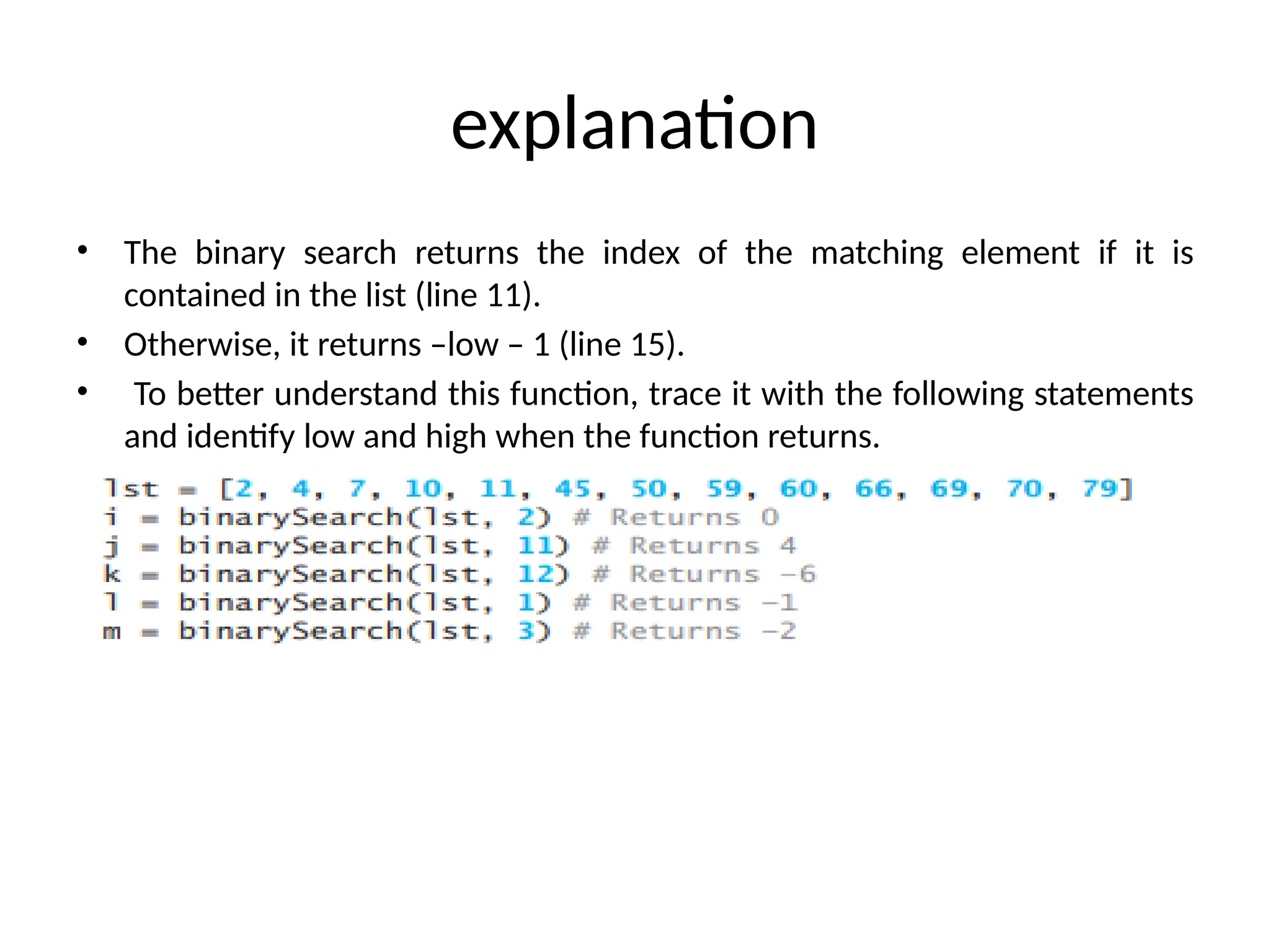
• The binarysearch returns the index of the matching element if it is
contained in the list (line 11).
• Otherwise, it returns –low – 1 (line 15).
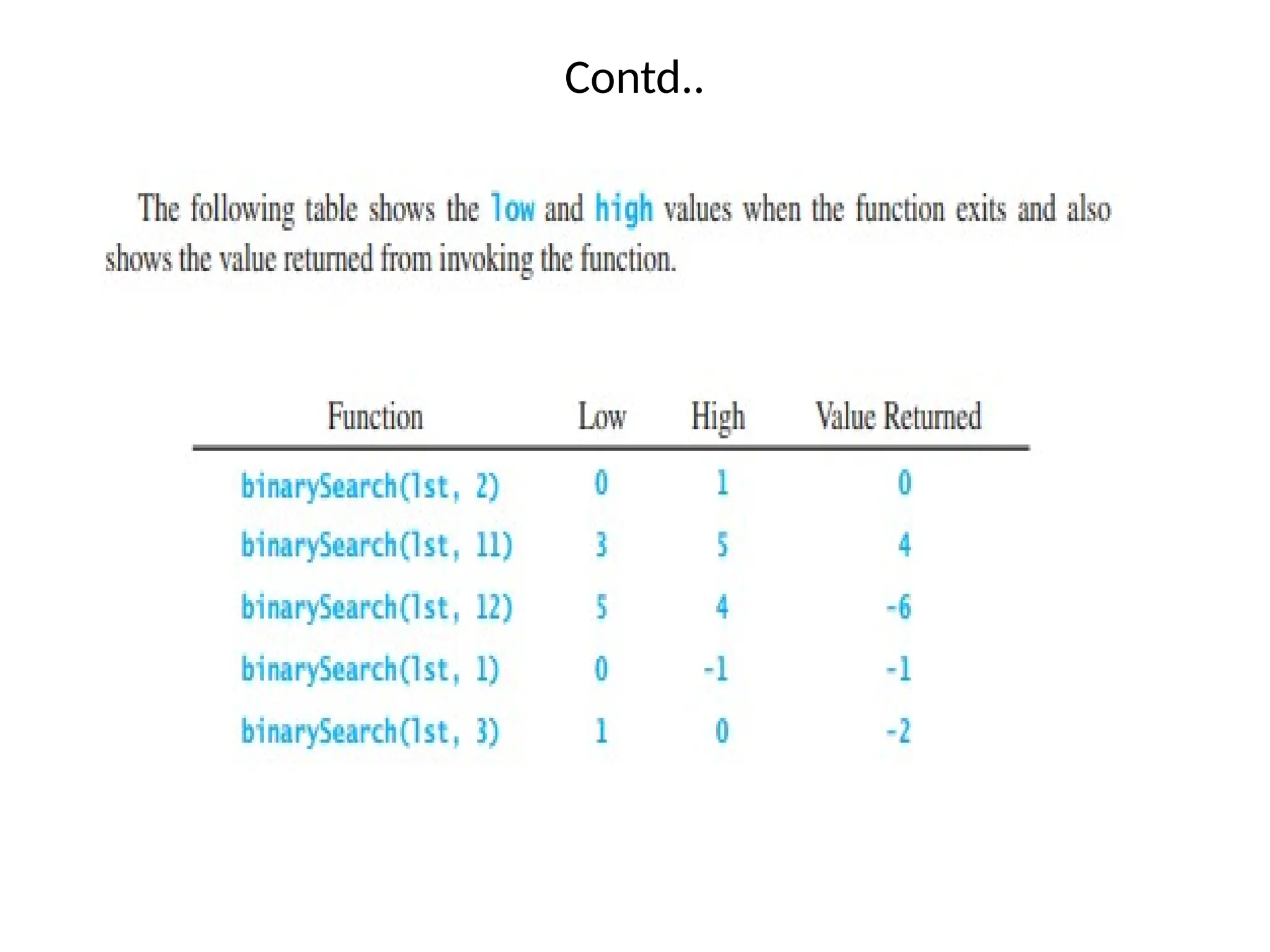
• To better understand this function, trace it with the following statements
and identify low and high when the function returns.
![List Values
• There are several ways to create a new list. The simplest is to enclose the elements
in square brackets ( [ and ]).
• [10, 20, 30, 40]
• ["spam", "bungee", "swallow"]
• The first example is a list of four integers.
• The second is a list of three strings.
• As we said above, the elements of a list don’t have to be the same type.
• The following list contains a string, a float, an integer, and another list.
• ["hello", 2.0, 5, [10, 20]]
• A list within another list is said to be nested and the inner list is often called
a sublist.
• Finally, there is a special list that contains no elements. It is called the empty list
and is denoted [].](https://image.slidesharecdn.com/lists-250629063036-191ce2a7/75/Lists-on-the-pyhton-to-learn-the-children-more-easily-on-easy-codes-pptx-8-2048.jpg)
![Index Operator [ ]
• An element in a list can be accessed through the index operator, using the
following syntax: myList[index]
• List indexes are 0 based; that is, they range from 0 to len(myList)-1, as illustrated in
Figure 10.1.
• myList = [5.6, 4.5, 3.3, 13.2, 4.0, 34.33, 34.0, 45.45, 99.993, 11123]
•myList[index] can be used just like a variable, so it is also known as an
indexed variable.
•For example, the following code adds the values in myList[0] and myList[1] to
myList[2]
myList[2] = myList[0] + myList[1]](https://image.slidesharecdn.com/lists-250629063036-191ce2a7/75/Lists-on-the-pyhton-to-learn-the-children-more-easily-on-easy-codes-pptx-12-2048.jpg)
![Accessing Elements
• The syntax for accessing the elements of a list is the same as the syntax for
accessing the characters of a string.
• We use the index operator ( [] – not to be confused with an empty list).
The expression inside the brackets specifies the index.
• Remember that the indices start at 0. Any integer expression can be used
as an index and as with strings, negative index values will locate items
from the right instead of from the left.
o/p:](https://image.slidesharecdn.com/lists-250629063036-191ce2a7/75/Lists-on-the-pyhton-to-learn-the-children-more-easily-on-easy-codes-pptx-14-2048.jpg)
![List Slicing [start : end]
• List Slicing [start : end] The index operator allows you to select an element
at the specified index.
• The slicing operator returns a slice of the list using the syntax list[start :
end].
• The slice is a sublist from index start to index end – 1. Here are some
examples:](https://image.slidesharecdn.com/lists-250629063036-191ce2a7/75/Lists-on-the-pyhton-to-learn-the-children-more-easily-on-easy-codes-pptx-18-2048.jpg)
![Contd..
• You can use a negative index in slicing.
• For example:
Note:
If start >= end, list[start : end] returns an empty list. If end specifies a position
beyond the end of the list, Python will use the length of the list for end instead.](https://image.slidesharecdn.com/lists-250629063036-191ce2a7/75/Lists-on-the-pyhton-to-learn-the-children-more-easily-on-easy-codes-pptx-20-2048.jpg)
![List comprehension
• List comprehension is a concise way to create lists in
Python. Instead of using a loop, you can generate a new
list in a single line of code.
• Syntax:
[expression for item in iterable if condition]
• expression – what to do with each item
• item – variable representing each element in the iterable
(like a list or range)
• iterable – the collection you're looping through
• condition – (optional) filter to include only certain items](https://image.slidesharecdn.com/lists-250629063036-191ce2a7/75/Lists-on-the-pyhton-to-learn-the-children-more-easily-on-easy-codes-pptx-24-2048.jpg)
![List Deletion
• Using slices to delete list elements can be
awkward and therefore error-prone.
• Python provides an alternative that is more
readable. The del statement removes an
element from a list by using its position.
['one', 'three']
['a', 'f']](https://image.slidesharecdn.com/lists-250629063036-191ce2a7/75/Lists-on-the-pyhton-to-learn-the-children-more-easily-on-easy-codes-pptx-36-2048.jpg)
![The List operators
• The del Operator
del list_name[a : b] :- This method deletes all the elements
in range starting from index ‘a’ till ‘b’ mentioned in
arguments.](https://image.slidesharecdn.com/lists-250629063036-191ce2a7/75/Lists-on-the-pyhton-to-learn-the-children-more-easily-on-easy-codes-pptx-39-2048.jpg)
![List Comprehensions
• The list comprehension is used to create a new list from
existing sequences.
• It is a tool for transforming a given list into another list.
• List comprehensions provide a concise way to create lists.
• List Comprehension is defined as an elegant way to define,
create a list in Python and consists of brackets that contains
an expression followed by for clause.
Syntax :
[ expression for item in list if conditional ]
• It is efficient in both computationally and in terms of
coding space and time.](https://image.slidesharecdn.com/lists-250629063036-191ce2a7/75/Lists-on-the-pyhton-to-learn-the-children-more-easily-on-easy-codes-pptx-45-2048.jpg)
![Consider the list with mixed type of elements, such as L1 = [1,
'X', 4,5.6, ‘z', 9, 'a', 0, 41] . Create another list using list
comprehension which consists of only the integer's present in
LI.](https://image.slidesharecdn.com/lists-250629063036-191ce2a7/75/Lists-on-the-pyhton-to-learn-the-children-more-easily-on-easy-codes-pptx-50-2048.jpg)
![Contd..
Print(origlist) o/p:[45, 99, 34, 55]](https://image.slidesharecdn.com/lists-250629063036-191ce2a7/75/Lists-on-the-pyhton-to-learn-the-children-more-easily-on-easy-codes-pptx-52-2048.jpg)
![• To get a duplicate copy of list1 into list2, you can use:
list2 = [x for x in list1]
or simply:
list2 = [] + list1
•What is the output of the following code? Output:
What is the output of the following code?
Output:](https://image.slidesharecdn.com/lists-250629063036-191ce2a7/75/Lists-on-the-pyhton-to-learn-the-children-more-easily-on-easy-codes-pptx-70-2048.jpg)
![Passing Lists to Functions
• When passing a list to a function, the contents of the list may
change after the function call, since a list is a mutable object.
• Since list is an object, passing a list to a function is just like passing
an object to a function.
• For example, the following function displays the elements in a list.
•You can invoke it by passing a list. For instance, the following
statement invokes the printList function to display 3, 1, 2, 6, 4, and
2.
printList([3, 1, 2, 6, 4, 2]) # creates a list and passes it to the function
•Note :
•The preceding statement creates a list and passes it to the function. There is no
explicit reference variable for the list. Such a list is called an anonymous list.](https://image.slidesharecdn.com/lists-250629063036-191ce2a7/75/Lists-on-the-pyhton-to-learn-the-children-more-easily-on-easy-codes-pptx-72-2048.jpg)
![Since a list is a mutable object, the contents of a list may change
in the function. Take the code in Listing 10.5, for example:
PassListArgument.py
Output:
x is 1
y[0] is 5555](https://image.slidesharecdn.com/lists-250629063036-191ce2a7/75/Lists-on-the-pyhton-to-learn-the-children-more-easily-on-easy-codes-pptx-73-2048.jpg)
![Code explanation
• In this sample run, you see that after m is invoked (line 5, x remains 1, but
y[0] is changed to 5555.
• Step 5: def m(number,numbers): This line defines a function named m
that accepts two parameters: number and numbers.
• Step 6: number = 1001 # Assign a new value to number Inside the m
function, the parameter number (which received the value of x) is
reassigned the value 1001. Important: This assignment only affects the
local variable number within the m function. It does not change the value
of the original variable x in the main function. This is because integers are
immutable in Python, and arguments are passed by value.
• Step 7: numbers[0] = 5555 # Assign a new value to numbers[0] The first
element of the list numbers (which refers to the same list as y in the main
function) is accessed using index 0 and its value is changed to 5555.
Important: Lists are mutable in Python, and when a list is passed as an
argument to a function, any modifications made to the list within the
function will affect the original list in the calling function. This is because
lists are passed by reference (or more accurately, a reference to the list
object is passed).](https://image.slidesharecdn.com/lists-250629063036-191ce2a7/75/Lists-on-the-pyhton-to-learn-the-children-more-easily-on-easy-codes-pptx-74-2048.jpg)
![Code explanation
• Step 1: def add(x, lst=[]): This line defines a function named add
that takes two arguments:
• x: The value to potentially add to the list.
• lst: A list. It has a default value of an empty list []. Important:
Default mutable arguments in Python can lead to unexpected
behavior because the same list object is reused across multiple calls
to the function when the default is used.
• Step 2: if x not in lst: Inside the add function, this line checks if the
value of x is already present in the lst.
• Step 3: lst.append(x) If the condition in the if statement is true (i.e.,
x is not in lst), this line appends the value of x to the end of the lst.
• Step 4: return lst The function add returns the modified lst.](https://image.slidesharecdn.com/lists-250629063036-191ce2a7/75/Lists-on-the-pyhton-to-learn-the-children-more-easily-on-easy-codes-pptx-76-2048.jpg)
![Contd..
• Step 5: def main(): This line defines the main function, which is the
entry point of our script.
• Step 6: list1 = add(1) The add function is called with x=1 and the
default value for lst (which is an empty list the first time it's used
with the default).
• 1 is not in [], so 1 is appended to the list.
• The function returns [1], which is assigned to list1.
• print(list1) outputs [1].
• Step 7: list2 = add(2) The add function is called again with x=2 and
the same default list that was used in the previous call (because it's
a mutable default argument). This list now contains [1].
• 2 is not in [1], so 2 is appended to the list.
• The function returns [1, 2], which is assigned to list2.
• print(list2) outputs [1, 2].](https://image.slidesharecdn.com/lists-250629063036-191ce2a7/75/Lists-on-the-pyhton-to-learn-the-children-more-easily-on-easy-codes-pptx-77-2048.jpg)
![Contd..
• Step 8: list3 = add(3, [11, 12, 13, 14]) The add function is called with x=3
and a new list [11, 12, 13, 14] is explicitly provided for the lst argument.
• 3 is not in [11, 12, 13, 14], so 3 is appended to this new list.
• The function returns [11, 12, 13, 14, 3], which is assigned to list3.
• print(list3) outputs [11, 12, 13, 14, 3].
• Step 9: list4 = add(4) The add function is called again with x=4 and the
default list. Remember, this is the same list object that was modified in
the second call. It currently contains [1, 2].
• 4 is not in [1, 2], so 4 is appended to this list.
• The function returns [1, 2, 4], which is assigned to list4.
• print(list4) outputs [1, 2, 4].
• Step 10: main() # Call the main function Finally, the main function is
called, initiating the execution of the steps above.](https://image.slidesharecdn.com/lists-250629063036-191ce2a7/75/Lists-on-the-pyhton-to-learn-the-children-more-easily-on-easy-codes-pptx-78-2048.jpg)
![example
• Explanation:
• Step 1: def reverse(lst): This line defines a function named reverse that takes one
argument: lst, which is expected to be a list.
• Step 2: result = [] Inside the reverse function, an empty list named result is
created. This list will store the reversed elements of the input list.
• Step 3: for element in lst: This line starts a for loop. The loop will iterate through
each element in the input list lst one by one.](https://image.slidesharecdn.com/lists-250629063036-191ce2a7/75/Lists-on-the-pyhton-to-learn-the-children-more-easily-on-easy-codes-pptx-82-2048.jpg)
![Code explanation
• Step 4: result.insert(0, element) Inside the loop, for each element retrieved from the input
lst, the insert() method is called on the result list.
• result.insert(0, element) inserts the current element at index 0 of the result list. This means
the new element is always added to the beginning of the result list.
• Let's trace the loop with the example list1 = [1, 2, 3, 4, 5, 6]:
• Iteration 1:
– element is 1.
– result.insert(0, 1) is executed. result becomes [1].
• Iteration 2:
– element is 2.
– result.insert(0, 2) is executed. result becomes [2, 1].
• Iteration 3:
– element is 3.
– result.insert(0, 3) is executed. result becomes [3, 2, 1].
• Iteration 4:
– element is 4.
– result.insert(0, 4) is executed. result becomes [4, 3, 2, 1].
• Iteration 5:
– element is 5.
– result.insert(0, 5) is executed. result becomes [5, 4, 3, 2, 1].
• Iteration 6:
– element is 6.
– result.insert(0, 6) is executed. result becomes [6, 5, 4, 3, 2, 1].](https://image.slidesharecdn.com/lists-250629063036-191ce2a7/75/Lists-on-the-pyhton-to-learn-the-children-more-easily-on-easy-codes-pptx-83-2048.jpg)
![Contd..
• Step 5: return result After the loop has finished processing all
the elements in the input lst, the function returns the result
list, which now contains the elements of the original list in
reverse order.
• Step 6: list1 = [1, 2, 3, 4, 5, 6] Outside the function, a list
named list1 is created and initialized with the numbers 1
through 6.
• Step 7: list2 = reverse(list1) The reverse function is called with
list1 as the argument. The function executes as described in
the previous steps and returns the reversed list [6, 5, 4, 3, 2,
1]. This returned list is then assigned to the variable list2.](https://image.slidesharecdn.com/lists-250629063036-191ce2a7/75/Lists-on-the-pyhton-to-learn-the-children-more-easily-on-easy-codes-pptx-84-2048.jpg)
![Case Study
• Key point:
• Counting the Occurrences of Each Letter The program in this section counts the
occurrence of each letter among 100 letters
• Problem:
• Generates 100 lowercase letters randomly and assigns them to a list of characters,
named chars, as shown in Figure 10.8a. You can obtain a random letter by using
the getRandomLowerCaseLetter() function in the RandomCharacter module.
• Figure 10.8b Counts the occurrences of each letter in the list. To do so, it creates a
list named counts that has 26 int values, each of which counts the occurrences of a
letter, as shown in Figure 10.8b. That is, counts[0] counts the number of times a
appears in the list, counts[1] counts the number of time b appears, and so on.](https://image.slidesharecdn.com/lists-250629063036-191ce2a7/75/Lists-on-the-pyhton-to-learn-the-children-more-easily-on-easy-codes-pptx-85-2048.jpg)
![Explanation
• The portion of the list being searched shrinks by half after each
comparison.
• Let low and high denote, respectively, the first index and last index of the
list that is currently being searched.
• Initially, low is 0 and high is len(lst)–1. Let mid denote the index of the
middle element, so mid is (low + high) // 2.
• Figure 10.9 shows how to find the key 11 in the list [2, 4, 7, 10, 11, 45, 50,
59, 60, 66, 69, 70, 79] using a binary search.](https://image.slidesharecdn.com/lists-250629063036-191ce2a7/75/Lists-on-the-pyhton-to-learn-the-children-more-easily-on-easy-codes-pptx-92-2048.jpg)
![Contd..
• Figure 10.10a. It compares the key with the middle element in the list,
whose low index is 0 and high index is len(lst) - 1.
• If key < lst[mid], set the high index to mid - 1; if key == lst[mid], a match is
found and the program returns mid; if key > lst[mid], set the low index to
mid + 1.
• Next, consider implementing the function to perform a search repeatedly
by adding a loop, as shown in Figure 10.10b.
• The search ends if the key is found, or if the key is not found when low >
high](https://image.slidesharecdn.com/lists-250629063036-191ce2a7/75/Lists-on-the-pyhton-to-learn-the-children-more-easily-on-easy-codes-pptx-93-2048.jpg)