Location
  Technology
 Workshop for
Parents of Teens
           By Di Zhang
               LIS 560
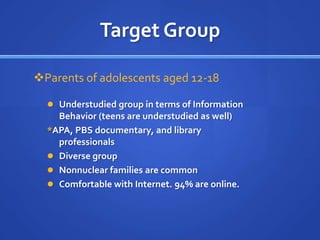
Target Group

Parents of adolescents aged 12-18

   Understudied group in terms of Information
    Behavior (teens are understudied as well)
  *APA, PBS documentary, and library
    professionals
   Diverse group
   Nonnuclear families are common
   Comfortable with Internet. 94% are online.
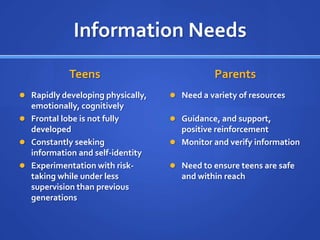
Information Needs
            Teens                             Parents
 Rapidly developing physically,    Need a variety of resources
  emotionally, cognitively
 Frontal lobe is not fully         Guidance, and support,
  developed                          positive reinforcement
 Constantly seeking                Monitor and verify information
  information and self-identity
 Experimentation with risk-        Need to ensure teens are safe
  taking while under less             and within reach
  supervision than previous
  generations
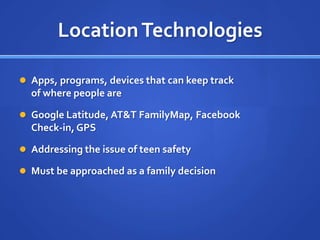
Location Technologies

 Apps, programs, devices that can keep track
  of where people are

 Google Latitude, AT&T FamilyMap, Facebook
  Check-in, GPS

 Addressing the issue of teen safety

 Must be approached as a family decision
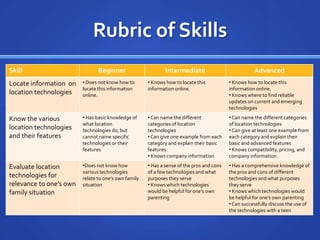
Rubric of Skills
Skill                           Beginner                      Intermediate                            Advanced
Locate information on    • Does not know how to       • Knows how to locate this           • Knows how to locate this
                         locate this information      information online.                  information online.
location technologies    online.                                                           • Knows where to find reliable
                                                                                           updates on current and emerging
                                                                                           technologies

Know the various         • Has basic knowledge of     • Can name the different             • Can name the different categories
                         what location                categories of location               of location technologies
location technologies    technologies do, but         technologies                         • Can give at least one example from
and their features       cannot name specific         • Can give one example from each     each category and explain their
                         technologies or their        category and explain their basic     basic and advanced features
                         features                     features                             • Knows compatibility, pricing, and
                                                      • Knows company information          company information.

Evaluate location        •Does not know how           • Has a sense of the pros and cons   • Has a comprehensive knowledge of
                         various technologies         of a few technologies and what       the pros and cons of different
technologies for         relate to one’s own family   purposes they serve                  technologies and what purposes
relevance to one’s own   situation                    • Knows which technologies           they serve
family situation                                      would be helpful for one’s own       • Knows which technologies would
                                                      parenting                            be helpful for one’s own parenting
                                                                                           • Can successfully discuss the use of
                                                                                           the technologies with a teen
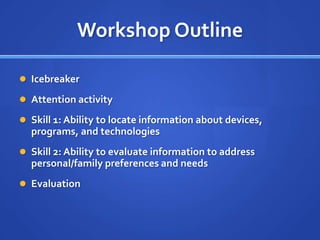
Workshop Outline

 Icebreaker

 Attention activity

 Skill 1: Ability to locate information about devices,
  programs, and technologies
 Skill 2: Ability to evaluate information to address
  personal/family preferences and needs
 Evaluation
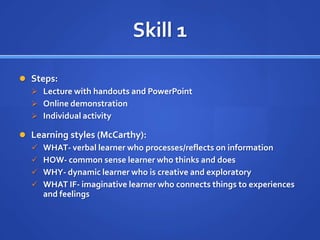
Skill 1

 Steps:
   Lecture with handouts and PowerPoint
   Online demonstration
   Individual activity

 Learning styles (McCarthy):
   WHAT- verbal learner who processes/reflects on information
   HOW- common sense learner who thinks and does
   WHY- dynamic learner who is creative and exploratory
   WHAT IF- imaginative learner who connects things to experiences
    and feelings
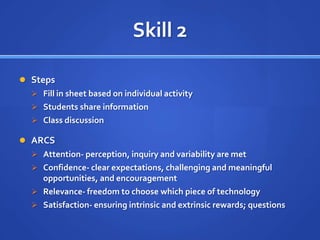
Skill 2

 Steps
   Fill in sheet based on individual activity
   Students share information
   Class discussion

 ARCS
   Attention- perception, inquiry and variability are met
   Confidence- clear expectations, challenging and meaningful
    opportunities, and encouragement
   Relevance- freedom to choose which piece of technology
   Satisfaction- ensuring intrinsic and extrinsic rewards; questions
Conclusion

Participants should leave with the following:
 Ability to search Google, company websites, and technology
   websites for information on location technologies

 A basic knowledge of what technologies are available, along with
   their features

 The ability to evaluate different products for potential positives
   and negatives

 The ability to relate various technologies and products to one’s
   own family situation.

 Handout

 Evaluation
References
   22 Surprising facts about birth in the United States. (2009, August). Baby Center. Retrieved
    February 24, 2011, from http://www.babycenter.com/0_22-surprising-facts-about-birth-in-
    the-united-states_1372273.bc?showAll=true

   American Women Are Waiting to Begin Families. (2002, December 11). Centers forDisease Control
    and Prevention. Retrieved February 24, 2011,
    fromhttp://www.cdc.gov/nchs/pressroom/02news/ameriwomen.htm

   Case, D.O. (2008). Looking for Information: A Survey of Research on InformationSeeking,
    Needs, and Behavior (2nd ed.). UK: Emerald Group Publishing Limited.

   Developing Adolescents: A Reference for Professionals. American Psychological Association.
    (2008). Retrieved from APA Web site:http://apa.org/pi/families/resources/develop.pdf

   Fatt, James Poon Teng. (1993). Learning Styles in Training: Teaching Learners the Way to
    Learn. Industrial and Commercial Training, 25(9), 17-23.

   Macgill, A. (2007). Parents, Teens and Technology. PEW Research Center Publications.
    Retrieved on February 25, 2011 from: http://pewresearch.org/pubs/621/

   McCarthy, Bernice. (1997). A tale of four learners: 4MAT’s learning styles. Educational
    Leadership, 54(6), 46-52.
References
   McDonough, H. (2007). “Dragging a Three-Year-Old to a Library”: The InformationBehavior of
    Parents of Young Children. Southern Connecticut State University. Retrieved on January 24,
    2011,
    from:http://myriadeyes.com/MLSCapstonePortfolio/CoursesTaken/McDonough_ILS537_Grou
    p_Information_Behavior.htm

   Pattee, A. (2006). The secret source: Sexually explicit young adult literature as an information
    source. Young Adult Library Services, 4, 30-38.

   Robyler, M.D. & J Edwards. (2000). “Learning Theories and Integration Models.” InIntegration
    Educational Technology into Teaching. Upper Saddle River: Prentice Hall.

   A. Shanton and P. Dixon. Just what do they want? What do they need? A study of the
    information needs of children, Children and Libraries 1 (2003), pp. 36-42.

   Spinks, S. (2002). Frontline: Inside the Teenage Brain. Retrieved on January 24, 2011, from
    PBS Web site:http://pbs.org/wgbh/pages/frontline/shows/teenbrain/etc/script.html

   US Census Bureau. (2009). Retrieved on February 24, 2011, from:
    http://factfinder.census.gov/servlet/STTable?_bm=y&-geo_id=01000US&
    qr_name=ACS_2009_5YR_G00_S0901&-ds_name=ACS_2009_5YR_G00_&-redoLog=false

Lis560 trainingmodulepart3

  • 1.
    Location Technology Workshop for Parents of Teens By Di Zhang LIS 560
  • 2.
    Target Group Parents ofadolescents aged 12-18  Understudied group in terms of Information Behavior (teens are understudied as well) *APA, PBS documentary, and library professionals  Diverse group  Nonnuclear families are common  Comfortable with Internet. 94% are online.
  • 3.
    Information Needs Teens Parents  Rapidly developing physically,  Need a variety of resources emotionally, cognitively  Frontal lobe is not fully  Guidance, and support, developed positive reinforcement  Constantly seeking  Monitor and verify information information and self-identity  Experimentation with risk-  Need to ensure teens are safe taking while under less and within reach supervision than previous generations
  • 4.
    Location Technologies  Apps,programs, devices that can keep track of where people are  Google Latitude, AT&T FamilyMap, Facebook Check-in, GPS  Addressing the issue of teen safety  Must be approached as a family decision
  • 5.
    Rubric of Skills Skill Beginner Intermediate Advanced Locate information on • Does not know how to • Knows how to locate this • Knows how to locate this locate this information information online. information online. location technologies online. • Knows where to find reliable updates on current and emerging technologies Know the various • Has basic knowledge of • Can name the different • Can name the different categories what location categories of location of location technologies location technologies technologies do, but technologies • Can give at least one example from and their features cannot name specific • Can give one example from each each category and explain their technologies or their category and explain their basic basic and advanced features features features • Knows compatibility, pricing, and • Knows company information company information. Evaluate location •Does not know how • Has a sense of the pros and cons • Has a comprehensive knowledge of various technologies of a few technologies and what the pros and cons of different technologies for relate to one’s own family purposes they serve technologies and what purposes relevance to one’s own situation • Knows which technologies they serve family situation would be helpful for one’s own • Knows which technologies would parenting be helpful for one’s own parenting • Can successfully discuss the use of the technologies with a teen
  • 6.
    Workshop Outline  Icebreaker Attention activity  Skill 1: Ability to locate information about devices, programs, and technologies  Skill 2: Ability to evaluate information to address personal/family preferences and needs  Evaluation
  • 7.
    Skill 1  Steps:  Lecture with handouts and PowerPoint  Online demonstration  Individual activity  Learning styles (McCarthy):  WHAT- verbal learner who processes/reflects on information  HOW- common sense learner who thinks and does  WHY- dynamic learner who is creative and exploratory  WHAT IF- imaginative learner who connects things to experiences and feelings
  • 8.
    Skill 2  Steps  Fill in sheet based on individual activity  Students share information  Class discussion  ARCS  Attention- perception, inquiry and variability are met  Confidence- clear expectations, challenging and meaningful opportunities, and encouragement  Relevance- freedom to choose which piece of technology  Satisfaction- ensuring intrinsic and extrinsic rewards; questions
  • 9.
    Conclusion Participants should leavewith the following:  Ability to search Google, company websites, and technology websites for information on location technologies  A basic knowledge of what technologies are available, along with their features  The ability to evaluate different products for potential positives and negatives  The ability to relate various technologies and products to one’s own family situation.  Handout  Evaluation
  • 10.
    References  22 Surprising facts about birth in the United States. (2009, August). Baby Center. Retrieved February 24, 2011, from http://www.babycenter.com/0_22-surprising-facts-about-birth-in- the-united-states_1372273.bc?showAll=true  American Women Are Waiting to Begin Families. (2002, December 11). Centers forDisease Control and Prevention. Retrieved February 24, 2011, fromhttp://www.cdc.gov/nchs/pressroom/02news/ameriwomen.htm  Case, D.O. (2008). Looking for Information: A Survey of Research on InformationSeeking, Needs, and Behavior (2nd ed.). UK: Emerald Group Publishing Limited.  Developing Adolescents: A Reference for Professionals. American Psychological Association. (2008). Retrieved from APA Web site:http://apa.org/pi/families/resources/develop.pdf  Fatt, James Poon Teng. (1993). Learning Styles in Training: Teaching Learners the Way to Learn. Industrial and Commercial Training, 25(9), 17-23.  Macgill, A. (2007). Parents, Teens and Technology. PEW Research Center Publications. Retrieved on February 25, 2011 from: http://pewresearch.org/pubs/621/  McCarthy, Bernice. (1997). A tale of four learners: 4MAT’s learning styles. Educational Leadership, 54(6), 46-52.
  • 11.
    References  McDonough, H. (2007). “Dragging a Three-Year-Old to a Library”: The InformationBehavior of Parents of Young Children. Southern Connecticut State University. Retrieved on January 24, 2011, from:http://myriadeyes.com/MLSCapstonePortfolio/CoursesTaken/McDonough_ILS537_Grou p_Information_Behavior.htm  Pattee, A. (2006). The secret source: Sexually explicit young adult literature as an information source. Young Adult Library Services, 4, 30-38.  Robyler, M.D. & J Edwards. (2000). “Learning Theories and Integration Models.” InIntegration Educational Technology into Teaching. Upper Saddle River: Prentice Hall.  A. Shanton and P. Dixon. Just what do they want? What do they need? A study of the information needs of children, Children and Libraries 1 (2003), pp. 36-42.  Spinks, S. (2002). Frontline: Inside the Teenage Brain. Retrieved on January 24, 2011, from PBS Web site:http://pbs.org/wgbh/pages/frontline/shows/teenbrain/etc/script.html  US Census Bureau. (2009). Retrieved on February 24, 2011, from: http://factfinder.census.gov/servlet/STTable?_bm=y&-geo_id=01000US& qr_name=ACS_2009_5YR_G00_S0901&-ds_name=ACS_2009_5YR_G00_&-redoLog=false

Editor's Notes

  • #2 Hi, I’m Di Zhang. Welcome to my presentation on the Location Technology Workshop for Parents of Teens.
  • #3 Roughly the middle school and high school ages. Parents of teenagers are an understudied group. There has been very little research done on their information behavior, searching habits, and needs. Because of this, I relied heavily on sources such as the American Psychological Association, a PBS frontline documentary on parents and teenagers, and library professionals who have worked with teens and written about them. What I found in my literature review was that this group is very diverse in terms of age, socioeconomic status, and race. Yet, as parents they share some important information needs that I will address in the next slide.But first, one point to note is that most parents are comfortable with using online resources, which is a plus for my workshop because a large part of the workshop deals with online searches. 94% of parents of teens are online, which is roughly the same percentage as teens who are online. Also, the internet is often the first source that parents consult when searching for information, although not usually the most trusted source.
  • #4 The teenage years are a period in which adolescents experience rapid physical, emotional, and cognitive growth. This means that parents need a variety of resources to address the concerns that are likely to arise during these years. Just before puberty, there is an overproduction of cells in the frontal lobe of the brain, which is the part that is responsible for planning and decision making. Because the frontal lobe is still developing, teens can have trouble seeing the long-term effects of their actions. Parents need to be able to give the appropriate guidance, support, and positive reinforcement that teens need. Also, teens are constantly seeking and being bombarded with information, and parents need to have the tools to make sure that that information is accurate and appropriate. Finally, compared to previous generations, teens have more access to risky behaviors while being under significantly less supervision. According to the APA, lack of supervision of youth is one of the strongest factors for drug abuse. Parents need to be able to monitor the whereabouts of teens and make sure that they remain within contact at all times. This last point is the focus of my workshop.
  • #5 Location technologies are things such as apps, programs, and devices that retrieve and store information about the whereabouts of individuals who are connected to each other via that technology. Some examples of these technologies are Google Latitude, AT&T FamilyMap, Facebook Check-in, and GPS devices. In order to address the issue of teen safety, it may be useful for parents to know how to research and keep up-to-date on these technologies, and which technologies might be right for their family. The decision to use these technologies must be approached as a family decision in which the teen is included in the decision making process. These technologies are not likely to work without the teen’s cooperation.