What is LinkedIn?


Everyone knows about LinkedIn, don't they?
What is LinkedIn?

    LinkedIn is a website where people create profiles
         about themselves and their companies

             Has a professional look and feel

Has more than 100 million users (but no one knows for sure)

         Seems to be mainly used for job hunting
               and business networking
LinkedIn Statistics
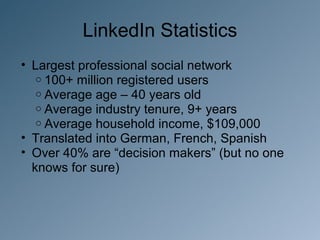
• Largest professional social network
   o 100+ million registered users
   o Average age – 40 years old
   o Average industry tenure, 9+ years
   o Average household income, $109,000
• Translated into German, French, Spanish
• Over 40% are “decision makers” (but no one
  knows for sure)
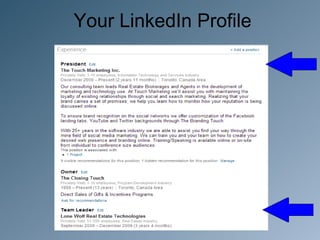
Your LinkedIn Profile
• Fill out completely
   o If there’s a box, complete the information
   o This is your professional resume plus
   o Every word in your profile is searchable
   o Ensure professionalism, proper spelling,
     grammar
• More complete profile leads to more
  connections, more business
• Apply some “tweakage”
Your LinkedIn Profile
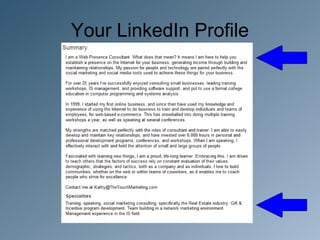
• Keyword density
  o Use keywords associated with what you do:
    ď‚§ Investments, catering, shoe repair, etc.
  o What do people search for?
  o We recommend 15-20% keyword density
• Photos
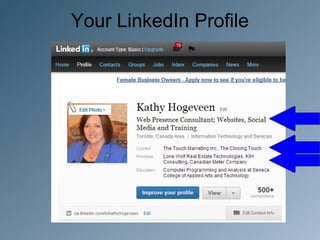
  o Profilephoto – use professional headshot
    ď‚§ No logos, sketches, group or partner shots
Your LinkedIn Profile
Everyone Needs A Friend
Everyone Need A Friend
• How do I find connections?
   o Watch “Suggestions”
   o Mine your connections’ networks*
   o Point from other networks
   o Group discussions, Q & A
   o Promote through email, blog site and website
• Look for “open networkers”
   o LION’s, TopLinked, etc. members
• Mass invite vs. singly
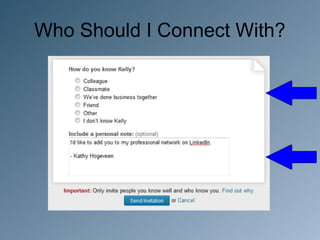
Who Should I Connect With?
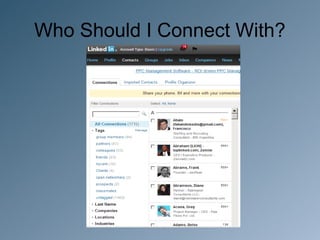
Two schools of thought:

• Connect only with those you know

• Connect with everyone

- Smaller networks of people you know and like can
be efficient and productive

- Larger networks allow for new connections and
opportunities (and bragging about all your online c
connections)
Who Should I Connect With?
What Should I Post?
• Professional information
   o LinkedIn is for business, so promote your
     activities, business
• Interesting articles, blog posts
• Status updates
   o Should be done daily
• Initiate conversations
   o Participate in group discussions
Communication
• LinkedIn internal messages
   o Private, delivered to LI inbox
   o Default notification settings notify via email
   o Set up rules in your email client to reduce
     clutter to your inbox
• Status updates
• Introductions
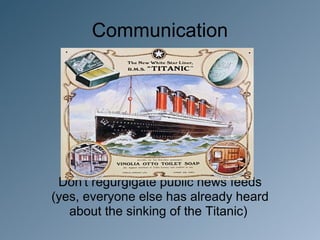
Communication


 Don't regurgigate public news feeds
(yes, everyone else has already heard
   about the sinking of the Titanic)
Care & Feeding of Your Network
• Update frequently
  o Daily status updates are recommended
     ď‚§ Activity breeds activity
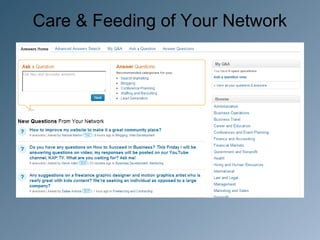
• Monitor questions and discussion forums
• Managing your connections
  o Scan updates, inbox
• Time saving tips
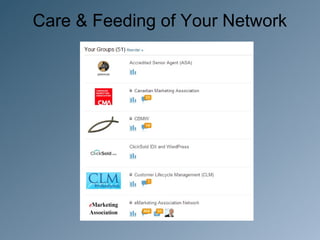
Care & Feeding of Your Network
Q&A
Thanks for attending
        Visit www.TheTouchMarketing.com
for social media training, tips and best practices

      Connect with / follow / like / watch:
      www.linkedin.com/in/kathyhogeveen
      www.facebook.com/TouchMrktg
      www.twitter.com/TouchMrktg
      www.youtube.com/TouchMrktg

Linkedin for Business

  • 2.
    What is LinkedIn? Everyoneknows about LinkedIn, don't they?
  • 3.
    What is LinkedIn? LinkedIn is a website where people create profiles about themselves and their companies Has a professional look and feel Has more than 100 million users (but no one knows for sure) Seems to be mainly used for job hunting and business networking
  • 4.
    LinkedIn Statistics • Largestprofessional social network o 100+ million registered users o Average age – 40 years old o Average industry tenure, 9+ years o Average household income, $109,000 • Translated into German, French, Spanish • Over 40% are “decision makers” (but no one knows for sure)
  • 5.
    Your LinkedIn Profile •Fill out completely o If there’s a box, complete the information o This is your professional resume plus o Every word in your profile is searchable o Ensure professionalism, proper spelling, grammar • More complete profile leads to more connections, more business • Apply some “tweakage”
  • 6.
    Your LinkedIn Profile •Keyword density o Use keywords associated with what you do:  Investments, catering, shoe repair, etc. o What do people search for? o We recommend 15-20% keyword density • Photos o Profilephoto – use professional headshot  No logos, sketches, group or partner shots
  • 7.
  • 8.
  • 9.
  • 10.
  • 11.
    Everyone Need AFriend • How do I find connections? o Watch “Suggestions” o Mine your connections’ networks* o Point from other networks o Group discussions, Q & A o Promote through email, blog site and website • Look for “open networkers” o LION’s, TopLinked, etc. members • Mass invite vs. singly
  • 12.
    Who Should IConnect With? Two schools of thought: • Connect only with those you know • Connect with everyone - Smaller networks of people you know and like can be efficient and productive - Larger networks allow for new connections and opportunities (and bragging about all your online c connections)
  • 13.
    Who Should IConnect With?
  • 14.
    Who Should IConnect With?
  • 15.
    What Should IPost? • Professional information o LinkedIn is for business, so promote your activities, business • Interesting articles, blog posts • Status updates o Should be done daily • Initiate conversations o Participate in group discussions
  • 16.
    Communication • LinkedIn internalmessages o Private, delivered to LI inbox o Default notification settings notify via email o Set up rules in your email client to reduce clutter to your inbox • Status updates • Introductions
  • 17.
    Communication Don't regurgigatepublic news feeds (yes, everyone else has already heard about the sinking of the Titanic)
  • 18.
    Care & Feedingof Your Network • Update frequently o Daily status updates are recommended  Activity breeds activity • Monitor questions and discussion forums • Managing your connections o Scan updates, inbox • Time saving tips
  • 19.
    Care & Feedingof Your Network
  • 20.
    Care & Feedingof Your Network
  • 21.
  • 22.
    Thanks for attending Visit www.TheTouchMarketing.com for social media training, tips and best practices Connect with / follow / like / watch: www.linkedin.com/in/kathyhogeveen www.facebook.com/TouchMrktg www.twitter.com/TouchMrktg www.youtube.com/TouchMrktg