www.CollaboraOffice.com
LibreOffice Online
–
client side development
by Mihai Varga
Consultant Software Engineer Intern
+MihaiVarga13 mihai.varga@collabora.com
@CollaboraOffice
LibreOffice Conference 2015 | Aarhus 2/34
A brief introduction
LibreOffice Conference 2015 | Aarhus 3/34
A brief introduction
● LibreOffice Online:
● development started in April 2015
● consists of two major parts:
– the server
– the client
● Leaflet
● JavaScript
LibreOffice Conference 2015 | Aarhus 4/34
Leaflet
LibreOffice Conference 2015 | Aarhus 5/34
A brief introduction
● how Leaflet usually looks like
LibreOffice Conference 2015 | Aarhus 6/34
Leaflet
● an open-source JavaScript library
● interactive maps
● tile-based implementation
● used by many big companies
LibreOffice Conference 2015 | Aarhus 7/34
Leaflet
● What have we changed ?
● added web socket for
communication with the server
● binary images
● caching more tiles
LibreOffice Conference 2015 | Aarhus 8/34
Loading the
document
LibreOffice Conference 2015 | Aarhus 9/34
Loading the document
● used Leaflet's simple CRS
(Coordinate reference system)
● the tile at (0, 0) is placed in the
left top corner
● request images from server
based on the coordinates of the
visible area
LibreOffice Conference 2015 | Aarhus 10/34
Loading the document
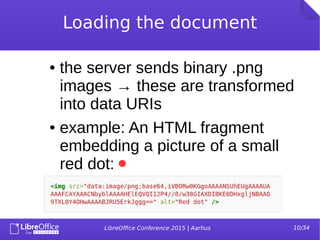
● the server sends binary .png
images → these are transformed
into data URIs
● example: An HTML fragment
embedding a picture of a small
red dot:
LibreOffice Conference 2015 | Aarhus 11/34
Loading the document
LibreOffice Conference 2015 | Aarhus 12/34
Caching
LibreOffice Conference 2015 | Aarhus 13/34
Caching
● tiles outside of the viewing area
are pre-fetched and cached
● tiles are not deleted when
removed from the DOM tree
LibreOffice Conference 2015 | Aarhus 14/34
Viewing the
document
LibreOffice Conference 2015 | Aarhus 15/34
Viewing the document
● implemented a scroll API → scroll
bars can be easily plugged in
● based on Leaflet's panning
methods
● the document can also be
panned with the mouse
● different zoom levels
LibreOffice Conference 2015 | Aarhus 16/34
Viewing the document
● selections are implemented as a
SVG overlay
● text can be selected and copied
from the document
● the user can shrink / enlarge the
selection
LibreOffice Conference 2015 | Aarhus 17/34
Editing the document
LibreOffice Conference 2015 | Aarhus 18/34
Editing the document
● typical scenario: key strokes are
sent to the server → tiles are
invalidated → new tiles are
requested and repainted →
cursor is moved, etc.
LibreOffice Conference 2015 | Aarhus 19/34
Editing the document
● how are key strokes captured?
● we have a hidden text area in which the
user types
● keyboard events are intercepted
● browser compatibility issues, the
keyboard event is different across
browsers
LibreOffice Conference 2015 | Aarhus 20/34
Editing the document
● images and shapes can be moved and
resized
LibreOffice Conference 2015 | Aarhus 21/34
Editing the document
● copying
● the ClipboardEvent is captured in the
hidden text area
● due to security issues, access to the
user's clipboard is quite restricted
● the event must be handled
synchronously when captured, else it
will 'expire'
LibreOffice Conference 2015 | Aarhus 22/34
Editing the document
● what's next for copying
● there is ongoing work for a Clipboard
API (current status: Working Draft)
● very little support for rtf
● plain text or html currently works better
● alternatives: zeroclipboard library
– but this uses flash which will soon be
deprecated
LibreOffice Conference 2015 | Aarhus 23/34
The toolbar
LibreOffice Conference 2015 | Aarhus 24/34
The toolbar
● we've extended Leaflet's API to provide
methods for building / using the toolbar
● most of the methods work through a UNO
command
● it's easy to plug in and out different
toolbar components
● can be easily integrated in an already
existing JavaScript application
LibreOffice Conference 2015 | Aarhus 25/34
The toolbar
Cloudsuite toolbar
LibreOffice Conference 2015 | Aarhus 26/34
The toolbar
A closer look at the toolbar
LibreOffice Conference 2015 | Aarhus 27/34
The toolbar
Searching
LibreOffice Conference 2015 | Aarhus 28/34
The toolbar
● a few other features not available through
UNO commands:
● goToPage / goToPart
● Enable editing / viewing mode
● Zoom in / out
● Enable mouse selection or panning
LibreOffice Conference 2015 | Aarhus 29/34
The toolbar
LibreOffice Conference 2015 | Aarhus 30/34
Testing
LibreOffice Conference 2015 | Aarhus 31/34
Testing
● automated testing is possible
● Leaflet was already using the mocha
JavaScript framework
● nice way of testing the new and the old
features of Leaflet
● we can replay an editing session
LibreOffice Conference 2015 | Aarhus 32/34
Testing
● the tests have to be run in the
browser
● an alternative is to use PhantomJS,
but it currently only has hixie-76
websockets
● PhantomJS 2.x promises RFC
6455 websockets, so this will be the
way to go
LibreOffice Conference 2015 | Aarhus 33/34
Testing
● performance while editing
● tile loading time it's really good on
average (< 100 ms)
● we are still working on improving it
● might have to do with how binary images
are loaded in the browser
LibreOffice Conference 2015 | Aarhus 34/34
Demo

LibreOffice Online

  • 1.
    www.CollaboraOffice.com LibreOffice Online – client sidedevelopment by Mihai Varga Consultant Software Engineer Intern +MihaiVarga13 mihai.varga@collabora.com @CollaboraOffice
  • 2.
    LibreOffice Conference 2015| Aarhus 2/34 A brief introduction
  • 3.
    LibreOffice Conference 2015| Aarhus 3/34 A brief introduction ● LibreOffice Online: ● development started in April 2015 ● consists of two major parts: – the server – the client ● Leaflet ● JavaScript
  • 4.
    LibreOffice Conference 2015| Aarhus 4/34 Leaflet
  • 5.
    LibreOffice Conference 2015| Aarhus 5/34 A brief introduction ● how Leaflet usually looks like
  • 6.
    LibreOffice Conference 2015| Aarhus 6/34 Leaflet ● an open-source JavaScript library ● interactive maps ● tile-based implementation ● used by many big companies
  • 7.
    LibreOffice Conference 2015| Aarhus 7/34 Leaflet ● What have we changed ? ● added web socket for communication with the server ● binary images ● caching more tiles
  • 8.
    LibreOffice Conference 2015| Aarhus 8/34 Loading the document
  • 9.
    LibreOffice Conference 2015| Aarhus 9/34 Loading the document ● used Leaflet's simple CRS (Coordinate reference system) ● the tile at (0, 0) is placed in the left top corner ● request images from server based on the coordinates of the visible area
  • 10.
    LibreOffice Conference 2015| Aarhus 10/34 Loading the document ● the server sends binary .png images → these are transformed into data URIs ● example: An HTML fragment embedding a picture of a small red dot:
  • 11.
    LibreOffice Conference 2015| Aarhus 11/34 Loading the document
  • 12.
    LibreOffice Conference 2015| Aarhus 12/34 Caching
  • 13.
    LibreOffice Conference 2015| Aarhus 13/34 Caching ● tiles outside of the viewing area are pre-fetched and cached ● tiles are not deleted when removed from the DOM tree
  • 14.
    LibreOffice Conference 2015| Aarhus 14/34 Viewing the document
  • 15.
    LibreOffice Conference 2015| Aarhus 15/34 Viewing the document ● implemented a scroll API → scroll bars can be easily plugged in ● based on Leaflet's panning methods ● the document can also be panned with the mouse ● different zoom levels
  • 16.
    LibreOffice Conference 2015| Aarhus 16/34 Viewing the document ● selections are implemented as a SVG overlay ● text can be selected and copied from the document ● the user can shrink / enlarge the selection
  • 17.
    LibreOffice Conference 2015| Aarhus 17/34 Editing the document
  • 18.
    LibreOffice Conference 2015| Aarhus 18/34 Editing the document ● typical scenario: key strokes are sent to the server → tiles are invalidated → new tiles are requested and repainted → cursor is moved, etc.
  • 19.
    LibreOffice Conference 2015| Aarhus 19/34 Editing the document ● how are key strokes captured? ● we have a hidden text area in which the user types ● keyboard events are intercepted ● browser compatibility issues, the keyboard event is different across browsers
  • 20.
    LibreOffice Conference 2015| Aarhus 20/34 Editing the document ● images and shapes can be moved and resized
  • 21.
    LibreOffice Conference 2015| Aarhus 21/34 Editing the document ● copying ● the ClipboardEvent is captured in the hidden text area ● due to security issues, access to the user's clipboard is quite restricted ● the event must be handled synchronously when captured, else it will 'expire'
  • 22.
    LibreOffice Conference 2015| Aarhus 22/34 Editing the document ● what's next for copying ● there is ongoing work for a Clipboard API (current status: Working Draft) ● very little support for rtf ● plain text or html currently works better ● alternatives: zeroclipboard library – but this uses flash which will soon be deprecated
  • 23.
    LibreOffice Conference 2015| Aarhus 23/34 The toolbar
  • 24.
    LibreOffice Conference 2015| Aarhus 24/34 The toolbar ● we've extended Leaflet's API to provide methods for building / using the toolbar ● most of the methods work through a UNO command ● it's easy to plug in and out different toolbar components ● can be easily integrated in an already existing JavaScript application
  • 25.
    LibreOffice Conference 2015| Aarhus 25/34 The toolbar Cloudsuite toolbar
  • 26.
    LibreOffice Conference 2015| Aarhus 26/34 The toolbar A closer look at the toolbar
  • 27.
    LibreOffice Conference 2015| Aarhus 27/34 The toolbar Searching
  • 28.
    LibreOffice Conference 2015| Aarhus 28/34 The toolbar ● a few other features not available through UNO commands: ● goToPage / goToPart ● Enable editing / viewing mode ● Zoom in / out ● Enable mouse selection or panning
  • 29.
    LibreOffice Conference 2015| Aarhus 29/34 The toolbar
  • 30.
    LibreOffice Conference 2015| Aarhus 30/34 Testing
  • 31.
    LibreOffice Conference 2015| Aarhus 31/34 Testing ● automated testing is possible ● Leaflet was already using the mocha JavaScript framework ● nice way of testing the new and the old features of Leaflet ● we can replay an editing session
  • 32.
    LibreOffice Conference 2015| Aarhus 32/34 Testing ● the tests have to be run in the browser ● an alternative is to use PhantomJS, but it currently only has hixie-76 websockets ● PhantomJS 2.x promises RFC 6455 websockets, so this will be the way to go
  • 33.
    LibreOffice Conference 2015| Aarhus 33/34 Testing ● performance while editing ● tile loading time it's really good on average (< 100 ms) ● we are still working on improving it ● might have to do with how binary images are loaded in the browser
  • 34.
    LibreOffice Conference 2015| Aarhus 34/34 Demo