Welcome to
           the Library
http://unihub.mdx.ac.uk/study/library/index.aspx
Aim of session

• Introduction to the library, its services and
  resources.

• Live demonstration of how to access some of
  our resources.
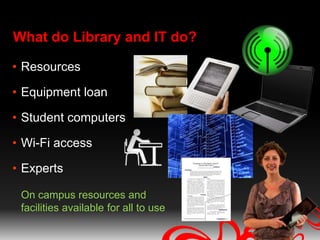
What do Library and IT do?

• Resources

• Equipment loan

• Student computers

• Wi-Fi access

• Experts

 On campus resources and
 facilities available for all to use
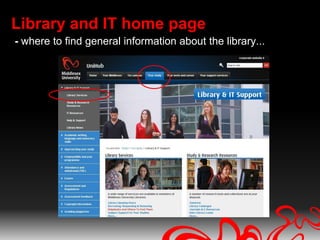
Library and IT home page
- where to find general information about the library...
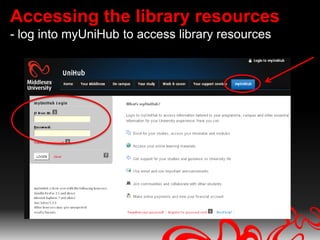
Accessing the library resources
- log into myUniHub to access library resources
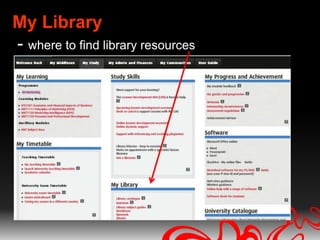
My Library
- where to find library resources
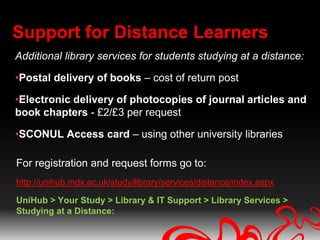
Support for Distance Learners
Additional library services for students studying at a distance:

•Postal delivery of books – cost of return post

•Electronic delivery of photocopies of journal articles and
book chapters - £2/£3 per request

•SCONUL Access card – using other university libraries

For registration and request forms go to:
http://unihub.mdx.ac.uk/study/library/services/distance/index.aspx

UniHub > Your Study > Library & IT Support > Library Services >
Studying at a Distance:
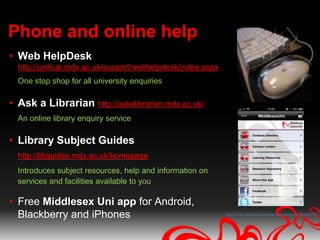
Phone and online help
• Web HelpDesk
  http://unihub.mdx.ac.uk/support/webhelpdesk/index.aspx
  One stop shop for all university enquiries

• Ask a Librarian http://askalibrarian.mdx.ac.uk/
  An online library enquiry service

• Library Subject Guides
  http://libguides.mdx.ac.uk/homepage
  Introduces subject resources, help and information on
  services and facilities available to you

• Free Middlesex Uni app for Android,
  Blackberry and iPhones                                   http://www.flickr.com/photos/sharynmorrow/30586814/
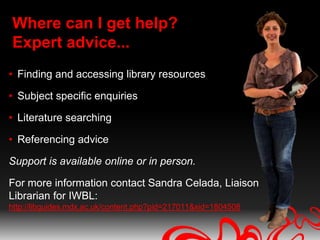
Where can I get help?
Expert advice...
• Finding and accessing library resources

• Subject specific enquiries

• Literature searching

• Referencing advice

Support is available online or in person.

For more information contact Sandra Celada, Liaison
Librarian for IWBL:
http://libguides.mdx.ac.uk/content.php?pid=217011&sid=1804508
Library resources
 a selection of resources
    available to you...
Library subject guides
The library provides a range of online subject
library guides: http://libguides.mdx.ac.uk/homepage

Some guides which may be of interest are:

• Work Based Learning and Professional Practice
  library guide

• Distance Learners guide

• Referencing & Plagiarism
Electronic resources
• E-books – download or read online

• Databases – subject specific collections of e-journals

• E-Journals – look up individual journals by title or
  subject area

• Middlesex University Research Repository - an
  open access digital archive of Research Projects &
  Theses, journal articles written by Mdx staff, etc
Where to look for information
Library Catalogue:
• The best place to search when you are looking for a
  specific book/e-book or journal title.

• Searches all the library’s resources, except individual
  journal articles.
Where to look for information
Summon:
• Searches the library catalogue plus the library’s databases
  for individual journal articles in one simple search.

• Searches across most of the libraries databases, irrespective
  of subject areas.

• Easy to refine your search results by: full-text online, content
  type –e.g. scholarly publications, publication date, etc

• Some glitches! – see here
 http://libguides.mdx.ac.uk/content.php?pid=217011&sid=1889443
Where to look for information
Databases:

• Usually subject specific, e.g. Business Source
  Complete, PsycInfo, Literature online

• Use the Advanced Search where possible

• Often has more advanced search functionality than
  Summon

• Use the Library Subject Guides to find the
  suggested databases for your subject area
Need further help


 IWBL Librarians
 Sandra Celada: s.celada@mdx.ac.uk
 Adam Edwards: a.edwards@mdx.ac.uk

Library Induction Oct 2011

  • 1.
    Welcome to the Library http://unihub.mdx.ac.uk/study/library/index.aspx
  • 2.
    Aim of session •Introduction to the library, its services and resources. • Live demonstration of how to access some of our resources.
  • 3.
    What do Libraryand IT do? • Resources • Equipment loan • Student computers • Wi-Fi access • Experts On campus resources and facilities available for all to use
  • 4.
    Library and IThome page - where to find general information about the library...
  • 5.
    Accessing the libraryresources - log into myUniHub to access library resources
  • 6.
    My Library - whereto find library resources
  • 7.
    Support for DistanceLearners Additional library services for students studying at a distance: •Postal delivery of books – cost of return post •Electronic delivery of photocopies of journal articles and book chapters - £2/£3 per request •SCONUL Access card – using other university libraries For registration and request forms go to: http://unihub.mdx.ac.uk/study/library/services/distance/index.aspx UniHub > Your Study > Library & IT Support > Library Services > Studying at a Distance:
  • 8.
    Phone and onlinehelp • Web HelpDesk http://unihub.mdx.ac.uk/support/webhelpdesk/index.aspx One stop shop for all university enquiries • Ask a Librarian http://askalibrarian.mdx.ac.uk/ An online library enquiry service • Library Subject Guides http://libguides.mdx.ac.uk/homepage Introduces subject resources, help and information on services and facilities available to you • Free Middlesex Uni app for Android, Blackberry and iPhones http://www.flickr.com/photos/sharynmorrow/30586814/
  • 9.
    Where can Iget help? Expert advice... • Finding and accessing library resources • Subject specific enquiries • Literature searching • Referencing advice Support is available online or in person. For more information contact Sandra Celada, Liaison Librarian for IWBL: http://libguides.mdx.ac.uk/content.php?pid=217011&sid=1804508
  • 10.
    Library resources aselection of resources available to you...
  • 11.
    Library subject guides Thelibrary provides a range of online subject library guides: http://libguides.mdx.ac.uk/homepage Some guides which may be of interest are: • Work Based Learning and Professional Practice library guide • Distance Learners guide • Referencing & Plagiarism
  • 12.
    Electronic resources • E-books– download or read online • Databases – subject specific collections of e-journals • E-Journals – look up individual journals by title or subject area • Middlesex University Research Repository - an open access digital archive of Research Projects & Theses, journal articles written by Mdx staff, etc
  • 13.
    Where to lookfor information Library Catalogue: • The best place to search when you are looking for a specific book/e-book or journal title. • Searches all the library’s resources, except individual journal articles.
  • 14.
    Where to lookfor information Summon: • Searches the library catalogue plus the library’s databases for individual journal articles in one simple search. • Searches across most of the libraries databases, irrespective of subject areas. • Easy to refine your search results by: full-text online, content type –e.g. scholarly publications, publication date, etc • Some glitches! – see here http://libguides.mdx.ac.uk/content.php?pid=217011&sid=1889443
  • 15.
    Where to lookfor information Databases: • Usually subject specific, e.g. Business Source Complete, PsycInfo, Literature online • Use the Advanced Search where possible • Often has more advanced search functionality than Summon • Use the Library Subject Guides to find the suggested databases for your subject area
  • 16.
    Need further help IWBL Librarians Sandra Celada: s.celada@mdx.ac.uk Adam Edwards: a.edwards@mdx.ac.uk

Editor's Notes

  • #2 WelcomeIn this session we are going to cover what Library and IT support can provide for you.
  • #4 You will find that the library here is much bigger then you are used to. When people think of a library the first thing that comes into their minds are books but Middlesex library has much more than just books: (Allow images to appear, then talk through what we have.)(Pic 1) books(Pic 2) electronic books, (Pic 3) journals and e-journals(Pic 4) databases(Pic 5) e- newspapers(Pic 6) place to study(Pic 7) Wireless access(Pic 8) laptops that you can borrow. (Pic 9) Expert advice when you need it
  • #5 You will get to the Library and IT home page when you click on the ‘Library & IT’ tab. From here you can see all of the services that the library has to offer you including:-Opening Hours-Helpdesks And Where to Find Them-Subject Support for your Studies-Access to the library catalogue-E-Resources And if you scroll down you will also see links to IT support and services
  • #6 We will be logging into myUniHub at the end of this session and you will be able to see for yourselves.
  • #9 Web Helpdesk (phone and email)for all general University enquiries including:Password problemsLibrary and IT enquiriesPhone help = 08:00-21:00 GMT Monday to Friday, 09:00-21:00 GMT Saturday and Sunday.Ask a Librarian: You can also use the online “Ask A Librarian” service if you have an enquiry regarding your subject, research, selecting and using resources etc. The benefit of using this service rather than just emailing your librarian directly is you can type your question into a search box and if the someone else has already asked the same, or similar question, then you can immediate see the librarians reply to the question. If not, we aim to answer all enquiries within 24 hours.Library Subject Guides:online library guide for each subject – more of which later Middlesex Uni App: freely downloadable app. Some of the things you can do are:browse the library catalogue, manage your library account, access the library guides & Research Repositoryfollow the WBL Twitter for the latest newsPlus much more!
  • #10 Your librarian Sandra Celada is available Mon-Fri 09.00-17.00 GMT for expert help in: Finding and accessing e-resources Subject specific enquiries Referencing & literature searching adviceShe can provide 1-1 support over the phone, email or online, by appointment Her contact details are available on the Work Based Learning & Professional Practice library guide which I show you shortly.The library also provides expert advice for academic IT needs such as software,
  • #11 We’re now going to take a look at a few key library resources that will be useful for your research:Library guidesElectronic resourcesResearch RepositoryBibliographic managementKeeping current – alerts and feedsFor Dprof’sImpact Factor for JournalsData collection tools
  • #12 WBL guide – summary***Distance learners support – summary entitled to extra support from the library. Postal books, journal articles, etc. See guide for more information.FAIR – the best of the web resourcesResearch – how to publish a book, etc...
  • #13 SummonE-booksDatabasesE-journals