Welcome toLibrary and IT supportCypress 2011http://unihub.mdx.ac.uk/study/library
What do Library and IT do?ResourcesExpertsDistance learner support
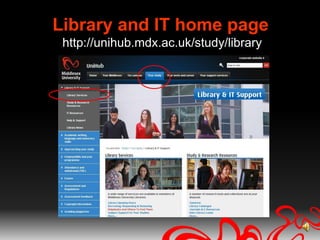
Library and IT home pagehttp://unihub.mdx.ac.uk/study/library
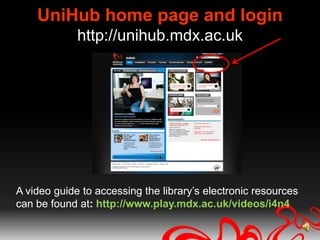
UniHub home page and loginhttp://unihub.mdx.ac.ukA video guide to accessing the library’s electronic resources can be found at: http://www.play.mdx.ac.uk/videos/i4n4
Where can I get help?Expert advice...Finding and accessing resources
Subject specific enquiries
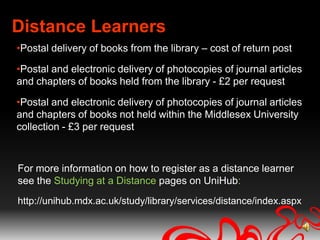
AppointmentsDistance LearnersPostal delivery of books from the library – cost of return postPostal and electronic delivery of photocopies of journal articles and chapters of books held from the library - £2 per requestPostal and electronic delivery of photocopies of journal articles and chapters of books not held within the Middlesex University collection - £3 per request For more information on how to register as a distance learner see the Studying at a Distance pages on UniHub:http://unihub.mdx.ac.uk/study/library/services/distance/index.aspx
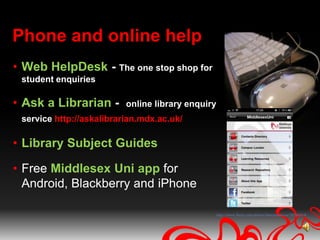
Phone and online helpWeb HelpDesk- The one stop shop for student enquiriesAsk a Librarian -  online library enquiry service http://askalibrarian.mdx.ac.uk/Library Subject GuidesFree Middlesex Uni app for Android, Blackberry and iPhonehttp://www.flickr.com/photos/sharynmorrow/30586814/
Useful resources
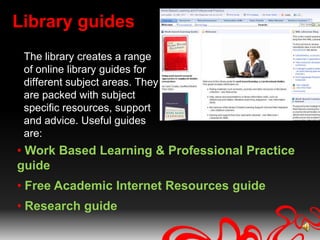
Library guidesThe library creates a range of online library guides for different subject areas. They are packed with subject specific resources, support and advice. Useful guides are:Work Based Learning & Professional Practice guide
Free Academic Internet Resources guide
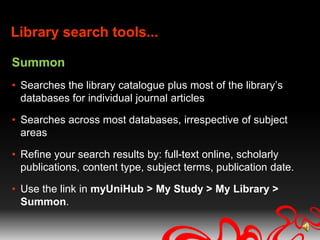
Research guideLibrary search tools...SummonSearches the library catalogue plus most of the library’s databases for individual journal articlesSearches across most databases, irrespective of subject areasRefine your search results by: full-text online, scholarly publications, content type, subject terms, publication date.Use the link in myUniHub > My Study > My Library > Summon.
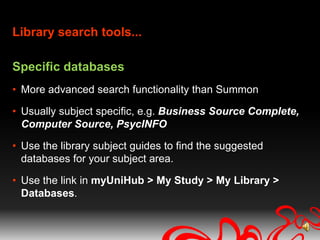
Library search tools...Specific databasesMore advanced search functionality than SummonUsually subject specific, e.g. Business Source Complete, Computer Source, PsycINFOUse the library subject guides to find the suggested databases for your subject area. Use the link in myUniHub > My Study > My Library > Databases.
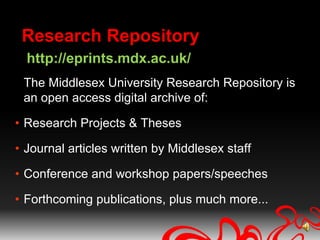
Research Repositoryhttp://eprints.mdx.ac.uk/The Middlesex University Research Repository is an open access digital archive of:Research Projects & ThesesJournal articles written by Middlesex staffConference and workshop papers/speechesForthcoming publications, plus much more...
Bibliographic managementRefWorksA bibliographic management system that helps you manage and organise your citations and referencesAvailable via myUniHub > My Study > My Library > Databases > R > RefWorks
Keeping current: journalsTo keep current you can set up email alerts and RSS feeds via:Databases (see individual databases)Zetoc Alert (British Library current awareness service)CiteuLike (a free service for managing and discovering scholarly references from recent publications)TicTOC (search for 1000s of journal table of contents (TOCs) RSS feeds by title, subject or publisher)
Impact Factors for JournalsDelivers quantifiable statistical information based on citation dataHelps determine a publication’s impact and influence in the global research communityIncludes journal and category dataAvailable via myUniHub > My Study > My Library > Databases > W > Web of ScienceTo generate the journal summary list follow the links: Social Science Citation Index> Additional Resources> Journal Citation Reports
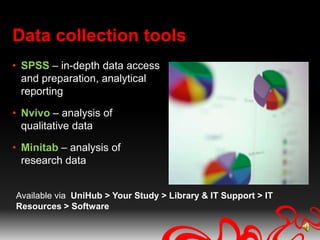
Data collection toolsSPSS – in-depth data access and preparation, analytical reportingNvivo – analysis of qualitative dataMinitab – analysis of research dataAvailable via  UniHub > Your Study > Library & IT Support > IT Resources > Software

Introduction the the Library & IT Support Oct 2011

  • 1.
    Welcome toLibrary andIT supportCypress 2011http://unihub.mdx.ac.uk/study/library
  • 2.
    What do Libraryand IT do?ResourcesExpertsDistance learner support
  • 3.
    Library and IThome pagehttp://unihub.mdx.ac.uk/study/library
  • 4.
    UniHub home pageand loginhttp://unihub.mdx.ac.ukA video guide to accessing the library’s electronic resources can be found at: http://www.play.mdx.ac.uk/videos/i4n4
  • 5.
    Where can Iget help?Expert advice...Finding and accessing resources
  • 6.
  • 7.
    AppointmentsDistance LearnersPostal deliveryof books from the library – cost of return postPostal and electronic delivery of photocopies of journal articles and chapters of books held from the library - £2 per requestPostal and electronic delivery of photocopies of journal articles and chapters of books not held within the Middlesex University collection - £3 per request For more information on how to register as a distance learner see the Studying at a Distance pages on UniHub:http://unihub.mdx.ac.uk/study/library/services/distance/index.aspx
  • 8.
    Phone and onlinehelpWeb HelpDesk- The one stop shop for student enquiriesAsk a Librarian - online library enquiry service http://askalibrarian.mdx.ac.uk/Library Subject GuidesFree Middlesex Uni app for Android, Blackberry and iPhonehttp://www.flickr.com/photos/sharynmorrow/30586814/
  • 9.
  • 10.
    Library guidesThe librarycreates a range of online library guides for different subject areas. They are packed with subject specific resources, support and advice. Useful guides are:Work Based Learning & Professional Practice guide
  • 11.
    Free Academic InternetResources guide
  • 12.
    Research guideLibrary searchtools...SummonSearches the library catalogue plus most of the library’s databases for individual journal articlesSearches across most databases, irrespective of subject areasRefine your search results by: full-text online, scholarly publications, content type, subject terms, publication date.Use the link in myUniHub > My Study > My Library > Summon.
  • 13.
    Library search tools...SpecificdatabasesMore advanced search functionality than SummonUsually subject specific, e.g. Business Source Complete, Computer Source, PsycINFOUse the library subject guides to find the suggested databases for your subject area. Use the link in myUniHub > My Study > My Library > Databases.
  • 14.
    Research Repositoryhttp://eprints.mdx.ac.uk/The MiddlesexUniversity Research Repository is an open access digital archive of:Research Projects & ThesesJournal articles written by Middlesex staffConference and workshop papers/speechesForthcoming publications, plus much more...
  • 15.
    Bibliographic managementRefWorksA bibliographicmanagement system that helps you manage and organise your citations and referencesAvailable via myUniHub > My Study > My Library > Databases > R > RefWorks
  • 16.
    Keeping current: journalsTokeep current you can set up email alerts and RSS feeds via:Databases (see individual databases)Zetoc Alert (British Library current awareness service)CiteuLike (a free service for managing and discovering scholarly references from recent publications)TicTOC (search for 1000s of journal table of contents (TOCs) RSS feeds by title, subject or publisher)
  • 17.
    Impact Factors forJournalsDelivers quantifiable statistical information based on citation dataHelps determine a publication’s impact and influence in the global research communityIncludes journal and category dataAvailable via myUniHub > My Study > My Library > Databases > W > Web of ScienceTo generate the journal summary list follow the links: Social Science Citation Index> Additional Resources> Journal Citation Reports
  • 18.
    Data collection toolsSPSS– in-depth data access and preparation, analytical reportingNvivo – analysis of qualitative dataMinitab – analysis of research dataAvailable via UniHub > Your Study > Library & IT Support > IT Resources > Software

Editor's Notes

  • #2 WelcomeIn this session we are going to cover what Library and IT support can provide for you.
  • #3 You will find that the library provides students to a wide range of resources. (Pic 1) books(Pic 2) electronic books, (Pic 3) e-journals(Pic 4) databases(Pic 5) e- newspapers(Pic 9) Expert advice when you need it Plus extra support for distance learners
  • #4 Library & IT support information can be found at UniHub > Your Study.Here you will find general information about the library e.g. Library services, such as inter-library loans, extra services for studying at a distance, software downloads, etc.However, you will not be able to access our electronic resources from this page. Instead you must sign into myUniHub. Once inside you must follow the links My Study > My Library and use the links in there.
  • #5 You can find a video guide to accessing the library’s resources at http://www.play.mdx.ac.uk/videos/i4n4
  • #6 Your librarian Sandra Celada is available Mon-Fri 09.00-17.00 GMT for expert help in: Finding and accessing e-resources Subject specific enquiries Referencing & literature searching adviceShe can provide 1-1 support over the phone, email or online using remote control and web conferencing software by appointment Her contact details are available on the Work Based Learning & Professional Practice library subject guide and aat the end of this presentation.The library also provides expert advice for academic IT needs such as software,
  • #7 The library offers extra support for students who study at a distance. You can register as a distance learner by downloading the registration form from the Studying at a Distance or contact your librarian Sandra Celada. As soon as you register you can begin requesting books, book chapters and journal articles.
  • #8 Web Helpdesk (phone and email)for all general University enquiries including:Password problemsLibrary and IT enquiriesPhone help = 08:00-21:00 GMT Monday to Friday, 09:00-21:00 GMT Saturday and Sunday.Ask a Librarian: You can also use the online “Ask A Librarian” service if you have an enquiry regarding your subject, research, selecting and using resources etc. The benefit of using this service rather than just emailing your librarian directly is you can type your question into a search box and if the someone else has already asked the same, or similar question, then you can immediate see the librarians reply to the question. If not, we aim to answer all enquiries within 24 hours.Library Subject Guides:online library guide for each subject – more of which later Middlesex Uni App: freely downloadable app. Some of the things you can do are:browse the library catalogue, manage your library account, access the library guides & Research Repositoryfollow the WBL Twitter for the latest newsPlus much more!
  • #9 We’re now going to take a look at a few key library resources that will be useful for your research:Library guidesSearching for informationResearch RepositoryBibliographic managementKeeping current – alerts and feedsFor Dprof’sImpact Factor for JournalsData collection tools
  • #10 WBL guide – summary***Distance learners support – summary entitled to extra support from the library. Postal books, journal articles, etc. See guide for more information.FAIR – the best of the web resourcesResearch – how to publish a book, etc...
  • #13 Read to slide
  • #14 RefWorks is online software that helps you collect, store and organise the references you use in your work. It makes producing a reference list or bibliography quick and easy. It is web-based, so you can access your references from anywhere, and you will never loose them if your computer fails.
  • #15 Using email alerts and RSS feeds is a great way to keep up to date with the latest journal articles. DatabasesIndividual databases also allow you to set up email alerts and RSS feedsZetocBL current awareness service - provides access to the British Library's Electronic Table of Contents of around 20.000 current journals and around 16,000 conference proceedings published every yearThe database covers from 1993 to the present, and is updated on a daily basis. It includes current awareness services, so that subscribers can receive notification of relevant new material either from particular journals, authors or on particular subjects (keywords)CituLikeHeadline articles from recent publicationsSome journals publish an electronic table of contents for the most recent issueBrowse all the recent articles in these journals just as if they were on your bookshelf Currently 13507 journals onlineTicTocSearch for 1000s of journal table of contents (TOCs) RSSfeeds by title, subject or publisher, export citations or link to full text, and then save TOCs in your ticTOCs account
  • #16 In order to find the most important journals in a subject area:[Electronic Resources> Databases> W> Web of Knowledge> Science Citation Index> Additional Resources> Journal Citation Reports>Leave options as default> Submit> Select subject eg. CS: hardware and architectures> SubmitProvides different measures eg:Explain info provided:Impact factors for a journal= number of times articles cited divided by number of articles published over 2 year periodArticle influence=average time article cited over 5 year periodEigenfactor= Similar to IF but in addition journal is rated by what publication cites its articles ie. higher rating if citing journal has a high rating. EF also maps how often the citation trail will return to original article/journal.
  • #17 IT Resources are available for all Middlesex University students and includes access to resources for students not on campus.All of the above programmes, which allows manipulation of data and analyzes results,are available for free download via UniHub as shown.
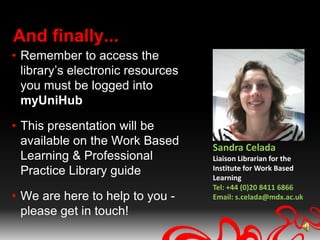
  • #18 And finally, please remember that you must log into myUniHub and use the links with the My Library portlet in order to gain access to the library’s electronic resources.Please do not hesitate to get in contact with me using the contact details here, should you wish more information or support using the library’s resources. We’re here to help!This presentation will be made available on the Work Based Learning & Professional Practice Library guide, should you wish to refer to it again later.Good luck with your research.
  • #19 WelcomeIn this session we are going to cover what Library and IT support can provide for you.