Computer Maintenance and Technical
Support
Chapter Seven
Bus and Cards
1
Bus and Cards
Buses - a path through which data can be sent to the different parts
of the computer system.
• Two different parts of a Bus
– Address bus -transfers information about where the data should
go
– Data bus -transfers the actual data.
• Bus width is the size of the bus lines.
• It determines the number of bits that the computer
can transmit at one time (say, one clock cycle).
– eg: a 32-bit bus can transmit 32 bits at a time.
– the larger the bus width, the faster the transmission.
2
Examples
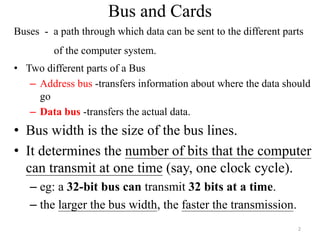
• Expansion buses or “slots”
• Disk interfaces/Buses
• External buses
• Communications buses
3
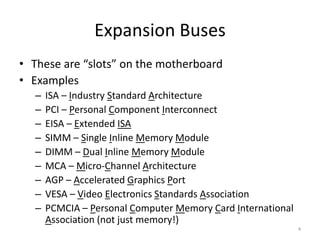
Expansion Buses
• These are “slots” on the motherboard
• Examples
– ISA – Industry Standard Architecture
– PCI – Personal Component Interconnect
– EISA – Extended ISA
– SIMM – Single Inline Memory Module
– DIMM – Dual Inline Memory Module
– MCA – Micro-Channel Architecture
– AGP – Accelerated Graphics Port
– VESA – Video Electronics Standards Association
– PCMCIA – Personal Computer Memory Card International
Association (not just memory!)
4
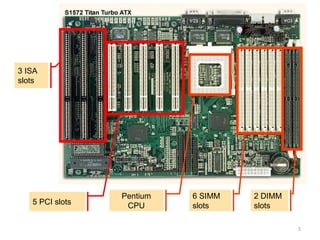
3 ISA
slots
5 PCI slots
Pentium
CPU
6 SIMM
slots
2 DIMM
slots
5
Disk Interfaces
• Examples
– ATA – AT Attachment (named after IBM PC-AT)
– IDE – Integrated Drive Electronics (same as ATA)
– Enhanced IDE
• Encompasses several older standards (ST-506/ST-412, IDE, ESDI,
ATA-2, ATA-3, ATA-4)
– SCSI – Small Computer Systems Interface
– ESDI – Enhanced Small Device Interface (mid-80s,
obsolete)
– PCMCIA
6
External Buses
• Examples
– Parallel – sometimes called LPT (“line printer”)
– Serial – typically RS232C (sometimes RS422)
– PS/2 – for keyboards and mice
– USB – Universal Serial Bus
– IrDA – Infrared Device Attachment
– FireWire – new, very high speed, developed by
IEEE
7
Communications Buses
• For connecting systems to systems
• Parallel/LPT
– special purpose, e.g., using special software
(Laplink) to transfer data between systems
• Serial/RS232C
– To connect a system to a voice-grade modem
• Ethernet
– To connect a system to a high-speed network
8
Cards
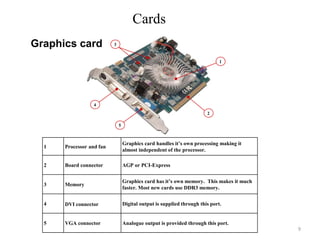
3
1
2
4
5
1 Processor and fan
Graphics card handles it’s own processing making it
almost independent of the processor.
2 Board connector AGP or PCI-Express
3 Memory
Graphics card has it’s own memory. This makes it much
faster. Most new cards use DDR3 memory.
4 DVI connector Digital output is supplied through this port.
5 VGA connector Analogue output is provided through this port.
Graphics card
9
Cards
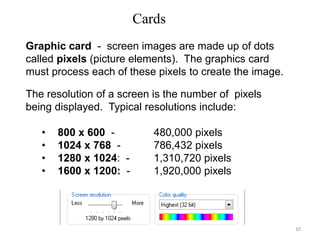
Graphic card - screen images are made up of dots
called pixels (picture elements). The graphics card
must process each of these pixels to create the image.
The resolution of a screen is the number of pixels
being displayed. Typical resolutions include:
• 800 x 600 - 480,000 pixels
• 1024 x 768 - 786,432 pixels
• 1280 x 1024: - 1,310,720 pixels
• 1600 x 1200: - 1,920,000 pixels
10
Cards
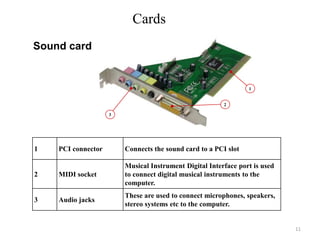
1
2
3
Sound card
1 PCI connector Connects the sound card to a PCI slot
2 MIDI socket
Musical Instrument Digital Interface port is used
to connect digital musical instruments to the
computer.
3 Audio jacks
These are used to connect microphones, speakers,
stereo systems etc to the computer.
11
Cards
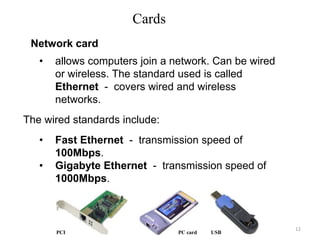
• allows computers join a network. Can be wired
or wireless. The standard used is called
Ethernet - covers wired and wireless
networks.
The wired standards include:
• Fast Ethernet - transmission speed of
100Mbps.
• Gigabyte Ethernet - transmission speed of
1000Mbps.
PCI PC card USB
Network card
12
Cards
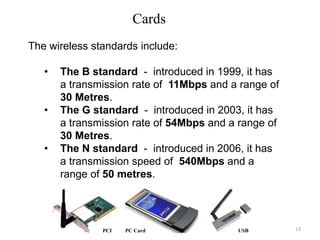
The wireless standards include:
• The B standard - introduced in 1999, it has
a transmission rate of 11Mbps and a range of
30 Metres.
• The G standard - introduced in 2003, it has
a transmission rate of 54Mbps and a range of
30 Metres.
• The N standard - introduced in 2006, it has
a transmission speed of 540Mbps and a
range of 50 metres.
PCI PC Card USB 13
Cards
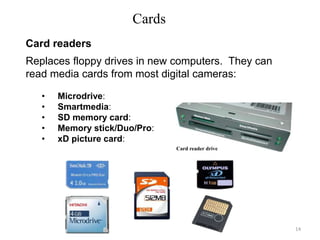
Replaces floppy drives in new computers. They can
read media cards from most digital cameras:
• Microdrive:
• Smartmedia:
• SD memory card:
• Memory stick/Duo/Pro:
• xD picture card:
Card readers
Card reader drive
14
Quiz
Name ______________ID ______
1. Write one example of Expansion Buses/slot?
Ans =SIMM,DIMM,PCMCIA,ISA,PCI,EISA…..
2. Write one example Disk interfaces ?
Ans =ATA,IDE,SCSI,ESDI,PCMCIA…..
3. Write one example External buses ?
Ans=PARALLEL,SERIAL PS/2,VGA,USB….
4. Write one example Communications buses?
Ans =….. ., using special software (Laplink)
5. Write two examples of Cards?
Ans=GRAPHIC CARD AND SOUND CARD
15

Lecture_Chapter_7.ppt

  • 1.
    Computer Maintenance andTechnical Support Chapter Seven Bus and Cards 1
  • 2.
    Bus and Cards Buses- a path through which data can be sent to the different parts of the computer system. • Two different parts of a Bus – Address bus -transfers information about where the data should go – Data bus -transfers the actual data. • Bus width is the size of the bus lines. • It determines the number of bits that the computer can transmit at one time (say, one clock cycle). – eg: a 32-bit bus can transmit 32 bits at a time. – the larger the bus width, the faster the transmission. 2
  • 3.
    Examples • Expansion busesor “slots” • Disk interfaces/Buses • External buses • Communications buses 3
  • 4.
    Expansion Buses • Theseare “slots” on the motherboard • Examples – ISA – Industry Standard Architecture – PCI – Personal Component Interconnect – EISA – Extended ISA – SIMM – Single Inline Memory Module – DIMM – Dual Inline Memory Module – MCA – Micro-Channel Architecture – AGP – Accelerated Graphics Port – VESA – Video Electronics Standards Association – PCMCIA – Personal Computer Memory Card International Association (not just memory!) 4
  • 5.
    3 ISA slots 5 PCIslots Pentium CPU 6 SIMM slots 2 DIMM slots 5
  • 6.
    Disk Interfaces • Examples –ATA – AT Attachment (named after IBM PC-AT) – IDE – Integrated Drive Electronics (same as ATA) – Enhanced IDE • Encompasses several older standards (ST-506/ST-412, IDE, ESDI, ATA-2, ATA-3, ATA-4) – SCSI – Small Computer Systems Interface – ESDI – Enhanced Small Device Interface (mid-80s, obsolete) – PCMCIA 6
  • 7.
    External Buses • Examples –Parallel – sometimes called LPT (“line printer”) – Serial – typically RS232C (sometimes RS422) – PS/2 – for keyboards and mice – USB – Universal Serial Bus – IrDA – Infrared Device Attachment – FireWire – new, very high speed, developed by IEEE 7
  • 8.
    Communications Buses • Forconnecting systems to systems • Parallel/LPT – special purpose, e.g., using special software (Laplink) to transfer data between systems • Serial/RS232C – To connect a system to a voice-grade modem • Ethernet – To connect a system to a high-speed network 8
  • 9.
    Cards 3 1 2 4 5 1 Processor andfan Graphics card handles it’s own processing making it almost independent of the processor. 2 Board connector AGP or PCI-Express 3 Memory Graphics card has it’s own memory. This makes it much faster. Most new cards use DDR3 memory. 4 DVI connector Digital output is supplied through this port. 5 VGA connector Analogue output is provided through this port. Graphics card 9
  • 10.
    Cards Graphic card -screen images are made up of dots called pixels (picture elements). The graphics card must process each of these pixels to create the image. The resolution of a screen is the number of pixels being displayed. Typical resolutions include: • 800 x 600 - 480,000 pixels • 1024 x 768 - 786,432 pixels • 1280 x 1024: - 1,310,720 pixels • 1600 x 1200: - 1,920,000 pixels 10
  • 11.
    Cards 1 2 3 Sound card 1 PCIconnector Connects the sound card to a PCI slot 2 MIDI socket Musical Instrument Digital Interface port is used to connect digital musical instruments to the computer. 3 Audio jacks These are used to connect microphones, speakers, stereo systems etc to the computer. 11
  • 12.
    Cards • allows computersjoin a network. Can be wired or wireless. The standard used is called Ethernet - covers wired and wireless networks. The wired standards include: • Fast Ethernet - transmission speed of 100Mbps. • Gigabyte Ethernet - transmission speed of 1000Mbps. PCI PC card USB Network card 12
  • 13.
    Cards The wireless standardsinclude: • The B standard - introduced in 1999, it has a transmission rate of 11Mbps and a range of 30 Metres. • The G standard - introduced in 2003, it has a transmission rate of 54Mbps and a range of 30 Metres. • The N standard - introduced in 2006, it has a transmission speed of 540Mbps and a range of 50 metres. PCI PC Card USB 13
  • 14.
    Cards Replaces floppy drivesin new computers. They can read media cards from most digital cameras: • Microdrive: • Smartmedia: • SD memory card: • Memory stick/Duo/Pro: • xD picture card: Card readers Card reader drive 14
  • 15.
    Quiz Name ______________ID ______ 1.Write one example of Expansion Buses/slot? Ans =SIMM,DIMM,PCMCIA,ISA,PCI,EISA….. 2. Write one example Disk interfaces ? Ans =ATA,IDE,SCSI,ESDI,PCMCIA….. 3. Write one example External buses ? Ans=PARALLEL,SERIAL PS/2,VGA,USB…. 4. Write one example Communications buses? Ans =….. ., using special software (Laplink) 5. Write two examples of Cards? Ans=GRAPHIC CARD AND SOUND CARD 15