Topics for Discussion
•Working with Node.js Packages
• What Are Node Packaged Modules?
• Understanding the Node Package Registry
• Using the Node Package Manager
• Searching for Node Package Modules
• Installing Node Packaged Modules
• Using package.json
4.
What Are NodePackaged Modules?
• A Node Packaged Module is a packaged library that can easily be
shared, reused, and installed in different projects.
• Many different modules are available for a variety of purposes.
Example:
The Mongoose module provides an ODM (Operational Data Model)
for MongoDB, Express extends Node’s HTTP capabilities and so on.
5.
What Are NodePackaged Modules?
• Node.js modules are created by various third-party organizations
to provide the needed features that Node.js lacks out of the box.
• This community of contributors is active in adding and updating
modules.
6.
What Are NodePackaged Modules?
• Node Packaged Modules include a package.json file that defines
the packages.
• The package.json file includes informational metadata, such as the
name, version author, and contributors, as well as control
metadata, such as dependencies and other requirements that the
Node Package Manager uses when performing actions such as
installation and publishing.
7.
Working with NodePackages
• One of the most powerful features of the Node.js framework is
the ability to easily extend it with additional Node Packaged
Modules (NPMs) using the Node Package Manager (NPM).
8.
What Are NodePackaged Modules?
• A Node Packaged Module is a packaged library that can easily be shared,
reused and installed in different projects.
• Many different modules are available for a variety of purposes.
• Example: The Mongoose module provides an ODM (Operational Data Model)
for MongoDB, Express extends Node’s HTTP capabilities and so on.
• Node.js modules are created by various third-party organizations to provide the
needed features that Node.js lacks out of the box. This community of
contributors is active in adding and updating modules.
9.
What Are NodePackaged Modules?
• Node Packaged Modules include a package.json file that defines the
packages.
• The package.json file includes informational metadata, such as the
name, version author, and contributors, as well as control metadata, such
as dependencies and other requirements that the Node.
• Package Manager uses when performing actions such as installation and
publishing.
10.
Understanding the NodePackage Registry
• The Node modules have a managed location called the Node Package
Registry where packages are registered.
• This allows you to publish your own packages in a location where others
can use them as well as download packages that others have created.
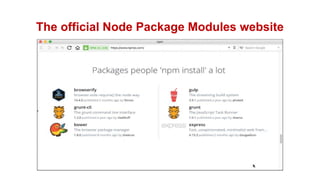
• The Node Package Registry is located at https://npmjs.com.
From this location you can view the newest and most popular modules
as well as search for specific packages
Using the NodePackage Manager
• The Node Package Manager you have already seen is a command-line utility.
• It allows you to find, install, remove, publish, and do everything else related
to Node Package Modules.
• The Node Package Manager provides the link between the Node Package
Registry and your development environment.
• The simplest way to really explain the Node Package Manager is to list some of
the command line options and what they do.
13.
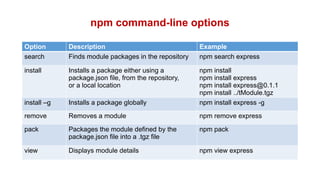
npm command-line options
OptionDescription Example
search Finds module packages in the repository npm search express
install Installs a package either using a
package.json file, from the repository,
or a local location
npm install
npm install express
npm install express@0.1.1
npm install ../tModule.tgz
install –g Installs a package globally npm install express -g
remove Removes a module npm remove express
pack Packages the module defined by the
package.json file into a .tgz file
npm pack
view Displays module details npm view express
14.
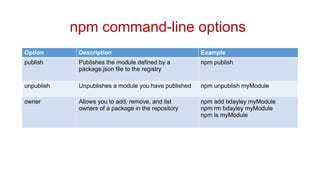
npm command-line options
OptionDescription Example
publish Publishes the module defined by a
package.json file to the registry
npm publish
unpublish Unpublishes a module you have published npm unpublish myModule
owner Allows you to add, remove, and list
owners of a package in the repository
npm add bdayley myModule
npm rm bdayley myModule
npm ls myModule
15.
Searching for NodePackage Modules
• You can also search for modules in the Node Package Registry directly
from the command prompt using the
npm search <search_string> command.
Example:
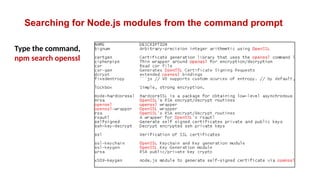
• The following command searches for modules related to openssl and
displays the results.
16.
Searching for Node.jsmodules from the command prompt
Type the command,
npm search openssl
17.
Installing Node PackagedModules
npm install express
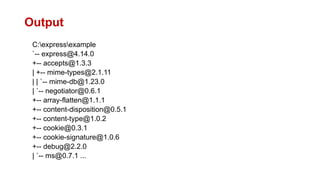
• The output of the npm install command displays the
dependency hierarchy installed with the module.
Example:
• The following code block shows part of the output from installing
the express module.
Installing Node PackagedModules
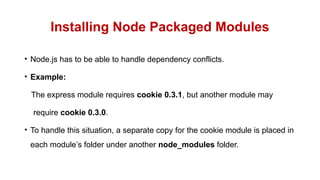
• Node.js has to be able to handle dependency conflicts.
• Example:
The express module requires cookie 0.3.1, but another module may
require cookie 0.3.0.
• To handle this situation, a separate copy for the cookie module is placed in
each module’s folder under another node_modules folder.
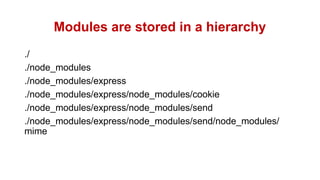
20.
Modules are storedin a hierarchy
./
./node_modules
./node_modules/express
./node_modules/express/node_modules/cookie
./node_modules/express/node_modules/send
./node_modules/express/node_modules/send/node_modules/
mime
21.
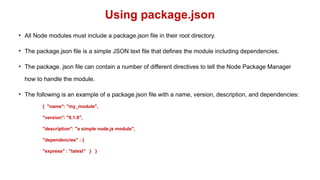
Using package.json
• AllNode modules must include a package.json file in their root directory.
• The package.json file is a simple JSON text file that defines the module including dependencies.
• The package. json file can contain a number of different directives to tell the Node Package Manager
how to handle the module.
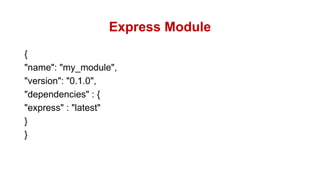
• The following is an example of a package.json file with a name, version, description, and dependencies:
{ "name": "my_module",
"version": "0.1.0",
"description": "a simple node.js module",
"dependencies" : {
"express" : "latest" } }
22.
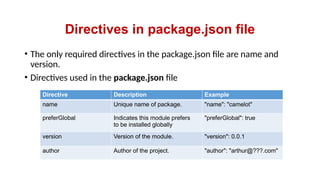
Directives in package.jsonfile
• The only required directives in the package.json file are name and
version.
• Directives used in the package.json file
Directive Description Example
name Unique name of package. "name": "camelot"
preferGlobal Indicates this module prefers
to be installed globally
"preferGlobal": true
version Version of the module. "version": 0.0.1
author Author of the project. "author": "arthur@???.com"
23.
Directives in package.jsonfile
Directive Description Example
description Textual description of module. "description": "a silly place"
contributors Additional contributors to the module. "contributors": [
{ "name": "gwen",
"email": "gwen@???.com"}]
bin Binary to be installed globally with
project.
"bin: {
"excalibur":
"./bin/excalibur"}
scripts Specifies parameters that execute
console apps when launching node.
"scripts" {
"start": "node ./bin/
excalibur",
"test": "echo testing"}
main Specifies the main entry point for the app.
This can be a binary or a .js file.
"main": "./bin/excalibur"
24.
Directives in package.jsonfile
Directive Description Example
repository Specifies the repository type
and location of the package.
"repository": {
"type": "git",
"location":
"http://???.com/c.git"}
keywords Specifies keywords that show
up in the npm search.
"keywords": [
"swallow", "unladen" ]
dependencies Modules and versions this
module depends on. You can
use the * and x wildcards.
"dependencies": {
"express": "latest",
"connect": "2.x.x,
"cookies": "*" }
engines Version of node this package
works with.
"engines": {
"node": ">=6.5"}
25.
Directives in package.jsonfile
• A great way to use package.json files is to automatically download and
install the dependencies for your Node.js app.
• All you need to do is create a package.json file in the root of your
project code and add the necessary dependencies to it.
• Example:
The following package. json requires the express module as a
dependency.
Directives in package.jsonfile
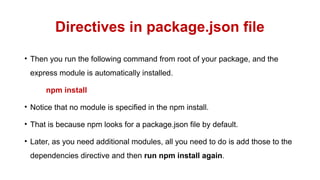
• Then you run the following command from root of your package, and the
express module is automatically installed.
npm install
• Notice that no module is specified in the npm install.
• That is because npm looks for a package.json file by default.
• Later, as you need additional modules, all you need to do is add those to the
dependencies directive and then run npm install again.
28.
Summary
In this sessionyou would have learned,
• Creating, publishing, and installing your own Node.js Packaged
Modules.
• How to use the NPM to package a local module as well as publish one
to the NPM registry.
• How to install the Node.js modules and use them in your own Node.js
applications.


![Directives in package.json file
Directive Description Example
description Textual description of module. "description": "a silly place"
contributors Additional contributors to the module. "contributors": [
{ "name": "gwen",
"email": "gwen@???.com"}]
bin Binary to be installed globally with
project.
"bin: {
"excalibur":
"./bin/excalibur"}
scripts Specifies parameters that execute
console apps when launching node.
"scripts" {
"start": "node ./bin/
excalibur",
"test": "echo testing"}
main Specifies the main entry point for the app.
This can be a binary or a .js file.
"main": "./bin/excalibur"](https://image.slidesharecdn.com/lecture7-workingnodejspackage-250514180113-9575cc2f/85/Lecture-7-Working-Nodejs-Packagempresenration-pptx-23-320.jpg)
![Directives in package.json file
Directive Description Example
repository Specifies the repository type
and location of the package.
"repository": {
"type": "git",
"location":
"http://???.com/c.git"}
keywords Specifies keywords that show
up in the npm search.
"keywords": [
"swallow", "unladen" ]
dependencies Modules and versions this
module depends on. You can
use the * and x wildcards.
"dependencies": {
"express": "latest",
"connect": "2.x.x,
"cookies": "*" }
engines Version of node this package
works with.
"engines": {
"node": ">=6.5"}](https://image.slidesharecdn.com/lecture7-workingnodejspackage-250514180113-9575cc2f/85/Lecture-7-Working-Nodejs-Packagempresenration-pptx-24-320.jpg)