©LPU CSE101 C Programming
CSE101-Lec#6-Part-1
• Control structures(Decision control
statements/ or Condition Statements)
©LPU CSE101 C Programming
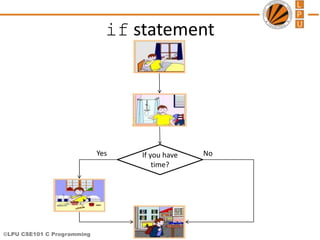
1. Wake up;
2. Get ready;
3. If you have enough time, then
eat breakfast;
4. Go to school.
Program
• Program is a set of instruction executed one by one.
• Depending upon the circumstances sometimes it is
desirable to alter the sequence of execution of
statements.
©LPU CSE101 C Programming
Control Statements
• The C language programs until now follows a
sequential form of execution of statements.
• C language provides statements that can alter the
flow of a sequence of instructions. These statements
are called control statements.
• These statements help to jump from one part of the
program to another. The control transfer may be
conditional or unconditional.
©LPU CSE101 C Programming
Control Structure
• A control structure refers to the way in which the
programmer specifies the order of executing the
statements.
• Three control structures
– Sequence structure
• Programs are executed sequentially by default.
– Selection structures(Condition)
• if, if…else, if-else-if, Nested-if ,switch
– Repetition structures (iteration)
• while, do…while, for
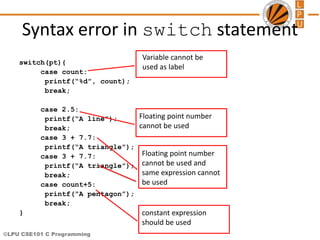
©LPU CSE101 C Programming
Condition Statements(or Decision control
statements or Branching statements)
• The C condition statements or the decision statements,
checks the given condition
• Based upon the state of the condition, a sub-block is
executed.
• Decision statements are the:
– if statement
– if-else statement
– If-else-if statement
– Nested if statement
– switch statement
©LPU CSE101 C Programming
Daily routine
Start
Where
To
Go?
Go!!!
Class Movie
Stop Stop
©LPU CSE101 C Programming
if statement
If you have
time?
Yes No
©LPU CSE101 C Programming
if Statement
• If statement
– It is decision making statement uses keyword if.
– It allows the computer to evaluate the expression
first
• and then, depending on whether the value is ‘true’
or ‘false’, i.e. non zero or zero it transfers the
control to a particular statement.
A decision can be made on any expression.
zero - false
nonzero - true
Example:
3 < 4 is true
©LPU CSE101 C Programming
if Statement
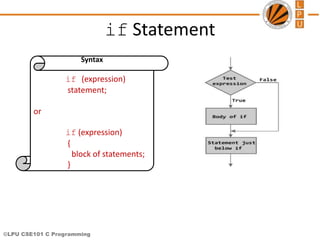
Syntax
if (expression)
statement;
or
if (expression)
{
block of statements;
}
©LPU CSE101 C Programming
if Statement
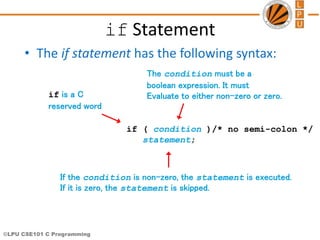
• The if statement has the following syntax:
if ( condition )/* no semi-colon */
statement;
if is a C
reserved word
The condition must be a
boolean expression. It must
Evaluate to either non-zero or zero.
If the condition is non-zero, the statement is executed.
If it is zero, the statement is skipped.
©LPU CSE101 C Programming
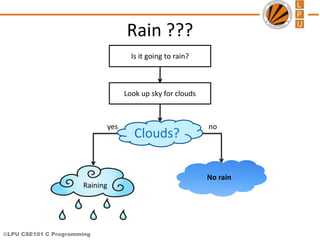
Rain ???
Clouds?
Is it going to rain?
Look up sky for clouds
yes no
No rain
Raining
©LPU CSE101 C Programming
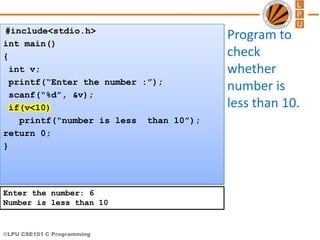
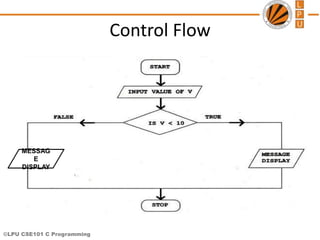
Program to
check
whether
number is
less than 10.
#include<stdio.h>
int main()
{
int v;
printf(“Enter the number :”);
scanf(“%d”, &v);
if(v<10)
printf(“number is less than 10”);
return 0;
}
Enter the number: 6
Number is less than 10
©LPU CSE101 C Programming
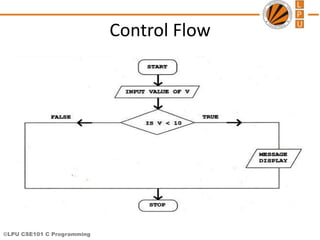
Control Flow
©LPU CSE101 C Programming
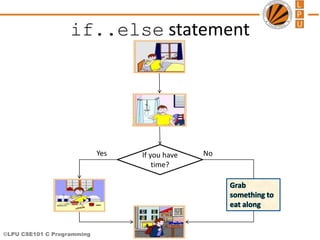
if..else statement
If you have
time?
Yes No
Grab
something to
eat along
©LPU CSE101 C Programming
if..else statement
• The if statement executes only when the
condition following if is true.
• It does nothing when the condition is false.
• The if..else statement takes care of the
true and false conditions.
©LPU CSE101 C Programming
if..else statement
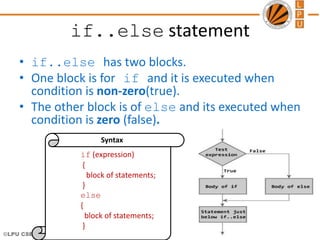
• if..else has two blocks.
• One block is for if and it is executed when
condition is non-zero(true).
• The other block is of else and its executed when
condition is zero (false).
if (expression)
{
block of statements;
}
else
{
block of statements;
}
Syntax
©LPU CSE101 C Programming
if..else statement
• The else statement cannot be used without
if.
• No multiple else statements are allowed
with one if.
• else statement has no expression.
• Number of else cannot be greater than
number of if.
©LPU CSE101 C Programming
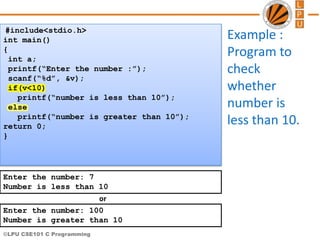
Example :
Program to
check
whether
number is
less than 10.
#include<stdio.h>
int main()
{
int a;
printf(“Enter the number :”);
scanf(“%d”, &v);
if(v<10)
printf(“number is less than 10”);
else
printf(“number is greater than 10”);
return 0;
}
Enter the number: 7
Number is less than 10
Enter the number: 100
Number is greater than 10
or
©LPU CSE101 C Programming
Control Flow
MESSAG
E
DISPLAY
©LPU CSE101 C Programming
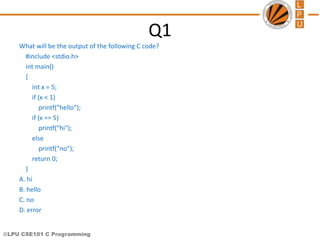
Q1
What will be the output of the following C code?
#include <stdio.h>
int main()
{
int x = 5;
if (x < 1)
printf("hello");
if (x == 5)
printf("hi");
else
printf("no");
return 0;
}
A. hi
B. hello
C. no
D. error
©LPU CSE101 C Programming
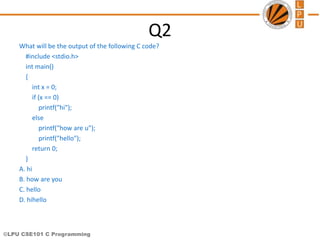
Q2
What will be the output of the following C code?
#include <stdio.h>
int main()
{
int x = 0;
if (x == 0)
printf("hi");
else
printf("how are u");
printf("hello");
return 0;
}
A. hi
B. how are you
C. hello
D. hihello
©LPU CSE101 C Programming
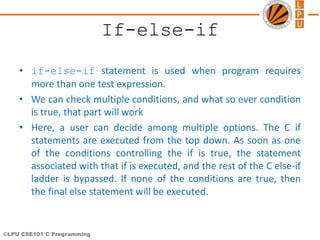
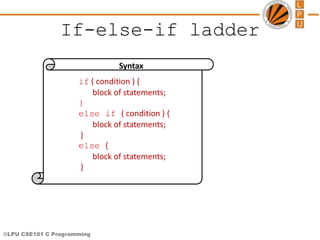
If-else-if
• if-else-if statement is used when program requires
more than one test expression.
• We can check multiple conditions, and what so ever condition
is true, that part will work
• Here, a user can decide among multiple options. The C if
statements are executed from the top down. As soon as one
of the conditions controlling the if is true, the statement
associated with that if is executed, and the rest of the C else-if
ladder is bypassed. If none of the conditions are true, then
the final else statement will be executed.
©LPU CSE101 C Programming
If-else-if ladder
if ( condition ) {
block of statements;
}
else if ( condition ) {
block of statements;
}
else {
block of statements;
}
Syntax
©LPU CSE101 C Programming
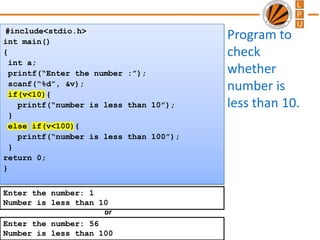
Program to
check
whether
number is
less than 10.
#include<stdio.h>
int main()
{
int a;
printf(“Enter the number :”);
scanf(“%d”, &v);
if(v<10){
printf(“number is less than 10”);
}
else if(v<100){
printf(“number is less than 100”);
}
return 0;
}
Enter the number: 1
Number is less than 10
Enter the number: 56
Number is less than 100
or
©LPU CSE101 C Programming
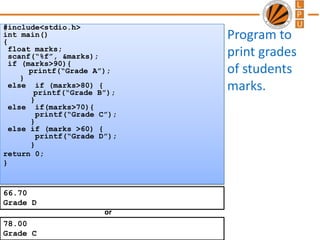
Program to
print grades
of students
marks.
#include<stdio.h>
int main()
{
float marks;
scanf(“%f”, &marks);
if (marks>90){
printf(“Grade A”);
}
else if (marks>80) {
printf(“Grade B”);
}
else if(marks>70){
printf(“Grade C”);
}
else if (marks >60) {
printf(“Grade D”);
}
return 0;
}
66.70
Grade D
78.00
Grade C
or
©LPU CSE101 C Programming
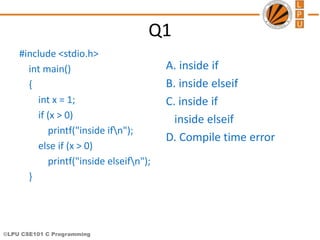
Q1
#include <stdio.h>
int main()
{
int x = 1;
if (x > 0)
printf("inside ifn");
else if (x > 0)
printf("inside elseifn");
}
A. inside if
B. inside elseif
C. inside if
inside elseif
D. Compile time error
©LPU CSE101 C Programming
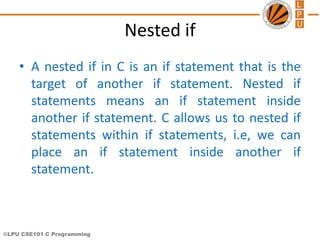
Nested if
• A nested if in C is an if statement that is the
target of another if statement. Nested if
statements means an if statement inside
another if statement. C allows us to nested if
statements within if statements, i.e, we can
place an if statement inside another if
statement.
©LPU CSE101 C Programming
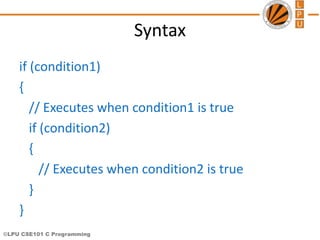
Syntax
if (condition1)
{
// Executes when condition1 is true
if (condition2)
{
// Executes when condition2 is true
}
}
©LPU CSE101 C Programming
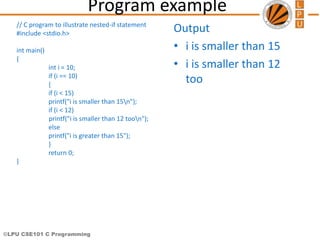
Program example
// C program to illustrate nested-if statement
#include <stdio.h>
int main()
{
int i = 10;
if (i == 10)
{
if (i < 15)
printf("i is smaller than 15n");
if (i < 12)
printf("i is smaller than 12 toon");
else
printf("i is greater than 15");
}
return 0;
}
Output
• i is smaller than 15
• i is smaller than 12
too
©LPU CSE101 C Programming
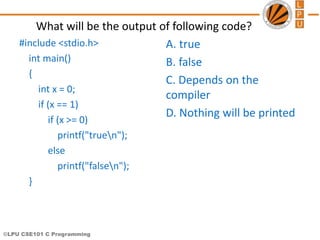
What will be the output of following code?
#include <stdio.h>
int main()
{
int x = 0;
if (x == 1)
if (x >= 0)
printf("truen");
else
printf("falsen");
}
A. true
B. false
C. Depends on the
compiler
D. Nothing will be printed
©LPU CSE101 C Programming
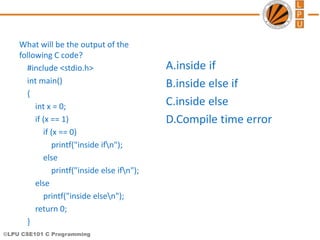
What will be the output of the
following C code?
#include <stdio.h>
int main()
{
int x = 0;
if (x == 1)
if (x == 0)
printf("inside ifn");
else
printf("inside else ifn");
else
printf("inside elsen");
return 0;
}
A.inside if
B.inside else if
C.inside else
D.Compile time error
©LPU CSE101 C Programming
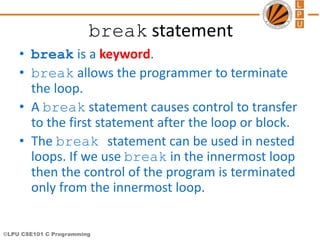
break statement
• break is a keyword.
• break allows the programmer to terminate
the loop.
• A break statement causes control to transfer
to the first statement after the loop or block.
• The break statement can be used in nested
loops. If we use break in the innermost loop
then the control of the program is terminated
only from the innermost loop.
©LPU CSE101 C Programming
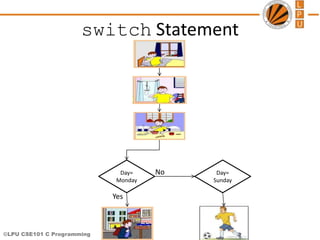
switch Statement
Day=
Monday
Yes
No Day=
Sunday
©LPU CSE101 C Programming
switch Statement
• The control statement that allows to make a decision
from the number of choices is called switch.
• Also called switch-case-default.
• The switch statement provides another way to decide
which statement to execute next.
• The switch statement evaluates an expression, then
attempts to match the result to one of several possible
cases.
• Each case contains a value and a list of statements.
• The flow of control transfers to statement associated
with the first case value that matches.
©LPU CSE101 C Programming
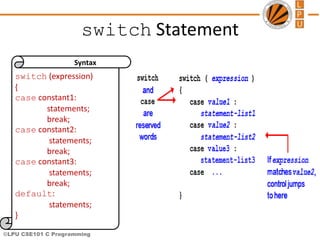
switch Statement
switch (expression)
{
case constant1:
statements;
break;
case constant2:
statements;
break;
case constant3:
statements;
break;
default:
statements;
}
Syntax
©LPU CSE101 C Programming
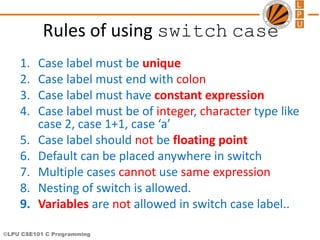
Rules of using switch case
1. Case label must be unique
2. Case label must end with colon
3. Case label must have constant expression
4. Case label must be of integer, character type like
case 2, case 1+1, case ‘a’
5. Case label should not be floating point
6. Default can be placed anywhere in switch
7. Multiple cases cannot use same expression
8. Nesting of switch is allowed.
9. Variables are not allowed in switch case label..
©LPU CSE101 C Programming
Syntax error in switch statement
switch(pt){
case count:
printf(“%d”, count);
break;
case 2.5:
printf(“A line”);
break;
case 3 + 7.7:
printf(“A triangle”);
case 3 + 7.7:
printf(“A triangle”);
break;
case count+5:
printf(“A pentagon”);
break;
}
Variable cannot be
used as label
Floating point number
cannot be used
Floating point number
cannot be used and
same expression cannot
be used
constant expression
should be used
©LPU CSE101 C Programming
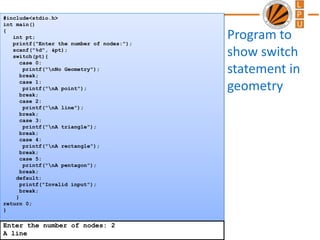
#include<stdio.h>
int main()
{
int pt;
printf("Enter the number of nodes:");
scanf("%d", &pt);
switch(pt){
case 0:
printf("nNo Geometry");
break;
case 1:
printf("nA point");
break;
case 2:
printf("nA line");
break;
case 3:
printf("nA triangle");
break;
case 4:
printf("nA rectangle");
break;
case 5:
printf("nA pentagon");
break;
default:
printf("Invalid input");
break;
}
return 0;
}
Program to
show switch
statement in
geometry
Enter the number of nodes: 2
A line
©LPU CSE101 C Programming
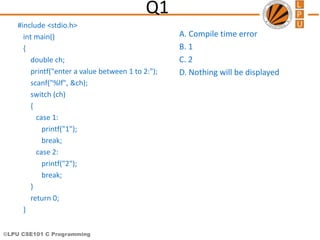
Q1
#include <stdio.h>
int main()
{
double ch;
printf("enter a value between 1 to 2:");
scanf("%lf", &ch);
switch (ch)
{
case 1:
printf("1");
break;
case 2:
printf("2");
break;
}
return 0;
}
A. Compile time error
B. 1
C. 2
D. Nothing will be displayed
©LPU CSE101 C Programming
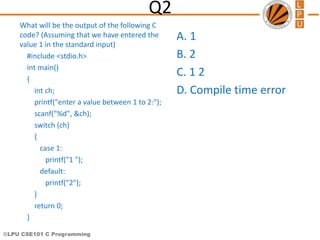
Q2
What will be the output of the following C
code? (Assuming that we have entered the
value 1 in the standard input)
#include <stdio.h>
int main()
{
int ch;
printf("enter a value between 1 to 2:");
scanf("%d", &ch);
switch (ch)
{
case 1:
printf("1 ");
default:
printf("2");
}
return 0;
}
A. 1
B. 2
C. 1 2
D. Compile time error
©LPU CSE101 C Programming
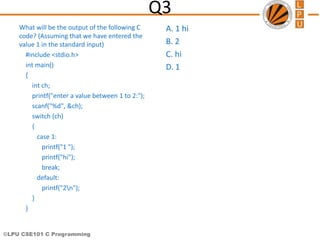
Q3
What will be the output of the following C
code? (Assuming that we have entered the
value 1 in the standard input)
#include <stdio.h>
int main()
{
int ch;
printf("enter a value between 1 to 2:");
scanf("%d", &ch);
switch (ch)
{
case 1:
printf("1 ");
printf("hi");
break;
default:
printf("2n");
}
}
A. 1 hi
B. 2
C. hi
D. 1
©LPU CSE101 C Programming
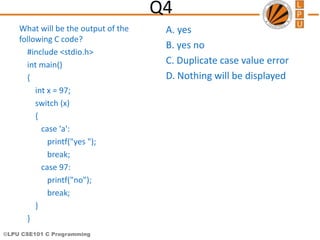
Q4
What will be the output of the
following C code?
#include <stdio.h>
int main()
{
int x = 97;
switch (x)
{
case 'a':
printf("yes ");
break;
case 97:
printf("no");
break;
}
}
A. yes
B. yes no
C. Duplicate case value error
D. Nothing will be displayed
©LPU CSE101 C Programming
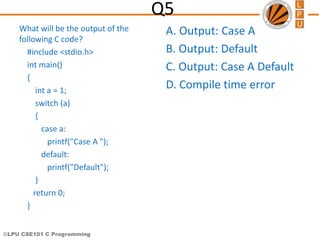
Q5
What will be the output of the
following C code?
#include <stdio.h>
int main()
{
int a = 1;
switch (a)
{
case a:
printf("Case A ");
default:
printf("Default");
}
return 0;
}
A. Output: Case A
B. Output: Default
C. Output: Case A Default
D. Compile time error

Lecture 6Decision_Control_OR_Conditional_Control_Structures.ppt

  • 1.
    ©LPU CSE101 CProgramming CSE101-Lec#6-Part-1 • Control structures(Decision control statements/ or Condition Statements)
  • 2.
    ©LPU CSE101 CProgramming 1. Wake up; 2. Get ready; 3. If you have enough time, then eat breakfast; 4. Go to school. Program • Program is a set of instruction executed one by one. • Depending upon the circumstances sometimes it is desirable to alter the sequence of execution of statements.
  • 3.
    ©LPU CSE101 CProgramming Control Statements • The C language programs until now follows a sequential form of execution of statements. • C language provides statements that can alter the flow of a sequence of instructions. These statements are called control statements. • These statements help to jump from one part of the program to another. The control transfer may be conditional or unconditional.
  • 4.
    ©LPU CSE101 CProgramming Control Structure • A control structure refers to the way in which the programmer specifies the order of executing the statements. • Three control structures – Sequence structure • Programs are executed sequentially by default. – Selection structures(Condition) • if, if…else, if-else-if, Nested-if ,switch – Repetition structures (iteration) • while, do…while, for
  • 5.
    ©LPU CSE101 CProgramming Condition Statements(or Decision control statements or Branching statements) • The C condition statements or the decision statements, checks the given condition • Based upon the state of the condition, a sub-block is executed. • Decision statements are the: – if statement – if-else statement – If-else-if statement – Nested if statement – switch statement
  • 6.
    ©LPU CSE101 CProgramming
  • 7.
    ©LPU CSE101 CProgramming Daily routine Start Where To Go? Go!!! Class Movie Stop Stop
  • 8.
    ©LPU CSE101 CProgramming if statement If you have time? Yes No
  • 9.
    ©LPU CSE101 CProgramming if Statement • If statement – It is decision making statement uses keyword if. – It allows the computer to evaluate the expression first • and then, depending on whether the value is ‘true’ or ‘false’, i.e. non zero or zero it transfers the control to a particular statement. A decision can be made on any expression. zero - false nonzero - true Example: 3 < 4 is true
  • 10.
    ©LPU CSE101 CProgramming if Statement Syntax if (expression) statement; or if (expression) { block of statements; }
  • 11.
    ©LPU CSE101 CProgramming if Statement • The if statement has the following syntax: if ( condition )/* no semi-colon */ statement; if is a C reserved word The condition must be a boolean expression. It must Evaluate to either non-zero or zero. If the condition is non-zero, the statement is executed. If it is zero, the statement is skipped.
  • 12.
    ©LPU CSE101 CProgramming Rain ??? Clouds? Is it going to rain? Look up sky for clouds yes no No rain Raining
  • 13.
    ©LPU CSE101 CProgramming Program to check whether number is less than 10. #include<stdio.h> int main() { int v; printf(“Enter the number :”); scanf(“%d”, &v); if(v<10) printf(“number is less than 10”); return 0; } Enter the number: 6 Number is less than 10
  • 14.
    ©LPU CSE101 CProgramming Control Flow
  • 15.
    ©LPU CSE101 CProgramming if..else statement If you have time? Yes No Grab something to eat along
  • 16.
    ©LPU CSE101 CProgramming if..else statement • The if statement executes only when the condition following if is true. • It does nothing when the condition is false. • The if..else statement takes care of the true and false conditions.
  • 17.
    ©LPU CSE101 CProgramming if..else statement • if..else has two blocks. • One block is for if and it is executed when condition is non-zero(true). • The other block is of else and its executed when condition is zero (false). if (expression) { block of statements; } else { block of statements; } Syntax
  • 18.
    ©LPU CSE101 CProgramming if..else statement • The else statement cannot be used without if. • No multiple else statements are allowed with one if. • else statement has no expression. • Number of else cannot be greater than number of if.
  • 19.
    ©LPU CSE101 CProgramming Example : Program to check whether number is less than 10. #include<stdio.h> int main() { int a; printf(“Enter the number :”); scanf(“%d”, &v); if(v<10) printf(“number is less than 10”); else printf(“number is greater than 10”); return 0; } Enter the number: 7 Number is less than 10 Enter the number: 100 Number is greater than 10 or
  • 20.
    ©LPU CSE101 CProgramming Control Flow MESSAG E DISPLAY
  • 21.
    ©LPU CSE101 CProgramming Q1 What will be the output of the following C code? #include <stdio.h> int main() { int x = 5; if (x < 1) printf("hello"); if (x == 5) printf("hi"); else printf("no"); return 0; } A. hi B. hello C. no D. error
  • 22.
    ©LPU CSE101 CProgramming Q2 What will be the output of the following C code? #include <stdio.h> int main() { int x = 0; if (x == 0) printf("hi"); else printf("how are u"); printf("hello"); return 0; } A. hi B. how are you C. hello D. hihello
  • 23.
    ©LPU CSE101 CProgramming If-else-if • if-else-if statement is used when program requires more than one test expression. • We can check multiple conditions, and what so ever condition is true, that part will work • Here, a user can decide among multiple options. The C if statements are executed from the top down. As soon as one of the conditions controlling the if is true, the statement associated with that if is executed, and the rest of the C else-if ladder is bypassed. If none of the conditions are true, then the final else statement will be executed.
  • 24.
    ©LPU CSE101 CProgramming If-else-if ladder if ( condition ) { block of statements; } else if ( condition ) { block of statements; } else { block of statements; } Syntax
  • 25.
    ©LPU CSE101 CProgramming Program to check whether number is less than 10. #include<stdio.h> int main() { int a; printf(“Enter the number :”); scanf(“%d”, &v); if(v<10){ printf(“number is less than 10”); } else if(v<100){ printf(“number is less than 100”); } return 0; } Enter the number: 1 Number is less than 10 Enter the number: 56 Number is less than 100 or
  • 26.
    ©LPU CSE101 CProgramming Program to print grades of students marks. #include<stdio.h> int main() { float marks; scanf(“%f”, &marks); if (marks>90){ printf(“Grade A”); } else if (marks>80) { printf(“Grade B”); } else if(marks>70){ printf(“Grade C”); } else if (marks >60) { printf(“Grade D”); } return 0; } 66.70 Grade D 78.00 Grade C or
  • 27.
    ©LPU CSE101 CProgramming Q1 #include <stdio.h> int main() { int x = 1; if (x > 0) printf("inside ifn"); else if (x > 0) printf("inside elseifn"); } A. inside if B. inside elseif C. inside if inside elseif D. Compile time error
  • 28.
    ©LPU CSE101 CProgramming Nested if • A nested if in C is an if statement that is the target of another if statement. Nested if statements means an if statement inside another if statement. C allows us to nested if statements within if statements, i.e, we can place an if statement inside another if statement.
  • 29.
    ©LPU CSE101 CProgramming Syntax if (condition1) { // Executes when condition1 is true if (condition2) { // Executes when condition2 is true } }
  • 30.
    ©LPU CSE101 CProgramming Program example // C program to illustrate nested-if statement #include <stdio.h> int main() { int i = 10; if (i == 10) { if (i < 15) printf("i is smaller than 15n"); if (i < 12) printf("i is smaller than 12 toon"); else printf("i is greater than 15"); } return 0; } Output • i is smaller than 15 • i is smaller than 12 too
  • 31.
    ©LPU CSE101 CProgramming What will be the output of following code? #include <stdio.h> int main() { int x = 0; if (x == 1) if (x >= 0) printf("truen"); else printf("falsen"); } A. true B. false C. Depends on the compiler D. Nothing will be printed
  • 32.
    ©LPU CSE101 CProgramming What will be the output of the following C code? #include <stdio.h> int main() { int x = 0; if (x == 1) if (x == 0) printf("inside ifn"); else printf("inside else ifn"); else printf("inside elsen"); return 0; } A.inside if B.inside else if C.inside else D.Compile time error
  • 33.
    ©LPU CSE101 CProgramming break statement • break is a keyword. • break allows the programmer to terminate the loop. • A break statement causes control to transfer to the first statement after the loop or block. • The break statement can be used in nested loops. If we use break in the innermost loop then the control of the program is terminated only from the innermost loop.
  • 34.
    ©LPU CSE101 CProgramming switch Statement Day= Monday Yes No Day= Sunday
  • 35.
    ©LPU CSE101 CProgramming switch Statement • The control statement that allows to make a decision from the number of choices is called switch. • Also called switch-case-default. • The switch statement provides another way to decide which statement to execute next. • The switch statement evaluates an expression, then attempts to match the result to one of several possible cases. • Each case contains a value and a list of statements. • The flow of control transfers to statement associated with the first case value that matches.
  • 36.
    ©LPU CSE101 CProgramming switch Statement switch (expression) { case constant1: statements; break; case constant2: statements; break; case constant3: statements; break; default: statements; } Syntax
  • 37.
    ©LPU CSE101 CProgramming Rules of using switch case 1. Case label must be unique 2. Case label must end with colon 3. Case label must have constant expression 4. Case label must be of integer, character type like case 2, case 1+1, case ‘a’ 5. Case label should not be floating point 6. Default can be placed anywhere in switch 7. Multiple cases cannot use same expression 8. Nesting of switch is allowed. 9. Variables are not allowed in switch case label..
  • 38.
    ©LPU CSE101 CProgramming Syntax error in switch statement switch(pt){ case count: printf(“%d”, count); break; case 2.5: printf(“A line”); break; case 3 + 7.7: printf(“A triangle”); case 3 + 7.7: printf(“A triangle”); break; case count+5: printf(“A pentagon”); break; } Variable cannot be used as label Floating point number cannot be used Floating point number cannot be used and same expression cannot be used constant expression should be used
  • 39.
    ©LPU CSE101 CProgramming #include<stdio.h> int main() { int pt; printf("Enter the number of nodes:"); scanf("%d", &pt); switch(pt){ case 0: printf("nNo Geometry"); break; case 1: printf("nA point"); break; case 2: printf("nA line"); break; case 3: printf("nA triangle"); break; case 4: printf("nA rectangle"); break; case 5: printf("nA pentagon"); break; default: printf("Invalid input"); break; } return 0; } Program to show switch statement in geometry Enter the number of nodes: 2 A line
  • 40.
    ©LPU CSE101 CProgramming Q1 #include <stdio.h> int main() { double ch; printf("enter a value between 1 to 2:"); scanf("%lf", &ch); switch (ch) { case 1: printf("1"); break; case 2: printf("2"); break; } return 0; } A. Compile time error B. 1 C. 2 D. Nothing will be displayed
  • 41.
    ©LPU CSE101 CProgramming Q2 What will be the output of the following C code? (Assuming that we have entered the value 1 in the standard input) #include <stdio.h> int main() { int ch; printf("enter a value between 1 to 2:"); scanf("%d", &ch); switch (ch) { case 1: printf("1 "); default: printf("2"); } return 0; } A. 1 B. 2 C. 1 2 D. Compile time error
  • 42.
    ©LPU CSE101 CProgramming Q3 What will be the output of the following C code? (Assuming that we have entered the value 1 in the standard input) #include <stdio.h> int main() { int ch; printf("enter a value between 1 to 2:"); scanf("%d", &ch); switch (ch) { case 1: printf("1 "); printf("hi"); break; default: printf("2n"); } } A. 1 hi B. 2 C. hi D. 1
  • 43.
    ©LPU CSE101 CProgramming Q4 What will be the output of the following C code? #include <stdio.h> int main() { int x = 97; switch (x) { case 'a': printf("yes "); break; case 97: printf("no"); break; } } A. yes B. yes no C. Duplicate case value error D. Nothing will be displayed
  • 44.
    ©LPU CSE101 CProgramming Q5 What will be the output of the following C code? #include <stdio.h> int main() { int a = 1; switch (a) { case a: printf("Case A "); default: printf("Default"); } return 0; } A. Output: Case A B. Output: Default C. Output: Case A Default D. Compile time error

Editor's Notes

  • #5 Sequence- all statements are executed in the order as it is written Selection- Different sets of statements are executed based on one or more conditions Iteration- Certain set of statements are executed repeatedly