ISBN 0-321-33025-0
Lecture 02
1-2
Outline
• Language Categories
• Language Design Trade-Offs
• Implementation Methods
• Programming Environments
1-3
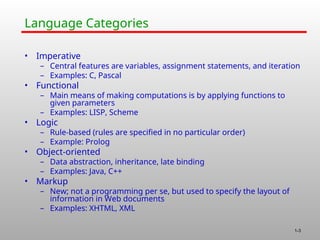
Language Categories
• Imperative
– Central features are variables, assignment statements, and iteration
– Examples: C, Pascal
• Functional
– Main means of making computations is by applying functions to
given parameters
– Examples: LISP, Scheme
• Logic
– Rule-based (rules are specified in no particular order)
– Example: Prolog
• Object-oriented
– Data abstraction, inheritance, late binding
– Examples: Java, C++
• Markup
– New; not a programming per se, but used to specify the layout of
information in Web documents
– Examples: XHTML, XML
1-4
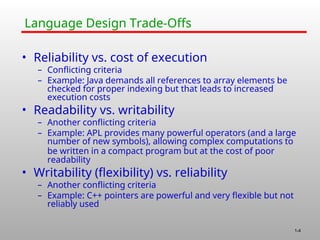
Language Design Trade-Offs
• Reliability vs. cost of execution
– Conflicting criteria
– Example: Java demands all references to array elements be
checked for proper indexing but that leads to increased
execution costs
• Readability vs. writability
– Another conflicting criteria
– Example: APL provides many powerful operators (and a large
number of new symbols), allowing complex computations to
be written in a compact program but at the cost of poor
readability
• Writability (flexibility) vs. reliability
– Another conflicting criteria
– Example: C++ pointers are powerful and very flexible but not
reliably used
1-5
Implementation Methods
• Compilation
– Programs are translated into machine
language
• Pure Interpretation
– Programs are interpreted by another
program known as an interpreter
• Hybrid Implementation Systems
– A compromise between compilers and
pure interpreters
1-6
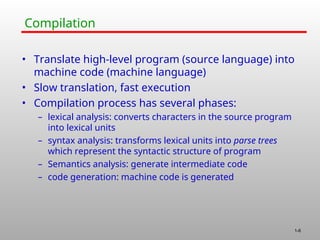
Compilation
• Translate high-level program (source language) into
machine code (machine language)
• Slow translation, fast execution
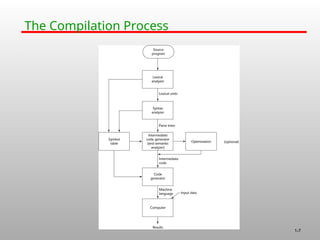
• Compilation process has several phases:
– lexical analysis: converts characters in the source program
into lexical units
– syntax analysis: transforms lexical units into parse trees
which represent the syntactic structure of program
– Semantics analysis: generate intermediate code
– code generation: machine code is generated
1-7
The Compilation Process
1-8
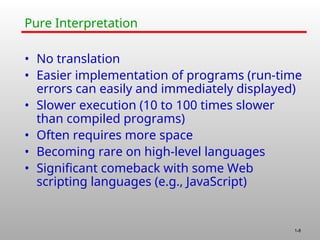
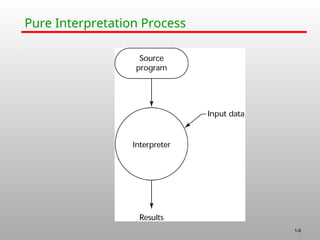
Pure Interpretation
• No translation
• Easier implementation of programs (run-time
errors can easily and immediately displayed)
• Slower execution (10 to 100 times slower
than compiled programs)
• Often requires more space
• Becoming rare on high-level languages
• Significant comeback with some Web
scripting languages (e.g., JavaScript)
1-9
Pure Interpretation Process
1-10
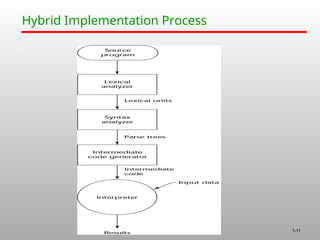
Hybrid Implementation Systems
• A compromise between compilers and pure
interpreters
• A high-level language program is translated to
an intermediate language that allows easy
interpretation
• Faster than pure interpretation
• Examples
– Perl programs are partially compiled to detect errors before
interpretation
– Initial implementations of Java were hybrid; the intermediate
form, byte code, provides portability to any machine that has a
byte code interpreter and a run-time system (together, these
are called Java Virtual Machine)
1-11
Hybrid Implementation Process
1-12
Just-in-Time Implementation Systems
• Initially translate programs to an
intermediate language
• Then compile intermediate language into
machine code
• Machine code version is kept for subsequent
calls
• JIT systems are widely used for Java
programs
• .NET languages are implemented with a JIT
system
1-13
Preprocessors
• Preprocessor macros (instructions) are
commonly used to specify that code from
another file is to be included
• A preprocessor processes a program
immediately before the program is compiled
to expand embedded preprocessor macros
• A well-known example: C preprocessor
– expands #include, #define, and similar
macros
1-14
Programming Environments
• The collection of tools used in software development
• UNIX
– An older operating system and tool collection
– Nowadays often used through a GUI (e.g., CDE, KDE, or
GNOME) that run on top of UNIX
• Borland JBuilder
– An integrated development environment for Java
• Microsoft Visual Studio.NET
– A large, complex visual environment
– Used to program in C#, Visual BASIC.NET, Jscript, J#, or C++

330CSS-Lecture 888888888885555555502.ppt

  • 1.
  • 2.
    1-2 Outline • Language Categories •Language Design Trade-Offs • Implementation Methods • Programming Environments
  • 3.
    1-3 Language Categories • Imperative –Central features are variables, assignment statements, and iteration – Examples: C, Pascal • Functional – Main means of making computations is by applying functions to given parameters – Examples: LISP, Scheme • Logic – Rule-based (rules are specified in no particular order) – Example: Prolog • Object-oriented – Data abstraction, inheritance, late binding – Examples: Java, C++ • Markup – New; not a programming per se, but used to specify the layout of information in Web documents – Examples: XHTML, XML
  • 4.
    1-4 Language Design Trade-Offs •Reliability vs. cost of execution – Conflicting criteria – Example: Java demands all references to array elements be checked for proper indexing but that leads to increased execution costs • Readability vs. writability – Another conflicting criteria – Example: APL provides many powerful operators (and a large number of new symbols), allowing complex computations to be written in a compact program but at the cost of poor readability • Writability (flexibility) vs. reliability – Another conflicting criteria – Example: C++ pointers are powerful and very flexible but not reliably used
  • 5.
    1-5 Implementation Methods • Compilation –Programs are translated into machine language • Pure Interpretation – Programs are interpreted by another program known as an interpreter • Hybrid Implementation Systems – A compromise between compilers and pure interpreters
  • 6.
    1-6 Compilation • Translate high-levelprogram (source language) into machine code (machine language) • Slow translation, fast execution • Compilation process has several phases: – lexical analysis: converts characters in the source program into lexical units – syntax analysis: transforms lexical units into parse trees which represent the syntactic structure of program – Semantics analysis: generate intermediate code – code generation: machine code is generated
  • 7.
  • 8.
    1-8 Pure Interpretation • Notranslation • Easier implementation of programs (run-time errors can easily and immediately displayed) • Slower execution (10 to 100 times slower than compiled programs) • Often requires more space • Becoming rare on high-level languages • Significant comeback with some Web scripting languages (e.g., JavaScript)
  • 9.
  • 10.
    1-10 Hybrid Implementation Systems •A compromise between compilers and pure interpreters • A high-level language program is translated to an intermediate language that allows easy interpretation • Faster than pure interpretation • Examples – Perl programs are partially compiled to detect errors before interpretation – Initial implementations of Java were hybrid; the intermediate form, byte code, provides portability to any machine that has a byte code interpreter and a run-time system (together, these are called Java Virtual Machine)
  • 11.
  • 12.
    1-12 Just-in-Time Implementation Systems •Initially translate programs to an intermediate language • Then compile intermediate language into machine code • Machine code version is kept for subsequent calls • JIT systems are widely used for Java programs • .NET languages are implemented with a JIT system
  • 13.
    1-13 Preprocessors • Preprocessor macros(instructions) are commonly used to specify that code from another file is to be included • A preprocessor processes a program immediately before the program is compiled to expand embedded preprocessor macros • A well-known example: C preprocessor – expands #include, #define, and similar macros
  • 14.
    1-14 Programming Environments • Thecollection of tools used in software development • UNIX – An older operating system and tool collection – Nowadays often used through a GUI (e.g., CDE, KDE, or GNOME) that run on top of UNIX • Borland JBuilder – An integrated development environment for Java • Microsoft Visual Studio.NET – A large, complex visual environment – Used to program in C#, Visual BASIC.NET, Jscript, J#, or C++