



University of
Greenwich
1
Introduction to
Undergraduate
Projects
2
What is a final year project?
• A sustained piece of individual work of
between 150 and 200 hours
• Planned by you with guidance from your
supervisor and the project lectures
• Written up by you as a Project report of
around 12,000 words (min 10,000, max
15,000)
• Assessed on your Report (+ Product)
and a Demonstration by your supervisor
and a second-marker. The final grade is
moderated and externally examined.
3
What is a final year project?
• A project with outcome that can map onto
the systems lifecycle
where you are the consultant
• Doing work on behalf of a (virtual) client
short timescale
low budget
• Deliverables
Product
Report
Presentation
4
Why your project is important!
• It is your main opportunity to carry out
an important, individual piece of work
• Your project counts for ¼ of your final
year
• It will be used when writing references
for you – for work or for further study
5
What are we looking for?
• Discovery of information
– read, research, investigate, gather
• Application of what you have learned
– to do something useful. This also involves some self
teach for the project
• Professional approach
– applying all those personal and professional skills
6
What are we looking for?
• Documentation of your achievements
– documentation is an important part of software
– your (virtual) client has paid you lots of money
to do this project for them
• you need to convince them that you did a good job
– you need to be assessed
• you need to convince your assessors your work is good
• Demonstration of insight
– show awareness of your strengths and
weaknesses
• your project's strengths and weaknesses
7
Deliverables
1. Project Proposal
2. Initial Report
3. Interim Report
4. Completed Project
(Report + Implementation)
5. Demonstration
8
What is assessed
• Three final deliverables
 Project Report
• Research,
• Design process,
• Development process,
• Evaluation
 Product
 Demonstration of your product,
ideas and knowledge to your
supervisor and second marker
9
What should you do now?
• Set objectives then tasks for your project.
Three general objectives :
1. Research
2. Build (Analysis, Design, Implementation)
Or analysis, discuss outcomes, recommendations
1. Evaluate
• Collect as much information as you can
about your project
• Write a draft project proposal based on your
plan so far and what you know
• Show it to your supervisor
10
A Suitable Topic
• Projects should be...
 narrow; well defined scope;
 deep of academic interest;
 relevant to your degree;
 current with regard to techniques and
technologies;
 novel with no re-inventing of wheels;
 achievable within the limited timescale.
11
Unsuitable Topic
• Projects should not be...
– Broad with wide scope cf. impractical
– Superficial and of no academic interest
– Irrelevant to your degree
– Developed with old techniques and
technologies
– Conventional in that we have seen it all
before
– Impractical because it is overambitious
and attempting far too much cf. broad
12
Web Applications
• Your project should identify a specific
web application
• Something that is
– Unusual eg built with emerging technology;
– Novel ie totally new application.
• Focus on what makes your web
application different
• Are you attempting something that is
less ambitious than a coursework?
13
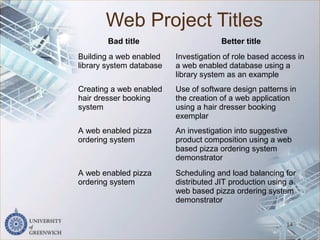
Web Project Titles
14
Bad title Better title
Building a web enabled
library system database
Investigation of role based access in
a web enabled database using a
library system as an example
Creating a web enabled
hair dresser booking
system
Use of software design patterns in
the creation of a web application
using a hair dresser booking
exemplar
A web enabled pizza
ordering system
An investigation into suggestive
product composition using a web
based pizza ordering system
demonstrator
A web enabled pizza
ordering system
Scheduling and load balancing for
distributed JIT production using a
web based pizza ordering system
demonstrator
Record the process
• Upload through the project website:
 project proposal which must be agreed by
supervisor before you can continue
 initial report - literature study/data collection
 interim report -
 electronic diary (make sure you add to it
regularly!)
• Keep notes and records of all your different
ideas including what did and didn’t work
• Save versions of your work
15
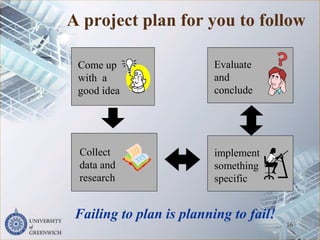
A project plan for you to follow
16
Collect
data and
research
Evaluate
and
conclude
implement
something
specific
Come up
with a
good idea
Failing to plan is planning to fail!
What should a BIS project
be about?
An IS project should be to build something
involving the design and implementation of a
system. It can also be about producing
something that maps onto the system life
cycle. It should be concerned with:
 understanding aspects about information systems
 applying principles from other courses (or
elsewhere)
 understanding and modelling problems
 reflecting and appraising how to build information
systems
Come up
with a
good idea
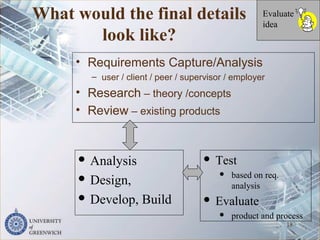
What would the final details
look like?
• Requirements Capture/Analysis
– user / client / peer / supervisor / employer
• Research – theory /concepts
• Review – existing products
18
Evaluate
idea
 Analysis
 Design,
 Develop, Build
 Test
 based on req.
analysis
 Evaluate
 product and process
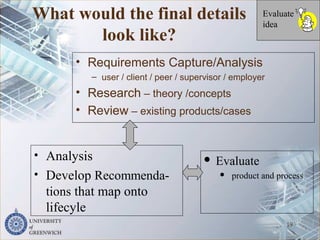
What would the final details
look like?
• Requirements Capture/Analysis
– user / client / peer / supervisor / employer
• Research – theory /concepts
• Review – existing products/cases
19
Evaluate
idea
• Analysis
• Develop Recommenda-
tions that map onto
lifecyle
 Evaluate
 product and process
Some advice
• 10+ hours a week on your project
• Keep realistic – you may not be able to
achieve all you want to do but a PLAN
will help you sort this out.
• Don’t hide from your supervisor – they
can’t help you if they don’t see any of
your work.
20
How to fail your project
1. Don’t plan
2. Don’t produce specifications, analysis
or designs
3. Avoid your supervisor
4. Start as late as possible
5. Don’t prepare for any meeting or
presentation
6. Make sure anything you hand in is
unreadable
7. Don’t ask for support.
21
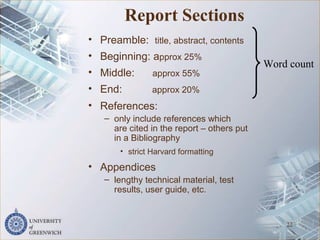
Report Sections
• Preamble: title, abstract, contents
• Beginning: approx 25%
• Middle: approx 55%
• End: approx 20%
• References:
– only include references which
are cited in the report – others put
in a Bibliography
• strict Harvard formatting
• Appendices
– lengthy technical material, test
results, user guide, etc.
22
Word count
Beginning
• Introduction:
– aims, justification
– why are you doing this project?
– Outline the rest of the report
• Research
– discovering information
• your approach to finding information
• credible sources
– documenting your discoveries
• discussion of your source material
• clear referencing
– conclusions
• summary of what you have discovered
23
Middle
• Methodology
– describe your chosen approach
• remember: this is a short timescale project and you are a team
of one
• Requirements Analysis and Specification
– preparation, gather requirements and analysis
• Technology
– identify the technology you have chosen to use
• avoid regurgitating superficial technical material
• justify your decisions
• Design
– plan what you intend to implement - schemas, architectures,
UML, and so on
• Implementation
– describe what you have done
• Testing
– discuss your approach to testing
– provide evidence of testing
– analyse and discuss your test results
24
End
• Reflection
– possibly the most important part of your report
• Critical evaluation of the three ‘P’s
– Process – the project
• what went well/wrong?
• would you do it differently next time?
– Product – the thing you made
• what is good/bad about it?
• would you do it differently next time?
• what is the next step in the development?
– Person - you
• how have you changed during the project?
• what skills did you bring?
• what skills did you develop?
• All projects are open to some criticism
– this should come from you
• as opposed to from your assessors
25
Referenced Material
• You must show that you have discovered
information by reading books, papers, articles, etc.
– written by other people and published somewhere
• credible authors and publications
• Your text must contain references (citations) to
these sources
• Text that is copied from your sources must be
formatted in "full quotation marks and italic font" and
clearly identified with a citation
– copied text can be good but avoid using too much
• Borrowed material such as pictures, figures, tables
etc., must be similarly identified
– graphical content must not float
– it must have a title and be referenced in the
body of the text
26
References
• A list of the source material cited in
the report
– only include material that is cited in the
text
– must be credible sources
• not Wikipedia, no DIY books, no dummies
guides
– apart from when it is really needed
– must be accurate
– must be correctly formatted
• If you have no credible sources then
find some
– and find a way of including them
27
Bibliography
• This is where you list books,
journals and websites that
informed your work but was not
directly cited in your work.
28
Appendices
• The word count of your report is limited
– if you exceed the word count push some content
into an appendix
• Appendices are good for...
– lengthy technical material
• boring detail that would not fit in the report body
• all that UML
• source code - if you really need to include it
• data sheets from third parties
– minutes of meetings
– installation / user guide for your product
• all those screen shots
– test results
• Appendices should not float
– they should be mentioned / described in the
body of the report
• ...further discussion of this can be found in
Appendix D 29
The role of the supervisor
• They will approve your project proposal and
support you in your project but they are not
there to do the work for you.
• They are your assessor, virtual client and critical
friend.
• You must talk to your supervisor
– you need to be proactive in arranging
meetings
– you should take an agenda to each meeting
– you must record the meeting - take minute
and include evidence of these meetings in
your report
the University of Greenwich 30
What students may expect but it is not
within the supervisor’s role to:
• Rewrite/finalise the project proposal.
• Tell them what to do.
• Edit/rewrite drafts, write the software or
configure the hardware.
• Provide detailed feedback when it is
submitted late without an agreed
extension.
• Give detailed feedback on the summary,
conclusions and evaluation.
• Negotiate on their behalf for an extension.
31
How to fail your project
1. Don’t plan
2. Don’t produce specifications, analysis
or designs
3. Avoid your supervisor
4. Start as late as possible
5. Don’t prepare for any meeting or
presentation
6. Make sure anything you hand in is
unreadable
7. Don’t ask for support.
32
How to pass the project
• Create a plan and keep it realistic.
• Make contingency plans in case things
go wrong.
• Spend 10+ hours a week on your
project
• Meet the deadlines
• Don’t hide from your supervisor – they
can’t help you if they don’t see any of
your work.
33
Questions
34
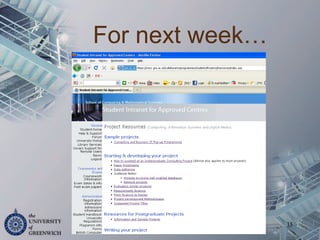
For next week…
35

Lecture 1 sbcs undergraduate projects

  • 1.
  • 2.
  • 3.
    What is afinal year project? • A sustained piece of individual work of between 150 and 200 hours • Planned by you with guidance from your supervisor and the project lectures • Written up by you as a Project report of around 12,000 words (min 10,000, max 15,000) • Assessed on your Report (+ Product) and a Demonstration by your supervisor and a second-marker. The final grade is moderated and externally examined. 3
  • 4.
    What is afinal year project? • A project with outcome that can map onto the systems lifecycle where you are the consultant • Doing work on behalf of a (virtual) client short timescale low budget • Deliverables Product Report Presentation 4
  • 5.
    Why your projectis important! • It is your main opportunity to carry out an important, individual piece of work • Your project counts for ¼ of your final year • It will be used when writing references for you – for work or for further study 5
  • 6.
    What are welooking for? • Discovery of information – read, research, investigate, gather • Application of what you have learned – to do something useful. This also involves some self teach for the project • Professional approach – applying all those personal and professional skills 6
  • 7.
    What are welooking for? • Documentation of your achievements – documentation is an important part of software – your (virtual) client has paid you lots of money to do this project for them • you need to convince them that you did a good job – you need to be assessed • you need to convince your assessors your work is good • Demonstration of insight – show awareness of your strengths and weaknesses • your project's strengths and weaknesses 7
  • 8.
    Deliverables 1. Project Proposal 2.Initial Report 3. Interim Report 4. Completed Project (Report + Implementation) 5. Demonstration 8
  • 9.
    What is assessed •Three final deliverables  Project Report • Research, • Design process, • Development process, • Evaluation  Product  Demonstration of your product, ideas and knowledge to your supervisor and second marker 9
  • 10.
    What should youdo now? • Set objectives then tasks for your project. Three general objectives : 1. Research 2. Build (Analysis, Design, Implementation) Or analysis, discuss outcomes, recommendations 1. Evaluate • Collect as much information as you can about your project • Write a draft project proposal based on your plan so far and what you know • Show it to your supervisor 10
  • 11.
    A Suitable Topic •Projects should be...  narrow; well defined scope;  deep of academic interest;  relevant to your degree;  current with regard to techniques and technologies;  novel with no re-inventing of wheels;  achievable within the limited timescale. 11
  • 12.
    Unsuitable Topic • Projectsshould not be... – Broad with wide scope cf. impractical – Superficial and of no academic interest – Irrelevant to your degree – Developed with old techniques and technologies – Conventional in that we have seen it all before – Impractical because it is overambitious and attempting far too much cf. broad 12
  • 13.
    Web Applications • Yourproject should identify a specific web application • Something that is – Unusual eg built with emerging technology; – Novel ie totally new application. • Focus on what makes your web application different • Are you attempting something that is less ambitious than a coursework? 13
  • 14.
    Web Project Titles 14 Badtitle Better title Building a web enabled library system database Investigation of role based access in a web enabled database using a library system as an example Creating a web enabled hair dresser booking system Use of software design patterns in the creation of a web application using a hair dresser booking exemplar A web enabled pizza ordering system An investigation into suggestive product composition using a web based pizza ordering system demonstrator A web enabled pizza ordering system Scheduling and load balancing for distributed JIT production using a web based pizza ordering system demonstrator
  • 15.
    Record the process •Upload through the project website:  project proposal which must be agreed by supervisor before you can continue  initial report - literature study/data collection  interim report -  electronic diary (make sure you add to it regularly!) • Keep notes and records of all your different ideas including what did and didn’t work • Save versions of your work 15
  • 16.
    A project planfor you to follow 16 Collect data and research Evaluate and conclude implement something specific Come up with a good idea Failing to plan is planning to fail!
  • 17.
    What should aBIS project be about? An IS project should be to build something involving the design and implementation of a system. It can also be about producing something that maps onto the system life cycle. It should be concerned with:  understanding aspects about information systems  applying principles from other courses (or elsewhere)  understanding and modelling problems  reflecting and appraising how to build information systems Come up with a good idea
  • 18.
    What would thefinal details look like? • Requirements Capture/Analysis – user / client / peer / supervisor / employer • Research – theory /concepts • Review – existing products 18 Evaluate idea  Analysis  Design,  Develop, Build  Test  based on req. analysis  Evaluate  product and process
  • 19.
    What would thefinal details look like? • Requirements Capture/Analysis – user / client / peer / supervisor / employer • Research – theory /concepts • Review – existing products/cases 19 Evaluate idea • Analysis • Develop Recommenda- tions that map onto lifecyle  Evaluate  product and process
  • 20.
    Some advice • 10+hours a week on your project • Keep realistic – you may not be able to achieve all you want to do but a PLAN will help you sort this out. • Don’t hide from your supervisor – they can’t help you if they don’t see any of your work. 20
  • 21.
    How to failyour project 1. Don’t plan 2. Don’t produce specifications, analysis or designs 3. Avoid your supervisor 4. Start as late as possible 5. Don’t prepare for any meeting or presentation 6. Make sure anything you hand in is unreadable 7. Don’t ask for support. 21
  • 22.
    Report Sections • Preamble:title, abstract, contents • Beginning: approx 25% • Middle: approx 55% • End: approx 20% • References: – only include references which are cited in the report – others put in a Bibliography • strict Harvard formatting • Appendices – lengthy technical material, test results, user guide, etc. 22 Word count
  • 23.
    Beginning • Introduction: – aims,justification – why are you doing this project? – Outline the rest of the report • Research – discovering information • your approach to finding information • credible sources – documenting your discoveries • discussion of your source material • clear referencing – conclusions • summary of what you have discovered 23
  • 24.
    Middle • Methodology – describeyour chosen approach • remember: this is a short timescale project and you are a team of one • Requirements Analysis and Specification – preparation, gather requirements and analysis • Technology – identify the technology you have chosen to use • avoid regurgitating superficial technical material • justify your decisions • Design – plan what you intend to implement - schemas, architectures, UML, and so on • Implementation – describe what you have done • Testing – discuss your approach to testing – provide evidence of testing – analyse and discuss your test results 24
  • 25.
    End • Reflection – possiblythe most important part of your report • Critical evaluation of the three ‘P’s – Process – the project • what went well/wrong? • would you do it differently next time? – Product – the thing you made • what is good/bad about it? • would you do it differently next time? • what is the next step in the development? – Person - you • how have you changed during the project? • what skills did you bring? • what skills did you develop? • All projects are open to some criticism – this should come from you • as opposed to from your assessors 25
  • 26.
    Referenced Material • Youmust show that you have discovered information by reading books, papers, articles, etc. – written by other people and published somewhere • credible authors and publications • Your text must contain references (citations) to these sources • Text that is copied from your sources must be formatted in "full quotation marks and italic font" and clearly identified with a citation – copied text can be good but avoid using too much • Borrowed material such as pictures, figures, tables etc., must be similarly identified – graphical content must not float – it must have a title and be referenced in the body of the text 26
  • 27.
    References • A listof the source material cited in the report – only include material that is cited in the text – must be credible sources • not Wikipedia, no DIY books, no dummies guides – apart from when it is really needed – must be accurate – must be correctly formatted • If you have no credible sources then find some – and find a way of including them 27
  • 28.
    Bibliography • This iswhere you list books, journals and websites that informed your work but was not directly cited in your work. 28
  • 29.
    Appendices • The wordcount of your report is limited – if you exceed the word count push some content into an appendix • Appendices are good for... – lengthy technical material • boring detail that would not fit in the report body • all that UML • source code - if you really need to include it • data sheets from third parties – minutes of meetings – installation / user guide for your product • all those screen shots – test results • Appendices should not float – they should be mentioned / described in the body of the report • ...further discussion of this can be found in Appendix D 29
  • 30.
    The role ofthe supervisor • They will approve your project proposal and support you in your project but they are not there to do the work for you. • They are your assessor, virtual client and critical friend. • You must talk to your supervisor – you need to be proactive in arranging meetings – you should take an agenda to each meeting – you must record the meeting - take minute and include evidence of these meetings in your report the University of Greenwich 30
  • 31.
    What students mayexpect but it is not within the supervisor’s role to: • Rewrite/finalise the project proposal. • Tell them what to do. • Edit/rewrite drafts, write the software or configure the hardware. • Provide detailed feedback when it is submitted late without an agreed extension. • Give detailed feedback on the summary, conclusions and evaluation. • Negotiate on their behalf for an extension. 31
  • 32.
    How to failyour project 1. Don’t plan 2. Don’t produce specifications, analysis or designs 3. Avoid your supervisor 4. Start as late as possible 5. Don’t prepare for any meeting or presentation 6. Make sure anything you hand in is unreadable 7. Don’t ask for support. 32
  • 33.
    How to passthe project • Create a plan and keep it realistic. • Make contingency plans in case things go wrong. • Spend 10+ hours a week on your project • Meet the deadlines • Don’t hide from your supervisor – they can’t help you if they don’t see any of your work. 33
  • 34.
  • 35.