2
2
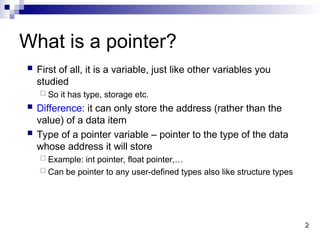
What is apointer?
First of all, it is a variable, just like other variables you
studied
So it has type, storage etc.
Difference: it can only store the address (rather than the
value) of a data item
Type of a pointer variable – pointer to the type of the data
whose address it will store
Example: int pointer, float pointer,…
Can be pointer to any user-defined types also like structure types
3.
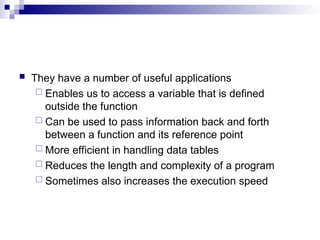
They havea number of useful applications
Enables us to access a variable that is defined
outside the function
Can be used to pass information back and forth
between a function and its reference point
More efficient in handling data tables
Reduces the length and complexity of a program
Sometimes also increases the execution speed
4.
4
4
Basic Concept
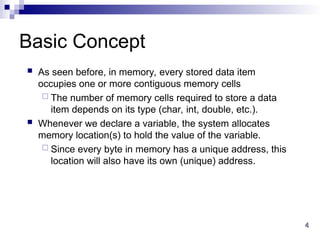
Asseen before, in memory, every stored data item
occupies one or more contiguous memory cells
The number of memory cells required to store a data
item depends on its type (char, int, double, etc.).
Whenever we declare a variable, the system allocates
memory location(s) to hold the value of the variable.
Since every byte in memory has a unique address, this
location will also have its own (unique) address.
5.
5
5
Contd.
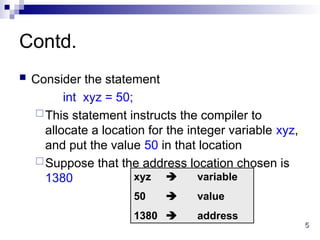
Consider thestatement
int xyz = 50;
This statement instructs the compiler to
allocate a location for the integer variable xyz,
and put the value 50 in that location
Suppose that the address location chosen is
1380 xyz variable
50 value
1380 address
6.
6
6
Contd.
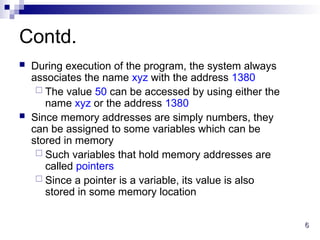
During executionof the program, the system always
associates the name xyz with the address 1380
The value 50 can be accessed by using either the
name xyz or the address 1380
Since memory addresses are simply numbers, they
can be assigned to some variables which can be
stored in memory
Such variables that hold memory addresses are
called pointers
Since a pointer is a variable, its value is also
stored in some memory location
7.
7
7
Contd.
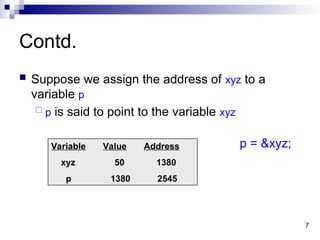
Suppose weassign the address of xyz to a
variable p
p is said to point to the variable xyz
Variable Value Address
xyz 50 1380
p 1380 2545
p = &xyz;
8.
8
8
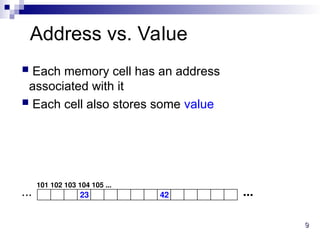
Address vs. Value
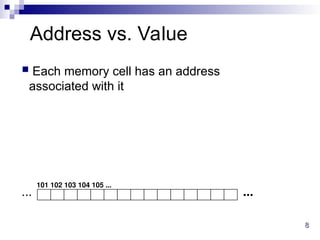
Each memory cell has an address
associated with it
...
...
101 102 103 104 105 ...
9.
9
9
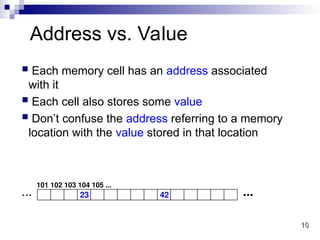
Address vs. Value
Each memory cell has an address
associated with it
Each cell also stores some value
23 42 ...
...
101 102 103 104 105 ...
10.
10
10
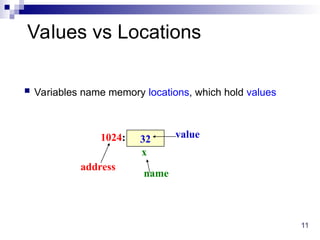
Address vs. Value
Each memory cell has an address associated
with it
Each cell also stores some value
Don’t confuse the address referring to a memory
location with the value stored in that location
23 42 ...
...
101 102 103 104 105 ...
12
12
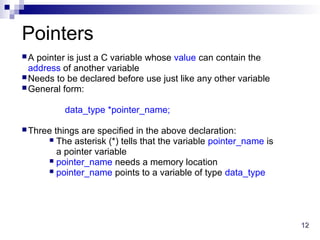
Pointers
A pointer isjust a C variable whose value can contain the
address of another variable
Needs to be declared before use just like any other variable
General form:
data_type *pointer_name;
Three things are specified in the above declaration:
The asterisk (*) tells that the variable pointer_name is
a pointer variable
pointer_name needs a memory location
pointer_name points to a variable of type data_type
13.
13
13
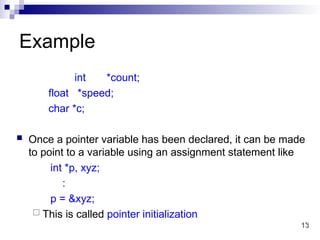
Example
int *count;
float *speed;
char*c;
Once a pointer variable has been declared, it can be made
to point to a variable using an assignment statement like
int *p, xyz;
:
p = &xyz;
This is called pointer initialization
14.
Pointers canbe defined for any type, including
user defined types
Example
struct name {
char first[20];
char last[20];
};
struct name *p;
p is a pointer which can store the address of a struct
name type variable
15.
15
15
Accessing the Addressof a
Variable
The address of a variable is given by the & operator
The operator & immediately preceding a variable
returns the address of the variable
Example:
p = &xyz;
The address of xyz (1380) is assigned to p
The & operator can be used only with a simple variable
(of any type, including user-defined types) or an array
element
&distance
&x[0]
&x[i-2]
16.
16
16
Illegal Use of&
&235
Pointing at constant
int arr[20];
:
&arr;
Pointing at array name
&(a+b)
Pointing at expression
In all these cases, there is no storage,
so no address either
17.
17
17
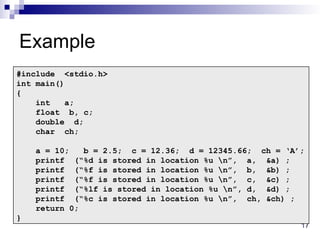
Example
#include <stdio.h>
int main()
{
inta;
float b, c;
double d;
char ch;
a = 10; b = 2.5; c = 12.36; d = 12345.66; ch = ‘A’;
printf (“%d is stored in location %u n”, a, &a) ;
printf (“%f is stored in location %u n”, b, &b) ;
printf (“%f is stored in location %u n”, c, &c) ;
printf (“%lf is stored in location %u n”, d, &d) ;
printf (“%c is stored in location %u n”, ch, &ch) ;
return 0;
}
18.
18
18
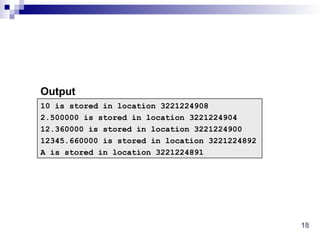
10 is storedin location 3221224908
2.500000 is stored in location 3221224904
12.360000 is stored in location 3221224900
12345.660000 is stored in location 3221224892
A is stored in location 3221224891
Output
19.
19
19
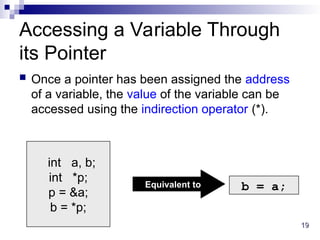
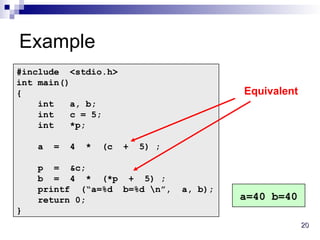
int a, b;
int*p;
p = &a;
b = *p;
Accessing a Variable Through
its Pointer
Once a pointer has been assigned the address
of a variable, the value of the variable can be
accessed using the indirection operator (*).
Equivalent to b = a;
21
21
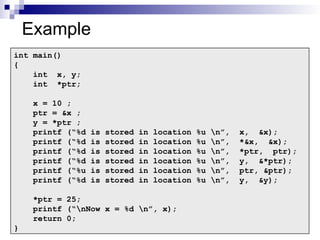
Example
int main()
{
int x,y;
int *ptr;
x = 10 ;
ptr = &x ;
y = *ptr ;
printf (“%d is stored in location %u n”, x, &x);
printf (“%d is stored in location %u n”, *&x, &x);
printf (“%d is stored in location %u n”, *ptr, ptr);
printf (“%d is stored in location %u n”, y, &*ptr);
printf (“%u is stored in location %u n”, ptr, &ptr);
printf (“%d is stored in location %u n”, y, &y);
*ptr = 25;
printf (“nNow x = %d n”, x);
return 0;
}
22.
22
22
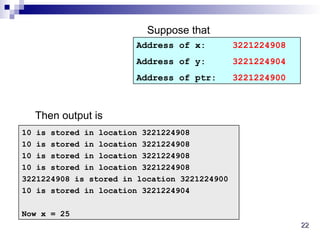
10 is storedin location 3221224908
10 is stored in location 3221224908
10 is stored in location 3221224908
10 is stored in location 3221224908
3221224908 is stored in location 3221224900
10 is stored in location 3221224904
Now x = 25
Address of x: 3221224908
Address of y: 3221224904
Address of ptr: 3221224900
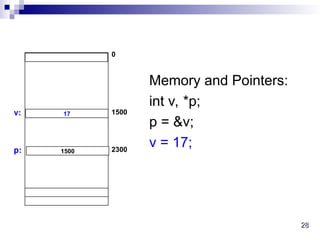
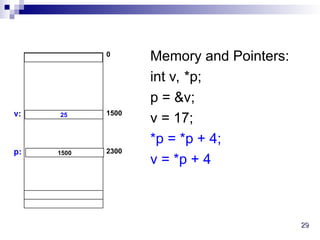
Suppose that
Then output is
23.
23
23
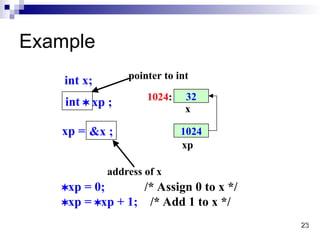
Example
32
x
1024:
int x;
int xp ;
1024
xp
xp = &x ;
address of x
pointer to int
xp = 0; /* Assign 0 to x */
xp = xp + 1; /* Add 1 to x */
24.
24
24
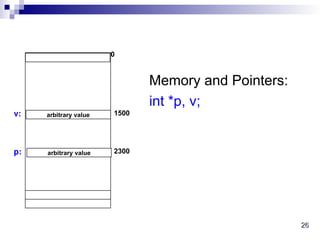
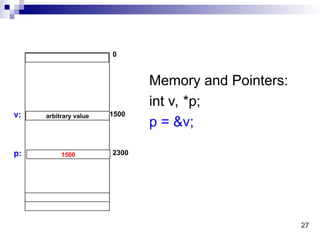
Value of thepointer
Declaring a pointer just allocates space to hold the
pointer – it does not allocate something to be pointed
to!
Local variables in C are not initialized, they may contain
anything
After declaring a pointer:
int *ptr;
ptr doesn’t actually point to anything yet. We can
either:
make it point to something that already exists, or
allocate room in memory for something new that it
will point to… (dynamic allocation, to be done later)
30
30
More Examples ofUsing Pointers
in Expressions
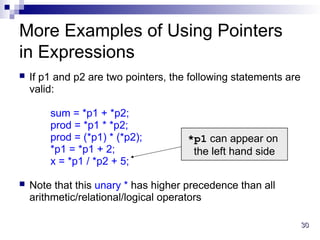
If p1 and p2 are two pointers, the following statements are
valid:
sum = *p1 + *p2;
prod = *p1 * *p2;
prod = (*p1) * (*p2);
*p1 = *p1 + 2;
x = *p1 / *p2 + 5;
Note that this unary * has higher precedence than all
arithmetic/relational/logical operators
*p1 can appear on
the left hand side
31.
31
31
Things to Remember
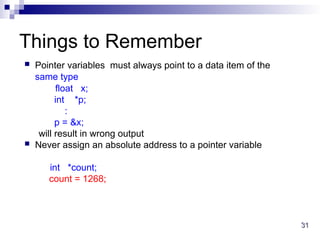
Pointer variables must always point to a data item of the
same type
float x;
int *p;
:
p = &x;
will result in wrong output
Never assign an absolute address to a pointer variable
int *count;
count = 1268;
32.
32
32
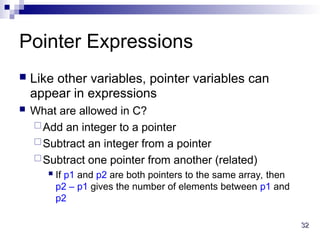
Pointer Expressions
Likeother variables, pointer variables can
appear in expressions
What are allowed in C?
Add an integer to a pointer
Subtract an integer from a pointer
Subtract one pointer from another (related)
If p1 and p2 are both pointers to the same array, then
p2 – p1 gives the number of elements between p1 and
p2
33.
33
33
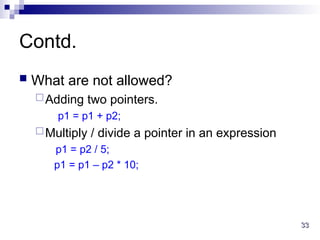
Contd.
What arenot allowed?
Adding two pointers.
p1 = p1 + p2;
Multiply / divide a pointer in an expression
p1 = p2 / 5;
p1 = p1 – p2 * 10;
34.
34
34
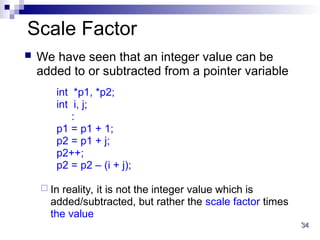
Scale Factor
Wehave seen that an integer value can be
added to or subtracted from a pointer variable
int *p1, *p2;
int i, j;
:
p1 = p1 + 1;
p2 = p1 + j;
p2++;
p2 = p2 – (i + j);
In reality, it is not the integer value which is
added/subtracted, but rather the scale factor times
the value
35.
35
35
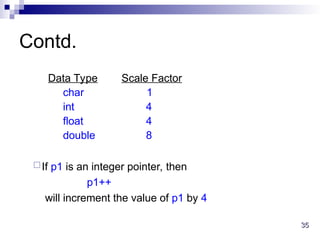
Contd.
Data Type ScaleFactor
char 1
int 4
float 4
double 8
If p1 is an integer pointer, then
p1++
will increment the value of p1 by 4
36.
36
36
The scalefactor indicates the number of bytes used to
store a value of that type
So the address of the next element of that type can only be
at the (current pointer value + size of data)
The exact scale factor may vary from one machine to
another
Can be found out using the sizeof function
Gives the size of that data type
Syntax:
sizeof (data_type)
37.
37
37
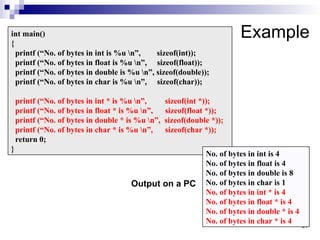
Example
int main()
{
printf (“No.of bytes in int is %u n”, sizeof(int));
printf (“No. of bytes in float is %u n”, sizeof(float));
printf (“No. of bytes in double is %u n”, sizeof(double));
printf (“No. of bytes in char is %u n”, sizeof(char));
printf (“No. of bytes in int * is %u n”, sizeof(int *));
printf (“No. of bytes in float * is %u n”, sizeof(float *));
printf (“No. of bytes in double * is %u n”, sizeof(double *));
printf (“No. of bytes in char * is %u n”, sizeof(char *));
return 0;
}
No. of bytes in int is 4
No. of bytes in float is 4
No. of bytes in double is 8
No. of bytes in char is 1
No. of bytes in int * is 4
No. of bytes in float * is 4
No. of bytes in double * is 4
No. of bytes in char * is 4
Output on a PC
38.
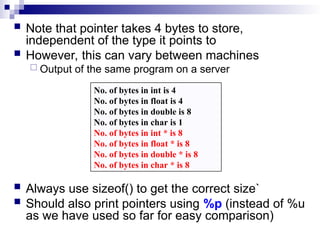
Note thatpointer takes 4 bytes to store,
independent of the type it points to
However, this can vary between machines
Output of the same program on a server
Always use sizeof() to get the correct size`
Should also print pointers using %p (instead of %u
as we have used so far for easy comparison)
No. of bytes in int is 4
No. of bytes in float is 4
No. of bytes in double is 8
No. of bytes in char is 1
No. of bytes in int * is 8
No. of bytes in float * is 8
No. of bytes in double * is 8
No. of bytes in char * is 8
39.
39
39
Example
int main()
{
int A[5],i;
printf(“The addresses of the array elements are:n”);
for (i=0; i<5; i++)
printf(“&A[%d]: Using %p = %p, Using %u = %u”, i, &A[i], &A[i]);
return 0;
}
&A[0]: Using %p = 0x7fffb2ad5930, Using %u = 2997705008
&A[1]: Using %p = 0x7fffb2ad5934, Using %u = 2997705012
&A[2]: Using %p = 0x7fffb2ad5938, Using %u = 2997705016
&A[3]: Using %p = 0x7fffb2ad593c, Using %u = 2997705020
&A[4]: Using %p = 0x7fffb2ad5940, Using %u = 2997705024
Output on a server machine
0x7fffb2ad5930 = 140736191093040 in decimal (NOT 2997705008)
so print with %u prints a wrong value (4 bytes of unsigned int cannot
hold 8 bytes for the pointer value)
![ Pointers can be defined for any type, including
user defined types
Example
struct name {
char first[20];
char last[20];
};
struct name *p;
p is a pointer which can store the address of a struct
name type variable](https://image.slidesharecdn.com/lect-16-17-pointer-basics-251125093818-6ee37652/85/Lect-16-17-Pointer-Basics-for-engineering-14-320.jpg)
![15
15
Accessing the Address of a
Variable
The address of a variable is given by the & operator
The operator & immediately preceding a variable
returns the address of the variable
Example:
p = &xyz;
The address of xyz (1380) is assigned to p
The & operator can be used only with a simple variable
(of any type, including user-defined types) or an array
element
&distance
&x[0]
&x[i-2]](https://image.slidesharecdn.com/lect-16-17-pointer-basics-251125093818-6ee37652/85/Lect-16-17-Pointer-Basics-for-engineering-15-320.jpg)
![16
16
Illegal Use of &
&235
Pointing at constant
int arr[20];
:
&arr;
Pointing at array name
&(a+b)
Pointing at expression
In all these cases, there is no storage,
so no address either](https://image.slidesharecdn.com/lect-16-17-pointer-basics-251125093818-6ee37652/85/Lect-16-17-Pointer-Basics-for-engineering-16-320.jpg)
![39
39
Example
int main()
{
int A[5], i;
printf(“The addresses of the array elements are:n”);
for (i=0; i<5; i++)
printf(“&A[%d]: Using %p = %p, Using %u = %u”, i, &A[i], &A[i]);
return 0;
}
&A[0]: Using %p = 0x7fffb2ad5930, Using %u = 2997705008
&A[1]: Using %p = 0x7fffb2ad5934, Using %u = 2997705012
&A[2]: Using %p = 0x7fffb2ad5938, Using %u = 2997705016
&A[3]: Using %p = 0x7fffb2ad593c, Using %u = 2997705020
&A[4]: Using %p = 0x7fffb2ad5940, Using %u = 2997705024
Output on a server machine
0x7fffb2ad5930 = 140736191093040 in decimal (NOT 2997705008)
so print with %u prints a wrong value (4 bytes of unsigned int cannot
hold 8 bytes for the pointer value)](https://image.slidesharecdn.com/lect-16-17-pointer-basics-251125093818-6ee37652/85/Lect-16-17-Pointer-Basics-for-engineering-39-320.jpg)


