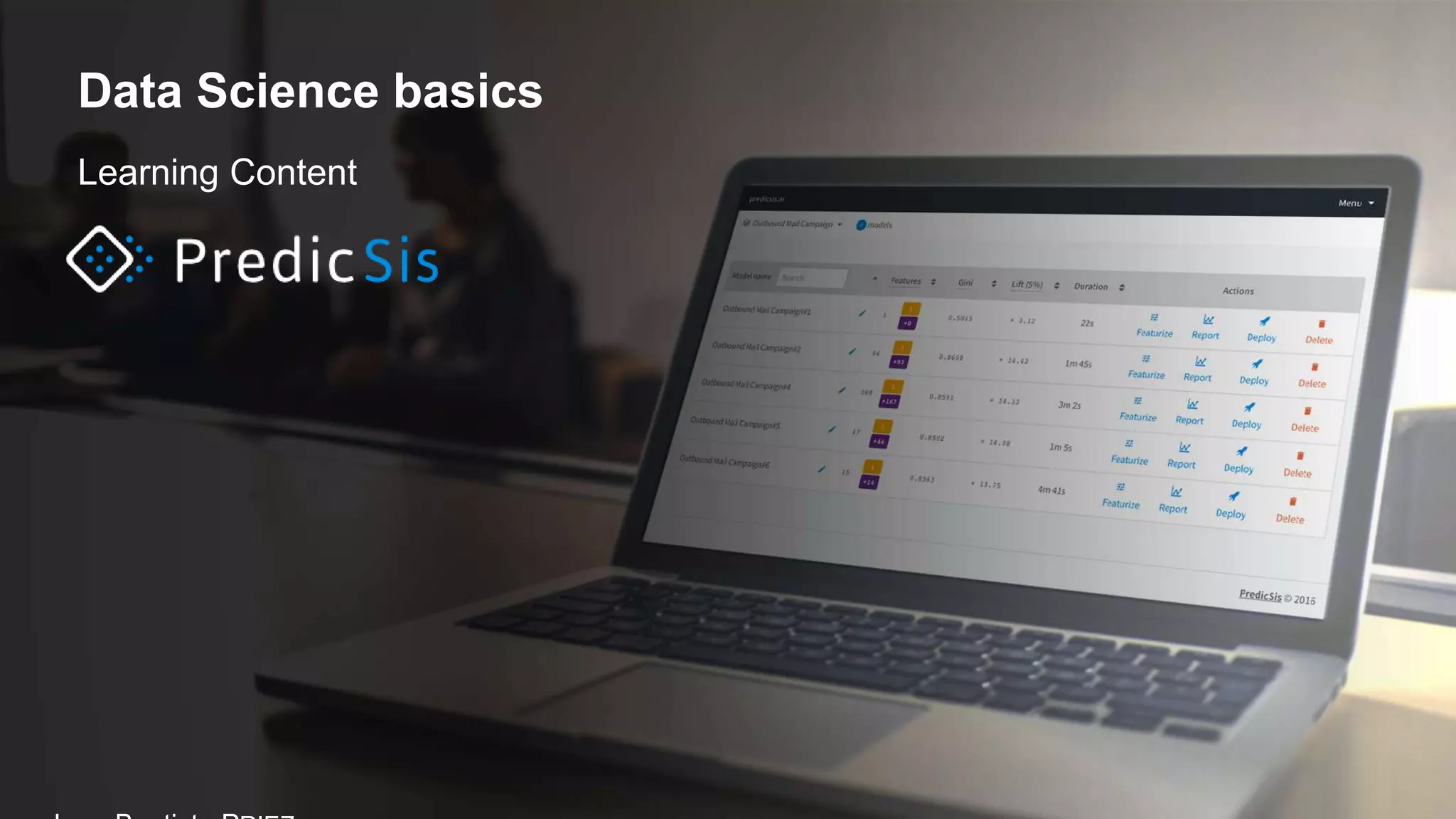
Learning Content
Data Science basics
Content
1. Supervised classification
1. Performance indicators: Gini, Lift, Level,
Weight, Contribution, etc…
2. Statistic reduction: Discretization / Grouping
3. Naïve Bayes and SNB
4. Feature Engineering: feature surfacing
2. Relational database
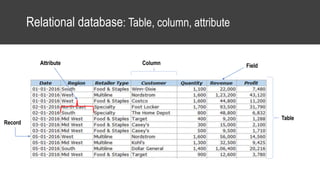
1. Table, column, field, attribute
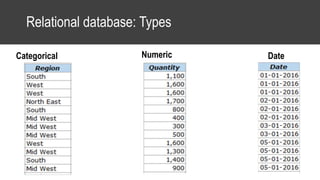
2. Types: categorical, numeric and date
3. Aggregation and filters
3. Methodology: CRISP-DM
• Step-by-step
4. Zoom on Data Preparation
1. (What’s drive) Description
2. (How to action) Prediction
3. Expected data
1. Train and test data
2. Central and Peripheral datasets
3. Central dataset
4. Peripheral dataset
5. CSV format
6. Settings
http://predicsis-ai-doc.readthedocs.io
http://predicsis-python-sdk.readthedocs.io
Supervised classification
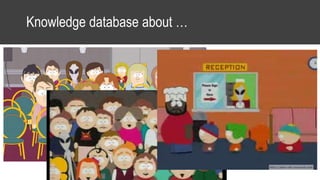
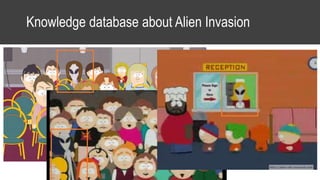
Knowledge database about …
Knowledge database about Alien Invasion
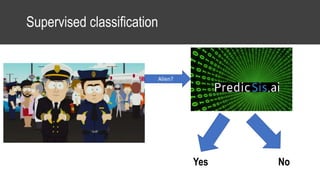
Supervised classification
Alien?
Yes No
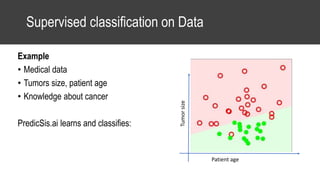
Supervised classification on Data
Example
• Medical data
• Tumors size, patient age
• Knowledge about cancer
PredicSis.ai learns and classifies:
Tumorsize
Patient age
Use case PredicSis.ai: Fidelio
Bank clients
• Using bank account data,
• Could we identify which clients are appetent to loyalty loan: Fidelio ?
Go to PredicSis.ai !!
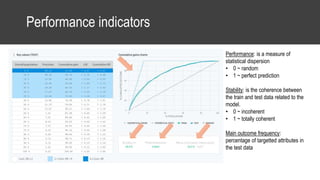
Performance indicators
Performance: is a measure of
statistical dispersion
• 0 ~ random
• 1 ~ perfect prediction
Stability: is the coherence between
the train and test data related to the
model.
• 0 ~ incoherent
• 1 ~ totally coherent
Main outcome frequency:
percentage of targetted attributes in
the test data
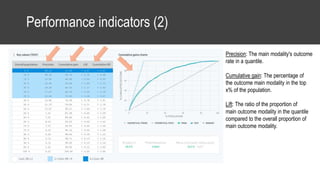
Performance indicators (2)
Precision: The main modality's outcome
rate in a quantile.
Cumulative gain: The percentage of
the outcome main modality in the top
x% of the population.
Lift: The ratio of the proportion of
main outcome modality in the quantile
compared to the overall proportion of
main outcome modality.
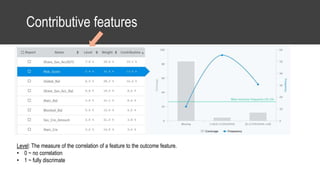
Contributive features
Level: The measure of the correlation of a feature to the outcome feature.
• 0 ~ no correlation
• 1 ~ fully discrimate
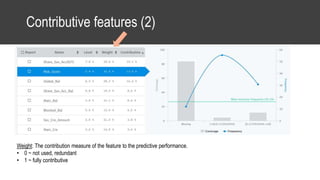
Contributive features (2)
Weight: The contribution measure of the feature to the predictive performance.
• 0 ~ not used, redundant
• 1 ~ fully contributive
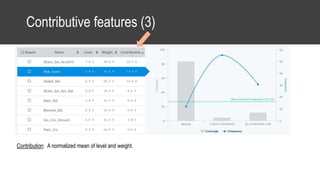
Contributive features (3)
Contribution: A normalized mean of level and weight.
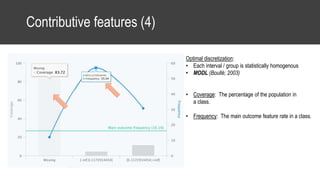
Contributive features (4)
Optimal discretization:
• Each interval / group is statistically homogenous
• MODL (Boullé; 2003)
• Coverage: The percentage of the population in
a class.
• Frequency: The main outcome feature rate in a class.
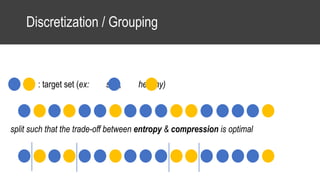
Discretization / Grouping
: target set (ex: sick, healthy)
split such that the trade-off between entropy & compression is optimal
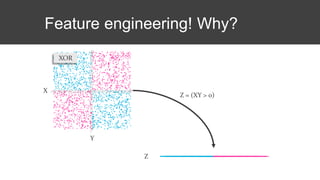
Feature engineering! Why?
XOR
X
Y
Z = (XY > 0)
Z
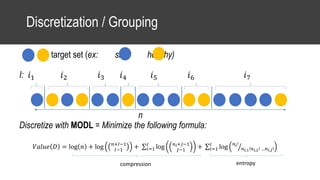
Discretization / Grouping
: target set (ex: sick, healthy)
I: 𝑖1 𝑖2 𝑖3 𝑖4 𝑖5 𝑖6 𝑖7
n
Discretize with MODL = Minimize the following formula:
𝑉𝑎𝑙𝑢𝑒 𝐷 = log 𝑛 + log 𝑛+𝐼−1
𝐼−1
+ 𝑖=1
𝐼
log 𝑛 𝑖+𝐽−1
𝐽−1
+ 𝑖=1
𝐼
log 𝑛 𝑖!
𝑛 𝑖,1!𝑛 𝑖,2! …𝑛 𝑖,𝐽!
entropycompression
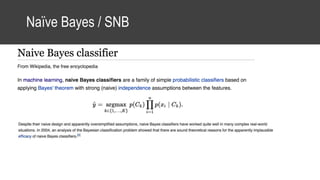
Naïve Bayes / SNB
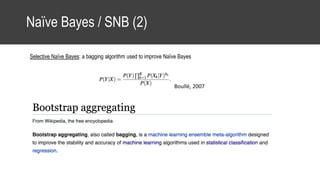
Naïve Bayes / SNB (2)
Selective Naïve Bayes: a bagging algorithm used to improve Naïve Bayes
Boullé, 2007
Relational database
Relational database: Table, column, attribute
Table
ColumnAttribute Field
Record
Relational database: Types
Categorical Numeric Date
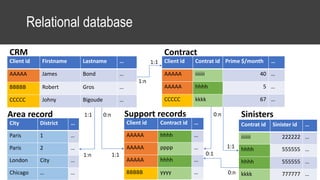
Relational database
Client id Firstname Lastname …
AAAAA James Bond …
BBBBB Robert Gros …
CCCCC Johny Bigoude …
Client id Contrat id Prime $/month …
AAAAA iiiiiii 40 …
AAAAA hhhh 5 …
CCCCC kkkk 67 …
CRM Contract
Contrat id Sinister id …
iiiiiii 222222 …
hhhh 555555 …
hhhh 555555 …
kkkk 777777 …
Sinisters
City District …
Paris 1 …
Paris 2 …
London City …
Chicago … …
Area record
1:n
1:1
1:n
1:1
0:n
1:1
Client id Contract id …
AAAAA hhhh …
AAAAA pppp …
AAAAA hhhh …
BBBBB yyyy …
Support records0:n
1:1 0:1
0:n
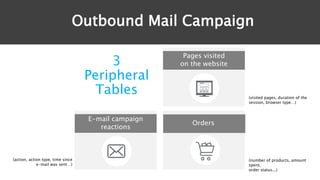
Use case PredicSis.ai: Outbound Mail Campaign
How to optimize mail campaign?
• Using CRM about customer:
• Orders
• Webpage visited
• Campaign
• Could we identify which clients are appetents to red t-shirts?
Go to PredicSis.ai !!
Outbound Mail Campaign
3
Peripheral
Tables (visited pages, duration of the
session, browser type…)
Pages visited
on the website
(number of products, amount
spent,
order status...)
E-mail campaign
reactions
(action, action type, time since
e-mail was sent…)
Orders
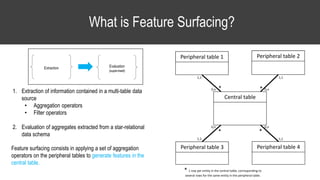
What is Feature Surfacing?
1. Extraction of information contained in a multi-table data
source
• Aggregation operators
• Filter operators
2. Evaluation of aggregates extracted from a star-relational
data schema
Feature surfacing consists in applying a set of aggregation
operators on the peripheral tables to generate features in the
central table.
Central table
Peripheral table 1 Peripheral table 2
Peripheral table 3 Peripheral table 4
* *
**
1,1
0,n0,n
0,n0,n
1,1
1,1
1,1
* 1 row per entity in the central table, corresponding to
several rows for the same entity in the peripheral table.
Extraction Evaluation
(supervised)
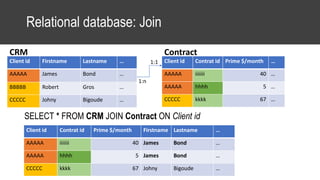
Relational database: Join
SELECT * FROM CRM JOIN Contract ON Client id
Client id Firstname Lastname …
AAAAA James Bond …
BBBBB Robert Gros …
CCCCC Johny Bigoude …
Client id Contrat id Prime $/month …
AAAAA iiiiiii 40 …
AAAAA hhhh 5 …
CCCCC kkkk 67 …
CRM Contract
1:n
1:1
Client id Contrat id Prime $/month Firstname Lastname …
AAAAA iiiiiii 40 James Bond …
AAAAA hhhh 5 James Bond …
CCCCC kkkk 67 Johny Bigoude …
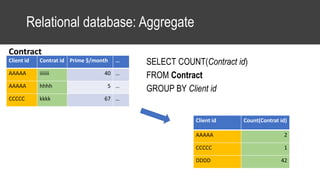
Relational database: Aggregate
SELECT COUNT(Contract id)
FROM Contract
GROUP BY Client id
Client id Contrat id Prime $/month …
AAAAA iiiiiii 40 …
AAAAA hhhh 5 …
CCCCC kkkk 67 …
Contract
Client id Count(Contrat id)
AAAAA 2
CCCCC 1
DDDD 42
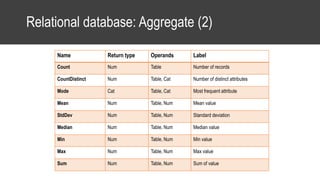
Relational database: Aggregate (2)
Name Return type Operands Label
Count Num Table Number of records
CountDistinct Num Table, Cat Number of distinct attributes
Mode Cat Table, Cat Most frequent attribute
Mean Num Table, Num Mean value
StdDev Num Table, Num Standard deviation
Median Num Table, Num Median value
Min Num Table, Num Min value
Max Num Table, Num Max value
Sum Num Table, Num Sum of value
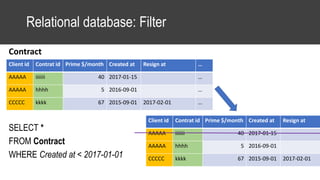
Client id Contrat id Prime $/month Created at Resign at …
AAAAA iiiiiii 40 2017-01-15 …
AAAAA hhhh 5 2016-09-01 …
CCCCC kkkk 67 2015-09-01 2017-02-01 …
Relational database: Filter
SELECT *
FROM Contract
WHERE Created at < 2017-01-01
Contract
Client id Contrat id Prime $/month Created at Resign at
AAAAA iiiiiii 40 2017-01-15
AAAAA hhhh 5 2016-09-01
CCCCC kkkk 67 2015-09-01 2017-02-01
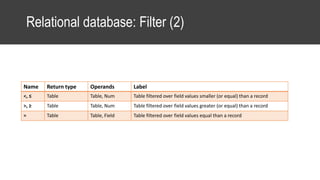
Relational database: Filter (2)
Name Return type Operands Label
<, ≤ Table Table, Num Table filtered over field values smaller (or equal) than a record
>, ≥ Table Table, Num Table filtered over field values greater (or equal) than a record
= Table Table, Field Table filtered over field values equal than a record
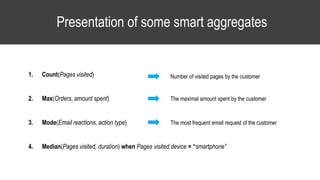
Presentation of some smart aggregates
1. Count(Pages visited)
2. Max(Orders, amount spent)
3. Mode(Email reactions, action type)
4. Median(Pages visited, duration) when Pages visited.device = “smartphone”
The maximal amount spent by the customer
The most frequent email request of the customer
Number of visited pages by the customer
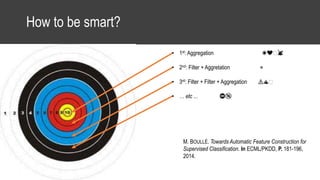
How to be smart?
• Good aggregate • 1st: Aggregation ☀❤️️🐰
• 2nd: Filter + Aggretation ⭐
• 3rd: Filter + Filter + Aggregation ⚠♨️️
• … etc ... ⛔️🔞
M. BOULLÉ. Towards Automatic Feature Construction for
Supervised Classification. In ECML/PKDD, P. 181-196,
2014.
Interpretation of smart aggregates
calculated over the visited pages table
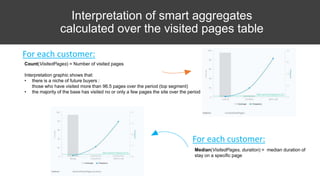
Count(VisitedPages) = Number of visited pages
Interpretation graphic shows that:
• there is a niche of future buyers :
those who have visited more than 96.5 pages over the period (top segment)
• the majority of the base has visited no or only a few pages the site over the period
For each customer:
For each customer:
Median(VisitedPages, duration) = median duration of
stay on a specific page
CRISP-DM methodology
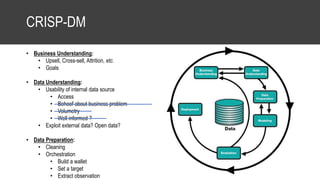
CRISP-DM
• Business Understanding:
• Upsell, Cross-sell, Attrition, etc.
• Goals
• Data Understanding:
• Usability of internal data source
• Access
• Behoof about business problem
• Volumetry
• Well informed ?
• Exploit external data? Open data?
• Data Preparation:
• Cleaning
• Orchestration
• Build a wallet
• Set a target
• Extract observation
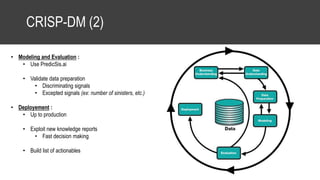
CRISP-DM (2)
• Modeling and Evaluation :
• Use PredicSis.ai
• Validate data preparation
• Discriminating signals
• Excepted signals (ex: number of sinisters, etc.)
• Deployement :
• Up to production
• Exploit new knowledge reports
• Fast decision making
• Build list of actionables
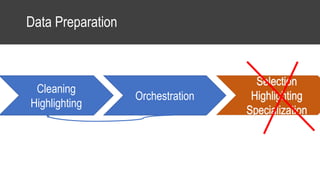
Data Preparation
Cleaning
Highlighting
Orchestration
Zoom Data Preparation
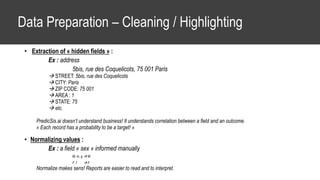
Data Preparation – Cleaning / Highlighting
• Extraction of « hidden fields » :
Ex : address
5bis, rue des Coquelicots, 75 001 Paris
 STREET: 5bis, rue des Coquelicots
 CITY: Paris
 ZIP CODE: 75 001
 AREA : 1
 STATE: 75
 etc.
PredicSis.ai doesn’t understand business! It understands correlation between a field and an outcome.
« Each record has a probability to be a target! »
• Normalizing values :
Ex : a field « sex » informed manually
M, m, g  M
F, f  F
Normalize makes sens! Reports are easier to read and to interpret.
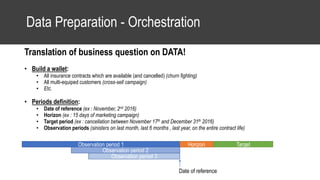
Data Preparation - Orchestration
Translation of business question on DATA!
• Build a wallet:
• All insurance contracts which are available (and cancelled) (churn fighting)
• All multi-equiped customers (cross-sell campaign)
• Etc.
• Periods definition:
• Date of reference (ex : November, 2nd 2016)
• Horizon (ex : 15 days of marketing campaign)
• Target period (ex : cancellation between November 17th and December 31th 2016)
• Observation periods (sinisters on last month, last 6 months , last year, on the entire contract life)
Observation period 1
Date of reference
Horizon Target
Observation period 2
Observation period 3
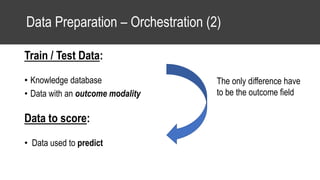
Data Preparation – Orchestration (2)
Train / Test Data:
• Knowledge database
• Data with an outcome modality
Data to score:
• Data used to predict
The only difference have
to be the outcome field
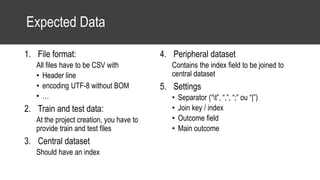
Expected Data
1. File format:
All files have to be CSV with
• Header line
• encoding UTF-8 without BOM
• …
2. Train and test data:
At the project creation, you have to
provide train and test files
3. Central dataset
Should have an index
4. Peripheral dataset
Contains the index field to be joined to
central dataset
5. Settings
• Separator (“t”, “,”, “;” ou “|”)
• Join key / index
• Outcome field
• Main outcome

Learning content - Data Science Basics

  • 1.
  • 2.
    Content 1. Supervised classification 1.Performance indicators: Gini, Lift, Level, Weight, Contribution, etc… 2. Statistic reduction: Discretization / Grouping 3. Naïve Bayes and SNB 4. Feature Engineering: feature surfacing 2. Relational database 1. Table, column, field, attribute 2. Types: categorical, numeric and date 3. Aggregation and filters 3. Methodology: CRISP-DM • Step-by-step 4. Zoom on Data Preparation 1. (What’s drive) Description 2. (How to action) Prediction 3. Expected data 1. Train and test data 2. Central and Peripheral datasets 3. Central dataset 4. Peripheral dataset 5. CSV format 6. Settings http://predicsis-ai-doc.readthedocs.io http://predicsis-python-sdk.readthedocs.io
  • 3.
  • 4.
  • 5.
  • 6.
  • 7.
    Supervised classification onData Example • Medical data • Tumors size, patient age • Knowledge about cancer PredicSis.ai learns and classifies: Tumorsize Patient age
  • 8.
    Use case PredicSis.ai:Fidelio Bank clients • Using bank account data, • Could we identify which clients are appetent to loyalty loan: Fidelio ? Go to PredicSis.ai !!
  • 9.
    Performance indicators Performance: isa measure of statistical dispersion • 0 ~ random • 1 ~ perfect prediction Stability: is the coherence between the train and test data related to the model. • 0 ~ incoherent • 1 ~ totally coherent Main outcome frequency: percentage of targetted attributes in the test data
  • 10.
    Performance indicators (2) Precision:The main modality's outcome rate in a quantile. Cumulative gain: The percentage of the outcome main modality in the top x% of the population. Lift: The ratio of the proportion of main outcome modality in the quantile compared to the overall proportion of main outcome modality.
  • 11.
    Contributive features Level: Themeasure of the correlation of a feature to the outcome feature. • 0 ~ no correlation • 1 ~ fully discrimate
  • 12.
    Contributive features (2) Weight:The contribution measure of the feature to the predictive performance. • 0 ~ not used, redundant • 1 ~ fully contributive
  • 13.
    Contributive features (3) Contribution:A normalized mean of level and weight.
  • 14.
    Contributive features (4) Optimaldiscretization: • Each interval / group is statistically homogenous • MODL (Boullé; 2003) • Coverage: The percentage of the population in a class. • Frequency: The main outcome feature rate in a class.
  • 15.
    Discretization / Grouping :target set (ex: sick, healthy) split such that the trade-off between entropy & compression is optimal
  • 16.
  • 17.
    Discretization / Grouping :target set (ex: sick, healthy) I: 𝑖1 𝑖2 𝑖3 𝑖4 𝑖5 𝑖6 𝑖7 n Discretize with MODL = Minimize the following formula: 𝑉𝑎𝑙𝑢𝑒 𝐷 = log 𝑛 + log 𝑛+𝐼−1 𝐼−1 + 𝑖=1 𝐼 log 𝑛 𝑖+𝐽−1 𝐽−1 + 𝑖=1 𝐼 log 𝑛 𝑖! 𝑛 𝑖,1!𝑛 𝑖,2! …𝑛 𝑖,𝐽! entropycompression
  • 18.
  • 19.
    Naïve Bayes /SNB (2) Selective Naïve Bayes: a bagging algorithm used to improve Naïve Bayes Boullé, 2007
  • 20.
  • 21.
    Relational database: Table,column, attribute Table ColumnAttribute Field Record
  • 22.
  • 23.
    Relational database Client idFirstname Lastname … AAAAA James Bond … BBBBB Robert Gros … CCCCC Johny Bigoude … Client id Contrat id Prime $/month … AAAAA iiiiiii 40 … AAAAA hhhh 5 … CCCCC kkkk 67 … CRM Contract Contrat id Sinister id … iiiiiii 222222 … hhhh 555555 … hhhh 555555 … kkkk 777777 … Sinisters City District … Paris 1 … Paris 2 … London City … Chicago … … Area record 1:n 1:1 1:n 1:1 0:n 1:1 Client id Contract id … AAAAA hhhh … AAAAA pppp … AAAAA hhhh … BBBBB yyyy … Support records0:n 1:1 0:1 0:n
  • 24.
    Use case PredicSis.ai:Outbound Mail Campaign How to optimize mail campaign? • Using CRM about customer: • Orders • Webpage visited • Campaign • Could we identify which clients are appetents to red t-shirts? Go to PredicSis.ai !!
  • 25.
    Outbound Mail Campaign 3 Peripheral Tables(visited pages, duration of the session, browser type…) Pages visited on the website (number of products, amount spent, order status...) E-mail campaign reactions (action, action type, time since e-mail was sent…) Orders
  • 26.
    What is FeatureSurfacing? 1. Extraction of information contained in a multi-table data source • Aggregation operators • Filter operators 2. Evaluation of aggregates extracted from a star-relational data schema Feature surfacing consists in applying a set of aggregation operators on the peripheral tables to generate features in the central table. Central table Peripheral table 1 Peripheral table 2 Peripheral table 3 Peripheral table 4 * * ** 1,1 0,n0,n 0,n0,n 1,1 1,1 1,1 * 1 row per entity in the central table, corresponding to several rows for the same entity in the peripheral table. Extraction Evaluation (supervised)
  • 27.
    Relational database: Join SELECT* FROM CRM JOIN Contract ON Client id Client id Firstname Lastname … AAAAA James Bond … BBBBB Robert Gros … CCCCC Johny Bigoude … Client id Contrat id Prime $/month … AAAAA iiiiiii 40 … AAAAA hhhh 5 … CCCCC kkkk 67 … CRM Contract 1:n 1:1 Client id Contrat id Prime $/month Firstname Lastname … AAAAA iiiiiii 40 James Bond … AAAAA hhhh 5 James Bond … CCCCC kkkk 67 Johny Bigoude …
  • 28.
    Relational database: Aggregate SELECTCOUNT(Contract id) FROM Contract GROUP BY Client id Client id Contrat id Prime $/month … AAAAA iiiiiii 40 … AAAAA hhhh 5 … CCCCC kkkk 67 … Contract Client id Count(Contrat id) AAAAA 2 CCCCC 1 DDDD 42
  • 29.
    Relational database: Aggregate(2) Name Return type Operands Label Count Num Table Number of records CountDistinct Num Table, Cat Number of distinct attributes Mode Cat Table, Cat Most frequent attribute Mean Num Table, Num Mean value StdDev Num Table, Num Standard deviation Median Num Table, Num Median value Min Num Table, Num Min value Max Num Table, Num Max value Sum Num Table, Num Sum of value
  • 30.
    Client id Contratid Prime $/month Created at Resign at … AAAAA iiiiiii 40 2017-01-15 … AAAAA hhhh 5 2016-09-01 … CCCCC kkkk 67 2015-09-01 2017-02-01 … Relational database: Filter SELECT * FROM Contract WHERE Created at < 2017-01-01 Contract Client id Contrat id Prime $/month Created at Resign at AAAAA iiiiiii 40 2017-01-15 AAAAA hhhh 5 2016-09-01 CCCCC kkkk 67 2015-09-01 2017-02-01
  • 31.
    Relational database: Filter(2) Name Return type Operands Label <, ≤ Table Table, Num Table filtered over field values smaller (or equal) than a record >, ≥ Table Table, Num Table filtered over field values greater (or equal) than a record = Table Table, Field Table filtered over field values equal than a record
  • 32.
    Presentation of somesmart aggregates 1. Count(Pages visited) 2. Max(Orders, amount spent) 3. Mode(Email reactions, action type) 4. Median(Pages visited, duration) when Pages visited.device = “smartphone” The maximal amount spent by the customer The most frequent email request of the customer Number of visited pages by the customer
  • 33.
    How to besmart? • Good aggregate • 1st: Aggregation ☀❤️️🐰 • 2nd: Filter + Aggretation ⭐ • 3rd: Filter + Filter + Aggregation ⚠♨️️ • … etc ... ⛔️🔞 M. BOULLÉ. Towards Automatic Feature Construction for Supervised Classification. In ECML/PKDD, P. 181-196, 2014.
  • 34.
    Interpretation of smartaggregates calculated over the visited pages table Count(VisitedPages) = Number of visited pages Interpretation graphic shows that: • there is a niche of future buyers : those who have visited more than 96.5 pages over the period (top segment) • the majority of the base has visited no or only a few pages the site over the period For each customer: For each customer: Median(VisitedPages, duration) = median duration of stay on a specific page
  • 35.
  • 36.
    CRISP-DM • Business Understanding: •Upsell, Cross-sell, Attrition, etc. • Goals • Data Understanding: • Usability of internal data source • Access • Behoof about business problem • Volumetry • Well informed ? • Exploit external data? Open data? • Data Preparation: • Cleaning • Orchestration • Build a wallet • Set a target • Extract observation
  • 37.
    CRISP-DM (2) • Modelingand Evaluation : • Use PredicSis.ai • Validate data preparation • Discriminating signals • Excepted signals (ex: number of sinisters, etc.) • Deployement : • Up to production • Exploit new knowledge reports • Fast decision making • Build list of actionables
  • 38.
  • 39.
  • 40.
    Data Preparation –Cleaning / Highlighting • Extraction of « hidden fields » : Ex : address 5bis, rue des Coquelicots, 75 001 Paris  STREET: 5bis, rue des Coquelicots  CITY: Paris  ZIP CODE: 75 001  AREA : 1  STATE: 75  etc. PredicSis.ai doesn’t understand business! It understands correlation between a field and an outcome. « Each record has a probability to be a target! » • Normalizing values : Ex : a field « sex » informed manually M, m, g  M F, f  F Normalize makes sens! Reports are easier to read and to interpret.
  • 41.
    Data Preparation -Orchestration Translation of business question on DATA! • Build a wallet: • All insurance contracts which are available (and cancelled) (churn fighting) • All multi-equiped customers (cross-sell campaign) • Etc. • Periods definition: • Date of reference (ex : November, 2nd 2016) • Horizon (ex : 15 days of marketing campaign) • Target period (ex : cancellation between November 17th and December 31th 2016) • Observation periods (sinisters on last month, last 6 months , last year, on the entire contract life) Observation period 1 Date of reference Horizon Target Observation period 2 Observation period 3
  • 42.
    Data Preparation –Orchestration (2) Train / Test Data: • Knowledge database • Data with an outcome modality Data to score: • Data used to predict The only difference have to be the outcome field
  • 43.
    Expected Data 1. Fileformat: All files have to be CSV with • Header line • encoding UTF-8 without BOM • … 2. Train and test data: At the project creation, you have to provide train and test files 3. Central dataset Should have an index 4. Peripheral dataset Contains the index field to be joined to central dataset 5. Settings • Separator (“t”, “,”, “;” ou “|”) • Join key / index • Outcome field • Main outcome
Editor's Notes

  • #17 La construction de variables : feature generation pour capturer les corrélations