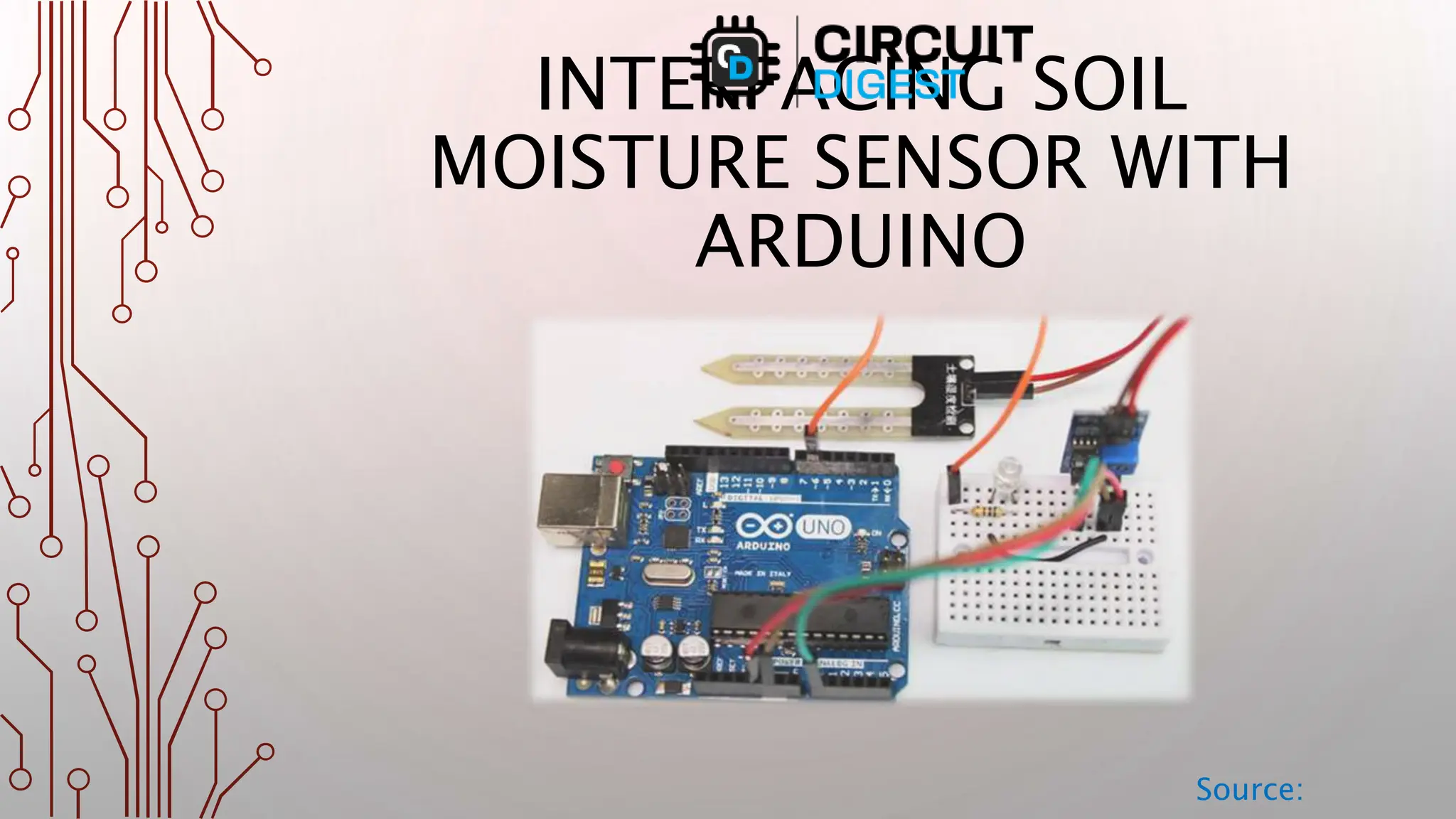
INTERFACING SOIL
MOISTURE SENSOR WITH
ARDUINO
Source:
SOIL MOISTURE SENSOR - PINOUT
Source:
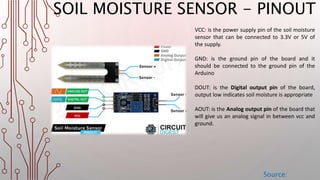
VCC: is the power supply pin of the soil moisture
sensor that can be connected to 3.3V or 5V of
the supply.
GND: is the ground pin of the board and it
should be connected to the ground pin of the
Arduino
DOUT: is the Digital output pin of the board,
output low indicates soil moisture is appropriate
AOUT: is the Analog output pin of the board that
will give us an analog signal in between vcc and
ground.
SOIL MOISTURE SENSOR - PARTS
Source:
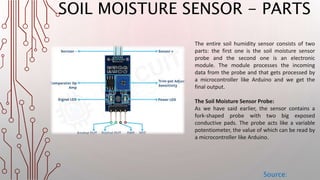
The entire soil humidity sensor consists of two
parts: the first one is the soil moisture sensor
probe and the second one is an electronic
module. The module processes the incoming
data from the probe and that gets processed by
a microcontroller like Arduino and we get the
final output.
The Soil Moisture Sensor Probe:
As we have said earlier, the sensor contains a
fork-shaped probe with two big exposed
conductive pads. The probe acts like a variable
potentiometer, the value of which can be read by
a microcontroller like Arduino.
WORKING
Source:
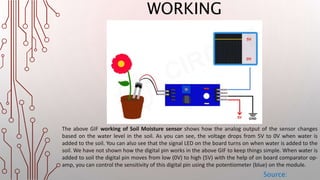
The above GIF working of Soil Moisture sensor shows how the analog output of the sensor changes
based on the water level in the soil. As you can see, the voltage drops from 5V to 0V when water is
added to the soil. You can also see that the signal LED on the board turns on when water is added to the
soil. We have not shown how the digital pin works in the above GIF to keep things simple. When water is
added to soil the digital pin moves from low (0V) to high (5V) with the help of on board comparator op-
amp, you can control the sensitivity of this digital pin using the potentiometer (blue) on the module.
CIRCUIT
Source:
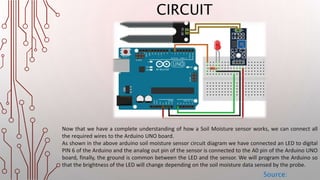
Now that we have a complete understanding of how a Soil Moisture sensor works, we can connect all
the required wires to the Arduino UNO board.
As shown in the above arduino soil moisture sensor circuit diagram we have connected an LED to digital
PIN 6 of the Arduino and the analog out pin of the sensor is connected to the A0 pin of the Arduino UNO
board, finally, the ground is common between the LED and the sensor. We will program the Arduino so
that the brightness of the LED will change depending on the soil moisture data sensed by the probe.
ARDUINO SOIL MOISTURE SENSOR
CONNECTION
Source:
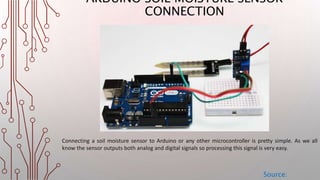
Connecting a soil moisture sensor to Arduino or any other microcontroller is pretty simple. As we all
know the sensor outputs both analog and digital signals so processing this signal is very easy.
ARDUINO SOIL MOISTURE SENSOR
CONNECTION
Source:
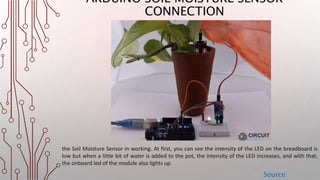
the Soil Moisture Sensor in working. At first, you can see the intensity of the LED on the breadboard is
low but when a little bit of water is added to the pot, the intensity of the LED increases, and with that,
the onboard led of the module also lights up.
THANK YOU!!
Source:
Full Tutorial: https://circuitdigest.com/microcontroller-projects/interfacing-soil-moisture-sensor-with-
arduino-uno

Learn Soil Moisture Sensor Using Arduino

  • 1.
  • 2.
    SOIL MOISTURE SENSOR- PINOUT Source: VCC: is the power supply pin of the soil moisture sensor that can be connected to 3.3V or 5V of the supply. GND: is the ground pin of the board and it should be connected to the ground pin of the Arduino DOUT: is the Digital output pin of the board, output low indicates soil moisture is appropriate AOUT: is the Analog output pin of the board that will give us an analog signal in between vcc and ground.
  • 3.
    SOIL MOISTURE SENSOR- PARTS Source: The entire soil humidity sensor consists of two parts: the first one is the soil moisture sensor probe and the second one is an electronic module. The module processes the incoming data from the probe and that gets processed by a microcontroller like Arduino and we get the final output. The Soil Moisture Sensor Probe: As we have said earlier, the sensor contains a fork-shaped probe with two big exposed conductive pads. The probe acts like a variable potentiometer, the value of which can be read by a microcontroller like Arduino.
  • 4.
    WORKING Source: The above GIFworking of Soil Moisture sensor shows how the analog output of the sensor changes based on the water level in the soil. As you can see, the voltage drops from 5V to 0V when water is added to the soil. You can also see that the signal LED on the board turns on when water is added to the soil. We have not shown how the digital pin works in the above GIF to keep things simple. When water is added to soil the digital pin moves from low (0V) to high (5V) with the help of on board comparator op- amp, you can control the sensitivity of this digital pin using the potentiometer (blue) on the module.
  • 5.
    CIRCUIT Source: Now that wehave a complete understanding of how a Soil Moisture sensor works, we can connect all the required wires to the Arduino UNO board. As shown in the above arduino soil moisture sensor circuit diagram we have connected an LED to digital PIN 6 of the Arduino and the analog out pin of the sensor is connected to the A0 pin of the Arduino UNO board, finally, the ground is common between the LED and the sensor. We will program the Arduino so that the brightness of the LED will change depending on the soil moisture data sensed by the probe.
  • 6.
    ARDUINO SOIL MOISTURESENSOR CONNECTION Source: Connecting a soil moisture sensor to Arduino or any other microcontroller is pretty simple. As we all know the sensor outputs both analog and digital signals so processing this signal is very easy.
  • 7.
    ARDUINO SOIL MOISTURESENSOR CONNECTION Source: the Soil Moisture Sensor in working. At first, you can see the intensity of the LED on the breadboard is low but when a little bit of water is added to the pot, the intensity of the LED increases, and with that, the onboard led of the module also lights up.
  • 8.
    THANK YOU!! Source: Full Tutorial:https://circuitdigest.com/microcontroller-projects/interfacing-soil-moisture-sensor-with- arduino-uno