Remote Lab:
Providing Access to Your
Lab Facilities Virtually
Michael Fudge
Sr. Systems & IT Support Administrator, Adjunct Professor
Syracuse University iSchool
Start
        Michael           http://mafudge.syr.edu/
        Fudge             remote-lab


        mafudge@syr.edu               @mafudge
iSchool?
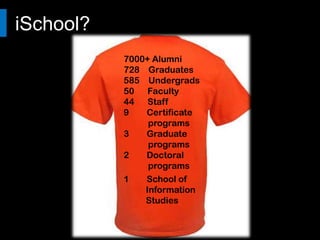
                7000+ Alumni
                728 Graduates
                585 Undergrads
   People       50 Faculty
                44 Staff
                9   Certificate
                     programs

Info.   Tech.   3   Graduate
                     programs
                2   Doctoral
                     programs
                1   School of
                    Information
                    Studies
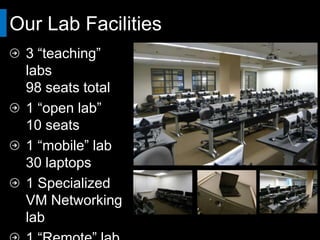
Our Lab Facilities
  3 “teaching” labs
  98 seats total
  1 “open lab”
  10 seats
  1 “mobile” lab
  30 laptops
  1 Specialized VM
  Networking lab
  1 “Remote” lab
  24 seats *
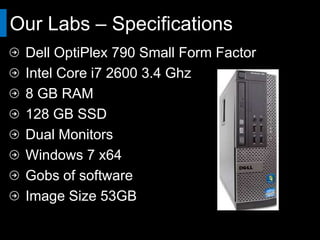
Our Labs – Specifications
 Dell OptiPlex 790 Small Form Factor
 Intel Core i7 2600 3.4 Ghz
 8 GB RAM
 128 GB SSD
 Dual Monitors
 Windows 7 x64
 Gobs of software
 Image Size 53GB
Our Labs – Configuration
 Imaged with Ghost over LAN
 Locked down with Deepfreeze
 Faronics Insight to control classroom activity
 Least privilege – no admin access.
 Roaming User Profiles
 Redirected My Documents.
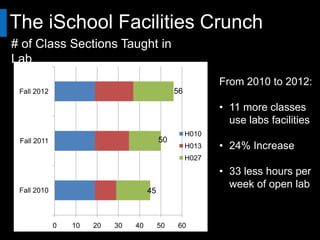
The iSchool Facilities Crunch
# of Class Sections Taught in Lab
                                                           Key Trends
                                                           From 2010 to 2012:
 Fall 2012                                     56

                                                           • 11 more classes
                                                             use labs facilities
                                                    H010
 Fall 2011                                50
                                                    H013   • 24% Increase
                                                    H027

                                                           • 33 less hours per
 Fall 2010                           45
                                                             week of open lab

                                                           • 90% Booked
             0   10   20   30   40        50    60
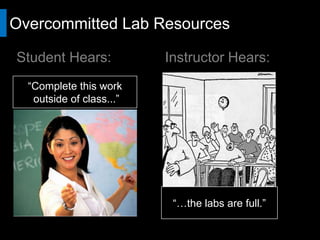
Overcommitted Lab Resources

Student Hears:             Instructor Hears:
  “Complete this work
    outside of class...”


                             “…the labs are full.”
But enough of our problems!
Why does your
organization maintain
computer labs?


  https://chronicle.com/article/Computer-Labs-Get-Rebooted-as/49323/
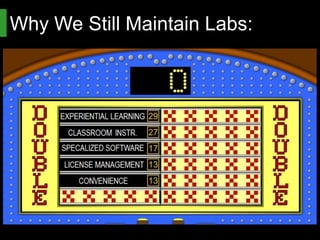
Why We Still Maintain Labs:
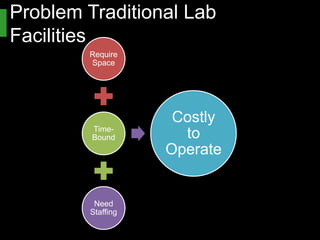
Problem Traditional Lab Facilities
          Require
           Space


          Time-      Costly to
          Bound
                     Operate


           Need
          Staffing
The Question Becomes:


        How do I provide access to
        lab facilities without a physical
        space to house them?
Remote Lab, FTW!
 Access our “Lab Computers”
 anytime from anywhere
 Does not need to be staffed.
 Does not occupy a room.
 No costly desks or furniture.
 No need to worry about theft
 …Or people spilling drinks.
The idea is simple:
1. Dedicate bank of lab computers
   (BOLC) to the task
2. Allow users to connect with
   Windows Remote desktop (RDP)
3. ??????
4. PROFIT!!! 
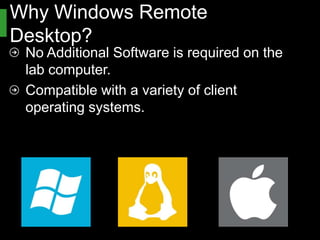
Why Windows Remote Desktop?
 No Additional Software is required on the
 lab computer.
 Compatible with a variety of client operating
 systems.
Demo.

        Remote Lab
        In Action
Remote Lab Design


            Technical Information Ahead
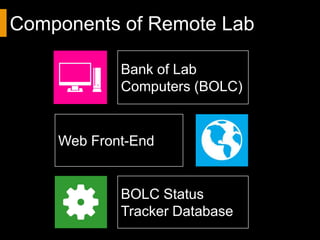
Components of Remote Lab

              Bank of Lab
              Computers (BOLC)


     Web Front-End


              BOLC Status Tracker
              Database
BOLC- Old School
Stack a bunch of PC’s
up somewhere.
Allow remote desktop
to your users.
You can use older
computers.
A great Start.
To scale, you’ll want
to virtualize…
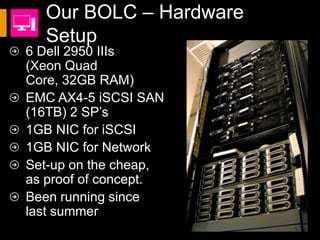
Our BOLC – Hardware Setup
6 Dell 2950 IIIs
(Xeon Quad
Core, 32GB RAM)
EMC AX4-5 iSCSI SAN
(16TB) 2 SP’s
1GB NIC for iSCSI
1GB NIC for Network
Set-up on the cheap,
as proof of concept.
Been running since
last summer
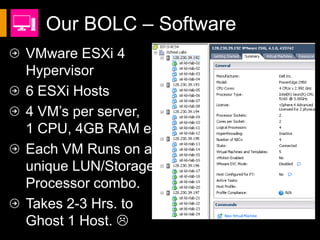
Our BOLC – Software
VMware ESXi 4
Hypervisor
6 ESXi Hosts
4 VM’s per server,
1 CPU, 4GB RAM ea.
Each VM Runs on a
unique LUN/Storage
Processor combo.
Takes 2-3 Hrs. to
Ghost 1 Host. 
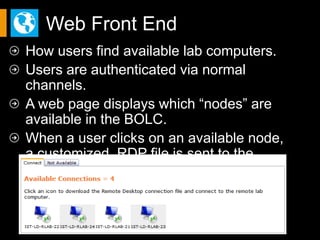
Web Front End
How users find available lab computers.
Users are authenticated via normal channels.
A web page displays which “nodes” are
available in the BOLC.
When a user clicks on an available node,
a customized .RDP file is sent to the client.
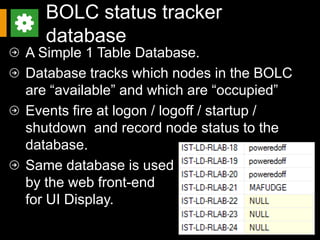
BOLC status tracker database
A Simple 1 Table Database.
Database tracks which nodes in the BOLC
are “available” and which are “occupied”
Events fire at logon / logoff / startup / shutdown
and record node status to the database.
Same database is used
by the web front-end
for UI Display.
Group Policy Tweaks
Special computer and user settings are
required for this unique environment
 Don’t allow users to kick each other off.
 Auto log-off at 120 minutes of idle time.
  Prevents hogging of sessions.
 Run scripts at startup / shutdown / logon /
  logoff to update the tracker database.
Our Rollout
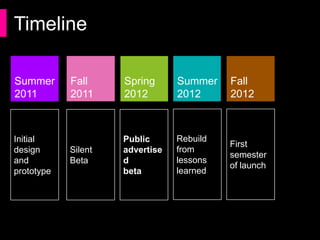
Timeline

Summer       Fall     Spring       Summer    Fall
2011         2011     2012         2012      2012


                                   Rebuild
Initial               Public                 First
             Silent                from
design and            advertised             semester
             Beta                  lessons
prototype             beta                   of launch
                                   learned
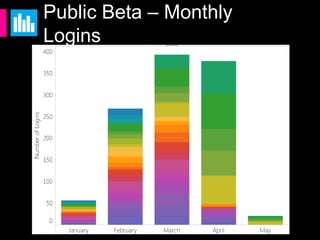
Public Beta – Monthly Logins
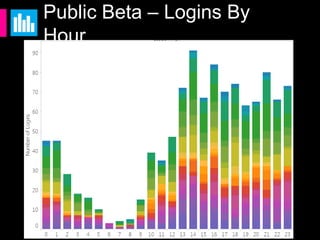
Public Beta – Logins By Hour
Other Realized Benefits
 Eases the lab crunch
 Students don’t need to install software
 Less student support calls / tickets.
 License control
 Distance education friendly!
Pro-Tips


For Starting Your Own Initiative
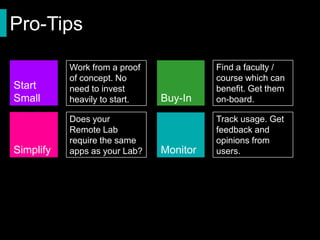
Pro-Tips

           Work from a proof             Find a faculty /
           of concept. No                course which can
Start      need to invest                benefit. Get them
Small      heavily to start.   Buy-In    on-board.

           Does your Remote              Track usage. Get
           Lab require the               feedback and
           same apps as your             opinions from
Simplify   Lab?                Monitor   users.
Try It Yourself
  Download SURA / Mac VPN from
  https://software.ischool.syr.edu/downloads
  Sign in with g-ist-labman / 0sw3go315
  Run SURA / Mac VPN
  Sign in with same Step 2 Credentials
  Access Remote lab.
  https://my.ischool.syr.edu
Thank You!
    Michael           http://mafudge.syr.edu/
    Fudge             remote-lab


    mafudge@syr.edu               @mafudge


Questions?

LabMan 2012 Presentation - Remote Lab

  • 1.
    Remote Lab: Providing Accessto Your Lab Facilities Virtually Michael Fudge Sr. Systems & IT Support Administrator, Adjunct Professor Syracuse University iSchool
  • 2.
    Start Michael http://mafudge.syr.edu/ Fudge remote-lab mafudge@syr.edu @mafudge
  • 3.
    iSchool? 7000+ Alumni 728 Graduates 585 Undergrads People 50 Faculty 44 Staff 9 Certificate programs Info. Tech. 3 Graduate programs 2 Doctoral programs 1 School of Information Studies
  • 4.
    Our Lab Facilities 3 “teaching” labs 98 seats total 1 “open lab” 10 seats 1 “mobile” lab 30 laptops 1 Specialized VM Networking lab 1 “Remote” lab 24 seats *
  • 5.
    Our Labs –Specifications Dell OptiPlex 790 Small Form Factor Intel Core i7 2600 3.4 Ghz 8 GB RAM 128 GB SSD Dual Monitors Windows 7 x64 Gobs of software Image Size 53GB
  • 6.
    Our Labs –Configuration Imaged with Ghost over LAN Locked down with Deepfreeze Faronics Insight to control classroom activity Least privilege – no admin access. Roaming User Profiles Redirected My Documents.
  • 7.
    The iSchool FacilitiesCrunch # of Class Sections Taught in Lab Key Trends From 2010 to 2012: Fall 2012 56 • 11 more classes use labs facilities H010 Fall 2011 50 H013 • 24% Increase H027 • 33 less hours per Fall 2010 45 week of open lab • 90% Booked 0 10 20 30 40 50 60
  • 8.
    Overcommitted Lab Resources StudentHears: Instructor Hears: “Complete this work outside of class...” “…the labs are full.”
  • 9.
    But enough ofour problems!
  • 10.
    Why does your organizationmaintain computer labs? https://chronicle.com/article/Computer-Labs-Get-Rebooted-as/49323/
  • 11.
    Why We StillMaintain Labs:
  • 12.
    Problem Traditional LabFacilities Require Space Time- Costly to Bound Operate Need Staffing
  • 13.
    The Question Becomes: How do I provide access to lab facilities without a physical space to house them?
  • 14.
    Remote Lab, FTW! Access our “Lab Computers” anytime from anywhere Does not need to be staffed. Does not occupy a room. No costly desks or furniture. No need to worry about theft …Or people spilling drinks.
  • 15.
    The idea issimple: 1. Dedicate bank of lab computers (BOLC) to the task 2. Allow users to connect with Windows Remote desktop (RDP) 3. ?????? 4. PROFIT!!! 
  • 16.
    Why Windows RemoteDesktop? No Additional Software is required on the lab computer. Compatible with a variety of client operating systems.
  • 17.
    Demo. Remote Lab In Action
  • 18.
    Remote Lab Design Technical Information Ahead
  • 19.
    Components of RemoteLab Bank of Lab Computers (BOLC) Web Front-End BOLC Status Tracker Database
  • 20.
    BOLC- Old School Stacka bunch of PC’s up somewhere. Allow remote desktop to your users. You can use older computers. A great Start. To scale, you’ll want to virtualize…
  • 21.
    Our BOLC –Hardware Setup 6 Dell 2950 IIIs (Xeon Quad Core, 32GB RAM) EMC AX4-5 iSCSI SAN (16TB) 2 SP’s 1GB NIC for iSCSI 1GB NIC for Network Set-up on the cheap, as proof of concept. Been running since last summer
  • 22.
    Our BOLC –Software VMware ESXi 4 Hypervisor 6 ESXi Hosts 4 VM’s per server, 1 CPU, 4GB RAM ea. Each VM Runs on a unique LUN/Storage Processor combo. Takes 2-3 Hrs. to Ghost 1 Host. 
  • 23.
    Web Front End Howusers find available lab computers. Users are authenticated via normal channels. A web page displays which “nodes” are available in the BOLC. When a user clicks on an available node, a customized .RDP file is sent to the client.
  • 24.
    BOLC status trackerdatabase A Simple 1 Table Database. Database tracks which nodes in the BOLC are “available” and which are “occupied” Events fire at logon / logoff / startup / shutdown and record node status to the database. Same database is used by the web front-end for UI Display.
  • 25.
    Group Policy Tweaks Specialcomputer and user settings are required for this unique environment  Don’t allow users to kick each other off.  Auto log-off at 120 minutes of idle time. Prevents hogging of sessions.  Run scripts at startup / shutdown / logon / logoff to update the tracker database.
  • 26.
  • 27.
    Timeline Summer Fall Spring Summer Fall 2011 2011 2012 2012 2012 Rebuild Initial Public First Silent from design and advertised semester Beta lessons prototype beta of launch learned
  • 28.
    Public Beta –Monthly Logins
  • 29.
    Public Beta –Logins By Hour
  • 30.
    Other Realized Benefits Eases the lab crunch Students don’t need to install software Less student support calls / tickets. License control Distance education friendly!
  • 31.
  • 32.
    Pro-Tips Work from a proof Find a faculty / of concept. No course which can Start need to invest benefit. Get them Small heavily to start. Buy-In on-board. Does your Remote Track usage. Get Lab require the feedback and same apps as your opinions from Simplify Lab? Monitor users.
  • 33.
    Try It Yourself Download SURA / Mac VPN from https://software.ischool.syr.edu/downloads Sign in with g-ist-labman / 0sw3go315 Run SURA / Mac VPN Sign in with same Step 2 Credentials Access Remote lab. https://my.ischool.syr.edu
  • 34.
    Thank You! Michael http://mafudge.syr.edu/ Fudge remote-lab mafudge@syr.edu @mafudge Questions?

Editor's Notes

  • #2 It seems I drew the tough slot. Right before lunch. If you recognize me it could be for at least 2 reasons.I’m an alumnus of Oswego State. Although its been a while and things look a lot different on campus.I spoke at labman 2010 @ Northhampton CC. I gave a talk on our VMWare lab manager initiative which has since grown and morphed into something much bigger. After lunch, my colleague James Powell will give a talk titled “Teaching Technology virtually”
  • #3 I thought I’d begin with an about me slide.
  • #4 As [Introducer] said, I work and teach at the School of Information studies, or iSchool. The focus of an iSchool is at the intersection of People, Information and Technology. We study the information plays in our lives. We teach courses in Library Science, Web Design, Social Media, Data Science, Information Policy, Information Management, Computer Networking, Databases, Human-Computer Interaction.
  • #5 I’d like to start out by explaining where we’re coming from. I’d start with our labs. Read slide as is, point to facility pictures as you talk.
  • #6 Typical lab station for us. Emphasize differentiators, like dual monitors and their reduction in printing.
  • #7 Read as is, for the most part. Poll the audience to get a sense of where people are.
  • #8 Now comes the time where I frame the outline for the meat of this talk. I don’t know about your school or college, but in the iSchool we’ve been seeing the utilization of our lab facilities increase over the last few years.
  • #9 This has created a dilemma where the instructors demand work be completed outside of class, yet we are incapable of providing enough free lab time to complete the work. We’re not talking about word processing and spreadsheets. We’re talking specalized software students are not going to have on their machines. like IDE’s, Photoshop, Network analysis software, SPSS.
  • #11 Student computer ownership is at an all time high, so…
  • #12 Experiential Learning = hands on experimentation and learning by doingClassroom instruction = teaching lessons in front of the computerOffer Specialized Software = databases, network, virtualization. Things students cannot easily install on their own systems.License Management – controlling access to the software.Convenience – for your students / value add / competitive advantage.
  • #13 They require space, Need to be staffed, require specific times.
  • #15 Pretty much read as is.
  • #18 Start With your End-Device Visio Document on that Device / Photoshop File / No Photoshop on my MachinePrinter on your deviceConnect to Remote Lab # 13Open document in Photoshop / Visio File
  • #20 BOLC – what your users will connect toWeb Front end – manages access to the BOLCStatus Tracker – determines which nodes are available
  • #29 Setup in Fall 2011 Ran “unannounced” for a semester while we worked out the issues.Official “BETA” Tag issued for Spring 2012 semester.Sc
  • #32 Students don’t need to install software on their personal computers to complete lab activities.
  • #34 Start SmallIt is easy and cheap to do a “proof of concept” You do not need to invest heavily in the infrastructure.Limit access while you're in this mode.Simplify your RLC’sYou don’t need ALL the software, only the specialized software. Start with the low hanging fruit: Windows-only apps, apps with restrictive licenses.Smaller Ghost images == faster deploymentCommunications: Make sure it works well before announcing to users.Clearly communicate expectations to your users.Once people use it, they’ll expect it to be available all the time.Monitor UsageTrack usage so you know when you need to build it out.Track when its used.How many are in use at the same time.Peak times (midterms, finals)