For more information about knovel, visit:
www.elsevier.com/knovel
Knovel is a service mark of Elsevier Inc. Copyright © 2021 Elsevier B.V. December 2021
Knovel®
Quick Start Guide
Knovel quickly delivers trusted, accessible and relevant engineering answers and insights for Industry &
Academia - building foundational engineering knowledge and solving problems with high business impact.
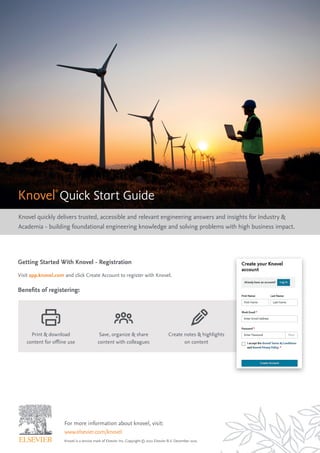
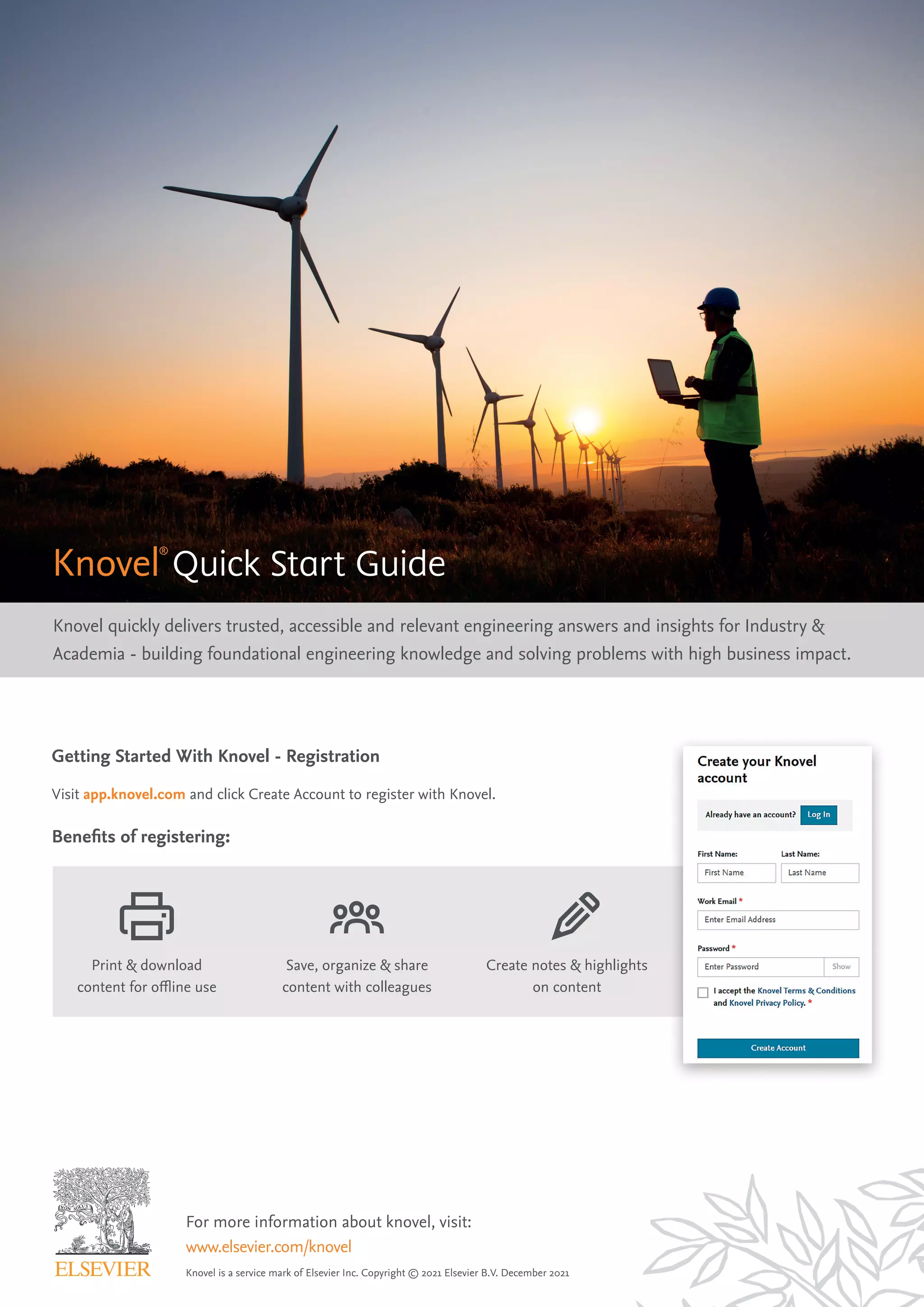
Getting Started With Knovel - Registration
Visit app.knovel.com and click Create Account to register with Knovel.
Benefits of registering:
Print & download
content for offline use
Save, organize & share
content with colleagues
Create notes & highlights
on content
1 9
10
11
12
13
14
2
3
4
5
6
7
8
For more information about knovel, visit:
www.elsevier.com/knovel
Knovel is a service mark of Elsevier Inc. Copyright © 2021 Elsevier B.V. December 2021
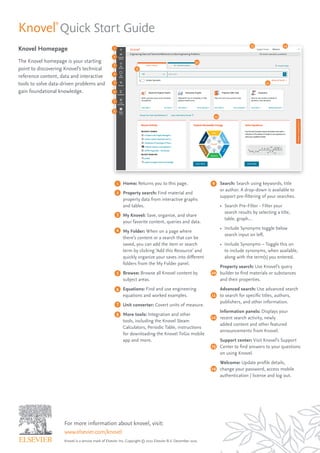
Knovel Homepage
The Knovel homepage is your starting
point to discovering Knovel’s technical
reference content, data and interactive
tools to solve data-driven problems and
gain foundational knowledge.
Knovel®
Quick Start Guide
1
2
3
4
5
6
7
8
9
10
11
12
13 14
Home: Returns you to this page.
Property search: Find material and
property data from interactive graphs
and tables.
My Knovel: Save, organize, and share
your favorite content, queries and data.
My Folder: When on a page where
there’s content or a search that can be
saved, you can add the item or search
term by clicking ‘Add this Resource’ and
quickly organize your saves into different
folders from the My Folder panel.
Browse: Browse all Knovel content by
subject areas.
Equations: Find and use engineering
equations and worked examples.
Unit converter: Covert units of measure.
More tools: Integration and other
tools, including the Knovel Steam
Calculators, Periodic Table, instructions
for downloading the Knovel ToGo mobile
app and more.
Search: Search using keywords, title
or author. A drop-down is available to
support pre-filtering of your searches.
• Search Pre-Filter - Filter your
search results by selecting a title,
table, graph…
• Include Synonyms toggle below
search input on left.
• Include Synonyms – Toggle this on
to include synonyms, when available,
along with the term(s) you entered.
Property search: Use Knovel’s query
builder to find materials or substances
and their properties.
Advanced search: Use advanced search
to search for specific titles, authors,
publishers, and other information.
Information panels: Displays your
recent search activity, newly
added content and other featured
announcements from Knovel.
Support center: Visit Knovel’s Support
Center to find answers to your questions
on using Knovel.
Welcome: Update profile details,
change your password, access mobile
authentication / license and log out.
1
2
3
For more information about knovel, visit:
www.elsevier.com/knovel
Knovel is a service mark of Elsevier Inc. Copyright © 2021 Elsevier B.V. December 2021
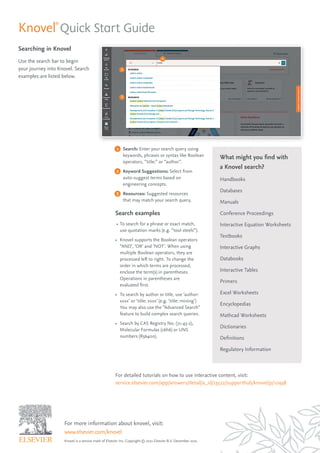
Searching in Knovel
Use the search bar to begin
your journey into Knovel. Search
examples are listed below.
What might you find with
a Knovel search?
Handbooks
Databases
Manuals
Conference Proceedings
Interactive Equation Worksheets
Textbooks
Interactive Graphs
Databooks
Interactive Tables
Primers
Excel Worksheets
Encyclopedias
Mathcad Worksheets
Dictionaries
Definitions
Regulatory Information
1
2
3
Search: Enter your search query using
keywords, phrases or syntax like Boolean
operators, “title:” or “author”.
Keyword Suggestions: Select from
auto-suggest terms based on
engineering concepts.
Resources: Suggested resources
that may match your search query.
Search examples
• To search for a phrase or exact match,
use quotation marks (e.g. “tool steels”).
• Knovel supports the Boolean operators
“AND’, ‘OR’ and ‘NOT’. When using
multiple Boolean operators, they are
processed left to right. To change the
order in which terms are processed,
enclose the term(s) in parentheses.
Operations in parentheses are
evaluated first.
• To search by author or title, use ‘author:
xxxx’ or ‘title: xxxx’ (e.g. ‘title: mining’)
You may also use the “Advanced Search”
feature to build complex search queries.
• Search by CAS Registry No. (71-43-2),
Molecular Formulas (c6h6) or UNS
numbers (R56400).
Knovel®
Quick Start Guide
For detailed tutorials on how to use interactive content, visit:
service.elsevier.com/app/answers/detail/a_id/13522/supporthub/knovel/p/10938
1
2
3
4
5
6
Material or Substance
Name can be:
• Name: titanium, carbon, sulfuric acid, etc
• CAS Registry No: 71-43-2, 7440-38-3
• Molecular Formula: c6h6, h2s04, etc
• UNS number: R56400, H40270
• ASTM Spec.: SA-182, SA-387, etc
Properties:
• You can combine up to three properties
in the query builder and ‘AND’, ‘OR’
and ‘NOT’ operators.
• Knovel supports the following
numeric operators: exists, =, <=, >= and is
between, enabling you to enter numerical
values or numeric ranges.
• For relevant properties, you can select
units of measurement using the drop
down menu; e.g., temperature units
(C, F, R, K, etc.)
For more information about knovel, visit:
www.elsevier.com/knovel
Knovel is a service mark of Elsevier Inc. Copyright © 2021 Elsevier B.V. December 2021
Property Search in Knovel
Instantly find specific materials
properties data from a database
of more than 100 properties
for hundreds-of-thousands
of materials and chemicals.
1
2
3
4
5
6
Material or Substance Name:
Enter a specific material or substance
name or select from auto-suggest terms.
Results include Synonyms [S],
these may be how your property
is identified in Knovel.
Share URL: Share this search query via
an email or short URL.
Save to My Knovel: Save this search
query to My Knovel.
Filter by Property Name: Start typing a
property name e.g. density; or browse
the property tree and select a property
by dragging and dropping onto the
query builder or double-clicking it.
Drag & Drop desired property onto the
query builder.
Results: As you build your query,
the number of results is dynamically
updated. Click to view results.
Knovel®
Quick Start Guide
How is Knovel Used?
An engineer used Knovel to compare
properties of stainless steel alloys to
increase the life span of a heavy
milling machine.
An engineer used Knovel’s graph digitizer
to understand the severity of corrosion
of steel with respect to pH and water flow
velocity in piping.
A research team at an academic institution
used Knovel to discover background
information on wearable technology &
fabrics, plus find reliable data on the
density of various polymers supporting
four research papers.
Results
18% cost reduction and
15% life span Increase.
Reduced EHS risk and provided cost
savings on the project.
Provided an increase in research funding.
1
2
3
Knovel is an engineering decision-support solution enabling engineers to solve problems
faster. With powerful search and interactive analytical tools, engineers can confidently
find answers to technical questions through best practice insights, validated equations
and materials and substances data from more than 160 providers. For more than 20 years,
Knovel has helped thousands of engineers and researchers from leading companies and
institutions around the world enhance research and productivity, achieve operational
excellence, reduce costs and time to market, and build expertise.
To learn more about how to use Knovel, visit app.knovel.com
and click Support Center in the top right corner.
For registered users download the app Knovel ToGo
https://app.knovel.com/web/marketing/mobile-app.v
For more information about knovel, visit:
www.elsevier.com/knovel
Knovel is a service mark of Elsevier Inc. Copyright © 2021 Elsevier B.V. December 2021
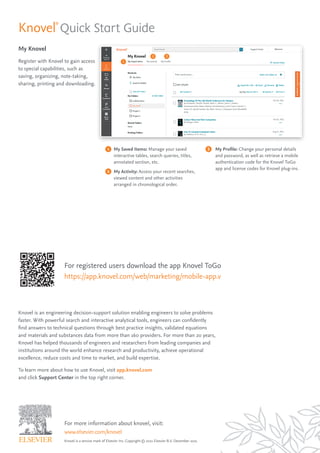
My Knovel
Register with Knovel to gain access
to special capabilities, such as
saving, organizing, note-taking,
sharing, printing and downloading.
1
2 3
My Saved Items: Manage your saved
interactive tables, search queries, titles,
annotated section, etc.
My Activity: Access your recent searches,
viewed content and other activities
arranged in chronological order.
My Profile: Change your personal details
and password, as well as retrieve a mobile
authentication code for the Knovel ToGo
app and license codes for Knovel plug-ins.
Knovel®
Quick Start Guide

Knovel Quick Start Guide

  • 1.
    For more informationabout knovel, visit: www.elsevier.com/knovel Knovel is a service mark of Elsevier Inc. Copyright © 2021 Elsevier B.V. December 2021 Knovel® Quick Start Guide Knovel quickly delivers trusted, accessible and relevant engineering answers and insights for Industry & Academia - building foundational engineering knowledge and solving problems with high business impact. Getting Started With Knovel - Registration Visit app.knovel.com and click Create Account to register with Knovel. Benefits of registering: Print & download content for offline use Save, organize & share content with colleagues Create notes & highlights on content
  • 2.
    1 9 10 11 12 13 14 2 3 4 5 6 7 8 For moreinformation about knovel, visit: www.elsevier.com/knovel Knovel is a service mark of Elsevier Inc. Copyright © 2021 Elsevier B.V. December 2021 Knovel Homepage The Knovel homepage is your starting point to discovering Knovel’s technical reference content, data and interactive tools to solve data-driven problems and gain foundational knowledge. Knovel® Quick Start Guide 1 2 3 4 5 6 7 8 9 10 11 12 13 14 Home: Returns you to this page. Property search: Find material and property data from interactive graphs and tables. My Knovel: Save, organize, and share your favorite content, queries and data. My Folder: When on a page where there’s content or a search that can be saved, you can add the item or search term by clicking ‘Add this Resource’ and quickly organize your saves into different folders from the My Folder panel. Browse: Browse all Knovel content by subject areas. Equations: Find and use engineering equations and worked examples. Unit converter: Covert units of measure. More tools: Integration and other tools, including the Knovel Steam Calculators, Periodic Table, instructions for downloading the Knovel ToGo mobile app and more. Search: Search using keywords, title or author. A drop-down is available to support pre-filtering of your searches. • Search Pre-Filter - Filter your search results by selecting a title, table, graph… • Include Synonyms toggle below search input on left. • Include Synonyms – Toggle this on to include synonyms, when available, along with the term(s) you entered. Property search: Use Knovel’s query builder to find materials or substances and their properties. Advanced search: Use advanced search to search for specific titles, authors, publishers, and other information. Information panels: Displays your recent search activity, newly added content and other featured announcements from Knovel. Support center: Visit Knovel’s Support Center to find answers to your questions on using Knovel. Welcome: Update profile details, change your password, access mobile authentication / license and log out.
  • 3.
    1 2 3 For more informationabout knovel, visit: www.elsevier.com/knovel Knovel is a service mark of Elsevier Inc. Copyright © 2021 Elsevier B.V. December 2021 Searching in Knovel Use the search bar to begin your journey into Knovel. Search examples are listed below. What might you find with a Knovel search? Handbooks Databases Manuals Conference Proceedings Interactive Equation Worksheets Textbooks Interactive Graphs Databooks Interactive Tables Primers Excel Worksheets Encyclopedias Mathcad Worksheets Dictionaries Definitions Regulatory Information 1 2 3 Search: Enter your search query using keywords, phrases or syntax like Boolean operators, “title:” or “author”. Keyword Suggestions: Select from auto-suggest terms based on engineering concepts. Resources: Suggested resources that may match your search query. Search examples • To search for a phrase or exact match, use quotation marks (e.g. “tool steels”). • Knovel supports the Boolean operators “AND’, ‘OR’ and ‘NOT’. When using multiple Boolean operators, they are processed left to right. To change the order in which terms are processed, enclose the term(s) in parentheses. Operations in parentheses are evaluated first. • To search by author or title, use ‘author: xxxx’ or ‘title: xxxx’ (e.g. ‘title: mining’) You may also use the “Advanced Search” feature to build complex search queries. • Search by CAS Registry No. (71-43-2), Molecular Formulas (c6h6) or UNS numbers (R56400). Knovel® Quick Start Guide For detailed tutorials on how to use interactive content, visit: service.elsevier.com/app/answers/detail/a_id/13522/supporthub/knovel/p/10938
  • 4.
    1 2 3 4 5 6 Material or Substance Namecan be: • Name: titanium, carbon, sulfuric acid, etc • CAS Registry No: 71-43-2, 7440-38-3 • Molecular Formula: c6h6, h2s04, etc • UNS number: R56400, H40270 • ASTM Spec.: SA-182, SA-387, etc Properties: • You can combine up to three properties in the query builder and ‘AND’, ‘OR’ and ‘NOT’ operators. • Knovel supports the following numeric operators: exists, =, <=, >= and is between, enabling you to enter numerical values or numeric ranges. • For relevant properties, you can select units of measurement using the drop down menu; e.g., temperature units (C, F, R, K, etc.) For more information about knovel, visit: www.elsevier.com/knovel Knovel is a service mark of Elsevier Inc. Copyright © 2021 Elsevier B.V. December 2021 Property Search in Knovel Instantly find specific materials properties data from a database of more than 100 properties for hundreds-of-thousands of materials and chemicals. 1 2 3 4 5 6 Material or Substance Name: Enter a specific material or substance name or select from auto-suggest terms. Results include Synonyms [S], these may be how your property is identified in Knovel. Share URL: Share this search query via an email or short URL. Save to My Knovel: Save this search query to My Knovel. Filter by Property Name: Start typing a property name e.g. density; or browse the property tree and select a property by dragging and dropping onto the query builder or double-clicking it. Drag & Drop desired property onto the query builder. Results: As you build your query, the number of results is dynamically updated. Click to view results. Knovel® Quick Start Guide How is Knovel Used? An engineer used Knovel to compare properties of stainless steel alloys to increase the life span of a heavy milling machine. An engineer used Knovel’s graph digitizer to understand the severity of corrosion of steel with respect to pH and water flow velocity in piping. A research team at an academic institution used Knovel to discover background information on wearable technology & fabrics, plus find reliable data on the density of various polymers supporting four research papers. Results 18% cost reduction and 15% life span Increase. Reduced EHS risk and provided cost savings on the project. Provided an increase in research funding.
  • 5.
    1 2 3 Knovel is anengineering decision-support solution enabling engineers to solve problems faster. With powerful search and interactive analytical tools, engineers can confidently find answers to technical questions through best practice insights, validated equations and materials and substances data from more than 160 providers. For more than 20 years, Knovel has helped thousands of engineers and researchers from leading companies and institutions around the world enhance research and productivity, achieve operational excellence, reduce costs and time to market, and build expertise. To learn more about how to use Knovel, visit app.knovel.com and click Support Center in the top right corner. For registered users download the app Knovel ToGo https://app.knovel.com/web/marketing/mobile-app.v For more information about knovel, visit: www.elsevier.com/knovel Knovel is a service mark of Elsevier Inc. Copyright © 2021 Elsevier B.V. December 2021 My Knovel Register with Knovel to gain access to special capabilities, such as saving, organizing, note-taking, sharing, printing and downloading. 1 2 3 My Saved Items: Manage your saved interactive tables, search queries, titles, annotated section, etc. My Activity: Access your recent searches, viewed content and other activities arranged in chronological order. My Profile: Change your personal details and password, as well as retrieve a mobile authentication code for the Knovel ToGo app and license codes for Knovel plug-ins. Knovel® Quick Start Guide