SymbalooEDU
Presented by Kerri Crescenzo
Agenda
OIntroduction
OWhy a Teacher Webmix?
OMy Teacher Webmix
OHow to Share a Webmix?
OHelpful Tools
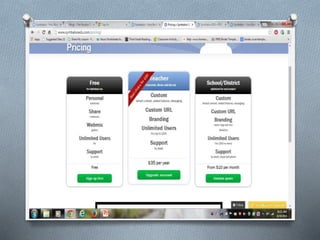
OPackages & Certifications
ONegatives about Symbaloo
Why a Teacher Webmix on
Symbaloo?
O No more bookmarks on my browser
O No more writing down websites
O Organize teaching resources (All in one
location)
O Student Teacher & New Teacher
O Share with other teachers, friends, and
social media
O http://edu.symbaloo.com/
Sharing a Webmix
OPublic-
O This will put your webmix in the
Symbaloo Gallery where it can be
searched by the public and viewed.
O It is indexed in Google so when you
do a Google search it come up.
OPrivate-
OIn your personal Twitter,
Facebook, and email accounts.
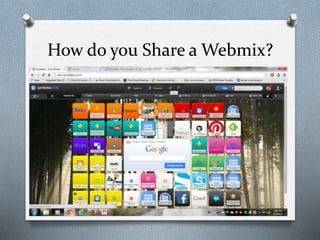
How do you Share a Webmix?
Steps on How to Share
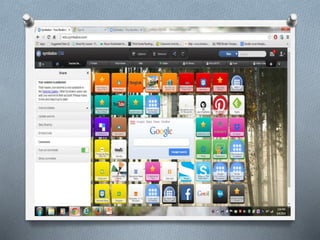
O Click on the share icon at the top of the
Symbaloo page above the webmix.
O A pop up box will appear that says “Share”.
Click on “Webmix Details”.
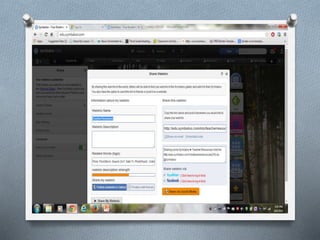
O A box will pop up that says “Share a Webmix”
O Fill out the appropriate information in the text
fields. It will ask if you want to make your
webmix public or private.
O http://edu.symbaloo.com/home/mix/13ePLQ4
bi4
Helpful Symbaloo Tools
O Scroll to the bottom of the page on any
Webmix or Symbaloo page to access these.
They all have video tutorials.
O Can set as homepage
O Help feature and FAQ’s
O Bookmarker –Symbaloo and export
bookmarks from a browser and import to
Symbaloo.
O EDU-give you access to blogs, Symbaloo
workshop, Swag, Tuesday’s Tutorials, a
Symbaloo about how to use Symbaloo,
translates website for many languages.
O Mobile-Download Apps for iPhone and
Androids
O http://edu.symbaloo.com/home/mix/13ePLQ4bi
4
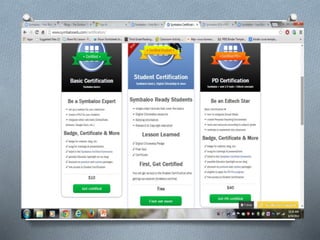
Symbaloo Certification for
Teachers
OBasic Certification: ($10)
O set up a webmix for your classroom
➤ create a PLE for your students
➤ integrate other web tools (SchoolTube,
Animoto, Google Docs, etc.)
O badge for website, blog, etc.
✔ swag for trainings & presentations
✔ listed in the Symbaloo Certified Community
✔ possible Educator Spotlight on our blog
✔ discount on premium and custom packages
✔ free access to Student Certification
Certification
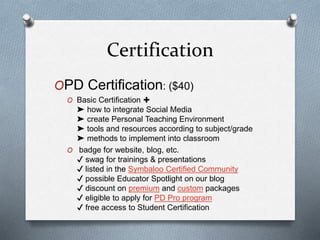
OPD Certification: ($40)
O Basic Certification ✚
➤ how to integrate Social Media
➤ create Personal Teaching Environment
➤ tools and resources according to subject/grade
➤ methods to implement into classroom
O badge for website, blog, etc.
✔ swag for trainings & presentations
✔ listed in the Symbaloo Certified Community
✔ possible Educator Spotlight on our blog
✔ discount on premium and custom packages
✔ eligible to apply for PD Pro program
✔ free access to Student Certification
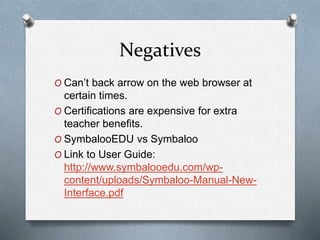
Negatives
O Can’t back arrow on the web browser at
certain times.
O Certifications are expensive for extra
teacher benefits.
O SymbalooEDU vs Symbaloo
O Link to User Guide:
http://www.symbalooedu.com/wp-
content/uploads/Symbaloo-Manual-New-
Interface.pdf
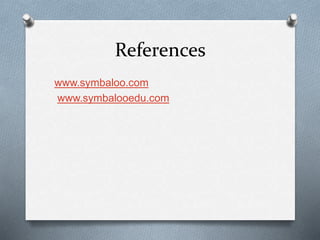
References
www.symbaloo.com
www.symbalooedu.com

Kerri's Symbaloo presentation Gordon edu 614

  • 1.
  • 2.
    Agenda OIntroduction OWhy a TeacherWebmix? OMy Teacher Webmix OHow to Share a Webmix? OHelpful Tools OPackages & Certifications ONegatives about Symbaloo
  • 3.
    Why a TeacherWebmix on Symbaloo? O No more bookmarks on my browser O No more writing down websites O Organize teaching resources (All in one location) O Student Teacher & New Teacher O Share with other teachers, friends, and social media O http://edu.symbaloo.com/
  • 4.
    Sharing a Webmix OPublic- OThis will put your webmix in the Symbaloo Gallery where it can be searched by the public and viewed. O It is indexed in Google so when you do a Google search it come up. OPrivate- OIn your personal Twitter, Facebook, and email accounts.
  • 5.
    How do youShare a Webmix?
  • 8.
    Steps on Howto Share O Click on the share icon at the top of the Symbaloo page above the webmix. O A pop up box will appear that says “Share”. Click on “Webmix Details”. O A box will pop up that says “Share a Webmix” O Fill out the appropriate information in the text fields. It will ask if you want to make your webmix public or private. O http://edu.symbaloo.com/home/mix/13ePLQ4 bi4
  • 9.
    Helpful Symbaloo Tools OScroll to the bottom of the page on any Webmix or Symbaloo page to access these. They all have video tutorials. O Can set as homepage O Help feature and FAQ’s O Bookmarker –Symbaloo and export bookmarks from a browser and import to Symbaloo. O EDU-give you access to blogs, Symbaloo workshop, Swag, Tuesday’s Tutorials, a Symbaloo about how to use Symbaloo, translates website for many languages. O Mobile-Download Apps for iPhone and Androids O http://edu.symbaloo.com/home/mix/13ePLQ4bi 4
  • 12.
    Symbaloo Certification for Teachers OBasicCertification: ($10) O set up a webmix for your classroom ➤ create a PLE for your students ➤ integrate other web tools (SchoolTube, Animoto, Google Docs, etc.) O badge for website, blog, etc. ✔ swag for trainings & presentations ✔ listed in the Symbaloo Certified Community ✔ possible Educator Spotlight on our blog ✔ discount on premium and custom packages ✔ free access to Student Certification
  • 13.
    Certification OPD Certification: ($40) OBasic Certification ✚ ➤ how to integrate Social Media ➤ create Personal Teaching Environment ➤ tools and resources according to subject/grade ➤ methods to implement into classroom O badge for website, blog, etc. ✔ swag for trainings & presentations ✔ listed in the Symbaloo Certified Community ✔ possible Educator Spotlight on our blog ✔ discount on premium and custom packages ✔ eligible to apply for PD Pro program ✔ free access to Student Certification
  • 14.
    Negatives O Can’t backarrow on the web browser at certain times. O Certifications are expensive for extra teacher benefits. O SymbalooEDU vs Symbaloo O Link to User Guide: http://www.symbalooedu.com/wp- content/uploads/Symbaloo-Manual-New- Interface.pdf
  • 15.